Sample: Disaster response, Kathmandu: report
Project: Sample: Disaster response, Kathmandu
Goal: Describe the project Sample: Disaster response, Kathmandu: run the analyses that tell the most about its data, draw every result, and write a cited report.
Run: 2199067b-8747-4c82-b083-7c3d54abda8f (running, 11 agent run(s))
Generated: 2026-10-18T05:36:27Z, version 1
Model cost: USD 0.0000 over 0 model call(s)
Data used
| Data | Kind | Rows | Time span | Summary | Source |
|---|---|---|---|---|---|
| Wards | vector, Polygon | 20 | 20 polygon (area) features; 'population' 26,870 to 97,681 (mean 5.61e+04); 'households' 6,248 to 22,716 (mean 1.305e+04); named by 'name' (e.g. Ward 1 Oakwood, Ward 2 Ashby Green, Ward 3 Cedar Vale); total area 56.01 km2; extent 85.2789,27.6679 to 85.3610,27.7321. Areas (Wards) with population to compare and map. | 96 | |
| Damage assessments | vector, Point | 2,000 | 2026-09-02 to 2026-09-22 | 2,000 point features; dated by 'assessed_at' from 2026-09-02 to 2026-09-22; 'occupancy' has 4 values (top: residential 792, commercial 425, school 397); 'construction' has 3 values (top: RC frame 680, brick in mud 671, brick in cement 649); 'damage_grade' 1 to 5 (mean 2.374); 'storeys' 1 to 5 (mean 2.846); 'people_displaced' 0 to 14 (mean 3.328); extent 85.2803,27.6689 to 85.3599,27.7310. Dated point events by occupancy: where and when Damage assessments happen. | 2 |
| Shelters | vector, Point | 25 | 25 point features; 'type' has 3 values (top: open space 10, school 9, tent camp 6); 'capacity' 150 to 1,200 (mean 716); named by 'name' (e.g. Elmstead open space shelter, Hawthorn Rise open space shelter, Kingsmead open space shelter); extent 85.2832,27.6721 to 85.3569,27.7277. Point locations of Shelters by type. | 97 | |
| Road status | vector, LineString | 160 | 2026-09-03 to 2026-09-20 | 160 line features; dated by 'updated_on' from 2026-09-03 to 2026-09-20; 'status' has 3 values (top: open 122, restricted 21, blocked 17); 'cause' has 1 values (top: debris 38); named by 'name' (e.g. Tol Path, Bagh Path, Pul Path); total length 26.39 km; extent 85.2805,27.6687 to 85.3596,27.7311. Lines (Road status) such as routes or networks. | 3 |
| Water points | vector, Point | 60 | 60 point features; 'type' has 3 values (top: well 27, tap stand 17, tanker point 16); 'working' has 2 values (top: True 48, False 12); 'litres_per_day' 3,306 to 43,201 (mean 1.409e+04); extent 85.2811,27.6709 to 85.3594,27.7290. Point locations of Water points by type. | 98 | |
| Health posts | vector, Point | 20 | 20 point features; 'functional' has 2 values (top: True 14, False 6); 'beds' 5 to 25 (mean 14.7); named by 'name' (e.g. Health post Ashby Green, Health post Cedar Vale, Health post Elmstead); extent 85.2869,27.6701 to 85.3532,27.7259. Point locations of Health posts by functional. | 99 | |
| Relief distributions | vector, Point | 320 | 2026-09-04 to 2026-09-22 | 320 point features; dated by 'date' from 2026-09-04 to 2026-09-22; 'item' has 4 values (top: blanket 87, tarpaulin 85, hygiene kit 77); 'agency' has 3 values (top: relief society 109, municipality 108, NGO partner 103); 'households_served' 21 to 400 (mean 209.4); extent 85.2828,27.6718 to 85.3572,27.7279. Dated point events by item: where and when Relief distributions happen. | 4 |
| Ward needs by day | table | 420 | 2026-09-02 to 2026-09-22 | Table of 420 rows and 5 columns without geometry; dated by 'date' from 2026-09-02 to 2026-09-22; 'ward_code' has 20 values (top: W01 21, W02 21, W03 21); 'households_need_shelter' 62 to 1,174 (mean 276.6); 'water_l_per_person' 11 to 32 (mean 21.77); 'food_kits_needed' 51 to 503 (mean 155.4). A table of Ward needs by day without locations. | 5 |
| Shelter register | table | 25 | Table of 25 rows and 5 columns without geometry; 'managed_by' has 3 values (top: NGO 11, municipality 8, army 6); 'capacity' 150 to 1,200 (mean 716); 'occupants' 98 to 1,663 (mean 808.5); 'toilets' 4 to 30 (mean 18.84). A table of Shelter register without locations. | 100 | |
| Situation report No. 4 | document | 1-page pdf document 'Situation report No. 4'; language en; mentions 4 place(s): Ward 20 Upton Vale (1), 27.68758, 85.33803 (1), Ward (1), Elmstead open space shelter (1). A document about Ward 20 Upton Vale, 27.68758, 85.33803, Ward. | 101 | ||
| Sample: Disaster response, Kathmandu | record | 102 | |||
| Hot spot analysis: Relief distributions | layer, Point | 320 | 103 | ||
| Hot spot analysis: Water points | layer, Polygon | 20 | 104 | ||
| Hot spot analysis: Damage assessments | layer, Point | 2,000 | 105 | ||
| Emerging hot spots: Relief distributions | layer, Polygon | 54 | 106 | ||
| Emerging hot spots: Damage assessments | layer, Polygon | 87 | 107 | ||
| Repeat and near repeat classification: Relief distributions | layer, Point | 320 | 108 | ||
| Summarize within: Wards | layer, Polygon | 20 | 109 | ||
| Summarize within: Wards | layer, Polygon | 20 | 110 | ||
| Summarize within: Wards | layer, Polygon | 20 | 111 | ||
| Find point clusters: Shelters | layer, Point | 25 | 112 | ||
| Find point clusters: cluster hulls | layer, Polygon | 1 | 113 | ||
| Find point clusters: Relief distributions | layer, Point | 320 | 114 | ||
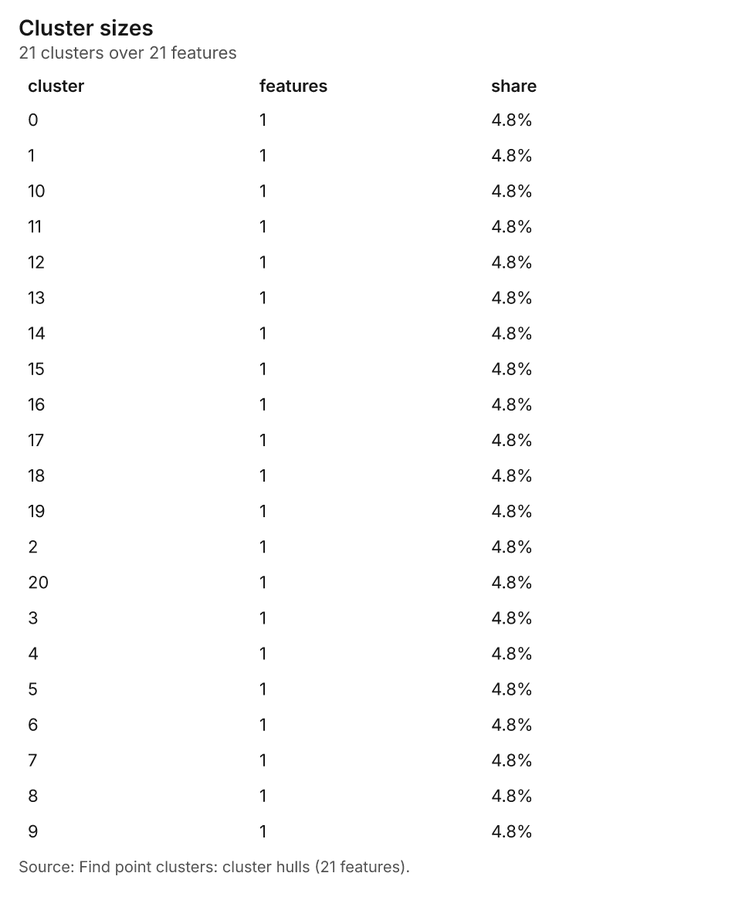
| Find point clusters: cluster hulls | layer, Polygon | 21 | 115 | ||
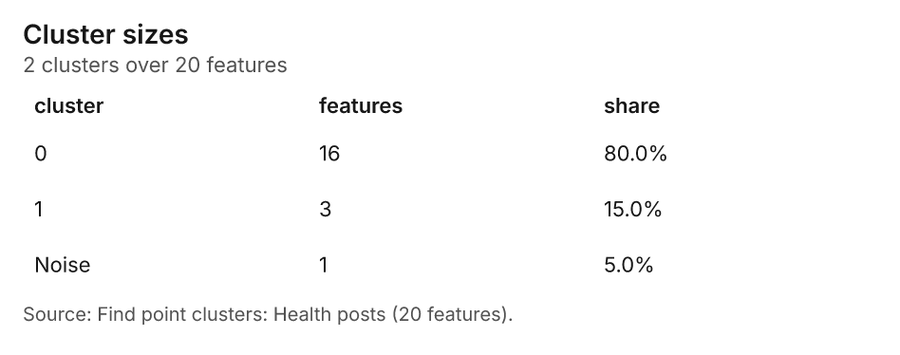
| Find point clusters: Health posts | layer, Point | 20 | 116 | ||
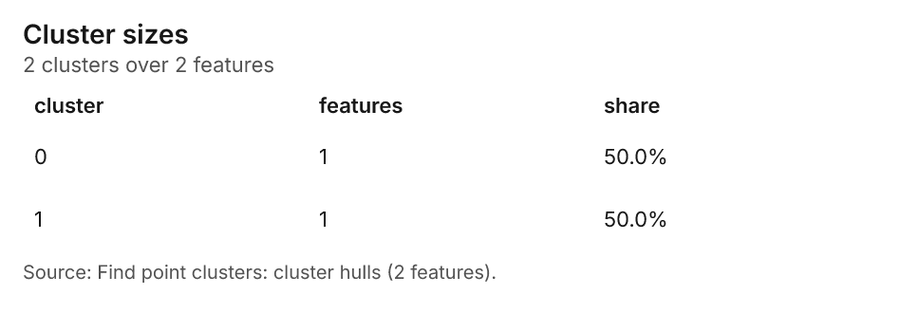
| Find point clusters: cluster hulls | layer, Polygon | 2 | 117 | ||
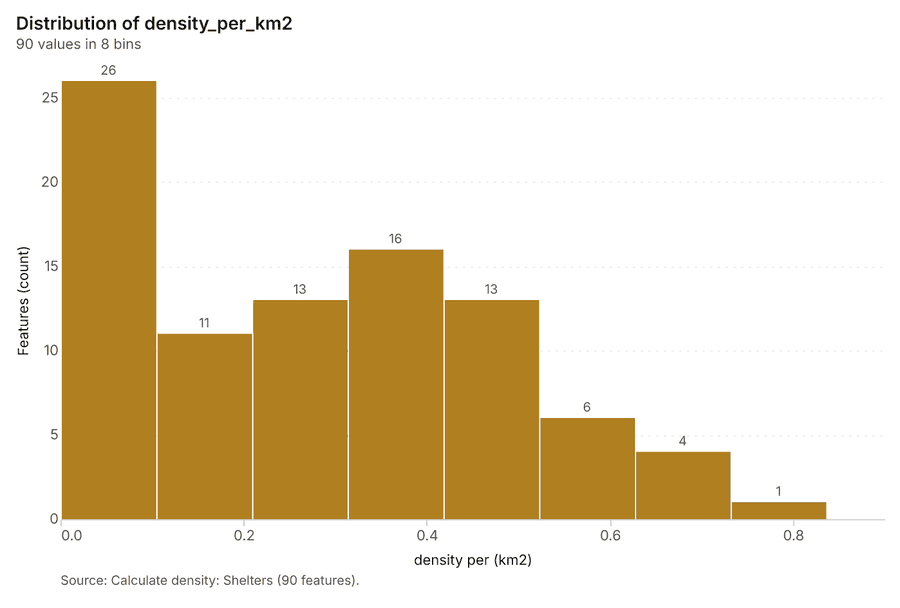
| Calculate density: Shelters | layer, Polygon | 90 | 118 | ||
| Calculate density: Relief distributions | layer, Polygon | 222 | 119 | ||
| Calculate density: Health posts | layer, Polygon | 228 | 120 | ||
| Situation report No. 4 | document | 121 | |||
| Find outliers: Wards | layer, Polygon | 20 | 122 |
Timeline
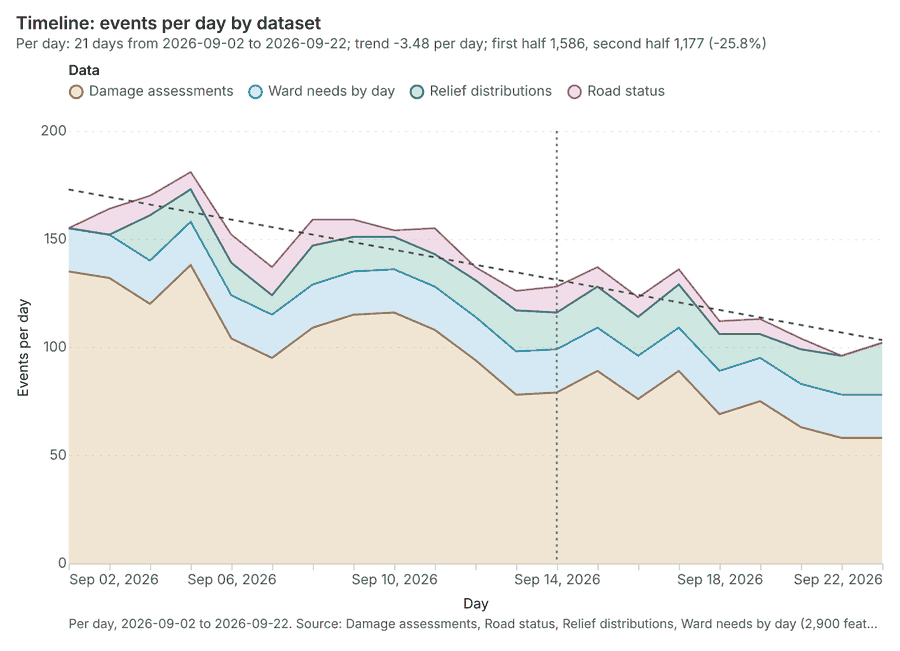
The timeline counts 2,900 dated events in Damage assessments, Road status, Relief distributions and 1 more per day, from 2026-09-02 to 2026-09-22 12345. By dataset: Damage assessments 2,000; Ward needs by day 420; Relief distributions 320; Road status 160 1. The trend is -3.48 events per day; the second half of the days has 1,177 against 1,586 in the first (-25.8%) 1. The project's documents name 1 date inside this span, drawn as dotted lines; the most named is 2026-09-14 (Situation report No 6. 4, page 1, 1 mention) 6.
Busiest days
Quietest days
Hot spots
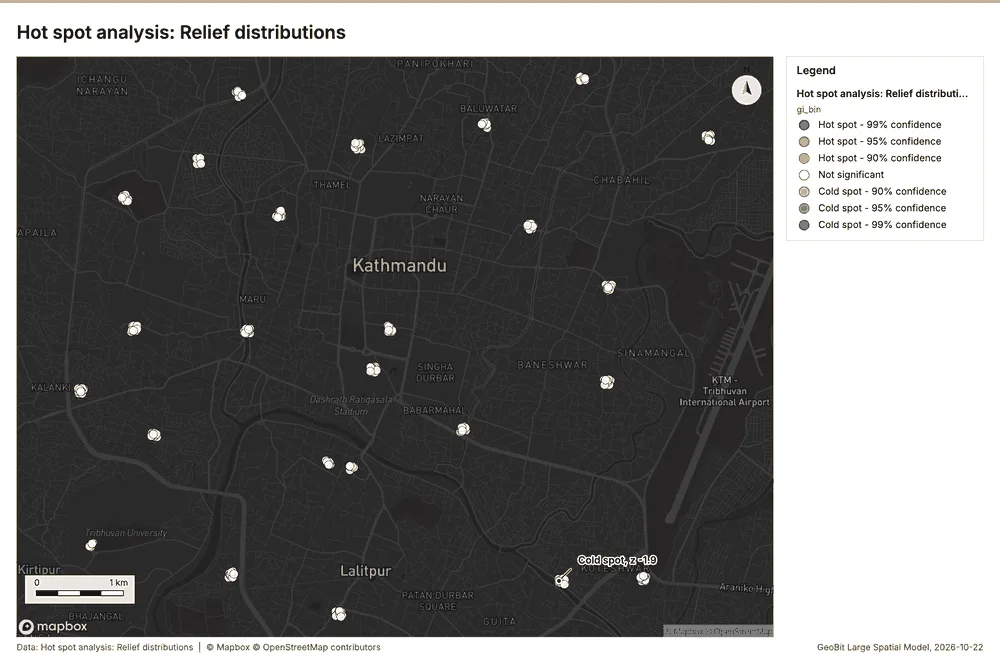
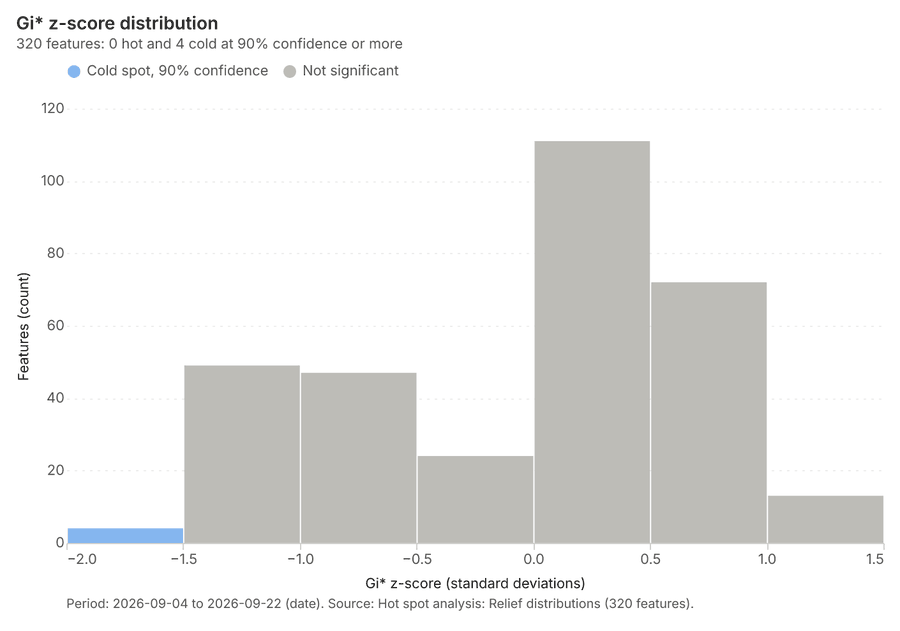
What this analysis is. Hot spot analysis: Getis-Ord Gi* hot and cold spots with z-scores, p-values and confidence bins 7. In ArcGIS it is Find Hot Spots or Hot Spot Analysis (Getis-Ord Gi*); in QGIS, qgis:hotspot (plugin) 7.
Why it was run on this data. 320 points: Getis-Ord Gi* tests whether the concentrations in Relief distributions are statistically significant 8.
What it found. Hot spot analysis was performed using the Relief distributions layer 10. The resulting analysis generated 320 features 9 and took 5 milliseconds to complete 9. The total billing cost for this operation was 0.0564 9.
| Result | Value |
|---|---|
| result, count | 320 |
| result, elapsed ms | 5 |
| result, excluded null | 0 |
| result, distance band m | 1,000 |
| billing, cost | 0.0564 |
| billing, list price | 0.0564 |
| billing, upstream cost | 0 |
Findings
- Evidenced: Hot spots on Relief distributions: Hot spot analysis: 1 layer saved: Hot spot analysis: Relief distributions (320 features) 910.
- Evidenced: It reported result, count 320; result, elapsed ms 5; result, excluded null 0; result, distance band m 1,000; billing, cost 0.0564; billing, list price 0.0564 9.
Tool gp_hot_spots; parameters {"field": "households_served", "project": "affd1e20-248c-4f96-b09d-48d3027477be", "features": {"layer": "Relief distributions (83cbe688)"}, "aggregation": "hexagon", "cell_size_m": 1000.0, "distance_band_m": 1000.0}
Hot spots
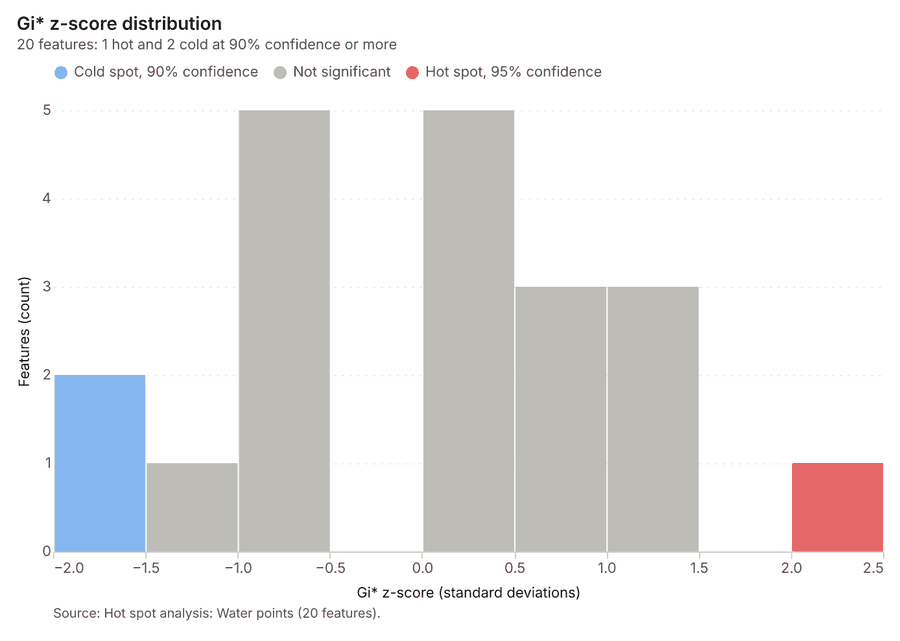
What this analysis is. Hot spot analysis: Getis-Ord Gi* hot and cold spots with z-scores, p-values and confidence bins 7. In ArcGIS it is Find Hot Spots or Hot Spot Analysis (Getis-Ord Gi*); in QGIS, qgis:hotspot (plugin) 7.
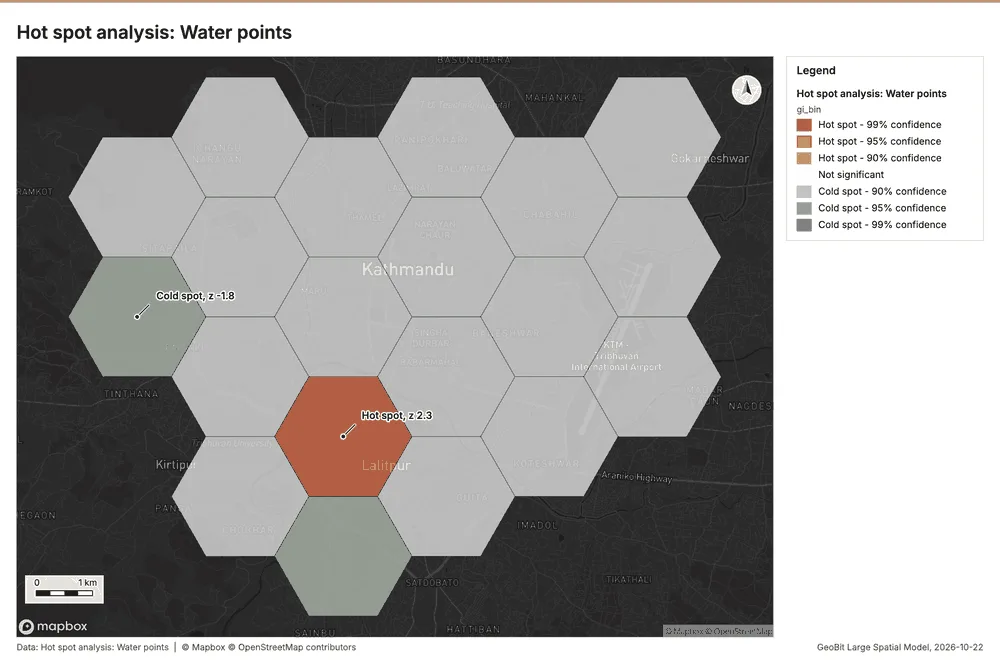
Why it was run on this data. 60 points: Getis-Ord Gi* tests whether the concentrations in Water points are statistically significant 11.
What it found. The hot spot analysis used "Water points" as its input 13. The process saved one layer titled "Hot spot analysis: Water points (20 features)" 12. Results for the analysis indicated 20 bins and 20 counts, based on a cell size of 2,000 m 12. The final billing cost associated with this analysis was 0.0512 12.
| Result | Value |
|---|---|
| result, bins | 20 |
| result, count | 20 |
| result, elapsed ms | 3 |
| result, cell size m | 2,000 |
| result, incidents used | 60 |
| result, distance band m | 2,000 |
| billing, cost | 0.0512 |
| billing, list price | 0.0512 |
| billing, upstream cost | 0 |
Findings
- Evidenced: Hot spots on Water points: Hot spot analysis: 1 layer saved: Hot spot analysis: Water points (20 features) 1213.
- Evidenced: It reported result, bins 20; result, count 20; result, elapsed ms 3; result, cell size m 2,000; result, incidents used 60; result, distance band m 2,000 12.
Tool gp_hot_spots; parameters {"project": "affd1e20-248c-4f96-b09d-48d3027477be", "features": {"layer": "Water points (2a061d8c)"}, "aggregation": "hexagon", "cell_size_m": 2000.0, "distance_band_m": 2000.0}
Hot spots
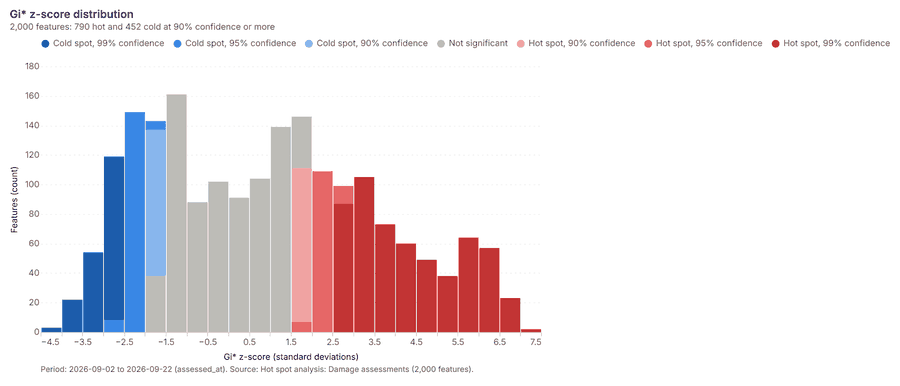
What this analysis is. Hot spot analysis: Getis-Ord Gi* hot and cold spots with z-scores, p-values and confidence bins 7. In ArcGIS it is Find Hot Spots or Hot Spot Analysis (Getis-Ord Gi*); in QGIS, qgis:hotspot (plugin) 7.
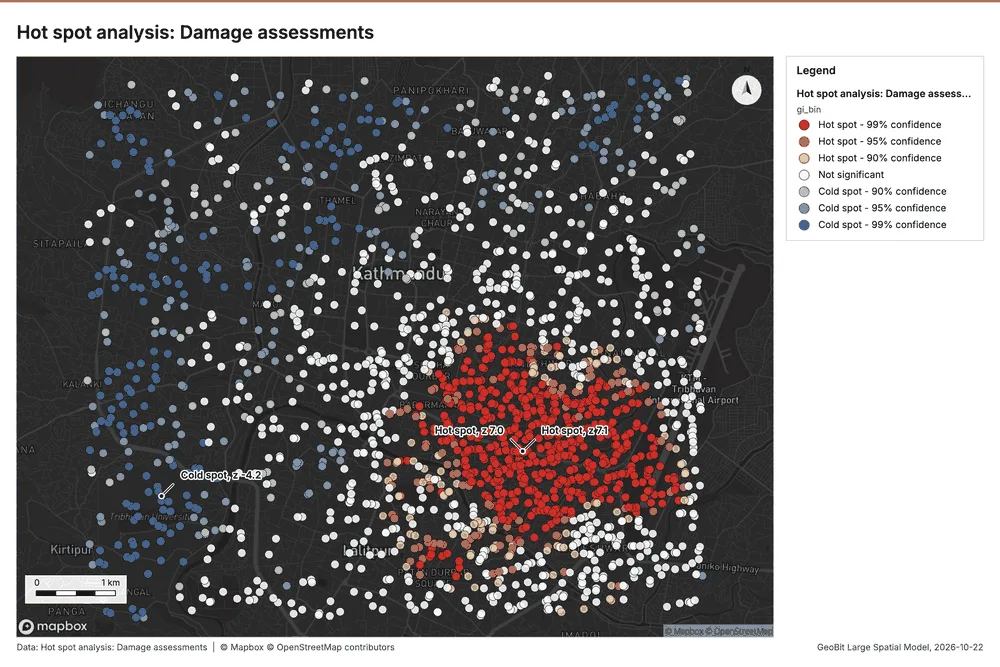
Why it was run on this data. 2000 points: Getis-Ord Gi* tests whether the concentrations in Damage assessments are statistically significant 14.
What it found. The hot spot analysis successfully generated one saved layer titled "Hot spot analysis: Damage assessments" 15.
| Result | Value |
|---|---|
| result, count | 2,000 |
| result, elapsed ms | 35 |
| result, excluded null | 0 |
| result, distance band m | 500 |
| billing, cost | 0.09 |
| billing, list price | 0.09 |
| billing, upstream cost | 0 |
Findings
- Evidenced: Hot spots on Damage assessments: Hot spot analysis: 1 layer saved: Hot spot analysis: Damage assessments (2000 features) 1516.
- Evidenced: It reported result, count 2,000; result, elapsed ms 35; result, excluded null 0; result, distance band m 500; billing, cost 0.09; billing, list price 0.09 15.
Tool gp_hot_spots; parameters {"field": "people_displaced", "project": "affd1e20-248c-4f96-b09d-48d3027477be", "features": {"layer": "Damage assessments (26bd99f3)"}, "aggregation": "hexagon", "cell_size_m": 500.0, "distance_band_m": 500.0}
Space time hot spots
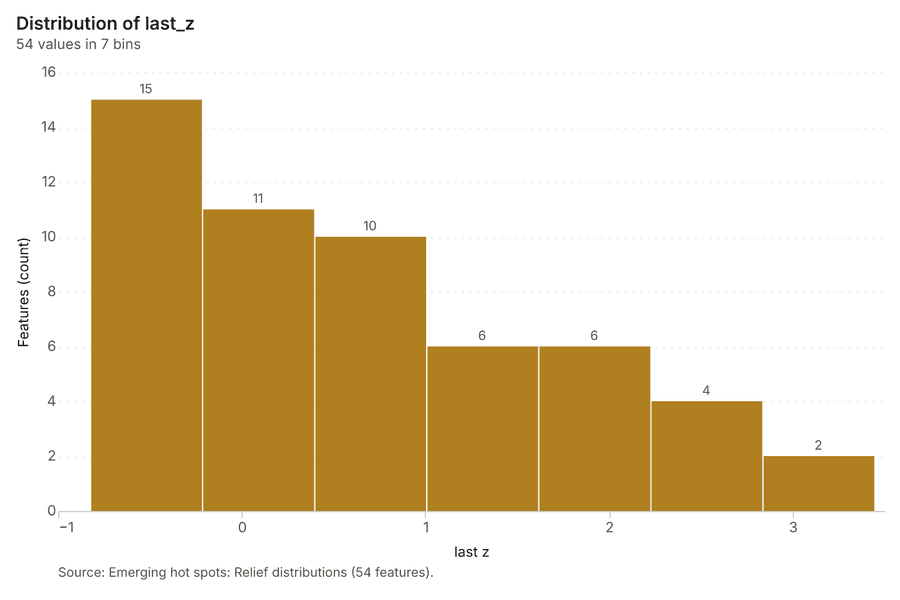
What this analysis is. Emerging hot spots: Where hot spots are new, consecutive, intensifying, persistent, diminishing, sporadic, oscillating or historical over time 17. In ArcGIS it is Emerging Hot Spot Analysis or Create Space Time Cube 17.
Why it was run on this data. Relief distributions carry dates in 'date': emerging hot spot analysis finds new, intensifying and fading hot spots per day 18.
What it found. Space time hot spots on Relief distributions: Emerging hot spots: 1 layer saved: Emerging hot spots: Relief distributions (54 features) 1019. It reported result, count 54; result, elapsed ms 10; result, resolution 8; result, features used 320; result, time neighbors 0; billing, cost 0.116 19.
| Result | Value |
|---|---|
| result, count | 54 |
| result, elapsed ms | 10 |
| result, resolution | 8 |
| result, features used | 320 |
| result, time neighbors | 0 |
| billing, cost | 0.116 |
| billing, list price | 0.116 |
| billing, upstream cost | 0 |
Findings
- Evidenced: Space time hot spots on Relief distributions: Emerging hot spots: 1 layer saved: Emerging hot spots: Relief distributions (54 features) 1019.
- Evidenced: It reported result, count 54; result, elapsed ms 10; result, resolution 8; result, features used 320; result, time neighbors 0; billing, cost 0.116 19.
Tool gp_space_time_hot_spots; parameters {"agg": "sum", "project": "affd1e20-248c-4f96-b09d-48d3027477be", "features": {"layer": "Relief distributions (83cbe688)"}, "interval": "day", "bin_shape": "h3", "resolution": 8, "time_field": "date", "value_field": "households_served"}
Space time hot spots
What this analysis is. Emerging hot spots: Where hot spots are new, consecutive, intensifying, persistent, diminishing, sporadic, oscillating or historical over time 17. In ArcGIS it is Emerging Hot Spot Analysis or Create Space Time Cube 17.
Why it was run on this data. Damage assessments carry dates in 'assessed_at': emerging hot spot analysis finds new, intensifying and fading hot spots per day 20.
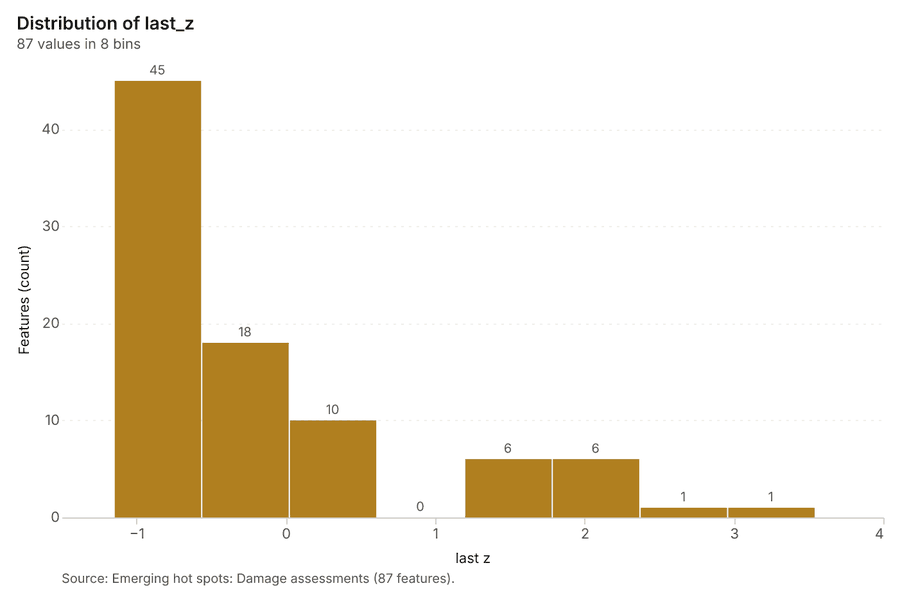
What it found. Space time hot spots on Damage assessments: Emerging hot spots: 1 layer saved: Emerging hot spots: Damage assessments (87 features) 1621. It reported result, count 87; result, elapsed ms 18; result, resolution 8; result, features used 2,000; result, time neighbors 0; billing, cost 0.2 21.
| Result | Value |
|---|---|
| result, count | 87 |
| result, elapsed ms | 18 |
| result, resolution | 8 |
| result, features used | 2,000 |
| result, time neighbors | 0 |
| billing, cost | 0.2 |
| billing, list price | 0.2 |
| billing, upstream cost | 0 |
Findings
- Evidenced: Space time hot spots on Damage assessments: Emerging hot spots: 1 layer saved: Emerging hot spots: Damage assessments (87 features) 1621.
- Evidenced: It reported result, count 87; result, elapsed ms 18; result, resolution 8; result, features used 2,000; result, time neighbors 0; billing, cost 0.2 21.
Tool gp_space_time_hot_spots; parameters {"agg": "sum", "project": "affd1e20-248c-4f96-b09d-48d3027477be", "features": {"layer": "Damage assessments (26bd99f3)"}, "interval": "day", "bin_shape": "h3", "resolution": 8, "time_field": "assessed_at", "value_field": "people_displaced"}
Near repeat
What this analysis is. Repeat and near repeat classification: Classify incidents as originators, repeats (same place) or near repeats within a distance and time window, with a Knox test table 22. In ArcGIS it is Repeat and Near Repeat Classification or Near Repeat Calculator 22.
Why it was run on this data. Near repeat analysis tests whether Relief distributions close in space also follow each other within 3 days 23.
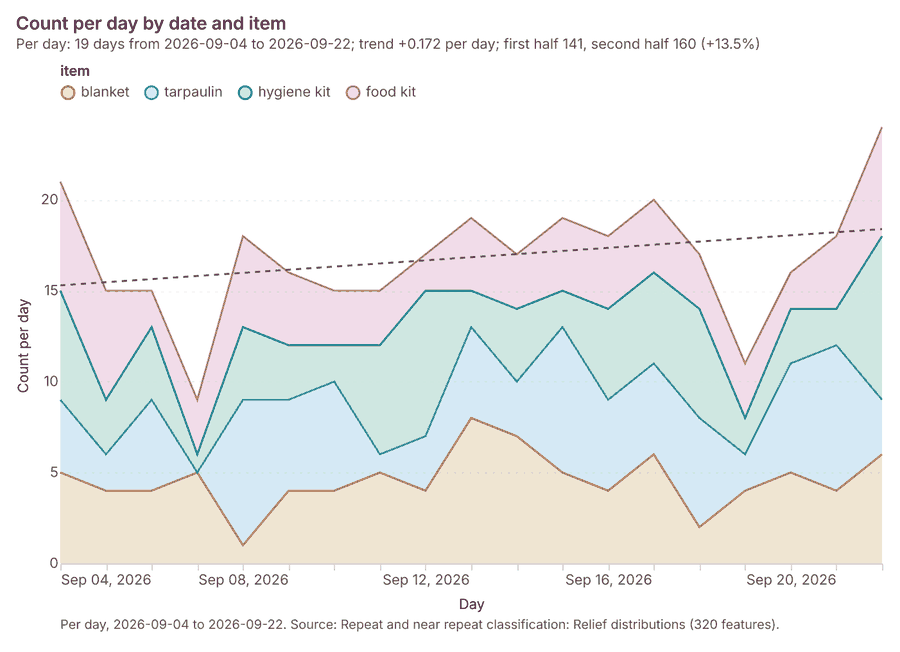
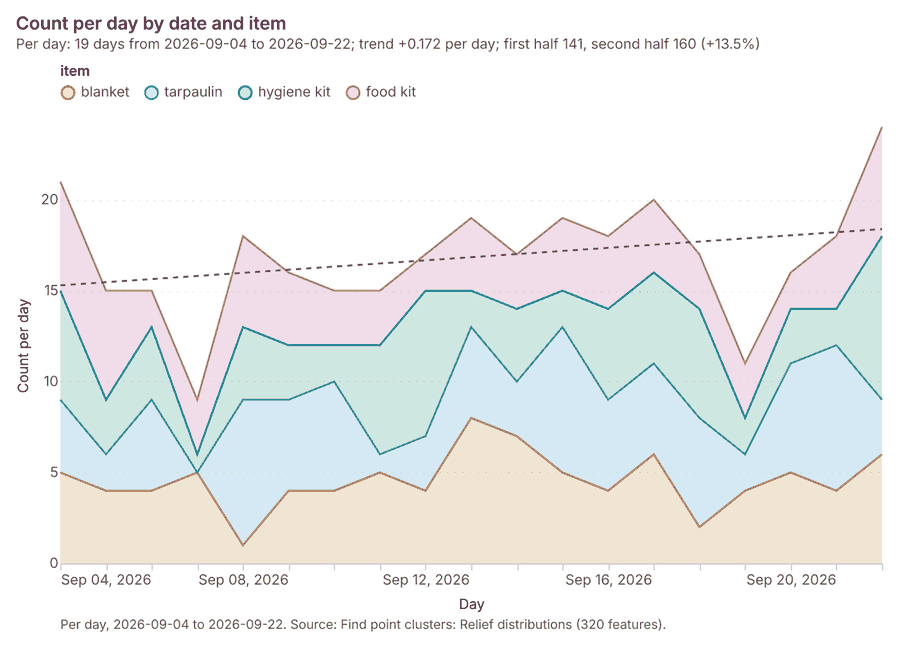
What it found. Near repeat on Relief distributions: Repeat and near repeat classification: 1 layer saved: Repeat and near repeat classification: Relief distributions (320 features) 1024. It reported result, days 3; result, count 320; result, chains 41; result, distance m 500; result, elapsed ms 13; result, pairs linked 742 24.
| Result | Value |
|---|---|
| result, days | 3 |
| result, count | 320 |
| result, chains | 41 |
| result, distance m | 500 |
| result, elapsed ms | 13 |
| result, pairs linked | 742 |
| billing, cost | 0.0596 |
| billing, list price | 0.0596 |
| billing, upstream cost | 0 |
Findings
- Evidenced: Near repeat on Relief distributions: Repeat and near repeat classification: 1 layer saved: Repeat and near repeat classification: Relief distributions (320 features) 1024.
- Evidenced: It reported result, days 3; result, count 320; result, chains 41; result, distance m 500; result, elapsed ms 13; result, pairs linked 742 24.
Tool gp_near_repeat; parameters {"days": 3, "project": "affd1e20-248c-4f96-b09d-48d3027477be", "features": {"layer": "Relief distributions (83cbe688)"}, "distance_m": 500.0, "time_field": "date"}
Summarize within
What this analysis is. Summarize within: Count and aggregate the features inside each polygon (or bin), proportionally for lines and polygons 25. In ArcGIS it is Summarize Within or Aggregate Points; in QGIS, native:countpointsinpolygon or native:sumlinelengths 25.
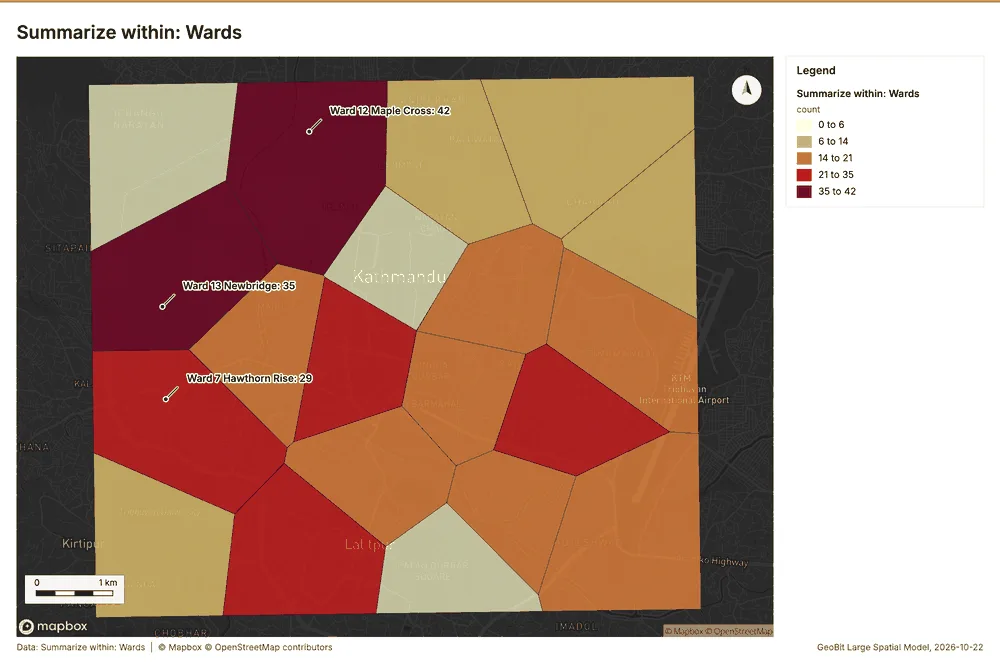
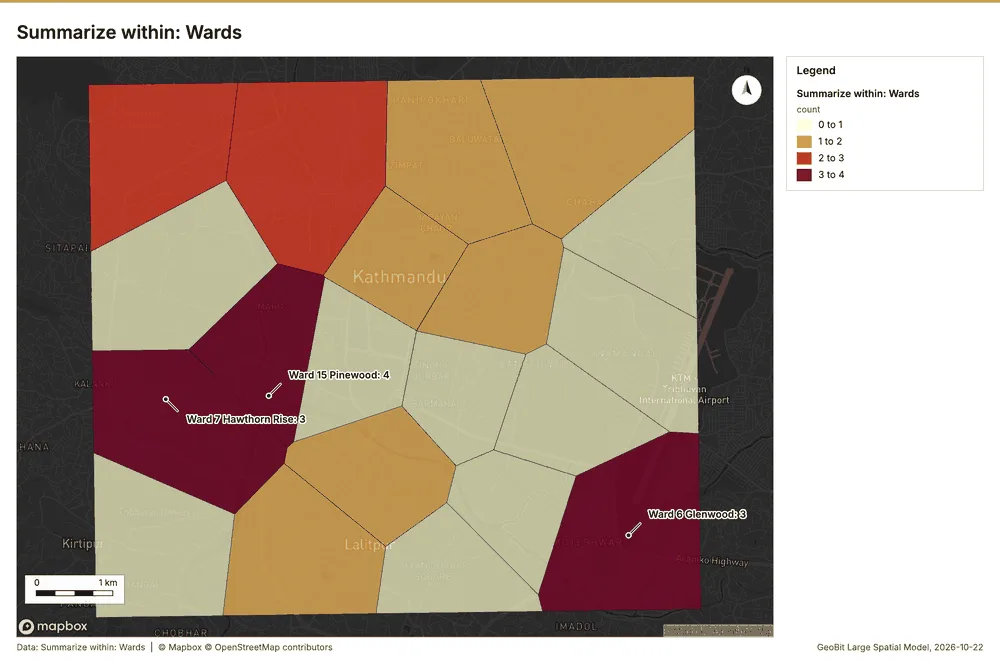
Why it was run on this data. Count Shelters inside each feature of Wards by type; the counts map as a choropleth (natural breaks, sequential colors) 26.
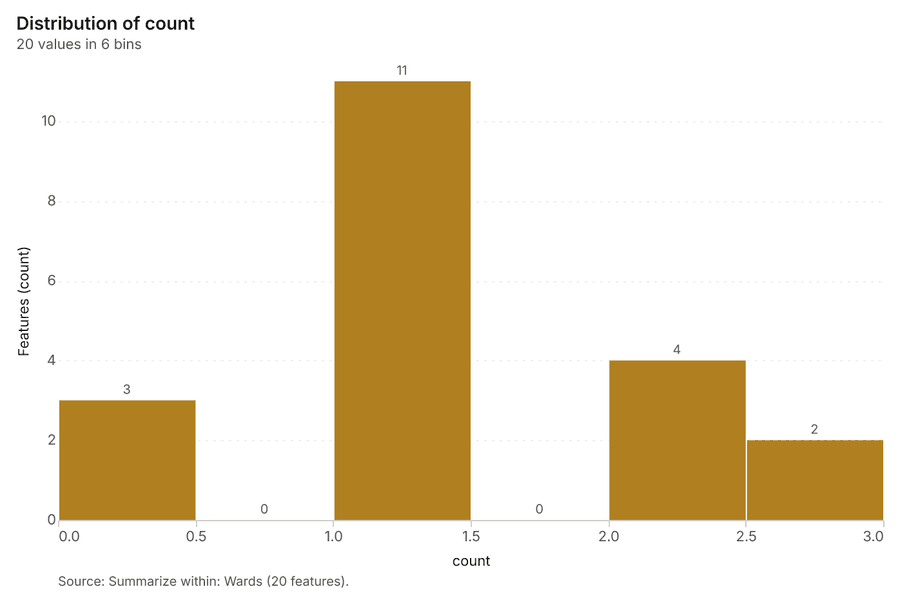
What it found. Summarize within on Shelters, Wards: Summarize within: 1 layer saved: Summarize within: Wards (20 features) 272829. It reported result, count 20; result, elapsed ms 0; billing, cost 0.01092; billing, list price 0.01092; billing, upstream cost 0 27.
| Result | Value |
|---|---|
| result, count | 20 |
| result, elapsed ms | 0 |
| billing, cost | 0.01092 |
| billing, list price | 0.01092 |
| billing, upstream cost | 0 |
Findings
- Evidenced: Summarize within on Shelters, Wards: Summarize within: 1 layer saved: Summarize within: Wards (20 features) 272829.
- Evidenced: It reported result, count 20; result, elapsed ms 0; billing, cost 0.01092; billing, list price 0.01092; billing, upstream cost 0 27.
Tool gp_summarize_within; parameters {"stats": [{"stat": "sum", "field": "capacity"}], "project": "affd1e20-248c-4f96-b09d-48d3027477be", "features": {"layer": "Shelters (ee1b31b2)"}, "group_by": "type", "polygons": {"layer": "Wards (b338e26e)"}}
Summarize within
What this analysis is. Summarize within: Count and aggregate the features inside each polygon (or bin), proportionally for lines and polygons 25. In ArcGIS it is Summarize Within or Aggregate Points; in QGIS, native:countpointsinpolygon or native:sumlinelengths 25.
Why it was run on this data. Count Shelters inside each feature of Wards by type; the counts map as a choropleth (natural breaks, sequential colors) 26.
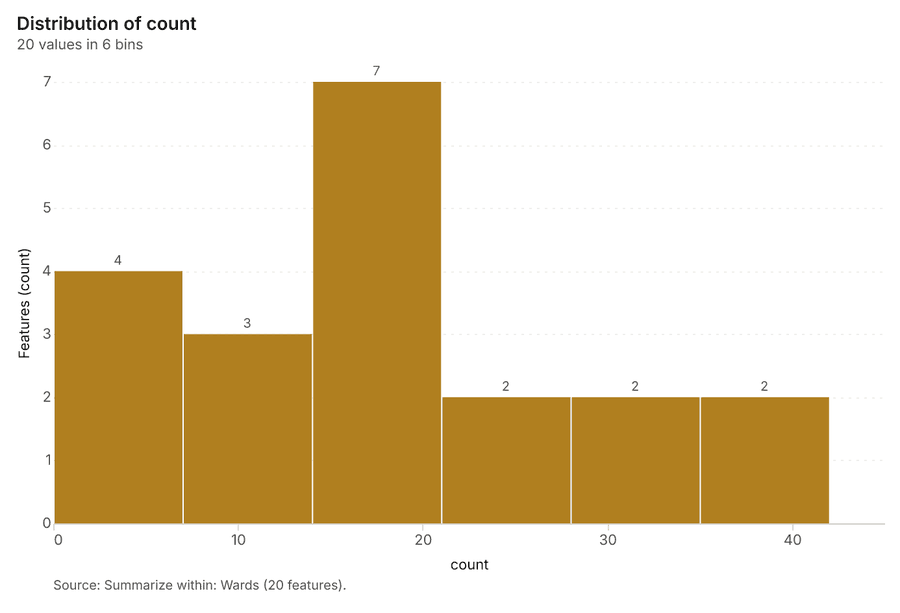
What it found. Summarize within on Relief distributions, Wards: Summarize within: 1 layer saved: Summarize within: Wards (20 features) 102930. It reported result, count 20; result, elapsed ms 1; billing, cost 0.01682; billing, list price 0.01682; billing, upstream cost 0 30.
| Result | Value |
|---|---|
| result, count | 20 |
| result, elapsed ms | 1 |
| billing, cost | 0.01682 |
| billing, list price | 0.01682 |
| billing, upstream cost | 0 |
Findings
- Evidenced: Summarize within on Relief distributions, Wards: Summarize within: 1 layer saved: Summarize within: Wards (20 features) 102930.
- Evidenced: It reported result, count 20; result, elapsed ms 1; billing, cost 0.01682; billing, list price 0.01682; billing, upstream cost 0 30.
Tool gp_summarize_within; parameters {"stats": [{"stat": "sum", "field": "households_served"}], "project": "affd1e20-248c-4f96-b09d-48d3027477be", "features": {"layer": "Relief distributions (83cbe688)"}, "group_by": "item", "polygons": {"layer": "Wards (b338e26e)"}}
Summarize within
What this analysis is. Summarize within: Count and aggregate the features inside each polygon (or bin), proportionally for lines and polygons 25. In ArcGIS it is Summarize Within or Aggregate Points; in QGIS, native:countpointsinpolygon or native:sumlinelengths 25.
Why it was run on this data. Count Shelters inside each feature of Wards by type; the counts map as a choropleth (natural breaks, sequential colors) 26.
What it found. Summarize within on Health posts, Wards: Summarize within: 1 layer saved: Summarize within: Wards (20 features) 293132. It reported result, count 20; result, elapsed ms 0; billing, cost 0.01082; billing, list price 0.01082; billing, upstream cost 0 31.
| Result | Value |
|---|---|
| result, count | 20 |
| result, elapsed ms | 0 |
| billing, cost | 0.01082 |
| billing, list price | 0.01082 |
| billing, upstream cost | 0 |
Findings
- Evidenced: Summarize within on Health posts, Wards: Summarize within: 1 layer saved: Summarize within: Wards (20 features) 293132.
- Evidenced: It reported result, count 20; result, elapsed ms 0; billing, cost 0.01082; billing, list price 0.01082; billing, upstream cost 0 31.
Tool gp_summarize_within; parameters {"stats": [{"stat": "sum", "field": "beds"}], "project": "affd1e20-248c-4f96-b09d-48d3027477be", "features": {"layer": "Health posts (7aed59a8)"}, "group_by": "functional", "polygons": {"layer": "Wards (b338e26e)"}}
Find point clusters
What this analysis is. Find point clusters: Density-based clusters (DBSCAN, HDBSCAN or OPTICS, optionally space-time) with hulls and noise 33. In ArcGIS it is Find Point Clusters or Density-based Clustering; in QGIS, native:dbscanclustering or native:stdbscanclustering 33.
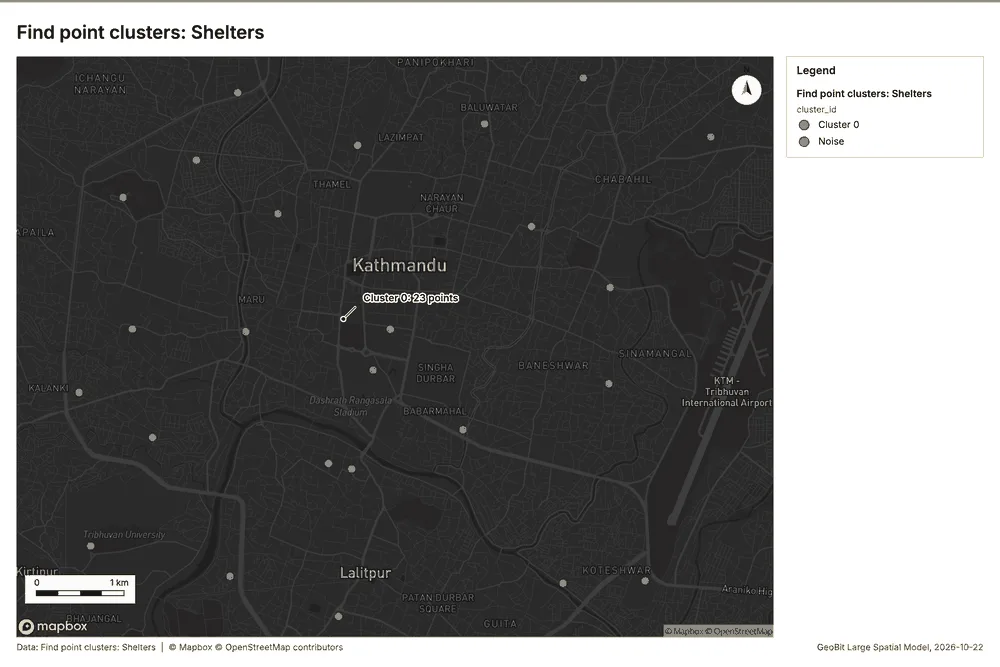
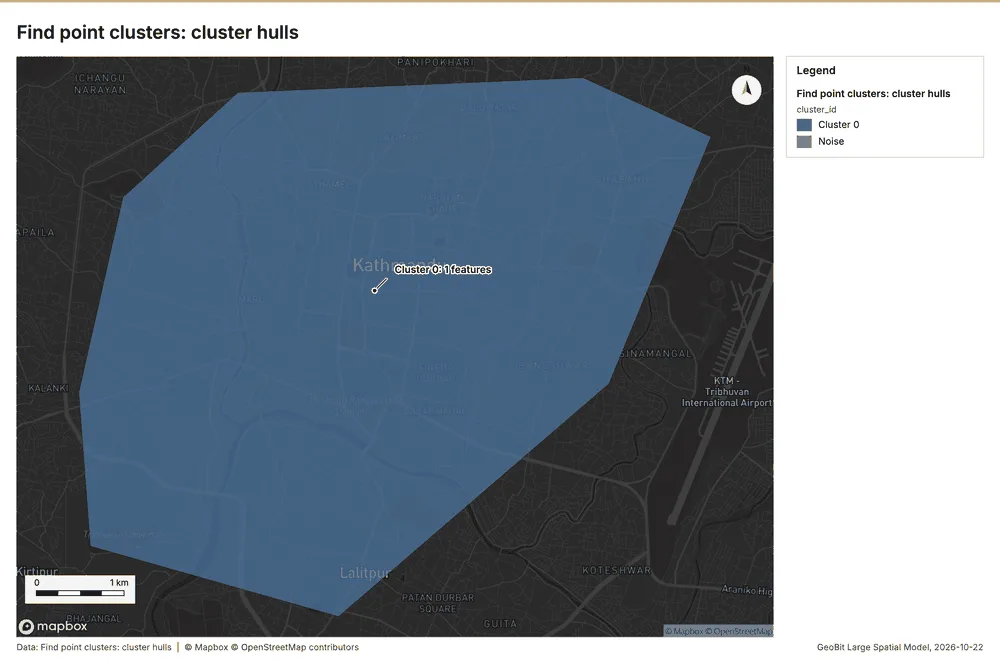
Why it was run on this data. DBSCAN finds dense groups of Shelters and separates noise 34.
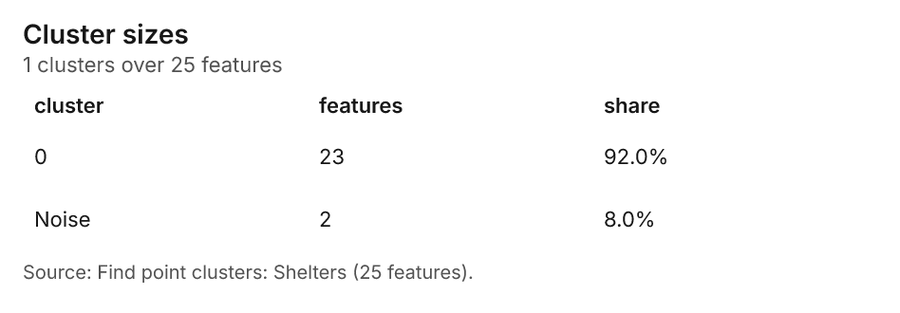
What it found. The gp_find_point_clusters tool was used on the Shelters data 28 to identify point clusters. The process resulted in a count of 25 clusters and 2 noise points 35. The output contained 2 layers, specifically listing "Shelters (25 features)" and "cluster hulls (1 feature)" 35. The computation was efficient, completing in an elapsed time of 4 ms 35.
| Result | Value |
|---|---|
| result, count | 25 |
| result, noise | 2 |
| result, distance m | 2,000 |
| result, elapsed ms | 4 |
| result, min points | 3 |
| billing, cost | 0.0505 |
| billing, list price | 0.0505 |
| billing, upstream cost | 0 |
Findings
- Evidenced: Find point clusters on Shelters: Find point clusters: 2 layers saved: Find point clusters: Shelters (25 features); Find point clusters: cluster hulls (1 feature) 2835.
- Evidenced: It reported result, count 25; result, noise 2; result, distance m 2,000; result, elapsed ms 4; result, min points 3; billing, cost 0.0505 35.
Tool gp_find_point_clusters; parameters {"method": "dbscan", "project": "affd1e20-248c-4f96-b09d-48d3027477be", "features": {"layer": "Shelters (ee1b31b2)"}, "distance_m": 2000.0, "min_points": 3}
Find point clusters
What this analysis is. Find point clusters: Density-based clusters (DBSCAN, HDBSCAN or OPTICS, optionally space-time) with hulls and noise 33. In ArcGIS it is Find Point Clusters or Density-based Clustering; in QGIS, native:dbscanclustering or native:stdbscanclustering 33.
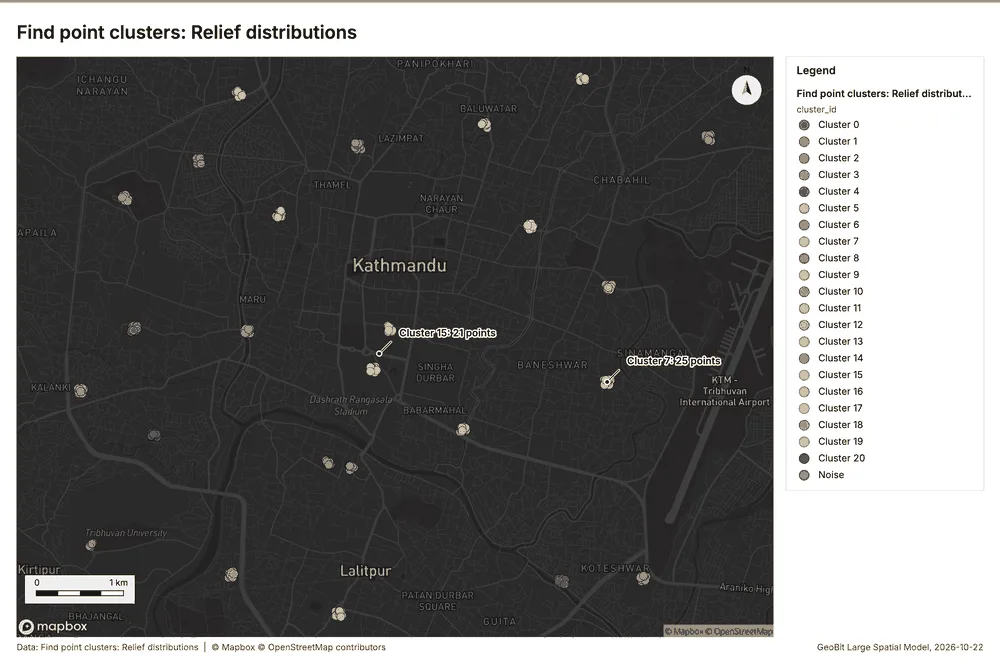
Why it was run on this data. DBSCAN finds dense groups of Relief distributions and separates noise 36.
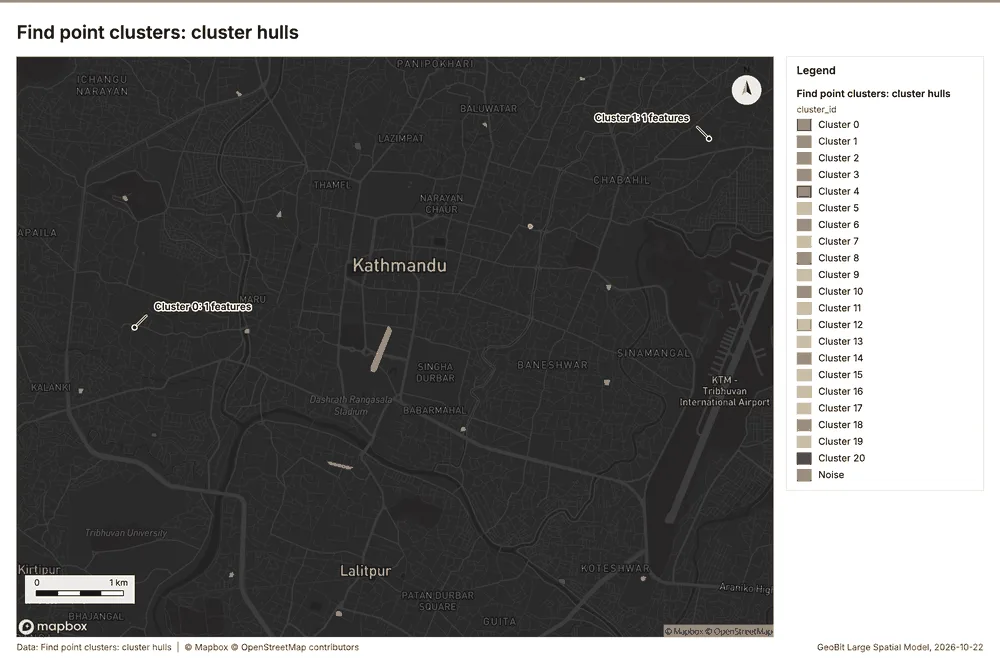
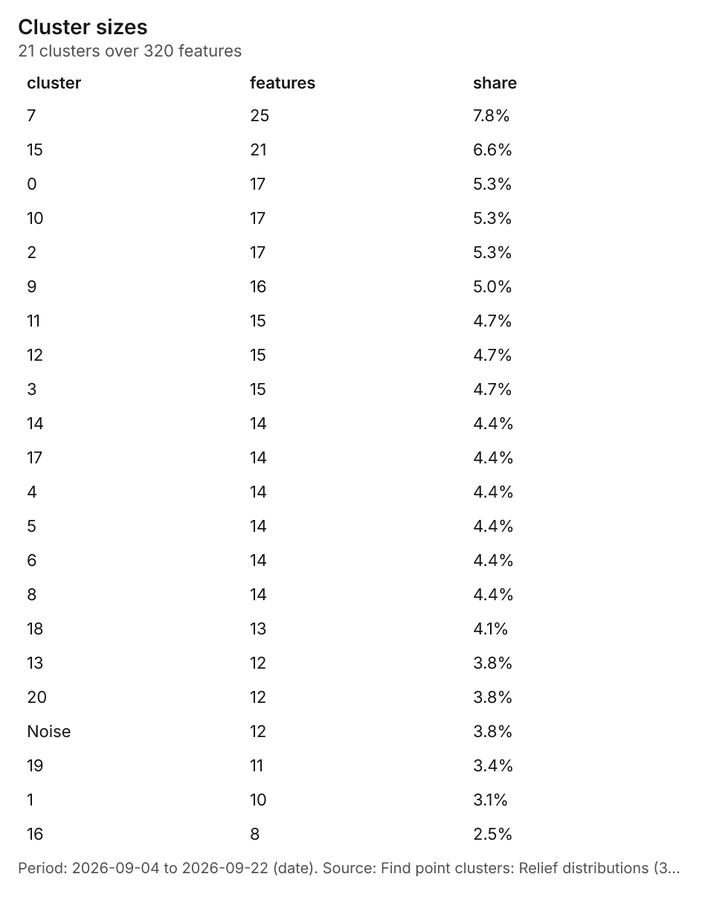
What it found. Find point clusters on Relief distributions: Find point clusters: 2 layers saved: Find point clusters: Relief distributions (320 features); Find point clusters: cluster hulls (21 features) 1037. It reported result, count 320; result, noise 12; result, distance m 500; result, elapsed ms 10; result, min points 8; billing, cost 0.0564 37.
| Result | Value |
|---|---|
| result, count | 320 |
| result, noise | 12 |
| result, distance m | 500 |
| result, elapsed ms | 10 |
| result, min points | 8 |
| billing, cost | 0.0564 |
| billing, list price | 0.0564 |
| billing, upstream cost | 0 |
Findings
- Evidenced: Find point clusters on Relief distributions: Find point clusters: 2 layers saved: Find point clusters: Relief distributions (320 features); Find point clusters: cluster hulls (21 features) 1037.
- Evidenced: It reported result, count 320; result, noise 12; result, distance m 500; result, elapsed ms 10; result, min points 8; billing, cost 0.0564 37.
Tool gp_find_point_clusters; parameters {"method": "dbscan", "project": "affd1e20-248c-4f96-b09d-48d3027477be", "features": {"layer": "Relief distributions (83cbe688)"}, "distance_m": 500.0, "min_points": 8}
Find point clusters
What this analysis is. Find point clusters: Density-based clusters (DBSCAN, HDBSCAN or OPTICS, optionally space-time) with hulls and noise 33. In ArcGIS it is Find Point Clusters or Density-based Clustering; in QGIS, native:dbscanclustering or native:stdbscanclustering 33.
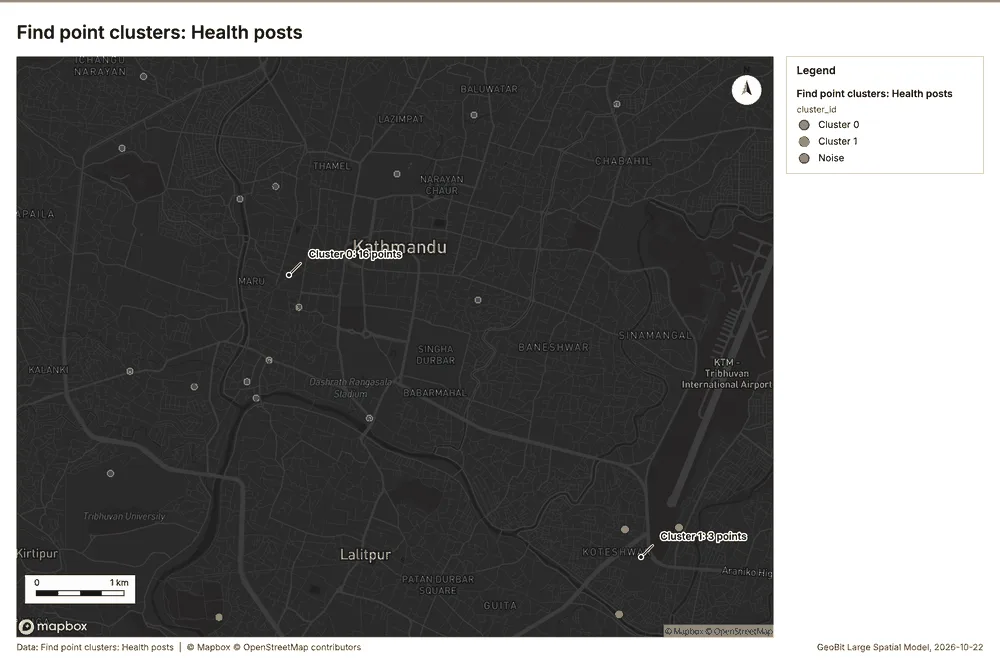
Why it was run on this data. DBSCAN finds dense groups of Health posts and separates noise 38.
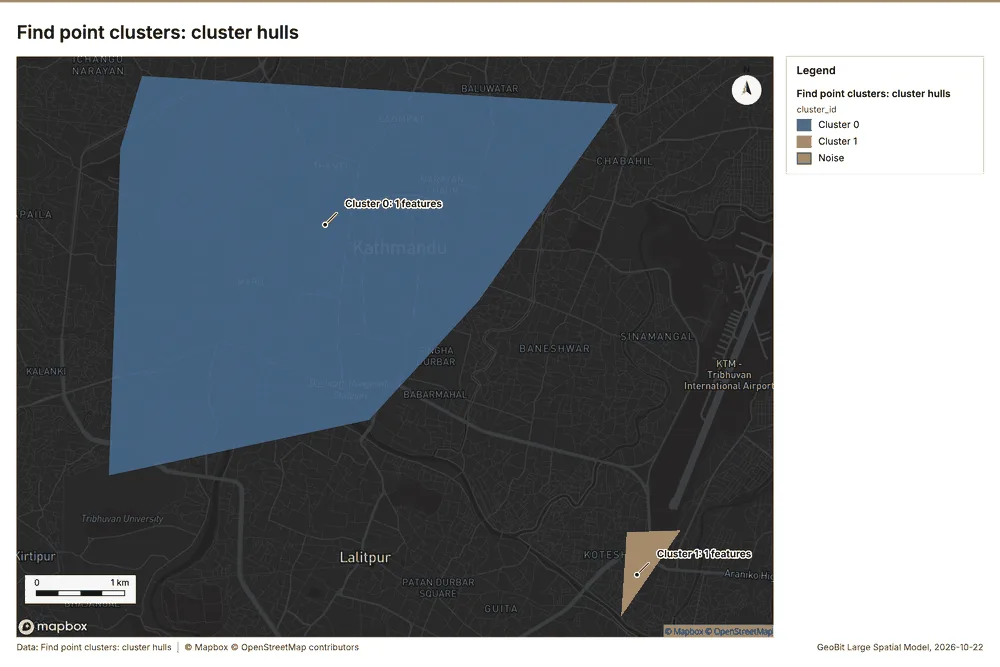
What it found. Find point clusters on Health posts: Find point clusters: 2 layers saved: Find point clusters: Health posts (20 features); Find point clusters: cluster hulls (2 features) 3239. It reported result, count 20; result, noise 1; result, distance m 2,000; result, elapsed ms 1; result, min points 3; billing, cost 0.0504 39.
| Result | Value |
|---|---|
| result, count | 20 |
| result, noise | 1 |
| result, distance m | 2,000 |
| result, elapsed ms | 1 |
| result, min points | 3 |
| billing, cost | 0.0504 |
| billing, list price | 0.0504 |
| billing, upstream cost | 0 |
Findings
- Evidenced: Find point clusters on Health posts: Find point clusters: 2 layers saved: Find point clusters: Health posts (20 features); Find point clusters: cluster hulls (2 features) 3239.
- Evidenced: It reported result, count 20; result, noise 1; result, distance m 2,000; result, elapsed ms 1; result, min points 3; billing, cost 0.0504 39.
Tool gp_find_point_clusters; parameters {"method": "dbscan", "project": "affd1e20-248c-4f96-b09d-48d3027477be", "features": {"layer": "Health posts (7aed59a8)"}, "distance_m": 2000.0, "min_points": 3}
Calculate density
What this analysis is. Calculate density: Kernel density per square kilometer on a grid 40. In ArcGIS it is Calculate Density or Kernel Density; in QGIS, native:heatmapkerneldensityestimation 40.
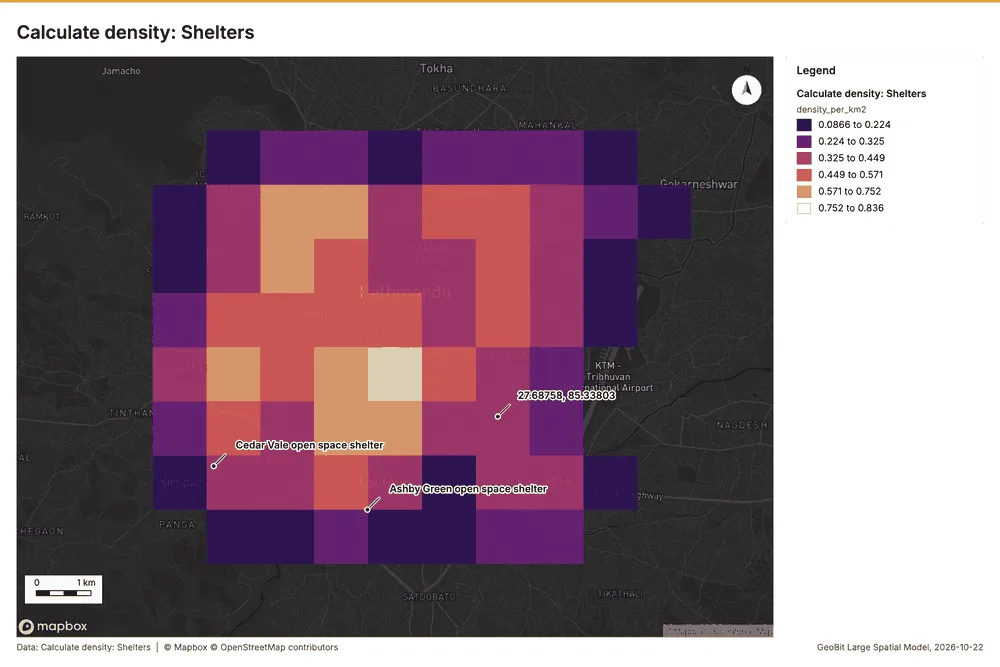
Why it was run on this data. 25 points in Shelters: a density surface shows where they concentrate 41.
What it found. Calculate density on Shelters: Calculate density: 1 layer saved: Calculate density: Shelters (90 features) 2842. It reported result, count 90; result, elapsed ms 4; result, bandwidth m 2,000; result, cell size m 1,000; result, excluded null 0; result, max density per km2 0.8364 42.
| Result | Value |
|---|---|
| result, count | 90 |
| result, elapsed ms | 4 |
| result, bandwidth m | 2,000 |
| result, cell size m | 1,000 |
| result, excluded null | 0 |
| result, max density per km2 | 0.8364 |
| billing, cost | 0.0505 |
| billing, list price | 0.0505 |
| billing, upstream cost | 0 |
Findings
- Evidenced: Calculate density on Shelters: Calculate density: 1 layer saved: Calculate density: Shelters (90 features) 2842.
- Evidenced: It reported result, count 90; result, elapsed ms 4; result, bandwidth m 2,000; result, cell size m 1,000; result, excluded null 0; result, max density per km2 0.8364 42.
Tool gp_calculate_density; parameters {"kernel": "quartic", "project": "affd1e20-248c-4f96-b09d-48d3027477be", "features": {"layer": "Shelters (ee1b31b2)"}, "bandwidth_m": 2000.0, "cell_size_m": 1000.0}
Calculate density
What this analysis is. Calculate density: Kernel density per square kilometer on a grid 40. In ArcGIS it is Calculate Density or Kernel Density; in QGIS, native:heatmapkerneldensityestimation 40.
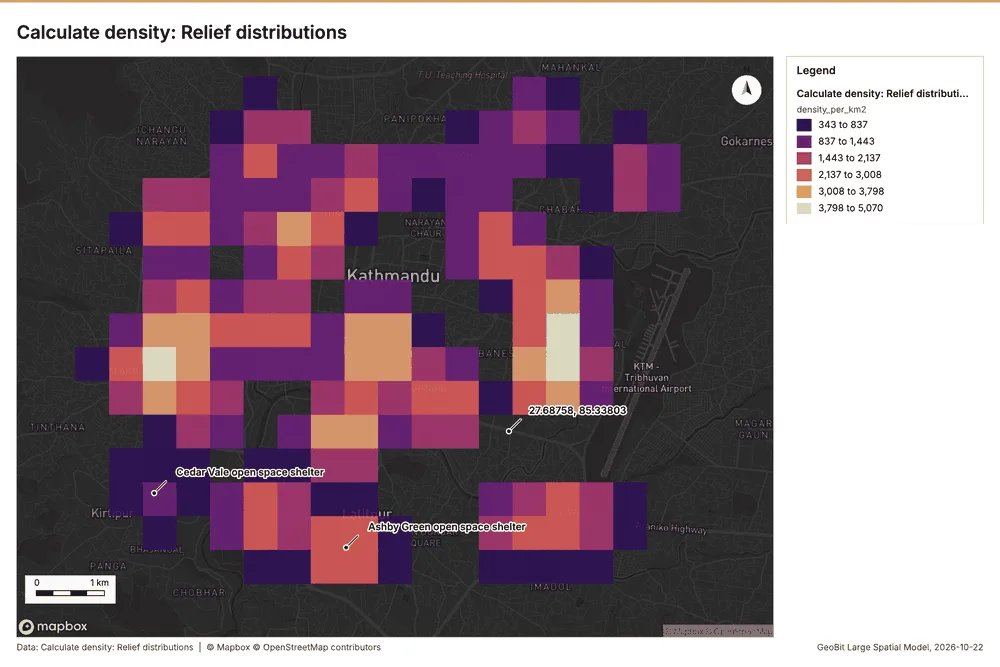
Why it was run on this data. 320 points in Relief distributions: a density surface shows where they concentrate 43.
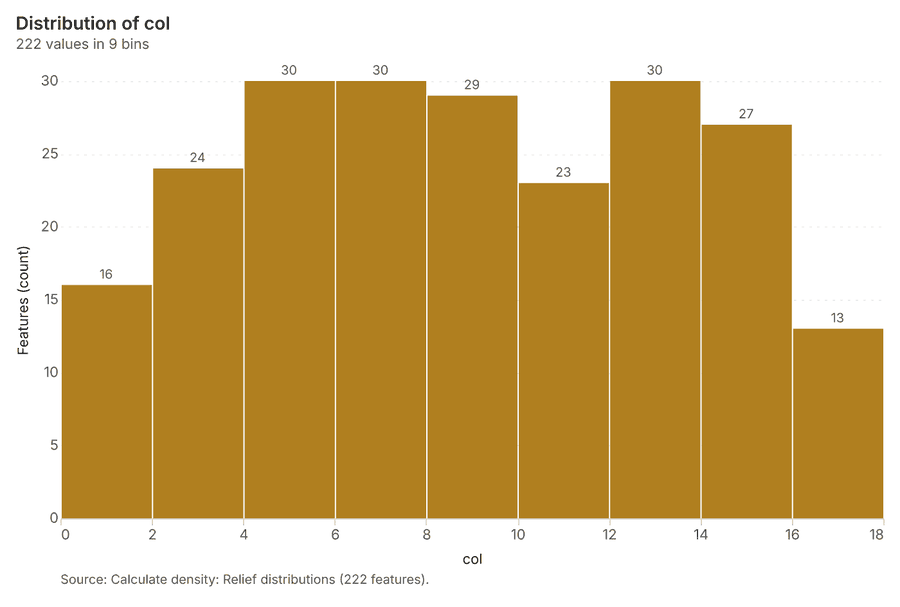
What it found. Calculate density on Relief distributions: Calculate density: 1 layer saved: Calculate density: Relief distributions (222 features) 1044. It reported result, count 222; result, elapsed ms 7; result, bandwidth m 1,000; result, cell size m 500; result, excluded null 0; result, max density per km2 5,070 44.
| Result | Value |
|---|---|
| result, count | 222 |
| result, elapsed ms | 7 |
| result, bandwidth m | 1,000 |
| result, cell size m | 500 |
| result, excluded null | 0 |
| result, max density per km2 | 5,070 |
| billing, cost | 0.0564 |
| billing, list price | 0.0564 |
| billing, upstream cost | 0 |
Findings
- Evidenced: Calculate density on Relief distributions: Calculate density: 1 layer saved: Calculate density: Relief distributions (222 features) 1044.
- Evidenced: It reported result, count 222; result, elapsed ms 7; result, bandwidth m 1,000; result, cell size m 500; result, excluded null 0; result, max density per km2 5,070 44.
Tool gp_calculate_density; parameters {"kernel": "quartic", "project": "affd1e20-248c-4f96-b09d-48d3027477be", "features": {"layer": "Relief distributions (83cbe688)"}, "bandwidth_m": 1000.0, "cell_size_m": 500.0, "weight_field": "households_served"}
Calculate density
What this analysis is. Calculate density: Kernel density per square kilometer on a grid 40. In ArcGIS it is Calculate Density or Kernel Density; in QGIS, native:heatmapkerneldensityestimation 40.
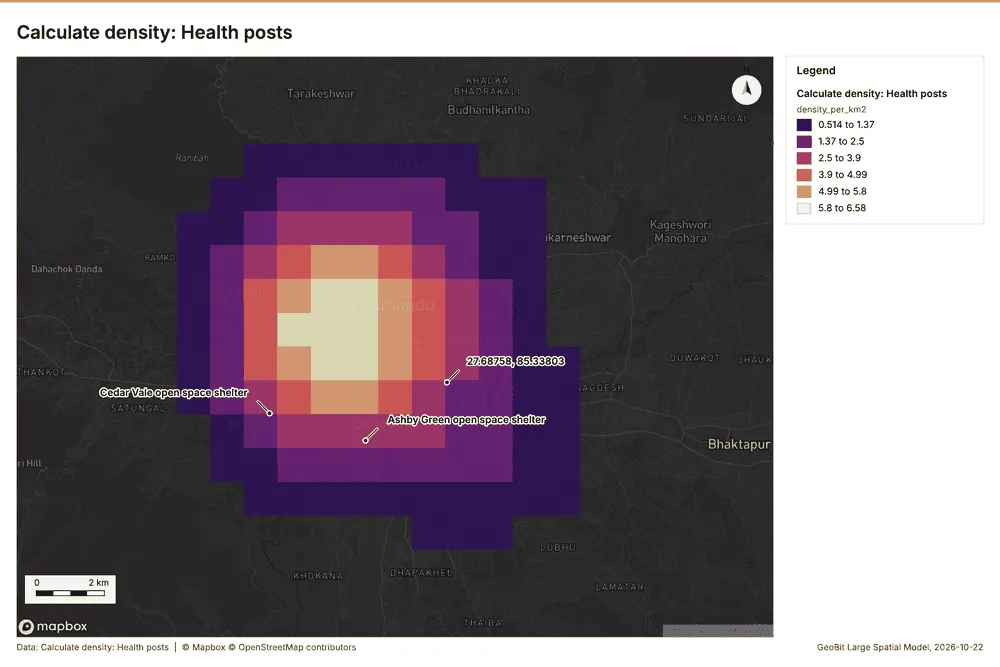
Why it was run on this data. 20 points in Health posts: a density surface shows where they concentrate 45.
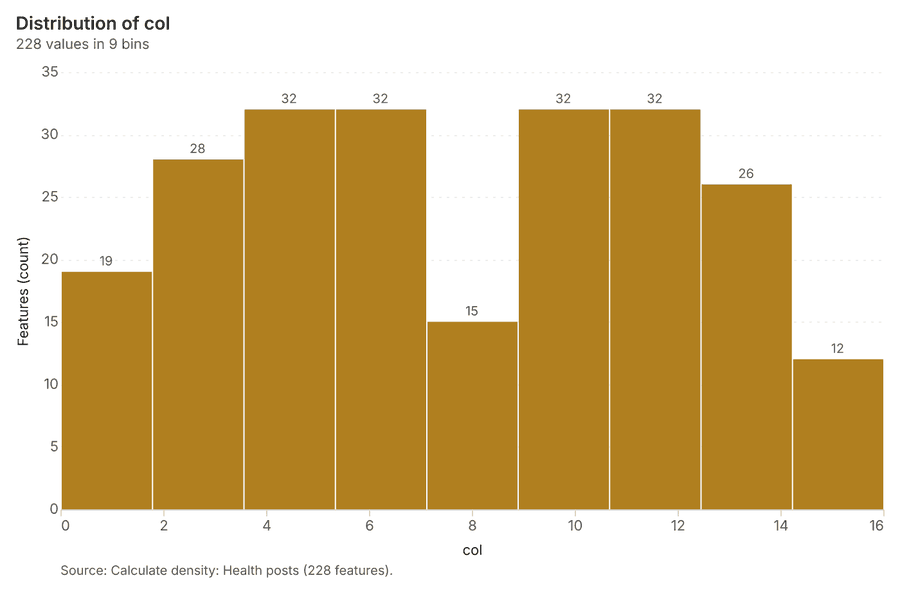
What it found. The density was calculated using the gp_calculate_density tool 46, processing the Health posts layer 32 across 228 features 46.
| Result | Value |
|---|---|
| result, count | 228 |
| result, elapsed ms | 6 |
| result, bandwidth m | 5,000 |
| result, cell size m | 1,000 |
| result, excluded null | 0 |
| result, max density per km2 | 6.578 |
| billing, cost | 0.0504 |
| billing, list price | 0.0504 |
| billing, upstream cost | 0 |
Findings
- Evidenced: Calculate density on Health posts: Calculate density: 1 layer saved: Calculate density: Health posts (228 features) 3246.
- Evidenced: It reported result, count 228; result, elapsed ms 6; result, bandwidth m 5,000; result, cell size m 1,000; result, excluded null 0; result, max density per km2 6.578 46.
Tool gp_calculate_density; parameters {"kernel": "quartic", "project": "affd1e20-248c-4f96-b09d-48d3027477be", "features": {"layer": "Health posts (7aed59a8)"}, "bandwidth_m": 5000.0, "cell_size_m": 1000.0, "weight_field": "beds"}
Outliers
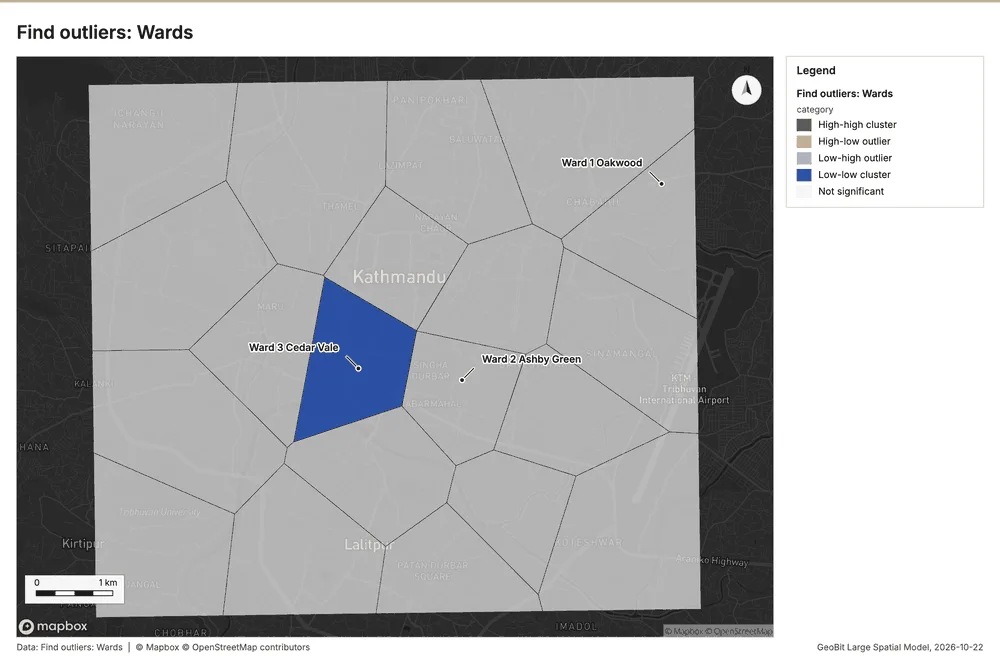
What this analysis is. Find outliers: Anselin local Moran’s I: HH, LL clusters and HL, LH outliers 47. In ArcGIS it is Find Outliers or Cluster and Outlier Analysis (Anselin Local Moran’s I) 47.
Why it was run on this data. Local Moran's I maps clusters and outliers of 'population' 48.
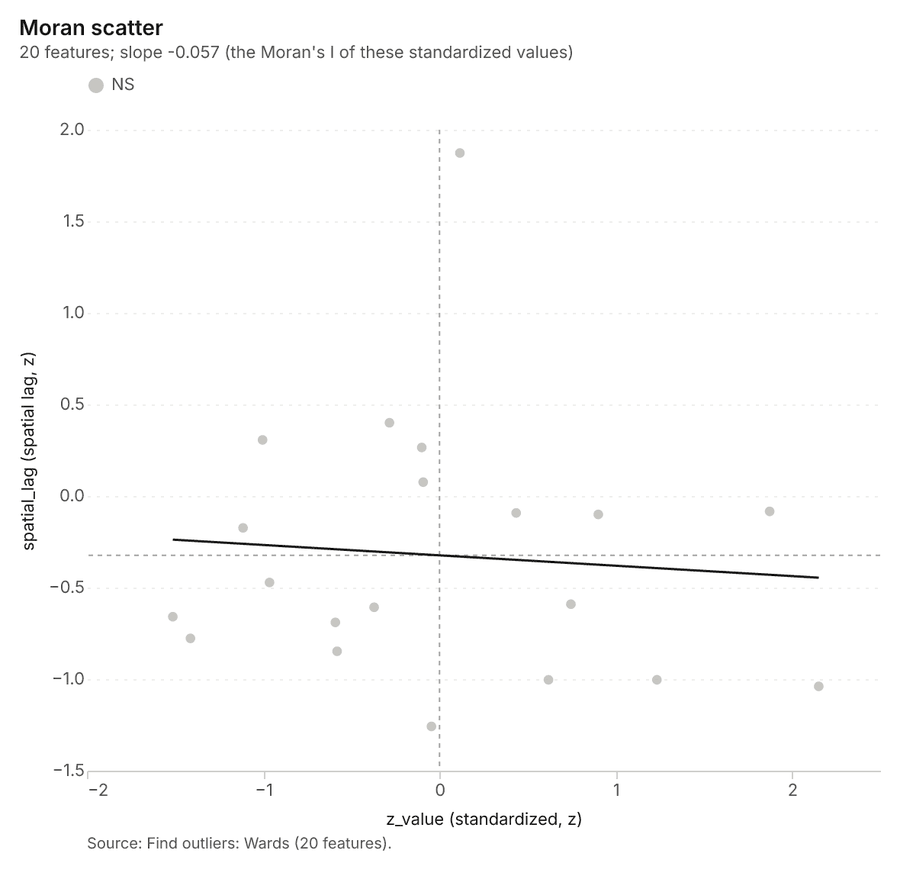
What it found. Outliers on Wards: Find outliers: 1 layer saved: Find outliers: Wards (20 features) 2949. It reported result, count 20; result, elapsed ms 4; result, permutations 199; result, excluded null 0; result, distance band m 1,735; billing, cost 0.0506 49.
| Result | Value |
|---|---|
| result, count | 20 |
| result, elapsed ms | 4 |
| result, permutations | 199 |
| result, excluded null | 0 |
| result, distance band m | 1,735 |
| billing, cost | 0.0506 |
| billing, list price | 0.0506 |
| billing, upstream cost | 0 |
Findings
- Evidenced: Outliers on Wards: Find outliers: 1 layer saved: Find outliers: Wards (20 features) 2949.
- Evidenced: It reported result, count 20; result, elapsed ms 4; result, permutations 199; result, excluded null 0; result, distance band m 1,735; billing, cost 0.0506 49.
Tool gp_outliers; parameters {"field": "population", "project": "affd1e20-248c-4f96-b09d-48d3027477be", "features": {"layer": "Wards (b338e26e)"}, "aggregation": "hexagon"}
Maps and charts
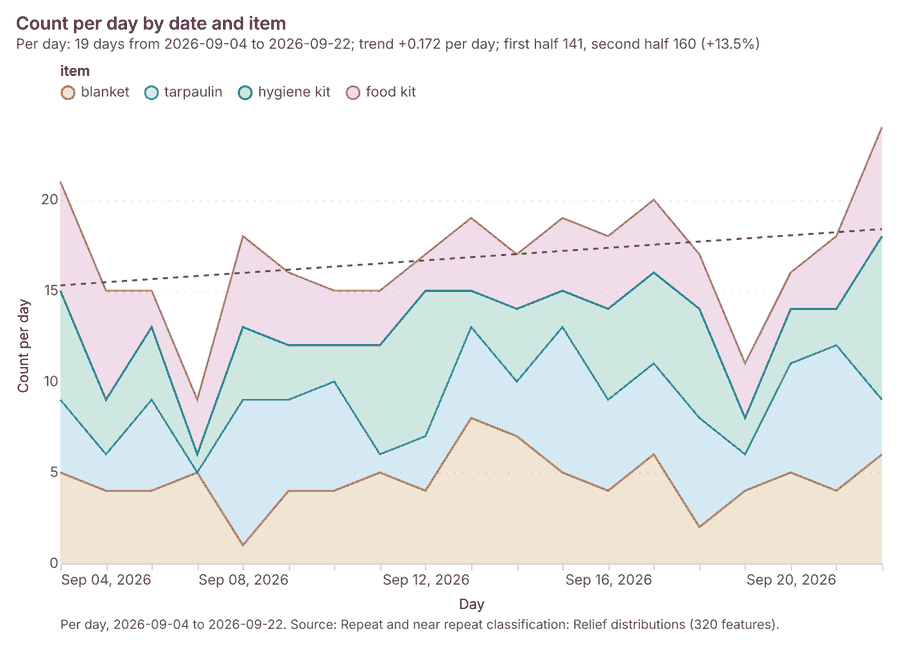
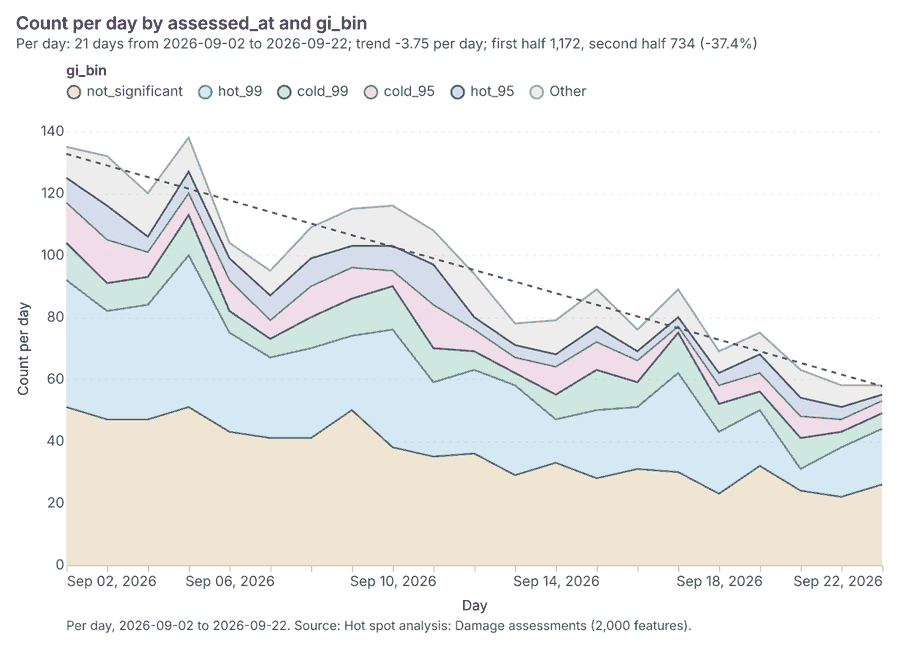
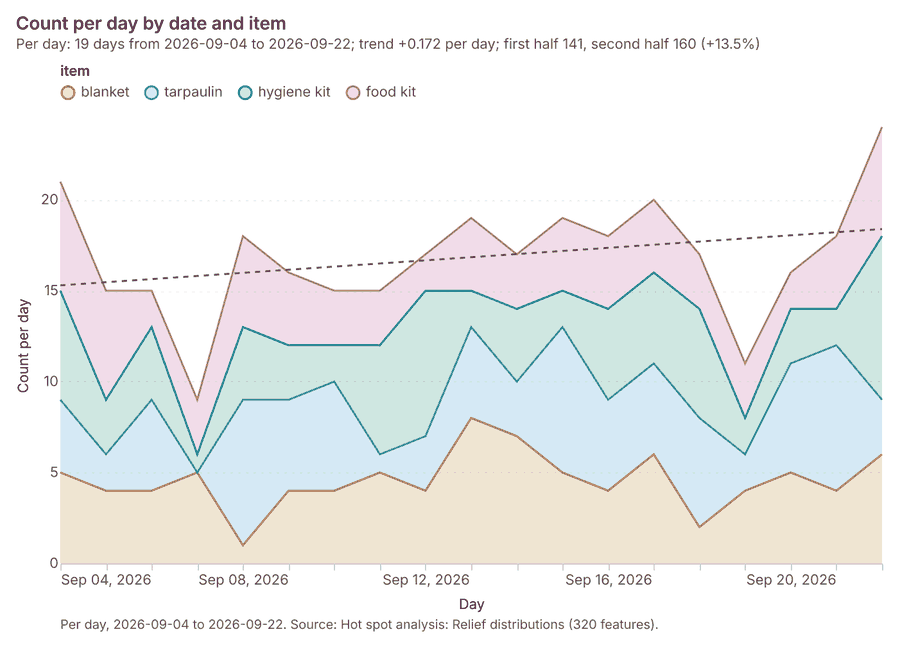
The run also made 20 map image(s) 5051525354555657585960616263646566676869 and 26 chart(s) 7071727374757677787980818283848586878889909192939495.
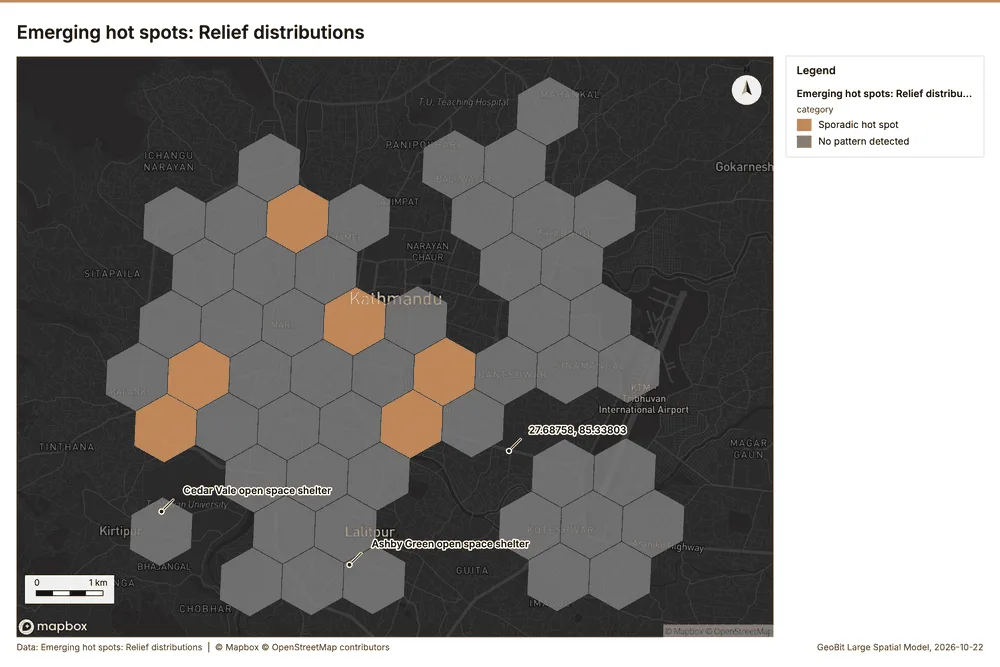
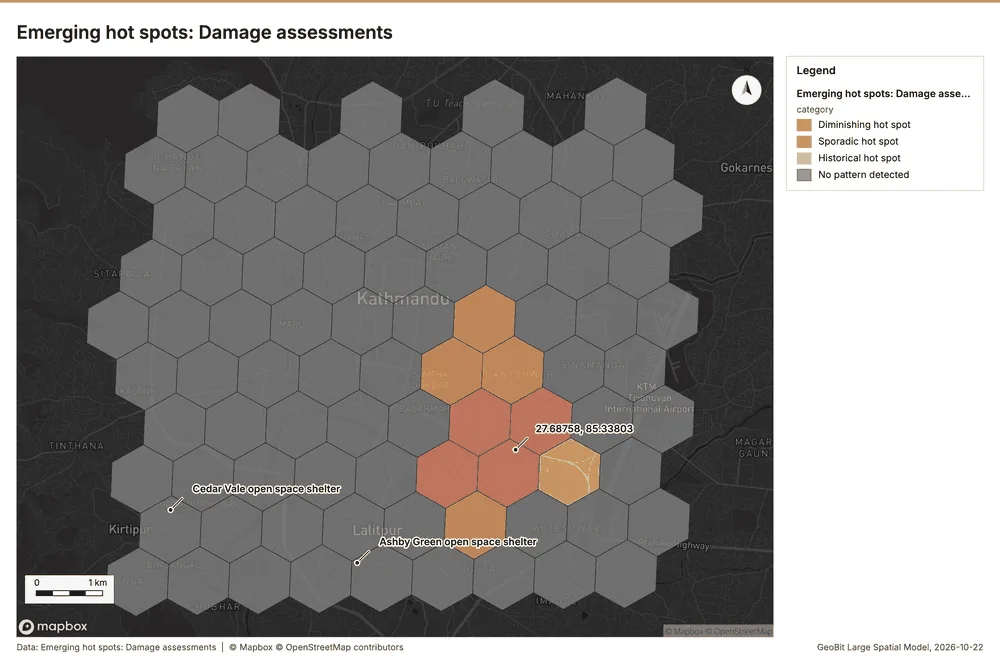
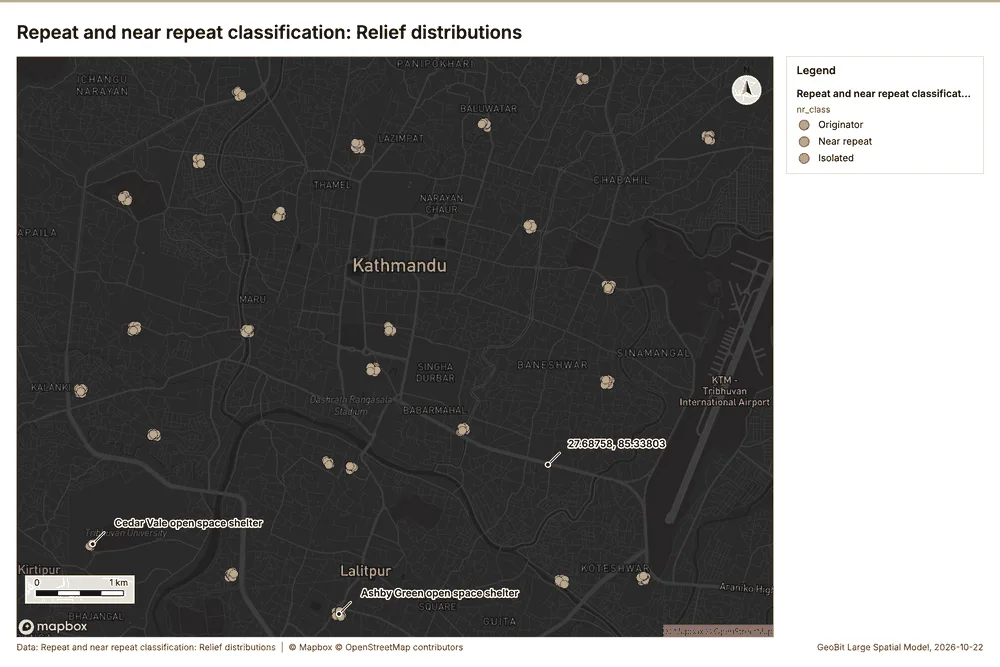
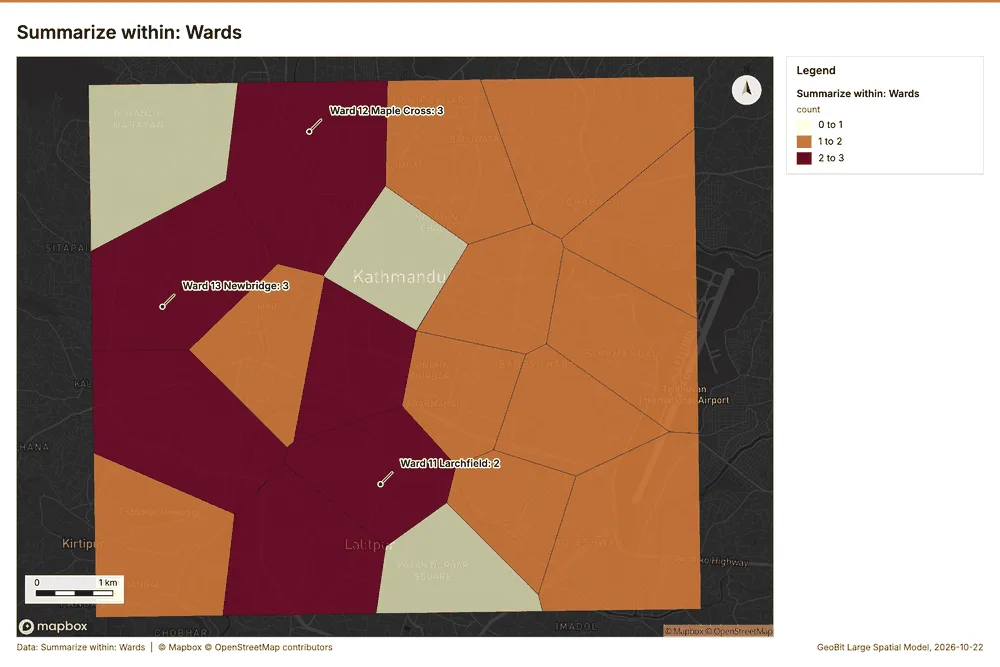
What the map shows. The map illustrates the results of an emerging hot spot analysis for relief distributions, categorizing areas based on detected patterns. The legend indicates that "Sporadic hot spot" areas are colored orange, while regions with "No pattern detected" are 53
Inferred: read from the image by gemma4:e4b, not evidence.
Changes since the last run
This is the first report of this project.
Sources
- 1Rendering: Chart: Timeline: events per day by dataset. 84 rows id 9bebc2a3-106c-4b25-9db2-00e0031eb8f3
- 2Dataset: Damage assessments. vector, 2000 rows id f5a03720-aeb0-4ef8-aac1-6cee065b688a
- 3Dataset: Road status. vector, 160 rows id f3c7c4b5-fd2f-4d56-9b57-5acf7a4d0374
- 4Dataset: Relief distributions. vector, 320 rows id 27e9cd9e-cac7-4864-8dbe-27172247ad35
- 5Dataset: Ward needs by day. table, 420 rows id b8f0859d-75f2-425c-a636-bd120d62d172
- 6Document page: Situation report No. 4, page 1. 2026-09-14 id c492201b-e67e-4ae4-b97c-58a6ff283bc1:1
- 7Catalog: Hot spot analysis (operation catalog, gp_hot_spots). Getis-Ord Gi* hot and cold spots with z-scores, p-values and confidence bins. ArcGIS: Find Hot Spots, Hot Spot Analysis (Getis-Ord Gi*). QGIS: qgis:hotspot (plugin). id gp_hot_spots
- 8Plan: Hot spots of Relief distributions (the Start plan's candidate c_2bd4e1c1361d). 320 points: Getis-Ord Gi* tests whether the concentrations in Relief distributions are statistically significant. id 5a15d461-f147-4d9e-923e-64f1e88fcd39:c_2bd4e1c1361d
- 9Tool result: gp_hot_spots, step 0. Hot spot analysis: 1 layer saved: Hot spot analysis: Relief distributions (320 features). id 312e7d93-9021-497b-95d6-33778143cdfe:0
- 10Layer: Relief distributions. 320 features id 83cbe688-753d-41e3-963d-5ac6a237060b
- 11Plan: Hot spots of Water points (the Start plan's candidate c_0814d71ea2c0). 60 points: Getis-Ord Gi* tests whether the concentrations in Water points are statistically significant. id 5a15d461-f147-4d9e-923e-64f1e88fcd39:c_0814d71ea2c0
- 12Tool result: gp_hot_spots, step 1. Hot spot analysis: 1 layer saved: Hot spot analysis: Water points (20 features). id 312e7d93-9021-497b-95d6-33778143cdfe:1
- 13Layer: Water points. 60 features id 2a061d8c-77a7-4d5f-9dfd-426a08595f03
- 14Plan: Hot spots of Damage assessments (the Start plan's candidate c_5240b7fee4b7). 2000 points: Getis-Ord Gi* tests whether the concentrations in Damage assessments are statistically significant. id 5a15d461-f147-4d9e-923e-64f1e88fcd39:c_5240b7fee4b7
- 15Tool result: gp_hot_spots, step 2. Hot spot analysis: 1 layer saved: Hot spot analysis: Damage assessments (2000 features). id 312e7d93-9021-497b-95d6-33778143cdfe:2
- 16Layer: Damage assessments. 2,000 features id 26bd99f3-3f2e-40d8-9e45-68835e95f651
- 17Catalog: Emerging hot spots (operation catalog, gp_space_time_hot_spots). Where hot spots are new, consecutive, intensifying, persistent, diminishing, sporadic, oscillating or historical over time. ArcGIS: Emerging Hot Spot Analysis, Create Space Time Cube. id gp_space_time_hot_spots
- 18Plan: Space time hot spots of Relief distributions (the Start plan's candidate c_a90b274940ea). Relief distributions carry dates in 'date': emerging hot spot analysis finds new, intensifying and fading hot spots per day. id 5a15d461-f147-4d9e-923e-64f1e88fcd39:c_a90b274940ea
- 19Tool result: gp_space_time_hot_spots, step 0. Emerging hot spots: 1 layer saved: Emerging hot spots: Relief distributions (54 features). id 6a511518-66af-49c2-9961-06cf7330178d:0
- 20Plan: Space time hot spots of Damage assessments (the Start plan's candidate c_e9b3cd3966d9). Damage assessments carry dates in 'assessed_at': emerging hot spot analysis finds new, intensifying and fading hot spots per day. id 5a15d461-f147-4d9e-923e-64f1e88fcd39:c_e9b3cd3966d9
- 21Tool result: gp_space_time_hot_spots, step 1. Emerging hot spots: 1 layer saved: Emerging hot spots: Damage assessments (87 features). id 6a511518-66af-49c2-9961-06cf7330178d:1
- 22Catalog: Repeat and near repeat classification (operation catalog, gp_near_repeat). Classify incidents as originators, repeats (same place) or near repeats within a distance and time window, with a Knox test table. ArcGIS: Repeat and Near Repeat Classification, Near Repeat Calculator. id gp_near_repeat
- 23Plan: Near repeat of Relief distributions (the Start plan's candidate c_d2196a8324bf). Near repeat analysis tests whether Relief distributions close in space also follow each other within 3 days. id 5a15d461-f147-4d9e-923e-64f1e88fcd39:c_d2196a8324bf
- 24Tool result: gp_near_repeat, step 2. Repeat and near repeat classification: 1 layer saved: Repeat and near repeat classification: Relief distributions (320 features). id 6a511518-66af-49c2-9961-06cf7330178d:2
- 25Catalog: Summarize within (operation catalog, gp_summarize_within). Count and aggregate the features inside each polygon (or bin), proportionally for lines and polygons. ArcGIS: Summarize Within, Aggregate Points. QGIS: native:countpointsinpolygon, native:sumlinelengths. id gp_summarize_within
- 26Plan: Shelters per feature of Wards (the Start plan's candidate c_51fb9e92bbf5). Count Shelters inside each feature of Wards by type; the counts map as a choropleth (natural breaks, sequential colors). id 5a15d461-f147-4d9e-923e-64f1e88fcd39:c_51fb9e92bbf5
- 27Tool result: gp_summarize_within, step 0. Summarize within: 1 layer saved: Summarize within: Wards (20 features). id 0979c79d-77b1-475d-a7be-e19a6678cb6f:0
- 28Layer: Shelters. 25 features id ee1b31b2-fece-4bec-a323-47ac9bdb3e6e
- 29Layer: Wards. 20 features id b338e26e-89d1-4de4-af0b-e9e1f797c2dd
- 30Tool result: gp_summarize_within, step 1. Summarize within: 1 layer saved: Summarize within: Wards (20 features). id 0979c79d-77b1-475d-a7be-e19a6678cb6f:1
- 31Tool result: gp_summarize_within, step 2. Summarize within: 1 layer saved: Summarize within: Wards (20 features). id 0979c79d-77b1-475d-a7be-e19a6678cb6f:2
- 32Layer: Health posts. 20 features id 7aed59a8-fdc9-4dca-9da9-530aea39fdf7
- 33Catalog: Find point clusters (operation catalog, gp_find_point_clusters). Density-based clusters (DBSCAN, HDBSCAN or OPTICS, optionally space-time) with hulls and noise. ArcGIS: Find Point Clusters, Density-based Clustering. QGIS: native:dbscanclustering, native:stdbscanclustering. id gp_find_point_clusters
- 34Plan: Cluster points of Shelters (the Start plan's candidate c_f692379d6a4c). DBSCAN finds dense groups of Shelters and separates noise. id 5a15d461-f147-4d9e-923e-64f1e88fcd39:c_f692379d6a4c
- 35Tool result: gp_find_point_clusters, step 0. Find point clusters: 2 layers saved: Find point clusters: Shelters (25 features); Find point clusters: cluster hulls (1 feature). id e8b434c3-b356-440a-9abe-58d49d66cc97:0
- 36Plan: Cluster points of Relief distributions (the Start plan's candidate c_349573557ecd). DBSCAN finds dense groups of Relief distributions and separates noise. id 5a15d461-f147-4d9e-923e-64f1e88fcd39:c_349573557ecd
- 37Tool result: gp_find_point_clusters, step 1. Find point clusters: 2 layers saved: Find point clusters: Relief distributions (320 features); Find point clusters: cluster hulls (21 features). id e8b434c3-b356-440a-9abe-58d49d66cc97:1
- 38Plan: Cluster points of Health posts (the Start plan's candidate c_ff423f0ff11e). DBSCAN finds dense groups of Health posts and separates noise. id 5a15d461-f147-4d9e-923e-64f1e88fcd39:c_ff423f0ff11e
- 39Tool result: gp_find_point_clusters, step 2. Find point clusters: 2 layers saved: Find point clusters: Health posts (20 features); Find point clusters: cluster hulls (2 features). id e8b434c3-b356-440a-9abe-58d49d66cc97:2
- 40Catalog: Calculate density (operation catalog, gp_calculate_density). Kernel density per square kilometer on a grid. ArcGIS: Calculate Density, Kernel Density. QGIS: native:heatmapkerneldensityestimation. id gp_calculate_density
- 41Plan: Kernel density of Shelters (the Start plan's candidate c_af35bc95bb98). 25 points in Shelters: a density surface shows where they concentrate. id 5a15d461-f147-4d9e-923e-64f1e88fcd39:c_af35bc95bb98
- 42Tool result: gp_calculate_density, step 0. Calculate density: 1 layer saved: Calculate density: Shelters (90 features). id dd271da2-1bea-419c-8888-9b686b947d5a:0
- 43Plan: Kernel density of Relief distributions (the Start plan's candidate c_346097776d28). 320 points in Relief distributions: a density surface shows where they concentrate. id 5a15d461-f147-4d9e-923e-64f1e88fcd39:c_346097776d28
- 44Tool result: gp_calculate_density, step 1. Calculate density: 1 layer saved: Calculate density: Relief distributions (222 features). id dd271da2-1bea-419c-8888-9b686b947d5a:1
- 45Plan: Kernel density of Health posts (the Start plan's candidate c_18ec87c25f18). 20 points in Health posts: a density surface shows where they concentrate. id 5a15d461-f147-4d9e-923e-64f1e88fcd39:c_18ec87c25f18
- 46Tool result: gp_calculate_density, step 2. Calculate density: 1 layer saved: Calculate density: Health posts (228 features). id dd271da2-1bea-419c-8888-9b686b947d5a:2
- 47Catalog: Find outliers (operation catalog, gp_outliers). Anselin local Moran’s I: HH, LL clusters and HL, LH outliers. ArcGIS: Find Outliers, Cluster and Outlier Analysis (Anselin Local Moran’s I). id gp_outliers
- 48Plan: Local morans i of Wards (the Start plan's candidate c_de4b9b365cb7). Local Moran's I maps clusters and outliers of 'population'. id 5a15d461-f147-4d9e-923e-64f1e88fcd39:c_de4b9b365cb7
- 49Tool result: gp_outliers, step 0. Find outliers: 1 layer saved: Find outliers: Wards (20 features). id 82ada6bc-afff-4238-9ffd-a1a3201c03ab:0
- 50Rendering: Map: Hot spot analysis: Relief distributions id 9390dd7d-eb52-4fef-b240-a9e39c60419a
- 51Rendering: Map: Hot spot analysis: Water points id c442f0af-9418-4ebb-bfcb-511695a7dfa4
- 52Rendering: Map: Hot spot analysis: Damage assessments id bf47cbcc-a7c2-4872-8e54-35d0ac4ff377
- 53Rendering: Map: Emerging hot spots: Relief distributions id 25f4f54c-4c45-48cf-a569-65f18477854c
- 54Rendering: Map: Emerging hot spots: Damage assessments id 6a4358fa-15b6-48b5-8954-acdaa394ce25
- 55Rendering: Map: Repeat and near repeat classification: Relief distributions id 9939dbb6-e3f8-4379-ac14-09eaa503d896
- 56Rendering: Map: Summarize within: Wards id 7e37ed6c-8912-44a3-bf3e-ee68208d7033
- 57Rendering: Map: Summarize within: Wards id be38a33a-5f20-4c0b-8912-57fa7895a19e
- 58Rendering: Map: Summarize within: Wards id b5d154ed-f63d-4d53-9377-fa605622ef5a
- 59Rendering: Map: Find point clusters: Shelters id c9d2bd3b-593e-4289-8016-4c68db15e487
- 60Rendering: Map: Find point clusters: cluster hulls id 6a3bb4df-0c93-47d3-ac5d-799d9cc55d97
- 61Rendering: Map: Find point clusters: Relief distributions id 7e541131-6f4c-4bb1-b407-1446d58780c9
- 62Rendering: Map: Find point clusters: cluster hulls id 38f01879-759a-4a13-835c-d8b021e78321
- 63Rendering: Map: Find point clusters: Health posts id 3e2a4e84-8386-4533-beff-b52a92b8455a
- 64Rendering: Map: Find point clusters: cluster hulls id 2e4605ac-3908-4fc6-9ef3-f84a99eee64a
- 65Rendering: Map: Calculate density: Shelters id 4c369f35-f8c0-44c2-af51-a805408d3d2c
- 66Rendering: Map: Calculate density: Relief distributions id 1fe838e1-34dc-4443-9b06-a8e4dfca95b1
- 67Rendering: Map: Calculate density: Health posts id 757ffe50-e313-4da5-9be2-6dc7c3f38b2c
- 68Rendering: Map: Wards by population id 74dd8da4-312d-43c5-85e7-bb2fb6224f53
- 69Rendering: Map: Find outliers: Wards id 7bf81023-a30e-4346-ab12-ff2513b7947f
- 70Rendering: Chart: Water points over time (litres_per_day). 7 rows id be19f3c9-7c18-4737-8ac1-c4b65ed62211
- 71Rendering: Chart: Relief distributions over time (date). 76 rows id 2be61f8a-8348-49a8-8c78-1ea19f2626a3
- 72Rendering: Chart: Ward needs by day over time (date). 126 rows id 3683d15b-0f5f-4034-99d3-c60bbd06867c
- 73Rendering: Chart: Hot spot analysis: Relief distributions. 7 rows id 8a54330c-390f-456b-b3e3-6ba7256e4df3
- 74Rendering: Chart: Hot spot analysis: Water points. 7 rows id beea2a8b-78df-4622-919a-df7a4d7bf1a9
- 75Rendering: Chart: Hot spot analysis: Damage assessments. 30 rows id b6ec9de8-9bcf-49e9-ba5e-2e62a12c8ca5
- 76Rendering: Chart: Emerging hot spots: Relief distributions. 7 rows id bde631a0-88da-4ec0-881b-6dc66cb32acc
- 77Rendering: Chart: Emerging hot spots: Damage assessments. 8 rows id 5060f9d4-d1f0-4a03-b624-4e1aa484e60d
- 78Rendering: Chart: Repeat and near repeat classification: Relief distributions. 76 rows id ad7da8c7-ed67-45e8-86ad-6f21ca29cbfd
- 79Rendering: Chart: Summarize within: Wards. 6 rows id eb5740e9-38f8-42ba-9d54-b9bec7d81080
- 80Rendering: Chart: Summarize within: Wards. 6 rows id 87ce8246-fadd-470c-b5a7-eb0629fc5ea3
- 81Rendering: Chart: Summarize within: Wards. 6 rows id 190869f4-a9ae-4fed-a451-67bc4560549c
- 82Rendering: Chart: Find point clusters: Shelters. 2 rows id 7be17c77-d4b9-4caf-8e86-10eb6d9d53e2
- 83Rendering: Chart: Find point clusters: cluster hulls. 1 rows id 382198e8-9ac9-4b75-9e8e-ef34700f25cd
- 84Rendering: Chart: Find point clusters: Relief distributions. 22 rows id bae50ece-0f0f-4399-87fd-3618eed224a5
- 85Rendering: Chart: Find point clusters: cluster hulls. 21 rows id 7bff01e1-9aeb-448c-8822-197f969c18f3
- 86Rendering: Chart: Find point clusters: Health posts. 3 rows id c1d4618b-97c3-444b-b7e7-445c2a95bc45
- 87Rendering: Chart: Find point clusters: cluster hulls. 2 rows id 004552ff-ca8c-4bd5-9838-b11d434b85b3
- 88Rendering: Chart: Calculate density: Shelters. 8 rows id 4716859b-53cb-4d5a-8441-47de226233ed
- 89Rendering: Chart: Calculate density: Relief distributions. 9 rows id a66c3a3a-0d79-4a90-8ba8-25684b82f78c
- 90Rendering: Chart: Calculate density: Health posts. 9 rows id 6d33660c-fb55-4ce5-9407-14cede82f1f7
- 91Rendering: Chart: Find outliers: Wards. 20 rows id 2c943aea-f0e1-4d2e-9a74-b1f3a68cccaf
- 92Rendering: Chart: Find point clusters: Relief distributions over time. 76 rows id ae09526f-b719-40fa-9352-7253703419e6
- 93Rendering: Chart: Repeat and near repeat classification: Relief distributions over time. 76 rows id d25012cc-f981-414f-b270-f5188a23b23a
- 94Rendering: Chart: Hot spot analysis: Damage assessments over time. 126 rows id dddbf0f7-9186-4260-86f0-90b42b3a2b7c
- 95Rendering: Chart: Hot spot analysis: Relief distributions over time. 76 rows id 75a753b2-7ec0-435d-93af-df87c5a2fdf9
- 96Dataset: Wards. vector, 20 rows id cd24d135-3a85-486d-b85d-aad5c710434a
- 97Dataset: Shelters. vector, 25 rows id 1a4488fc-1d07-4261-9f0e-01b2b1f2dca2
- 98Dataset: Water points. vector, 60 rows id c5cb6996-b665-4741-91b9-eb2b235d60b3
- 99Dataset: Health posts. vector, 20 rows id 8e654bff-294d-4ad6-be89-593de050aebf
- 100Dataset: Shelter register. table, 25 rows id 71a97a94-2ec4-4a02-b6d8-66a6192053f9
- 101Dataset: Situation report No. 4. document, ? rows id 919b6864-e3dc-42c9-b9dc-71340dbf1f59
- 102Record: Sample: Disaster response, Kathmandu id affd1e20-248c-4f96-b09d-48d3027477be
- 103Layer: Hot spot analysis: Relief distributions. 320 features id 9e5f578c-630b-43eb-8ebe-8545f6fca7c2
- 104Layer: Hot spot analysis: Water points. 20 features id bb294769-aa54-4b53-b8ab-a11a9895ae52
- 105Layer: Hot spot analysis: Damage assessments. 2,000 features id 363b8c44-c958-4210-beb4-e032340f3591
- 106Layer: Emerging hot spots: Relief distributions. 54 features id 6f8363b7-e1a7-432e-b17e-f0e1a5b04c12
- 107Layer: Emerging hot spots: Damage assessments. 87 features id 26abf030-7544-4caa-a068-87e5fbf6fc76
- 108Layer: Repeat and near repeat classification: Relief distributions. 320 features id 176d38bd-d5dd-4e59-bcf4-f4f67c442f05
- 109Layer: Summarize within: Wards. 20 features id 59ed06c8-19f7-4cdc-bf0a-93f1af3df0bb
- 110Layer: Summarize within: Wards. 20 features id 60eb7f4c-9283-4a68-b158-7fe6014e035b
- 111Layer: Summarize within: Wards. 20 features id d2a68fd2-e432-4366-8c8c-79cfc7fbd916
- 112Layer: Find point clusters: Shelters. 25 features id db7ac08f-e31a-41c7-b06d-b7bc5b1ddae1
- 113Layer: Find point clusters: cluster hulls. 1 features id 1a61db01-7dbf-4a4b-a14e-619c2d2130e2
- 114Layer: Find point clusters: Relief distributions. 320 features id 80a3b728-2f6b-44e4-962f-eac228b32051
- 115Layer: Find point clusters: cluster hulls. 21 features id ab1e3ae7-0d91-4e6a-8a58-5afda7d572e8
- 116Layer: Find point clusters: Health posts. 20 features id f387abca-2c2c-4945-9f86-d310b94a5d2e
- 117Layer: Find point clusters: cluster hulls. 2 features id 0ee12d31-db24-4ae2-ba77-bea3bd72c010
- 118Layer: Calculate density: Shelters. 90 features id 70bc6150-3af3-4110-ba8a-60400c37bf40
- 119Layer: Calculate density: Relief distributions. 222 features id 3d315b62-8343-4e06-9cb9-c92f6b2c53e0
- 120Layer: Calculate density: Health posts. 228 features id dc129652-f329-497f-8a85-b1a55c7c00b4
- 121Document: Situation report No. 4 id c492201b-e67e-4ae4-b97c-58a6ff283bc1
- 122Layer: Find outliers: Wards. 20 features id a6dabb92-ab09-424d-95b6-28b66295aba0
Appendix: the data behind the chartsShow
Figure 1. Timeline: events per day by dataset 1
| period | series | value |
|---|---|---|
| 2026-09-02 | Damage assessments | 135 |
| 2026-09-02 | Ward needs by day | 20 |
| 2026-09-02 | Relief distributions | 0 |
| 2026-09-02 | Road status | 0 |
| 2026-09-03 | Damage assessments | 132 |
| 2026-09-03 | Ward needs by day | 20 |
| 2026-09-03 | Relief distributions | 0 |
| 2026-09-03 | Road status | 12 |
| 2026-09-04 | Damage assessments | 120 |
| 2026-09-04 | Ward needs by day | 20 |
| 2026-09-04 | Relief distributions | 21 |
| 2026-09-04 | Road status | 9 |
| 2026-09-05 | Damage assessments | 138 |
| 2026-09-05 | Ward needs by day | 20 |
| 2026-09-05 | Relief distributions | 15 |
| 2026-09-05 | Road status | 8 |
| 2026-09-06 | Damage assessments | 104 |
| 2026-09-06 | Ward needs by day | 20 |
| 2026-09-06 | Relief distributions | 15 |
| 2026-09-06 | Road status | 13 |
| 2026-09-07 | Damage assessments | 95 |
| 2026-09-07 | Ward needs by day | 20 |
| 2026-09-07 | Relief distributions | 9 |
| 2026-09-07 | Road status | 13 |
| 2026-09-08 | Damage assessments | 109 |
| 2026-09-08 | Ward needs by day | 20 |
| 2026-09-08 | Relief distributions | 18 |
| 2026-09-08 | Road status | 12 |
| 2026-09-09 | Damage assessments | 115 |
| 2026-09-09 | Ward needs by day | 20 |
| 2026-09-09 | Relief distributions | 16 |
| 2026-09-09 | Road status | 8 |
| 2026-09-10 | Damage assessments | 116 |
| 2026-09-10 | Ward needs by day | 20 |
| 2026-09-10 | Relief distributions | 15 |
| 2026-09-10 | Road status | 3 |
| 2026-09-11 | Damage assessments | 108 |
| 2026-09-11 | Ward needs by day | 20 |
| 2026-09-11 | Relief distributions | 15 |
| 2026-09-11 | Road status | 12 |
| 2026-09-12 | Damage assessments | 94 |
| 2026-09-12 | Ward needs by day | 20 |
| 2026-09-12 | Relief distributions | 17 |
| 2026-09-12 | Road status | 6 |
| 2026-09-13 | Damage assessments | 78 |
| 2026-09-13 | Ward needs by day | 20 |
| 2026-09-13 | Relief distributions | 19 |
| 2026-09-13 | Road status | 9 |
| 2026-09-14 | Damage assessments | 79 |
| 2026-09-14 | Ward needs by day | 20 |
| 2026-09-14 | Relief distributions | 17 |
| 2026-09-14 | Road status | 12 |
| 2026-09-15 | Damage assessments | 89 |
| 2026-09-15 | Ward needs by day | 20 |
| 2026-09-15 | Relief distributions | 19 |
| 2026-09-15 | Road status | 9 |
| 2026-09-16 | Damage assessments | 76 |
| 2026-09-16 | Ward needs by day | 20 |
| 2026-09-16 | Relief distributions | 18 |
| 2026-09-16 | Road status | 9 |
| 2026-09-17 | Damage assessments | 89 |
| 2026-09-17 | Ward needs by day | 20 |
| 2026-09-17 | Relief distributions | 20 |
| 2026-09-17 | Road status | 7 |
| 2026-09-18 | Damage assessments | 69 |
| 2026-09-18 | Ward needs by day | 20 |
| 2026-09-18 | Relief distributions | 17 |
| 2026-09-18 | Road status | 6 |
| 2026-09-19 | Damage assessments | 75 |
| 2026-09-19 | Ward needs by day | 20 |
| 2026-09-19 | Relief distributions | 11 |
| 2026-09-19 | Road status | 7 |
| 2026-09-20 | Damage assessments | 63 |
| 2026-09-20 | Ward needs by day | 20 |
| 2026-09-20 | Relief distributions | 16 |
| 2026-09-20 | Road status | 5 |
| 2026-09-21 | Damage assessments | 58 |
| 2026-09-21 | Ward needs by day | 20 |
| 2026-09-21 | Relief distributions | 18 |
| 2026-09-21 | Road status | 0 |
| 2026-09-22 | Damage assessments | 58 |
| 2026-09-22 | Ward needs by day | 20 |
| 2026-09-22 | Relief distributions | 24 |
| 2026-09-22 | Road status | 0 |
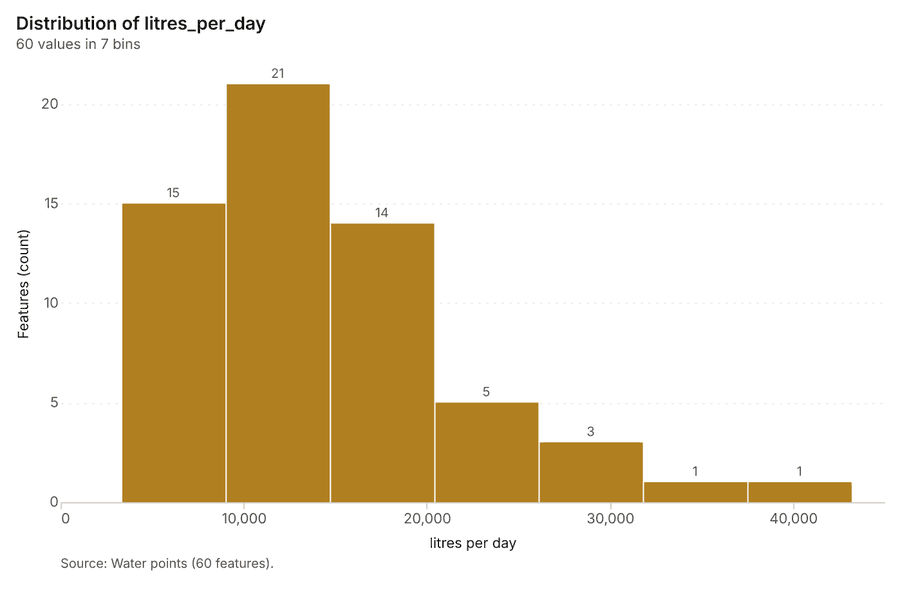
Figure 22. Water points over time (litres_per_day) 70
| bin_start | bin_end | count |
|---|---|---|
| 3,306 | 9,005 | 15 |
| 9,005 | 1.47e+04 | 21 |
| 1.47e+04 | 2.04e+04 | 14 |
| 2.04e+04 | 2.61e+04 | 5 |
| 2.61e+04 | 3.18e+04 | 3 |
| 3.18e+04 | 3.75e+04 | 1 |
| 3.75e+04 | 4.32e+04 | 1 |
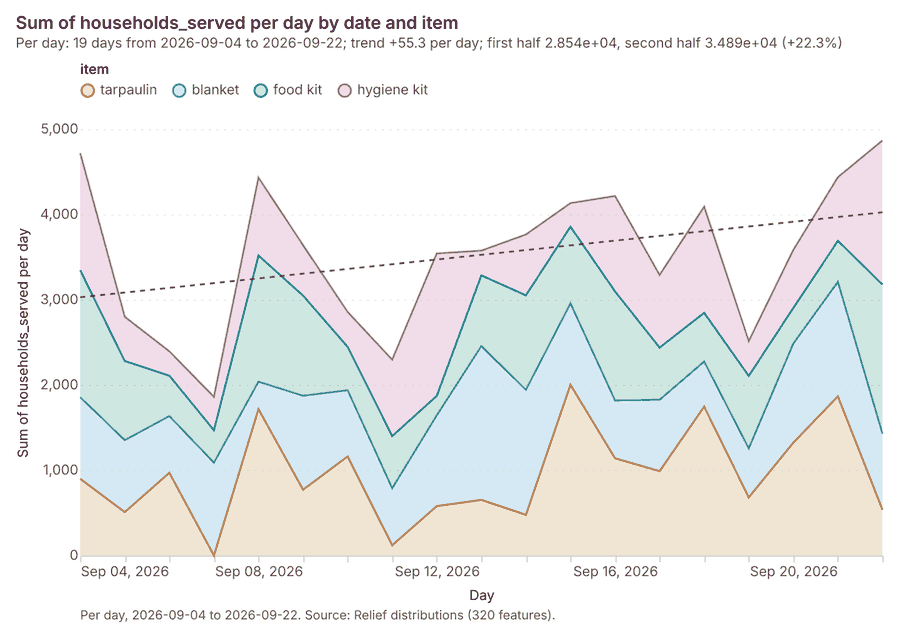
Figure 23. Relief distributions over time (date) 71
| period | series | value |
|---|---|---|
| 2026-09-04 | tarpaulin | 900 |
| 2026-09-04 | blanket | 956 |
| 2026-09-04 | food kit | 1,490 |
| 2026-09-04 | hygiene kit | 1,373 |
| 2026-09-05 | tarpaulin | 509 |
| 2026-09-05 | blanket | 843 |
| 2026-09-05 | food kit | 928 |
| 2026-09-05 | hygiene kit | 519 |
| 2026-09-06 | tarpaulin | 970 |
| 2026-09-06 | blanket | 665 |
| 2026-09-06 | food kit | 474 |
| 2026-09-06 | hygiene kit | 285 |
| 2026-09-07 | tarpaulin | 0 |
| 2026-09-07 | blanket | 1,088 |
| 2026-09-07 | food kit | 381 |
| 2026-09-07 | hygiene kit | 391 |
| 2026-09-08 | tarpaulin | 1,716 |
| 2026-09-08 | blanket | 322 |
| 2026-09-08 | food kit | 1,480 |
| 2026-09-08 | hygiene kit | 913 |
| 2026-09-09 | tarpaulin | 772 |
| 2026-09-09 | blanket | 1,101 |
| 2026-09-09 | food kit | 1,175 |
| 2026-09-09 | hygiene kit | 591 |
| 2026-09-10 | tarpaulin | 1,161 |
| 2026-09-10 | blanket | 777 |
| 2026-09-10 | food kit | 509 |
| 2026-09-10 | hygiene kit | 409 |
| 2026-09-11 | tarpaulin | 120 |
| 2026-09-11 | blanket | 668 |
| 2026-09-11 | food kit | 612 |
| 2026-09-11 | hygiene kit | 896 |
| 2026-09-12 | tarpaulin | 579 |
| 2026-09-12 | blanket | 1,064 |
| 2026-09-12 | food kit | 229 |
| 2026-09-12 | hygiene kit | 1,670 |
| 2026-09-13 | tarpaulin | 652 |
| 2026-09-13 | blanket | 1,803 |
| 2026-09-13 | food kit | 830 |
| 2026-09-13 | hygiene kit | 290 |
| 2026-09-14 | tarpaulin | 477 |
| 2026-09-14 | blanket | 1,465 |
| 2026-09-14 | food kit | 1,109 |
| 2026-09-14 | hygiene kit | 713 |
| 2026-09-15 | tarpaulin | 2,002 |
| 2026-09-15 | blanket | 954 |
| 2026-09-15 | food kit | 900 |
| 2026-09-15 | hygiene kit | 276 |
| 2026-09-16 | tarpaulin | 1,140 |
| 2026-09-16 | blanket | 678 |
| 2026-09-16 | food kit | 1,279 |
| 2026-09-16 | hygiene kit | 1,119 |
| 2026-09-17 | tarpaulin | 989 |
| 2026-09-17 | blanket | 837 |
| 2026-09-17 | food kit | 612 |
| 2026-09-17 | hygiene kit | 851 |
| 2026-09-18 | tarpaulin | 1,746 |
| 2026-09-18 | blanket | 528 |
| 2026-09-18 | food kit | 572 |
| 2026-09-18 | hygiene kit | 1,245 |
| 2026-09-19 | tarpaulin | 681 |
| 2026-09-19 | blanket | 574 |
| 2026-09-19 | food kit | 851 |
| 2026-09-19 | hygiene kit | 408 |
| 2026-09-20 | tarpaulin | 1,323 |
| 2026-09-20 | blanket | 1,162 |
| 2026-09-20 | food kit | 418 |
| 2026-09-20 | hygiene kit | 680 |
| 2026-09-21 | tarpaulin | 1,866 |
| 2026-09-21 | blanket | 1,343 |
| 2026-09-21 | food kit | 481 |
| 2026-09-21 | hygiene kit | 746 |
| 2026-09-22 | tarpaulin | 538 |
| 2026-09-22 | blanket | 891 |
| 2026-09-22 | food kit | 1,749 |
| 2026-09-22 | hygiene kit | 1,689 |
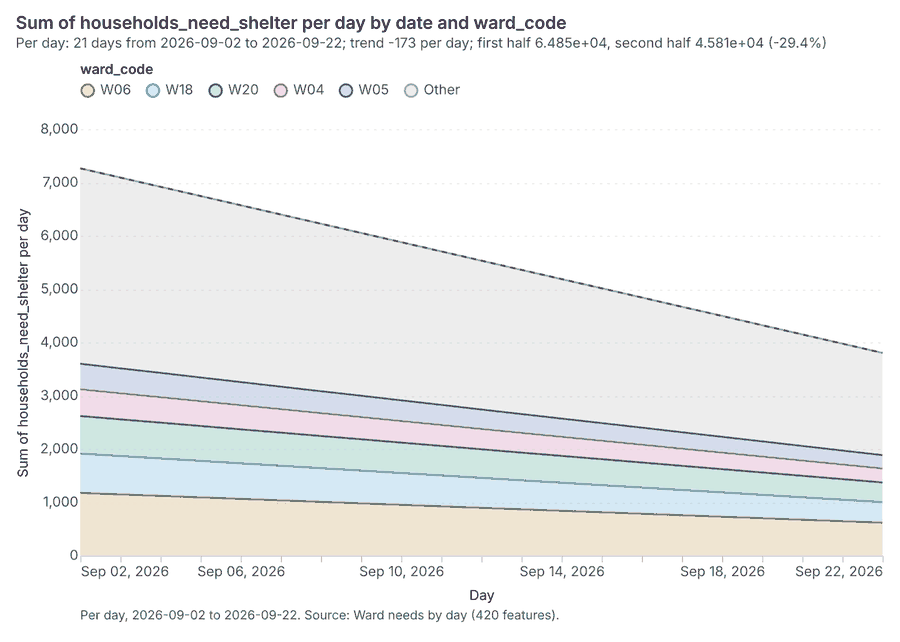
Figure 24. Ward needs by day over time (date) 72
| period | series | value |
|---|---|---|
| 2026-09-02 | W06 | 1,174 |
| 2026-09-02 | W18 | 738 |
| 2026-09-02 | W20 | 705 |
| 2026-09-02 | W04 | 501 |
| 2026-09-02 | W05 | 480 |
| 2026-09-02 | Other | 3,667 |
| 2026-09-03 | W06 | 1,146 |
| 2026-09-03 | W18 | 720 |
| 2026-09-03 | W20 | 688 |
| 2026-09-03 | W04 | 489 |
| 2026-09-03 | W05 | 468 |
| 2026-09-03 | Other | 3,581 |
| 2026-09-04 | W06 | 1,118 |
| 2026-09-04 | W18 | 703 |
| 2026-09-04 | W20 | 672 |
| 2026-09-04 | W04 | 477 |
| 2026-09-04 | W05 | 457 |
| 2026-09-04 | Other | 3,492 |
| 2026-09-05 | W06 | 1,090 |
| 2026-09-05 | W18 | 685 |
| 2026-09-05 | W20 | 655 |
| 2026-09-05 | W04 | 465 |
| 2026-09-05 | W05 | 445 |
| 2026-09-05 | Other | 3,405 |
| 2026-09-06 | W06 | 1,062 |
| 2026-09-06 | W18 | 667 |
| 2026-09-06 | W20 | 638 |
| 2026-09-06 | W04 | 453 |
| 2026-09-06 | W05 | 434 |
| 2026-09-06 | Other | 3,318 |
| 2026-09-07 | W06 | 1,034 |
| 2026-09-07 | W18 | 650 |
| 2026-09-07 | W20 | 621 |
| 2026-09-07 | W04 | 441 |
| 2026-09-07 | W05 | 422 |
| 2026-09-07 | Other | 3,230 |
| 2026-09-08 | W06 | 1,006 |
| 2026-09-08 | W18 | 632 |
| 2026-09-08 | W20 | 604 |
| 2026-09-08 | W04 | 429 |
| 2026-09-08 | W05 | 411 |
| 2026-09-08 | Other | 3,143 |
| 2026-09-09 | W06 | 978 |
| 2026-09-09 | W18 | 615 |
| 2026-09-09 | W20 | 588 |
| 2026-09-09 | W04 | 417 |
| 2026-09-09 | W05 | 400 |
| 2026-09-09 | Other | 3,055 |
| 2026-09-10 | W06 | 950 |
| 2026-09-10 | W18 | 597 |
| 2026-09-10 | W20 | 571 |
| 2026-09-10 | W04 | 405 |
| 2026-09-10 | W05 | 388 |
| 2026-09-10 | Other | 2,968 |
| 2026-09-11 | W06 | 922 |
| 2026-09-11 | W18 | 580 |
| 2026-09-11 | W20 | 554 |
| 2026-09-11 | W04 | 393 |
| 2026-09-11 | W05 | 377 |
| 2026-09-11 | Other | 2,880 |
| 2026-09-12 | W06 | 894 |
| 2026-09-12 | W18 | 562 |
| 2026-09-12 | W20 | 537 |
| 2026-09-12 | W04 | 381 |
| 2026-09-12 | W05 | 365 |
| 2026-09-12 | Other | 2,792 |
| 2026-09-13 | W06 | 866 |
| 2026-09-13 | W18 | 544 |
| 2026-09-13 | W20 | 520 |
| 2026-09-13 | W04 | 370 |
| 2026-09-13 | W05 | 354 |
| 2026-09-13 | Other | 2,705 |
| 2026-09-14 | W06 | 838 |
| 2026-09-14 | W18 | 527 |
| 2026-09-14 | W20 | 504 |
| 2026-09-14 | W04 | 358 |
| 2026-09-14 | W05 | 342 |
| 2026-09-14 | Other | 2,616 |
| 2026-09-15 | W06 | 811 |
| 2026-09-15 | W18 | 509 |
| 2026-09-15 | W20 | 487 |
| 2026-09-15 | W04 | 346 |
| 2026-09-15 | W05 | 331 |
| 2026-09-15 | Other | 2,530 |
| 2026-09-16 | W06 | 783 |
| 2026-09-16 | W18 | 492 |
| 2026-09-16 | W20 | 470 |
| 2026-09-16 | W04 | 334 |
| 2026-09-16 | W05 | 320 |
| 2026-09-16 | Other | 2,442 |
| 2026-09-17 | W06 | 755 |
| 2026-09-17 | W18 | 474 |
| 2026-09-17 | W20 | 453 |
| 2026-09-17 | W04 | 322 |
| 2026-09-17 | W05 | 308 |
| 2026-09-17 | Other | 2,355 |
| 2026-09-18 | W06 | 727 |
| 2026-09-18 | W18 | 457 |
| 2026-09-18 | W20 | 436 |
| 2026-09-18 | W04 | 310 |
| 2026-09-18 | W05 | 297 |
| 2026-09-18 | Other | 2,270 |
| 2026-09-19 | W06 | 699 |
| 2026-09-19 | W18 | 439 |
| 2026-09-19 | W20 | 420 |
| 2026-09-19 | W04 | 298 |
| 2026-09-19 | W05 | 285 |
| 2026-09-19 | Other | 2,180 |
| 2026-09-20 | W06 | 671 |
| 2026-09-20 | W18 | 421 |
| 2026-09-20 | W20 | 403 |
| 2026-09-20 | W04 | 286 |
| 2026-09-20 | W05 | 274 |
| 2026-09-20 | Other | 2,093 |
| 2026-09-21 | W06 | 643 |
| 2026-09-21 | W18 | 404 |
| 2026-09-21 | W20 | 386 |
| 2026-09-21 | W04 | 274 |
| 2026-09-21 | W05 | 262 |
| 2026-09-21 | Other | 2,006 |
| 2026-09-22 | W06 | 615 |
| 2026-09-22 | W18 | 386 |
| 2026-09-22 | W20 | 369 |
| 2026-09-22 | W04 | 262 |
| 2026-09-22 | W05 | 251 |
| 2026-09-22 | Other | 1,918 |
Figure 25. Hot spot analysis: Relief distributions 73
| bin_start | bin_end | band | band_label | count |
|---|---|---|---|---|
| -2 | -1.5 | cold_90 | Cold spot, 90% confidence | 4 |
| -1.5 | -1 | not_significant | Not significant | 49 |
| -1 | -0.5 | not_significant | Not significant | 47 |
| -0.5 | 0 | not_significant | Not significant | 24 |
| 0 | 0.5 | not_significant | Not significant | 111 |
| 0.5 | 1 | not_significant | Not significant | 72 |
| 1 | 1.5 | not_significant | Not significant | 13 |
Figure 26. Hot spot analysis: Water points 74
| bin_start | bin_end | band | band_label | count |
|---|---|---|---|---|
| -2 | -1.5 | cold_90 | Cold spot, 90% confidence | 2 |
| -1.5 | -1 | not_significant | Not significant | 1 |
| -1 | -0.5 | not_significant | Not significant | 5 |
| 0 | 0.5 | not_significant | Not significant | 5 |
| 0.5 | 1 | not_significant | Not significant | 3 |
| 1 | 1.5 | not_significant | Not significant | 3 |
| 2 | 2.5 | hot_95 | Hot spot, 95% confidence | 1 |
Figure 27. Hot spot analysis: Damage assessments 75
| bin_start | bin_end | band | band_label | count |
|---|---|---|---|---|
| -4.5 | -4 | cold_99 | Cold spot, 99% confidence | 3 |
| -4 | -3.5 | cold_99 | Cold spot, 99% confidence | 22 |
| -3.5 | -3 | cold_99 | Cold spot, 99% confidence | 54 |
| -3 | -2.5 | cold_95 | Cold spot, 95% confidence | 8 |
| -3 | -2.5 | cold_99 | Cold spot, 99% confidence | 111 |
| -2.5 | -2 | cold_95 | Cold spot, 95% confidence | 149 |
| -2 | -1.5 | cold_90 | Cold spot, 90% confidence | 99 |
| -2 | -1.5 | cold_95 | Cold spot, 95% confidence | 6 |
| -2 | -1.5 | not_significant | Not significant | 38 |
| -1.5 | -1 | not_significant | Not significant | 161 |
| -1 | -0.5 | not_significant | Not significant | 88 |
| -0.5 | 0 | not_significant | Not significant | 102 |
| 0 | 0.5 | not_significant | Not significant | 91 |
| 0.5 | 1 | not_significant | Not significant | 104 |
| 1 | 1.5 | not_significant | Not significant | 139 |
| 1.5 | 2 | hot_90 | Hot spot, 90% confidence | 104 |
| 1.5 | 2 | hot_95 | Hot spot, 95% confidence | 7 |
| 1.5 | 2 | not_significant | Not significant | 35 |
| 2 | 2.5 | hot_95 | Hot spot, 95% confidence | 109 |
| 2.5 | 3 | hot_95 | Hot spot, 95% confidence | 12 |
| 2.5 | 3 | hot_99 | Hot spot, 99% confidence | 87 |
| 3 | 3.5 | hot_99 | Hot spot, 99% confidence | 105 |
| 3.5 | 4 | hot_99 | Hot spot, 99% confidence | 73 |
| 4 | 4.5 | hot_99 | Hot spot, 99% confidence | 60 |
| 4.5 | 5 | hot_99 | Hot spot, 99% confidence | 49 |
| 5 | 5.5 | hot_99 | Hot spot, 99% confidence | 38 |
| 5.5 | 6 | hot_99 | Hot spot, 99% confidence | 64 |
| 6 | 6.5 | hot_99 | Hot spot, 99% confidence | 57 |
| 6.5 | 7 | hot_99 | Hot spot, 99% confidence | 23 |
| 7 | 7.5 | hot_99 | Hot spot, 99% confidence | 2 |
Figure 28. Emerging hot spots: Relief distributions 76
| bin_start | bin_end | count |
|---|---|---|
| -0.827 | -0.2167 | 15 |
| -0.2167 | 0.3936 | 11 |
| 0.3936 | 1.004 | 10 |
| 1.004 | 1.614 | 6 |
| 1.614 | 2.224 | 6 |
| 2.224 | 2.835 | 4 |
| 2.835 | 3.445 | 2 |
Figure 29. Emerging hot spots: Damage assessments 77
| bin_start | bin_end | count |
|---|---|---|
| -1.153 | -0.5664 | 45 |
| -0.5664 | 0.02025 | 18 |
| 0.02025 | 0.6069 | 10 |
| 0.6069 | 1.194 | 0 |
| 1.194 | 1.78 | 6 |
| 1.78 | 2.367 | 6 |
| 2.367 | 2.953 | 1 |
| 2.953 | 3.54 | 1 |
Figure 30. Repeat and near repeat classification: Relief distributions 78
| period | series | value |
|---|---|---|
| 2026-09-04 | blanket | 5 |
| 2026-09-04 | tarpaulin | 4 |
| 2026-09-04 | hygiene kit | 6 |
| 2026-09-04 | food kit | 6 |
| 2026-09-05 | blanket | 4 |
| 2026-09-05 | tarpaulin | 2 |
| 2026-09-05 | hygiene kit | 3 |
| 2026-09-05 | food kit | 6 |
| 2026-09-06 | blanket | 4 |
| 2026-09-06 | tarpaulin | 5 |
| 2026-09-06 | hygiene kit | 4 |
| 2026-09-06 | food kit | 2 |
| 2026-09-07 | blanket | 5 |
| 2026-09-07 | tarpaulin | 0 |
| 2026-09-07 | hygiene kit | 1 |
| 2026-09-07 | food kit | 3 |
| 2026-09-08 | blanket | 1 |
| 2026-09-08 | tarpaulin | 8 |
| 2026-09-08 | hygiene kit | 4 |
| 2026-09-08 | food kit | 5 |
| 2026-09-09 | blanket | 4 |
| 2026-09-09 | tarpaulin | 5 |
| 2026-09-09 | hygiene kit | 3 |
| 2026-09-09 | food kit | 4 |
| 2026-09-10 | blanket | 4 |
| 2026-09-10 | tarpaulin | 6 |
| 2026-09-10 | hygiene kit | 2 |
| 2026-09-10 | food kit | 3 |
| 2026-09-11 | blanket | 5 |
| 2026-09-11 | tarpaulin | 1 |
| 2026-09-11 | hygiene kit | 6 |
| 2026-09-11 | food kit | 3 |
| 2026-09-12 | blanket | 4 |
| 2026-09-12 | tarpaulin | 3 |
| 2026-09-12 | hygiene kit | 8 |
| 2026-09-12 | food kit | 2 |
| 2026-09-13 | blanket | 8 |
| 2026-09-13 | tarpaulin | 5 |
| 2026-09-13 | hygiene kit | 2 |
| 2026-09-13 | food kit | 4 |
| 2026-09-14 | blanket | 7 |
| 2026-09-14 | tarpaulin | 3 |
| 2026-09-14 | hygiene kit | 4 |
| 2026-09-14 | food kit | 3 |
| 2026-09-15 | blanket | 5 |
| 2026-09-15 | tarpaulin | 8 |
| 2026-09-15 | hygiene kit | 2 |
| 2026-09-15 | food kit | 4 |
| 2026-09-16 | blanket | 4 |
| 2026-09-16 | tarpaulin | 5 |
| 2026-09-16 | hygiene kit | 5 |
| 2026-09-16 | food kit | 4 |
| 2026-09-17 | blanket | 6 |
| 2026-09-17 | tarpaulin | 5 |
| 2026-09-17 | hygiene kit | 5 |
| 2026-09-17 | food kit | 4 |
| 2026-09-18 | blanket | 2 |
| 2026-09-18 | tarpaulin | 6 |
| 2026-09-18 | hygiene kit | 6 |
| 2026-09-18 | food kit | 3 |
| 2026-09-19 | blanket | 4 |
| 2026-09-19 | tarpaulin | 2 |
| 2026-09-19 | hygiene kit | 2 |
| 2026-09-19 | food kit | 3 |
| 2026-09-20 | blanket | 5 |
| 2026-09-20 | tarpaulin | 6 |
| 2026-09-20 | hygiene kit | 3 |
| 2026-09-20 | food kit | 2 |
| 2026-09-21 | blanket | 4 |
| 2026-09-21 | tarpaulin | 8 |
| 2026-09-21 | hygiene kit | 2 |
| 2026-09-21 | food kit | 4 |
| 2026-09-22 | blanket | 6 |
| 2026-09-22 | tarpaulin | 3 |
| 2026-09-22 | hygiene kit | 9 |
| 2026-09-22 | food kit | 6 |
Figure 31. Summarize within: Wards 79
| bin_start | bin_end | count |
|---|---|---|
| 0 | 0.5 | 3 |
| 0.5 | 1 | 0 |
| 1 | 1.5 | 11 |
| 1.5 | 2 | 0 |
| 2 | 2.5 | 4 |
| 2.5 | 3 | 2 |
Figure 32. Summarize within: Wards 80
| bin_start | bin_end | count |
|---|---|---|
| 0 | 7 | 4 |
| 7 | 14 | 3 |
| 14 | 21 | 7 |
| 21 | 28 | 2 |
| 28 | 35 | 2 |
| 35 | 42 | 2 |
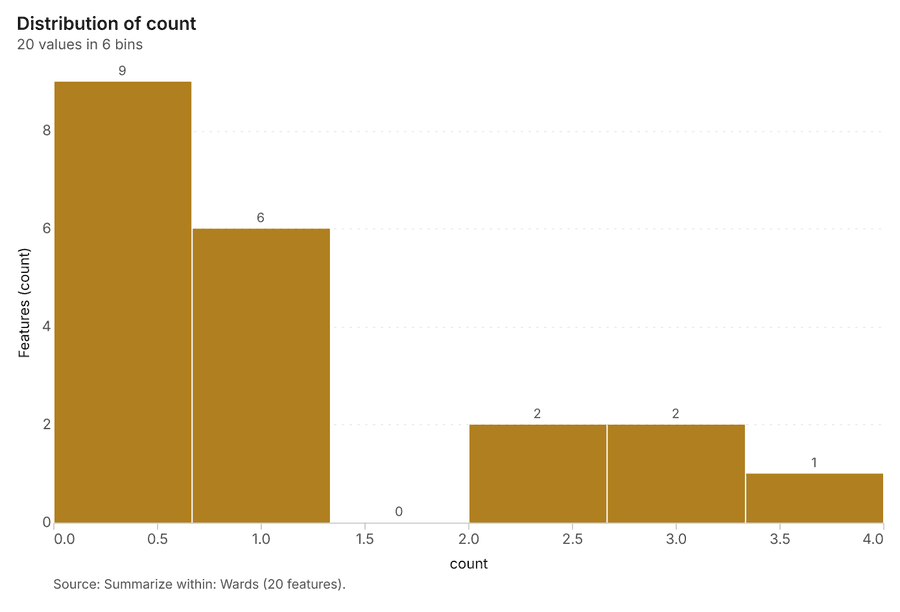
Figure 33. Summarize within: Wards 81
| bin_start | bin_end | count |
|---|---|---|
| 0 | 0.6667 | 9 |
| 0.6667 | 1.333 | 6 |
| 1.333 | 2 | 0 |
| 2 | 2.667 | 2 |
| 2.667 | 3.333 | 2 |
| 3.333 | 4 | 1 |
Figure 34. Find point clusters: Shelters 82
| cluster | features | fraction | share |
|---|---|---|---|
| 0 | 23 | 0.92 | 92.0% |
| Noise | 2 | 0.08 | 8.0% |
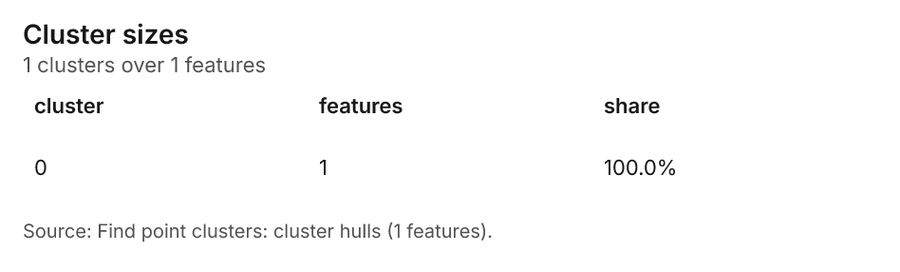
Figure 35. Find point clusters: cluster hulls 83
| cluster | features | fraction | share |
|---|---|---|---|
| 0 | 1 | 1 | 100.0% |
Figure 36. Find point clusters: Relief distributions 84
| cluster | features | fraction | share |
|---|---|---|---|
| 7 | 25 | 0.07812 | 7.8% |
| 15 | 21 | 0.06563 | 6.6% |
| 0 | 17 | 0.05312 | 5.3% |
| 10 | 17 | 0.05312 | 5.3% |
| 2 | 17 | 0.05312 | 5.3% |
| 9 | 16 | 0.05 | 5.0% |
| 11 | 15 | 0.04688 | 4.7% |
| 12 | 15 | 0.04688 | 4.7% |
| 3 | 15 | 0.04688 | 4.7% |
| 14 | 14 | 0.04375 | 4.4% |
| 17 | 14 | 0.04375 | 4.4% |
| 4 | 14 | 0.04375 | 4.4% |
| 5 | 14 | 0.04375 | 4.4% |
| 6 | 14 | 0.04375 | 4.4% |
| 8 | 14 | 0.04375 | 4.4% |
| 18 | 13 | 0.04063 | 4.1% |
| 13 | 12 | 0.0375 | 3.8% |
| 20 | 12 | 0.0375 | 3.8% |
| Noise | 12 | 0.0375 | 3.8% |
| 19 | 11 | 0.03438 | 3.4% |
| 1 | 10 | 0.03125 | 3.1% |
| 16 | 8 | 0.025 | 2.5% |
Figure 37. Find point clusters: cluster hulls 85
| cluster | features | fraction | share |
|---|---|---|---|
| 0 | 1 | 0.04762 | 4.8% |
| 1 | 1 | 0.04762 | 4.8% |
| 10 | 1 | 0.04762 | 4.8% |
| 11 | 1 | 0.04762 | 4.8% |
| 12 | 1 | 0.04762 | 4.8% |
| 13 | 1 | 0.04762 | 4.8% |
| 14 | 1 | 0.04762 | 4.8% |
| 15 | 1 | 0.04762 | 4.8% |
| 16 | 1 | 0.04762 | 4.8% |
| 17 | 1 | 0.04762 | 4.8% |
| 18 | 1 | 0.04762 | 4.8% |
| 19 | 1 | 0.04762 | 4.8% |
| 2 | 1 | 0.04762 | 4.8% |
| 20 | 1 | 0.04762 | 4.8% |
| 3 | 1 | 0.04762 | 4.8% |
| 4 | 1 | 0.04762 | 4.8% |
| 5 | 1 | 0.04762 | 4.8% |
| 6 | 1 | 0.04762 | 4.8% |
| 7 | 1 | 0.04762 | 4.8% |
| 8 | 1 | 0.04762 | 4.8% |
| 9 | 1 | 0.04762 | 4.8% |
Figure 38. Find point clusters: Health posts 86
| cluster | features | fraction | share |
|---|---|---|---|
| 0 | 16 | 0.8 | 80.0% |
| 1 | 3 | 0.15 | 15.0% |
| Noise | 1 | 0.05 | 5.0% |
Figure 39. Find point clusters: cluster hulls 87
| cluster | features | fraction | share |
|---|---|---|---|
| 0 | 1 | 0.5 | 50.0% |
| 1 | 1 | 0.5 | 50.0% |
Figure 40. Calculate density: Shelters 88
| bin_start | bin_end | count |
|---|---|---|
| 4.952e-05 | 0.1046 | 26 |
| 0.1046 | 0.2091 | 11 |
| 0.2091 | 0.3137 | 13 |
| 0.3137 | 0.4182 | 16 |
| 0.4182 | 0.5227 | 13 |
| 0.5227 | 0.6273 | 6 |
| 0.6273 | 0.7318 | 4 |
| 0.7318 | 0.8364 | 1 |
Figure 41. Calculate density: Relief distributions 89
| bin_start | bin_end | count |
|---|---|---|
| 0 | 2 | 16 |
| 2 | 4 | 24 |
| 4 | 6 | 30 |
| 6 | 8 | 30 |
| 8 | 10 | 29 |
| 10 | 12 | 23 |
| 12 | 14 | 30 |
| 14 | 16 | 27 |
| 16 | 18 | 13 |
Figure 42. Calculate density: Health posts 90
| bin_start | bin_end | count |
|---|---|---|
| 0 | 1.778 | 19 |
| 1.778 | 3.556 | 28 |
| 3.556 | 5.333 | 32 |
| 5.333 | 7.111 | 32 |
| 7.111 | 8.889 | 15 |
| 8.889 | 10.67 | 32 |
| 10.67 | 12.44 | 32 |
| 12.44 | 14.22 | 26 |
| 14.22 | 16 | 12 |
Figure 43. Find outliers: Wards 91
| value | lag | type |
|---|---|---|
| -0.1006 | 0.265 | NS |
| -1.513 | -0.6592 | NS |
| -0.5809 | -0.8478 | NS |
| -0.3709 | -0.6076 | NS |
| -0.0457 | -1.258 | NS |
| 2.151 | -1.039 | NS |
| -0.0925 | 0.0756 | NS |
| -1.004 | 0.3063 | NS |
| 0.1157 | 1.873 | NS |
| 0.9009 | -0.1006 | NS |
| -0.5907 | -0.6902 | NS |
| 1.234 | -1.004 | NS |
| 1.873 | -0.0841 | NS |
| 0.7456 | -0.5907 | NS |
| -0.2838 | 0.3999 | NS |
| -1.413 | -0.7775 | NS |
| 0.4349 | -0.0925 | NS |
| -0.9643 | -0.4722 | NS |
| 0.6182 | -1.004 | NS |
| -1.115 | -0.1741 | NS |
Figure 44. Find point clusters: Relief distributions over time 92
| period | series | value |
|---|---|---|
| 2026-09-04 | blanket | 5 |
| 2026-09-04 | tarpaulin | 4 |
| 2026-09-04 | hygiene kit | 6 |
| 2026-09-04 | food kit | 6 |
| 2026-09-05 | blanket | 4 |
| 2026-09-05 | tarpaulin | 2 |
| 2026-09-05 | hygiene kit | 3 |
| 2026-09-05 | food kit | 6 |
| 2026-09-06 | blanket | 4 |
| 2026-09-06 | tarpaulin | 5 |
| 2026-09-06 | hygiene kit | 4 |
| 2026-09-06 | food kit | 2 |
| 2026-09-07 | blanket | 5 |
| 2026-09-07 | tarpaulin | 0 |
| 2026-09-07 | hygiene kit | 1 |
| 2026-09-07 | food kit | 3 |
| 2026-09-08 | blanket | 1 |
| 2026-09-08 | tarpaulin | 8 |
| 2026-09-08 | hygiene kit | 4 |
| 2026-09-08 | food kit | 5 |
| 2026-09-09 | blanket | 4 |
| 2026-09-09 | tarpaulin | 5 |
| 2026-09-09 | hygiene kit | 3 |
| 2026-09-09 | food kit | 4 |
| 2026-09-10 | blanket | 4 |
| 2026-09-10 | tarpaulin | 6 |
| 2026-09-10 | hygiene kit | 2 |
| 2026-09-10 | food kit | 3 |
| 2026-09-11 | blanket | 5 |
| 2026-09-11 | tarpaulin | 1 |
| 2026-09-11 | hygiene kit | 6 |
| 2026-09-11 | food kit | 3 |
| 2026-09-12 | blanket | 4 |
| 2026-09-12 | tarpaulin | 3 |
| 2026-09-12 | hygiene kit | 8 |
| 2026-09-12 | food kit | 2 |
| 2026-09-13 | blanket | 8 |
| 2026-09-13 | tarpaulin | 5 |
| 2026-09-13 | hygiene kit | 2 |
| 2026-09-13 | food kit | 4 |
| 2026-09-14 | blanket | 7 |
| 2026-09-14 | tarpaulin | 3 |
| 2026-09-14 | hygiene kit | 4 |
| 2026-09-14 | food kit | 3 |
| 2026-09-15 | blanket | 5 |
| 2026-09-15 | tarpaulin | 8 |
| 2026-09-15 | hygiene kit | 2 |
| 2026-09-15 | food kit | 4 |
| 2026-09-16 | blanket | 4 |
| 2026-09-16 | tarpaulin | 5 |
| 2026-09-16 | hygiene kit | 5 |
| 2026-09-16 | food kit | 4 |
| 2026-09-17 | blanket | 6 |
| 2026-09-17 | tarpaulin | 5 |
| 2026-09-17 | hygiene kit | 5 |
| 2026-09-17 | food kit | 4 |
| 2026-09-18 | blanket | 2 |
| 2026-09-18 | tarpaulin | 6 |
| 2026-09-18 | hygiene kit | 6 |
| 2026-09-18 | food kit | 3 |
| 2026-09-19 | blanket | 4 |
| 2026-09-19 | tarpaulin | 2 |
| 2026-09-19 | hygiene kit | 2 |
| 2026-09-19 | food kit | 3 |
| 2026-09-20 | blanket | 5 |
| 2026-09-20 | tarpaulin | 6 |
| 2026-09-20 | hygiene kit | 3 |
| 2026-09-20 | food kit | 2 |
| 2026-09-21 | blanket | 4 |
| 2026-09-21 | tarpaulin | 8 |
| 2026-09-21 | hygiene kit | 2 |
| 2026-09-21 | food kit | 4 |
| 2026-09-22 | blanket | 6 |
| 2026-09-22 | tarpaulin | 3 |
| 2026-09-22 | hygiene kit | 9 |
| 2026-09-22 | food kit | 6 |
Figure 45. Repeat and near repeat classification: Relief distributions over time 93
| period | series | value |
|---|---|---|
| 2026-09-04 | blanket | 5 |
| 2026-09-04 | tarpaulin | 4 |
| 2026-09-04 | hygiene kit | 6 |
| 2026-09-04 | food kit | 6 |
| 2026-09-05 | blanket | 4 |
| 2026-09-05 | tarpaulin | 2 |
| 2026-09-05 | hygiene kit | 3 |
| 2026-09-05 | food kit | 6 |
| 2026-09-06 | blanket | 4 |
| 2026-09-06 | tarpaulin | 5 |
| 2026-09-06 | hygiene kit | 4 |
| 2026-09-06 | food kit | 2 |
| 2026-09-07 | blanket | 5 |
| 2026-09-07 | tarpaulin | 0 |
| 2026-09-07 | hygiene kit | 1 |
| 2026-09-07 | food kit | 3 |
| 2026-09-08 | blanket | 1 |
| 2026-09-08 | tarpaulin | 8 |
| 2026-09-08 | hygiene kit | 4 |
| 2026-09-08 | food kit | 5 |
| 2026-09-09 | blanket | 4 |
| 2026-09-09 | tarpaulin | 5 |
| 2026-09-09 | hygiene kit | 3 |
| 2026-09-09 | food kit | 4 |
| 2026-09-10 | blanket | 4 |
| 2026-09-10 | tarpaulin | 6 |
| 2026-09-10 | hygiene kit | 2 |
| 2026-09-10 | food kit | 3 |
| 2026-09-11 | blanket | 5 |
| 2026-09-11 | tarpaulin | 1 |
| 2026-09-11 | hygiene kit | 6 |
| 2026-09-11 | food kit | 3 |
| 2026-09-12 | blanket | 4 |
| 2026-09-12 | tarpaulin | 3 |
| 2026-09-12 | hygiene kit | 8 |
| 2026-09-12 | food kit | 2 |
| 2026-09-13 | blanket | 8 |
| 2026-09-13 | tarpaulin | 5 |
| 2026-09-13 | hygiene kit | 2 |
| 2026-09-13 | food kit | 4 |
| 2026-09-14 | blanket | 7 |
| 2026-09-14 | tarpaulin | 3 |
| 2026-09-14 | hygiene kit | 4 |
| 2026-09-14 | food kit | 3 |
| 2026-09-15 | blanket | 5 |
| 2026-09-15 | tarpaulin | 8 |
| 2026-09-15 | hygiene kit | 2 |
| 2026-09-15 | food kit | 4 |
| 2026-09-16 | blanket | 4 |
| 2026-09-16 | tarpaulin | 5 |
| 2026-09-16 | hygiene kit | 5 |
| 2026-09-16 | food kit | 4 |
| 2026-09-17 | blanket | 6 |
| 2026-09-17 | tarpaulin | 5 |
| 2026-09-17 | hygiene kit | 5 |
| 2026-09-17 | food kit | 4 |
| 2026-09-18 | blanket | 2 |
| 2026-09-18 | tarpaulin | 6 |
| 2026-09-18 | hygiene kit | 6 |
| 2026-09-18 | food kit | 3 |
| 2026-09-19 | blanket | 4 |
| 2026-09-19 | tarpaulin | 2 |
| 2026-09-19 | hygiene kit | 2 |
| 2026-09-19 | food kit | 3 |
| 2026-09-20 | blanket | 5 |
| 2026-09-20 | tarpaulin | 6 |
| 2026-09-20 | hygiene kit | 3 |
| 2026-09-20 | food kit | 2 |
| 2026-09-21 | blanket | 4 |
| 2026-09-21 | tarpaulin | 8 |
| 2026-09-21 | hygiene kit | 2 |
| 2026-09-21 | food kit | 4 |
| 2026-09-22 | blanket | 6 |
| 2026-09-22 | tarpaulin | 3 |
| 2026-09-22 | hygiene kit | 9 |
| 2026-09-22 | food kit | 6 |
Figure 46. Hot spot analysis: Damage assessments over time 94
| period | series | value |
|---|---|---|
| 2026-09-02 | not_significant | 51 |
| 2026-09-02 | hot_99 | 41 |
| 2026-09-02 | cold_99 | 12 |
| 2026-09-02 | cold_95 | 13 |
| 2026-09-02 | hot_95 | 8 |
| 2026-09-02 | Other | 10 |
| 2026-09-03 | not_significant | 47 |
| 2026-09-03 | hot_99 | 35 |
| 2026-09-03 | cold_99 | 9 |
| 2026-09-03 | cold_95 | 14 |
| 2026-09-03 | hot_95 | 11 |
| 2026-09-03 | Other | 16 |
| 2026-09-04 | not_significant | 47 |
| 2026-09-04 | hot_99 | 37 |
| 2026-09-04 | cold_99 | 9 |
| 2026-09-04 | cold_95 | 8 |
| 2026-09-04 | hot_95 | 5 |
| 2026-09-04 | Other | 14 |
| 2026-09-05 | not_significant | 51 |
| 2026-09-05 | hot_99 | 49 |
| 2026-09-05 | cold_99 | 13 |
| 2026-09-05 | cold_95 | 7 |
| 2026-09-05 | hot_95 | 7 |
| 2026-09-05 | Other | 11 |
| 2026-09-06 | not_significant | 43 |
| 2026-09-06 | hot_99 | 32 |
| 2026-09-06 | cold_99 | 7 |
| 2026-09-06 | cold_95 | 10 |
| 2026-09-06 | hot_95 | 7 |
| 2026-09-06 | Other | 5 |
| 2026-09-07 | not_significant | 41 |
| 2026-09-07 | hot_99 | 26 |
| 2026-09-07 | cold_99 | 6 |
| 2026-09-07 | cold_95 | 6 |
| 2026-09-07 | hot_95 | 8 |
| 2026-09-07 | Other | 8 |
| 2026-09-08 | not_significant | 41 |
| 2026-09-08 | hot_99 | 29 |
| 2026-09-08 | cold_99 | 10 |
| 2026-09-08 | cold_95 | 10 |
| 2026-09-08 | hot_95 | 9 |
| 2026-09-08 | Other | 10 |
| 2026-09-09 | not_significant | 50 |
| 2026-09-09 | hot_99 | 24 |
| 2026-09-09 | cold_99 | 12 |
| 2026-09-09 | cold_95 | 10 |
| 2026-09-09 | hot_95 | 7 |
| 2026-09-09 | Other | 12 |
| 2026-09-10 | not_significant | 38 |
| 2026-09-10 | hot_99 | 38 |
| 2026-09-10 | cold_99 | 14 |
| 2026-09-10 | cold_95 | 5 |
| 2026-09-10 | hot_95 | 8 |
| 2026-09-10 | Other | 13 |
| 2026-09-11 | not_significant | 35 |
| 2026-09-11 | hot_99 | 24 |
| 2026-09-11 | cold_99 | 11 |
| 2026-09-11 | cold_95 | 14 |
| 2026-09-11 | hot_95 | 13 |
| 2026-09-11 | Other | 11 |
| 2026-09-12 | not_significant | 36 |
| 2026-09-12 | hot_99 | 27 |
| 2026-09-12 | cold_99 | 6 |
| 2026-09-12 | cold_95 | 7 |
| 2026-09-12 | hot_95 | 4 |
| 2026-09-12 | Other | 14 |
| 2026-09-13 | not_significant | 29 |
| 2026-09-13 | hot_99 | 29 |
| 2026-09-13 | cold_99 | 4 |
| 2026-09-13 | cold_95 | 5 |
| 2026-09-13 | hot_95 | 4 |
| 2026-09-13 | Other | 7 |
| 2026-09-14 | not_significant | 33 |
| 2026-09-14 | hot_99 | 14 |
| 2026-09-14 | cold_99 | 8 |
| 2026-09-14 | cold_95 | 9 |
| 2026-09-14 | hot_95 | 4 |
| 2026-09-14 | Other | 11 |
| 2026-09-15 | not_significant | 28 |
| 2026-09-15 | hot_99 | 22 |
| 2026-09-15 | cold_99 | 13 |
| 2026-09-15 | cold_95 | 9 |
| 2026-09-15 | hot_95 | 5 |
| 2026-09-15 | Other | 12 |
| 2026-09-16 | not_significant | 31 |
| 2026-09-16 | hot_99 | 20 |
| 2026-09-16 | cold_99 | 8 |
| 2026-09-16 | cold_95 | 7 |
| 2026-09-16 | hot_95 | 3 |
| 2026-09-16 | Other | 7 |
| 2026-09-17 | not_significant | 30 |
| 2026-09-17 | hot_99 | 32 |
| 2026-09-17 | cold_99 | 13 |
| 2026-09-17 | cold_95 | 2 |
| 2026-09-17 | hot_95 | 3 |
| 2026-09-17 | Other | 9 |
| 2026-09-18 | not_significant | 23 |
| 2026-09-18 | hot_99 | 20 |
| 2026-09-18 | cold_99 | 9 |
| 2026-09-18 | cold_95 | 6 |
| 2026-09-18 | hot_95 | 4 |
| 2026-09-18 | Other | 7 |
| 2026-09-19 | not_significant | 32 |
| 2026-09-19 | hot_99 | 18 |
| 2026-09-19 | cold_99 | 6 |
| 2026-09-19 | cold_95 | 6 |
| 2026-09-19 | hot_95 | 6 |
| 2026-09-19 | Other | 7 |
| 2026-09-20 | not_significant | 24 |
| 2026-09-20 | hot_99 | 7 |
| 2026-09-20 | cold_99 | 10 |
| 2026-09-20 | cold_95 | 7 |
| 2026-09-20 | hot_95 | 6 |
| 2026-09-20 | Other | 9 |
| 2026-09-21 | not_significant | 22 |
| 2026-09-21 | hot_99 | 16 |
| 2026-09-21 | cold_99 | 5 |
| 2026-09-21 | cold_95 | 4 |
| 2026-09-21 | hot_95 | 4 |
| 2026-09-21 | Other | 7 |
| 2026-09-22 | not_significant | 26 |
| 2026-09-22 | hot_99 | 18 |
| 2026-09-22 | cold_99 | 5 |
| 2026-09-22 | cold_95 | 4 |
| 2026-09-22 | hot_95 | 2 |
| 2026-09-22 | Other | 3 |
Figure 47. Hot spot analysis: Relief distributions over time 95
| period | series | value |
|---|---|---|
| 2026-09-04 | blanket | 5 |
| 2026-09-04 | tarpaulin | 4 |
| 2026-09-04 | hygiene kit | 6 |
| 2026-09-04 | food kit | 6 |
| 2026-09-05 | blanket | 4 |
| 2026-09-05 | tarpaulin | 2 |
| 2026-09-05 | hygiene kit | 3 |
| 2026-09-05 | food kit | 6 |
| 2026-09-06 | blanket | 4 |
| 2026-09-06 | tarpaulin | 5 |
| 2026-09-06 | hygiene kit | 4 |
| 2026-09-06 | food kit | 2 |
| 2026-09-07 | blanket | 5 |
| 2026-09-07 | tarpaulin | 0 |
| 2026-09-07 | hygiene kit | 1 |
| 2026-09-07 | food kit | 3 |
| 2026-09-08 | blanket | 1 |
| 2026-09-08 | tarpaulin | 8 |
| 2026-09-08 | hygiene kit | 4 |
| 2026-09-08 | food kit | 5 |
| 2026-09-09 | blanket | 4 |
| 2026-09-09 | tarpaulin | 5 |
| 2026-09-09 | hygiene kit | 3 |
| 2026-09-09 | food kit | 4 |
| 2026-09-10 | blanket | 4 |
| 2026-09-10 | tarpaulin | 6 |
| 2026-09-10 | hygiene kit | 2 |
| 2026-09-10 | food kit | 3 |
| 2026-09-11 | blanket | 5 |
| 2026-09-11 | tarpaulin | 1 |
| 2026-09-11 | hygiene kit | 6 |
| 2026-09-11 | food kit | 3 |
| 2026-09-12 | blanket | 4 |
| 2026-09-12 | tarpaulin | 3 |
| 2026-09-12 | hygiene kit | 8 |
| 2026-09-12 | food kit | 2 |
| 2026-09-13 | blanket | 8 |
| 2026-09-13 | tarpaulin | 5 |
| 2026-09-13 | hygiene kit | 2 |
| 2026-09-13 | food kit | 4 |
| 2026-09-14 | blanket | 7 |
| 2026-09-14 | tarpaulin | 3 |
| 2026-09-14 | hygiene kit | 4 |
| 2026-09-14 | food kit | 3 |
| 2026-09-15 | blanket | 5 |
| 2026-09-15 | tarpaulin | 8 |
| 2026-09-15 | hygiene kit | 2 |
| 2026-09-15 | food kit | 4 |
| 2026-09-16 | blanket | 4 |
| 2026-09-16 | tarpaulin | 5 |
| 2026-09-16 | hygiene kit | 5 |
| 2026-09-16 | food kit | 4 |
| 2026-09-17 | blanket | 6 |
| 2026-09-17 | tarpaulin | 5 |
| 2026-09-17 | hygiene kit | 5 |
| 2026-09-17 | food kit | 4 |
| 2026-09-18 | blanket | 2 |
| 2026-09-18 | tarpaulin | 6 |
| 2026-09-18 | hygiene kit | 6 |
| 2026-09-18 | food kit | 3 |
| 2026-09-19 | blanket | 4 |
| 2026-09-19 | tarpaulin | 2 |
| 2026-09-19 | hygiene kit | 2 |
| 2026-09-19 | food kit | 3 |
| 2026-09-20 | blanket | 5 |
| 2026-09-20 | tarpaulin | 6 |
| 2026-09-20 | hygiene kit | 3 |
| 2026-09-20 | food kit | 2 |
| 2026-09-21 | blanket | 4 |
| 2026-09-21 | tarpaulin | 8 |
| 2026-09-21 | hygiene kit | 2 |
| 2026-09-21 | food kit | 4 |
| 2026-09-22 | blanket | 6 |
| 2026-09-22 | tarpaulin | 3 |
| 2026-09-22 | hygiene kit | 9 |
| 2026-09-22 | food kit | 6 |
GeoBit Large Spatial Model. Findings are labeled Evidenced (computed by a tool), Inferred (a reading or reasoning) or Unverified (no evidence yet).