Sample: Field operations terrain, Sennybridge: report
Project: Sample: Field operations terrain, Sennybridge
Goal: Describe the project Sample: Field operations terrain, Sennybridge: run the analyses that tell the most about its data, draw every result, and write a cited report.
Run: a36509fb-c3ff-418d-888b-dfbec0c1819e (running, 11 agent run(s))
Generated: 2026-10-18T05:50:35Z, version 1
Model cost: USD 0.0000 over 0 model call(s)
Data used
| Data | Kind | Rows | Time span | Summary | Source |
|---|---|---|---|---|---|
| Observation posts | vector, Point | 10 | 10 point features; 'manned' has 2 values (top: True 7, False 3); 'height_m' 2 to 2 (mean 2); 'ground_m' 449.5 to 532.4 (mean 493.7); named by 'name' (e.g. Observation post 1, Observation post 2, Observation post 3); extent -3.6612,52.0113 to -3.5369,52.0492. Point locations of Observation posts by manned. | 93 | |
| Areas of operation | vector, Polygon | 6 | 6 polygon (area) features; 'priority' 1 to 3 (mean 1.667); named by 'name' (e.g. AO North West, AO North, AO North East); total area 80.06 km2; extent -3.6734,51.9936 to -3.5267,52.0663. Areas (Areas of operation) with priority to compare and map. | 94 | |
| Tracks and routes | vector, LineString | 10 | 10 line features; 'surface' has 3 values (top: track 6, footpath 3, valley road 1); 'max_vehicle' has 4 values (top: foot only 5, 4x4 3, truck 1); total length 101.9 km; extent -3.6731,51.9938 to -3.5267,52.0661. Lines (Tracks and routes) such as routes or networks. | 95 | |
| Patrol reports | vector, Point | 650 | 2026-09-07 to 2026-10-04 | 650 point features; dated by 'reported_at' from 2026-09-07 to 2026-10-04; 'type' has 4 values (top: observation 173, vehicle 165, movement 156); 'confidence' has 3 values (top: medium 238, low 206, high 206); extent -3.6728,52.0126 to -3.5271,52.0491. Dated point events by type: where and when Patrol reports happen. | 2 |
| Obstacles | vector, Point | 90 | 2026-08-24 to 2026-10-04 | 90 point features; dated by 'date' from 2026-08-24 to 2026-10-04; 'type' has 5 values (top: fallen tree 20, fence 20, washout 20); 'passable_by' has 2 values (top: tracked 37, foot only 26); extent -3.6713,51.9949 to -3.5392,52.0467. Dated point events by type: where and when Obstacles happen. | 3 |
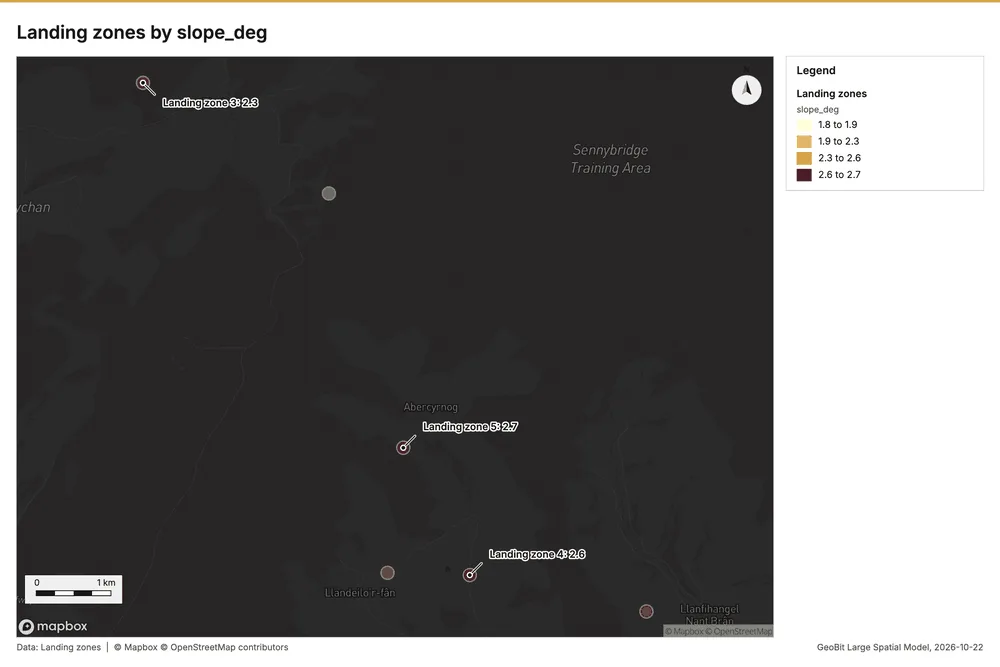
| Landing zones | vector, Polygon | 6 | 6 polygon (area) features; 'surface' has 2 values (top: grass 5, heather 1); 'slope_deg' 1.8 to 2.7 (mean 2.267); named by 'name' (e.g. Landing zone 1, Landing zone 2, Landing zone 3); total area 0.1524 km2; extent -3.6535,51.9966 to -3.5514,52.0625. Areas (Landing zones) with slope_deg to compare and map. | 96 | |
| Water crossings | vector, Point | 20 | 20 point features; 'type' has 3 values (top: ford 8, culvert 7, bridge 5); 'max_depth_m' 0.2 to 1.2 (mean 0.735); extent -3.6513,52.0278 to -3.5856,52.0321. Point locations of Water crossings by type. | 97 | |
| Training area terrain model (DEM) | raster | 1-band float32 raster (dem), 500 x 400 cells; resolution 20; band 1 237.7 to 543.7; extent -3.6734,51.9936 to -3.5267,52.0663. An elevation surface for terrain analysis. | 98 | ||
| Patrol log | table | 180 | 2026-09-07 to 2026-10-04 | Table of 180 rows and 6 columns without geometry; dated by 'date' from 2026-09-07 to 2026-10-04; 'ao_code' has 6 values (top: AO2 37, AO5 34, AO6 31); 'distance_km' 3 to 17.7 (mean 10.23); 'duration_h' 2 to 9 (mean 5.54); 'reports' 0 to 9 (mean 2.961). A table of Patrol log without locations. | 4 |
| Unit roster | table | 12 | Table of 12 rows and 5 columns without geometry; 'ao_code' has 6 values (top: AO1 2, AO2 2, AO3 2); 'role' has 3 values (top: logistics 4, infantry 4, engineers 4); 'personnel' 35 to 119 (mean 67); 'vehicles' 0 to 12 (mean 6.667). A table of Unit roster without locations. | 99 | |
| Exercise orders | document | 1-page pdf document 'Exercise orders'; language en; mentions 10 place(s): Observation (2), Observation post 1 (1), Observation post 6 (1), Observation post 7 (1), Observation post 10 (1). A document about Observation, Observation post 1, Observation post 6. | 100 | ||
| Sample: Field operations terrain, Sennybridge | record | 101 | |||
| Hot spot analysis: Obstacles | layer, Polygon | 17 | 102 | ||
| Hot spot analysis: Patrol reports | layer, Polygon | 154 | 103 | ||
| Summarize within: Areas of operation | layer, Polygon | 6 | 104 | ||
| Summarize within: Areas of operation | layer, Polygon | 6 | 105 | ||
| Summarize within: Areas of operation | layer, Polygon | 6 | 106 | ||
| Find point clusters: Observation posts | layer, Point | 10 | 107 | ||
| Find point clusters: cluster hulls | layer, Polygon | 1 | 108 | ||
| Find point clusters: Obstacles | layer, Point | 90 | 109 | ||
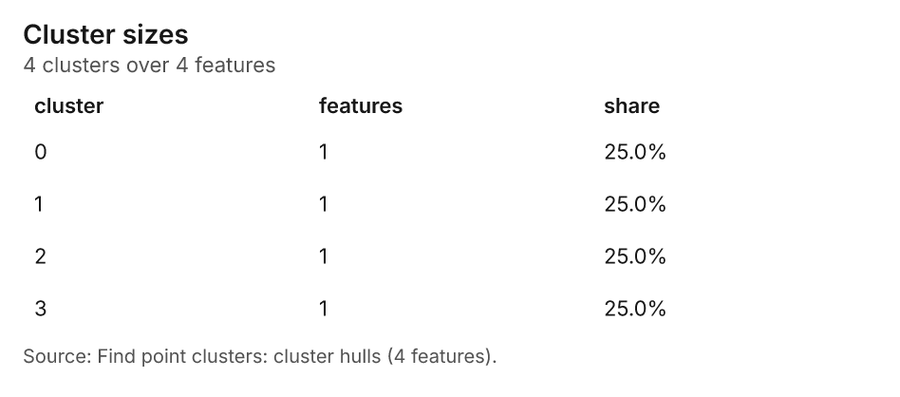
| Find point clusters: cluster hulls | layer, Polygon | 4 | 110 | ||
| Find point clusters: Patrol reports | layer, Point | 650 | 111 | ||
| Find point clusters: cluster hulls | layer, Polygon | 1 | 112 | ||
| Slope (degrees) | layer | 0 | 113 | ||
| Emerging hot spots: Obstacles | layer, Polygon | 23 | 114 | ||
| Emerging hot spots: Patrol reports | layer, Polygon | 53 | 115 | ||
| Repeat and near repeat classification: Obstacles | layer, Point | 90 | 116 | ||
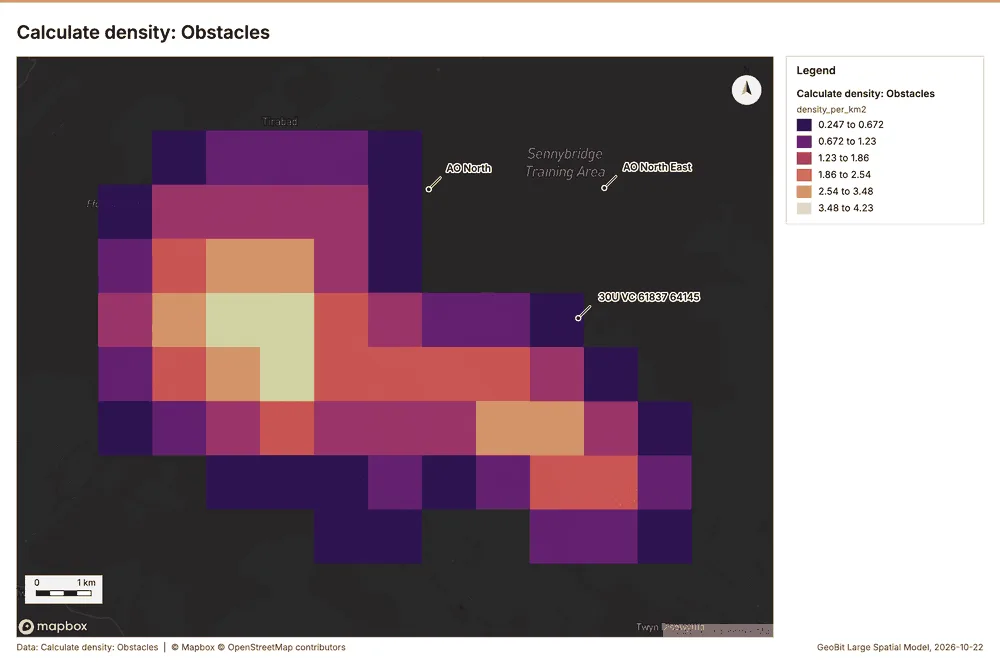
| Calculate density: Obstacles | layer, Polygon | 92 | 117 | ||
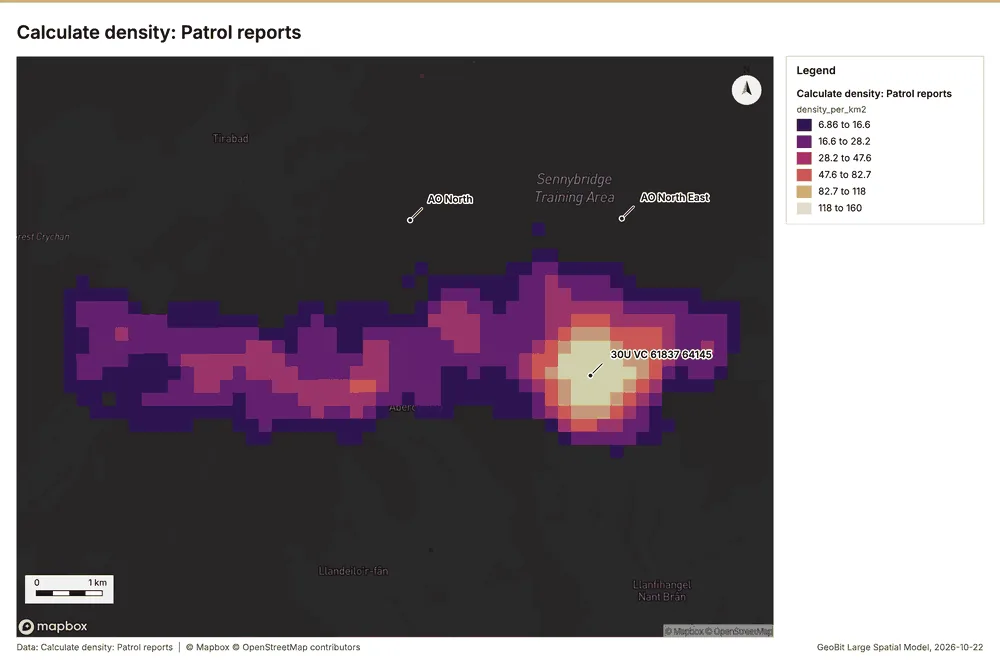
| Calculate density: Patrol reports | layer, Polygon | 917 | 118 | ||
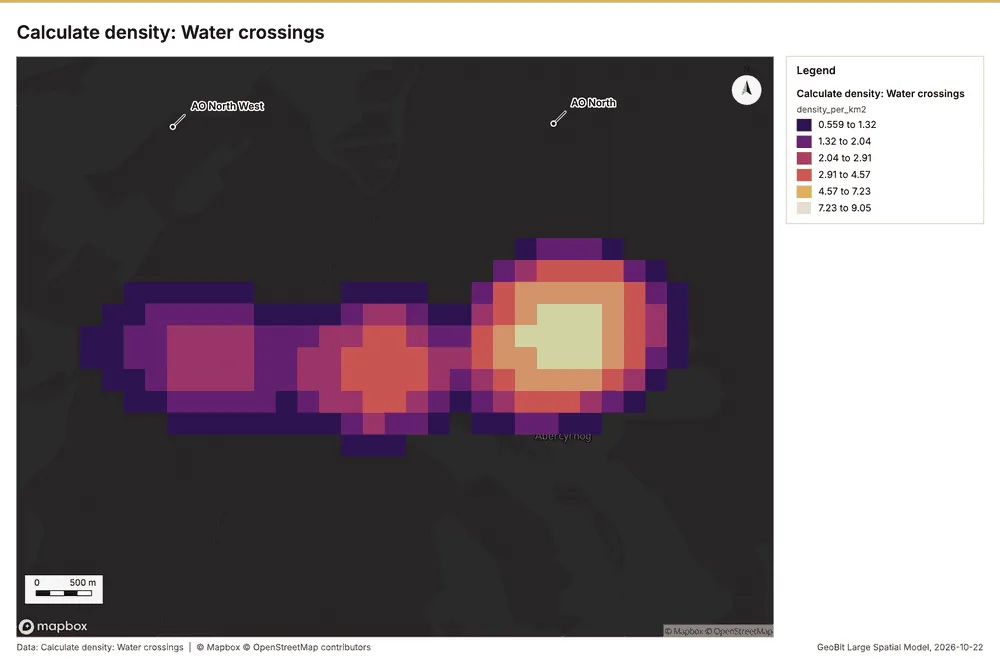
| Calculate density: Water crossings | layer, Polygon | 307 | 119 | ||
| Exercise orders | document | 120 |
Timeline
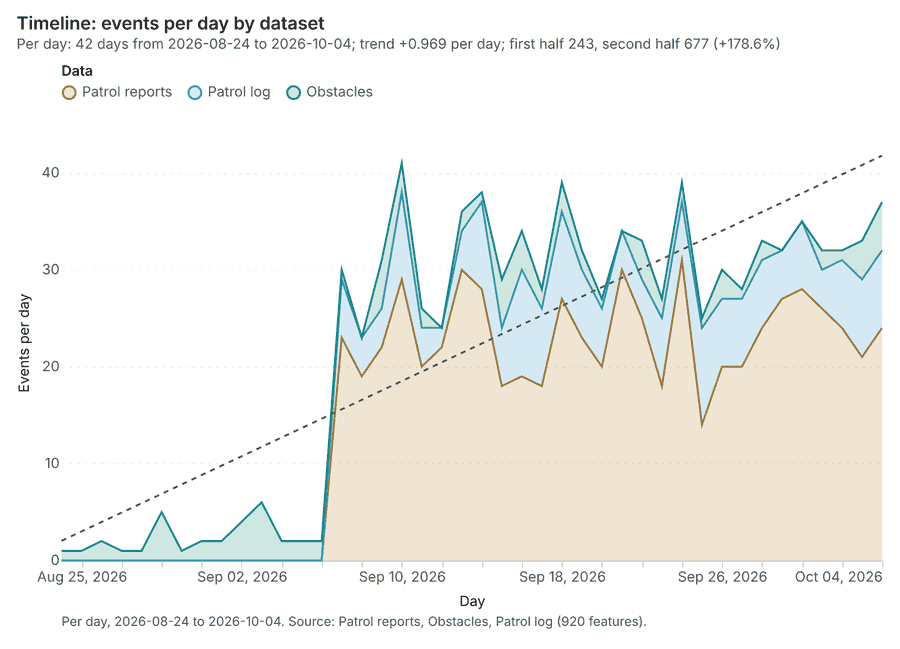
The timeline counts 920 dated events in Patrol reports, Obstacles, Patrol log per day, from 2026-08-24 to 2026-10-04 1234. By dataset: Patrol reports 650; Patrol log 180; Obstacles 90 1. The trend is +0.969 events per day; the second half of the days has 677 against 243 in the first (+178.6%) 1.
Busiest days
Quietest days
Hot spots
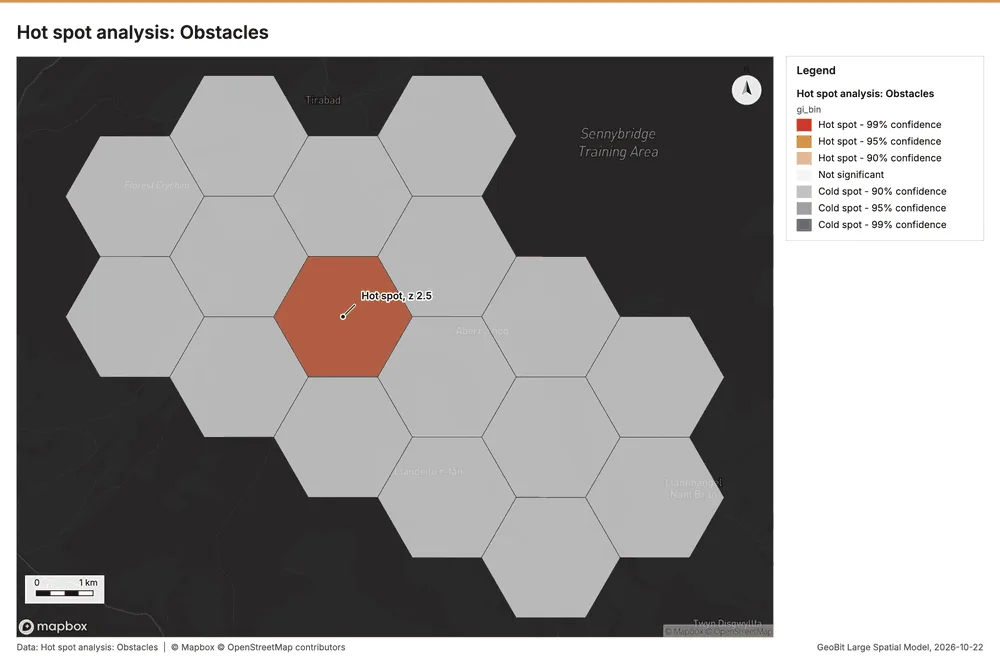
What this analysis is. Hot spot analysis: Getis-Ord Gi* hot and cold spots with z-scores, p-values and confidence bins 5. In ArcGIS it is Find Hot Spots or Hot Spot Analysis (Getis-Ord Gi*); in QGIS, qgis:hotspot (plugin) 5.
Why it was run on this data. 90 points: Getis-Ord Gi* tests whether the concentrations in Obstacles are statistically significant 6.
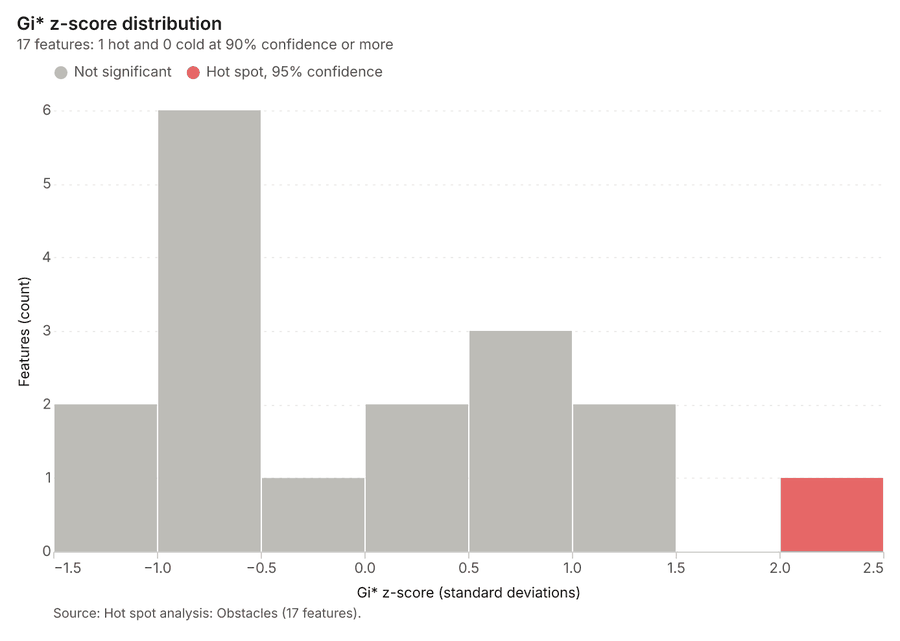
What it found. Hot spots on Obstacles: Hot spot analysis: 1 layer saved: Hot spot analysis: Obstacles (17 features) 78. It reported result, bins 17; result, count 17; result, elapsed ms 4; result, cell size m 2,000; result, incidents used 90; result, distance band m 2,000 7.
| Result | Value |
|---|---|
| result, bins | 17 |
| result, count | 17 |
| result, elapsed ms | 4 |
| result, cell size m | 2,000 |
| result, incidents used | 90 |
| result, distance band m | 2,000 |
| billing, cost | 0.0518 |
| billing, list price | 0.0518 |
| billing, upstream cost | 0 |
Findings
- Evidenced: Hot spots on Obstacles: Hot spot analysis: 1 layer saved: Hot spot analysis: Obstacles (17 features) 78.
- Evidenced: It reported result, bins 17; result, count 17; result, elapsed ms 4; result, cell size m 2,000; result, incidents used 90; result, distance band m 2,000 7.
Tool gp_hot_spots; parameters {"project": "9f6aa8f7-f5fe-4630-ab44-f56a90a94683", "features": {"layer": "Obstacles (10e309c5)"}, "aggregation": "hexagon", "cell_size_m": 2000.0, "distance_band_m": 2000.0}
Hot spots
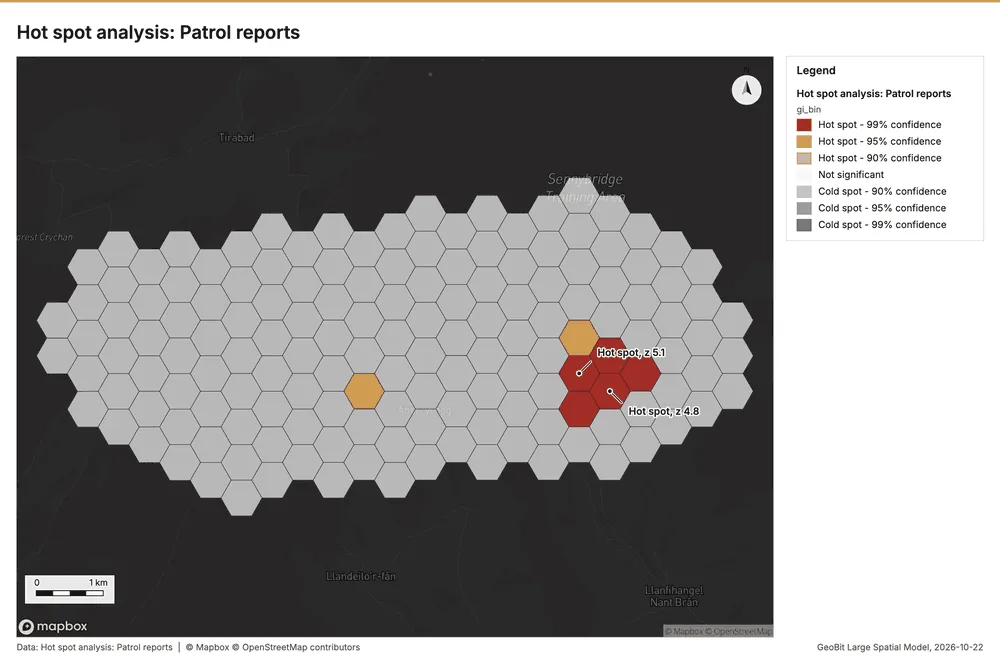
What this analysis is. Hot spot analysis: Getis-Ord Gi* hot and cold spots with z-scores, p-values and confidence bins 5. In ArcGIS it is Find Hot Spots or Hot Spot Analysis (Getis-Ord Gi*); in QGIS, qgis:hotspot (plugin) 5.
Why it was run on this data. 650 points: Getis-Ord Gi* tests whether the concentrations in Patrol reports are statistically significant 9.
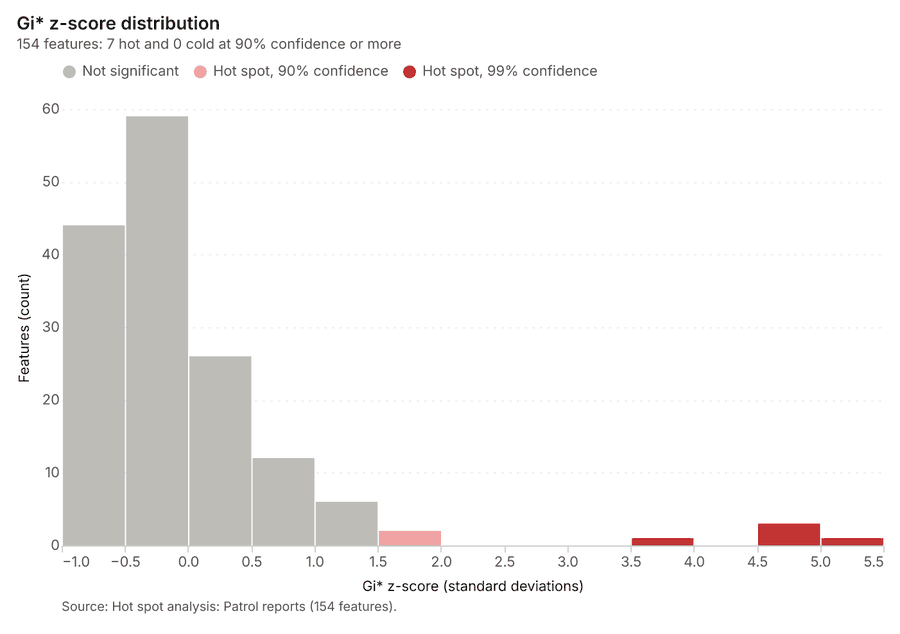
What it found. Hot spots on Patrol reports: Hot spot analysis: 1 layer saved: Hot spot analysis: Patrol reports (154 features) 1011. It reported result, bins 154; result, count 154; result, elapsed ms 13; result, cell size m 500; result, incidents used 650; result, distance band m 500 10.
| Result | Value |
|---|---|
| result, bins | 154 |
| result, count | 154 |
| result, elapsed ms | 13 |
| result, cell size m | 500 |
| result, incidents used | 650 |
| result, distance band m | 500 |
| billing, cost | 0.063 |
| billing, list price | 0.063 |
| billing, upstream cost | 0 |
Findings
- Evidenced: Hot spots on Patrol reports: Hot spot analysis: 1 layer saved: Hot spot analysis: Patrol reports (154 features) 1011.
- Evidenced: It reported result, bins 154; result, count 154; result, elapsed ms 13; result, cell size m 500; result, incidents used 650; result, distance band m 500 10.
A model draft was discarded because a sentence did not cite a source of this section.
Tool gp_hot_spots; parameters {"project": "9f6aa8f7-f5fe-4630-ab44-f56a90a94683", "features": {"layer": "Patrol reports (5e87153f)"}, "aggregation": "hexagon", "cell_size_m": 500.0, "distance_band_m": 500.0}
Summarize within
What this analysis is. Summarize within: Count and aggregate the features inside each polygon (or bin), proportionally for lines and polygons 12. In ArcGIS it is Summarize Within or Aggregate Points; in QGIS, native:countpointsinpolygon or native:sumlinelengths 12.
Why it was run on this data. Count Observation posts inside each feature of Areas of operation by manned; the counts map as a choropleth (natural breaks, sequential colors) 13.
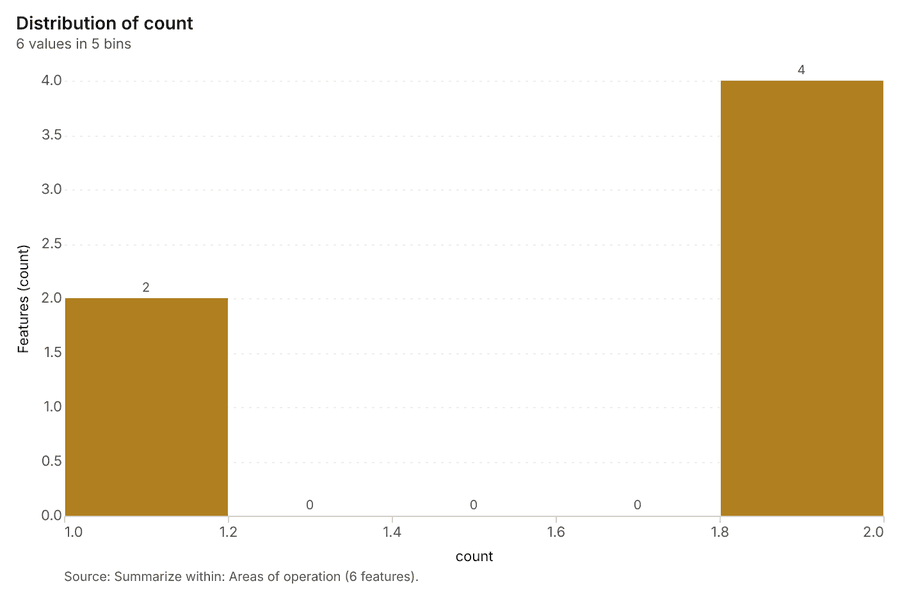
What it found. Summarize within on Observation posts, Areas of operation: Summarize within: 1 layer saved: Summarize within: Areas of operation (6 features) 141516. It reported result, count 6; result, elapsed ms 1; billing, cost 0.01034; billing, list price 0.01034; billing, upstream cost 0 14.
| Result | Value |
|---|---|
| result, count | 6 |
| result, elapsed ms | 1 |
| billing, cost | 0.01034 |
| billing, list price | 0.01034 |
| billing, upstream cost | 0 |
Findings
- Evidenced: Summarize within on Observation posts, Areas of operation: Summarize within: 1 layer saved: Summarize within: Areas of operation (6 features) 141516.
- Evidenced: It reported result, count 6; result, elapsed ms 1; billing, cost 0.01034; billing, list price 0.01034; billing, upstream cost 0 14.
A model draft was discarded because a sentence did not cite a source of this section.
Tool gp_summarize_within; parameters {"stats": [{"stat": "sum", "field": "ground_m"}], "project": "9f6aa8f7-f5fe-4630-ab44-f56a90a94683", "features": {"layer": "Observation posts (fd2e56d2)"}, "group_by": "manned", "polygons": {"layer": "Areas of operation (eb593b97)"}}
Summarize within
What this analysis is. Summarize within: Count and aggregate the features inside each polygon (or bin), proportionally for lines and polygons 12. In ArcGIS it is Summarize Within or Aggregate Points; in QGIS, native:countpointsinpolygon or native:sumlinelengths 12.
Why it was run on this data. Count Observation posts inside each feature of Areas of operation by manned; the counts map as a choropleth (natural breaks, sequential colors) 13.
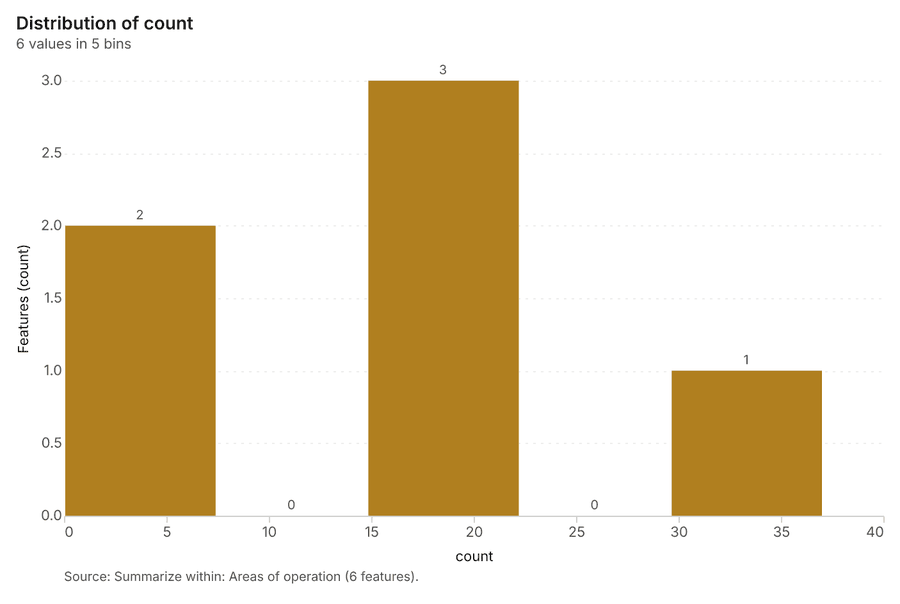
What it found. The gp_summarize_within tool was executed 17, utilizing areas of operation 16 and obstacles 8 as inputs. The operation yielded a count of 6 17. Measurements showed the process took an elapsed time of 0 ms 17.
| Result | Value |
|---|---|
| result, count | 6 |
| result, elapsed ms | 0 |
| billing, cost | 0.01192 |
| billing, list price | 0.01192 |
| billing, upstream cost | 0 |
Findings
- Evidenced: Summarize within on Obstacles, Areas of operation: Summarize within: 1 layer saved: Summarize within: Areas of operation (6 features) 81617.
- Evidenced: It reported result, count 6; result, elapsed ms 0; billing, cost 0.01192; billing, list price 0.01192; billing, upstream cost 0 17.
Tool gp_summarize_within; parameters {"stats": [], "project": "9f6aa8f7-f5fe-4630-ab44-f56a90a94683", "features": {"layer": "Obstacles (10e309c5)"}, "group_by": "type", "polygons": {"layer": "Areas of operation (eb593b97)"}}
Summarize within
What this analysis is. Summarize within: Count and aggregate the features inside each polygon (or bin), proportionally for lines and polygons 12. In ArcGIS it is Summarize Within or Aggregate Points; in QGIS, native:countpointsinpolygon or native:sumlinelengths 12.
Why it was run on this data. Count Observation posts inside each feature of Areas of operation by manned; the counts map as a choropleth (natural breaks, sequential colors) 13.
What it found. Summarize within on Patrol reports, Areas of operation: Summarize within: 1 layer saved: Summarize within: Areas of operation (6 features) 111618. It reported result, count 6; result, elapsed ms 1; billing, cost 0.02312; billing, list price 0.02312; billing, upstream cost 0 18.
| Result | Value |
|---|---|
| result, count | 6 |
| result, elapsed ms | 1 |
| billing, cost | 0.02312 |
| billing, list price | 0.02312 |
| billing, upstream cost | 0 |
Findings
- Evidenced: Summarize within on Patrol reports, Areas of operation: Summarize within: 1 layer saved: Summarize within: Areas of operation (6 features) 111618.
- Evidenced: It reported result, count 6; result, elapsed ms 1; billing, cost 0.02312; billing, list price 0.02312; billing, upstream cost 0 18.
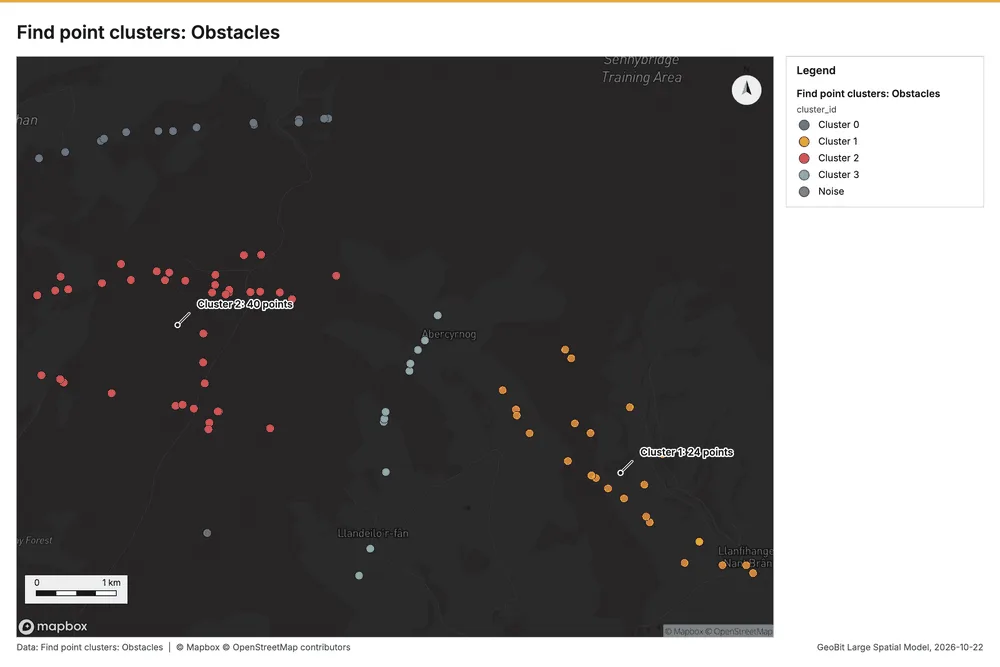
Tool gp_summarize_within; parameters {"stats": [], "project": "9f6aa8f7-f5fe-4630-ab44-f56a90a94683", "features": {"layer": "Patrol reports (5e87153f)"}, "group_by": "type", "polygons": {"layer": "Areas of operation (eb593b97)"}}
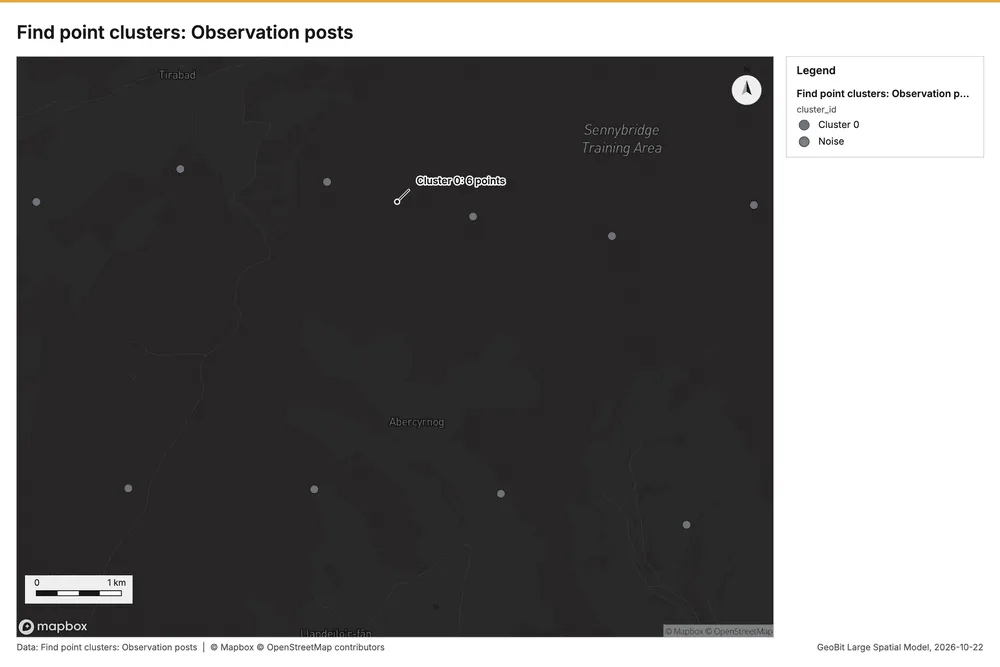
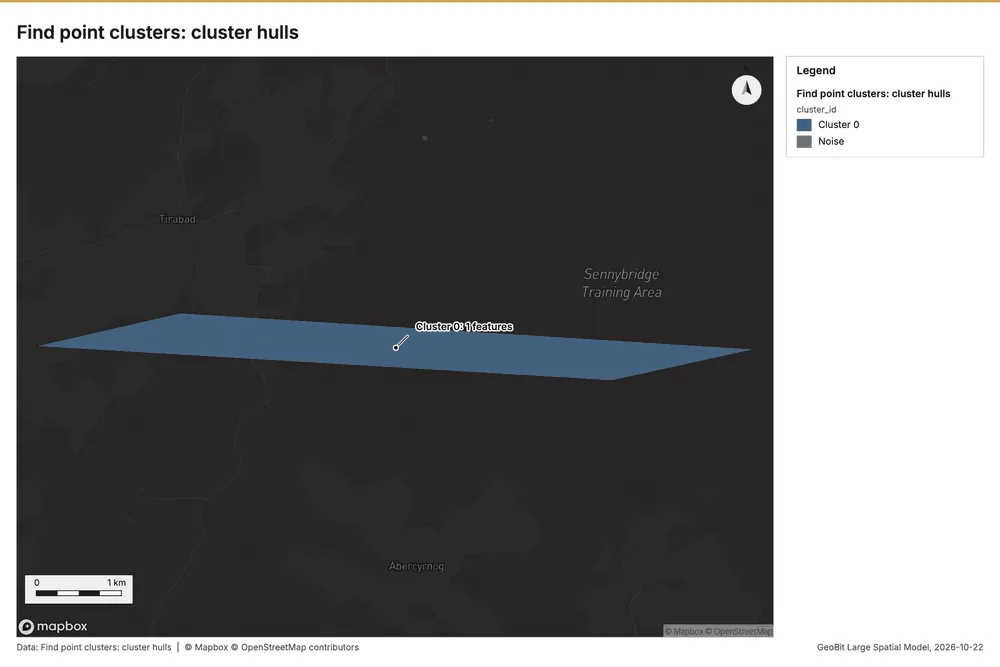
Find point clusters
What this analysis is. Find point clusters: Density-based clusters (DBSCAN, HDBSCAN or OPTICS, optionally space-time) with hulls and noise 19. In ArcGIS it is Find Point Clusters or Density-based Clustering; in QGIS, native:dbscanclustering or native:stdbscanclustering 19.
Why it was run on this data. DBSCAN finds dense groups of Observation posts and separates noise 20.
What it found. The gp_find_point_clusters tool was run using the Observation posts data 15, saving 2 layers, including Observation posts and cluster hulls 21.
| Result | Value |
|---|---|
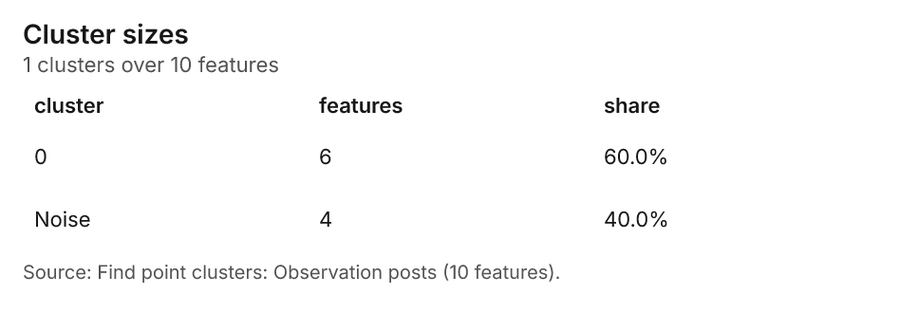
| result, count | 10 |
| result, noise | 4 |
| result, distance m | 2,000 |
| result, elapsed ms | 5 |
| result, min points | 3 |
| billing, cost | 0.0502 |
| billing, list price | 0.0502 |
| billing, upstream cost | 0 |
Findings
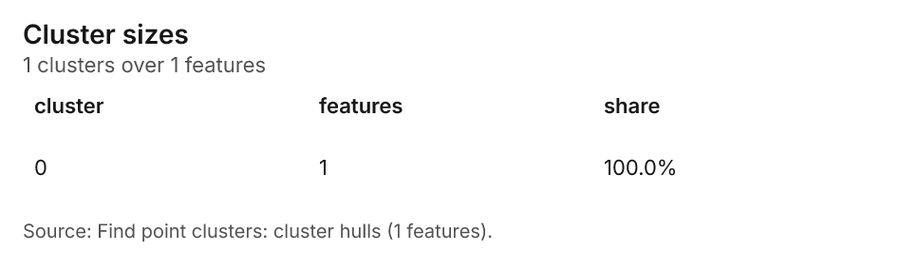
- Evidenced: Find point clusters on Observation posts: Find point clusters: 2 layers saved: Find point clusters: Observation posts (10 features); Find point clusters: cluster hulls (1 feature) 1521.
- Evidenced: It reported result, count 10; result, noise 4; result, distance m 2,000; result, elapsed ms 5; result, min points 3; billing, cost 0.0502 21.
Tool gp_find_point_clusters; parameters {"method": "dbscan", "project": "9f6aa8f7-f5fe-4630-ab44-f56a90a94683", "features": {"layer": "Observation posts (fd2e56d2)"}, "distance_m": 2000.0, "min_points": 3}
Find point clusters
What this analysis is. Find point clusters: Density-based clusters (DBSCAN, HDBSCAN or OPTICS, optionally space-time) with hulls and noise 19. In ArcGIS it is Find Point Clusters or Density-based Clustering; in QGIS, native:dbscanclustering or native:stdbscanclustering 19.
Why it was run on this data. DBSCAN finds dense groups of Obstacles and separates noise 22.
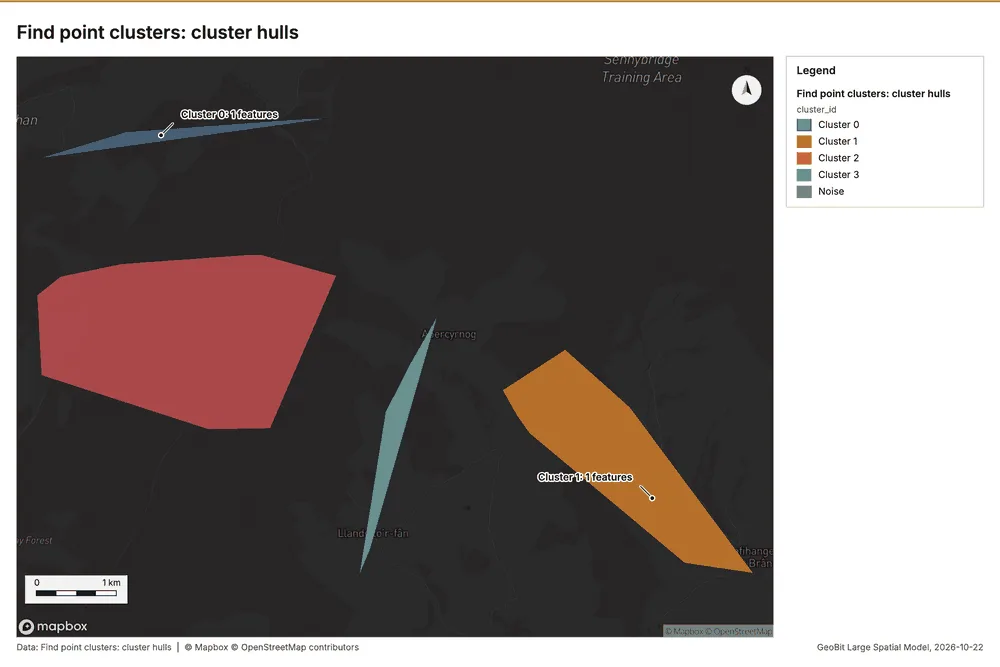
What it found. The gp_find_point_clusters tool utilized the Obstacles layer for analysis 23. This process resulted in 90 features being discovered, alongside 4 cluster hulls 23.
| Result | Value |
|---|---|
| result, count | 90 |
| result, noise | 1 |
| result, distance m | 1,000 |
| result, elapsed ms | 6 |
| result, min points | 3 |
| billing, cost | 0.0518 |
| billing, list price | 0.0518 |
| billing, upstream cost | 0 |
Findings
- Evidenced: Find point clusters on Obstacles: Find point clusters: 2 layers saved: Find point clusters: Obstacles (90 features); Find point clusters: cluster hulls (4 features) 823.
- Evidenced: It reported result, count 90; result, noise 1; result, distance m 1,000; result, elapsed ms 6; result, min points 3; billing, cost 0.0518 23.
Tool gp_find_point_clusters; parameters {"method": "dbscan", "project": "9f6aa8f7-f5fe-4630-ab44-f56a90a94683", "features": {"layer": "Obstacles (10e309c5)"}, "distance_m": 1000.0, "min_points": 3}
Find point clusters
What this analysis is. Find point clusters: Density-based clusters (DBSCAN, HDBSCAN or OPTICS, optionally space-time) with hulls and noise 19. In ArcGIS it is Find Point Clusters or Density-based Clustering; in QGIS, native:dbscanclustering or native:stdbscanclustering 19.
Why it was run on this data. DBSCAN finds dense groups of Patrol reports and separates noise 24.
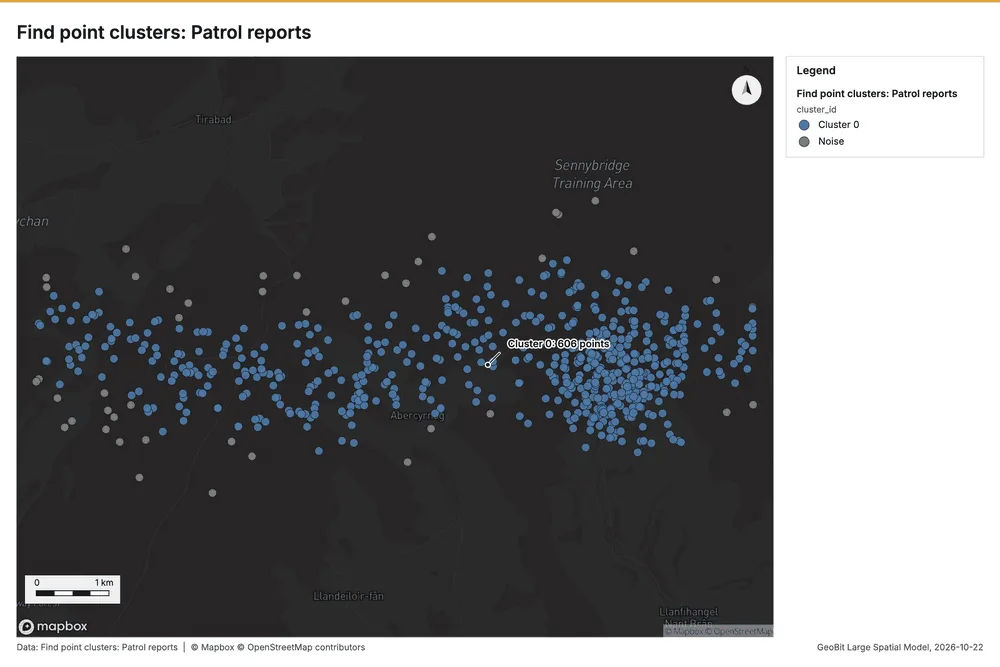
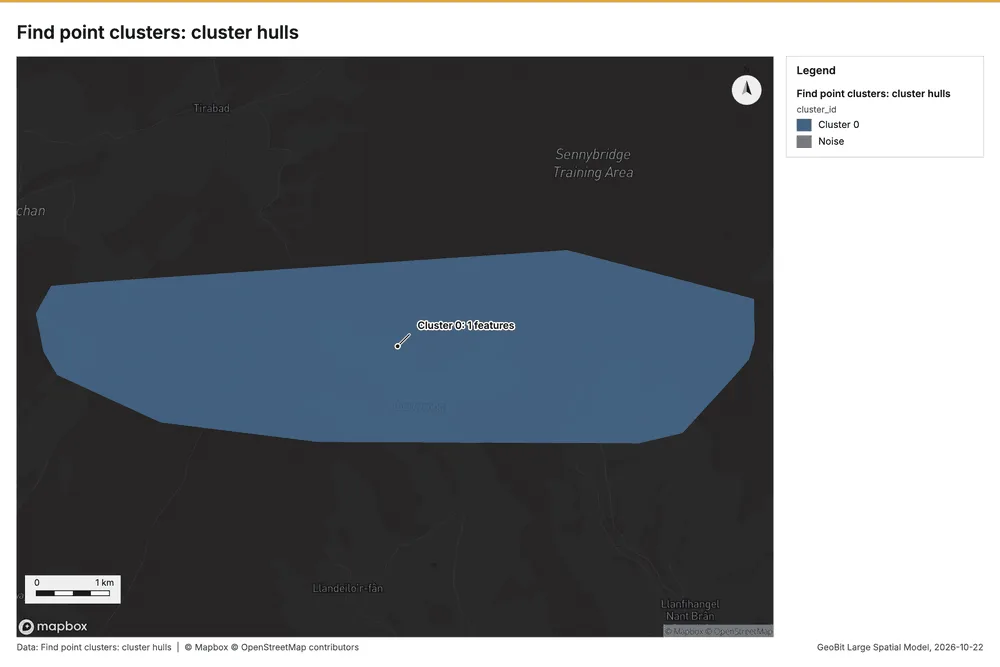
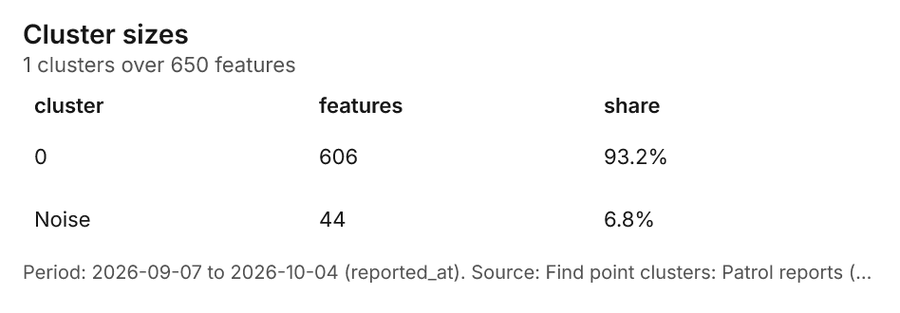
What it found. Find point clusters on Patrol reports: Find point clusters: 2 layers saved: Find point clusters: Patrol reports (650 features); Find point clusters: cluster hulls (1 feature) 1125. It reported result, count 650; result, noise 44; result, distance m 500; result, elapsed ms 16; result, min points 16; billing, cost 0.063 25.
| Result | Value |
|---|---|
| result, count | 650 |
| result, noise | 44 |
| result, distance m | 500 |
| result, elapsed ms | 16 |
| result, min points | 16 |
| billing, cost | 0.063 |
| billing, list price | 0.063 |
| billing, upstream cost | 0 |
Findings
- Evidenced: Find point clusters on Patrol reports: Find point clusters: 2 layers saved: Find point clusters: Patrol reports (650 features); Find point clusters: cluster hulls (1 feature) 1125.
- Evidenced: It reported result, count 650; result, noise 44; result, distance m 500; result, elapsed ms 16; result, min points 16; billing, cost 0.063 25.
Tool gp_find_point_clusters; parameters {"method": "dbscan", "project": "9f6aa8f7-f5fe-4630-ab44-f56a90a94683", "features": {"layer": "Patrol reports (5e87153f)"}, "distance_m": 500.0, "min_points": 16}
Zonal statistics
What this analysis is. Zonal statistics: count/min/max/mean/std/sum/median/majority per polygon as a table and as GeoJSON 26. In ArcGIS it is Zonal Statistics as Table (polygons) 26.
Why it was run on this data. Statistics of Training area terrain model (DEM) inside each feature of Landing zones 27.
What it found. The Zonal statistics tool rs_zonal_statistics was employed for this analysis 28. The execution involved step 0 of the process 28. A total of 6 zones were analyzed, resulting in 6 row(s) of zonal statistics data 28.
Findings
Tool rs_zonal_statistics; parameters {"stats": ["mean", "min", "max", "std"], "zones": "Landing zones (6405dd78)", "raster_id": "Training area terrain model (DEM) (e55808a8)"}
Zonal statistics
What this analysis is. Zonal statistics: count/min/max/mean/std/sum/median/majority per polygon as a table and as GeoJSON 26. In ArcGIS it is Zonal Statistics as Table (polygons) 26.
Why it was run on this data. Statistics of Training area terrain model (DEM) inside each feature of Landing zones 27.
What it found. The rs_zonal_statistics tool executed with 6 row(s) and 6 zones 29. The analysis generated statistics for 6 zones 29. Additionally, the tool counted 6 features 29. The entire process was completed in 40 elapsed milliseconds 29.
| Result | Value |
|---|---|
| stats, zones | 6 |
| features, count | 6 |
| elapsed ms | 40 |
Findings
- Evidenced: Zonal statistics: Zonal statistics: 6 row(s) 29.
- Evidenced: zones 6 29.
- Evidenced: It reported stats, zones 6; features, count 6; elapsed ms 40 29.
Tool rs_zonal_statistics; parameters {"stats": ["mean", "min", "max", "std"], "zones": "Areas of operation (eb593b97)", "raster_id": "Training area terrain model (DEM) (e55808a8)"}
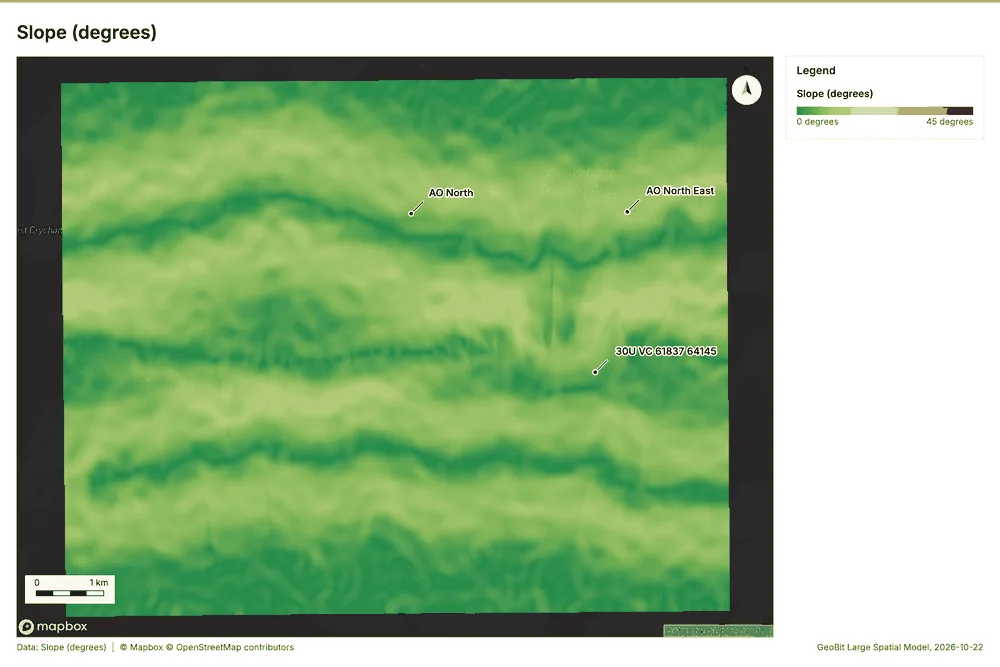
Slope
What this analysis is. Slope: Horn slope in degrees or percent, with the share of ground in six grade classes 30. In ArcGIS it is Slope (Spatial Analyst); in QGIS, Slope (GDAL DEM) 30.
Why it was run on this data. Slope of the Training area terrain model (DEM) surface 31.
What it found. Slope on Training area terrain model (DEM): Slope over 80.00 km2: mean 6.45 degrees, max 17.54 degrees; 35% of the ground is steeper than 15% 3233. DEM: Training area terrain model (DEM) 3233. Verified: 2 checks passed 3233. It reported dem, cols 500; dem, rows 400; dem, cell m 20; dem, relief m 306; dem, elev max m 543.7; dem, elev min m 237.7 32.
| Result | Value |
|---|---|
| dem, cols | 500 |
| dem, rows | 400 |
| dem, cell m | 20 |
| dem, relief m | 306 |
| dem, elev max m | 543.7 |
| dem, elev min m | 237.7 |
| dem, elev mean m | 370.9 |
| dem, missing frac | 0 |
| cost, usd | 0 |
| grid, cols | 500 |
| grid, rows | 400 |
| grid, cell m | 20 |
| stats, max | 17.54 |
| stats, min | 0.01 |
| stats, mean | 6.45 |
| stats, median | 6.41 |
| stats, steeper than 15pct | 35.02 |
| rows left out | 0 |
Findings
- Evidenced: Slope on Training area terrain model (DEM): Slope over 80.00 km2: mean 6.45 degrees, max 17.54 degrees; 35% of the ground is steeper than 15% 3233.
- Evidenced: DEM: Training area terrain model (DEM) 3233.
- Evidenced: Verified: 2 checks passed 3233.
- Evidenced: It reported dem, cols 500; dem, rows 400; dem, cell m 20; dem, relief m 306; dem, elev max m 543.7; dem, elev min m 237.7 32.
Tool tr_slope; parameters {"dem": {"layer": "Training area terrain model (DEM) (e55808a8)"}, "project": "9f6aa8f7-f5fe-4630-ab44-f56a90a94683"}
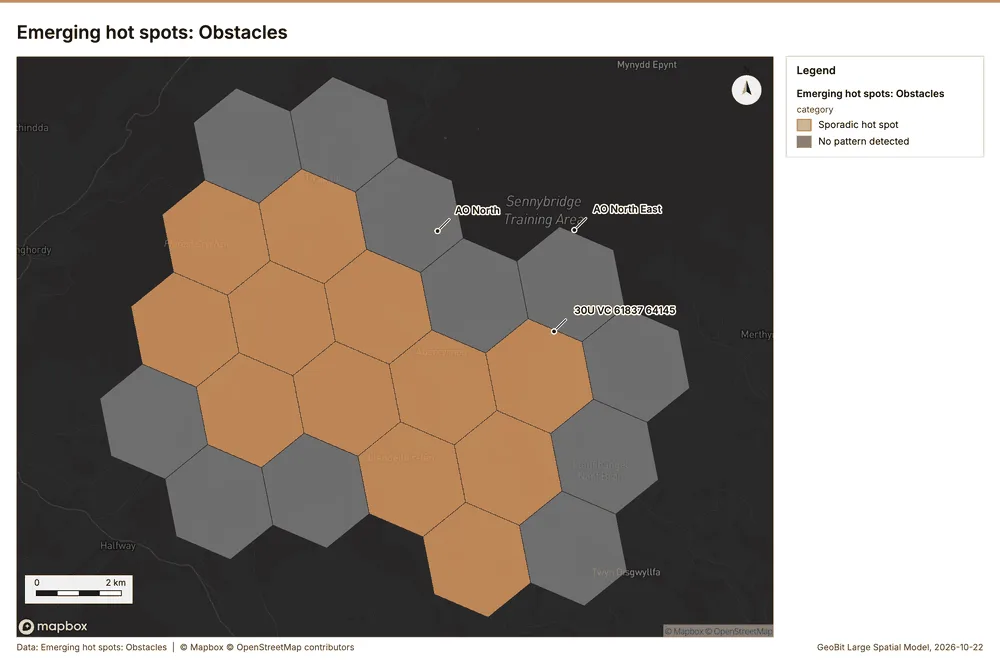
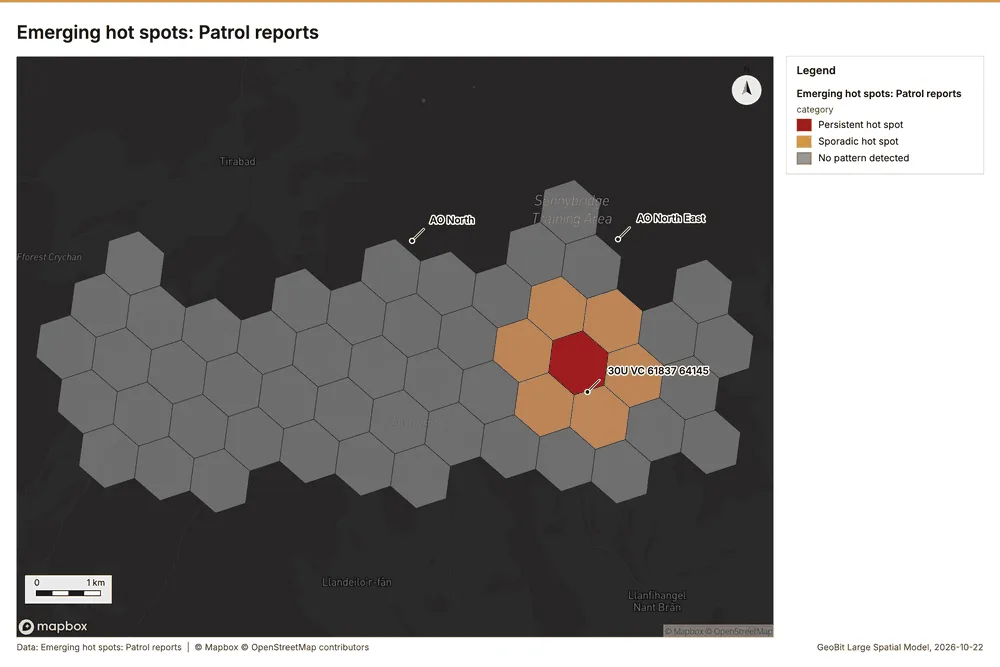
Space time hot spots
What this analysis is. Emerging hot spots: Where hot spots are new, consecutive, intensifying, persistent, diminishing, sporadic, oscillating or historical over time 34. In ArcGIS it is Emerging Hot Spot Analysis or Create Space Time Cube 34.
Why it was run on this data. Obstacles carry dates in 'date': emerging hot spot analysis finds new, intensifying and fading hot spots per day 35.
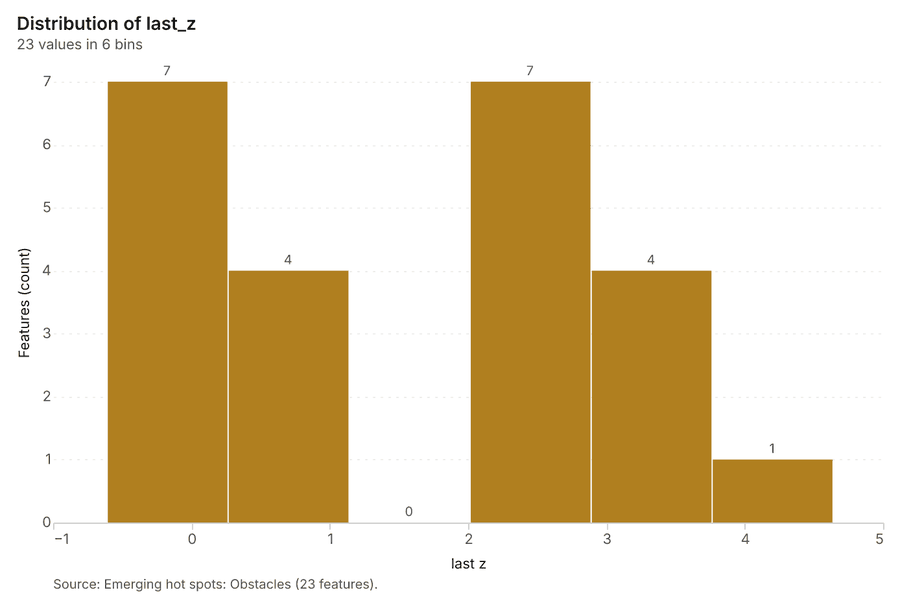
What it found. Space time hot spots on Obstacles: Emerging hot spots: 1 layer saved: Emerging hot spots: Obstacles (23 features) 836. It reported result, count 23; result, elapsed ms 5; result, resolution 7; result, features used 90; result, time neighbors 0; billing, cost 0.1045 36.
| Result | Value |
|---|---|
| result, count | 23 |
| result, elapsed ms | 5 |
| result, resolution | 7 |
| result, features used | 90 |
| result, time neighbors | 0 |
| billing, cost | 0.1045 |
| billing, list price | 0.1045 |
| billing, upstream cost | 0 |
Findings
- Evidenced: Space time hot spots on Obstacles: Emerging hot spots: 1 layer saved: Emerging hot spots: Obstacles (23 features) 836.
- Evidenced: It reported result, count 23; result, elapsed ms 5; result, resolution 7; result, features used 90; result, time neighbors 0; billing, cost 0.1045 36.
A model draft was discarded because a sentence did not cite a source of this section.
Tool gp_space_time_hot_spots; parameters {"project": "9f6aa8f7-f5fe-4630-ab44-f56a90a94683", "features": {"layer": "Obstacles (10e309c5)"}, "interval": "day", "bin_shape": "h3", "resolution": 7, "time_field": "date"}
Space time hot spots
What this analysis is. Emerging hot spots: Where hot spots are new, consecutive, intensifying, persistent, diminishing, sporadic, oscillating or historical over time 34. In ArcGIS it is Emerging Hot Spot Analysis or Create Space Time Cube 34.
Why it was run on this data. Patrol reports carry dates in 'reported_at': emerging hot spot analysis finds new, intensifying and fading hot spots per day 37.
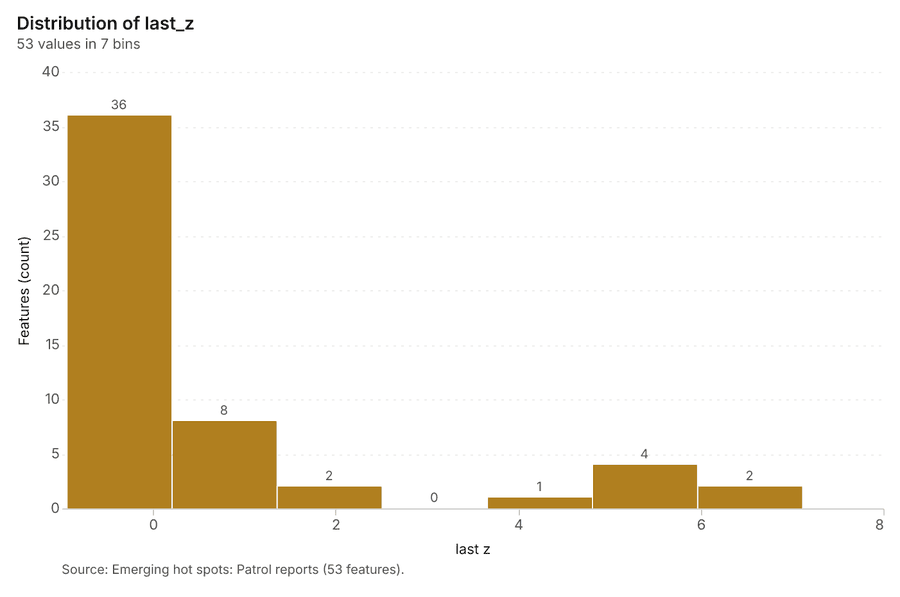
What it found. The gp_space_time_hot_spots tool was run using the Patrol reports 11 and successfully identified 53 emerging hot spots 38.
| Result | Value |
|---|---|
| result, count | 53 |
| result, elapsed ms | 10 |
| result, resolution | 8 |
| result, features used | 650 |
| result, time neighbors | 0 |
| billing, cost | 0.1325 |
| billing, list price | 0.1325 |
| billing, upstream cost | 0 |
Findings
- Evidenced: Space time hot spots on Patrol reports: Emerging hot spots: 1 layer saved: Emerging hot spots: Patrol reports (53 features) 1138.
- Evidenced: It reported result, count 53; result, elapsed ms 10; result, resolution 8; result, features used 650; result, time neighbors 0; billing, cost 0.1325 38.
Tool gp_space_time_hot_spots; parameters {"project": "9f6aa8f7-f5fe-4630-ab44-f56a90a94683", "features": {"layer": "Patrol reports (5e87153f)"}, "interval": "day", "bin_shape": "h3", "resolution": 8, "time_field": "reported_at"}
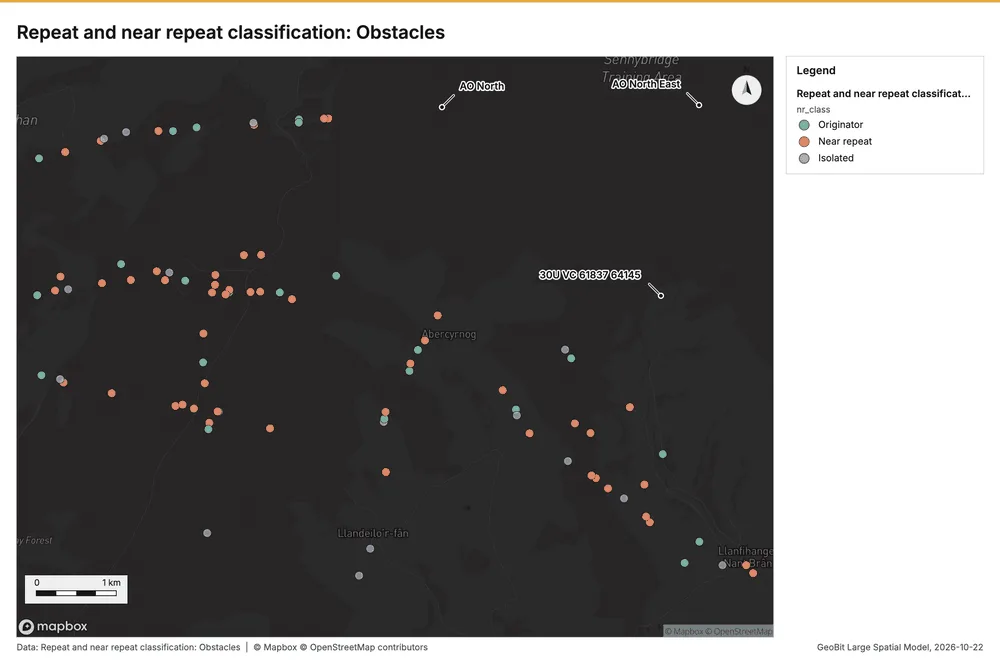
Near repeat
What this analysis is. Repeat and near repeat classification: Classify incidents as originators, repeats (same place) or near repeats within a distance and time window, with a Knox test table 39. In ArcGIS it is Repeat and Near Repeat Classification or Near Repeat Calculator 39.
Why it was run on this data. Near repeat analysis tests whether Obstacles close in space also follow each other within 4 days 40.
What it found. Near repeat on Obstacles: Repeat and near repeat classification: 1 layer saved: Repeat and near repeat classification: Obstacles (90 features) 841. It reported result, days 4; result, count 90; result, chains 18; result, distance m 1,000; result, elapsed ms 5; result, pairs linked 76 41.
| Result | Value |
|---|---|
| result, days | 4 |
| result, count | 90 |
| result, chains | 18 |
| result, distance m | 1,000 |
| result, elapsed ms | 5 |
| result, pairs linked | 76 |
| billing, cost | 0.0527 |
| billing, list price | 0.0527 |
| billing, upstream cost | 0 |
Findings
- Evidenced: Near repeat on Obstacles: Repeat and near repeat classification: 1 layer saved: Repeat and near repeat classification: Obstacles (90 features) 841.
- Evidenced: It reported result, days 4; result, count 90; result, chains 18; result, distance m 1,000; result, elapsed ms 5; result, pairs linked 76 41.
Tool gp_near_repeat; parameters {"days": 4, "project": "9f6aa8f7-f5fe-4630-ab44-f56a90a94683", "features": {"layer": "Obstacles (10e309c5)"}, "distance_m": 1000.0, "time_field": "date"}
Calculate density
What this analysis is. Calculate density: Kernel density per square kilometer on a grid 42. In ArcGIS it is Calculate Density or Kernel Density; in QGIS, native:heatmapkerneldensityestimation 42.
Why it was run on this data. 90 points in Obstacles: a density surface shows where they concentrate 43.
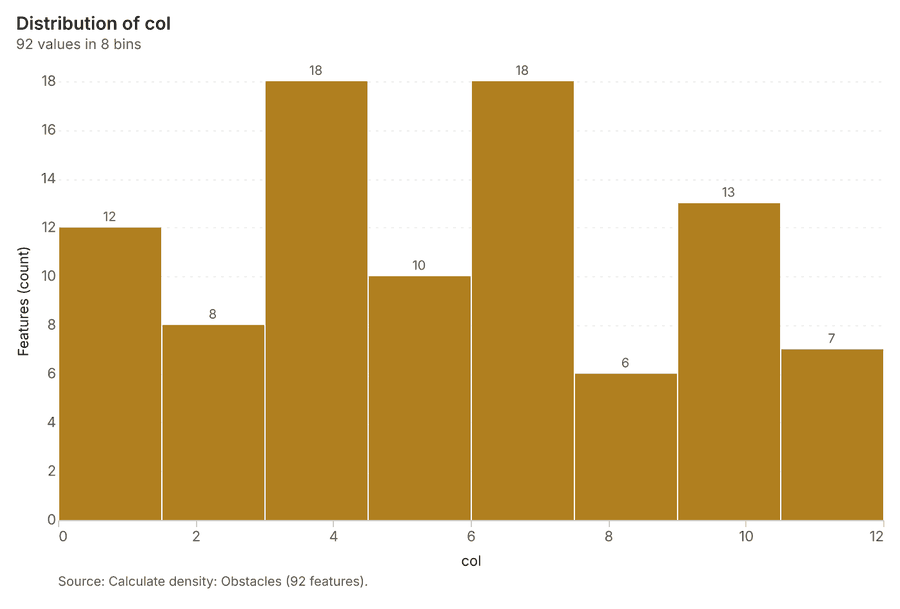
What it found. The density calculation processed 92 features from the Obstacles layer 44.
| Result | Value |
|---|---|
| result, count | 92 |
| result, elapsed ms | 3 |
| result, bandwidth m | 2,000 |
| result, cell size m | 1,000 |
| result, excluded null | 0 |
| result, max density per km2 | 4.231 |
| billing, cost | 0.0518 |
| billing, list price | 0.0518 |
| billing, upstream cost | 0 |
Findings
- Evidenced: Calculate density on Obstacles: Calculate density: 1 layer saved: Calculate density: Obstacles (92 features) 844.
- Evidenced: It reported result, count 92; result, elapsed ms 3; result, bandwidth m 2,000; result, cell size m 1,000; result, excluded null 0; result, max density per km2 4.231 44.
Tool gp_calculate_density; parameters {"kernel": "quartic", "project": "9f6aa8f7-f5fe-4630-ab44-f56a90a94683", "features": {"layer": "Obstacles (10e309c5)"}, "bandwidth_m": 2000.0, "cell_size_m": 1000.0}
Calculate density
What this analysis is. Calculate density: Kernel density per square kilometer on a grid 42. In ArcGIS it is Calculate Density or Kernel Density; in QGIS, native:heatmapkerneldensityestimation 42.
Why it was run on this data. 650 points in Patrol reports: a density surface shows where they concentrate 45.
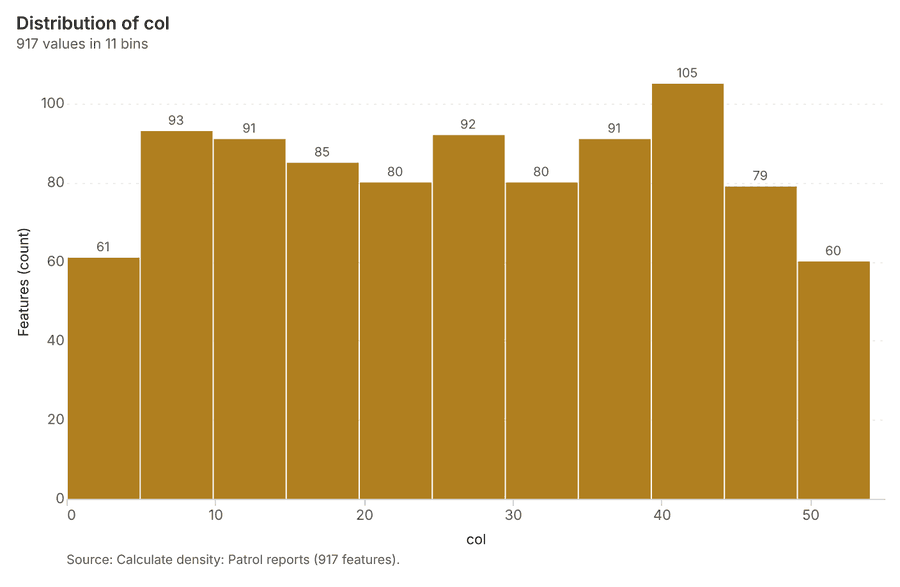
What it found. Density was calculated using the Patrol reports 11, generating a total of 917 features 46. The analysis determined that the maximum density recorded was 160.4 per km² 46. This calculation was completed in 27 ms 46 and generated a billing cost of 0.063 46.
| Result | Value |
|---|---|
| result, count | 917 |
| result, elapsed ms | 27 |
| result, bandwidth m | 500 |
| result, cell size m | 200 |
| result, excluded null | 0 |
| result, max density per km2 | 160.4 |
| billing, cost | 0.063 |
| billing, list price | 0.063 |
| billing, upstream cost | 0 |
Findings
- Evidenced: Calculate density on Patrol reports: Calculate density: 1 layer saved: Calculate density: Patrol reports (917 features) 1146.
- Evidenced: It reported result, count 917; result, elapsed ms 27; result, bandwidth m 500; result, cell size m 200; result, excluded null 0; result, max density per km2 160.4 46.
Tool gp_calculate_density; parameters {"kernel": "quartic", "project": "9f6aa8f7-f5fe-4630-ab44-f56a90a94683", "features": {"layer": "Patrol reports (5e87153f)"}, "bandwidth_m": 500.0, "cell_size_m": 200.0}
Calculate density
What this analysis is. Calculate density: Kernel density per square kilometer on a grid 42. In ArcGIS it is Calculate Density or Kernel Density; in QGIS, native:heatmapkerneldensityestimation 42.
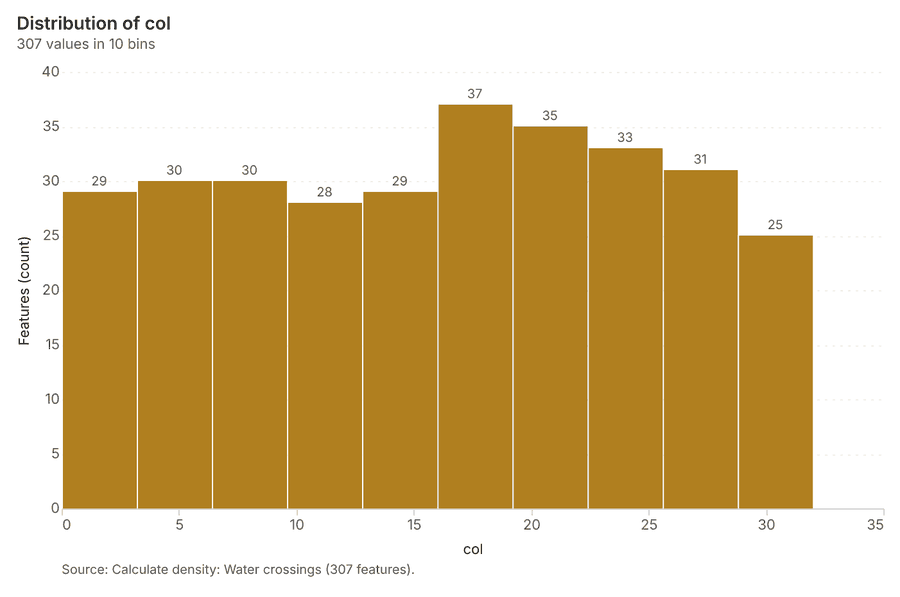
Why it was run on this data. 20 points in Water crossings: a density surface shows where they concentrate 47.
What it found. Calculate density on Water crossings: Calculate density: 1 layer saved: Calculate density: Water crossings (307 features) 4849. It reported result, count 307; result, elapsed ms 8; result, bandwidth m 1,000; result, cell size m 200; result, excluded null 0; result, max density per km2 9.049 48.
| Result | Value |
|---|---|
| result, count | 307 |
| result, elapsed ms | 8 |
| result, bandwidth m | 1,000 |
| result, cell size m | 200 |
| result, excluded null | 0 |
| result, max density per km2 | 9.049 |
| billing, cost | 0.0504 |
| billing, list price | 0.0504 |
| billing, upstream cost | 0 |
Findings
- Evidenced: Calculate density on Water crossings: Calculate density: 1 layer saved: Calculate density: Water crossings (307 features) 4849.
- Evidenced: It reported result, count 307; result, elapsed ms 8; result, bandwidth m 1,000; result, cell size m 200; result, excluded null 0; result, max density per km2 9.049 48.
Tool gp_calculate_density; parameters {"kernel": "quartic", "project": "9f6aa8f7-f5fe-4630-ab44-f56a90a94683", "features": {"layer": "Water crossings (208d3baf)"}, "bandwidth_m": 1000.0, "cell_size_m": 200.0}
Maps and charts
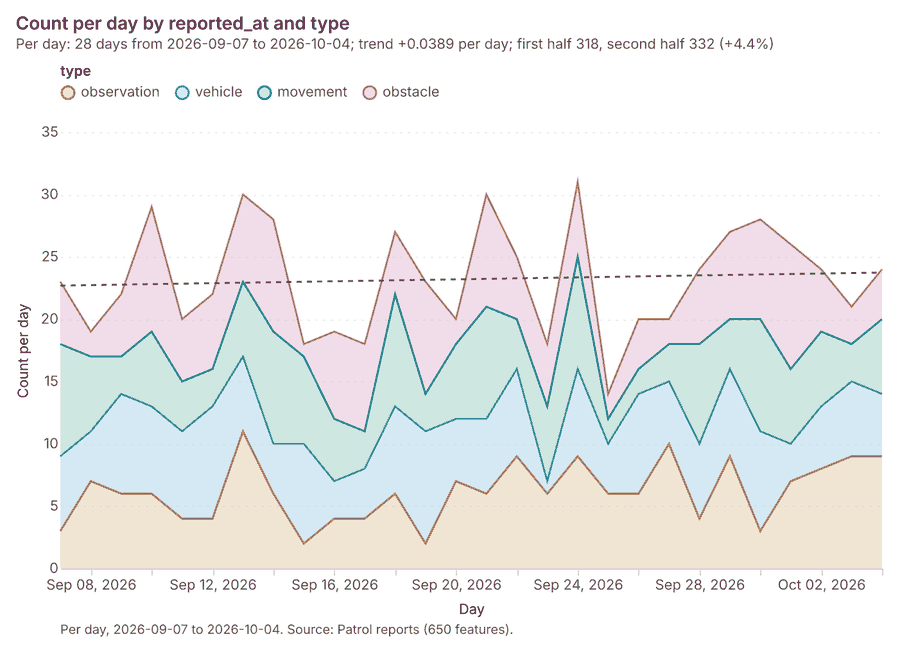
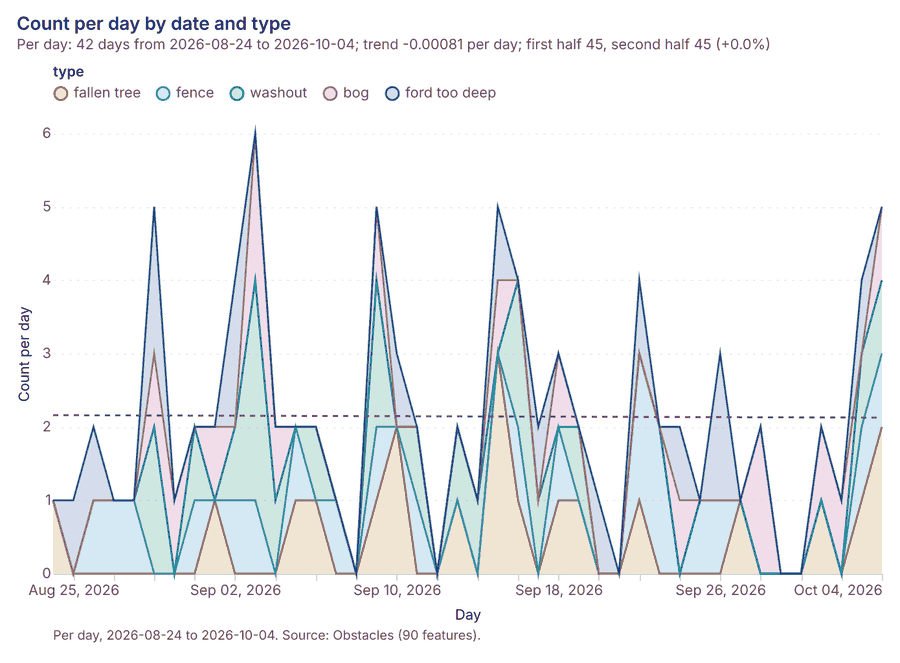
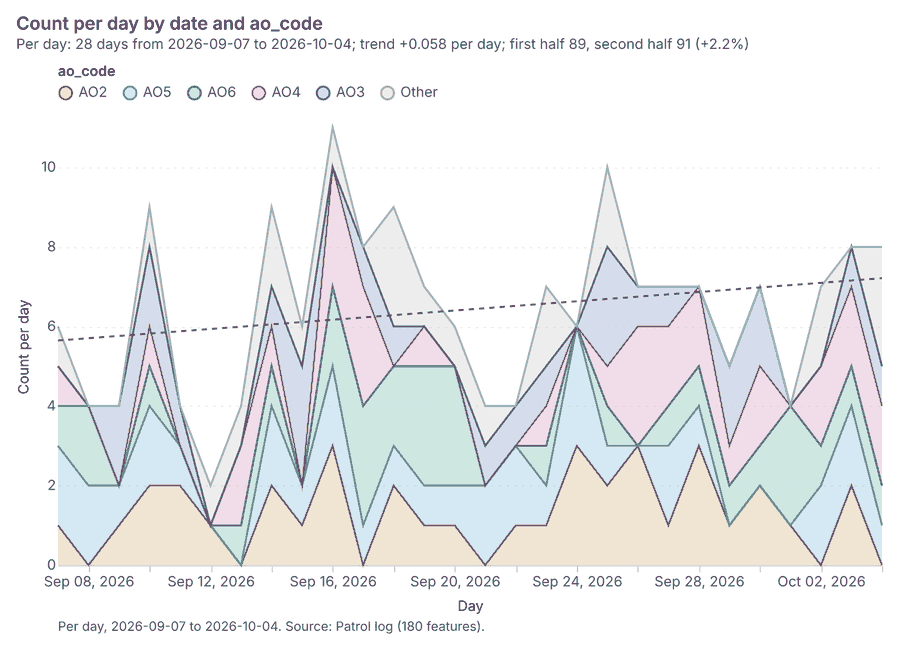
The run also made 20 map image(s) 5051525354555657585960616263646566676869 and 23 chart(s) 7071727374757677787980818283848586878889909192.
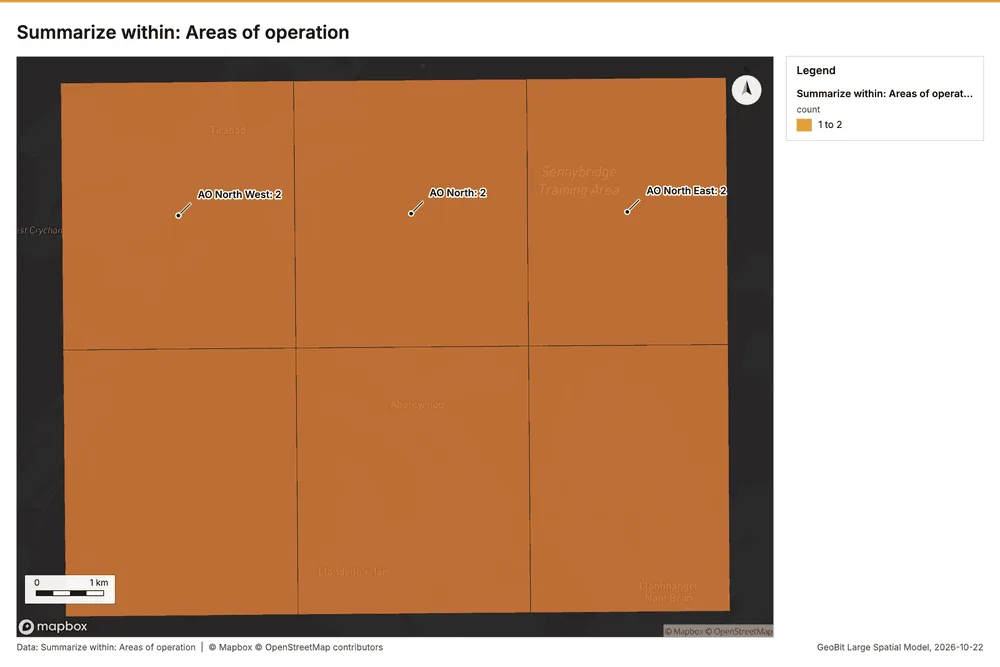
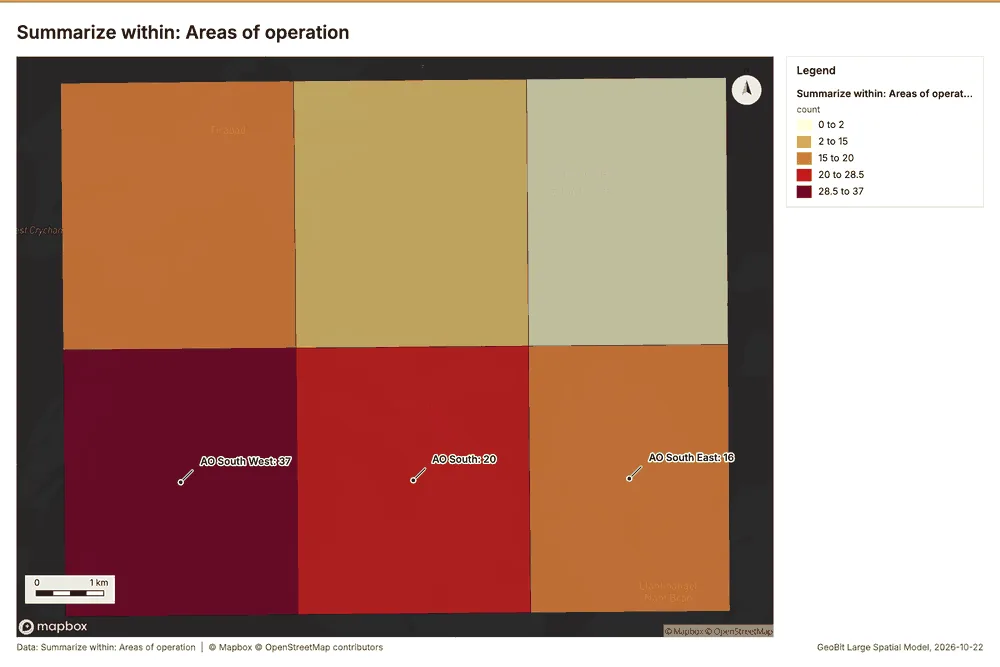
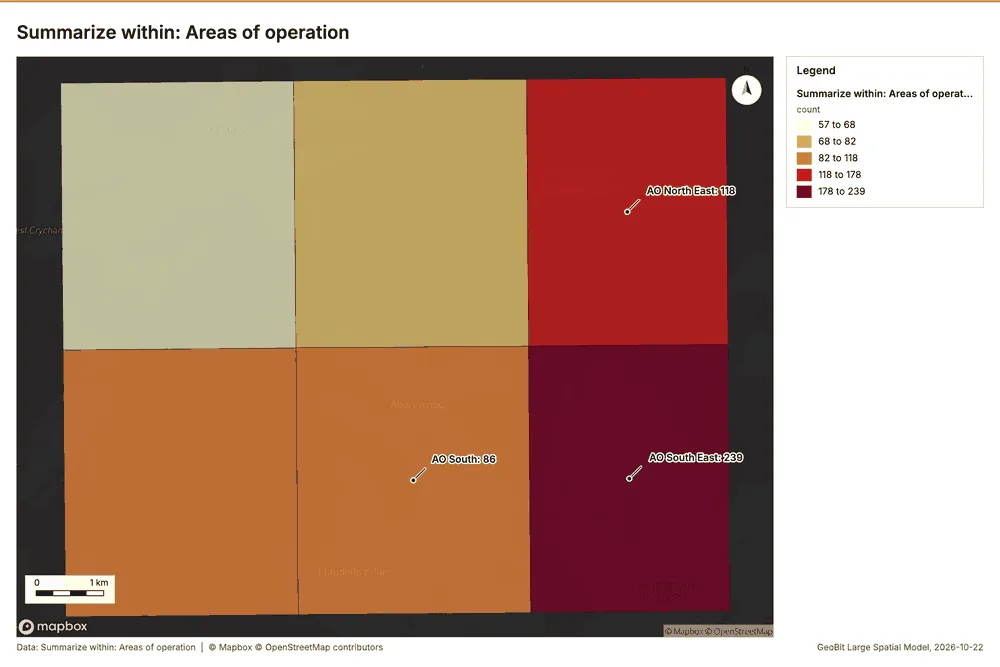
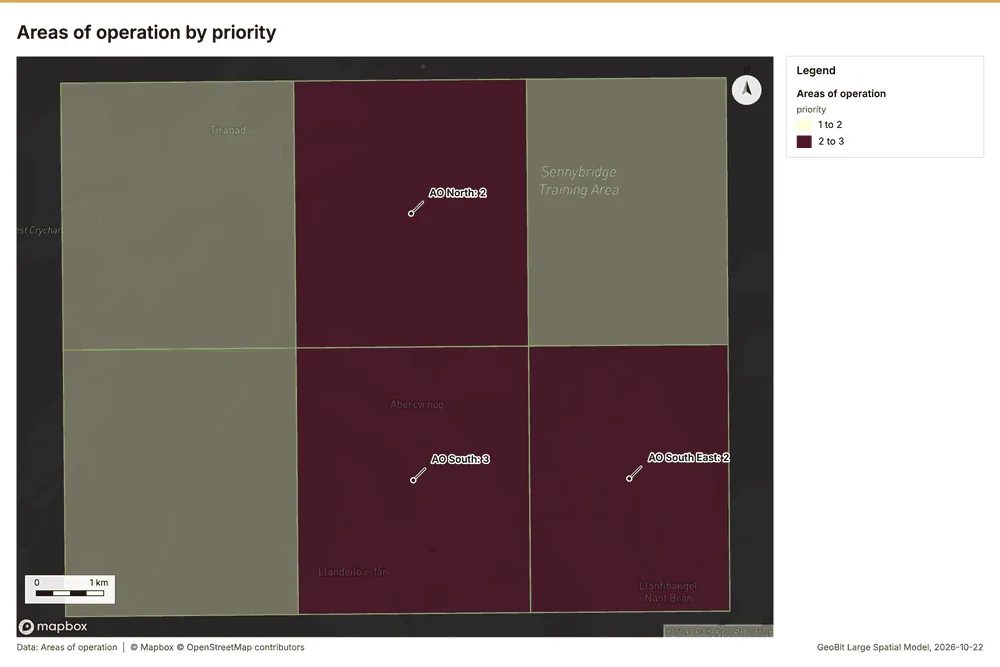
What the map shows. The map illustrates the count of "Areas of operation 52
Inferred: read from the image by gemma4:e4b, not evidence.
Changes since the last run
This is the first report of this project.
Sources
- 1Rendering: Chart: Timeline: events per day by dataset. 126 rows id a075601f-8af4-4c36-b946-28a1dfddb7fe
- 2Dataset: Patrol reports. vector, 650 rows id c25eb5cb-2e9d-49b2-9627-f99a5f226a66
- 3Dataset: Obstacles. vector, 90 rows id 9d65a5e4-b04a-4392-a9de-b8effe3904cf
- 4Dataset: Patrol log. table, 180 rows id 955d11b9-aa3e-47bb-9ff6-b65e6ac4fa73
- 5Catalog: Hot spot analysis (operation catalog, gp_hot_spots). Getis-Ord Gi* hot and cold spots with z-scores, p-values and confidence bins. ArcGIS: Find Hot Spots, Hot Spot Analysis (Getis-Ord Gi*). QGIS: qgis:hotspot (plugin). id gp_hot_spots
- 6Plan: Hot spots of Obstacles (the Start plan's candidate c_1654b7ad37e0). 90 points: Getis-Ord Gi* tests whether the concentrations in Obstacles are statistically significant. id 3357fd3d-8b81-4a47-98ef-82353b0fc69a:c_1654b7ad37e0
- 7Tool result: gp_hot_spots, step 0. Hot spot analysis: 1 layer saved: Hot spot analysis: Obstacles (17 features). id c02bea9a-84b4-471a-af11-fcc136bfd834:0
- 8Layer: Obstacles. 90 features id 10e309c5-03a3-4ad1-ae11-ae448d606dc2
- 9Plan: Hot spots of Patrol reports (the Start plan's candidate c_c76128ed5dc0). 650 points: Getis-Ord Gi* tests whether the concentrations in Patrol reports are statistically significant. id 3357fd3d-8b81-4a47-98ef-82353b0fc69a:c_c76128ed5dc0
- 10Tool result: gp_hot_spots, step 1. Hot spot analysis: 1 layer saved: Hot spot analysis: Patrol reports (154 features). id c02bea9a-84b4-471a-af11-fcc136bfd834:1
- 11Layer: Patrol reports. 650 features id 5e87153f-3c7f-4d6a-8b1b-b4466de16a73
- 12Catalog: Summarize within (operation catalog, gp_summarize_within). Count and aggregate the features inside each polygon (or bin), proportionally for lines and polygons. ArcGIS: Summarize Within, Aggregate Points. QGIS: native:countpointsinpolygon, native:sumlinelengths. id gp_summarize_within
- 13Plan: Observation posts per feature of Areas of operation (the Start plan's candidate c_9615a25895d8). Count Observation posts inside each feature of Areas of operation by manned; the counts map as a choropleth (natural breaks, sequential colors). id 3357fd3d-8b81-4a47-98ef-82353b0fc69a:c_9615a25895d8
- 14Tool result: gp_summarize_within, step 0. Summarize within: 1 layer saved: Summarize within: Areas of operation (6 features). id 708827d4-b092-40cb-a1ae-61f53ad70619:0
- 15Layer: Observation posts. 10 features id fd2e56d2-1032-4b2b-9046-8f9286496779
- 16Layer: Areas of operation. 6 features id eb593b97-39dd-4550-80e3-2d7a82b95f79
- 17Tool result: gp_summarize_within, step 1. Summarize within: 1 layer saved: Summarize within: Areas of operation (6 features). id 708827d4-b092-40cb-a1ae-61f53ad70619:1
- 18Tool result: gp_summarize_within, step 2. Summarize within: 1 layer saved: Summarize within: Areas of operation (6 features). id 708827d4-b092-40cb-a1ae-61f53ad70619:2
- 19Catalog: Find point clusters (operation catalog, gp_find_point_clusters). Density-based clusters (DBSCAN, HDBSCAN or OPTICS, optionally space-time) with hulls and noise. ArcGIS: Find Point Clusters, Density-based Clustering. QGIS: native:dbscanclustering, native:stdbscanclustering. id gp_find_point_clusters
- 20Plan: Cluster points of Observation posts (the Start plan's candidate c_7723da134a11). DBSCAN finds dense groups of Observation posts and separates noise. id 3357fd3d-8b81-4a47-98ef-82353b0fc69a:c_7723da134a11
- 21Tool result: gp_find_point_clusters, step 0. Find point clusters: 2 layers saved: Find point clusters: Observation posts (10 features); Find point clusters: cluster hulls (1 feature). id 93f15f4c-77ae-405b-a031-78b5514fb666:0
- 22Plan: Cluster points of Obstacles (the Start plan's candidate c_98311896c483). DBSCAN finds dense groups of Obstacles and separates noise. id 3357fd3d-8b81-4a47-98ef-82353b0fc69a:c_98311896c483
- 23Tool result: gp_find_point_clusters, step 1. Find point clusters: 2 layers saved: Find point clusters: Obstacles (90 features); Find point clusters: cluster hulls (4 features). id 93f15f4c-77ae-405b-a031-78b5514fb666:1
- 24Plan: Cluster points of Patrol reports (the Start plan's candidate c_4e02d942d100). DBSCAN finds dense groups of Patrol reports and separates noise. id 3357fd3d-8b81-4a47-98ef-82353b0fc69a:c_4e02d942d100
- 25Tool result: gp_find_point_clusters, step 2. Find point clusters: 2 layers saved: Find point clusters: Patrol reports (650 features); Find point clusters: cluster hulls (1 feature). id 93f15f4c-77ae-405b-a031-78b5514fb666:2
- 26Catalog: Zonal statistics (analysis catalog, rs_zonal_statistics). count/min/max/mean/std/sum/median/majority per polygon as a table and as GeoJSON. ArcGIS: Zonal Statistics as Table (polygons). id rs_zonal_statistics
- 27Plan: Zonal statistics of Training area terrain model (DEM) and Landing zones (the Start plan's candidate c_70866e78d829). Statistics of Training area terrain model (DEM) inside each feature of Landing zones. id 3357fd3d-8b81-4a47-98ef-82353b0fc69a:c_70866e78d829
- 28Tool result: rs_zonal_statistics, step 0. Zonal statistics: 6 row(s). zones 6. id 57fd4b1c-0b21-474c-8fbb-5585fed0e5d0:0
- 29Tool result: rs_zonal_statistics, step 1. Zonal statistics: 6 row(s). zones 6. id 57fd4b1c-0b21-474c-8fbb-5585fed0e5d0:1
- 30Catalog: Slope (analysis catalog, tr_slope). Horn slope in degrees or percent, with the share of ground in six grade classes. ArcGIS: Slope (Spatial Analyst). QGIS: Slope (GDAL DEM). id tr_slope
- 31Plan: Slope of Training area terrain model (DEM) (the Start plan's candidate c_5f66d5e2b63c). Slope of the Training area terrain model (DEM) surface. id 3357fd3d-8b81-4a47-98ef-82353b0fc69a:c_5f66d5e2b63c
- 32Tool result: tr_slope, step 2. Slope over 80.00 km2: mean 6.45 degrees, max 17.54 degrees; 35% of the ground is steeper than 15%. DEM: Training area terrain model (DEM). Verified: 2 checks passed. id 57fd4b1c-0b21-474c-8fbb-5585fed0e5d0:2
- 33Layer: Training area terrain model (DEM). 0 features id e55808a8-3d73-4245-b822-111fb86d9827
- 34Catalog: Emerging hot spots (operation catalog, gp_space_time_hot_spots). Where hot spots are new, consecutive, intensifying, persistent, diminishing, sporadic, oscillating or historical over time. ArcGIS: Emerging Hot Spot Analysis, Create Space Time Cube. id gp_space_time_hot_spots
- 35Plan: Space time hot spots of Obstacles (the Start plan's candidate c_31f5f28e0062). Obstacles carry dates in 'date': emerging hot spot analysis finds new, intensifying and fading hot spots per day. id 3357fd3d-8b81-4a47-98ef-82353b0fc69a:c_31f5f28e0062
- 36Tool result: gp_space_time_hot_spots, step 0. Emerging hot spots: 1 layer saved: Emerging hot spots: Obstacles (23 features). id f9327690-03fb-4bc8-a73e-29675f948fa0:0
- 37Plan: Space time hot spots of Patrol reports (the Start plan's candidate c_f4213213eb44). Patrol reports carry dates in 'reported_at': emerging hot spot analysis finds new, intensifying and fading hot spots per day. id 3357fd3d-8b81-4a47-98ef-82353b0fc69a:c_f4213213eb44
- 38Tool result: gp_space_time_hot_spots, step 1. Emerging hot spots: 1 layer saved: Emerging hot spots: Patrol reports (53 features). id f9327690-03fb-4bc8-a73e-29675f948fa0:1
- 39Catalog: Repeat and near repeat classification (operation catalog, gp_near_repeat). Classify incidents as originators, repeats (same place) or near repeats within a distance and time window, with a Knox test table. ArcGIS: Repeat and Near Repeat Classification, Near Repeat Calculator. id gp_near_repeat
- 40Plan: Near repeat of Obstacles (the Start plan's candidate c_d6531d225d6c). Near repeat analysis tests whether Obstacles close in space also follow each other within 4 days. id 3357fd3d-8b81-4a47-98ef-82353b0fc69a:c_d6531d225d6c
- 41Tool result: gp_near_repeat, step 2. Repeat and near repeat classification: 1 layer saved: Repeat and near repeat classification: Obstacles (90 features). id f9327690-03fb-4bc8-a73e-29675f948fa0:2
- 42Catalog: Calculate density (operation catalog, gp_calculate_density). Kernel density per square kilometer on a grid. ArcGIS: Calculate Density, Kernel Density. QGIS: native:heatmapkerneldensityestimation. id gp_calculate_density
- 43Plan: Kernel density of Obstacles (the Start plan's candidate c_f16b85e1e450). 90 points in Obstacles: a density surface shows where they concentrate. id 3357fd3d-8b81-4a47-98ef-82353b0fc69a:c_f16b85e1e450
- 44Tool result: gp_calculate_density, step 0. Calculate density: 1 layer saved: Calculate density: Obstacles (92 features). id 60e730b7-dd00-400a-a140-c96bac46f2c5:0
- 45Plan: Kernel density of Patrol reports (the Start plan's candidate c_e02ad3b592ff). 650 points in Patrol reports: a density surface shows where they concentrate. id 3357fd3d-8b81-4a47-98ef-82353b0fc69a:c_e02ad3b592ff
- 46Tool result: gp_calculate_density, step 1. Calculate density: 1 layer saved: Calculate density: Patrol reports (917 features). id 60e730b7-dd00-400a-a140-c96bac46f2c5:1
- 47Plan: Kernel density of Water crossings (the Start plan's candidate c_15ca28f2d2d2). 20 points in Water crossings: a density surface shows where they concentrate. id 3357fd3d-8b81-4a47-98ef-82353b0fc69a:c_15ca28f2d2d2
- 48Tool result: gp_calculate_density, step 2. Calculate density: 1 layer saved: Calculate density: Water crossings (307 features). id 60e730b7-dd00-400a-a140-c96bac46f2c5:2
- 49Layer: Water crossings. 20 features id 208d3baf-a4d2-484f-8e16-b9702114da9b
- 50Rendering: Map: Hot spot analysis: Obstacles id b36c2235-8c38-40a3-8157-25e56c6a1e0f
- 51Rendering: Map: Hot spot analysis: Patrol reports id 5cda70fb-0d99-4a7a-8495-a97496733283
- 52Rendering: Map: Summarize within: Areas of operation id 1e1b5d41-642e-48b0-8269-a66c0ef32d78
- 53Rendering: Map: Summarize within: Areas of operation id 168d2ce0-cf77-4595-bde8-43e1862982cc
- 54Rendering: Map: Summarize within: Areas of operation id 0d8537f4-dd3c-4f73-ab89-6f8174e81d97
- 55Rendering: Map: Find point clusters: Observation posts id 70c9dab4-7a4d-4fec-8552-055022f5cbb7
- 56Rendering: Map: Find point clusters: cluster hulls id 6236e4ce-4459-48d1-a70d-b79e0117c1ec
- 57Rendering: Map: Find point clusters: Obstacles id 563df080-8000-41a7-8a11-a694ccd89b08
- 58Rendering: Map: Find point clusters: cluster hulls id e92c0248-744d-4cc3-8589-370dfcad30f2
- 59Rendering: Map: Find point clusters: Patrol reports id ab13ea19-de86-4b69-80e0-c8ef4aa30931
- 60Rendering: Map: Find point clusters: cluster hulls id 7ca4199b-5d6b-4f23-ab37-2fa1f56526a8
- 61Rendering: Map: Slope (degrees) id 6a63c78c-3d1e-4205-a842-31ad40a4b309
- 62Rendering: Map: Emerging hot spots: Obstacles id 29d7b2e3-d895-4a09-a771-5fc05603e430
- 63Rendering: Map: Emerging hot spots: Patrol reports id 1bc16b89-3c2b-4b82-9207-eb27a894493d
- 64Rendering: Map: Repeat and near repeat classification: Obstacles id bcbe80a5-b991-4d6f-96f1-a3139a300291
- 65Rendering: Map: Calculate density: Obstacles id 7d62948d-b214-4047-b1cf-5bd2a67def12
- 66Rendering: Map: Calculate density: Patrol reports id 250c5714-f0d3-4b1c-9640-dc6880c56e2b
- 67Rendering: Map: Calculate density: Water crossings id 7b8c83ac-abff-4e12-ab23-c44d4c789f3d
- 68Rendering: Map: Landing zones by slope_deg id 74f2a1da-dfd2-4448-b5de-b8702a8f25d4
- 69Rendering: Map: Areas of operation by priority id d834336f-0a25-476c-b121-230662c23d0a
- 70Rendering: Chart: Patrol reports over time (reported_at). 112 rows id 07478869-2a69-4581-87e3-17496cf5e136
- 71Rendering: Chart: Obstacles over time (date). 210 rows id 9d813213-59c6-4415-82b3-c93e26844b7f
- 72Rendering: Chart: Patrol log over time (date). 168 rows id 034a55d7-21be-4129-a31d-9eee119f54f5
- 73Rendering: Chart: Hot spot analysis: Obstacles. 7 rows id 72a5d350-6ab1-4962-b0f7-d1bad4f53392
- 74Rendering: Chart: Hot spot analysis: Patrol reports. 9 rows id ace8f4ef-f3d3-4b05-a439-cfc49e5df712
- 75Rendering: Chart: Summarize within: Areas of operation. 5 rows id eb14ddb9-15a6-48d4-8ae8-f9529a04a3cb
- 76Rendering: Chart: Summarize within: Areas of operation. 5 rows id 1eb7527a-597b-41b9-a99a-45938cd7dc50
- 77Rendering: Chart: Summarize within: Areas of operation. 5 rows id 792139b3-4b0e-4de4-bd8a-43603bb5f6bd
- 78Rendering: Chart: Find point clusters: Observation posts. 2 rows id 534f28e5-77b1-4f4e-acb4-709551f06798
- 79Rendering: Chart: Find point clusters: cluster hulls. 1 rows id 97f55bbe-4bbd-44f1-bd3f-936b63a5a2b0
- 80Rendering: Chart: Find point clusters: Obstacles. 5 rows id b4e5e438-92bd-4da6-8403-7a4589823441
- 81Rendering: Chart: Find point clusters: cluster hulls. 4 rows id b3a2459b-e772-43f2-ab39-976f2ffc561d
- 82Rendering: Chart: Find point clusters: Patrol reports. 2 rows id 74922feb-fe7f-4a01-89dc-69b5df2a31d8
- 83Rendering: Chart: Find point clusters: cluster hulls. 1 rows id ca1b9fb6-ec2c-401a-b77a-adefc366594e
- 84Rendering: Chart: Emerging hot spots: Obstacles. 6 rows id 7467a03d-7a04-4edd-b500-2571d8ed1ff7
- 85Rendering: Chart: Emerging hot spots: Patrol reports. 7 rows id 1cb4af9d-0884-4a75-8acf-df058d69feec
- 86Rendering: Chart: Repeat and near repeat classification: Obstacles. 210 rows id 02424072-0bed-4b29-aed1-3ae65502761a
- 87Rendering: Chart: Calculate density: Obstacles. 8 rows id 65b9b20c-13c3-4077-83f5-ddb3fa4dbbf1
- 88Rendering: Chart: Calculate density: Patrol reports. 11 rows id 732b7459-ac9a-498c-8134-64ac33368d43
- 89Rendering: Chart: Calculate density: Water crossings. 10 rows id c5e21893-6553-4771-b9ec-1404e4bde3e4
- 90Rendering: Chart: Repeat and near repeat classification: Obstacles over time. 210 rows id 85c408a0-c4a6-494e-889b-9629715d60f3
- 91Rendering: Chart: Find point clusters: Patrol reports over time. 112 rows id 2b6755a5-cbe0-4c45-af22-1c437c4c3148
- 92Rendering: Chart: Find point clusters: Obstacles over time. 210 rows id 09f78ff6-4149-4a54-a883-9acb717cebb8
- 93Dataset: Observation posts. vector, 10 rows id 8f0f1a87-dd0f-4c0b-8acd-1987833c2dfb
- 94Dataset: Areas of operation. vector, 6 rows id 57abb88c-382d-49e5-af70-78724688b7aa
- 95Dataset: Tracks and routes. vector, 10 rows id fa0f7594-2e32-484b-b0ef-259c88036060
- 96Dataset: Landing zones. vector, 6 rows id 1e58cf31-c3d8-4fc1-8126-5d80f9746b7f
- 97Dataset: Water crossings. vector, 20 rows id f536fc8e-2668-4ca3-84d6-d02229976802
- 98Dataset: Training area terrain model (DEM). raster, ? rows id 4e625b8c-d8a8-495f-bcc1-48bc10c548e6
- 99Dataset: Unit roster. table, 12 rows id 9792cc27-8080-4d5c-9bca-d91704c915e7
- 100Dataset: Exercise orders. document, ? rows id 4186fc2a-074a-4dee-8f0f-dab84dbe40c0
- 101Record: Sample: Field operations terrain, Sennybridge id 9f6aa8f7-f5fe-4630-ab44-f56a90a94683
- 102Layer: Hot spot analysis: Obstacles. 17 features id f4dc8e71-227a-4c0d-ad3d-1bf4d7b0007a
- 103Layer: Hot spot analysis: Patrol reports. 154 features id 3915a1a8-7346-4d03-aed4-c92fac1c921a
- 104Layer: Summarize within: Areas of operation. 6 features id 23f3ae18-b552-4200-8914-682e1fecfaa8
- 105Layer: Summarize within: Areas of operation. 6 features id 1f4497dc-e816-43d0-ab77-866fac5cc34c
- 106Layer: Summarize within: Areas of operation. 6 features id 727ecbb2-90f8-4fe2-9e60-2c9101f12b0d
- 107Layer: Find point clusters: Observation posts. 10 features id 16d6caee-b512-4773-9ba1-66108569c4a9
- 108Layer: Find point clusters: cluster hulls. 1 features id 0bdf2a2b-41e8-4e1c-8aa7-7ee0e119ca1b
- 109Layer: Find point clusters: Obstacles. 90 features id 0f5f0385-f10d-4121-988c-42dfafc82df7
- 110Layer: Find point clusters: cluster hulls. 4 features id 01da6a57-d000-4e39-b882-1f40bb33050d
- 111Layer: Find point clusters: Patrol reports. 650 features id 4f52bebf-3f65-4820-866c-85abbe31c6e0
- 112Layer: Find point clusters: cluster hulls. 1 features id e3c5e7a6-2962-4719-b63c-271a1f761b44
- 113Layer: Slope (degrees). 0 features id 2c8b4aff-3457-42fc-b96c-11c77a0ac8d3
- 114Layer: Emerging hot spots: Obstacles. 23 features id ed581997-aff0-48ca-90b6-5aaf76587ff9
- 115Layer: Emerging hot spots: Patrol reports. 53 features id 49cb95cf-68cc-4d39-8757-8bec5c021a79
- 116Layer: Repeat and near repeat classification: Obstacles. 90 features id 12ba7636-bbf6-4484-b67c-076a475693ee
- 117Layer: Calculate density: Obstacles. 92 features id b54dddde-3720-4c5c-8833-27f6868f361e
- 118Layer: Calculate density: Patrol reports. 917 features id b5456c96-3d51-4f5f-8e7a-cea776032203
- 119Layer: Calculate density: Water crossings. 307 features id 6828b511-9b90-421e-b1c0-82df009bcd2c
- 120Document: Exercise orders id a3a42113-5e5d-4af0-bcf8-a95ed08b3dfe
Appendix: the data behind the chartsShow
Figure 1. Timeline: events per day by dataset 1
| period | series | value |
|---|---|---|
| 2026-08-24 | Patrol reports | 0 |
| 2026-08-24 | Patrol log | 0 |
| 2026-08-24 | Obstacles | 1 |
| 2026-08-25 | Patrol reports | 0 |
| 2026-08-25 | Patrol log | 0 |
| 2026-08-25 | Obstacles | 1 |
| 2026-08-26 | Patrol reports | 0 |
| 2026-08-26 | Patrol log | 0 |
| 2026-08-26 | Obstacles | 2 |
| 2026-08-27 | Patrol reports | 0 |
| 2026-08-27 | Patrol log | 0 |
| 2026-08-27 | Obstacles | 1 |
| 2026-08-28 | Patrol reports | 0 |
| 2026-08-28 | Patrol log | 0 |
| 2026-08-28 | Obstacles | 1 |
| 2026-08-29 | Patrol reports | 0 |
| 2026-08-29 | Patrol log | 0 |
| 2026-08-29 | Obstacles | 5 |
| 2026-08-30 | Patrol reports | 0 |
| 2026-08-30 | Patrol log | 0 |
| 2026-08-30 | Obstacles | 1 |
| 2026-08-31 | Patrol reports | 0 |
| 2026-08-31 | Patrol log | 0 |
| 2026-08-31 | Obstacles | 2 |
| 2026-09-01 | Patrol reports | 0 |
| 2026-09-01 | Patrol log | 0 |
| 2026-09-01 | Obstacles | 2 |
| 2026-09-02 | Patrol reports | 0 |
| 2026-09-02 | Patrol log | 0 |
| 2026-09-02 | Obstacles | 4 |
| 2026-09-03 | Patrol reports | 0 |
| 2026-09-03 | Patrol log | 0 |
| 2026-09-03 | Obstacles | 6 |
| 2026-09-04 | Patrol reports | 0 |
| 2026-09-04 | Patrol log | 0 |
| 2026-09-04 | Obstacles | 2 |
| 2026-09-05 | Patrol reports | 0 |
| 2026-09-05 | Patrol log | 0 |
| 2026-09-05 | Obstacles | 2 |
| 2026-09-06 | Patrol reports | 0 |
| 2026-09-06 | Patrol log | 0 |
| 2026-09-06 | Obstacles | 2 |
| 2026-09-07 | Patrol reports | 23 |
| 2026-09-07 | Patrol log | 6 |
| 2026-09-07 | Obstacles | 1 |
| 2026-09-08 | Patrol reports | 19 |
| 2026-09-08 | Patrol log | 4 |
| 2026-09-08 | Obstacles | 0 |
| 2026-09-09 | Patrol reports | 22 |
| 2026-09-09 | Patrol log | 4 |
| 2026-09-09 | Obstacles | 5 |
| 2026-09-10 | Patrol reports | 29 |
| 2026-09-10 | Patrol log | 9 |
| 2026-09-10 | Obstacles | 3 |
| 2026-09-11 | Patrol reports | 20 |
| 2026-09-11 | Patrol log | 4 |
| 2026-09-11 | Obstacles | 2 |
| 2026-09-12 | Patrol reports | 22 |
| 2026-09-12 | Patrol log | 2 |
| 2026-09-12 | Obstacles | 0 |
| 2026-09-13 | Patrol reports | 30 |
| 2026-09-13 | Patrol log | 4 |
| 2026-09-13 | Obstacles | 2 |
| 2026-09-14 | Patrol reports | 28 |
| 2026-09-14 | Patrol log | 9 |
| 2026-09-14 | Obstacles | 1 |
| 2026-09-15 | Patrol reports | 18 |
| 2026-09-15 | Patrol log | 6 |
| 2026-09-15 | Obstacles | 5 |
| 2026-09-16 | Patrol reports | 19 |
| 2026-09-16 | Patrol log | 11 |
| 2026-09-16 | Obstacles | 4 |
| 2026-09-17 | Patrol reports | 18 |
| 2026-09-17 | Patrol log | 8 |
| 2026-09-17 | Obstacles | 2 |
| 2026-09-18 | Patrol reports | 27 |
| 2026-09-18 | Patrol log | 9 |
| 2026-09-18 | Obstacles | 3 |
| 2026-09-19 | Patrol reports | 23 |
| 2026-09-19 | Patrol log | 7 |
| 2026-09-19 | Obstacles | 2 |
| 2026-09-20 | Patrol reports | 20 |
| 2026-09-20 | Patrol log | 6 |
| 2026-09-20 | Obstacles | 1 |
| 2026-09-21 | Patrol reports | 30 |
| 2026-09-21 | Patrol log | 4 |
| 2026-09-21 | Obstacles | 0 |
| 2026-09-22 | Patrol reports | 25 |
| 2026-09-22 | Patrol log | 4 |
| 2026-09-22 | Obstacles | 4 |
| 2026-09-23 | Patrol reports | 18 |
| 2026-09-23 | Patrol log | 7 |
| 2026-09-23 | Obstacles | 2 |
| 2026-09-24 | Patrol reports | 31 |
| 2026-09-24 | Patrol log | 6 |
| 2026-09-24 | Obstacles | 2 |
| 2026-09-25 | Patrol reports | 14 |
| 2026-09-25 | Patrol log | 10 |
| 2026-09-25 | Obstacles | 1 |
| 2026-09-26 | Patrol reports | 20 |
| 2026-09-26 | Patrol log | 7 |
| 2026-09-26 | Obstacles | 3 |
| 2026-09-27 | Patrol reports | 20 |
| 2026-09-27 | Patrol log | 7 |
| 2026-09-27 | Obstacles | 1 |
| 2026-09-28 | Patrol reports | 24 |
| 2026-09-28 | Patrol log | 7 |
| 2026-09-28 | Obstacles | 2 |
| 2026-09-29 | Patrol reports | 27 |
| 2026-09-29 | Patrol log | 5 |
| 2026-09-29 | Obstacles | 0 |
| 2026-09-30 | Patrol reports | 28 |
| 2026-09-30 | Patrol log | 7 |
| 2026-09-30 | Obstacles | 0 |
| 2026-10-01 | Patrol reports | 26 |
| 2026-10-01 | Patrol log | 4 |
| 2026-10-01 | Obstacles | 2 |
| 2026-10-02 | Patrol reports | 24 |
| 2026-10-02 | Patrol log | 7 |
| 2026-10-02 | Obstacles | 1 |
| 2026-10-03 | Patrol reports | 21 |
| 2026-10-03 | Patrol log | 8 |
| 2026-10-03 | Obstacles | 4 |
| 2026-10-04 | Patrol reports | 24 |
| 2026-10-04 | Patrol log | 8 |
| 2026-10-04 | Obstacles | 5 |
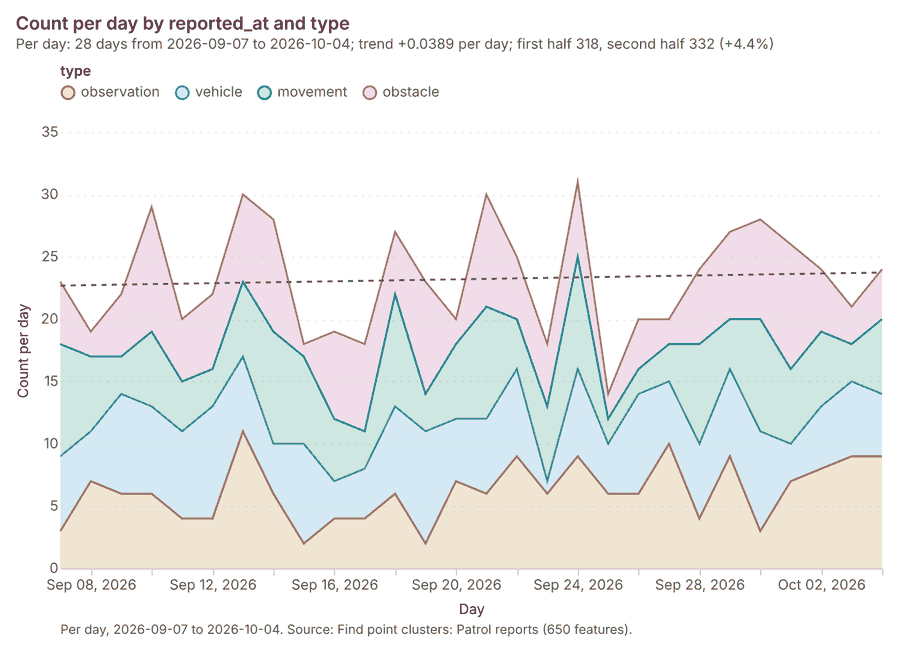
Figure 22. Patrol reports over time (reported_at) 70
| period | series | value |
|---|---|---|
| 2026-09-07 | observation | 3 |
| 2026-09-07 | vehicle | 6 |
| 2026-09-07 | movement | 9 |
| 2026-09-07 | obstacle | 5 |
| 2026-09-08 | observation | 7 |
| 2026-09-08 | vehicle | 4 |
| 2026-09-08 | movement | 6 |
| 2026-09-08 | obstacle | 2 |
| 2026-09-09 | observation | 6 |
| 2026-09-09 | vehicle | 8 |
| 2026-09-09 | movement | 3 |
| 2026-09-09 | obstacle | 5 |
| 2026-09-10 | observation | 6 |
| 2026-09-10 | vehicle | 7 |
| 2026-09-10 | movement | 6 |
| 2026-09-10 | obstacle | 10 |
| 2026-09-11 | observation | 4 |
| 2026-09-11 | vehicle | 7 |
| 2026-09-11 | movement | 4 |
| 2026-09-11 | obstacle | 5 |
| 2026-09-12 | observation | 4 |
| 2026-09-12 | vehicle | 9 |
| 2026-09-12 | movement | 3 |
| 2026-09-12 | obstacle | 6 |
| 2026-09-13 | observation | 11 |
| 2026-09-13 | vehicle | 6 |
| 2026-09-13 | movement | 6 |
| 2026-09-13 | obstacle | 7 |
| 2026-09-14 | observation | 6 |
| 2026-09-14 | vehicle | 4 |
| 2026-09-14 | movement | 9 |
| 2026-09-14 | obstacle | 9 |
| 2026-09-15 | observation | 2 |
| 2026-09-15 | vehicle | 8 |
| 2026-09-15 | movement | 7 |
| 2026-09-15 | obstacle | 1 |
| 2026-09-16 | observation | 4 |
| 2026-09-16 | vehicle | 3 |
| 2026-09-16 | movement | 5 |
| 2026-09-16 | obstacle | 7 |
| 2026-09-17 | observation | 4 |
| 2026-09-17 | vehicle | 4 |
| 2026-09-17 | movement | 3 |
| 2026-09-17 | obstacle | 7 |
| 2026-09-18 | observation | 6 |
| 2026-09-18 | vehicle | 7 |
| 2026-09-18 | movement | 9 |
| 2026-09-18 | obstacle | 5 |
| 2026-09-19 | observation | 2 |
| 2026-09-19 | vehicle | 9 |
| 2026-09-19 | movement | 3 |
| 2026-09-19 | obstacle | 9 |
| 2026-09-20 | observation | 7 |
| 2026-09-20 | vehicle | 5 |
| 2026-09-20 | movement | 6 |
| 2026-09-20 | obstacle | 2 |
| 2026-09-21 | observation | 6 |
| 2026-09-21 | vehicle | 6 |
| 2026-09-21 | movement | 9 |
| 2026-09-21 | obstacle | 9 |
| 2026-09-22 | observation | 9 |
| 2026-09-22 | vehicle | 7 |
| 2026-09-22 | movement | 4 |
| 2026-09-22 | obstacle | 5 |
| 2026-09-23 | observation | 6 |
| 2026-09-23 | vehicle | 1 |
| 2026-09-23 | movement | 6 |
| 2026-09-23 | obstacle | 5 |
| 2026-09-24 | observation | 9 |
| 2026-09-24 | vehicle | 7 |
| 2026-09-24 | movement | 9 |
| 2026-09-24 | obstacle | 6 |
| 2026-09-25 | observation | 6 |
| 2026-09-25 | vehicle | 4 |
| 2026-09-25 | movement | 2 |
| 2026-09-25 | obstacle | 2 |
| 2026-09-26 | observation | 6 |
| 2026-09-26 | vehicle | 8 |
| 2026-09-26 | movement | 2 |
| 2026-09-26 | obstacle | 4 |
| 2026-09-27 | observation | 10 |
| 2026-09-27 | vehicle | 5 |
| 2026-09-27 | movement | 3 |
| 2026-09-27 | obstacle | 2 |
| 2026-09-28 | observation | 4 |
| 2026-09-28 | vehicle | 6 |
| 2026-09-28 | movement | 8 |
| 2026-09-28 | obstacle | 6 |
| 2026-09-29 | observation | 9 |
| 2026-09-29 | vehicle | 7 |
| 2026-09-29 | movement | 4 |
| 2026-09-29 | obstacle | 7 |
| 2026-09-30 | observation | 3 |
| 2026-09-30 | vehicle | 8 |
| 2026-09-30 | movement | 9 |
| 2026-09-30 | obstacle | 8 |
| 2026-10-01 | observation | 7 |
| 2026-10-01 | vehicle | 3 |
| 2026-10-01 | movement | 6 |
| 2026-10-01 | obstacle | 10 |
| 2026-10-02 | observation | 8 |
| 2026-10-02 | vehicle | 5 |
| 2026-10-02 | movement | 6 |
| 2026-10-02 | obstacle | 5 |
| 2026-10-03 | observation | 9 |
| 2026-10-03 | vehicle | 6 |
| 2026-10-03 | movement | 3 |
| 2026-10-03 | obstacle | 3 |
| 2026-10-04 | observation | 9 |
| 2026-10-04 | vehicle | 5 |
| 2026-10-04 | movement | 6 |
| 2026-10-04 | obstacle | 4 |
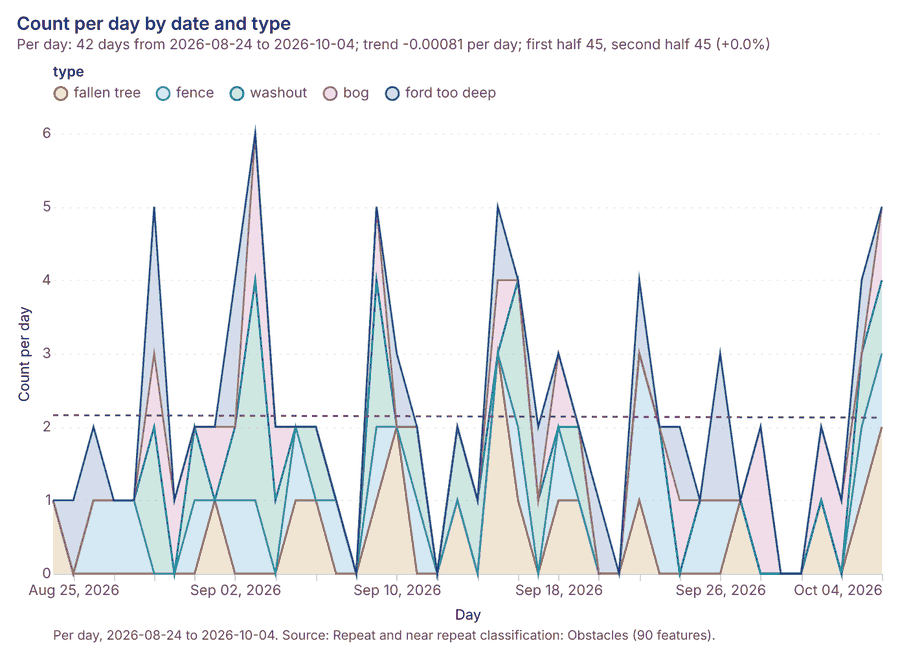
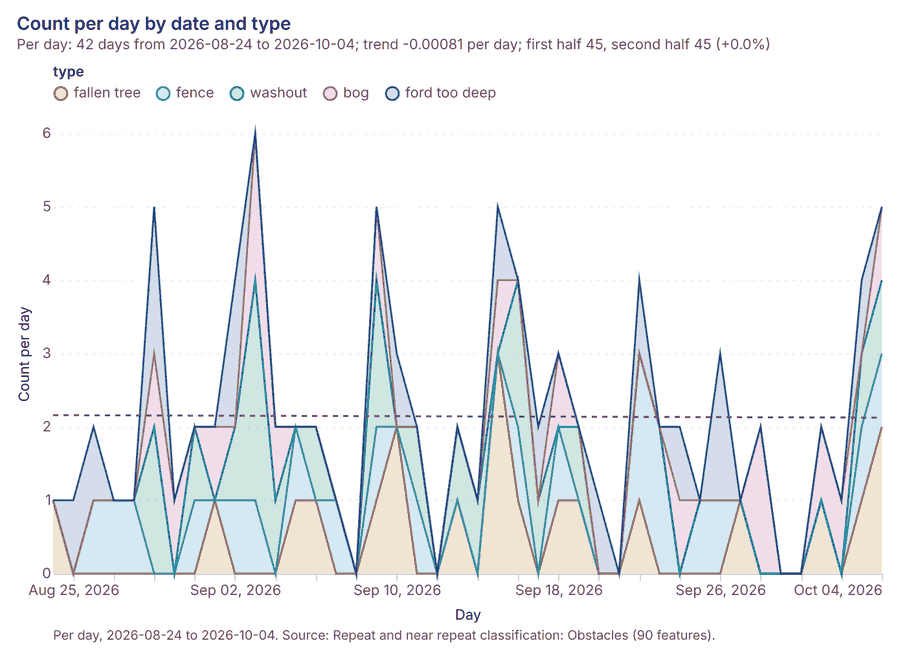
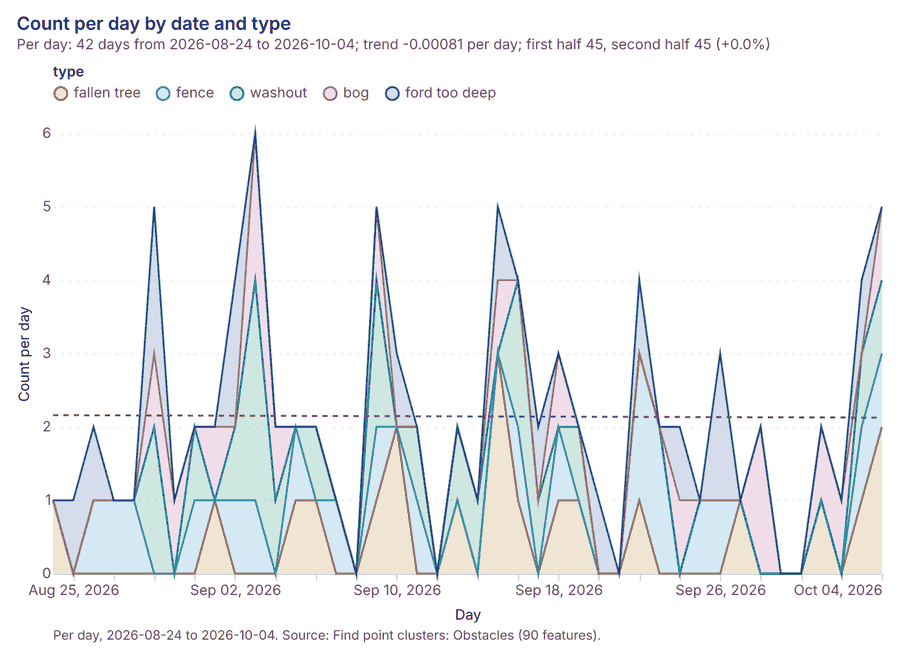
Figure 23. Obstacles over time (date) 71
| period | series | value |
|---|---|---|
| 2026-08-24 | fallen tree | 1 |
| 2026-08-24 | fence | 0 |
| 2026-08-24 | washout | 0 |
| 2026-08-24 | bog | 0 |
| 2026-08-24 | ford too deep | 0 |
| 2026-08-25 | fallen tree | 0 |
| 2026-08-25 | fence | 0 |
| 2026-08-25 | washout | 0 |
| 2026-08-25 | bog | 0 |
| 2026-08-25 | ford too deep | 1 |
| 2026-08-26 | fallen tree | 0 |
| 2026-08-26 | fence | 1 |
| 2026-08-26 | washout | 0 |
| 2026-08-26 | bog | 0 |
| 2026-08-26 | ford too deep | 1 |
| 2026-08-27 | fallen tree | 0 |
| 2026-08-27 | fence | 1 |
| 2026-08-27 | washout | 0 |
| 2026-08-27 | bog | 0 |
| 2026-08-27 | ford too deep | 0 |
| 2026-08-28 | fallen tree | 0 |
| 2026-08-28 | fence | 1 |
| 2026-08-28 | washout | 0 |
| 2026-08-28 | bog | 0 |
| 2026-08-28 | ford too deep | 0 |
| 2026-08-29 | fallen tree | 0 |
| 2026-08-29 | fence | 0 |
| 2026-08-29 | washout | 2 |
| 2026-08-29 | bog | 1 |
| 2026-08-29 | ford too deep | 2 |
| 2026-08-30 | fallen tree | 0 |
| 2026-08-30 | fence | 0 |
| 2026-08-30 | washout | 0 |
| 2026-08-30 | bog | 1 |
| 2026-08-30 | ford too deep | 0 |
| 2026-08-31 | fallen tree | 0 |
| 2026-08-31 | fence | 1 |
| 2026-08-31 | washout | 1 |
| 2026-08-31 | bog | 0 |
| 2026-08-31 | ford too deep | 0 |
| 2026-09-01 | fallen tree | 1 |
| 2026-09-01 | fence | 0 |
| 2026-09-01 | washout | 0 |
| 2026-09-01 | bog | 1 |
| 2026-09-01 | ford too deep | 0 |
| 2026-09-02 | fallen tree | 0 |
| 2026-09-02 | fence | 1 |
| 2026-09-02 | washout | 1 |
| 2026-09-02 | bog | 0 |
| 2026-09-02 | ford too deep | 2 |
| 2026-09-03 | fallen tree | 0 |
| 2026-09-03 | fence | 1 |
| 2026-09-03 | washout | 3 |
| 2026-09-03 | bog | 2 |
| 2026-09-03 | ford too deep | 0 |
| 2026-09-04 | fallen tree | 0 |
| 2026-09-04 | fence | 0 |
| 2026-09-04 | washout | 1 |
| 2026-09-04 | bog | 1 |
| 2026-09-04 | ford too deep | 0 |
| 2026-09-05 | fallen tree | 1 |
| 2026-09-05 | fence | 1 |
| 2026-09-05 | washout | 0 |
| 2026-09-05 | bog | 0 |
| 2026-09-05 | ford too deep | 0 |
| 2026-09-06 | fallen tree | 1 |
| 2026-09-06 | fence | 0 |
| 2026-09-06 | washout | 1 |
| 2026-09-06 | bog | 0 |
| 2026-09-06 | ford too deep | 0 |
| 2026-09-07 | fallen tree | 0 |
| 2026-09-07 | fence | 1 |
| 2026-09-07 | washout | 0 |
| 2026-09-07 | bog | 0 |
| 2026-09-07 | ford too deep | 0 |
| 2026-09-08 | fallen tree | 0 |
| 2026-09-08 | fence | 0 |
| 2026-09-08 | washout | 0 |
| 2026-09-08 | bog | 0 |
| 2026-09-08 | ford too deep | 0 |
| 2026-09-09 | fallen tree | 1 |
| 2026-09-09 | fence | 1 |
| 2026-09-09 | washout | 2 |
| 2026-09-09 | bog | 1 |
| 2026-09-09 | ford too deep | 0 |
| 2026-09-10 | fallen tree | 2 |
| 2026-09-10 | fence | 0 |
| 2026-09-10 | washout | 0 |
| 2026-09-10 | bog | 0 |
| 2026-09-10 | ford too deep | 1 |
| 2026-09-11 | fallen tree | 0 |
| 2026-09-11 | fence | 1 |
| 2026-09-11 | washout | 1 |
| 2026-09-11 | bog | 0 |
| 2026-09-11 | ford too deep | 0 |
| 2026-09-12 | fallen tree | 0 |
| 2026-09-12 | fence | 0 |
| 2026-09-12 | washout | 0 |
| 2026-09-12 | bog | 0 |
| 2026-09-12 | ford too deep | 0 |
| 2026-09-13 | fallen tree | 1 |
| 2026-09-13 | fence | 0 |
| 2026-09-13 | washout | 1 |
| 2026-09-13 | bog | 0 |
| 2026-09-13 | ford too deep | 0 |
| 2026-09-14 | fallen tree | 0 |
| 2026-09-14 | fence | 0 |
| 2026-09-14 | washout | 1 |
| 2026-09-14 | bog | 0 |
| 2026-09-14 | ford too deep | 0 |
| 2026-09-15 | fallen tree | 3 |
| 2026-09-15 | fence | 0 |
| 2026-09-15 | washout | 0 |
| 2026-09-15 | bog | 1 |
| 2026-09-15 | ford too deep | 1 |
| 2026-09-16 | fallen tree | 1 |
| 2026-09-16 | fence | 1 |
| 2026-09-16 | washout | 2 |
| 2026-09-16 | bog | 0 |
| 2026-09-16 | ford too deep | 0 |
| 2026-09-17 | fallen tree | 0 |
| 2026-09-17 | fence | 0 |
| 2026-09-17 | washout | 1 |
| 2026-09-17 | bog | 0 |
| 2026-09-17 | ford too deep | 1 |
| 2026-09-18 | fallen tree | 1 |
| 2026-09-18 | fence | 1 |
| 2026-09-18 | washout | 0 |
| 2026-09-18 | bog | 1 |
| 2026-09-18 | ford too deep | 0 |
| 2026-09-19 | fallen tree | 1 |
| 2026-09-19 | fence | 0 |
| 2026-09-19 | washout | 1 |
| 2026-09-19 | bog | 0 |
| 2026-09-19 | ford too deep | 0 |
| 2026-09-20 | fallen tree | 0 |
| 2026-09-20 | fence | 0 |
| 2026-09-20 | washout | 0 |
| 2026-09-20 | bog | 0 |
| 2026-09-20 | ford too deep | 1 |
| 2026-09-21 | fallen tree | 0 |
| 2026-09-21 | fence | 0 |
| 2026-09-21 | washout | 0 |
| 2026-09-21 | bog | 0 |
| 2026-09-21 | ford too deep | 0 |
| 2026-09-22 | fallen tree | 1 |
| 2026-09-22 | fence | 2 |
| 2026-09-22 | washout | 0 |
| 2026-09-22 | bog | 0 |
| 2026-09-22 | ford too deep | 1 |
| 2026-09-23 | fallen tree | 0 |
| 2026-09-23 | fence | 2 |
| 2026-09-23 | washout | 0 |
| 2026-09-23 | bog | 0 |
| 2026-09-23 | ford too deep | 0 |
| 2026-09-24 | fallen tree | 0 |
| 2026-09-24 | fence | 0 |
| 2026-09-24 | washout | 0 |
| 2026-09-24 | bog | 1 |
| 2026-09-24 | ford too deep | 1 |
| 2026-09-25 | fallen tree | 0 |
| 2026-09-25 | fence | 1 |
| 2026-09-25 | washout | 0 |
| 2026-09-25 | bog | 0 |
| 2026-09-25 | ford too deep | 0 |
| 2026-09-26 | fallen tree | 0 |
| 2026-09-26 | fence | 1 |
| 2026-09-26 | washout | 0 |
| 2026-09-26 | bog | 0 |
| 2026-09-26 | ford too deep | 2 |
| 2026-09-27 | fallen tree | 1 |
| 2026-09-27 | fence | 0 |
| 2026-09-27 | washout | 0 |
| 2026-09-27 | bog | 0 |
| 2026-09-27 | ford too deep | 0 |
| 2026-09-28 | fallen tree | 0 |
| 2026-09-28 | fence | 0 |
| 2026-09-28 | washout | 0 |
| 2026-09-28 | bog | 2 |
| 2026-09-28 | ford too deep | 0 |
| 2026-09-29 | fallen tree | 0 |
| 2026-09-29 | fence | 0 |
| 2026-09-29 | washout | 0 |
| 2026-09-29 | bog | 0 |
| 2026-09-29 | ford too deep | 0 |
| 2026-09-30 | fallen tree | 0 |
| 2026-09-30 | fence | 0 |
| 2026-09-30 | washout | 0 |
| 2026-09-30 | bog | 0 |
| 2026-09-30 | ford too deep | 0 |
| 2026-10-01 | fallen tree | 1 |
| 2026-10-01 | fence | 0 |
| 2026-10-01 | washout | 0 |
| 2026-10-01 | bog | 1 |
| 2026-10-01 | ford too deep | 0 |
| 2026-10-02 | fallen tree | 0 |
| 2026-10-02 | fence | 0 |
| 2026-10-02 | washout | 0 |
| 2026-10-02 | bog | 1 |
| 2026-10-02 | ford too deep | 0 |
| 2026-10-03 | fallen tree | 1 |
| 2026-10-03 | fence | 1 |
| 2026-10-03 | washout | 1 |
| 2026-10-03 | bog | 0 |
| 2026-10-03 | ford too deep | 1 |
| 2026-10-04 | fallen tree | 2 |
| 2026-10-04 | fence | 1 |
| 2026-10-04 | washout | 1 |
| 2026-10-04 | bog | 1 |
| 2026-10-04 | ford too deep | 0 |
Figure 24. Patrol log over time (date) 72
| period | series | value |
|---|---|---|
| 2026-09-07 | AO2 | 1 |
| 2026-09-07 | AO5 | 2 |
| 2026-09-07 | AO6 | 1 |
| 2026-09-07 | AO4 | 1 |
| 2026-09-07 | AO3 | 0 |
| 2026-09-07 | Other | 1 |
| 2026-09-08 | AO2 | 0 |
| 2026-09-08 | AO5 | 2 |
| 2026-09-08 | AO6 | 2 |
| 2026-09-08 | AO4 | 0 |
| 2026-09-08 | AO3 | 0 |
| 2026-09-08 | Other | 0 |
| 2026-09-09 | AO2 | 1 |
| 2026-09-09 | AO5 | 1 |
| 2026-09-09 | AO6 | 0 |
| 2026-09-09 | AO4 | 0 |
| 2026-09-09 | AO3 | 2 |
| 2026-09-09 | Other | 0 |
| 2026-09-10 | AO2 | 2 |
| 2026-09-10 | AO5 | 2 |
| 2026-09-10 | AO6 | 1 |
| 2026-09-10 | AO4 | 1 |
| 2026-09-10 | AO3 | 2 |
| 2026-09-10 | Other | 1 |
| 2026-09-11 | AO2 | 2 |
| 2026-09-11 | AO5 | 1 |
| 2026-09-11 | AO6 | 0 |
| 2026-09-11 | AO4 | 0 |
| 2026-09-11 | AO3 | 1 |
| 2026-09-11 | Other | 0 |
| 2026-09-12 | AO2 | 1 |
| 2026-09-12 | AO5 | 0 |
| 2026-09-12 | AO6 | 0 |
| 2026-09-12 | AO4 | 0 |
| 2026-09-12 | AO3 | 0 |
| 2026-09-12 | Other | 1 |
| 2026-09-13 | AO2 | 0 |
| 2026-09-13 | AO5 | 0 |
| 2026-09-13 | AO6 | 1 |
| 2026-09-13 | AO4 | 2 |
| 2026-09-13 | AO3 | 0 |
| 2026-09-13 | Other | 1 |
| 2026-09-14 | AO2 | 2 |
| 2026-09-14 | AO5 | 2 |
| 2026-09-14 | AO6 | 1 |
| 2026-09-14 | AO4 | 1 |
| 2026-09-14 | AO3 | 1 |
| 2026-09-14 | Other | 2 |
| 2026-09-15 | AO2 | 1 |
| 2026-09-15 | AO5 | 1 |
| 2026-09-15 | AO6 | 0 |
| 2026-09-15 | AO4 | 0 |
| 2026-09-15 | AO3 | 3 |
| 2026-09-15 | Other | 1 |
| 2026-09-16 | AO2 | 3 |
| 2026-09-16 | AO5 | 2 |
| 2026-09-16 | AO6 | 2 |
| 2026-09-16 | AO4 | 3 |
| 2026-09-16 | AO3 | 0 |
| 2026-09-16 | Other | 1 |
| 2026-09-17 | AO2 | 0 |
| 2026-09-17 | AO5 | 1 |
| 2026-09-17 | AO6 | 3 |
| 2026-09-17 | AO4 | 3 |
| 2026-09-17 | AO3 | 1 |
| 2026-09-17 | Other | 0 |
| 2026-09-18 | AO2 | 2 |
| 2026-09-18 | AO5 | 1 |
| 2026-09-18 | AO6 | 2 |
| 2026-09-18 | AO4 | 0 |
| 2026-09-18 | AO3 | 1 |
| 2026-09-18 | Other | 3 |
| 2026-09-19 | AO2 | 1 |
| 2026-09-19 | AO5 | 1 |
| 2026-09-19 | AO6 | 3 |
| 2026-09-19 | AO4 | 1 |
| 2026-09-19 | AO3 | 0 |
| 2026-09-19 | Other | 1 |
| 2026-09-20 | AO2 | 1 |
| 2026-09-20 | AO5 | 1 |
| 2026-09-20 | AO6 | 3 |
| 2026-09-20 | AO4 | 0 |
| 2026-09-20 | AO3 | 0 |
| 2026-09-20 | Other | 1 |
| 2026-09-21 | AO2 | 0 |
| 2026-09-21 | AO5 | 2 |
| 2026-09-21 | AO6 | 0 |
| 2026-09-21 | AO4 | 0 |
| 2026-09-21 | AO3 | 1 |
| 2026-09-21 | Other | 1 |
| 2026-09-22 | AO2 | 1 |
| 2026-09-22 | AO5 | 2 |
| 2026-09-22 | AO6 | 0 |
| 2026-09-22 | AO4 | 0 |
| 2026-09-22 | AO3 | 1 |
| 2026-09-22 | Other | 0 |
| 2026-09-23 | AO2 | 1 |
| 2026-09-23 | AO5 | 1 |
| 2026-09-23 | AO6 | 1 |
| 2026-09-23 | AO4 | 1 |
| 2026-09-23 | AO3 | 1 |
| 2026-09-23 | Other | 2 |
| 2026-09-24 | AO2 | 3 |
| 2026-09-24 | AO5 | 3 |
| 2026-09-24 | AO6 | 0 |
| 2026-09-24 | AO4 | 0 |
| 2026-09-24 | AO3 | 0 |
| 2026-09-24 | Other | 0 |
| 2026-09-25 | AO2 | 2 |
| 2026-09-25 | AO5 | 1 |
| 2026-09-25 | AO6 | 1 |
| 2026-09-25 | AO4 | 1 |
| 2026-09-25 | AO3 | 3 |
| 2026-09-25 | Other | 2 |
| 2026-09-26 | AO2 | 3 |
| 2026-09-26 | AO5 | 0 |
| 2026-09-26 | AO6 | 0 |
| 2026-09-26 | AO4 | 3 |
| 2026-09-26 | AO3 | 1 |
| 2026-09-26 | Other | 0 |
| 2026-09-27 | AO2 | 1 |
| 2026-09-27 | AO5 | 2 |
| 2026-09-27 | AO6 | 1 |
| 2026-09-27 | AO4 | 2 |
| 2026-09-27 | AO3 | 1 |
| 2026-09-27 | Other | 0 |
| 2026-09-28 | AO2 | 3 |
| 2026-09-28 | AO5 | 1 |
| 2026-09-28 | AO6 | 1 |
| 2026-09-28 | AO4 | 2 |
| 2026-09-28 | AO3 | 0 |
| 2026-09-28 | Other | 0 |
| 2026-09-29 | AO2 | 1 |
| 2026-09-29 | AO5 | 0 |
| 2026-09-29 | AO6 | 1 |
| 2026-09-29 | AO4 | 1 |
| 2026-09-29 | AO3 | 2 |
| 2026-09-29 | Other | 0 |
| 2026-09-30 | AO2 | 2 |
| 2026-09-30 | AO5 | 0 |
| 2026-09-30 | AO6 | 1 |
| 2026-09-30 | AO4 | 2 |
| 2026-09-30 | AO3 | 2 |
| 2026-09-30 | Other | 0 |
| 2026-10-01 | AO2 | 1 |
| 2026-10-01 | AO5 | 0 |
| 2026-10-01 | AO6 | 3 |
| 2026-10-01 | AO4 | 0 |
| 2026-10-01 | AO3 | 0 |
| 2026-10-01 | Other | 0 |
| 2026-10-02 | AO2 | 0 |
| 2026-10-02 | AO5 | 2 |
| 2026-10-02 | AO6 | 1 |
| 2026-10-02 | AO4 | 2 |
| 2026-10-02 | AO3 | 0 |
| 2026-10-02 | Other | 2 |
| 2026-10-03 | AO2 | 2 |
| 2026-10-03 | AO5 | 2 |
| 2026-10-03 | AO6 | 1 |
| 2026-10-03 | AO4 | 2 |
| 2026-10-03 | AO3 | 1 |
| 2026-10-03 | Other | 0 |
| 2026-10-04 | AO2 | 0 |
| 2026-10-04 | AO5 | 1 |
| 2026-10-04 | AO6 | 1 |
| 2026-10-04 | AO4 | 2 |
| 2026-10-04 | AO3 | 1 |
| 2026-10-04 | Other | 3 |
Figure 25. Hot spot analysis: Obstacles 73
| bin_start | bin_end | band | band_label | count |
|---|---|---|---|---|
| -1.5 | -1 | not_significant | Not significant | 2 |
| -1 | -0.5 | not_significant | Not significant | 6 |
| -0.5 | 0 | not_significant | Not significant | 1 |
| 0 | 0.5 | not_significant | Not significant | 2 |
| 0.5 | 1 | not_significant | Not significant | 3 |
| 1 | 1.5 | not_significant | Not significant | 2 |
| 2 | 2.5 | hot_95 | Hot spot, 95% confidence | 1 |
Figure 26. Hot spot analysis: Patrol reports 74
| bin_start | bin_end | band | band_label | count |
|---|---|---|---|---|
| -1 | -0.5 | not_significant | Not significant | 44 |
| -0.5 | 0 | not_significant | Not significant | 59 |
| 0 | 0.5 | not_significant | Not significant | 26 |
| 0.5 | 1 | not_significant | Not significant | 12 |
| 1 | 1.5 | not_significant | Not significant | 6 |
| 1.5 | 2 | hot_90 | Hot spot, 90% confidence | 2 |
| 3.5 | 4 | hot_99 | Hot spot, 99% confidence | 1 |
| 4.5 | 5 | hot_99 | Hot spot, 99% confidence | 3 |
| 5 | 5.5 | hot_99 | Hot spot, 99% confidence | 1 |
Figure 27. Summarize within: Areas of operation 75
| bin_start | bin_end | count |
|---|---|---|
| 1 | 1.2 | 2 |
| 1.2 | 1.4 | 0 |
| 1.4 | 1.6 | 0 |
| 1.6 | 1.8 | 0 |
| 1.8 | 2 | 4 |
Figure 28. Summarize within: Areas of operation 76
| bin_start | bin_end | count |
|---|---|---|
| 0 | 7.4 | 2 |
| 7.4 | 14.8 | 0 |
| 14.8 | 22.2 | 3 |
| 22.2 | 29.6 | 0 |
| 29.6 | 37 | 1 |
Figure 29. Summarize within: Areas of operation 77
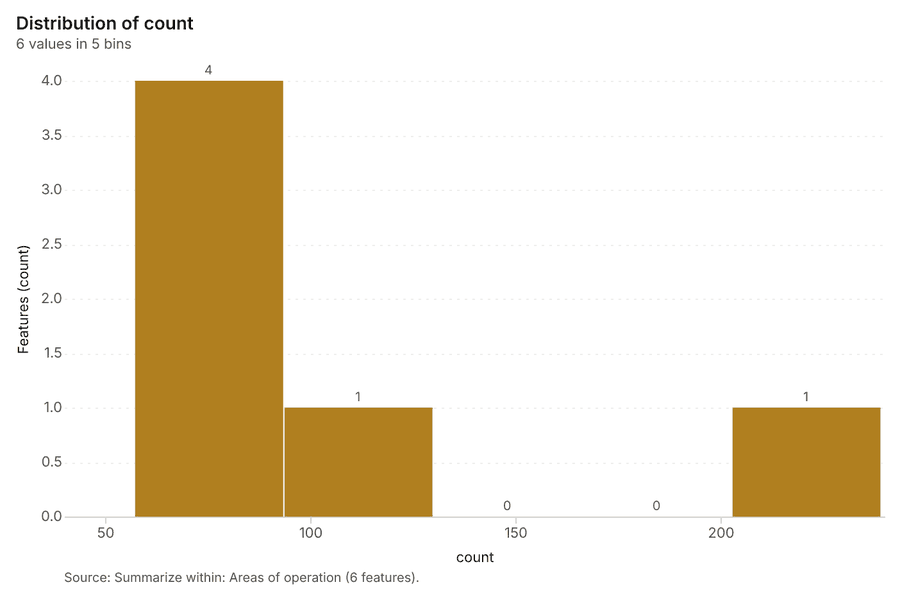
| bin_start | bin_end | count |
|---|---|---|
| 57 | 93.4 | 4 |
| 93.4 | 129.8 | 1 |
| 129.8 | 166.2 | 0 |
| 166.2 | 202.6 | 0 |
| 202.6 | 239 | 1 |
Figure 30. Find point clusters: Observation posts 78
| cluster | features | fraction | share |
|---|---|---|---|
| 0 | 6 | 0.6 | 60.0% |
| Noise | 4 | 0.4 | 40.0% |
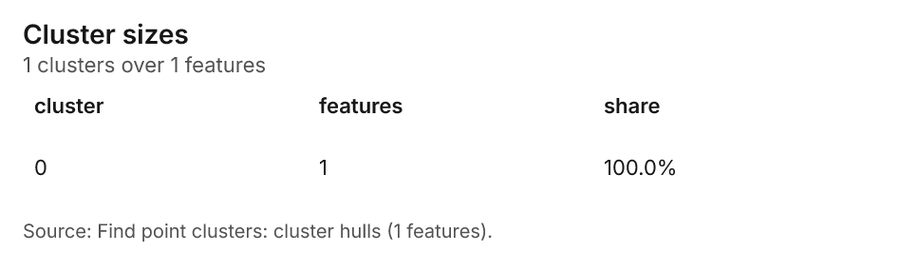
Figure 31. Find point clusters: cluster hulls 79
| cluster | features | fraction | share |
|---|---|---|---|
| 0 | 1 | 1 | 100.0% |
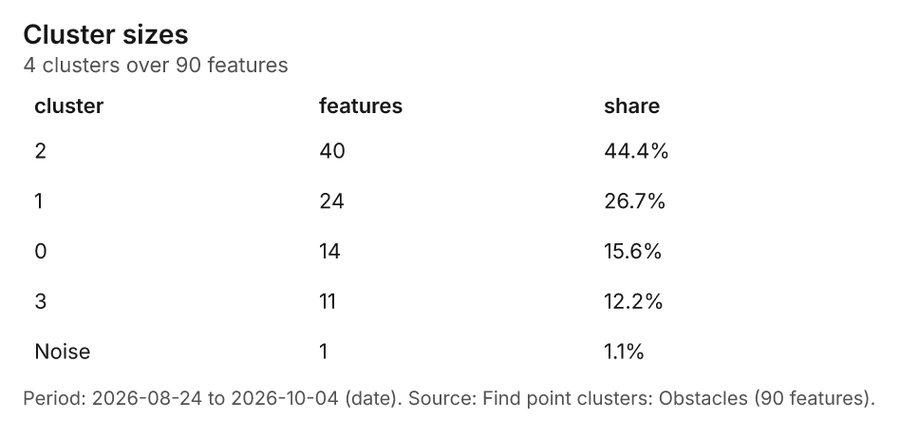
Figure 32. Find point clusters: Obstacles 80
| cluster | features | fraction | share |
|---|---|---|---|
| 2 | 40 | 0.4444 | 44.4% |
| 1 | 24 | 0.2667 | 26.7% |
| 0 | 14 | 0.1556 | 15.6% |
| 3 | 11 | 0.1222 | 12.2% |
| Noise | 1 | 0.01111 | 1.1% |
Figure 33. Find point clusters: cluster hulls 81
| cluster | features | fraction | share |
|---|---|---|---|
| 0 | 1 | 0.25 | 25.0% |
| 1 | 1 | 0.25 | 25.0% |
| 2 | 1 | 0.25 | 25.0% |
| 3 | 1 | 0.25 | 25.0% |
Figure 34. Find point clusters: Patrol reports 82
| cluster | features | fraction | share |
|---|---|---|---|
| 0 | 606 | 0.9323 | 93.2% |
| Noise | 44 | 0.06769 | 6.8% |
Figure 35. Find point clusters: cluster hulls 83
| cluster | features | fraction | share |
|---|---|---|---|
| 0 | 1 | 1 | 100.0% |
Figure 36. Emerging hot spots: Obstacles 84
| bin_start | bin_end | count |
|---|---|---|
| -0.615 | 0.2598 | 7 |
| 0.2598 | 1.135 | 4 |
| 1.135 | 2.01 | 0 |
| 2.01 | 2.884 | 7 |
| 2.884 | 3.759 | 4 |
| 3.759 | 4.634 | 1 |
Figure 37. Emerging hot spots: Patrol reports 85
| bin_start | bin_end | count |
|---|---|---|
| -0.949 | 0.2023 | 36 |
| 0.2023 | 1.354 | 8 |
| 1.354 | 2.505 | 2 |
| 2.505 | 3.656 | 0 |
| 3.656 | 4.807 | 1 |
| 4.807 | 5.959 | 4 |
| 5.959 | 7.11 | 2 |
Figure 38. Repeat and near repeat classification: Obstacles 86
| period | series | value |
|---|---|---|
| 2026-08-24 | fallen tree | 1 |
| 2026-08-24 | fence | 0 |
| 2026-08-24 | washout | 0 |
| 2026-08-24 | bog | 0 |
| 2026-08-24 | ford too deep | 0 |
| 2026-08-25 | fallen tree | 0 |
| 2026-08-25 | fence | 0 |
| 2026-08-25 | washout | 0 |
| 2026-08-25 | bog | 0 |
| 2026-08-25 | ford too deep | 1 |
| 2026-08-26 | fallen tree | 0 |
| 2026-08-26 | fence | 1 |
| 2026-08-26 | washout | 0 |
| 2026-08-26 | bog | 0 |
| 2026-08-26 | ford too deep | 1 |
| 2026-08-27 | fallen tree | 0 |
| 2026-08-27 | fence | 1 |
| 2026-08-27 | washout | 0 |
| 2026-08-27 | bog | 0 |
| 2026-08-27 | ford too deep | 0 |
| 2026-08-28 | fallen tree | 0 |
| 2026-08-28 | fence | 1 |
| 2026-08-28 | washout | 0 |
| 2026-08-28 | bog | 0 |
| 2026-08-28 | ford too deep | 0 |
| 2026-08-29 | fallen tree | 0 |
| 2026-08-29 | fence | 0 |
| 2026-08-29 | washout | 2 |
| 2026-08-29 | bog | 1 |
| 2026-08-29 | ford too deep | 2 |
| 2026-08-30 | fallen tree | 0 |
| 2026-08-30 | fence | 0 |
| 2026-08-30 | washout | 0 |
| 2026-08-30 | bog | 1 |
| 2026-08-30 | ford too deep | 0 |
| 2026-08-31 | fallen tree | 0 |
| 2026-08-31 | fence | 1 |
| 2026-08-31 | washout | 1 |
| 2026-08-31 | bog | 0 |
| 2026-08-31 | ford too deep | 0 |
| 2026-09-01 | fallen tree | 1 |
| 2026-09-01 | fence | 0 |
| 2026-09-01 | washout | 0 |
| 2026-09-01 | bog | 1 |
| 2026-09-01 | ford too deep | 0 |
| 2026-09-02 | fallen tree | 0 |
| 2026-09-02 | fence | 1 |
| 2026-09-02 | washout | 1 |
| 2026-09-02 | bog | 0 |
| 2026-09-02 | ford too deep | 2 |
| 2026-09-03 | fallen tree | 0 |
| 2026-09-03 | fence | 1 |
| 2026-09-03 | washout | 3 |
| 2026-09-03 | bog | 2 |
| 2026-09-03 | ford too deep | 0 |
| 2026-09-04 | fallen tree | 0 |
| 2026-09-04 | fence | 0 |
| 2026-09-04 | washout | 1 |
| 2026-09-04 | bog | 1 |
| 2026-09-04 | ford too deep | 0 |
| 2026-09-05 | fallen tree | 1 |
| 2026-09-05 | fence | 1 |
| 2026-09-05 | washout | 0 |
| 2026-09-05 | bog | 0 |
| 2026-09-05 | ford too deep | 0 |
| 2026-09-06 | fallen tree | 1 |
| 2026-09-06 | fence | 0 |
| 2026-09-06 | washout | 1 |
| 2026-09-06 | bog | 0 |
| 2026-09-06 | ford too deep | 0 |
| 2026-09-07 | fallen tree | 0 |
| 2026-09-07 | fence | 1 |
| 2026-09-07 | washout | 0 |
| 2026-09-07 | bog | 0 |
| 2026-09-07 | ford too deep | 0 |
| 2026-09-08 | fallen tree | 0 |
| 2026-09-08 | fence | 0 |
| 2026-09-08 | washout | 0 |
| 2026-09-08 | bog | 0 |
| 2026-09-08 | ford too deep | 0 |
| 2026-09-09 | fallen tree | 1 |
| 2026-09-09 | fence | 1 |
| 2026-09-09 | washout | 2 |
| 2026-09-09 | bog | 1 |
| 2026-09-09 | ford too deep | 0 |
| 2026-09-10 | fallen tree | 2 |
| 2026-09-10 | fence | 0 |
| 2026-09-10 | washout | 0 |
| 2026-09-10 | bog | 0 |
| 2026-09-10 | ford too deep | 1 |
| 2026-09-11 | fallen tree | 0 |
| 2026-09-11 | fence | 1 |
| 2026-09-11 | washout | 1 |
| 2026-09-11 | bog | 0 |
| 2026-09-11 | ford too deep | 0 |
| 2026-09-12 | fallen tree | 0 |
| 2026-09-12 | fence | 0 |
| 2026-09-12 | washout | 0 |
| 2026-09-12 | bog | 0 |
| 2026-09-12 | ford too deep | 0 |
| 2026-09-13 | fallen tree | 1 |
| 2026-09-13 | fence | 0 |
| 2026-09-13 | washout | 1 |
| 2026-09-13 | bog | 0 |
| 2026-09-13 | ford too deep | 0 |
| 2026-09-14 | fallen tree | 0 |
| 2026-09-14 | fence | 0 |
| 2026-09-14 | washout | 1 |
| 2026-09-14 | bog | 0 |
| 2026-09-14 | ford too deep | 0 |
| 2026-09-15 | fallen tree | 3 |
| 2026-09-15 | fence | 0 |
| 2026-09-15 | washout | 0 |
| 2026-09-15 | bog | 1 |
| 2026-09-15 | ford too deep | 1 |
| 2026-09-16 | fallen tree | 1 |
| 2026-09-16 | fence | 1 |
| 2026-09-16 | washout | 2 |
| 2026-09-16 | bog | 0 |
| 2026-09-16 | ford too deep | 0 |
| 2026-09-17 | fallen tree | 0 |
| 2026-09-17 | fence | 0 |
| 2026-09-17 | washout | 1 |
| 2026-09-17 | bog | 0 |
| 2026-09-17 | ford too deep | 1 |
| 2026-09-18 | fallen tree | 1 |
| 2026-09-18 | fence | 1 |
| 2026-09-18 | washout | 0 |
| 2026-09-18 | bog | 1 |
| 2026-09-18 | ford too deep | 0 |
| 2026-09-19 | fallen tree | 1 |
| 2026-09-19 | fence | 0 |
| 2026-09-19 | washout | 1 |
| 2026-09-19 | bog | 0 |
| 2026-09-19 | ford too deep | 0 |
| 2026-09-20 | fallen tree | 0 |
| 2026-09-20 | fence | 0 |
| 2026-09-20 | washout | 0 |
| 2026-09-20 | bog | 0 |
| 2026-09-20 | ford too deep | 1 |
| 2026-09-21 | fallen tree | 0 |
| 2026-09-21 | fence | 0 |
| 2026-09-21 | washout | 0 |
| 2026-09-21 | bog | 0 |
| 2026-09-21 | ford too deep | 0 |
| 2026-09-22 | fallen tree | 1 |
| 2026-09-22 | fence | 2 |
| 2026-09-22 | washout | 0 |
| 2026-09-22 | bog | 0 |
| 2026-09-22 | ford too deep | 1 |
| 2026-09-23 | fallen tree | 0 |
| 2026-09-23 | fence | 2 |
| 2026-09-23 | washout | 0 |
| 2026-09-23 | bog | 0 |
| 2026-09-23 | ford too deep | 0 |
| 2026-09-24 | fallen tree | 0 |
| 2026-09-24 | fence | 0 |
| 2026-09-24 | washout | 0 |
| 2026-09-24 | bog | 1 |
| 2026-09-24 | ford too deep | 1 |
| 2026-09-25 | fallen tree | 0 |
| 2026-09-25 | fence | 1 |
| 2026-09-25 | washout | 0 |
| 2026-09-25 | bog | 0 |
| 2026-09-25 | ford too deep | 0 |
| 2026-09-26 | fallen tree | 0 |
| 2026-09-26 | fence | 1 |
| 2026-09-26 | washout | 0 |
| 2026-09-26 | bog | 0 |
| 2026-09-26 | ford too deep | 2 |
| 2026-09-27 | fallen tree | 1 |
| 2026-09-27 | fence | 0 |
| 2026-09-27 | washout | 0 |
| 2026-09-27 | bog | 0 |
| 2026-09-27 | ford too deep | 0 |
| 2026-09-28 | fallen tree | 0 |
| 2026-09-28 | fence | 0 |
| 2026-09-28 | washout | 0 |
| 2026-09-28 | bog | 2 |
| 2026-09-28 | ford too deep | 0 |
| 2026-09-29 | fallen tree | 0 |
| 2026-09-29 | fence | 0 |
| 2026-09-29 | washout | 0 |
| 2026-09-29 | bog | 0 |
| 2026-09-29 | ford too deep | 0 |
| 2026-09-30 | fallen tree | 0 |
| 2026-09-30 | fence | 0 |
| 2026-09-30 | washout | 0 |
| 2026-09-30 | bog | 0 |
| 2026-09-30 | ford too deep | 0 |
| 2026-10-01 | fallen tree | 1 |
| 2026-10-01 | fence | 0 |
| 2026-10-01 | washout | 0 |
| 2026-10-01 | bog | 1 |
| 2026-10-01 | ford too deep | 0 |
| 2026-10-02 | fallen tree | 0 |
| 2026-10-02 | fence | 0 |
| 2026-10-02 | washout | 0 |
| 2026-10-02 | bog | 1 |
| 2026-10-02 | ford too deep | 0 |
| 2026-10-03 | fallen tree | 1 |
| 2026-10-03 | fence | 1 |
| 2026-10-03 | washout | 1 |
| 2026-10-03 | bog | 0 |
| 2026-10-03 | ford too deep | 1 |
| 2026-10-04 | fallen tree | 2 |
| 2026-10-04 | fence | 1 |
| 2026-10-04 | washout | 1 |
| 2026-10-04 | bog | 1 |
| 2026-10-04 | ford too deep | 0 |
Figure 39. Calculate density: Obstacles 87
| bin_start | bin_end | count |
|---|---|---|
| 0 | 1.5 | 12 |
| 1.5 | 3 | 8 |
| 3 | 4.5 | 18 |
| 4.5 | 6 | 10 |
| 6 | 7.5 | 18 |
| 7.5 | 9 | 6 |
| 9 | 10.5 | 13 |
| 10.5 | 12 | 7 |
Figure 40. Calculate density: Patrol reports 88
| bin_start | bin_end | count |
|---|---|---|
| 0 | 4.909 | 61 |
| 4.909 | 9.818 | 93 |
| 9.818 | 14.73 | 91 |
| 14.73 | 19.64 | 85 |
| 19.64 | 24.55 | 80 |
| 24.55 | 29.45 | 92 |
| 29.45 | 34.36 | 80 |
| 34.36 | 39.27 | 91 |
| 39.27 | 44.18 | 105 |
| 44.18 | 49.09 | 79 |
| 49.09 | 54 | 60 |
Figure 41. Calculate density: Water crossings 89
| bin_start | bin_end | count |
|---|---|---|
| 0 | 3.2 | 29 |
| 3.2 | 6.4 | 30 |
| 6.4 | 9.6 | 30 |
| 9.6 | 12.8 | 28 |
| 12.8 | 16 | 29 |
| 16 | 19.2 | 37 |
| 19.2 | 22.4 | 35 |
| 22.4 | 25.6 | 33 |
| 25.6 | 28.8 | 31 |
| 28.8 | 32 | 25 |
Figure 42. Repeat and near repeat classification: Obstacles over time 90
| period | series | value |
|---|---|---|
| 2026-08-24 | fallen tree | 1 |
| 2026-08-24 | fence | 0 |
| 2026-08-24 | washout | 0 |
| 2026-08-24 | bog | 0 |
| 2026-08-24 | ford too deep | 0 |
| 2026-08-25 | fallen tree | 0 |
| 2026-08-25 | fence | 0 |
| 2026-08-25 | washout | 0 |
| 2026-08-25 | bog | 0 |
| 2026-08-25 | ford too deep | 1 |
| 2026-08-26 | fallen tree | 0 |
| 2026-08-26 | fence | 1 |
| 2026-08-26 | washout | 0 |
| 2026-08-26 | bog | 0 |
| 2026-08-26 | ford too deep | 1 |
| 2026-08-27 | fallen tree | 0 |
| 2026-08-27 | fence | 1 |
| 2026-08-27 | washout | 0 |
| 2026-08-27 | bog | 0 |
| 2026-08-27 | ford too deep | 0 |
| 2026-08-28 | fallen tree | 0 |
| 2026-08-28 | fence | 1 |
| 2026-08-28 | washout | 0 |
| 2026-08-28 | bog | 0 |
| 2026-08-28 | ford too deep | 0 |
| 2026-08-29 | fallen tree | 0 |
| 2026-08-29 | fence | 0 |
| 2026-08-29 | washout | 2 |
| 2026-08-29 | bog | 1 |
| 2026-08-29 | ford too deep | 2 |
| 2026-08-30 | fallen tree | 0 |
| 2026-08-30 | fence | 0 |
| 2026-08-30 | washout | 0 |
| 2026-08-30 | bog | 1 |
| 2026-08-30 | ford too deep | 0 |
| 2026-08-31 | fallen tree | 0 |
| 2026-08-31 | fence | 1 |
| 2026-08-31 | washout | 1 |
| 2026-08-31 | bog | 0 |
| 2026-08-31 | ford too deep | 0 |
| 2026-09-01 | fallen tree | 1 |
| 2026-09-01 | fence | 0 |
| 2026-09-01 | washout | 0 |
| 2026-09-01 | bog | 1 |
| 2026-09-01 | ford too deep | 0 |
| 2026-09-02 | fallen tree | 0 |
| 2026-09-02 | fence | 1 |
| 2026-09-02 | washout | 1 |
| 2026-09-02 | bog | 0 |
| 2026-09-02 | ford too deep | 2 |
| 2026-09-03 | fallen tree | 0 |
| 2026-09-03 | fence | 1 |
| 2026-09-03 | washout | 3 |
| 2026-09-03 | bog | 2 |
| 2026-09-03 | ford too deep | 0 |
| 2026-09-04 | fallen tree | 0 |
| 2026-09-04 | fence | 0 |
| 2026-09-04 | washout | 1 |
| 2026-09-04 | bog | 1 |
| 2026-09-04 | ford too deep | 0 |
| 2026-09-05 | fallen tree | 1 |
| 2026-09-05 | fence | 1 |
| 2026-09-05 | washout | 0 |
| 2026-09-05 | bog | 0 |
| 2026-09-05 | ford too deep | 0 |
| 2026-09-06 | fallen tree | 1 |
| 2026-09-06 | fence | 0 |
| 2026-09-06 | washout | 1 |
| 2026-09-06 | bog | 0 |
| 2026-09-06 | ford too deep | 0 |
| 2026-09-07 | fallen tree | 0 |
| 2026-09-07 | fence | 1 |
| 2026-09-07 | washout | 0 |
| 2026-09-07 | bog | 0 |
| 2026-09-07 | ford too deep | 0 |
| 2026-09-08 | fallen tree | 0 |
| 2026-09-08 | fence | 0 |
| 2026-09-08 | washout | 0 |
| 2026-09-08 | bog | 0 |
| 2026-09-08 | ford too deep | 0 |
| 2026-09-09 | fallen tree | 1 |
| 2026-09-09 | fence | 1 |
| 2026-09-09 | washout | 2 |
| 2026-09-09 | bog | 1 |
| 2026-09-09 | ford too deep | 0 |
| 2026-09-10 | fallen tree | 2 |
| 2026-09-10 | fence | 0 |
| 2026-09-10 | washout | 0 |
| 2026-09-10 | bog | 0 |
| 2026-09-10 | ford too deep | 1 |
| 2026-09-11 | fallen tree | 0 |
| 2026-09-11 | fence | 1 |
| 2026-09-11 | washout | 1 |
| 2026-09-11 | bog | 0 |
| 2026-09-11 | ford too deep | 0 |
| 2026-09-12 | fallen tree | 0 |
| 2026-09-12 | fence | 0 |
| 2026-09-12 | washout | 0 |
| 2026-09-12 | bog | 0 |
| 2026-09-12 | ford too deep | 0 |
| 2026-09-13 | fallen tree | 1 |
| 2026-09-13 | fence | 0 |
| 2026-09-13 | washout | 1 |
| 2026-09-13 | bog | 0 |
| 2026-09-13 | ford too deep | 0 |
| 2026-09-14 | fallen tree | 0 |
| 2026-09-14 | fence | 0 |
| 2026-09-14 | washout | 1 |
| 2026-09-14 | bog | 0 |
| 2026-09-14 | ford too deep | 0 |
| 2026-09-15 | fallen tree | 3 |
| 2026-09-15 | fence | 0 |
| 2026-09-15 | washout | 0 |
| 2026-09-15 | bog | 1 |
| 2026-09-15 | ford too deep | 1 |
| 2026-09-16 | fallen tree | 1 |
| 2026-09-16 | fence | 1 |
| 2026-09-16 | washout | 2 |
| 2026-09-16 | bog | 0 |
| 2026-09-16 | ford too deep | 0 |
| 2026-09-17 | fallen tree | 0 |
| 2026-09-17 | fence | 0 |
| 2026-09-17 | washout | 1 |
| 2026-09-17 | bog | 0 |
| 2026-09-17 | ford too deep | 1 |
| 2026-09-18 | fallen tree | 1 |
| 2026-09-18 | fence | 1 |
| 2026-09-18 | washout | 0 |
| 2026-09-18 | bog | 1 |
| 2026-09-18 | ford too deep | 0 |
| 2026-09-19 | fallen tree | 1 |
| 2026-09-19 | fence | 0 |
| 2026-09-19 | washout | 1 |
| 2026-09-19 | bog | 0 |
| 2026-09-19 | ford too deep | 0 |
| 2026-09-20 | fallen tree | 0 |
| 2026-09-20 | fence | 0 |
| 2026-09-20 | washout | 0 |
| 2026-09-20 | bog | 0 |
| 2026-09-20 | ford too deep | 1 |
| 2026-09-21 | fallen tree | 0 |
| 2026-09-21 | fence | 0 |
| 2026-09-21 | washout | 0 |
| 2026-09-21 | bog | 0 |
| 2026-09-21 | ford too deep | 0 |
| 2026-09-22 | fallen tree | 1 |
| 2026-09-22 | fence | 2 |
| 2026-09-22 | washout | 0 |
| 2026-09-22 | bog | 0 |
| 2026-09-22 | ford too deep | 1 |
| 2026-09-23 | fallen tree | 0 |
| 2026-09-23 | fence | 2 |
| 2026-09-23 | washout | 0 |
| 2026-09-23 | bog | 0 |
| 2026-09-23 | ford too deep | 0 |
| 2026-09-24 | fallen tree | 0 |
| 2026-09-24 | fence | 0 |
| 2026-09-24 | washout | 0 |
| 2026-09-24 | bog | 1 |
| 2026-09-24 | ford too deep | 1 |
| 2026-09-25 | fallen tree | 0 |
| 2026-09-25 | fence | 1 |
| 2026-09-25 | washout | 0 |
| 2026-09-25 | bog | 0 |
| 2026-09-25 | ford too deep | 0 |
| 2026-09-26 | fallen tree | 0 |
| 2026-09-26 | fence | 1 |
| 2026-09-26 | washout | 0 |
| 2026-09-26 | bog | 0 |
| 2026-09-26 | ford too deep | 2 |
| 2026-09-27 | fallen tree | 1 |
| 2026-09-27 | fence | 0 |
| 2026-09-27 | washout | 0 |
| 2026-09-27 | bog | 0 |
| 2026-09-27 | ford too deep | 0 |
| 2026-09-28 | fallen tree | 0 |
| 2026-09-28 | fence | 0 |
| 2026-09-28 | washout | 0 |
| 2026-09-28 | bog | 2 |
| 2026-09-28 | ford too deep | 0 |
| 2026-09-29 | fallen tree | 0 |
| 2026-09-29 | fence | 0 |
| 2026-09-29 | washout | 0 |
| 2026-09-29 | bog | 0 |
| 2026-09-29 | ford too deep | 0 |
| 2026-09-30 | fallen tree | 0 |
| 2026-09-30 | fence | 0 |
| 2026-09-30 | washout | 0 |
| 2026-09-30 | bog | 0 |
| 2026-09-30 | ford too deep | 0 |
| 2026-10-01 | fallen tree | 1 |
| 2026-10-01 | fence | 0 |
| 2026-10-01 | washout | 0 |
| 2026-10-01 | bog | 1 |
| 2026-10-01 | ford too deep | 0 |
| 2026-10-02 | fallen tree | 0 |
| 2026-10-02 | fence | 0 |
| 2026-10-02 | washout | 0 |
| 2026-10-02 | bog | 1 |
| 2026-10-02 | ford too deep | 0 |
| 2026-10-03 | fallen tree | 1 |
| 2026-10-03 | fence | 1 |
| 2026-10-03 | washout | 1 |
| 2026-10-03 | bog | 0 |
| 2026-10-03 | ford too deep | 1 |
| 2026-10-04 | fallen tree | 2 |
| 2026-10-04 | fence | 1 |
| 2026-10-04 | washout | 1 |
| 2026-10-04 | bog | 1 |
| 2026-10-04 | ford too deep | 0 |
Figure 43. Find point clusters: Patrol reports over time 91
| period | series | value |
|---|---|---|
| 2026-09-07 | observation | 3 |
| 2026-09-07 | vehicle | 6 |
| 2026-09-07 | movement | 9 |
| 2026-09-07 | obstacle | 5 |
| 2026-09-08 | observation | 7 |
| 2026-09-08 | vehicle | 4 |
| 2026-09-08 | movement | 6 |
| 2026-09-08 | obstacle | 2 |
| 2026-09-09 | observation | 6 |
| 2026-09-09 | vehicle | 8 |
| 2026-09-09 | movement | 3 |
| 2026-09-09 | obstacle | 5 |
| 2026-09-10 | observation | 6 |
| 2026-09-10 | vehicle | 7 |
| 2026-09-10 | movement | 6 |
| 2026-09-10 | obstacle | 10 |
| 2026-09-11 | observation | 4 |
| 2026-09-11 | vehicle | 7 |
| 2026-09-11 | movement | 4 |
| 2026-09-11 | obstacle | 5 |
| 2026-09-12 | observation | 4 |
| 2026-09-12 | vehicle | 9 |
| 2026-09-12 | movement | 3 |
| 2026-09-12 | obstacle | 6 |
| 2026-09-13 | observation | 11 |
| 2026-09-13 | vehicle | 6 |
| 2026-09-13 | movement | 6 |
| 2026-09-13 | obstacle | 7 |
| 2026-09-14 | observation | 6 |
| 2026-09-14 | vehicle | 4 |
| 2026-09-14 | movement | 9 |
| 2026-09-14 | obstacle | 9 |
| 2026-09-15 | observation | 2 |
| 2026-09-15 | vehicle | 8 |
| 2026-09-15 | movement | 7 |
| 2026-09-15 | obstacle | 1 |
| 2026-09-16 | observation | 4 |
| 2026-09-16 | vehicle | 3 |
| 2026-09-16 | movement | 5 |
| 2026-09-16 | obstacle | 7 |
| 2026-09-17 | observation | 4 |
| 2026-09-17 | vehicle | 4 |
| 2026-09-17 | movement | 3 |
| 2026-09-17 | obstacle | 7 |
| 2026-09-18 | observation | 6 |
| 2026-09-18 | vehicle | 7 |
| 2026-09-18 | movement | 9 |
| 2026-09-18 | obstacle | 5 |
| 2026-09-19 | observation | 2 |
| 2026-09-19 | vehicle | 9 |
| 2026-09-19 | movement | 3 |
| 2026-09-19 | obstacle | 9 |
| 2026-09-20 | observation | 7 |
| 2026-09-20 | vehicle | 5 |
| 2026-09-20 | movement | 6 |
| 2026-09-20 | obstacle | 2 |
| 2026-09-21 | observation | 6 |
| 2026-09-21 | vehicle | 6 |
| 2026-09-21 | movement | 9 |
| 2026-09-21 | obstacle | 9 |
| 2026-09-22 | observation | 9 |
| 2026-09-22 | vehicle | 7 |
| 2026-09-22 | movement | 4 |
| 2026-09-22 | obstacle | 5 |
| 2026-09-23 | observation | 6 |
| 2026-09-23 | vehicle | 1 |
| 2026-09-23 | movement | 6 |
| 2026-09-23 | obstacle | 5 |
| 2026-09-24 | observation | 9 |
| 2026-09-24 | vehicle | 7 |
| 2026-09-24 | movement | 9 |
| 2026-09-24 | obstacle | 6 |
| 2026-09-25 | observation | 6 |
| 2026-09-25 | vehicle | 4 |
| 2026-09-25 | movement | 2 |
| 2026-09-25 | obstacle | 2 |
| 2026-09-26 | observation | 6 |
| 2026-09-26 | vehicle | 8 |
| 2026-09-26 | movement | 2 |
| 2026-09-26 | obstacle | 4 |
| 2026-09-27 | observation | 10 |
| 2026-09-27 | vehicle | 5 |
| 2026-09-27 | movement | 3 |
| 2026-09-27 | obstacle | 2 |
| 2026-09-28 | observation | 4 |
| 2026-09-28 | vehicle | 6 |
| 2026-09-28 | movement | 8 |
| 2026-09-28 | obstacle | 6 |
| 2026-09-29 | observation | 9 |
| 2026-09-29 | vehicle | 7 |
| 2026-09-29 | movement | 4 |
| 2026-09-29 | obstacle | 7 |
| 2026-09-30 | observation | 3 |
| 2026-09-30 | vehicle | 8 |
| 2026-09-30 | movement | 9 |
| 2026-09-30 | obstacle | 8 |
| 2026-10-01 | observation | 7 |
| 2026-10-01 | vehicle | 3 |
| 2026-10-01 | movement | 6 |
| 2026-10-01 | obstacle | 10 |
| 2026-10-02 | observation | 8 |
| 2026-10-02 | vehicle | 5 |
| 2026-10-02 | movement | 6 |
| 2026-10-02 | obstacle | 5 |
| 2026-10-03 | observation | 9 |
| 2026-10-03 | vehicle | 6 |
| 2026-10-03 | movement | 3 |
| 2026-10-03 | obstacle | 3 |
| 2026-10-04 | observation | 9 |
| 2026-10-04 | vehicle | 5 |
| 2026-10-04 | movement | 6 |
| 2026-10-04 | obstacle | 4 |
Figure 44. Find point clusters: Obstacles over time 92
| period | series | value |
|---|---|---|
| 2026-08-24 | fallen tree | 1 |
| 2026-08-24 | fence | 0 |
| 2026-08-24 | washout | 0 |
| 2026-08-24 | bog | 0 |
| 2026-08-24 | ford too deep | 0 |
| 2026-08-25 | fallen tree | 0 |
| 2026-08-25 | fence | 0 |
| 2026-08-25 | washout | 0 |
| 2026-08-25 | bog | 0 |
| 2026-08-25 | ford too deep | 1 |
| 2026-08-26 | fallen tree | 0 |
| 2026-08-26 | fence | 1 |
| 2026-08-26 | washout | 0 |
| 2026-08-26 | bog | 0 |
| 2026-08-26 | ford too deep | 1 |
| 2026-08-27 | fallen tree | 0 |
| 2026-08-27 | fence | 1 |
| 2026-08-27 | washout | 0 |
| 2026-08-27 | bog | 0 |
| 2026-08-27 | ford too deep | 0 |
| 2026-08-28 | fallen tree | 0 |
| 2026-08-28 | fence | 1 |
| 2026-08-28 | washout | 0 |
| 2026-08-28 | bog | 0 |
| 2026-08-28 | ford too deep | 0 |
| 2026-08-29 | fallen tree | 0 |
| 2026-08-29 | fence | 0 |
| 2026-08-29 | washout | 2 |
| 2026-08-29 | bog | 1 |
| 2026-08-29 | ford too deep | 2 |
| 2026-08-30 | fallen tree | 0 |
| 2026-08-30 | fence | 0 |
| 2026-08-30 | washout | 0 |
| 2026-08-30 | bog | 1 |
| 2026-08-30 | ford too deep | 0 |
| 2026-08-31 | fallen tree | 0 |
| 2026-08-31 | fence | 1 |
| 2026-08-31 | washout | 1 |
| 2026-08-31 | bog | 0 |
| 2026-08-31 | ford too deep | 0 |
| 2026-09-01 | fallen tree | 1 |
| 2026-09-01 | fence | 0 |
| 2026-09-01 | washout | 0 |
| 2026-09-01 | bog | 1 |
| 2026-09-01 | ford too deep | 0 |
| 2026-09-02 | fallen tree | 0 |
| 2026-09-02 | fence | 1 |
| 2026-09-02 | washout | 1 |
| 2026-09-02 | bog | 0 |
| 2026-09-02 | ford too deep | 2 |
| 2026-09-03 | fallen tree | 0 |
| 2026-09-03 | fence | 1 |
| 2026-09-03 | washout | 3 |
| 2026-09-03 | bog | 2 |
| 2026-09-03 | ford too deep | 0 |
| 2026-09-04 | fallen tree | 0 |
| 2026-09-04 | fence | 0 |
| 2026-09-04 | washout | 1 |
| 2026-09-04 | bog | 1 |
| 2026-09-04 | ford too deep | 0 |
| 2026-09-05 | fallen tree | 1 |
| 2026-09-05 | fence | 1 |
| 2026-09-05 | washout | 0 |
| 2026-09-05 | bog | 0 |
| 2026-09-05 | ford too deep | 0 |
| 2026-09-06 | fallen tree | 1 |
| 2026-09-06 | fence | 0 |
| 2026-09-06 | washout | 1 |
| 2026-09-06 | bog | 0 |
| 2026-09-06 | ford too deep | 0 |
| 2026-09-07 | fallen tree | 0 |
| 2026-09-07 | fence | 1 |
| 2026-09-07 | washout | 0 |
| 2026-09-07 | bog | 0 |
| 2026-09-07 | ford too deep | 0 |
| 2026-09-08 | fallen tree | 0 |
| 2026-09-08 | fence | 0 |
| 2026-09-08 | washout | 0 |
| 2026-09-08 | bog | 0 |
| 2026-09-08 | ford too deep | 0 |
| 2026-09-09 | fallen tree | 1 |
| 2026-09-09 | fence | 1 |
| 2026-09-09 | washout | 2 |
| 2026-09-09 | bog | 1 |
| 2026-09-09 | ford too deep | 0 |
| 2026-09-10 | fallen tree | 2 |
| 2026-09-10 | fence | 0 |
| 2026-09-10 | washout | 0 |
| 2026-09-10 | bog | 0 |
| 2026-09-10 | ford too deep | 1 |
| 2026-09-11 | fallen tree | 0 |
| 2026-09-11 | fence | 1 |
| 2026-09-11 | washout | 1 |
| 2026-09-11 | bog | 0 |
| 2026-09-11 | ford too deep | 0 |
| 2026-09-12 | fallen tree | 0 |
| 2026-09-12 | fence | 0 |
| 2026-09-12 | washout | 0 |
| 2026-09-12 | bog | 0 |
| 2026-09-12 | ford too deep | 0 |
| 2026-09-13 | fallen tree | 1 |
| 2026-09-13 | fence | 0 |
| 2026-09-13 | washout | 1 |
| 2026-09-13 | bog | 0 |
| 2026-09-13 | ford too deep | 0 |
| 2026-09-14 | fallen tree | 0 |
| 2026-09-14 | fence | 0 |
| 2026-09-14 | washout | 1 |
| 2026-09-14 | bog | 0 |
| 2026-09-14 | ford too deep | 0 |
| 2026-09-15 | fallen tree | 3 |
| 2026-09-15 | fence | 0 |
| 2026-09-15 | washout | 0 |
| 2026-09-15 | bog | 1 |
| 2026-09-15 | ford too deep | 1 |
| 2026-09-16 | fallen tree | 1 |
| 2026-09-16 | fence | 1 |
| 2026-09-16 | washout | 2 |
| 2026-09-16 | bog | 0 |
| 2026-09-16 | ford too deep | 0 |
| 2026-09-17 | fallen tree | 0 |
| 2026-09-17 | fence | 0 |
| 2026-09-17 | washout | 1 |
| 2026-09-17 | bog | 0 |
| 2026-09-17 | ford too deep | 1 |
| 2026-09-18 | fallen tree | 1 |
| 2026-09-18 | fence | 1 |
| 2026-09-18 | washout | 0 |
| 2026-09-18 | bog | 1 |
| 2026-09-18 | ford too deep | 0 |
| 2026-09-19 | fallen tree | 1 |
| 2026-09-19 | fence | 0 |
| 2026-09-19 | washout | 1 |
| 2026-09-19 | bog | 0 |
| 2026-09-19 | ford too deep | 0 |
| 2026-09-20 | fallen tree | 0 |
| 2026-09-20 | fence | 0 |
| 2026-09-20 | washout | 0 |
| 2026-09-20 | bog | 0 |
| 2026-09-20 | ford too deep | 1 |
| 2026-09-21 | fallen tree | 0 |
| 2026-09-21 | fence | 0 |
| 2026-09-21 | washout | 0 |
| 2026-09-21 | bog | 0 |
| 2026-09-21 | ford too deep | 0 |
| 2026-09-22 | fallen tree | 1 |
| 2026-09-22 | fence | 2 |
| 2026-09-22 | washout | 0 |
| 2026-09-22 | bog | 0 |
| 2026-09-22 | ford too deep | 1 |
| 2026-09-23 | fallen tree | 0 |
| 2026-09-23 | fence | 2 |
| 2026-09-23 | washout | 0 |
| 2026-09-23 | bog | 0 |
| 2026-09-23 | ford too deep | 0 |
| 2026-09-24 | fallen tree | 0 |
| 2026-09-24 | fence | 0 |
| 2026-09-24 | washout | 0 |
| 2026-09-24 | bog | 1 |
| 2026-09-24 | ford too deep | 1 |
| 2026-09-25 | fallen tree | 0 |
| 2026-09-25 | fence | 1 |
| 2026-09-25 | washout | 0 |
| 2026-09-25 | bog | 0 |
| 2026-09-25 | ford too deep | 0 |
| 2026-09-26 | fallen tree | 0 |
| 2026-09-26 | fence | 1 |
| 2026-09-26 | washout | 0 |
| 2026-09-26 | bog | 0 |
| 2026-09-26 | ford too deep | 2 |
| 2026-09-27 | fallen tree | 1 |
| 2026-09-27 | fence | 0 |
| 2026-09-27 | washout | 0 |
| 2026-09-27 | bog | 0 |
| 2026-09-27 | ford too deep | 0 |
| 2026-09-28 | fallen tree | 0 |
| 2026-09-28 | fence | 0 |
| 2026-09-28 | washout | 0 |
| 2026-09-28 | bog | 2 |
| 2026-09-28 | ford too deep | 0 |
| 2026-09-29 | fallen tree | 0 |
| 2026-09-29 | fence | 0 |
| 2026-09-29 | washout | 0 |
| 2026-09-29 | bog | 0 |
| 2026-09-29 | ford too deep | 0 |
| 2026-09-30 | fallen tree | 0 |
| 2026-09-30 | fence | 0 |
| 2026-09-30 | washout | 0 |
| 2026-09-30 | bog | 0 |
| 2026-09-30 | ford too deep | 0 |
| 2026-10-01 | fallen tree | 1 |
| 2026-10-01 | fence | 0 |
| 2026-10-01 | washout | 0 |
| 2026-10-01 | bog | 1 |
| 2026-10-01 | ford too deep | 0 |
| 2026-10-02 | fallen tree | 0 |
| 2026-10-02 | fence | 0 |
| 2026-10-02 | washout | 0 |
| 2026-10-02 | bog | 1 |
| 2026-10-02 | ford too deep | 0 |
| 2026-10-03 | fallen tree | 1 |
| 2026-10-03 | fence | 1 |
| 2026-10-03 | washout | 1 |
| 2026-10-03 | bog | 0 |
| 2026-10-03 | ford too deep | 1 |
| 2026-10-04 | fallen tree | 2 |
| 2026-10-04 | fence | 1 |
| 2026-10-04 | washout | 1 |
| 2026-10-04 | bog | 1 |
| 2026-10-04 | ford too deep | 0 |
GeoBit Large Spatial Model. Findings are labeled Evidenced (computed by a tool), Inferred (a reading or reasoning) or Unverified (no evidence yet).