Sample: Mining, Newman: report
Project: Sample: Mining, Newman
Goal: Describe the project Sample: Mining, Newman: run the analyses that tell the most about its data, draw every result, and write a cited report.
Run: e02f959c-4f5a-4566-a3dc-239b3095beaa (running, 11 agent run(s))
Generated: 2026-10-18T05:51:00Z, version 1
Model cost: USD 0.0000 over 0 model call(s)
Data used
| Data | Kind | Rows | Time span | Summary | Source |
|---|---|---|---|---|---|
| Mine areas | vector, Polygon | 7 | 7 polygon (area) features; 'kind' has 4 values (top: waste dump 3, pit 2, ROM pad 1); 'status' has 2 values (top: active 4, rehabilitating 3); 'depth_m' -60 to 260 (mean 33.14); 'ore_reserve_mt' 0 to 151.5 (mean 38.09); named by 'name' (e.g. Main Pit A, East Pit B, North Waste Dump); total area 6.68 km2; extent 119.6814,-23.3942 to 119.7444,-23.3460. Areas (Mine areas) with depth_m to compare and map. | 94 | |
| Haul roads | vector, LineString | 38 | 38 line features; 'from' has 4 values (top: PIT-B 14, PIT-A 13, ROM 7); 'to' has 6 values (top: ROM 13, SP-1 6, WD-2 5); 'grade_pct' 0 to 33.3 (mean 6.558); 'width_m' 25 to 35 (mean 28.82); 'trucks_per_hour' 6 to 40 (mean 21.89); total length 20.47 km; extent 119.6885,-23.3893 to 119.7424,-23.3467. Lines (Haul roads) such as routes or networks. | 95 | |
| Monitoring prisms | vector, Point | 60 | 60 point features; 'wall' has 4 values (top: north 19, west 17, south 17); 'elevation_m' 444.2 to 559.6 (mean 499.8); extent 119.6927,-23.3753 to 119.7116,-23.3626. Point locations of Monitoring prisms by wall. | 96 | |
| Prism readings | vector, Point | 1,200 | 2026-05-04 to 2026-09-14 | 1,200 point features; dated by 'observed_at' from 2026-05-04 to 2026-09-14; 'displacement_mm' 0.1 to 74.8 (mean 7.96); 'velocity_mm_day' 0.02 to 2.99 (mean 0.2121); extent 119.6927,-23.3753 to 119.7116,-23.3626. Dated point events: where and when Prism readings happen. | 2 |
| Drill holes | vector, Point | 320 | 2024-01-01 to 2026-08-19 | 320 point features; dated by 'drilled_on' from 2024-01-01 to 2026-08-19; 'type' has 2 values (top: RC 221, diamond 99); 'depth_m' 60 to 319 (mean 187.9); 'fe_pct' 33.6 to 66 (mean 52.77); 'sio2_pct' 1 to 9.6 (mean 5.066); extent 119.6888,-23.3822 to 119.7396,-23.3598. Dated point events by type: where and when Drill holes happen. | 3 |
| Equipment | vector, Point | 40 | 40 point features; 'type' has 5 values (top: haul truck 16, excavator 8, dozer 6); 'status' has 3 values (top: operating 16, down 12, standby 12); 'payload_t' 0 to 220 (mean 88); extent 119.6909,-23.3864 to 119.7392,-23.3483. Point locations of Equipment by type. | 97 | |
| Geotechnical domains | vector, Polygon | 6 | 6 polygon (area) features; 'rock_type' has 4 values (top: shale 3, dolerite 1, BIF 1); 'rmr' 43 to 74 (mean 54.83); 'design_angle_deg' 38 to 48 (mean 44.17); total area 10.37 km2; extent 119.6826,-23.3842 to 119.7217,-23.3540. Areas (Geotechnical domains) with rmr to compare and map. | 98 | |
| Mine terrain model (DEM) | raster | 1-band float32 raster (dem), 400 x 300 cells; resolution 20; band 1 309.4 to 630.1; extent 119.6704,-23.3977 to 119.7496,-23.3423. An elevation surface for terrain analysis. | 99 | ||
| Production by pit and week | table | 76 | 2026-01-05 to 2026-09-21 | Table of 76 rows and 6 columns without geometry; dated by 'week_start' from 2026-01-05 to 2026-09-21; 'ore_t' 124,041 to 577,138 (mean 2.998e+05); 'waste_t' 238,570 to 1,500,239 (mean 7.316e+05); 'truck_hours' 664 to 3,679 (mean 1875). A table of Production by pit and week without locations. | 4 |
| Bench design by domain | table | 6 | Table of 6 rows and 5 columns without geometry; 'bench_height_m' 10 to 15 (mean 13.33); 'berm_width_m' 6.4 to 8.8 (mean 7.833); 'face_angle_deg' 65 to 75 (mean 69.17). A table of Bench design by domain without locations. | 100 | |
| Geotechnical inspection report | document | 1-page pdf document 'Geotechnical inspection report'; language en; mentions 6 place(s): Main Pit A (3), -23.36400, 119.70205 (1), ROM Pad and Crusher (1), Main Pit (1), East Pit B (1). A document about Main Pit A, -23.36400, 119.70205, ROM Pad and Crusher. | 101 | ||
| Sample: Mining, Newman | record | 102 | |||
| Hot spot analysis: Drill holes | layer, Polygon | 50 | 103 | ||
| Hot spot analysis: Prism readings | layer, Polygon | 227 | 104 | ||
| Emerging hot spots: Drill holes | layer, Polygon | 30 | 105 | ||
| Emerging hot spots: Prism readings | layer, Polygon | 29 | 106 | ||
| Repeat and near repeat classification: Drill holes | layer, Point | 320 | 107 | ||
| Summarize within: Geotechnical domains | layer, Polygon | 6 | 108 | ||
| Summarize within: Geotechnical domains | layer, Polygon | 6 | 109 | ||
| Summarize within: Geotechnical domains | layer, Polygon | 6 | 110 | ||
| Find point clusters: Drill holes | layer, Point | 320 | 111 | ||
| Find point clusters: cluster hulls | layer, Polygon | 10 | 112 | ||
| Find point clusters: Prism readings | layer, Point | 1,200 | 113 | ||
| Find point clusters: cluster hulls | layer, Polygon | 60 | 114 | ||
| Find point clusters: Monitoring prisms | layer, Point | 60 | 115 | ||
| Find point clusters: cluster hulls | layer, Polygon | 4 | 116 | ||
| Slope (degrees) | layer | 0 | 117 | ||
| Calculate density: Drill holes | layer, Polygon | 328 | 118 | ||
| Calculate density: Prism readings | layer, Polygon | 545 | 119 | ||
| Calculate density: Monitoring prisms | layer, Polygon | 134 | 120 | ||
| Hot spot analysis: Monitoring prisms | layer, Polygon | 16 | 121 |
Timeline
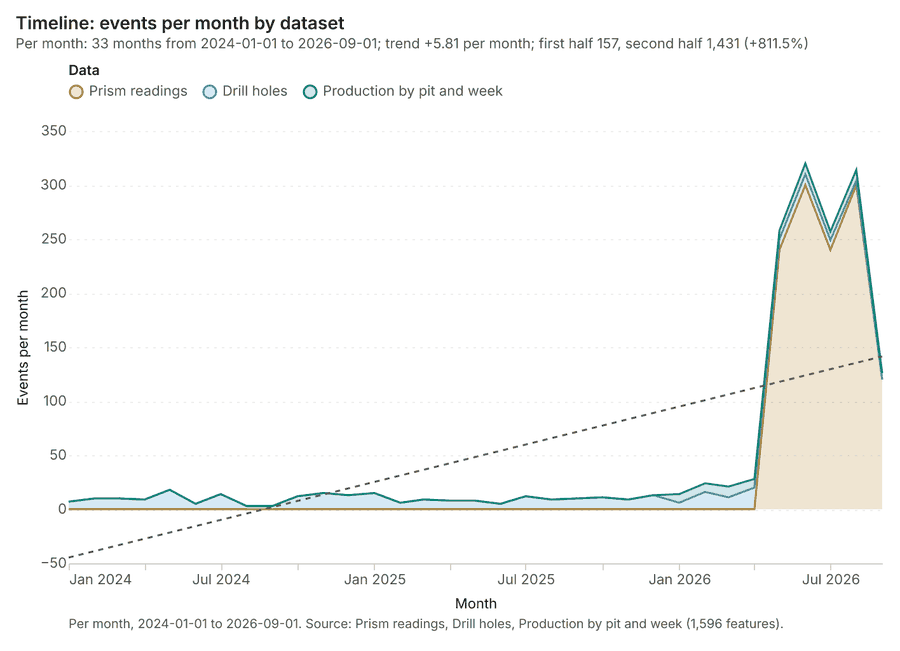
The timeline counts 1,596 dated events in Prism readings, Drill holes, Production by pit and week per month, from January 2024 to September 2026 1234. By dataset: Prism readings 1,200; Drill holes 320; Production by pit and week 76 1. The trend is +5.81 events per month; the second half of the months has 1,431 against 157 in the first (+811.5%) 1.
Busiest months
Quietest months
Hot spots
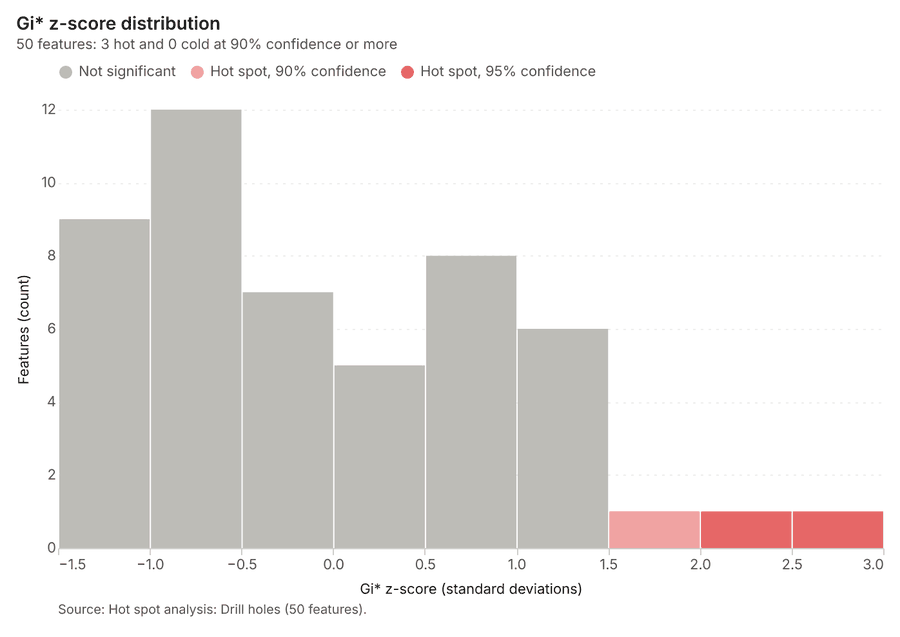
What this analysis is. Hot spot analysis: Getis-Ord Gi* hot and cold spots with z-scores, p-values and confidence bins 5. In ArcGIS it is Find Hot Spots or Hot Spot Analysis (Getis-Ord Gi*); in QGIS, qgis:hotspot (plugin) 5.
Why it was run on this data. 320 points: Getis-Ord Gi* tests whether the concentrations in Drill holes are statistically significant 6.
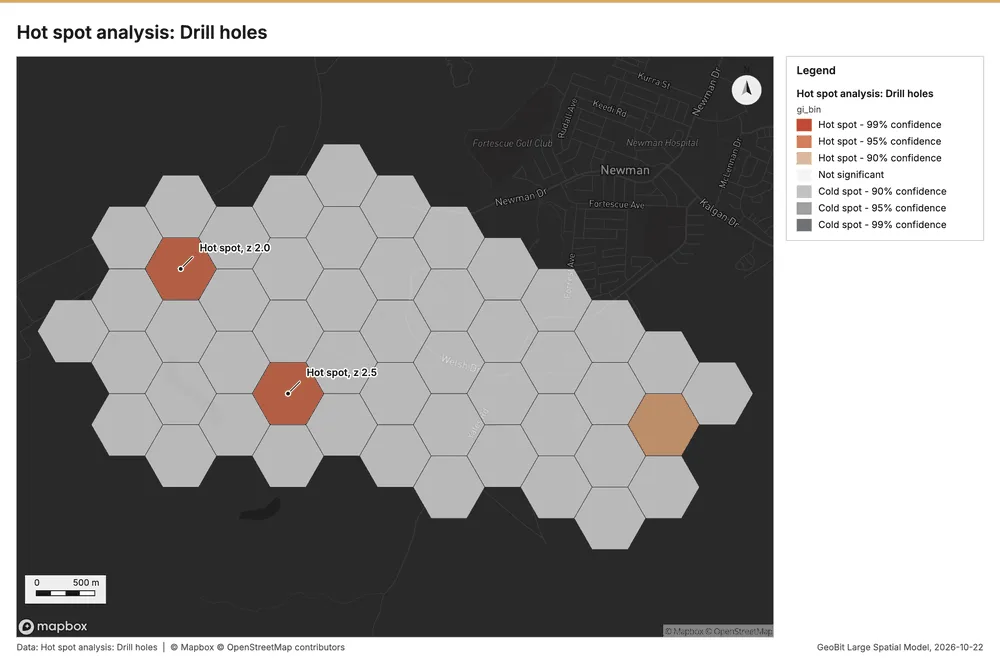
What it found. Hot spots on Drill holes: Hot spot analysis: 1 layer saved: Hot spot analysis: Drill holes (50 features) 78. It reported result, bins 50; result, count 50; result, elapsed ms 6; result, cell size m 500; result, incidents used 320; result, distance band m 500 7.
| Result | Value |
|---|---|
| result, bins | 50 |
| result, count | 50 |
| result, elapsed ms | 6 |
| result, cell size m | 500 |
| result, incidents used | 320 |
| result, distance band m | 500 |
| billing, cost | 0.0564 |
| billing, list price | 0.0564 |
| billing, upstream cost | 0 |
Findings
- Evidenced: Hot spots on Drill holes: Hot spot analysis: 1 layer saved: Hot spot analysis: Drill holes (50 features) 78.
- Evidenced: It reported result, bins 50; result, count 50; result, elapsed ms 6; result, cell size m 500; result, incidents used 320; result, distance band m 500 7.
Tool gp_hot_spots; parameters {"project": "11fd3b70-5f29-4895-b87f-807f2ec1e52e", "features": {"layer": "Drill holes (3fc6780a)"}, "aggregation": "hexagon", "cell_size_m": 500.0, "distance_band_m": 500.0}
Hot spots
What this analysis is. Hot spot analysis: Getis-Ord Gi* hot and cold spots with z-scores, p-values and confidence bins 5. In ArcGIS it is Find Hot Spots or Hot Spot Analysis (Getis-Ord Gi*); in QGIS, qgis:hotspot (plugin) 5.
Why it was run on this data. 1200 points: Getis-Ord Gi* tests whether the concentrations in Prism readings are statistically significant 9.
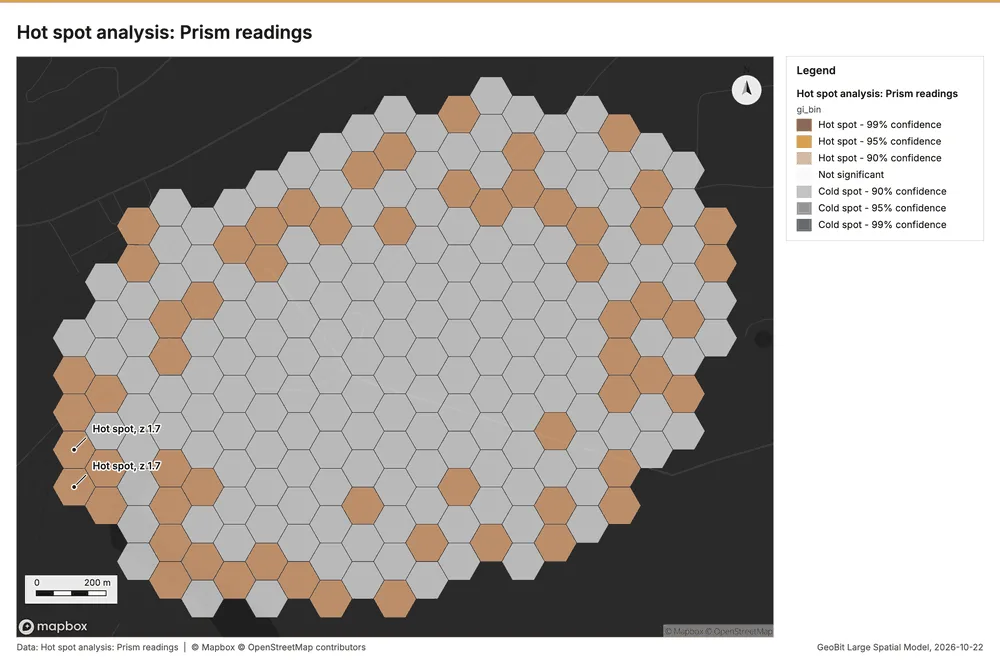
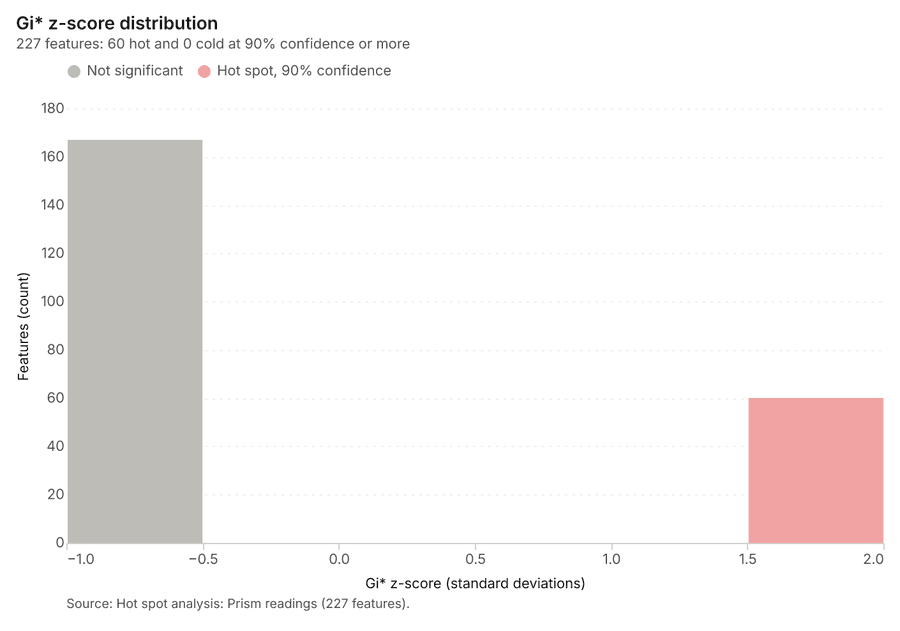
What it found. Hot spots on Prism readings: Hot spot analysis: 1 layer saved: Hot spot analysis: Prism readings (227 features) 1011. It reported result, bins 227; result, count 227; result, elapsed ms 15; result, cell size m 100; result, incidents used 1,200; result, distance band m 100 10.
| Result | Value |
|---|---|
| result, bins | 227 |
| result, count | 227 |
| result, elapsed ms | 15 |
| result, cell size m | 100 |
| result, incidents used | 1,200 |
| result, distance band m | 100 |
| billing, cost | 0.074 |
| billing, list price | 0.074 |
| billing, upstream cost | 0 |
Findings
- Evidenced: Hot spots on Prism readings: Hot spot analysis: 1 layer saved: Hot spot analysis: Prism readings (227 features) 1011.
- Evidenced: It reported result, bins 227; result, count 227; result, elapsed ms 15; result, cell size m 100; result, incidents used 1,200; result, distance band m 100 10.
Tool gp_hot_spots; parameters {"project": "11fd3b70-5f29-4895-b87f-807f2ec1e52e", "features": {"layer": "Prism readings (920e4ae7)"}, "aggregation": "hexagon", "cell_size_m": 100.0, "distance_band_m": 100.0}
Space time hot spots
What this analysis is. Emerging hot spots: Where hot spots are new, consecutive, intensifying, persistent, diminishing, sporadic, oscillating or historical over time 12. In ArcGIS it is Emerging Hot Spot Analysis or Create Space Time Cube 12.
Why it was run on this data. Drill holes carry dates in 'drilled_on': emerging hot spot analysis finds new, intensifying and fading hot spots per month 13.
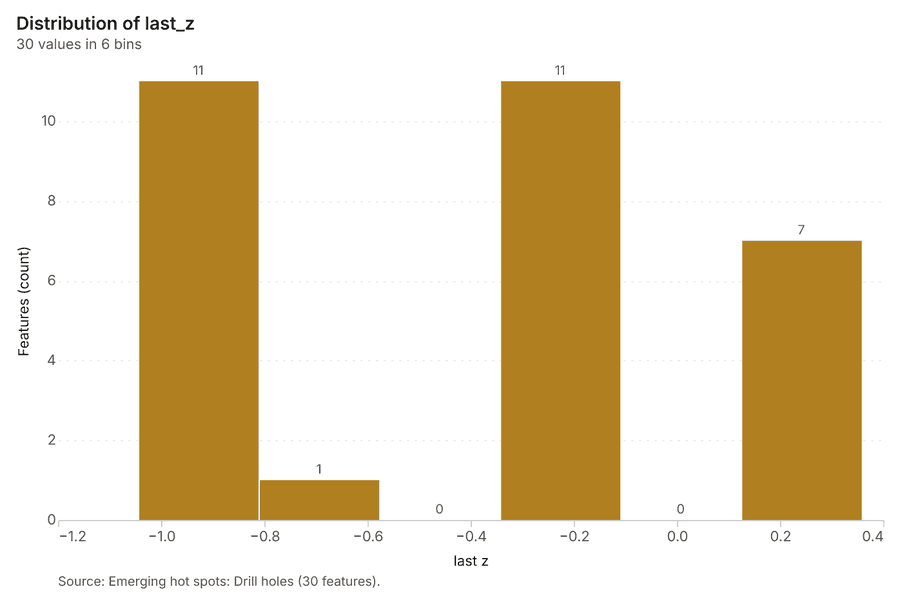
What it found. Space time hot spots on Drill holes: Emerging hot spots: 1 layer saved: Emerging hot spots: Drill holes (30 features) 814. It reported result, count 30; result, elapsed ms 5; result, resolution 8; result, features used 320; result, time neighbors 0; billing, cost 0.116 14.
| Result | Value |
|---|---|
| result, count | 30 |
| result, elapsed ms | 5 |
| result, resolution | 8 |
| result, features used | 320 |
| result, time neighbors | 0 |
| billing, cost | 0.116 |
| billing, list price | 0.116 |
| billing, upstream cost | 0 |
Findings
- Evidenced: Space time hot spots on Drill holes: Emerging hot spots: 1 layer saved: Emerging hot spots: Drill holes (30 features) 814.
- Evidenced: It reported result, count 30; result, elapsed ms 5; result, resolution 8; result, features used 320; result, time neighbors 0; billing, cost 0.116 14.
A model draft was discarded because a sentence did not cite a source of this section.
Tool gp_space_time_hot_spots; parameters {"project": "11fd3b70-5f29-4895-b87f-807f2ec1e52e", "features": {"layer": "Drill holes (3fc6780a)"}, "interval": "month", "bin_shape": "h3", "resolution": 8, "time_field": "drilled_on"}
Space time hot spots
What this analysis is. Emerging hot spots: Where hot spots are new, consecutive, intensifying, persistent, diminishing, sporadic, oscillating or historical over time 12. In ArcGIS it is Emerging Hot Spot Analysis or Create Space Time Cube 12.
Why it was run on this data. Prism readings carry dates in 'observed_at': emerging hot spot analysis finds new, intensifying and fading hot spots per week 15.
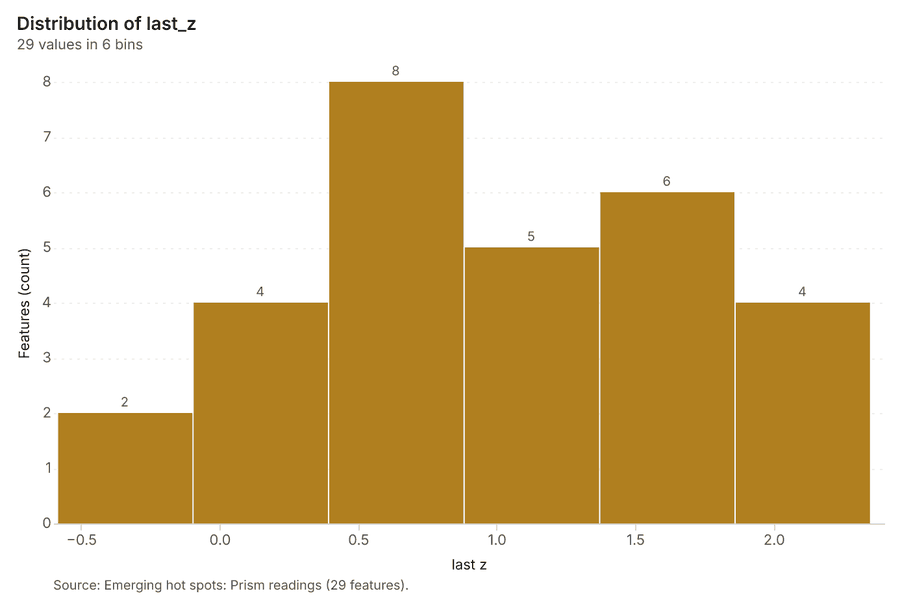
What it found. Space time hot spots on Prism readings: Emerging hot spots: 1 layer saved: Emerging hot spots: Prism readings (29 features) 1116. It reported result, count 29; result, elapsed ms 5; result, resolution 9; result, features used 1,200; result, time neighbors 0; billing, cost 0.16 16.
| Result | Value |
|---|---|
| result, count | 29 |
| result, elapsed ms | 5 |
| result, resolution | 9 |
| result, features used | 1,200 |
| result, time neighbors | 0 |
| billing, cost | 0.16 |
| billing, list price | 0.16 |
| billing, upstream cost | 0 |
Findings
- Evidenced: Space time hot spots on Prism readings: Emerging hot spots: 1 layer saved: Emerging hot spots: Prism readings (29 features) 1116.
- Evidenced: It reported result, count 29; result, elapsed ms 5; result, resolution 9; result, features used 1,200; result, time neighbors 0; billing, cost 0.16 16.
Tool gp_space_time_hot_spots; parameters {"project": "11fd3b70-5f29-4895-b87f-807f2ec1e52e", "features": {"layer": "Prism readings (920e4ae7)"}, "interval": "week", "bin_shape": "h3", "resolution": 9, "time_field": "observed_at"}
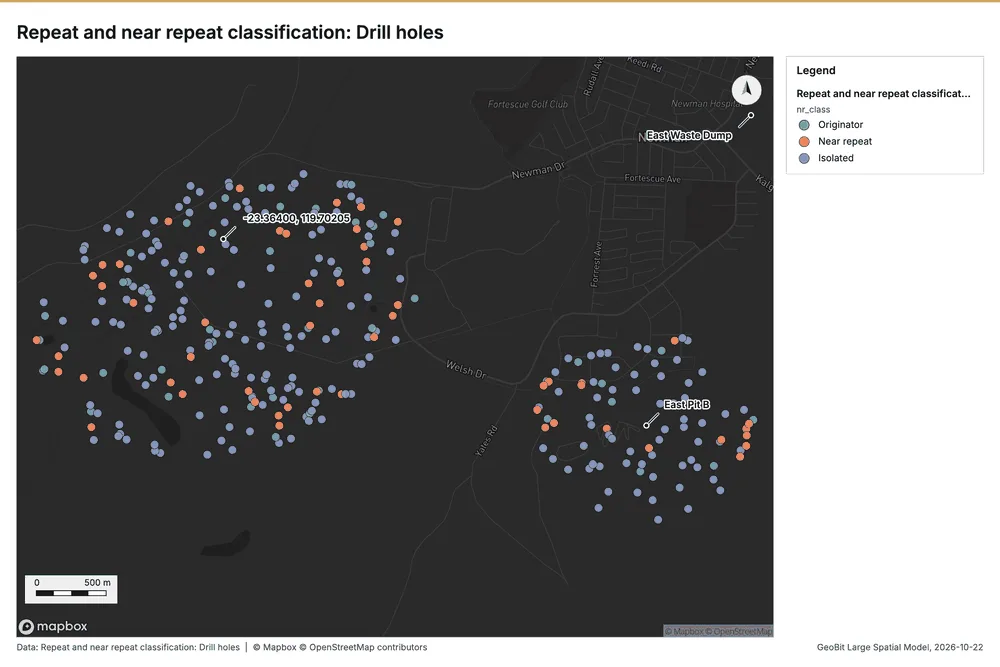
Near repeat
What this analysis is. Repeat and near repeat classification: Classify incidents as originators, repeats (same place) or near repeats within a distance and time window, with a Knox test table 17. In ArcGIS it is Repeat and Near Repeat Classification or Near Repeat Calculator 17.
Why it was run on this data. Near repeat analysis tests whether Drill holes close in space also follow each other within 30 days 18.
What it found. The analysis used an input of Drill holes 8 to classify
| Result | Value |
|---|---|
| result, days | 30 |
| result, count | 320 |
| result, chains | 41 |
| result, distance m | 200 |
| result, elapsed ms | 8 |
| result, pairs linked | 61 |
| billing, cost | 0.0596 |
| billing, list price | 0.0596 |
| billing, upstream cost | 0 |
Findings
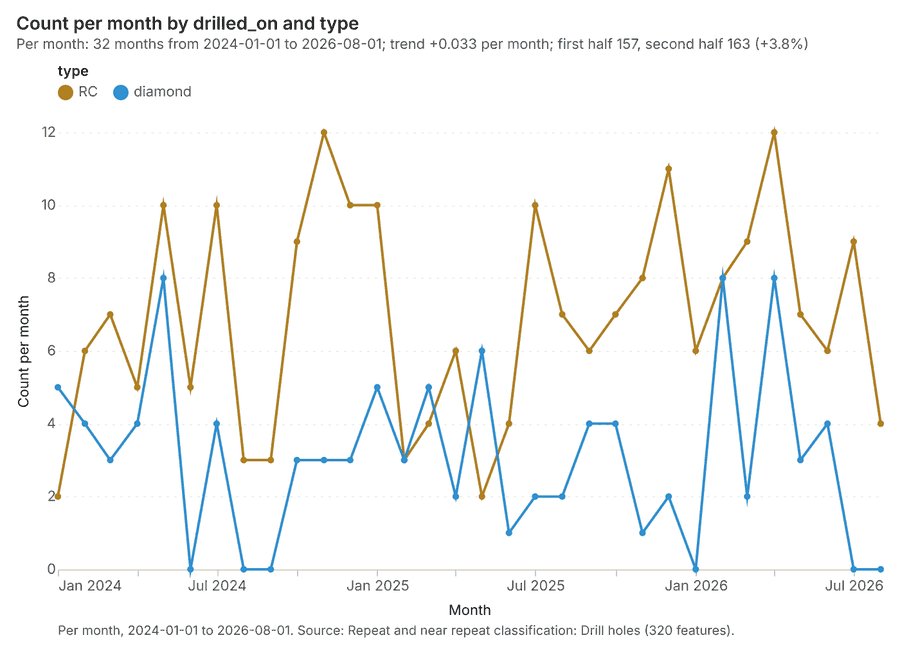
- Evidenced: Near repeat on Drill holes: Repeat and near repeat classification: 1 layer saved: Repeat and near repeat classification: Drill holes (320 features) 819.
- Evidenced: It reported result, days 30; result, count 320; result, chains 41; result, distance m 200; result, elapsed ms 8; result, pairs linked 61 19.
Tool gp_near_repeat; parameters {"days": 30, "project": "11fd3b70-5f29-4895-b87f-807f2ec1e52e", "features": {"layer": "Drill holes (3fc6780a)"}, "distance_m": 200.0, "time_field": "drilled_on"}
Summarize within
What this analysis is. Summarize within: Count and aggregate the features inside each polygon (or bin), proportionally for lines and polygons 20. In ArcGIS it is Summarize Within or Aggregate Points; in QGIS, native:countpointsinpolygon or native:sumlinelengths 20.
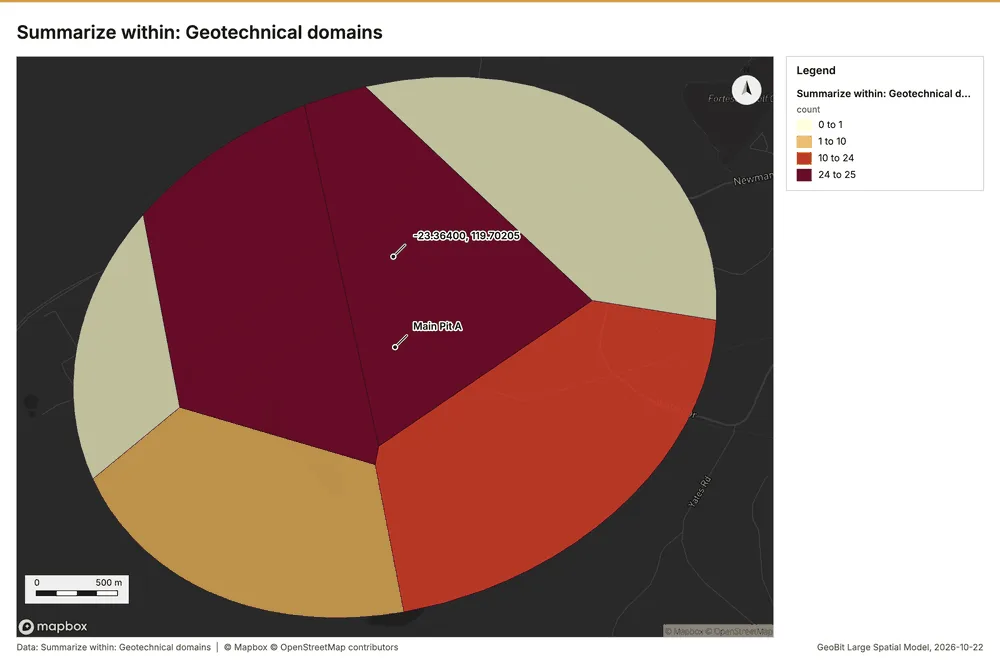
Why it was run on this data. Count Drill holes inside each feature of Geotechnical domains by type; the counts map as a choropleth (natural breaks, sequential colors) 21.
What it found. Summarize within on Drill holes, Geotechnical domains: Summarize within: 1 layer saved: Summarize within: Geotechnical domains (6 features) 82223. It reported result, count 6; result, elapsed ms 1; billing, cost 0.01654; billing, list price 0.01654; billing, upstream cost 0 22.
| Result | Value |
|---|---|
| result, count | 6 |
| result, elapsed ms | 1 |
| billing, cost | 0.01654 |
| billing, list price | 0.01654 |
| billing, upstream cost | 0 |
Findings
- Evidenced: Summarize within on Drill holes, Geotechnical domains: Summarize within: 1 layer saved: Summarize within: Geotechnical domains (6 features) 82223.
- Evidenced: It reported result, count 6; result, elapsed ms 1; billing, cost 0.01654; billing, list price 0.01654; billing, upstream cost 0 22.
Tool gp_summarize_within; parameters {"stats": [{"stat": "sum", "field": "depth_m"}], "project": "11fd3b70-5f29-4895-b87f-807f2ec1e52e", "features": {"layer": "Drill holes (3fc6780a)"}, "group_by": "type", "polygons": {"layer": "Geotechnical domains (7e9e4801)"}}
Summarize within
What this analysis is. Summarize within: Count and aggregate the features inside each polygon (or bin), proportionally for lines and polygons 20. In ArcGIS it is Summarize Within or Aggregate Points; in QGIS, native:countpointsinpolygon or native:sumlinelengths 20.
Why it was run on this data. Count Drill holes inside each feature of Geotechnical domains by type; the counts map as a choropleth (natural breaks, sequential colors) 21.
What it found. Summarize within on Prism readings, Geotechnical domains: Summarize within: 1 layer saved: Summarize within: Geotechnical domains (6 features) 112324. It reported result, count 6; result, elapsed ms 3; billing, cost 0.03414; billing, list price 0.03414; billing, upstream cost 0 24.
| Result | Value |
|---|---|
| result, count | 6 |
| result, elapsed ms | 3 |
| billing, cost | 0.03414 |
| billing, list price | 0.03414 |
| billing, upstream cost | 0 |
Findings
- Evidenced: Summarize within on Prism readings, Geotechnical domains: Summarize within: 1 layer saved: Summarize within: Geotechnical domains (6 features) 112324.
- Evidenced: It reported result, count 6; result, elapsed ms 3; billing, cost 0.03414; billing, list price 0.03414; billing, upstream cost 0 24.
Tool gp_summarize_within; parameters {"stats": [{"stat": "sum", "field": "displacement_mm"}], "project": "11fd3b70-5f29-4895-b87f-807f2ec1e52e", "features": {"layer": "Prism readings (920e4ae7)"}, "polygons": {"layer": "Geotechnical domains (7e9e4801)"}}
Summarize within
What this analysis is. Summarize within: Count and aggregate the features inside each polygon (or bin), proportionally for lines and polygons 20. In ArcGIS it is Summarize Within or Aggregate Points; in QGIS, native:countpointsinpolygon or native:sumlinelengths 20.
Why it was run on this data. Count Drill holes inside each feature of Geotechnical domains by type; the counts map as a choropleth (natural breaks, sequential colors) 21.
What it found. Summarize within on Monitoring prisms, Geotechnical domains: Summarize within: 1 layer saved: Summarize within: Geotechnical domains (6 features) 232526. It reported result, count 6; result, elapsed ms 1; billing, cost 0.01134; billing, list price 0.01134; billing, upstream cost 0 25.
| Result | Value |
|---|---|
| result, count | 6 |
| result, elapsed ms | 1 |
| billing, cost | 0.01134 |
| billing, list price | 0.01134 |
| billing, upstream cost | 0 |
Findings
- Evidenced: Summarize within on Monitoring prisms, Geotechnical domains: Summarize within: 1 layer saved: Summarize within: Geotechnical domains (6 features) 232526.
- Evidenced: It reported result, count 6; result, elapsed ms 1; billing, cost 0.01134; billing, list price 0.01134; billing, upstream cost 0 25.
A model draft was discarded because a sentence did not cite a source of this section.
Tool gp_summarize_within; parameters {"stats": [{"stat": "sum", "field": "elevation_m"}], "project": "11fd3b70-5f29-4895-b87f-807f2ec1e52e", "features": {"layer": "Monitoring prisms (6e51a43e)"}, "group_by": "wall", "polygons": {"layer": "Geotechnical domains (7e9e4801)"}}
Find point clusters
What this analysis is. Find point clusters: Density-based clusters (DBSCAN, HDBSCAN or OPTICS, optionally space-time) with hulls and noise 27. In ArcGIS it is Find Point Clusters or Density-based Clustering; in QGIS, native:dbscanclustering or native:stdbscanclustering 27.
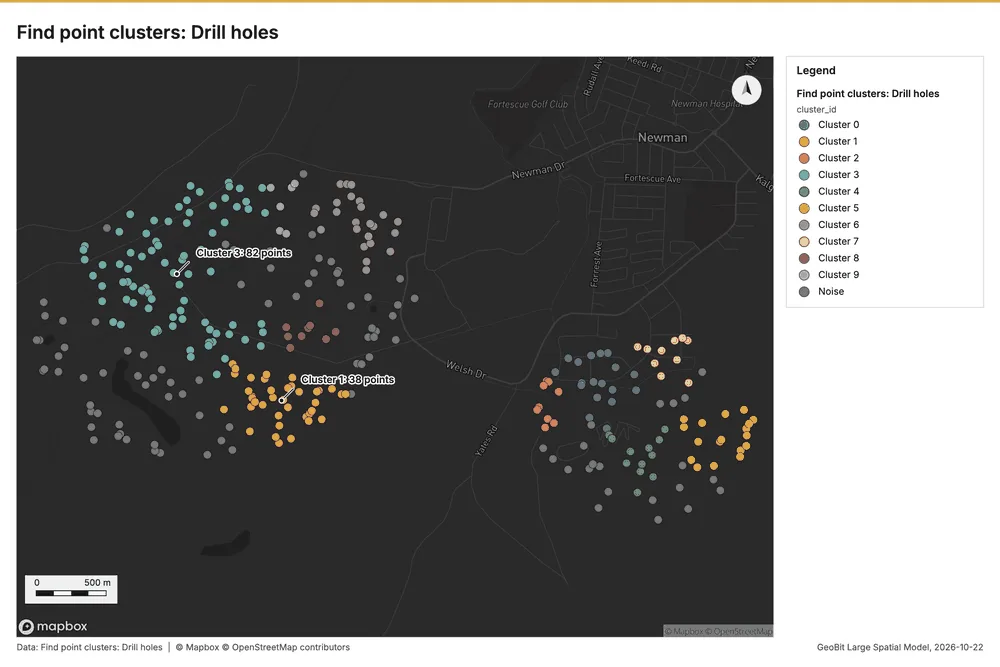
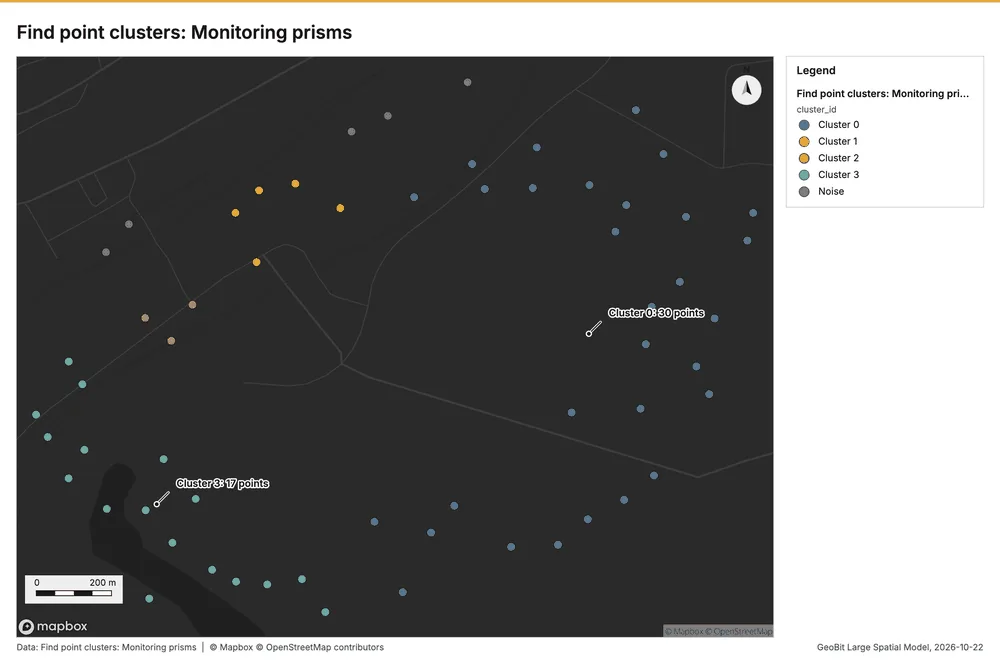
Why it was run on this data. DBSCAN finds dense groups of Drill holes and separates noise 28.
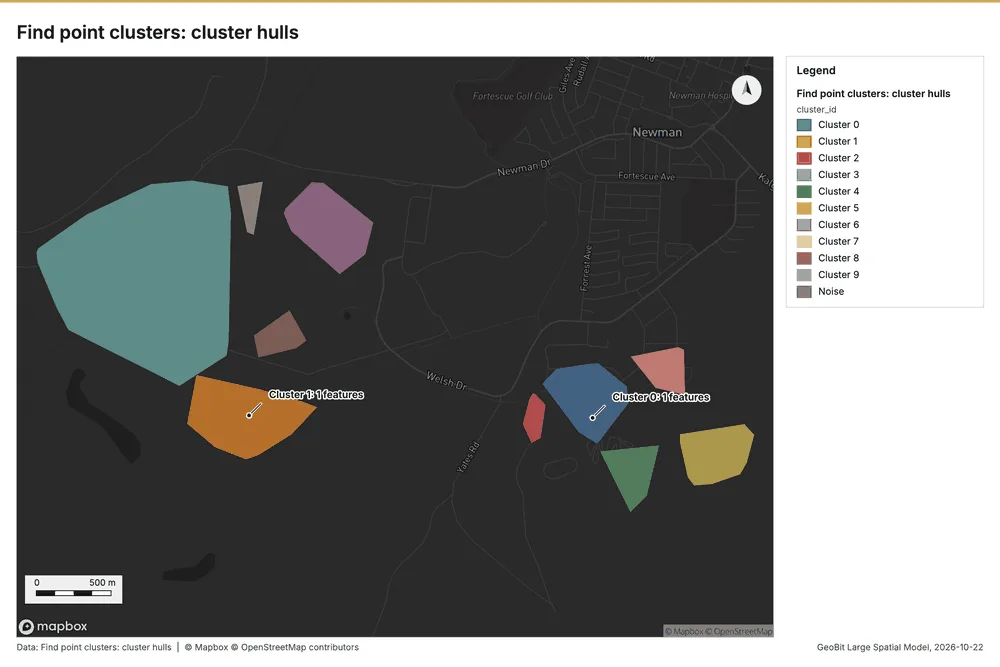
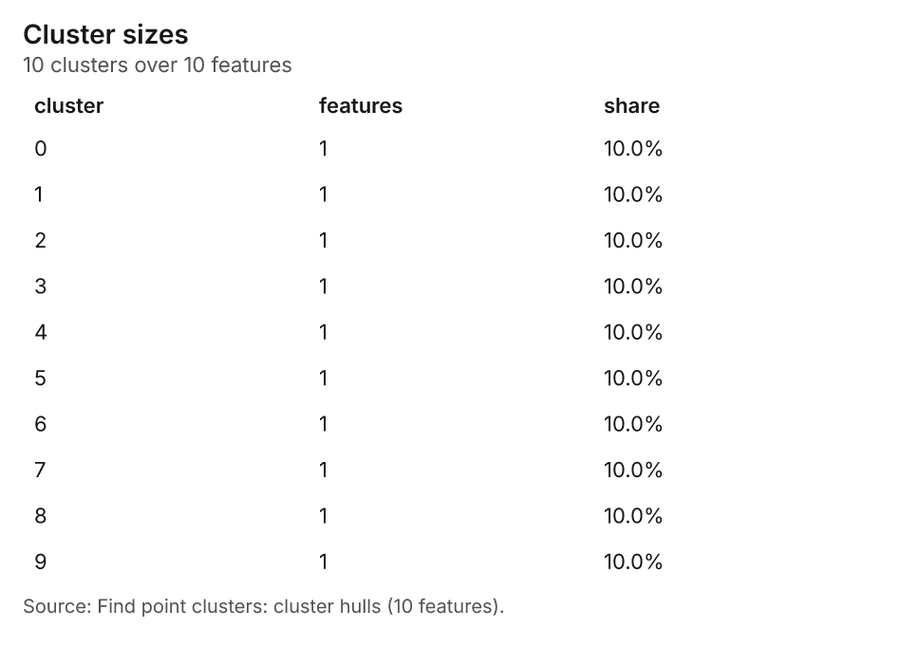
What it found. Find point clusters on Drill holes: Find point clusters: 2 layers saved: Find point clusters: Drill holes (320 features); Find point clusters: cluster hulls (10 features) 829. It reported result, count 320; result, noise 93; result, distance m 200; result, elapsed ms 9; result, min points 8; billing, cost 0.0564 29.
| Result | Value |
|---|---|
| result, count | 320 |
| result, noise | 93 |
| result, distance m | 200 |
| result, elapsed ms | 9 |
| result, min points | 8 |
| billing, cost | 0.0564 |
| billing, list price | 0.0564 |
| billing, upstream cost | 0 |
Findings
- Evidenced: Find point clusters on Drill holes: Find point clusters: 2 layers saved: Find point clusters: Drill holes (320 features); Find point clusters: cluster hulls (10 features) 829.
- Evidenced: It reported result, count 320; result, noise 93; result, distance m 200; result, elapsed ms 9; result, min points 8; billing, cost 0.0564 29.
Tool gp_find_point_clusters; parameters {"method": "dbscan", "project": "11fd3b70-5f29-4895-b87f-807f2ec1e52e", "features": {"layer": "Drill holes (3fc6780a)"}, "distance_m": 200.0, "min_points": 8}
Find point clusters
What this analysis is. Find point clusters: Density-based clusters (DBSCAN, HDBSCAN or OPTICS, optionally space-time) with hulls and noise 27. In ArcGIS it is Find Point Clusters or Density-based Clustering; in QGIS, native:dbscanclustering or native:stdbscanclustering 27.
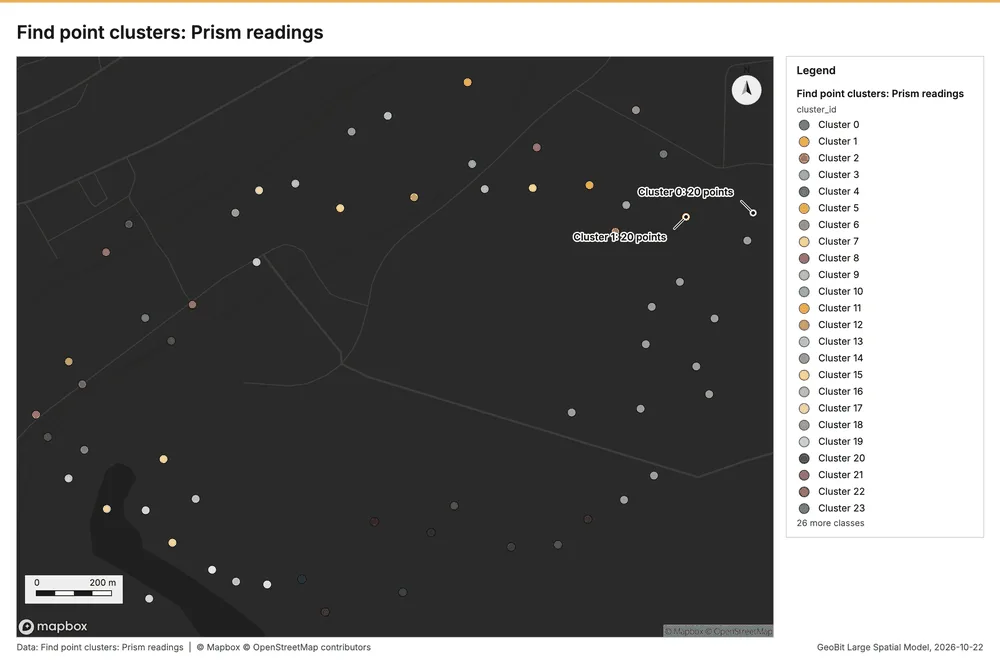
Why it was run on this data. DBSCAN finds dense groups of Prism readings and separates noise 30.
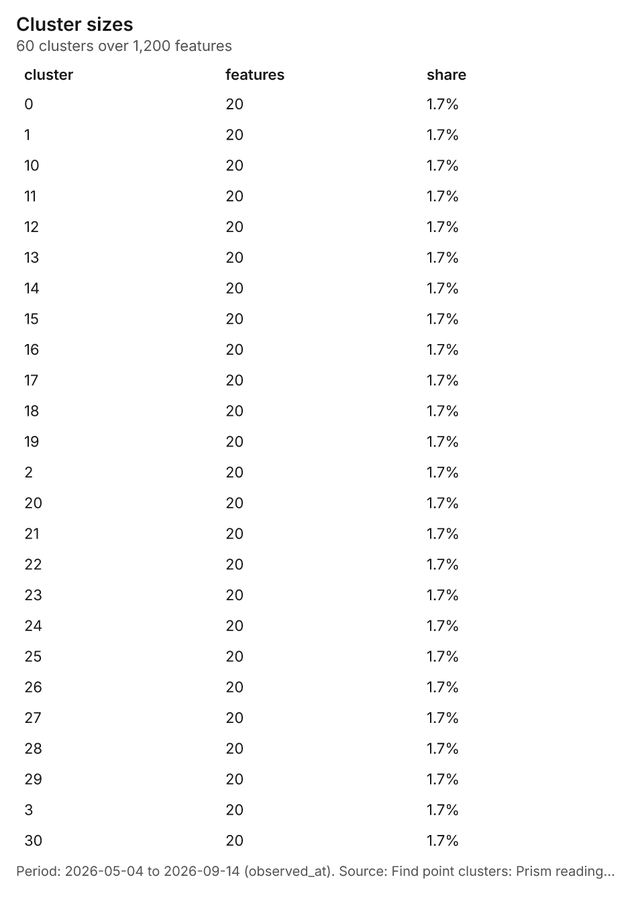
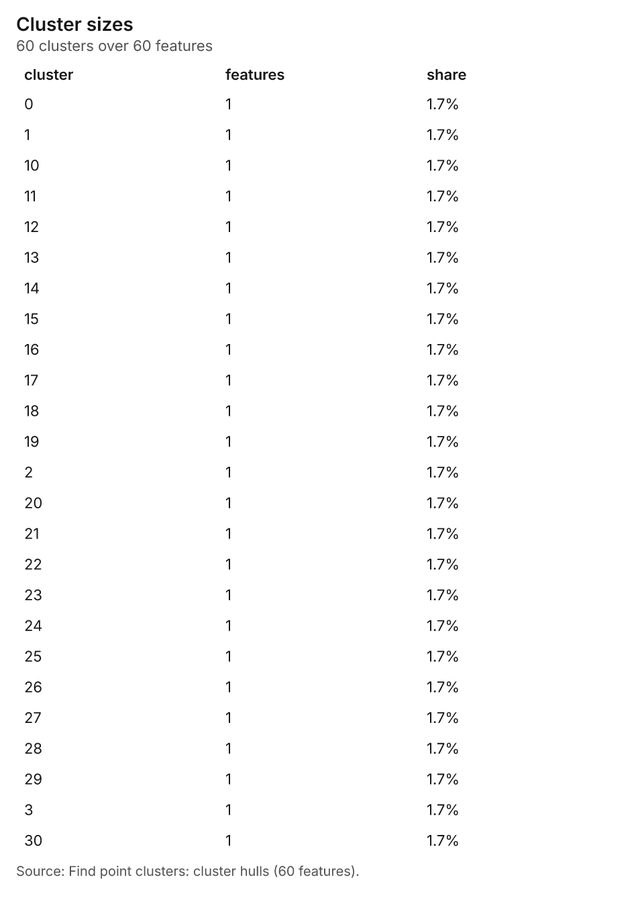
What it found. The cluster finding process began using the Prism readings as input 11. The gp_find_point_clusters tool was executed, which saved a total of 2 layers 31.
Findings
- Evidenced: Find point clusters on Prism readings: Find point clusters: 2 layers saved: Find point clusters: Prism readings (1200 features); Find point clusters: cluster hulls (60 features) 1131.
Tool gp_find_point_clusters; parameters {"method": "dbscan", "project": "11fd3b70-5f29-4895-b87f-807f2ec1e52e", "features": {"layer": "Prism readings (920e4ae7)"}, "distance_m": 50.0, "min_points": 20}
Find point clusters
What this analysis is. Find point clusters: Density-based clusters (DBSCAN, HDBSCAN or OPTICS, optionally space-time) with hulls and noise 27. In ArcGIS it is Find Point Clusters or Density-based Clustering; in QGIS, native:dbscanclustering or native:stdbscanclustering 27.
Why it was run on this data. DBSCAN finds dense groups of Monitoring prisms and separates noise 32.
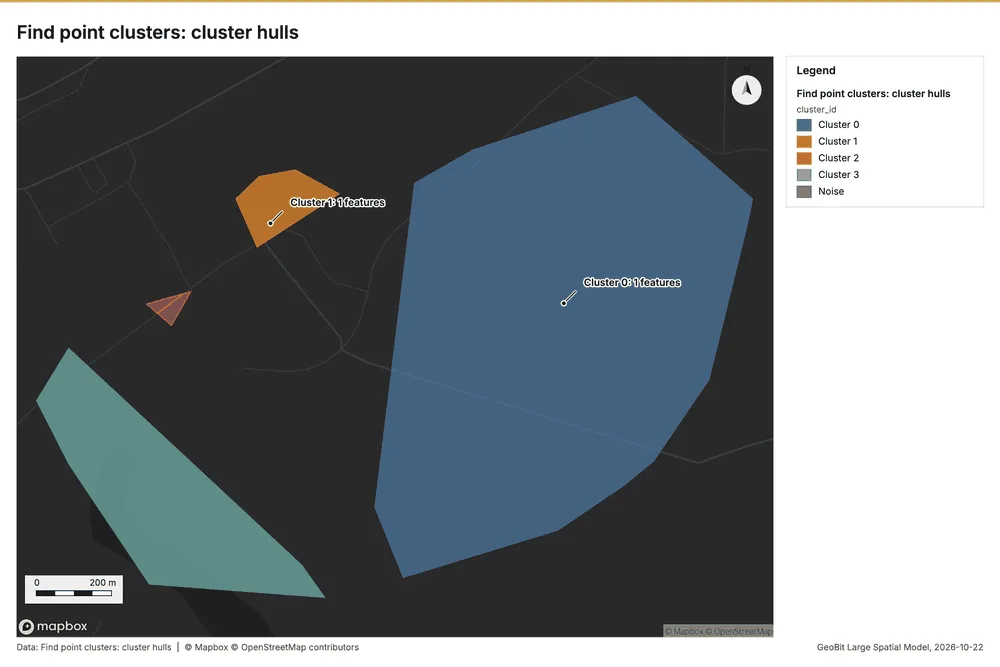
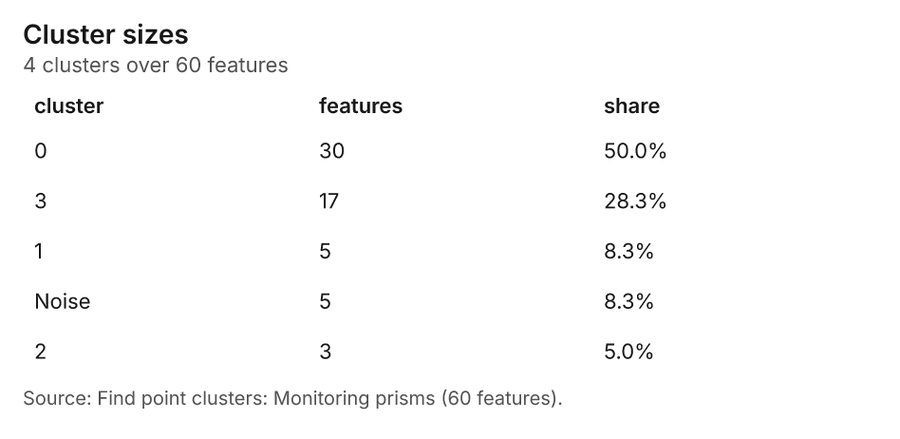
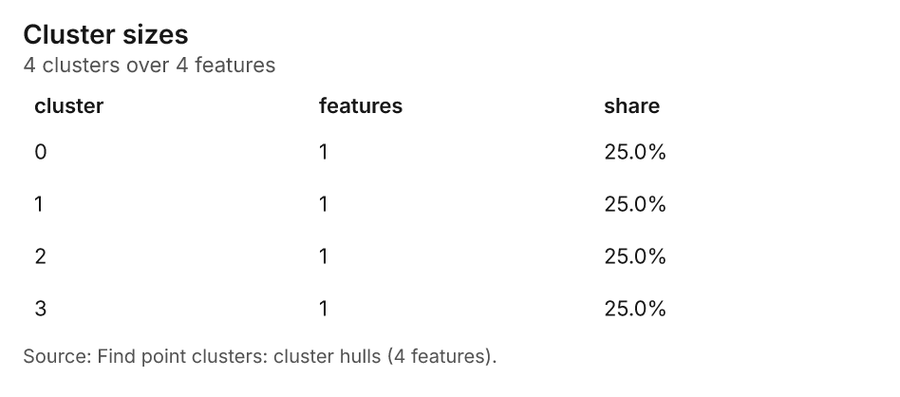
What it found. Find point clusters on Monitoring prisms: Find point clusters: 2 layers saved: Find point clusters: Monitoring prisms (60 features); Find point clusters: cluster hulls (4 features) 2633. It reported result, count 60; result, noise 5; result, distance m 200; result, elapsed ms 2; result, min points 3; billing, cost 0.0512 33.
| Result | Value |
|---|---|
| result, count | 60 |
| result, noise | 5 |
| result, distance m | 200 |
| result, elapsed ms | 2 |
| result, min points | 3 |
| billing, cost | 0.0512 |
| billing, list price | 0.0512 |
| billing, upstream cost | 0 |
Findings
- Evidenced: Find point clusters on Monitoring prisms: Find point clusters: 2 layers saved: Find point clusters: Monitoring prisms (60 features); Find point clusters: cluster hulls (4 features) 2633.
- Evidenced: It reported result, count 60; result, noise 5; result, distance m 200; result, elapsed ms 2; result, min points 3; billing, cost 0.0512 33.
Tool gp_find_point_clusters; parameters {"method": "dbscan", "project": "11fd3b70-5f29-4895-b87f-807f2ec1e52e", "features": {"layer": "Monitoring prisms (6e51a43e)"}, "distance_m": 200.0, "min_points": 3}
Zonal statistics
What this analysis is. Zonal statistics: count/min/max/mean/std/sum/median/majority per polygon as a table and as GeoJSON 34. In ArcGIS it is Zonal Statistics as Table (polygons) 34.
Why it was run on this data. Statistics of Mine terrain model (DEM) inside each feature of Geotechnical domains 35.
What it found. The analysis involved Zonal statistics using the rs_zonal_statistics tool 36. The tool summary reports the generation of 6 row(s) 36. It is noted that the analysis involved 6 zones 36.
Findings
Tool rs_zonal_statistics; parameters {"stats": ["mean", "min", "max", "std"], "zones": "Geotechnical domains (7e9e4801)", "raster_id": "Mine terrain model (DEM) (d3bacd4c)"}
Zonal statistics
What this analysis is. Zonal statistics: count/min/max/mean/std/sum/median/majority per polygon as a table and as GeoJSON 34. In ArcGIS it is Zonal Statistics as Table (polygons) 34.
Why it was run on this data. Statistics of Mine terrain model (DEM) inside each feature of Geotechnical domains 35.
What it found. The analysis utilized the Zonal statistics tool, which is also referenced as rs_zonal_statistics 37. This process yielded 7 row(s) 37. The resulting data analyzed 7 zones 37.
Findings
Tool rs_zonal_statistics; parameters {"stats": ["mean", "min", "max", "std"], "zones": "Mine areas (e1015218)", "raster_id": "Mine terrain model (DEM) (d3bacd4c)"}
Slope
What this analysis is. Slope: Horn slope in degrees or percent, with the share of ground in six grade classes 38. In ArcGIS it is Slope (Spatial Analyst); in QGIS, Slope (GDAL DEM) 38.
Why it was run on this data. Slope of the Mine terrain model (DEM) surface 39.
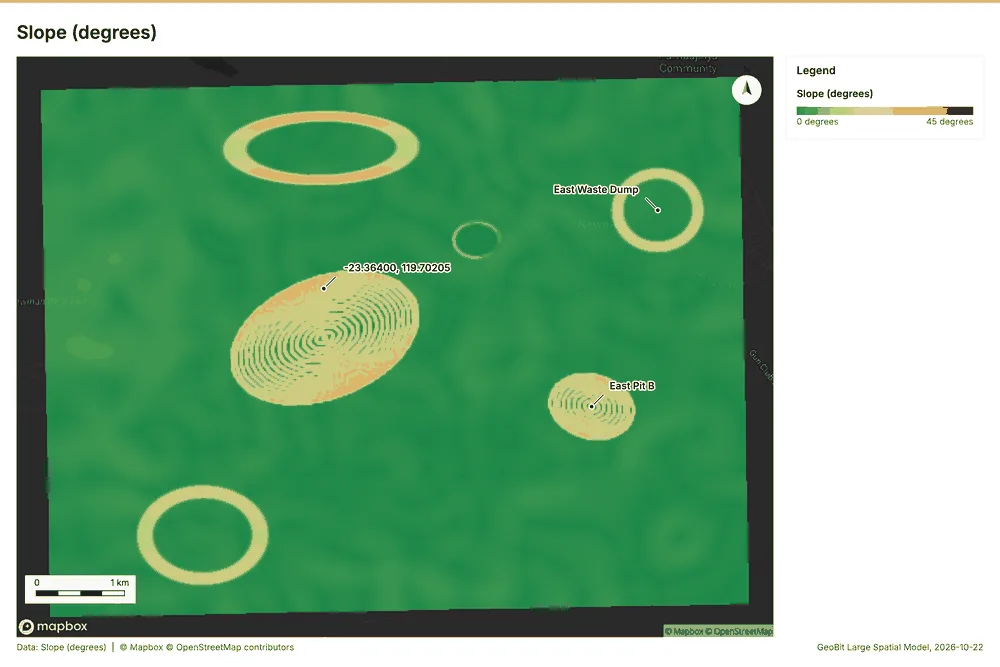
What it found. The slope analysis was conducted over an area of 48.00 km² 40.
| Result | Value |
|---|---|
| dem, cols | 400 |
| dem, rows | 300 |
| dem, cell m | 20 |
| dem, relief m | 320.7 |
| dem, elev max m | 630.1 |
| dem, elev min m | 309.4 |
| dem, elev mean m | 570.3 |
| dem, missing frac | 0 |
| cost, usd | 0 |
| grid, cols | 400 |
| grid, rows | 300 |
| grid, cell m | 20 |
| stats, max | 36.74 |
| stats, min | 0 |
| stats, mean | 2.68 |
| stats, median | 0.99 |
| stats, steeper than 15pct | 8.62 |
| rows left out | 0 |
Findings
- Evidenced: Slope on Mine terrain model (DEM): Slope over 48.00 km2: mean 2.68 degrees, max 36.74 degrees; 9% of the ground is steeper than 15% 4041.
- Evidenced: DEM: Mine terrain model (DEM) 4041.
- Evidenced: Verified: 2 checks passed 4041.
- Evidenced: It reported dem, cols 400; dem, rows 300; dem, cell m 20; dem, relief m 320.7; dem, elev max m 630.1; dem, elev min m 309.4 40.
Tool tr_slope; parameters {"dem": {"layer": "Mine terrain model (DEM) (d3bacd4c)"}, "project": "11fd3b70-5f29-4895-b87f-807f2ec1e52e"}
Calculate density
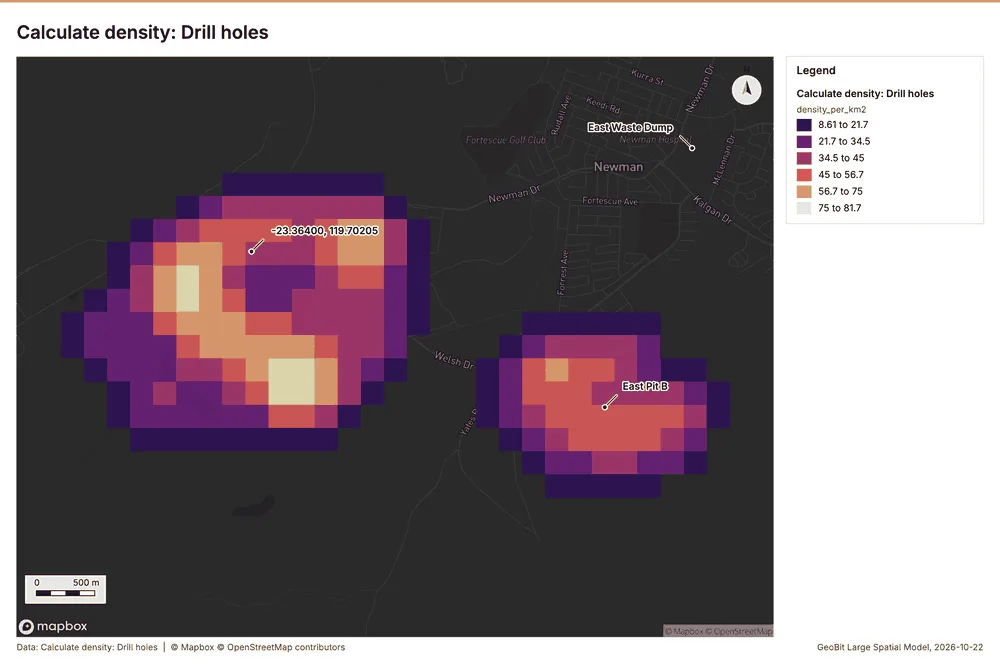
What this analysis is. Calculate density: Kernel density per square kilometer on a grid 42. In ArcGIS it is Calculate Density or Kernel Density; in QGIS, native:heatmapkerneldensityestimation 42.
Why it was run on this data. 320 points in Drill holes: a density surface shows where they concentrate 43.
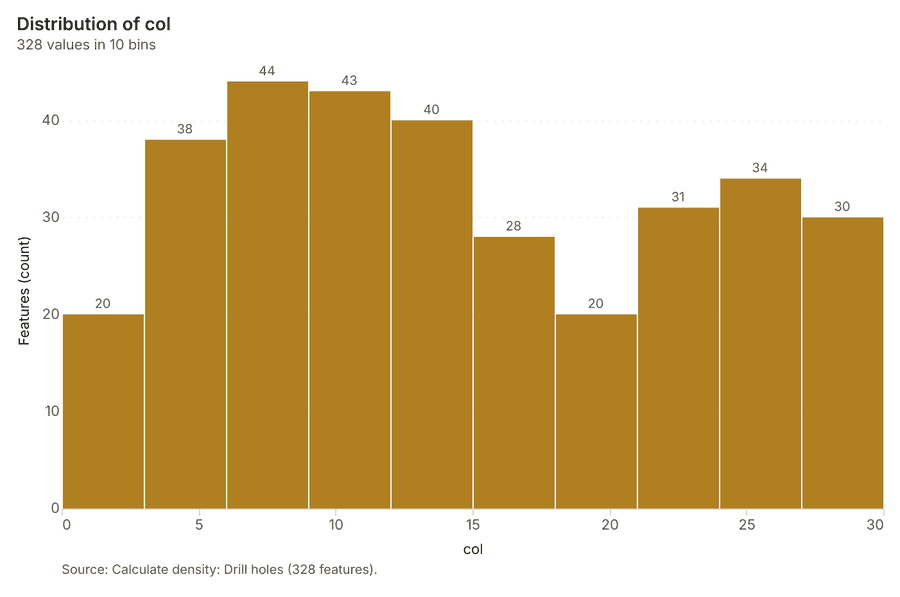
What it found. The density calculation was performed on 328 drill holes 44. The resulting maximum density recorded was 81.67 per km2 44. The total elapsed time for the calculation was 11 ms 44. Furthermore, the billing cost associated with this service was 0.0564 44.
| Result | Value |
|---|---|
| result, count | 328 |
| result, elapsed ms | 11 |
| result, bandwidth m | 500 |
| result, cell size m | 200 |
| result, excluded null | 0 |
| result, max density per km2 | 81.67 |
| billing, cost | 0.0564 |
| billing, list price | 0.0564 |
| billing, upstream cost | 0 |
Findings
- Evidenced: Calculate density on Drill holes: Calculate density: 1 layer saved: Calculate density: Drill holes (328 features) 844.
- Evidenced: It reported result, count 328; result, elapsed ms 11; result, bandwidth m 500; result, cell size m 200; result, excluded null 0; result, max density per km2 81.67 44.
Tool gp_calculate_density; parameters {"kernel": "quartic", "project": "11fd3b70-5f29-4895-b87f-807f2ec1e52e", "features": {"layer": "Drill holes (3fc6780a)"}, "bandwidth_m": 500.0, "cell_size_m": 200.0}
Calculate density
What this analysis is. Calculate density: Kernel density per square kilometer on a grid 42. In ArcGIS it is Calculate Density or Kernel Density; in QGIS, native:heatmapkerneldensityestimation 42.
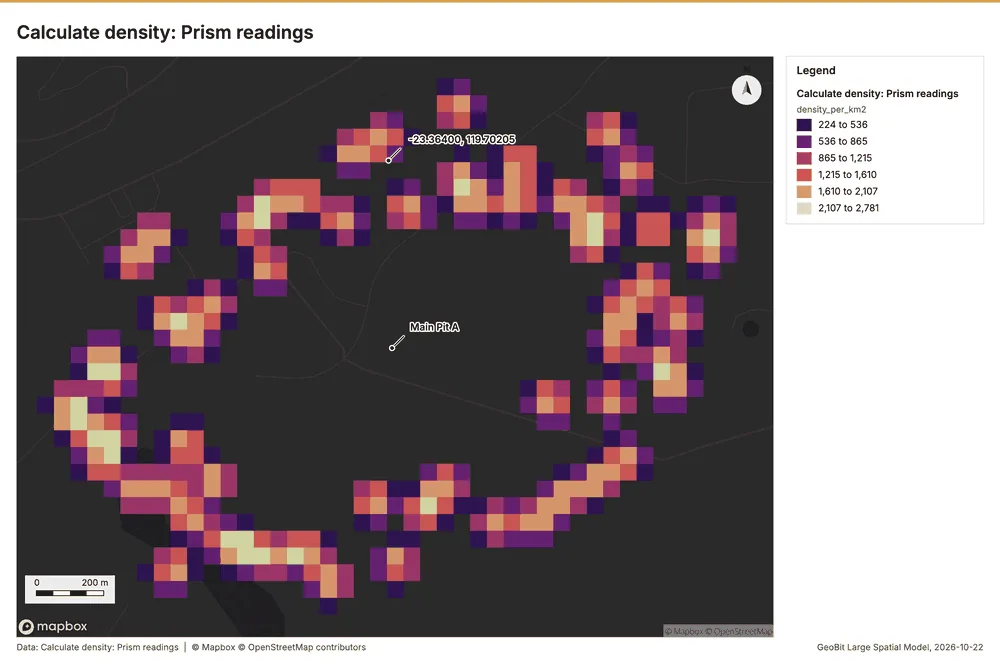
Why it was run on this data. 1200 points in Prism readings: a density surface shows where they concentrate 45.
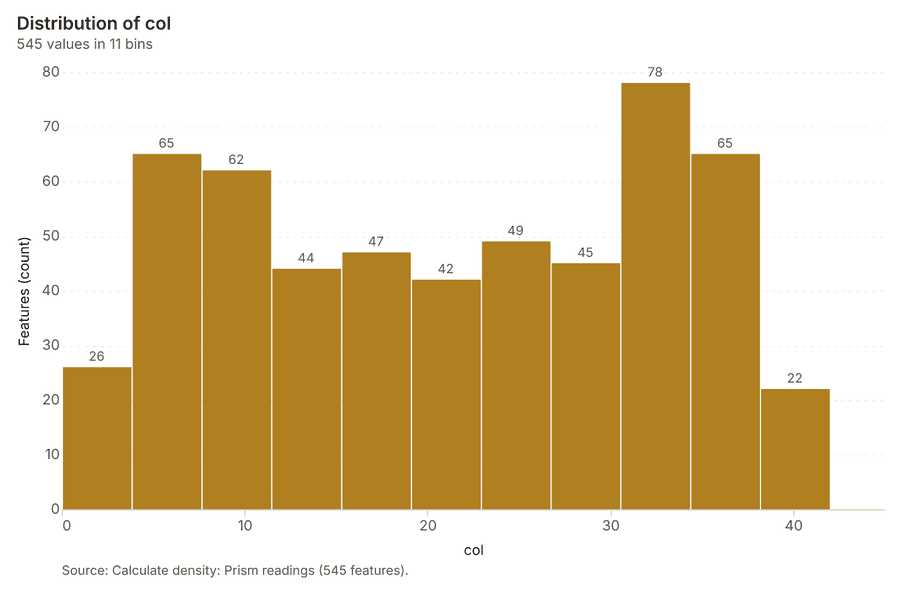
What it found. Calculate density on Prism readings: Calculate density: 1 layer saved: Calculate density: Prism readings (545 features) 1146. It reported result, count 545; result, elapsed ms 18; result, bandwidth m 100; result, cell size m 50; result, excluded null 0; result, max density per km2 2,781 46.
| Result | Value |
|---|---|
| result, count | 545 |
| result, elapsed ms | 18 |
| result, bandwidth m | 100 |
| result, cell size m | 50 |
| result, excluded null | 0 |
| result, max density per km2 | 2,781 |
| billing, cost | 0.074 |
| billing, list price | 0.074 |
| billing, upstream cost | 0 |
Findings
- Evidenced: Calculate density on Prism readings: Calculate density: 1 layer saved: Calculate density: Prism readings (545 features) 1146.
- Evidenced: It reported result, count 545; result, elapsed ms 18; result, bandwidth m 100; result, cell size m 50; result, excluded null 0; result, max density per km2 2,781 46.
Tool gp_calculate_density; parameters {"kernel": "quartic", "project": "11fd3b70-5f29-4895-b87f-807f2ec1e52e", "features": {"layer": "Prism readings (920e4ae7)"}, "bandwidth_m": 100.0, "cell_size_m": 50.0}
Calculate density
What this analysis is. Calculate density: Kernel density per square kilometer on a grid 42. In ArcGIS it is Calculate Density or Kernel Density; in QGIS, native:heatmapkerneldensityestimation 42.
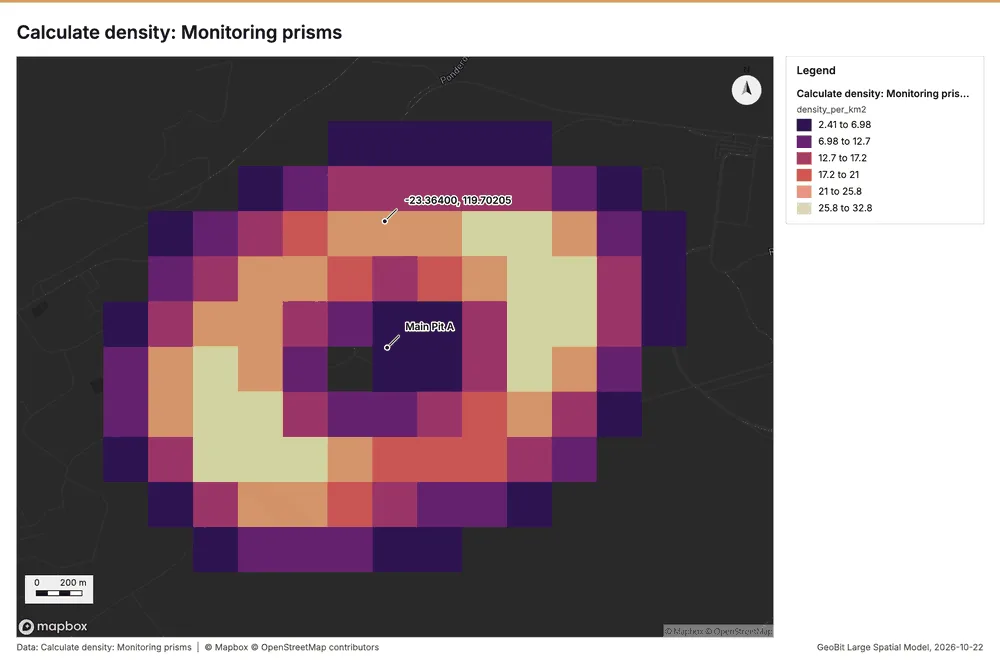
Why it was run on this data. 60 points in Monitoring prisms: a density surface shows where they concentrate 47.
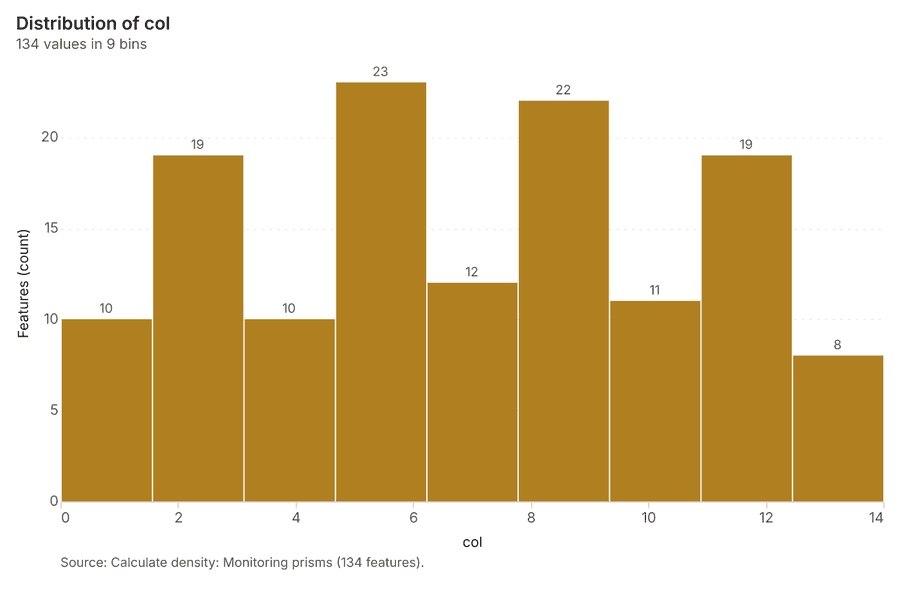
What it found. The gp_calculate_density tool analyzed 134 features from the "Monitoring prisms" layer 48. Key results from this analysis include a maximum density of 32.75 per km² 48. Furthermore, the process utilized a bandwidth of 500 m 48 and completed within 4 elapsed ms 48.
| Result | Value |
|---|---|
| result, count | 134 |
| result, elapsed ms | 4 |
| result, bandwidth m | 500 |
| result, cell size m | 200 |
| result, excluded null | 0 |
| result, max density per km2 | 32.75 |
| billing, cost | 0.0512 |
| billing, list price | 0.0512 |
| billing, upstream cost | 0 |
Findings
- Evidenced: Calculate density on Monitoring prisms: Calculate density: 1 layer saved: Calculate density: Monitoring prisms (134 features) 2648.
- Evidenced: It reported result, count 134; result, elapsed ms 4; result, bandwidth m 500; result, cell size m 200; result, excluded null 0; result, max density per km2 32.75 48.
Tool gp_calculate_density; parameters {"kernel": "quartic", "project": "11fd3b70-5f29-4895-b87f-807f2ec1e52e", "features": {"layer": "Monitoring prisms (6e51a43e)"}, "bandwidth_m": 500.0, "cell_size_m": 200.0}
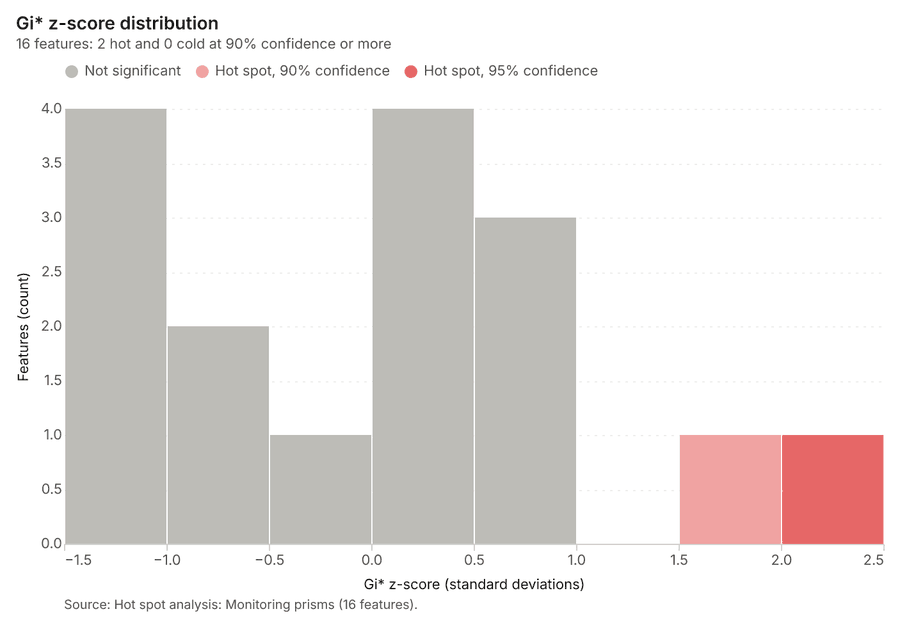
Hot spots
What this analysis is. Hot spot analysis: Getis-Ord Gi* hot and cold spots with z-scores, p-values and confidence bins 5. In ArcGIS it is Find Hot Spots or Hot Spot Analysis (Getis-Ord Gi*); in QGIS, qgis:hotspot (plugin) 5.
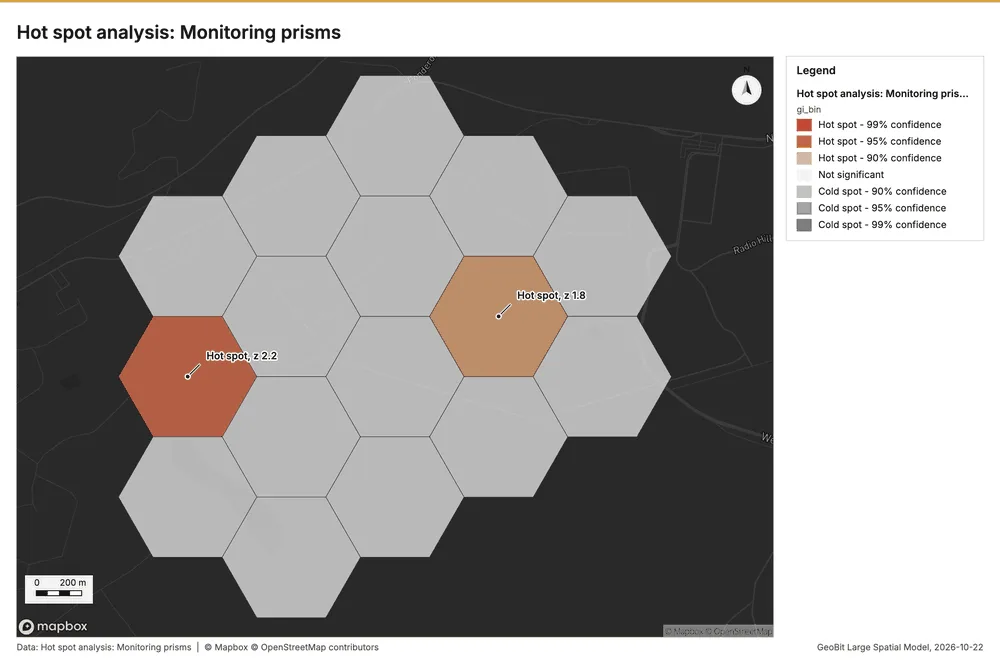
Why it was run on this data. 60 points: Getis-Ord Gi* tests whether the concentrations in Monitoring prisms are statistically significant 49.
What it found. Hot spots on Monitoring prisms: Hot spot analysis: 1 layer saved: Hot spot analysis: Monitoring prisms (16 features) 2650. It reported result, bins 16; result, count 16; result, elapsed ms 3; result, cell size m 500; result, incidents used 60; result, distance band m 500 50.
| Result | Value |
|---|---|
| result, bins | 16 |
| result, count | 16 |
| result, elapsed ms | 3 |
| result, cell size m | 500 |
| result, incidents used | 60 |
| result, distance band m | 500 |
| billing, cost | 0.0512 |
| billing, list price | 0.0512 |
| billing, upstream cost | 0 |
Findings
- Evidenced: Hot spots on Monitoring prisms: Hot spot analysis: 1 layer saved: Hot spot analysis: Monitoring prisms (16 features) 2650.
- Evidenced: It reported result, bins 16; result, count 16; result, elapsed ms 3; result, cell size m 500; result, incidents used 60; result, distance band m 500 50.
Tool gp_hot_spots; parameters {"project": "11fd3b70-5f29-4895-b87f-807f2ec1e52e", "features": {"layer": "Monitoring prisms (6e51a43e)"}, "aggregation": "hexagon", "cell_size_m": 500.0, "distance_band_m": 500.0}
Maps and charts
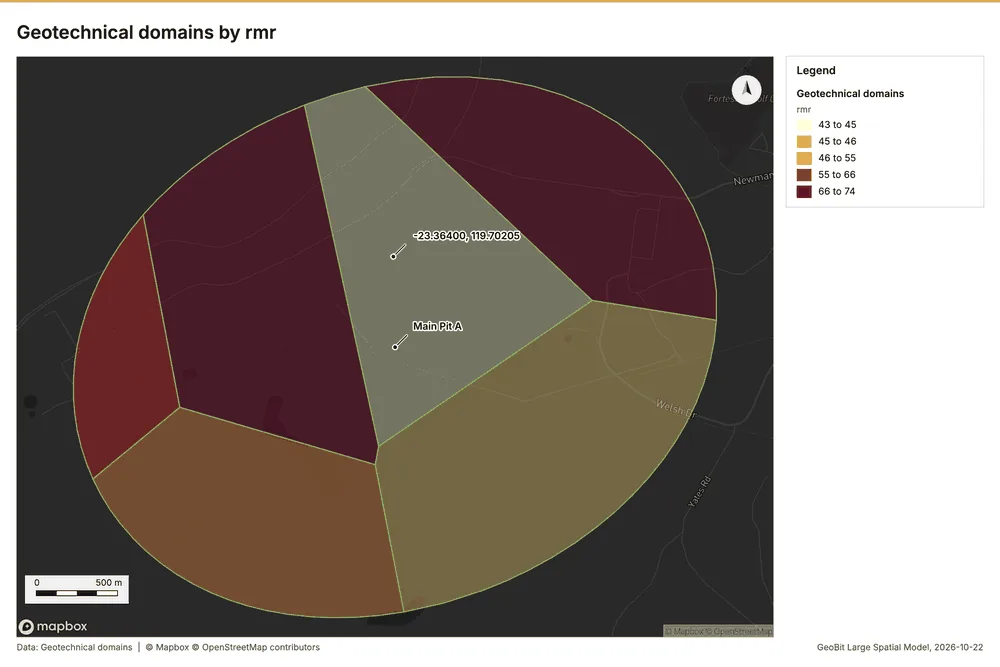
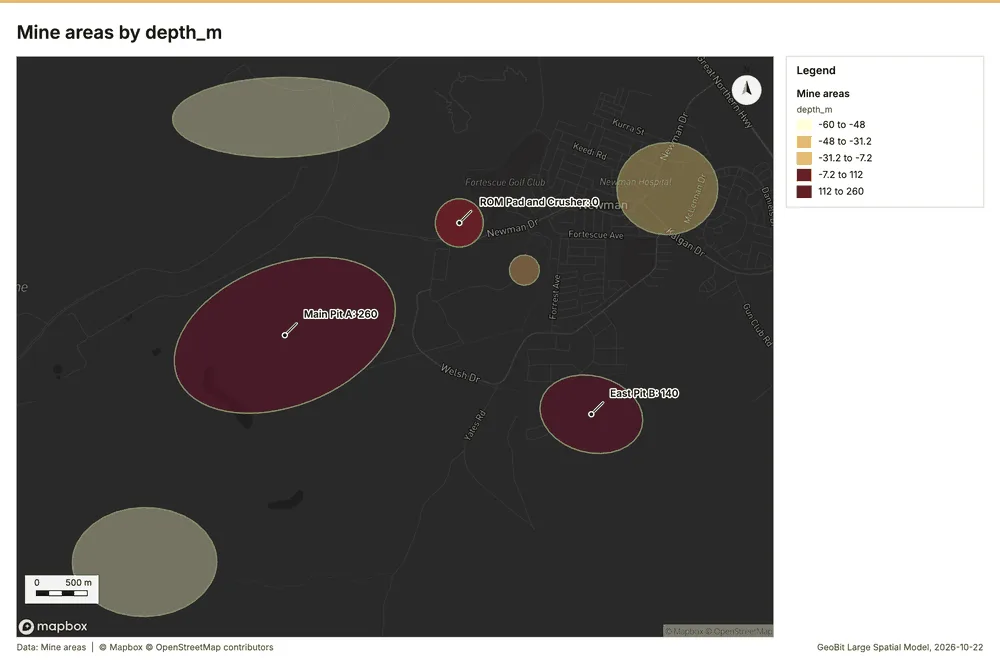
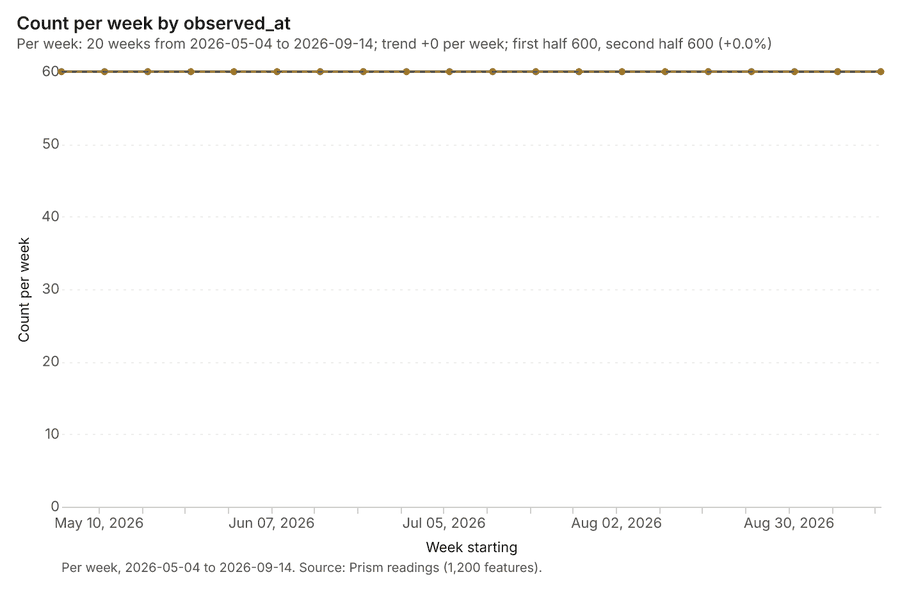
The run also made 21 map image(s) 515253545556575859606162636465666768697071 and 22 chart(s) 72737475767778798081828384858687888990919293.
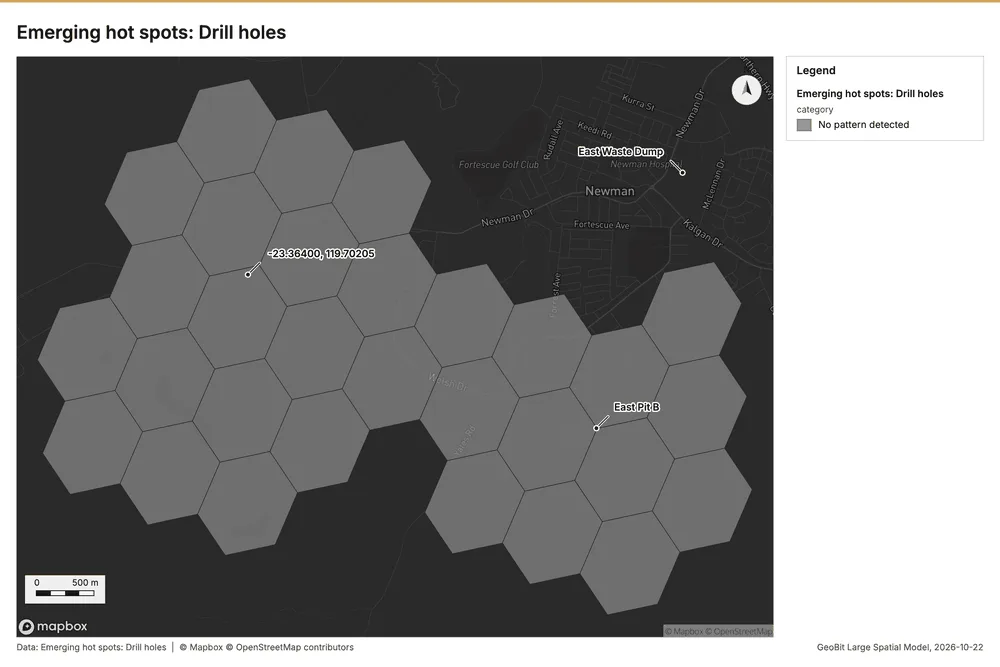
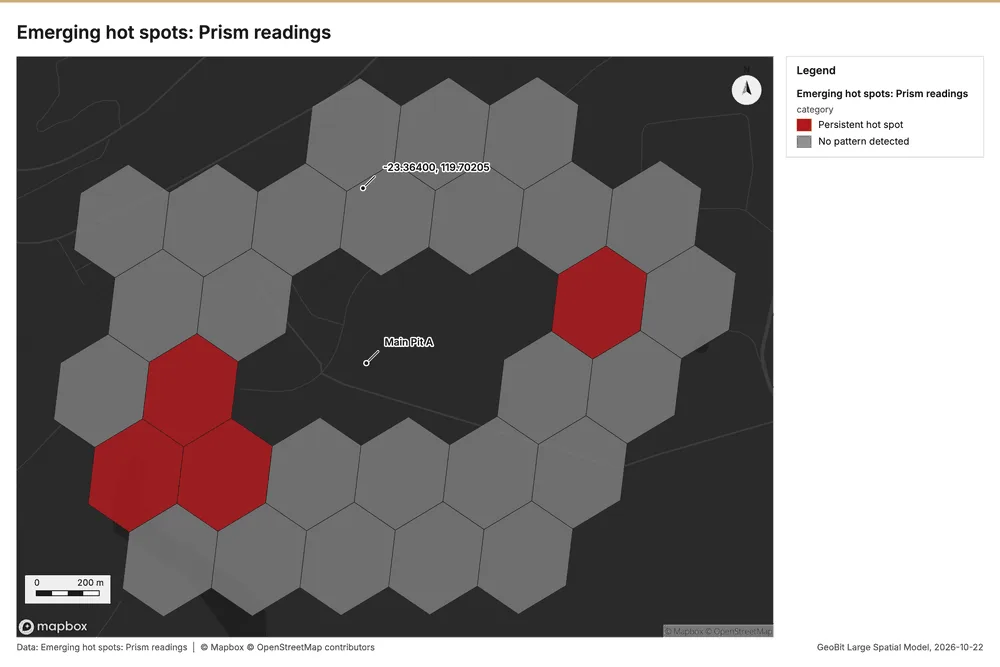
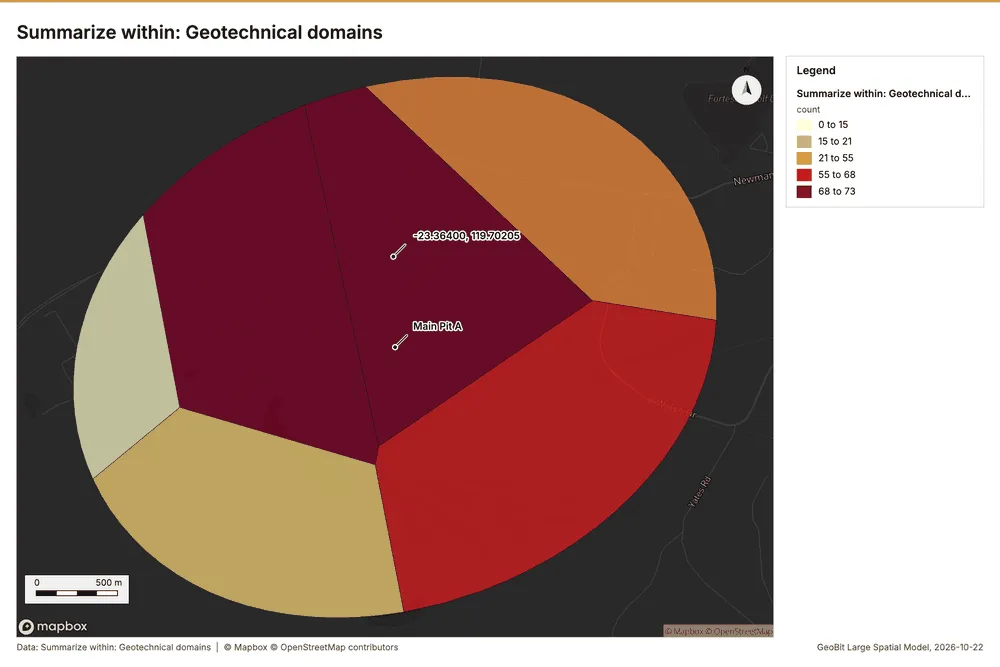
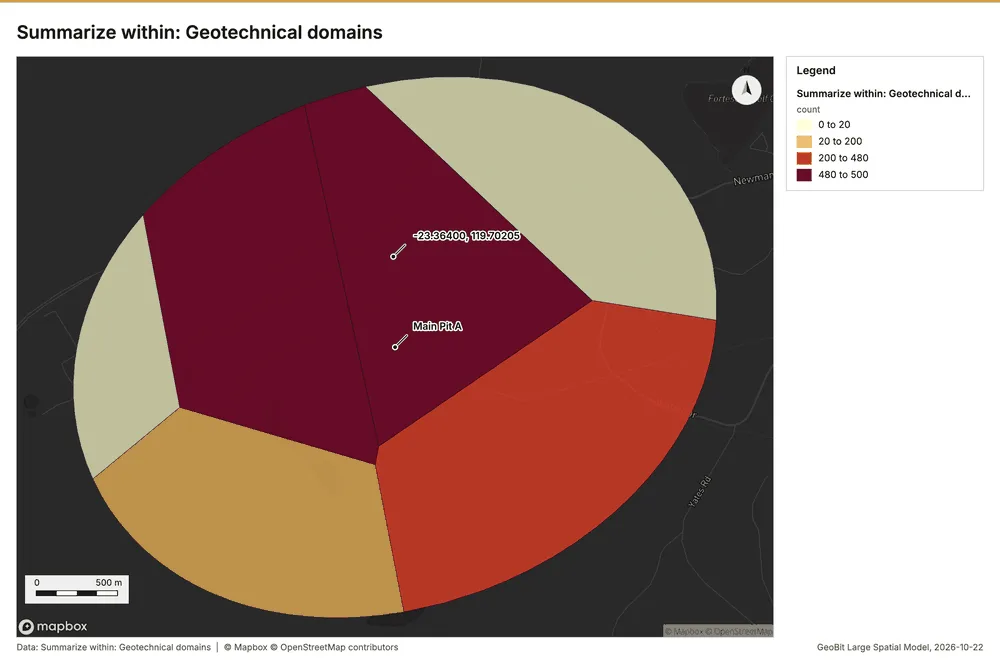
What the map shows. The map titled "Emerging hot spots: Drill holes" displays the spatial analysis of drill hole activity over a defined geographical area. According to the legend provided, the analysis concluded that there is "No pattern detected" for the emerging hot spots of drill holes across the mapped region. Visually, the entire area is covered in a continuous network of uniformly shaded polygons, reflecting the absence of a discernible spatial cluster or gradient. Consequently, the image indicates a lack of significant aggregation or concentration of drill hole activity at any specific point. 53
Inferred: read from the image by gemma4:e4b, not evidence.
Changes since the last run
This is the first report of this project.
Sources
- 1Rendering: Chart: Timeline: events per month by dataset. 99 rows id d5063e0d-383f-46d6-a583-b42ef86dcb50
- 2Dataset: Prism readings. vector, 1200 rows id 60f18997-7538-4981-ab32-a2378dbc2332
- 3Dataset: Drill holes. vector, 320 rows id 2a2433a0-611a-44a4-9f0d-081ef95736f5
- 4Dataset: Production by pit and week. table, 76 rows id b8016ccc-7a32-41af-83a8-3d85487ce025
- 5Catalog: Hot spot analysis (operation catalog, gp_hot_spots). Getis-Ord Gi* hot and cold spots with z-scores, p-values and confidence bins. ArcGIS: Find Hot Spots, Hot Spot Analysis (Getis-Ord Gi*). QGIS: qgis:hotspot (plugin). id gp_hot_spots
- 6Plan: Hot spots of Drill holes (the Start plan's candidate c_89364af0f3f2). 320 points: Getis-Ord Gi* tests whether the concentrations in Drill holes are statistically significant. id 7bc56161-0d78-4299-bc71-0dcafaee2734:c_89364af0f3f2
- 7Tool result: gp_hot_spots, step 0. Hot spot analysis: 1 layer saved: Hot spot analysis: Drill holes (50 features). id 6d176ba7-ebd6-4f95-82dc-d0c9a4e4146b:0
- 8Layer: Drill holes. 320 features id 3fc6780a-f84b-41cc-a091-beff7f8fa0d0
- 9Plan: Hot spots of Prism readings (the Start plan's candidate c_50324c88a44c). 1200 points: Getis-Ord Gi* tests whether the concentrations in Prism readings are statistically significant. id 7bc56161-0d78-4299-bc71-0dcafaee2734:c_50324c88a44c
- 10Tool result: gp_hot_spots, step 1. Hot spot analysis: 1 layer saved: Hot spot analysis: Prism readings (227 features). id 6d176ba7-ebd6-4f95-82dc-d0c9a4e4146b:1
- 11Layer: Prism readings. 1,200 features id 920e4ae7-03de-45d8-8b1f-df8f2afca685
- 12Catalog: Emerging hot spots (operation catalog, gp_space_time_hot_spots). Where hot spots are new, consecutive, intensifying, persistent, diminishing, sporadic, oscillating or historical over time. ArcGIS: Emerging Hot Spot Analysis, Create Space Time Cube. id gp_space_time_hot_spots
- 13Plan: Space time hot spots of Drill holes (the Start plan's candidate c_0ea6ff5db7ae). Drill holes carry dates in 'drilled_on': emerging hot spot analysis finds new, intensifying and fading hot spots per month. id 7bc56161-0d78-4299-bc71-0dcafaee2734:c_0ea6ff5db7ae
- 14Tool result: gp_space_time_hot_spots, step 0. Emerging hot spots: 1 layer saved: Emerging hot spots: Drill holes (30 features). id d6b96f46-054d-4ebc-b6ed-8ea1f8115bfb:0
- 15Plan: Space time hot spots of Prism readings (the Start plan's candidate c_52d4ce8ea935). Prism readings carry dates in 'observed_at': emerging hot spot analysis finds new, intensifying and fading hot spots per week. id 7bc56161-0d78-4299-bc71-0dcafaee2734:c_52d4ce8ea935
- 16Tool result: gp_space_time_hot_spots, step 1. Emerging hot spots: 1 layer saved: Emerging hot spots: Prism readings (29 features). id d6b96f46-054d-4ebc-b6ed-8ea1f8115bfb:1
- 17Catalog: Repeat and near repeat classification (operation catalog, gp_near_repeat). Classify incidents as originators, repeats (same place) or near repeats within a distance and time window, with a Knox test table. ArcGIS: Repeat and Near Repeat Classification, Near Repeat Calculator. id gp_near_repeat
- 18Plan: Near repeat of Drill holes (the Start plan's candidate c_817106996954). Near repeat analysis tests whether Drill holes close in space also follow each other within 30 days. id 7bc56161-0d78-4299-bc71-0dcafaee2734:c_817106996954
- 19Tool result: gp_near_repeat, step 2. Repeat and near repeat classification: 1 layer saved: Repeat and near repeat classification: Drill holes (320 features). id d6b96f46-054d-4ebc-b6ed-8ea1f8115bfb:2
- 20Catalog: Summarize within (operation catalog, gp_summarize_within). Count and aggregate the features inside each polygon (or bin), proportionally for lines and polygons. ArcGIS: Summarize Within, Aggregate Points. QGIS: native:countpointsinpolygon, native:sumlinelengths. id gp_summarize_within
- 21Plan: Drill holes per feature of Geotechnical domains (the Start plan's candidate c_755f3a7cd2f9). Count Drill holes inside each feature of Geotechnical domains by type; the counts map as a choropleth (natural breaks, sequential colors). id 7bc56161-0d78-4299-bc71-0dcafaee2734:c_755f3a7cd2f9
- 22Tool result: gp_summarize_within, step 0. Summarize within: 1 layer saved: Summarize within: Geotechnical domains (6 features). id e68cc066-c112-488f-8008-428c4110a545:0
- 23Layer: Geotechnical domains. 6 features id 7e9e4801-2390-459b-a556-ee9f4ecc9967
- 24Tool result: gp_summarize_within, step 1. Summarize within: 1 layer saved: Summarize within: Geotechnical domains (6 features). id e68cc066-c112-488f-8008-428c4110a545:1
- 25Tool result: gp_summarize_within, step 2. Summarize within: 1 layer saved: Summarize within: Geotechnical domains (6 features). id e68cc066-c112-488f-8008-428c4110a545:2
- 26Layer: Monitoring prisms. 60 features id 6e51a43e-4dfd-41b4-8730-56c9ba793475
- 27Catalog: Find point clusters (operation catalog, gp_find_point_clusters). Density-based clusters (DBSCAN, HDBSCAN or OPTICS, optionally space-time) with hulls and noise. ArcGIS: Find Point Clusters, Density-based Clustering. QGIS: native:dbscanclustering, native:stdbscanclustering. id gp_find_point_clusters
- 28Plan: Cluster points of Drill holes (the Start plan's candidate c_6300f2dcb36d). DBSCAN finds dense groups of Drill holes and separates noise. id 7bc56161-0d78-4299-bc71-0dcafaee2734:c_6300f2dcb36d
- 29Tool result: gp_find_point_clusters, step 0. Find point clusters: 2 layers saved: Find point clusters: Drill holes (320 features); Find point clusters: cluster hulls (10 features). id 5ac0b253-366a-4046-9261-fd5bdc8cf6f3:0
- 30Plan: Cluster points of Prism readings (the Start plan's candidate c_04a216785510). DBSCAN finds dense groups of Prism readings and separates noise. id 7bc56161-0d78-4299-bc71-0dcafaee2734:c_04a216785510
- 31Tool result: gp_find_point_clusters, step 1. Find point clusters: 2 layers saved: Find point clusters: Prism readings (1200 features); Find point clusters: cluster hulls (60 features). id 5ac0b253-366a-4046-9261-fd5bdc8cf6f3:1
- 32Plan: Cluster points of Monitoring prisms (the Start plan's candidate c_9c591df40051). DBSCAN finds dense groups of Monitoring prisms and separates noise. id 7bc56161-0d78-4299-bc71-0dcafaee2734:c_9c591df40051
- 33Tool result: gp_find_point_clusters, step 2. Find point clusters: 2 layers saved: Find point clusters: Monitoring prisms (60 features); Find point clusters: cluster hulls (4 features). id 5ac0b253-366a-4046-9261-fd5bdc8cf6f3:2
- 34Catalog: Zonal statistics (analysis catalog, rs_zonal_statistics). count/min/max/mean/std/sum/median/majority per polygon as a table and as GeoJSON. ArcGIS: Zonal Statistics as Table (polygons). id rs_zonal_statistics
- 35Plan: Zonal statistics of Mine terrain model (DEM) and Geotechnical domains (the Start plan's candidate c_4a873859298f). Statistics of Mine terrain model (DEM) inside each feature of Geotechnical domains. id 7bc56161-0d78-4299-bc71-0dcafaee2734:c_4a873859298f
- 36Tool result: rs_zonal_statistics, step 0. Zonal statistics: 6 row(s). zones 6. id 30c7009a-f86b-4e23-ad74-b8942eb98ecd:0
- 37Tool result: rs_zonal_statistics, step 1. Zonal statistics: 7 row(s). zones 7. id 30c7009a-f86b-4e23-ad74-b8942eb98ecd:1
- 38Catalog: Slope (analysis catalog, tr_slope). Horn slope in degrees or percent, with the share of ground in six grade classes. ArcGIS: Slope (Spatial Analyst). QGIS: Slope (GDAL DEM). id tr_slope
- 39Plan: Slope of Mine terrain model (DEM) (the Start plan's candidate c_c4670a6804ed). Slope of the Mine terrain model (DEM) surface. id 7bc56161-0d78-4299-bc71-0dcafaee2734:c_c4670a6804ed
- 40Tool result: tr_slope, step 2. Slope over 48.00 km2: mean 2.68 degrees, max 36.74 degrees; 9% of the ground is steeper than 15%. DEM: Mine terrain model (DEM). Verified: 2 checks passed. id 30c7009a-f86b-4e23-ad74-b8942eb98ecd:2
- 41Layer: Mine terrain model (DEM). 0 features id d3bacd4c-de66-4724-8a10-a3ec4d2f4cd4
- 42Catalog: Calculate density (operation catalog, gp_calculate_density). Kernel density per square kilometer on a grid. ArcGIS: Calculate Density, Kernel Density. QGIS: native:heatmapkerneldensityestimation. id gp_calculate_density
- 43Plan: Kernel density of Drill holes (the Start plan's candidate c_2e2e29bf0e3a). 320 points in Drill holes: a density surface shows where they concentrate. id 7bc56161-0d78-4299-bc71-0dcafaee2734:c_2e2e29bf0e3a
- 44Tool result: gp_calculate_density, step 0. Calculate density: 1 layer saved: Calculate density: Drill holes (328 features). id 48907d44-ee48-4d56-88b9-782734e7cb9e:0
- 45Plan: Kernel density of Prism readings (the Start plan's candidate c_aacfc43e5746). 1200 points in Prism readings: a density surface shows where they concentrate. id 7bc56161-0d78-4299-bc71-0dcafaee2734:c_aacfc43e5746
- 46Tool result: gp_calculate_density, step 1. Calculate density: 1 layer saved: Calculate density: Prism readings (545 features). id 48907d44-ee48-4d56-88b9-782734e7cb9e:1
- 47Plan: Kernel density of Monitoring prisms (the Start plan's candidate c_f6f8e0a3b55f). 60 points in Monitoring prisms: a density surface shows where they concentrate. id 7bc56161-0d78-4299-bc71-0dcafaee2734:c_f6f8e0a3b55f
- 48Tool result: gp_calculate_density, step 2. Calculate density: 1 layer saved: Calculate density: Monitoring prisms (134 features). id 48907d44-ee48-4d56-88b9-782734e7cb9e:2
- 49Plan: Hot spots of Monitoring prisms (the Start plan's candidate c_37960faa4114). 60 points: Getis-Ord Gi* tests whether the concentrations in Monitoring prisms are statistically significant. id 7bc56161-0d78-4299-bc71-0dcafaee2734:c_37960faa4114
- 50Tool result: gp_hot_spots, step 0. Hot spot analysis: 1 layer saved: Hot spot analysis: Monitoring prisms (16 features). id 85672774-a9a1-438b-b198-fb69481775dd:0
- 51Rendering: Map: Hot spot analysis: Drill holes id 7aba71c8-1496-40d8-b8eb-42666243d92b
- 52Rendering: Map: Hot spot analysis: Prism readings id 26ff0f7f-3d97-4039-93a6-123c8eafa5da
- 53Rendering: Map: Emerging hot spots: Drill holes id e03597b1-0956-4005-94ae-c579b88dc145
- 54Rendering: Map: Emerging hot spots: Prism readings id c7fd6550-a8b0-43c2-b53f-25a96057ad1f
- 55Rendering: Map: Repeat and near repeat classification: Drill holes id 64c3b80d-fd24-488e-857c-348e16eef2b7
- 56Rendering: Map: Summarize within: Geotechnical domains id 46826436-d7ec-40c3-bd26-6442c1f5bce0
- 57Rendering: Map: Summarize within: Geotechnical domains id a0355267-d17c-48fb-8009-9201561699e5
- 58Rendering: Map: Summarize within: Geotechnical domains id b5636e87-7844-4fb0-8ed5-f8f518396c87
- 59Rendering: Map: Find point clusters: Drill holes id db466f95-f4c8-4cd9-af9d-6d9cfcf6d915
- 60Rendering: Map: Find point clusters: cluster hulls id 6c0777df-5751-4f2a-b90f-28f799dfed17
- 61Rendering: Map: Find point clusters: Prism readings id 24577f88-171d-4b0e-b865-3e11993d2f9f
- 62Rendering: Map: Find point clusters: cluster hulls id f6f2da46-1368-4eda-bec6-17e32c7181f8
- 63Rendering: Map: Find point clusters: Monitoring prisms id a07906f9-8500-4b6c-9113-39a85ad19144
- 64Rendering: Map: Find point clusters: cluster hulls id 46445a69-778d-4e67-b2ee-b6df575e5ec0
- 65Rendering: Map: Slope (degrees) id 6e1a5363-e4c6-449d-8033-bd5fd8b184f2
- 66Rendering: Map: Calculate density: Drill holes id cc413631-8b22-482c-a490-bb94d5d9fcab
- 67Rendering: Map: Calculate density: Prism readings id 580f357c-fb0a-4e14-adc1-65a8045b73a3
- 68Rendering: Map: Calculate density: Monitoring prisms id cad3aba8-d7e0-4de8-8c67-d9f79050feae
- 69Rendering: Map: Geotechnical domains by rmr id c85125a0-4390-476f-8f95-a7f7b2b1772c
- 70Rendering: Map: Mine areas by depth_m id 7bf2ced2-c815-4869-902d-5189c7dbcbb3
- 71Rendering: Map: Hot spot analysis: Monitoring prisms id e47105cc-ae94-4c8a-ac4c-801c44b57ad6
- 72Rendering: Chart: Prism readings over time (velocity_mm_day). 20 rows id f72a208b-643e-404c-b35c-deb12248f756
- 73Rendering: Chart: Hot spot analysis: Drill holes. 9 rows id 2232e923-0f0f-40a7-bcec-b33f32691a12
- 74Rendering: Chart: Hot spot analysis: Prism readings. 2 rows id bcc45631-4c2b-4328-b12f-0742986292e6
- 75Rendering: Chart: Emerging hot spots: Drill holes. 6 rows id 83db89a9-e5f1-43ee-bef4-9607147169ef
- 76Rendering: Chart: Emerging hot spots: Prism readings. 6 rows id e64dd055-c0fb-427f-a4c1-b3365102d997
- 77Rendering: Chart: Repeat and near repeat classification: Drill holes. 64 rows id 0487f31b-380e-42f5-8a05-5afcc2dd8033
- 78Rendering: Chart: Summarize within: Geotechnical domains. 5 rows id 52ed6781-1621-4935-86e6-a4335fb92e26
- 79Rendering: Chart: Summarize within: Geotechnical domains. 5 rows id 60644b50-b68a-4746-97d0-81795a71efe5
- 80Rendering: Chart: Summarize within: Geotechnical domains. 5 rows id dc5eabf8-66d5-4b52-ab80-f8fd8a8eb98a
- 81Rendering: Chart: Find point clusters: Drill holes. 11 rows id c2c8d93a-1510-4b4c-8ceb-eb117952bdd5
- 82Rendering: Chart: Find point clusters: cluster hulls. 10 rows id 520eb33c-5a35-4111-bf80-cb207542d8d7
- 83Rendering: Chart: Find point clusters: Prism readings. 60 rows id 23efb700-58b6-48a0-8b27-5d330ea8f265
- 84Rendering: Chart: Find point clusters: cluster hulls. 60 rows id 471bb2b8-d0f5-4095-8b5a-dc94ede849ca
- 85Rendering: Chart: Find point clusters: Monitoring prisms. 5 rows id 19c67bbc-96ea-464f-98d9-b8049e398cd2
- 86Rendering: Chart: Find point clusters: cluster hulls. 4 rows id b959d2a0-9626-4d42-adca-b8bd867773e1
- 87Rendering: Chart: Calculate density: Drill holes. 10 rows id b2f5fe27-ce96-4a92-b076-cbd54e45c371
- 88Rendering: Chart: Calculate density: Prism readings. 11 rows id 141cbaa1-7ea2-44fe-a5b7-1bd4079d6a01
- 89Rendering: Chart: Calculate density: Monitoring prisms. 9 rows id 0f1f5fd1-f50c-4016-ac53-5ae0ec095be2
- 90Rendering: Chart: Hot spot analysis: Monitoring prisms. 7 rows id 0bacfb00-e39e-4890-93a0-bbdf0d8d797f
- 91Rendering: Chart: Find point clusters: Prism readings over time. 20 rows id e052e5c9-141f-425d-87c0-88027cefb9e8
- 92Rendering: Chart: Find point clusters: Drill holes over time. 64 rows id 0501233f-ce86-469a-adb7-88f810d5c2bf
- 93Rendering: Chart: Repeat and near repeat classification: Drill holes over time. 64 rows id a1201925-0565-4158-a599-5097c6e018b7
- 94Dataset: Mine areas. vector, 7 rows id 796bc23c-1c01-471f-a816-e4b92b4ad5d2
- 95Dataset: Haul roads. vector, 38 rows id 98271253-f396-48d5-89e3-e5ec77dd5592
- 96Dataset: Monitoring prisms. vector, 60 rows id 931b37bf-74ac-40a6-bf1e-5aa284c78b21
- 97Dataset: Equipment. vector, 40 rows id eb207db2-da08-4413-ab19-e6b7a998dbd4
- 98Dataset: Geotechnical domains. vector, 6 rows id 767dcbe8-71b3-4319-9ad0-09d448c619f8
- 99Dataset: Mine terrain model (DEM). raster, ? rows id 963146d0-3d3d-4cbb-a20f-e9c9ef5589ac
- 100Dataset: Bench design by domain. table, 6 rows id b5190874-406c-48c8-aebb-c9874f6882f0
- 101Dataset: Geotechnical inspection report. document, ? rows id 80e8ec2d-81ee-46d6-8c45-60a1c26b1f30
- 102Record: Sample: Mining, Newman id 11fd3b70-5f29-4895-b87f-807f2ec1e52e
- 103Layer: Hot spot analysis: Drill holes. 50 features id 36abf980-d699-4391-b457-180766c099c0
- 104Layer: Hot spot analysis: Prism readings. 227 features id 8d411a35-93ea-41e6-ac52-18fa06883b1c
- 105Layer: Emerging hot spots: Drill holes. 30 features id cc05cc11-2ba3-49cc-afaf-96e5b6d84ea6
- 106Layer: Emerging hot spots: Prism readings. 29 features id e8e5a0b5-cdd5-4009-9d71-f4cf0a3f9f18
- 107Layer: Repeat and near repeat classification: Drill holes. 320 features id 8bddb8ce-b2f8-42a4-ab09-fb8113d0c801
- 108Layer: Summarize within: Geotechnical domains. 6 features id 989fcb0a-59fe-4c99-8349-b5beb2aa041b
- 109Layer: Summarize within: Geotechnical domains. 6 features id 3a8b71e4-f3a7-48ff-b334-a801a6580ef1
- 110Layer: Summarize within: Geotechnical domains. 6 features id 6c0a971c-88cb-42dd-b61a-1f207187a16a
- 111Layer: Find point clusters: Drill holes. 320 features id be76cc0a-2088-45ad-bf48-2d3888e3db73
- 112Layer: Find point clusters: cluster hulls. 10 features id 2d5bb0ec-3aff-4ae5-8c07-a363aa90d7c0
- 113Layer: Find point clusters: Prism readings. 1,200 features id 3ed015a7-54f2-48f5-8d53-18be5b1e296f
- 114Layer: Find point clusters: cluster hulls. 60 features id 879a04ad-6994-4706-b490-5ae1b265ce0c
- 115Layer: Find point clusters: Monitoring prisms. 60 features id 071cb991-6662-4709-864a-6640d55e879e
- 116Layer: Find point clusters: cluster hulls. 4 features id e55673cb-1d02-42f4-93f6-1a75d767eade
- 117Layer: Slope (degrees). 0 features id c5b5f107-7b36-4783-b7a6-737f8f3a02cc
- 118Layer: Calculate density: Drill holes. 328 features id dd247b38-56c5-4294-964c-b7f44ab1d084
- 119Layer: Calculate density: Prism readings. 545 features id f30d3b65-9ba2-4542-8fe4-bf9d001bdfdb
- 120Layer: Calculate density: Monitoring prisms. 134 features id 8f7a5a35-13b6-4d43-bf2b-da32f59529b4
- 121Layer: Hot spot analysis: Monitoring prisms. 16 features id 4b0bd69c-b2aa-4d02-9ce9-80b98cc051ab
Appendix: the data behind the chartsShow
Figure 1. Timeline: events per month by dataset 1
| period | series | value |
|---|---|---|
| 2024-01-01 | Prism readings | 0 |
| 2024-01-01 | Drill holes | 7 |
| 2024-01-01 | Production by pit and week | 0 |
| 2024-02-01 | Prism readings | 0 |
| 2024-02-01 | Drill holes | 10 |
| 2024-02-01 | Production by pit and week | 0 |
| 2024-03-01 | Prism readings | 0 |
| 2024-03-01 | Drill holes | 10 |
| 2024-03-01 | Production by pit and week | 0 |
| 2024-04-01 | Prism readings | 0 |
| 2024-04-01 | Drill holes | 9 |
| 2024-04-01 | Production by pit and week | 0 |
| 2024-05-01 | Prism readings | 0 |
| 2024-05-01 | Drill holes | 18 |
| 2024-05-01 | Production by pit and week | 0 |
| 2024-06-01 | Prism readings | 0 |
| 2024-06-01 | Drill holes | 5 |
| 2024-06-01 | Production by pit and week | 0 |
| 2024-07-01 | Prism readings | 0 |
| 2024-07-01 | Drill holes | 14 |
| 2024-07-01 | Production by pit and week | 0 |
| 2024-08-01 | Prism readings | 0 |
| 2024-08-01 | Drill holes | 3 |
| 2024-08-01 | Production by pit and week | 0 |
| 2024-09-01 | Prism readings | 0 |
| 2024-09-01 | Drill holes | 3 |
| 2024-09-01 | Production by pit and week | 0 |
| 2024-10-01 | Prism readings | 0 |
| 2024-10-01 | Drill holes | 12 |
| 2024-10-01 | Production by pit and week | 0 |
| 2024-11-01 | Prism readings | 0 |
| 2024-11-01 | Drill holes | 15 |
| 2024-11-01 | Production by pit and week | 0 |
| 2024-12-01 | Prism readings | 0 |
| 2024-12-01 | Drill holes | 13 |
| 2024-12-01 | Production by pit and week | 0 |
| 2025-01-01 | Prism readings | 0 |
| 2025-01-01 | Drill holes | 15 |
| 2025-01-01 | Production by pit and week | 0 |
| 2025-02-01 | Prism readings | 0 |
| 2025-02-01 | Drill holes | 6 |
| 2025-02-01 | Production by pit and week | 0 |
| 2025-03-01 | Prism readings | 0 |
| 2025-03-01 | Drill holes | 9 |
| 2025-03-01 | Production by pit and week | 0 |
| 2025-04-01 | Prism readings | 0 |
| 2025-04-01 | Drill holes | 8 |
| 2025-04-01 | Production by pit and week | 0 |
| 2025-05-01 | Prism readings | 0 |
| 2025-05-01 | Drill holes | 8 |
| 2025-05-01 | Production by pit and week | 0 |
| 2025-06-01 | Prism readings | 0 |
| 2025-06-01 | Drill holes | 5 |
| 2025-06-01 | Production by pit and week | 0 |
| 2025-07-01 | Prism readings | 0 |
| 2025-07-01 | Drill holes | 12 |
| 2025-07-01 | Production by pit and week | 0 |
| 2025-08-01 | Prism readings | 0 |
| 2025-08-01 | Drill holes | 9 |
| 2025-08-01 | Production by pit and week | 0 |
| 2025-09-01 | Prism readings | 0 |
| 2025-09-01 | Drill holes | 10 |
| 2025-09-01 | Production by pit and week | 0 |
| 2025-10-01 | Prism readings | 0 |
| 2025-10-01 | Drill holes | 11 |
| 2025-10-01 | Production by pit and week | 0 |
| 2025-11-01 | Prism readings | 0 |
| 2025-11-01 | Drill holes | 9 |
| 2025-11-01 | Production by pit and week | 0 |
| 2025-12-01 | Prism readings | 0 |
| 2025-12-01 | Drill holes | 13 |
| 2025-12-01 | Production by pit and week | 0 |
| 2026-01-01 | Prism readings | 0 |
| 2026-01-01 | Drill holes | 6 |
| 2026-01-01 | Production by pit and week | 8 |
| 2026-02-01 | Prism readings | 0 |
| 2026-02-01 | Drill holes | 16 |
| 2026-02-01 | Production by pit and week | 8 |
| 2026-03-01 | Prism readings | 0 |
| 2026-03-01 | Drill holes | 11 |
| 2026-03-01 | Production by pit and week | 10 |
| 2026-04-01 | Prism readings | 0 |
| 2026-04-01 | Drill holes | 20 |
| 2026-04-01 | Production by pit and week | 8 |
| 2026-05-01 | Prism readings | 240 |
| 2026-05-01 | Drill holes | 10 |
| 2026-05-01 | Production by pit and week | 8 |
| 2026-06-01 | Prism readings | 300 |
| 2026-06-01 | Drill holes | 10 |
| 2026-06-01 | Production by pit and week | 10 |
| 2026-07-01 | Prism readings | 240 |
| 2026-07-01 | Drill holes | 9 |
| 2026-07-01 | Production by pit and week | 8 |
| 2026-08-01 | Prism readings | 300 |
| 2026-08-01 | Drill holes | 4 |
| 2026-08-01 | Production by pit and week | 10 |
| 2026-09-01 | Prism readings | 120 |
| 2026-09-01 | Drill holes | 0 |
| 2026-09-01 | Production by pit and week | 6 |
Figure 23. Prism readings over time (velocity_mm_day) 72
| period | value |
|---|---|
| 2026-05-04 | 60 |
| 2026-05-11 | 60 |
| 2026-05-18 | 60 |
| 2026-05-25 | 60 |
| 2026-06-01 | 60 |
| 2026-06-08 | 60 |
| 2026-06-15 | 60 |
| 2026-06-22 | 60 |
| 2026-06-29 | 60 |
| 2026-07-06 | 60 |
| 2026-07-13 | 60 |
| 2026-07-20 | 60 |
| 2026-07-27 | 60 |
| 2026-08-03 | 60 |
| 2026-08-10 | 60 |
| 2026-08-17 | 60 |
| 2026-08-24 | 60 |
| 2026-08-31 | 60 |
| 2026-09-07 | 60 |
| 2026-09-14 | 60 |
Figure 24. Hot spot analysis: Drill holes 73
| bin_start | bin_end | band | band_label | count |
|---|---|---|---|---|
| -1.5 | -1 | not_significant | Not significant | 9 |
| -1 | -0.5 | not_significant | Not significant | 12 |
| -0.5 | 0 | not_significant | Not significant | 7 |
| 0 | 0.5 | not_significant | Not significant | 5 |
| 0.5 | 1 | not_significant | Not significant | 8 |
| 1 | 1.5 | not_significant | Not significant | 6 |
| 1.5 | 2 | hot_90 | Hot spot, 90% confidence | 1 |
| 2 | 2.5 | hot_95 | Hot spot, 95% confidence | 1 |
| 2.5 | 3 | hot_95 | Hot spot, 95% confidence | 1 |
Figure 25. Hot spot analysis: Prism readings 74
| bin_start | bin_end | band | band_label | count |
|---|---|---|---|---|
| -1 | -0.5 | not_significant | Not significant | 167 |
| 1.5 | 2 | hot_90 | Hot spot, 90% confidence | 60 |
Figure 26. Emerging hot spots: Drill holes 75
| bin_start | bin_end | count |
|---|---|---|
| -1.045 | -0.8112 | 11 |
| -0.8112 | -0.5773 | 1 |
| -0.5773 | -0.3435 | 0 |
| -0.3435 | -0.1097 | 11 |
| -0.1097 | 0.1242 | 0 |
| 0.1242 | 0.358 | 7 |
Figure 27. Emerging hot spots: Prism readings 76
| bin_start | bin_end | count |
|---|---|---|
| -0.587 | -0.09783 | 2 |
| -0.09783 | 0.3913 | 4 |
| 0.3913 | 0.8805 | 8 |
| 0.8805 | 1.37 | 5 |
| 1.37 | 1.859 | 6 |
| 1.859 | 2.348 | 4 |
Figure 28. Repeat and near repeat classification: Drill holes 77
| period | series | value |
|---|---|---|
| 2024-01-01 | RC | 2 |
| 2024-01-01 | diamond | 5 |
| 2024-02-01 | RC | 6 |
| 2024-02-01 | diamond | 4 |
| 2024-03-01 | RC | 7 |
| 2024-03-01 | diamond | 3 |
| 2024-04-01 | RC | 5 |
| 2024-04-01 | diamond | 4 |
| 2024-05-01 | RC | 10 |
| 2024-05-01 | diamond | 8 |
| 2024-06-01 | RC | 5 |
| 2024-06-01 | diamond | 0 |
| 2024-07-01 | RC | 10 |
| 2024-07-01 | diamond | 4 |
| 2024-08-01 | RC | 3 |
| 2024-08-01 | diamond | 0 |
| 2024-09-01 | RC | 3 |
| 2024-09-01 | diamond | 0 |
| 2024-10-01 | RC | 9 |
| 2024-10-01 | diamond | 3 |
| 2024-11-01 | RC | 12 |
| 2024-11-01 | diamond | 3 |
| 2024-12-01 | RC | 10 |
| 2024-12-01 | diamond | 3 |
| 2025-01-01 | RC | 10 |
| 2025-01-01 | diamond | 5 |
| 2025-02-01 | RC | 3 |
| 2025-02-01 | diamond | 3 |
| 2025-03-01 | RC | 4 |
| 2025-03-01 | diamond | 5 |
| 2025-04-01 | RC | 6 |
| 2025-04-01 | diamond | 2 |
| 2025-05-01 | RC | 2 |
| 2025-05-01 | diamond | 6 |
| 2025-06-01 | RC | 4 |
| 2025-06-01 | diamond | 1 |
| 2025-07-01 | RC | 10 |
| 2025-07-01 | diamond | 2 |
| 2025-08-01 | RC | 7 |
| 2025-08-01 | diamond | 2 |
| 2025-09-01 | RC | 6 |
| 2025-09-01 | diamond | 4 |
| 2025-10-01 | RC | 7 |
| 2025-10-01 | diamond | 4 |
| 2025-11-01 | RC | 8 |
| 2025-11-01 | diamond | 1 |
| 2025-12-01 | RC | 11 |
| 2025-12-01 | diamond | 2 |
| 2026-01-01 | RC | 6 |
| 2026-01-01 | diamond | 0 |
| 2026-02-01 | RC | 8 |
| 2026-02-01 | diamond | 8 |
| 2026-03-01 | RC | 9 |
| 2026-03-01 | diamond | 2 |
| 2026-04-01 | RC | 12 |
| 2026-04-01 | diamond | 8 |
| 2026-05-01 | RC | 7 |
| 2026-05-01 | diamond | 3 |
| 2026-06-01 | RC | 6 |
| 2026-06-01 | diamond | 4 |
| 2026-07-01 | RC | 9 |
| 2026-07-01 | diamond | 0 |
| 2026-08-01 | RC | 4 |
| 2026-08-01 | diamond | 0 |
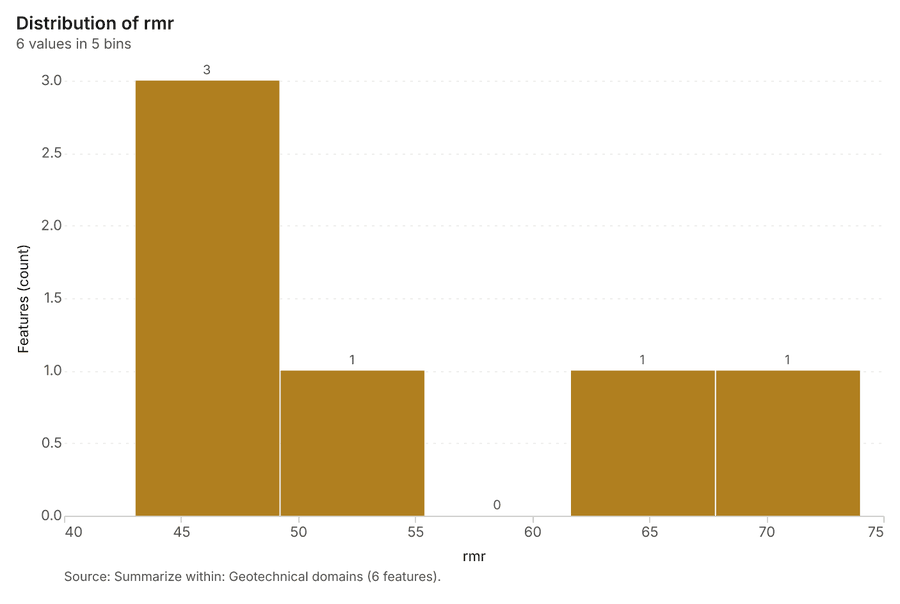
Figure 29. Summarize within: Geotechnical domains 78
| bin_start | bin_end | count |
|---|---|---|
| 43 | 49.2 | 3 |
| 49.2 | 55.4 | 1 |
| 55.4 | 61.6 | 0 |
| 61.6 | 67.8 | 1 |
| 67.8 | 74 | 1 |
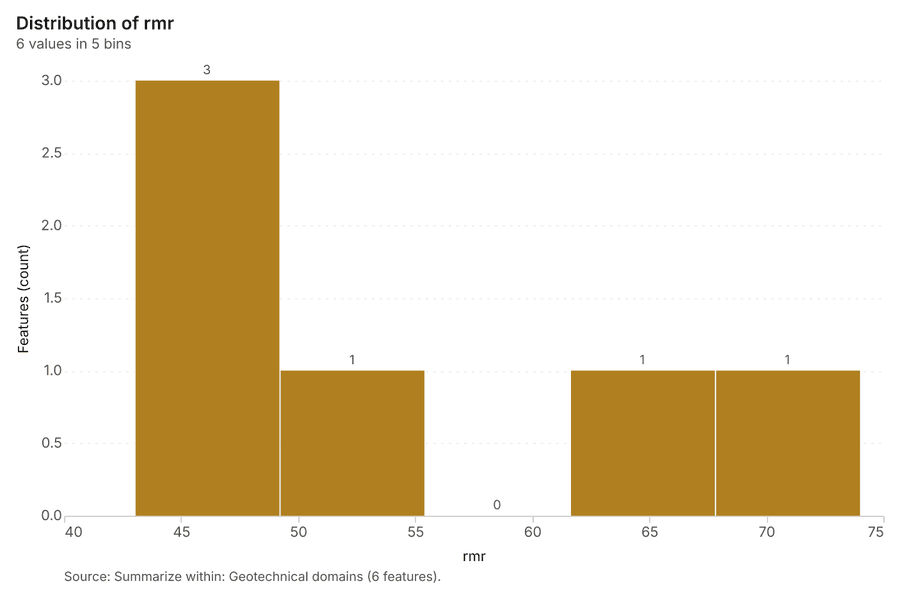
Figure 30. Summarize within: Geotechnical domains 79
| bin_start | bin_end | count |
|---|---|---|
| 43 | 49.2 | 3 |
| 49.2 | 55.4 | 1 |
| 55.4 | 61.6 | 0 |
| 61.6 | 67.8 | 1 |
| 67.8 | 74 | 1 |
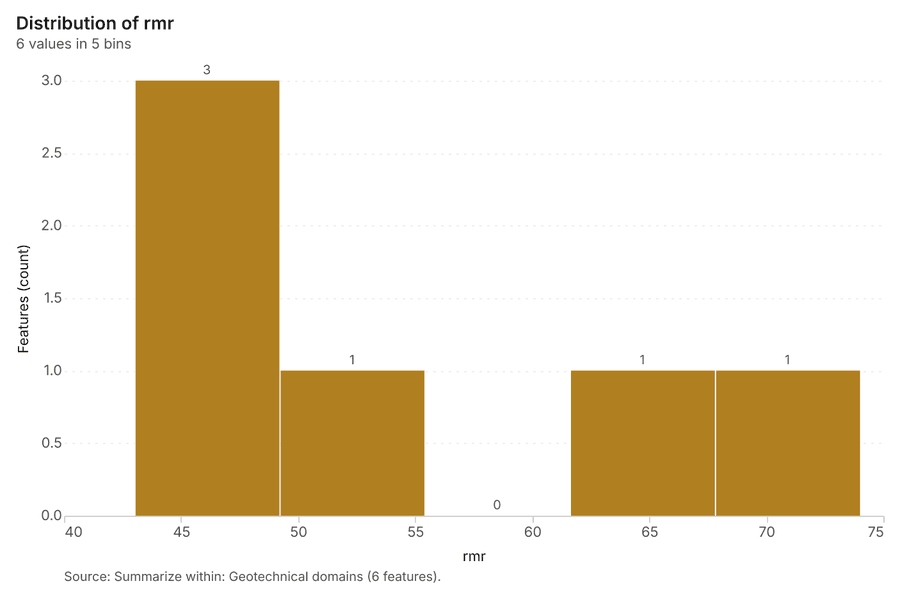
Figure 31. Summarize within: Geotechnical domains 80
| bin_start | bin_end | count |
|---|---|---|
| 43 | 49.2 | 3 |
| 49.2 | 55.4 | 1 |
| 55.4 | 61.6 | 0 |
| 61.6 | 67.8 | 1 |
| 67.8 | 74 | 1 |
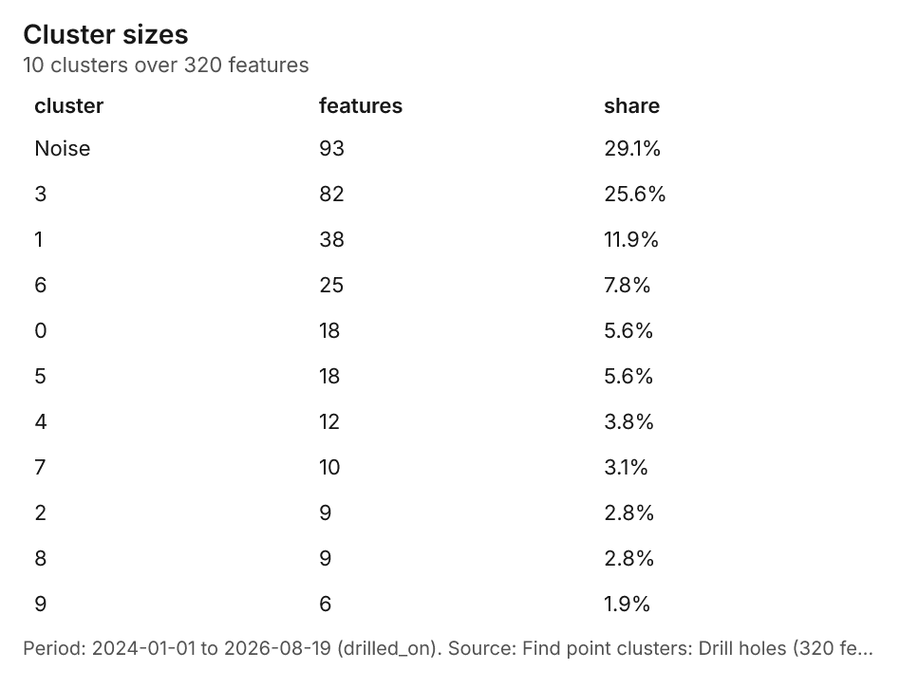
Figure 32. Find point clusters: Drill holes 81
| cluster | features | fraction | share |
|---|---|---|---|
| Noise | 93 | 0.2906 | 29.1% |
| 3 | 82 | 0.2562 | 25.6% |
| 1 | 38 | 0.1187 | 11.9% |
| 6 | 25 | 0.07812 | 7.8% |
| 0 | 18 | 0.05625 | 5.6% |
| 5 | 18 | 0.05625 | 5.6% |
| 4 | 12 | 0.0375 | 3.8% |
| 7 | 10 | 0.03125 | 3.1% |
| 2 | 9 | 0.02813 | 2.8% |
| 8 | 9 | 0.02813 | 2.8% |
| 9 | 6 | 0.01875 | 1.9% |
Figure 33. Find point clusters: cluster hulls 82
| cluster | features | fraction | share |
|---|---|---|---|
| 0 | 1 | 0.1 | 10.0% |
| 1 | 1 | 0.1 | 10.0% |
| 2 | 1 | 0.1 | 10.0% |
| 3 | 1 | 0.1 | 10.0% |
| 4 | 1 | 0.1 | 10.0% |
| 5 | 1 | 0.1 | 10.0% |
| 6 | 1 | 0.1 | 10.0% |
| 7 | 1 | 0.1 | 10.0% |
| 8 | 1 | 0.1 | 10.0% |
| 9 | 1 | 0.1 | 10.0% |
Figure 34. Find point clusters: Prism readings 83
| cluster | features | fraction | share |
|---|---|---|---|
| 0 | 20 | 0.01667 | 1.7% |
| 1 | 20 | 0.01667 | 1.7% |
| 10 | 20 | 0.01667 | 1.7% |
| 11 | 20 | 0.01667 | 1.7% |
| 12 | 20 | 0.01667 | 1.7% |
| 13 | 20 | 0.01667 | 1.7% |
| 14 | 20 | 0.01667 | 1.7% |
| 15 | 20 | 0.01667 | 1.7% |
| 16 | 20 | 0.01667 | 1.7% |
| 17 | 20 | 0.01667 | 1.7% |
| 18 | 20 | 0.01667 | 1.7% |
| 19 | 20 | 0.01667 | 1.7% |
| 2 | 20 | 0.01667 | 1.7% |
| 20 | 20 | 0.01667 | 1.7% |
| 21 | 20 | 0.01667 | 1.7% |
| 22 | 20 | 0.01667 | 1.7% |
| 23 | 20 | 0.01667 | 1.7% |
| 24 | 20 | 0.01667 | 1.7% |
| 25 | 20 | 0.01667 | 1.7% |
| 26 | 20 | 0.01667 | 1.7% |
| 27 | 20 | 0.01667 | 1.7% |
| 28 | 20 | 0.01667 | 1.7% |
| 29 | 20 | 0.01667 | 1.7% |
| 3 | 20 | 0.01667 | 1.7% |
| 30 | 20 | 0.01667 | 1.7% |
| 31 | 20 | 0.01667 | 1.7% |
| 32 | 20 | 0.01667 | 1.7% |
| 33 | 20 | 0.01667 | 1.7% |
| 34 | 20 | 0.01667 | 1.7% |
| 35 | 20 | 0.01667 | 1.7% |
| 36 | 20 | 0.01667 | 1.7% |
| 37 | 20 | 0.01667 | 1.7% |
| 38 | 20 | 0.01667 | 1.7% |
| 39 | 20 | 0.01667 | 1.7% |
| 4 | 20 | 0.01667 | 1.7% |
| 40 | 20 | 0.01667 | 1.7% |
| 41 | 20 | 0.01667 | 1.7% |
| 42 | 20 | 0.01667 | 1.7% |
| 43 | 20 | 0.01667 | 1.7% |
| 44 | 20 | 0.01667 | 1.7% |
| 45 | 20 | 0.01667 | 1.7% |
| 46 | 20 | 0.01667 | 1.7% |
| 47 | 20 | 0.01667 | 1.7% |
| 48 | 20 | 0.01667 | 1.7% |
| 49 | 20 | 0.01667 | 1.7% |
| 5 | 20 | 0.01667 | 1.7% |
| 50 | 20 | 0.01667 | 1.7% |
| 51 | 20 | 0.01667 | 1.7% |
| 52 | 20 | 0.01667 | 1.7% |
| 53 | 20 | 0.01667 | 1.7% |
| 54 | 20 | 0.01667 | 1.7% |
| 55 | 20 | 0.01667 | 1.7% |
| 56 | 20 | 0.01667 | 1.7% |
| 57 | 20 | 0.01667 | 1.7% |
| 58 | 20 | 0.01667 | 1.7% |
| 59 | 20 | 0.01667 | 1.7% |
| 6 | 20 | 0.01667 | 1.7% |
| 7 | 20 | 0.01667 | 1.7% |
| 8 | 20 | 0.01667 | 1.7% |
| 9 | 20 | 0.01667 | 1.7% |
Figure 35. Find point clusters: cluster hulls 84
| cluster | features | fraction | share |
|---|---|---|---|
| 0 | 1 | 0.01667 | 1.7% |
| 1 | 1 | 0.01667 | 1.7% |
| 10 | 1 | 0.01667 | 1.7% |
| 11 | 1 | 0.01667 | 1.7% |
| 12 | 1 | 0.01667 | 1.7% |
| 13 | 1 | 0.01667 | 1.7% |
| 14 | 1 | 0.01667 | 1.7% |
| 15 | 1 | 0.01667 | 1.7% |
| 16 | 1 | 0.01667 | 1.7% |
| 17 | 1 | 0.01667 | 1.7% |
| 18 | 1 | 0.01667 | 1.7% |
| 19 | 1 | 0.01667 | 1.7% |
| 2 | 1 | 0.01667 | 1.7% |
| 20 | 1 | 0.01667 | 1.7% |
| 21 | 1 | 0.01667 | 1.7% |
| 22 | 1 | 0.01667 | 1.7% |
| 23 | 1 | 0.01667 | 1.7% |
| 24 | 1 | 0.01667 | 1.7% |
| 25 | 1 | 0.01667 | 1.7% |
| 26 | 1 | 0.01667 | 1.7% |
| 27 | 1 | 0.01667 | 1.7% |
| 28 | 1 | 0.01667 | 1.7% |
| 29 | 1 | 0.01667 | 1.7% |
| 3 | 1 | 0.01667 | 1.7% |
| 30 | 1 | 0.01667 | 1.7% |
| 31 | 1 | 0.01667 | 1.7% |
| 32 | 1 | 0.01667 | 1.7% |
| 33 | 1 | 0.01667 | 1.7% |
| 34 | 1 | 0.01667 | 1.7% |
| 35 | 1 | 0.01667 | 1.7% |
| 36 | 1 | 0.01667 | 1.7% |
| 37 | 1 | 0.01667 | 1.7% |
| 38 | 1 | 0.01667 | 1.7% |
| 39 | 1 | 0.01667 | 1.7% |
| 4 | 1 | 0.01667 | 1.7% |
| 40 | 1 | 0.01667 | 1.7% |
| 41 | 1 | 0.01667 | 1.7% |
| 42 | 1 | 0.01667 | 1.7% |
| 43 | 1 | 0.01667 | 1.7% |
| 44 | 1 | 0.01667 | 1.7% |
| 45 | 1 | 0.01667 | 1.7% |
| 46 | 1 | 0.01667 | 1.7% |
| 47 | 1 | 0.01667 | 1.7% |
| 48 | 1 | 0.01667 | 1.7% |
| 49 | 1 | 0.01667 | 1.7% |
| 5 | 1 | 0.01667 | 1.7% |
| 50 | 1 | 0.01667 | 1.7% |
| 51 | 1 | 0.01667 | 1.7% |
| 52 | 1 | 0.01667 | 1.7% |
| 53 | 1 | 0.01667 | 1.7% |
| 54 | 1 | 0.01667 | 1.7% |
| 55 | 1 | 0.01667 | 1.7% |
| 56 | 1 | 0.01667 | 1.7% |
| 57 | 1 | 0.01667 | 1.7% |
| 58 | 1 | 0.01667 | 1.7% |
| 59 | 1 | 0.01667 | 1.7% |
| 6 | 1 | 0.01667 | 1.7% |
| 7 | 1 | 0.01667 | 1.7% |
| 8 | 1 | 0.01667 | 1.7% |
| 9 | 1 | 0.01667 | 1.7% |
Figure 36. Find point clusters: Monitoring prisms 85
| cluster | features | fraction | share |
|---|---|---|---|
| 0 | 30 | 0.5 | 50.0% |
| 3 | 17 | 0.2833 | 28.3% |
| 1 | 5 | 0.08333 | 8.3% |
| Noise | 5 | 0.08333 | 8.3% |
| 2 | 3 | 0.05 | 5.0% |
Figure 37. Find point clusters: cluster hulls 86
| cluster | features | fraction | share |
|---|---|---|---|
| 0 | 1 | 0.25 | 25.0% |
| 1 | 1 | 0.25 | 25.0% |
| 2 | 1 | 0.25 | 25.0% |
| 3 | 1 | 0.25 | 25.0% |
Figure 38. Calculate density: Drill holes 87
| bin_start | bin_end | count |
|---|---|---|
| 0 | 3 | 20 |
| 3 | 6 | 38 |
| 6 | 9 | 44 |
| 9 | 12 | 43 |
| 12 | 15 | 40 |
| 15 | 18 | 28 |
| 18 | 21 | 20 |
| 21 | 24 | 31 |
| 24 | 27 | 34 |
| 27 | 30 | 30 |
Figure 39. Calculate density: Prism readings 88
| bin_start | bin_end | count |
|---|---|---|
| 0 | 3.818 | 26 |
| 3.818 | 7.636 | 65 |
| 7.636 | 11.45 | 62 |
| 11.45 | 15.27 | 44 |
| 15.27 | 19.09 | 47 |
| 19.09 | 22.91 | 42 |
| 22.91 | 26.73 | 49 |
| 26.73 | 30.55 | 45 |
| 30.55 | 34.36 | 78 |
| 34.36 | 38.18 | 65 |
| 38.18 | 42 | 22 |
Figure 40. Calculate density: Monitoring prisms 89
| bin_start | bin_end | count |
|---|---|---|
| 0 | 1.556 | 10 |
| 1.556 | 3.111 | 19 |
| 3.111 | 4.667 | 10 |
| 4.667 | 6.222 | 23 |
| 6.222 | 7.778 | 12 |
| 7.778 | 9.333 | 22 |
| 9.333 | 10.89 | 11 |
| 10.89 | 12.44 | 19 |
| 12.44 | 14 | 8 |
Figure 41. Hot spot analysis: Monitoring prisms 90
| bin_start | bin_end | band | band_label | count |
|---|---|---|---|---|
| -1.5 | -1 | not_significant | Not significant | 4 |
| -1 | -0.5 | not_significant | Not significant | 2 |
| -0.5 | 0 | not_significant | Not significant | 1 |
| 0 | 0.5 | not_significant | Not significant | 4 |
| 0.5 | 1 | not_significant | Not significant | 3 |
| 1.5 | 2 | hot_90 | Hot spot, 90% confidence | 1 |
| 2 | 2.5 | hot_95 | Hot spot, 95% confidence | 1 |
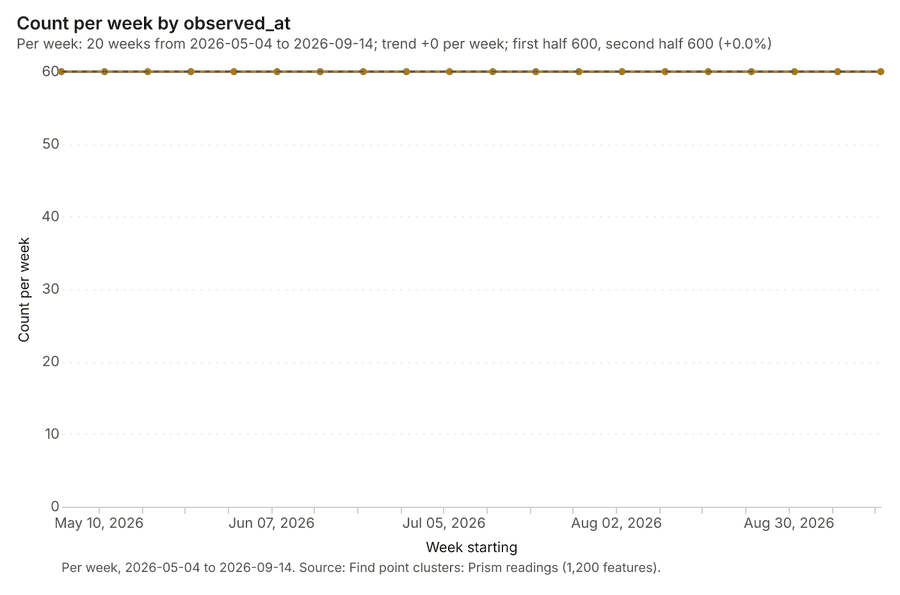
Figure 42. Find point clusters: Prism readings over time 91
| period | value |
|---|---|
| 2026-05-04 | 60 |
| 2026-05-11 | 60 |
| 2026-05-18 | 60 |
| 2026-05-25 | 60 |
| 2026-06-01 | 60 |
| 2026-06-08 | 60 |
| 2026-06-15 | 60 |
| 2026-06-22 | 60 |
| 2026-06-29 | 60 |
| 2026-07-06 | 60 |
| 2026-07-13 | 60 |
| 2026-07-20 | 60 |
| 2026-07-27 | 60 |
| 2026-08-03 | 60 |
| 2026-08-10 | 60 |
| 2026-08-17 | 60 |
| 2026-08-24 | 60 |
| 2026-08-31 | 60 |
| 2026-09-07 | 60 |
| 2026-09-14 | 60 |
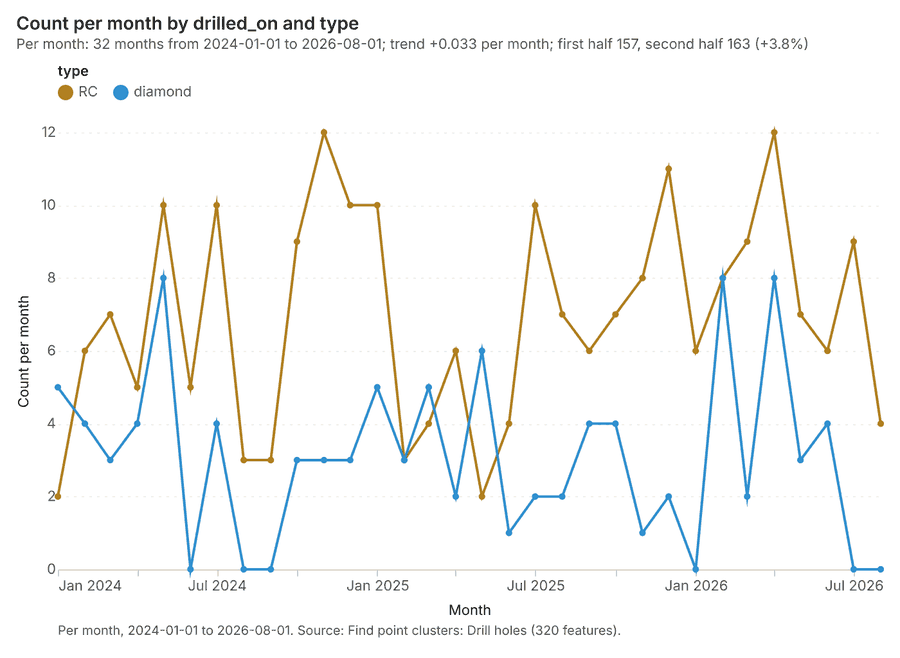
Figure 43. Find point clusters: Drill holes over time 92
| period | series | value |
|---|---|---|
| 2024-01-01 | RC | 2 |
| 2024-01-01 | diamond | 5 |
| 2024-02-01 | RC | 6 |
| 2024-02-01 | diamond | 4 |
| 2024-03-01 | RC | 7 |
| 2024-03-01 | diamond | 3 |
| 2024-04-01 | RC | 5 |
| 2024-04-01 | diamond | 4 |
| 2024-05-01 | RC | 10 |
| 2024-05-01 | diamond | 8 |
| 2024-06-01 | RC | 5 |
| 2024-06-01 | diamond | 0 |
| 2024-07-01 | RC | 10 |
| 2024-07-01 | diamond | 4 |
| 2024-08-01 | RC | 3 |
| 2024-08-01 | diamond | 0 |
| 2024-09-01 | RC | 3 |
| 2024-09-01 | diamond | 0 |
| 2024-10-01 | RC | 9 |
| 2024-10-01 | diamond | 3 |
| 2024-11-01 | RC | 12 |
| 2024-11-01 | diamond | 3 |
| 2024-12-01 | RC | 10 |
| 2024-12-01 | diamond | 3 |
| 2025-01-01 | RC | 10 |
| 2025-01-01 | diamond | 5 |
| 2025-02-01 | RC | 3 |
| 2025-02-01 | diamond | 3 |
| 2025-03-01 | RC | 4 |
| 2025-03-01 | diamond | 5 |
| 2025-04-01 | RC | 6 |
| 2025-04-01 | diamond | 2 |
| 2025-05-01 | RC | 2 |
| 2025-05-01 | diamond | 6 |
| 2025-06-01 | RC | 4 |
| 2025-06-01 | diamond | 1 |
| 2025-07-01 | RC | 10 |
| 2025-07-01 | diamond | 2 |
| 2025-08-01 | RC | 7 |
| 2025-08-01 | diamond | 2 |
| 2025-09-01 | RC | 6 |
| 2025-09-01 | diamond | 4 |
| 2025-10-01 | RC | 7 |
| 2025-10-01 | diamond | 4 |
| 2025-11-01 | RC | 8 |
| 2025-11-01 | diamond | 1 |
| 2025-12-01 | RC | 11 |
| 2025-12-01 | diamond | 2 |
| 2026-01-01 | RC | 6 |
| 2026-01-01 | diamond | 0 |
| 2026-02-01 | RC | 8 |
| 2026-02-01 | diamond | 8 |
| 2026-03-01 | RC | 9 |
| 2026-03-01 | diamond | 2 |
| 2026-04-01 | RC | 12 |
| 2026-04-01 | diamond | 8 |
| 2026-05-01 | RC | 7 |
| 2026-05-01 | diamond | 3 |
| 2026-06-01 | RC | 6 |
| 2026-06-01 | diamond | 4 |
| 2026-07-01 | RC | 9 |
| 2026-07-01 | diamond | 0 |
| 2026-08-01 | RC | 4 |
| 2026-08-01 | diamond | 0 |
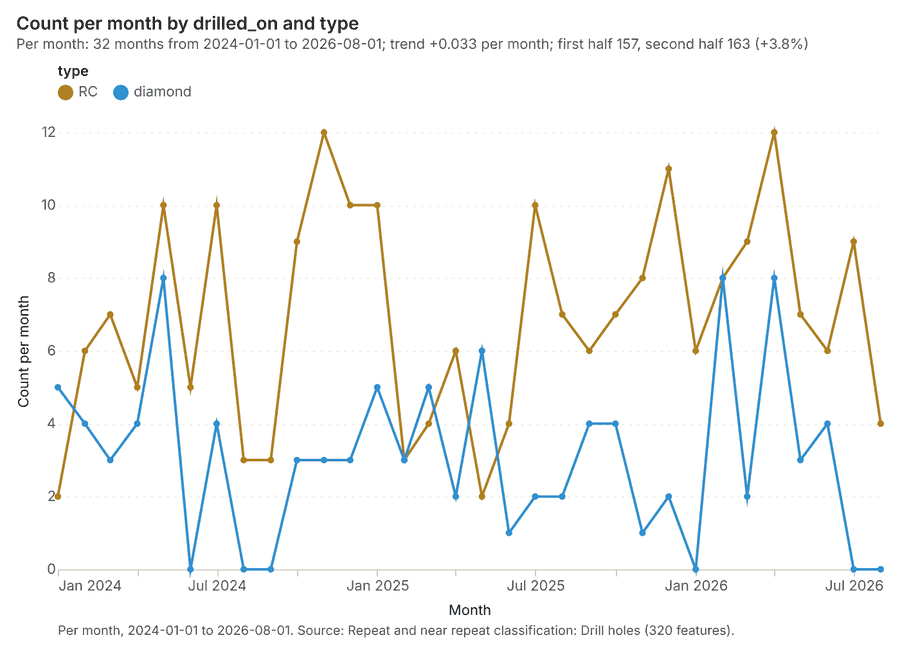
Figure 44. Repeat and near repeat classification: Drill holes over time 93
| period | series | value |
|---|---|---|
| 2024-01-01 | RC | 2 |
| 2024-01-01 | diamond | 5 |
| 2024-02-01 | RC | 6 |
| 2024-02-01 | diamond | 4 |
| 2024-03-01 | RC | 7 |
| 2024-03-01 | diamond | 3 |
| 2024-04-01 | RC | 5 |
| 2024-04-01 | diamond | 4 |
| 2024-05-01 | RC | 10 |
| 2024-05-01 | diamond | 8 |
| 2024-06-01 | RC | 5 |
| 2024-06-01 | diamond | 0 |
| 2024-07-01 | RC | 10 |
| 2024-07-01 | diamond | 4 |
| 2024-08-01 | RC | 3 |
| 2024-08-01 | diamond | 0 |
| 2024-09-01 | RC | 3 |
| 2024-09-01 | diamond | 0 |
| 2024-10-01 | RC | 9 |
| 2024-10-01 | diamond | 3 |
| 2024-11-01 | RC | 12 |
| 2024-11-01 | diamond | 3 |
| 2024-12-01 | RC | 10 |
| 2024-12-01 | diamond | 3 |
| 2025-01-01 | RC | 10 |
| 2025-01-01 | diamond | 5 |
| 2025-02-01 | RC | 3 |
| 2025-02-01 | diamond | 3 |
| 2025-03-01 | RC | 4 |
| 2025-03-01 | diamond | 5 |
| 2025-04-01 | RC | 6 |
| 2025-04-01 | diamond | 2 |
| 2025-05-01 | RC | 2 |
| 2025-05-01 | diamond | 6 |
| 2025-06-01 | RC | 4 |
| 2025-06-01 | diamond | 1 |
| 2025-07-01 | RC | 10 |
| 2025-07-01 | diamond | 2 |
| 2025-08-01 | RC | 7 |
| 2025-08-01 | diamond | 2 |
| 2025-09-01 | RC | 6 |
| 2025-09-01 | diamond | 4 |
| 2025-10-01 | RC | 7 |
| 2025-10-01 | diamond | 4 |
| 2025-11-01 | RC | 8 |
| 2025-11-01 | diamond | 1 |
| 2025-12-01 | RC | 11 |
| 2025-12-01 | diamond | 2 |
| 2026-01-01 | RC | 6 |
| 2026-01-01 | diamond | 0 |
| 2026-02-01 | RC | 8 |
| 2026-02-01 | diamond | 8 |
| 2026-03-01 | RC | 9 |
| 2026-03-01 | diamond | 2 |
| 2026-04-01 | RC | 12 |
| 2026-04-01 | diamond | 8 |
| 2026-05-01 | RC | 7 |
| 2026-05-01 | diamond | 3 |
| 2026-06-01 | RC | 6 |
| 2026-06-01 | diamond | 4 |
| 2026-07-01 | RC | 9 |
| 2026-07-01 | diamond | 0 |
| 2026-08-01 | RC | 4 |
| 2026-08-01 | diamond | 0 |
GeoBit Large Spatial Model. Findings are labeled Evidenced (computed by a tool), Inferred (a reading or reasoning) or Unverified (no evidence yet).