Sample: Oil and gas pipelines, Midland: report
Project: Sample: Oil and gas pipelines, Midland
Goal: Describe the project Sample: Oil and gas pipelines, Midland: run the analyses that tell the most about its data, draw every result, and write a cited report.
Run: debf2e20-caf9-45f0-b26f-597c66cae39f (running, 11 agent run(s))
Generated: 2026-10-18T05:56:24Z, version 1
Model cost: USD 0.0000 over 0 model call(s)
Data used
| Data | Kind | Rows | Time span | Summary | Source |
|---|---|---|---|---|---|
| Pipeline segments | vector, LineString | 99 | 99 line features; 'coating' has 3 values (top: FBE 54, tape 23, coal tar 22); 'station_from_m' 0 to 28,000 (mean 1.302e+04); 'station_to_m' 800 to 28,785 (mean 1.381e+04); 'diameter_in' 12 to 24 (mean 17.82); total length 78.44 km; extent -102.2108,31.9243 to -101.9449,32.0740. Lines (Pipeline segments) such as routes or networks. | 94 | |
| In-line inspection anomalies | vector, Point | 1,118 | 2021-06-14 to 2025-06-09 | 1,118 point features; dated by 'inspected_on' from 2021-06-14 to 2025-06-09; 'feature' has 4 values (top: metal loss 454, crack-like 233, dent 220); 'clock' has 12 values (top: 4:00 105, 11:00 101, 7:00 100); 'depth_pct' 3 to 41.1 (mean 15.7); 'length_mm' 15 to 472 (mean 68.66); 'station_m' 157 to 28,769 (mean 1.203e+04); extent -102.2093,31.9267 to -101.9451,32.0732. Dated point events by feature: where and when In-line inspection anomalies happen. | 2 |
| Incidents | vector, Point | 70 | 2016-04-07 to 2026-06-14 | 70 point features; dated by 'date' from 2016-04-07 to 2026-06-14; 'cause' has 5 values (top: external corrosion 28, third-party damage 14, equipment 11); 'release_bbl' 0.5 to 157.2 (mean 12.33); 'station_m' 216 to 27,926 (mean 1.288e+04); extent -102.2063,31.9262 to -101.9486,32.0725. Dated point events by cause: where and when Incidents happen. | 3 |
| Valves and stations | vector, Point | 25 | 25 point features; 'type' has 3 values (top: test station 14, block valve 8, pump station 3); 'station_m' 0 to 25,600 (mean 1.19e+04); named by 'name' (e.g. L100 pump station 1, L100 test station 2, L100 block valve 3); extent -102.2109,31.9243 to -101.9659,32.0570. Point locations of Valves and stations by type. | 95 | |
| High consequence areas | vector, Polygon | 6 | 6 polygon (area) features; 'type' has 2 values (top: populated area 5, water body 1); 'population' 0 to 2,400 (mean 728.3); named by 'name' (e.g. Mesa Verde colonia, Ranch Road 12 homes, County school campus); total area 19.01 km2; extent -102.1694,31.9544 to -101.9683,32.0709. Areas (High consequence areas) with population to compare and map. | 96 | |
| Crossings | vector, Point | 14 | 14 point features; 'type' has 2 values (top: road 10, draw 4); 'cased' has 2 values (top: True 7, False 7); 'station_m' 186 to 23,139 (mean 1.149e+04); extent -102.1577,31.9259 to -101.9846,32.0445. Point locations of Crossings by type. | 97 | |
| Right of way | vector, Polygon | 3 | 3 polygon (area) features; 'width_m' 30 to 30 (mean 30); named by 'name' (e.g. Line 100 crude right of way, Line 200 gas right of way, Line 300 NGL lateral right of way); total area 2.353 km2; extent -102.2110,31.9242 to -101.9447,32.0742. Areas (Right of way) with width_m to compare and map. | 98 | |
| Cathodic protection readings | table | 168 | 2023-10-01 to 2026-06-28 | Table of 168 rows and 4 columns without geometry; dated by 'date' from 2023-10-01 to 2026-06-28; 'pipe_to_soil_on_mv' -1,031 to -863 (mean -948.8); 'pipe_to_soil_off_mv' -1,172 to -974 (mean -1065). A table of Cathodic protection readings without locations. | 4 |
| Segment operating limits | table | 99 | Table of 99 rows and 4 columns without geometry; 'maop_psi' 1,100 to 1,440 (mean 1247); 'class_location' 1 to 3 (mean 1.626); 'last_hydrotest_year' 2,008 to 2,022 (mean 2015). A table of Segment operating limits without locations. | 99 | |
| Integrity management summary | document | 1-page pdf document 'Integrity management summary'; language en; mentions 5 place(s): 31.97837, -102.14691 (1), Highway rest area (1), Highway (1), Mesa Verde colonia (1), County school campus (1). A document about 31.97837, -102.14691, Highway rest area, Highway. | 100 | ||
| Sample: Oil and gas pipelines, Midland | record | 101 | |||
| Emerging hot spots: Incidents | layer, Polygon | 13 | 102 | ||
| Emerging hot spots: In-line inspection anomalies | layer, Polygon | 56 | 103 | ||
| Hot spot analysis: Incidents | layer, Point | 70 | 104 | ||
| Hot spot analysis: In-line inspection anomalies | layer, Point | 1,118 | 105 | ||
| Calculate density: Valves and stations | layer, Polygon | 41 | 106 | ||
| Calculate density: Incidents | layer, Polygon | 144 | 107 | ||
| Calculate density: In-line inspection anomalies | layer, Polygon | 1,039 | 108 | ||
| Summarize within: Right of way | layer, Polygon | 3 | 109 | ||
| Summarize within: Right of way | layer, Polygon | 3 | 110 | ||
| Summarize within: Right of way | layer, Polygon | 3 | 111 | ||
| Find point clusters: Valves and stations | layer, Point | 25 | 112 | ||
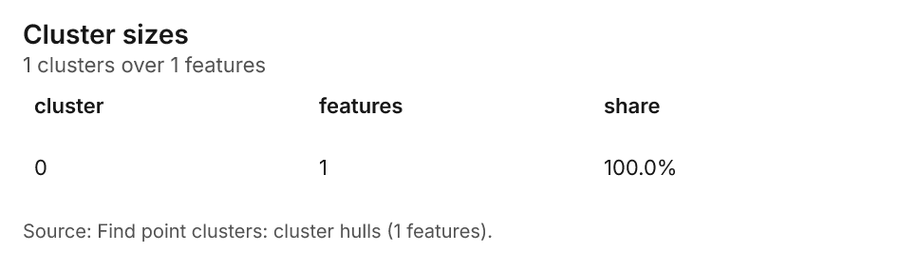
| Find point clusters: cluster hulls | layer, Polygon | 1 | 113 | ||
| Find point clusters: Incidents | layer, Point | 70 | 114 | ||
| Find point clusters: cluster hulls | layer, Polygon | 1 | 115 | ||
| Find point clusters: Crossings | layer, Point | 14 | 116 | ||
| Find point clusters: cluster hulls | layer, Polygon | 1 | 117 | ||
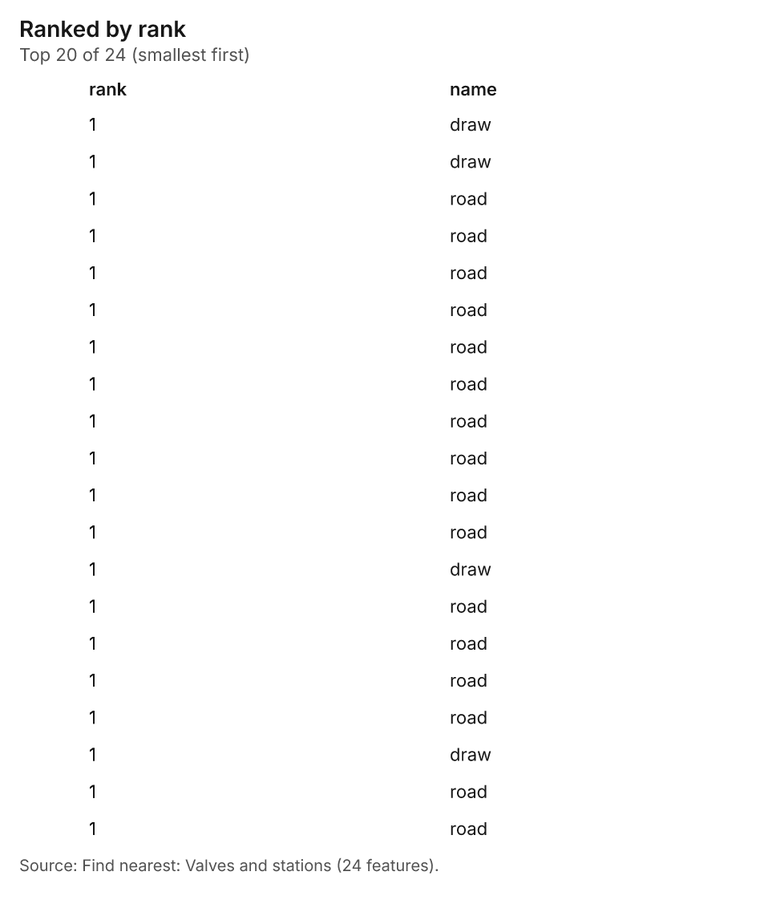
| Find nearest: Valves and stations | layer, Point | 24 | 118 | ||
| Find nearest: Valves and stations | layer, Point | 25 | 119 | ||
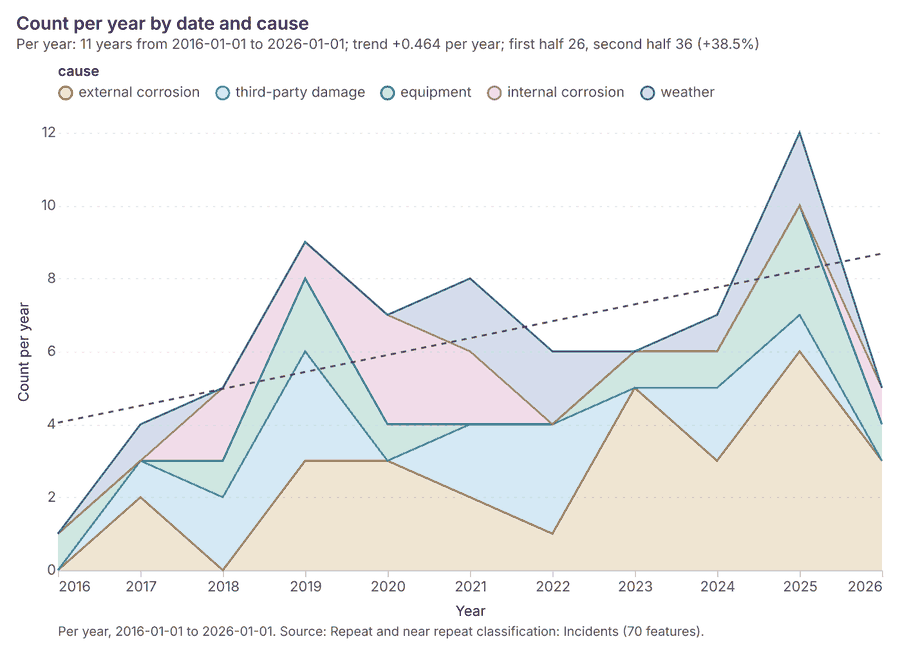
| Repeat and near repeat classification: Incidents | layer, Point | 70 | 120 |
Timeline
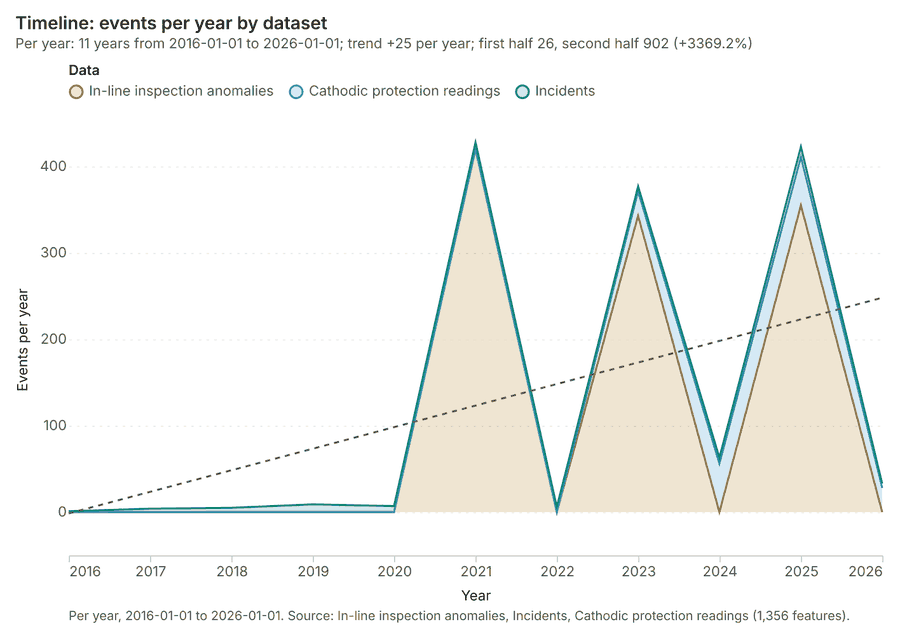
The timeline counts 1,356 dated events in In-line inspection anomalies, Incidents, Cathodic protection readings per year, from 2016 to 2026 1234. By dataset: In-line inspection anomalies 1,118; Cathodic protection readings 168; Incidents 70 1. The trend is +25 events per year; the second half of the years has 902 against 26 in the first (+3369.2%) 1.
Busiest years
Quietest years
Space time hot spots
What this analysis is. Emerging hot spots: Where hot spots are new, consecutive, intensifying, persistent, diminishing, sporadic, oscillating or historical over time 5. In ArcGIS it is Emerging Hot Spot Analysis or Create Space Time Cube 5.
Why it was run on this data. Incidents carry dates in 'date': emerging hot spot analysis finds new, intensifying and fading hot spots per year 6.
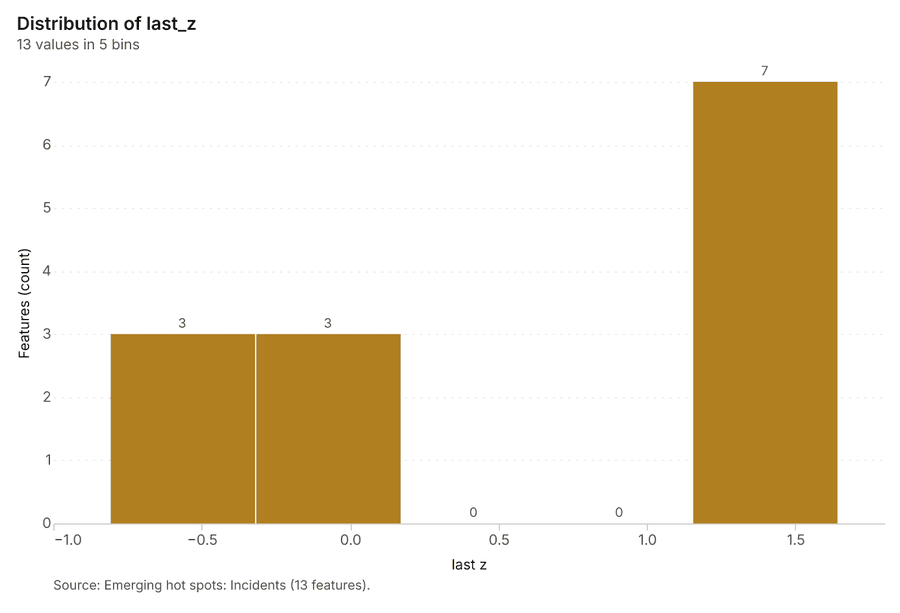
What it found. The analysis generated an output layer titled "Emerging hot spots: Incidents" which contained 13 features 7. The input data for this analysis was the Incidents layer 8. The process completed quickly, generating the result in 3 milliseconds 7.
| Result | Value |
|---|---|
| result, count | 13 |
| result, elapsed ms | 3 |
| result, resolution | 6 |
| result, features used | 70 |
| result, time neighbors | 0 |
| billing, cost | 0.1035 |
| billing, list price | 0.1035 |
| billing, upstream cost | 0 |
Findings
- Evidenced: Space time hot spots on Incidents: Emerging hot spots: 1 layer saved: Emerging hot spots: Incidents (13 features) 78.
- Evidenced: It reported result, count 13; result, elapsed ms 3; result, resolution 6; result, features used 70; result, time neighbors 0; billing, cost 0.1035 7.
Tool gp_space_time_hot_spots; parameters {"agg": "sum", "project": "814309a7-f84e-4437-a8ec-209438a3f0a6", "features": {"layer": "Incidents (f9c94228)"}, "interval": "year", "bin_shape": "h3", "resolution": 6, "time_field": "date", "value_field": "station_m"}
Space time hot spots
What this analysis is. Emerging hot spots: Where hot spots are new, consecutive, intensifying, persistent, diminishing, sporadic, oscillating or historical over time 5. In ArcGIS it is Emerging Hot Spot Analysis or Create Space Time Cube 5.
Why it was run on this data. In-line inspection anomalies carry dates in 'inspected_on': emerging hot spot analysis finds new, intensifying and fading hot spots per month 9.
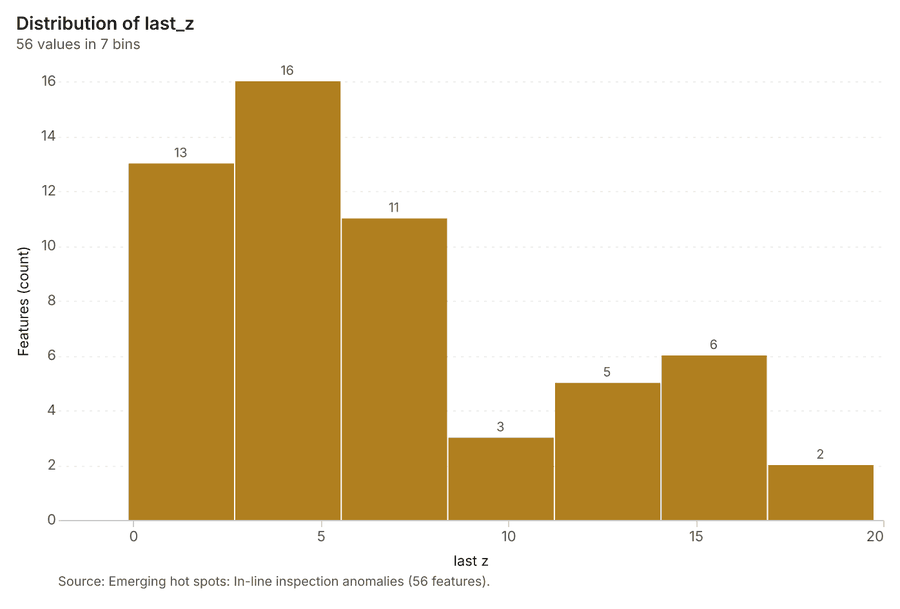
What it found. The tool utilized the In-line inspection anomalies data as input 11. The analysis identified 56 features for emerging hot spots, saving a layer named Emerging hot spots: In-line inspection anomalies 10.
| Result | Value |
|---|---|
| result, count | 56 |
| result, elapsed ms | 13 |
| result, resolution | 7 |
| result, features used | 1,118 |
| result, time neighbors | 0 |
| billing, cost | 0.1559 |
| billing, list price | 0.1559 |
| billing, upstream cost | 0 |
Findings
- Evidenced: Space time hot spots on In-line inspection anomalies: Emerging hot spots: 1 layer saved: Emerging hot spots: In-line inspection anomalies (56 features) 1011.
- Evidenced: It reported result, count 56; result, elapsed ms 13; result, resolution 7; result, features used 1,118; result, time neighbors 0; billing, cost 0.1559 10.
Tool gp_space_time_hot_spots; parameters {"agg": "sum", "project": "814309a7-f84e-4437-a8ec-209438a3f0a6", "features": {"layer": "In-line inspection anomalies (47cf738b)"}, "interval": "month", "bin_shape": "h3", "resolution": 7, "time_field": "inspected_on", "value_field": "station_m"}
Hot spots
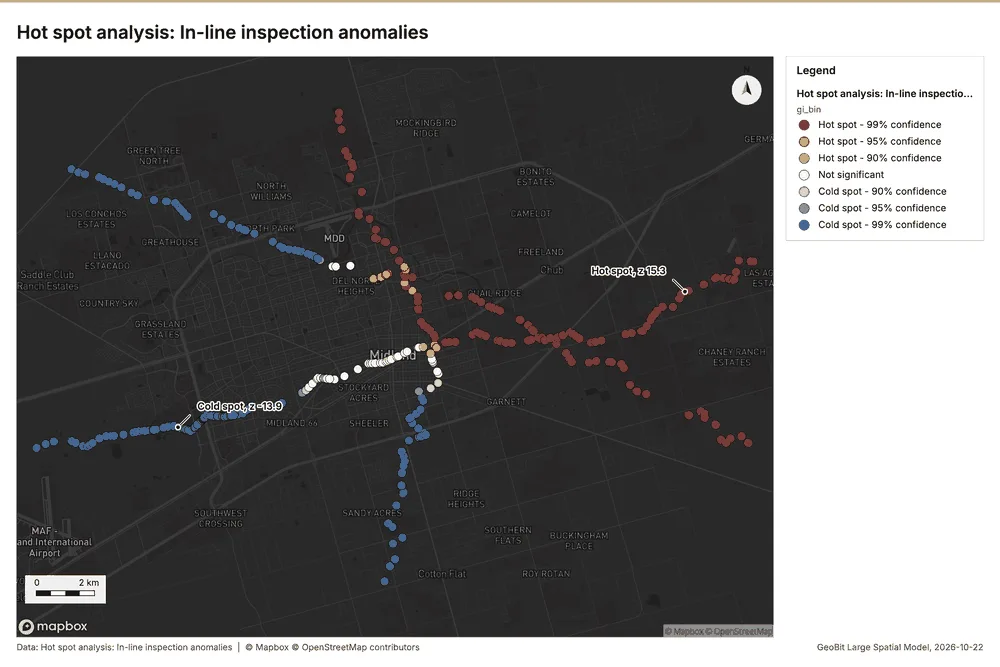
What this analysis is. Hot spot analysis: Getis-Ord Gi* hot and cold spots with z-scores, p-values and confidence bins 12. In ArcGIS it is Find Hot Spots or Hot Spot Analysis (Getis-Ord Gi*); in QGIS, qgis:hotspot (plugin) 12.
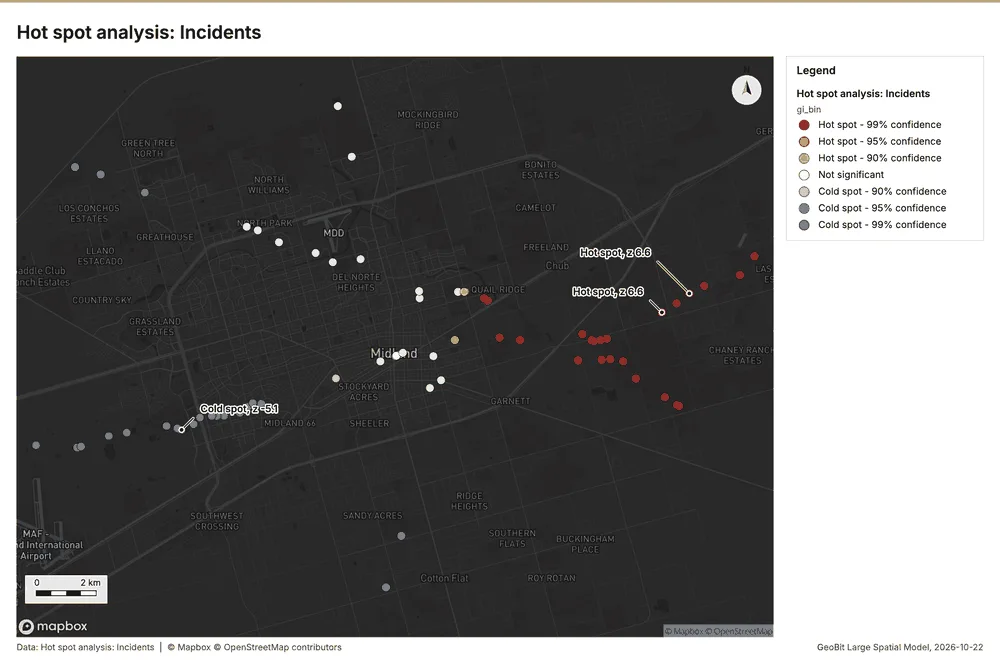
Why it was run on this data. 70 points: Getis-Ord Gi* tests whether the concentrations in Incidents are statistically significant 13.
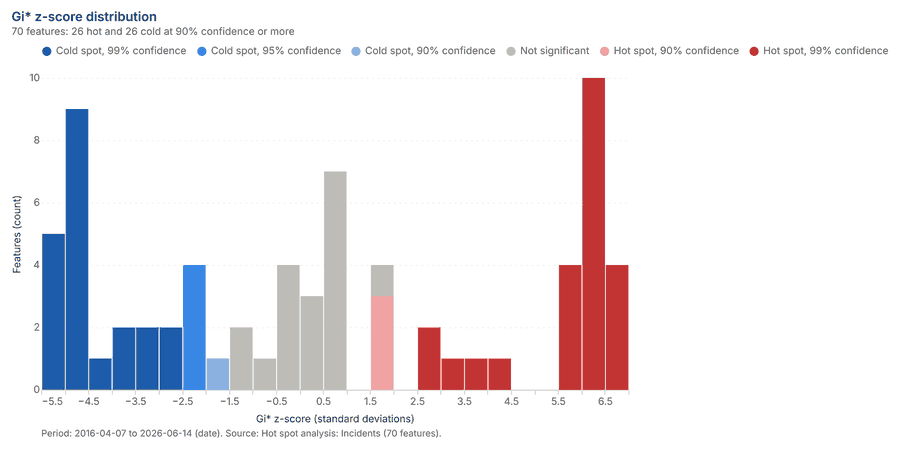
What it found. Hot spots on Incidents: Hot spot analysis: 1 layer saved: Hot spot analysis: Incidents (70 features) 814. It reported result, count 70; result, elapsed ms 2; result, excluded null 0; result, distance band m 5,000; billing, cost 0.0514; billing, list price 0.0514 14.
| Result | Value |
|---|---|
| result, count | 70 |
| result, elapsed ms | 2 |
| result, excluded null | 0 |
| result, distance band m | 5,000 |
| billing, cost | 0.0514 |
| billing, list price | 0.0514 |
| billing, upstream cost | 0 |
Findings
- Evidenced: Hot spots on Incidents: Hot spot analysis: 1 layer saved: Hot spot analysis: Incidents (70 features) 814.
- Evidenced: It reported result, count 70; result, elapsed ms 2; result, excluded null 0; result, distance band m 5,000; billing, cost 0.0514; billing, list price 0.0514 14.
Tool gp_hot_spots; parameters {"field": "station_m", "project": "814309a7-f84e-4437-a8ec-209438a3f0a6", "features": {"layer": "Incidents (f9c94228)"}, "aggregation": "hexagon", "cell_size_m": 5000.0, "distance_band_m": 5000.0}
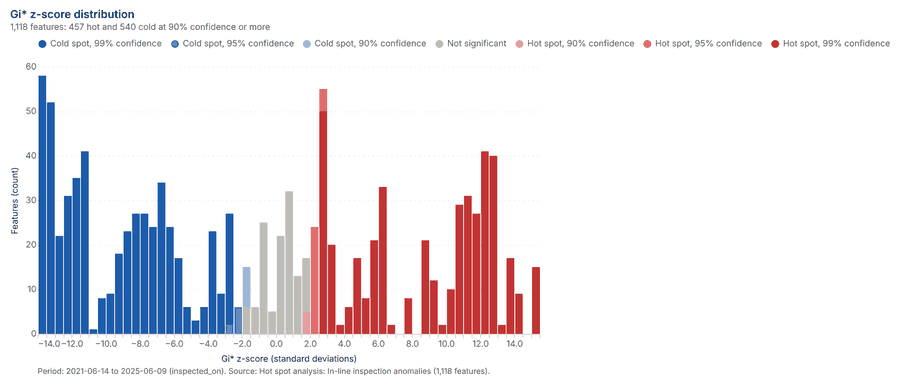
Hot spots
What this analysis is. Hot spot analysis: Getis-Ord Gi* hot and cold spots with z-scores, p-values and confidence bins 12. In ArcGIS it is Find Hot Spots or Hot Spot Analysis (Getis-Ord Gi*); in QGIS, qgis:hotspot (plugin) 12.
Why it was run on this data. 1118 points: Getis-Ord Gi* tests whether the concentrations in In-line inspection anomalies are statistically significant 15.
What it found. The hot spot analysis was performed using the In-line inspection anomalies data 11.
| Result | Value |
|---|---|
| result, count | 1,118 |
| result, elapsed ms | 22 |
| result, excluded null | 0 |
| result, distance band m | 2,000 |
| billing, cost | 0.07236 |
| billing, list price | 0.07236 |
| billing, upstream cost | 0 |
Findings
- Evidenced: Hot spots on In-line inspection anomalies: Hot spot analysis: 1 layer saved: Hot spot analysis: In-line inspection anomalies (1118 features) 1116.
- Evidenced: It reported result, count 1,118; result, elapsed ms 22; result, excluded null 0; result, distance band m 2,000; billing, cost 0.07236; billing, list price 0.07236 16.
Tool gp_hot_spots; parameters {"field": "station_m", "project": "814309a7-f84e-4437-a8ec-209438a3f0a6", "features": {"layer": "In-line inspection anomalies (47cf738b)"}, "aggregation": "hexagon", "cell_size_m": 1000.0, "distance_band_m": 2000.0}
Calculate density
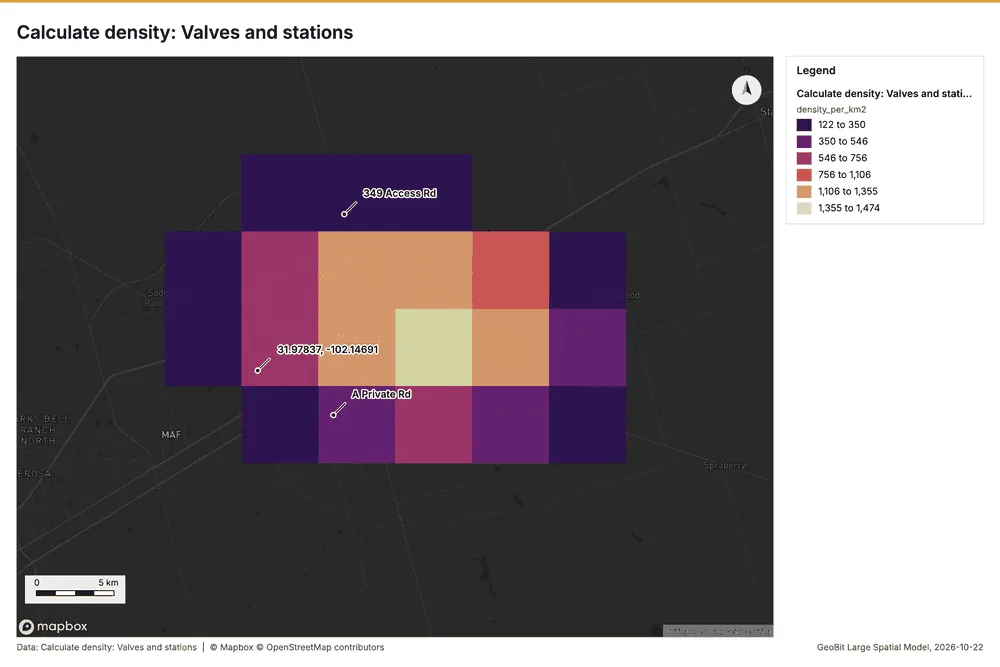
What this analysis is. Calculate density: Kernel density per square kilometer on a grid 17. In ArcGIS it is Calculate Density or Kernel Density; in QGIS, native:heatmapkerneldensityestimation 17.
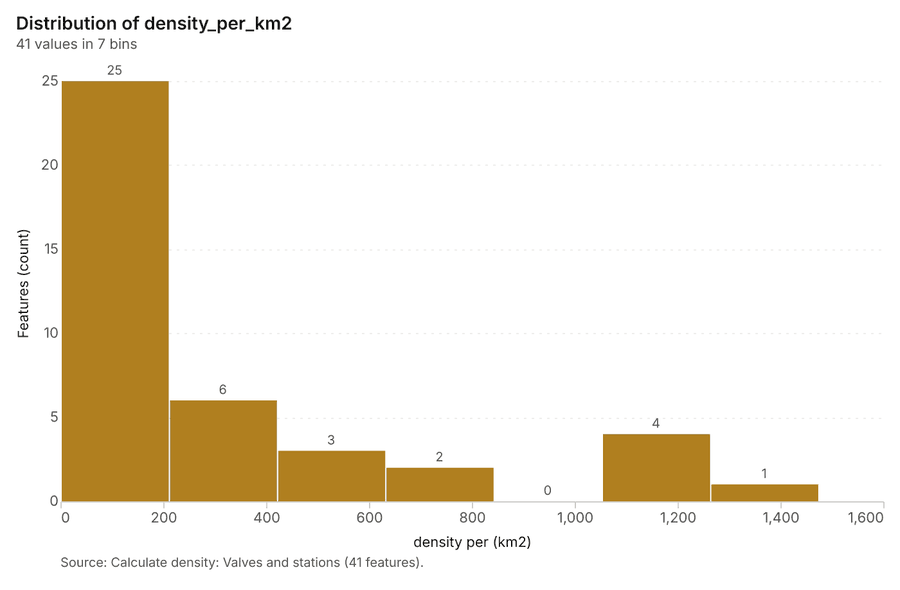
Why it was run on this data. 25 points in Valves and stations: a density surface shows where they concentrate 18.
What it found. Calculate density on Valves and stations: Calculate density: 1 layer saved: Calculate density: Valves and stations (41 features) 1920. It reported result, count 41; result, elapsed ms 2; result, bandwidth m 10,000; result, cell size m 5,000; result, excluded null 0; result, max density per km2 1,474 19.
| Result | Value |
|---|---|
| result, count | 41 |
| result, elapsed ms | 2 |
| result, bandwidth m | 1e+04 |
| result, cell size m | 5,000 |
| result, excluded null | 0 |
| result, max density per km2 | 1,474 |
| billing, cost | 0.0505 |
| billing, list price | 0.0505 |
| billing, upstream cost | 0 |
Findings
- Evidenced: Calculate density on Valves and stations: Calculate density: 1 layer saved: Calculate density: Valves and stations (41 features) 1920.
- Evidenced: It reported result, count 41; result, elapsed ms 2; result, bandwidth m 10,000; result, cell size m 5,000; result, excluded null 0; result, max density per km2 1,474 19.
Tool gp_calculate_density; parameters {"kernel": "quartic", "project": "814309a7-f84e-4437-a8ec-209438a3f0a6", "features": {"layer": "Valves and stations (db114367)"}, "bandwidth_m": 10000.0, "cell_size_m": 5000.0, "weight_field": "station_m"}
Calculate density
What this analysis is. Calculate density: Kernel density per square kilometer on a grid 17. In ArcGIS it is Calculate Density or Kernel Density; in QGIS, native:heatmapkerneldensityestimation 17.
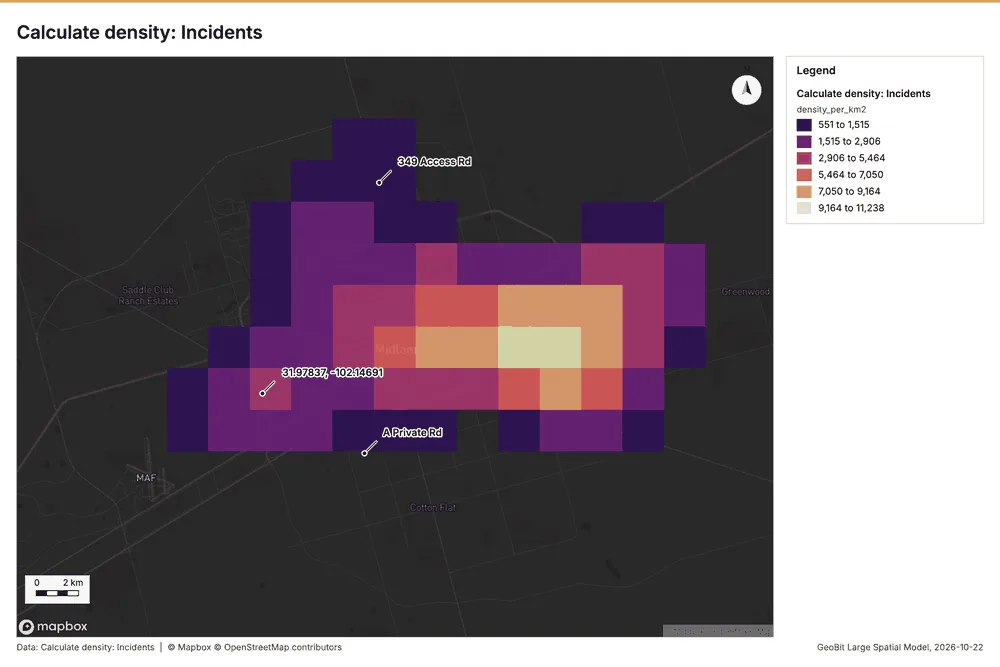
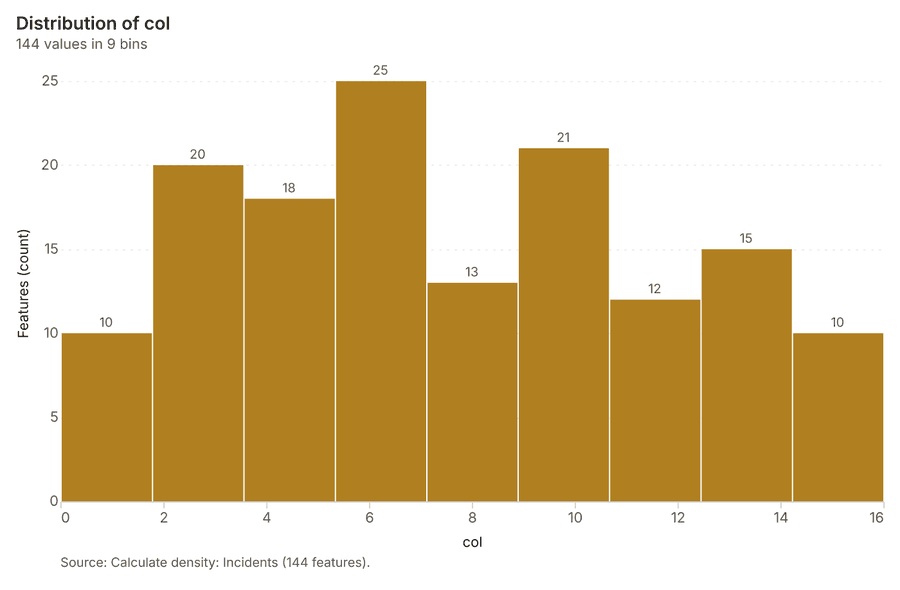
Why it was run on this data. 70 points in Incidents: a density surface shows where they concentrate 21.
What it found. Calculate density on Incidents: Calculate density: 1 layer saved: Calculate density: Incidents (144 features) 822. It reported result, count 144; result, elapsed ms 4; result, bandwidth m 5,000; result, cell size m 2,000; result, excluded null 0; result, max density per km2 1.124e+04 22.
| Result | Value |
|---|---|
| result, count | 144 |
| result, elapsed ms | 4 |
| result, bandwidth m | 5,000 |
| result, cell size m | 2,000 |
| result, excluded null | 0 |
| result, max density per km2 | 1.124e+04 |
| billing, cost | 0.0514 |
| billing, list price | 0.0514 |
| billing, upstream cost | 0 |
Findings
- Evidenced: Calculate density on Incidents: Calculate density: 1 layer saved: Calculate density: Incidents (144 features) 822.
- Evidenced: It reported result, count 144; result, elapsed ms 4; result, bandwidth m 5,000; result, cell size m 2,000; result, excluded null 0; result, max density per km2 1.124e+04 22.
Tool gp_calculate_density; parameters {"kernel": "quartic", "project": "814309a7-f84e-4437-a8ec-209438a3f0a6", "features": {"layer": "Incidents (f9c94228)"}, "bandwidth_m": 5000.0, "cell_size_m": 2000.0, "weight_field": "station_m"}
Calculate density
What this analysis is. Calculate density: Kernel density per square kilometer on a grid 17. In ArcGIS it is Calculate Density or Kernel Density; in QGIS, native:heatmapkerneldensityestimation 17.
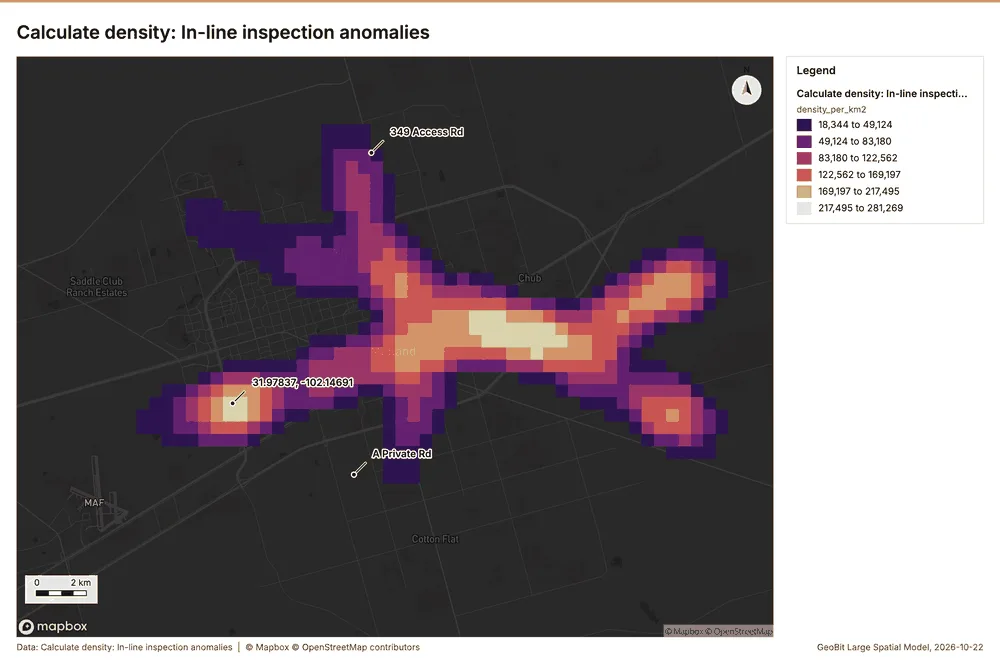
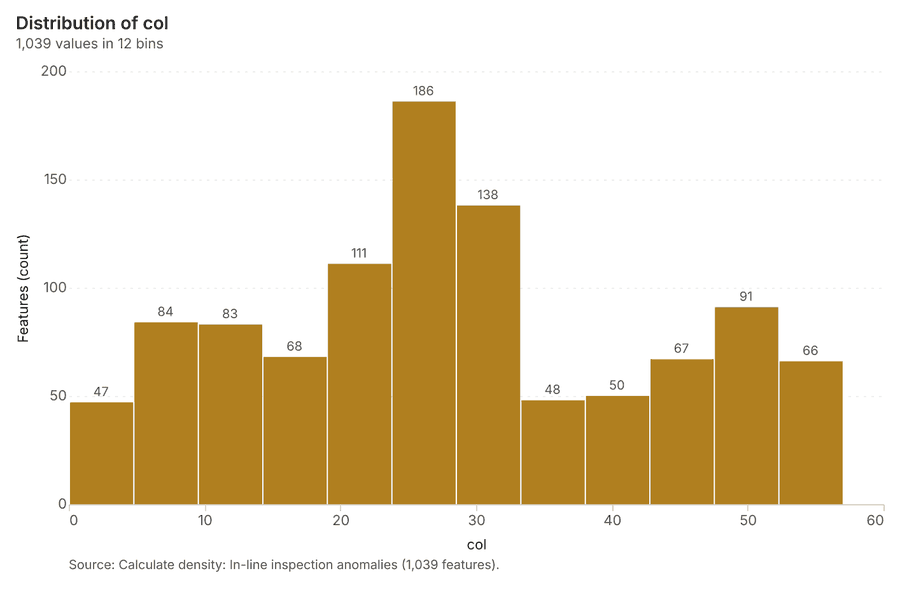
Why it was run on this data. 1118 points in In-line inspection anomalies: a density surface shows where they concentrate 23.
What it found. The density calculation processed 1,039 features from the in-line inspection anomalies data 24. The resulting maximum density per km2 was 2.813e+05 24. This analysis took an elapsed time of 35 ms 24. Furthermore, the associated billing cost for this tool was 0.07236 24.
| Result | Value |
|---|---|
| result, count | 1,039 |
| result, elapsed ms | 35 |
| result, bandwidth m | 2,000 |
| result, cell size m | 500 |
| result, excluded null | 0 |
| result, max density per km2 | 2.813e+05 |
| billing, cost | 0.07236 |
| billing, list price | 0.07236 |
| billing, upstream cost | 0 |
Findings
- Evidenced: Calculate density on In-line inspection anomalies: Calculate density: 1 layer saved: Calculate density: In-line inspection anomalies (1039 features) 1124.
- Evidenced: It reported result, count 1,039; result, elapsed ms 35; result, bandwidth m 2,000; result, cell size m 500; result, excluded null 0; result, max density per km2 2.813e+05 24.
Tool gp_calculate_density; parameters {"kernel": "quartic", "project": "814309a7-f84e-4437-a8ec-209438a3f0a6", "features": {"layer": "In-line inspection anomalies (47cf738b)"}, "bandwidth_m": 2000.0, "cell_size_m": 500.0, "weight_field": "station_m"}
Summarize within
What this analysis is. Summarize within: Count and aggregate the features inside each polygon (or bin), proportionally for lines and polygons 25. In ArcGIS it is Summarize Within or Aggregate Points; in QGIS, native:countpointsinpolygon or native:sumlinelengths 25.
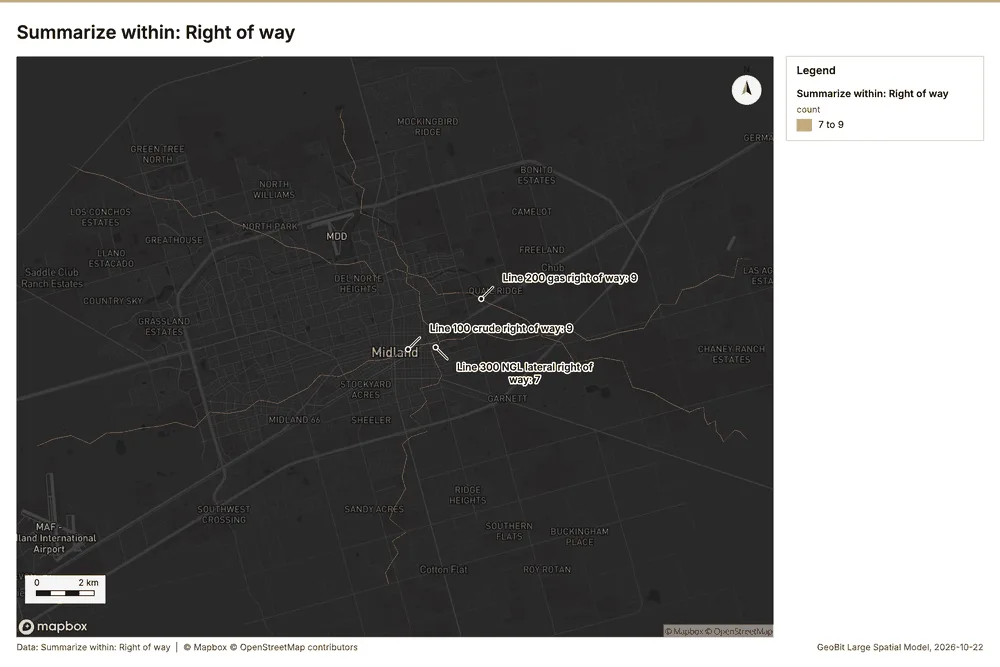
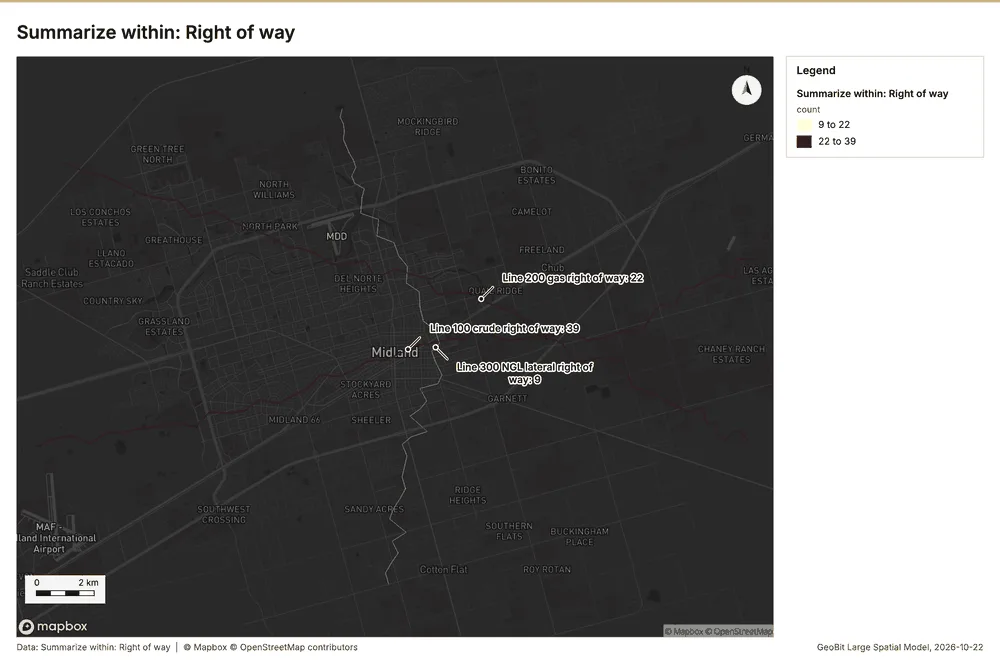
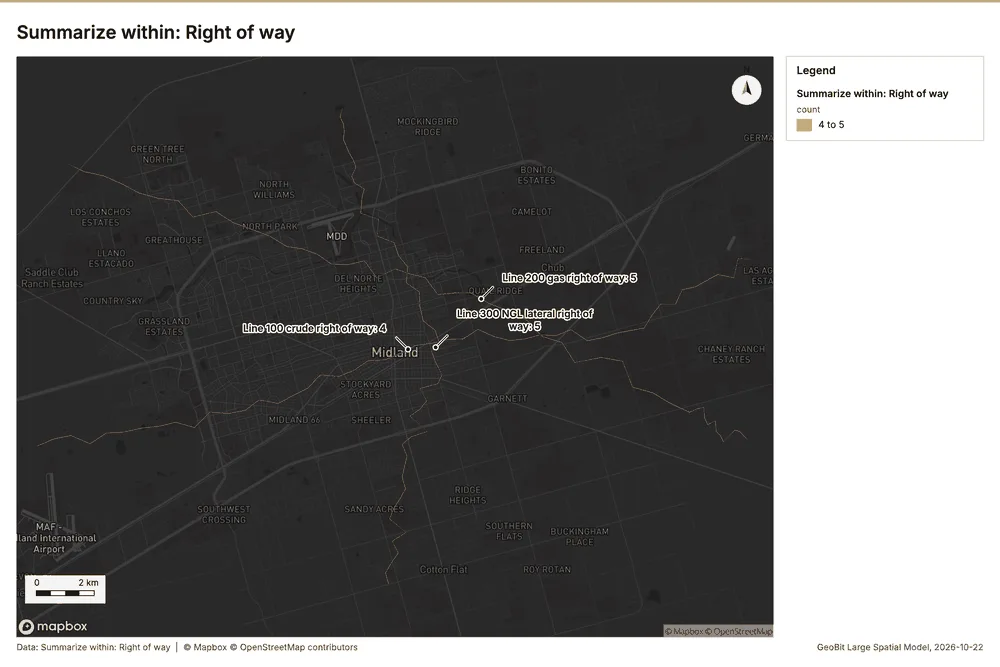
Why it was run on this data. Count Valves and stations inside each feature of Right of way by type; the counts map as a choropleth (natural breaks, sequential colors) 26.
What it found. Summarize within on Valves and stations, Right of way: Summarize within: 1 layer saved: Summarize within: Right of way (3 features) 202728. It reported result, count 3; result, elapsed ms 2; billing, cost 0.01058; billing, list price 0.01058; billing, upstream cost 0 27.
| Result | Value |
|---|---|
| result, count | 3 |
| result, elapsed ms | 2 |
| billing, cost | 0.01058 |
| billing, list price | 0.01058 |
| billing, upstream cost | 0 |
Findings
- Evidenced: Summarize within on Valves and stations, Right of way: Summarize within: 1 layer saved: Summarize within: Right of way (3 features) 202728.
- Evidenced: It reported result, count 3; result, elapsed ms 2; billing, cost 0.01058; billing, list price 0.01058; billing, upstream cost 0 27.
Tool gp_summarize_within; parameters {"stats": [{"stat": "sum", "field": "station_m"}], "project": "814309a7-f84e-4437-a8ec-209438a3f0a6", "features": {"layer": "Valves and stations (db114367)"}, "group_by": "type", "polygons": {"layer": "Right of way (73b1c8fe)"}}
Summarize within
What this analysis is. Summarize within: Count and aggregate the features inside each polygon (or bin), proportionally for lines and polygons 25. In ArcGIS it is Summarize Within or Aggregate Points; in QGIS, native:countpointsinpolygon or native:sumlinelengths 25.
Why it was run on this data. Count Valves and stations inside each feature of Right of way by type; the counts map as a choropleth (natural breaks, sequential colors) 26.
What it found. A summary within of right of way was generated using the gp_summarize_within tool 29. The inputs for this process included incidents 8 and right of way data 28 29. The result produced contained 3 entries 29, and the process required 2 elapsed milliseconds 29.
| Result | Value |
|---|---|
| result, count | 3 |
| result, elapsed ms | 2 |
| billing, cost | 0.01148 |
| billing, list price | 0.01148 |
| billing, upstream cost | 0 |
Findings
- Evidenced: Summarize within on Incidents, Right of way: Summarize within: 1 layer saved: Summarize within: Right of way (3 features) 82829.
- Evidenced: It reported result, count 3; result, elapsed ms 2; billing, cost 0.01148; billing, list price 0.01148; billing, upstream cost 0 29.
Tool gp_summarize_within; parameters {"stats": [{"stat": "sum", "field": "station_m"}], "project": "814309a7-f84e-4437-a8ec-209438a3f0a6", "features": {"layer": "Incidents (f9c94228)"}, "group_by": "cause", "polygons": {"layer": "Right of way (73b1c8fe)"}}
Summarize within
What this analysis is. Summarize within: Count and aggregate the features inside each polygon (or bin), proportionally for lines and polygons 25. In ArcGIS it is Summarize Within or Aggregate Points; in QGIS, native:countpointsinpolygon or native:sumlinelengths 25.
Why it was run on this data. Count Valves and stations inside each feature of Right of way by type; the counts map as a choropleth (natural breaks, sequential colors) 26.
What it found. Summarize within on Crossings, Right of way: Summarize within: 1 layer saved: Summarize within: Right of way (3 features) 283031. It reported result, count 3; result, elapsed ms 2; billing, cost 0.01036; billing, list price 0.01036; billing, upstream cost 0 30.
| Result | Value |
|---|---|
| result, count | 3 |
| result, elapsed ms | 2 |
| billing, cost | 0.01036 |
| billing, list price | 0.01036 |
| billing, upstream cost | 0 |
Findings
- Evidenced: Summarize within on Crossings, Right of way: Summarize within: 1 layer saved: Summarize within: Right of way (3 features) 283031.
- Evidenced: It reported result, count 3; result, elapsed ms 2; billing, cost 0.01036; billing, list price 0.01036; billing, upstream cost 0 30.
Tool gp_summarize_within; parameters {"stats": [{"stat": "sum", "field": "station_m"}], "project": "814309a7-f84e-4437-a8ec-209438a3f0a6", "features": {"layer": "Crossings (d8fae91e)"}, "group_by": "type", "polygons": {"layer": "Right of way (73b1c8fe)"}}
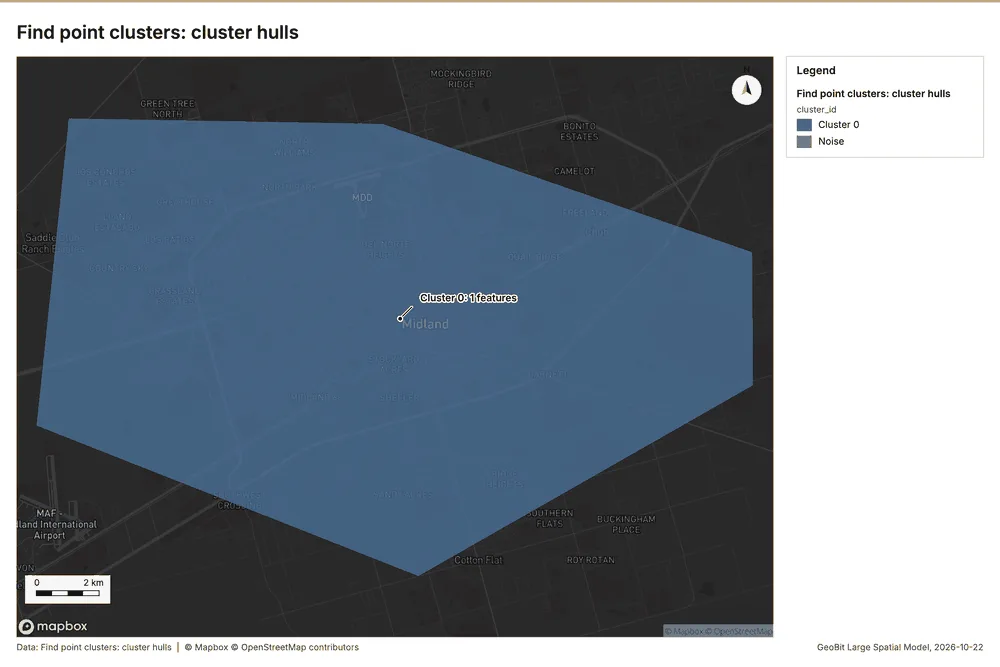
Find point clusters
What this analysis is. Find point clusters: Density-based clusters (DBSCAN, HDBSCAN or OPTICS, optionally space-time) with hulls and noise 32. In ArcGIS it is Find Point Clusters or Density-based Clustering; in QGIS, native:dbscanclustering or native:stdbscanclustering 32.
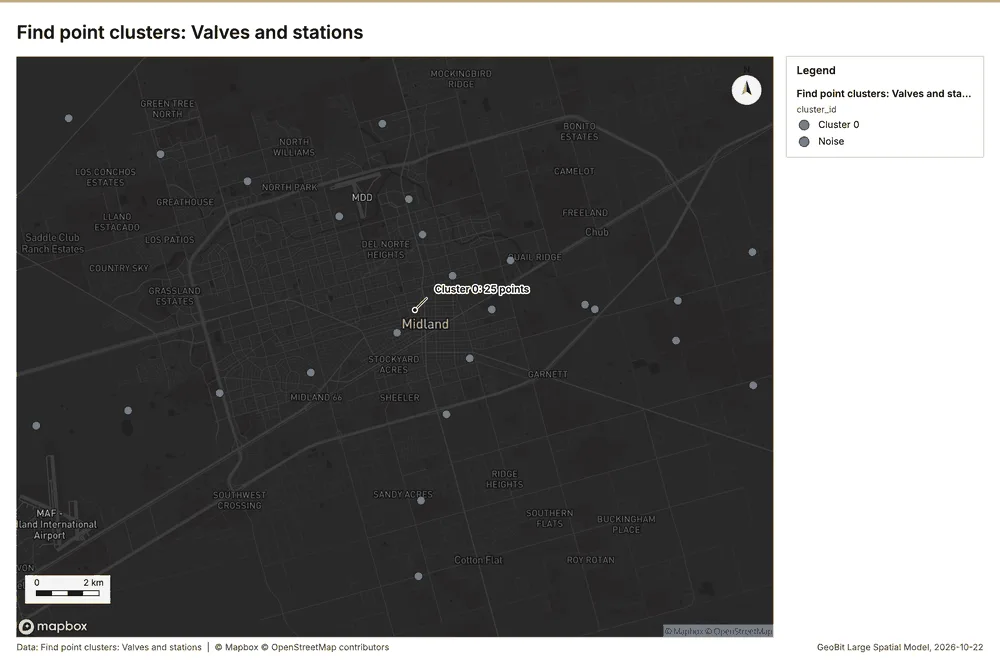
Why it was run on this data. DBSCAN finds dense groups of Valves and stations and separates noise 33.
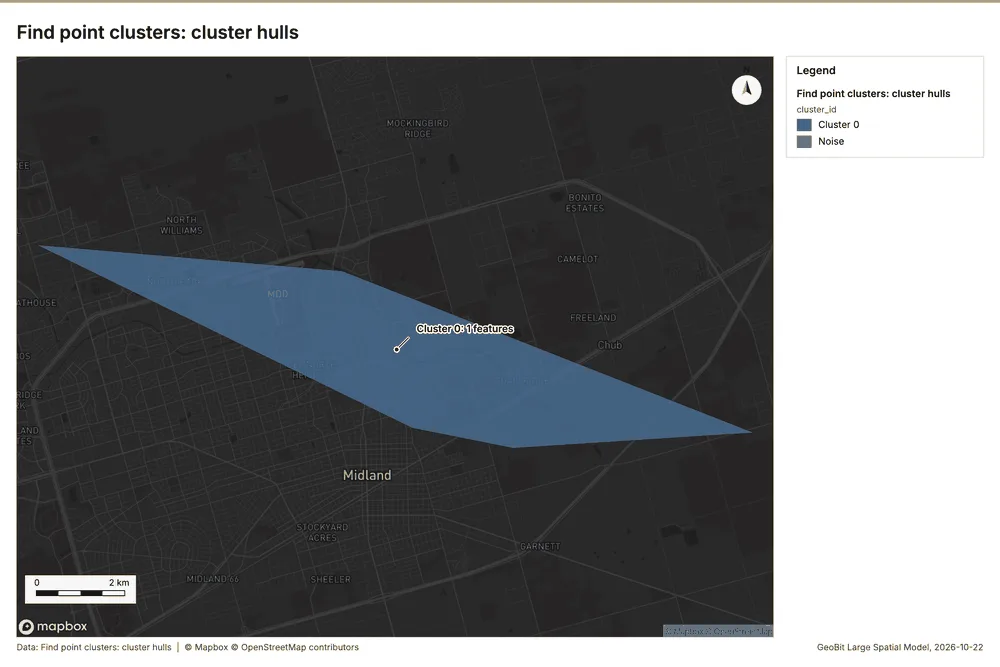
What it found. Find point clusters on Valves and stations: Find point clusters: 2 layers saved: Find point clusters: Valves and stations (25 features); Find point clusters: cluster hulls (1 feature) 2034. It reported result, count 25; result, noise 0; result, distance m 5,000; result, elapsed ms 2; result, min points 3; billing, cost 0.0505 34.
| Result | Value |
|---|---|
| result, count | 25 |
| result, noise | 0 |
| result, distance m | 5,000 |
| result, elapsed ms | 2 |
| result, min points | 3 |
| billing, cost | 0.0505 |
| billing, list price | 0.0505 |
| billing, upstream cost | 0 |
Findings
- Evidenced: Find point clusters on Valves and stations: Find point clusters: 2 layers saved: Find point clusters: Valves and stations (25 features); Find point clusters: cluster hulls (1 feature) 2034.
- Evidenced: It reported result, count 25; result, noise 0; result, distance m 5,000; result, elapsed ms 2; result, min points 3; billing, cost 0.0505 34.
Tool gp_find_point_clusters; parameters {"method": "dbscan", "project": "814309a7-f84e-4437-a8ec-209438a3f0a6", "features": {"layer": "Valves and stations (db114367)"}, "distance_m": 5000.0, "min_points": 3}
Find point clusters
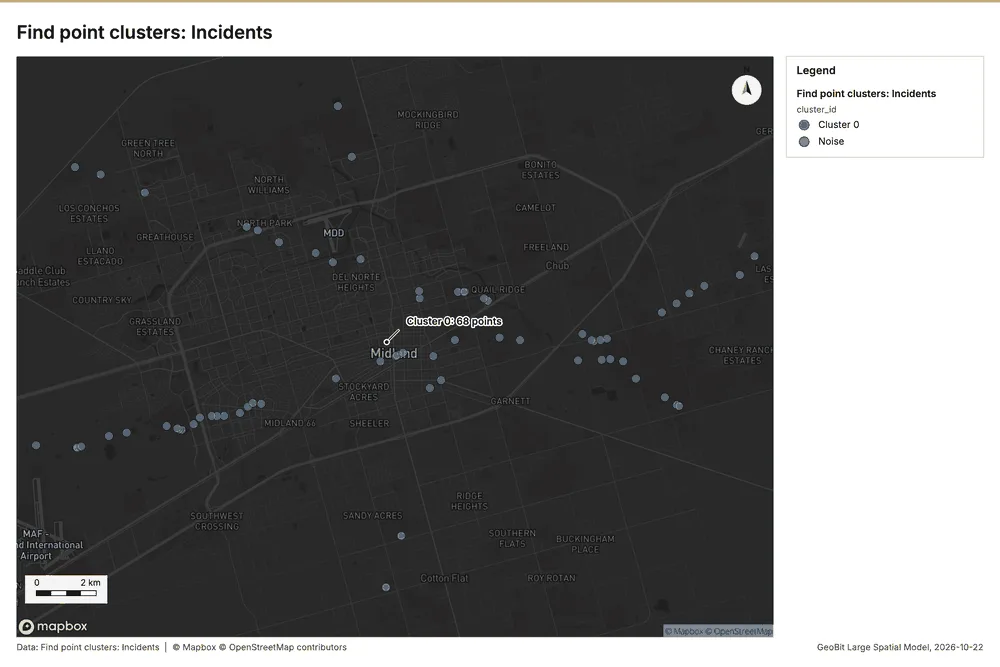
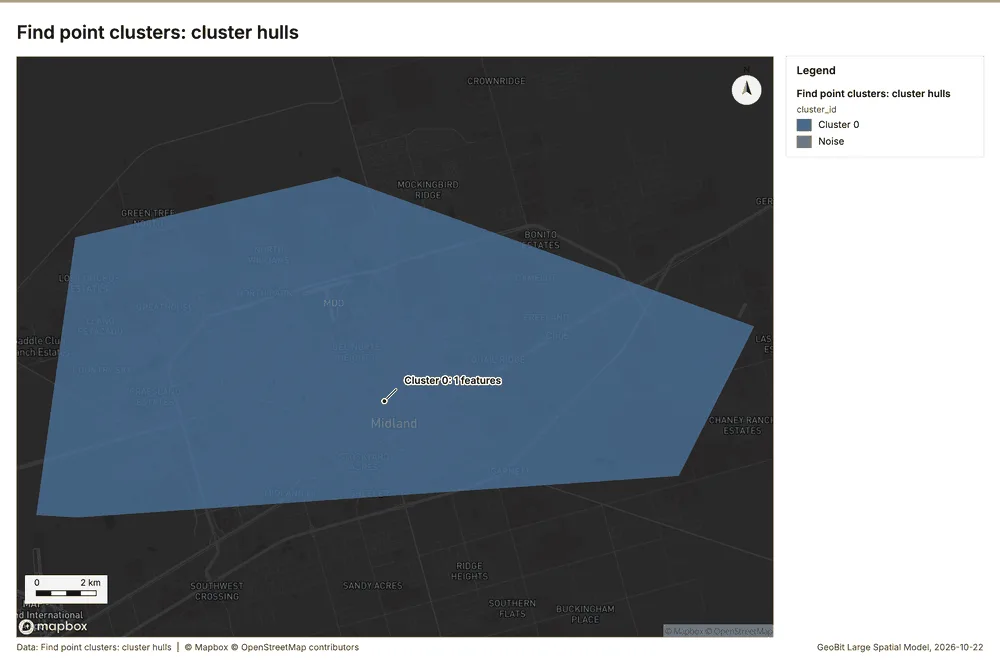
What this analysis is. Find point clusters: Density-based clusters (DBSCAN, HDBSCAN or OPTICS, optionally space-time) with hulls and noise 32. In ArcGIS it is Find Point Clusters or Density-based Clustering; in QGIS, native:dbscanclustering or native:stdbscanclustering 32.
Why it was run on this data. DBSCAN finds dense groups of Incidents and separates noise 35.
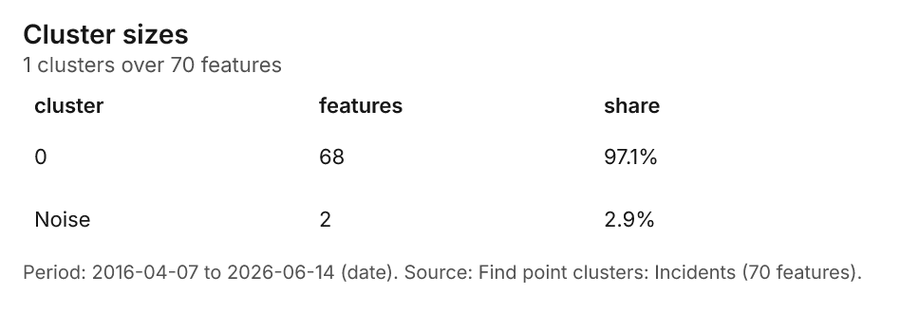
What it found. Find point clusters on Incidents: Find point clusters: 2 layers saved: Find point clusters: Incidents (70 features); Find point clusters: cluster hulls (1 feature) 836. It reported result, count 70; result, noise 2; result, distance m 5,000; result, elapsed ms 2; result, min points 3; billing, cost 0.0514 36.
| Result | Value |
|---|---|
| result, count | 70 |
| result, noise | 2 |
| result, distance m | 5,000 |
| result, elapsed ms | 2 |
| result, min points | 3 |
| billing, cost | 0.0514 |
| billing, list price | 0.0514 |
| billing, upstream cost | 0 |
Findings
- Evidenced: Find point clusters on Incidents: Find point clusters: 2 layers saved: Find point clusters: Incidents (70 features); Find point clusters: cluster hulls (1 feature) 836.
- Evidenced: It reported result, count 70; result, noise 2; result, distance m 5,000; result, elapsed ms 2; result, min points 3; billing, cost 0.0514 36.
Tool gp_find_point_clusters; parameters {"method": "dbscan", "project": "814309a7-f84e-4437-a8ec-209438a3f0a6", "features": {"layer": "Incidents (f9c94228)"}, "distance_m": 5000.0, "min_points": 3}
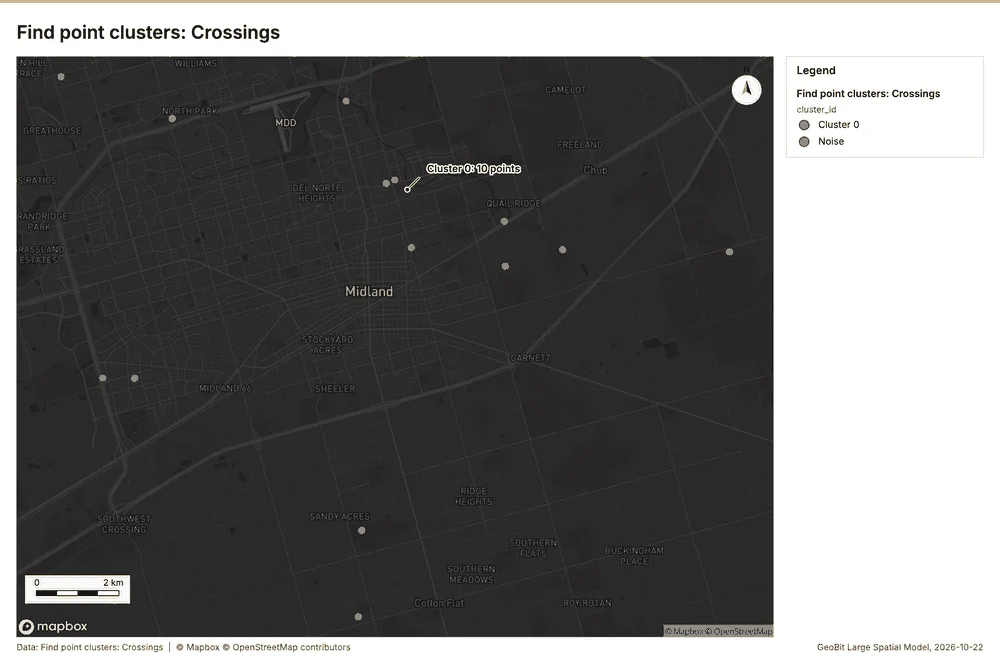
Find point clusters
What this analysis is. Find point clusters: Density-based clusters (DBSCAN, HDBSCAN or OPTICS, optionally space-time) with hulls and noise 32. In ArcGIS it is Find Point Clusters or Density-based Clustering; in QGIS, native:dbscanclustering or native:stdbscanclustering 32.
Why it was run on this data. DBSCAN finds dense groups of Crossings and separates noise 37.
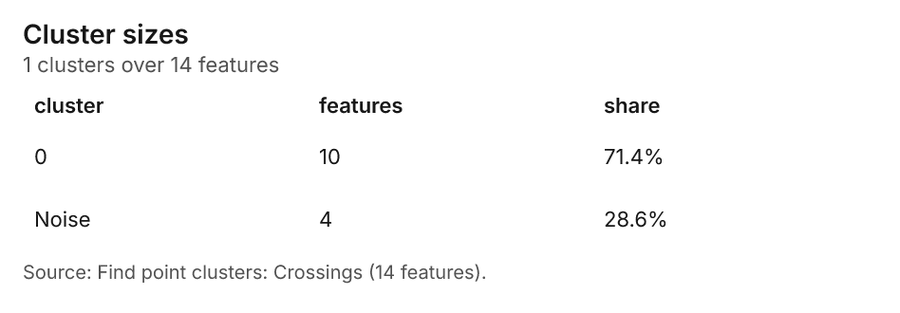
What it found. Find point clusters on Crossings: Find point clusters: 2 layers saved: Find point clusters: Crossings (14 features); Find point clusters: cluster hulls (1 feature) 3138. It reported result, count 14; result, noise 4; result, distance m 5,000; result, elapsed ms 1; result, min points 3; billing, cost 0.05028 38.
| Result | Value |
|---|---|
| result, count | 14 |
| result, noise | 4 |
| result, distance m | 5,000 |
| result, elapsed ms | 1 |
| result, min points | 3 |
| billing, cost | 0.05028 |
| billing, list price | 0.05028 |
| billing, upstream cost | 0 |
Findings
- Evidenced: Find point clusters on Crossings: Find point clusters: 2 layers saved: Find point clusters: Crossings (14 features); Find point clusters: cluster hulls (1 feature) 3138.
- Evidenced: It reported result, count 14; result, noise 4; result, distance m 5,000; result, elapsed ms 1; result, min points 3; billing, cost 0.05028 38.
Tool gp_find_point_clusters; parameters {"method": "dbscan", "project": "814309a7-f84e-4437-a8ec-209438a3f0a6", "features": {"layer": "Crossings (d8fae91e)"}, "distance_m": 5000.0, "min_points": 3}
Find nearest
What this analysis is. Find nearest: The k nearest features for each input, with geodesic distance and bearing 39. In ArcGIS it is Find Nearest or Near; in QGIS, native:joinbynearest or native:nearestneighbouranalysis 39.
Why it was run on this data. The nearest of Crossings to each of Valves and stations, with distances 40.
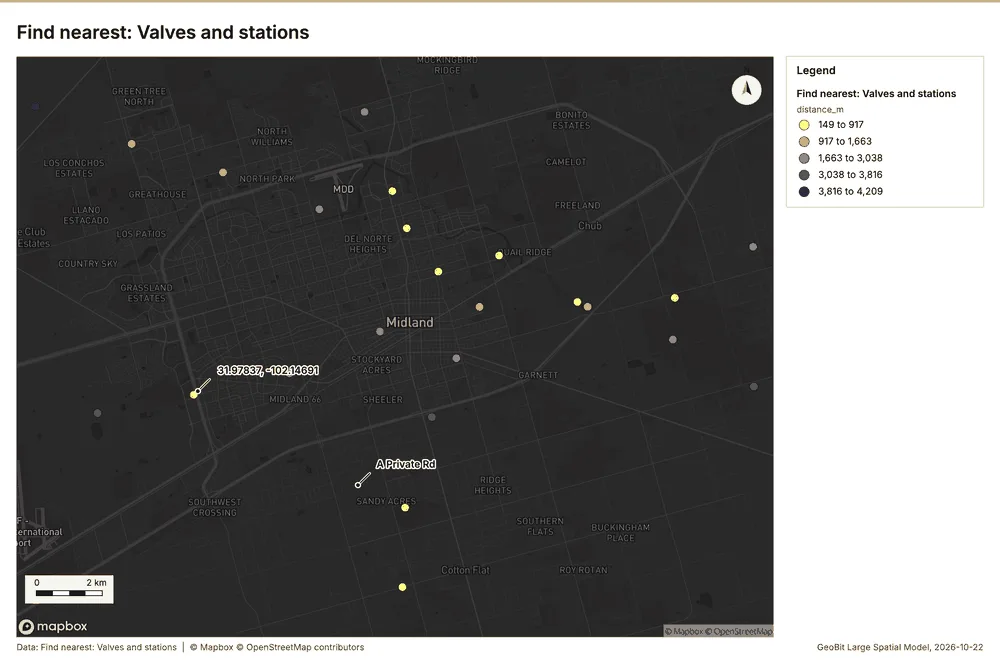
What it found. Find nearest on Crossings, Valves and stations: Find nearest: 1 layer saved: Find nearest: Valves and stations (24 features) 203141. It reported result, count 24; result, elapsed ms 2; billing, cost 0.01078; billing, list price 0.01078; billing, upstream cost 0 41.
| Result | Value |
|---|---|
| result, count | 24 |
| result, elapsed ms | 2 |
| billing, cost | 0.01078 |
| billing, list price | 0.01078 |
| billing, upstream cost | 0 |
Findings
- Evidenced: Find nearest on Crossings, Valves and stations: Find nearest: 1 layer saved: Find nearest: Valves and stations (24 features) 203141.
- Evidenced: It reported result, count 24; result, elapsed ms 2; billing, cost 0.01078; billing, list price 0.01078; billing, upstream cost 0 41.
Tool gp_find_nearest; parameters {"k": 1, "to": {"layer": "Crossings (d8fae91e)"}, "from": {"layer": "Valves and stations (db114367)"}, "project": "814309a7-f84e-4437-a8ec-209438a3f0a6", "max_distance_m": 5000.0}
Find nearest
What this analysis is. Find nearest: The k nearest features for each input, with geodesic distance and bearing 39. In ArcGIS it is Find Nearest or Near; in QGIS, native:joinbynearest or native:nearestneighbouranalysis 39.
Why it was run on this data. The nearest of Crossings to each of Valves and stations, with distances 40.
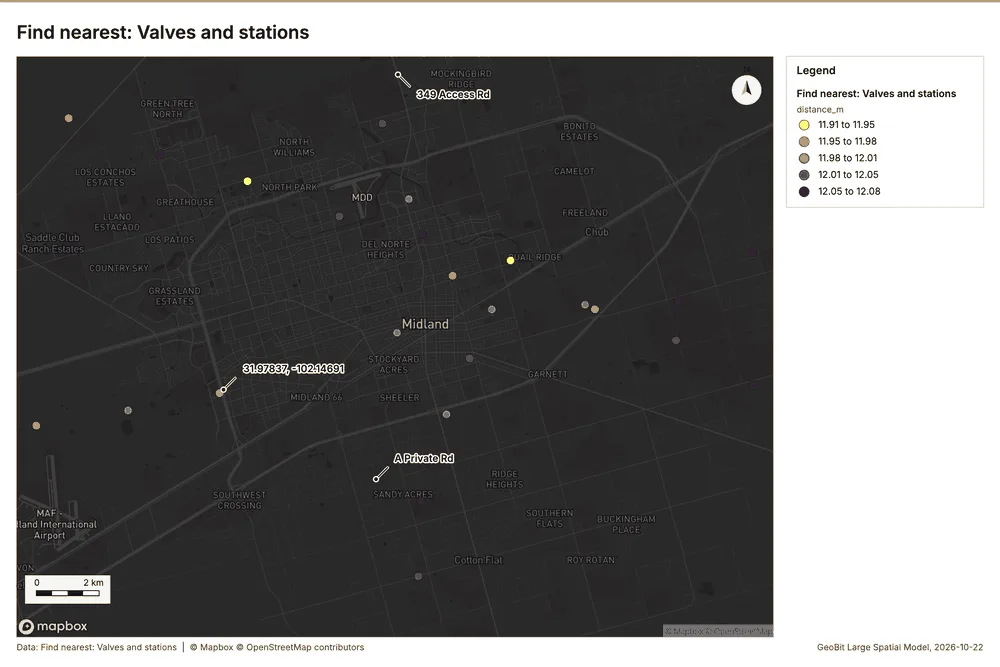
What it found. The gp_find_nearest tool was utilized, taking Valves and stations 20 and Pipeline segments 43 as input 42. The function successfully returned 25 results 42. The operation completed with an elapsed time of 12 ms 42, and the associated costs were reported as 0.01248 42.
| Result | Value |
|---|---|
| result, count | 25 |
| result, elapsed ms | 12 |
| billing, cost | 0.01248 |
| billing, list price | 0.01248 |
| billing, upstream cost | 0 |
Findings
- Evidenced: Find nearest on Pipeline segments, Valves and stations: Find nearest: 1 layer saved: Find nearest: Valves and stations (25 features) 204243.
- Evidenced: It reported result, count 25; result, elapsed ms 12; billing, cost 0.01248; billing, list price 0.01248; billing, upstream cost 0 42.
Tool gp_find_nearest; parameters {"k": 1, "to": {"layer": "Pipeline segments (07d2778e)"}, "from": {"layer": "Valves and stations (db114367)"}, "project": "814309a7-f84e-4437-a8ec-209438a3f0a6", "max_distance_m": 5000.0}
Near repeat
What this analysis is. Repeat and near repeat classification: Classify incidents as originators, repeats (same place) or near repeats within a distance and time window, with a Knox test table 44. In ArcGIS it is Repeat and Near Repeat Classification or Near Repeat Calculator 44.
Why it was run on this data. Near repeat analysis tests whether Incidents close in space also follow each other within 30 days 45.
What it found. The Near repeat classification tool was run using Incidents data 8 and generated a layer containing 70
| Result | Value |
|---|---|
| result, days | 30 |
| result, count | 70 |
| result, chains | 3 |
| result, distance m | 2,000 |
| result, elapsed ms | 4 |
| result, pairs linked | 3 |
| billing, cost | 0.0521 |
| billing, list price | 0.0521 |
| billing, upstream cost | 0 |
Findings
- Evidenced: Near repeat on Incidents: Repeat and near repeat classification: 1 layer saved: Repeat and near repeat classification: Incidents (70 features) 846.
- Evidenced: It reported result, days 30; result, count 70; result, chains 3; result, distance m 2,000; result, elapsed ms 4; result, pairs linked 3 46.
Tool gp_near_repeat; parameters {"days": 30, "project": "814309a7-f84e-4437-a8ec-209438a3f0a6", "features": {"layer": "Incidents (f9c94228)"}, "distance_m": 2000.0, "time_field": "date"}
Maps and charts
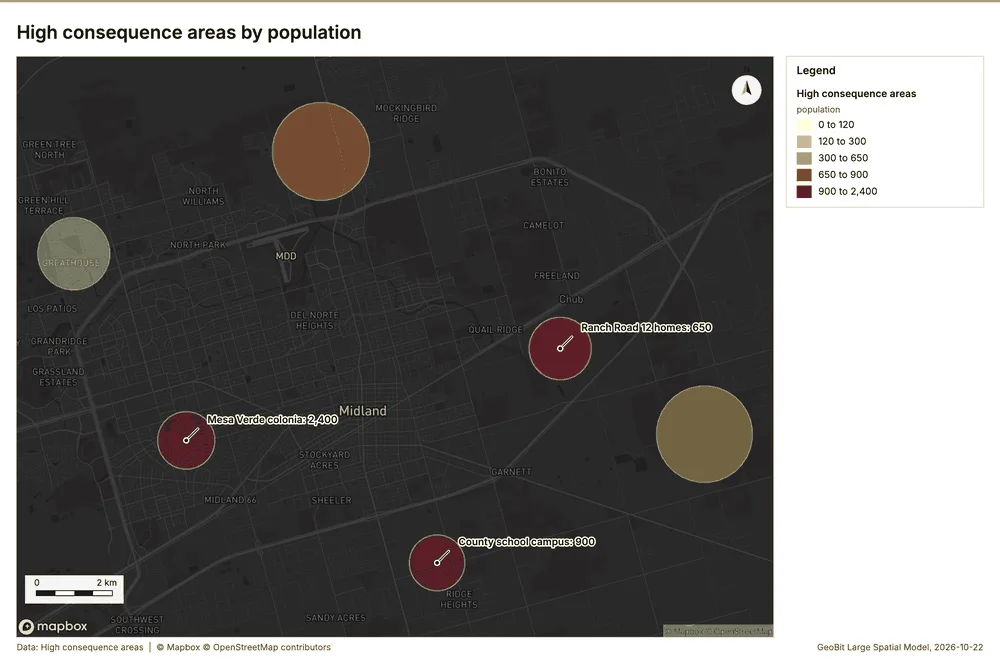
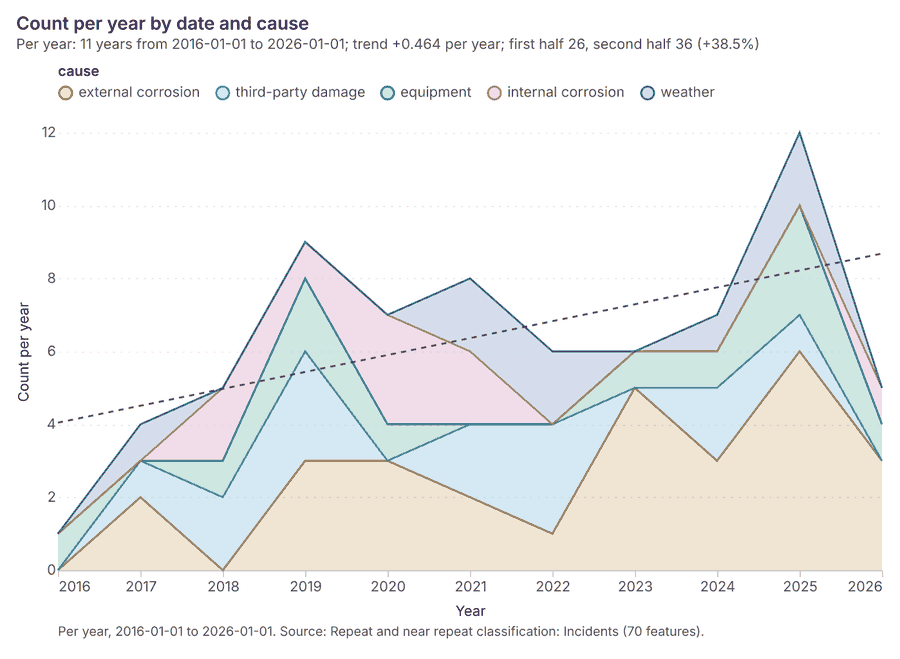
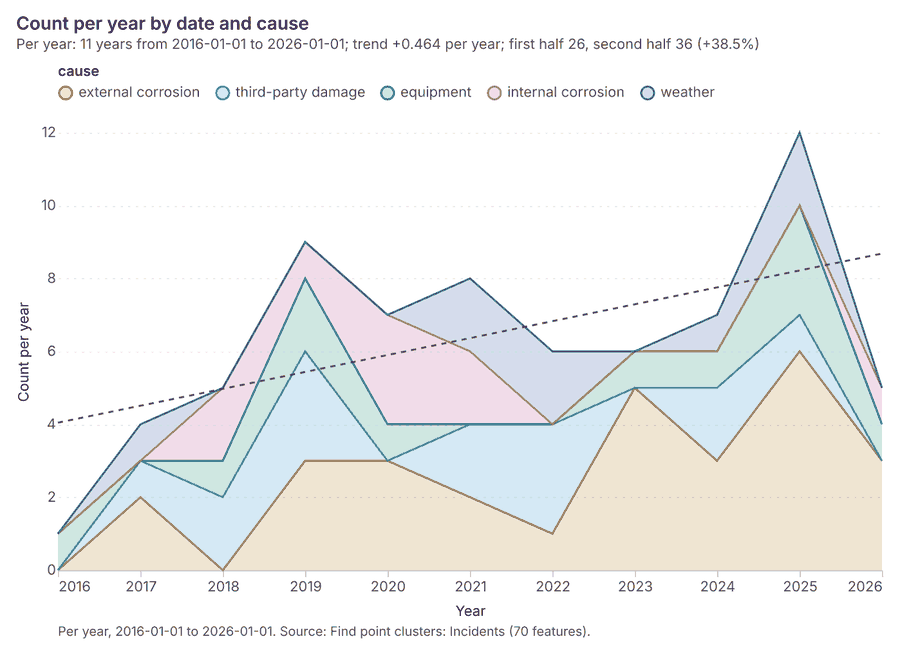
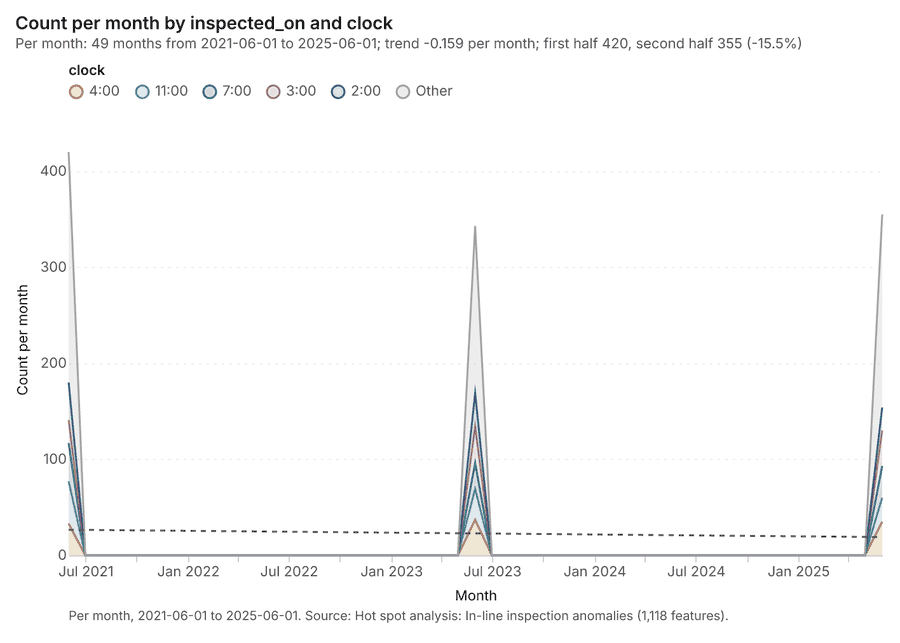
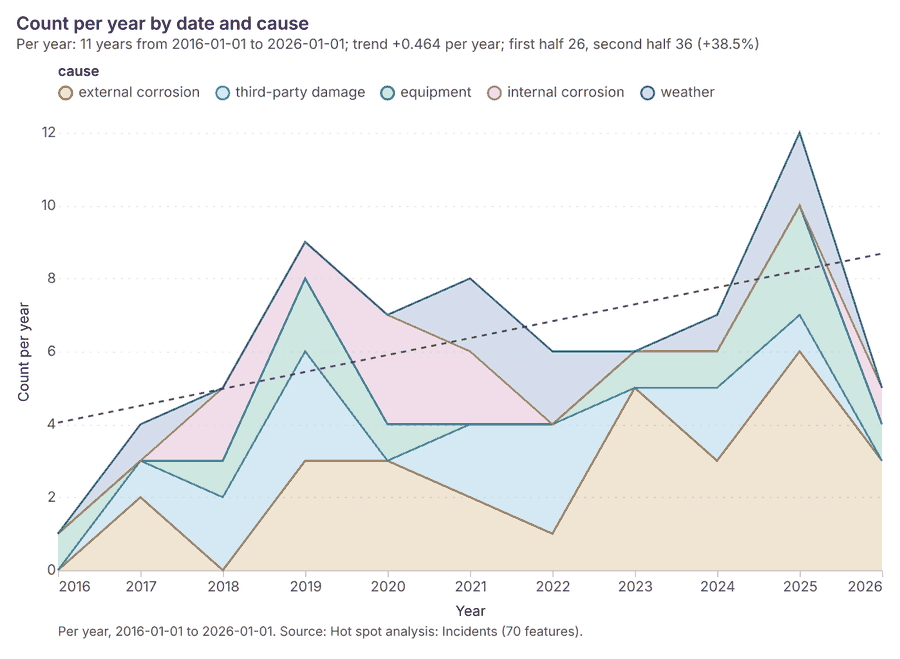
The run also made 20 map image(s) 4748495051525354555657585960616263646566 and 27 chart(s) 676869707172737475767778798081828384858687888990919293.
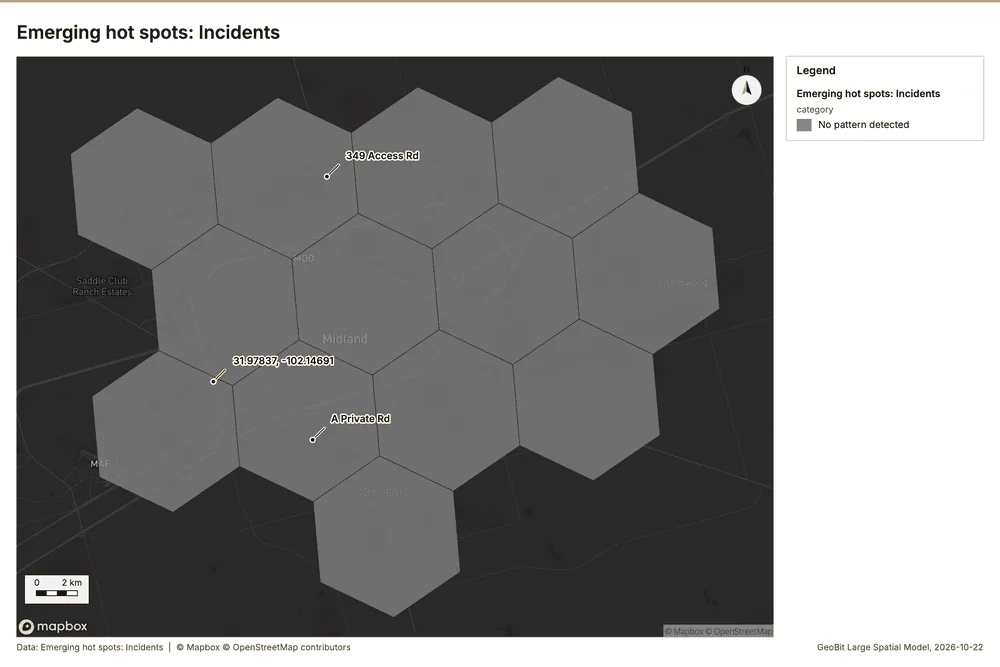
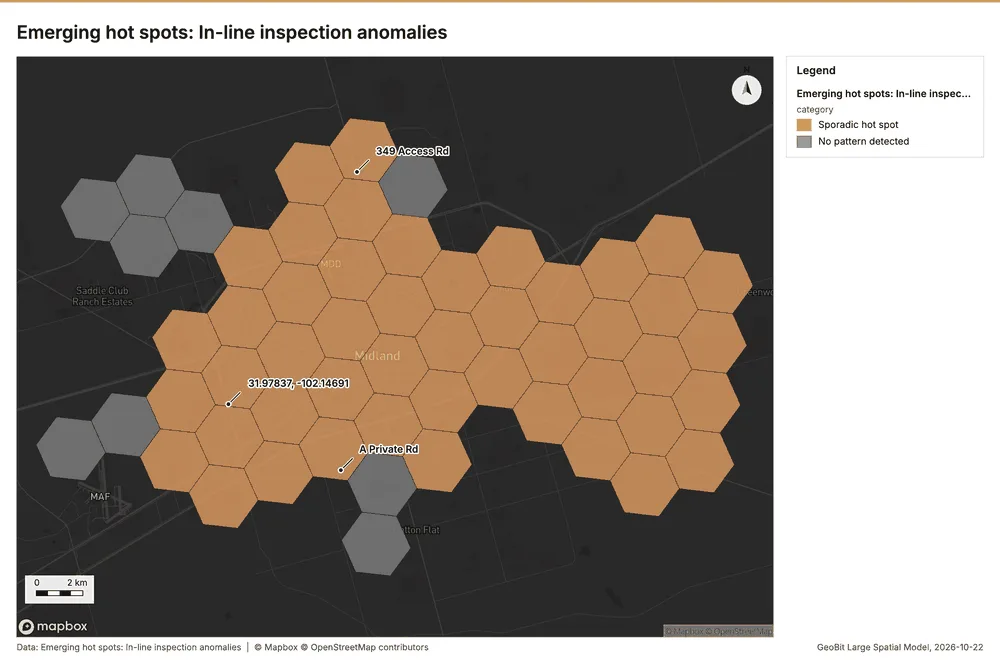
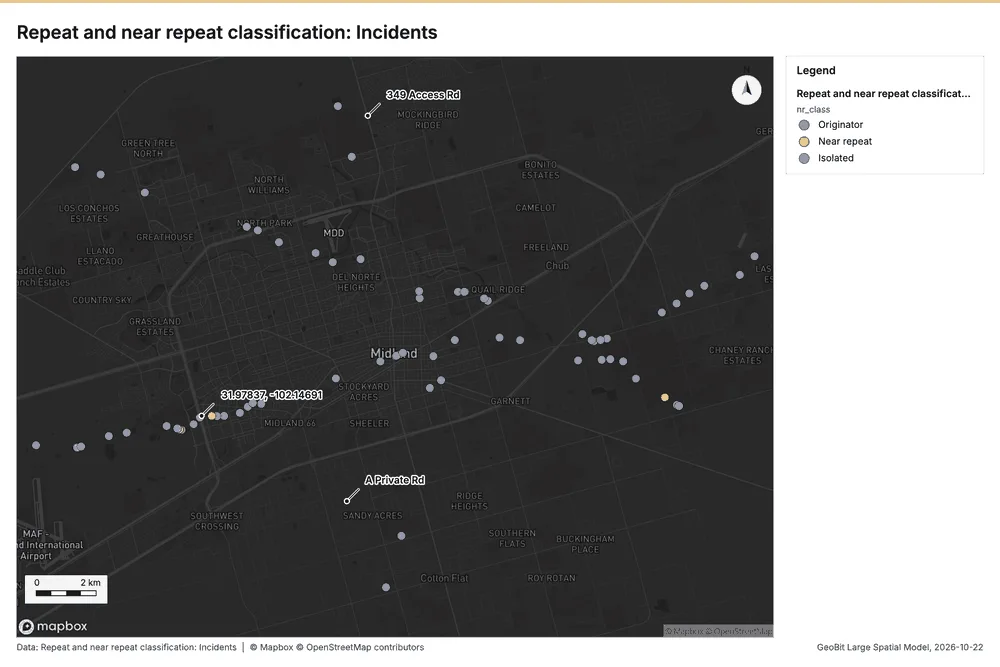
What the map shows. This map visualizes the analysis of emerging hot spots for incidents across the mapped area. The legend explicitly states that no pattern was detected for this category of incidents. Graphically, the map is drawn using a tessellation of hexagonal polygons, all of which are uniformly filled with a solid grey shade. Because no pattern was detected, the map does not display any visible clusters, significant gradients, or distinguishable high or low activity areas. 47
Inferred: read from the image by gemma4:e4b, not evidence.
Changes since the last run
This is the first report of this project.
Sources
- 1Rendering: Chart: Timeline: events per year by dataset. 33 rows id 27fa3a89-f6f1-4b50-8932-e49cafec5ffa
- 2Dataset: In-line inspection anomalies. vector, 1118 rows id ab2540a1-9c20-423b-b653-0cf763c5cc8e
- 3Dataset: Incidents. vector, 70 rows id 663eca22-c04e-4522-8f28-ddc430b2a25c
- 4Dataset: Cathodic protection readings. table, 168 rows id aa287ab3-e04d-46e8-9c49-c47c5badeaec
- 5Catalog: Emerging hot spots (operation catalog, gp_space_time_hot_spots). Where hot spots are new, consecutive, intensifying, persistent, diminishing, sporadic, oscillating or historical over time. ArcGIS: Emerging Hot Spot Analysis, Create Space Time Cube. id gp_space_time_hot_spots
- 6Plan: Space time hot spots of Incidents (the Start plan's candidate c_4bb802ff0ca3). Incidents carry dates in 'date': emerging hot spot analysis finds new, intensifying and fading hot spots per year. id 448d8646-960a-4050-9835-47097cdccdec:c_4bb802ff0ca3
- 7Tool result: gp_space_time_hot_spots, step 0. Emerging hot spots: 1 layer saved: Emerging hot spots: Incidents (13 features). id 23f4a12e-8bc2-4bed-8142-0185e3507423:0
- 8Layer: Incidents. 70 features id f9c94228-f003-4199-ac8c-9f7c7ce6573e
- 9Plan: Space time hot spots of In-line inspection anomalies (the Start plan's candidate c_ae37f1059eb0). In-line inspection anomalies carry dates in 'inspected_on': emerging hot spot analysis finds new, intensifying and fading hot spots per month. id 448d8646-960a-4050-9835-47097cdccdec:c_ae37f1059eb0
- 10Tool result: gp_space_time_hot_spots, step 1. Emerging hot spots: 1 layer saved: Emerging hot spots: In-line inspection anomalies (56 features). id 23f4a12e-8bc2-4bed-8142-0185e3507423:1
- 11Layer: In-line inspection anomalies. 1,118 features id 47cf738b-1c03-4bc9-bfb4-57cf3a587582
- 12Catalog: Hot spot analysis (operation catalog, gp_hot_spots). Getis-Ord Gi* hot and cold spots with z-scores, p-values and confidence bins. ArcGIS: Find Hot Spots, Hot Spot Analysis (Getis-Ord Gi*). QGIS: qgis:hotspot (plugin). id gp_hot_spots
- 13Plan: Hot spots of Incidents (the Start plan's candidate c_08af186146f2). 70 points: Getis-Ord Gi* tests whether the concentrations in Incidents are statistically significant. id 448d8646-960a-4050-9835-47097cdccdec:c_08af186146f2
- 14Tool result: gp_hot_spots, step 0. Hot spot analysis: 1 layer saved: Hot spot analysis: Incidents (70 features). id 20eab220-57ff-40eb-9e8f-f1ba9a425785:0
- 15Plan: Hot spots of In-line inspection anomalies (the Start plan's candidate c_5c37a51e83ac). 1118 points: Getis-Ord Gi* tests whether the concentrations in In-line inspection anomalies are statistically significant. id 448d8646-960a-4050-9835-47097cdccdec:c_5c37a51e83ac
- 16Tool result: gp_hot_spots, step 1. Hot spot analysis: 1 layer saved: Hot spot analysis: In-line inspection anomalies (1118 features). id 20eab220-57ff-40eb-9e8f-f1ba9a425785:1
- 17Catalog: Calculate density (operation catalog, gp_calculate_density). Kernel density per square kilometer on a grid. ArcGIS: Calculate Density, Kernel Density. QGIS: native:heatmapkerneldensityestimation. id gp_calculate_density
- 18Plan: Kernel density of Valves and stations (the Start plan's candidate c_43c88752b5a9). 25 points in Valves and stations: a density surface shows where they concentrate. id 448d8646-960a-4050-9835-47097cdccdec:c_43c88752b5a9
- 19Tool result: gp_calculate_density, step 0. Calculate density: 1 layer saved: Calculate density: Valves and stations (41 features). id b394d06b-54ec-4401-9565-ef318584fd16:0
- 20Layer: Valves and stations. 25 features id db114367-2f18-40d1-b793-29e91297403d
- 21Plan: Kernel density of Incidents (the Start plan's candidate c_d907267d52f7). 70 points in Incidents: a density surface shows where they concentrate. id 448d8646-960a-4050-9835-47097cdccdec:c_d907267d52f7
- 22Tool result: gp_calculate_density, step 1. Calculate density: 1 layer saved: Calculate density: Incidents (144 features). id b394d06b-54ec-4401-9565-ef318584fd16:1
- 23Plan: Kernel density of In-line inspection anomalies (the Start plan's candidate c_61f2c99818e2). 1118 points in In-line inspection anomalies: a density surface shows where they concentrate. id 448d8646-960a-4050-9835-47097cdccdec:c_61f2c99818e2
- 24Tool result: gp_calculate_density, step 2. Calculate density: 1 layer saved: Calculate density: In-line inspection anomalies (1039 features). id b394d06b-54ec-4401-9565-ef318584fd16:2
- 25Catalog: Summarize within (operation catalog, gp_summarize_within). Count and aggregate the features inside each polygon (or bin), proportionally for lines and polygons. ArcGIS: Summarize Within, Aggregate Points. QGIS: native:countpointsinpolygon, native:sumlinelengths. id gp_summarize_within
- 26Plan: Valves and stations per feature of Right of way (the Start plan's candidate c_b6eafe06ef22). Count Valves and stations inside each feature of Right of way by type; the counts map as a choropleth (natural breaks, sequential colors). id 448d8646-960a-4050-9835-47097cdccdec:c_b6eafe06ef22
- 27Tool result: gp_summarize_within, step 0. Summarize within: 1 layer saved: Summarize within: Right of way (3 features). id ea2f3752-846d-448f-8548-5b0a1c92e970:0
- 28Layer: Right of way. 3 features id 73b1c8fe-ccbe-4a85-be57-8b42d4cb2f98
- 29Tool result: gp_summarize_within, step 1. Summarize within: 1 layer saved: Summarize within: Right of way (3 features). id ea2f3752-846d-448f-8548-5b0a1c92e970:1
- 30Tool result: gp_summarize_within, step 2. Summarize within: 1 layer saved: Summarize within: Right of way (3 features). id ea2f3752-846d-448f-8548-5b0a1c92e970:2
- 31Layer: Crossings. 14 features id d8fae91e-ebf5-4f86-914b-576c03ec8036
- 32Catalog: Find point clusters (operation catalog, gp_find_point_clusters). Density-based clusters (DBSCAN, HDBSCAN or OPTICS, optionally space-time) with hulls and noise. ArcGIS: Find Point Clusters, Density-based Clustering. QGIS: native:dbscanclustering, native:stdbscanclustering. id gp_find_point_clusters
- 33Plan: Cluster points of Valves and stations (the Start plan's candidate c_7d2ecc0e9b43). DBSCAN finds dense groups of Valves and stations and separates noise. id 448d8646-960a-4050-9835-47097cdccdec:c_7d2ecc0e9b43
- 34Tool result: gp_find_point_clusters, step 0. Find point clusters: 2 layers saved: Find point clusters: Valves and stations (25 features); Find point clusters: cluster hulls (1 feature). id 507d8dab-fdbf-4108-a054-5cc8d7218340:0
- 35Plan: Cluster points of Incidents (the Start plan's candidate c_4583222e078a). DBSCAN finds dense groups of Incidents and separates noise. id 448d8646-960a-4050-9835-47097cdccdec:c_4583222e078a
- 36Tool result: gp_find_point_clusters, step 1. Find point clusters: 2 layers saved: Find point clusters: Incidents (70 features); Find point clusters: cluster hulls (1 feature). id 507d8dab-fdbf-4108-a054-5cc8d7218340:1
- 37Plan: Cluster points of Crossings (the Start plan's candidate c_8f718b3a3142). DBSCAN finds dense groups of Crossings and separates noise. id 448d8646-960a-4050-9835-47097cdccdec:c_8f718b3a3142
- 38Tool result: gp_find_point_clusters, step 2. Find point clusters: 2 layers saved: Find point clusters: Crossings (14 features); Find point clusters: cluster hulls (1 feature). id 507d8dab-fdbf-4108-a054-5cc8d7218340:2
- 39Catalog: Find nearest (operation catalog, gp_find_nearest). The k nearest features for each input, with geodesic distance and bearing. ArcGIS: Find Nearest, Near, Generate Near Table. QGIS: native:joinbynearest, native:nearestneighbouranalysis. id gp_find_nearest
- 40Plan: Find nearest of Valves and stations and Crossings (the Start plan's candidate c_e87a78f2fa16). The nearest of Crossings to each of Valves and stations, with distances. id 448d8646-960a-4050-9835-47097cdccdec:c_e87a78f2fa16
- 41Tool result: gp_find_nearest, step 0. Find nearest: 1 layer saved: Find nearest: Valves and stations (24 features). id 98d845c3-a74a-4d63-8fbd-35eec3976f40:0
- 42Tool result: gp_find_nearest, step 1. Find nearest: 1 layer saved: Find nearest: Valves and stations (25 features). id 98d845c3-a74a-4d63-8fbd-35eec3976f40:1
- 43Layer: Pipeline segments. 99 features id 07d2778e-6a97-4ea5-9c49-141bc281a75e
- 44Catalog: Repeat and near repeat classification (operation catalog, gp_near_repeat). Classify incidents as originators, repeats (same place) or near repeats within a distance and time window, with a Knox test table. ArcGIS: Repeat and Near Repeat Classification, Near Repeat Calculator. id gp_near_repeat
- 45Plan: Near repeat of Incidents (the Start plan's candidate c_4d0990e5511d). Near repeat analysis tests whether Incidents close in space also follow each other within 30 days. id 448d8646-960a-4050-9835-47097cdccdec:c_4d0990e5511d
- 46Tool result: gp_near_repeat, step 0. Repeat and near repeat classification: 1 layer saved: Repeat and near repeat classification: Incidents (70 features). id 17f2580a-7f80-4b8b-8777-ba9b5e830194:0
- 47Rendering: Map: Emerging hot spots: Incidents id 9d77b25c-7721-4e11-a5b8-69e26ace1947
- 48Rendering: Map: Emerging hot spots: In-line inspection anomalies id 90c2582b-d73c-4982-b407-80c5f9808033
- 49Rendering: Map: Hot spot analysis: Incidents id 0b24f3d0-b06f-47f1-b372-43fc67cd8551
- 50Rendering: Map: Hot spot analysis: In-line inspection anomalies id 646edb97-f9c0-4bb5-8f51-a08c09d511e1
- 51Rendering: Map: Calculate density: Valves and stations id fa84664f-57a4-4a31-9378-cdfa74fa2ba5
- 52Rendering: Map: Calculate density: Incidents id b5fc9dfb-5cc7-4f8a-949d-ff6deb264068
- 53Rendering: Map: Calculate density: In-line inspection anomalies id 91e61349-3f8f-4df0-b85a-43246e0fba55
- 54Rendering: Map: Summarize within: Right of way id 43517d52-4c91-4a8a-b917-7c411a38d5ca
- 55Rendering: Map: Summarize within: Right of way id df7b3a24-22a5-4690-8eb3-f3af1d42b294
- 56Rendering: Map: Summarize within: Right of way id 6a8fcbbf-760e-42ab-86f6-975c6006fbff
- 57Rendering: Map: Find point clusters: Valves and stations id 39caaf58-743b-4be4-920b-cf81ce83ab6f
- 58Rendering: Map: Find point clusters: cluster hulls id 1c7d602b-58b5-4916-ae6b-1c8f781c42bc
- 59Rendering: Map: Find point clusters: Incidents id 23a515ac-6326-42d9-9b84-da366f111f0e
- 60Rendering: Map: Find point clusters: cluster hulls id 747a058e-9c8c-4dba-b805-099266717c23
- 61Rendering: Map: Find point clusters: Crossings id 880dba8e-22b4-42a1-bc63-5b6f17eba956
- 62Rendering: Map: Find point clusters: cluster hulls id 98f83533-fdad-4c1e-acfc-495e89277355
- 63Rendering: Map: High consequence areas by population id be0e9735-069a-4144-bcc3-4a5076868b7c
- 64Rendering: Map: Find nearest: Valves and stations id bc01fc55-62d8-4244-a6d8-2793a3a96a49
- 65Rendering: Map: Find nearest: Valves and stations id 389dedf9-c64f-4e07-bdee-1671f0aac289
- 66Rendering: Map: Repeat and near repeat classification: Incidents id 406a8b02-086d-430d-8e92-300ea2f58ebd
- 67Rendering: Chart: Pipeline segments over time (install_year). 8 rows id deca339b-546d-42f4-b999-c2fdb81c2551
- 68Rendering: Chart: Incidents over time (date). 55 rows id 28e9d8db-0969-4b8d-83d8-bd378ada30cc
- 69Rendering: Chart: Cathodic protection readings over time (date). 33 rows id 725b8aba-f6b3-4275-a079-6901dd4884a9
- 70Rendering: Chart: Segment operating limits over time (last_hydrotest_year). 8 rows id e6a700bd-e844-4aab-9f11-fb5d6ff8d9ac
- 71Rendering: Chart: Emerging hot spots: Incidents. 5 rows id ed2a12a0-1331-4e78-9b34-65bbc3466482
- 72Rendering: Chart: Emerging hot spots: In-line inspection anomalies. 7 rows id 568b890a-b0be-491f-b8c3-f5baca0de437
- 73Rendering: Chart: Hot spot analysis: Incidents. 22 rows id d61118a9-f614-4df7-96ea-d1853818f5cf
- 74Rendering: Chart: Hot spot analysis: In-line inspection anomalies. 60 rows id 8cecacc9-055e-4d3f-9f80-ad5581542518
- 75Rendering: Chart: Calculate density: Valves and stations. 7 rows id bbe9d65a-31d2-4828-a906-2d7744159241
- 76Rendering: Chart: Calculate density: Incidents. 9 rows id 648c7e0d-4975-4e6e-a88d-8be424d7ce73
- 77Rendering: Chart: Calculate density: In-line inspection anomalies. 12 rows id 45573bae-3b31-4aab-9b04-e8beccc02c66
- 78Rendering: Chart: Summarize within: Right of way. 5 rows id 80a42914-05e4-4d36-8d7a-4764e8358c4f
- 79Rendering: Chart: Summarize within: Right of way. 5 rows id 3fdf97cb-7ffa-42e4-a600-ff2a1546d530
- 80Rendering: Chart: Summarize within: Right of way. 5 rows id a91d845a-309d-4fb0-b09d-704693b7a33b
- 81Rendering: Chart: Find point clusters: Valves and stations. 1 rows id d116571e-86a6-4d39-89f0-a9b3ba40672e
- 82Rendering: Chart: Find point clusters: cluster hulls. 1 rows id a9ae9300-1702-49d4-bd47-7cc40008cadb
- 83Rendering: Chart: Find point clusters: Incidents. 2 rows id 6038f799-99b3-4a72-971a-4641713d3bc3
- 84Rendering: Chart: Find point clusters: cluster hulls. 1 rows id 01936942-9161-4210-a318-1e6ed3863d39
- 85Rendering: Chart: Find point clusters: Crossings. 2 rows id 708723bf-3747-4536-aa03-97d38d05bdf3
- 86Rendering: Chart: Find point clusters: cluster hulls. 1 rows id 0f980414-a050-4d48-9c30-1718d1a53d68
- 87Rendering: Chart: Find nearest: Valves and stations. 20 rows id ab68370c-1fcf-4a5a-bbf1-95daec887c63
- 88Rendering: Chart: Find nearest: Valves and stations. 20 rows id 03a124ee-3f3c-47e6-8427-457bea343092
- 89Rendering: Chart: Repeat and near repeat classification: Incidents. 55 rows id e0888086-d628-40b1-8e42-a28e2ad03314
- 90Rendering: Chart: Repeat and near repeat classification: Incidents over time. 55 rows id f7464338-c561-4ab3-8d45-b9664fa68c68
- 91Rendering: Chart: Find point clusters: Incidents over time. 55 rows id 3f3f2588-8f02-47f7-8ee8-b3b05074a4c0
- 92Rendering: Chart: Hot spot analysis: In-line inspection anomalies over time. 294 rows id 9615d7aa-ad69-493e-bcb4-301f153345a1
- 93Rendering: Chart: Hot spot analysis: Incidents over time. 55 rows id 5ed77f86-ae16-45fc-a707-ffe729229767
- 94Dataset: Pipeline segments. vector, 99 rows id aa24fa37-25a4-401a-aa0f-50268903f48d
- 95Dataset: Valves and stations. vector, 25 rows id 3d5c604b-238e-40fa-bcba-7a9411f150fb
- 96Dataset: High consequence areas. vector, 6 rows id c293e365-7a24-403b-9a39-f76e3b3326f1
- 97Dataset: Crossings. vector, 14 rows id 782618e2-11ce-41b2-b4fd-45a0e8fece3e
- 98Dataset: Right of way. vector, 3 rows id bb3c91ac-eea5-46a8-8560-01a305ee1a0d
- 99Dataset: Segment operating limits. table, 99 rows id 09899115-5eca-4e48-a25a-e02a48f1f415
- 100Dataset: Integrity management summary. document, ? rows id e4123571-4649-4ac8-85d6-bae9373cef36
- 101Record: Sample: Oil and gas pipelines, Midland id 814309a7-f84e-4437-a8ec-209438a3f0a6
- 102Layer: Emerging hot spots: Incidents. 13 features id 5ccafcff-cff1-4e9d-b2e3-765c77156339
- 103Layer: Emerging hot spots: In-line inspection anomalies. 56 features id 353953a9-5c13-479e-8f1b-6501da1582af
- 104Layer: Hot spot analysis: Incidents. 70 features id ec8a6c4b-e103-4cfc-9121-a54f3cec6e6e
- 105Layer: Hot spot analysis: In-line inspection anomalies. 1,118 features id bacc7686-f7e9-4955-a0cf-9db64aa4870e
- 106Layer: Calculate density: Valves and stations. 41 features id cc1d20be-5dca-4029-8f6b-33c27e79db1c
- 107Layer: Calculate density: Incidents. 144 features id 2e0cc790-5fb1-484a-9922-bc678772fb7d
- 108Layer: Calculate density: In-line inspection anomalies. 1,039 features id 6b4b4463-7e80-40f9-93a0-0cb62e92dcba
- 109Layer: Summarize within: Right of way. 3 features id 13538db0-7d38-497b-94d1-40cf60ad245d
- 110Layer: Summarize within: Right of way. 3 features id 227062b6-aa48-4440-a0f6-277e670c7170
- 111Layer: Summarize within: Right of way. 3 features id 06a7dd75-70ab-43d0-8420-66697a994dcc
- 112Layer: Find point clusters: Valves and stations. 25 features id 3110df92-7371-4f5e-8e6c-b97b894bb024
- 113Layer: Find point clusters: cluster hulls. 1 features id 060ccd5c-fd41-45f5-a05f-e6acaf40d13a
- 114Layer: Find point clusters: Incidents. 70 features id 6114c590-c23e-4ea0-a8b5-64c271fd3ab1
- 115Layer: Find point clusters: cluster hulls. 1 features id 3b9663d6-98db-48e7-91e9-6c73f7269773
- 116Layer: Find point clusters: Crossings. 14 features id d6bec857-d779-4b62-a669-ed072d7ff82e
- 117Layer: Find point clusters: cluster hulls. 1 features id 97d9231b-03fd-4842-802d-d3268005cde9
- 118Layer: Find nearest: Valves and stations. 24 features id 93cedf1e-ed61-4ee9-81a7-acea61799ce3
- 119Layer: Find nearest: Valves and stations. 25 features id 07d06af9-ca9c-459d-905a-591ff5b8a7b4
- 120Layer: Repeat and near repeat classification: Incidents. 70 features id 190a3e17-cf0e-4dd6-b885-45720a8e06f1
Appendix: the data behind the chartsShow
Figure 1. Timeline: events per year by dataset 1
| period | series | value |
|---|---|---|
| 2016-01-01 | In-line inspection anomalies | 0 |
| 2016-01-01 | Cathodic protection readings | 0 |
| 2016-01-01 | Incidents | 1 |
| 2017-01-01 | In-line inspection anomalies | 0 |
| 2017-01-01 | Cathodic protection readings | 0 |
| 2017-01-01 | Incidents | 4 |
| 2018-01-01 | In-line inspection anomalies | 0 |
| 2018-01-01 | Cathodic protection readings | 0 |
| 2018-01-01 | Incidents | 5 |
| 2019-01-01 | In-line inspection anomalies | 0 |
| 2019-01-01 | Cathodic protection readings | 0 |
| 2019-01-01 | Incidents | 9 |
| 2020-01-01 | In-line inspection anomalies | 0 |
| 2020-01-01 | Cathodic protection readings | 0 |
| 2020-01-01 | Incidents | 7 |
| 2021-01-01 | In-line inspection anomalies | 420 |
| 2021-01-01 | Cathodic protection readings | 0 |
| 2021-01-01 | Incidents | 8 |
| 2022-01-01 | In-line inspection anomalies | 0 |
| 2022-01-01 | Cathodic protection readings | 0 |
| 2022-01-01 | Incidents | 6 |
| 2023-01-01 | In-line inspection anomalies | 343 |
| 2023-01-01 | Cathodic protection readings | 28 |
| 2023-01-01 | Incidents | 6 |
| 2024-01-01 | In-line inspection anomalies | 0 |
| 2024-01-01 | Cathodic protection readings | 56 |
| 2024-01-01 | Incidents | 7 |
| 2025-01-01 | In-line inspection anomalies | 355 |
| 2025-01-01 | Cathodic protection readings | 56 |
| 2025-01-01 | Incidents | 12 |
| 2026-01-01 | In-line inspection anomalies | 0 |
| 2026-01-01 | Cathodic protection readings | 28 |
| 2026-01-01 | Incidents | 5 |
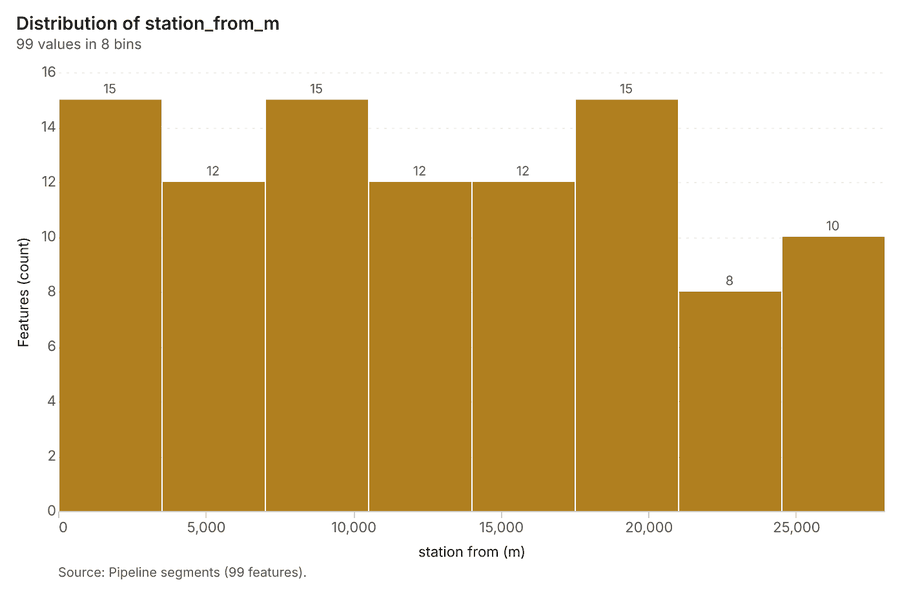
Figure 22. Pipeline segments over time (install_year) 67
| bin_start | bin_end | count |
|---|---|---|
| 0 | 3,500 | 15 |
| 3,500 | 7,000 | 12 |
| 7,000 | 1.05e+04 | 15 |
| 1.05e+04 | 1.4e+04 | 12 |
| 1.4e+04 | 1.75e+04 | 12 |
| 1.75e+04 | 2.1e+04 | 15 |
| 2.1e+04 | 2.45e+04 | 8 |
| 2.45e+04 | 2.8e+04 | 10 |
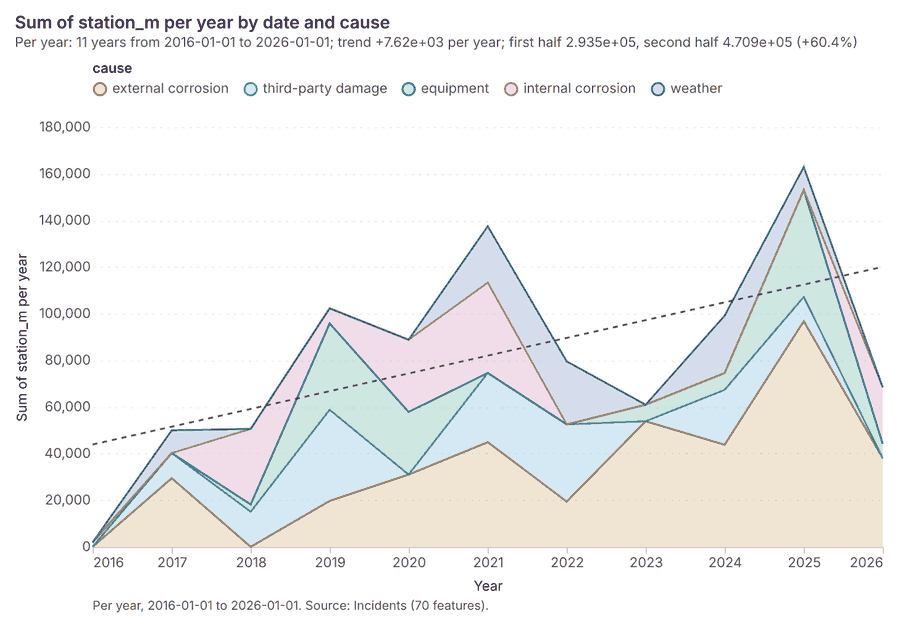
Figure 23. Incidents over time (date) 68
| period | series | value |
|---|---|---|
| 2016-01-01 | external corrosion | 0 |
| 2016-01-01 | third-party damage | 0 |
| 2016-01-01 | equipment | 1,913 |
| 2016-01-01 | internal corrosion | 0 |
| 2016-01-01 | weather | 0 |
| 2017-01-01 | external corrosion | 2.942e+04 |
| 2017-01-01 | third-party damage | 1.078e+04 |
| 2017-01-01 | equipment | 0 |
| 2017-01-01 | internal corrosion | 0 |
| 2017-01-01 | weather | 9,750 |
| 2018-01-01 | external corrosion | 0 |
| 2018-01-01 | third-party damage | 1.504e+04 |
| 2018-01-01 | equipment | 3,140 |
| 2018-01-01 | internal corrosion | 3.239e+04 |
| 2018-01-01 | weather | 0 |
| 2019-01-01 | external corrosion | 1.968e+04 |
| 2019-01-01 | third-party damage | 3.909e+04 |
| 2019-01-01 | equipment | 3.703e+04 |
| 2019-01-01 | internal corrosion | 6,487 |
| 2019-01-01 | weather | 0 |
| 2020-01-01 | external corrosion | 3.097e+04 |
| 2020-01-01 | third-party damage | 0 |
| 2020-01-01 | equipment | 2.688e+04 |
| 2020-01-01 | internal corrosion | 3.096e+04 |
| 2020-01-01 | weather | 0 |
| 2021-01-01 | external corrosion | 4.487e+04 |
| 2021-01-01 | third-party damage | 2.968e+04 |
| 2021-01-01 | equipment | 0 |
| 2021-01-01 | internal corrosion | 3.876e+04 |
| 2021-01-01 | weather | 2.415e+04 |
| 2022-01-01 | external corrosion | 1.941e+04 |
| 2022-01-01 | third-party damage | 3.309e+04 |
| 2022-01-01 | equipment | 0 |
| 2022-01-01 | internal corrosion | 0 |
| 2022-01-01 | weather | 2.702e+04 |
| 2023-01-01 | external corrosion | 5.385e+04 |
| 2023-01-01 | third-party damage | 0 |
| 2023-01-01 | equipment | 7,096 |
| 2023-01-01 | internal corrosion | 0 |
| 2023-01-01 | weather | 0 |
| 2024-01-01 | external corrosion | 4.377e+04 |
| 2024-01-01 | third-party damage | 2.353e+04 |
| 2024-01-01 | equipment | 7,225 |
| 2024-01-01 | internal corrosion | 0 |
| 2024-01-01 | weather | 2.458e+04 |
| 2025-01-01 | external corrosion | 9.675e+04 |
| 2025-01-01 | third-party damage | 1.043e+04 |
| 2025-01-01 | equipment | 4.588e+04 |
| 2025-01-01 | internal corrosion | 0 |
| 2025-01-01 | weather | 9,842 |
| 2026-01-01 | external corrosion | 3.798e+04 |
| 2026-01-01 | third-party damage | 0 |
| 2026-01-01 | equipment | 6,176 |
| 2026-01-01 | internal corrosion | 2.427e+04 |
| 2026-01-01 | weather | 0 |
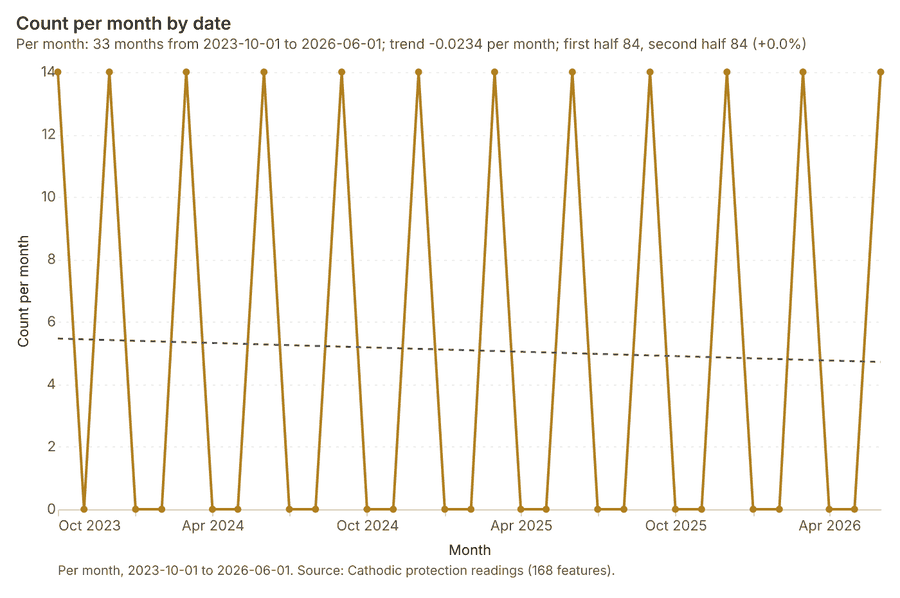
Figure 24. Cathodic protection readings over time (date) 69
| period | value |
|---|---|
| 2023-10-01 | 14 |
| 2023-11-01 | 0 |
| 2023-12-01 | 14 |
| 2024-01-01 | 0 |
| 2024-02-01 | 0 |
| 2024-03-01 | 14 |
| 2024-04-01 | 0 |
| 2024-05-01 | 0 |
| 2024-06-01 | 14 |
| 2024-07-01 | 0 |
| 2024-08-01 | 0 |
| 2024-09-01 | 14 |
| 2024-10-01 | 0 |
| 2024-11-01 | 0 |
| 2024-12-01 | 14 |
| 2025-01-01 | 0 |
| 2025-02-01 | 0 |
| 2025-03-01 | 14 |
| 2025-04-01 | 0 |
| 2025-05-01 | 0 |
| 2025-06-01 | 14 |
| 2025-07-01 | 0 |
| 2025-08-01 | 0 |
| 2025-09-01 | 14 |
| 2025-10-01 | 0 |
| 2025-11-01 | 0 |
| 2025-12-01 | 14 |
| 2026-01-01 | 0 |
| 2026-02-01 | 0 |
| 2026-03-01 | 14 |
| 2026-04-01 | 0 |
| 2026-05-01 | 0 |
| 2026-06-01 | 14 |
Figure 25. Segment operating limits over time (last_hydrotest_year) 70
| bin_start | bin_end | count |
|---|---|---|
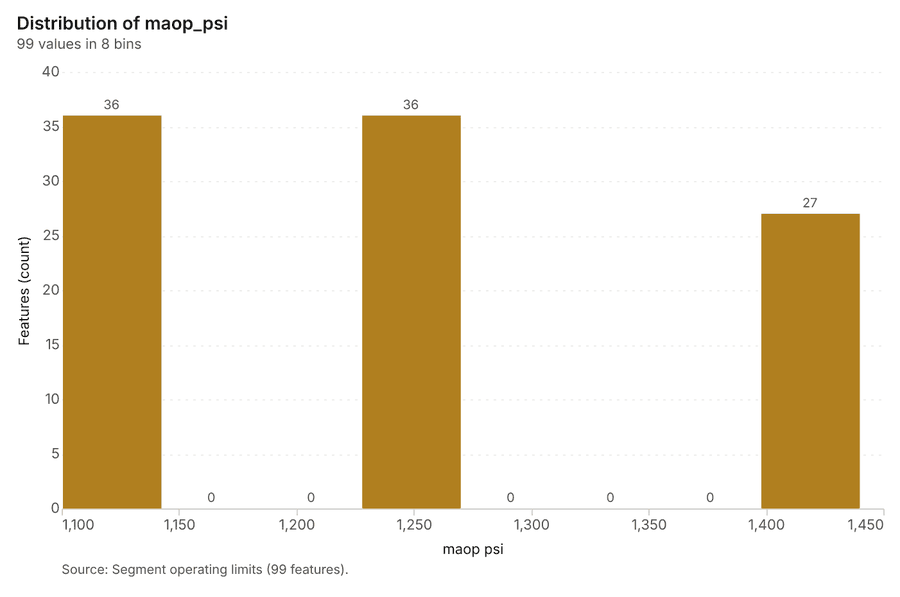
| 1,100 | 1,142 | 36 |
| 1,142 | 1,185 | 0 |
| 1,185 | 1,228 | 0 |
| 1,228 | 1,270 | 36 |
| 1,270 | 1,312 | 0 |
| 1,312 | 1,355 | 0 |
| 1,355 | 1,398 | 0 |
| 1,398 | 1,440 | 27 |
Figure 26. Emerging hot spots: Incidents 71
| bin_start | bin_end | count |
|---|---|---|
| -0.811 | -0.3204 | 3 |
| -0.3204 | 0.1702 | 3 |
| 0.1702 | 0.6608 | 0 |
| 0.6608 | 1.151 | 0 |
| 1.151 | 1.642 | 7 |
Figure 27. Emerging hot spots: In-line inspection anomalies 72
| bin_start | bin_end | count |
|---|---|---|
| -0.151 | 2.691 | 13 |
| 2.691 | 5.532 | 16 |
| 5.532 | 8.374 | 11 |
| 8.374 | 11.22 | 3 |
| 11.22 | 14.06 | 5 |
| 14.06 | 16.9 | 6 |
| 16.9 | 19.74 | 2 |
Figure 28. Hot spot analysis: Incidents 73
| bin_start | bin_end | band | band_label | count |
|---|---|---|---|---|
| -5.5 | -5 | cold_99 | Cold spot, 99% confidence | 5 |
| -5 | -4.5 | cold_99 | Cold spot, 99% confidence | 9 |
| -4.5 | -4 | cold_99 | Cold spot, 99% confidence | 1 |
| -4 | -3.5 | cold_99 | Cold spot, 99% confidence | 2 |
| -3.5 | -3 | cold_99 | Cold spot, 99% confidence | 2 |
| -3 | -2.5 | cold_99 | Cold spot, 99% confidence | 2 |
| -2.5 | -2 | cold_95 | Cold spot, 95% confidence | 4 |
| -2 | -1.5 | cold_90 | Cold spot, 90% confidence | 1 |
| -1.5 | -1 | not_significant | Not significant | 2 |
| -1 | -0.5 | not_significant | Not significant | 1 |
| -0.5 | 0 | not_significant | Not significant | 4 |
| 0 | 0.5 | not_significant | Not significant | 3 |
| 0.5 | 1 | not_significant | Not significant | 7 |
| 1.5 | 2 | hot_90 | Hot spot, 90% confidence | 3 |
| 1.5 | 2 | not_significant | Not significant | 1 |
| 2.5 | 3 | hot_99 | Hot spot, 99% confidence | 2 |
| 3 | 3.5 | hot_99 | Hot spot, 99% confidence | 1 |
| 3.5 | 4 | hot_99 | Hot spot, 99% confidence | 1 |
| 4 | 4.5 | hot_99 | Hot spot, 99% confidence | 1 |
| 5.5 | 6 | hot_99 | Hot spot, 99% confidence | 4 |
| 6 | 6.5 | hot_99 | Hot spot, 99% confidence | 10 |
| 6.5 | 7 | hot_99 | Hot spot, 99% confidence | 4 |
Figure 29. Hot spot analysis: In-line inspection anomalies 74
| bin_start | bin_end | band | band_label | count |
|---|---|---|---|---|
| -14 | -13.5 | cold_99 | Cold spot, 99% confidence | 58 |
| -13.5 | -13 | cold_99 | Cold spot, 99% confidence | 52 |
| -13 | -12.5 | cold_99 | Cold spot, 99% confidence | 22 |
| -12.5 | -12 | cold_99 | Cold spot, 99% confidence | 31 |
| -12 | -11.5 | cold_99 | Cold spot, 99% confidence | 35 |
| -11.5 | -11 | cold_99 | Cold spot, 99% confidence | 41 |
| -11 | -10.5 | cold_99 | Cold spot, 99% confidence | 1 |
| -10.5 | -10 | cold_99 | Cold spot, 99% confidence | 8 |
| -10 | -9.5 | cold_99 | Cold spot, 99% confidence | 9 |
| -9.5 | -9 | cold_99 | Cold spot, 99% confidence | 18 |
| -9 | -8.5 | cold_99 | Cold spot, 99% confidence | 23 |
| -8.5 | -8 | cold_99 | Cold spot, 99% confidence | 27 |
| -8 | -7.5 | cold_99 | Cold spot, 99% confidence | 27 |
| -7.5 | -7 | cold_99 | Cold spot, 99% confidence | 24 |
| -7 | -6.5 | cold_99 | Cold spot, 99% confidence | 34 |
| -6.5 | -6 | cold_99 | Cold spot, 99% confidence | 24 |
| -6 | -5.5 | cold_99 | Cold spot, 99% confidence | 17 |
| -5.5 | -5 | cold_99 | Cold spot, 99% confidence | 6 |
| -5 | -4.5 | cold_99 | Cold spot, 99% confidence | 3 |
| -4.5 | -4 | cold_99 | Cold spot, 99% confidence | 6 |
| -4 | -3.5 | cold_99 | Cold spot, 99% confidence | 23 |
| -3.5 | -3 | cold_99 | Cold spot, 99% confidence | 9 |
| -3 | -2.5 | cold_95 | Cold spot, 95% confidence | 2 |
| -3 | -2.5 | cold_99 | Cold spot, 99% confidence | 25 |
| -2.5 | -2 | cold_95 | Cold spot, 95% confidence | 6 |
| -2 | -1.5 | cold_90 | Cold spot, 90% confidence | 9 |
| -2 | -1.5 | not_significant | Not significant | 6 |
| -1.5 | -1 | not_significant | Not significant | 6 |
| -1 | -0.5 | not_significant | Not significant | 25 |
| -0.5 | 0 | not_significant | Not significant | 5 |
| 0 | 0.5 | not_significant | Not significant | 22 |
| 0.5 | 1 | not_significant | Not significant | 32 |
| 1 | 1.5 | not_significant | Not significant | 13 |
| 1.5 | 2 | hot_90 | Hot spot, 90% confidence | 5 |
| 1.5 | 2 | not_significant | Not significant | 12 |
| 2 | 2.5 | hot_95 | Hot spot, 95% confidence | 24 |
| 2.5 | 3 | hot_95 | Hot spot, 95% confidence | 5 |
| 2.5 | 3 | hot_99 | Hot spot, 99% confidence | 50 |
| 3 | 3.5 | hot_99 | Hot spot, 99% confidence | 20 |
| 3.5 | 4 | hot_99 | Hot spot, 99% confidence | 2 |
| 4 | 4.5 | hot_99 | Hot spot, 99% confidence | 6 |
| 4.5 | 5 | hot_99 | Hot spot, 99% confidence | 17 |
| 5 | 5.5 | hot_99 | Hot spot, 99% confidence | 8 |
| 5.5 | 6 | hot_99 | Hot spot, 99% confidence | 21 |
| 6 | 6.5 | hot_99 | Hot spot, 99% confidence | 33 |
| 6.5 | 7 | hot_99 | Hot spot, 99% confidence | 2 |
| 7.5 | 8 | hot_99 | Hot spot, 99% confidence | 8 |
| 8.5 | 9 | hot_99 | Hot spot, 99% confidence | 21 |
| 9 | 9.5 | hot_99 | Hot spot, 99% confidence | 12 |
| 9.5 | 10 | hot_99 | Hot spot, 99% confidence | 2 |
| 10 | 10.5 | hot_99 | Hot spot, 99% confidence | 10 |
| 10.5 | 11 | hot_99 | Hot spot, 99% confidence | 29 |
| 11 | 11.5 | hot_99 | Hot spot, 99% confidence | 31 |
| 11.5 | 12 | hot_99 | Hot spot, 99% confidence | 27 |
| 12 | 12.5 | hot_99 | Hot spot, 99% confidence | 41 |
| 12.5 | 13 | hot_99 | Hot spot, 99% confidence | 40 |
| 13 | 13.5 | hot_99 | Hot spot, 99% confidence | 2 |
| 13.5 | 14 | hot_99 | Hot spot, 99% confidence | 17 |
| 14 | 14.5 | hot_99 | Hot spot, 99% confidence | 9 |
| 15 | 15.5 | hot_99 | Hot spot, 99% confidence | 15 |
Figure 30. Calculate density: Valves and stations 75
| bin_start | bin_end | count |
|---|---|---|
| 0.005559 | 210.5 | 25 |
| 210.5 | 421.1 | 6 |
| 421.1 | 631.6 | 3 |
| 631.6 | 842.1 | 2 |
| 842.1 | 1,053 | 0 |
| 1,053 | 1,263 | 4 |
| 1,263 | 1,474 | 1 |
Figure 31. Calculate density: Incidents 76
| bin_start | bin_end | count |
|---|---|---|
| 0 | 1.778 | 10 |
| 1.778 | 3.556 | 20 |
| 3.556 | 5.333 | 18 |
| 5.333 | 7.111 | 25 |
| 7.111 | 8.889 | 13 |
| 8.889 | 10.67 | 21 |
| 10.67 | 12.44 | 12 |
| 12.44 | 14.22 | 15 |
| 14.22 | 16 | 10 |
Figure 32. Calculate density: In-line inspection anomalies 77
| bin_start | bin_end | count |
|---|---|---|
| 0 | 4.75 | 47 |
| 4.75 | 9.5 | 84 |
| 9.5 | 14.25 | 83 |
| 14.25 | 19 | 68 |
| 19 | 23.75 | 111 |
| 23.75 | 28.5 | 186 |
| 28.5 | 33.25 | 138 |
| 33.25 | 38 | 48 |
| 38 | 42.75 | 50 |
| 42.75 | 47.5 | 67 |
| 47.5 | 52.25 | 91 |
| 52.25 | 57 | 66 |
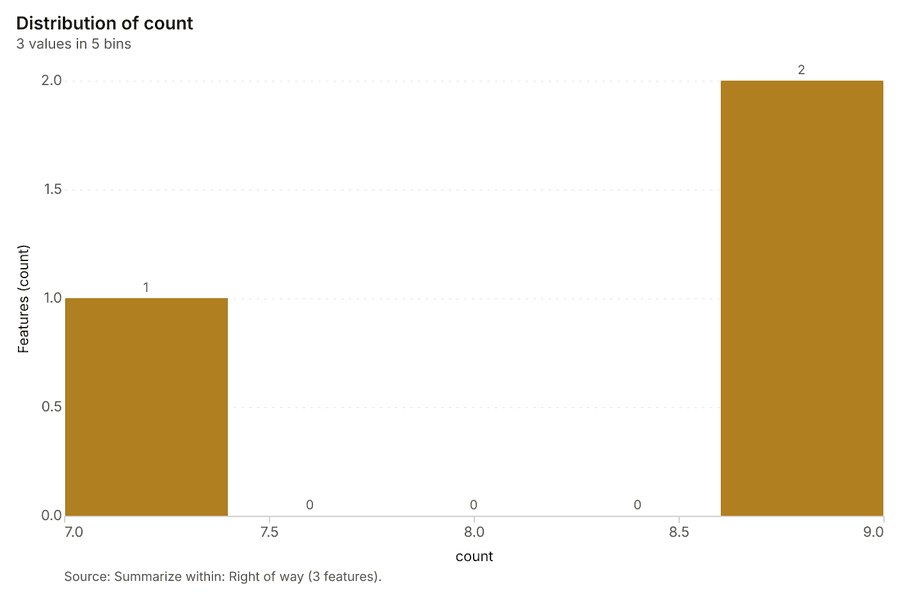
Figure 33. Summarize within: Right of way 78
| bin_start | bin_end | count |
|---|---|---|
| 7 | 7.4 | 1 |
| 7.4 | 7.8 | 0 |
| 7.8 | 8.2 | 0 |
| 8.2 | 8.6 | 0 |
| 8.6 | 9 | 2 |
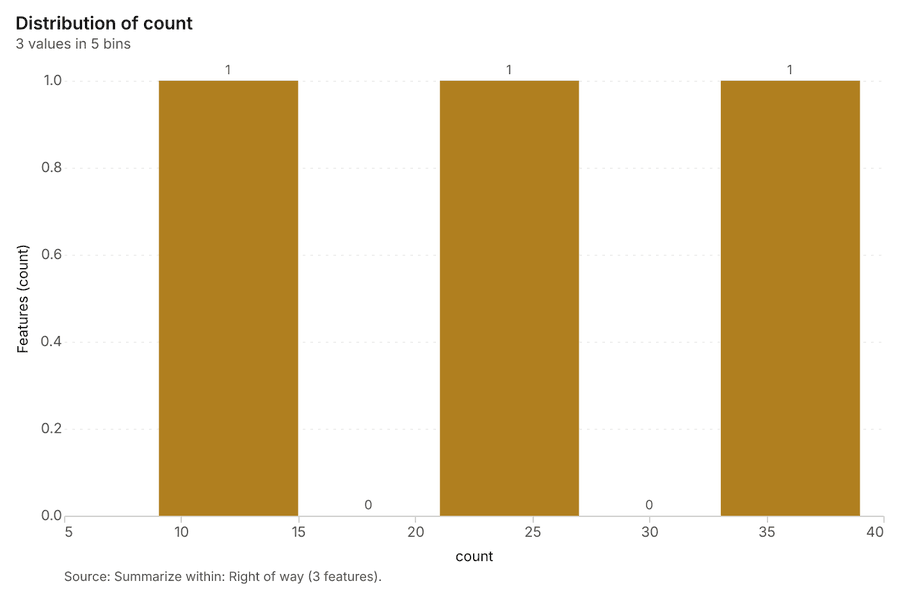
Figure 34. Summarize within: Right of way 79
| bin_start | bin_end | count |
|---|---|---|
| 9 | 15 | 1 |
| 15 | 21 | 0 |
| 21 | 27 | 1 |
| 27 | 33 | 0 |
| 33 | 39 | 1 |
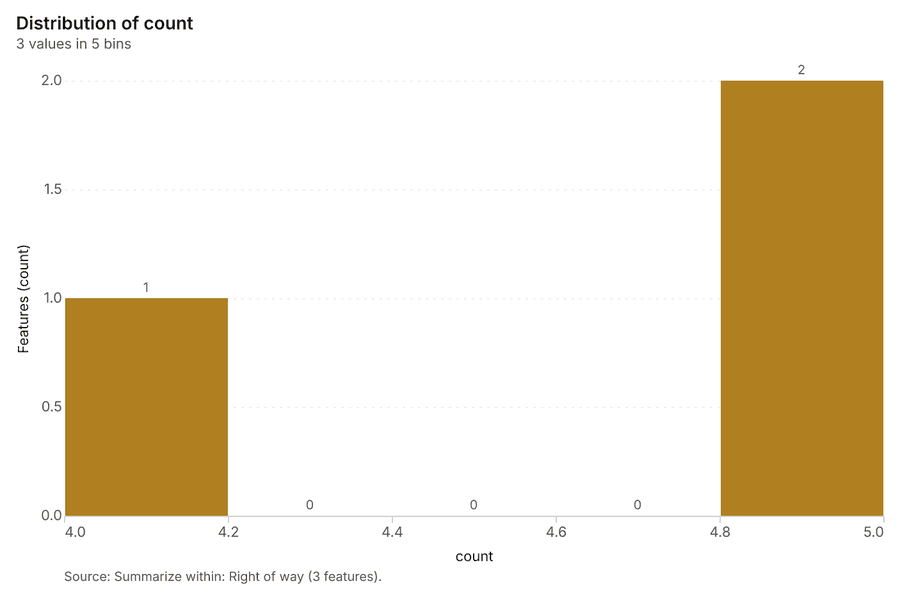
Figure 35. Summarize within: Right of way 80
| bin_start | bin_end | count |
|---|---|---|
| 4 | 4.2 | 1 |
| 4.2 | 4.4 | 0 |
| 4.4 | 4.6 | 0 |
| 4.6 | 4.8 | 0 |
| 4.8 | 5 | 2 |
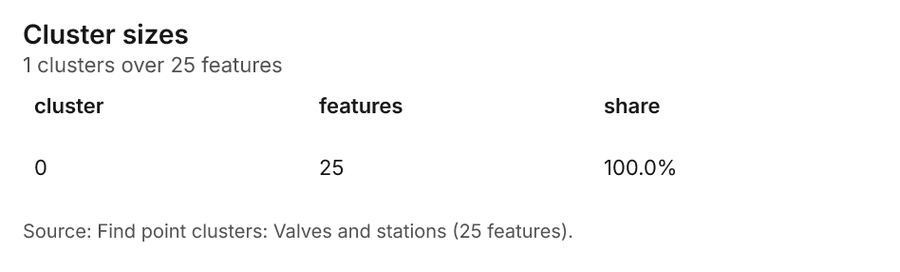
Figure 36. Find point clusters: Valves and stations 81
| cluster | features | fraction | share |
|---|---|---|---|
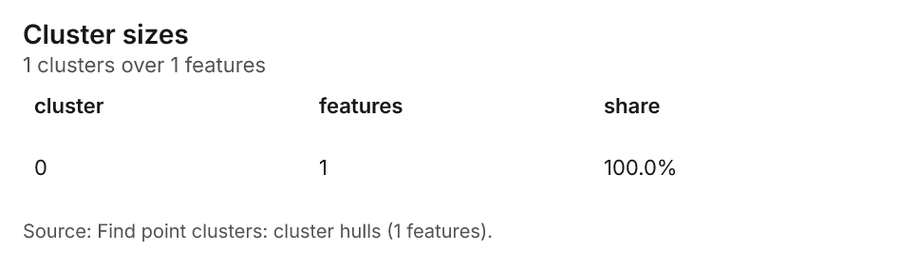
| 0 | 25 | 1 | 100.0% |
Figure 37. Find point clusters: cluster hulls 82
| cluster | features | fraction | share |
|---|---|---|---|
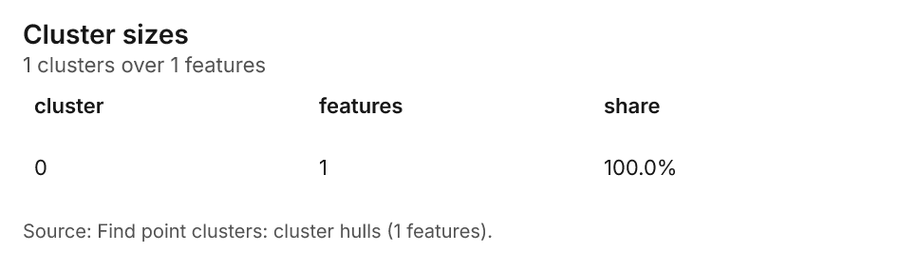
| 0 | 1 | 1 | 100.0% |
Figure 38. Find point clusters: Incidents 83
| cluster | features | fraction | share |
|---|---|---|---|
| 0 | 68 | 0.9714 | 97.1% |
| Noise | 2 | 0.02857 | 2.9% |
Figure 39. Find point clusters: cluster hulls 84
| cluster | features | fraction | share |
|---|---|---|---|
| 0 | 1 | 1 | 100.0% |
Figure 40. Find point clusters: Crossings 85
| cluster | features | fraction | share |
|---|---|---|---|
| 0 | 10 | 0.7143 | 71.4% |
| Noise | 4 | 0.2857 | 28.6% |
Figure 41. Find point clusters: cluster hulls 86
| cluster | features | fraction | share |
|---|---|---|---|
| 0 | 1 | 1 | 100.0% |
Figure 42. Find nearest: Valves and stations 87
| rank | name |
|---|---|
| 1 | draw |
| 1 | draw |
| 1 | road |
| 1 | road |
| 1 | road |
| 1 | road |
| 1 | road |
| 1 | road |
| 1 | road |
| 1 | road |
| 1 | road |
| 1 | road |
| 1 | draw |
| 1 | road |
| 1 | road |
| 1 | road |
| 1 | road |
| 1 | draw |
| 1 | road |
| 1 | road |
Figure 43. Find nearest: Valves and stations 88
| rank | name |
|---|---|
| 1 | 1 |
| 1 | 1 |
| 1 | 1 |
| 1 | 1 |
| 1 | 1 |
| 1 | 1 |
| 1 | 1 |
| 1 | 1 |
| 1 | 1 |
| 1 | 1 |
| 1 | 1 |
| 1 | 1 |
| 1 | 1 |
| 1 | 1 |
| 1 | 1 |
| 1 | 1 |
| 1 | 1 |
| 1 | 1 |
| 1 | 1 |
| 1 | 1 |
Figure 44. Repeat and near repeat classification: Incidents 89
| period | series | value |
|---|---|---|
| 2016-01-01 | external corrosion | 0 |
| 2016-01-01 | third-party damage | 0 |
| 2016-01-01 | equipment | 1 |
| 2016-01-01 | internal corrosion | 0 |
| 2016-01-01 | weather | 0 |
| 2017-01-01 | external corrosion | 2 |
| 2017-01-01 | third-party damage | 1 |
| 2017-01-01 | equipment | 0 |
| 2017-01-01 | internal corrosion | 0 |
| 2017-01-01 | weather | 1 |
| 2018-01-01 | external corrosion | 0 |
| 2018-01-01 | third-party damage | 2 |
| 2018-01-01 | equipment | 1 |
| 2018-01-01 | internal corrosion | 2 |
| 2018-01-01 | weather | 0 |
| 2019-01-01 | external corrosion | 3 |
| 2019-01-01 | third-party damage | 3 |
| 2019-01-01 | equipment | 2 |
| 2019-01-01 | internal corrosion | 1 |
| 2019-01-01 | weather | 0 |
| 2020-01-01 | external corrosion | 3 |
| 2020-01-01 | third-party damage | 0 |
| 2020-01-01 | equipment | 1 |
| 2020-01-01 | internal corrosion | 3 |
| 2020-01-01 | weather | 0 |
| 2021-01-01 | external corrosion | 2 |
| 2021-01-01 | third-party damage | 2 |
| 2021-01-01 | equipment | 0 |
| 2021-01-01 | internal corrosion | 2 |
| 2021-01-01 | weather | 2 |
| 2022-01-01 | external corrosion | 1 |
| 2022-01-01 | third-party damage | 3 |
| 2022-01-01 | equipment | 0 |
| 2022-01-01 | internal corrosion | 0 |
| 2022-01-01 | weather | 2 |
| 2023-01-01 | external corrosion | 5 |
| 2023-01-01 | third-party damage | 0 |
| 2023-01-01 | equipment | 1 |
| 2023-01-01 | internal corrosion | 0 |
| 2023-01-01 | weather | 0 |
| 2024-01-01 | external corrosion | 3 |
| 2024-01-01 | third-party damage | 2 |
| 2024-01-01 | equipment | 1 |
| 2024-01-01 | internal corrosion | 0 |
| 2024-01-01 | weather | 1 |
| 2025-01-01 | external corrosion | 6 |
| 2025-01-01 | third-party damage | 1 |
| 2025-01-01 | equipment | 3 |
| 2025-01-01 | internal corrosion | 0 |
| 2025-01-01 | weather | 2 |
| 2026-01-01 | external corrosion | 3 |
| 2026-01-01 | third-party damage | 0 |
| 2026-01-01 | equipment | 1 |
| 2026-01-01 | internal corrosion | 1 |
| 2026-01-01 | weather | 0 |
Figure 45. Repeat and near repeat classification: Incidents over time 90
| period | series | value |
|---|---|---|
| 2016-01-01 | external corrosion | 0 |
| 2016-01-01 | third-party damage | 0 |
| 2016-01-01 | equipment | 1 |
| 2016-01-01 | internal corrosion | 0 |
| 2016-01-01 | weather | 0 |
| 2017-01-01 | external corrosion | 2 |
| 2017-01-01 | third-party damage | 1 |
| 2017-01-01 | equipment | 0 |
| 2017-01-01 | internal corrosion | 0 |
| 2017-01-01 | weather | 1 |
| 2018-01-01 | external corrosion | 0 |
| 2018-01-01 | third-party damage | 2 |
| 2018-01-01 | equipment | 1 |
| 2018-01-01 | internal corrosion | 2 |
| 2018-01-01 | weather | 0 |
| 2019-01-01 | external corrosion | 3 |
| 2019-01-01 | third-party damage | 3 |
| 2019-01-01 | equipment | 2 |
| 2019-01-01 | internal corrosion | 1 |
| 2019-01-01 | weather | 0 |
| 2020-01-01 | external corrosion | 3 |
| 2020-01-01 | third-party damage | 0 |
| 2020-01-01 | equipment | 1 |
| 2020-01-01 | internal corrosion | 3 |
| 2020-01-01 | weather | 0 |
| 2021-01-01 | external corrosion | 2 |
| 2021-01-01 | third-party damage | 2 |
| 2021-01-01 | equipment | 0 |
| 2021-01-01 | internal corrosion | 2 |
| 2021-01-01 | weather | 2 |
| 2022-01-01 | external corrosion | 1 |
| 2022-01-01 | third-party damage | 3 |
| 2022-01-01 | equipment | 0 |
| 2022-01-01 | internal corrosion | 0 |
| 2022-01-01 | weather | 2 |
| 2023-01-01 | external corrosion | 5 |
| 2023-01-01 | third-party damage | 0 |
| 2023-01-01 | equipment | 1 |
| 2023-01-01 | internal corrosion | 0 |
| 2023-01-01 | weather | 0 |
| 2024-01-01 | external corrosion | 3 |
| 2024-01-01 | third-party damage | 2 |
| 2024-01-01 | equipment | 1 |
| 2024-01-01 | internal corrosion | 0 |
| 2024-01-01 | weather | 1 |
| 2025-01-01 | external corrosion | 6 |
| 2025-01-01 | third-party damage | 1 |
| 2025-01-01 | equipment | 3 |
| 2025-01-01 | internal corrosion | 0 |
| 2025-01-01 | weather | 2 |
| 2026-01-01 | external corrosion | 3 |
| 2026-01-01 | third-party damage | 0 |
| 2026-01-01 | equipment | 1 |
| 2026-01-01 | internal corrosion | 1 |
| 2026-01-01 | weather | 0 |
Figure 46. Find point clusters: Incidents over time 91
| period | series | value |
|---|---|---|
| 2016-01-01 | external corrosion | 0 |
| 2016-01-01 | third-party damage | 0 |
| 2016-01-01 | equipment | 1 |
| 2016-01-01 | internal corrosion | 0 |
| 2016-01-01 | weather | 0 |
| 2017-01-01 | external corrosion | 2 |
| 2017-01-01 | third-party damage | 1 |
| 2017-01-01 | equipment | 0 |
| 2017-01-01 | internal corrosion | 0 |
| 2017-01-01 | weather | 1 |
| 2018-01-01 | external corrosion | 0 |
| 2018-01-01 | third-party damage | 2 |
| 2018-01-01 | equipment | 1 |
| 2018-01-01 | internal corrosion | 2 |
| 2018-01-01 | weather | 0 |
| 2019-01-01 | external corrosion | 3 |
| 2019-01-01 | third-party damage | 3 |
| 2019-01-01 | equipment | 2 |
| 2019-01-01 | internal corrosion | 1 |
| 2019-01-01 | weather | 0 |
| 2020-01-01 | external corrosion | 3 |
| 2020-01-01 | third-party damage | 0 |
| 2020-01-01 | equipment | 1 |
| 2020-01-01 | internal corrosion | 3 |
| 2020-01-01 | weather | 0 |
| 2021-01-01 | external corrosion | 2 |
| 2021-01-01 | third-party damage | 2 |
| 2021-01-01 | equipment | 0 |
| 2021-01-01 | internal corrosion | 2 |
| 2021-01-01 | weather | 2 |
| 2022-01-01 | external corrosion | 1 |
| 2022-01-01 | third-party damage | 3 |
| 2022-01-01 | equipment | 0 |
| 2022-01-01 | internal corrosion | 0 |
| 2022-01-01 | weather | 2 |
| 2023-01-01 | external corrosion | 5 |
| 2023-01-01 | third-party damage | 0 |
| 2023-01-01 | equipment | 1 |
| 2023-01-01 | internal corrosion | 0 |
| 2023-01-01 | weather | 0 |
| 2024-01-01 | external corrosion | 3 |
| 2024-01-01 | third-party damage | 2 |
| 2024-01-01 | equipment | 1 |
| 2024-01-01 | internal corrosion | 0 |
| 2024-01-01 | weather | 1 |
| 2025-01-01 | external corrosion | 6 |
| 2025-01-01 | third-party damage | 1 |
| 2025-01-01 | equipment | 3 |
| 2025-01-01 | internal corrosion | 0 |
| 2025-01-01 | weather | 2 |
| 2026-01-01 | external corrosion | 3 |
| 2026-01-01 | third-party damage | 0 |
| 2026-01-01 | equipment | 1 |
| 2026-01-01 | internal corrosion | 1 |
| 2026-01-01 | weather | 0 |
Figure 47. Hot spot analysis: In-line inspection anomalies over time 92
| period | series | value |
|---|---|---|
| 2021-06-01 | 4:00 | 33 |
| 2021-06-01 | 11:00 | 44 |
| 2021-06-01 | 7:00 | 40 |
| 2021-06-01 | 3:00 | 24 |
| 2021-06-01 | 2:00 | 39 |
| 2021-06-01 | Other | 240 |
| 2021-07-01 | 4:00 | 0 |
| 2021-07-01 | 11:00 | 0 |
| 2021-07-01 | 7:00 | 0 |
| 2021-07-01 | 3:00 | 0 |
| 2021-07-01 | 2:00 | 0 |
| 2021-07-01 | Other | 0 |
| 2021-08-01 | 4:00 | 0 |
| 2021-08-01 | 11:00 | 0 |
| 2021-08-01 | 7:00 | 0 |
| 2021-08-01 | 3:00 | 0 |
| 2021-08-01 | 2:00 | 0 |
| 2021-08-01 | Other | 0 |
| 2021-09-01 | 4:00 | 0 |
| 2021-09-01 | 11:00 | 0 |
| 2021-09-01 | 7:00 | 0 |
| 2021-09-01 | 3:00 | 0 |
| 2021-09-01 | 2:00 | 0 |
| 2021-09-01 | Other | 0 |
| 2021-10-01 | 4:00 | 0 |
| 2021-10-01 | 11:00 | 0 |
| 2021-10-01 | 7:00 | 0 |
| 2021-10-01 | 3:00 | 0 |
| 2021-10-01 | 2:00 | 0 |
| 2021-10-01 | Other | 0 |
| 2021-11-01 | 4:00 | 0 |
| 2021-11-01 | 11:00 | 0 |
| 2021-11-01 | 7:00 | 0 |
| 2021-11-01 | 3:00 | 0 |
| 2021-11-01 | 2:00 | 0 |
| 2021-11-01 | Other | 0 |
| 2021-12-01 | 4:00 | 0 |
| 2021-12-01 | 11:00 | 0 |
| 2021-12-01 | 7:00 | 0 |
| 2021-12-01 | 3:00 | 0 |
| 2021-12-01 | 2:00 | 0 |
| 2021-12-01 | Other | 0 |
| 2022-01-01 | 4:00 | 0 |
| 2022-01-01 | 11:00 | 0 |
| 2022-01-01 | 7:00 | 0 |
| 2022-01-01 | 3:00 | 0 |
| 2022-01-01 | 2:00 | 0 |
| 2022-01-01 | Other | 0 |
| 2022-02-01 | 4:00 | 0 |
| 2022-02-01 | 11:00 | 0 |
| 2022-02-01 | 7:00 | 0 |
| 2022-02-01 | 3:00 | 0 |
| 2022-02-01 | 2:00 | 0 |
| 2022-02-01 | Other | 0 |
| 2022-03-01 | 4:00 | 0 |
| 2022-03-01 | 11:00 | 0 |
| 2022-03-01 | 7:00 | 0 |
| 2022-03-01 | 3:00 | 0 |
| 2022-03-01 | 2:00 | 0 |
| 2022-03-01 | Other | 0 |
| 2022-04-01 | 4:00 | 0 |
| 2022-04-01 | 11:00 | 0 |
| 2022-04-01 | 7:00 | 0 |
| 2022-04-01 | 3:00 | 0 |
| 2022-04-01 | 2:00 | 0 |
| 2022-04-01 | Other | 0 |
| 2022-05-01 | 4:00 | 0 |
| 2022-05-01 | 11:00 | 0 |
| 2022-05-01 | 7:00 | 0 |
| 2022-05-01 | 3:00 | 0 |
| 2022-05-01 | 2:00 | 0 |
| 2022-05-01 | Other | 0 |
| 2022-06-01 | 4:00 | 0 |
| 2022-06-01 | 11:00 | 0 |
| 2022-06-01 | 7:00 | 0 |
| 2022-06-01 | 3:00 | 0 |
| 2022-06-01 | 2:00 | 0 |
| 2022-06-01 | Other | 0 |
| 2022-07-01 | 4:00 | 0 |
| 2022-07-01 | 11:00 | 0 |
| 2022-07-01 | 7:00 | 0 |
| 2022-07-01 | 3:00 | 0 |
| 2022-07-01 | 2:00 | 0 |
| 2022-07-01 | Other | 0 |
| 2022-08-01 | 4:00 | 0 |
| 2022-08-01 | 11:00 | 0 |
| 2022-08-01 | 7:00 | 0 |
| 2022-08-01 | 3:00 | 0 |
| 2022-08-01 | 2:00 | 0 |
| 2022-08-01 | Other | 0 |
| 2022-09-01 | 4:00 | 0 |
| 2022-09-01 | 11:00 | 0 |
| 2022-09-01 | 7:00 | 0 |
| 2022-09-01 | 3:00 | 0 |
| 2022-09-01 | 2:00 | 0 |
| 2022-09-01 | Other | 0 |
| 2022-10-01 | 4:00 | 0 |
| 2022-10-01 | 11:00 | 0 |
| 2022-10-01 | 7:00 | 0 |
| 2022-10-01 | 3:00 | 0 |
| 2022-10-01 | 2:00 | 0 |
| 2022-10-01 | Other | 0 |
| 2022-11-01 | 4:00 | 0 |
| 2022-11-01 | 11:00 | 0 |
| 2022-11-01 | 7:00 | 0 |
| 2022-11-01 | 3:00 | 0 |
| 2022-11-01 | 2:00 | 0 |
| 2022-11-01 | Other | 0 |
| 2022-12-01 | 4:00 | 0 |
| 2022-12-01 | 11:00 | 0 |
| 2022-12-01 | 7:00 | 0 |
| 2022-12-01 | 3:00 | 0 |
| 2022-12-01 | 2:00 | 0 |
| 2022-12-01 | Other | 0 |
| 2023-01-01 | 4:00 | 0 |
| 2023-01-01 | 11:00 | 0 |
| 2023-01-01 | 7:00 | 0 |
| 2023-01-01 | 3:00 | 0 |
| 2023-01-01 | 2:00 | 0 |
| 2023-01-01 | Other | 0 |
| 2023-02-01 | 4:00 | 0 |
| 2023-02-01 | 11:00 | 0 |
| 2023-02-01 | 7:00 | 0 |
| 2023-02-01 | 3:00 | 0 |
| 2023-02-01 | 2:00 | 0 |
| 2023-02-01 | Other | 0 |
| 2023-03-01 | 4:00 | 0 |
| 2023-03-01 | 11:00 | 0 |
| 2023-03-01 | 7:00 | 0 |
| 2023-03-01 | 3:00 | 0 |
| 2023-03-01 | 2:00 | 0 |
| 2023-03-01 | Other | 0 |
| 2023-04-01 | 4:00 | 0 |
| 2023-04-01 | 11:00 | 0 |
| 2023-04-01 | 7:00 | 0 |
| 2023-04-01 | 3:00 | 0 |
| 2023-04-01 | 2:00 | 0 |
| 2023-04-01 | Other | 0 |
| 2023-05-01 | 4:00 | 0 |
| 2023-05-01 | 11:00 | 0 |
| 2023-05-01 | 7:00 | 0 |
| 2023-05-01 | 3:00 | 0 |
| 2023-05-01 | 2:00 | 0 |
| 2023-05-01 | Other | 0 |
| 2023-06-01 | 4:00 | 37 |
| 2023-06-01 | 11:00 | 32 |
| 2023-06-01 | 7:00 | 27 |
| 2023-06-01 | 3:00 | 38 |
| 2023-06-01 | 2:00 | 35 |
| 2023-06-01 | Other | 174 |
| 2023-07-01 | 4:00 | 0 |
| 2023-07-01 | 11:00 | 0 |
| 2023-07-01 | 7:00 | 0 |
| 2023-07-01 | 3:00 | 0 |
| 2023-07-01 | 2:00 | 0 |
| 2023-07-01 | Other | 0 |
| 2023-08-01 | 4:00 | 0 |
| 2023-08-01 | 11:00 | 0 |
| 2023-08-01 | 7:00 | 0 |
| 2023-08-01 | 3:00 | 0 |
| 2023-08-01 | 2:00 | 0 |
| 2023-08-01 | Other | 0 |
| 2023-09-01 | 4:00 | 0 |
| 2023-09-01 | 11:00 | 0 |
| 2023-09-01 | 7:00 | 0 |
| 2023-09-01 | 3:00 | 0 |
| 2023-09-01 | 2:00 | 0 |
| 2023-09-01 | Other | 0 |
| 2023-10-01 | 4:00 | 0 |
| 2023-10-01 | 11:00 | 0 |
| 2023-10-01 | 7:00 | 0 |
| 2023-10-01 | 3:00 | 0 |
| 2023-10-01 | 2:00 | 0 |
| 2023-10-01 | Other | 0 |
| 2023-11-01 | 4:00 | 0 |
| 2023-11-01 | 11:00 | 0 |
| 2023-11-01 | 7:00 | 0 |
| 2023-11-01 | 3:00 | 0 |
| 2023-11-01 | 2:00 | 0 |
| 2023-11-01 | Other | 0 |
| 2023-12-01 | 4:00 | 0 |
| 2023-12-01 | 11:00 | 0 |
| 2023-12-01 | 7:00 | 0 |
| 2023-12-01 | 3:00 | 0 |
| 2023-12-01 | 2:00 | 0 |
| 2023-12-01 | Other | 0 |
| 2024-01-01 | 4:00 | 0 |
| 2024-01-01 | 11:00 | 0 |
| 2024-01-01 | 7:00 | 0 |
| 2024-01-01 | 3:00 | 0 |
| 2024-01-01 | 2:00 | 0 |
| 2024-01-01 | Other | 0 |
| 2024-02-01 | 4:00 | 0 |
| 2024-02-01 | 11:00 | 0 |
| 2024-02-01 | 7:00 | 0 |
| 2024-02-01 | 3:00 | 0 |
| 2024-02-01 | 2:00 | 0 |
| 2024-02-01 | Other | 0 |
| 2024-03-01 | 4:00 | 0 |
| 2024-03-01 | 11:00 | 0 |
| 2024-03-01 | 7:00 | 0 |
| 2024-03-01 | 3:00 | 0 |
| 2024-03-01 | 2:00 | 0 |
| 2024-03-01 | Other | 0 |
| 2024-04-01 | 4:00 | 0 |
| 2024-04-01 | 11:00 | 0 |
| 2024-04-01 | 7:00 | 0 |
| 2024-04-01 | 3:00 | 0 |
| 2024-04-01 | 2:00 | 0 |
| 2024-04-01 | Other | 0 |
| 2024-05-01 | 4:00 | 0 |
| 2024-05-01 | 11:00 | 0 |
| 2024-05-01 | 7:00 | 0 |
| 2024-05-01 | 3:00 | 0 |
| 2024-05-01 | 2:00 | 0 |
| 2024-05-01 | Other | 0 |
| 2024-06-01 | 4:00 | 0 |
| 2024-06-01 | 11:00 | 0 |
| 2024-06-01 | 7:00 | 0 |
| 2024-06-01 | 3:00 | 0 |
| 2024-06-01 | 2:00 | 0 |
| 2024-06-01 | Other | 0 |
| 2024-07-01 | 4:00 | 0 |
| 2024-07-01 | 11:00 | 0 |
| 2024-07-01 | 7:00 | 0 |
| 2024-07-01 | 3:00 | 0 |
| 2024-07-01 | 2:00 | 0 |
| 2024-07-01 | Other | 0 |
| 2024-08-01 | 4:00 | 0 |
| 2024-08-01 | 11:00 | 0 |
| 2024-08-01 | 7:00 | 0 |
| 2024-08-01 | 3:00 | 0 |
| 2024-08-01 | 2:00 | 0 |
| 2024-08-01 | Other | 0 |
| 2024-09-01 | 4:00 | 0 |
| 2024-09-01 | 11:00 | 0 |
| 2024-09-01 | 7:00 | 0 |
| 2024-09-01 | 3:00 | 0 |
| 2024-09-01 | 2:00 | 0 |
| 2024-09-01 | Other | 0 |
| 2024-10-01 | 4:00 | 0 |
| 2024-10-01 | 11:00 | 0 |
| 2024-10-01 | 7:00 | 0 |
| 2024-10-01 | 3:00 | 0 |
| 2024-10-01 | 2:00 | 0 |
| 2024-10-01 | Other | 0 |
| 2024-11-01 | 4:00 | 0 |
| 2024-11-01 | 11:00 | 0 |
| 2024-11-01 | 7:00 | 0 |
| 2024-11-01 | 3:00 | 0 |
| 2024-11-01 | 2:00 | 0 |
| 2024-11-01 | Other | 0 |
| 2024-12-01 | 4:00 | 0 |
| 2024-12-01 | 11:00 | 0 |
| 2024-12-01 | 7:00 | 0 |
| 2024-12-01 | 3:00 | 0 |
| 2024-12-01 | 2:00 | 0 |
| 2024-12-01 | Other | 0 |
| 2025-01-01 | 4:00 | 0 |
| 2025-01-01 | 11:00 | 0 |
| 2025-01-01 | 7:00 | 0 |
| 2025-01-01 | 3:00 | 0 |
| 2025-01-01 | 2:00 | 0 |
| 2025-01-01 | Other | 0 |
| 2025-02-01 | 4:00 | 0 |
| 2025-02-01 | 11:00 | 0 |
| 2025-02-01 | 7:00 | 0 |
| 2025-02-01 | 3:00 | 0 |
| 2025-02-01 | 2:00 | 0 |
| 2025-02-01 | Other | 0 |
| 2025-03-01 | 4:00 | 0 |
| 2025-03-01 | 11:00 | 0 |
| 2025-03-01 | 7:00 | 0 |
| 2025-03-01 | 3:00 | 0 |
| 2025-03-01 | 2:00 | 0 |
| 2025-03-01 | Other | 0 |
| 2025-04-01 | 4:00 | 0 |
| 2025-04-01 | 11:00 | 0 |
| 2025-04-01 | 7:00 | 0 |
| 2025-04-01 | 3:00 | 0 |
| 2025-04-01 | 2:00 | 0 |
| 2025-04-01 | Other | 0 |
| 2025-05-01 | 4:00 | 0 |
| 2025-05-01 | 11:00 | 0 |
| 2025-05-01 | 7:00 | 0 |
| 2025-05-01 | 3:00 | 0 |
| 2025-05-01 | 2:00 | 0 |
| 2025-05-01 | Other | 0 |
| 2025-06-01 | 4:00 | 35 |
| 2025-06-01 | 11:00 | 25 |
| 2025-06-01 | 7:00 | 33 |
| 2025-06-01 | 3:00 | 37 |
| 2025-06-01 | 2:00 | 24 |
| 2025-06-01 | Other | 201 |
Figure 48. Hot spot analysis: Incidents over time 93
| period | series | value |
|---|---|---|
| 2016-01-01 | external corrosion | 0 |
| 2016-01-01 | third-party damage | 0 |
| 2016-01-01 | equipment | 1 |
| 2016-01-01 | internal corrosion | 0 |
| 2016-01-01 | weather | 0 |
| 2017-01-01 | external corrosion | 2 |
| 2017-01-01 | third-party damage | 1 |
| 2017-01-01 | equipment | 0 |
| 2017-01-01 | internal corrosion | 0 |
| 2017-01-01 | weather | 1 |
| 2018-01-01 | external corrosion | 0 |
| 2018-01-01 | third-party damage | 2 |
| 2018-01-01 | equipment | 1 |
| 2018-01-01 | internal corrosion | 2 |
| 2018-01-01 | weather | 0 |
| 2019-01-01 | external corrosion | 3 |
| 2019-01-01 | third-party damage | 3 |
| 2019-01-01 | equipment | 2 |
| 2019-01-01 | internal corrosion | 1 |
| 2019-01-01 | weather | 0 |
| 2020-01-01 | external corrosion | 3 |
| 2020-01-01 | third-party damage | 0 |
| 2020-01-01 | equipment | 1 |
| 2020-01-01 | internal corrosion | 3 |
| 2020-01-01 | weather | 0 |
| 2021-01-01 | external corrosion | 2 |
| 2021-01-01 | third-party damage | 2 |
| 2021-01-01 | equipment | 0 |
| 2021-01-01 | internal corrosion | 2 |
| 2021-01-01 | weather | 2 |
| 2022-01-01 | external corrosion | 1 |
| 2022-01-01 | third-party damage | 3 |
| 2022-01-01 | equipment | 0 |
| 2022-01-01 | internal corrosion | 0 |
| 2022-01-01 | weather | 2 |
| 2023-01-01 | external corrosion | 5 |
| 2023-01-01 | third-party damage | 0 |
| 2023-01-01 | equipment | 1 |
| 2023-01-01 | internal corrosion | 0 |
| 2023-01-01 | weather | 0 |
| 2024-01-01 | external corrosion | 3 |
| 2024-01-01 | third-party damage | 2 |
| 2024-01-01 | equipment | 1 |
| 2024-01-01 | internal corrosion | 0 |
| 2024-01-01 | weather | 1 |
| 2025-01-01 | external corrosion | 6 |
| 2025-01-01 | third-party damage | 1 |
| 2025-01-01 | equipment | 3 |
| 2025-01-01 | internal corrosion | 0 |
| 2025-01-01 | weather | 2 |
| 2026-01-01 | external corrosion | 3 |
| 2026-01-01 | third-party damage | 0 |
| 2026-01-01 | equipment | 1 |
| 2026-01-01 | internal corrosion | 1 |
| 2026-01-01 | weather | 0 |
GeoBit Large Spatial Model. Findings are labeled Evidenced (computed by a tool), Inferred (a reading or reasoning) or Unverified (no evidence yet).