Sample: Transportation safety, Sao Paulo: report
Project: Sample: Transportation safety, Sao Paulo
Goal: Describe the project Sample: Transportation safety, Sao Paulo: run the analyses that tell the most about its data, draw every result, and write a cited report.
Run: 35aef51a-0242-4655-8a7d-ba6fc31c344b (running, 11 agent run(s))
Generated: 2026-10-18T06:32:13Z, version 1
Model cost: USD 0.0000 over 0 model call(s)
Data used
| Data | Kind | Rows | Time span | Summary | Source |
|---|---|---|---|---|---|
| Road segments | vector, LineString | 900 | 900 line features; 'class' has 2 values (top: local 663, arterial 237); 'speed_limit_kmh' 30 to 60 (mean 45.06); 'aadt' 1,727 to 99,346 (mean 1.553e+04); 'lanes' 1 to 4 (mean 2.173); named by 'name' (e.g. Avenida Sul, Avenida Norte, Avenida Rebouca); total length 200.3 km; extent -46.6897,-23.5880 to -46.6328,-23.5351. Lines (Road segments) such as routes or networks. | 89 | |
| Traffic districts | vector, Polygon | 12 | 12 polygon (area) features; 'population' 13,386 to 103,619 (mean 4.944e+04); 'km_of_road' 19.5 to 61.8 (mean 42.02); named by 'name' (e.g. Ribeira Sul, Jardim dos Pinheiros, Morro Claro); total area 42 km2; extent -46.6905,-23.5888 to -46.6213,-23.5339. Areas (Traffic districts) with population to compare and map. | 90 | |
| Crashes | vector, Point | 2,100 | 2024-10-01 to 2026-09-30 | 2,100 point features; dated by 'occurred_at' from 2024-10-01 to 2026-09-30; 'severity' has 4 values (top: slight 965, property damage 610, serious 442); 'mode' has 6 values (top: motorcycle 761, car 728, pedestrian 280); 'injured' 0 to 6 (mean 0.8281); extent -46.6895,-23.5878 to -46.6221,-23.5352. Dated point events by severity: where and when Crashes happen. | 2 |
| Speed cameras | vector, Point | 25 | 25 point features; 'limit_kmh' 60 to 60 (mean 60); 'installed_year' 2,015 to 2,025 (mean 2020); named by 'name' (e.g. Speed camera 01, Speed camera 02, Speed camera 03); extent -46.6879,-23.5867 to -46.6330,-23.5361. Point locations of Speed cameras. | 91 | |
| Schools | vector, Point | 40 | 40 point features; 'level' has 2 values (top: medio 22, fundamental 18); 'students' 206 to 1,777 (mean 936.7); named by 'name' (e.g. Escola Vila Norte, Escola Jardim Primavera, Escola Alto do Moinho); extent -46.6894,-23.5866 to -46.6239,-23.5365. Point locations of Schools by level. | 92 | |
| Bus stops | vector, Point | 120 | 120 point features; 'shelter' has 2 values (top: True 74, False 46); 'lines' 1 to 14 (mean 7.383); extent -46.6879,-23.5873 to -46.6236,-23.5357. Point locations of Bus stops by shelter. | 93 | |
| Pedestrian crossings | vector, Point | 200 | 200 point features; 'type' has 3 values (top: signalized 74, zebra 64, raised 62); 'countdown' has 2 values (top: False 114, True 86); extent -46.6896,-23.5875 to -46.6226,-23.5348. Point locations of Pedestrian crossings by type. | 94 | |
| Traffic calming | vector, Point | 70 | 2023-01-07 to 2026-06-13 | 70 point features; dated by 'date' from 2023-01-07 to 2026-06-13; 'type' has 4 values (top: chicane 21, lane narrowing 19, raised crossing 18); 'cost_brl' 13,814 to 135,708 (mean 5.279e+04); extent -46.6872,-23.5825 to -46.6351,-23.5364. Dated point events by type: where and when Traffic calming happen. | 3 |
| Segment speeds by month | table | 1,440 | 2025-10-01 to 2026-09-01 | Table of 1,440 rows and 5 columns without geometry; dated by 'month' from 2025-10-01 to 2026-09-01; 'mean_speed_kmh' 42 to 65.8 (mean 53.34); 'p85_speed_kmh' 52.9 to 79.3 (mean 65.81); 'volume' 15,817 to 81,760 (mean 3.765e+04). A table of Segment speeds by month without locations. | 4 |
| Camera citations by month | table | 300 | 2025-10-01 to 2026-09-01 | Table of 300 rows and 4 columns without geometry; dated by 'month' from 2025-10-01 to 2026-09-01; 'citations' 802 to 993 (mean 898.9); 'avg_excess_kmh' 8 to 19 (mean 13.36). A table of Camera citations by month without locations. | 5 |
| Vision Zero corridor review | document | 1-page md document 'Vision Zero corridor review'; language en; mentions 4 place(s): Avenida do Parque (2), -23.55479, -46.66610 (1), Speed camera 01 (1), Speed camera 02 (1). A document about Avenida do Parque, -23.55479, -46.66610, Speed camera 01. | 95 | ||
| Sample: Transportation safety, Sao Paulo | record | 96 | |||
| Hot spot analysis: Schools | layer, Point | 40 | 97 | ||
| Hot spot analysis: Crashes | layer, Polygon | 1,049 | 98 | ||
| Emerging hot spots: Crashes | layer, Polygon | 391 | 99 | ||
| Emerging hot spots: Traffic calming | layer, Polygon | 14 | 100 | ||
| Summarize within: Traffic districts | layer, Polygon | 12 | 101 | ||
| Summarize within: Traffic districts | layer, Polygon | 12 | 102 | ||
| Find point clusters: Schools | layer, Point | 40 | 103 | ||
| Find point clusters: cluster hulls | layer, Polygon | 3 | 104 | ||
| Find point clusters: Crashes | layer, Point | 2,100 | 105 | ||
| Find point clusters: cluster hulls | layer, Polygon | 2 | 106 | ||
| Find point clusters: Pedestrian crossings | layer, Point | 200 | 107 | ||
| Find point clusters: cluster hulls | layer, Polygon | 11 | 108 | ||
| Calculate density: Schools | layer, Polygon | 80 | 109 | ||
| Calculate density: Crashes | layer, Polygon | 4,112 | 110 | ||
| Calculate density: Pedestrian crossings | layer, Polygon | 251 | 111 | ||
| Hot spot analysis: Pedestrian crossings | layer, Polygon | 54 | 112 | ||
| Repeat and near repeat classification: Crashes | layer, Point | 2,100 | 113 | ||
| Summarize within: Traffic districts | layer, Polygon | 12 | 114 |
Timeline
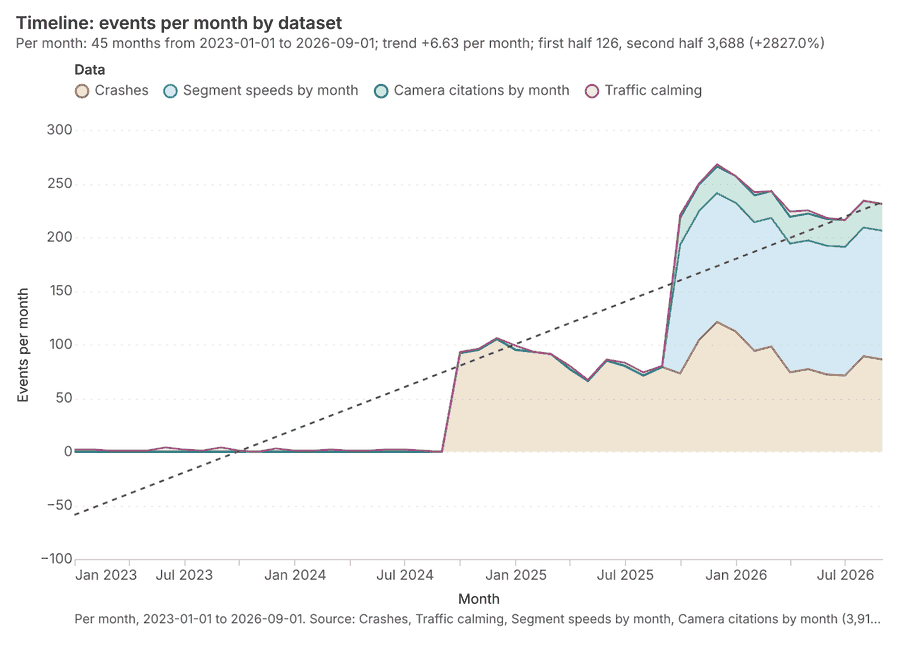
The timeline counts 3,910 dated events in Crashes, Traffic calming, Segment speeds by month and 1 more per month, from January 2023 to September 2026 12345. By dataset: Crashes 2,100; Segment speeds by month 1,440; Camera citations by month 300; Traffic calming 70 1. The trend is +6.63 events per month; the second half of the months has 3,688 against 126 in the first (+2827.0%) 1. 2 of the 45 months had no events 1.
Busiest months
Quietest months with events
Hot spots
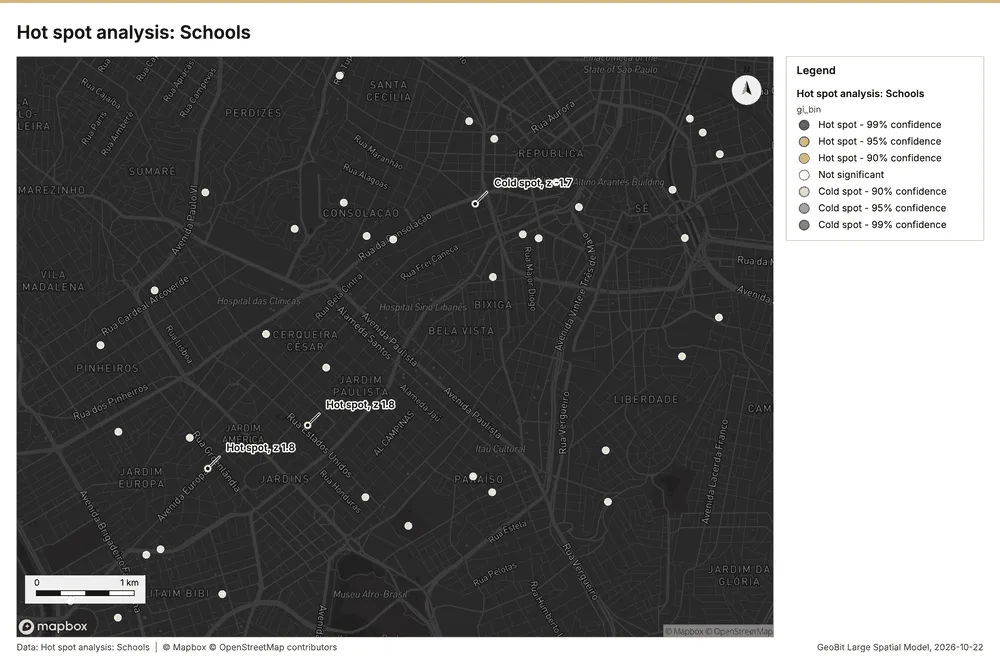
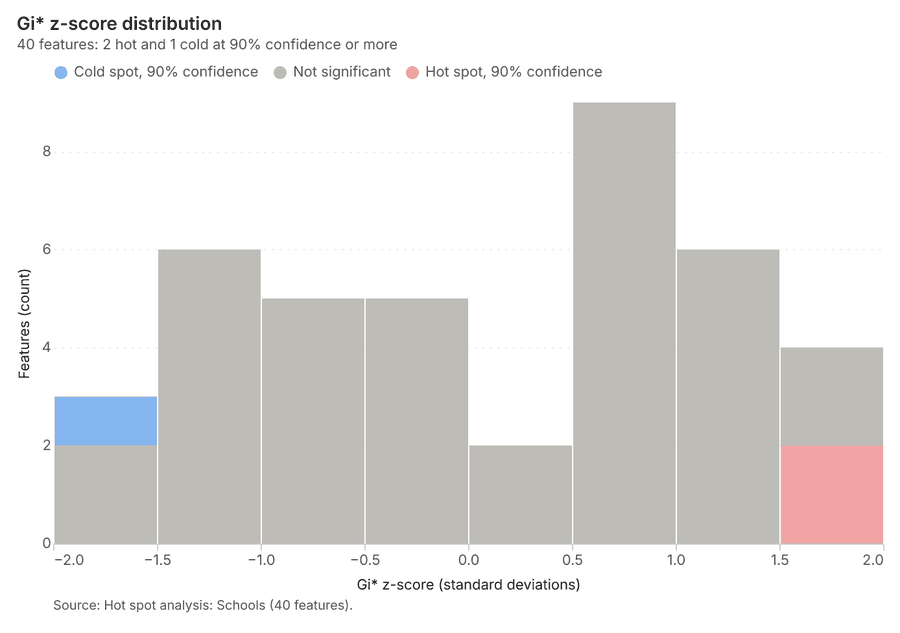
What this analysis is. Hot spot analysis: Getis-Ord Gi* hot and cold spots with z-scores, p-values and confidence bins 6. In ArcGIS it is Find Hot Spots or Hot Spot Analysis (Getis-Ord Gi*); in QGIS, qgis:hotspot (plugin) 6.
Why it was run on this data. 40 points: Getis-Ord Gi* tests whether the concentrations in Schools are statistically significant 7.
What it found. Hot spot analysis was performed using the Schools input layer 9.
| Result | Value |
|---|---|
| result, count | 40 |
| result, elapsed ms | 3 |
| result, excluded null | 0 |
| result, distance band m | 2,000 |
| billing, cost | 0.0508 |
| billing, list price | 0.0508 |
| billing, upstream cost | 0 |
Findings
- Evidenced: Hot spots on Schools: Hot spot analysis: 1 layer saved: Hot spot analysis: Schools (40 features) 89.
- Evidenced: It reported result, count 40; result, elapsed ms 3; result, excluded null 0; result, distance band m 2,000; billing, cost 0.0508; billing, list price 0.0508 8.
Tool gp_hot_spots; parameters {"field": "students", "project": "220702b2-1327-4244-9cff-74cf9d501f98", "features": {"layer": "Schools (cb956034)"}, "aggregation": "hexagon", "cell_size_m": 2000.0, "distance_band_m": 2000.0}
Hot spots
What this analysis is. Hot spot analysis: Getis-Ord Gi* hot and cold spots with z-scores, p-values and confidence bins 6. In ArcGIS it is Find Hot Spots or Hot Spot Analysis (Getis-Ord Gi*); in QGIS, qgis:hotspot (plugin) 6.
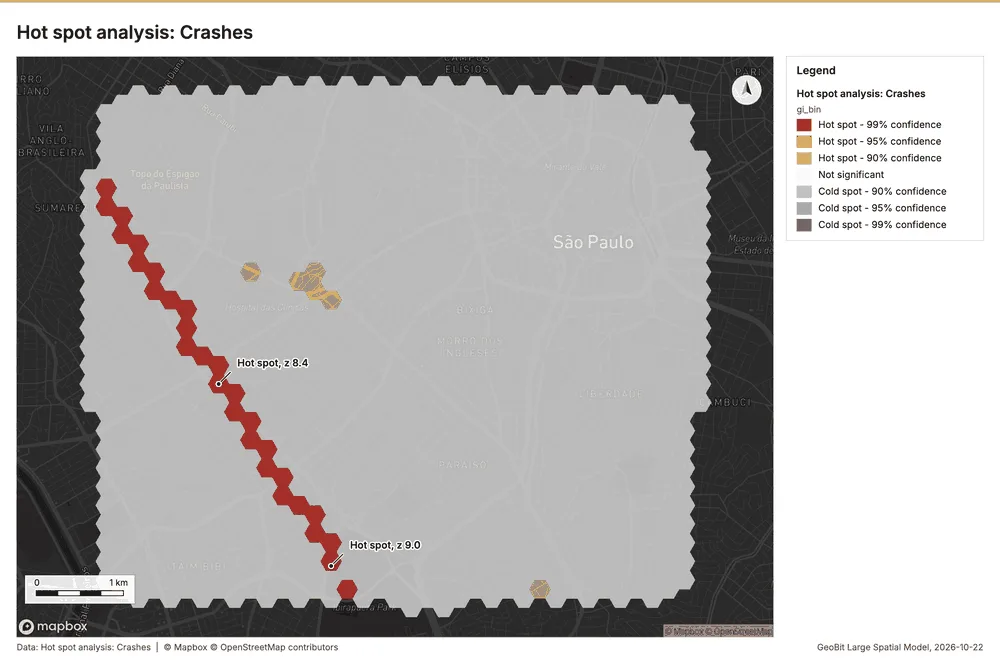
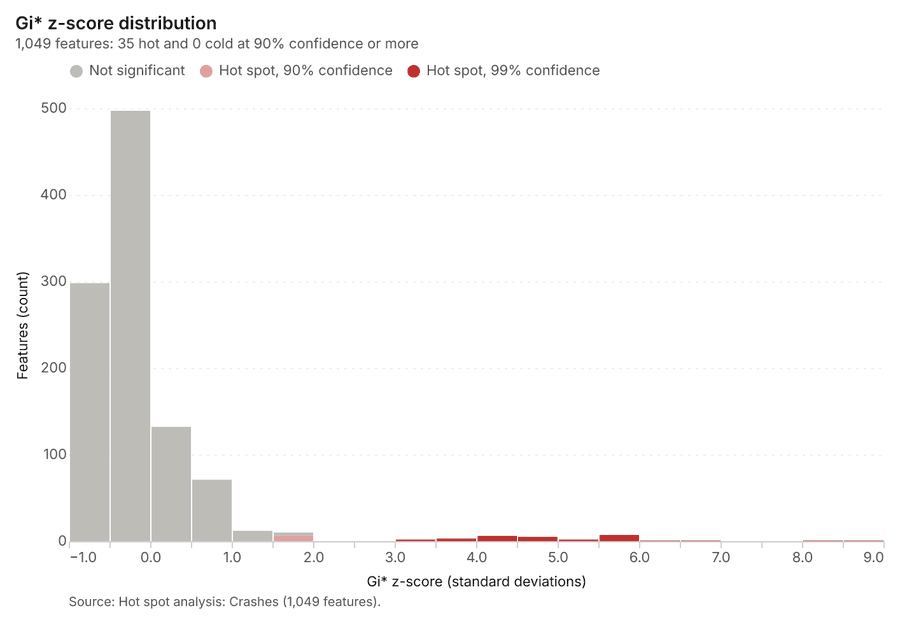
Why it was run on this data. 2100 points: Getis-Ord Gi* tests whether the concentrations in Crashes are statistically significant 10.
What it found. Hot spots on Crashes: Hot spot analysis: 1 layer saved: Hot spot analysis: Crashes (1049 features) 1112. It reported result, bins 1,049; result, count 1,049; result, elapsed ms 64; result, cell size m 200; result, incidents used 2,100; result, distance band m 200 11.
| Result | Value |
|---|---|
| result, bins | 1,049 |
| result, count | 1,049 |
| result, elapsed ms | 64 |
| result, cell size m | 200 |
| result, incidents used | 2,100 |
| result, distance band m | 200 |
| billing, cost | 0.092 |
| billing, list price | 0.092 |
| billing, upstream cost | 0 |
Findings
- Evidenced: Hot spots on Crashes: Hot spot analysis: 1 layer saved: Hot spot analysis: Crashes (1049 features) 1112.
- Evidenced: It reported result, bins 1,049; result, count 1,049; result, elapsed ms 64; result, cell size m 200; result, incidents used 2,100; result, distance band m 200 11.
Tool gp_hot_spots; parameters {"project": "220702b2-1327-4244-9cff-74cf9d501f98", "features": {"layer": "Crashes (9501bda5)"}, "aggregation": "hexagon", "cell_size_m": 200.0, "distance_band_m": 200.0}
Space time hot spots
What this analysis is. Emerging hot spots: Where hot spots are new, consecutive, intensifying, persistent, diminishing, sporadic, oscillating or historical over time 13. In ArcGIS it is Emerging Hot Spot Analysis or Create Space Time Cube 13.
Why it was run on this data. Crashes carry dates in 'occurred_at': emerging hot spot analysis finds new, intensifying and fading hot spots per month 14.
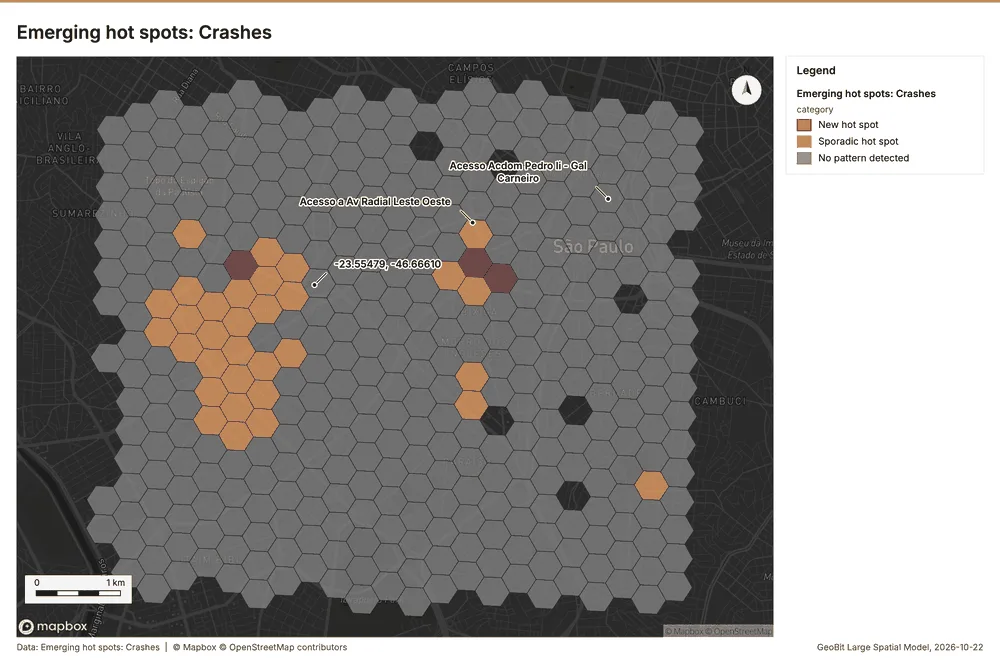
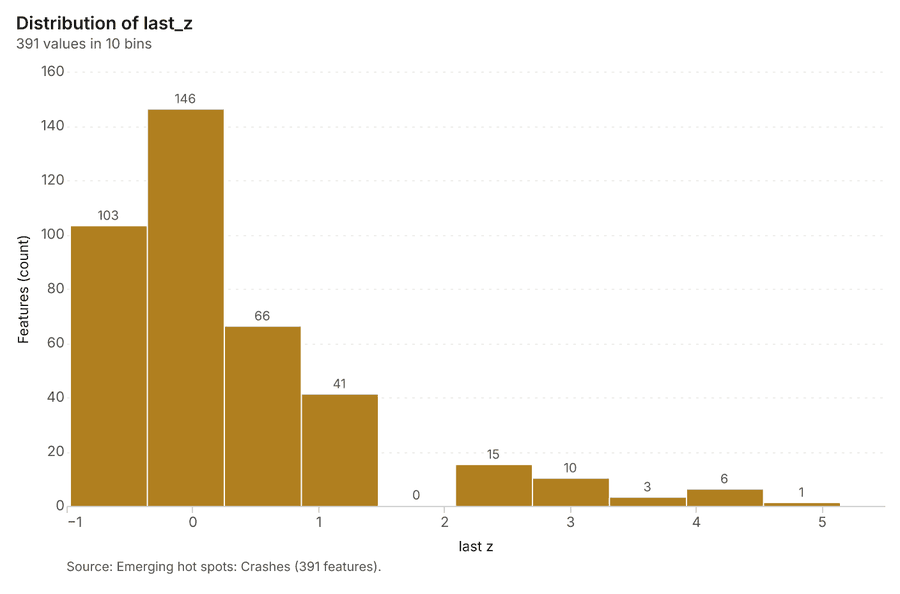
What it found. Space time hot spots on Crashes: Emerging hot spots: 1 layer saved: Emerging hot spots: Crashes (391 features) 1215. It reported result, count 391; result, elapsed ms 57; result, resolution 9; result, features used 2,100; result, time neighbors 0; billing, cost 0.205 15.
| Result | Value |
|---|---|
| result, count | 391 |
| result, elapsed ms | 57 |
| result, resolution | 9 |
| result, features used | 2,100 |
| result, time neighbors | 0 |
| billing, cost | 0.205 |
| billing, list price | 0.205 |
| billing, upstream cost | 0 |
Findings
- Evidenced: Space time hot spots on Crashes: Emerging hot spots: 1 layer saved: Emerging hot spots: Crashes (391 features) 1215.
- Evidenced: It reported result, count 391; result, elapsed ms 57; result, resolution 9; result, features used 2,100; result, time neighbors 0; billing, cost 0.205 15.
Tool gp_space_time_hot_spots; parameters {"project": "220702b2-1327-4244-9cff-74cf9d501f98", "features": {"layer": "Crashes (9501bda5)"}, "interval": "month", "bin_shape": "h3", "resolution": 9, "time_field": "occurred_at"}
Space time hot spots
What this analysis is. Emerging hot spots: Where hot spots are new, consecutive, intensifying, persistent, diminishing, sporadic, oscillating or historical over time 13. In ArcGIS it is Emerging Hot Spot Analysis or Create Space Time Cube 13.
Why it was run on this data. Traffic calming carry dates in 'date': emerging hot spot analysis finds new, intensifying and fading hot spots per month 16.
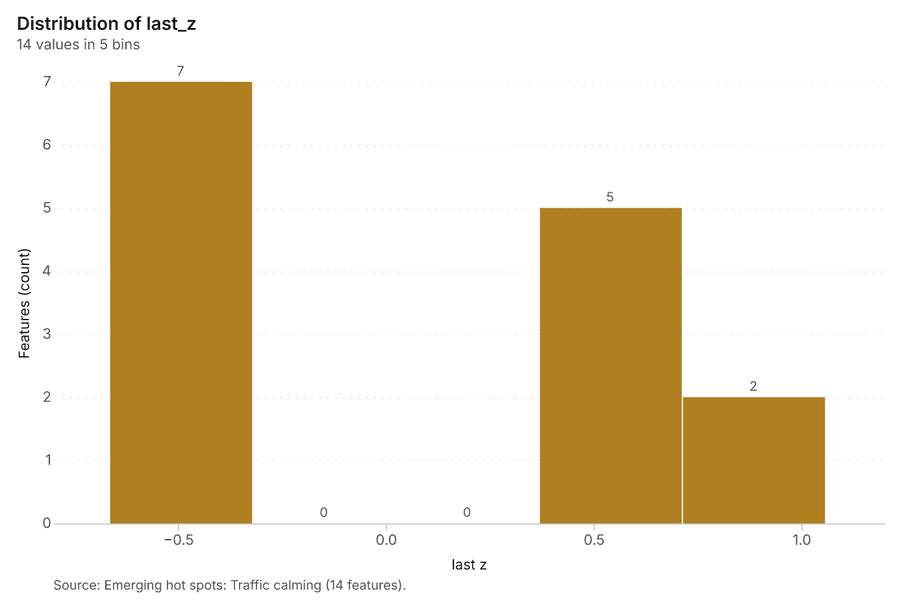
What it found. Space time hot spots on Traffic calming: Emerging hot spots: 1 layer saved: Emerging hot spots: Traffic calming (14 features) 1718. It reported result, count 14; result, elapsed ms 4; result, resolution 7; result, features used 70; result, time neighbors 0; billing, cost 0.1035 17.
| Result | Value |
|---|---|
| result, count | 14 |
| result, elapsed ms | 4 |
| result, resolution | 7 |
| result, features used | 70 |
| result, time neighbors | 0 |
| billing, cost | 0.1035 |
| billing, list price | 0.1035 |
| billing, upstream cost | 0 |
Findings
- Evidenced: Space time hot spots on Traffic calming: Emerging hot spots: 1 layer saved: Emerging hot spots: Traffic calming (14 features) 1718.
- Evidenced: It reported result, count 14; result, elapsed ms 4; result, resolution 7; result, features used 70; result, time neighbors 0; billing, cost 0.1035 17.
Tool gp_space_time_hot_spots; parameters {"project": "220702b2-1327-4244-9cff-74cf9d501f98", "features": {"layer": "Traffic calming (03fd1e3f)"}, "interval": "month", "bin_shape": "h3", "resolution": 7, "time_field": "date"}
Summarize within
What this analysis is. Summarize within: Count and aggregate the features inside each polygon (or bin), proportionally for lines and polygons 19. In ArcGIS it is Summarize Within or Aggregate Points; in QGIS, native:countpointsinpolygon or native:sumlinelengths 19.
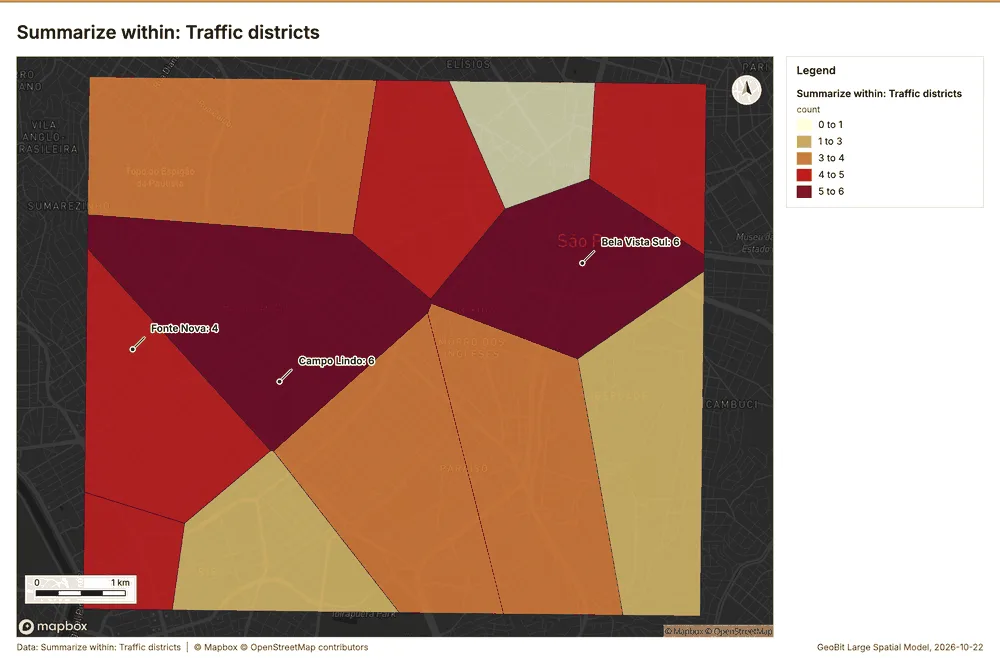
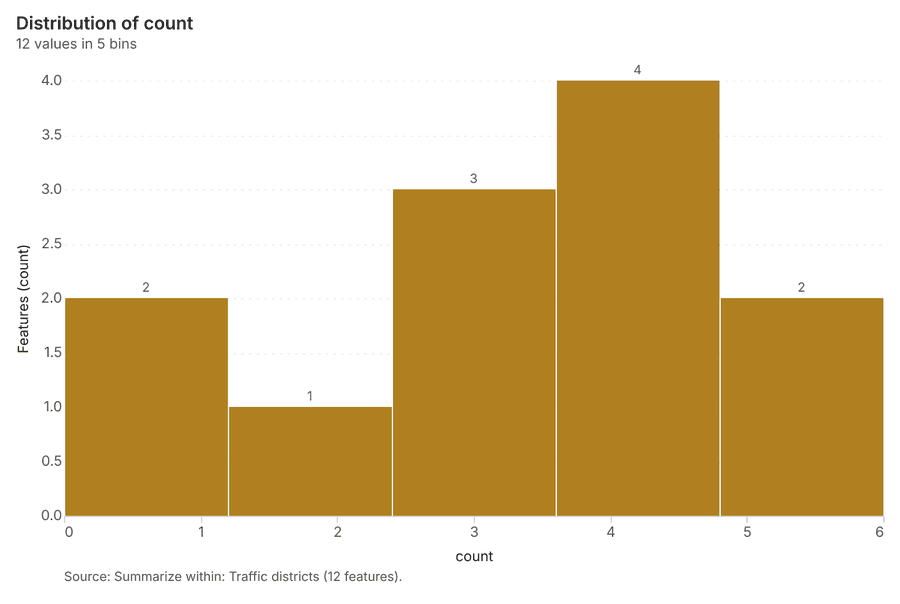
Why it was run on this data. Count Schools inside each feature of Traffic districts by level; the counts map as a choropleth (natural breaks, sequential colors) 20.
What it found. Summarize within on Schools, Traffic districts: Summarize within: 1 layer saved: Summarize within: Traffic districts (12 features) 92122. It reported result, count 12; result, elapsed ms 0; billing, cost 0.01106; billing, list price 0.01106; billing, upstream cost 0 21.
| Result | Value |
|---|---|
| result, count | 12 |
| result, elapsed ms | 0 |
| billing, cost | 0.01106 |
| billing, list price | 0.01106 |
| billing, upstream cost | 0 |
Findings
- Evidenced: Summarize within on Schools, Traffic districts: Summarize within: 1 layer saved: Summarize within: Traffic districts (12 features) 92122.
- Evidenced: It reported result, count 12; result, elapsed ms 0; billing, cost 0.01106; billing, list price 0.01106; billing, upstream cost 0 21.
Tool gp_summarize_within; parameters {"stats": [{"stat": "sum", "field": "students"}], "project": "220702b2-1327-4244-9cff-74cf9d501f98", "features": {"layer": "Schools (cb956034)"}, "group_by": "level", "polygons": {"layer": "Traffic districts (426e8d19)"}}
Summarize within
What this analysis is. Summarize within: Count and aggregate the features inside each polygon (or bin), proportionally for lines and polygons 19. In ArcGIS it is Summarize Within or Aggregate Points; in QGIS, native:countpointsinpolygon or native:sumlinelengths 19.
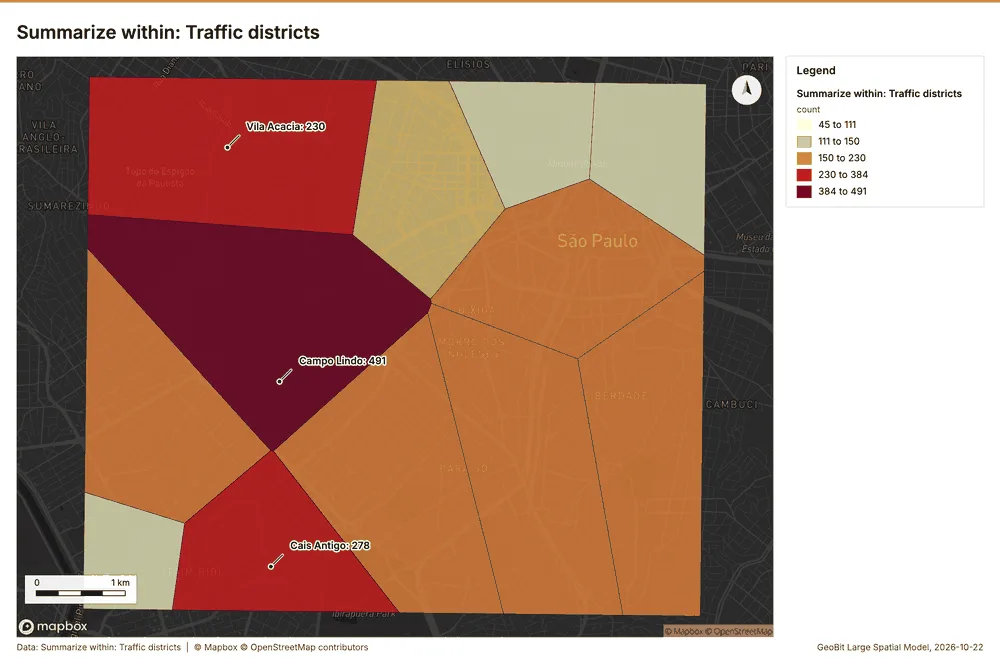
Why it was run on this data. Count Schools inside each feature of Traffic districts by level; the counts map as a choropleth (natural breaks, sequential colors) 20.
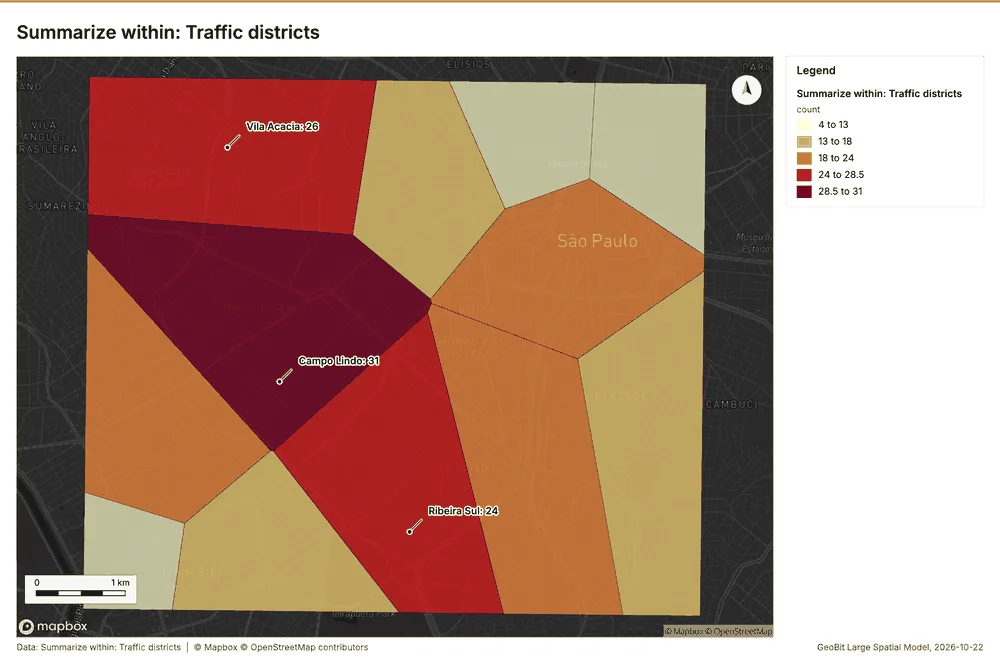
What it found. Summarize within on Crashes, Traffic districts: Summarize within: 1 layer saved: Summarize within: Traffic districts (12 features) 122223. It reported result, count 12; result, elapsed ms 3; billing, cost 0.05226; billing, list price 0.05226; billing, upstream cost 0 23.
| Result | Value |
|---|---|
| result, count | 12 |
| result, elapsed ms | 3 |
| billing, cost | 0.05226 |
| billing, list price | 0.05226 |
| billing, upstream cost | 0 |
Findings
- Evidenced: Summarize within on Crashes, Traffic districts: Summarize within: 1 layer saved: Summarize within: Traffic districts (12 features) 122223.
- Evidenced: It reported result, count 12; result, elapsed ms 3; billing, cost 0.05226; billing, list price 0.05226; billing, upstream cost 0 23.
Tool gp_summarize_within; parameters {"stats": [{"stat": "sum", "field": "injured"}], "project": "220702b2-1327-4244-9cff-74cf9d501f98", "features": {"layer": "Crashes (9501bda5)"}, "group_by": "severity", "polygons": {"layer": "Traffic districts (426e8d19)"}}
Find point clusters
What this analysis is. Find point clusters: Density-based clusters (DBSCAN, HDBSCAN or OPTICS, optionally space-time) with hulls and noise 24. In ArcGIS it is Find Point Clusters or Density-based Clustering; in QGIS, native:dbscanclustering or native:stdbscanclustering 24.
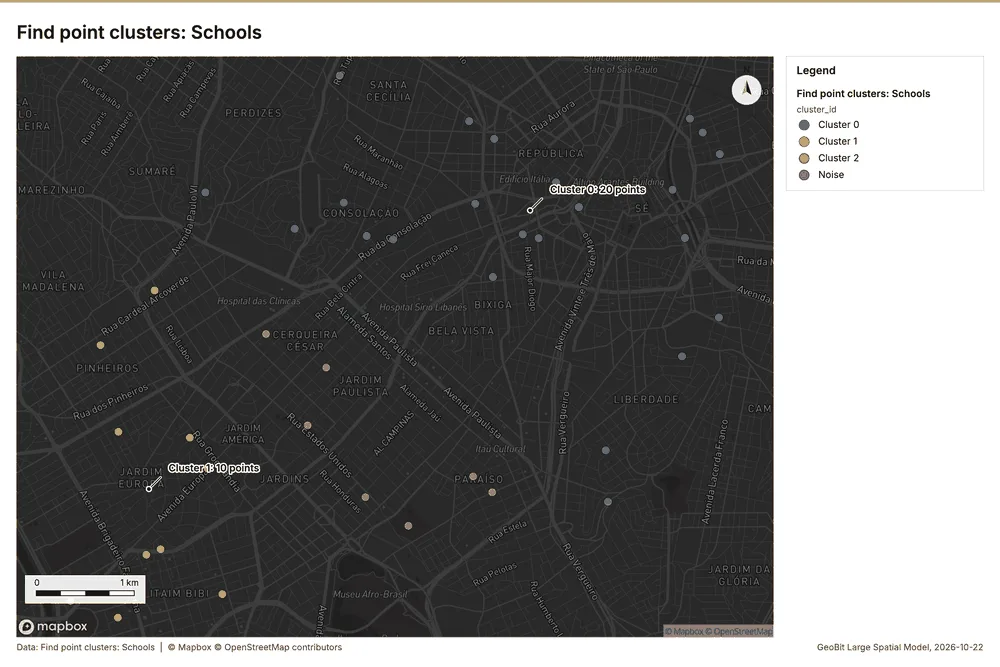
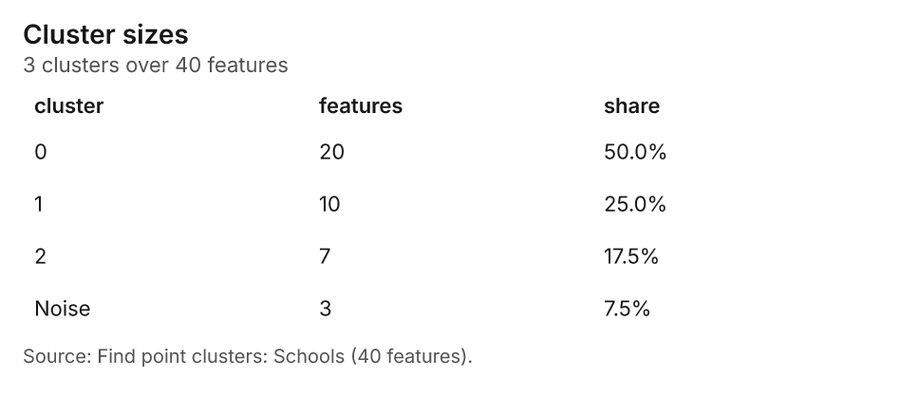
Why it was run on this data. DBSCAN finds dense groups of Schools and separates noise 25.
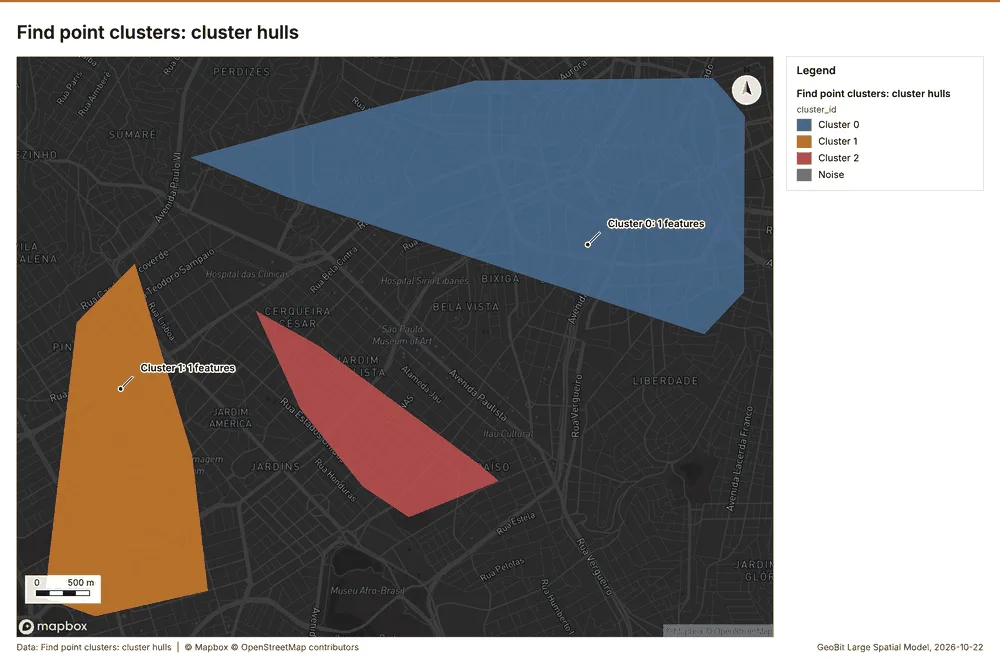
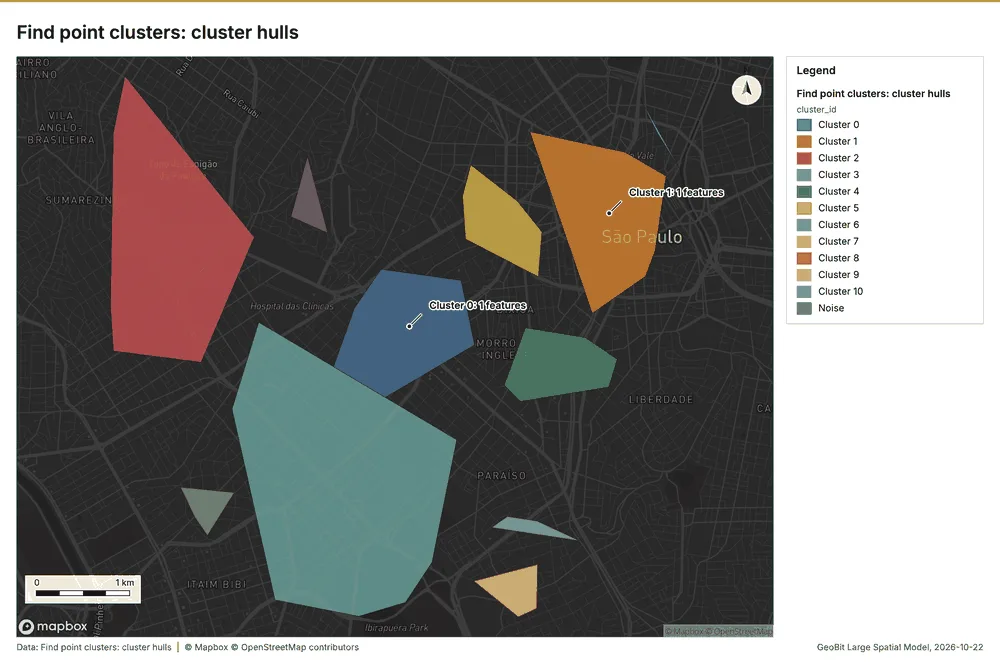
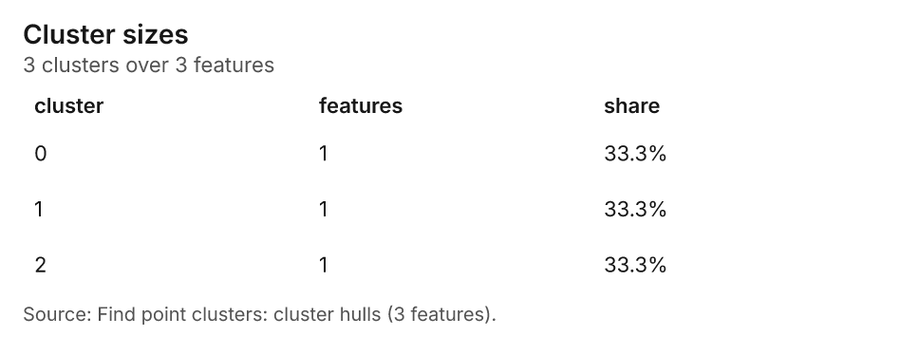
What it found. Find point clusters on Schools: Find point clusters: 2 layers saved: Find point clusters: Schools (40 features); Find point clusters: cluster hulls (3 features) 926. It reported result, count 40; result, noise 3; result, distance m 1,000; result, elapsed ms 5; result, min points 3; billing, cost 0.0508 26.
| Result | Value |
|---|---|
| result, count | 40 |
| result, noise | 3 |
| result, distance m | 1,000 |
| result, elapsed ms | 5 |
| result, min points | 3 |
| billing, cost | 0.0508 |
| billing, list price | 0.0508 |
| billing, upstream cost | 0 |
Findings
- Evidenced: Find point clusters on Schools: Find point clusters: 2 layers saved: Find point clusters: Schools (40 features); Find point clusters: cluster hulls (3 features) 926.
- Evidenced: It reported result, count 40; result, noise 3; result, distance m 1,000; result, elapsed ms 5; result, min points 3; billing, cost 0.0508 26.
Tool gp_find_point_clusters; parameters {"method": "dbscan", "project": "220702b2-1327-4244-9cff-74cf9d501f98", "features": {"layer": "Schools (cb956034)"}, "distance_m": 1000.0, "min_points": 3}
Find point clusters
What this analysis is. Find point clusters: Density-based clusters (DBSCAN, HDBSCAN or OPTICS, optionally space-time) with hulls and noise 24. In ArcGIS it is Find Point Clusters or Density-based Clustering; in QGIS, native:dbscanclustering or native:stdbscanclustering 24.
Why it was run on this data. DBSCAN finds dense groups of Crashes and separates noise 27.
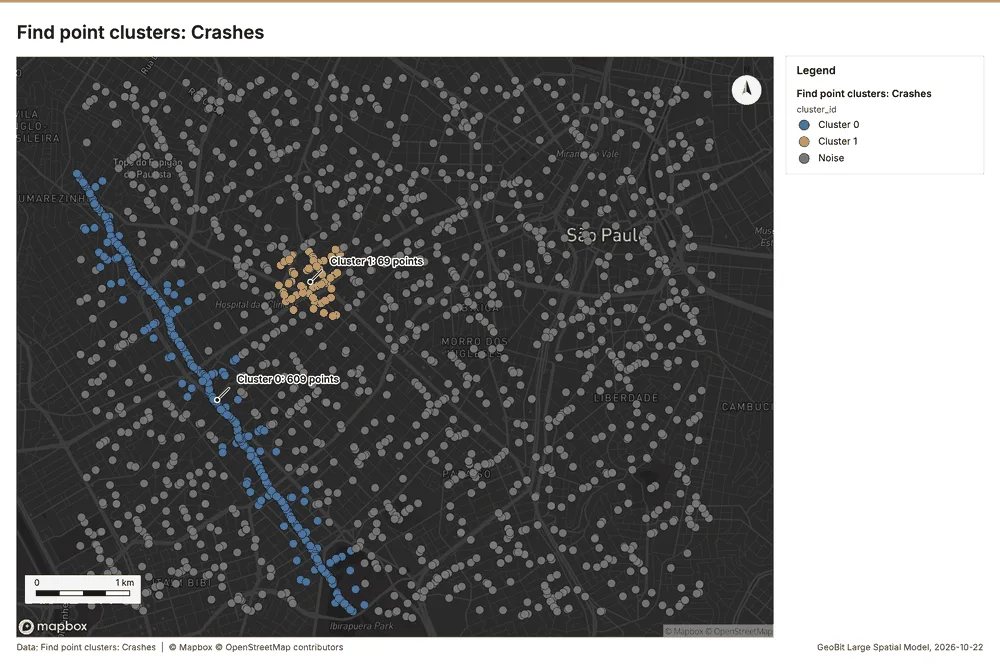
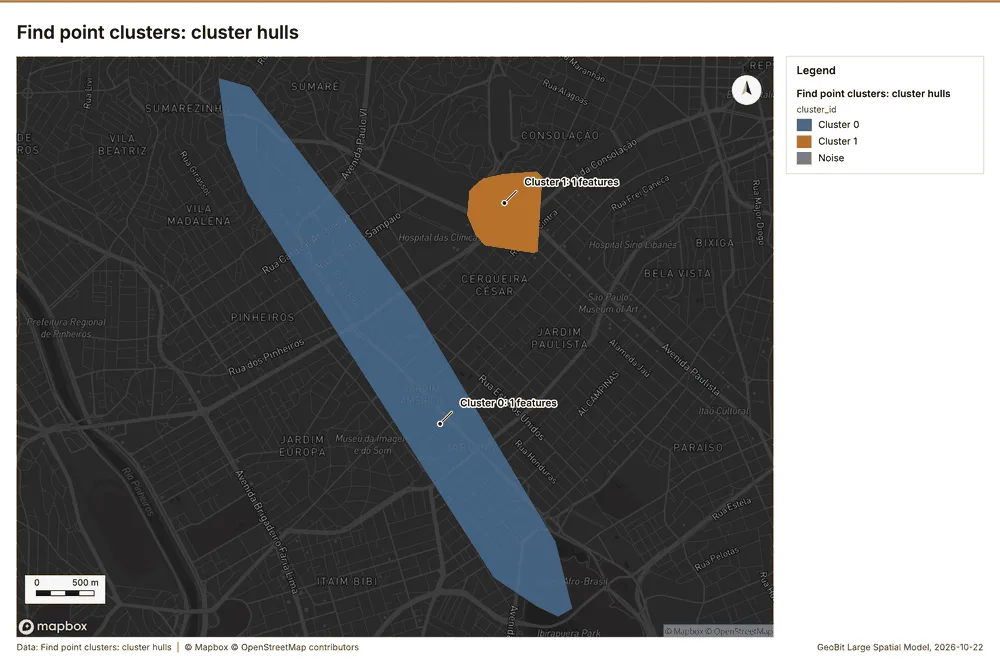
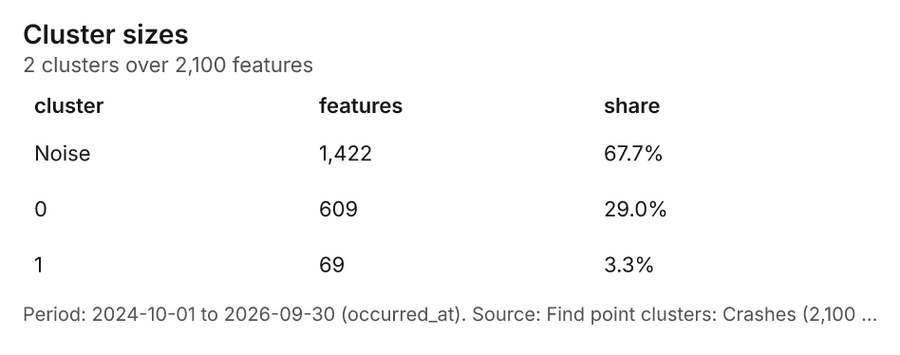
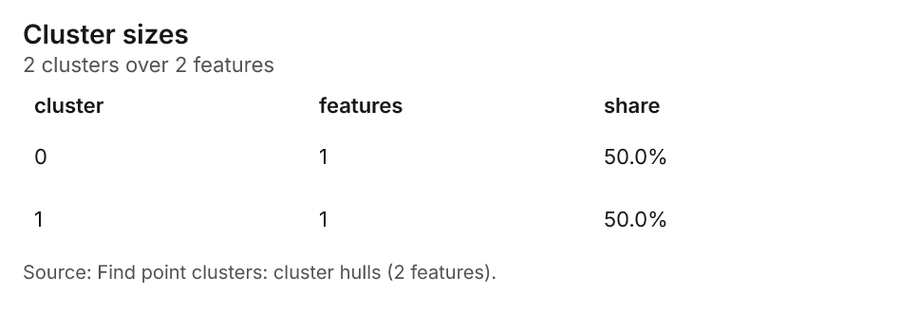
What it found. Find point clusters on Crashes: Find point clusters: 2 layers saved: Find point clusters: Crashes (2100 features); Find point clusters: cluster hulls (2 features) 1228. It reported result, count 2,100; result, noise 1,422; result, distance m 200; result, elapsed ms 32; result, min points 20; billing, cost 0.092 28.
| Result | Value |
|---|---|
| result, count | 2,100 |
| result, noise | 1,422 |
| result, distance m | 200 |
| result, elapsed ms | 32 |
| result, min points | 20 |
| billing, cost | 0.092 |
| billing, list price | 0.092 |
| billing, upstream cost | 0 |
Findings
- Evidenced: Find point clusters on Crashes: Find point clusters: 2 layers saved: Find point clusters: Crashes (2100 features); Find point clusters: cluster hulls (2 features) 1228.
- Evidenced: It reported result, count 2,100; result, noise 1,422; result, distance m 200; result, elapsed ms 32; result, min points 20; billing, cost 0.092 28.
Tool gp_find_point_clusters; parameters {"method": "dbscan", "project": "220702b2-1327-4244-9cff-74cf9d501f98", "features": {"layer": "Crashes (9501bda5)"}, "distance_m": 200.0, "min_points": 20}
Find point clusters
What this analysis is. Find point clusters: Density-based clusters (DBSCAN, HDBSCAN or OPTICS, optionally space-time) with hulls and noise 24. In ArcGIS it is Find Point Clusters or Density-based Clustering; in QGIS, native:dbscanclustering or native:stdbscanclustering 24.
Why it was run on this data. DBSCAN finds dense groups of Pedestrian crossings and separates noise 29.
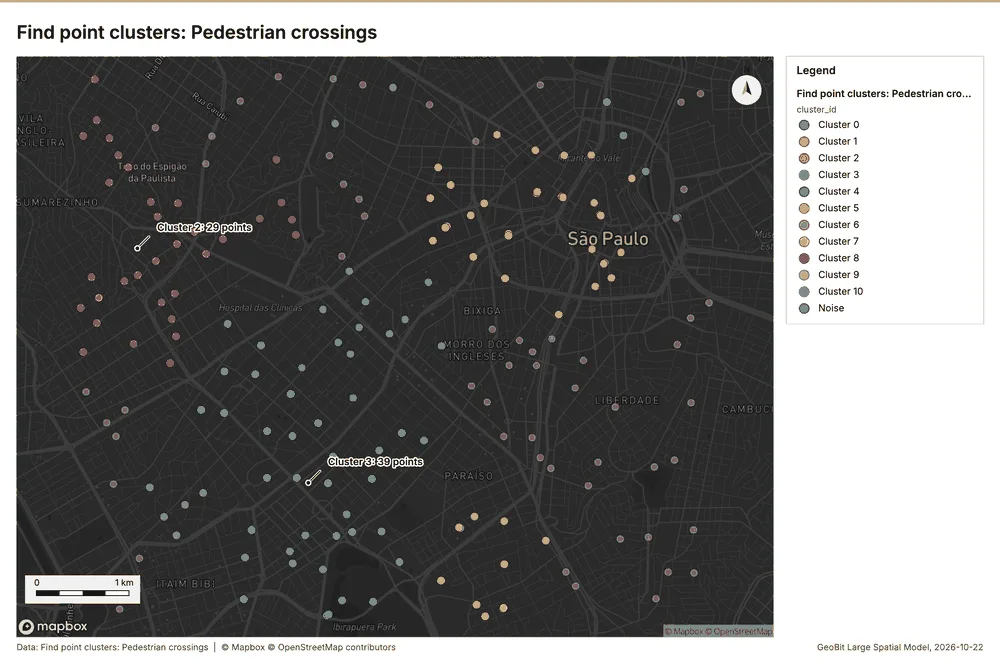
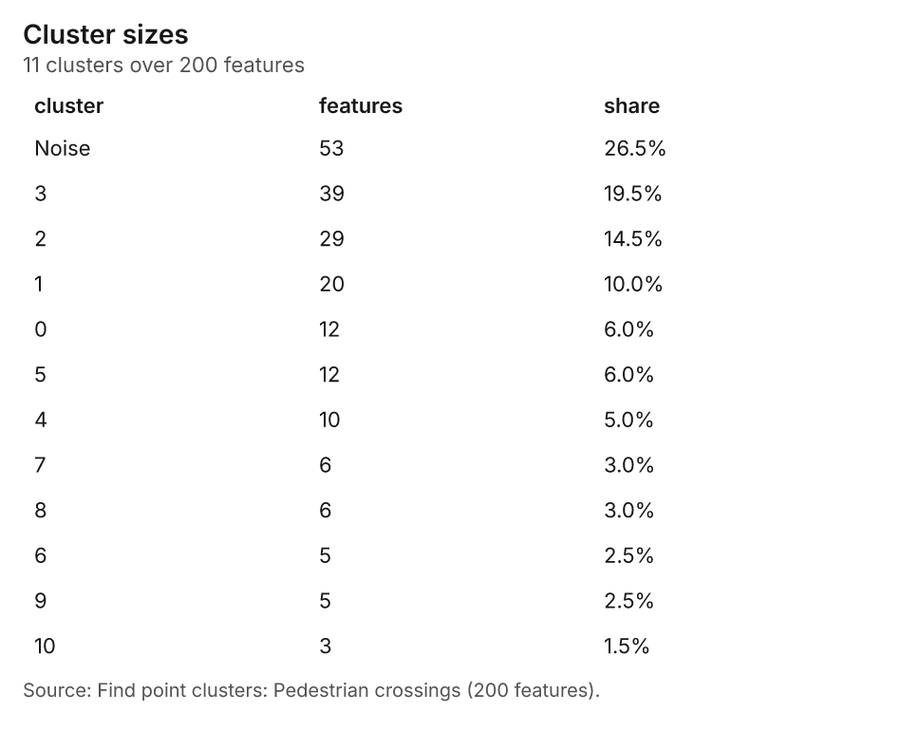
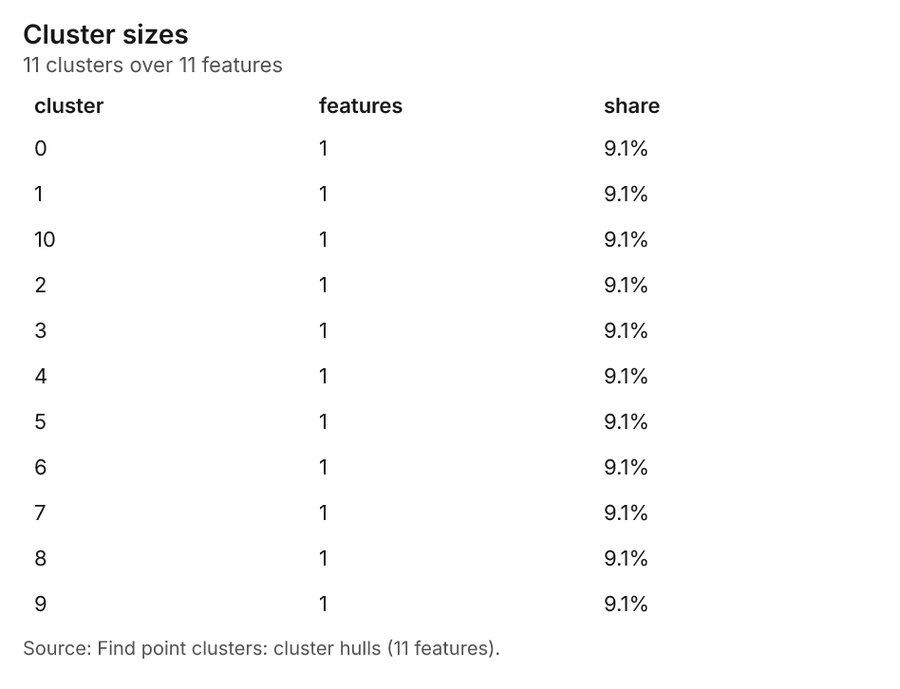
What it found. Find point clusters on Pedestrian crossings: Find point clusters: 2 layers saved: Find point clusters: Pedestrian crossings (200 features); Find point clusters: cluster hulls (11 features) 3031. It reported result, count 200; result, noise 53; result, distance m 500; result, elapsed ms 6; result, min points 5; billing, cost 0.054 30.
| Result | Value |
|---|---|
| result, count | 200 |
| result, noise | 53 |
| result, distance m | 500 |
| result, elapsed ms | 6 |
| result, min points | 5 |
| billing, cost | 0.054 |
| billing, list price | 0.054 |
| billing, upstream cost | 0 |
Findings
- Evidenced: Find point clusters on Pedestrian crossings: Find point clusters: 2 layers saved: Find point clusters: Pedestrian crossings (200 features); Find point clusters: cluster hulls (11 features) 3031.
- Evidenced: It reported result, count 200; result, noise 53; result, distance m 500; result, elapsed ms 6; result, min points 5; billing, cost 0.054 30.
A model draft was discarded because a sentence did not cite a source of this section.
Tool gp_find_point_clusters; parameters {"method": "dbscan", "project": "220702b2-1327-4244-9cff-74cf9d501f98", "features": {"layer": "Pedestrian crossings (5a5fc524)"}, "distance_m": 500.0, "min_points": 5}
Calculate density
What this analysis is. Calculate density: Kernel density per square kilometer on a grid 32. In ArcGIS it is Calculate Density or Kernel Density; in QGIS, native:heatmapkerneldensityestimation 32.
Why it was run on this data. 40 points in Schools: a density surface shows where they concentrate 33.
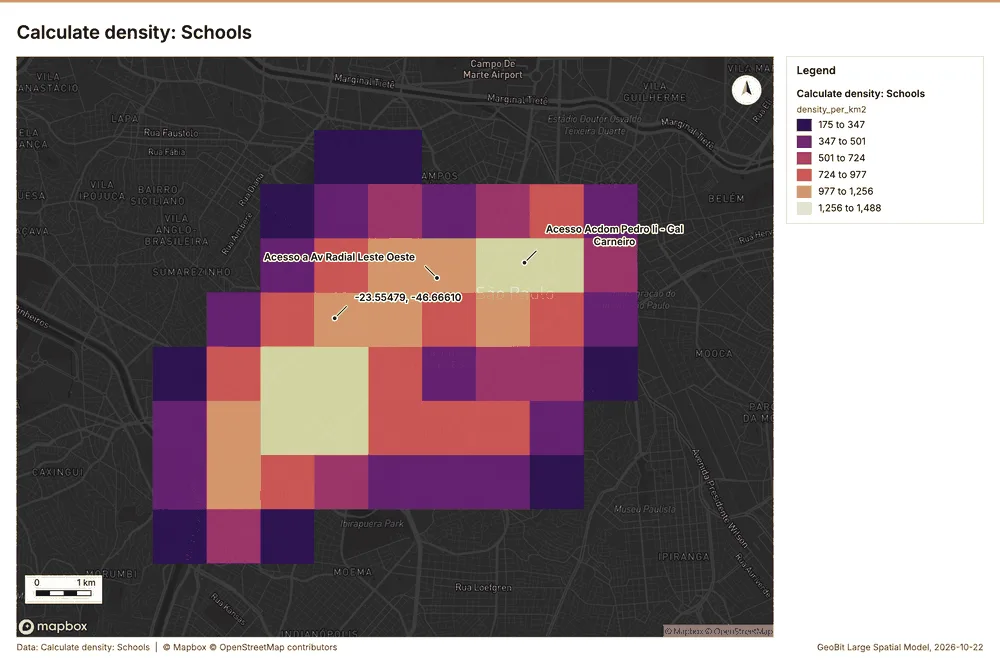
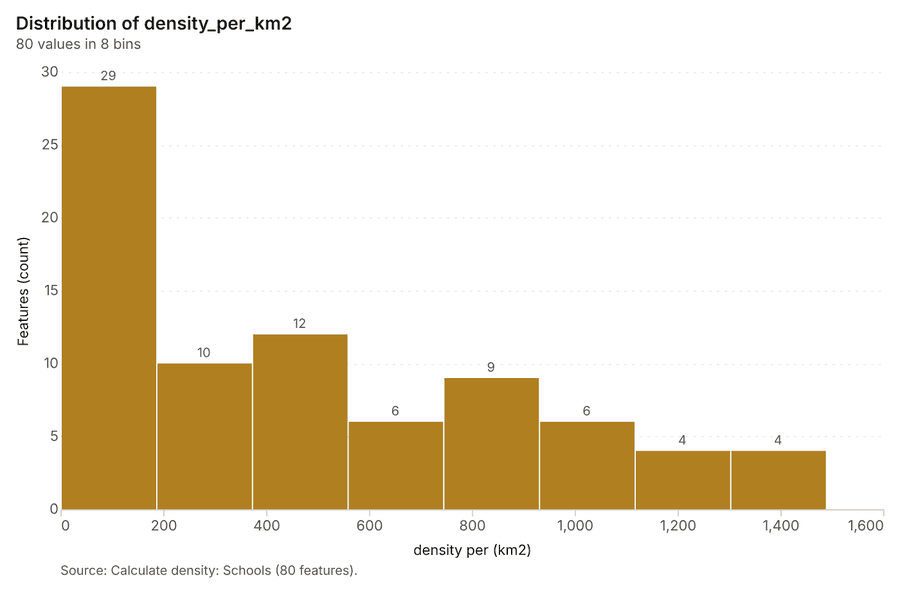
What it found. Calculate density on Schools: Calculate density: 1 layer saved: Calculate density: Schools (80 features) 934. It reported result, count 80; result, elapsed ms 4; result, bandwidth m 2,000; result, cell size m 1,000; result, excluded null 0; result, max density per km2 1,488 34.
| Result | Value |
|---|---|
| result, count | 80 |
| result, elapsed ms | 4 |
| result, bandwidth m | 2,000 |
| result, cell size m | 1,000 |
| result, excluded null | 0 |
| result, max density per km2 | 1,488 |
| billing, cost | 0.0508 |
| billing, list price | 0.0508 |
| billing, upstream cost | 0 |
Findings
- Evidenced: Calculate density on Schools: Calculate density: 1 layer saved: Calculate density: Schools (80 features) 934.
- Evidenced: It reported result, count 80; result, elapsed ms 4; result, bandwidth m 2,000; result, cell size m 1,000; result, excluded null 0; result, max density per km2 1,488 34.
A model draft was discarded because a sentence did not cite a source of this section.
Tool gp_calculate_density; parameters {"kernel": "quartic", "project": "220702b2-1327-4244-9cff-74cf9d501f98", "features": {"layer": "Schools (cb956034)"}, "bandwidth_m": 2000.0, "cell_size_m": 1000.0, "weight_field": "students"}
Calculate density
What this analysis is. Calculate density: Kernel density per square kilometer on a grid 32. In ArcGIS it is Calculate Density or Kernel Density; in QGIS, native:heatmapkerneldensityestimation 32.
Why it was run on this data. 2100 points in Crashes: a density surface shows where they concentrate 35.
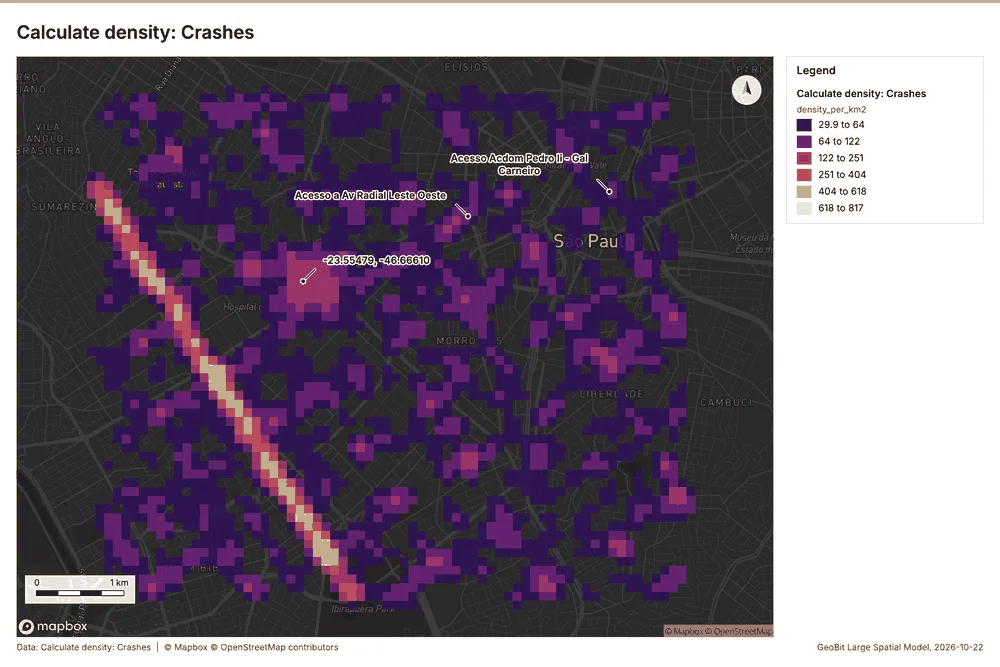
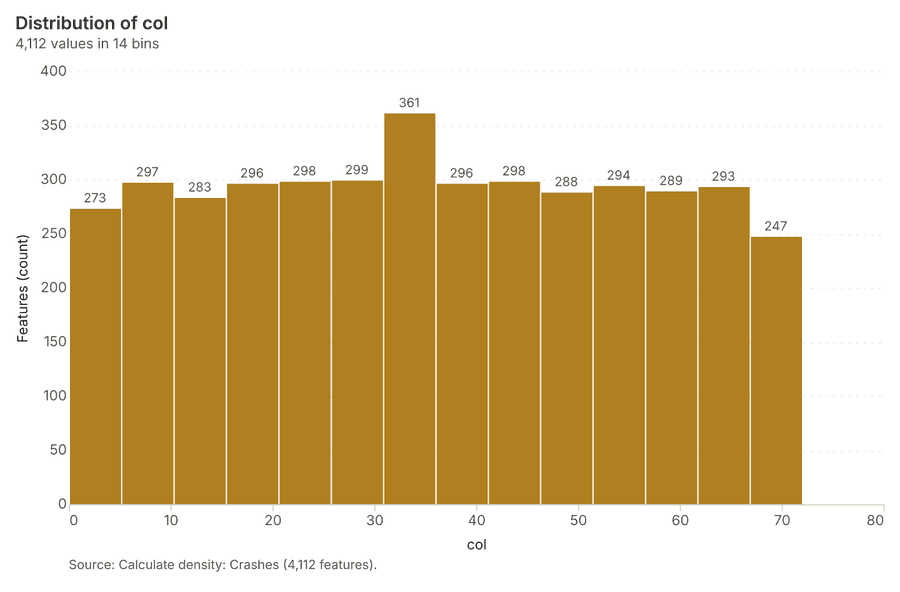
What it found. The density calculation used the Crashes layer as input 12. The tool successfully processed the data, yielding 4,112 features 36.
| Result | Value |
|---|---|
| result, count | 4,112 |
| result, elapsed ms | 110 |
| result, bandwidth m | 200 |
| result, cell size m | 100 |
| result, excluded null | 0 |
| result, max density per km2 | 816.6 |
| billing, cost | 0.092 |
| billing, list price | 0.092 |
| billing, upstream cost | 0 |
Findings
- Evidenced: Calculate density on Crashes: Calculate density: 1 layer saved: Calculate density: Crashes (4112 features) 1236.
- Evidenced: It reported result, count 4,112; result, elapsed ms 110; result, bandwidth m 200; result, cell size m 100; result, excluded null 0; result, max density per km2 816.6 36.
Tool gp_calculate_density; parameters {"kernel": "quartic", "project": "220702b2-1327-4244-9cff-74cf9d501f98", "features": {"layer": "Crashes (9501bda5)"}, "bandwidth_m": 200.0, "cell_size_m": 100.0}
Calculate density
What this analysis is. Calculate density: Kernel density per square kilometer on a grid 32. In ArcGIS it is Calculate Density or Kernel Density; in QGIS, native:heatmapkerneldensityestimation 32.
Why it was run on this data. 200 points in Pedestrian crossings: a density surface shows where they concentrate 37.
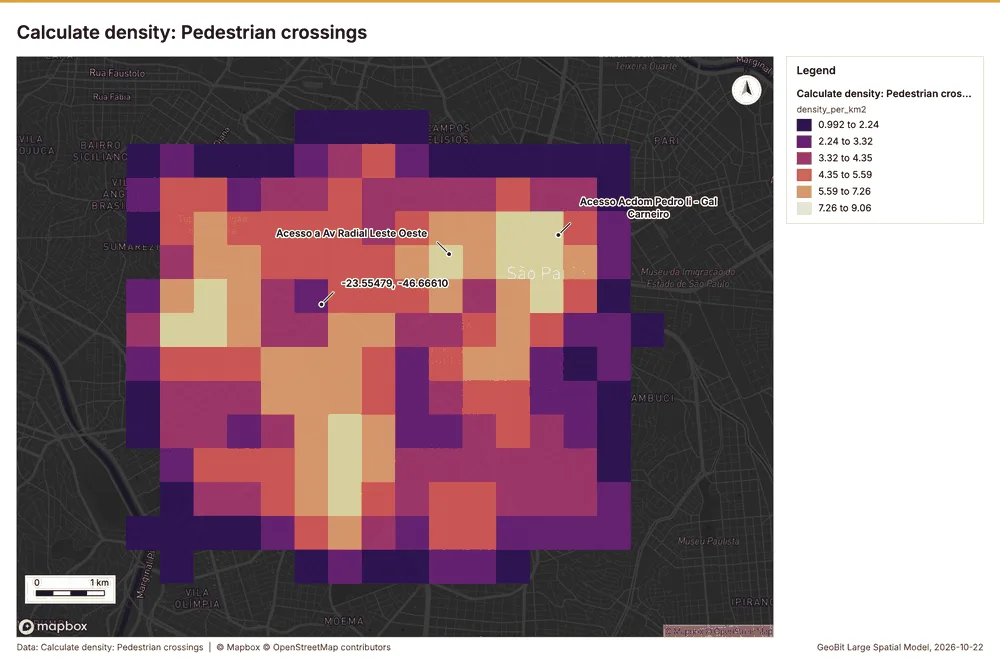
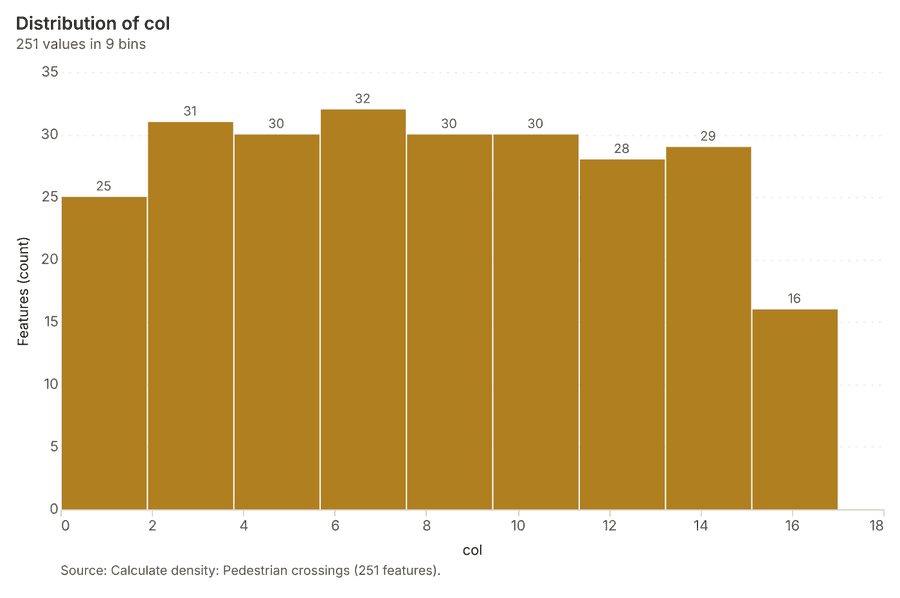
What it found. The calculation of density was performed on the Pedestrian crossings layer 31 using the gp_calculate_density function 38. This process yielded a count of 251 features 38, with an elapsed time of 7 milliseconds 38. The resulting density calculation reported a maximum density per km2 of 9.062 38.
| Result | Value |
|---|---|
| result, count | 251 |
| result, elapsed ms | 7 |
| result, bandwidth m | 1,000 |
| result, cell size m | 500 |
| result, excluded null | 0 |
| result, max density per km2 | 9.062 |
| billing, cost | 0.054 |
| billing, list price | 0.054 |
| billing, upstream cost | 0 |
Findings
- Evidenced: Calculate density on Pedestrian crossings: Calculate density: 1 layer saved: Calculate density: Pedestrian crossings (251 features) 3138.
- Evidenced: It reported result, count 251; result, elapsed ms 7; result, bandwidth m 1,000; result, cell size m 500; result, excluded null 0; result, max density per km2 9.062 38.
Tool gp_calculate_density; parameters {"kernel": "quartic", "project": "220702b2-1327-4244-9cff-74cf9d501f98", "features": {"layer": "Pedestrian crossings (5a5fc524)"}, "bandwidth_m": 1000.0, "cell_size_m": 500.0}
Hot spots
What this analysis is. Hot spot analysis: Getis-Ord Gi* hot and cold spots with z-scores, p-values and confidence bins 6. In ArcGIS it is Find Hot Spots or Hot Spot Analysis (Getis-Ord Gi*); in QGIS, qgis:hotspot (plugin) 6.
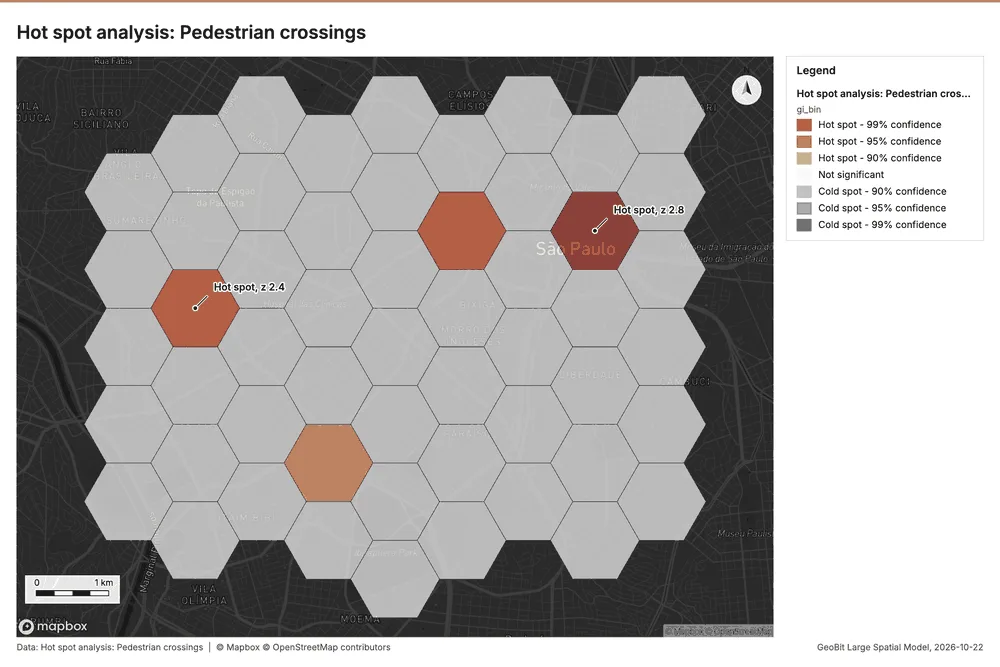
Why it was run on this data. 200 points: Getis-Ord Gi* tests whether the concentrations in Pedestrian crossings are statistically significant 39.
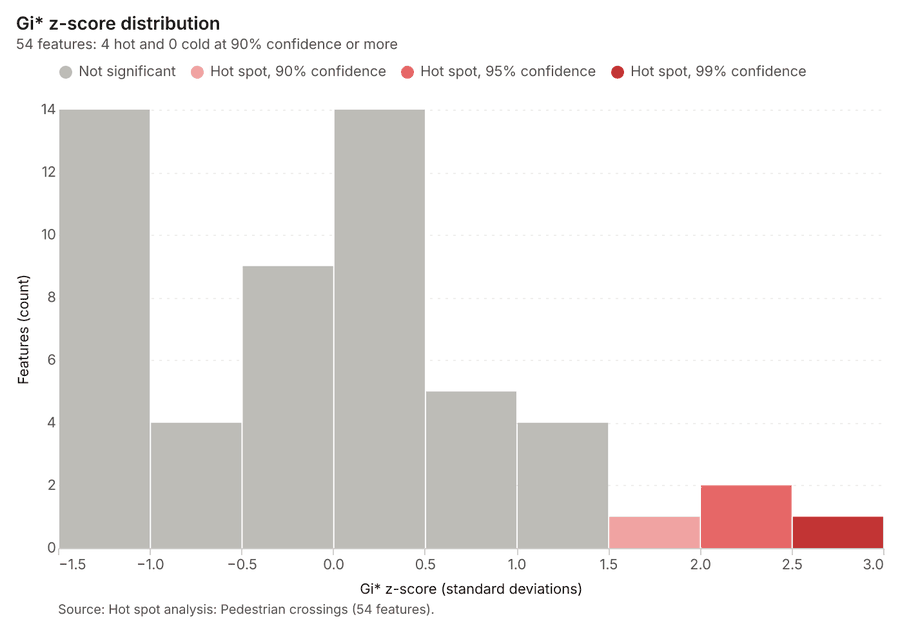
What it found. Hot spots on Pedestrian crossings: Hot spot analysis: 1 layer saved: Hot spot analysis: Pedestrian crossings (54 features) 3140. It reported result, bins 54; result, count 54; result, elapsed ms 5; result, cell size m 1,000; result, incidents used 200; result, distance band m 1,000 40.
| Result | Value |
|---|---|
| result, bins | 54 |
| result, count | 54 |
| result, elapsed ms | 5 |
| result, cell size m | 1,000 |
| result, incidents used | 200 |
| result, distance band m | 1,000 |
| billing, cost | 0.054 |
| billing, list price | 0.054 |
| billing, upstream cost | 0 |
Findings
- Evidenced: Hot spots on Pedestrian crossings: Hot spot analysis: 1 layer saved: Hot spot analysis: Pedestrian crossings (54 features) 3140.
- Evidenced: It reported result, bins 54; result, count 54; result, elapsed ms 5; result, cell size m 1,000; result, incidents used 200; result, distance band m 1,000 40.
Tool gp_hot_spots; parameters {"project": "220702b2-1327-4244-9cff-74cf9d501f98", "features": {"layer": "Pedestrian crossings (5a5fc524)"}, "aggregation": "hexagon", "cell_size_m": 1000.0, "distance_band_m": 1000.0}
Near repeat
What this analysis is. Repeat and near repeat classification: Classify incidents as originators, repeats (same place) or near repeats within a distance and time window, with a Knox test table 41. In ArcGIS it is Repeat and Near Repeat Classification or Near Repeat Calculator 41.
Why it was run on this data. Near repeat analysis tests whether Crashes close in space also follow each other within 30 days 42.
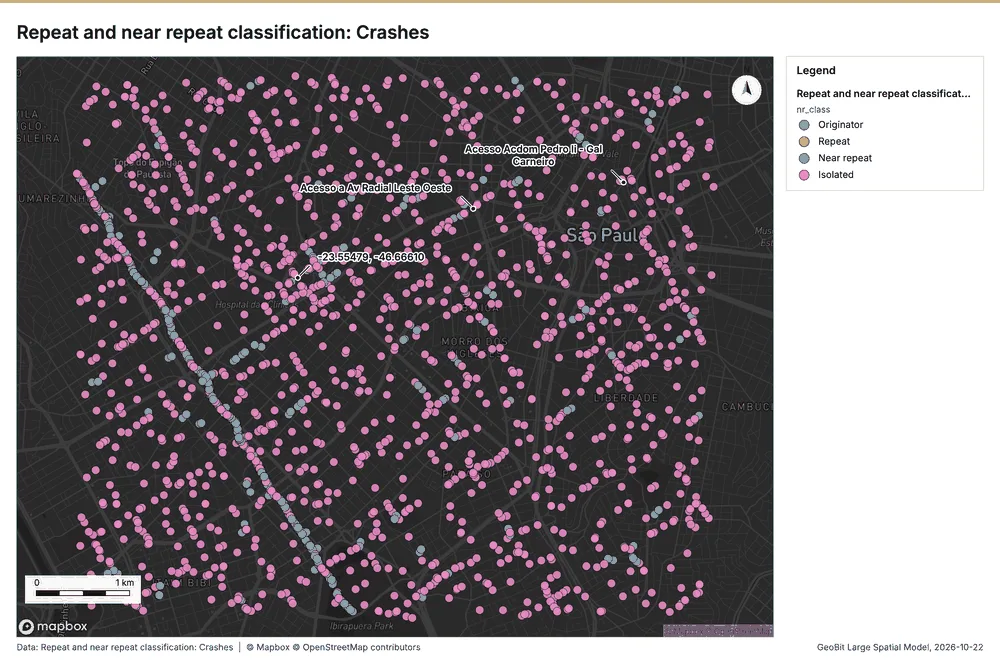
What it found. Near repeat on Crashes: Repeat and near repeat classification: 1 layer saved: Repeat and near repeat classification: Crashes (2100 features) 1243. It reported result, days 30; result, count 2,100; result, chains 190; result, distance m 100; result, elapsed ms 41; result, pairs linked 506 43.
| Result | Value |
|---|---|
| result, days | 30 |
| result, count | 2,100 |
| result, chains | 190 |
| result, distance m | 100 |
| result, elapsed ms | 41 |
| result, pairs linked | 506 |
| billing, cost | 0.113 |
| billing, list price | 0.113 |
| billing, upstream cost | 0 |
Findings
- Evidenced: Near repeat on Crashes: Repeat and near repeat classification: 1 layer saved: Repeat and near repeat classification: Crashes (2100 features) 1243.
- Evidenced: It reported result, days 30; result, count 2,100; result, chains 190; result, distance m 100; result, elapsed ms 41; result, pairs linked 506 43.
Tool gp_near_repeat; parameters {"days": 30, "project": "220702b2-1327-4244-9cff-74cf9d501f98", "features": {"layer": "Crashes (9501bda5)"}, "distance_m": 100.0, "time_field": "occurred_at"}
Summarize within
What this analysis is. Summarize within: Count and aggregate the features inside each polygon (or bin), proportionally for lines and polygons 19. In ArcGIS it is Summarize Within or Aggregate Points; in QGIS, native:countpointsinpolygon or native:sumlinelengths 19.
Why it was run on this data. Count Pedestrian crossings inside each feature of Traffic districts by type; the counts map as a choropleth (natural breaks, sequential colors) 44.
What it found. The analysis used Pedestrian crossings 31 and Traffic districts 22 as inputs for the geoprocessing summary 45. The gp_summarize_within tool reported a result count of 12 45.
| Result | Value |
|---|---|
| result, count | 12 |
| result, elapsed ms | 1 |
| billing, cost | 0.01424 |
| billing, list price | 0.01424 |
| billing, upstream cost | 0 |
Findings
- Evidenced: Summarize within on Pedestrian crossings, Traffic districts: Summarize within: 1 layer saved: Summarize within: Traffic districts (12 features) 223145.
- Evidenced: It reported result, count 12; result, elapsed ms 1; billing, cost 0.01424; billing, list price 0.01424; billing, upstream cost 0 45.
Tool gp_summarize_within; parameters {"stats": [], "project": "220702b2-1327-4244-9cff-74cf9d501f98", "features": {"layer": "Pedestrian crossings (5a5fc524)"}, "group_by": "type", "polygons": {"layer": "Traffic districts (426e8d19)"}}
Maps and charts
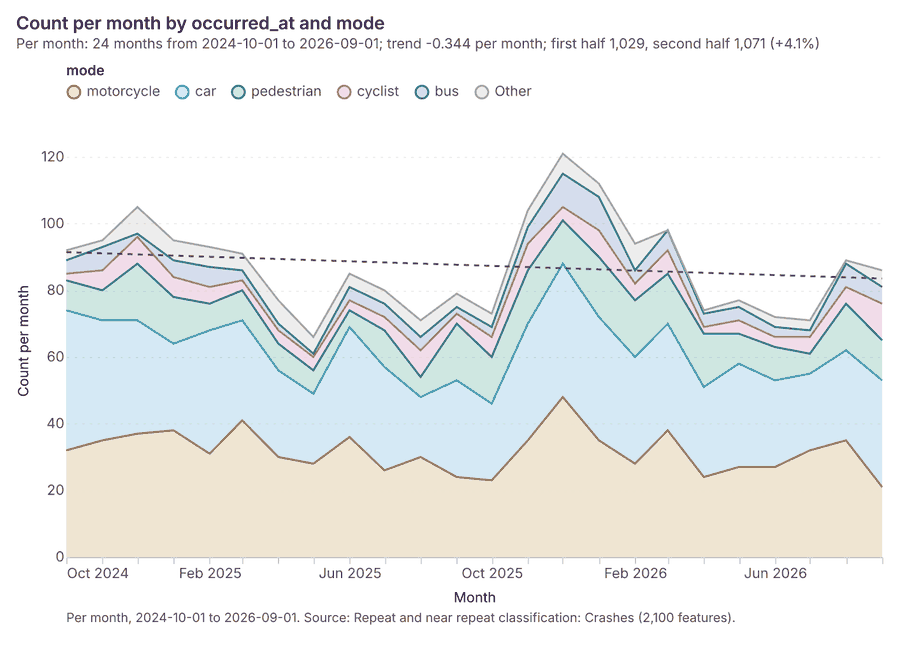
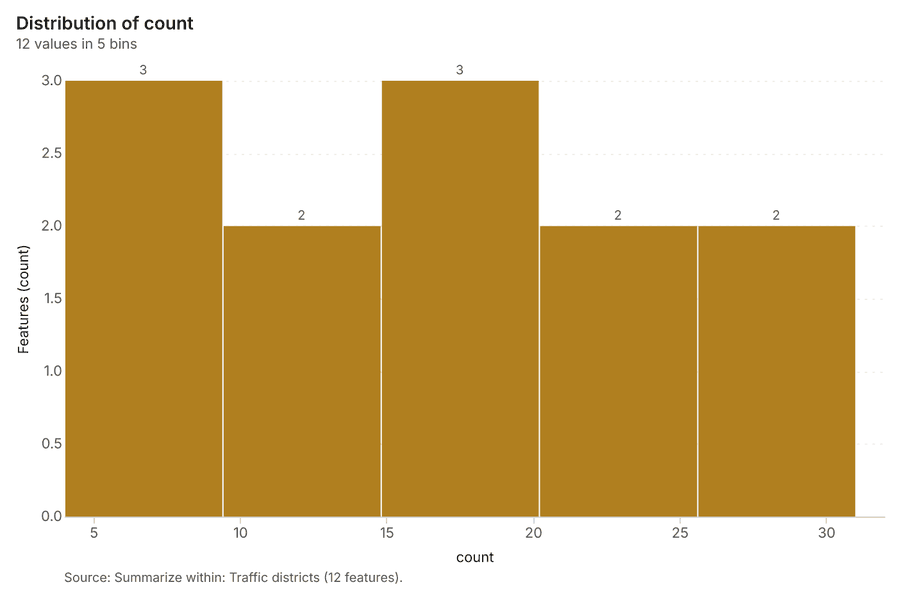
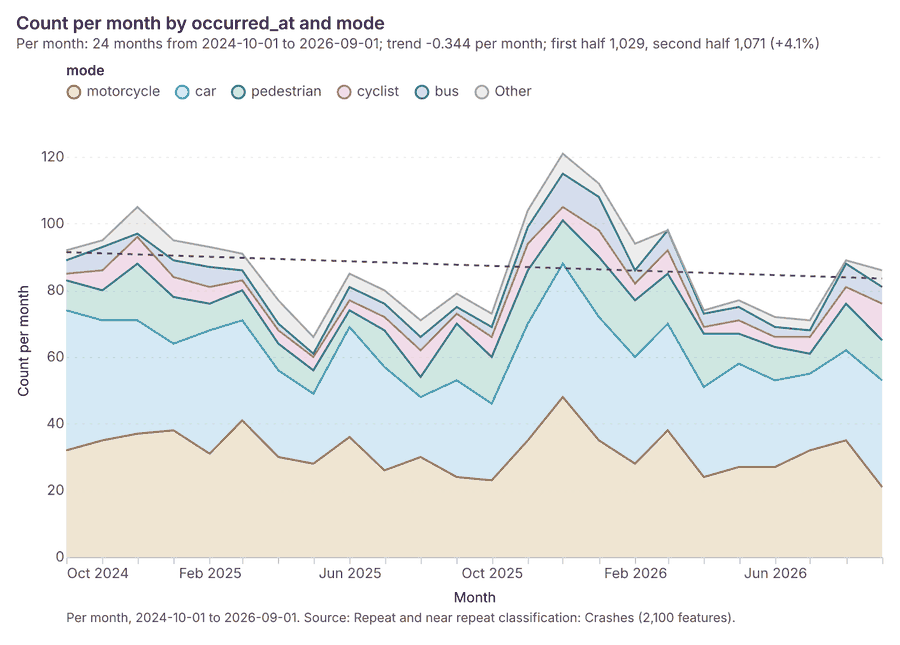
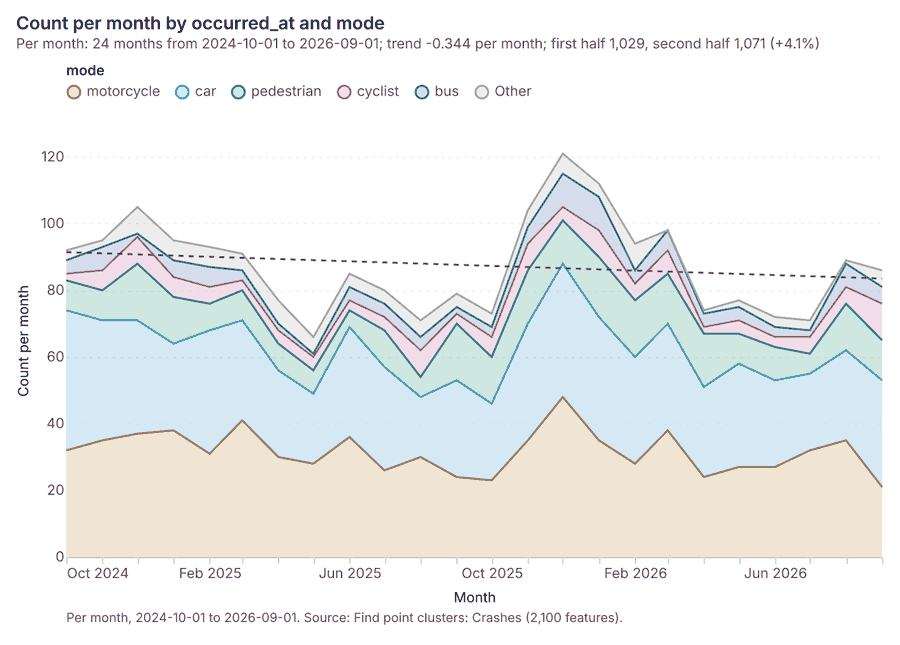
The run also made 18 map image(s) 464748495051525354555657585960616263 and 25 chart(s) 64656667686970717273747576777879808182838485868788.
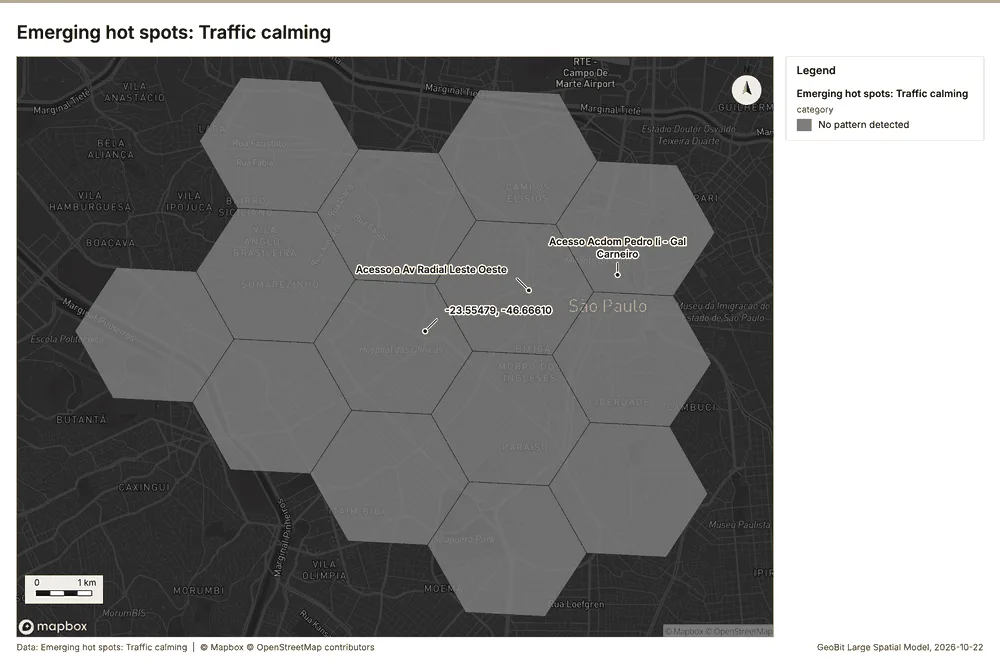
What the map shows. The map, titled "Emerging hot spots: Traffic calming," displays spatial analysis results across multiple hexagonal zones. According to the map's legend, every area is categorized under the "No pattern detected" status for this emerging hot spot analysis. The map does not display any visible clusters, gradients, or outliers of high or low traffic calming activity. The uniform 49
Inferred: read from the image by gemma4:e4b, not evidence.
Changes since the last run
This is the first report of this project.
Sources
- 1Rendering: Chart: Timeline: events per month by dataset. 180 rows id 9a0c9c08-6710-43e7-925b-a5575fc6ff05
- 2Dataset: Crashes. vector, 2100 rows id 4c514909-5014-41d8-b00c-114927c21aa8
- 3Dataset: Traffic calming. vector, 70 rows id a3bcfa4c-92bd-4d42-84a1-8fa68b0ed82e
- 4Dataset: Segment speeds by month. table, 1440 rows id d8e69dfa-1f0d-4b89-a415-acb37422c879
- 5Dataset: Camera citations by month. table, 300 rows id 6dd2a5a7-473b-47ef-87b8-127a0fa9fe0d
- 6Catalog: Hot spot analysis (operation catalog, gp_hot_spots). Getis-Ord Gi* hot and cold spots with z-scores, p-values and confidence bins. ArcGIS: Find Hot Spots, Hot Spot Analysis (Getis-Ord Gi*). QGIS: qgis:hotspot (plugin). id gp_hot_spots
- 7Plan: Hot spots of Schools (the Start plan's candidate c_6820fa8048aa). 40 points: Getis-Ord Gi* tests whether the concentrations in Schools are statistically significant. id b084b0e6-acd2-4d38-bfd7-32a3ffa79c90:c_6820fa8048aa
- 8Tool result: gp_hot_spots, step 0. Hot spot analysis: 1 layer saved: Hot spot analysis: Schools (40 features). id b665fc95-b641-4093-9d22-956737a8fbfd:0
- 9Layer: Schools. 40 features id cb956034-2d9c-4a8b-b395-a35fdb983208
- 10Plan: Hot spots of Crashes (the Start plan's candidate c_770e814da3da). 2100 points: Getis-Ord Gi* tests whether the concentrations in Crashes are statistically significant. id b084b0e6-acd2-4d38-bfd7-32a3ffa79c90:c_770e814da3da
- 11Tool result: gp_hot_spots, step 1. Hot spot analysis: 1 layer saved: Hot spot analysis: Crashes (1049 features). id b665fc95-b641-4093-9d22-956737a8fbfd:1
- 12Layer: Crashes. 2,100 features id 9501bda5-835f-47e8-b486-e5fa594533df
- 13Catalog: Emerging hot spots (operation catalog, gp_space_time_hot_spots). Where hot spots are new, consecutive, intensifying, persistent, diminishing, sporadic, oscillating or historical over time. ArcGIS: Emerging Hot Spot Analysis, Create Space Time Cube. id gp_space_time_hot_spots
- 14Plan: Space time hot spots of Crashes (the Start plan's candidate c_94b04cf53208). Crashes carry dates in 'occurred_at': emerging hot spot analysis finds new, intensifying and fading hot spots per month. id b084b0e6-acd2-4d38-bfd7-32a3ffa79c90:c_94b04cf53208
- 15Tool result: gp_space_time_hot_spots, step 0. Emerging hot spots: 1 layer saved: Emerging hot spots: Crashes (391 features). id a02448cc-b477-4a6c-8ae7-3ac23d189640:0
- 16Plan: Space time hot spots of Traffic calming (the Start plan's candidate c_b32d5bad7a33). Traffic calming carry dates in 'date': emerging hot spot analysis finds new, intensifying and fading hot spots per month. id b084b0e6-acd2-4d38-bfd7-32a3ffa79c90:c_b32d5bad7a33
- 17Tool result: gp_space_time_hot_spots, step 1. Emerging hot spots: 1 layer saved: Emerging hot spots: Traffic calming (14 features). id a02448cc-b477-4a6c-8ae7-3ac23d189640:1
- 18Layer: Traffic calming. 70 features id 03fd1e3f-918a-4f9a-8ab9-945371297dc6
- 19Catalog: Summarize within (operation catalog, gp_summarize_within). Count and aggregate the features inside each polygon (or bin), proportionally for lines and polygons. ArcGIS: Summarize Within, Aggregate Points. QGIS: native:countpointsinpolygon, native:sumlinelengths. id gp_summarize_within
- 20Plan: Schools per feature of Traffic districts (the Start plan's candidate c_8a3ffc7a90b1). Count Schools inside each feature of Traffic districts by level; the counts map as a choropleth (natural breaks, sequential colors). id b084b0e6-acd2-4d38-bfd7-32a3ffa79c90:c_8a3ffc7a90b1
- 21Tool result: gp_summarize_within, step 0. Summarize within: 1 layer saved: Summarize within: Traffic districts (12 features). id 8387f3d4-ed0c-4186-a3ac-98f72f10cd75:0
- 22Layer: Traffic districts. 12 features id 426e8d19-80fb-4cf4-9a7a-1e47e48d31cc
- 23Tool result: gp_summarize_within, step 1. Summarize within: 1 layer saved: Summarize within: Traffic districts (12 features). id 8387f3d4-ed0c-4186-a3ac-98f72f10cd75:1
- 24Catalog: Find point clusters (operation catalog, gp_find_point_clusters). Density-based clusters (DBSCAN, HDBSCAN or OPTICS, optionally space-time) with hulls and noise. ArcGIS: Find Point Clusters, Density-based Clustering. QGIS: native:dbscanclustering, native:stdbscanclustering. id gp_find_point_clusters
- 25Plan: Cluster points of Schools (the Start plan's candidate c_a5ebd65960a7). DBSCAN finds dense groups of Schools and separates noise. id b084b0e6-acd2-4d38-bfd7-32a3ffa79c90:c_a5ebd65960a7
- 26Tool result: gp_find_point_clusters, step 0. Find point clusters: 2 layers saved: Find point clusters: Schools (40 features); Find point clusters: cluster hulls (3 features). id 54de2fc4-ad0a-412e-bf5d-e9653a15671f:0
- 27Plan: Cluster points of Crashes (the Start plan's candidate c_2c9942f1fafe). DBSCAN finds dense groups of Crashes and separates noise. id b084b0e6-acd2-4d38-bfd7-32a3ffa79c90:c_2c9942f1fafe
- 28Tool result: gp_find_point_clusters, step 1. Find point clusters: 2 layers saved: Find point clusters: Crashes (2100 features); Find point clusters: cluster hulls (2 features). id 54de2fc4-ad0a-412e-bf5d-e9653a15671f:1
- 29Plan: Cluster points of Pedestrian crossings (the Start plan's candidate c_c18fe860314d). DBSCAN finds dense groups of Pedestrian crossings and separates noise. id b084b0e6-acd2-4d38-bfd7-32a3ffa79c90:c_c18fe860314d
- 30Tool result: gp_find_point_clusters, step 2. Find point clusters: 2 layers saved: Find point clusters: Pedestrian crossings (200 features); Find point clusters: cluster hulls (11 features). id 54de2fc4-ad0a-412e-bf5d-e9653a15671f:2
- 31Layer: Pedestrian crossings. 200 features id 5a5fc524-5914-46f0-b637-120d3de1b01c
- 32Catalog: Calculate density (operation catalog, gp_calculate_density). Kernel density per square kilometer on a grid. ArcGIS: Calculate Density, Kernel Density. QGIS: native:heatmapkerneldensityestimation. id gp_calculate_density
- 33Plan: Kernel density of Schools (the Start plan's candidate c_25e52236511e). 40 points in Schools: a density surface shows where they concentrate. id b084b0e6-acd2-4d38-bfd7-32a3ffa79c90:c_25e52236511e
- 34Tool result: gp_calculate_density, step 0. Calculate density: 1 layer saved: Calculate density: Schools (80 features). id 002fb5f9-1af6-402f-b464-49edd32e3044:0
- 35Plan: Kernel density of Crashes (the Start plan's candidate c_bfc2a7ecf90c). 2100 points in Crashes: a density surface shows where they concentrate. id b084b0e6-acd2-4d38-bfd7-32a3ffa79c90:c_bfc2a7ecf90c
- 36Tool result: gp_calculate_density, step 1. Calculate density: 1 layer saved: Calculate density: Crashes (4112 features). id 002fb5f9-1af6-402f-b464-49edd32e3044:1
- 37Plan: Kernel density of Pedestrian crossings (the Start plan's candidate c_9b962a31a776). 200 points in Pedestrian crossings: a density surface shows where they concentrate. id b084b0e6-acd2-4d38-bfd7-32a3ffa79c90:c_9b962a31a776
- 38Tool result: gp_calculate_density, step 2. Calculate density: 1 layer saved: Calculate density: Pedestrian crossings (251 features). id 002fb5f9-1af6-402f-b464-49edd32e3044:2
- 39Plan: Hot spots of Pedestrian crossings (the Start plan's candidate c_6f2484f162ad). 200 points: Getis-Ord Gi* tests whether the concentrations in Pedestrian crossings are statistically significant. id b084b0e6-acd2-4d38-bfd7-32a3ffa79c90:c_6f2484f162ad
- 40Tool result: gp_hot_spots, step 0. Hot spot analysis: 1 layer saved: Hot spot analysis: Pedestrian crossings (54 features). id 20671da3-3c9f-4bfc-ab63-45789559bbaa:0
- 41Catalog: Repeat and near repeat classification (operation catalog, gp_near_repeat). Classify incidents as originators, repeats (same place) or near repeats within a distance and time window, with a Knox test table. ArcGIS: Repeat and Near Repeat Classification, Near Repeat Calculator. id gp_near_repeat
- 42Plan: Near repeat of Crashes (the Start plan's candidate c_f79962c58bba). Near repeat analysis tests whether Crashes close in space also follow each other within 30 days. id b084b0e6-acd2-4d38-bfd7-32a3ffa79c90:c_f79962c58bba
- 43Tool result: gp_near_repeat, step 0. Repeat and near repeat classification: 1 layer saved: Repeat and near repeat classification: Crashes (2100 features). id 9871ee2f-25cc-4833-b2ad-49666fe06c44:0
- 44Plan: Pedestrian crossings per feature of Traffic districts (the Start plan's candidate c_c09d00b8db7e). Count Pedestrian crossings inside each feature of Traffic districts by type; the counts map as a choropleth (natural breaks, sequential colors). id b084b0e6-acd2-4d38-bfd7-32a3ffa79c90:c_c09d00b8db7e
- 45Tool result: gp_summarize_within, step 0. Summarize within: 1 layer saved: Summarize within: Traffic districts (12 features). id 1ff731de-fa54-412a-90f2-45eb74c9277e:0
- 46Rendering: Map: Hot spot analysis: Schools id adeafe66-bb7e-41b6-a50a-d645d50e3878
- 47Rendering: Map: Hot spot analysis: Crashes id 233e2091-e0f2-486b-9e97-493528e7345f
- 48Rendering: Map: Emerging hot spots: Crashes id fbc0e5a3-a877-4a33-bf17-9ad55699796c
- 49Rendering: Map: Emerging hot spots: Traffic calming id a1894195-d446-4aa2-9f8e-d0c822d7fa9e
- 50Rendering: Map: Summarize within: Traffic districts id 30ea9d3d-11ed-4c02-a9da-973b648cdda5
- 51Rendering: Map: Summarize within: Traffic districts id 59917dcd-4eac-4bbc-9094-fa048d8e0a8b
- 52Rendering: Map: Find point clusters: Schools id b9530209-8153-4b70-81e4-d13d4126e118
- 53Rendering: Map: Find point clusters: cluster hulls id 330923f5-621d-43f6-9f98-83b237722c00
- 54Rendering: Map: Find point clusters: Crashes id e8b0af6b-ab8d-4188-83ae-a83a5a7c76b3
- 55Rendering: Map: Find point clusters: cluster hulls id e5080803-3fc0-47b7-95f7-4829eb6d3859
- 56Rendering: Map: Find point clusters: Pedestrian crossings id 5f216382-62b6-4351-86ff-4e5ae0af8125
- 57Rendering: Map: Find point clusters: cluster hulls id 58f6c7d6-f814-4b9e-a8c9-4dd6d9ef95d1
- 58Rendering: Map: Calculate density: Schools id f2b01dad-ebee-465f-9e27-d62097f4c268
- 59Rendering: Map: Calculate density: Crashes id 64a4981a-c955-42e7-b34b-254a98f25520
- 60Rendering: Map: Calculate density: Pedestrian crossings id 2756e5bb-abe5-4473-b915-78f831d3d5a4
- 61Rendering: Map: Hot spot analysis: Pedestrian crossings id 8f0a76db-4777-4ab7-9a9a-930da7a08925
- 62Rendering: Map: Repeat and near repeat classification: Crashes id 02ed79bd-4bdf-4842-93fe-2e184455d945
- 63Rendering: Map: Summarize within: Traffic districts id 6dfdb515-5e14-402d-871f-0ffa294530f7
- 64Rendering: Chart: Crashes over time (occurred_at). 96 rows id 8cda2c81-bd3a-4553-9c58-295ed795aff2
- 65Rendering: Chart: Speed cameras over time (installed_year). 1 rows id 7edbd055-674b-4ee4-97e5-347a866c2947
- 66Rendering: Chart: Traffic calming over time (date). 168 rows id 2d958f28-45c2-4b7a-87ed-c8ab49911031
- 67Rendering: Chart: Segment speeds by month over time (month). 49 rows id b7432eea-2c3a-477a-a1e8-2d36cd655803
- 68Rendering: Chart: Camera citations by month over time (month). 49 rows id 969fa530-28ba-4dd0-a75b-69aa84b54678
- 69Rendering: Chart: Hot spot analysis: Schools. 10 rows id 461534e0-1147-4c68-b696-ce72af84c87e
- 70Rendering: Chart: Hot spot analysis: Crashes. 17 rows id e0c0fd5a-fbcd-48a4-b737-5ec55e00e9b6
- 71Rendering: Chart: Emerging hot spots: Crashes. 10 rows id 733c92a3-ffad-470a-a9c0-f4d673d42289
- 72Rendering: Chart: Emerging hot spots: Traffic calming. 5 rows id 10c55d47-29c7-4734-a9fe-0a0b7975fbb8
- 73Rendering: Chart: Summarize within: Traffic districts. 5 rows id d2a4a3dc-7d76-4a0e-b041-b334e994f076
- 74Rendering: Chart: Summarize within: Traffic districts. 5 rows id 897d00dc-b8b3-4e8d-9d2a-a66ba81fa3a8
- 75Rendering: Chart: Find point clusters: Schools. 4 rows id 423c158c-d88d-476c-b3d7-399c0645179a
- 76Rendering: Chart: Find point clusters: cluster hulls. 3 rows id b7ed2b2a-82e2-47a7-b9fd-40ba7637b0fb
- 77Rendering: Chart: Find point clusters: Crashes. 3 rows id 7ea99118-9ea1-4440-a6b8-2787d996b886
- 78Rendering: Chart: Find point clusters: cluster hulls. 2 rows id 1f581a53-06c3-4e15-b1d5-c6d8810d5069
- 79Rendering: Chart: Find point clusters: Pedestrian crossings. 12 rows id 734ca768-921a-4688-b5a3-91e547b8132f
- 80Rendering: Chart: Find point clusters: cluster hulls. 11 rows id 644e98c9-2e62-4e6c-88cc-2bac7654aca8
- 81Rendering: Chart: Calculate density: Schools. 8 rows id 5185f166-2557-47d4-95a0-e09a9b9dffa6
- 82Rendering: Chart: Calculate density: Crashes. 14 rows id d1d3088c-9c82-4847-9ad2-937f125a2774
- 83Rendering: Chart: Calculate density: Pedestrian crossings. 9 rows id 2be0343e-08ed-45f8-b191-db1ac61f21d2
- 84Rendering: Chart: Hot spot analysis: Pedestrian crossings. 9 rows id 04bdc4d9-e0fe-477a-8403-b2f2881d948a
- 85Rendering: Chart: Repeat and near repeat classification: Crashes. 144 rows id 533c2ef2-04e7-4ec6-9dda-091526d4b60e
- 86Rendering: Chart: Summarize within: Traffic districts. 5 rows id f50135c9-a379-4056-b401-ddd84d655807
- 87Rendering: Chart: Repeat and near repeat classification: Crashes over time. 144 rows id aa71a552-c3d9-4aee-a82e-f6857fbc92a9
- 88Rendering: Chart: Find point clusters: Crashes over time. 144 rows id 1d507cb3-0287-4a28-9492-374091139b83
- 89Dataset: Road segments. vector, 900 rows id a1c0c341-b0b4-4540-8666-cc898710a5a2
- 90Dataset: Traffic districts. vector, 12 rows id 4ddf9694-9e59-443e-9e26-b99d63650843
- 91Dataset: Speed cameras. vector, 25 rows id d0346d0a-3495-47e2-bbaa-9bdebea63dae
- 92Dataset: Schools. vector, 40 rows id 47516658-bc03-4d11-a9a3-83d7b85272e7
- 93Dataset: Bus stops. vector, 120 rows id b69ec834-01b9-40fe-b4d7-048918f3ff66
- 94Dataset: Pedestrian crossings. vector, 200 rows id 9904012c-b65c-4579-bb44-535cd45f66ca
- 95Dataset: Vision Zero corridor review. document, ? rows id cef3f8f3-9628-4f98-b173-947dda8f30f3
- 96Record: Sample: Transportation safety, Sao Paulo id 220702b2-1327-4244-9cff-74cf9d501f98
- 97Layer: Hot spot analysis: Schools. 40 features id e24a725d-1226-4c6c-ac79-ddb0e0634c6c
- 98Layer: Hot spot analysis: Crashes. 1,049 features id becfaca3-5eea-4150-9c71-4a8a51769984
- 99Layer: Emerging hot spots: Crashes. 391 features id 9df86500-c0e4-4e6a-b523-dc729593eaa4
- 100Layer: Emerging hot spots: Traffic calming. 14 features id fd2099dc-7aac-4041-8f85-bb99a6553671
- 101Layer: Summarize within: Traffic districts. 12 features id 7dd3dbff-8946-47c0-9f8c-365a3f16b57f
- 102Layer: Summarize within: Traffic districts. 12 features id ab0320a0-7ff1-4268-8628-c5d500503744
- 103Layer: Find point clusters: Schools. 40 features id 62d9b779-75eb-44b3-af8e-6b11cb59257b
- 104Layer: Find point clusters: cluster hulls. 3 features id 9a336160-b53a-41a1-bdce-2ce51cd5a9fe
- 105Layer: Find point clusters: Crashes. 2,100 features id a3b9de76-4c1e-4b60-b686-346672b601ef
- 106Layer: Find point clusters: cluster hulls. 2 features id fb76f8c2-f8d9-4e00-9560-bec71fbe6696
- 107Layer: Find point clusters: Pedestrian crossings. 200 features id 177f4978-c15d-4e75-b5c7-7a917152e219
- 108Layer: Find point clusters: cluster hulls. 11 features id 42bb9ca8-0db1-4b9d-8ed3-e7c9337230cf
- 109Layer: Calculate density: Schools. 80 features id 41390c5d-5081-4052-9d4c-9ba56bf9b6f5
- 110Layer: Calculate density: Crashes. 4,112 features id b719c8e4-0a00-46f8-a1ac-dba4d26a9fcb
- 111Layer: Calculate density: Pedestrian crossings. 251 features id 59d27925-1f02-4b09-86f4-ada68a81d6fe
- 112Layer: Hot spot analysis: Pedestrian crossings. 54 features id a4ed9f7b-d1d3-42f8-a3e7-e16c31bbc302
- 113Layer: Repeat and near repeat classification: Crashes. 2,100 features id 983941e1-9046-42e6-a142-4a34d1f16e13
- 114Layer: Summarize within: Traffic districts. 12 features id 611b1b4c-39d3-405a-976d-57aca77ac14e
Appendix: the data behind the chartsShow
Figure 1. Timeline: events per month by dataset 1
| period | series | value |
|---|---|---|
| 2023-01-01 | Crashes | 0 |
| 2023-01-01 | Segment speeds by month | 0 |
| 2023-01-01 | Camera citations by month | 0 |
| 2023-01-01 | Traffic calming | 2 |
| 2023-02-01 | Crashes | 0 |
| 2023-02-01 | Segment speeds by month | 0 |
| 2023-02-01 | Camera citations by month | 0 |
| 2023-02-01 | Traffic calming | 2 |
| 2023-03-01 | Crashes | 0 |
| 2023-03-01 | Segment speeds by month | 0 |
| 2023-03-01 | Camera citations by month | 0 |
| 2023-03-01 | Traffic calming | 1 |
| 2023-04-01 | Crashes | 0 |
| 2023-04-01 | Segment speeds by month | 0 |
| 2023-04-01 | Camera citations by month | 0 |
| 2023-04-01 | Traffic calming | 1 |
| 2023-05-01 | Crashes | 0 |
| 2023-05-01 | Segment speeds by month | 0 |
| 2023-05-01 | Camera citations by month | 0 |
| 2023-05-01 | Traffic calming | 1 |
| 2023-06-01 | Crashes | 0 |
| 2023-06-01 | Segment speeds by month | 0 |
| 2023-06-01 | Camera citations by month | 0 |
| 2023-06-01 | Traffic calming | 4 |
| 2023-07-01 | Crashes | 0 |
| 2023-07-01 | Segment speeds by month | 0 |
| 2023-07-01 | Camera citations by month | 0 |
| 2023-07-01 | Traffic calming | 2 |
| 2023-08-01 | Crashes | 0 |
| 2023-08-01 | Segment speeds by month | 0 |
| 2023-08-01 | Camera citations by month | 0 |
| 2023-08-01 | Traffic calming | 1 |
| 2023-09-01 | Crashes | 0 |
| 2023-09-01 | Segment speeds by month | 0 |
| 2023-09-01 | Camera citations by month | 0 |
| 2023-09-01 | Traffic calming | 4 |
| 2023-10-01 | Crashes | 0 |
| 2023-10-01 | Segment speeds by month | 0 |
| 2023-10-01 | Camera citations by month | 0 |
| 2023-10-01 | Traffic calming | 1 |
| 2023-11-01 | Crashes | 0 |
| 2023-11-01 | Segment speeds by month | 0 |
| 2023-11-01 | Camera citations by month | 0 |
| 2023-11-01 | Traffic calming | 0 |
| 2023-12-01 | Crashes | 0 |
| 2023-12-01 | Segment speeds by month | 0 |
| 2023-12-01 | Camera citations by month | 0 |
| 2023-12-01 | Traffic calming | 3 |
| 2024-01-01 | Crashes | 0 |
| 2024-01-01 | Segment speeds by month | 0 |
| 2024-01-01 | Camera citations by month | 0 |
| 2024-01-01 | Traffic calming | 1 |
| 2024-02-01 | Crashes | 0 |
| 2024-02-01 | Segment speeds by month | 0 |
| 2024-02-01 | Camera citations by month | 0 |
| 2024-02-01 | Traffic calming | 1 |
| 2024-03-01 | Crashes | 0 |
| 2024-03-01 | Segment speeds by month | 0 |
| 2024-03-01 | Camera citations by month | 0 |
| 2024-03-01 | Traffic calming | 2 |
| 2024-04-01 | Crashes | 0 |
| 2024-04-01 | Segment speeds by month | 0 |
| 2024-04-01 | Camera citations by month | 0 |
| 2024-04-01 | Traffic calming | 1 |
| 2024-05-01 | Crashes | 0 |
| 2024-05-01 | Segment speeds by month | 0 |
| 2024-05-01 | Camera citations by month | 0 |
| 2024-05-01 | Traffic calming | 1 |
| 2024-06-01 | Crashes | 0 |
| 2024-06-01 | Segment speeds by month | 0 |
| 2024-06-01 | Camera citations by month | 0 |
| 2024-06-01 | Traffic calming | 2 |
| 2024-07-01 | Crashes | 0 |
| 2024-07-01 | Segment speeds by month | 0 |
| 2024-07-01 | Camera citations by month | 0 |
| 2024-07-01 | Traffic calming | 2 |
| 2024-08-01 | Crashes | 0 |
| 2024-08-01 | Segment speeds by month | 0 |
| 2024-08-01 | Camera citations by month | 0 |
| 2024-08-01 | Traffic calming | 1 |
| 2024-09-01 | Crashes | 0 |
| 2024-09-01 | Segment speeds by month | 0 |
| 2024-09-01 | Camera citations by month | 0 |
| 2024-09-01 | Traffic calming | 0 |
| 2024-10-01 | Crashes | 92 |
| 2024-10-01 | Segment speeds by month | 0 |
| 2024-10-01 | Camera citations by month | 0 |
| 2024-10-01 | Traffic calming | 1 |
| 2024-11-01 | Crashes | 95 |
| 2024-11-01 | Segment speeds by month | 0 |
| 2024-11-01 | Camera citations by month | 0 |
| 2024-11-01 | Traffic calming | 1 |
| 2024-12-01 | Crashes | 105 |
| 2024-12-01 | Segment speeds by month | 0 |
| 2024-12-01 | Camera citations by month | 0 |
| 2024-12-01 | Traffic calming | 1 |
| 2025-01-01 | Crashes | 95 |
| 2025-01-01 | Segment speeds by month | 0 |
| 2025-01-01 | Camera citations by month | 0 |
| 2025-01-01 | Traffic calming | 4 |
| 2025-02-01 | Crashes | 93 |
| 2025-02-01 | Segment speeds by month | 0 |
| 2025-02-01 | Camera citations by month | 0 |
| 2025-02-01 | Traffic calming | 0 |
| 2025-03-01 | Crashes | 91 |
| 2025-03-01 | Segment speeds by month | 0 |
| 2025-03-01 | Camera citations by month | 0 |
| 2025-03-01 | Traffic calming | 0 |
| 2025-04-01 | Crashes | 77 |
| 2025-04-01 | Segment speeds by month | 0 |
| 2025-04-01 | Camera citations by month | 0 |
| 2025-04-01 | Traffic calming | 3 |
| 2025-05-01 | Crashes | 66 |
| 2025-05-01 | Segment speeds by month | 0 |
| 2025-05-01 | Camera citations by month | 0 |
| 2025-05-01 | Traffic calming | 1 |
| 2025-06-01 | Crashes | 85 |
| 2025-06-01 | Segment speeds by month | 0 |
| 2025-06-01 | Camera citations by month | 0 |
| 2025-06-01 | Traffic calming | 1 |
| 2025-07-01 | Crashes | 80 |
| 2025-07-01 | Segment speeds by month | 0 |
| 2025-07-01 | Camera citations by month | 0 |
| 2025-07-01 | Traffic calming | 3 |
| 2025-08-01 | Crashes | 71 |
| 2025-08-01 | Segment speeds by month | 0 |
| 2025-08-01 | Camera citations by month | 0 |
| 2025-08-01 | Traffic calming | 3 |
| 2025-09-01 | Crashes | 79 |
| 2025-09-01 | Segment speeds by month | 0 |
| 2025-09-01 | Camera citations by month | 0 |
| 2025-09-01 | Traffic calming | 1 |
| 2025-10-01 | Crashes | 73 |
| 2025-10-01 | Segment speeds by month | 120 |
| 2025-10-01 | Camera citations by month | 25 |
| 2025-10-01 | Traffic calming | 3 |
| 2025-11-01 | Crashes | 104 |
| 2025-11-01 | Segment speeds by month | 120 |
| 2025-11-01 | Camera citations by month | 25 |
| 2025-11-01 | Traffic calming | 1 |
| 2025-12-01 | Crashes | 121 |
| 2025-12-01 | Segment speeds by month | 120 |
| 2025-12-01 | Camera citations by month | 25 |
| 2025-12-01 | Traffic calming | 2 |
| 2026-01-01 | Crashes | 112 |
| 2026-01-01 | Segment speeds by month | 120 |
| 2026-01-01 | Camera citations by month | 25 |
| 2026-01-01 | Traffic calming | 0 |
| 2026-02-01 | Crashes | 94 |
| 2026-02-01 | Segment speeds by month | 120 |
| 2026-02-01 | Camera citations by month | 25 |
| 2026-02-01 | Traffic calming | 3 |
| 2026-03-01 | Crashes | 98 |
| 2026-03-01 | Segment speeds by month | 120 |
| 2026-03-01 | Camera citations by month | 25 |
| 2026-03-01 | Traffic calming | 0 |
| 2026-04-01 | Crashes | 74 |
| 2026-04-01 | Segment speeds by month | 120 |
| 2026-04-01 | Camera citations by month | 25 |
| 2026-04-01 | Traffic calming | 5 |
| 2026-05-01 | Crashes | 77 |
| 2026-05-01 | Segment speeds by month | 120 |
| 2026-05-01 | Camera citations by month | 25 |
| 2026-05-01 | Traffic calming | 3 |
| 2026-06-01 | Crashes | 72 |
| 2026-06-01 | Segment speeds by month | 120 |
| 2026-06-01 | Camera citations by month | 25 |
| 2026-06-01 | Traffic calming | 1 |
| 2026-07-01 | Crashes | 71 |
| 2026-07-01 | Segment speeds by month | 120 |
| 2026-07-01 | Camera citations by month | 25 |
| 2026-07-01 | Traffic calming | 0 |
| 2026-08-01 | Crashes | 89 |
| 2026-08-01 | Segment speeds by month | 120 |
| 2026-08-01 | Camera citations by month | 25 |
| 2026-08-01 | Traffic calming | 0 |
| 2026-09-01 | Crashes | 86 |
| 2026-09-01 | Segment speeds by month | 120 |
| 2026-09-01 | Camera citations by month | 25 |
| 2026-09-01 | Traffic calming | 0 |
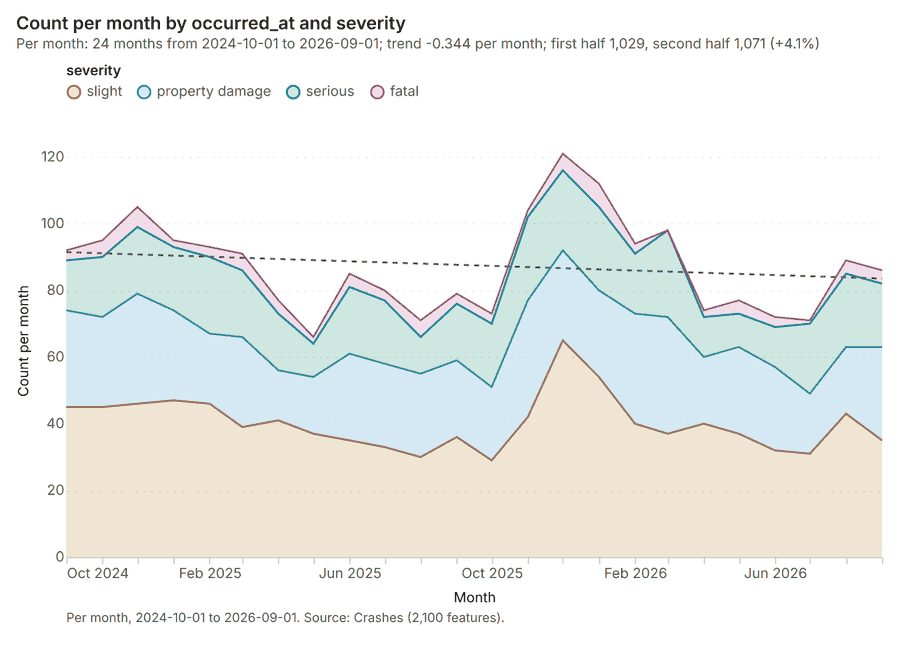
Figure 20. Crashes over time (occurred_at) 64
| period | series | value |
|---|---|---|
| 2024-10-01 | slight | 45 |
| 2024-10-01 | property damage | 29 |
| 2024-10-01 | serious | 15 |
| 2024-10-01 | fatal | 3 |
| 2024-11-01 | slight | 45 |
| 2024-11-01 | property damage | 27 |
| 2024-11-01 | serious | 18 |
| 2024-11-01 | fatal | 5 |
| 2024-12-01 | slight | 46 |
| 2024-12-01 | property damage | 33 |
| 2024-12-01 | serious | 20 |
| 2024-12-01 | fatal | 6 |
| 2025-01-01 | slight | 47 |
| 2025-01-01 | property damage | 27 |
| 2025-01-01 | serious | 19 |
| 2025-01-01 | fatal | 2 |
| 2025-02-01 | slight | 46 |
| 2025-02-01 | property damage | 21 |
| 2025-02-01 | serious | 23 |
| 2025-02-01 | fatal | 3 |
| 2025-03-01 | slight | 39 |
| 2025-03-01 | property damage | 27 |
| 2025-03-01 | serious | 20 |
| 2025-03-01 | fatal | 5 |
| 2025-04-01 | slight | 41 |
| 2025-04-01 | property damage | 15 |
| 2025-04-01 | serious | 17 |
| 2025-04-01 | fatal | 4 |
| 2025-05-01 | slight | 37 |
| 2025-05-01 | property damage | 17 |
| 2025-05-01 | serious | 10 |
| 2025-05-01 | fatal | 2 |
| 2025-06-01 | slight | 35 |
| 2025-06-01 | property damage | 26 |
| 2025-06-01 | serious | 20 |
| 2025-06-01 | fatal | 4 |
| 2025-07-01 | slight | 33 |
| 2025-07-01 | property damage | 25 |
| 2025-07-01 | serious | 19 |
| 2025-07-01 | fatal | 3 |
| 2025-08-01 | slight | 30 |
| 2025-08-01 | property damage | 25 |
| 2025-08-01 | serious | 11 |
| 2025-08-01 | fatal | 5 |
| 2025-09-01 | slight | 36 |
| 2025-09-01 | property damage | 23 |
| 2025-09-01 | serious | 17 |
| 2025-09-01 | fatal | 3 |
| 2025-10-01 | slight | 29 |
| 2025-10-01 | property damage | 22 |
| 2025-10-01 | serious | 19 |
| 2025-10-01 | fatal | 3 |
| 2025-11-01 | slight | 42 |
| 2025-11-01 | property damage | 35 |
| 2025-11-01 | serious | 25 |
| 2025-11-01 | fatal | 2 |
| 2025-12-01 | slight | 65 |
| 2025-12-01 | property damage | 27 |
| 2025-12-01 | serious | 24 |
| 2025-12-01 | fatal | 5 |
| 2026-01-01 | slight | 54 |
| 2026-01-01 | property damage | 26 |
| 2026-01-01 | serious | 25 |
| 2026-01-01 | fatal | 7 |
| 2026-02-01 | slight | 40 |
| 2026-02-01 | property damage | 33 |
| 2026-02-01 | serious | 18 |
| 2026-02-01 | fatal | 3 |
| 2026-03-01 | slight | 37 |
| 2026-03-01 | property damage | 35 |
| 2026-03-01 | serious | 26 |
| 2026-03-01 | fatal | 0 |
| 2026-04-01 | slight | 40 |
| 2026-04-01 | property damage | 20 |
| 2026-04-01 | serious | 12 |
| 2026-04-01 | fatal | 2 |
| 2026-05-01 | slight | 37 |
| 2026-05-01 | property damage | 26 |
| 2026-05-01 | serious | 10 |
| 2026-05-01 | fatal | 4 |
| 2026-06-01 | slight | 32 |
| 2026-06-01 | property damage | 25 |
| 2026-06-01 | serious | 12 |
| 2026-06-01 | fatal | 3 |
| 2026-07-01 | slight | 31 |
| 2026-07-01 | property damage | 18 |
| 2026-07-01 | serious | 21 |
| 2026-07-01 | fatal | 1 |
| 2026-08-01 | slight | 43 |
| 2026-08-01 | property damage | 20 |
| 2026-08-01 | serious | 22 |
| 2026-08-01 | fatal | 4 |
| 2026-09-01 | slight | 35 |
| 2026-09-01 | property damage | 28 |
| 2026-09-01 | serious | 19 |
| 2026-09-01 | fatal | 4 |
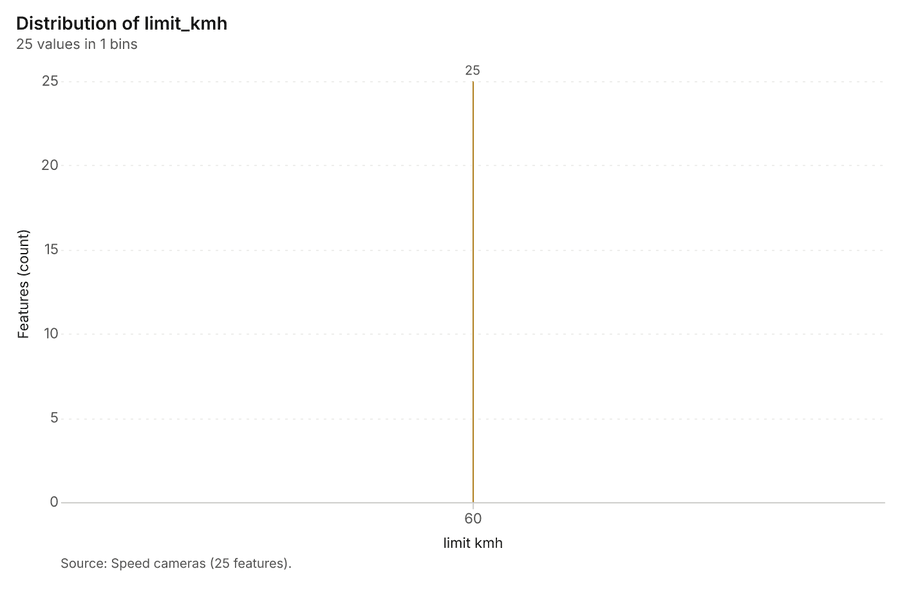
Figure 21. Speed cameras over time (installed_year) 65
| bin_start | bin_end | count |
|---|---|---|
| 60 | 60 | 25 |
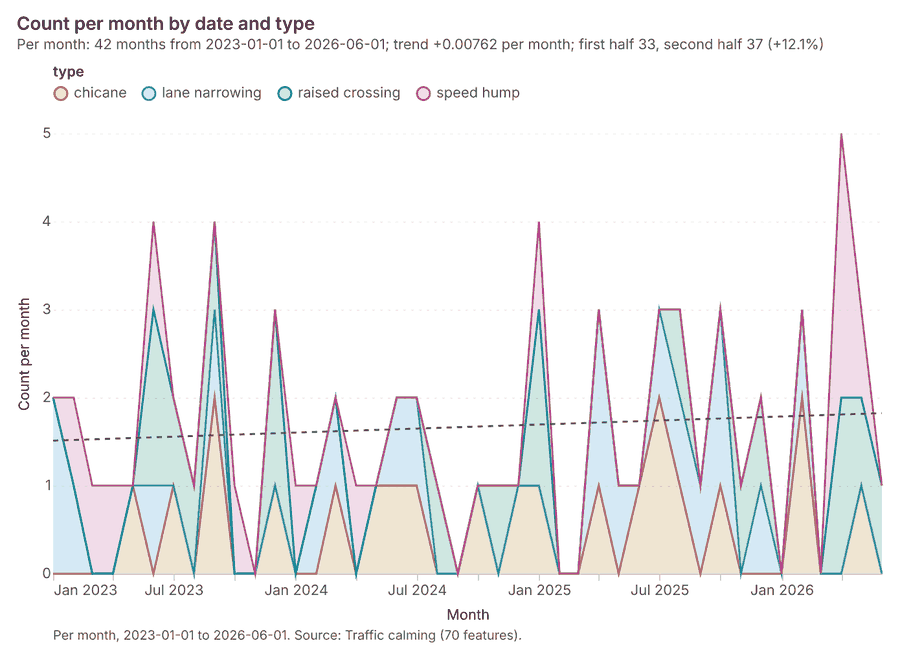
Figure 22. Traffic calming over time (date) 66
| period | series | value |
|---|---|---|
| 2023-01-01 | chicane | 0 |
| 2023-01-01 | lane narrowing | 2 |
| 2023-01-01 | raised crossing | 0 |
| 2023-01-01 | speed hump | 0 |
| 2023-02-01 | chicane | 0 |
| 2023-02-01 | lane narrowing | 1 |
| 2023-02-01 | raised crossing | 0 |
| 2023-02-01 | speed hump | 1 |
| 2023-03-01 | chicane | 0 |
| 2023-03-01 | lane narrowing | 0 |
| 2023-03-01 | raised crossing | 0 |
| 2023-03-01 | speed hump | 1 |
| 2023-04-01 | chicane | 0 |
| 2023-04-01 | lane narrowing | 0 |
| 2023-04-01 | raised crossing | 0 |
| 2023-04-01 | speed hump | 1 |
| 2023-05-01 | chicane | 1 |
| 2023-05-01 | lane narrowing | 0 |
| 2023-05-01 | raised crossing | 0 |
| 2023-05-01 | speed hump | 0 |
| 2023-06-01 | chicane | 0 |
| 2023-06-01 | lane narrowing | 1 |
| 2023-06-01 | raised crossing | 2 |
| 2023-06-01 | speed hump | 1 |
| 2023-07-01 | chicane | 1 |
| 2023-07-01 | lane narrowing | 0 |
| 2023-07-01 | raised crossing | 1 |
| 2023-07-01 | speed hump | 0 |
| 2023-08-01 | chicane | 0 |
| 2023-08-01 | lane narrowing | 0 |
| 2023-08-01 | raised crossing | 1 |
| 2023-08-01 | speed hump | 0 |
| 2023-09-01 | chicane | 2 |
| 2023-09-01 | lane narrowing | 1 |
| 2023-09-01 | raised crossing | 1 |
| 2023-09-01 | speed hump | 0 |
| 2023-10-01 | chicane | 0 |
| 2023-10-01 | lane narrowing | 0 |
| 2023-10-01 | raised crossing | 0 |
| 2023-10-01 | speed hump | 1 |
| 2023-11-01 | chicane | 0 |
| 2023-11-01 | lane narrowing | 0 |
| 2023-11-01 | raised crossing | 0 |
| 2023-11-01 | speed hump | 0 |
| 2023-12-01 | chicane | 1 |
| 2023-12-01 | lane narrowing | 0 |
| 2023-12-01 | raised crossing | 2 |
| 2023-12-01 | speed hump | 0 |
| 2024-01-01 | chicane | 0 |
| 2024-01-01 | lane narrowing | 0 |
| 2024-01-01 | raised crossing | 0 |
| 2024-01-01 | speed hump | 1 |
| 2024-02-01 | chicane | 0 |
| 2024-02-01 | lane narrowing | 1 |
| 2024-02-01 | raised crossing | 0 |
| 2024-02-01 | speed hump | 0 |
| 2024-03-01 | chicane | 1 |
| 2024-03-01 | lane narrowing | 1 |
| 2024-03-01 | raised crossing | 0 |
| 2024-03-01 | speed hump | 0 |
| 2024-04-01 | chicane | 0 |
| 2024-04-01 | lane narrowing | 0 |
| 2024-04-01 | raised crossing | 0 |
| 2024-04-01 | speed hump | 1 |
| 2024-05-01 | chicane | 1 |
| 2024-05-01 | lane narrowing | 0 |
| 2024-05-01 | raised crossing | 0 |
| 2024-05-01 | speed hump | 0 |
| 2024-06-01 | chicane | 1 |
| 2024-06-01 | lane narrowing | 1 |
| 2024-06-01 | raised crossing | 0 |
| 2024-06-01 | speed hump | 0 |
| 2024-07-01 | chicane | 1 |
| 2024-07-01 | lane narrowing | 1 |
| 2024-07-01 | raised crossing | 0 |
| 2024-07-01 | speed hump | 0 |
| 2024-08-01 | chicane | 0 |
| 2024-08-01 | lane narrowing | 0 |
| 2024-08-01 | raised crossing | 1 |
| 2024-08-01 | speed hump | 0 |
| 2024-09-01 | chicane | 0 |
| 2024-09-01 | lane narrowing | 0 |
| 2024-09-01 | raised crossing | 0 |
| 2024-09-01 | speed hump | 0 |
| 2024-10-01 | chicane | 1 |
| 2024-10-01 | lane narrowing | 0 |
| 2024-10-01 | raised crossing | 0 |
| 2024-10-01 | speed hump | 0 |
| 2024-11-01 | chicane | 0 |
| 2024-11-01 | lane narrowing | 0 |
| 2024-11-01 | raised crossing | 1 |
| 2024-11-01 | speed hump | 0 |
| 2024-12-01 | chicane | 1 |
| 2024-12-01 | lane narrowing | 0 |
| 2024-12-01 | raised crossing | 0 |
| 2024-12-01 | speed hump | 0 |
| 2025-01-01 | chicane | 1 |
| 2025-01-01 | lane narrowing | 0 |
| 2025-01-01 | raised crossing | 2 |
| 2025-01-01 | speed hump | 1 |
| 2025-02-01 | chicane | 0 |
| 2025-02-01 | lane narrowing | 0 |
| 2025-02-01 | raised crossing | 0 |
| 2025-02-01 | speed hump | 0 |
| 2025-03-01 | chicane | 0 |
| 2025-03-01 | lane narrowing | 0 |
| 2025-03-01 | raised crossing | 0 |
| 2025-03-01 | speed hump | 0 |
| 2025-04-01 | chicane | 1 |
| 2025-04-01 | lane narrowing | 2 |
| 2025-04-01 | raised crossing | 0 |
| 2025-04-01 | speed hump | 0 |
| 2025-05-01 | chicane | 0 |
| 2025-05-01 | lane narrowing | 1 |
| 2025-05-01 | raised crossing | 0 |
| 2025-05-01 | speed hump | 0 |
| 2025-06-01 | chicane | 1 |
| 2025-06-01 | lane narrowing | 0 |
| 2025-06-01 | raised crossing | 0 |
| 2025-06-01 | speed hump | 0 |
| 2025-07-01 | chicane | 2 |
| 2025-07-01 | lane narrowing | 1 |
| 2025-07-01 | raised crossing | 0 |
| 2025-07-01 | speed hump | 0 |
| 2025-08-01 | chicane | 1 |
| 2025-08-01 | lane narrowing | 1 |
| 2025-08-01 | raised crossing | 1 |
| 2025-08-01 | speed hump | 0 |
| 2025-09-01 | chicane | 0 |
| 2025-09-01 | lane narrowing | 1 |
| 2025-09-01 | raised crossing | 0 |
| 2025-09-01 | speed hump | 0 |
| 2025-10-01 | chicane | 1 |
| 2025-10-01 | lane narrowing | 2 |
| 2025-10-01 | raised crossing | 0 |
| 2025-10-01 | speed hump | 0 |
| 2025-11-01 | chicane | 0 |
| 2025-11-01 | lane narrowing | 0 |
| 2025-11-01 | raised crossing | 1 |
| 2025-11-01 | speed hump | 0 |
| 2025-12-01 | chicane | 0 |
| 2025-12-01 | lane narrowing | 1 |
| 2025-12-01 | raised crossing | 1 |
| 2025-12-01 | speed hump | 0 |
| 2026-01-01 | chicane | 0 |
| 2026-01-01 | lane narrowing | 0 |
| 2026-01-01 | raised crossing | 0 |
| 2026-01-01 | speed hump | 0 |
| 2026-02-01 | chicane | 2 |
| 2026-02-01 | lane narrowing | 1 |
| 2026-02-01 | raised crossing | 0 |
| 2026-02-01 | speed hump | 0 |
| 2026-03-01 | chicane | 0 |
| 2026-03-01 | lane narrowing | 0 |
| 2026-03-01 | raised crossing | 0 |
| 2026-03-01 | speed hump | 0 |
| 2026-04-01 | chicane | 0 |
| 2026-04-01 | lane narrowing | 0 |
| 2026-04-01 | raised crossing | 2 |
| 2026-04-01 | speed hump | 3 |
| 2026-05-01 | chicane | 1 |
| 2026-05-01 | lane narrowing | 0 |
| 2026-05-01 | raised crossing | 1 |
| 2026-05-01 | speed hump | 1 |
| 2026-06-01 | chicane | 0 |
| 2026-06-01 | lane narrowing | 0 |
| 2026-06-01 | raised crossing | 1 |
| 2026-06-01 | speed hump | 0 |
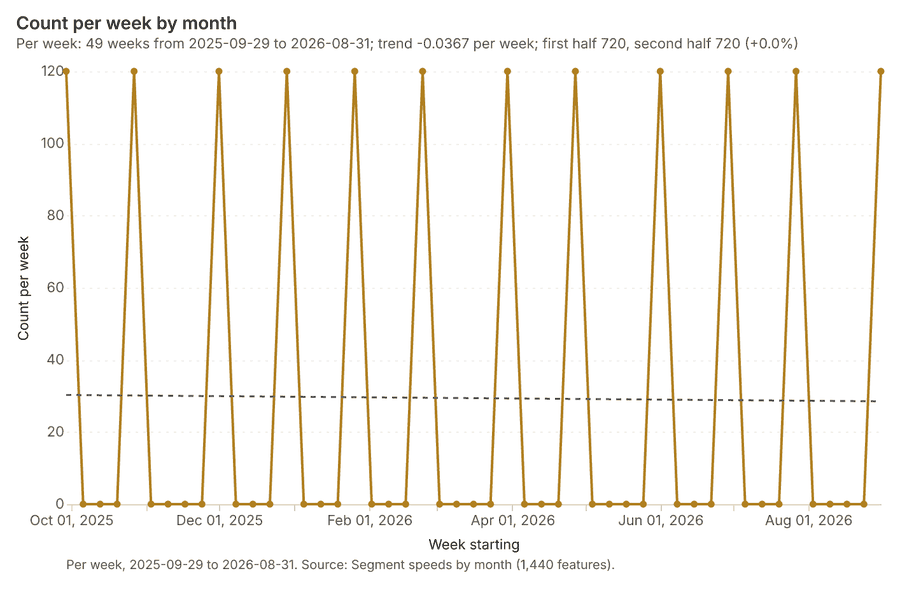
Figure 23. Segment speeds by month over time (month) 67
| period | value |
|---|---|
| 2025-09-29 | 120 |
| 2025-10-06 | 0 |
| 2025-10-13 | 0 |
| 2025-10-20 | 0 |
| 2025-10-27 | 120 |
| 2025-11-03 | 0 |
| 2025-11-10 | 0 |
| 2025-11-17 | 0 |
| 2025-11-24 | 0 |
| 2025-12-01 | 120 |
| 2025-12-08 | 0 |
| 2025-12-15 | 0 |
| 2025-12-22 | 0 |
| 2025-12-29 | 120 |
| 2026-01-05 | 0 |
| 2026-01-12 | 0 |
| 2026-01-19 | 0 |
| 2026-01-26 | 120 |
| 2026-02-02 | 0 |
| 2026-02-09 | 0 |
| 2026-02-16 | 0 |
| 2026-02-23 | 120 |
| 2026-03-02 | 0 |
| 2026-03-09 | 0 |
| 2026-03-16 | 0 |
| 2026-03-23 | 0 |
| 2026-03-30 | 120 |
| 2026-04-06 | 0 |
| 2026-04-13 | 0 |
| 2026-04-20 | 0 |
| 2026-04-27 | 120 |
| 2026-05-04 | 0 |
| 2026-05-11 | 0 |
| 2026-05-18 | 0 |
| 2026-05-25 | 0 |
| 2026-06-01 | 120 |
| 2026-06-08 | 0 |
| 2026-06-15 | 0 |
| 2026-06-22 | 0 |
| 2026-06-29 | 120 |
| 2026-07-06 | 0 |
| 2026-07-13 | 0 |
| 2026-07-20 | 0 |
| 2026-07-27 | 120 |
| 2026-08-03 | 0 |
| 2026-08-10 | 0 |
| 2026-08-17 | 0 |
| 2026-08-24 | 0 |
| 2026-08-31 | 120 |
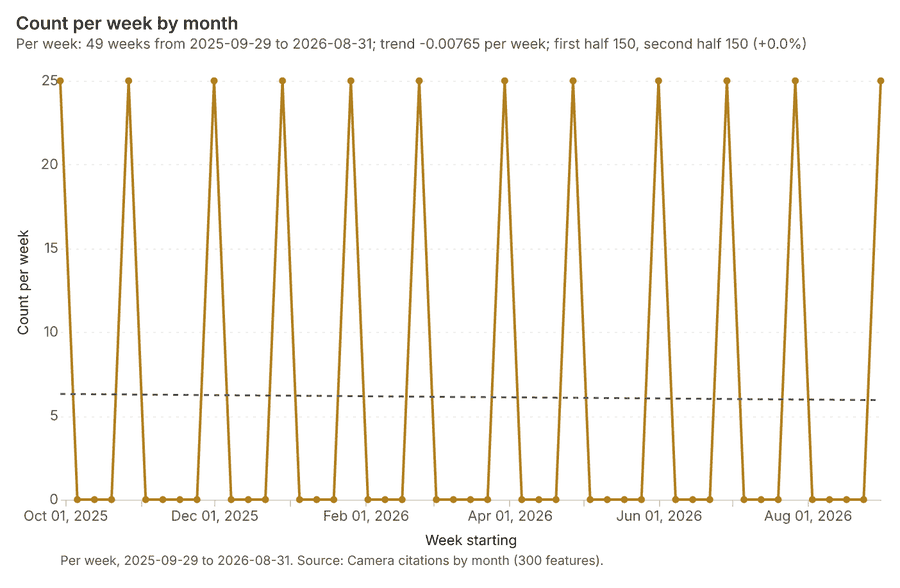
Figure 24. Camera citations by month over time (month) 68
| period | value |
|---|---|
| 2025-09-29 | 25 |
| 2025-10-06 | 0 |
| 2025-10-13 | 0 |
| 2025-10-20 | 0 |
| 2025-10-27 | 25 |
| 2025-11-03 | 0 |
| 2025-11-10 | 0 |
| 2025-11-17 | 0 |
| 2025-11-24 | 0 |
| 2025-12-01 | 25 |
| 2025-12-08 | 0 |
| 2025-12-15 | 0 |
| 2025-12-22 | 0 |
| 2025-12-29 | 25 |
| 2026-01-05 | 0 |
| 2026-01-12 | 0 |
| 2026-01-19 | 0 |
| 2026-01-26 | 25 |
| 2026-02-02 | 0 |
| 2026-02-09 | 0 |
| 2026-02-16 | 0 |
| 2026-02-23 | 25 |
| 2026-03-02 | 0 |
| 2026-03-09 | 0 |
| 2026-03-16 | 0 |
| 2026-03-23 | 0 |
| 2026-03-30 | 25 |
| 2026-04-06 | 0 |
| 2026-04-13 | 0 |
| 2026-04-20 | 0 |
| 2026-04-27 | 25 |
| 2026-05-04 | 0 |
| 2026-05-11 | 0 |
| 2026-05-18 | 0 |
| 2026-05-25 | 0 |
| 2026-06-01 | 25 |
| 2026-06-08 | 0 |
| 2026-06-15 | 0 |
| 2026-06-22 | 0 |
| 2026-06-29 | 25 |
| 2026-07-06 | 0 |
| 2026-07-13 | 0 |
| 2026-07-20 | 0 |
| 2026-07-27 | 25 |
| 2026-08-03 | 0 |
| 2026-08-10 | 0 |
| 2026-08-17 | 0 |
| 2026-08-24 | 0 |
| 2026-08-31 | 25 |
Figure 25. Hot spot analysis: Schools 69
| bin_start | bin_end | band | band_label | count |
|---|---|---|---|---|
| -2 | -1.5 | cold_90 | Cold spot, 90% confidence | 1 |
| -2 | -1.5 | not_significant | Not significant | 2 |
| -1.5 | -1 | not_significant | Not significant | 6 |
| -1 | -0.5 | not_significant | Not significant | 5 |
| -0.5 | 0 | not_significant | Not significant | 5 |
| 0 | 0.5 | not_significant | Not significant | 2 |
| 0.5 | 1 | not_significant | Not significant | 9 |
| 1 | 1.5 | not_significant | Not significant | 6 |
| 1.5 | 2 | hot_90 | Hot spot, 90% confidence | 2 |
| 1.5 | 2 | not_significant | Not significant | 2 |
Figure 26. Hot spot analysis: Crashes 70
| bin_start | bin_end | band | band_label | count |
|---|---|---|---|---|
| -1 | -0.5 | not_significant | Not significant | 298 |
| -0.5 | 0 | not_significant | Not significant | 497 |
| 0 | 0.5 | not_significant | Not significant | 132 |
| 0.5 | 1 | not_significant | Not significant | 71 |
| 1 | 1.5 | not_significant | Not significant | 12 |
| 1.5 | 2 | hot_90 | Hot spot, 90% confidence | 6 |
| 1.5 | 2 | not_significant | Not significant | 4 |
| 3 | 3.5 | hot_99 | Hot spot, 99% confidence | 2 |
| 3.5 | 4 | hot_99 | Hot spot, 99% confidence | 3 |
| 4 | 4.5 | hot_99 | Hot spot, 99% confidence | 6 |
| 4.5 | 5 | hot_99 | Hot spot, 99% confidence | 5 |
| 5 | 5.5 | hot_99 | Hot spot, 99% confidence | 2 |
| 5.5 | 6 | hot_99 | Hot spot, 99% confidence | 7 |
| 6 | 6.5 | hot_99 | Hot spot, 99% confidence | 1 |
| 6.5 | 7 | hot_99 | Hot spot, 99% confidence | 1 |
| 8 | 8.5 | hot_99 | Hot spot, 99% confidence | 1 |
| 8.5 | 9 | hot_99 | Hot spot, 99% confidence | 1 |
Figure 27. Emerging hot spots: Crashes 71
| bin_start | bin_end | count |
|---|---|---|
| -0.974 | -0.3622 | 103 |
| -0.3622 | 0.2496 | 146 |
| 0.2496 | 0.8614 | 66 |
| 0.8614 | 1.473 | 41 |
| 1.473 | 2.085 | 0 |
| 2.085 | 2.697 | 15 |
| 2.697 | 3.309 | 10 |
| 3.309 | 3.92 | 3 |
| 3.92 | 4.532 | 6 |
| 4.532 | 5.144 | 1 |
Figure 28. Emerging hot spots: Traffic calming 72
| bin_start | bin_end | count |
|---|---|---|
| -0.666 | -0.3214 | 7 |
| -0.3214 | 0.0232 | 0 |
| 0.0232 | 0.3678 | 0 |
| 0.3678 | 0.7124 | 5 |
| 0.7124 | 1.057 | 2 |
Figure 29. Summarize within: Traffic districts 73
| bin_start | bin_end | count |
|---|---|---|
| 0 | 1.2 | 2 |
| 1.2 | 2.4 | 1 |
| 2.4 | 3.6 | 3 |
| 3.6 | 4.8 | 4 |
| 4.8 | 6 | 2 |
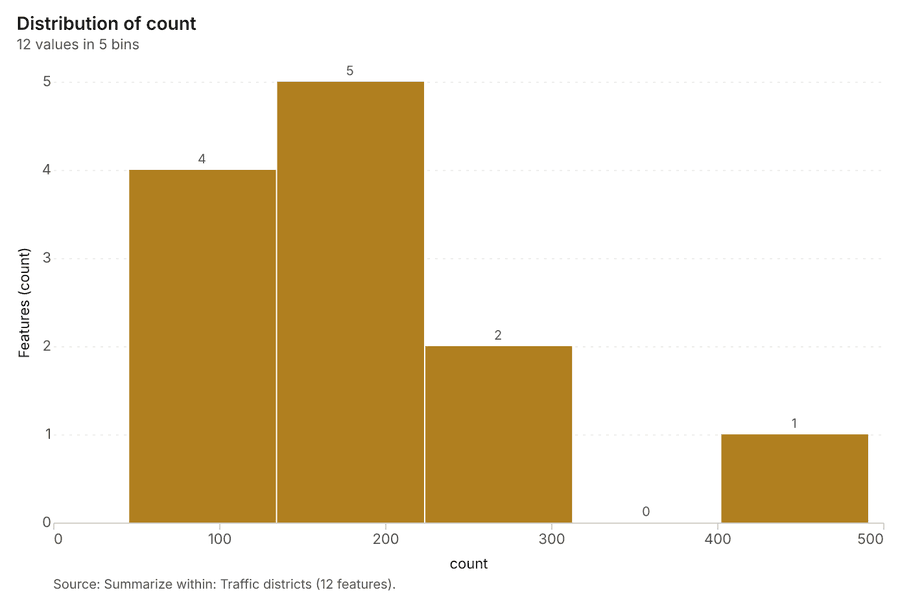
Figure 30. Summarize within: Traffic districts 74
| bin_start | bin_end | count |
|---|---|---|
| 45 | 134.2 | 4 |
| 134.2 | 223.4 | 5 |
| 223.4 | 312.6 | 2 |
| 312.6 | 401.8 | 0 |
| 401.8 | 491 | 1 |
Figure 31. Find point clusters: Schools 75
| cluster | features | fraction | share |
|---|---|---|---|
| 0 | 20 | 0.5 | 50.0% |
| 1 | 10 | 0.25 | 25.0% |
| 2 | 7 | 0.175 | 17.5% |
| Noise | 3 | 0.075 | 7.5% |
Figure 32. Find point clusters: cluster hulls 76
| cluster | features | fraction | share |
|---|---|---|---|
| 0 | 1 | 0.3333 | 33.3% |
| 1 | 1 | 0.3333 | 33.3% |
| 2 | 1 | 0.3333 | 33.3% |
Figure 33. Find point clusters: Crashes 77
| cluster | features | fraction | share |
|---|---|---|---|
| Noise | 1,422 | 0.6771 | 67.7% |
| 0 | 609 | 0.29 | 29.0% |
| 1 | 69 | 0.03286 | 3.3% |
Figure 34. Find point clusters: cluster hulls 78
| cluster | features | fraction | share |
|---|---|---|---|
| 0 | 1 | 0.5 | 50.0% |
| 1 | 1 | 0.5 | 50.0% |
Figure 35. Find point clusters: Pedestrian crossings 79
| cluster | features | fraction | share |
|---|---|---|---|
| Noise | 53 | 0.265 | 26.5% |
| 3 | 39 | 0.195 | 19.5% |
| 2 | 29 | 0.145 | 14.5% |
| 1 | 20 | 0.1 | 10.0% |
| 0 | 12 | 0.06 | 6.0% |
| 5 | 12 | 0.06 | 6.0% |
| 4 | 10 | 0.05 | 5.0% |
| 7 | 6 | 0.03 | 3.0% |
| 8 | 6 | 0.03 | 3.0% |
| 6 | 5 | 0.025 | 2.5% |
| 9 | 5 | 0.025 | 2.5% |
| 10 | 3 | 0.015 | 1.5% |
Figure 36. Find point clusters: cluster hulls 80
| cluster | features | fraction | share |
|---|---|---|---|
| 0 | 1 | 0.09091 | 9.1% |
| 1 | 1 | 0.09091 | 9.1% |
| 10 | 1 | 0.09091 | 9.1% |
| 2 | 1 | 0.09091 | 9.1% |
| 3 | 1 | 0.09091 | 9.1% |
| 4 | 1 | 0.09091 | 9.1% |
| 5 | 1 | 0.09091 | 9.1% |
| 6 | 1 | 0.09091 | 9.1% |
| 7 | 1 | 0.09091 | 9.1% |
| 8 | 1 | 0.09091 | 9.1% |
| 9 | 1 | 0.09091 | 9.1% |
Figure 37. Calculate density: Schools 81
| bin_start | bin_end | count |
|---|---|---|
| 0.0812 | 186.1 | 29 |
| 186.1 | 372.1 | 10 |
| 372.1 | 558.1 | 12 |
| 558.1 | 744.2 | 6 |
| 744.2 | 930.2 | 9 |
| 930.2 | 1,116 | 6 |
| 1,116 | 1,302 | 4 |
| 1,302 | 1,488 | 4 |
Figure 38. Calculate density: Crashes 82
| bin_start | bin_end | count |
|---|---|---|
| 0 | 5.143 | 273 |
| 5.143 | 10.29 | 297 |
| 10.29 | 15.43 | 283 |
| 15.43 | 20.57 | 296 |
| 20.57 | 25.71 | 298 |
| 25.71 | 30.86 | 299 |
| 30.86 | 36 | 361 |
| 36 | 41.14 | 296 |
| 41.14 | 46.29 | 298 |
| 46.29 | 51.43 | 288 |
| 51.43 | 56.57 | 294 |
| 56.57 | 61.71 | 289 |
| 61.71 | 66.86 | 293 |
| 66.86 | 72 | 247 |
Figure 39. Calculate density: Pedestrian crossings 83
| bin_start | bin_end | count |
|---|---|---|
| 0 | 1.889 | 25 |
| 1.889 | 3.778 | 31 |
| 3.778 | 5.667 | 30 |
| 5.667 | 7.556 | 32 |
| 7.556 | 9.444 | 30 |
| 9.444 | 11.33 | 30 |
| 11.33 | 13.22 | 28 |
| 13.22 | 15.11 | 29 |
| 15.11 | 17 | 16 |
Figure 40. Hot spot analysis: Pedestrian crossings 84
| bin_start | bin_end | band | band_label | count |
|---|---|---|---|---|
| -1.5 | -1 | not_significant | Not significant | 14 |
| -1 | -0.5 | not_significant | Not significant | 4 |
| -0.5 | 0 | not_significant | Not significant | 9 |
| 0 | 0.5 | not_significant | Not significant | 14 |
| 0.5 | 1 | not_significant | Not significant | 5 |
| 1 | 1.5 | not_significant | Not significant | 4 |
| 1.5 | 2 | hot_90 | Hot spot, 90% confidence | 1 |
| 2 | 2.5 | hot_95 | Hot spot, 95% confidence | 2 |
| 2.5 | 3 | hot_99 | Hot spot, 99% confidence | 1 |
Figure 41. Repeat and near repeat classification: Crashes 85
| period | series | value |
|---|---|---|
| 2024-10-01 | motorcycle | 32 |
| 2024-10-01 | car | 42 |
| 2024-10-01 | pedestrian | 9 |
| 2024-10-01 | cyclist | 2 |
| 2024-10-01 | bus | 4 |
| 2024-10-01 | Other | 3 |
| 2024-11-01 | motorcycle | 35 |
| 2024-11-01 | car | 36 |
| 2024-11-01 | pedestrian | 9 |
| 2024-11-01 | cyclist | 6 |
| 2024-11-01 | bus | 7 |
| 2024-11-01 | Other | 2 |
| 2024-12-01 | motorcycle | 37 |
| 2024-12-01 | car | 34 |
| 2024-12-01 | pedestrian | 17 |
| 2024-12-01 | cyclist | 8 |
| 2024-12-01 | bus | 1 |
| 2024-12-01 | Other | 8 |
| 2025-01-01 | motorcycle | 38 |
| 2025-01-01 | car | 26 |
| 2025-01-01 | pedestrian | 14 |
| 2025-01-01 | cyclist | 6 |
| 2025-01-01 | bus | 5 |
| 2025-01-01 | Other | 6 |
| 2025-02-01 | motorcycle | 31 |
| 2025-02-01 | car | 37 |
| 2025-02-01 | pedestrian | 8 |
| 2025-02-01 | cyclist | 5 |
| 2025-02-01 | bus | 6 |
| 2025-02-01 | Other | 6 |
| 2025-03-01 | motorcycle | 41 |
| 2025-03-01 | car | 30 |
| 2025-03-01 | pedestrian | 9 |
| 2025-03-01 | cyclist | 3 |
| 2025-03-01 | bus | 3 |
| 2025-03-01 | Other | 5 |
| 2025-04-01 | motorcycle | 30 |
| 2025-04-01 | car | 26 |
| 2025-04-01 | pedestrian | 8 |
| 2025-04-01 | cyclist | 4 |
| 2025-04-01 | bus | 2 |
| 2025-04-01 | Other | 7 |
| 2025-05-01 | motorcycle | 28 |
| 2025-05-01 | car | 21 |
| 2025-05-01 | pedestrian | 7 |
| 2025-05-01 | cyclist | 4 |
| 2025-05-01 | bus | 1 |
| 2025-05-01 | Other | 5 |
| 2025-06-01 | motorcycle | 36 |
| 2025-06-01 | car | 33 |
| 2025-06-01 | pedestrian | 5 |
| 2025-06-01 | cyclist | 3 |
| 2025-06-01 | bus | 4 |
| 2025-06-01 | Other | 4 |
| 2025-07-01 | motorcycle | 26 |
| 2025-07-01 | car | 31 |
| 2025-07-01 | pedestrian | 11 |
| 2025-07-01 | cyclist | 4 |
| 2025-07-01 | bus | 4 |
| 2025-07-01 | Other | 4 |
| 2025-08-01 | motorcycle | 30 |
| 2025-08-01 | car | 18 |
| 2025-08-01 | pedestrian | 6 |
| 2025-08-01 | cyclist | 8 |
| 2025-08-01 | bus | 4 |
| 2025-08-01 | Other | 5 |
| 2025-09-01 | motorcycle | 24 |
| 2025-09-01 | car | 29 |
| 2025-09-01 | pedestrian | 17 |
| 2025-09-01 | cyclist | 3 |
| 2025-09-01 | bus | 2 |
| 2025-09-01 | Other | 4 |
| 2025-10-01 | motorcycle | 23 |
| 2025-10-01 | car | 23 |
| 2025-10-01 | pedestrian | 14 |
| 2025-10-01 | cyclist | 6 |
| 2025-10-01 | bus | 3 |
| 2025-10-01 | Other | 4 |
| 2025-11-01 | motorcycle | 35 |
| 2025-11-01 | car | 35 |
| 2025-11-01 | pedestrian | 16 |
| 2025-11-01 | cyclist | 8 |
| 2025-11-01 | bus | 5 |
| 2025-11-01 | Other | 5 |
| 2025-12-01 | motorcycle | 48 |
| 2025-12-01 | car | 40 |
| 2025-12-01 | pedestrian | 13 |
| 2025-12-01 | cyclist | 4 |
| 2025-12-01 | bus | 10 |
| 2025-12-01 | Other | 6 |
| 2026-01-01 | motorcycle | 35 |
| 2026-01-01 | car | 37 |
| 2026-01-01 | pedestrian | 18 |
| 2026-01-01 | cyclist | 8 |
| 2026-01-01 | bus | 10 |
| 2026-01-01 | Other | 4 |
| 2026-02-01 | motorcycle | 28 |
| 2026-02-01 | car | 32 |
| 2026-02-01 | pedestrian | 17 |
| 2026-02-01 | cyclist | 5 |
| 2026-02-01 | bus | 4 |
| 2026-02-01 | Other | 8 |
| 2026-03-01 | motorcycle | 38 |
| 2026-03-01 | car | 32 |
| 2026-03-01 | pedestrian | 15 |
| 2026-03-01 | cyclist | 7 |
| 2026-03-01 | bus | 6 |
| 2026-03-01 | Other | 0 |
| 2026-04-01 | motorcycle | 24 |
| 2026-04-01 | car | 27 |
| 2026-04-01 | pedestrian | 16 |
| 2026-04-01 | cyclist | 2 |
| 2026-04-01 | bus | 4 |
| 2026-04-01 | Other | 1 |
| 2026-05-01 | motorcycle | 27 |
| 2026-05-01 | car | 31 |
| 2026-05-01 | pedestrian | 9 |
| 2026-05-01 | cyclist | 4 |
| 2026-05-01 | bus | 4 |
| 2026-05-01 | Other | 2 |
| 2026-06-01 | motorcycle | 27 |
| 2026-06-01 | car | 26 |
| 2026-06-01 | pedestrian | 10 |
| 2026-06-01 | cyclist | 3 |
| 2026-06-01 | bus | 3 |
| 2026-06-01 | Other | 3 |
| 2026-07-01 | motorcycle | 32 |
| 2026-07-01 | car | 23 |
| 2026-07-01 | pedestrian | 6 |
| 2026-07-01 | cyclist | 5 |
| 2026-07-01 | bus | 2 |
| 2026-07-01 | Other | 3 |
| 2026-08-01 | motorcycle | 35 |
| 2026-08-01 | car | 27 |
| 2026-08-01 | pedestrian | 14 |
| 2026-08-01 | cyclist | 5 |
| 2026-08-01 | bus | 7 |
| 2026-08-01 | Other | 1 |
| 2026-09-01 | motorcycle | 21 |
| 2026-09-01 | car | 32 |
| 2026-09-01 | pedestrian | 12 |
| 2026-09-01 | cyclist | 11 |
| 2026-09-01 | bus | 5 |
| 2026-09-01 | Other | 5 |
Figure 42. Summarize within: Traffic districts 86
| bin_start | bin_end | count |
|---|---|---|
| 4 | 9.4 | 3 |
| 9.4 | 14.8 | 2 |
| 14.8 | 20.2 | 3 |
| 20.2 | 25.6 | 2 |
| 25.6 | 31 | 2 |
Figure 43. Repeat and near repeat classification: Crashes over time 87
| period | series | value |
|---|---|---|
| 2024-10-01 | motorcycle | 32 |
| 2024-10-01 | car | 42 |
| 2024-10-01 | pedestrian | 9 |
| 2024-10-01 | cyclist | 2 |
| 2024-10-01 | bus | 4 |
| 2024-10-01 | Other | 3 |
| 2024-11-01 | motorcycle | 35 |
| 2024-11-01 | car | 36 |
| 2024-11-01 | pedestrian | 9 |
| 2024-11-01 | cyclist | 6 |
| 2024-11-01 | bus | 7 |
| 2024-11-01 | Other | 2 |
| 2024-12-01 | motorcycle | 37 |
| 2024-12-01 | car | 34 |
| 2024-12-01 | pedestrian | 17 |
| 2024-12-01 | cyclist | 8 |
| 2024-12-01 | bus | 1 |
| 2024-12-01 | Other | 8 |
| 2025-01-01 | motorcycle | 38 |
| 2025-01-01 | car | 26 |
| 2025-01-01 | pedestrian | 14 |
| 2025-01-01 | cyclist | 6 |
| 2025-01-01 | bus | 5 |
| 2025-01-01 | Other | 6 |
| 2025-02-01 | motorcycle | 31 |
| 2025-02-01 | car | 37 |
| 2025-02-01 | pedestrian | 8 |
| 2025-02-01 | cyclist | 5 |
| 2025-02-01 | bus | 6 |
| 2025-02-01 | Other | 6 |
| 2025-03-01 | motorcycle | 41 |
| 2025-03-01 | car | 30 |
| 2025-03-01 | pedestrian | 9 |
| 2025-03-01 | cyclist | 3 |
| 2025-03-01 | bus | 3 |
| 2025-03-01 | Other | 5 |
| 2025-04-01 | motorcycle | 30 |
| 2025-04-01 | car | 26 |
| 2025-04-01 | pedestrian | 8 |
| 2025-04-01 | cyclist | 4 |
| 2025-04-01 | bus | 2 |
| 2025-04-01 | Other | 7 |
| 2025-05-01 | motorcycle | 28 |
| 2025-05-01 | car | 21 |
| 2025-05-01 | pedestrian | 7 |
| 2025-05-01 | cyclist | 4 |
| 2025-05-01 | bus | 1 |
| 2025-05-01 | Other | 5 |
| 2025-06-01 | motorcycle | 36 |
| 2025-06-01 | car | 33 |
| 2025-06-01 | pedestrian | 5 |
| 2025-06-01 | cyclist | 3 |
| 2025-06-01 | bus | 4 |
| 2025-06-01 | Other | 4 |
| 2025-07-01 | motorcycle | 26 |
| 2025-07-01 | car | 31 |
| 2025-07-01 | pedestrian | 11 |
| 2025-07-01 | cyclist | 4 |
| 2025-07-01 | bus | 4 |
| 2025-07-01 | Other | 4 |
| 2025-08-01 | motorcycle | 30 |
| 2025-08-01 | car | 18 |
| 2025-08-01 | pedestrian | 6 |
| 2025-08-01 | cyclist | 8 |
| 2025-08-01 | bus | 4 |
| 2025-08-01 | Other | 5 |
| 2025-09-01 | motorcycle | 24 |
| 2025-09-01 | car | 29 |
| 2025-09-01 | pedestrian | 17 |
| 2025-09-01 | cyclist | 3 |
| 2025-09-01 | bus | 2 |
| 2025-09-01 | Other | 4 |
| 2025-10-01 | motorcycle | 23 |
| 2025-10-01 | car | 23 |
| 2025-10-01 | pedestrian | 14 |
| 2025-10-01 | cyclist | 6 |
| 2025-10-01 | bus | 3 |
| 2025-10-01 | Other | 4 |
| 2025-11-01 | motorcycle | 35 |
| 2025-11-01 | car | 35 |
| 2025-11-01 | pedestrian | 16 |
| 2025-11-01 | cyclist | 8 |
| 2025-11-01 | bus | 5 |
| 2025-11-01 | Other | 5 |
| 2025-12-01 | motorcycle | 48 |
| 2025-12-01 | car | 40 |
| 2025-12-01 | pedestrian | 13 |
| 2025-12-01 | cyclist | 4 |
| 2025-12-01 | bus | 10 |
| 2025-12-01 | Other | 6 |
| 2026-01-01 | motorcycle | 35 |
| 2026-01-01 | car | 37 |
| 2026-01-01 | pedestrian | 18 |
| 2026-01-01 | cyclist | 8 |
| 2026-01-01 | bus | 10 |
| 2026-01-01 | Other | 4 |
| 2026-02-01 | motorcycle | 28 |
| 2026-02-01 | car | 32 |
| 2026-02-01 | pedestrian | 17 |
| 2026-02-01 | cyclist | 5 |
| 2026-02-01 | bus | 4 |
| 2026-02-01 | Other | 8 |
| 2026-03-01 | motorcycle | 38 |
| 2026-03-01 | car | 32 |
| 2026-03-01 | pedestrian | 15 |
| 2026-03-01 | cyclist | 7 |
| 2026-03-01 | bus | 6 |
| 2026-03-01 | Other | 0 |
| 2026-04-01 | motorcycle | 24 |
| 2026-04-01 | car | 27 |
| 2026-04-01 | pedestrian | 16 |
| 2026-04-01 | cyclist | 2 |
| 2026-04-01 | bus | 4 |
| 2026-04-01 | Other | 1 |
| 2026-05-01 | motorcycle | 27 |
| 2026-05-01 | car | 31 |
| 2026-05-01 | pedestrian | 9 |
| 2026-05-01 | cyclist | 4 |
| 2026-05-01 | bus | 4 |
| 2026-05-01 | Other | 2 |
| 2026-06-01 | motorcycle | 27 |
| 2026-06-01 | car | 26 |
| 2026-06-01 | pedestrian | 10 |
| 2026-06-01 | cyclist | 3 |
| 2026-06-01 | bus | 3 |
| 2026-06-01 | Other | 3 |
| 2026-07-01 | motorcycle | 32 |
| 2026-07-01 | car | 23 |
| 2026-07-01 | pedestrian | 6 |
| 2026-07-01 | cyclist | 5 |
| 2026-07-01 | bus | 2 |
| 2026-07-01 | Other | 3 |
| 2026-08-01 | motorcycle | 35 |
| 2026-08-01 | car | 27 |
| 2026-08-01 | pedestrian | 14 |
| 2026-08-01 | cyclist | 5 |
| 2026-08-01 | bus | 7 |
| 2026-08-01 | Other | 1 |
| 2026-09-01 | motorcycle | 21 |
| 2026-09-01 | car | 32 |
| 2026-09-01 | pedestrian | 12 |
| 2026-09-01 | cyclist | 11 |
| 2026-09-01 | bus | 5 |
| 2026-09-01 | Other | 5 |
Figure 44. Find point clusters: Crashes over time 88
| period | series | value |
|---|---|---|
| 2024-10-01 | motorcycle | 32 |
| 2024-10-01 | car | 42 |
| 2024-10-01 | pedestrian | 9 |
| 2024-10-01 | cyclist | 2 |
| 2024-10-01 | bus | 4 |
| 2024-10-01 | Other | 3 |
| 2024-11-01 | motorcycle | 35 |
| 2024-11-01 | car | 36 |
| 2024-11-01 | pedestrian | 9 |
| 2024-11-01 | cyclist | 6 |
| 2024-11-01 | bus | 7 |
| 2024-11-01 | Other | 2 |
| 2024-12-01 | motorcycle | 37 |
| 2024-12-01 | car | 34 |
| 2024-12-01 | pedestrian | 17 |
| 2024-12-01 | cyclist | 8 |
| 2024-12-01 | bus | 1 |
| 2024-12-01 | Other | 8 |
| 2025-01-01 | motorcycle | 38 |
| 2025-01-01 | car | 26 |
| 2025-01-01 | pedestrian | 14 |
| 2025-01-01 | cyclist | 6 |
| 2025-01-01 | bus | 5 |
| 2025-01-01 | Other | 6 |
| 2025-02-01 | motorcycle | 31 |
| 2025-02-01 | car | 37 |
| 2025-02-01 | pedestrian | 8 |
| 2025-02-01 | cyclist | 5 |
| 2025-02-01 | bus | 6 |
| 2025-02-01 | Other | 6 |
| 2025-03-01 | motorcycle | 41 |
| 2025-03-01 | car | 30 |
| 2025-03-01 | pedestrian | 9 |
| 2025-03-01 | cyclist | 3 |
| 2025-03-01 | bus | 3 |
| 2025-03-01 | Other | 5 |
| 2025-04-01 | motorcycle | 30 |
| 2025-04-01 | car | 26 |
| 2025-04-01 | pedestrian | 8 |
| 2025-04-01 | cyclist | 4 |
| 2025-04-01 | bus | 2 |
| 2025-04-01 | Other | 7 |
| 2025-05-01 | motorcycle | 28 |
| 2025-05-01 | car | 21 |
| 2025-05-01 | pedestrian | 7 |
| 2025-05-01 | cyclist | 4 |
| 2025-05-01 | bus | 1 |
| 2025-05-01 | Other | 5 |
| 2025-06-01 | motorcycle | 36 |
| 2025-06-01 | car | 33 |
| 2025-06-01 | pedestrian | 5 |
| 2025-06-01 | cyclist | 3 |
| 2025-06-01 | bus | 4 |
| 2025-06-01 | Other | 4 |
| 2025-07-01 | motorcycle | 26 |
| 2025-07-01 | car | 31 |
| 2025-07-01 | pedestrian | 11 |
| 2025-07-01 | cyclist | 4 |
| 2025-07-01 | bus | 4 |
| 2025-07-01 | Other | 4 |
| 2025-08-01 | motorcycle | 30 |
| 2025-08-01 | car | 18 |
| 2025-08-01 | pedestrian | 6 |
| 2025-08-01 | cyclist | 8 |
| 2025-08-01 | bus | 4 |
| 2025-08-01 | Other | 5 |
| 2025-09-01 | motorcycle | 24 |
| 2025-09-01 | car | 29 |
| 2025-09-01 | pedestrian | 17 |
| 2025-09-01 | cyclist | 3 |
| 2025-09-01 | bus | 2 |
| 2025-09-01 | Other | 4 |
| 2025-10-01 | motorcycle | 23 |
| 2025-10-01 | car | 23 |
| 2025-10-01 | pedestrian | 14 |
| 2025-10-01 | cyclist | 6 |
| 2025-10-01 | bus | 3 |
| 2025-10-01 | Other | 4 |
| 2025-11-01 | motorcycle | 35 |
| 2025-11-01 | car | 35 |
| 2025-11-01 | pedestrian | 16 |
| 2025-11-01 | cyclist | 8 |
| 2025-11-01 | bus | 5 |
| 2025-11-01 | Other | 5 |
| 2025-12-01 | motorcycle | 48 |
| 2025-12-01 | car | 40 |
| 2025-12-01 | pedestrian | 13 |
| 2025-12-01 | cyclist | 4 |
| 2025-12-01 | bus | 10 |
| 2025-12-01 | Other | 6 |
| 2026-01-01 | motorcycle | 35 |
| 2026-01-01 | car | 37 |
| 2026-01-01 | pedestrian | 18 |
| 2026-01-01 | cyclist | 8 |
| 2026-01-01 | bus | 10 |
| 2026-01-01 | Other | 4 |
| 2026-02-01 | motorcycle | 28 |
| 2026-02-01 | car | 32 |
| 2026-02-01 | pedestrian | 17 |
| 2026-02-01 | cyclist | 5 |
| 2026-02-01 | bus | 4 |
| 2026-02-01 | Other | 8 |
| 2026-03-01 | motorcycle | 38 |
| 2026-03-01 | car | 32 |
| 2026-03-01 | pedestrian | 15 |
| 2026-03-01 | cyclist | 7 |
| 2026-03-01 | bus | 6 |
| 2026-03-01 | Other | 0 |
| 2026-04-01 | motorcycle | 24 |
| 2026-04-01 | car | 27 |
| 2026-04-01 | pedestrian | 16 |
| 2026-04-01 | cyclist | 2 |
| 2026-04-01 | bus | 4 |
| 2026-04-01 | Other | 1 |
| 2026-05-01 | motorcycle | 27 |
| 2026-05-01 | car | 31 |
| 2026-05-01 | pedestrian | 9 |
| 2026-05-01 | cyclist | 4 |
| 2026-05-01 | bus | 4 |
| 2026-05-01 | Other | 2 |
| 2026-06-01 | motorcycle | 27 |
| 2026-06-01 | car | 26 |
| 2026-06-01 | pedestrian | 10 |
| 2026-06-01 | cyclist | 3 |
| 2026-06-01 | bus | 3 |
| 2026-06-01 | Other | 3 |
| 2026-07-01 | motorcycle | 32 |
| 2026-07-01 | car | 23 |
| 2026-07-01 | pedestrian | 6 |
| 2026-07-01 | cyclist | 5 |
| 2026-07-01 | bus | 2 |
| 2026-07-01 | Other | 3 |
| 2026-08-01 | motorcycle | 35 |
| 2026-08-01 | car | 27 |
| 2026-08-01 | pedestrian | 14 |
| 2026-08-01 | cyclist | 5 |
| 2026-08-01 | bus | 7 |
| 2026-08-01 | Other | 1 |
| 2026-09-01 | motorcycle | 21 |
| 2026-09-01 | car | 32 |
| 2026-09-01 | pedestrian | 12 |
| 2026-09-01 | cyclist | 11 |
| 2026-09-01 | bus | 5 |
| 2026-09-01 | Other | 5 |
GeoBit Large Spatial Model. Findings are labeled Evidenced (computed by a tool), Inferred (a reading or reasoning) or Unverified (no evidence yet).