Sample: Water resources, Chiang Mai: report
Project: Sample: Water resources, Chiang Mai
Goal: Describe the project Sample: Water resources, Chiang Mai: run the analyses that tell the most about its data, draw every result, and write a cited report.
Run: d6604a47-a47a-419f-9baf-8c790e459434 (running, 11 agent run(s))
Generated: 2026-10-18T05:15:55Z, version 1
Model cost: USD 0.0000 over 0 model call(s)
Data used
| Data | Kind | Rows | Time span | Summary | Source |
|---|---|---|---|---|---|
| River gauge stations | vector, Point | 10 | 10 point features; 'river' has 2 values (top: Tributary 7, Main river 3); 'bank_full_m' 270.9 to 1543 (mean 839.8); 'catchment_km2' 41 to 850 (mean 525.9); named by 'name' (e.g. Gauge station P.1, Gauge station P.2, Gauge station P.3); extent 98.9498,18.7638 to 99.0158,18.8219. Point locations of River gauge stations by river. | 82 | |
| Rivers | vector, LineString | 5 | 5 line features; 'order' 2 to 4 (mean 2.4); named by 'name' (e.g. Main river, Tributary 1, Tributary 2); total length 46.51 km; extent 98.9306,18.7431 to 99.0167,18.8335. Lines (Rivers) such as routes or networks. | 83 | |
| Sub-catchments | vector, Polygon | 10 | 10 polygon (area) features; 'mean_rain_mm' 1,054 to 1,643 (mean 1410); 'forest_pct' 16 to 77 (mean 44.4); 'area_km2' 5.8 to 19.8 (mean 12); named by 'name' (e.g. Sub-catchment 1, Sub-catchment 2, Sub-catchment 3); total area 120.1 km2; extent 98.9283,18.7431 to 99.0422,18.8335. Areas (Sub-catchments) with mean_rain_mm to compare and map. | 84 | |
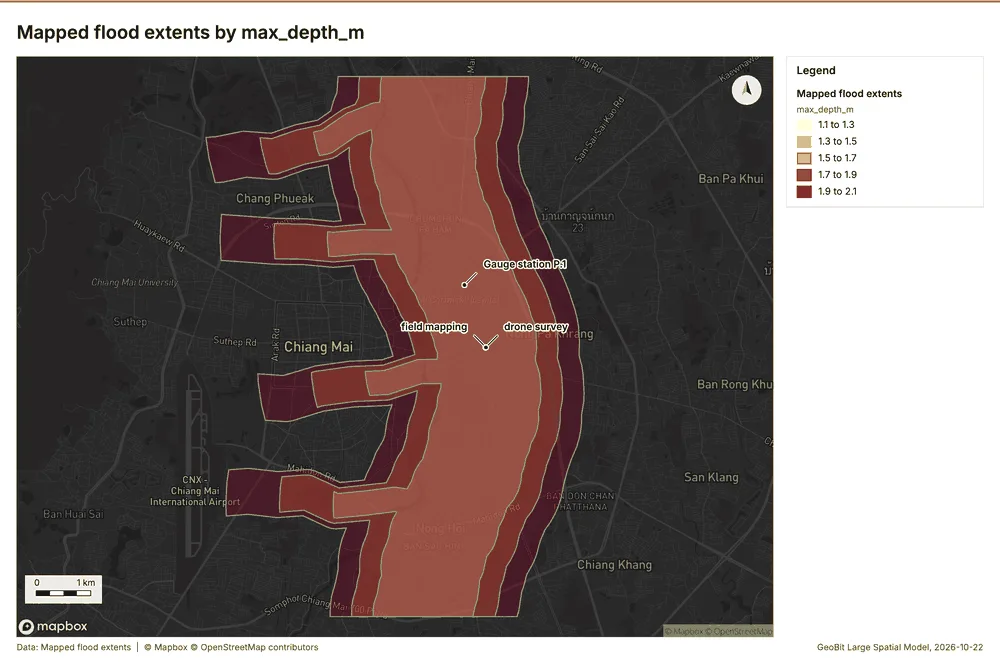
| Mapped flood extents | vector, Polygon | 3 | 2024-09-28 to 2025-10-06 | 3 polygon (area) features; dated by 'mapped_on' from 2024-09-28 to 2025-10-06; 'max_depth_m' 1.1 to 2.1 (mean 1.6); total area 99.54 km2; extent 98.9659,18.7431 to 99.0328,18.8335. Areas (Mapped flood extents) with max_depth_m to compare and map. | 2 |
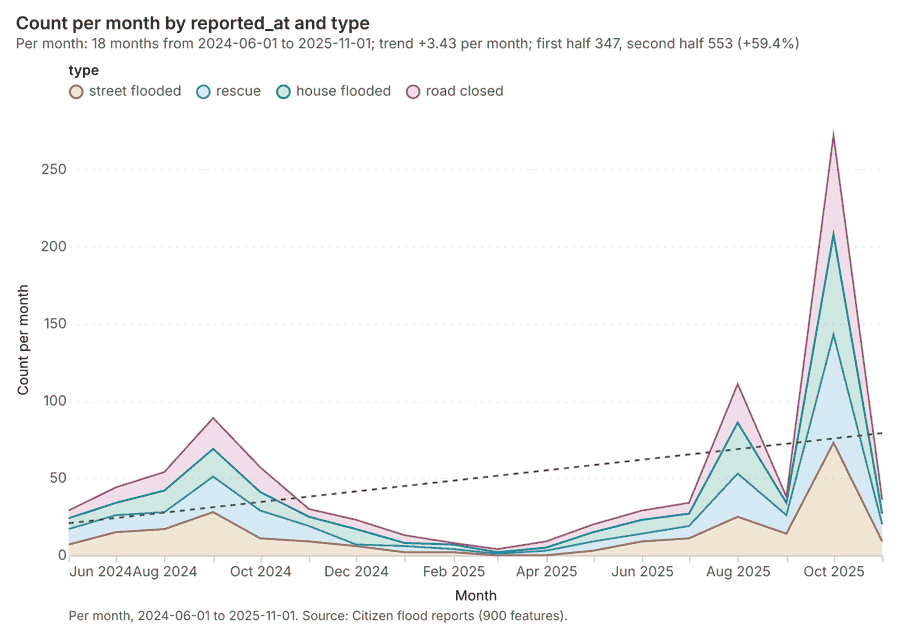
| Citizen flood reports | vector, Point | 900 | 2024-06-02 to 2025-11-30 | 900 point features; dated by 'reported_at' from 2024-06-02 to 2025-11-30; 'type' has 4 values (top: street flooded 241, rescue 234, house flooded 219); 'verified' has 2 values (top: True 536, False 364); 'water_depth_cm' 3 to 332 (mean 37.65); extent 98.9902,18.7433 to 99.0339,18.8333. Dated point events by type: where and when Citizen flood reports happen. | 3 |
| Rain gauges | vector, Point | 15 | 15 point features; 'elevation_m' 301.6 to 1940 (mean 914.3); named by 'name' (e.g. Rain gauge station 1, Rain gauge station 2, Rain gauge station 3); extent 98.9374,18.7503 to 99.0326,18.8271. Point locations of Rain gauges. | 85 | |
| Levees | vector, LineString | 4 | 4 line features; 'condition' has 2 values (top: poor 2, good 2); 'crest_m' 286.7 to 346.4 (mean 307.4); total length 4.802 km; extent 99.0043,18.7529 to 99.0184,18.8152. Lines (Levees) such as routes or networks. | 86 | |
| Catchment terrain model (DEM) | raster | 1-band float32 raster (dem), 400 x 333 cells; resolution 30; band 1 250 to 2062; extent 98.9283,18.7432 to 99.0422,18.8335. An elevation surface for terrain analysis. | 87 | ||
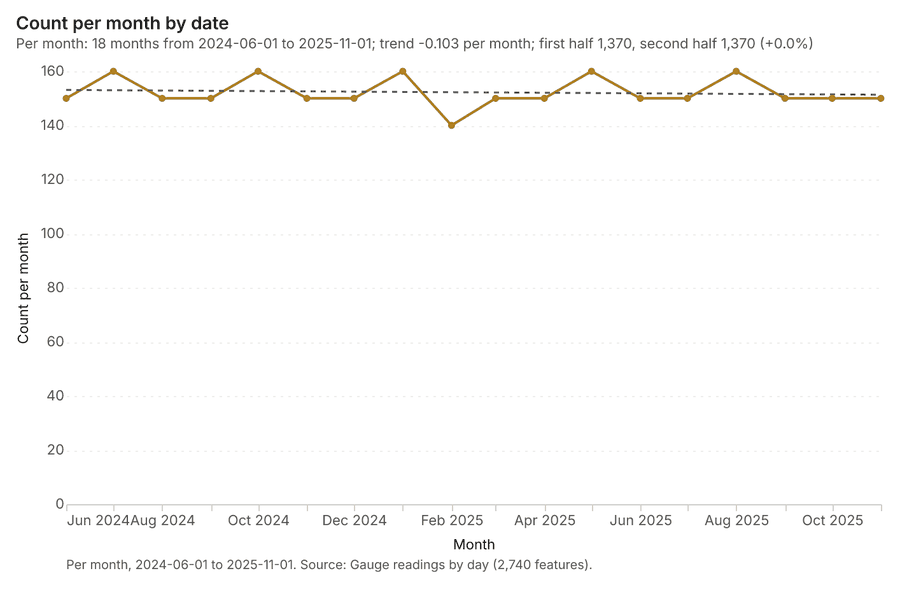
| Gauge readings by day | table | 2,740 | 2024-06-01 to 2025-11-29 | Table of 2,740 rows and 4 columns without geometry; dated by 'date' from 2024-06-01 to 2025-11-29; 'level_m' 266.7 to 1544 (mean 837.8); 'discharge_m3s' 2.4 to 1108 (mean 220.3). A table of Gauge readings by day without locations. | 4 |
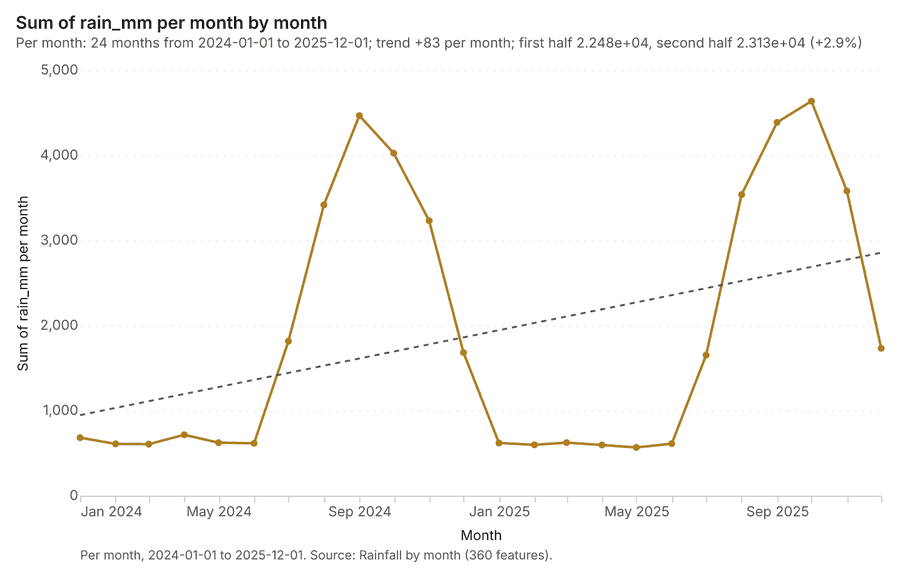
| Rainfall by month | table | 360 | 2024-01-01 to 2025-12-01 | Table of 360 rows and 3 columns without geometry; dated by 'month' from 2024-01-01 to 2025-12-01; 'rain_mm' 23 to 444 (mean 126.7). A table of Rainfall by month without locations. | 5 |
| Flood bulletin | document | 1-page pdf document 'Flood bulletin'; language en; mentions 8 place(s): Main river (2), Gauge station P.1 (2), Gauge station P.2 (1), Gauge (1), Tributary 2 (1). A document about Main river, Gauge station P.1, Gauge station P.2. | 88 | ||
| Sample: Water resources, Chiang Mai | record | 89 | |||
| Emerging hot spots: Citizen flood reports | layer, Polygon | 54 | 90 | ||
| Repeat and near repeat classification: Citizen flood reports | layer, Point | 900 | 91 | ||
| Hot spot analysis: Citizen flood reports | layer, Polygon | 192 | 92 | ||
| Hot spot analysis: Sub-catchments | layer, Polygon | 10 | 93 | ||
| Calculate density: Citizen flood reports | layer, Polygon | 1,058 | 94 | ||
| Summarize within: Sub-catchments | layer, Polygon | 10 | 95 | ||
| Summarize within: Sub-catchments | layer, Polygon | 10 | 96 | ||
| Summarize within: Sub-catchments | layer, Polygon | 10 | 97 | ||
| Slope (degrees) | layer | 0 | 98 | ||
| Find point clusters: Citizen flood reports | layer, Point | 900 | 99 | ||
| Find point clusters: River gauge stations | layer, Point | 10 | 100 | ||
| Find point clusters: cluster hulls | layer, Polygon | 2 | 101 | ||
| Find point clusters: Rain gauges | layer, Point | 15 | 102 | ||
| Find point clusters: cluster hulls | layer, Polygon | 1 | 103 | ||
| Flood bulletin | document | 104 |
Timeline
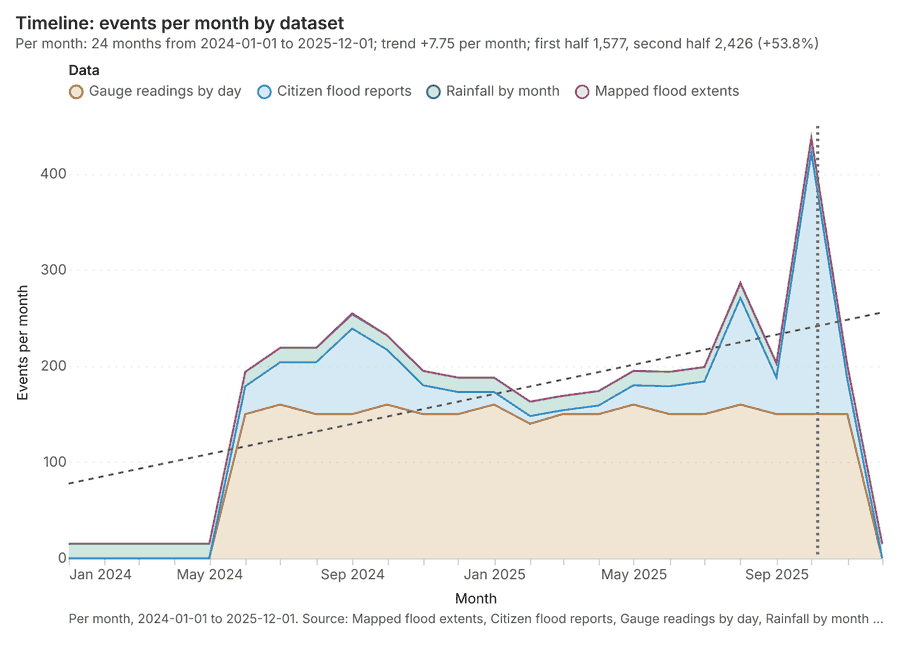
The timeline counts 4,003 dated events in Mapped flood extents, Citizen flood reports, Gauge readings by day and 1 more per month, from January 2024 to December 2025 12345. By dataset: Gauge readings by day 2,740; Citizen flood reports 900; Rainfall by month 360; Mapped flood extents 3 1. The trend is +7.75 events per month; the second half of the months has 2,426 against 1,577 in the first (+53.8%) 1. Change point detection found no shift in the counts 6. The project's documents name 2 dates inside this span, drawn as dotted lines; the most named is 2025-10-06 (Flood bulletin, page 1, 1 mention) 7.
Busiest months
Quietest months
Space time hot spots
What this analysis is. Emerging hot spots: Where hot spots are new, consecutive, intensifying, persistent, diminishing, sporadic, oscillating or historical over time 8. In ArcGIS it is Emerging Hot Spot Analysis or Create Space Time Cube 8.
Why it was run on this data. Citizen flood reports carry dates in 'reported_at': emerging hot spot analysis finds new, intensifying and fading hot spots per month 9.
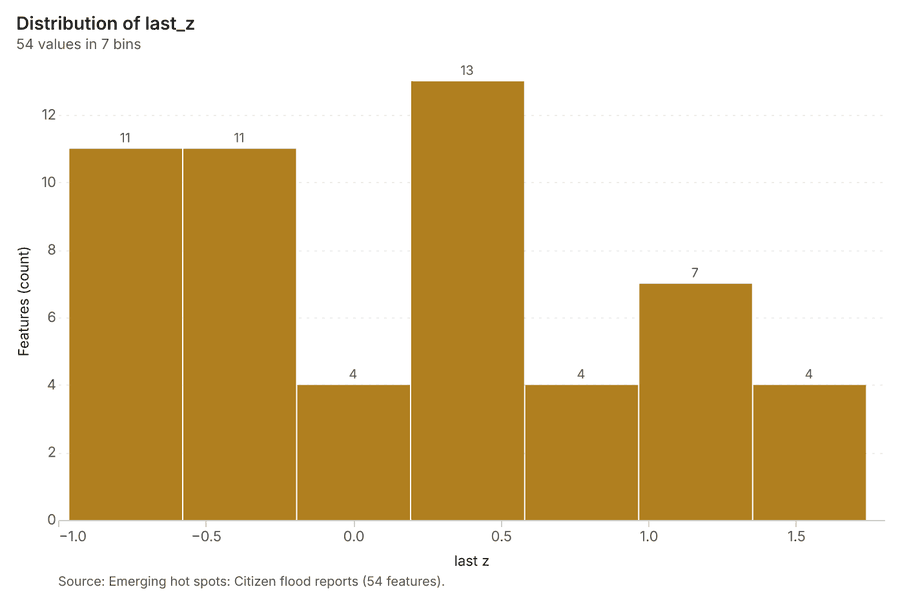
What it found. The analysis generated 54 features identifying emerging hot spots from the Citizen flood reports 10. This result utilized 900 features and required 0 time neighbors 10. The process achieved a resolution of 8 and completed in 15 milliseconds 10. The associated costs for this operation were 0.145, reflecting that the upstream cost was 0 10.
| Result | Value |
|---|---|
| result, count | 54 |
| result, elapsed ms | 15 |
| result, resolution | 8 |
| result, features used | 900 |
| result, time neighbors | 0 |
| billing, cost | 0.145 |
| billing, list price | 0.145 |
| billing, upstream cost | 0 |
Findings
- Evidenced: Space time hot spots on Citizen flood reports: Emerging hot spots: 1 layer saved: Emerging hot spots: Citizen flood reports (54 features) 1011.
- Evidenced: It reported result, count 54; result, elapsed ms 15; result, resolution 8; result, features used 900; result, time neighbors 0; billing, cost 0.145 10.
Tool gp_space_time_hot_spots; parameters {"project": "61868fa2-4b0c-4a49-9b21-03b342758885", "features": {"layer": "Citizen flood reports (e21d361b)"}, "interval": "month", "bin_shape": "h3", "resolution": 8, "time_field": "reported_at"}
Near repeat
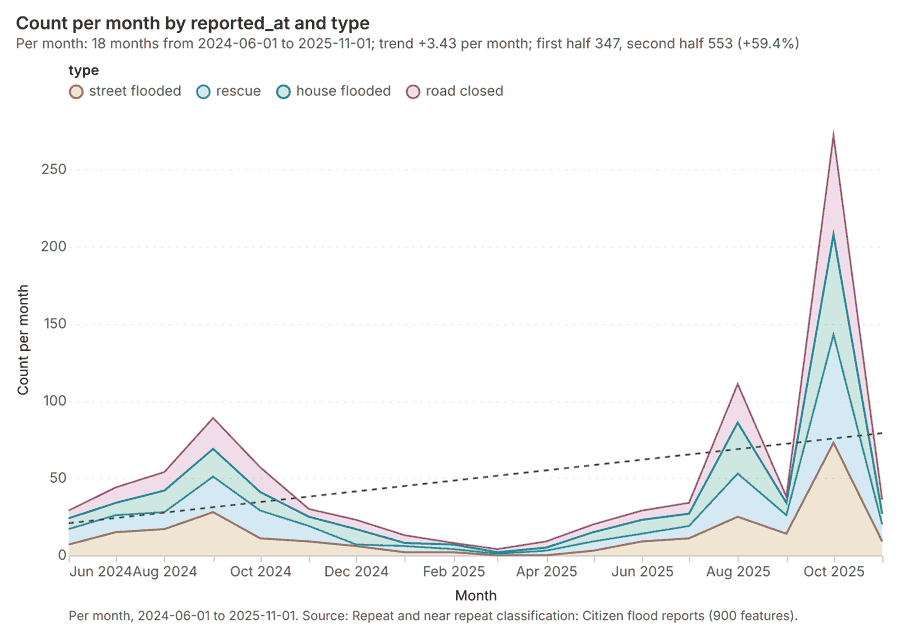
What this analysis is. Repeat and near repeat classification: Classify incidents as originators, repeats (same place) or near repeats within a distance and time window, with a Knox test table 12. In ArcGIS it is Repeat and Near Repeat Classification or Near Repeat Calculator 12.
Why it was run on this data. Near repeat analysis tests whether Citizen flood reports close in space also follow each other within 30 days 13.
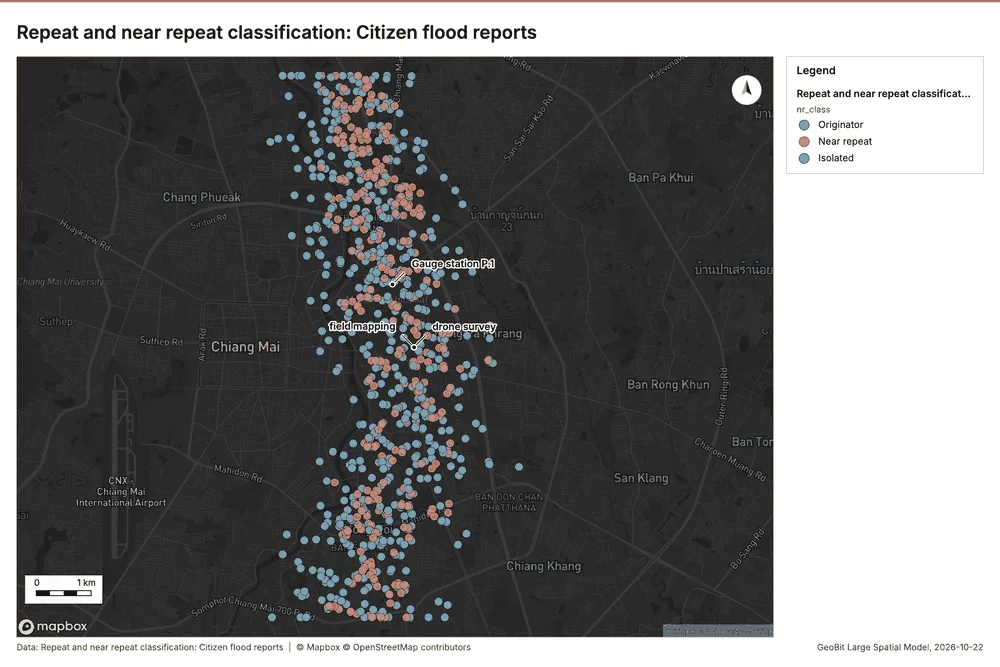
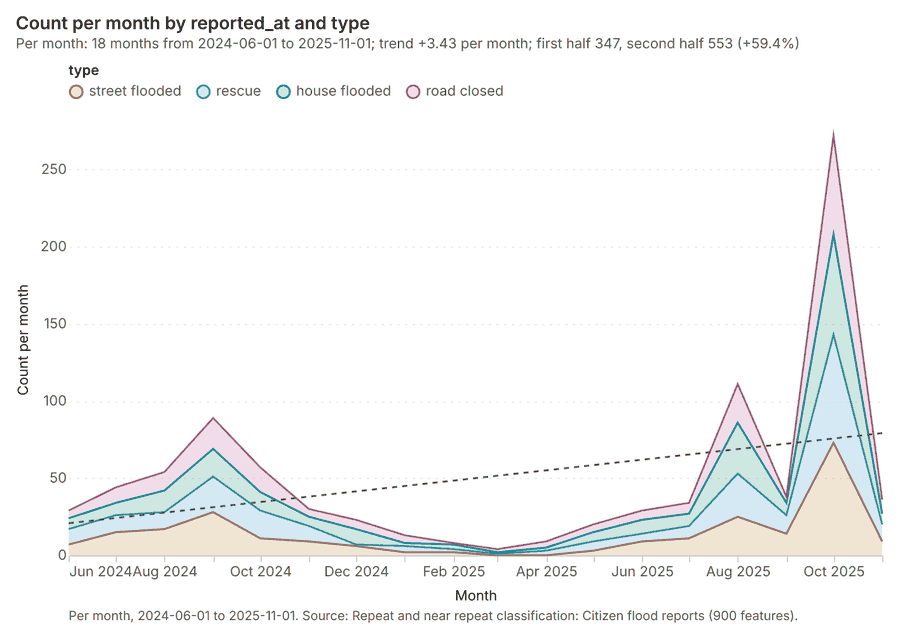
What it found. Near repeat on Citizen flood reports: Repeat and near repeat classification: 1 layer saved: Repeat and near repeat classification: Citizen flood reports (900 features) 1114. It reported result, days 30; result, count 900; result, chains 136; result, distance m 200; result, elapsed ms 25; result, pairs linked 474 14.
| Result | Value |
|---|---|
| result, days | 30 |
| result, count | 900 |
| result, chains | 136 |
| result, distance m | 200 |
| result, elapsed ms | 25 |
| result, pairs linked | 474 |
| billing, cost | 0.077 |
| billing, list price | 0.077 |
| billing, upstream cost | 0 |
Findings
- Evidenced: Near repeat on Citizen flood reports: Repeat and near repeat classification: 1 layer saved: Repeat and near repeat classification: Citizen flood reports (900 features) 1114.
- Evidenced: It reported result, days 30; result, count 900; result, chains 136; result, distance m 200; result, elapsed ms 25; result, pairs linked 474 14.
Tool gp_near_repeat; parameters {"days": 30, "project": "61868fa2-4b0c-4a49-9b21-03b342758885", "features": {"layer": "Citizen flood reports (e21d361b)"}, "distance_m": 200.0, "time_field": "reported_at"}
Change point detection
What this analysis is. Change point detection: When did the level, count, trend or variability change 15? For the whole study area or for every bin 15. In ArcGIS it is Change Point Detection 15.
Why it was run on this data. Change point detection finds when the monthly count of Citizen flood reports shifted 16.
What it found. Change point detection was successfully completed, though no map output was generated for the analysis 6.
| Result | Value |
|---|---|
| result, n changes | 0 |
| result, elapsed ms | 4 |
| result, events used | 900 |
| billing, cost | 0.077 |
| billing, list price | 0.077 |
| billing, upstream cost | 0 |
Findings
- Evidenced: Change point detection on Citizen flood reports: Change point detection: done; no map output 611.
- Evidenced: It reported result, n changes 0; result, elapsed ms 4; result, events used 900; billing, cost 0.077; billing, list price 0.077; billing, upstream cost 0 6.
Tool gp_change_point_detection; parameters {"method": "count", "project": "61868fa2-4b0c-4a49-9b21-03b342758885", "features": {"layer": "Citizen flood reports (e21d361b)"}, "interval": "month", "time_field": "reported_at"}
Hot spots
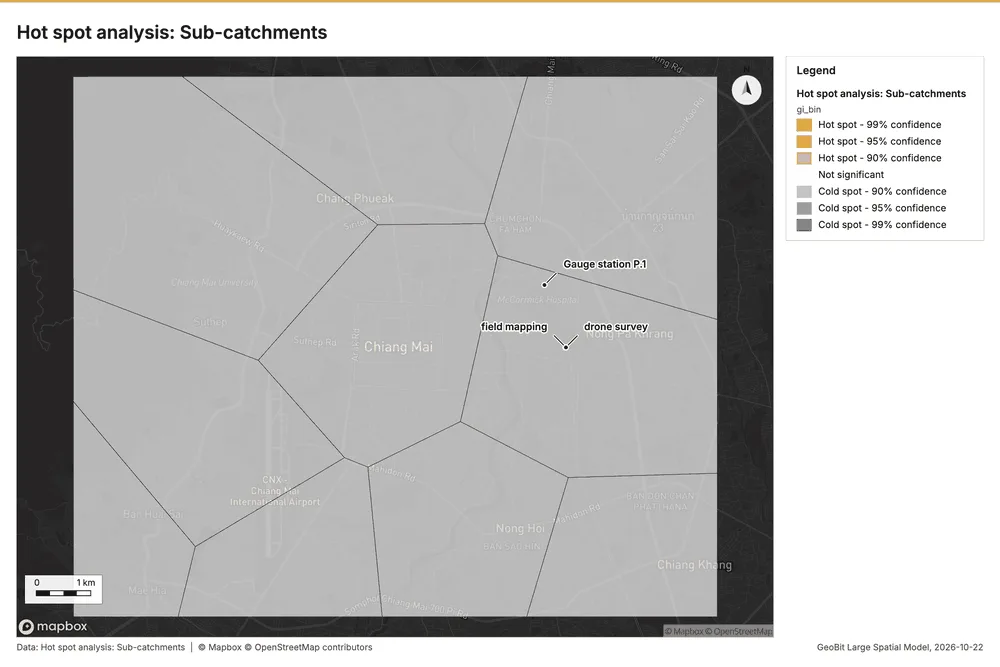
What this analysis is. Hot spot analysis: Getis-Ord Gi* hot and cold spots with z-scores, p-values and confidence bins 17. In ArcGIS it is Find Hot Spots or Hot Spot Analysis (Getis-Ord Gi*); in QGIS, qgis:hotspot (plugin) 17.
Why it was run on this data. 900 points: Getis-Ord Gi* tests whether the concentrations in Citizen flood reports are statistically significant 18.
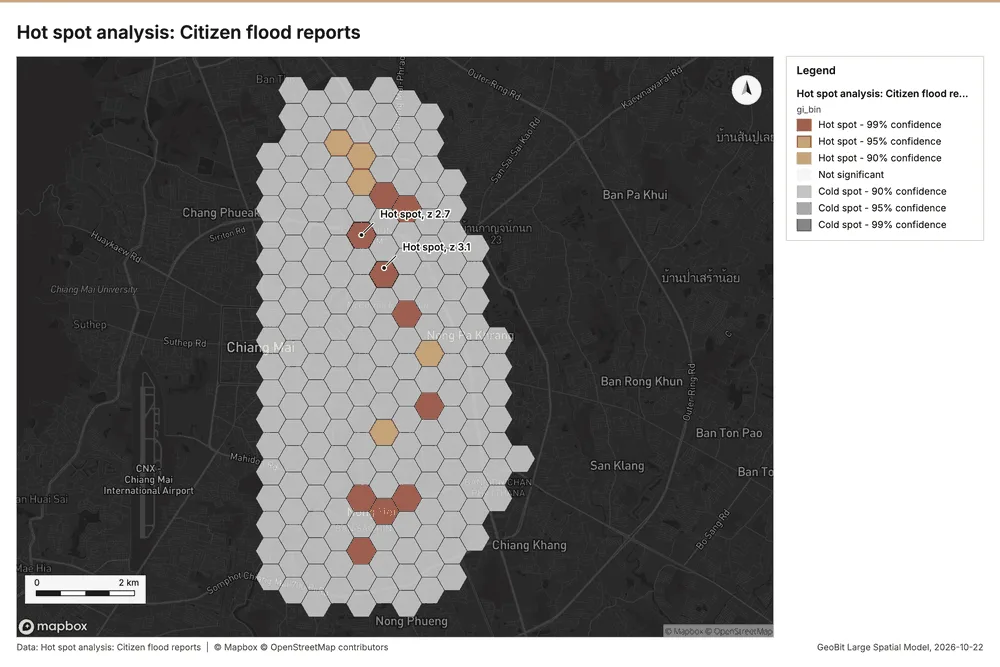
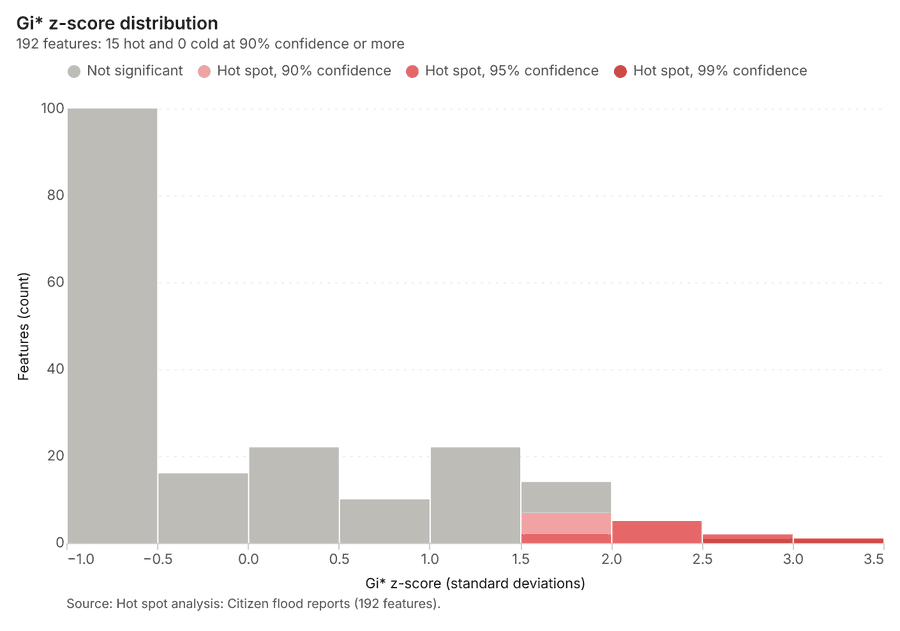
What it found. Hot spot analysis was performed using the Citizen flood reports 11, resulting in the identification of 192 features 19. This analysis, which covered 900 incidents, completed with an elapsed time of 17 milliseconds 19.
| Result | Value |
|---|---|
| result, bins | 192 |
| result, count | 192 |
| result, elapsed ms | 17 |
| result, cell size m | 500 |
| result, incidents used | 900 |
| result, distance band m | 500 |
| billing, cost | 0.068 |
| billing, list price | 0.068 |
| billing, upstream cost | 0 |
Findings
- Evidenced: Hot spots on Citizen flood reports: Hot spot analysis: 1 layer saved: Hot spot analysis: Citizen flood reports (192 features) 1119.
- Evidenced: It reported result, bins 192; result, count 192; result, elapsed ms 17; result, cell size m 500; result, incidents used 900; result, distance band m 500 19.
Tool gp_hot_spots; parameters {"project": "61868fa2-4b0c-4a49-9b21-03b342758885", "features": {"layer": "Citizen flood reports (e21d361b)"}, "aggregation": "hexagon", "cell_size_m": 500.0, "distance_band_m": 500.0}
Hot spots
What this analysis is. Hot spot analysis: Getis-Ord Gi* hot and cold spots with z-scores, p-values and confidence bins 17. In ArcGIS it is Find Hot Spots or Hot Spot Analysis (Getis-Ord Gi*); in QGIS, qgis:hotspot (plugin) 17.
Why it was run on this data. Gi* hot spots of 'mean_rain_mm' across the areas 20.
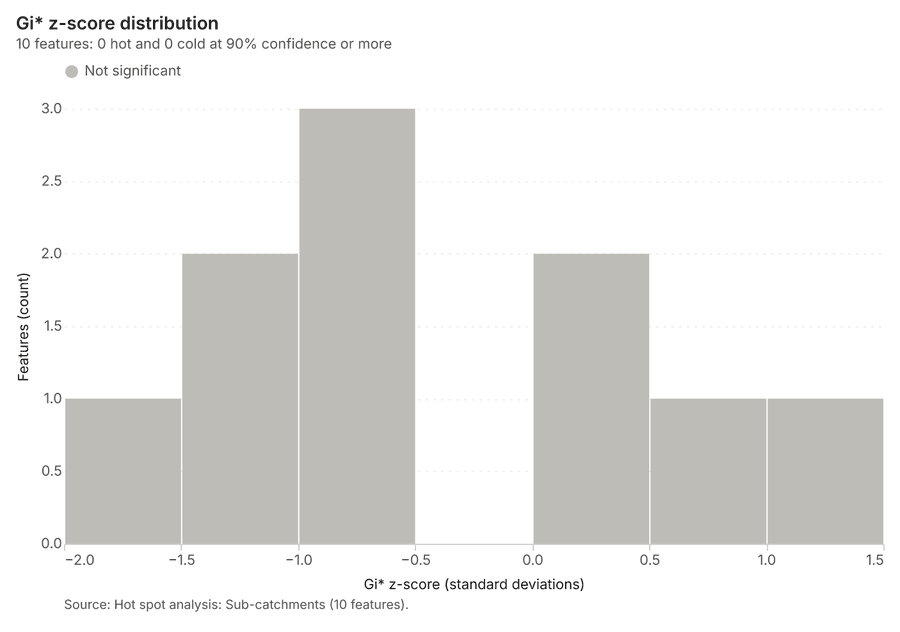
What it found. Hot spots on Sub-catchments: Hot spot analysis: 1 layer saved: Hot spot analysis: Sub-catchments (10 features) 2122. It reported result, count 10; result, elapsed ms 1; result, excluded null 0; result, distance band m 3,807; billing, cost 0.0502; billing, list price 0.0502 21.
| Result | Value |
|---|---|
| result, count | 10 |
| result, elapsed ms | 1 |
| result, excluded null | 0 |
| result, distance band m | 3,807 |
| billing, cost | 0.0502 |
| billing, list price | 0.0502 |
| billing, upstream cost | 0 |
Findings
- Evidenced: Hot spots on Sub-catchments: Hot spot analysis: 1 layer saved: Hot spot analysis: Sub-catchments (10 features) 2122.
- Evidenced: It reported result, count 10; result, elapsed ms 1; result, excluded null 0; result, distance band m 3,807; billing, cost 0.0502; billing, list price 0.0502 21.
Tool gp_hot_spots; parameters {"field": "mean_rain_mm", "project": "61868fa2-4b0c-4a49-9b21-03b342758885", "features": {"layer": "Sub-catchments (93ab58bf)"}}
Calculate density
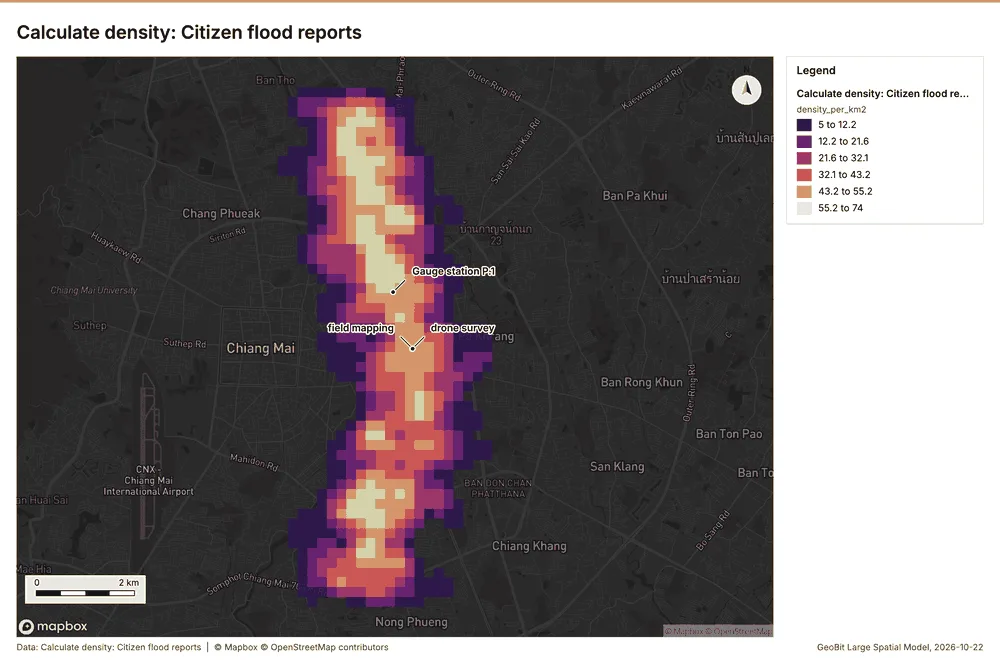
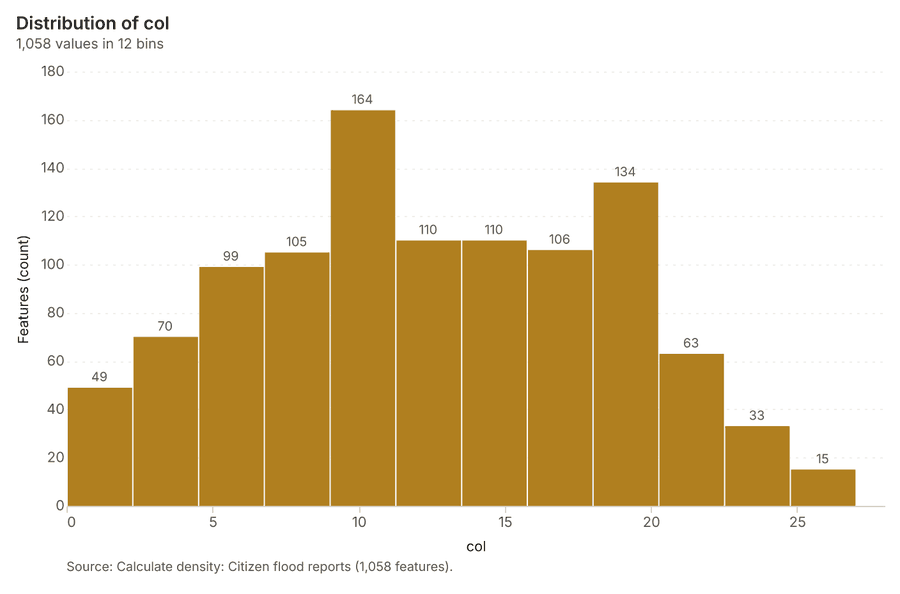
What this analysis is. Calculate density: Kernel density per square kilometer on a grid 23. In ArcGIS it is Calculate Density or Kernel Density; in QGIS, native:heatmapkerneldensityestimation 23.
Why it was run on this data. 900 points in Citizen flood reports: a density surface shows where they concentrate 24.
What it found. Using citizen flood reports as the input, density was calculated with the gp_calculate_density tool [11, 25]. This process analyzed 1,058 features 25 and determined a maximum density of 73.99 per km2 25. The total cost associated with the density calculation was 0.068 25.
| Result | Value |
|---|---|
| result, count | 1,058 |
| result, elapsed ms | 245 |
| result, bandwidth m | 500 |
| result, cell size m | 200 |
| result, excluded null | 0 |
| result, max density per km2 | 73.99 |
| billing, cost | 0.068 |
| billing, list price | 0.068 |
| billing, upstream cost | 0 |
Findings
- Evidenced: Calculate density on Citizen flood reports: Calculate density: 1 layer saved: Calculate density: Citizen flood reports (1058 features) 1125.
- Evidenced: It reported result, count 1,058; result, elapsed ms 245; result, bandwidth m 500; result, cell size m 200; result, excluded null 0; result, max density per km2 73.99 25.
Tool gp_calculate_density; parameters {"kernel": "quartic", "project": "61868fa2-4b0c-4a49-9b21-03b342758885", "features": {"layer": "Citizen flood reports (e21d361b)"}, "bandwidth_m": 500.0, "cell_size_m": 200.0}
Summarize within
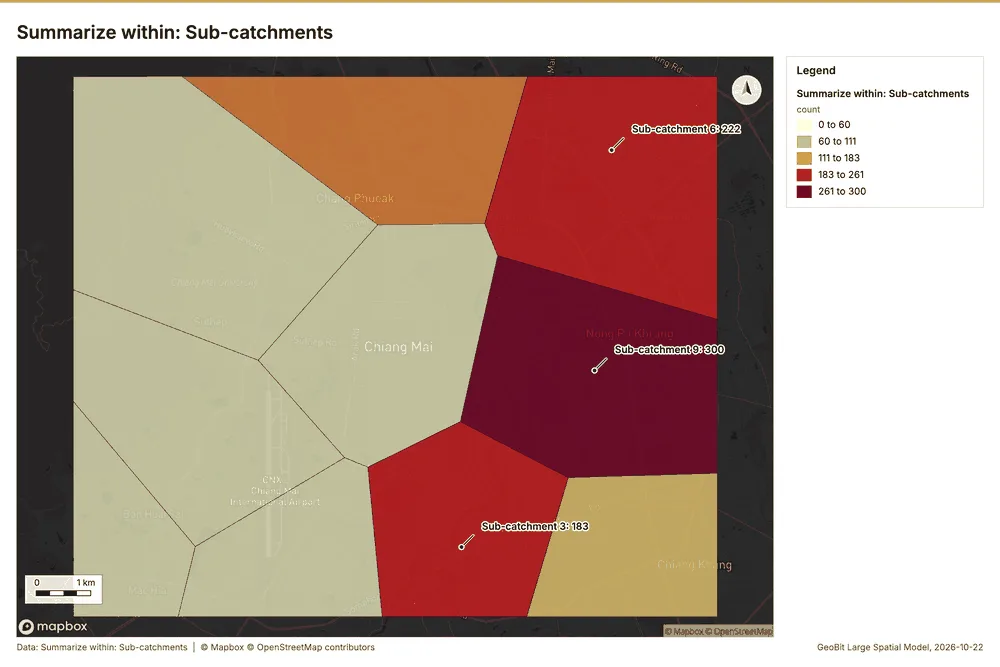
What this analysis is. Summarize within: Count and aggregate the features inside each polygon (or bin), proportionally for lines and polygons 26. In ArcGIS it is Summarize Within or Aggregate Points; in QGIS, native:countpointsinpolygon or native:sumlinelengths 26.
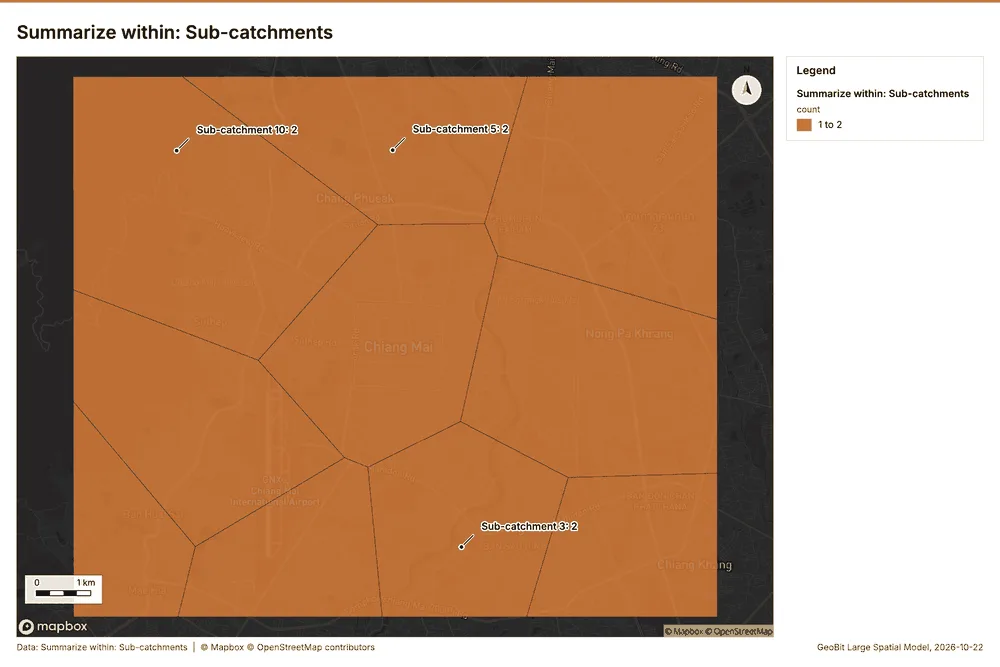
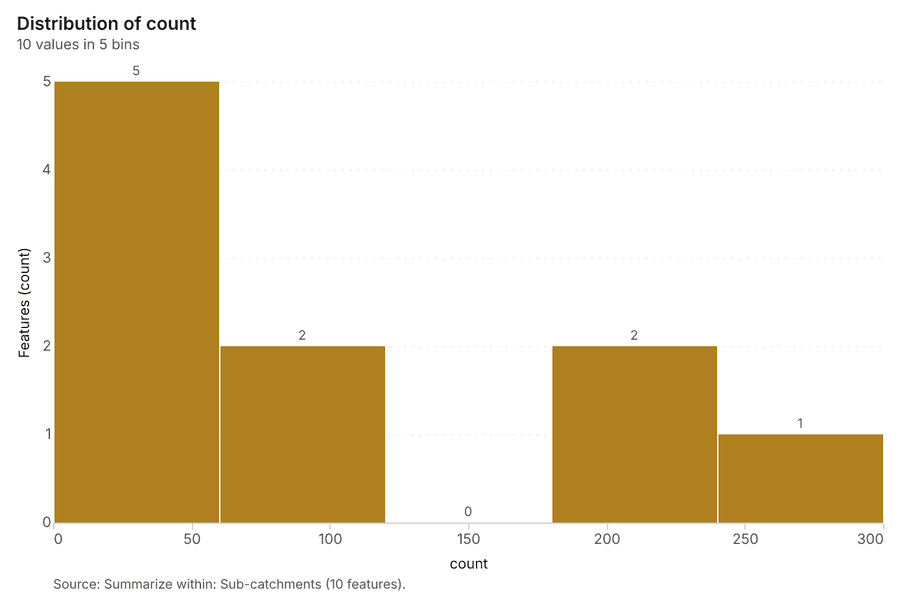
Why it was run on this data. Count Citizen flood reports inside each feature of Sub-catchments by type; the counts map as a choropleth (natural breaks, sequential colors) 27.
What it found. Summarize within on Citizen flood reports, Sub-catchments: Summarize within: 1 layer saved: Summarize within: Sub-catchments (10 features) 112228. It reported result, count 10; result, elapsed ms 2; billing, cost 0.02822; billing, list price 0.02822; billing, upstream cost 0 28.
| Result | Value |
|---|---|
| result, count | 10 |
| result, elapsed ms | 2 |
| billing, cost | 0.02822 |
| billing, list price | 0.02822 |
| billing, upstream cost | 0 |
Findings
- Evidenced: Summarize within on Citizen flood reports, Sub-catchments: Summarize within: 1 layer saved: Summarize within: Sub-catchments (10 features) 112228.
- Evidenced: It reported result, count 10; result, elapsed ms 2; billing, cost 0.02822; billing, list price 0.02822; billing, upstream cost 0 28.
Tool gp_summarize_within; parameters {"stats": [{"stat": "sum", "field": "water_depth_cm"}], "project": "61868fa2-4b0c-4a49-9b21-03b342758885", "features": {"layer": "Citizen flood reports (e21d361b)"}, "group_by": "type", "polygons": {"layer": "Sub-catchments (93ab58bf)"}}
Summarize within
What this analysis is. Summarize within: Count and aggregate the features inside each polygon (or bin), proportionally for lines and polygons 26. In ArcGIS it is Summarize Within or Aggregate Points; in QGIS, native:countpointsinpolygon or native:sumlinelengths 26.
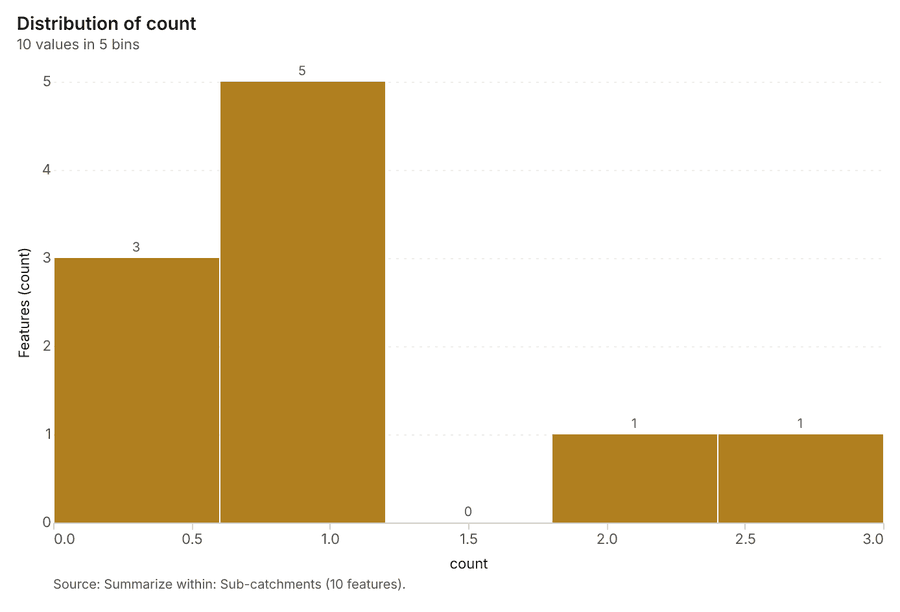
Why it was run on this data. Count Citizen flood reports inside each feature of Sub-catchments by type; the counts map as a choropleth (natural breaks, sequential colors) 27.
What it found. Summarize within on River gauge stations, Sub-catchments: Summarize within: 1 layer saved: Summarize within: Sub-catchments (10 features) 222930. It reported result, count 10; result, elapsed ms 0; billing, cost 0.01042; billing, list price 0.01042; billing, upstream cost 0 29.
| Result | Value |
|---|---|
| result, count | 10 |
| result, elapsed ms | 0 |
| billing, cost | 0.01042 |
| billing, list price | 0.01042 |
| billing, upstream cost | 0 |
Findings
- Evidenced: Summarize within on River gauge stations, Sub-catchments: Summarize within: 1 layer saved: Summarize within: Sub-catchments (10 features) 222930.
- Evidenced: It reported result, count 10; result, elapsed ms 0; billing, cost 0.01042; billing, list price 0.01042; billing, upstream cost 0 29.
Tool gp_summarize_within; parameters {"stats": [{"stat": "sum", "field": "bank_full_m"}], "project": "61868fa2-4b0c-4a49-9b21-03b342758885", "features": {"layer": "River gauge stations (78d4554f)"}, "group_by": "river", "polygons": {"layer": "Sub-catchments (93ab58bf)"}}
Summarize within
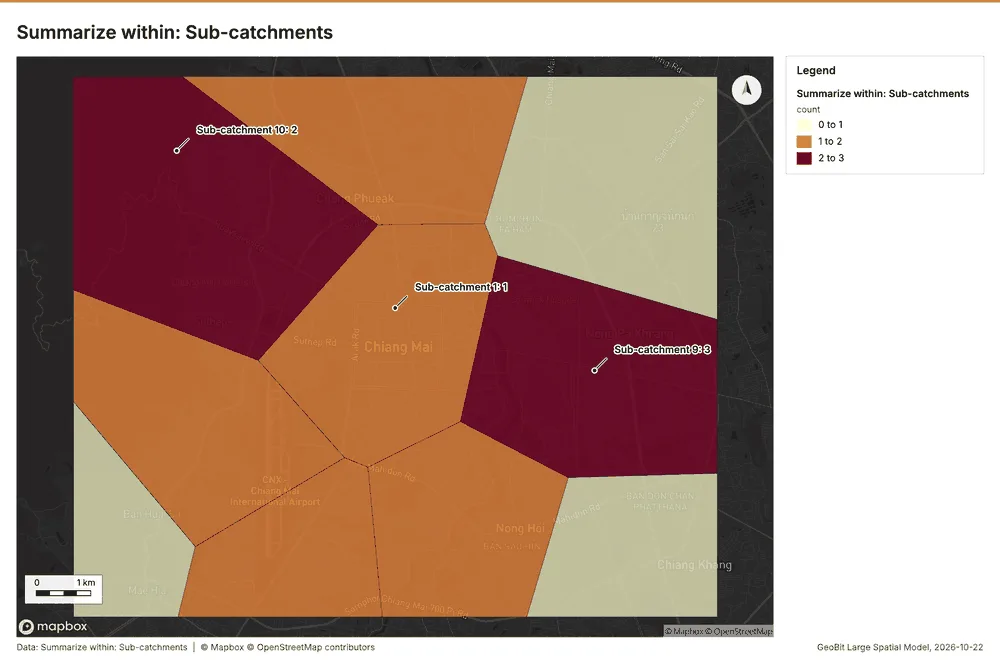
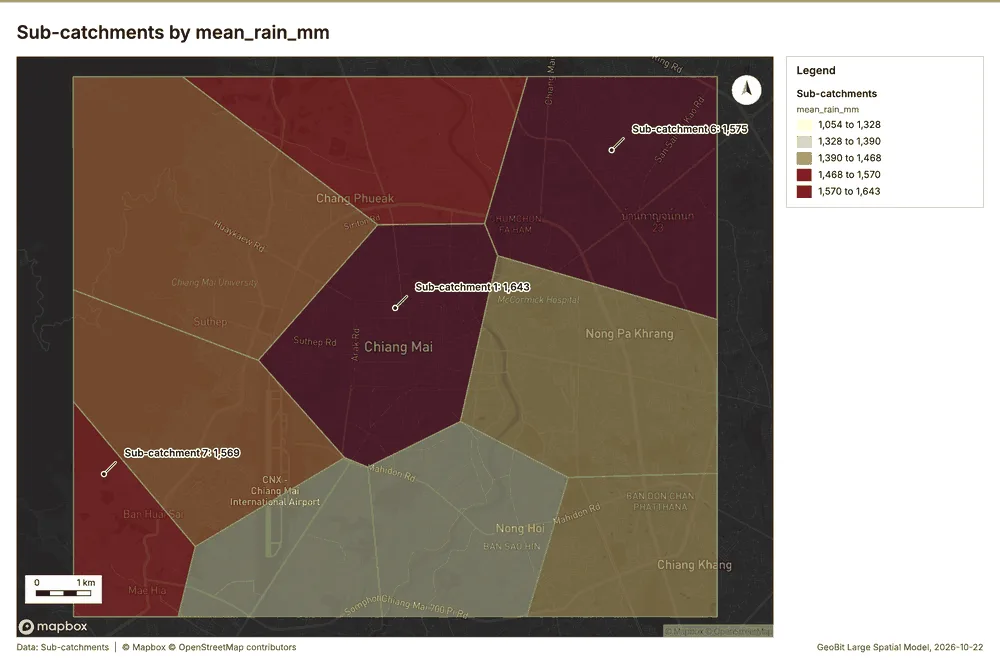
What this analysis is. Summarize within: Count and aggregate the features inside each polygon (or bin), proportionally for lines and polygons 26. In ArcGIS it is Summarize Within or Aggregate Points; in QGIS, native:countpointsinpolygon or native:sumlinelengths 26.
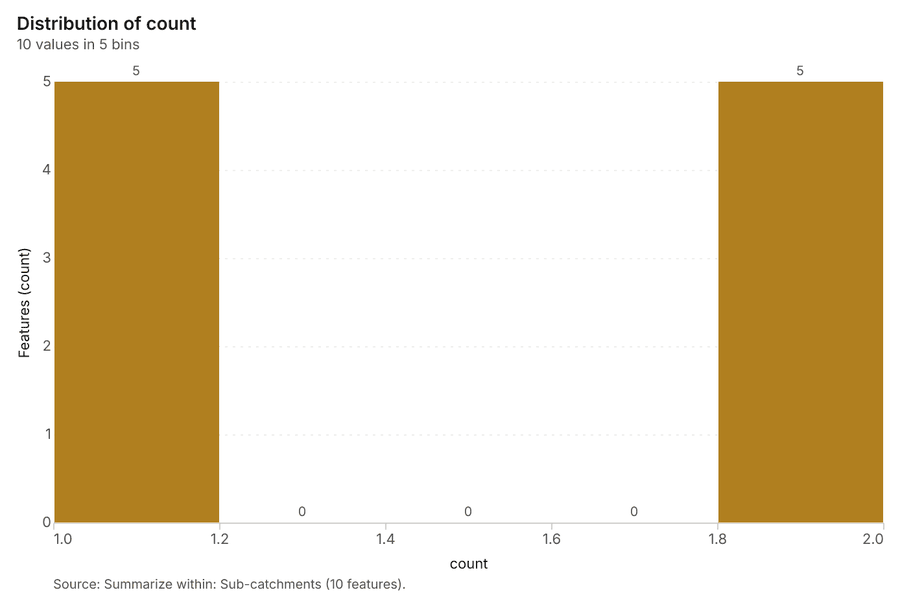
Why it was run on this data. Count Citizen flood reports inside each feature of Sub-catchments by type; the counts map as a choropleth (natural breaks, sequential colors) 27.
What it found. Summarize within on Rain gauges, Sub-catchments: Summarize within: 1 layer saved: Summarize within: Sub-catchments (10 features) 223132. It reported result, count 10; result, elapsed ms 0; billing, cost 0.01052; billing, list price 0.01052; billing, upstream cost 0 31.
| Result | Value |
|---|---|
| result, count | 10 |
| result, elapsed ms | 0 |
| billing, cost | 0.01052 |
| billing, list price | 0.01052 |
| billing, upstream cost | 0 |
Findings
- Evidenced: Summarize within on Rain gauges, Sub-catchments: Summarize within: 1 layer saved: Summarize within: Sub-catchments (10 features) 223132.
- Evidenced: It reported result, count 10; result, elapsed ms 0; billing, cost 0.01052; billing, list price 0.01052; billing, upstream cost 0 31.
Tool gp_summarize_within; parameters {"stats": [{"stat": "sum", "field": "elevation_m"}], "project": "61868fa2-4b0c-4a49-9b21-03b342758885", "features": {"layer": "Rain gauges (3db367dc)"}, "polygons": {"layer": "Sub-catchments (93ab58bf)"}}
Zonal statistics
What this analysis is. Zonal statistics: count/min/max/mean/std/sum/median/majority per polygon as a table and as GeoJSON 33. In ArcGIS it is Zonal Statistics as Table (polygons) 33.
Why it was run on this data. Statistics of Catchment terrain model (DEM) inside each feature of Sub-catchments 34.
What it found. The analysis utilized the Zonal statistics tool, specifically rs_zonal_statistics 35. The resulting output contained 10 row(s) 35. This statistical breakdown successfully processed 10 zones 35.
Findings
Tool rs_zonal_statistics; parameters {"stats": ["mean", "min", "max", "std"], "zones": "Sub-catchments (93ab58bf)", "raster_id": "Catchment terrain model (DEM) (8a54f320)"}
Zonal statistics
What this analysis is. Zonal statistics: count/min/max/mean/std/sum/median/majority per polygon as a table and as GeoJSON 33. In ArcGIS it is Zonal Statistics as Table (polygons) 33.
Why it was run on this data. Statistics of Catchment terrain model (DEM) inside each feature of Sub-catchments 34.
What it found. The analysis utilized the tool rs_zonal_statistics for zonal statistics 36. Based on the tool summary, the output contained 3 row(s) 36. Additionally, the process processed 3 zones 36.
Findings
Tool rs_zonal_statistics; parameters {"stats": ["mean", "min", "max", "std"], "zones": "Mapped flood extents (32d0b09d)", "raster_id": "Catchment terrain model (DEM) (8a54f320)"}
Slope
What this analysis is. Slope: Horn slope in degrees or percent, with the share of ground in six grade classes 37. In ArcGIS it is Slope (Spatial Analyst); in QGIS, Slope (GDAL DEM) 37.
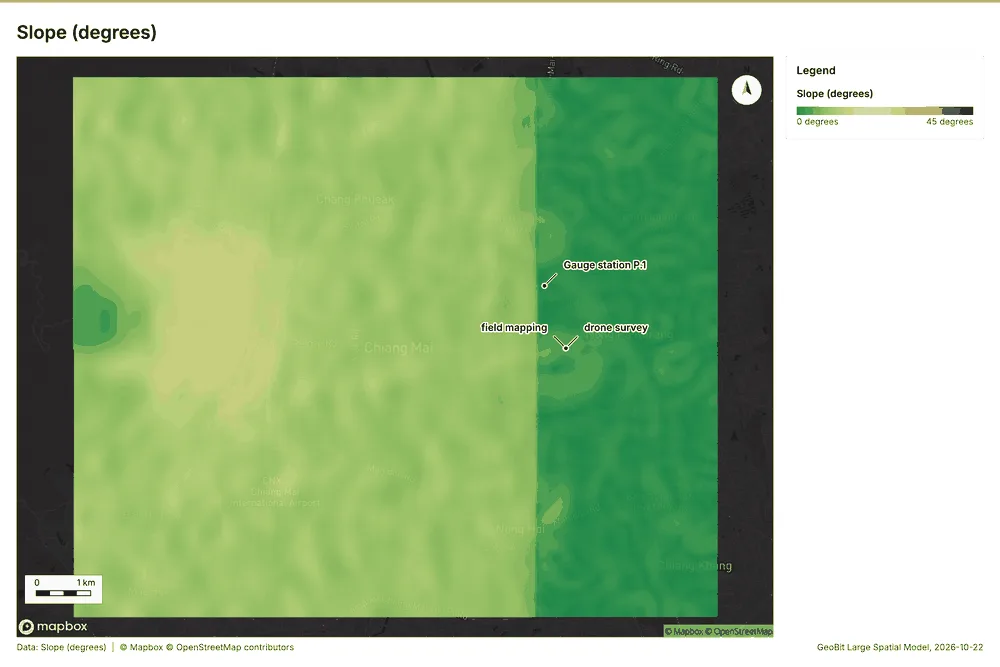
Why it was run on this data. Slope of the Catchment terrain model (DEM) surface 38.
What it found. Slope on Catchment terrain model (DEM): Slope over 119.88 km2: mean 8.48 degrees, max 20.58 degrees; 68% of the ground is steeper than 15% 3940. DEM: Catchment terrain model (DEM) 3940. Verified: 2 checks passed 3940. It reported dem, cols 400; dem, rows 333; dem, cell m 30; dem, relief m 1,812; dem, elev max m 2,062; dem, elev min m 250 39.
| Result | Value |
|---|---|
| dem, cols | 400 |
| dem, rows | 333 |
| dem, cell m | 30 |
| dem, relief m | 1,812 |
| dem, elev max m | 2,062 |
| dem, elev min m | 250 |
| dem, elev mean m | 882.8 |
| dem, missing frac | 0 |
| cost, usd | 0 |
| grid, cols | 400 |
| grid, rows | 333 |
| grid, cell m | 30 |
| stats, max | 20.58 |
| stats, min | 0.01 |
| stats, mean | 8.48 |
| stats, median | 10.33 |
| stats, steeper than 15pct | 68.27 |
| rows left out | 0 |
Findings
- Evidenced: Slope on Catchment terrain model (DEM): Slope over 119.88 km2: mean 8.48 degrees, max 20.58 degrees; 68% of the ground is steeper than 15% 3940.
- Evidenced: DEM: Catchment terrain model (DEM) 3940.
- Evidenced: Verified: 2 checks passed 3940.
- Evidenced: It reported dem, cols 400; dem, rows 333; dem, cell m 30; dem, relief m 1,812; dem, elev max m 2,062; dem, elev min m 250 39.
Tool tr_slope; parameters {"dem": {"layer": "Catchment terrain model (DEM) (8a54f320)"}, "project": "61868fa2-4b0c-4a49-9b21-03b342758885"}
Find point clusters
What this analysis is. Find point clusters: Density-based clusters (DBSCAN, HDBSCAN or OPTICS, optionally space-time) with hulls and noise 41. In ArcGIS it is Find Point Clusters or Density-based Clustering; in QGIS, native:dbscanclustering or native:stdbscanclustering 41.
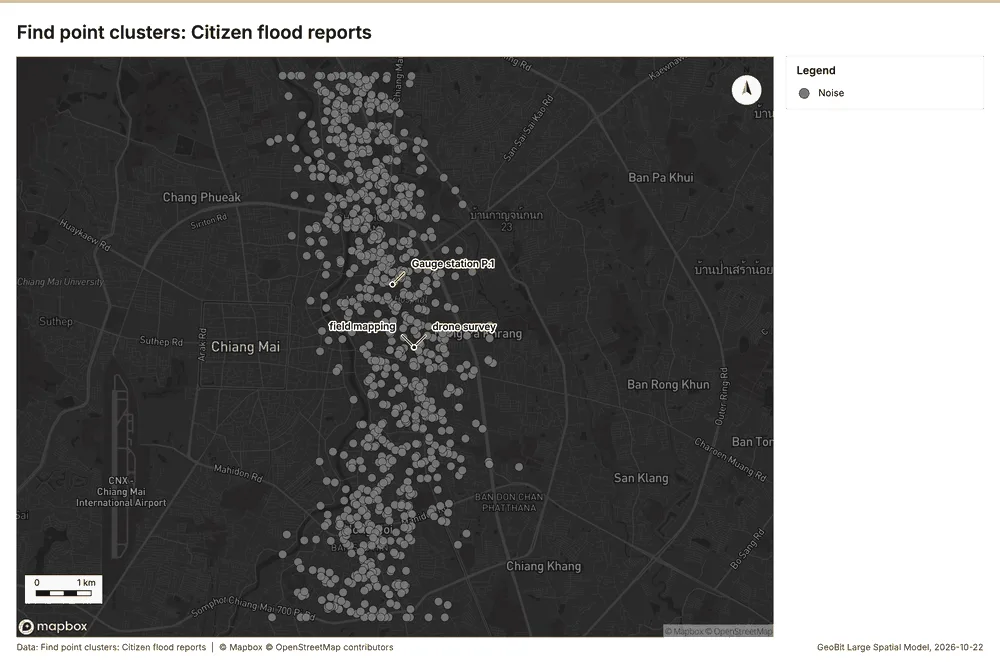
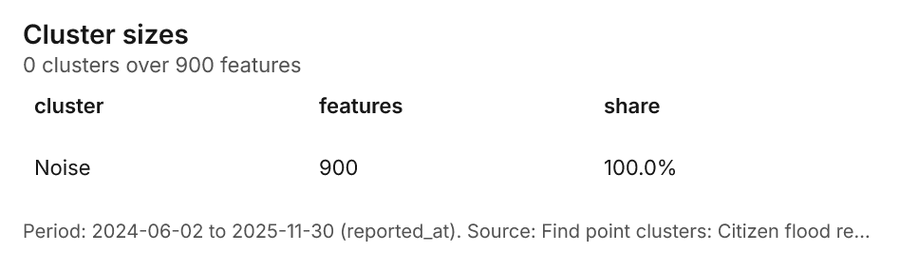
Why it was run on this data. DBSCAN finds dense groups of Citizen flood reports and separates noise 42.
What it found. Find point clusters on Citizen flood reports: Find point clusters: 1 layer saved: Find point clusters: Citizen flood reports (900 features) 1143. It reported result, count 900; result, noise 900; result, distance m 200; result, elapsed ms 13; result, min points 20; billing, cost 0.068 43.
| Result | Value |
|---|---|
| result, count | 900 |
| result, noise | 900 |
| result, distance m | 200 |
| result, elapsed ms | 13 |
| result, min points | 20 |
| billing, cost | 0.068 |
| billing, list price | 0.068 |
| billing, upstream cost | 0 |
Findings
- Evidenced: Find point clusters on Citizen flood reports: Find point clusters: 1 layer saved: Find point clusters: Citizen flood reports (900 features) 1143.
- Evidenced: It reported result, count 900; result, noise 900; result, distance m 200; result, elapsed ms 13; result, min points 20; billing, cost 0.068 43.
Tool gp_find_point_clusters; parameters {"method": "dbscan", "project": "61868fa2-4b0c-4a49-9b21-03b342758885", "features": {"layer": "Citizen flood reports (e21d361b)"}, "distance_m": 200.0, "min_points": 20}
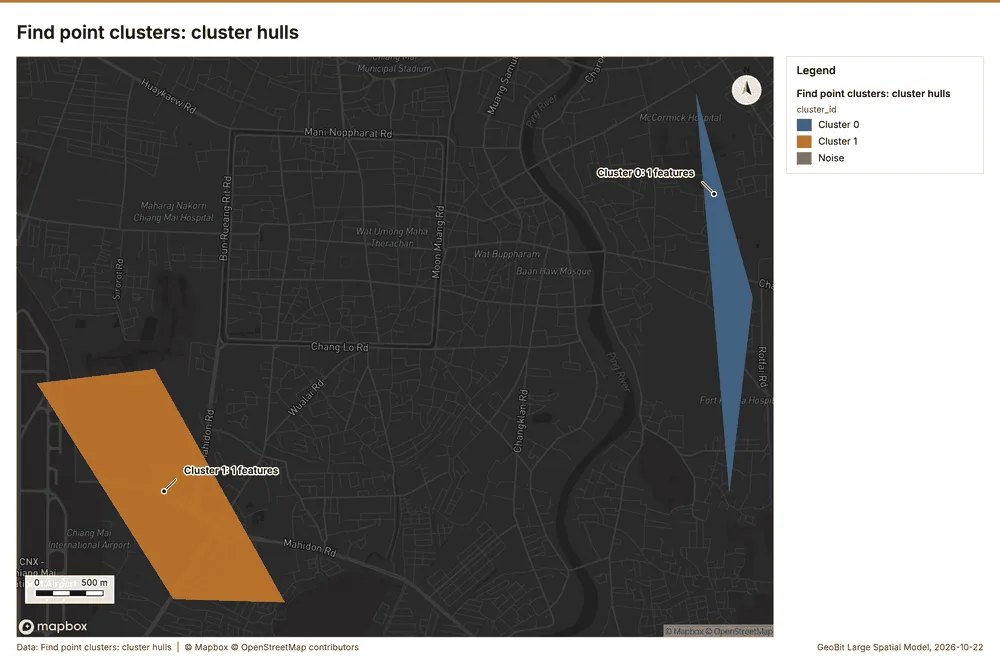
Find point clusters
What this analysis is. Find point clusters: Density-based clusters (DBSCAN, HDBSCAN or OPTICS, optionally space-time) with hulls and noise 41. In ArcGIS it is Find Point Clusters or Density-based Clustering; in QGIS, native:dbscanclustering or native:stdbscanclustering 41.
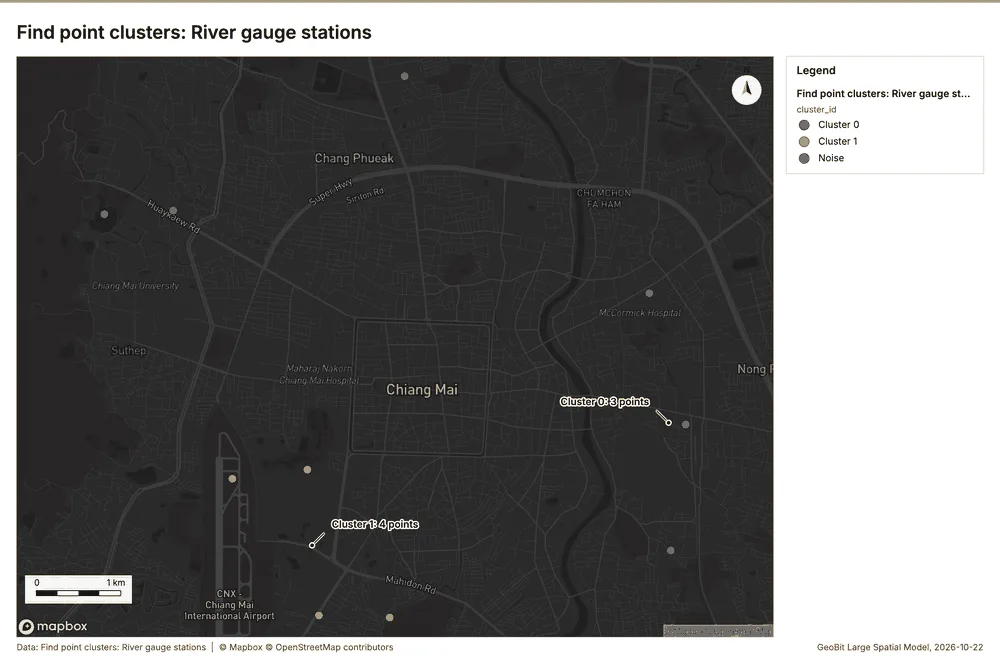
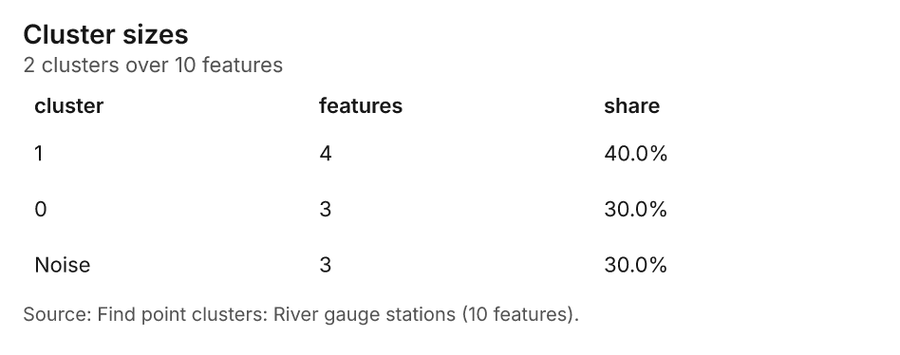
Why it was run on this data. DBSCAN finds dense groups of River gauge stations and separates noise 44.
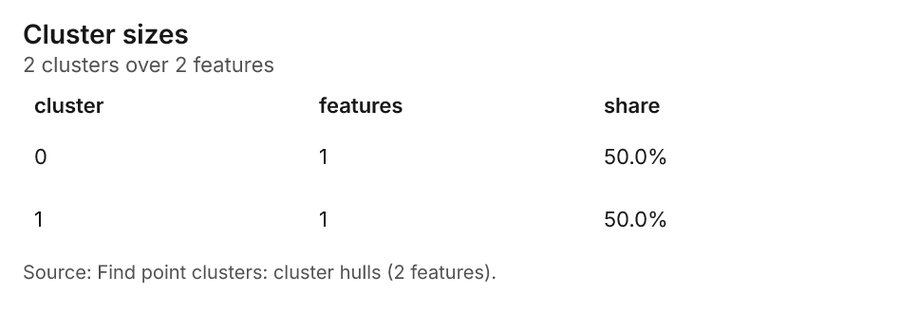
What it found. Find point clusters on River gauge stations: Find point clusters: 2 layers saved: Find point clusters: River gauge stations (10 features); Find point clusters: cluster hulls (2 features) 3045. It reported result, count 10; result, noise 3; result, distance m 2,000; result, elapsed ms 85; result, min points 3; billing, cost 0.0502 45.
| Result | Value |
|---|---|
| result, count | 10 |
| result, noise | 3 |
| result, distance m | 2,000 |
| result, elapsed ms | 85 |
| result, min points | 3 |
| billing, cost | 0.0502 |
| billing, list price | 0.0502 |
| billing, upstream cost | 0 |
Findings
- Evidenced: Find point clusters on River gauge stations: Find point clusters: 2 layers saved: Find point clusters: River gauge stations (10 features); Find point clusters: cluster hulls (2 features) 3045.
- Evidenced: It reported result, count 10; result, noise 3; result, distance m 2,000; result, elapsed ms 85; result, min points 3; billing, cost 0.0502 45.
Tool gp_find_point_clusters; parameters {"method": "dbscan", "project": "61868fa2-4b0c-4a49-9b21-03b342758885", "features": {"layer": "River gauge stations (78d4554f)"}, "distance_m": 2000.0, "min_points": 3}
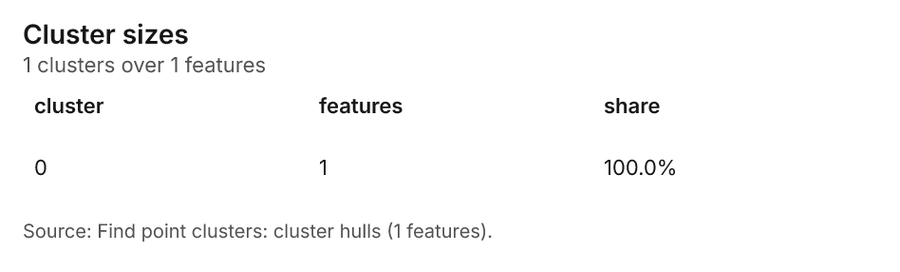
Find point clusters
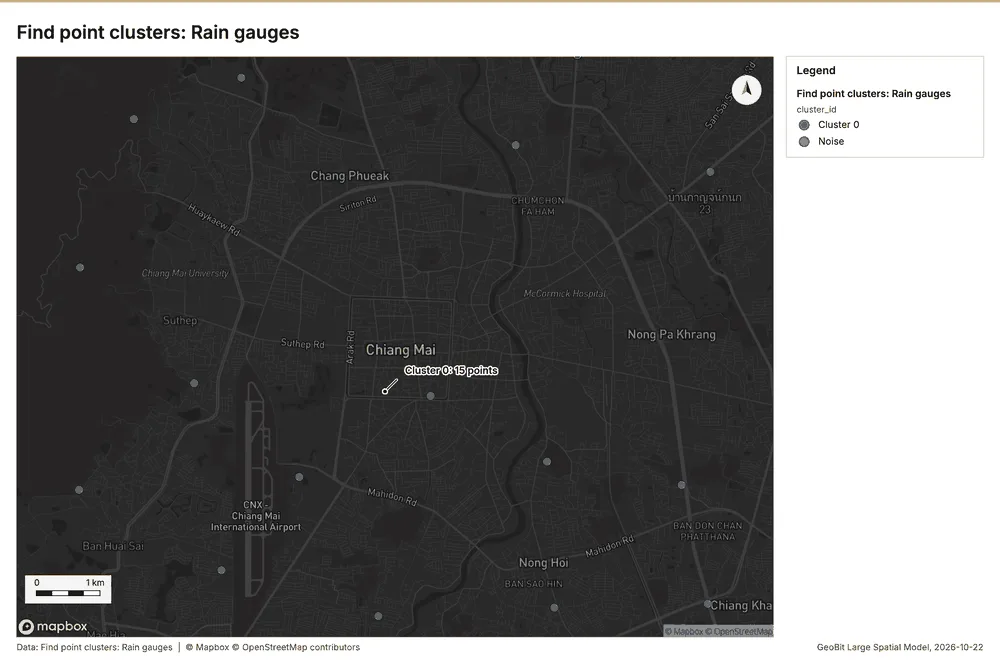
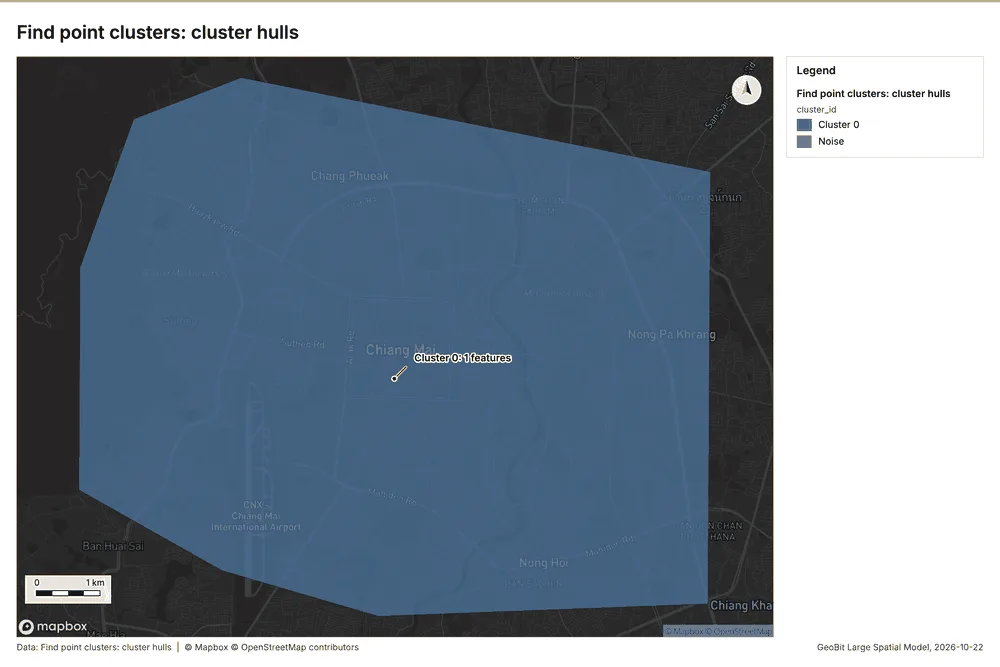
What this analysis is. Find point clusters: Density-based clusters (DBSCAN, HDBSCAN or OPTICS, optionally space-time) with hulls and noise 41. In ArcGIS it is Find Point Clusters or Density-based Clustering; in QGIS, native:dbscanclustering or native:stdbscanclustering 41.
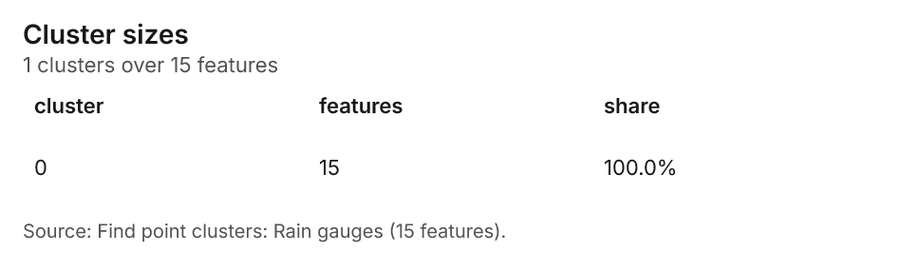
Why it was run on this data. DBSCAN finds dense groups of Rain gauges and separates noise 46.
What it found. Find point clusters on Rain gauges: Find point clusters: 2 layers saved: Find point clusters: Rain gauges (15 features); Find point clusters: cluster hulls (1 feature) 3247. It reported result, count 15; result, noise 0; result, distance m 5,000; result, elapsed ms 2; result, min points 3; billing, cost 0.0503 47.
| Result | Value |
|---|---|
| result, count | 15 |
| result, noise | 0 |
| result, distance m | 5,000 |
| result, elapsed ms | 2 |
| result, min points | 3 |
| billing, cost | 0.0503 |
| billing, list price | 0.0503 |
| billing, upstream cost | 0 |
Findings
- Evidenced: Find point clusters on Rain gauges: Find point clusters: 2 layers saved: Find point clusters: Rain gauges (15 features); Find point clusters: cluster hulls (1 feature) 3247.
- Evidenced: It reported result, count 15; result, noise 0; result, distance m 5,000; result, elapsed ms 2; result, min points 3; billing, cost 0.0503 47.
A model draft was discarded because a sentence did not cite a source of this section.
Tool gp_find_point_clusters; parameters {"method": "dbscan", "project": "61868fa2-4b0c-4a49-9b21-03b342758885", "features": {"layer": "Rain gauges (3db367dc)"}, "distance_m": 5000.0, "min_points": 3}
Maps and charts
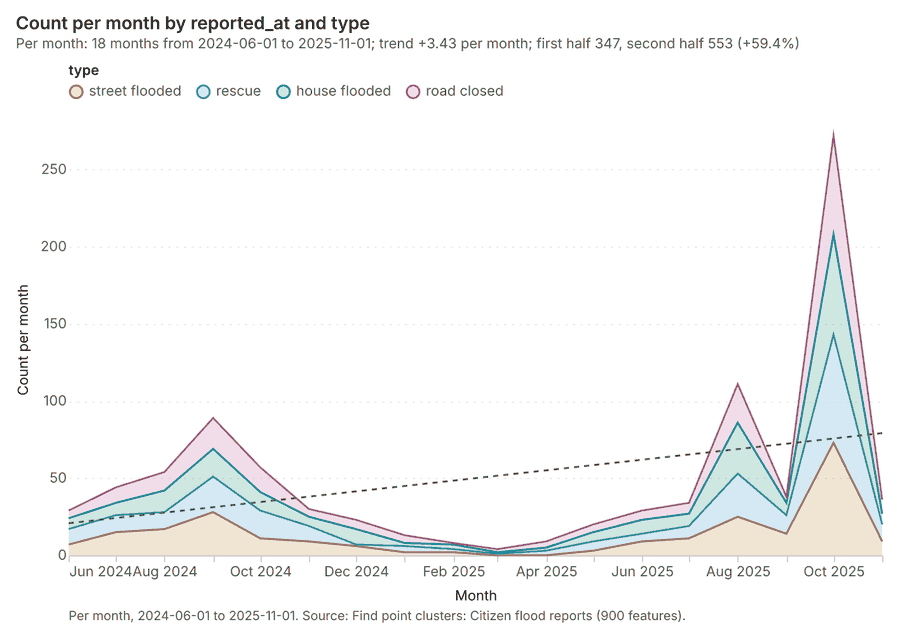
The run also made 16 map image(s) 48495051525354555657585960616263 and 18 chart(s) 646566676869707172737475767778798081.
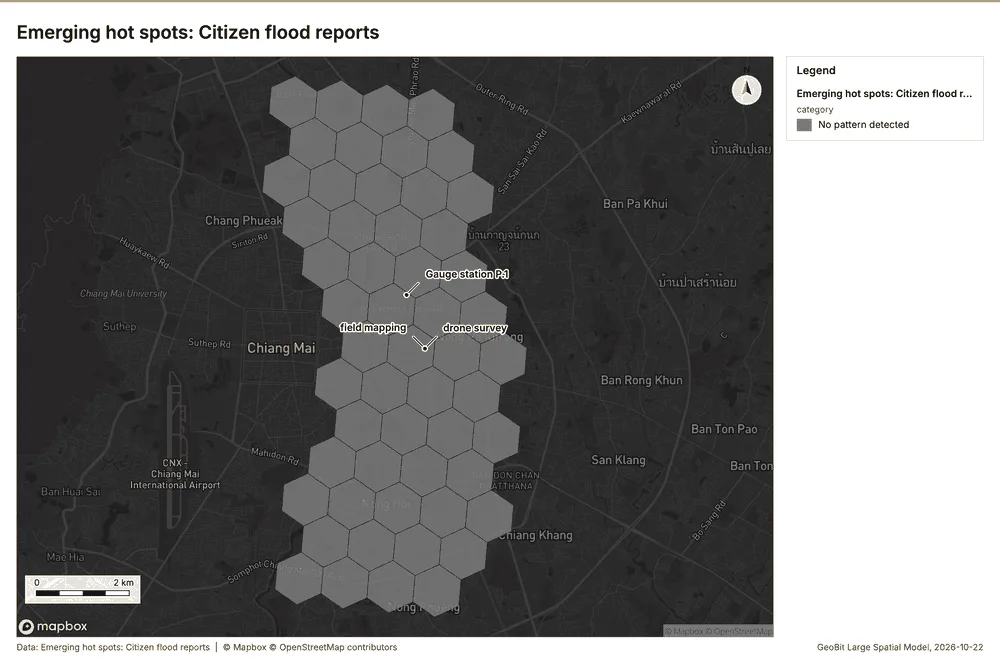
What the map shows. The map, titled "Emerging hot spots: Citizen flood reports," displays an analysis of potential flood reporting clusters across a gridded area. According to the legend, the pattern result for this analysis is "No pattern detected." Visually, the entire area is covered by a uniform hexagonal grid structure, indicating the scope of the report, but no specific hot spots or distinct groupings are highlighted. The overall reading suggests that citizen flood reports are not concentrated in any specific, statistically significant area within the mapped region. Therefore, the image indicates that 48
Inferred: read from the image by gemma4:e4b, not evidence.
Changes since the last run
This is the first report of this project.
Sources
- 1Rendering: Chart: Timeline: events per month by dataset. 96 rows id ab73206e-a519-4180-9535-698e58b41091
- 2Dataset: Mapped flood extents. vector, 3 rows id db7dcc69-6952-403c-92c2-c3bc2246001a
- 3Dataset: Citizen flood reports. vector, 900 rows id 1efc03c7-deb5-479a-8a37-e719f58c2b20
- 4Dataset: Gauge readings by day. table, 2740 rows id 2f1b0f9a-faac-4f0f-a937-14d42ba33293
- 5Dataset: Rainfall by month. table, 360 rows id b74ec6fb-9f9c-443c-9bf1-60b415ac2d65
- 6Tool result: gp_change_point_detection, step 2. Change point detection: done; no map output. id 2d6ff918-4a3d-4d6b-90bb-880ab63700de:2
- 7Document page: Flood bulletin, page 1. 6 October 2025 id 85d1f153-b632-4f92-9c75-e27e602d03cd:1
- 8Catalog: Emerging hot spots (operation catalog, gp_space_time_hot_spots). Where hot spots are new, consecutive, intensifying, persistent, diminishing, sporadic, oscillating or historical over time. ArcGIS: Emerging Hot Spot Analysis, Create Space Time Cube. id gp_space_time_hot_spots
- 9Plan: Space time hot spots of Citizen flood reports (the Start plan's candidate c_8817aba79f40). Citizen flood reports carry dates in 'reported_at': emerging hot spot analysis finds new, intensifying and fading hot spots per month. id 782d5b2b-9474-44b9-a11b-9d4d784bcedb:c_8817aba79f40
- 10Tool result: gp_space_time_hot_spots, step 0. Emerging hot spots: 1 layer saved: Emerging hot spots: Citizen flood reports (54 features). id 2d6ff918-4a3d-4d6b-90bb-880ab63700de:0
- 11Layer: Citizen flood reports. 900 features id e21d361b-1aea-4c6c-983a-db6793334e54
- 12Catalog: Repeat and near repeat classification (operation catalog, gp_near_repeat). Classify incidents as originators, repeats (same place) or near repeats within a distance and time window, with a Knox test table. ArcGIS: Repeat and Near Repeat Classification, Near Repeat Calculator. id gp_near_repeat
- 13Plan: Near repeat of Citizen flood reports (the Start plan's candidate c_dc6752c63c8e). Near repeat analysis tests whether Citizen flood reports close in space also follow each other within 30 days. id 782d5b2b-9474-44b9-a11b-9d4d784bcedb:c_dc6752c63c8e
- 14Tool result: gp_near_repeat, step 1. Repeat and near repeat classification: 1 layer saved: Repeat and near repeat classification: Citizen flood reports (900 features). id 2d6ff918-4a3d-4d6b-90bb-880ab63700de:1
- 15Catalog: Change point detection (operation catalog, gp_change_point_detection). When did the level, count, trend or variability change? For the whole study area or for every bin. ArcGIS: Change Point Detection. id gp_change_point_detection
- 16Plan: Change points of Citizen flood reports (the Start plan's candidate c_026cfc884747). Change point detection finds when the monthly count of Citizen flood reports shifted. id 782d5b2b-9474-44b9-a11b-9d4d784bcedb:c_026cfc884747
- 17Catalog: Hot spot analysis (operation catalog, gp_hot_spots). Getis-Ord Gi* hot and cold spots with z-scores, p-values and confidence bins. ArcGIS: Find Hot Spots, Hot Spot Analysis (Getis-Ord Gi*). QGIS: qgis:hotspot (plugin). id gp_hot_spots
- 18Plan: Hot spots of Citizen flood reports (the Start plan's candidate c_55817c6df3fb). 900 points: Getis-Ord Gi* tests whether the concentrations in Citizen flood reports are statistically significant. id 782d5b2b-9474-44b9-a11b-9d4d784bcedb:c_55817c6df3fb
- 19Tool result: gp_hot_spots, step 0. Hot spot analysis: 1 layer saved: Hot spot analysis: Citizen flood reports (192 features). id d01cf43d-7790-4072-93f9-676ff4a27366:0
- 20Plan: Hot spots of Sub-catchments (the Start plan's candidate c_65d5fe8b1094). Gi* hot spots of 'mean_rain_mm' across the areas. id 782d5b2b-9474-44b9-a11b-9d4d784bcedb:c_65d5fe8b1094
- 21Tool result: gp_hot_spots, step 1. Hot spot analysis: 1 layer saved: Hot spot analysis: Sub-catchments (10 features). id d01cf43d-7790-4072-93f9-676ff4a27366:1
- 22Layer: Sub-catchments. 10 features id 93ab58bf-7296-4170-ad95-b10fa72c5e22
- 23Catalog: Calculate density (operation catalog, gp_calculate_density). Kernel density per square kilometer on a grid. ArcGIS: Calculate Density, Kernel Density. QGIS: native:heatmapkerneldensityestimation. id gp_calculate_density
- 24Plan: Kernel density of Citizen flood reports (the Start plan's candidate c_ae50d36cd0d9). 900 points in Citizen flood reports: a density surface shows where they concentrate. id 782d5b2b-9474-44b9-a11b-9d4d784bcedb:c_ae50d36cd0d9
- 25Tool result: gp_calculate_density, step 0. Calculate density: 1 layer saved: Calculate density: Citizen flood reports (1058 features). id 8747d1d4-2b67-4155-bcb2-a4e53f193c9d:0
- 26Catalog: Summarize within (operation catalog, gp_summarize_within). Count and aggregate the features inside each polygon (or bin), proportionally for lines and polygons. ArcGIS: Summarize Within, Aggregate Points. QGIS: native:countpointsinpolygon, native:sumlinelengths. id gp_summarize_within
- 27Plan: Citizen flood reports per feature of Sub-catchments (the Start plan's candidate c_3b154a6e32f0). Count Citizen flood reports inside each feature of Sub-catchments by type; the counts map as a choropleth (natural breaks, sequential colors). id 782d5b2b-9474-44b9-a11b-9d4d784bcedb:c_3b154a6e32f0
- 28Tool result: gp_summarize_within, step 0. Summarize within: 1 layer saved: Summarize within: Sub-catchments (10 features). id 8dd97c93-e555-418d-a9c0-cfdf74a7bac8:0
- 29Tool result: gp_summarize_within, step 1. Summarize within: 1 layer saved: Summarize within: Sub-catchments (10 features). id 8dd97c93-e555-418d-a9c0-cfdf74a7bac8:1
- 30Layer: River gauge stations. 10 features id 78d4554f-40bd-482a-8b8e-976f0f3f0fe9
- 31Tool result: gp_summarize_within, step 2. Summarize within: 1 layer saved: Summarize within: Sub-catchments (10 features). id 8dd97c93-e555-418d-a9c0-cfdf74a7bac8:2
- 32Layer: Rain gauges. 15 features id 3db367dc-7928-4385-9039-bfe0bba84b6d
- 33Catalog: Zonal statistics (analysis catalog, rs_zonal_statistics). count/min/max/mean/std/sum/median/majority per polygon as a table and as GeoJSON. ArcGIS: Zonal Statistics as Table (polygons). id rs_zonal_statistics
- 34Plan: Zonal statistics of Catchment terrain model (DEM) and Sub-catchments (the Start plan's candidate c_252b1099847d). Statistics of Catchment terrain model (DEM) inside each feature of Sub-catchments. id 782d5b2b-9474-44b9-a11b-9d4d784bcedb:c_252b1099847d
- 35Tool result: rs_zonal_statistics, step 0. Zonal statistics: 10 row(s). zones 10. id a7316d79-1e6d-45dd-9d15-38c74be5152e:0
- 36Tool result: rs_zonal_statistics, step 1. Zonal statistics: 3 row(s). zones 3. id a7316d79-1e6d-45dd-9d15-38c74be5152e:1
- 37Catalog: Slope (analysis catalog, tr_slope). Horn slope in degrees or percent, with the share of ground in six grade classes. ArcGIS: Slope (Spatial Analyst). QGIS: Slope (GDAL DEM). id tr_slope
- 38Plan: Slope of Catchment terrain model (DEM) (the Start plan's candidate c_7150677d61cb). Slope of the Catchment terrain model (DEM) surface. id 782d5b2b-9474-44b9-a11b-9d4d784bcedb:c_7150677d61cb
- 39Tool result: tr_slope, step 2. Slope over 119.88 km2: mean 8.48 degrees, max 20.58 degrees; 68% of the ground is steeper than 15%. DEM: Catchment terrain model (DEM). Verified: 2 checks passed. id a7316d79-1e6d-45dd-9d15-38c74be5152e:2
- 40Layer: Catchment terrain model (DEM). 0 features id 8a54f320-9f63-4fda-934a-2891d0746533
- 41Catalog: Find point clusters (operation catalog, gp_find_point_clusters). Density-based clusters (DBSCAN, HDBSCAN or OPTICS, optionally space-time) with hulls and noise. ArcGIS: Find Point Clusters, Density-based Clustering. QGIS: native:dbscanclustering, native:stdbscanclustering. id gp_find_point_clusters
- 42Plan: Cluster points of Citizen flood reports (the Start plan's candidate c_14cb11cdaf9e). DBSCAN finds dense groups of Citizen flood reports and separates noise. id 782d5b2b-9474-44b9-a11b-9d4d784bcedb:c_14cb11cdaf9e
- 43Tool result: gp_find_point_clusters, step 0. Find point clusters: 1 layer saved: Find point clusters: Citizen flood reports (900 features). id e37a3cf8-9f42-4186-9a30-b91e39fd4753:0
- 44Plan: Cluster points of River gauge stations (the Start plan's candidate c_850adaee1a23). DBSCAN finds dense groups of River gauge stations and separates noise. id 782d5b2b-9474-44b9-a11b-9d4d784bcedb:c_850adaee1a23
- 45Tool result: gp_find_point_clusters, step 1. Find point clusters: 2 layers saved: Find point clusters: River gauge stations (10 features); Find point clusters: cluster hulls (2 features). id e37a3cf8-9f42-4186-9a30-b91e39fd4753:1
- 46Plan: Cluster points of Rain gauges (the Start plan's candidate c_880362120631). DBSCAN finds dense groups of Rain gauges and separates noise. id 782d5b2b-9474-44b9-a11b-9d4d784bcedb:c_880362120631
- 47Tool result: gp_find_point_clusters, step 2. Find point clusters: 2 layers saved: Find point clusters: Rain gauges (15 features); Find point clusters: cluster hulls (1 feature). id e37a3cf8-9f42-4186-9a30-b91e39fd4753:2
- 48Rendering: Map: Emerging hot spots: Citizen flood reports id df84019c-853e-4480-ae80-4360a5057762
- 49Rendering: Map: Repeat and near repeat classification: Citizen flood reports id db30ad7f-93e1-49a6-8051-b2115ddb3932
- 50Rendering: Map: Hot spot analysis: Citizen flood reports id 58d7b995-0988-4e8e-9630-4bc577176a92
- 51Rendering: Map: Hot spot analysis: Sub-catchments id 235866fd-a134-4c95-9350-8f2aece11b24
- 52Rendering: Map: Calculate density: Citizen flood reports id 691e1041-8462-4990-a2b4-333fec815627
- 53Rendering: Map: Summarize within: Sub-catchments id 2a79fecc-b8b2-4472-b272-fb43b039dbd2
- 54Rendering: Map: Summarize within: Sub-catchments id 857ca1b5-8fec-48a4-b304-266e68d31b94
- 55Rendering: Map: Summarize within: Sub-catchments id 1e84fe9a-d7b2-4902-98c6-88f83d1753eb
- 56Rendering: Map: Slope (degrees) id 1d6c4200-1fcb-4126-ad0a-641d77b24050
- 57Rendering: Map: Find point clusters: Citizen flood reports id 322bd37e-7f71-4ec2-be16-3d3eb394fa1a
- 58Rendering: Map: Find point clusters: River gauge stations id 42494457-0017-4176-b060-8c623d818af7
- 59Rendering: Map: Find point clusters: cluster hulls id cbd218da-1936-4b2f-928b-583963a4d05b
- 60Rendering: Map: Find point clusters: Rain gauges id de3b65e7-1df0-45b3-a9d9-3f16c3ec25e0
- 61Rendering: Map: Find point clusters: cluster hulls id bb029bff-1f80-4876-9c36-9f206c27cb52
- 62Rendering: Map: Sub-catchments by mean_rain_mm id 629ae5d8-0e0f-40be-8efe-59858715407c
- 63Rendering: Map: Mapped flood extents by max_depth_m id 672a21a8-f21f-47d9-915d-f1215f2351ea
- 64Rendering: Chart: Citizen flood reports over time (reported_at). 72 rows id 1f057250-f2f3-4444-8ee4-312f7e3f29b8
- 65Rendering: Chart: Gauge readings by day over time (date). 18 rows id 1cefadf3-c3b0-4bdc-b14d-0912c06be92b
- 66Rendering: Chart: Rainfall by month over time (month). 24 rows id 68e438aa-5686-4857-9a3f-cd8c3cde2386
- 67Rendering: Chart: Emerging hot spots: Citizen flood reports. 7 rows id 2f15b311-199d-4056-abbf-7f7d18fe96f7
- 68Rendering: Chart: Repeat and near repeat classification: Citizen flood reports. 72 rows id ad285a50-1301-486d-8690-dc043ed0946c
- 69Rendering: Chart: Hot spot analysis: Citizen flood reports. 12 rows id 3368b83c-fef0-4ed7-a8a9-0b1b9da8619b
- 70Rendering: Chart: Hot spot analysis: Sub-catchments. 6 rows id c9d116d9-5701-464b-b839-63cf43f651de
- 71Rendering: Chart: Calculate density: Citizen flood reports. 12 rows id c7966614-d1c9-46e7-8925-8f2f0bac5902
- 72Rendering: Chart: Summarize within: Sub-catchments. 5 rows id 8c848fa1-3d91-47af-9649-288a226486ed
- 73Rendering: Chart: Summarize within: Sub-catchments. 5 rows id dfeafeea-e8b5-4e66-bec7-146625c650af
- 74Rendering: Chart: Summarize within: Sub-catchments. 5 rows id a13f8b52-7627-46cb-b4b5-97051fbb536c
- 75Rendering: Chart: Find point clusters: Citizen flood reports. 1 rows id 0788ef2e-51b6-4142-92a3-ee3cbdd4a246
- 76Rendering: Chart: Find point clusters: River gauge stations. 3 rows id ec2f47a4-6cfe-4935-ae97-f19fd059d77c
- 77Rendering: Chart: Find point clusters: cluster hulls. 2 rows id 0c8ac877-ebc0-43c8-a153-654498de370e
- 78Rendering: Chart: Find point clusters: Rain gauges. 1 rows id 28dec6f4-3a37-41d3-901b-dde7b707ca85
- 79Rendering: Chart: Find point clusters: cluster hulls. 1 rows id 88019df2-74d5-411f-aa91-914142d1020b
- 80Rendering: Chart: Find point clusters: Citizen flood reports over time. 72 rows id 9aed8e2a-dca7-41a3-88ab-dcad1081cc59
- 81Rendering: Chart: Repeat and near repeat classification: Citizen flood reports over time. 72 rows id 682239cc-117a-45c4-932d-cd4f72d53c6a
- 82Dataset: River gauge stations. vector, 10 rows id 51e6f3e7-39f7-409d-b75a-5e3c4f2111ba
- 83Dataset: Rivers. vector, 5 rows id c3beaebe-fab3-43f4-8bd5-fd534de0bc90
- 84Dataset: Sub-catchments. vector, 10 rows id 3b3a6800-4b3b-485f-9a6e-9cb94a905fda
- 85Dataset: Rain gauges. vector, 15 rows id 798fc52e-f033-441e-89de-9aba95030abe
- 86Dataset: Levees. vector, 4 rows id 452fb0cc-8b65-48aa-80fb-aa893b871288
- 87Dataset: Catchment terrain model (DEM). raster, ? rows id 1e838159-31fe-49cd-9295-eb56c3c76602
- 88Dataset: Flood bulletin. document, ? rows id 0d72e77d-8ce0-4130-85e5-3594ccc48b8b
- 89Record: Sample: Water resources, Chiang Mai id 61868fa2-4b0c-4a49-9b21-03b342758885
- 90Layer: Emerging hot spots: Citizen flood reports. 54 features id 76aee3c4-5662-40a6-a573-f7385c27cb6f
- 91Layer: Repeat and near repeat classification: Citizen flood reports. 900 features id 453b38fc-b031-4019-9f36-cea25aa9d8bc
- 92Layer: Hot spot analysis: Citizen flood reports. 192 features id 194f8e1a-bb85-455a-a877-c8e63e1e9706
- 93Layer: Hot spot analysis: Sub-catchments. 10 features id 1a25513d-2337-4e12-b048-9964386b8caf
- 94Layer: Calculate density: Citizen flood reports. 1,058 features id d06650d9-2045-4364-b4eb-7e2d08340918
- 95Layer: Summarize within: Sub-catchments. 10 features id fd0b3217-d60a-47c7-90ab-ea465e8c7c5d
- 96Layer: Summarize within: Sub-catchments. 10 features id ea36acc2-c9e4-47d1-ae43-8e8a01796331
- 97Layer: Summarize within: Sub-catchments. 10 features id e444fc8a-915a-41cf-b527-64e4d1f433ad
- 98Layer: Slope (degrees). 0 features id a753c90d-d085-4dc3-9dbd-73f27c7b0ce4
- 99Layer: Find point clusters: Citizen flood reports. 900 features id 74df7279-bf60-476d-a11f-318baf9e29c1
- 100Layer: Find point clusters: River gauge stations. 10 features id 206d0831-64d5-4e32-8f3e-6a20b952bafa
- 101Layer: Find point clusters: cluster hulls. 2 features id fdb581a7-158f-4075-9090-44eea9d091f3
- 102Layer: Find point clusters: Rain gauges. 15 features id c05c732b-60cd-4aa0-9e1c-3c5d0446cfb9
- 103Layer: Find point clusters: cluster hulls. 1 features id f339f855-d239-4237-9f3a-0d4890abce5e
- 104Document: Flood bulletin id 85d1f153-b632-4f92-9c75-e27e602d03cd
Appendix: the data behind the chartsShow
Figure 1. Timeline: events per month by dataset 1
| period | series | value |
|---|---|---|
| 2024-01-01 | Gauge readings by day | 0 |
| 2024-01-01 | Citizen flood reports | 0 |
| 2024-01-01 | Rainfall by month | 15 |
| 2024-01-01 | Mapped flood extents | 0 |
| 2024-02-01 | Gauge readings by day | 0 |
| 2024-02-01 | Citizen flood reports | 0 |
| 2024-02-01 | Rainfall by month | 15 |
| 2024-02-01 | Mapped flood extents | 0 |
| 2024-03-01 | Gauge readings by day | 0 |
| 2024-03-01 | Citizen flood reports | 0 |
| 2024-03-01 | Rainfall by month | 15 |
| 2024-03-01 | Mapped flood extents | 0 |
| 2024-04-01 | Gauge readings by day | 0 |
| 2024-04-01 | Citizen flood reports | 0 |
| 2024-04-01 | Rainfall by month | 15 |
| 2024-04-01 | Mapped flood extents | 0 |
| 2024-05-01 | Gauge readings by day | 0 |
| 2024-05-01 | Citizen flood reports | 0 |
| 2024-05-01 | Rainfall by month | 15 |
| 2024-05-01 | Mapped flood extents | 0 |
| 2024-06-01 | Gauge readings by day | 150 |
| 2024-06-01 | Citizen flood reports | 29 |
| 2024-06-01 | Rainfall by month | 15 |
| 2024-06-01 | Mapped flood extents | 0 |
| 2024-07-01 | Gauge readings by day | 160 |
| 2024-07-01 | Citizen flood reports | 44 |
| 2024-07-01 | Rainfall by month | 15 |
| 2024-07-01 | Mapped flood extents | 0 |
| 2024-08-01 | Gauge readings by day | 150 |
| 2024-08-01 | Citizen flood reports | 54 |
| 2024-08-01 | Rainfall by month | 15 |
| 2024-08-01 | Mapped flood extents | 0 |
| 2024-09-01 | Gauge readings by day | 150 |
| 2024-09-01 | Citizen flood reports | 89 |
| 2024-09-01 | Rainfall by month | 15 |
| 2024-09-01 | Mapped flood extents | 1 |
| 2024-10-01 | Gauge readings by day | 160 |
| 2024-10-01 | Citizen flood reports | 57 |
| 2024-10-01 | Rainfall by month | 15 |
| 2024-10-01 | Mapped flood extents | 0 |
| 2024-11-01 | Gauge readings by day | 150 |
| 2024-11-01 | Citizen flood reports | 30 |
| 2024-11-01 | Rainfall by month | 15 |
| 2024-11-01 | Mapped flood extents | 0 |
| 2024-12-01 | Gauge readings by day | 150 |
| 2024-12-01 | Citizen flood reports | 23 |
| 2024-12-01 | Rainfall by month | 15 |
| 2024-12-01 | Mapped flood extents | 0 |
| 2025-01-01 | Gauge readings by day | 160 |
| 2025-01-01 | Citizen flood reports | 13 |
| 2025-01-01 | Rainfall by month | 15 |
| 2025-01-01 | Mapped flood extents | 0 |
| 2025-02-01 | Gauge readings by day | 140 |
| 2025-02-01 | Citizen flood reports | 8 |
| 2025-02-01 | Rainfall by month | 15 |
| 2025-02-01 | Mapped flood extents | 0 |
| 2025-03-01 | Gauge readings by day | 150 |
| 2025-03-01 | Citizen flood reports | 4 |
| 2025-03-01 | Rainfall by month | 15 |
| 2025-03-01 | Mapped flood extents | 0 |
| 2025-04-01 | Gauge readings by day | 150 |
| 2025-04-01 | Citizen flood reports | 9 |
| 2025-04-01 | Rainfall by month | 15 |
| 2025-04-01 | Mapped flood extents | 0 |
| 2025-05-01 | Gauge readings by day | 160 |
| 2025-05-01 | Citizen flood reports | 20 |
| 2025-05-01 | Rainfall by month | 15 |
| 2025-05-01 | Mapped flood extents | 0 |
| 2025-06-01 | Gauge readings by day | 150 |
| 2025-06-01 | Citizen flood reports | 29 |
| 2025-06-01 | Rainfall by month | 15 |
| 2025-06-01 | Mapped flood extents | 0 |
| 2025-07-01 | Gauge readings by day | 150 |
| 2025-07-01 | Citizen flood reports | 34 |
| 2025-07-01 | Rainfall by month | 15 |
| 2025-07-01 | Mapped flood extents | 0 |
| 2025-08-01 | Gauge readings by day | 160 |
| 2025-08-01 | Citizen flood reports | 111 |
| 2025-08-01 | Rainfall by month | 15 |
| 2025-08-01 | Mapped flood extents | 1 |
| 2025-09-01 | Gauge readings by day | 150 |
| 2025-09-01 | Citizen flood reports | 38 |
| 2025-09-01 | Rainfall by month | 15 |
| 2025-09-01 | Mapped flood extents | 0 |
| 2025-10-01 | Gauge readings by day | 150 |
| 2025-10-01 | Citizen flood reports | 272 |
| 2025-10-01 | Rainfall by month | 15 |
| 2025-10-01 | Mapped flood extents | 1 |
| 2025-11-01 | Gauge readings by day | 150 |
| 2025-11-01 | Citizen flood reports | 36 |
| 2025-11-01 | Rainfall by month | 15 |
| 2025-11-01 | Mapped flood extents | 0 |
| 2025-12-01 | Gauge readings by day | 0 |
| 2025-12-01 | Citizen flood reports | 0 |
| 2025-12-01 | Rainfall by month | 15 |
| 2025-12-01 | Mapped flood extents | 0 |
Figure 18. Citizen flood reports over time (reported_at) 64
| period | series | value |
|---|---|---|
| 2024-06-01 | street flooded | 7 |
| 2024-06-01 | rescue | 10 |
| 2024-06-01 | house flooded | 7 |
| 2024-06-01 | road closed | 5 |
| 2024-07-01 | street flooded | 15 |
| 2024-07-01 | rescue | 11 |
| 2024-07-01 | house flooded | 8 |
| 2024-07-01 | road closed | 10 |
| 2024-08-01 | street flooded | 17 |
| 2024-08-01 | rescue | 11 |
| 2024-08-01 | house flooded | 14 |
| 2024-08-01 | road closed | 12 |
| 2024-09-01 | street flooded | 28 |
| 2024-09-01 | rescue | 23 |
| 2024-09-01 | house flooded | 18 |
| 2024-09-01 | road closed | 20 |
| 2024-10-01 | street flooded | 11 |
| 2024-10-01 | rescue | 18 |
| 2024-10-01 | house flooded | 12 |
| 2024-10-01 | road closed | 16 |
| 2024-11-01 | street flooded | 9 |
| 2024-11-01 | rescue | 10 |
| 2024-11-01 | house flooded | 6 |
| 2024-11-01 | road closed | 5 |
| 2024-12-01 | street flooded | 6 |
| 2024-12-01 | rescue | 1 |
| 2024-12-01 | house flooded | 10 |
| 2024-12-01 | road closed | 6 |
| 2025-01-01 | street flooded | 2 |
| 2025-01-01 | rescue | 4 |
| 2025-01-01 | house flooded | 2 |
| 2025-01-01 | road closed | 5 |
| 2025-02-01 | street flooded | 2 |
| 2025-02-01 | rescue | 2 |
| 2025-02-01 | house flooded | 3 |
| 2025-02-01 | road closed | 1 |
| 2025-03-01 | street flooded | 0 |
| 2025-03-01 | rescue | 1 |
| 2025-03-01 | house flooded | 1 |
| 2025-03-01 | road closed | 2 |
| 2025-04-01 | street flooded | 0 |
| 2025-04-01 | rescue | 3 |
| 2025-04-01 | house flooded | 2 |
| 2025-04-01 | road closed | 4 |
| 2025-05-01 | street flooded | 3 |
| 2025-05-01 | rescue | 6 |
| 2025-05-01 | house flooded | 6 |
| 2025-05-01 | road closed | 5 |
| 2025-06-01 | street flooded | 9 |
| 2025-06-01 | rescue | 5 |
| 2025-06-01 | house flooded | 9 |
| 2025-06-01 | road closed | 6 |
| 2025-07-01 | street flooded | 11 |
| 2025-07-01 | rescue | 8 |
| 2025-07-01 | house flooded | 8 |
| 2025-07-01 | road closed | 7 |
| 2025-08-01 | street flooded | 25 |
| 2025-08-01 | rescue | 28 |
| 2025-08-01 | house flooded | 33 |
| 2025-08-01 | road closed | 25 |
| 2025-09-01 | street flooded | 14 |
| 2025-09-01 | rescue | 12 |
| 2025-09-01 | house flooded | 8 |
| 2025-09-01 | road closed | 4 |
| 2025-10-01 | street flooded | 73 |
| 2025-10-01 | rescue | 70 |
| 2025-10-01 | house flooded | 65 |
| 2025-10-01 | road closed | 64 |
| 2025-11-01 | street flooded | 9 |
| 2025-11-01 | rescue | 11 |
| 2025-11-01 | house flooded | 7 |
| 2025-11-01 | road closed | 9 |
Figure 19. Gauge readings by day over time (date) 65
| period | value |
|---|---|
| 2024-06-01 | 150 |
| 2024-07-01 | 160 |
| 2024-08-01 | 150 |
| 2024-09-01 | 150 |
| 2024-10-01 | 160 |
| 2024-11-01 | 150 |
| 2024-12-01 | 150 |
| 2025-01-01 | 160 |
| 2025-02-01 | 140 |
| 2025-03-01 | 150 |
| 2025-04-01 | 150 |
| 2025-05-01 | 160 |
| 2025-06-01 | 150 |
| 2025-07-01 | 150 |
| 2025-08-01 | 160 |
| 2025-09-01 | 150 |
| 2025-10-01 | 150 |
| 2025-11-01 | 150 |
Figure 20. Rainfall by month over time (month) 66
| period | value |
|---|---|
| 2024-01-01 | 681 |
| 2024-02-01 | 608 |
| 2024-03-01 | 605 |
| 2024-04-01 | 715 |
| 2024-05-01 | 622 |
| 2024-06-01 | 615 |
| 2024-07-01 | 1,814 |
| 2024-08-01 | 3,416 |
| 2024-09-01 | 4,465 |
| 2024-10-01 | 4,024 |
| 2024-11-01 | 3,230 |
| 2024-12-01 | 1,681 |
| 2025-01-01 | 619 |
| 2025-02-01 | 597 |
| 2025-03-01 | 623 |
| 2025-04-01 | 595 |
| 2025-05-01 | 566 |
| 2025-06-01 | 611 |
| 2025-07-01 | 1,651 |
| 2025-08-01 | 3,538 |
| 2025-09-01 | 4,386 |
| 2025-10-01 | 4,635 |
| 2025-11-01 | 3,580 |
| 2025-12-01 | 1,731 |
Figure 21. Emerging hot spots: Citizen flood reports 67
| bin_start | bin_end | count |
|---|---|---|
| -0.966 | -0.5799 | 11 |
| -0.5799 | -0.1937 | 11 |
| -0.1937 | 0.1924 | 4 |
| 0.1924 | 0.5786 | 13 |
| 0.5786 | 0.9647 | 4 |
| 0.9647 | 1.351 | 7 |
| 1.351 | 1.737 | 4 |
Figure 22. Repeat and near repeat classification: Citizen flood reports 68
| period | series | value |
|---|---|---|
| 2024-06-01 | street flooded | 7 |
| 2024-06-01 | rescue | 10 |
| 2024-06-01 | house flooded | 7 |
| 2024-06-01 | road closed | 5 |
| 2024-07-01 | street flooded | 15 |
| 2024-07-01 | rescue | 11 |
| 2024-07-01 | house flooded | 8 |
| 2024-07-01 | road closed | 10 |
| 2024-08-01 | street flooded | 17 |
| 2024-08-01 | rescue | 11 |
| 2024-08-01 | house flooded | 14 |
| 2024-08-01 | road closed | 12 |
| 2024-09-01 | street flooded | 28 |
| 2024-09-01 | rescue | 23 |
| 2024-09-01 | house flooded | 18 |
| 2024-09-01 | road closed | 20 |
| 2024-10-01 | street flooded | 11 |
| 2024-10-01 | rescue | 18 |
| 2024-10-01 | house flooded | 12 |
| 2024-10-01 | road closed | 16 |
| 2024-11-01 | street flooded | 9 |
| 2024-11-01 | rescue | 10 |
| 2024-11-01 | house flooded | 6 |
| 2024-11-01 | road closed | 5 |
| 2024-12-01 | street flooded | 6 |
| 2024-12-01 | rescue | 1 |
| 2024-12-01 | house flooded | 10 |
| 2024-12-01 | road closed | 6 |
| 2025-01-01 | street flooded | 2 |
| 2025-01-01 | rescue | 4 |
| 2025-01-01 | house flooded | 2 |
| 2025-01-01 | road closed | 5 |
| 2025-02-01 | street flooded | 2 |
| 2025-02-01 | rescue | 2 |
| 2025-02-01 | house flooded | 3 |
| 2025-02-01 | road closed | 1 |
| 2025-03-01 | street flooded | 0 |
| 2025-03-01 | rescue | 1 |
| 2025-03-01 | house flooded | 1 |
| 2025-03-01 | road closed | 2 |
| 2025-04-01 | street flooded | 0 |
| 2025-04-01 | rescue | 3 |
| 2025-04-01 | house flooded | 2 |
| 2025-04-01 | road closed | 4 |
| 2025-05-01 | street flooded | 3 |
| 2025-05-01 | rescue | 6 |
| 2025-05-01 | house flooded | 6 |
| 2025-05-01 | road closed | 5 |
| 2025-06-01 | street flooded | 9 |
| 2025-06-01 | rescue | 5 |
| 2025-06-01 | house flooded | 9 |
| 2025-06-01 | road closed | 6 |
| 2025-07-01 | street flooded | 11 |
| 2025-07-01 | rescue | 8 |
| 2025-07-01 | house flooded | 8 |
| 2025-07-01 | road closed | 7 |
| 2025-08-01 | street flooded | 25 |
| 2025-08-01 | rescue | 28 |
| 2025-08-01 | house flooded | 33 |
| 2025-08-01 | road closed | 25 |
| 2025-09-01 | street flooded | 14 |
| 2025-09-01 | rescue | 12 |
| 2025-09-01 | house flooded | 8 |
| 2025-09-01 | road closed | 4 |
| 2025-10-01 | street flooded | 73 |
| 2025-10-01 | rescue | 70 |
| 2025-10-01 | house flooded | 65 |
| 2025-10-01 | road closed | 64 |
| 2025-11-01 | street flooded | 9 |
| 2025-11-01 | rescue | 11 |
| 2025-11-01 | house flooded | 7 |
| 2025-11-01 | road closed | 9 |
Figure 23. Hot spot analysis: Citizen flood reports 69
| bin_start | bin_end | band | band_label | count |
|---|---|---|---|---|
| -1 | -0.5 | not_significant | Not significant | 100 |
| -0.5 | 0 | not_significant | Not significant | 16 |
| 0 | 0.5 | not_significant | Not significant | 22 |
| 0.5 | 1 | not_significant | Not significant | 10 |
| 1 | 1.5 | not_significant | Not significant | 22 |
| 1.5 | 2 | hot_90 | Hot spot, 90% confidence | 5 |
| 1.5 | 2 | hot_95 | Hot spot, 95% confidence | 2 |
| 1.5 | 2 | not_significant | Not significant | 7 |
| 2 | 2.5 | hot_95 | Hot spot, 95% confidence | 5 |
| 2.5 | 3 | hot_95 | Hot spot, 95% confidence | 1 |
| 2.5 | 3 | hot_99 | Hot spot, 99% confidence | 1 |
| 3 | 3.5 | hot_99 | Hot spot, 99% confidence | 1 |
Figure 24. Hot spot analysis: Sub-catchments 70
| bin_start | bin_end | band | band_label | count |
|---|---|---|---|---|
| -2 | -1.5 | not_significant | Not significant | 1 |
| -1.5 | -1 | not_significant | Not significant | 2 |
| -1 | -0.5 | not_significant | Not significant | 3 |
| 0 | 0.5 | not_significant | Not significant | 2 |
| 0.5 | 1 | not_significant | Not significant | 1 |
| 1 | 1.5 | not_significant | Not significant | 1 |
Figure 25. Calculate density: Citizen flood reports 71
| bin_start | bin_end | count |
|---|---|---|
| 0 | 2.25 | 49 |
| 2.25 | 4.5 | 70 |
| 4.5 | 6.75 | 99 |
| 6.75 | 9 | 105 |
| 9 | 11.25 | 164 |
| 11.25 | 13.5 | 110 |
| 13.5 | 15.75 | 110 |
| 15.75 | 18 | 106 |
| 18 | 20.25 | 134 |
| 20.25 | 22.5 | 63 |
| 22.5 | 24.75 | 33 |
| 24.75 | 27 | 15 |
Figure 26. Summarize within: Sub-catchments 72
| bin_start | bin_end | count |
|---|---|---|
| 0 | 60 | 5 |
| 60 | 120 | 2 |
| 120 | 180 | 0 |
| 180 | 240 | 2 |
| 240 | 300 | 1 |
Figure 27. Summarize within: Sub-catchments 73
| bin_start | bin_end | count |
|---|---|---|
| 0 | 0.6 | 3 |
| 0.6 | 1.2 | 5 |
| 1.2 | 1.8 | 0 |
| 1.8 | 2.4 | 1 |
| 2.4 | 3 | 1 |
Figure 28. Summarize within: Sub-catchments 74
| bin_start | bin_end | count |
|---|---|---|
| 1 | 1.2 | 5 |
| 1.2 | 1.4 | 0 |
| 1.4 | 1.6 | 0 |
| 1.6 | 1.8 | 0 |
| 1.8 | 2 | 5 |
Figure 29. Find point clusters: Citizen flood reports 75
| cluster | features | fraction | share |
|---|---|---|---|
| Noise | 900 | 1 | 100.0% |
Figure 30. Find point clusters: River gauge stations 76
| cluster | features | fraction | share |
|---|---|---|---|
| 1 | 4 | 0.4 | 40.0% |
| 0 | 3 | 0.3 | 30.0% |
| Noise | 3 | 0.3 | 30.0% |
Figure 31. Find point clusters: cluster hulls 77
| cluster | features | fraction | share |
|---|---|---|---|
| 0 | 1 | 0.5 | 50.0% |
| 1 | 1 | 0.5 | 50.0% |
Figure 32. Find point clusters: Rain gauges 78
| cluster | features | fraction | share |
|---|---|---|---|
| 0 | 15 | 1 | 100.0% |
Figure 33. Find point clusters: cluster hulls 79
| cluster | features | fraction | share |
|---|---|---|---|
| 0 | 1 | 1 | 100.0% |
Figure 34. Find point clusters: Citizen flood reports over time 80
| period | series | value |
|---|---|---|
| 2024-06-01 | street flooded | 7 |
| 2024-06-01 | rescue | 10 |
| 2024-06-01 | house flooded | 7 |
| 2024-06-01 | road closed | 5 |
| 2024-07-01 | street flooded | 15 |
| 2024-07-01 | rescue | 11 |
| 2024-07-01 | house flooded | 8 |
| 2024-07-01 | road closed | 10 |
| 2024-08-01 | street flooded | 17 |
| 2024-08-01 | rescue | 11 |
| 2024-08-01 | house flooded | 14 |
| 2024-08-01 | road closed | 12 |
| 2024-09-01 | street flooded | 28 |
| 2024-09-01 | rescue | 23 |
| 2024-09-01 | house flooded | 18 |
| 2024-09-01 | road closed | 20 |
| 2024-10-01 | street flooded | 11 |
| 2024-10-01 | rescue | 18 |
| 2024-10-01 | house flooded | 12 |
| 2024-10-01 | road closed | 16 |
| 2024-11-01 | street flooded | 9 |
| 2024-11-01 | rescue | 10 |
| 2024-11-01 | house flooded | 6 |
| 2024-11-01 | road closed | 5 |
| 2024-12-01 | street flooded | 6 |
| 2024-12-01 | rescue | 1 |
| 2024-12-01 | house flooded | 10 |
| 2024-12-01 | road closed | 6 |
| 2025-01-01 | street flooded | 2 |
| 2025-01-01 | rescue | 4 |
| 2025-01-01 | house flooded | 2 |
| 2025-01-01 | road closed | 5 |
| 2025-02-01 | street flooded | 2 |
| 2025-02-01 | rescue | 2 |
| 2025-02-01 | house flooded | 3 |
| 2025-02-01 | road closed | 1 |
| 2025-03-01 | street flooded | 0 |
| 2025-03-01 | rescue | 1 |
| 2025-03-01 | house flooded | 1 |
| 2025-03-01 | road closed | 2 |
| 2025-04-01 | street flooded | 0 |
| 2025-04-01 | rescue | 3 |
| 2025-04-01 | house flooded | 2 |
| 2025-04-01 | road closed | 4 |
| 2025-05-01 | street flooded | 3 |
| 2025-05-01 | rescue | 6 |
| 2025-05-01 | house flooded | 6 |
| 2025-05-01 | road closed | 5 |
| 2025-06-01 | street flooded | 9 |
| 2025-06-01 | rescue | 5 |
| 2025-06-01 | house flooded | 9 |
| 2025-06-01 | road closed | 6 |
| 2025-07-01 | street flooded | 11 |
| 2025-07-01 | rescue | 8 |
| 2025-07-01 | house flooded | 8 |
| 2025-07-01 | road closed | 7 |
| 2025-08-01 | street flooded | 25 |
| 2025-08-01 | rescue | 28 |
| 2025-08-01 | house flooded | 33 |
| 2025-08-01 | road closed | 25 |
| 2025-09-01 | street flooded | 14 |
| 2025-09-01 | rescue | 12 |
| 2025-09-01 | house flooded | 8 |
| 2025-09-01 | road closed | 4 |
| 2025-10-01 | street flooded | 73 |
| 2025-10-01 | rescue | 70 |
| 2025-10-01 | house flooded | 65 |
| 2025-10-01 | road closed | 64 |
| 2025-11-01 | street flooded | 9 |
| 2025-11-01 | rescue | 11 |
| 2025-11-01 | house flooded | 7 |
| 2025-11-01 | road closed | 9 |
Figure 35. Repeat and near repeat classification: Citizen flood reports over time 81
| period | series | value |
|---|---|---|
| 2024-06-01 | street flooded | 7 |
| 2024-06-01 | rescue | 10 |
| 2024-06-01 | house flooded | 7 |
| 2024-06-01 | road closed | 5 |
| 2024-07-01 | street flooded | 15 |
| 2024-07-01 | rescue | 11 |
| 2024-07-01 | house flooded | 8 |
| 2024-07-01 | road closed | 10 |
| 2024-08-01 | street flooded | 17 |
| 2024-08-01 | rescue | 11 |
| 2024-08-01 | house flooded | 14 |
| 2024-08-01 | road closed | 12 |
| 2024-09-01 | street flooded | 28 |
| 2024-09-01 | rescue | 23 |
| 2024-09-01 | house flooded | 18 |
| 2024-09-01 | road closed | 20 |
| 2024-10-01 | street flooded | 11 |
| 2024-10-01 | rescue | 18 |
| 2024-10-01 | house flooded | 12 |
| 2024-10-01 | road closed | 16 |
| 2024-11-01 | street flooded | 9 |
| 2024-11-01 | rescue | 10 |
| 2024-11-01 | house flooded | 6 |
| 2024-11-01 | road closed | 5 |
| 2024-12-01 | street flooded | 6 |
| 2024-12-01 | rescue | 1 |
| 2024-12-01 | house flooded | 10 |
| 2024-12-01 | road closed | 6 |
| 2025-01-01 | street flooded | 2 |
| 2025-01-01 | rescue | 4 |
| 2025-01-01 | house flooded | 2 |
| 2025-01-01 | road closed | 5 |
| 2025-02-01 | street flooded | 2 |
| 2025-02-01 | rescue | 2 |
| 2025-02-01 | house flooded | 3 |
| 2025-02-01 | road closed | 1 |
| 2025-03-01 | street flooded | 0 |
| 2025-03-01 | rescue | 1 |
| 2025-03-01 | house flooded | 1 |
| 2025-03-01 | road closed | 2 |
| 2025-04-01 | street flooded | 0 |
| 2025-04-01 | rescue | 3 |
| 2025-04-01 | house flooded | 2 |
| 2025-04-01 | road closed | 4 |
| 2025-05-01 | street flooded | 3 |
| 2025-05-01 | rescue | 6 |
| 2025-05-01 | house flooded | 6 |
| 2025-05-01 | road closed | 5 |
| 2025-06-01 | street flooded | 9 |
| 2025-06-01 | rescue | 5 |
| 2025-06-01 | house flooded | 9 |
| 2025-06-01 | road closed | 6 |
| 2025-07-01 | street flooded | 11 |
| 2025-07-01 | rescue | 8 |
| 2025-07-01 | house flooded | 8 |
| 2025-07-01 | road closed | 7 |
| 2025-08-01 | street flooded | 25 |
| 2025-08-01 | rescue | 28 |
| 2025-08-01 | house flooded | 33 |
| 2025-08-01 | road closed | 25 |
| 2025-09-01 | street flooded | 14 |
| 2025-09-01 | rescue | 12 |
| 2025-09-01 | house flooded | 8 |
| 2025-09-01 | road closed | 4 |
| 2025-10-01 | street flooded | 73 |
| 2025-10-01 | rescue | 70 |
| 2025-10-01 | house flooded | 65 |
| 2025-10-01 | road closed | 64 |
| 2025-11-01 | street flooded | 9 |
| 2025-11-01 | rescue | 11 |
| 2025-11-01 | house flooded | 7 |
| 2025-11-01 | road closed | 9 |
GeoBit Large Spatial Model. Findings are labeled Evidenced (computed by a tool), Inferred (a reading or reasoning) or Unverified (no evidence yet).