Sample: Banking, Mumbai: report
Project: Sample: Banking, Mumbai
Goal: Describe the project Sample: Banking, Mumbai: run the analyses that tell the most about its data, draw every result, and write a cited report.
Run: cd8e89bb-fb40-4fa7-a600-6d9a7cc0c9e5 (running, 11 agent run(s))
Generated: 2026-10-18T06:25:52Z, version 1
Model cost: USD 0.0000 over 0 model call(s)
Data used
| Data | Kind | Rows | Time span | Summary | Source |
|---|---|---|---|---|---|
| Branches | vector, Point | 30 | 30 point features; 'type' has 3 values (top: full service 16, digital 8, business 6); 'staff' 6 to 38 (mean 20.37); 'deposits_inr_cr' 171 to 1,143 (mean 517.5); named by 'name' (e.g. Canal Side branch, Station Quarter branch, Market Hill branch); extent 72.8294,19.0285 to 72.9005,19.0885. Point locations of Branches by type. | 90 | |
| ATMs | vector, Point | 140 | 140 point features; 'location_type' has 4 values (top: station 37, branch 36, mall 34); 'uptime_pct' 88.1 to 99.8 (mean 93.51); extent 72.8284,19.0257 to 72.9010,19.0951. Point locations of ATMs by location_type. | 91 | |
| Service areas | vector, Polygon | 24 | 24 polygon (area) features; 'population' 16,226 to 160,336 (mean 8.265e+04); 'median_income_inr' 23,680 to 83,761 (mean 5.115e+04); named by 'name' (e.g. Kingsmead, Larchfield, Maple Cross); total area 60.53 km2; extent 72.8270,19.0236 to 72.9032,19.0966. Areas (Service areas) with population to compare and map. | 92 | |
| New customer accounts | vector, Point | 1,971 | 2025-04-01 to 2026-09-30 | 1,971 point features; dated by 'opened_on' from 2025-04-01 to 2026-09-30; 'product' has 4 values (top: current 529, loan 521, salary 463); 'channel' has 3 values (top: app 951, branch 818, agent 202); named by 'account_ref' (e.g. AC000001, AC000002, AC000003); extent 72.8271,19.0243 to 72.9024,19.0957. Dated point events by product: where and when New customer accounts happen. | 2 |
| ATM faults | vector, Point | 650 | 2026-04-01 to 2026-09-30 | 650 point features; dated by 'reported_at' from 2026-04-01 to 2026-09-30; 'fault' has 4 values (top: cash out 173, network 172, card reader 160); 'downtime_h' 0.3 to 28.9 (mean 4.26); extent 72.8284,19.0257 to 72.9010,19.0951. Dated point events by fault: where and when ATM faults happen. | 3 |
| Business clients | vector, Point | 259 | 259 point features; 'sector' has 5 values (top: retail 62, food 53, logistics 52); 'turnover_inr_cr' 1 to 167.7 (mean 17.91); extent 72.8272,19.0249 to 72.9018,19.0952. Point locations of Business clients by sector. | 93 | |
| Competitor branches | vector, Point | 80 | 80 point features; 'bank' has 4 values (top: Bank P 26, Bank Q 25, Bank R 15); extent 72.8187,19.0271 to 72.9006,19.0949. Point locations of Competitor branches by bank. | 94 | |
| Transactions by area and month | table | 432 | 2025-04-01 to 2026-09-01 | Table of 432 rows and 6 columns without geometry; dated by 'month' from 2025-04-01 to 2026-09-01; 'card_txn' 6,490 to 124,927 (mean 3.929e+04); 'upi_txn' 29,206 to 753,312 (mean 2.088e+05); 'cash_withdrawals_lakh' 10.9 to 128.3 (mean 60.79). A table of Transactions by area and month without locations. | 4 |
| Branch targets | table | 90 | Table of 90 rows and 5 columns without geometry; 'quarter' has 3 values (top: 2026-Q1 30, 2026-Q2 30, 2026-Q3 30); 'deposits_target_cr' 31 to 109 (mean 60.63); 'loans_target_cr' 17 to 78 (mean 37.02); 'achieved_pct' 75.2 to 124.8 (mean 102.8). A table of Branch targets without locations. | 95 | |
| Suburban rail lines | vector, LineString | 3 | 3 line features; 'daily_riders' 759,730 to 1,011,722 (mean 8.475e+05); named by 'name' (e.g. Western line, Central line, Harbor link); total length 22.43 km; extent 72.8434,19.0237 to 72.9029,19.0963. Lines (Suburban rail lines) such as routes or networks. | 96 | |
| Branch network strategy memo | document | 1-page md document 'Branch network strategy memo'; language en; mentions 3 place(s): 19.08544, 72.87250 (1), Canal Side branch (1), Station Quarter branch (1). A document about 19.08544, 72.87250, Canal Side branch, Station Quarter branch. | 97 | ||
| Sample: Banking, Mumbai | record | 98 | |||
| Emerging hot spots: ATM faults | layer, Polygon | 84 | 99 | ||
| Emerging hot spots: New customer accounts | layer, Polygon | 106 | 100 | ||
| Summarize within: Service areas | layer, Polygon | 24 | 101 | ||
| Summarize within: Service areas | layer, Polygon | 24 | 102 | ||
| Summarize within: Service areas | layer, Polygon | 24 | 103 | ||
| Hot spot analysis: ATM faults | layer, Polygon | 240 | 104 | ||
| Hot spot analysis: ATMs | layer, Polygon | 68 | 105 | ||
| Hot spot analysis: Branches | layer, Polygon | 16 | 106 | ||
| Calculate density: ATM faults | layer, Polygon | 1,893 | 107 | ||
| Calculate density: ATMs | layer, Polygon | 459 | 108 | ||
| Calculate density: Branches | layer, Polygon | 88 | 109 | ||
| Find point clusters: ATM faults | layer, Point | 650 | 110 | ||
| Find point clusters: cluster hulls | layer, Polygon | 14 | 111 | ||
| Find point clusters: ATMs | layer, Point | 140 | 112 | ||
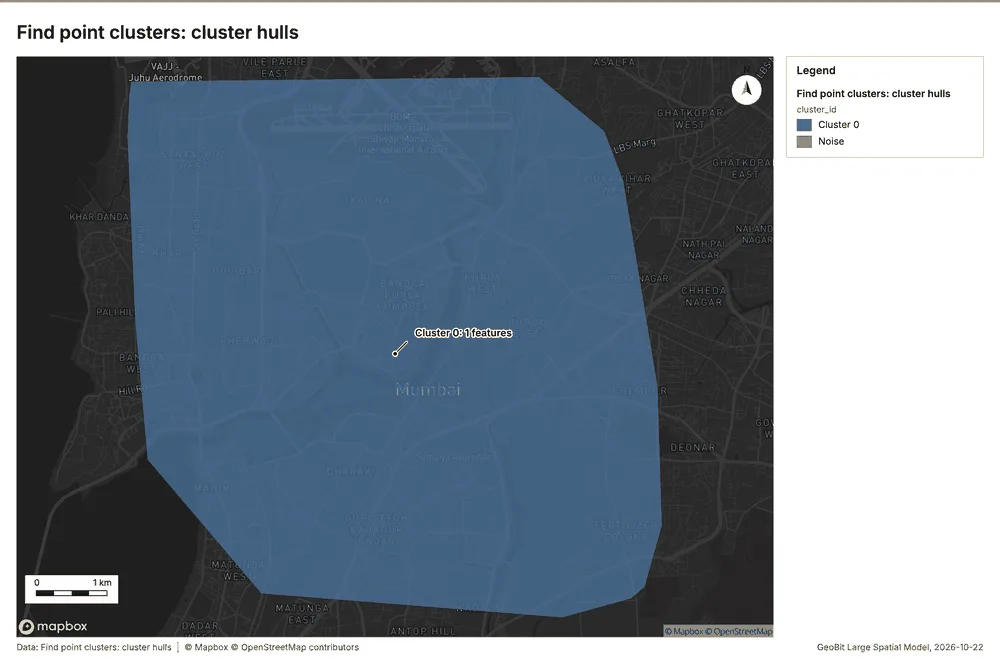
| Find point clusters: cluster hulls | layer, Polygon | 1 | 113 | ||
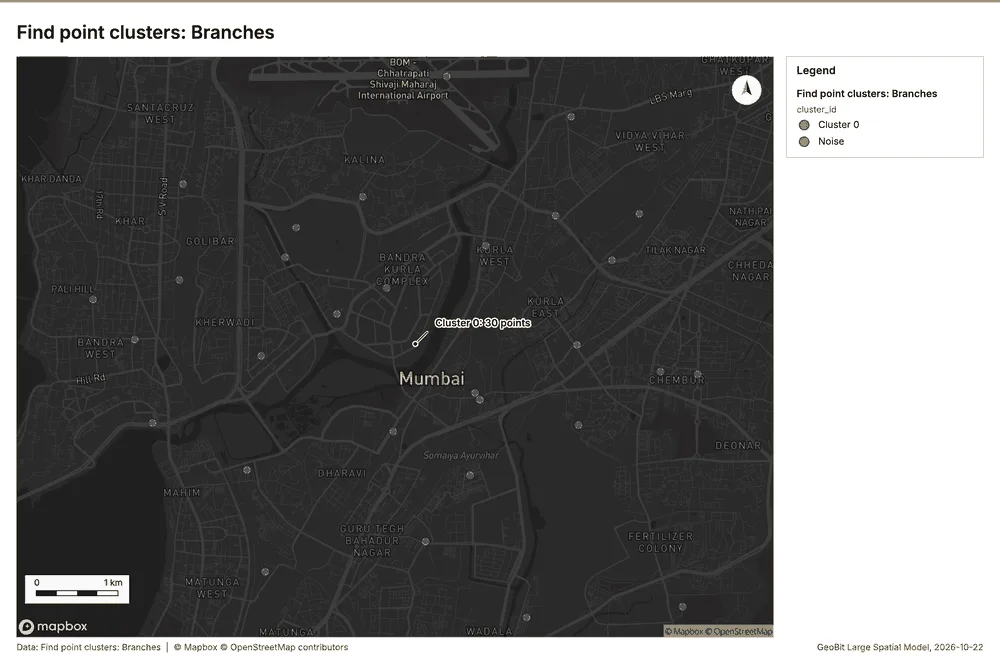
| Find point clusters: Branches | layer, Point | 30 | 114 | ||
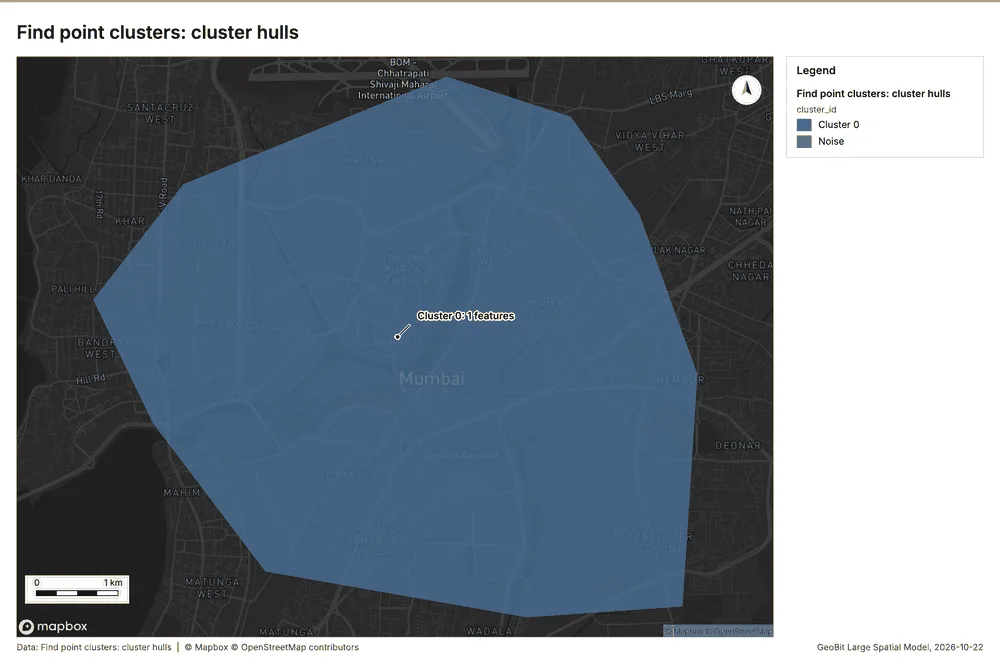
| Find point clusters: cluster hulls | layer, Polygon | 1 | 115 | ||
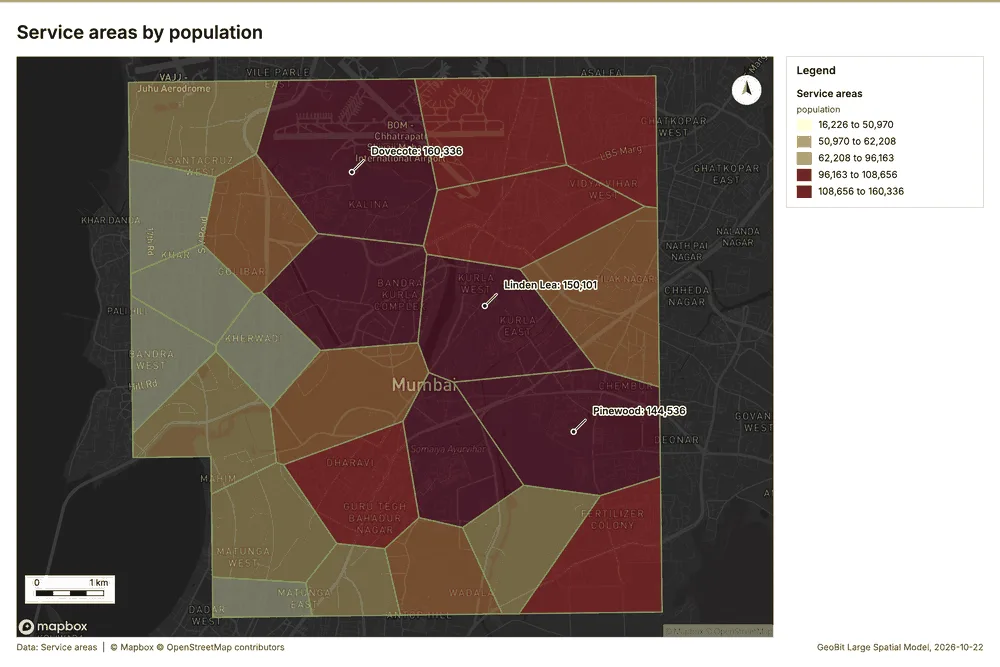
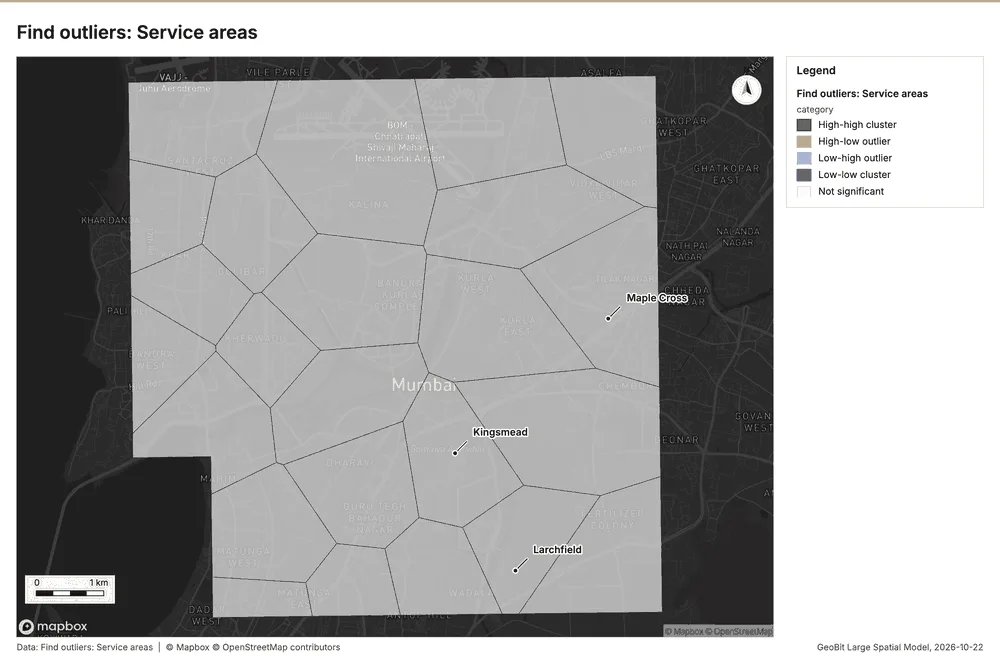
| Find outliers: Service areas | layer, Polygon | 24 | 116 | ||
| Repeat and near repeat classification: ATM faults | layer, Point | 650 | 117 |
Timeline
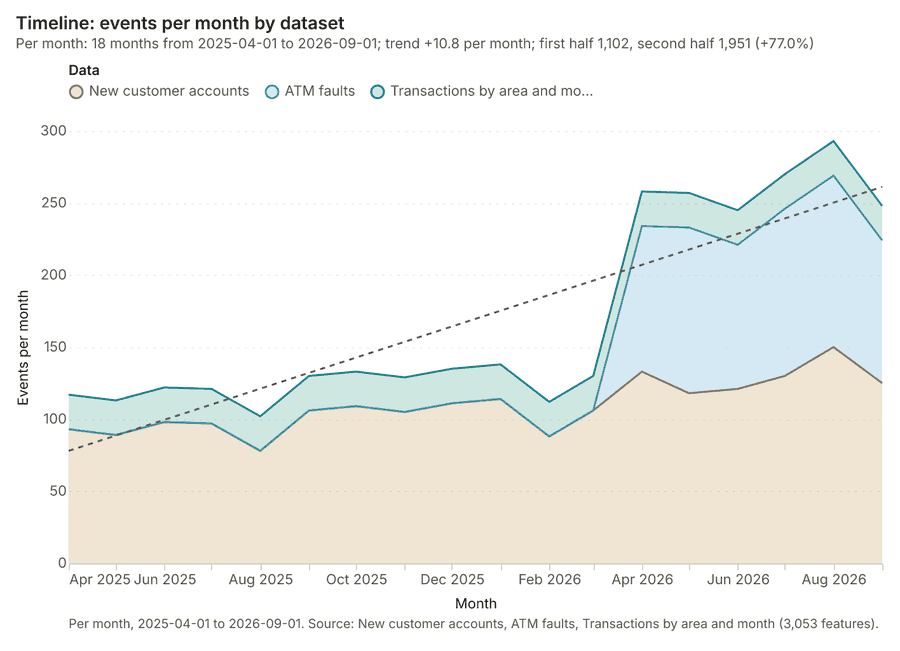
The timeline counts 3,053 dated events in New customer accounts, ATM faults, Transactions by area and month per month, from April 2025 to September 2026 1234. By dataset: New customer accounts 1,971; ATM faults 650; Transactions by area and month 432 1. The trend is +10.8 events per month; the second half of the months has 1,951 against 1,102 in the first (+77.0%) 1.
Busiest months
Quietest months
Space time hot spots
What this analysis is. Emerging hot spots: Where hot spots are new, consecutive, intensifying, persistent, diminishing, sporadic, oscillating or historical over time 5. In ArcGIS it is Emerging Hot Spot Analysis or Create Space Time Cube 5.
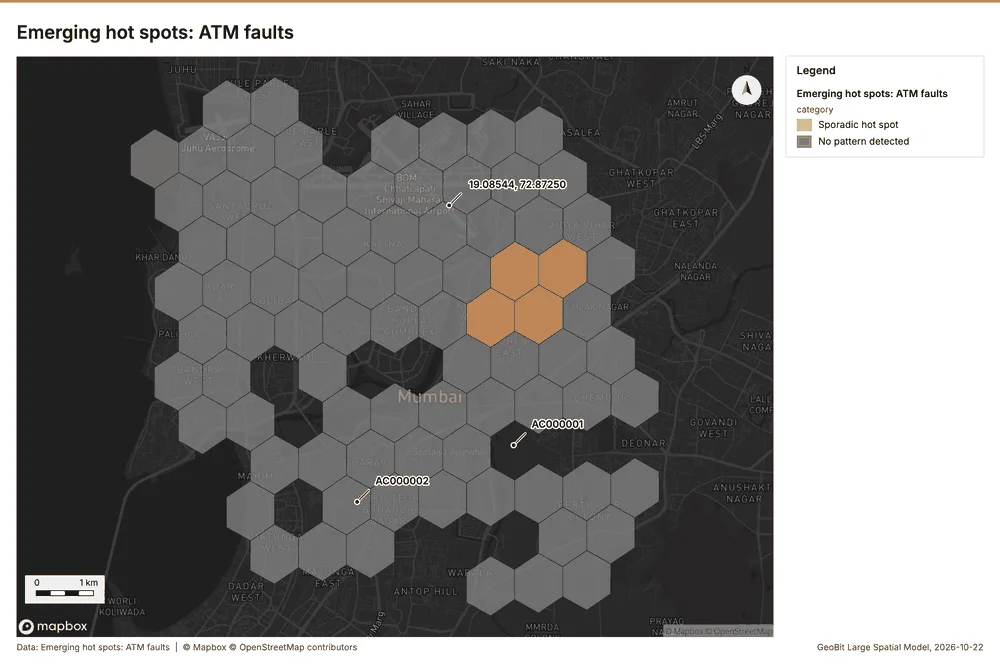
Why it was run on this data. ATM faults carry dates in 'reported_at': emerging hot spot analysis finds new, intensifying and fading hot spots per week 6.
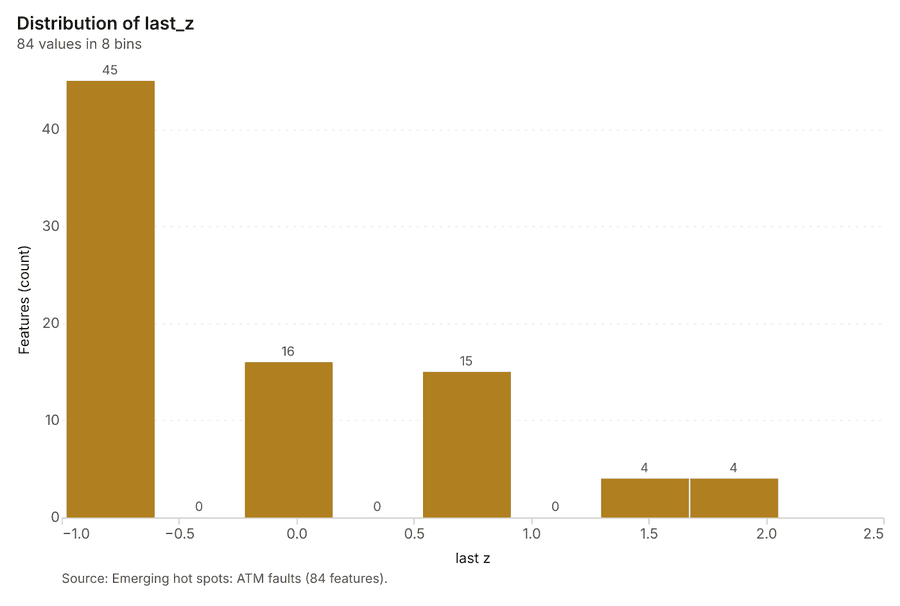
What it found. The process saved a layer named Emerging hot spots: ATM faults, which contained 84 features 7. Using ATM faults as input 8, the operation completed with an elapsed time of 24 milliseconds 7. The analysis utilized 650 features and generated a count of 84 results 7.
| Result | Value |
|---|---|
| result, count | 84 |
| result, elapsed ms | 24 |
| result, resolution | 8 |
| result, features used | 650 |
| result, time neighbors | 0 |
| billing, cost | 0.1325 |
| billing, list price | 0.1325 |
| billing, upstream cost | 0 |
Findings
- Evidenced: Space time hot spots on ATM faults: Emerging hot spots: 1 layer saved: Emerging hot spots: ATM faults (84 features) 78.
- Evidenced: It reported result, count 84; result, elapsed ms 24; result, resolution 8; result, features used 650; result, time neighbors 0; billing, cost 0.1325 7.
Tool gp_space_time_hot_spots; parameters {"project": "36cc8b7b-aabc-4b71-981b-a2c53e8f31ad", "features": {"layer": "ATM faults (2bdf3635)"}, "interval": "week", "bin_shape": "h3", "resolution": 8, "time_field": "reported_at"}
Space time hot spots
What this analysis is. Emerging hot spots: Where hot spots are new, consecutive, intensifying, persistent, diminishing, sporadic, oscillating or historical over time 5. In ArcGIS it is Emerging Hot Spot Analysis or Create Space Time Cube 5.
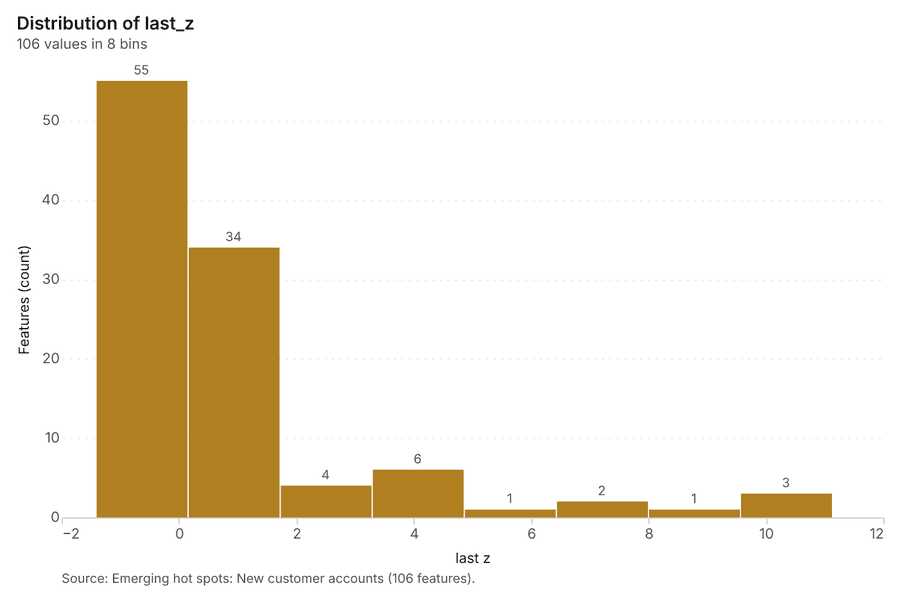
Why it was run on this data. New customer accounts carry dates in 'opened_on': emerging hot spot analysis finds new, intensifying and fading hot spots per month 9.
What it found. Space time hot spots on New customer accounts: Emerging hot spots: 1 layer saved: Emerging hot spots: New customer accounts (106 features) 1011. It reported result, count 106; result, elapsed ms 21; result, resolution 8; result, features used 1,971; result, time neighbors 0; billing, cost 0.1986 10.
| Result | Value |
|---|---|
| result, count | 106 |
| result, elapsed ms | 21 |
| result, resolution | 8 |
| result, features used | 1,971 |
| result, time neighbors | 0 |
| billing, cost | 0.1986 |
| billing, list price | 0.1986 |
| billing, upstream cost | 0 |
Findings
- Evidenced: Space time hot spots on New customer accounts: Emerging hot spots: 1 layer saved: Emerging hot spots: New customer accounts (106 features) 1011.
- Evidenced: It reported result, count 106; result, elapsed ms 21; result, resolution 8; result, features used 1,971; result, time neighbors 0; billing, cost 0.1986 10.
Tool gp_space_time_hot_spots; parameters {"project": "36cc8b7b-aabc-4b71-981b-a2c53e8f31ad", "features": {"layer": "New customer accounts (e03b0fae)"}, "interval": "month", "bin_shape": "h3", "resolution": 8, "time_field": "opened_on"}
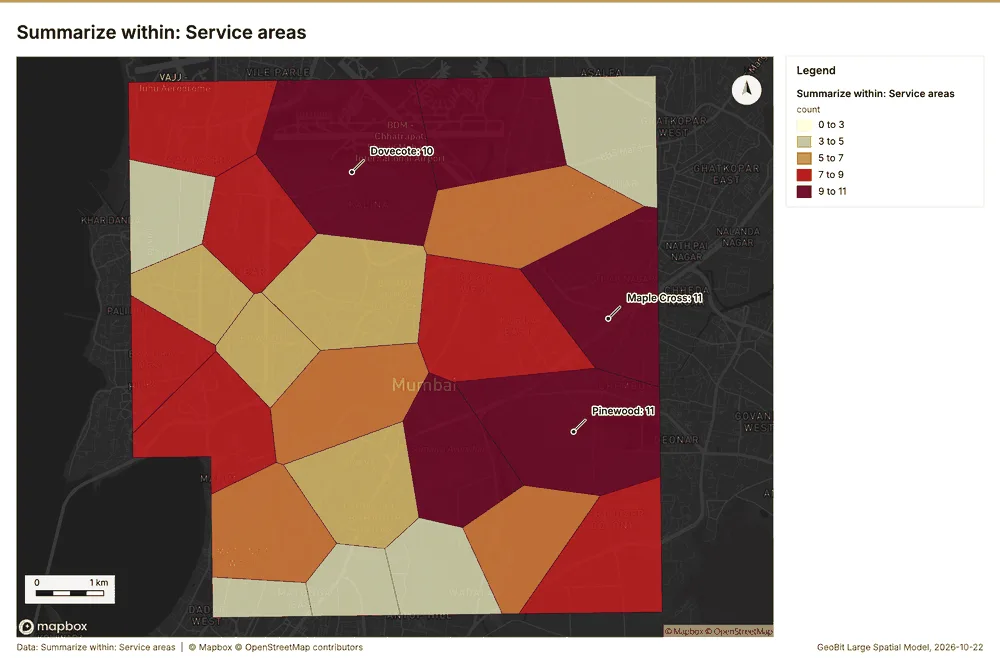
Summarize within
What this analysis is. Summarize within: Count and aggregate the features inside each polygon (or bin), proportionally for lines and polygons 12. In ArcGIS it is Summarize Within or Aggregate Points; in QGIS, native:countpointsinpolygon or native:sumlinelengths 12.
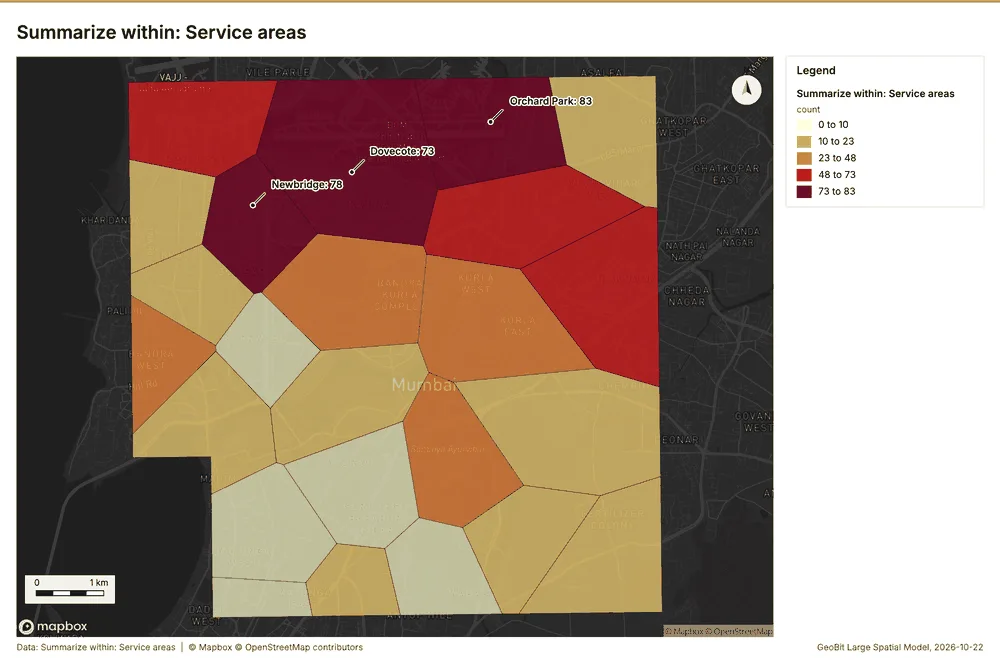
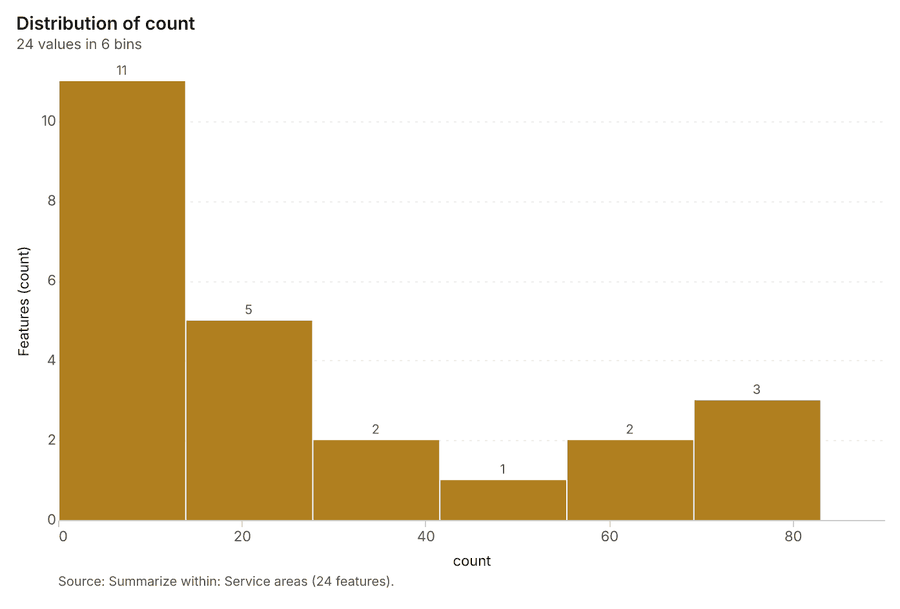
Why it was run on this data. Count ATM faults inside each feature of Service areas by fault; the counts map as a choropleth (natural breaks, sequential colors) 13.
What it found. The process of summarizing ATM faults using the Service areas feature set retrieved 24 features 14. This execution involved analyzing the Service areas 15 and clocked an elapsed time of 4 ms 14. The analysis reported a billing cost and list price of 0.0235, noting an upstream cost of 0 14.
| Result | Value |
|---|---|
| result, count | 24 |
| result, elapsed ms | 4 |
| billing, cost | 0.0235 |
| billing, list price | 0.0235 |
| billing, upstream cost | 0 |
Findings
- Evidenced: Summarize within on ATM faults, Service areas: Summarize within: 1 layer saved: Summarize within: Service areas (24 features) 81415.
- Evidenced: It reported result, count 24; result, elapsed ms 4; billing, cost 0.0235; billing, list price 0.0235; billing, upstream cost 0 14.
Tool gp_summarize_within; parameters {"stats": [{"stat": "sum", "field": "downtime_h"}], "project": "36cc8b7b-aabc-4b71-981b-a2c53e8f31ad", "features": {"layer": "ATM faults (2bdf3635)"}, "group_by": "fault", "polygons": {"layer": "Service areas (6344158f)"}}
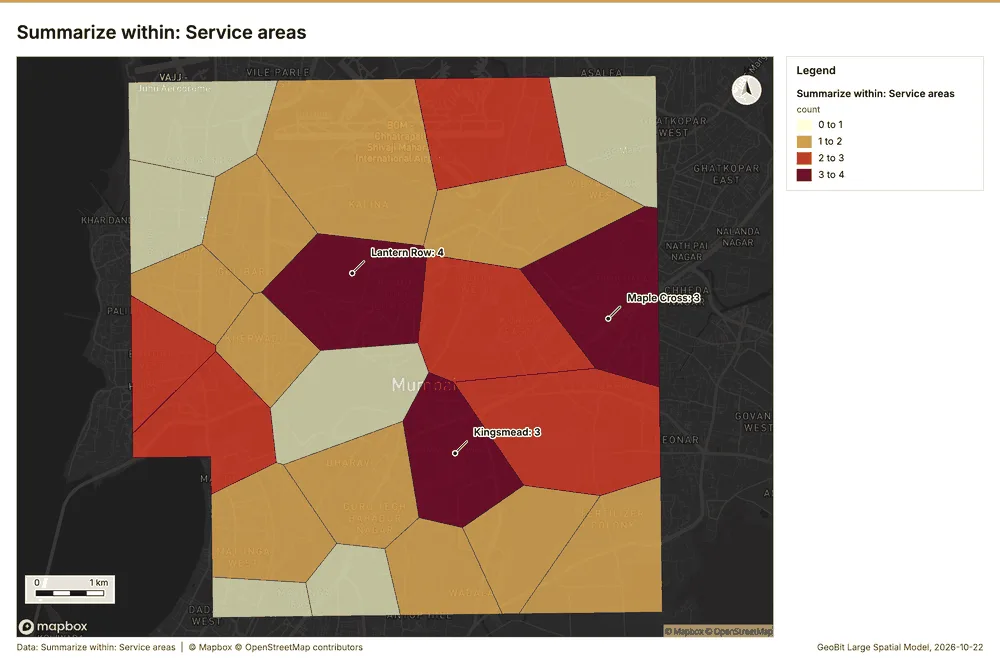
Summarize within
What this analysis is. Summarize within: Count and aggregate the features inside each polygon (or bin), proportionally for lines and polygons 12. In ArcGIS it is Summarize Within or Aggregate Points; in QGIS, native:countpointsinpolygon or native:sumlinelengths 12.
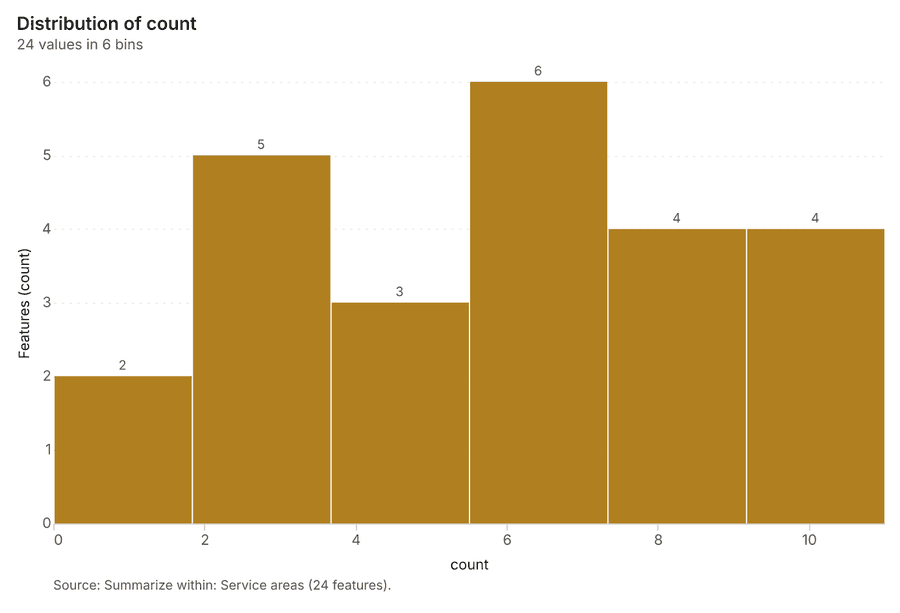
Why it was run on this data. Count ATM faults inside each feature of Service areas by fault; the counts map as a choropleth (natural breaks, sequential colors) 13.
What it found. The gp_summarize_within tool was executed to process Service areas 15 using ATMs 17 as input 16. This process resulted in a count of 24 for the service areas 16. Costs associated with this operation included a billing cost and list price of 0.0133 16. The upstream cost for the billing was zero 16.
| Result | Value |
|---|---|
| result, count | 24 |
| result, elapsed ms | 1 |
| billing, cost | 0.0133 |
| billing, list price | 0.0133 |
| billing, upstream cost | 0 |
Findings
- Evidenced: Summarize within on ATMs, Service areas: Summarize within: 1 layer saved: Summarize within: Service areas (24 features) 151617.
- Evidenced: It reported result, count 24; result, elapsed ms 1; billing, cost 0.0133; billing, list price 0.0133; billing, upstream cost 0 16.
Tool gp_summarize_within; parameters {"stats": [{"stat": "sum", "field": "uptime_pct"}], "project": "36cc8b7b-aabc-4b71-981b-a2c53e8f31ad", "features": {"layer": "ATMs (f9f05311)"}, "group_by": "location_type", "polygons": {"layer": "Service areas (6344158f)"}}
Summarize within
What this analysis is. Summarize within: Count and aggregate the features inside each polygon (or bin), proportionally for lines and polygons 12. In ArcGIS it is Summarize Within or Aggregate Points; in QGIS, native:countpointsinpolygon or native:sumlinelengths 12.
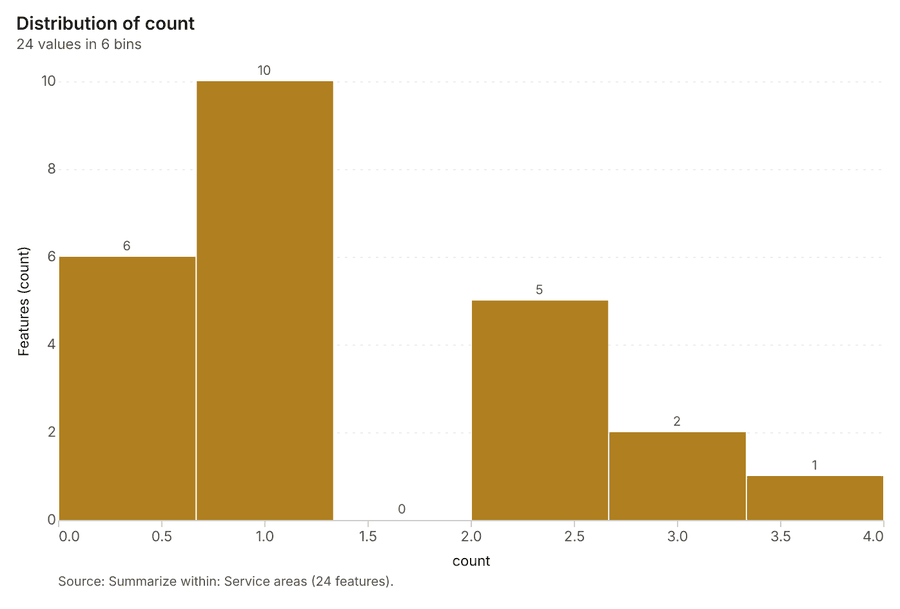
Why it was run on this data. Count ATM faults inside each feature of Service areas by fault; the counts map as a choropleth (natural breaks, sequential colors) 13.
What it found. Summarize within on Branches, Service areas: Summarize within: 1 layer saved: Summarize within: Service areas (24 features) 151819. It reported result, count 24; result, elapsed ms 1; billing, cost 0.0111; billing, list price 0.0111; billing, upstream cost 0 18.
| Result | Value |
|---|---|
| result, count | 24 |
| result, elapsed ms | 1 |
| billing, cost | 0.0111 |
| billing, list price | 0.0111 |
| billing, upstream cost | 0 |
Findings
- Evidenced: Summarize within on Branches, Service areas: Summarize within: 1 layer saved: Summarize within: Service areas (24 features) 151819.
- Evidenced: It reported result, count 24; result, elapsed ms 1; billing, cost 0.0111; billing, list price 0.0111; billing, upstream cost 0 18.
Tool gp_summarize_within; parameters {"stats": [{"stat": "sum", "field": "staff"}], "project": "36cc8b7b-aabc-4b71-981b-a2c53e8f31ad", "features": {"layer": "Branches (8f400be9)"}, "group_by": "type", "polygons": {"layer": "Service areas (6344158f)"}}
Hot spots
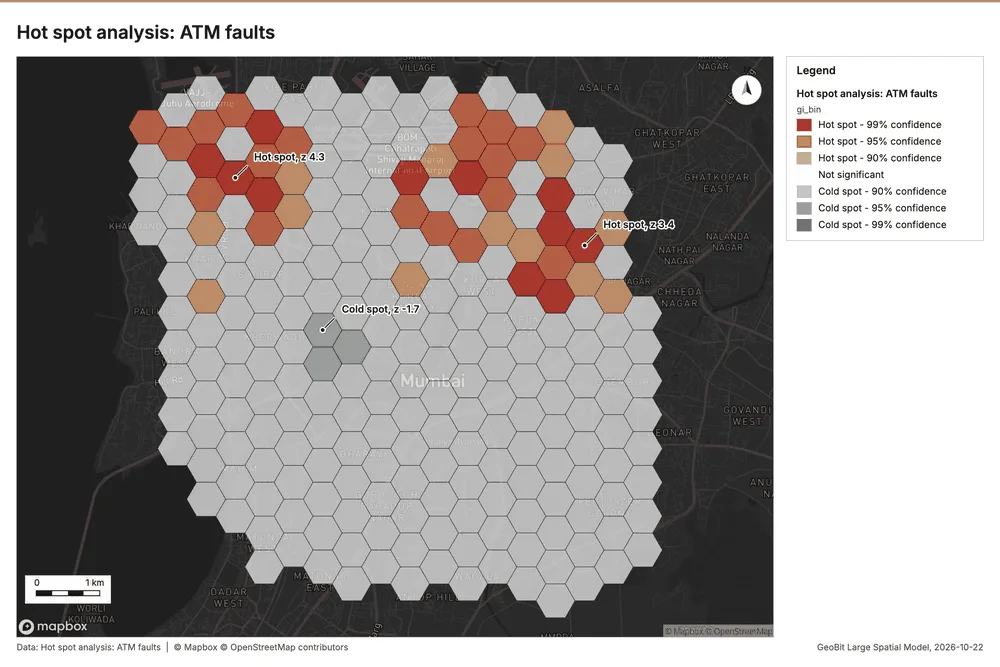
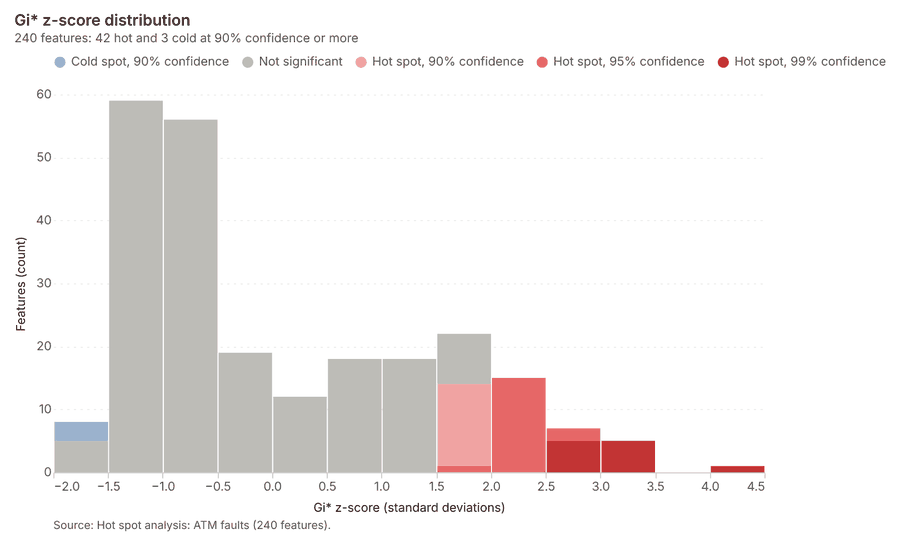
What this analysis is. Hot spot analysis: Getis-Ord Gi* hot and cold spots with z-scores, p-values and confidence bins 20. In ArcGIS it is Find Hot Spots or Hot Spot Analysis (Getis-Ord Gi*); in QGIS, qgis:hotspot (plugin) 20.
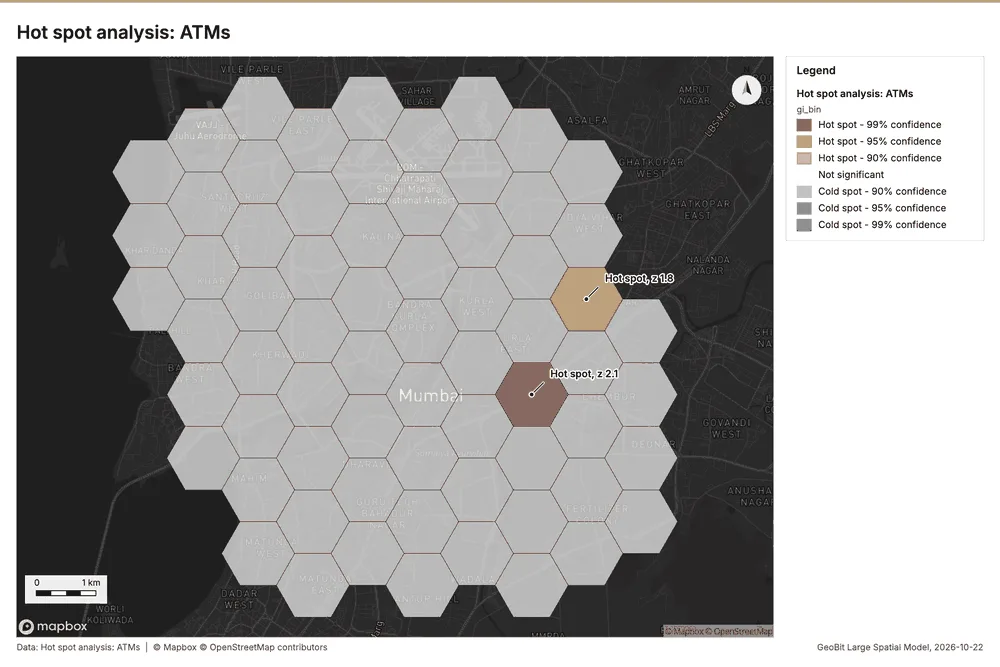
Why it was run on this data. 650 points: Getis-Ord Gi* tests whether the concentrations in ATM faults are statistically significant 21.
What it found. Hot spots on ATM faults: Hot spot analysis: 1 layer saved: Hot spot analysis: ATM faults (240 features) 822. It reported result, bins 240; result, count 240; result, elapsed ms 19; result, cell size m 500; result, incidents used 650; result, distance band m 1,000 22.
| Result | Value |
|---|---|
| result, bins | 240 |
| result, count | 240 |
| result, elapsed ms | 19 |
| result, cell size m | 500 |
| result, incidents used | 650 |
| result, distance band m | 1,000 |
| billing, cost | 0.063 |
| billing, list price | 0.063 |
| billing, upstream cost | 0 |
Findings
- Evidenced: Hot spots on ATM faults: Hot spot analysis: 1 layer saved: Hot spot analysis: ATM faults (240 features) 822.
- Evidenced: It reported result, bins 240; result, count 240; result, elapsed ms 19; result, cell size m 500; result, incidents used 650; result, distance band m 1,000 22.
Tool gp_hot_spots; parameters {"project": "36cc8b7b-aabc-4b71-981b-a2c53e8f31ad", "features": {"layer": "ATM faults (2bdf3635)"}, "aggregation": "hexagon", "cell_size_m": 500.0, "distance_band_m": 1000.0}
Hot spots
What this analysis is. Hot spot analysis: Getis-Ord Gi* hot and cold spots with z-scores, p-values and confidence bins 20. In ArcGIS it is Find Hot Spots or Hot Spot Analysis (Getis-Ord Gi*); in QGIS, qgis:hotspot (plugin) 20.
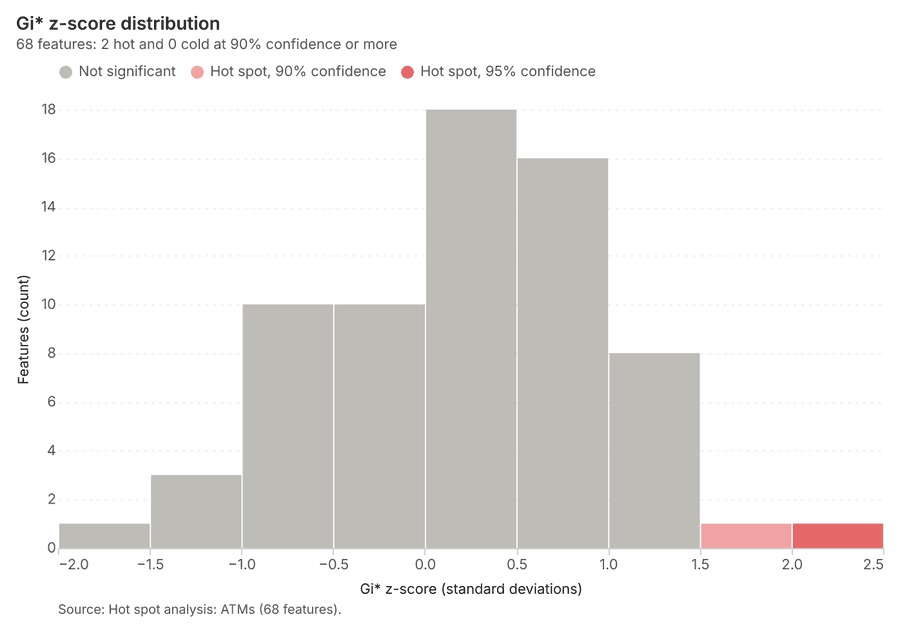
Why it was run on this data. 140 points: Getis-Ord Gi* tests whether the concentrations in ATMs are statistically significant 23.
What it found. The hot spot analysis tool processed the ATMs layer to generate one layer containing 68 features 24.
| Result | Value |
|---|---|
| result, bins | 68 |
| result, count | 68 |
| result, elapsed ms | 5 |
| result, cell size m | 1,000 |
| result, incidents used | 140 |
| result, distance band m | 2,000 |
| billing, cost | 0.0528 |
| billing, list price | 0.0528 |
| billing, upstream cost | 0 |
Findings
- Evidenced: Hot spots on ATMs: Hot spot analysis: 1 layer saved: Hot spot analysis: ATMs (68 features) 1724.
- Evidenced: It reported result, bins 68; result, count 68; result, elapsed ms 5; result, cell size m 1,000; result, incidents used 140; result, distance band m 2,000 24.
Tool gp_hot_spots; parameters {"project": "36cc8b7b-aabc-4b71-981b-a2c53e8f31ad", "features": {"layer": "ATMs (f9f05311)"}, "aggregation": "hexagon", "cell_size_m": 1000.0, "distance_band_m": 2000.0}
Hot spots
What this analysis is. Hot spot analysis: Getis-Ord Gi* hot and cold spots with z-scores, p-values and confidence bins 20. In ArcGIS it is Find Hot Spots or Hot Spot Analysis (Getis-Ord Gi*); in QGIS, qgis:hotspot (plugin) 20.
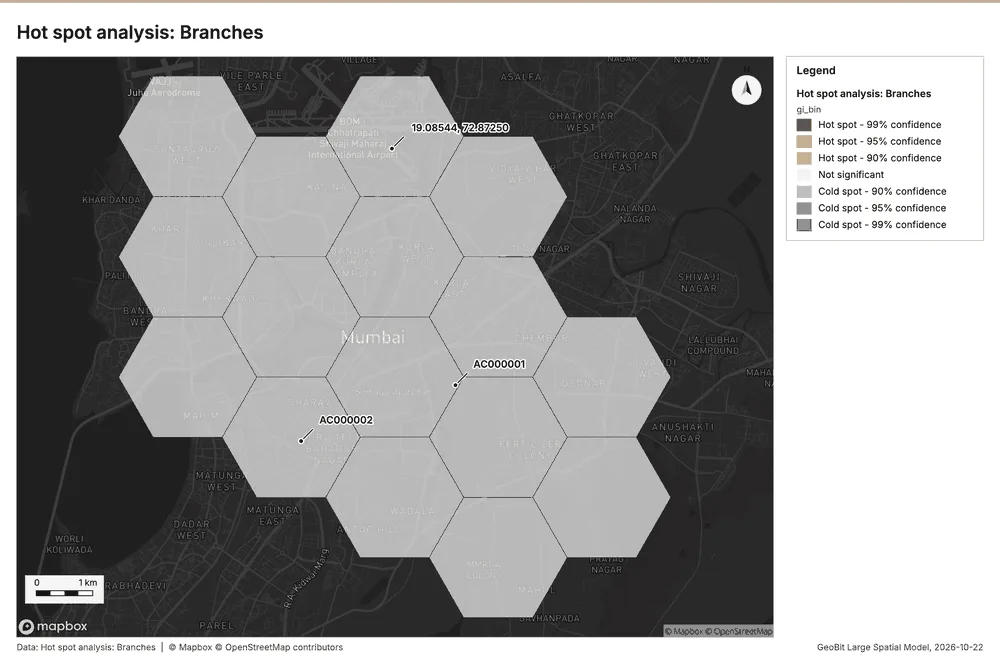
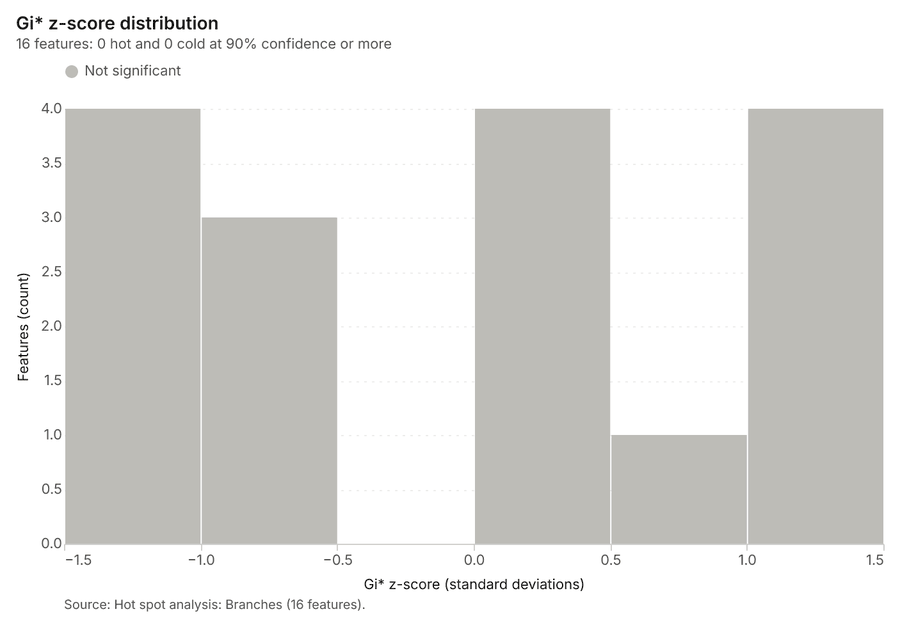
Why it was run on this data. 30 points: Getis-Ord Gi* tests whether the concentrations in Branches are statistically significant 25.
What it found. The hot spot analysis processed the Branches layer 19, saving one layer containing 16 features 26. The analysis utilized 30 incidents and generated 16 bins 26.
| Result | Value |
|---|---|
| result, bins | 16 |
| result, count | 16 |
| result, elapsed ms | 2 |
| result, cell size m | 2,000 |
| result, incidents used | 30 |
| result, distance band m | 2,000 |
| billing, cost | 0.0506 |
| billing, list price | 0.0506 |
| billing, upstream cost | 0 |
Findings
- Evidenced: Hot spots on Branches: Hot spot analysis: 1 layer saved: Hot spot analysis: Branches (16 features) 1926.
- Evidenced: It reported result, bins 16; result, count 16; result, elapsed ms 2; result, cell size m 2,000; result, incidents used 30; result, distance band m 2,000 26.
Tool gp_hot_spots; parameters {"project": "36cc8b7b-aabc-4b71-981b-a2c53e8f31ad", "features": {"layer": "Branches (8f400be9)"}, "aggregation": "hexagon", "cell_size_m": 2000.0, "distance_band_m": 2000.0}
Calculate density
What this analysis is. Calculate density: Kernel density per square kilometer on a grid 27. In ArcGIS it is Calculate Density or Kernel Density; in QGIS, native:heatmapkerneldensityestimation 27.
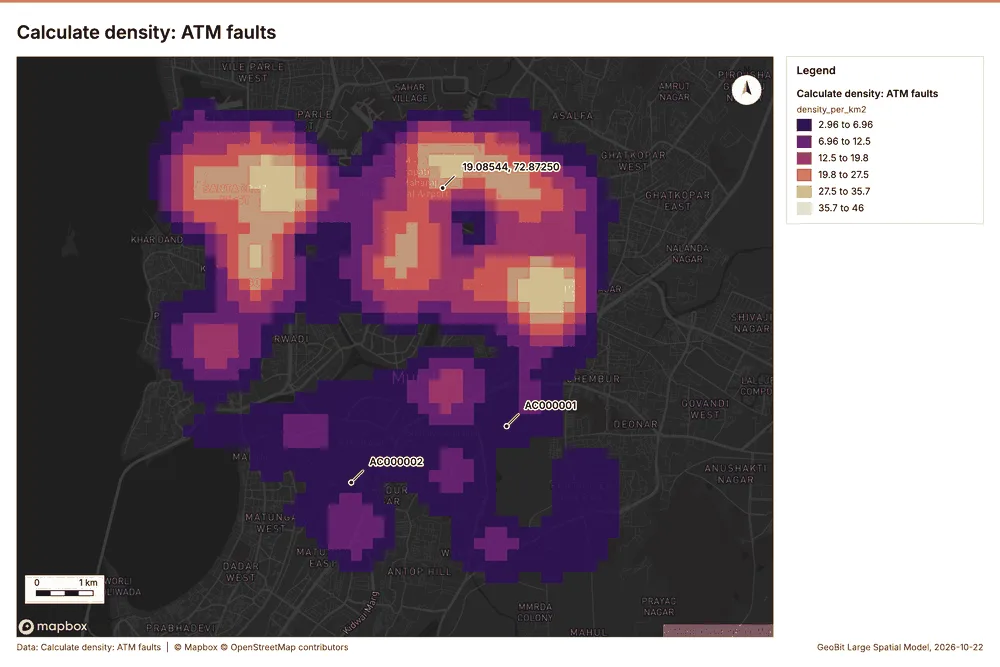
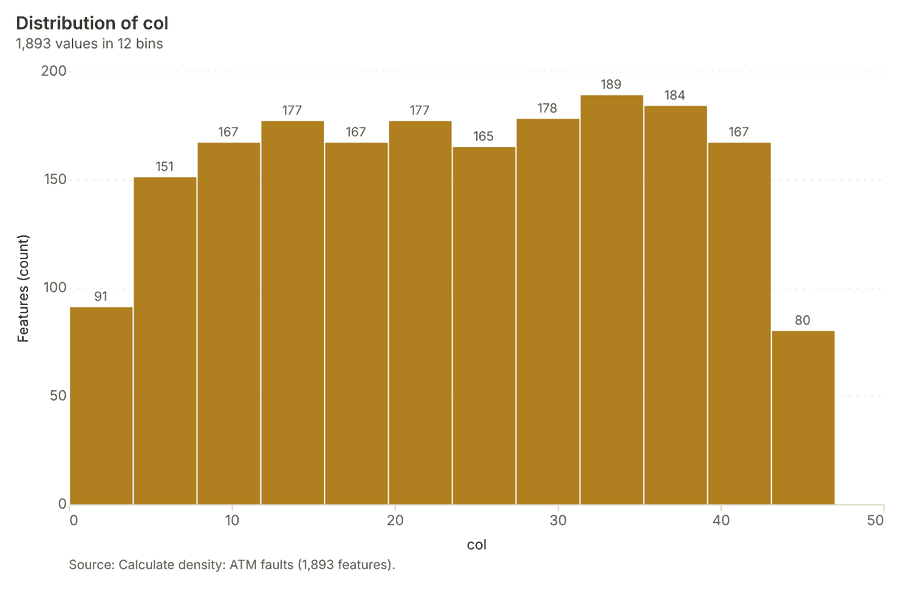
Why it was run on this data. 650 points in ATM faults: a density surface shows where they concentrate 28.
What it found. Calculate density on ATM faults: Calculate density: 1 layer saved: Calculate density: ATM faults (1893 features) 829. It reported result, count 1,893; result, elapsed ms 61; result, bandwidth m 1,000; result, cell size m 200; result, excluded null 0; result, max density per km2 45.95 29.
| Result | Value |
|---|---|
| result, count | 1,893 |
| result, elapsed ms | 61 |
| result, bandwidth m | 1,000 |
| result, cell size m | 200 |
| result, excluded null | 0 |
| result, max density per km2 | 45.95 |
| billing, cost | 0.063 |
| billing, list price | 0.063 |
| billing, upstream cost | 0 |
Findings
- Evidenced: Calculate density on ATM faults: Calculate density: 1 layer saved: Calculate density: ATM faults (1893 features) 829.
- Evidenced: It reported result, count 1,893; result, elapsed ms 61; result, bandwidth m 1,000; result, cell size m 200; result, excluded null 0; result, max density per km2 45.95 29.
Tool gp_calculate_density; parameters {"kernel": "quartic", "project": "36cc8b7b-aabc-4b71-981b-a2c53e8f31ad", "features": {"layer": "ATM faults (2bdf3635)"}, "bandwidth_m": 1000.0, "cell_size_m": 200.0}
Calculate density
What this analysis is. Calculate density: Kernel density per square kilometer on a grid 27. In ArcGIS it is Calculate Density or Kernel Density; in QGIS, native:heatmapkerneldensityestimation 27.
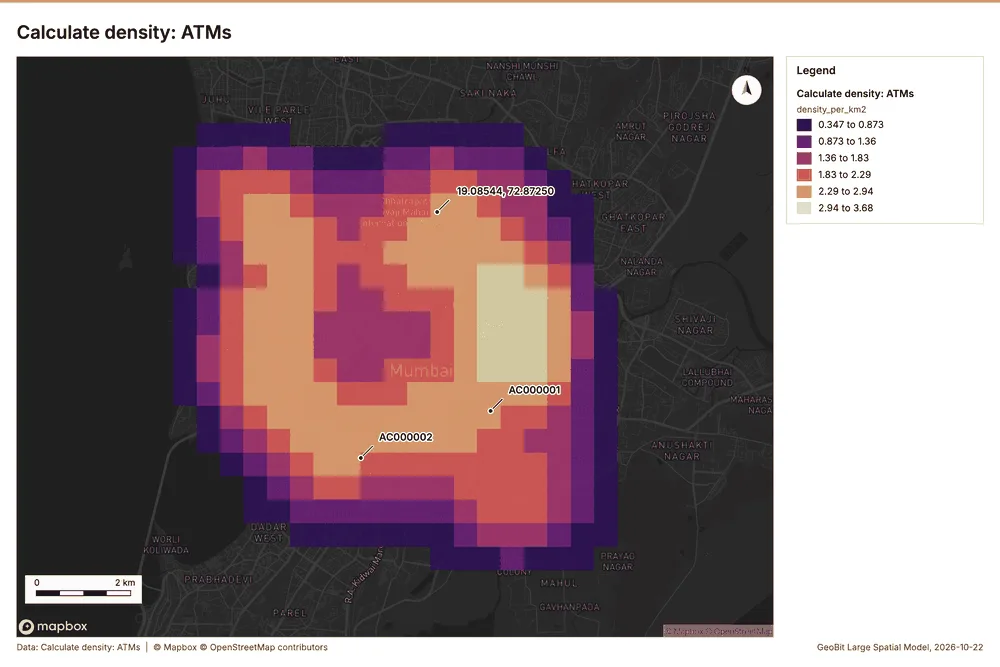
Why it was run on this data. 140 points in ATMs: a density surface shows where they concentrate 30.
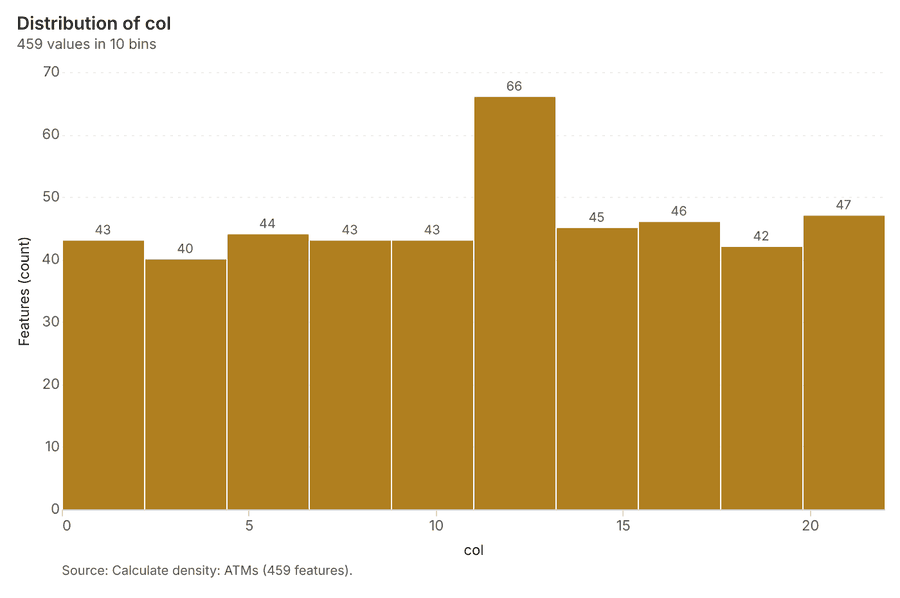
What it found. Calculate density on ATMs: Calculate density: 1 layer saved: Calculate density: ATMs (459 features) 1731. It reported result, count 459; result, elapsed ms 15; result, bandwidth m 2,000; result, cell size m 500; result, excluded null 0; result, max density per km2 3.678 31.
| Result | Value |
|---|---|
| result, count | 459 |
| result, elapsed ms | 15 |
| result, bandwidth m | 2,000 |
| result, cell size m | 500 |
| result, excluded null | 0 |
| result, max density per km2 | 3.678 |
| billing, cost | 0.0528 |
| billing, list price | 0.0528 |
| billing, upstream cost | 0 |
Findings
- Evidenced: Calculate density on ATMs: Calculate density: 1 layer saved: Calculate density: ATMs (459 features) 1731.
- Evidenced: It reported result, count 459; result, elapsed ms 15; result, bandwidth m 2,000; result, cell size m 500; result, excluded null 0; result, max density per km2 3.678 31.
Tool gp_calculate_density; parameters {"kernel": "quartic", "project": "36cc8b7b-aabc-4b71-981b-a2c53e8f31ad", "features": {"layer": "ATMs (f9f05311)"}, "bandwidth_m": 2000.0, "cell_size_m": 500.0}
Calculate density
What this analysis is. Calculate density: Kernel density per square kilometer on a grid 27. In ArcGIS it is Calculate Density or Kernel Density; in QGIS, native:heatmapkerneldensityestimation 27.
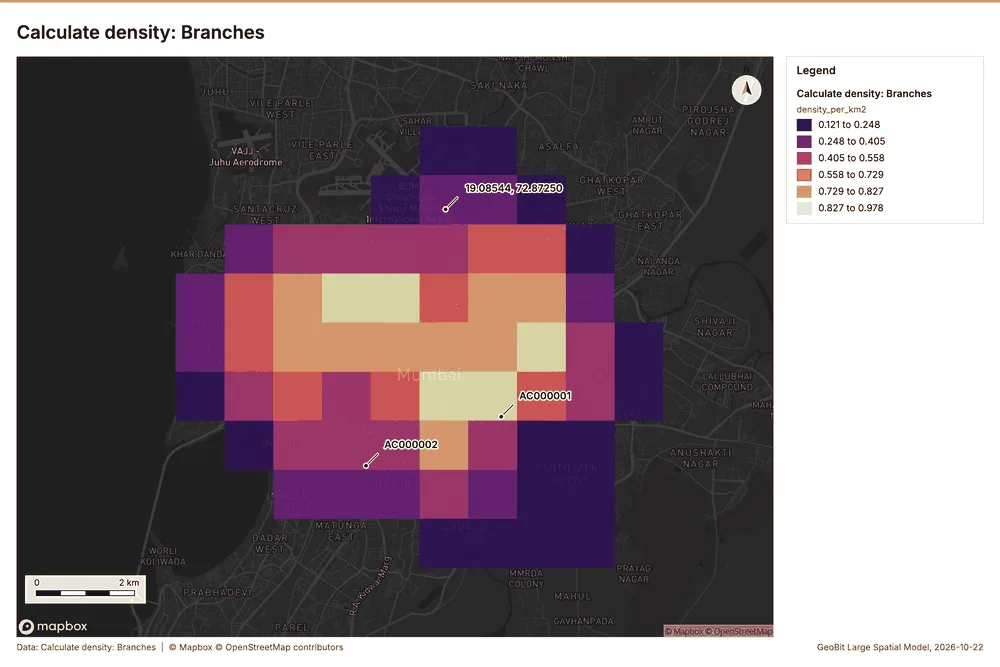
Why it was run on this data. 30 points in Branches: a density surface shows where they concentrate 32.
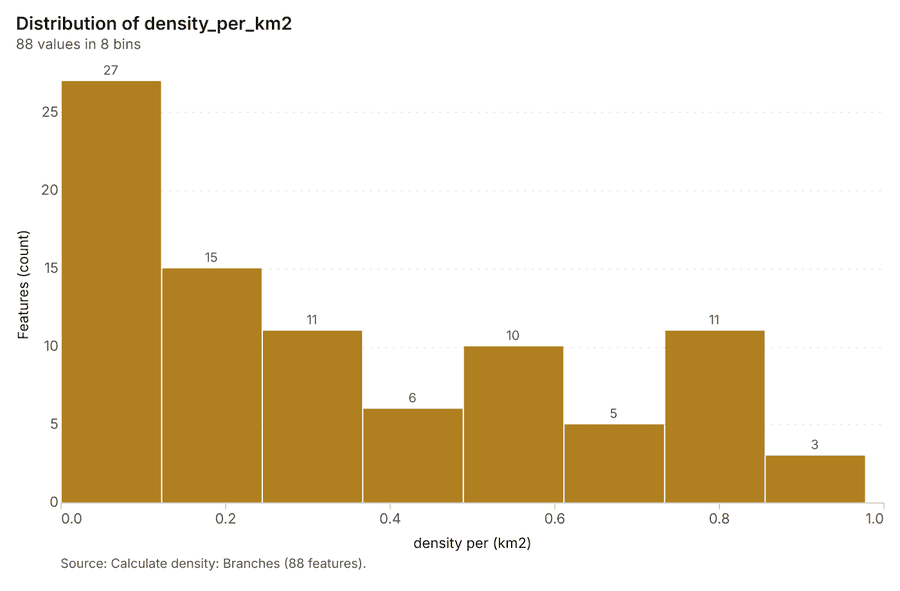
What it found. The density calculation successfully processed 88 branches 33. Parameters used in the calculation included a bandwidth of 2,000 m and a cell size of 1,000 m 33. The analysis generated a maximum density of 0.9778 per km² 33. The total billing cost associated with this calculation was 0.0506 33.
| Result | Value |
|---|---|
| result, count | 88 |
| result, elapsed ms | 3 |
| result, bandwidth m | 2,000 |
| result, cell size m | 1,000 |
| result, excluded null | 0 |
| result, max density per km2 | 0.9778 |
| billing, cost | 0.0506 |
| billing, list price | 0.0506 |
| billing, upstream cost | 0 |
Findings
- Evidenced: Calculate density on Branches: Calculate density: 1 layer saved: Calculate density: Branches (88 features) 1933.
- Evidenced: It reported result, count 88; result, elapsed ms 3; result, bandwidth m 2,000; result, cell size m 1,000; result, excluded null 0; result, max density per km2 0.9778 33.
Tool gp_calculate_density; parameters {"kernel": "quartic", "project": "36cc8b7b-aabc-4b71-981b-a2c53e8f31ad", "features": {"layer": "Branches (8f400be9)"}, "bandwidth_m": 2000.0, "cell_size_m": 1000.0}
Find point clusters
What this analysis is. Find point clusters: Density-based clusters (DBSCAN, HDBSCAN or OPTICS, optionally space-time) with hulls and noise 34. In ArcGIS it is Find Point Clusters or Density-based Clustering; in QGIS, native:dbscanclustering or native:stdbscanclustering 34.
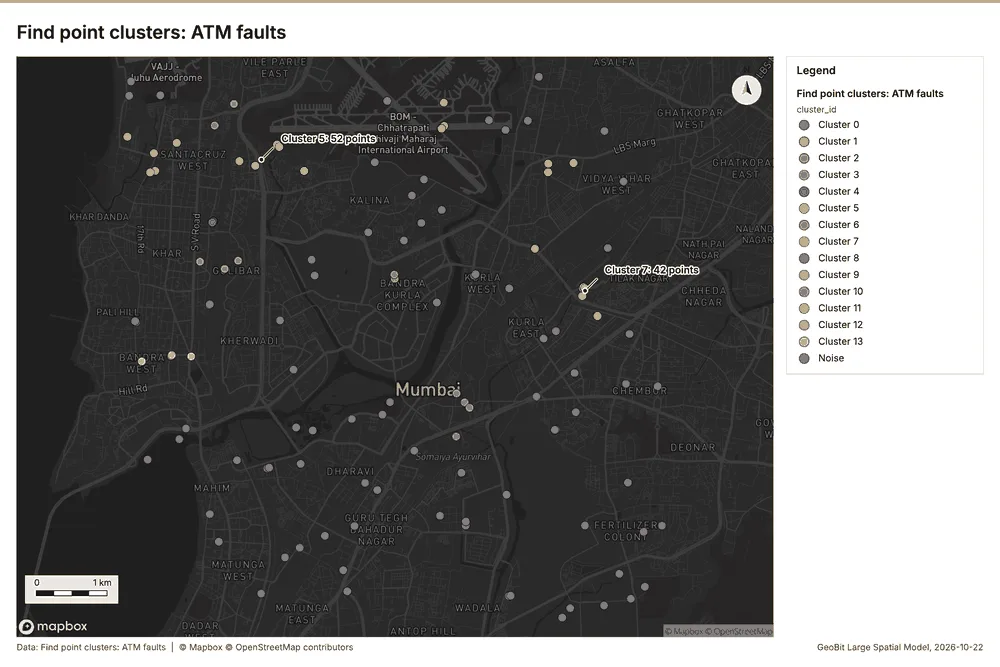
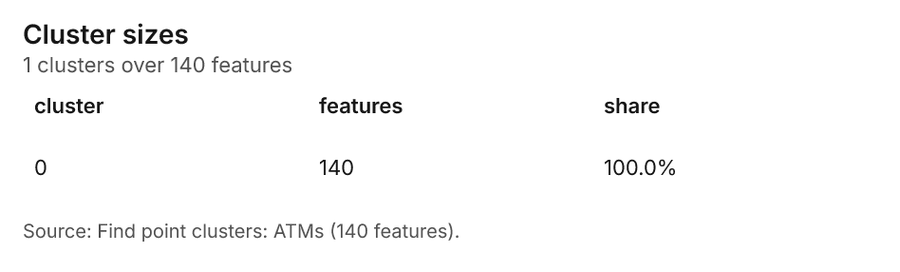
Why it was run on this data. DBSCAN finds dense groups of ATM faults and separates noise 35.
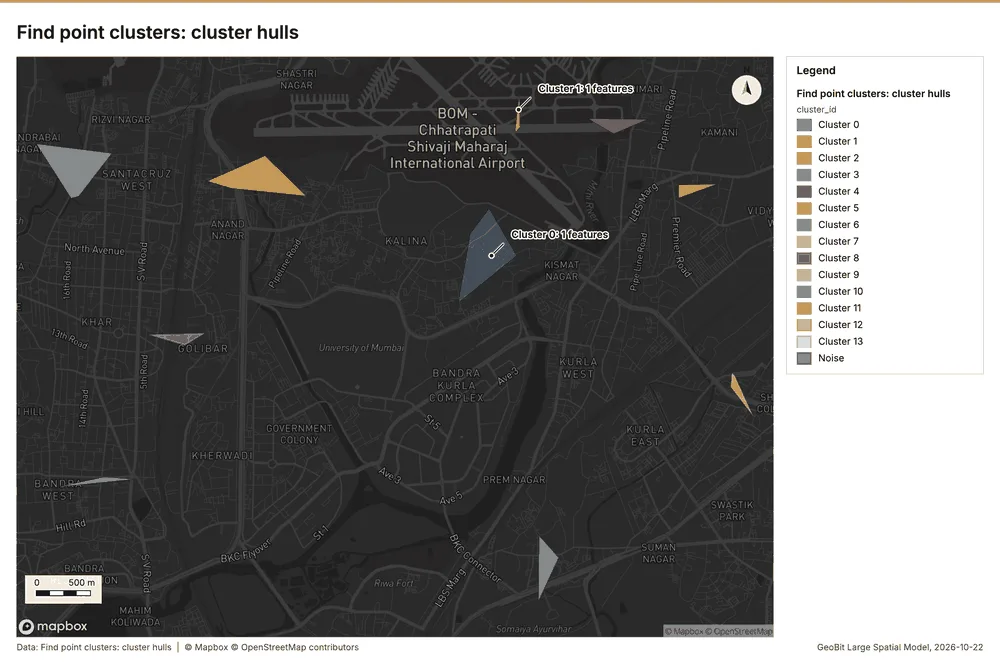
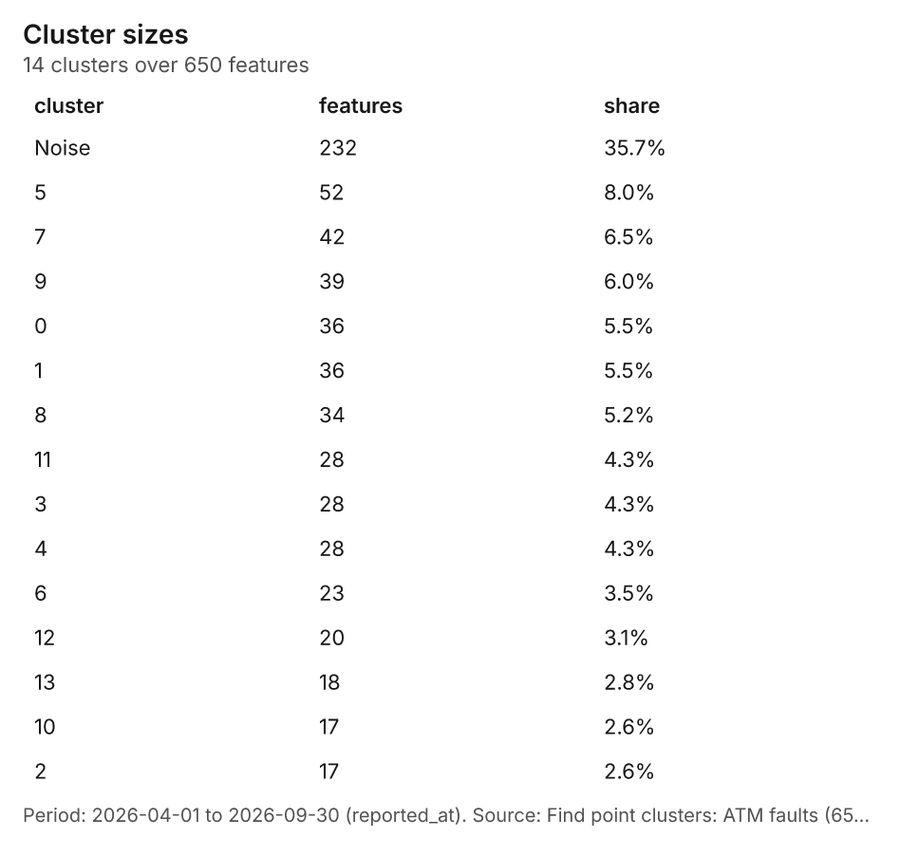
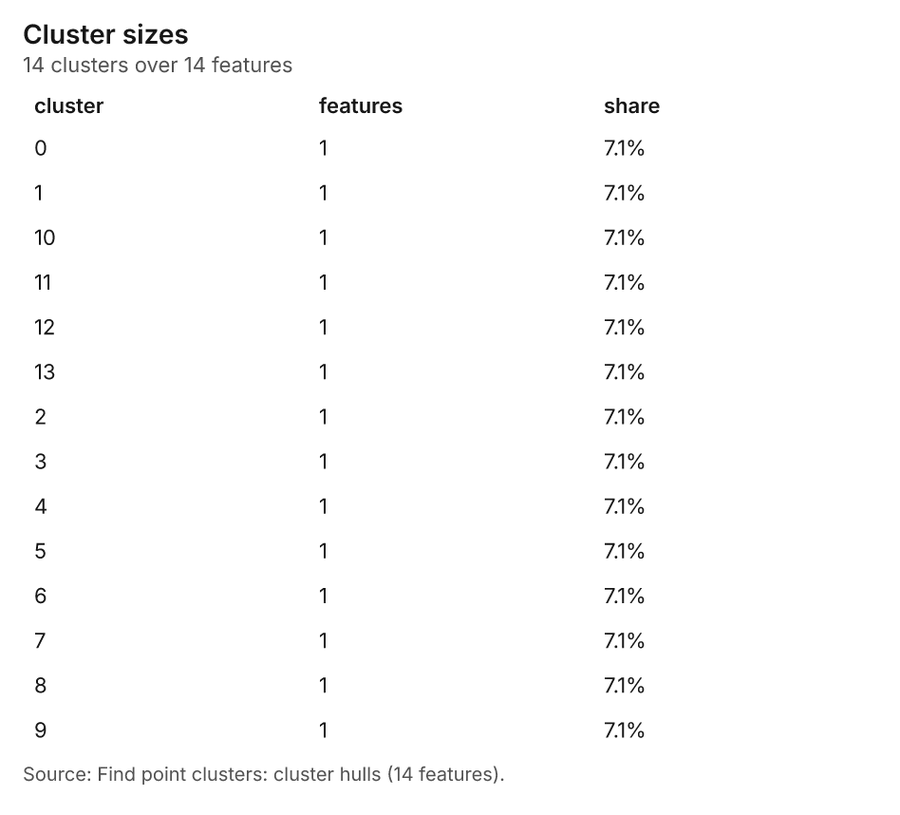
What it found. Find point clusters on ATM faults: Find point clusters: 2 layers saved: Find point clusters: ATM faults (650 features); Find point clusters: cluster hulls (14 features) 836. It reported result, count 650; result, noise 232; result, distance m 500; result, elapsed ms 14; result, min points 16; billing, cost 0.063 36.
| Result | Value |
|---|---|
| result, count | 650 |
| result, noise | 232 |
| result, distance m | 500 |
| result, elapsed ms | 14 |
| result, min points | 16 |
| billing, cost | 0.063 |
| billing, list price | 0.063 |
| billing, upstream cost | 0 |
Findings
- Evidenced: Find point clusters on ATM faults: Find point clusters: 2 layers saved: Find point clusters: ATM faults (650 features); Find point clusters: cluster hulls (14 features) 836.
- Evidenced: It reported result, count 650; result, noise 232; result, distance m 500; result, elapsed ms 14; result, min points 16; billing, cost 0.063 36.
Tool gp_find_point_clusters; parameters {"method": "dbscan", "project": "36cc8b7b-aabc-4b71-981b-a2c53e8f31ad", "features": {"layer": "ATM faults (2bdf3635)"}, "distance_m": 500.0, "min_points": 16}
Find point clusters
What this analysis is. Find point clusters: Density-based clusters (DBSCAN, HDBSCAN or OPTICS, optionally space-time) with hulls and noise 34. In ArcGIS it is Find Point Clusters or Density-based Clustering; in QGIS, native:dbscanclustering or native:stdbscanclustering 34.
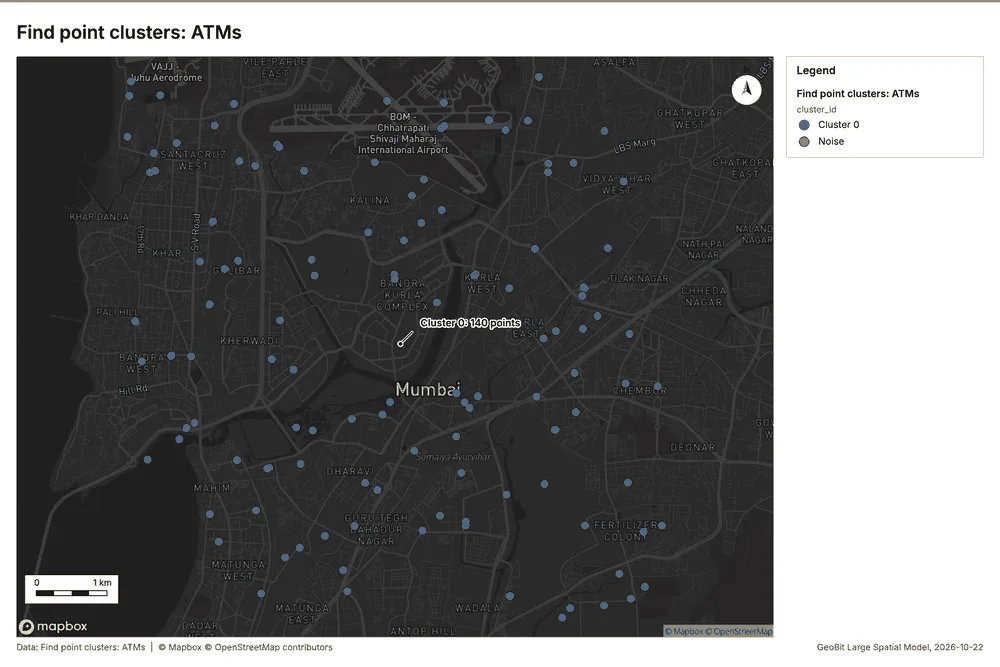
Why it was run on this data. DBSCAN finds dense groups of ATMs and separates noise 37.
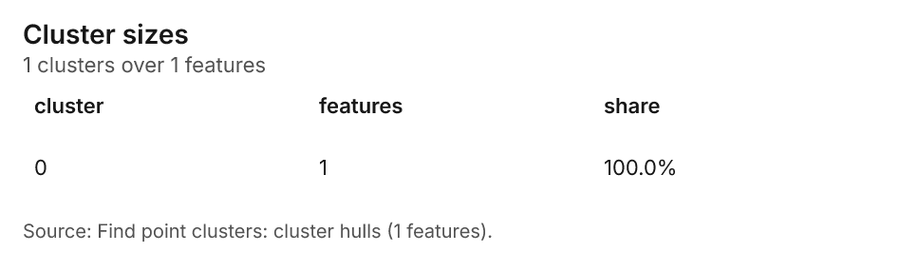
What it found. Find point clusters on ATMs: Find point clusters: 2 layers saved: Find point clusters: ATMs (140 features); Find point clusters: cluster hulls (1 feature) 1738. It reported result, count 140; result, noise 0; result, distance m 1,000; result, elapsed ms 3; result, min points 4; billing, cost 0.0528 38.
| Result | Value |
|---|---|
| result, count | 140 |
| result, noise | 0 |
| result, distance m | 1,000 |
| result, elapsed ms | 3 |
| result, min points | 4 |
| billing, cost | 0.0528 |
| billing, list price | 0.0528 |
| billing, upstream cost | 0 |
Findings
- Evidenced: Find point clusters on ATMs: Find point clusters: 2 layers saved: Find point clusters: ATMs (140 features); Find point clusters: cluster hulls (1 feature) 1738.
- Evidenced: It reported result, count 140; result, noise 0; result, distance m 1,000; result, elapsed ms 3; result, min points 4; billing, cost 0.0528 38.
Tool gp_find_point_clusters; parameters {"method": "dbscan", "project": "36cc8b7b-aabc-4b71-981b-a2c53e8f31ad", "features": {"layer": "ATMs (f9f05311)"}, "distance_m": 1000.0, "min_points": 4}
Find point clusters
What this analysis is. Find point clusters: Density-based clusters (DBSCAN, HDBSCAN or OPTICS, optionally space-time) with hulls and noise 34. In ArcGIS it is Find Point Clusters or Density-based Clustering; in QGIS, native:dbscanclustering or native:stdbscanclustering 34.
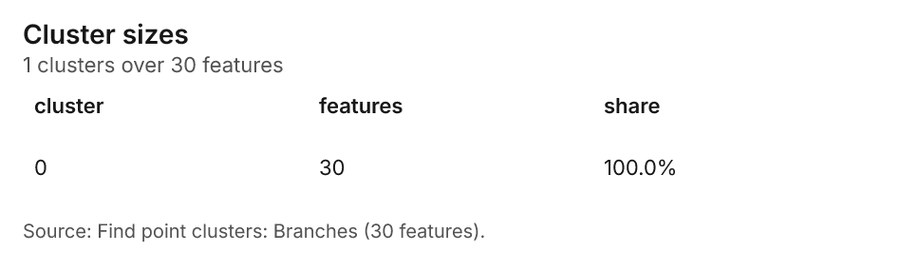
Why it was run on this data. DBSCAN finds dense groups of Branches and separates noise 39.
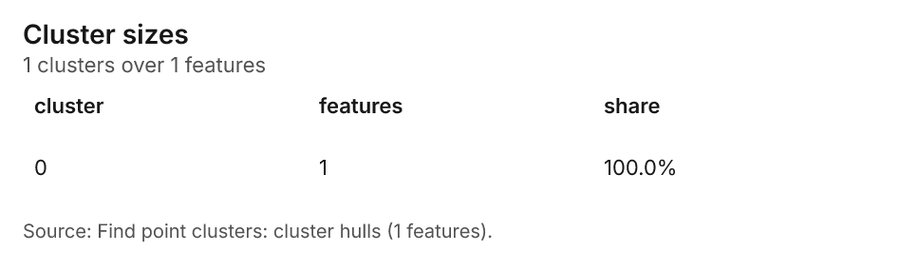
What it found. Find point clusters on Branches: Find point clusters: 2 layers saved: Find point clusters: Branches (30 features); Find point clusters: cluster hulls (1 feature) 1940. It reported result, count 30; result, noise 0; result, distance m 2,000; result, elapsed ms 2; result, min points 3; billing, cost 0.0506 40.
| Result | Value |
|---|---|
| result, count | 30 |
| result, noise | 0 |
| result, distance m | 2,000 |
| result, elapsed ms | 2 |
| result, min points | 3 |
| billing, cost | 0.0506 |
| billing, list price | 0.0506 |
| billing, upstream cost | 0 |
Findings
- Evidenced: Find point clusters on Branches: Find point clusters: 2 layers saved: Find point clusters: Branches (30 features); Find point clusters: cluster hulls (1 feature) 1940.
- Evidenced: It reported result, count 30; result, noise 0; result, distance m 2,000; result, elapsed ms 2; result, min points 3; billing, cost 0.0506 40.
Tool gp_find_point_clusters; parameters {"method": "dbscan", "project": "36cc8b7b-aabc-4b71-981b-a2c53e8f31ad", "features": {"layer": "Branches (8f400be9)"}, "distance_m": 2000.0, "min_points": 3}
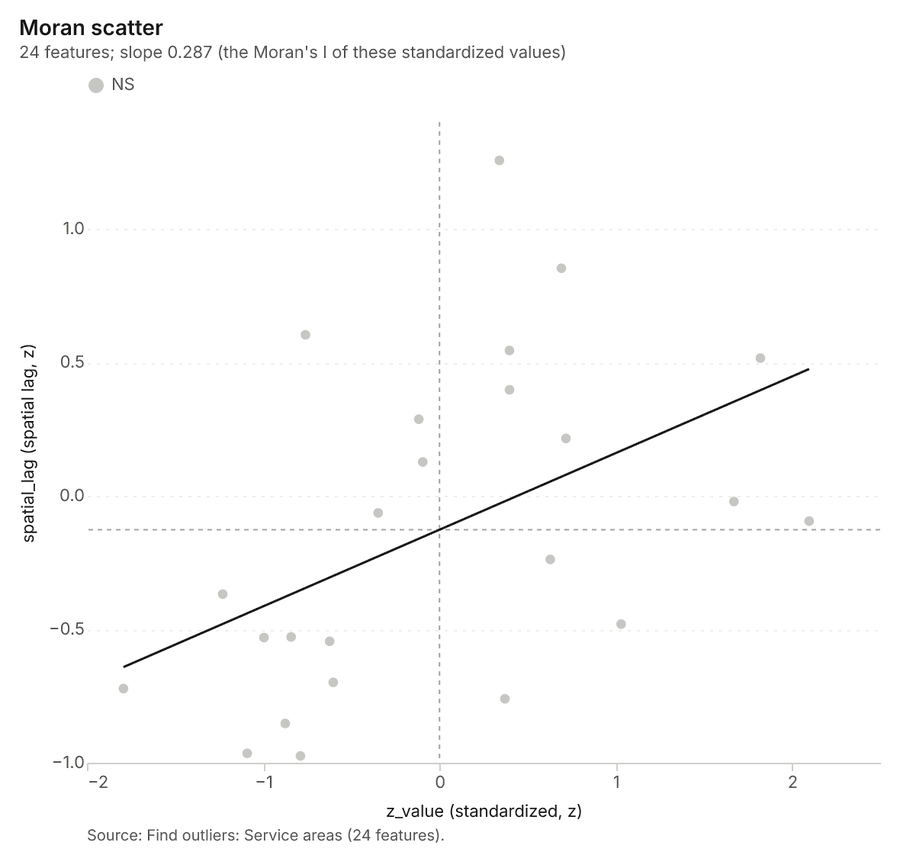
Outliers
What this analysis is. Find outliers: Anselin local Moran’s I: HH, LL clusters and HL, LH outliers 41. In ArcGIS it is Find Outliers or Cluster and Outlier Analysis (Anselin Local Moran’s I) 41.
Why it was run on this data. Local Moran's I maps clusters and outliers of 'population' 42.
What it found. Outliers on Service areas: Find outliers: 1 layer saved: Find outliers: Service areas (24 features) 1543. It reported result, count 24; result, elapsed ms 6; result, permutations 199; result, excluded null 0; result, distance band m 1,844; billing, cost 0.05072 43.
| Result | Value |
|---|---|
| result, count | 24 |
| result, elapsed ms | 6 |
| result, permutations | 199 |
| result, excluded null | 0 |
| result, distance band m | 1,844 |
| billing, cost | 0.05072 |
| billing, list price | 0.05072 |
| billing, upstream cost | 0 |
Findings
- Evidenced: Outliers on Service areas: Find outliers: 1 layer saved: Find outliers: Service areas (24 features) 1543.
- Evidenced: It reported result, count 24; result, elapsed ms 6; result, permutations 199; result, excluded null 0; result, distance band m 1,844; billing, cost 0.05072 43.
Tool gp_outliers; parameters {"field": "population", "project": "36cc8b7b-aabc-4b71-981b-a2c53e8f31ad", "features": {"layer": "Service areas (6344158f)"}, "aggregation": "hexagon"}
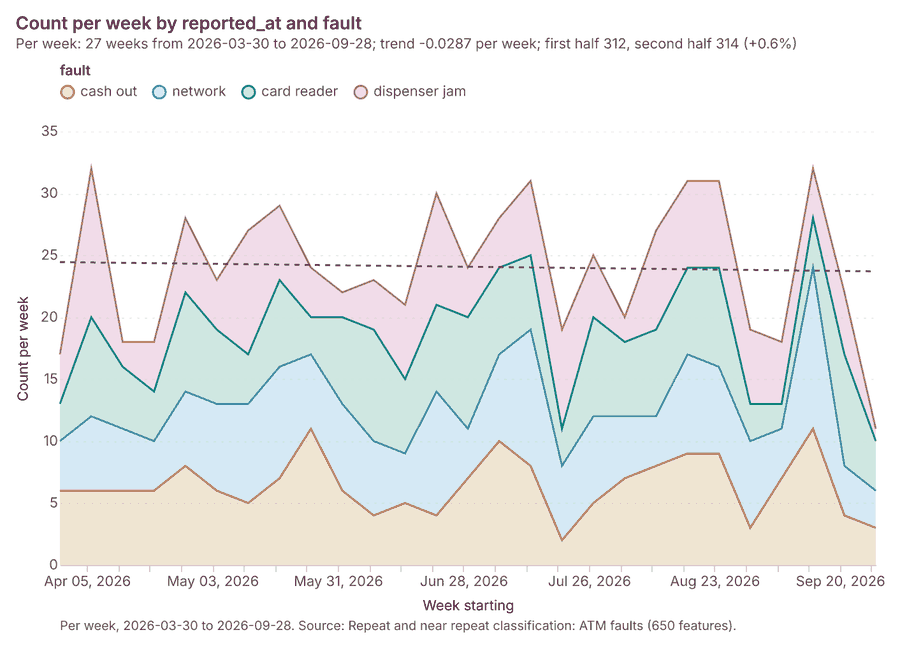
Near repeat
What this analysis is. Repeat and near repeat classification: Classify incidents as originators, repeats (same place) or near repeats within a distance and time window, with a Knox test table 44. In ArcGIS it is Repeat and Near Repeat Classification or Near Repeat Calculator 44.
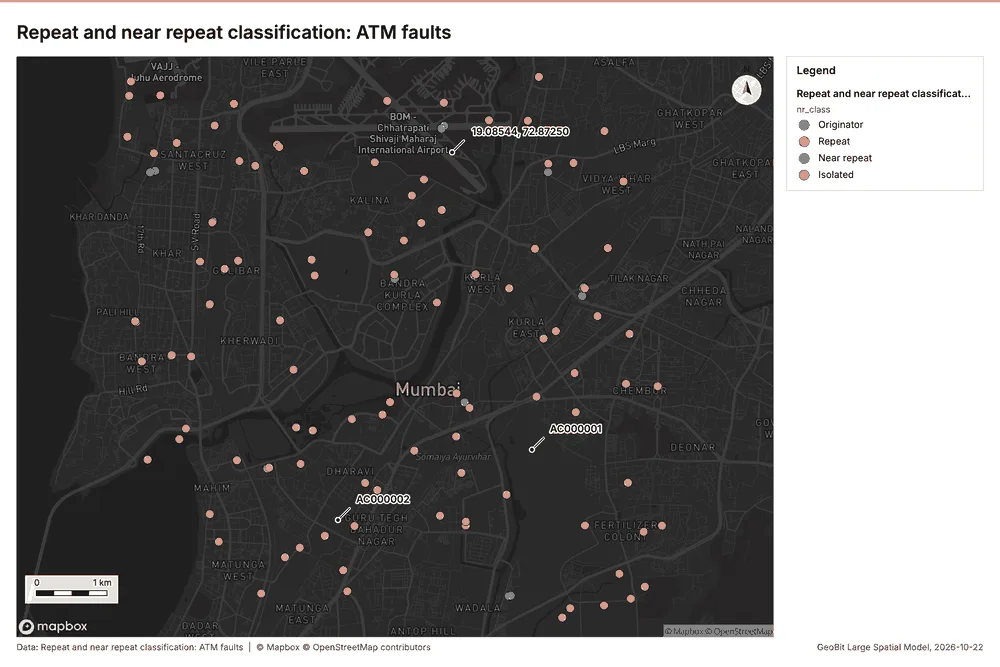
Why it was run on this data. Near repeat analysis tests whether ATM faults close in space also follow each other within 18 days 45.
What it found. Near repeat on ATM faults: Repeat and near repeat classification: 1 layer saved: Repeat and near repeat classification: ATM faults (650 features) 846. It reported result, days 18; result, count 650; result, chains 119; result, distance m 200; result, elapsed ms 23; result, pairs linked 690 46.
| Result | Value |
|---|---|
| result, days | 18 |
| result, count | 650 |
| result, chains | 119 |
| result, distance m | 200 |
| result, elapsed ms | 23 |
| result, pairs linked | 690 |
| billing, cost | 0.0695 |
| billing, list price | 0.0695 |
| billing, upstream cost | 0 |
Findings
- Evidenced: Near repeat on ATM faults: Repeat and near repeat classification: 1 layer saved: Repeat and near repeat classification: ATM faults (650 features) 846.
- Evidenced: It reported result, days 18; result, count 650; result, chains 119; result, distance m 200; result, elapsed ms 23; result, pairs linked 690 46.
Tool gp_near_repeat; parameters {"days": 18, "project": "36cc8b7b-aabc-4b71-981b-a2c53e8f31ad", "features": {"layer": "ATM faults (2bdf3635)"}, "distance_m": 200.0, "time_field": "reported_at"}
Maps and charts
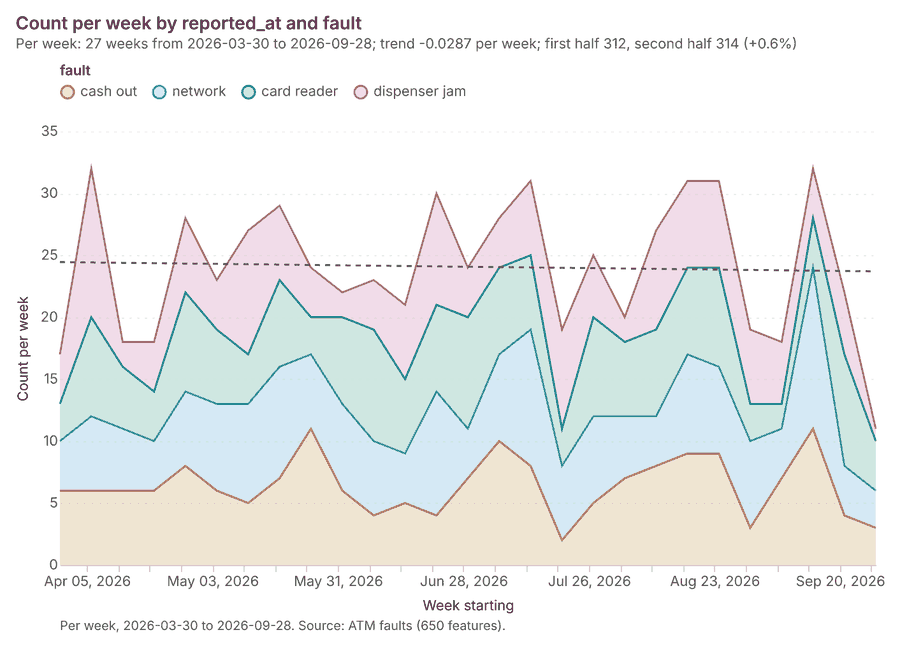
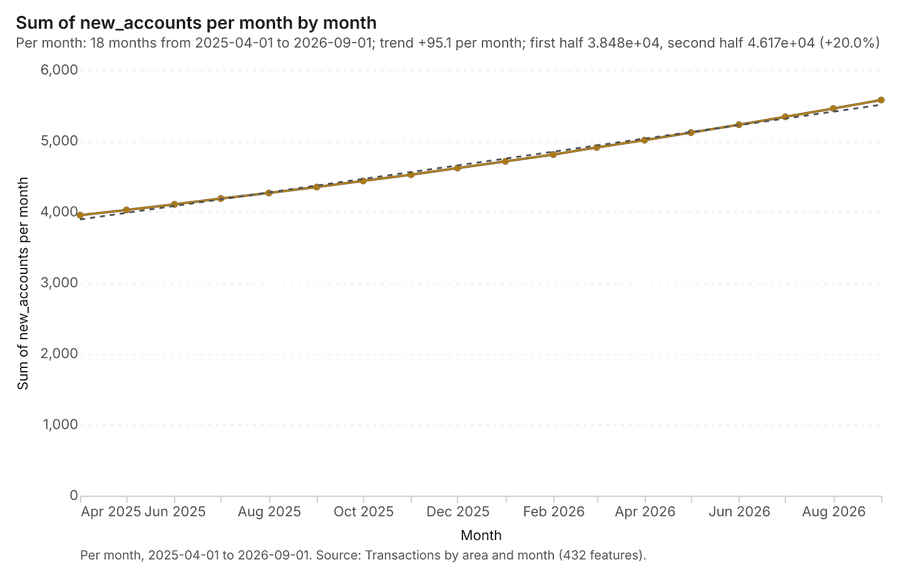
The run also made 20 map image(s) 4748495051525354555657585960616263646566 and 23 chart(s) 6768697071727374757677787980818283848586878889.
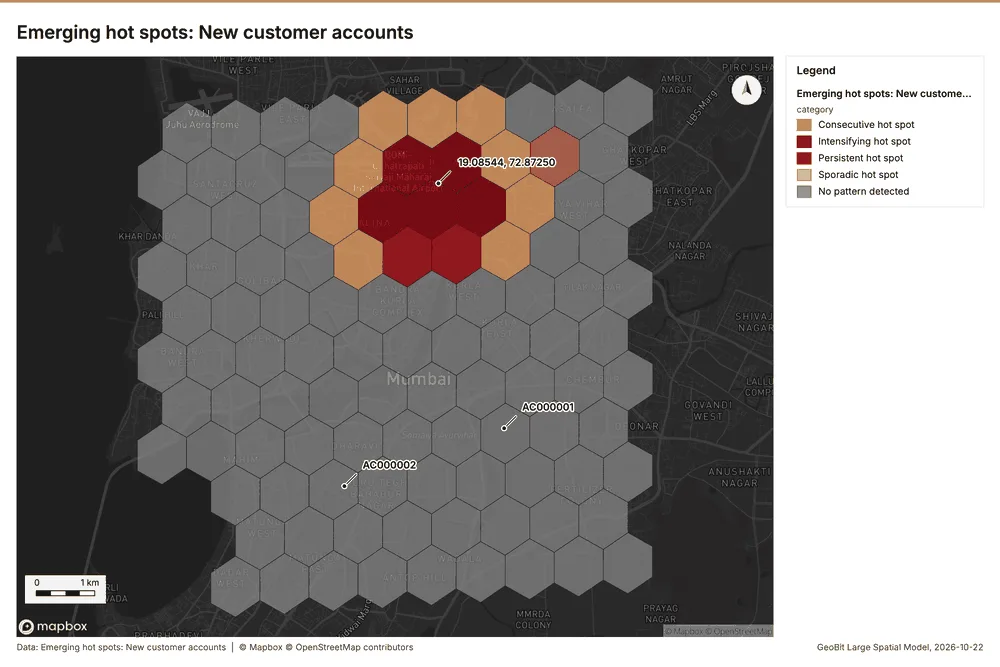
What the map shows. A highly defined cluster of emerging hot spots is visible in the upper-center portion of the map, indicating concentrated areas for new customer accounts. Within this core area, the color coding reveals a 48
Inferred: read from the image by gemma4:e4b, not evidence.
Changes since the last run
This is the first report of this project.
Sources
- 1Rendering: Chart: Timeline: events per month by dataset. 54 rows id 5350075e-73c1-474d-950e-d360606711fc
- 2Dataset: New customer accounts. vector, 1971 rows id ca1a5fee-d2f1-4e7a-96ff-a2ae025365b9
- 3Dataset: ATM faults. vector, 650 rows id 1a89d4d2-5bd2-4af8-8992-58556152d450
- 4Dataset: Transactions by area and month. table, 432 rows id d861cdce-91fa-4661-9b4c-084d3fdfa2af
- 5Catalog: Emerging hot spots (operation catalog, gp_space_time_hot_spots). Where hot spots are new, consecutive, intensifying, persistent, diminishing, sporadic, oscillating or historical over time. ArcGIS: Emerging Hot Spot Analysis, Create Space Time Cube. id gp_space_time_hot_spots
- 6Plan: Space time hot spots of ATM faults (the Start plan's candidate c_11dd443868e3). ATM faults carry dates in 'reported_at': emerging hot spot analysis finds new, intensifying and fading hot spots per week. id 8966c973-8846-4a37-90ad-665c80260ba6:c_11dd443868e3
- 7Tool result: gp_space_time_hot_spots, step 0. Emerging hot spots: 1 layer saved: Emerging hot spots: ATM faults (84 features). id b6f5a2bb-6262-4265-bcee-f2cfddd03ddb:0
- 8Layer: ATM faults. 650 features id 2bdf3635-4c99-4580-a937-de55490e43f5
- 9Plan: Space time hot spots of New customer accounts (the Start plan's candidate c_bb1839f07414). New customer accounts carry dates in 'opened_on': emerging hot spot analysis finds new, intensifying and fading hot spots per month. id 8966c973-8846-4a37-90ad-665c80260ba6:c_bb1839f07414
- 10Tool result: gp_space_time_hot_spots, step 1. Emerging hot spots: 1 layer saved: Emerging hot spots: New customer accounts (106 features). id b6f5a2bb-6262-4265-bcee-f2cfddd03ddb:1
- 11Layer: New customer accounts. 1,971 features id e03b0fae-60ec-4079-913e-15d82b331701
- 12Catalog: Summarize within (operation catalog, gp_summarize_within). Count and aggregate the features inside each polygon (or bin), proportionally for lines and polygons. ArcGIS: Summarize Within, Aggregate Points. QGIS: native:countpointsinpolygon, native:sumlinelengths. id gp_summarize_within
- 13Plan: ATM faults per feature of Service areas (the Start plan's candidate c_b3b30286944f). Count ATM faults inside each feature of Service areas by fault; the counts map as a choropleth (natural breaks, sequential colors). id 8966c973-8846-4a37-90ad-665c80260ba6:c_b3b30286944f
- 14Tool result: gp_summarize_within, step 0. Summarize within: 1 layer saved: Summarize within: Service areas (24 features). id 55a6123f-a37d-4fea-bc56-f3134e981a4d:0
- 15Layer: Service areas. 24 features id 6344158f-5202-4018-adf5-fef914f7efc7
- 16Tool result: gp_summarize_within, step 1. Summarize within: 1 layer saved: Summarize within: Service areas (24 features). id 55a6123f-a37d-4fea-bc56-f3134e981a4d:1
- 17Layer: ATMs. 140 features id f9f05311-d0d9-491b-b60e-76d6074147ae
- 18Tool result: gp_summarize_within, step 2. Summarize within: 1 layer saved: Summarize within: Service areas (24 features). id 55a6123f-a37d-4fea-bc56-f3134e981a4d:2
- 19Layer: Branches. 30 features id 8f400be9-7e82-4433-96cb-438a2b6ed3d3
- 20Catalog: Hot spot analysis (operation catalog, gp_hot_spots). Getis-Ord Gi* hot and cold spots with z-scores, p-values and confidence bins. ArcGIS: Find Hot Spots, Hot Spot Analysis (Getis-Ord Gi*). QGIS: qgis:hotspot (plugin). id gp_hot_spots
- 21Plan: Hot spots of ATM faults (the Start plan's candidate c_33af6577a5c2). 650 points: Getis-Ord Gi* tests whether the concentrations in ATM faults are statistically significant. id 8966c973-8846-4a37-90ad-665c80260ba6:c_33af6577a5c2
- 22Tool result: gp_hot_spots, step 0. Hot spot analysis: 1 layer saved: Hot spot analysis: ATM faults (240 features). id 2f94438c-e0a6-41b8-a152-e3151a6def70:0
- 23Plan: Hot spots of ATMs (the Start plan's candidate c_eacb2979e4db). 140 points: Getis-Ord Gi* tests whether the concentrations in ATMs are statistically significant. id 8966c973-8846-4a37-90ad-665c80260ba6:c_eacb2979e4db
- 24Tool result: gp_hot_spots, step 1. Hot spot analysis: 1 layer saved: Hot spot analysis: ATMs (68 features). id 2f94438c-e0a6-41b8-a152-e3151a6def70:1
- 25Plan: Hot spots of Branches (the Start plan's candidate c_b3e06b1ef787). 30 points: Getis-Ord Gi* tests whether the concentrations in Branches are statistically significant. id 8966c973-8846-4a37-90ad-665c80260ba6:c_b3e06b1ef787
- 26Tool result: gp_hot_spots, step 2. Hot spot analysis: 1 layer saved: Hot spot analysis: Branches (16 features). id 2f94438c-e0a6-41b8-a152-e3151a6def70:2
- 27Catalog: Calculate density (operation catalog, gp_calculate_density). Kernel density per square kilometer on a grid. ArcGIS: Calculate Density, Kernel Density. QGIS: native:heatmapkerneldensityestimation. id gp_calculate_density
- 28Plan: Kernel density of ATM faults (the Start plan's candidate c_984c04544f87). 650 points in ATM faults: a density surface shows where they concentrate. id 8966c973-8846-4a37-90ad-665c80260ba6:c_984c04544f87
- 29Tool result: gp_calculate_density, step 0. Calculate density: 1 layer saved: Calculate density: ATM faults (1893 features). id 8c87dbcb-4a64-4e28-b285-e529fd8b7cc4:0
- 30Plan: Kernel density of ATMs (the Start plan's candidate c_0c2ac7adbfb7). 140 points in ATMs: a density surface shows where they concentrate. id 8966c973-8846-4a37-90ad-665c80260ba6:c_0c2ac7adbfb7
- 31Tool result: gp_calculate_density, step 1. Calculate density: 1 layer saved: Calculate density: ATMs (459 features). id 8c87dbcb-4a64-4e28-b285-e529fd8b7cc4:1
- 32Plan: Kernel density of Branches (the Start plan's candidate c_fbae95ca186a). 30 points in Branches: a density surface shows where they concentrate. id 8966c973-8846-4a37-90ad-665c80260ba6:c_fbae95ca186a
- 33Tool result: gp_calculate_density, step 2. Calculate density: 1 layer saved: Calculate density: Branches (88 features). id 8c87dbcb-4a64-4e28-b285-e529fd8b7cc4:2
- 34Catalog: Find point clusters (operation catalog, gp_find_point_clusters). Density-based clusters (DBSCAN, HDBSCAN or OPTICS, optionally space-time) with hulls and noise. ArcGIS: Find Point Clusters, Density-based Clustering. QGIS: native:dbscanclustering, native:stdbscanclustering. id gp_find_point_clusters
- 35Plan: Cluster points of ATM faults (the Start plan's candidate c_7a7e6112a7c4). DBSCAN finds dense groups of ATM faults and separates noise. id 8966c973-8846-4a37-90ad-665c80260ba6:c_7a7e6112a7c4
- 36Tool result: gp_find_point_clusters, step 0. Find point clusters: 2 layers saved: Find point clusters: ATM faults (650 features); Find point clusters: cluster hulls (14 features). id ddb39481-1f8b-4e18-afe9-2b1c4db1b0ef:0
- 37Plan: Cluster points of ATMs (the Start plan's candidate c_0807abb77372). DBSCAN finds dense groups of ATMs and separates noise. id 8966c973-8846-4a37-90ad-665c80260ba6:c_0807abb77372
- 38Tool result: gp_find_point_clusters, step 1. Find point clusters: 2 layers saved: Find point clusters: ATMs (140 features); Find point clusters: cluster hulls (1 feature). id ddb39481-1f8b-4e18-afe9-2b1c4db1b0ef:1
- 39Plan: Cluster points of Branches (the Start plan's candidate c_5c9c54534fb2). DBSCAN finds dense groups of Branches and separates noise. id 8966c973-8846-4a37-90ad-665c80260ba6:c_5c9c54534fb2
- 40Tool result: gp_find_point_clusters, step 2. Find point clusters: 2 layers saved: Find point clusters: Branches (30 features); Find point clusters: cluster hulls (1 feature). id ddb39481-1f8b-4e18-afe9-2b1c4db1b0ef:2
- 41Catalog: Find outliers (operation catalog, gp_outliers). Anselin local Moran’s I: HH, LL clusters and HL, LH outliers. ArcGIS: Find Outliers, Cluster and Outlier Analysis (Anselin Local Moran’s I). id gp_outliers
- 42Plan: Local morans i of Service areas (the Start plan's candidate c_82c4828c335b). Local Moran's I maps clusters and outliers of 'population'. id 8966c973-8846-4a37-90ad-665c80260ba6:c_82c4828c335b
- 43Tool result: gp_outliers, step 0. Find outliers: 1 layer saved: Find outliers: Service areas (24 features). id ebdb002d-2e5b-42ca-870b-a29352cb798d:0
- 44Catalog: Repeat and near repeat classification (operation catalog, gp_near_repeat). Classify incidents as originators, repeats (same place) or near repeats within a distance and time window, with a Knox test table. ArcGIS: Repeat and Near Repeat Classification, Near Repeat Calculator. id gp_near_repeat
- 45Plan: Near repeat of ATM faults (the Start plan's candidate c_0525e54ffa77). Near repeat analysis tests whether ATM faults close in space also follow each other within 18 days. id 8966c973-8846-4a37-90ad-665c80260ba6:c_0525e54ffa77
- 46Tool result: gp_near_repeat, step 0. Repeat and near repeat classification: 1 layer saved: Repeat and near repeat classification: ATM faults (650 features). id decafdf2-8712-4857-a4f0-3ed34c0aec6c:0
- 47Rendering: Map: Emerging hot spots: ATM faults id 76ee6f37-74c8-4c56-85ba-bc6f47108994
- 48Rendering: Map: Emerging hot spots: New customer accounts id 09264e18-ba78-46fb-a2ce-7ab906f160d8
- 49Rendering: Map: Summarize within: Service areas id ef256995-4467-474b-80ab-8a608ad3fd72
- 50Rendering: Map: Summarize within: Service areas id 35df054b-4186-4e03-a63c-67a7f2baaa23
- 51Rendering: Map: Summarize within: Service areas id 6fbc5d26-341e-436b-b24d-678ad5b8ef4b
- 52Rendering: Map: Service areas by population id b341088d-2db3-4a29-8635-157f59123b60
- 53Rendering: Map: Hot spot analysis: ATM faults id b6494a6c-b71f-443e-b39b-2d54712e5f62
- 54Rendering: Map: Hot spot analysis: ATMs id ca6b7c1c-7a7b-4dc0-96b2-9562dc7d9dda
- 55Rendering: Map: Hot spot analysis: Branches id 71bb9dc5-68ce-41c3-b0e3-97c35130725d
- 56Rendering: Map: Calculate density: ATM faults id 61e8469a-ca23-498c-a844-56c1eb1808e4
- 57Rendering: Map: Calculate density: ATMs id 050ba628-bb1f-487e-a378-542769c03674
- 58Rendering: Map: Calculate density: Branches id 2bb0e1f9-4b39-400e-8731-95ab5d3eb007
- 59Rendering: Map: Find point clusters: ATM faults id 4a3ddce9-b286-4982-b29f-e520074e1420
- 60Rendering: Map: Find point clusters: cluster hulls id 60fbd3c3-41cf-4188-af84-ac3eb9ec45f4
- 61Rendering: Map: Find point clusters: ATMs id f933545e-ee47-43ac-8a7c-7f5ab4f3a26a
- 62Rendering: Map: Find point clusters: cluster hulls id 712b47f2-0a18-4783-bd5f-42b3ab911373
- 63Rendering: Map: Find point clusters: Branches id baa9825c-0a0a-41a0-8deb-28d4fe342b5d
- 64Rendering: Map: Find point clusters: cluster hulls id b7e4a16c-e3ce-489f-8e8e-7709e70f30c5
- 65Rendering: Map: Find outliers: Service areas id 097cd92c-bdca-494e-8c39-c6c9f8f013ff
- 66Rendering: Map: Repeat and near repeat classification: ATM faults id c50405e6-0141-4a62-a6fa-302fdbda1f8e
- 67Rendering: Chart: ATM faults over time (reported_at). 108 rows id 7e58d05f-f91f-4b43-b9a7-53ede05aab3c
- 68Rendering: Chart: Transactions by area and month over time (month). 18 rows id 43d54876-a680-44f0-8807-97d30add6c7b
- 69Rendering: Chart: Emerging hot spots: ATM faults. 8 rows id 05240352-4094-459b-93b9-b0b39ff66388
- 70Rendering: Chart: Emerging hot spots: New customer accounts. 8 rows id d171a240-e329-4555-b7f7-dd2e1a4eb630
- 71Rendering: Chart: Summarize within: Service areas. 6 rows id 34d3fffd-c931-4253-8f1c-b9a3d02f33a2
- 72Rendering: Chart: Summarize within: Service areas. 6 rows id cfdf43ab-0f4b-483a-b49f-f59ae44a4cb6
- 73Rendering: Chart: Summarize within: Service areas. 6 rows id 102d8194-390f-4002-a602-f35d93571a68
- 74Rendering: Chart: Hot spot analysis: ATM faults. 16 rows id afea17ba-ef2f-4c29-a788-e9eb93790b0a
- 75Rendering: Chart: Hot spot analysis: ATMs. 9 rows id 06f70b45-9da8-41dd-b783-99cdc39a5ed1
- 76Rendering: Chart: Hot spot analysis: Branches. 5 rows id 8dac2f16-e156-4c0c-a3bc-1abdd53acf19
- 77Rendering: Chart: Calculate density: ATM faults. 12 rows id 5300cc79-ddc9-4789-ba0e-8117219edc08
- 78Rendering: Chart: Calculate density: ATMs. 10 rows id 85a5ca6f-877a-4152-ad20-9962042d8773
- 79Rendering: Chart: Calculate density: Branches. 8 rows id a4e1be4d-2170-4fa2-8eaf-e621a6e88889
- 80Rendering: Chart: Find point clusters: ATM faults. 15 rows id 7475dab8-8ac2-451a-896a-2cba2b21ceb0
- 81Rendering: Chart: Find point clusters: cluster hulls. 14 rows id 050ea633-9bb7-4f6f-b729-e48e19e2f29f
- 82Rendering: Chart: Find point clusters: ATMs. 1 rows id 0a6689e7-beeb-407c-a93a-968bb7b5fd18
- 83Rendering: Chart: Find point clusters: cluster hulls. 1 rows id b2c962a7-8efd-4811-b98b-b95c07a42f91
- 84Rendering: Chart: Find point clusters: Branches. 1 rows id 51e26a99-7c7f-4f46-b42b-db4446790e9b
- 85Rendering: Chart: Find point clusters: cluster hulls. 1 rows id 74c8188c-0eb1-4132-b48c-c6f932d42986
- 86Rendering: Chart: Find outliers: Service areas. 24 rows id 685cf60b-64b0-4c10-abc0-8d35b5d3fe39
- 87Rendering: Chart: Repeat and near repeat classification: ATM faults. 108 rows id 5fedd8da-8a3c-43d9-b089-3ef291f6037b
- 88Rendering: Chart: Repeat and near repeat classification: ATM faults over time. 108 rows id 39e30229-db4d-4477-9cf4-6a0e357a9214
- 89Rendering: Chart: Find point clusters: ATM faults over time. 108 rows id 15d42b9c-5969-49e7-92a7-e2d8d7ee3bed
- 90Dataset: Branches. vector, 30 rows id 723808dc-deb7-4f84-8a71-4d9971c7481d
- 91Dataset: ATMs. vector, 140 rows id 67e0988a-c269-4f42-9feb-d3f8cc8e6cce
- 92Dataset: Service areas. vector, 24 rows id edb72b32-4d2f-4324-82c3-07d95a35855a
- 93Dataset: Business clients. vector, 259 rows id fc7b0810-e2b6-4b63-b451-6145da616183
- 94Dataset: Competitor branches. vector, 80 rows id dc85622c-0f83-43c4-b78a-de81f9514dc0
- 95Dataset: Branch targets. table, 90 rows id 1805a967-c33f-4bec-bae7-33ddb672f5c2
- 96Dataset: Suburban rail lines. vector, 3 rows id be0b9524-ec6b-46e9-8d03-12477e584565
- 97Dataset: Branch network strategy memo. document, ? rows id a09d49c1-003f-46cd-89de-81aa969e1f47
- 98Record: Sample: Banking, Mumbai id 36cc8b7b-aabc-4b71-981b-a2c53e8f31ad
- 99Layer: Emerging hot spots: ATM faults. 84 features id 7a9e76b7-6a9c-4142-9b1b-2ba16950826e
- 100Layer: Emerging hot spots: New customer accounts. 106 features id d2737b97-6e34-4724-9cc1-4fc26dc27ef0
- 101Layer: Summarize within: Service areas. 24 features id 82ed72b3-93b8-44f3-aed9-b04c683016ac
- 102Layer: Summarize within: Service areas. 24 features id 65d1f682-3dbc-430d-9611-73e246f61c59
- 103Layer: Summarize within: Service areas. 24 features id b0085626-4a10-4142-a439-fee139d0d654
- 104Layer: Hot spot analysis: ATM faults. 240 features id 2f93886f-42ab-46e3-9a7f-1af360604373
- 105Layer: Hot spot analysis: ATMs. 68 features id a1c55487-2858-4142-ad20-bd6b5d7310eb
- 106Layer: Hot spot analysis: Branches. 16 features id 35e39240-1bef-45a6-a63c-a0d865426146
- 107Layer: Calculate density: ATM faults. 1,893 features id 8c0ee5b1-c9d1-478d-b5b1-c98fa86bd9f8
- 108Layer: Calculate density: ATMs. 459 features id f79c3fc8-1034-4abe-a828-0eb4004201cd
- 109Layer: Calculate density: Branches. 88 features id 1902ddf0-4227-4a92-ac7c-939bc604a5b3
- 110Layer: Find point clusters: ATM faults. 650 features id 05658f04-f9ea-4c40-a4c5-30b7e4e77625
- 111Layer: Find point clusters: cluster hulls. 14 features id de772841-b4f1-4f69-8eba-cfe862a45c01
- 112Layer: Find point clusters: ATMs. 140 features id 4db94fe3-4761-4f5a-9ec9-577c48d7d13a
- 113Layer: Find point clusters: cluster hulls. 1 features id a0af9a60-4b16-4861-a4d6-0aac7ae08c50
- 114Layer: Find point clusters: Branches. 30 features id 139f426e-3703-4fb2-818e-11512ded6292
- 115Layer: Find point clusters: cluster hulls. 1 features id 8dc3f93c-e454-4aa6-a12a-36f3ccd4a02a
- 116Layer: Find outliers: Service areas. 24 features id 02024e38-4d51-481d-a141-856333b7c347
- 117Layer: Repeat and near repeat classification: ATM faults. 650 features id c209894e-f1ec-4882-a054-494986b09a69
Appendix: the data behind the chartsShow
Figure 1. Timeline: events per month by dataset 1
| period | series | value |
|---|---|---|
| 2025-04-01 | New customer accounts | 93 |
| 2025-04-01 | ATM faults | 0 |
| 2025-04-01 | Transactions by area and month | 24 |
| 2025-05-01 | New customer accounts | 89 |
| 2025-05-01 | ATM faults | 0 |
| 2025-05-01 | Transactions by area and month | 24 |
| 2025-06-01 | New customer accounts | 98 |
| 2025-06-01 | ATM faults | 0 |
| 2025-06-01 | Transactions by area and month | 24 |
| 2025-07-01 | New customer accounts | 97 |
| 2025-07-01 | ATM faults | 0 |
| 2025-07-01 | Transactions by area and month | 24 |
| 2025-08-01 | New customer accounts | 78 |
| 2025-08-01 | ATM faults | 0 |
| 2025-08-01 | Transactions by area and month | 24 |
| 2025-09-01 | New customer accounts | 106 |
| 2025-09-01 | ATM faults | 0 |
| 2025-09-01 | Transactions by area and month | 24 |
| 2025-10-01 | New customer accounts | 109 |
| 2025-10-01 | ATM faults | 0 |
| 2025-10-01 | Transactions by area and month | 24 |
| 2025-11-01 | New customer accounts | 105 |
| 2025-11-01 | ATM faults | 0 |
| 2025-11-01 | Transactions by area and month | 24 |
| 2025-12-01 | New customer accounts | 111 |
| 2025-12-01 | ATM faults | 0 |
| 2025-12-01 | Transactions by area and month | 24 |
| 2026-01-01 | New customer accounts | 114 |
| 2026-01-01 | ATM faults | 0 |
| 2026-01-01 | Transactions by area and month | 24 |
| 2026-02-01 | New customer accounts | 88 |
| 2026-02-01 | ATM faults | 0 |
| 2026-02-01 | Transactions by area and month | 24 |
| 2026-03-01 | New customer accounts | 106 |
| 2026-03-01 | ATM faults | 0 |
| 2026-03-01 | Transactions by area and month | 24 |
| 2026-04-01 | New customer accounts | 133 |
| 2026-04-01 | ATM faults | 101 |
| 2026-04-01 | Transactions by area and month | 24 |
| 2026-05-01 | New customer accounts | 118 |
| 2026-05-01 | ATM faults | 115 |
| 2026-05-01 | Transactions by area and month | 24 |
| 2026-06-01 | New customer accounts | 121 |
| 2026-06-01 | ATM faults | 100 |
| 2026-06-01 | Transactions by area and month | 24 |
| 2026-07-01 | New customer accounts | 130 |
| 2026-07-01 | ATM faults | 116 |
| 2026-07-01 | Transactions by area and month | 24 |
| 2026-08-01 | New customer accounts | 150 |
| 2026-08-01 | ATM faults | 119 |
| 2026-08-01 | Transactions by area and month | 24 |
| 2026-09-01 | New customer accounts | 125 |
| 2026-09-01 | ATM faults | 99 |
| 2026-09-01 | Transactions by area and month | 24 |
Figure 22. ATM faults over time (reported_at) 67
| period | series | value |
|---|---|---|
| 2026-03-30 | cash out | 6 |
| 2026-03-30 | network | 4 |
| 2026-03-30 | card reader | 3 |
| 2026-03-30 | dispenser jam | 4 |
| 2026-04-06 | cash out | 6 |
| 2026-04-06 | network | 6 |
| 2026-04-06 | card reader | 8 |
| 2026-04-06 | dispenser jam | 12 |
| 2026-04-13 | cash out | 6 |
| 2026-04-13 | network | 5 |
| 2026-04-13 | card reader | 5 |
| 2026-04-13 | dispenser jam | 2 |
| 2026-04-20 | cash out | 6 |
| 2026-04-20 | network | 4 |
| 2026-04-20 | card reader | 4 |
| 2026-04-20 | dispenser jam | 4 |
| 2026-04-27 | cash out | 8 |
| 2026-04-27 | network | 6 |
| 2026-04-27 | card reader | 8 |
| 2026-04-27 | dispenser jam | 6 |
| 2026-05-04 | cash out | 6 |
| 2026-05-04 | network | 7 |
| 2026-05-04 | card reader | 6 |
| 2026-05-04 | dispenser jam | 4 |
| 2026-05-11 | cash out | 5 |
| 2026-05-11 | network | 8 |
| 2026-05-11 | card reader | 4 |
| 2026-05-11 | dispenser jam | 10 |
| 2026-05-18 | cash out | 7 |
| 2026-05-18 | network | 9 |
| 2026-05-18 | card reader | 7 |
| 2026-05-18 | dispenser jam | 6 |
| 2026-05-25 | cash out | 11 |
| 2026-05-25 | network | 6 |
| 2026-05-25 | card reader | 3 |
| 2026-05-25 | dispenser jam | 4 |
| 2026-06-01 | cash out | 6 |
| 2026-06-01 | network | 7 |
| 2026-06-01 | card reader | 7 |
| 2026-06-01 | dispenser jam | 2 |
| 2026-06-08 | cash out | 4 |
| 2026-06-08 | network | 6 |
| 2026-06-08 | card reader | 9 |
| 2026-06-08 | dispenser jam | 4 |
| 2026-06-15 | cash out | 5 |
| 2026-06-15 | network | 4 |
| 2026-06-15 | card reader | 6 |
| 2026-06-15 | dispenser jam | 6 |
| 2026-06-22 | cash out | 4 |
| 2026-06-22 | network | 10 |
| 2026-06-22 | card reader | 7 |
| 2026-06-22 | dispenser jam | 9 |
| 2026-06-29 | cash out | 7 |
| 2026-06-29 | network | 4 |
| 2026-06-29 | card reader | 9 |
| 2026-06-29 | dispenser jam | 4 |
| 2026-07-06 | cash out | 10 |
| 2026-07-06 | network | 7 |
| 2026-07-06 | card reader | 7 |
| 2026-07-06 | dispenser jam | 4 |
| 2026-07-13 | cash out | 8 |
| 2026-07-13 | network | 11 |
| 2026-07-13 | card reader | 6 |
| 2026-07-13 | dispenser jam | 6 |
| 2026-07-20 | cash out | 2 |
| 2026-07-20 | network | 6 |
| 2026-07-20 | card reader | 3 |
| 2026-07-20 | dispenser jam | 8 |
| 2026-07-27 | cash out | 5 |
| 2026-07-27 | network | 7 |
| 2026-07-27 | card reader | 8 |
| 2026-07-27 | dispenser jam | 5 |
| 2026-08-03 | cash out | 7 |
| 2026-08-03 | network | 5 |
| 2026-08-03 | card reader | 6 |
| 2026-08-03 | dispenser jam | 2 |
| 2026-08-10 | cash out | 8 |
| 2026-08-10 | network | 4 |
| 2026-08-10 | card reader | 7 |
| 2026-08-10 | dispenser jam | 8 |
| 2026-08-17 | cash out | 9 |
| 2026-08-17 | network | 8 |
| 2026-08-17 | card reader | 7 |
| 2026-08-17 | dispenser jam | 7 |
| 2026-08-24 | cash out | 9 |
| 2026-08-24 | network | 7 |
| 2026-08-24 | card reader | 8 |
| 2026-08-24 | dispenser jam | 7 |
| 2026-08-31 | cash out | 3 |
| 2026-08-31 | network | 7 |
| 2026-08-31 | card reader | 3 |
| 2026-08-31 | dispenser jam | 6 |
| 2026-09-07 | cash out | 7 |
| 2026-09-07 | network | 4 |
| 2026-09-07 | card reader | 2 |
| 2026-09-07 | dispenser jam | 5 |
| 2026-09-14 | cash out | 11 |
| 2026-09-14 | network | 13 |
| 2026-09-14 | card reader | 4 |
| 2026-09-14 | dispenser jam | 4 |
| 2026-09-21 | cash out | 4 |
| 2026-09-21 | network | 4 |
| 2026-09-21 | card reader | 9 |
| 2026-09-21 | dispenser jam | 5 |
| 2026-09-28 | cash out | 3 |
| 2026-09-28 | network | 3 |
| 2026-09-28 | card reader | 4 |
| 2026-09-28 | dispenser jam | 1 |
Figure 23. Transactions by area and month over time (month) 68
| period | value |
|---|---|
| 2025-04-01 | 3,954 |
| 2025-05-01 | 4,028 |
| 2025-06-01 | 4,107 |
| 2025-07-01 | 4,189 |
| 2025-08-01 | 4,267 |
| 2025-09-01 | 4,351 |
| 2025-10-01 | 4,438 |
| 2025-11-01 | 4,525 |
| 2025-12-01 | 4,618 |
| 2026-01-01 | 4,713 |
| 2026-02-01 | 4,809 |
| 2026-03-01 | 4,909 |
| 2026-04-01 | 5,012 |
| 2026-05-01 | 5,119 |
| 2026-06-01 | 5,230 |
| 2026-07-01 | 5,341 |
| 2026-08-01 | 5,458 |
| 2026-09-01 | 5,578 |
Figure 24. Emerging hot spots: ATM faults 69
| bin_start | bin_end | count |
|---|---|---|
| -0.984 | -0.6045 | 45 |
| -0.6045 | -0.225 | 0 |
| -0.225 | 0.1545 | 16 |
| 0.1545 | 0.534 | 0 |
| 0.534 | 0.9135 | 15 |
| 0.9135 | 1.293 | 0 |
| 1.293 | 1.673 | 4 |
| 1.673 | 2.052 | 4 |
Figure 25. Emerging hot spots: New customer accounts 70
| bin_start | bin_end | count |
|---|---|---|
| -1.425 | 0.1437 | 55 |
| 0.1437 | 1.712 | 34 |
| 1.712 | 3.281 | 4 |
| 3.281 | 4.85 | 6 |
| 4.85 | 6.419 | 1 |
| 6.419 | 7.987 | 2 |
| 7.987 | 9.556 | 1 |
| 9.556 | 11.12 | 3 |
Figure 26. Summarize within: Service areas 71
| bin_start | bin_end | count |
|---|---|---|
| 0 | 13.83 | 11 |
| 13.83 | 27.67 | 5 |
| 27.67 | 41.5 | 2 |
| 41.5 | 55.33 | 1 |
| 55.33 | 69.17 | 2 |
| 69.17 | 83 | 3 |
Figure 27. Summarize within: Service areas 72
| bin_start | bin_end | count |
|---|---|---|
| 0 | 1.833 | 2 |
| 1.833 | 3.667 | 5 |
| 3.667 | 5.5 | 3 |
| 5.5 | 7.333 | 6 |
| 7.333 | 9.167 | 4 |
| 9.167 | 11 | 4 |
Figure 28. Summarize within: Service areas 73
| bin_start | bin_end | count |
|---|---|---|
| 0 | 0.6667 | 6 |
| 0.6667 | 1.333 | 10 |
| 1.333 | 2 | 0 |
| 2 | 2.667 | 5 |
| 2.667 | 3.333 | 2 |
| 3.333 | 4 | 1 |
Figure 29. Hot spot analysis: ATM faults 74
| bin_start | bin_end | band | band_label | count |
|---|---|---|---|---|
| -2 | -1.5 | cold_90 | Cold spot, 90% confidence | 3 |
| -2 | -1.5 | not_significant | Not significant | 5 |
| -1.5 | -1 | not_significant | Not significant | 59 |
| -1 | -0.5 | not_significant | Not significant | 56 |
| -0.5 | 0 | not_significant | Not significant | 19 |
| 0 | 0.5 | not_significant | Not significant | 12 |
| 0.5 | 1 | not_significant | Not significant | 18 |
| 1 | 1.5 | not_significant | Not significant | 18 |
| 1.5 | 2 | hot_90 | Hot spot, 90% confidence | 13 |
| 1.5 | 2 | hot_95 | Hot spot, 95% confidence | 1 |
| 1.5 | 2 | not_significant | Not significant | 8 |
| 2 | 2.5 | hot_95 | Hot spot, 95% confidence | 15 |
| 2.5 | 3 | hot_95 | Hot spot, 95% confidence | 2 |
| 2.5 | 3 | hot_99 | Hot spot, 99% confidence | 5 |
| 3 | 3.5 | hot_99 | Hot spot, 99% confidence | 5 |
| 4 | 4.5 | hot_99 | Hot spot, 99% confidence | 1 |
Figure 30. Hot spot analysis: ATMs 75
| bin_start | bin_end | band | band_label | count |
|---|---|---|---|---|
| -2 | -1.5 | not_significant | Not significant | 1 |
| -1.5 | -1 | not_significant | Not significant | 3 |
| -1 | -0.5 | not_significant | Not significant | 10 |
| -0.5 | 0 | not_significant | Not significant | 10 |
| 0 | 0.5 | not_significant | Not significant | 18 |
| 0.5 | 1 | not_significant | Not significant | 16 |
| 1 | 1.5 | not_significant | Not significant | 8 |
| 1.5 | 2 | hot_90 | Hot spot, 90% confidence | 1 |
| 2 | 2.5 | hot_95 | Hot spot, 95% confidence | 1 |
Figure 31. Hot spot analysis: Branches 76
| bin_start | bin_end | band | band_label | count |
|---|---|---|---|---|
| -1.5 | -1 | not_significant | Not significant | 4 |
| -1 | -0.5 | not_significant | Not significant | 3 |
| 0 | 0.5 | not_significant | Not significant | 4 |
| 0.5 | 1 | not_significant | Not significant | 1 |
| 1 | 1.5 | not_significant | Not significant | 4 |
Figure 32. Calculate density: ATM faults 77
| bin_start | bin_end | count |
|---|---|---|
| 0 | 3.917 | 91 |
| 3.917 | 7.833 | 151 |
| 7.833 | 11.75 | 167 |
| 11.75 | 15.67 | 177 |
| 15.67 | 19.58 | 167 |
| 19.58 | 23.5 | 177 |
| 23.5 | 27.42 | 165 |
| 27.42 | 31.33 | 178 |
| 31.33 | 35.25 | 189 |
| 35.25 | 39.17 | 184 |
| 39.17 | 43.08 | 167 |
| 43.08 | 47 | 80 |
Figure 33. Calculate density: ATMs 78
| bin_start | bin_end | count |
|---|---|---|
| 0 | 2.2 | 43 |
| 2.2 | 4.4 | 40 |
| 4.4 | 6.6 | 44 |
| 6.6 | 8.8 | 43 |
| 8.8 | 11 | 43 |
| 11 | 13.2 | 66 |
| 13.2 | 15.4 | 45 |
| 15.4 | 17.6 | 46 |
| 17.6 | 19.8 | 42 |
| 19.8 | 22 | 47 |
Figure 34. Calculate density: Branches 79
| bin_start | bin_end | count |
|---|---|---|
| 1.546e-06 | 0.1222 | 27 |
| 0.1222 | 0.2445 | 15 |
| 0.2445 | 0.3667 | 11 |
| 0.3667 | 0.4889 | 6 |
| 0.4889 | 0.6111 | 10 |
| 0.6111 | 0.7334 | 5 |
| 0.7334 | 0.8556 | 11 |
| 0.8556 | 0.9778 | 3 |
Figure 35. Find point clusters: ATM faults 80
| cluster | features | fraction | share |
|---|---|---|---|
| Noise | 232 | 0.3569 | 35.7% |
| 5 | 52 | 0.08 | 8.0% |
| 7 | 42 | 0.06462 | 6.5% |
| 9 | 39 | 0.06 | 6.0% |
| 0 | 36 | 0.05538 | 5.5% |
| 1 | 36 | 0.05538 | 5.5% |
| 8 | 34 | 0.05231 | 5.2% |
| 11 | 28 | 0.04308 | 4.3% |
| 3 | 28 | 0.04308 | 4.3% |
| 4 | 28 | 0.04308 | 4.3% |
| 6 | 23 | 0.03538 | 3.5% |
| 12 | 20 | 0.03077 | 3.1% |
| 13 | 18 | 0.02769 | 2.8% |
| 10 | 17 | 0.02615 | 2.6% |
| 2 | 17 | 0.02615 | 2.6% |
Figure 36. Find point clusters: cluster hulls 81
| cluster | features | fraction | share |
|---|---|---|---|
| 0 | 1 | 0.07143 | 7.1% |
| 1 | 1 | 0.07143 | 7.1% |
| 10 | 1 | 0.07143 | 7.1% |
| 11 | 1 | 0.07143 | 7.1% |
| 12 | 1 | 0.07143 | 7.1% |
| 13 | 1 | 0.07143 | 7.1% |
| 2 | 1 | 0.07143 | 7.1% |
| 3 | 1 | 0.07143 | 7.1% |
| 4 | 1 | 0.07143 | 7.1% |
| 5 | 1 | 0.07143 | 7.1% |
| 6 | 1 | 0.07143 | 7.1% |
| 7 | 1 | 0.07143 | 7.1% |
| 8 | 1 | 0.07143 | 7.1% |
| 9 | 1 | 0.07143 | 7.1% |
Figure 37. Find point clusters: ATMs 82
| cluster | features | fraction | share |
|---|---|---|---|
| 0 | 140 | 1 | 100.0% |
Figure 38. Find point clusters: cluster hulls 83
| cluster | features | fraction | share |
|---|---|---|---|
| 0 | 1 | 1 | 100.0% |
Figure 39. Find point clusters: Branches 84
| cluster | features | fraction | share |
|---|---|---|---|
| 0 | 30 | 1 | 100.0% |
Figure 40. Find point clusters: cluster hulls 85
| cluster | features | fraction | share |
|---|---|---|---|
| 0 | 1 | 1 | 100.0% |
Figure 41. Find outliers: Service areas 86
| value | lag | type |
|---|---|---|
| 0.7175 | 0.2147 | NS |
| -0.7605 | 0.6028 | NS |
| 0.3397 | 1.256 | NS |
| -0.0948 | 0.1267 | NS |
| 0.3969 | 0.5444 | NS |
| 1.671 | -0.0215 | NS |
| -0.1173 | 0.2867 | NS |
| -0.3478 | -0.0641 | NS |
| -0.7889 | -0.9745 | NS |
| -1.23 | -0.3683 | NS |
| -0.6027 | -0.6988 | NS |
| 0.6917 | 0.8524 | NS |
| 0.3711 | -0.7605 | NS |
| 0.6284 | -0.2384 | NS |
| 1.821 | 0.5157 | NS |
| -1.793 | -0.7222 | NS |
| -1.091 | -0.9646 | NS |
| 2.097 | -0.0948 | NS |
| -0.6233 | -0.5452 | NS |
| -0.8751 | -0.8528 | NS |
| -0.8417 | -0.5287 | NS |
| 1.031 | -0.4806 | NS |
| 0.3971 | 0.3969 | NS |
| -0.9956 | -0.5311 | NS |
Figure 42. Repeat and near repeat classification: ATM faults 87
| period | series | value |
|---|---|---|
| 2026-03-30 | cash out | 6 |
| 2026-03-30 | network | 4 |
| 2026-03-30 | card reader | 3 |
| 2026-03-30 | dispenser jam | 4 |
| 2026-04-06 | cash out | 6 |
| 2026-04-06 | network | 6 |
| 2026-04-06 | card reader | 8 |
| 2026-04-06 | dispenser jam | 12 |
| 2026-04-13 | cash out | 6 |
| 2026-04-13 | network | 5 |
| 2026-04-13 | card reader | 5 |
| 2026-04-13 | dispenser jam | 2 |
| 2026-04-20 | cash out | 6 |
| 2026-04-20 | network | 4 |
| 2026-04-20 | card reader | 4 |
| 2026-04-20 | dispenser jam | 4 |
| 2026-04-27 | cash out | 8 |
| 2026-04-27 | network | 6 |
| 2026-04-27 | card reader | 8 |
| 2026-04-27 | dispenser jam | 6 |
| 2026-05-04 | cash out | 6 |
| 2026-05-04 | network | 7 |
| 2026-05-04 | card reader | 6 |
| 2026-05-04 | dispenser jam | 4 |
| 2026-05-11 | cash out | 5 |
| 2026-05-11 | network | 8 |
| 2026-05-11 | card reader | 4 |
| 2026-05-11 | dispenser jam | 10 |
| 2026-05-18 | cash out | 7 |
| 2026-05-18 | network | 9 |
| 2026-05-18 | card reader | 7 |
| 2026-05-18 | dispenser jam | 6 |
| 2026-05-25 | cash out | 11 |
| 2026-05-25 | network | 6 |
| 2026-05-25 | card reader | 3 |
| 2026-05-25 | dispenser jam | 4 |
| 2026-06-01 | cash out | 6 |
| 2026-06-01 | network | 7 |
| 2026-06-01 | card reader | 7 |
| 2026-06-01 | dispenser jam | 2 |
| 2026-06-08 | cash out | 4 |
| 2026-06-08 | network | 6 |
| 2026-06-08 | card reader | 9 |
| 2026-06-08 | dispenser jam | 4 |
| 2026-06-15 | cash out | 5 |
| 2026-06-15 | network | 4 |
| 2026-06-15 | card reader | 6 |
| 2026-06-15 | dispenser jam | 6 |
| 2026-06-22 | cash out | 4 |
| 2026-06-22 | network | 10 |
| 2026-06-22 | card reader | 7 |
| 2026-06-22 | dispenser jam | 9 |
| 2026-06-29 | cash out | 7 |
| 2026-06-29 | network | 4 |
| 2026-06-29 | card reader | 9 |
| 2026-06-29 | dispenser jam | 4 |
| 2026-07-06 | cash out | 10 |
| 2026-07-06 | network | 7 |
| 2026-07-06 | card reader | 7 |
| 2026-07-06 | dispenser jam | 4 |
| 2026-07-13 | cash out | 8 |
| 2026-07-13 | network | 11 |
| 2026-07-13 | card reader | 6 |
| 2026-07-13 | dispenser jam | 6 |
| 2026-07-20 | cash out | 2 |
| 2026-07-20 | network | 6 |
| 2026-07-20 | card reader | 3 |
| 2026-07-20 | dispenser jam | 8 |
| 2026-07-27 | cash out | 5 |
| 2026-07-27 | network | 7 |
| 2026-07-27 | card reader | 8 |
| 2026-07-27 | dispenser jam | 5 |
| 2026-08-03 | cash out | 7 |
| 2026-08-03 | network | 5 |
| 2026-08-03 | card reader | 6 |
| 2026-08-03 | dispenser jam | 2 |
| 2026-08-10 | cash out | 8 |
| 2026-08-10 | network | 4 |
| 2026-08-10 | card reader | 7 |
| 2026-08-10 | dispenser jam | 8 |
| 2026-08-17 | cash out | 9 |
| 2026-08-17 | network | 8 |
| 2026-08-17 | card reader | 7 |
| 2026-08-17 | dispenser jam | 7 |
| 2026-08-24 | cash out | 9 |
| 2026-08-24 | network | 7 |
| 2026-08-24 | card reader | 8 |
| 2026-08-24 | dispenser jam | 7 |
| 2026-08-31 | cash out | 3 |
| 2026-08-31 | network | 7 |
| 2026-08-31 | card reader | 3 |
| 2026-08-31 | dispenser jam | 6 |
| 2026-09-07 | cash out | 7 |
| 2026-09-07 | network | 4 |
| 2026-09-07 | card reader | 2 |
| 2026-09-07 | dispenser jam | 5 |
| 2026-09-14 | cash out | 11 |
| 2026-09-14 | network | 13 |
| 2026-09-14 | card reader | 4 |
| 2026-09-14 | dispenser jam | 4 |
| 2026-09-21 | cash out | 4 |
| 2026-09-21 | network | 4 |
| 2026-09-21 | card reader | 9 |
| 2026-09-21 | dispenser jam | 5 |
| 2026-09-28 | cash out | 3 |
| 2026-09-28 | network | 3 |
| 2026-09-28 | card reader | 4 |
| 2026-09-28 | dispenser jam | 1 |
Figure 43. Repeat and near repeat classification: ATM faults over time 88
| period | series | value |
|---|---|---|
| 2026-03-30 | cash out | 6 |
| 2026-03-30 | network | 4 |
| 2026-03-30 | card reader | 3 |
| 2026-03-30 | dispenser jam | 4 |
| 2026-04-06 | cash out | 6 |
| 2026-04-06 | network | 6 |
| 2026-04-06 | card reader | 8 |
| 2026-04-06 | dispenser jam | 12 |
| 2026-04-13 | cash out | 6 |
| 2026-04-13 | network | 5 |
| 2026-04-13 | card reader | 5 |
| 2026-04-13 | dispenser jam | 2 |
| 2026-04-20 | cash out | 6 |
| 2026-04-20 | network | 4 |
| 2026-04-20 | card reader | 4 |
| 2026-04-20 | dispenser jam | 4 |
| 2026-04-27 | cash out | 8 |
| 2026-04-27 | network | 6 |
| 2026-04-27 | card reader | 8 |
| 2026-04-27 | dispenser jam | 6 |
| 2026-05-04 | cash out | 6 |
| 2026-05-04 | network | 7 |
| 2026-05-04 | card reader | 6 |
| 2026-05-04 | dispenser jam | 4 |
| 2026-05-11 | cash out | 5 |
| 2026-05-11 | network | 8 |
| 2026-05-11 | card reader | 4 |
| 2026-05-11 | dispenser jam | 10 |
| 2026-05-18 | cash out | 7 |
| 2026-05-18 | network | 9 |
| 2026-05-18 | card reader | 7 |
| 2026-05-18 | dispenser jam | 6 |
| 2026-05-25 | cash out | 11 |
| 2026-05-25 | network | 6 |
| 2026-05-25 | card reader | 3 |
| 2026-05-25 | dispenser jam | 4 |
| 2026-06-01 | cash out | 6 |
| 2026-06-01 | network | 7 |
| 2026-06-01 | card reader | 7 |
| 2026-06-01 | dispenser jam | 2 |
| 2026-06-08 | cash out | 4 |
| 2026-06-08 | network | 6 |
| 2026-06-08 | card reader | 9 |
| 2026-06-08 | dispenser jam | 4 |
| 2026-06-15 | cash out | 5 |
| 2026-06-15 | network | 4 |
| 2026-06-15 | card reader | 6 |
| 2026-06-15 | dispenser jam | 6 |
| 2026-06-22 | cash out | 4 |
| 2026-06-22 | network | 10 |
| 2026-06-22 | card reader | 7 |
| 2026-06-22 | dispenser jam | 9 |
| 2026-06-29 | cash out | 7 |
| 2026-06-29 | network | 4 |
| 2026-06-29 | card reader | 9 |
| 2026-06-29 | dispenser jam | 4 |
| 2026-07-06 | cash out | 10 |
| 2026-07-06 | network | 7 |
| 2026-07-06 | card reader | 7 |
| 2026-07-06 | dispenser jam | 4 |
| 2026-07-13 | cash out | 8 |
| 2026-07-13 | network | 11 |
| 2026-07-13 | card reader | 6 |
| 2026-07-13 | dispenser jam | 6 |
| 2026-07-20 | cash out | 2 |
| 2026-07-20 | network | 6 |
| 2026-07-20 | card reader | 3 |
| 2026-07-20 | dispenser jam | 8 |
| 2026-07-27 | cash out | 5 |
| 2026-07-27 | network | 7 |
| 2026-07-27 | card reader | 8 |
| 2026-07-27 | dispenser jam | 5 |
| 2026-08-03 | cash out | 7 |
| 2026-08-03 | network | 5 |
| 2026-08-03 | card reader | 6 |
| 2026-08-03 | dispenser jam | 2 |
| 2026-08-10 | cash out | 8 |
| 2026-08-10 | network | 4 |
| 2026-08-10 | card reader | 7 |
| 2026-08-10 | dispenser jam | 8 |
| 2026-08-17 | cash out | 9 |
| 2026-08-17 | network | 8 |
| 2026-08-17 | card reader | 7 |
| 2026-08-17 | dispenser jam | 7 |
| 2026-08-24 | cash out | 9 |
| 2026-08-24 | network | 7 |
| 2026-08-24 | card reader | 8 |
| 2026-08-24 | dispenser jam | 7 |
| 2026-08-31 | cash out | 3 |
| 2026-08-31 | network | 7 |
| 2026-08-31 | card reader | 3 |
| 2026-08-31 | dispenser jam | 6 |
| 2026-09-07 | cash out | 7 |
| 2026-09-07 | network | 4 |
| 2026-09-07 | card reader | 2 |
| 2026-09-07 | dispenser jam | 5 |
| 2026-09-14 | cash out | 11 |
| 2026-09-14 | network | 13 |
| 2026-09-14 | card reader | 4 |
| 2026-09-14 | dispenser jam | 4 |
| 2026-09-21 | cash out | 4 |
| 2026-09-21 | network | 4 |
| 2026-09-21 | card reader | 9 |
| 2026-09-21 | dispenser jam | 5 |
| 2026-09-28 | cash out | 3 |
| 2026-09-28 | network | 3 |
| 2026-09-28 | card reader | 4 |
| 2026-09-28 | dispenser jam | 1 |
Figure 44. Find point clusters: ATM faults over time 89
| period | series | value |
|---|---|---|
| 2026-03-30 | cash out | 6 |
| 2026-03-30 | network | 4 |
| 2026-03-30 | card reader | 3 |
| 2026-03-30 | dispenser jam | 4 |
| 2026-04-06 | cash out | 6 |
| 2026-04-06 | network | 6 |
| 2026-04-06 | card reader | 8 |
| 2026-04-06 | dispenser jam | 12 |
| 2026-04-13 | cash out | 6 |
| 2026-04-13 | network | 5 |
| 2026-04-13 | card reader | 5 |
| 2026-04-13 | dispenser jam | 2 |
| 2026-04-20 | cash out | 6 |
| 2026-04-20 | network | 4 |
| 2026-04-20 | card reader | 4 |
| 2026-04-20 | dispenser jam | 4 |
| 2026-04-27 | cash out | 8 |
| 2026-04-27 | network | 6 |
| 2026-04-27 | card reader | 8 |
| 2026-04-27 | dispenser jam | 6 |
| 2026-05-04 | cash out | 6 |
| 2026-05-04 | network | 7 |
| 2026-05-04 | card reader | 6 |
| 2026-05-04 | dispenser jam | 4 |
| 2026-05-11 | cash out | 5 |
| 2026-05-11 | network | 8 |
| 2026-05-11 | card reader | 4 |
| 2026-05-11 | dispenser jam | 10 |
| 2026-05-18 | cash out | 7 |
| 2026-05-18 | network | 9 |
| 2026-05-18 | card reader | 7 |
| 2026-05-18 | dispenser jam | 6 |
| 2026-05-25 | cash out | 11 |
| 2026-05-25 | network | 6 |
| 2026-05-25 | card reader | 3 |
| 2026-05-25 | dispenser jam | 4 |
| 2026-06-01 | cash out | 6 |
| 2026-06-01 | network | 7 |
| 2026-06-01 | card reader | 7 |
| 2026-06-01 | dispenser jam | 2 |
| 2026-06-08 | cash out | 4 |
| 2026-06-08 | network | 6 |
| 2026-06-08 | card reader | 9 |
| 2026-06-08 | dispenser jam | 4 |
| 2026-06-15 | cash out | 5 |
| 2026-06-15 | network | 4 |
| 2026-06-15 | card reader | 6 |
| 2026-06-15 | dispenser jam | 6 |
| 2026-06-22 | cash out | 4 |
| 2026-06-22 | network | 10 |
| 2026-06-22 | card reader | 7 |
| 2026-06-22 | dispenser jam | 9 |
| 2026-06-29 | cash out | 7 |
| 2026-06-29 | network | 4 |
| 2026-06-29 | card reader | 9 |
| 2026-06-29 | dispenser jam | 4 |
| 2026-07-06 | cash out | 10 |
| 2026-07-06 | network | 7 |
| 2026-07-06 | card reader | 7 |
| 2026-07-06 | dispenser jam | 4 |
| 2026-07-13 | cash out | 8 |
| 2026-07-13 | network | 11 |
| 2026-07-13 | card reader | 6 |
| 2026-07-13 | dispenser jam | 6 |
| 2026-07-20 | cash out | 2 |
| 2026-07-20 | network | 6 |
| 2026-07-20 | card reader | 3 |
| 2026-07-20 | dispenser jam | 8 |
| 2026-07-27 | cash out | 5 |
| 2026-07-27 | network | 7 |
| 2026-07-27 | card reader | 8 |
| 2026-07-27 | dispenser jam | 5 |
| 2026-08-03 | cash out | 7 |
| 2026-08-03 | network | 5 |
| 2026-08-03 | card reader | 6 |
| 2026-08-03 | dispenser jam | 2 |
| 2026-08-10 | cash out | 8 |
| 2026-08-10 | network | 4 |
| 2026-08-10 | card reader | 7 |
| 2026-08-10 | dispenser jam | 8 |
| 2026-08-17 | cash out | 9 |
| 2026-08-17 | network | 8 |
| 2026-08-17 | card reader | 7 |
| 2026-08-17 | dispenser jam | 7 |
| 2026-08-24 | cash out | 9 |
| 2026-08-24 | network | 7 |
| 2026-08-24 | card reader | 8 |
| 2026-08-24 | dispenser jam | 7 |
| 2026-08-31 | cash out | 3 |
| 2026-08-31 | network | 7 |
| 2026-08-31 | card reader | 3 |
| 2026-08-31 | dispenser jam | 6 |
| 2026-09-07 | cash out | 7 |
| 2026-09-07 | network | 4 |
| 2026-09-07 | card reader | 2 |
| 2026-09-07 | dispenser jam | 5 |
| 2026-09-14 | cash out | 11 |
| 2026-09-14 | network | 13 |
| 2026-09-14 | card reader | 4 |
| 2026-09-14 | dispenser jam | 4 |
| 2026-09-21 | cash out | 4 |
| 2026-09-21 | network | 4 |
| 2026-09-21 | card reader | 9 |
| 2026-09-21 | dispenser jam | 5 |
| 2026-09-28 | cash out | 3 |
| 2026-09-28 | network | 3 |
| 2026-09-28 | card reader | 4 |
| 2026-09-28 | dispenser jam | 1 |
GeoBit Large Spatial Model. Findings are labeled Evidenced (computed by a tool), Inferred (a reading or reasoning) or Unverified (no evidence yet).