Sample: Construction, Al Reem Island: report
Project: Sample: Construction, Al Reem Island
Goal: Describe the project Sample: Construction, Al Reem Island: run the analyses that tell the most about its data, draw every result, and write a cited report.
Run: 92888b09-8bee-40e6-98f7-92f663833df1 (running, 12 agent run(s))
Generated: 2026-10-18T06:18:56Z, version 1
Model cost: USD 0.0000 over 6 model call(s)
Data used
| Data | Kind | Rows | Time span | Summary | Source |
|---|---|---|---|---|---|
| Site boundary | vector, Polygon | 1 | 1 polygon (area) features; 'area_ha' 592.2 to 592.2 (mean 592.2); named by 'site' (e.g. Plot RI-27); total area 5.917 km2; extent 54.3909,24.4853 to 54.4191,24.5047. Areas (Site boundary) with area_ha to compare and map. | 110 | |
| Work zones | vector, Polygon | 8 | 8 polygon (area) features; 'pct_complete' 20 to 89 (mean 64.75); named by 'name' (e.g. Foundations and basement, Tower A, Tower B); total area 0.5156 km2; extent 54.3920,24.4875 to 54.4156,24.5026. Areas (Work zones) with pct_complete to compare and map. | 111 | |
| Site progress scene 2026-03-01 | raster | 2026-03-01 | 4-band float32 raster (imagery), 300 x 250 cells; resolution 10; band 1 0.038 to 0.185; acquired 2026-03-01; extent 54.3900,24.4835 to 54.4200,24.5065. Imagery for visual and change analysis. | 112 | |
| Site progress scene 2026-09-01 | raster | 2026-09-01 | 4-band float32 raster (imagery), 300 x 250 cells; resolution 10; band 1 0.032 to 0.237; acquired 2026-09-01; extent 54.3900,24.4835 to 54.4200,24.5065. Imagery for visual and change analysis. | 113 | |
| Site terrain model (DEM) | raster | 1-band float32 raster (dem), 600 x 500 cells; resolution 5; band 1 -10.8 to 10.14; extent 54.3900,24.4835 to 54.4200,24.5065. An elevation surface for terrain analysis. | 114 | ||
| Inspections and defects | vector, Point | 900 | 2026-03-01 to 2026-09-30 | 900 point features; dated by 'inspected_at' from 2026-03-01 to 2026-09-30; 'type' has 3 values (top: quality 458, safety 349, environmental 93); 'severity' has 3 values (top: minor 542, major 292, critical 66); extent 54.3920,24.4875 to 54.4156,24.5025. Dated point events by type: where and when Inspections and defects happen. | 2 |
| Site roads | vector, LineString | 3 | 3 line features; 'surface' has 1 values (top: asphalt 3); 'one_way' has 1 values (top: False 3); total length 7.167 km; extent 54.3911,24.4855 to 54.4189,24.5045. Lines (Site roads) such as routes or networks. | 115 | |
| Tower cranes | vector, Point | 4 | 4 point features; 'radius_m' 50 to 70 (mean 62.5); 'max_load_t' 8 to 16 (mean 12); extent 54.3991,24.4895 to 54.4140,24.4960. Point locations of Tower cranes. | 116 | |
| Settlement monitoring | vector, Point | 270 | 2026-01-01 to 2026-09-01 | 270 point features; dated by 'month' from 2026-01-01 to 2026-09-01; 'settlement_mm' -14.4 to 0.6 (mean -2.731); extent 54.3969,24.4943 to 54.4020,24.4978. Dated point events: where and when Settlement monitoring happen. | 3 |
| Daily progress by zone | table | 1,264 | 2026-03-01 to 2026-08-31 | Table of 1,264 rows and 6 columns without geometry; dated by 'date' from 2026-03-01 to 2026-08-31; 'concrete_m3' 0 to 294 (mean 44.64); 'workers' 20 to 260 (mean 142); 'crane_hours' 0 to 9 (mean 4.423). A table of Daily progress by zone without locations. | 4 |
| Deliveries log | table | 400 | 2026-03-01 to 2026-08-31 | Table of 400 rows and 6 columns without geometry; dated by 'date' from 2026-03-01 to 2026-08-31; 'material' has 5 values (top: ready-mix concrete 93, rebar 80, MEP 77); 'gate' has 2 values (top: Gate 1 206, Gate 2 194); 'quantity' 5 to 59.8 (mean 33.76). A table of Deliveries log without locations. | 5 |
| Monthly progress report | document | 1-page pdf document 'Monthly progress report'; language en; mentions 6 place(s): Tower B (3), Tower A (1), Podium (1), Foundations and basement (1), Laydown yard (1). A document about Tower B, Tower A, Podium. | 117 | ||
| Sample: Construction, Al Reem Island | record | 118 | |||
| Emerging hot spots: Inspections and defects | layer, Polygon | 28 | 119 | ||
| Emerging hot spots: Settlement monitoring | layer, Polygon | 10 | 120 | ||
| Repeat and near repeat classification: Inspections and defects | layer, Point | 900 | 121 | ||
| Hot spot analysis: Inspections and defects | layer, Polygon | 317 | 122 | ||
| Hot spot analysis: Settlement monitoring | layer, Polygon | 87 | 123 | ||
| Hot spot analysis: Work zones | layer, Polygon | 8 | 124 | ||
| NDVI change Site progress scene 2026-03-01 to Site progress scene 2026-09-01 | layer | 0 | 125 | ||
| NDVI decrease / increase | layer | 0 | 126 | ||
| NDVI change polygons | layer, Polygon | 1,078 | 127 | ||
| Difference Site progress scene 2026-03-01 to Site progress scene 2026-09-01 | layer | 0 | 128 | ||
| Calculate density: Inspections and defects | layer, Polygon | 976 | 129 | ||
| Calculate density: Settlement monitoring | layer, Polygon | 806 | 130 | ||
| Summarize within: Work zones | layer, Polygon | 8 | 131 | ||
| Summarize within: Work zones | layer, Polygon | 8 | 132 | ||
| Summarize within: Work zones | layer, Polygon | 8 | 133 | ||
| Slope (degrees) | layer | 0 | 134 | ||
| Find point clusters: Inspections and defects | layer, Point | 900 | 135 | ||
| Find point clusters: cluster hulls | layer, Polygon | 7 | 136 | ||
| Find point clusters: Settlement monitoring | layer, Point | 270 | 137 | ||
| Find point clusters: cluster hulls | layer, Polygon | 19 | 138 | ||
| NDVI change polygons | layer, Polygon | 1,078 | 139 |
Timeline
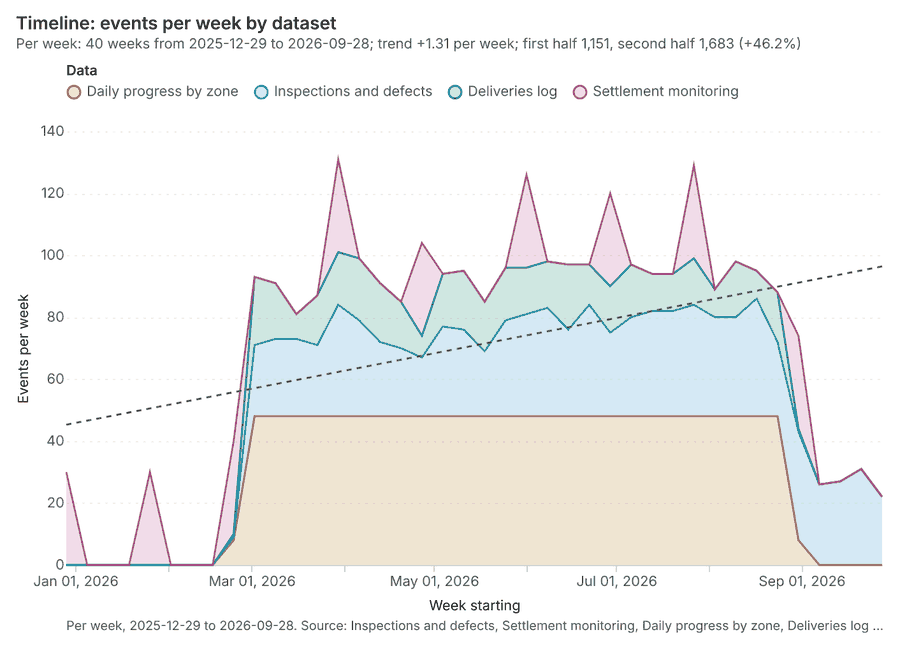
The timeline counts 2,834 dated events in Inspections and defects, Settlement monitoring, Daily progress by zone and 1 more per week, from week of 2025-12-29 to week of 2026-09-28 12345. By dataset: Daily progress by zone 1,264; Inspections and defects 900; Deliveries log 400; Settlement monitoring 270 1. The trend is +1.31 events per week; the second half of the weeks has 1,683 against 1,151 in the first (+46.2%) 1. 6 of the 40 weeks had no events 1.
Busiest weeks
Quietest weeks with events
Space time hot spots
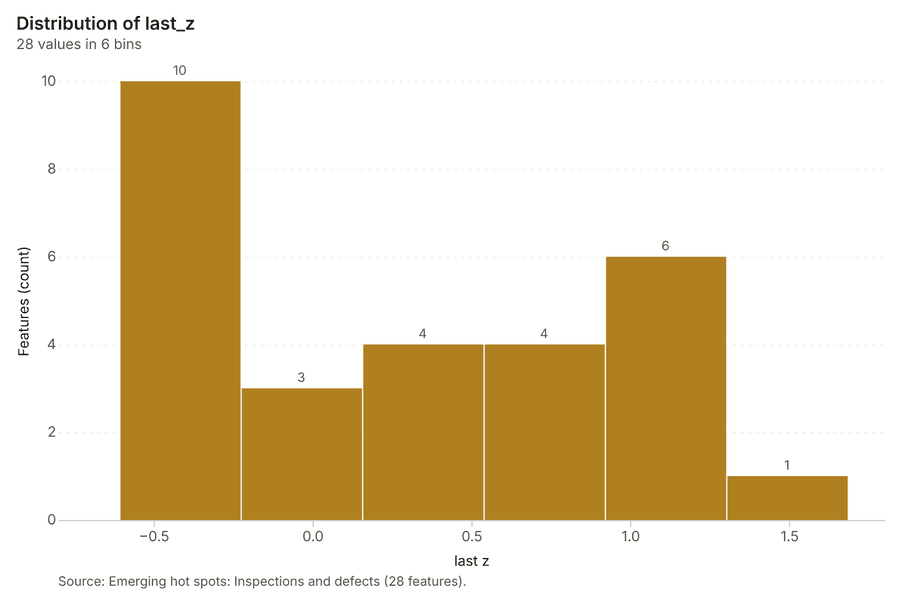
What this analysis is. Emerging hot spots: Where hot spots are new, consecutive, intensifying, persistent, diminishing, sporadic, oscillating or historical over time 6. In ArcGIS it is Emerging Hot Spot Analysis or Create Space Time Cube 6.
Why it was run on this data. Inspections and defects carry dates in 'inspected_at': emerging hot spot analysis finds new, intensifying and fading hot spots per week 7.
What it found. The gp_space_time_hot_spots tool was run using the Inspections and defects input layer 9 [8
| Result | Value |
|---|---|
| result, count | 28 |
| result, elapsed ms | 16 |
| result, resolution | 9 |
| result, features used | 900 |
| result, time neighbors | 0 |
| billing, cost | 0.145 |
| billing, list price | 0.145 |
| billing, upstream cost | 0 |
Findings
- Evidenced: Space time hot spots on Inspections and defects: Emerging hot spots: 1 layer saved: Emerging hot spots: Inspections and defects (28 features) 89.
- Evidenced: It reported result, count 28; result, elapsed ms 16; result, resolution 9; result, features used 900; result, time neighbors 0; billing, cost 0.145 8.
Tool gp_space_time_hot_spots; parameters {"project": "d4e5404f-06e4-4689-a539-31a71b8348eb", "features": {"layer": "Inspections and defects (2d513b03)"}, "interval": "week", "bin_shape": "h3", "resolution": 9, "time_field": "inspected_at"}
Space time hot spots
What this analysis is. Emerging hot spots: Where hot spots are new, consecutive, intensifying, persistent, diminishing, sporadic, oscillating or historical over time 6. In ArcGIS it is Emerging Hot Spot Analysis or Create Space Time Cube 6.
Why it was run on this data. Settlement monitoring carry dates in 'month': emerging hot spot analysis finds new, intensifying and fading hot spots per week 10.
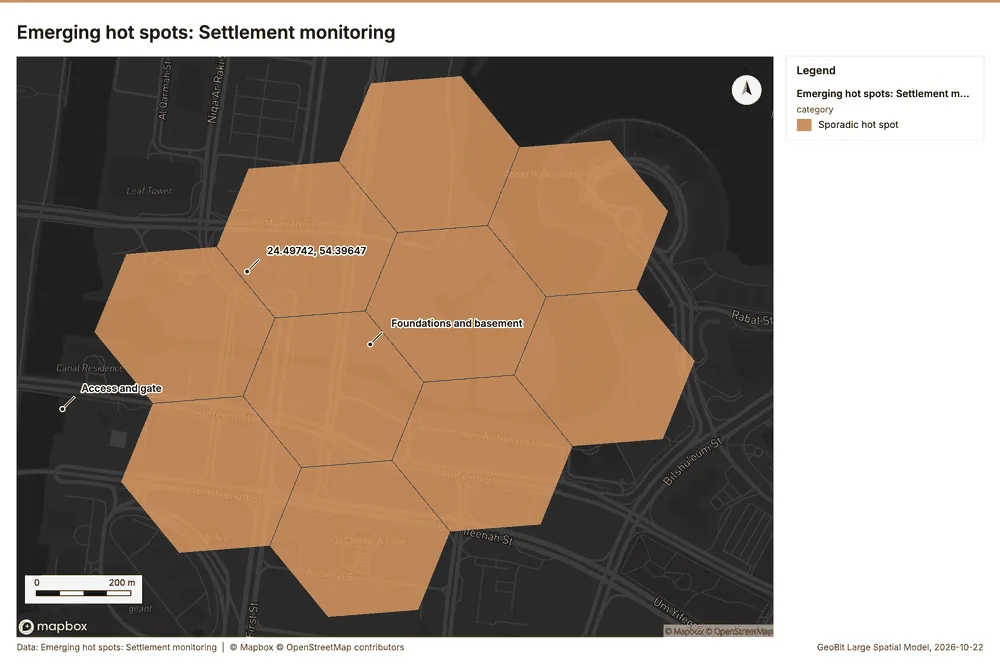
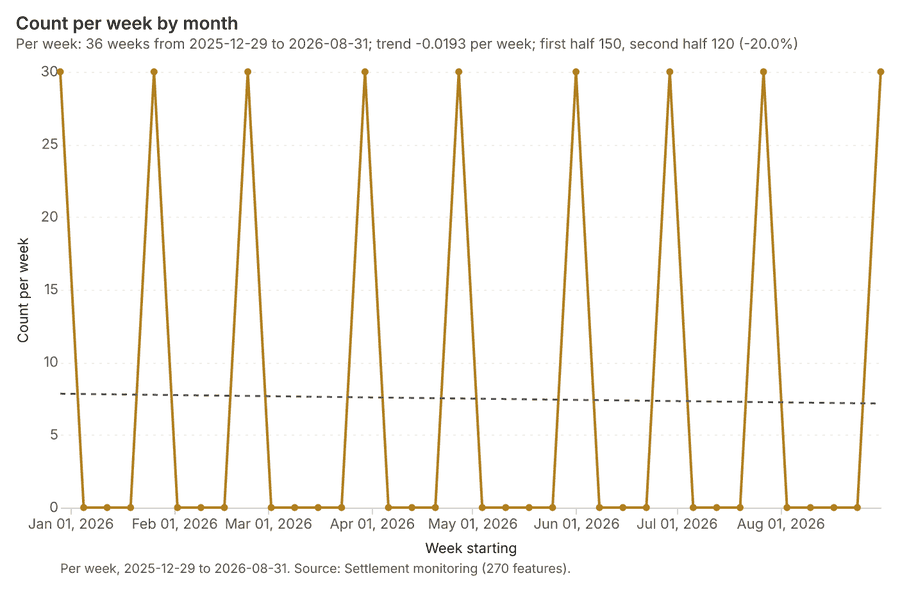
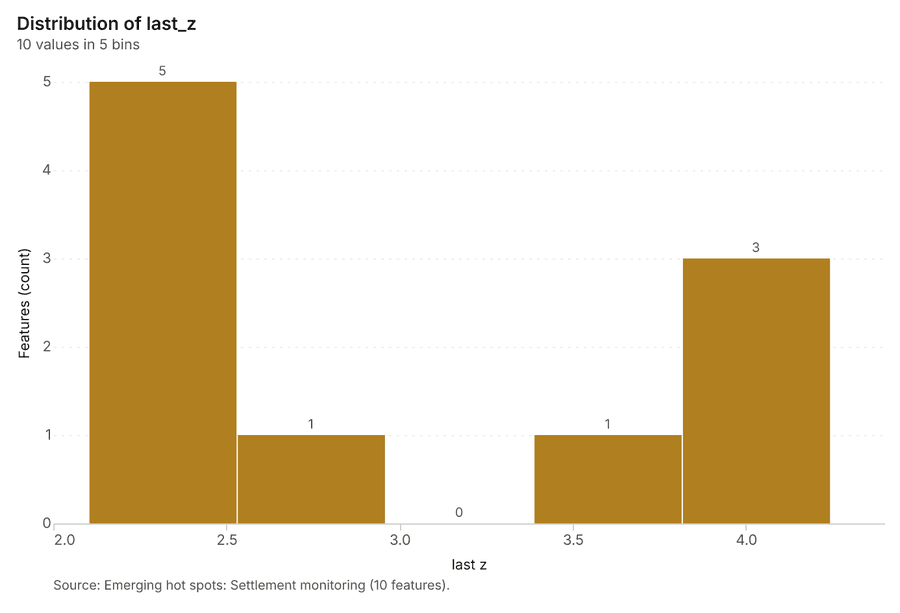
What it found. Space time hot spots on Settlement monitoring: Emerging hot spots: 1 layer saved: Emerging hot spots: Settlement monitoring (10 features) 1112. It reported result, count 10; result, elapsed ms 2; result, resolution 9; result, features used 270; result, time neighbors 0; billing, cost 0.1135 11.
| Result | Value |
|---|---|
| result, count | 10 |
| result, elapsed ms | 2 |
| result, resolution | 9 |
| result, features used | 270 |
| result, time neighbors | 0 |
| billing, cost | 0.1135 |
| billing, list price | 0.1135 |
| billing, upstream cost | 0 |
Findings
- Evidenced: Space time hot spots on Settlement monitoring: Emerging hot spots: 1 layer saved: Emerging hot spots: Settlement monitoring (10 features) 1112.
- Evidenced: It reported result, count 10; result, elapsed ms 2; result, resolution 9; result, features used 270; result, time neighbors 0; billing, cost 0.1135 11.
A model draft was discarded because a sentence did not cite a source of this section.
Tool gp_space_time_hot_spots; parameters {"project": "d4e5404f-06e4-4689-a539-31a71b8348eb", "features": {"layer": "Settlement monitoring (425841af)"}, "interval": "week", "bin_shape": "h3", "resolution": 9, "time_field": "month"}
Near repeat
What this analysis is. Repeat and near repeat classification: Classify incidents as originators, repeats (same place) or near repeats within a distance and time window, with a Knox test table 13. In ArcGIS it is Repeat and Near Repeat Classification or Near Repeat Calculator 13.
Why it was run on this data. Near repeat analysis tests whether Inspections and defects close in space also follow each other within 21 days 14.
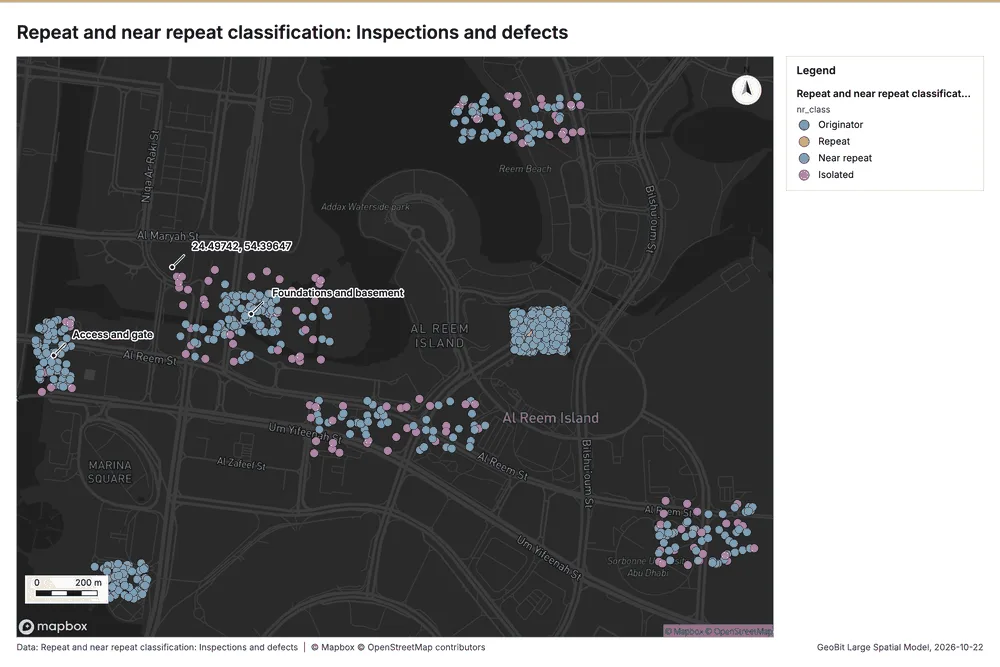
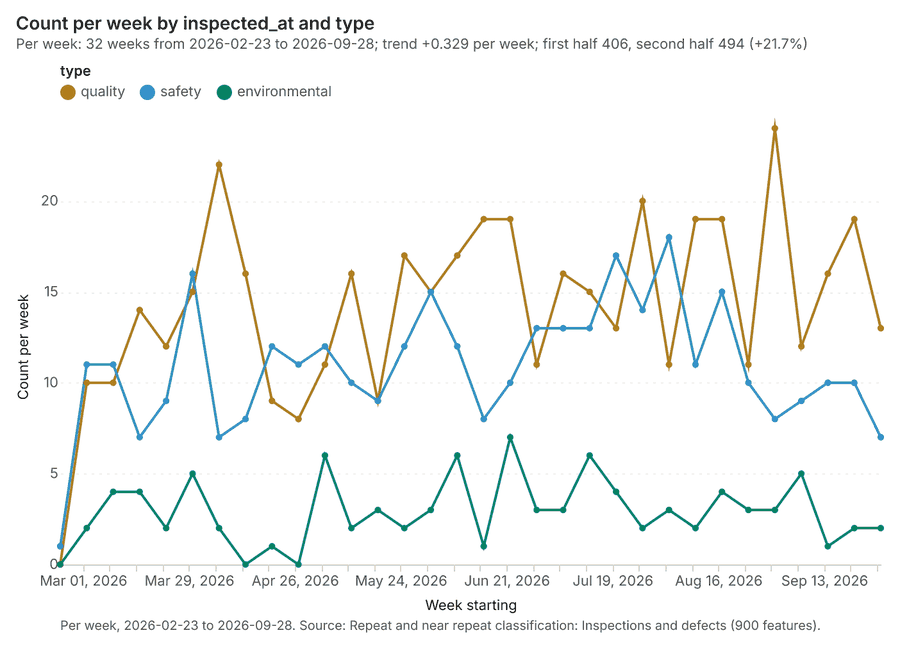
What it found. Near repeat on Inspections and defects: Repeat and near repeat classification: 1 layer saved: Repeat and near repeat classification: Inspections and defects (900 features) 915. It reported result, days 21; result, count 900; result, chains 65; result, distance m 50; result, elapsed ms 78; result, pairs linked 3,856 15.
| Result | Value |
|---|---|
| result, days | 21 |
| result, count | 900 |
| result, chains | 65 |
| result, distance m | 50 |
| result, elapsed ms | 78 |
| result, pairs linked | 3,856 |
| billing, cost | 0.077 |
| billing, list price | 0.077 |
| billing, upstream cost | 0 |
Findings
- Evidenced: Near repeat on Inspections and defects: Repeat and near repeat classification: 1 layer saved: Repeat and near repeat classification: Inspections and defects (900 features) 915.
- Evidenced: It reported result, days 21; result, count 900; result, chains 65; result, distance m 50; result, elapsed ms 78; result, pairs linked 3,856 15.
Tool gp_near_repeat; parameters {"days": 21, "project": "d4e5404f-06e4-4689-a539-31a71b8348eb", "features": {"layer": "Inspections and defects (2d513b03)"}, "distance_m": 50.0, "time_field": "inspected_at"}
Hot spots
What this analysis is. Hot spot analysis: Getis-Ord Gi* hot and cold spots with z-scores, p-values and confidence bins 16. In ArcGIS it is Find Hot Spots or Hot Spot Analysis (Getis-Ord Gi*); in QGIS, qgis:hotspot (plugin) 16.
Why it was run on this data. 900 points: Getis-Ord Gi* tests whether the concentrations in Inspections and defects are statistically significant 17.
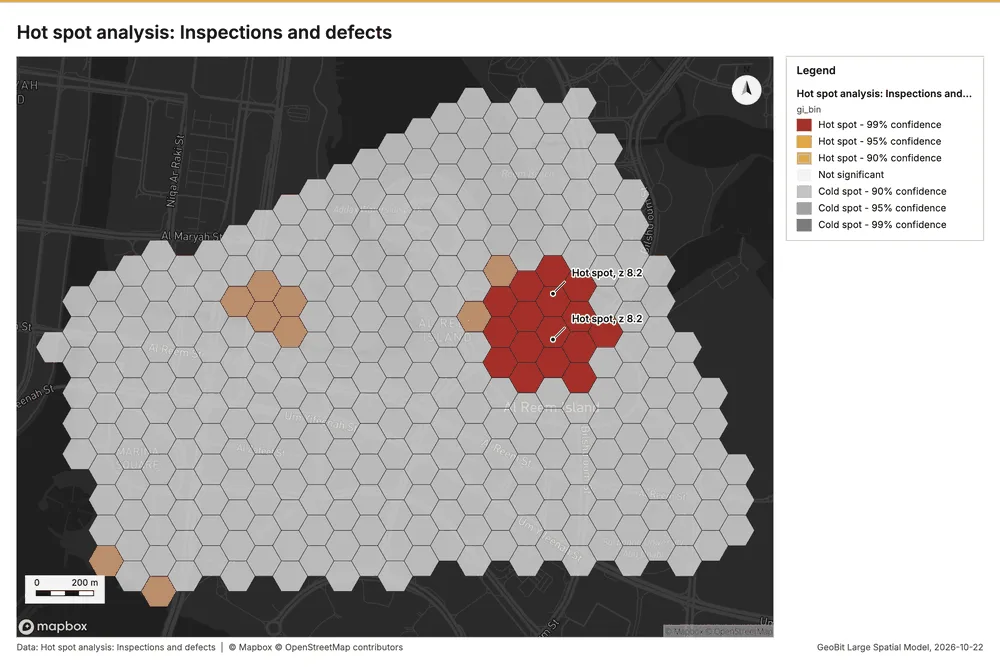
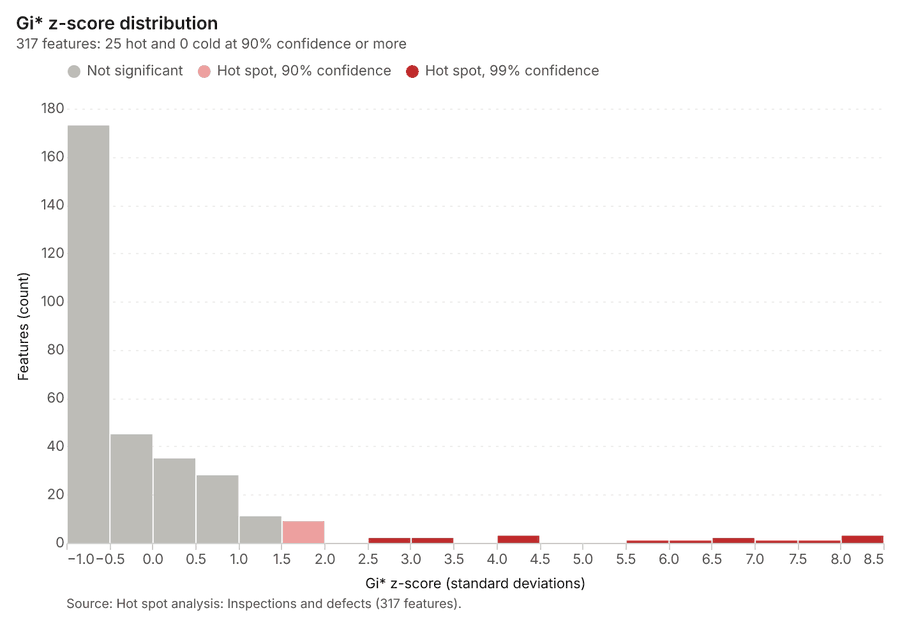
What it found. The hot spot analysis was performed on the Inspections and defects layer 9, generating a result layer with 317 features 18. This process used 900 incidents 18 and covered a distance band of 200 m 18. The analysis report indicates a cell size of 100 m 18 and resulted in an elapsed time of 19 ms 18. The total billing cost for this analysis was 0.068 18.
| Result | Value |
|---|---|
| result, bins | 317 |
| result, count | 317 |
| result, elapsed ms | 19 |
| result, cell size m | 100 |
| result, incidents used | 900 |
| result, distance band m | 200 |
| billing, cost | 0.068 |
| billing, list price | 0.068 |
| billing, upstream cost | 0 |
Findings
- Evidenced: Hot spots on Inspections and defects: Hot spot analysis: 1 layer saved: Hot spot analysis: Inspections and defects (317 features) 918.
- Evidenced: It reported result, bins 317; result, count 317; result, elapsed ms 19; result, cell size m 100; result, incidents used 900; result, distance band m 200 18.
Tool gp_hot_spots; parameters {"project": "d4e5404f-06e4-4689-a539-31a71b8348eb", "features": {"layer": "Inspections and defects (2d513b03)"}, "aggregation": "hexagon", "cell_size_m": 100.0, "distance_band_m": 200.0}
Hot spots
What this analysis is. Hot spot analysis: Getis-Ord Gi* hot and cold spots with z-scores, p-values and confidence bins 16. In ArcGIS it is Find Hot Spots or Hot Spot Analysis (Getis-Ord Gi*); in QGIS, qgis:hotspot (plugin) 16.
Why it was run on this data. 270 points: Getis-Ord Gi* tests whether the concentrations in Settlement monitoring are statistically significant 19.
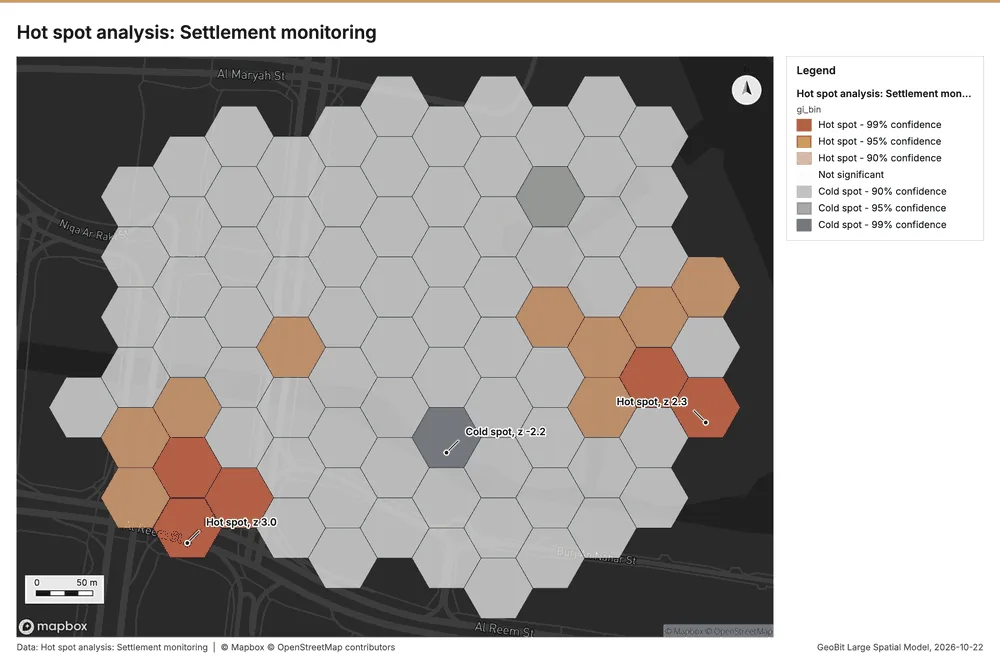
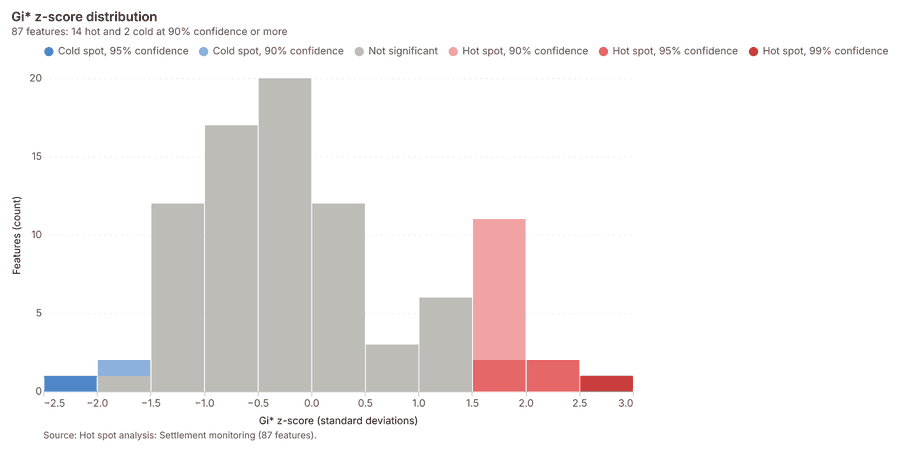
What it found. Hot spots on Settlement monitoring: Hot spot analysis: 1 layer saved: Hot spot analysis: Settlement monitoring (87 features) 1220. It reported result, bins 87; result, count 87; result, elapsed ms 5; result, cell size m 50; result, incidents used 270; result, distance band m 100 20.
| Result | Value |
|---|---|
| result, bins | 87 |
| result, count | 87 |
| result, elapsed ms | 5 |
| result, cell size m | 50 |
| result, incidents used | 270 |
| result, distance band m | 100 |
| billing, cost | 0.0554 |
| billing, list price | 0.0554 |
| billing, upstream cost | 0 |
Findings
- Evidenced: Hot spots on Settlement monitoring: Hot spot analysis: 1 layer saved: Hot spot analysis: Settlement monitoring (87 features) 1220.
- Evidenced: It reported result, bins 87; result, count 87; result, elapsed ms 5; result, cell size m 50; result, incidents used 270; result, distance band m 100 20.
Tool gp_hot_spots; parameters {"project": "d4e5404f-06e4-4689-a539-31a71b8348eb", "features": {"layer": "Settlement monitoring (425841af)"}, "aggregation": "hexagon", "cell_size_m": 50.0, "distance_band_m": 100.0}
Hot spots
What this analysis is. Hot spot analysis: Getis-Ord Gi* hot and cold spots with z-scores, p-values and confidence bins 16. In ArcGIS it is Find Hot Spots or Hot Spot Analysis (Getis-Ord Gi*); in QGIS, qgis:hotspot (plugin) 16.
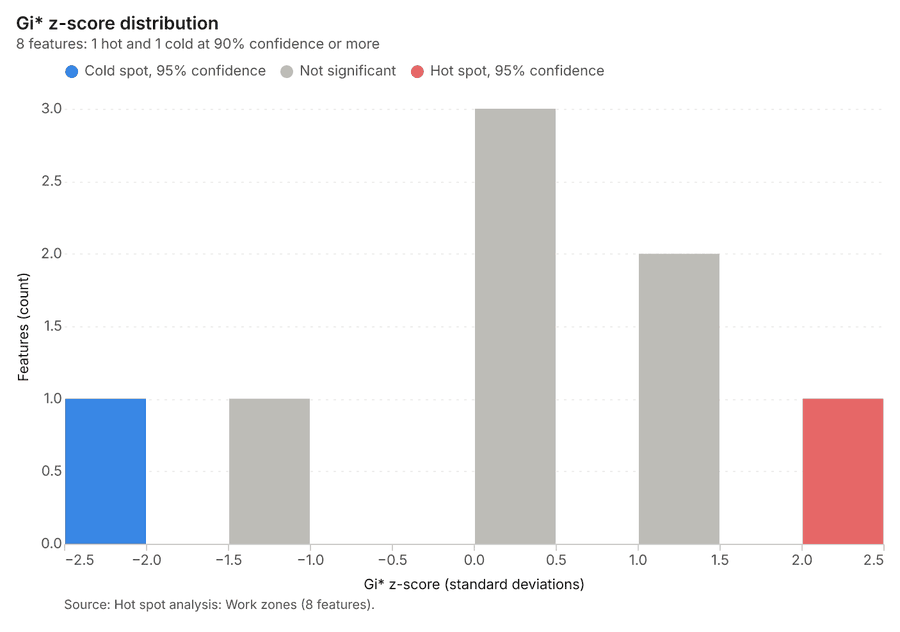
Why it was run on this data. Gi* hot spots of 'pct_complete' across the areas 21.
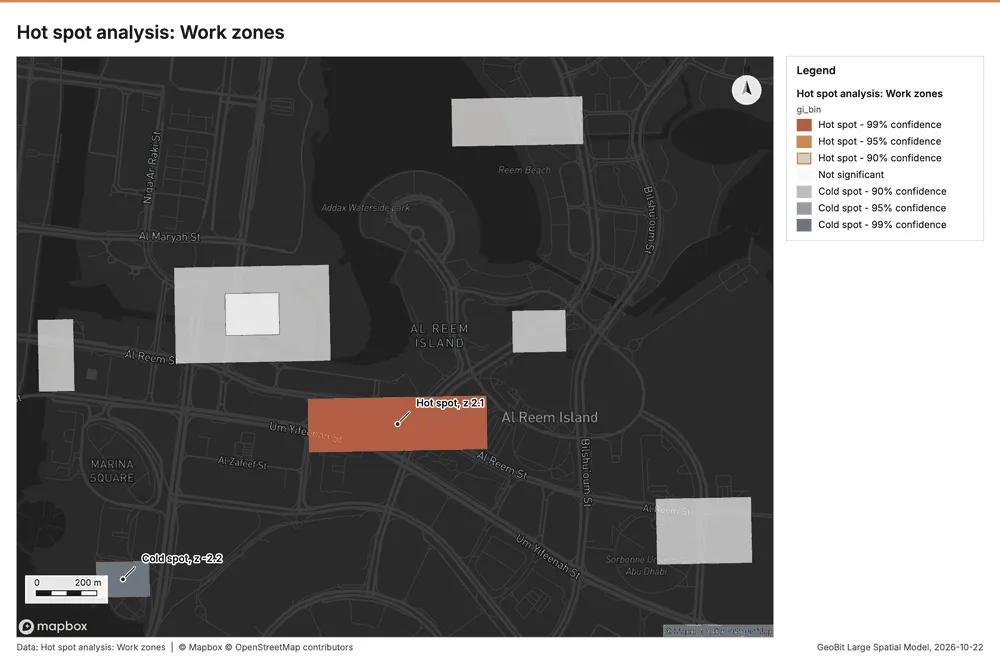
What it found. The hot spot analysis was performed using the Work zones layer 23 and generated a saved layer titled Hot spot analysis: Work zones 22.
| Result | Value |
|---|---|
| result, count | 8 |
| result, elapsed ms | 1 |
| result, excluded null | 0 |
| result, distance band m | 872.7 |
| billing, cost | 0.05016 |
| billing, list price | 0.05016 |
| billing, upstream cost | 0 |
Findings
- Evidenced: Hot spots on Work zones: Hot spot analysis: 1 layer saved: Hot spot analysis: Work zones (8 features) 2223.
- Evidenced: It reported result, count 8; result, elapsed ms 1; result, excluded null 0; result, distance band m 872.7; billing, cost 0.05016; billing, list price 0.05016 22.
Tool gp_hot_spots; parameters {"field": "pct_complete", "project": "d4e5404f-06e4-4689-a539-31a71b8348eb", "features": {"layer": "Work zones (a87c9da1)"}}
Index change
What this analysis is. Spectral index change: Change of a spectral index (NDVI, NDWI, NDBI, NBR …) or a band expression between two images: before, after and difference rasters, decrease / increase classes beyond the threshold with polygons and areas; NBR also gives dNBR with burn severity classes 24.
Why it was run on this data. Index change between Site progress scene 2026-03-01 (2026-03-01) and Site progress scene 2026-09-01 (2026-09-01): the changed area, with the changed places as polygons 25.
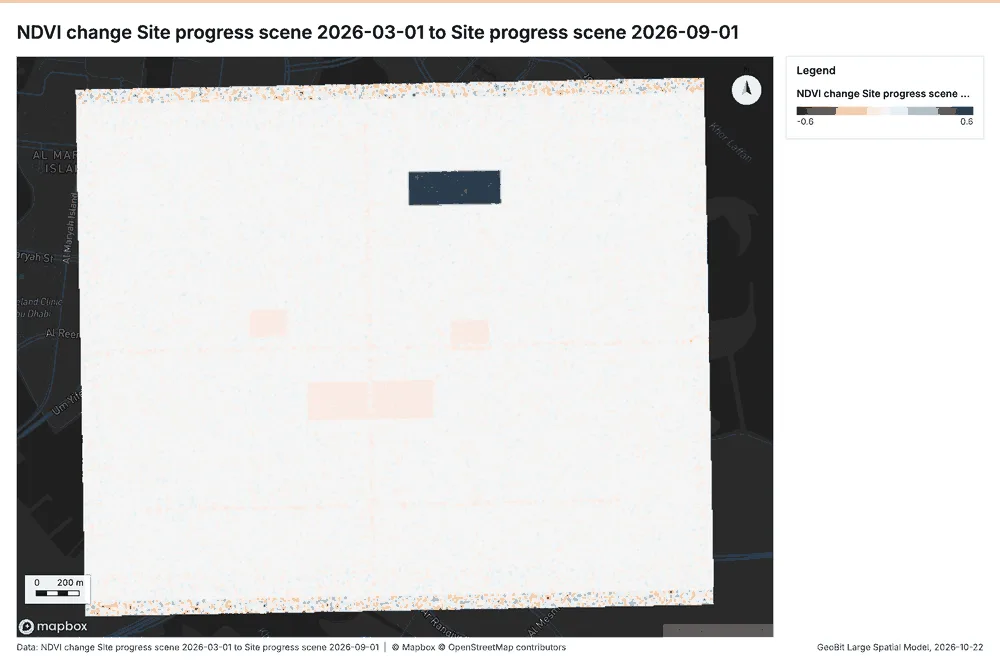
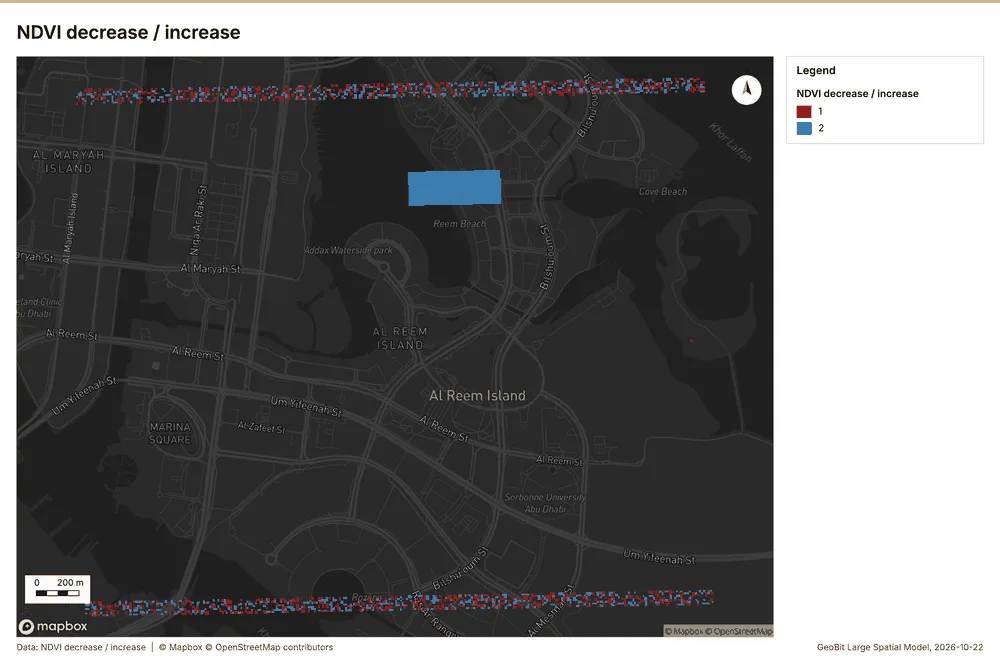
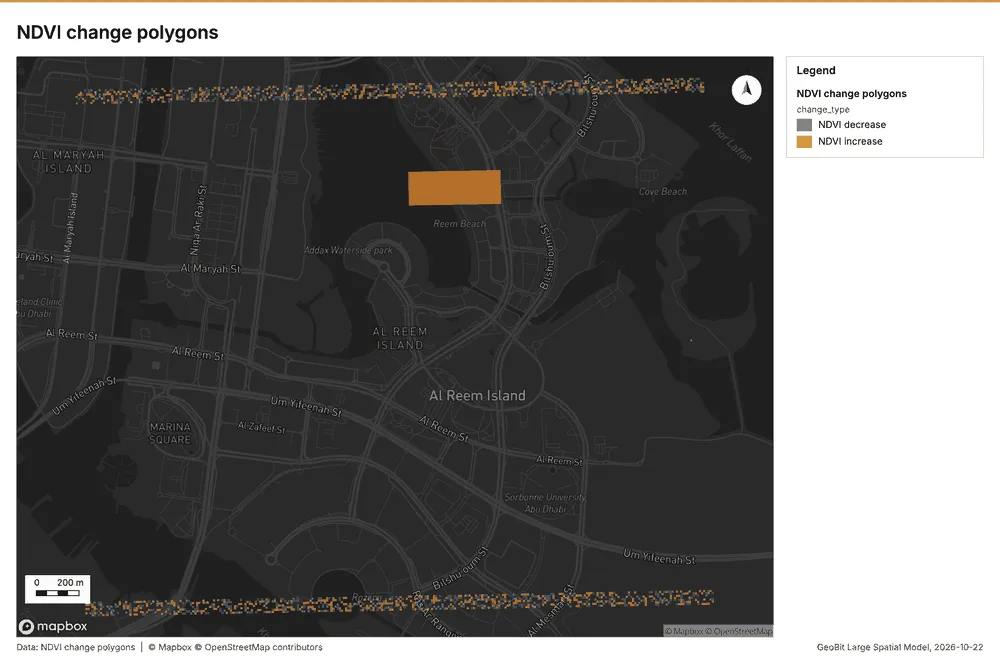
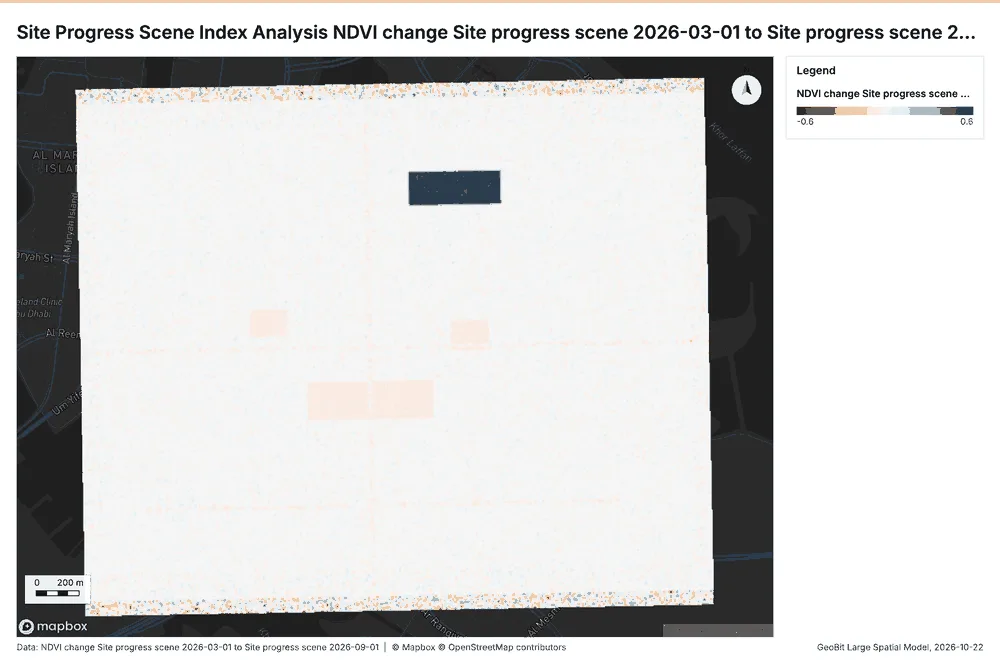
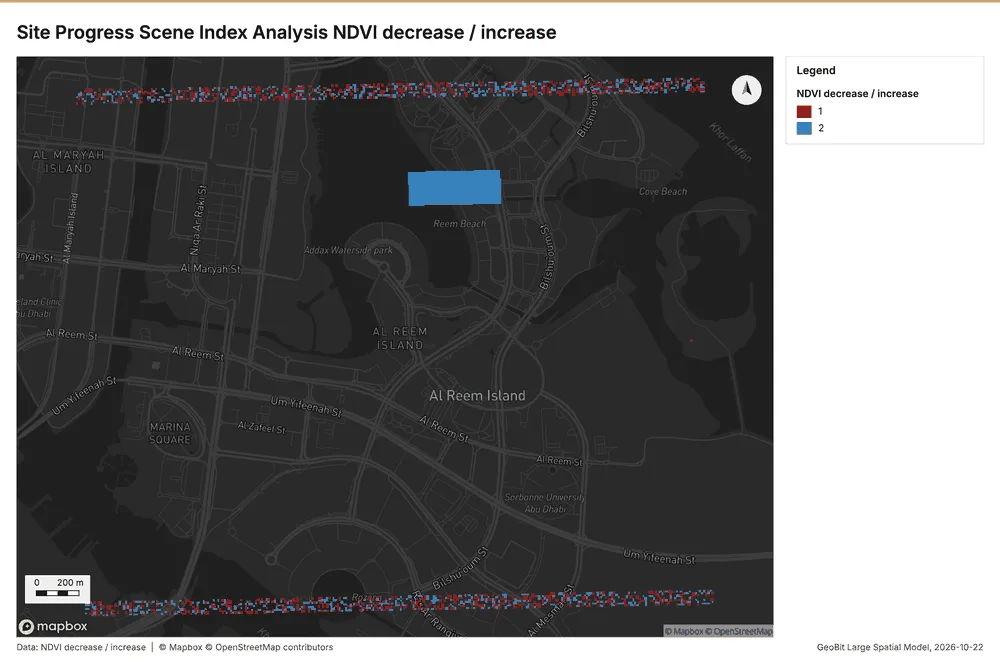
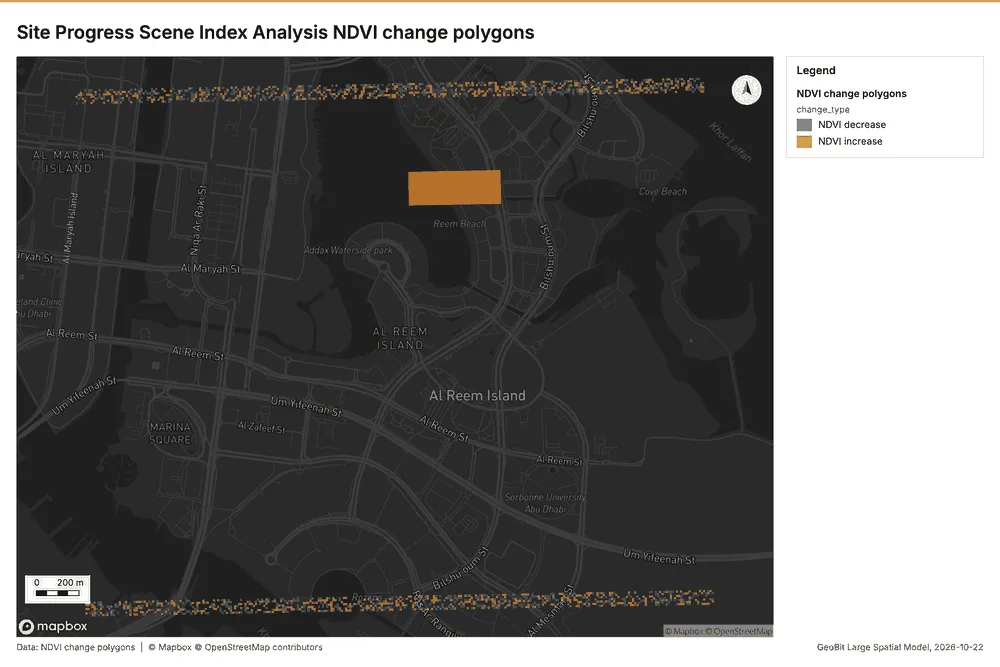
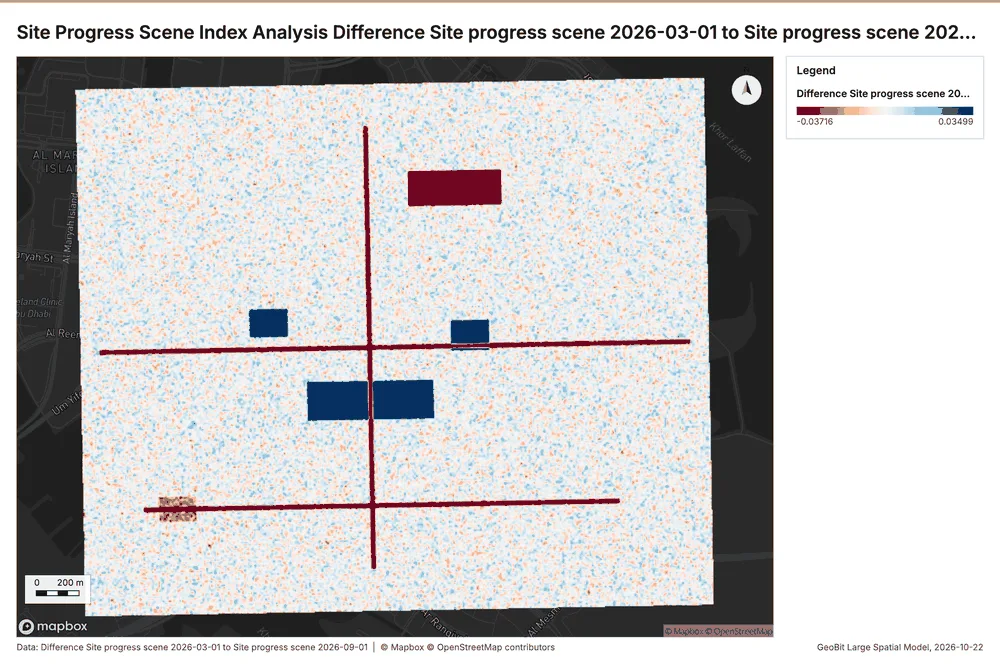
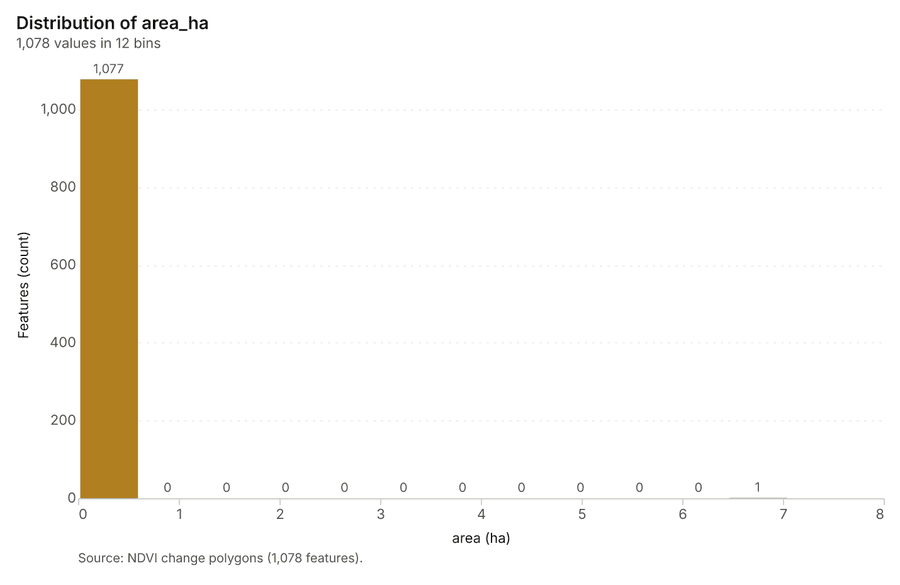
What it found. Index change: Spectral index change: created NDVI change Site progress scene 2026-03-01 to Site progress scene 2026-09-01 (300 x 250 cells, 10.00 m) 26. plus 1 more raster layer(s) 26. and layer NDVI change polygons with 1078 feature(s) 26. mean before 0.08239; mean after 0.08535; mean difference 0.002955; decrease ha 9.00; increase ha 15.70 26. It reported stats, polygons 1,078; stats, mean after 0.08535; stats, decrease ha 9; stats, increase ha 15.7; stats, mean before 0.08239; stats, masked pixels 0 26.
| Result | Value |
|---|---|
| stats, polygons | 1,078 |
| stats, mean after | 0.08535 |
| stats, decrease ha | 9 |
| stats, increase ha | 15.7 |
| stats, mean before | 0.08239 |
| stats, masked pixels | 0 |
| stats, mean difference | 0.002955 |
| elapsed ms | 692 |
Findings
- Evidenced: Index change: Spectral index change: created NDVI change Site progress scene 2026-03-01 to Site progress scene 2026-09-01 (300 x 250 cells, 10.00 m) 26.
- Evidenced: plus 1 more raster layer(s) 26.
- Evidenced: and layer NDVI change polygons with 1078 feature(s) 26.
- Evidenced: mean before 0.08239; mean after 0.08535; mean difference 0.002955; decrease ha 9.00; increase ha 15.70 26.
- Evidenced: It reported stats, polygons 1,078; stats, mean after 0.08535; stats, decrease ha 9; stats, increase ha 15.7; stats, mean before 0.08239; stats, masked pixels 0 26.
Tool im_index_change; parameters {"after_id": "Site progress scene 2026-09-01 (0e506696)", "polygons": true, "before_id": "Site progress scene 2026-03-01 (44bcba49)"}
Compute change raster
What this analysis is. Compute change raster: Pixel value or spectral change between two co-registered images: difference, relative difference, absolute difference, log ratio (radar, dB), Euclidean spectral distance, spectral angle (radians) or the band with most change 27.
Why it was run on this data. A change raster between Site progress scene 2026-03-01 (2026-03-01) and Site progress scene 2026-09-01 (2026-09-01): where and how much the pixels changed 28.
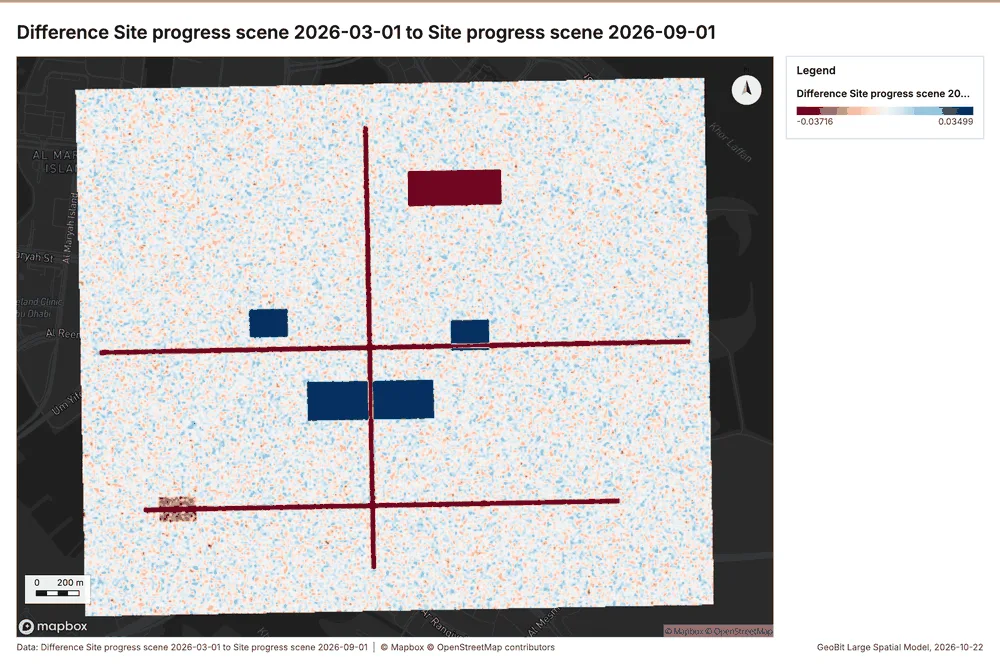
What it found. Compute change raster: Compute change raster: created Difference Site progress scene 2026-03-01 to Site progress scene 2026-09-01 (300 x 250 cells, 10.00 m) 29. mean -0.001083; std 0.01804; min -0.134; max 0.091; masked pixels 0 29. It reported stats, max 0.091; stats, min -0.134; stats, std 0.01804; stats, mean -0.001083; stats, masked pixels 0; elapsed ms 115 29.
| Result | Value |
|---|---|
| stats, max | 0.091 |
| stats, min | -0.134 |
| stats, std | 0.01804 |
| stats, mean | -0.001083 |
| stats, masked pixels | 0 |
| elapsed ms | 115 |
Findings
- Evidenced: Compute change raster: Compute change raster: created Difference Site progress scene 2026-03-01 to Site progress scene 2026-09-01 (300 x 250 cells, 10.00 m) 29.
- Evidenced: mean -0.001083; std 0.01804; min -0.134; max 0.091; masked pixels 0 29.
- Evidenced: It reported stats, max 0.091; stats, min -0.134; stats, std 0.01804; stats, mean -0.001083; stats, masked pixels 0; elapsed ms 115 29.
Tool im_compute_change_raster; parameters {"after_id": "Site progress scene 2026-09-01 (0e506696)", "before_id": "Site progress scene 2026-03-01 (44bcba49)"}
Calculate density
What this analysis is. Calculate density: Kernel density per square kilometer on a grid 30. In ArcGIS it is Calculate Density or Kernel Density; in QGIS, native:heatmapkerneldensityestimation 30.
Why it was run on this data. 900 points in Inspections and defects: a density surface shows where they concentrate 31.
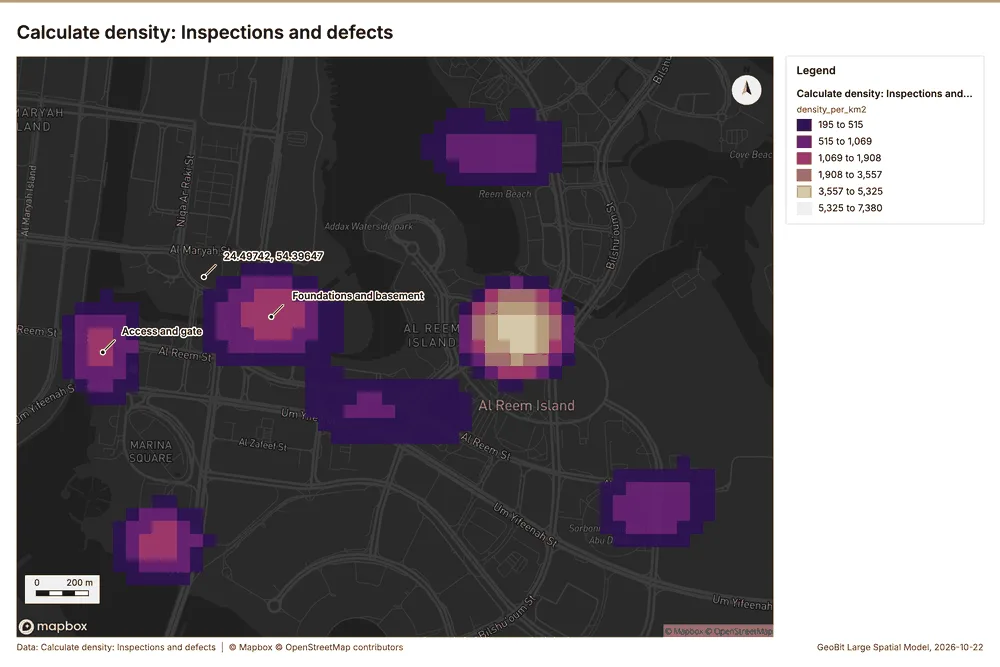
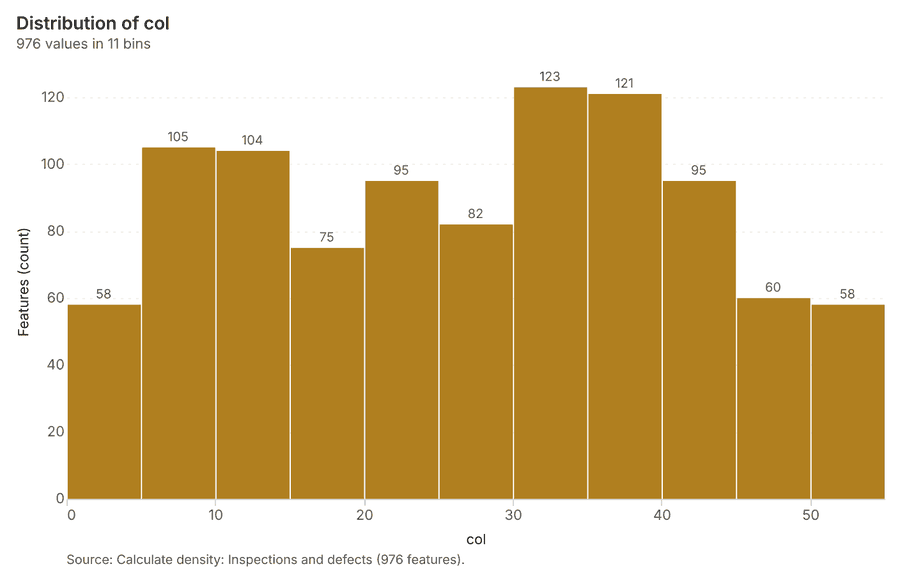
What it found. The calculation of density using Inspections and defects 9 generated a result containing 976 features 32. The maximum density calculated was 7,380 per km2 32. This process was completed with an elapsed time of 36 ms 32 and incurred a cost of 0.068 32.
| Result | Value |
|---|---|
| result, count | 976 |
| result, elapsed ms | 36 |
| result, bandwidth m | 200 |
| result, cell size m | 50 |
| result, excluded null | 0 |
| result, max density per km2 | 7,380 |
| billing, cost | 0.068 |
| billing, list price | 0.068 |
| billing, upstream cost | 0 |
Findings
- Evidenced: Calculate density on Inspections and defects: Calculate density: 1 layer saved: Calculate density: Inspections and defects (976 features) 932.
- Evidenced: It reported result, count 976; result, elapsed ms 36; result, bandwidth m 200; result, cell size m 50; result, excluded null 0; result, max density per km2 7,380 32.
Tool gp_calculate_density; parameters {"kernel": "quartic", "project": "d4e5404f-06e4-4689-a539-31a71b8348eb", "features": {"layer": "Inspections and defects (2d513b03)"}, "bandwidth_m": 200.0, "cell_size_m": 50.0}
Calculate density
What this analysis is. Calculate density: Kernel density per square kilometer on a grid 30. In ArcGIS it is Calculate Density or Kernel Density; in QGIS, native:heatmapkerneldensityestimation 30.
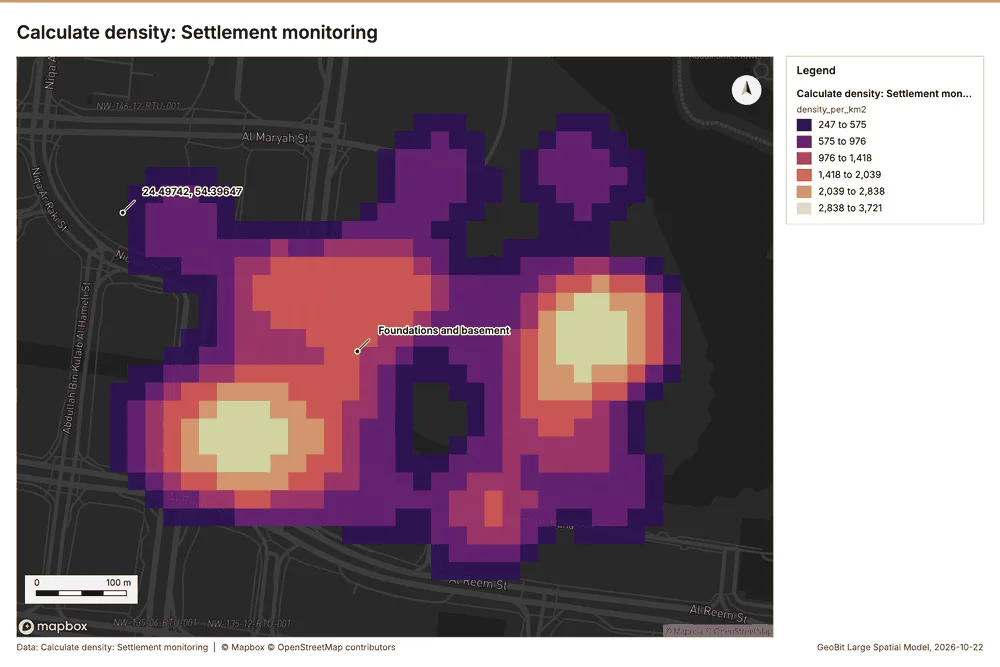
Why it was run on this data. 270 points in Settlement monitoring: a density surface shows where they concentrate 33.
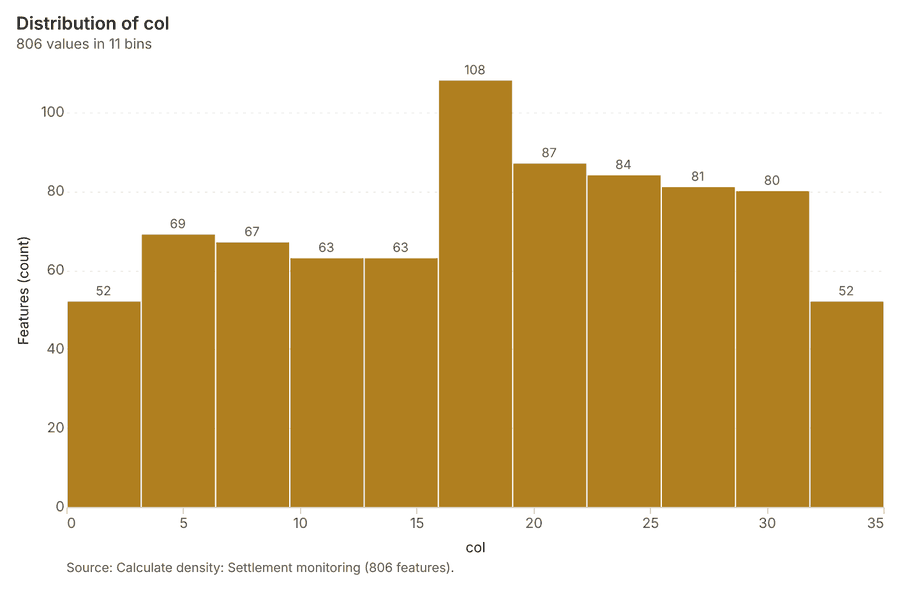
What it found. Calculate density on Settlement monitoring: Calculate density: 1 layer saved: Calculate density: Settlement monitoring (806 features) 1234. It reported result, count 806; result, elapsed ms 22; result, bandwidth m 100; result, cell size m 20; result, excluded null 0; result, max density per km2 3,721 34.
| Result | Value |
|---|---|
| result, count | 806 |
| result, elapsed ms | 22 |
| result, bandwidth m | 100 |
| result, cell size m | 20 |
| result, excluded null | 0 |
| result, max density per km2 | 3,721 |
| billing, cost | 0.0554 |
| billing, list price | 0.0554 |
| billing, upstream cost | 0 |
Findings
- Evidenced: Calculate density on Settlement monitoring: Calculate density: 1 layer saved: Calculate density: Settlement monitoring (806 features) 1234.
- Evidenced: It reported result, count 806; result, elapsed ms 22; result, bandwidth m 100; result, cell size m 20; result, excluded null 0; result, max density per km2 3,721 34.
Tool gp_calculate_density; parameters {"kernel": "quartic", "project": "d4e5404f-06e4-4689-a539-31a71b8348eb", "features": {"layer": "Settlement monitoring (425841af)"}, "bandwidth_m": 100.0, "cell_size_m": 20.0}
Summarize within
What this analysis is. Summarize within: Count and aggregate the features inside each polygon (or bin), proportionally for lines and polygons 35. In ArcGIS it is Summarize Within or Aggregate Points; in QGIS, native:countpointsinpolygon or native:sumlinelengths 35.
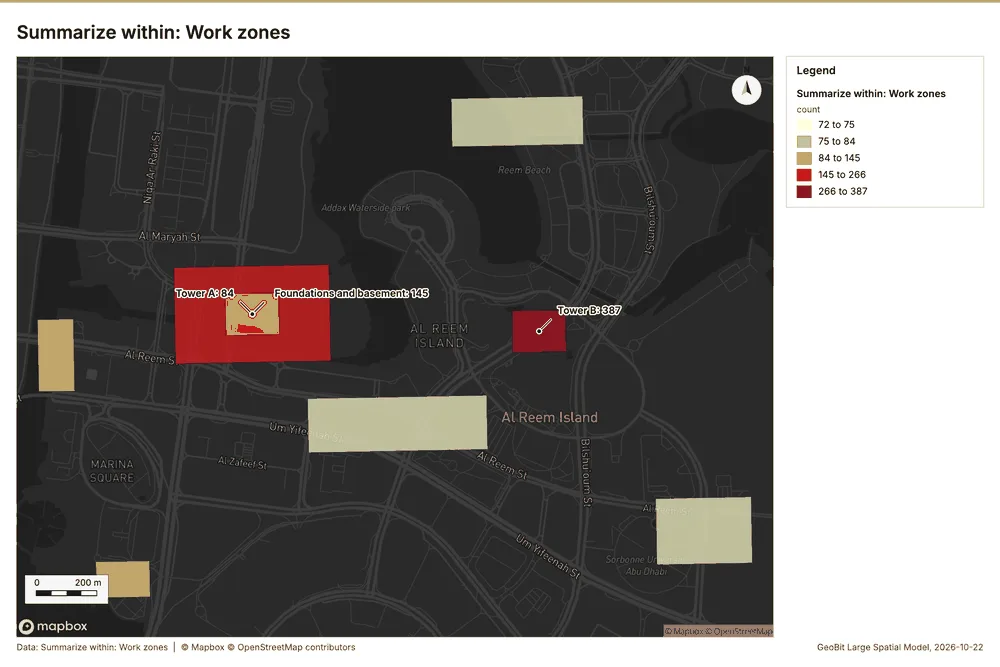
Why it was run on this data. Count Inspections and defects inside each feature of Work zones by type; the counts map as a choropleth (natural breaks, sequential colors) 36.
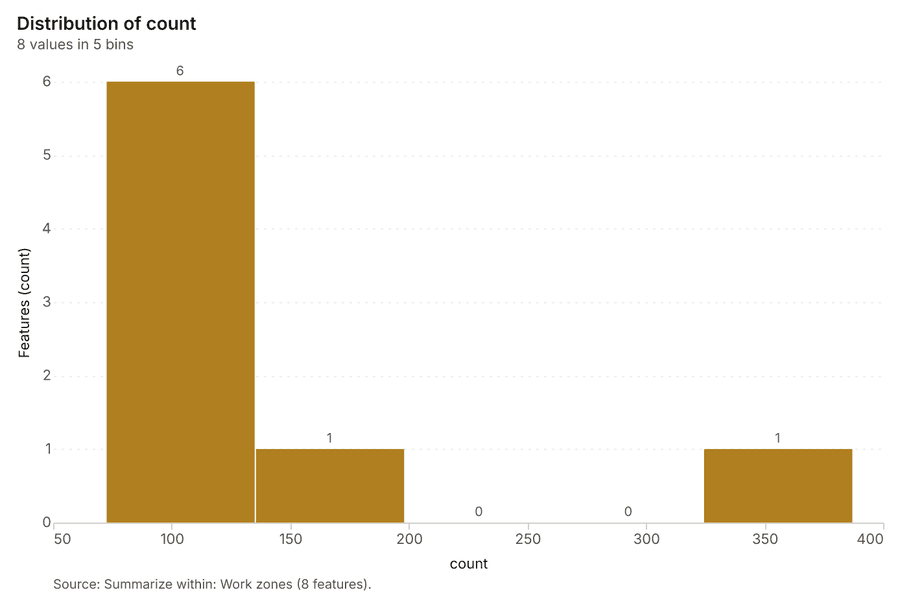
What it found. Summarize within on Inspections and defects, Work zones: Summarize within: 1 layer saved: Summarize within: Work zones (8 features) 92337. It reported result, count 8; result, elapsed ms 1; billing, cost 0.02816; billing, list price 0.02816; billing, upstream cost 0 37.
| Result | Value |
|---|---|
| result, count | 8 |
| result, elapsed ms | 1 |
| billing, cost | 0.02816 |
| billing, list price | 0.02816 |
| billing, upstream cost | 0 |
Findings
- Evidenced: Summarize within on Inspections and defects, Work zones: Summarize within: 1 layer saved: Summarize within: Work zones (8 features) 92337.
- Evidenced: It reported result, count 8; result, elapsed ms 1; billing, cost 0.02816; billing, list price 0.02816; billing, upstream cost 0 37.
Tool gp_summarize_within; parameters {"stats": [], "project": "d4e5404f-06e4-4689-a539-31a71b8348eb", "features": {"layer": "Inspections and defects (2d513b03)"}, "group_by": "type", "polygons": {"layer": "Work zones (a87c9da1)"}}
Summarize within
What this analysis is. Summarize within: Count and aggregate the features inside each polygon (or bin), proportionally for lines and polygons 35. In ArcGIS it is Summarize Within or Aggregate Points; in QGIS, native:countpointsinpolygon or native:sumlinelengths 35.
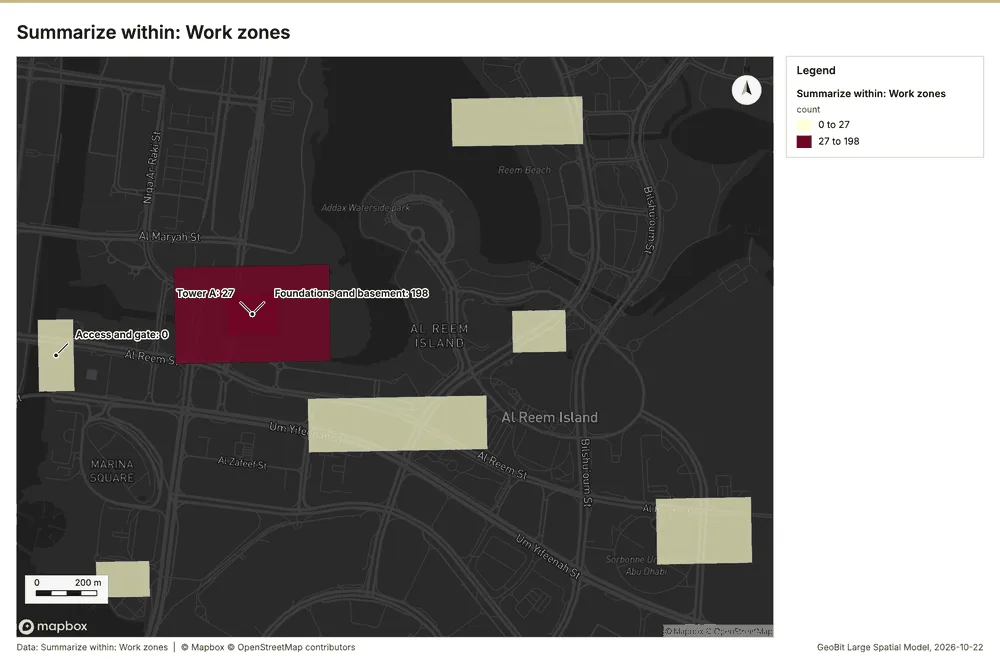
Why it was run on this data. Count Inspections and defects inside each feature of Work zones by type; the counts map as a choropleth (natural breaks, sequential colors) 36.
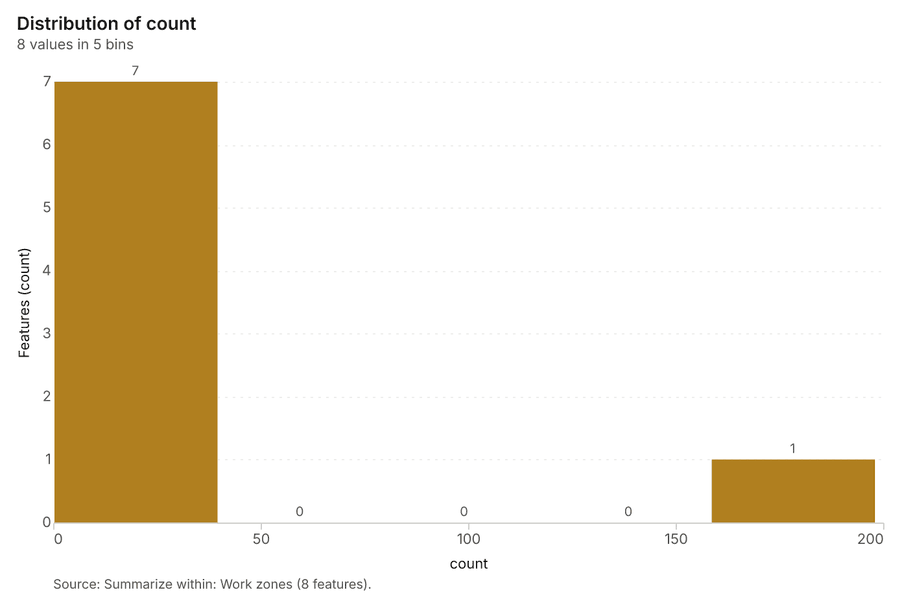
What it found. Summarize within on Settlement monitoring, Work zones: Summarize within: 1 layer saved: Summarize within: Work zones (8 features) 122338. It reported result, count 8; result, elapsed ms 0; billing, cost 0.01558; billing, list price 0.01558; billing, upstream cost 0 38.
| Result | Value |
|---|---|
| result, count | 8 |
| result, elapsed ms | 0 |
| billing, cost | 0.01558 |
| billing, list price | 0.01558 |
| billing, upstream cost | 0 |
Findings
- Evidenced: Summarize within on Settlement monitoring, Work zones: Summarize within: 1 layer saved: Summarize within: Work zones (8 features) 122338.
- Evidenced: It reported result, count 8; result, elapsed ms 0; billing, cost 0.01558; billing, list price 0.01558; billing, upstream cost 0 38.
Tool gp_summarize_within; parameters {"stats": [{"stat": "sum", "field": "settlement_mm"}], "project": "d4e5404f-06e4-4689-a539-31a71b8348eb", "features": {"layer": "Settlement monitoring (425841af)"}, "polygons": {"layer": "Work zones (a87c9da1)"}}
Summarize within
What this analysis is. Summarize within: Count and aggregate the features inside each polygon (or bin), proportionally for lines and polygons 35. In ArcGIS it is Summarize Within or Aggregate Points; in QGIS, native:countpointsinpolygon or native:sumlinelengths 35.
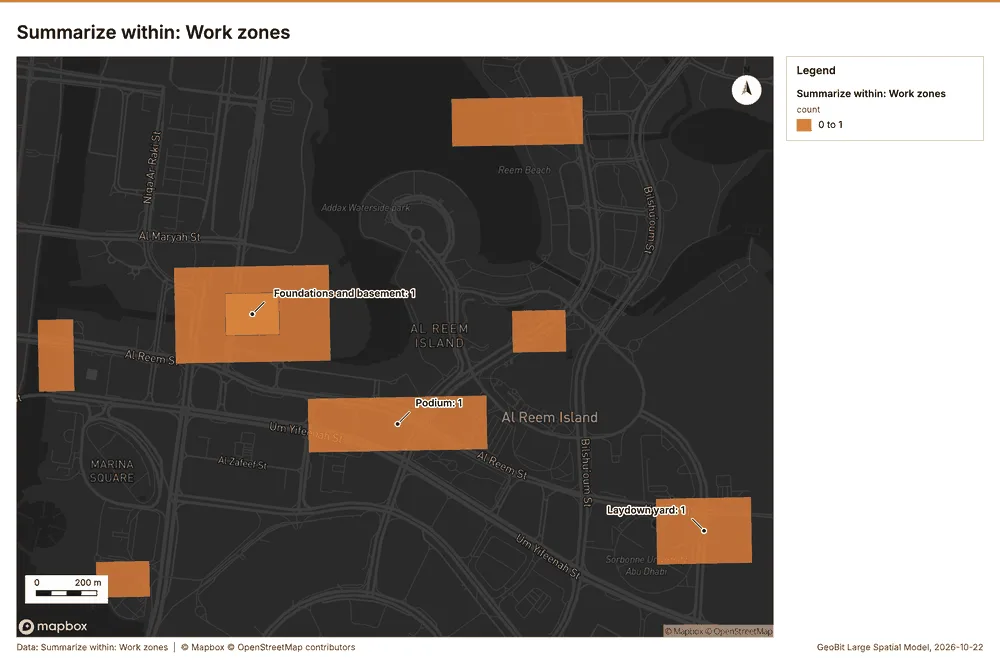
Why it was run on this data. Count Inspections and defects inside each feature of Work zones by type; the counts map as a choropleth (natural breaks, sequential colors) 36.
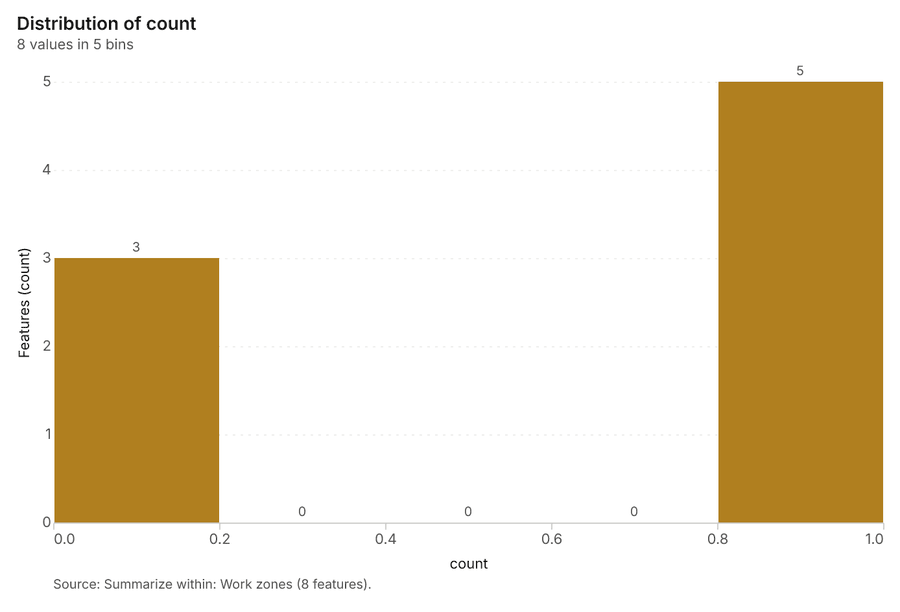
What it found. Summarize within on Tower cranes, Work zones: Summarize within: 1 layer saved: Summarize within: Work zones (8 features) 233940. It reported result, count 8; result, elapsed ms 0; billing, cost 0.01026; billing, list price 0.01026; billing, upstream cost 0 39.
| Result | Value |
|---|---|
| result, count | 8 |
| result, elapsed ms | 0 |
| billing, cost | 0.01026 |
| billing, list price | 0.01026 |
| billing, upstream cost | 0 |
Findings
- Evidenced: Summarize within on Tower cranes, Work zones: Summarize within: 1 layer saved: Summarize within: Work zones (8 features) 233940.
- Evidenced: It reported result, count 8; result, elapsed ms 0; billing, cost 0.01026; billing, list price 0.01026; billing, upstream cost 0 39.
Tool gp_summarize_within; parameters {"stats": [{"stat": "sum", "field": "radius_m"}], "project": "d4e5404f-06e4-4689-a539-31a71b8348eb", "features": {"layer": "Tower cranes (a6101de1)"}, "polygons": {"layer": "Work zones (a87c9da1)"}}
Zonal statistics
What this analysis is. Zonal statistics: count/min/max/mean/std/sum/median/majority per polygon as a table and as GeoJSON 41. In ArcGIS it is Zonal Statistics as Table (polygons) 41.
Why it was run on this data. Statistics of Site terrain model (DEM) inside each feature of Work zones 42.
What it found. The analysis utilized the Zonal statistics tool rs_zonal_statistics 43. This tool processed 8 row(s) of zonal statistics 43. The resulting analysis covered a total of 8 zones 43.
Findings
Tool rs_zonal_statistics; parameters {"stats": ["mean", "min", "max", "std"], "zones": "Work zones (a87c9da1)", "raster_id": "Site terrain model (DEM) (0c6d4acd)"}
Zonal statistics
What this analysis is. Zonal statistics: count/min/max/mean/std/sum/median/majority per polygon as a table and as GeoJSON 41. In ArcGIS it is Zonal Statistics as Table (polygons) 41.
Why it was run on this data. Statistics of Site terrain model (DEM) inside each feature of Work zones 42.
What it found. The zonal statistics generated an output containing 1 row(s) spanning 1 zone 44. The analysis confirmed that the count of zones was 1 and the count of features was 1 44. The process completed its execution in 31 elapsed ms 44.
| Result | Value |
|---|---|
| stats, zones | 1 |
| features, count | 1 |
| elapsed ms | 31 |
Findings
- Evidenced: Zonal statistics: Zonal statistics: 1 row(s) 44.
- Evidenced: zones 1 44.
- Evidenced: It reported stats, zones 1; features, count 1; elapsed ms 31 44.
Tool rs_zonal_statistics; parameters {"stats": ["mean", "min", "max", "std"], "zones": "Site boundary (3902997c)", "raster_id": "Site terrain model (DEM) (0c6d4acd)"}
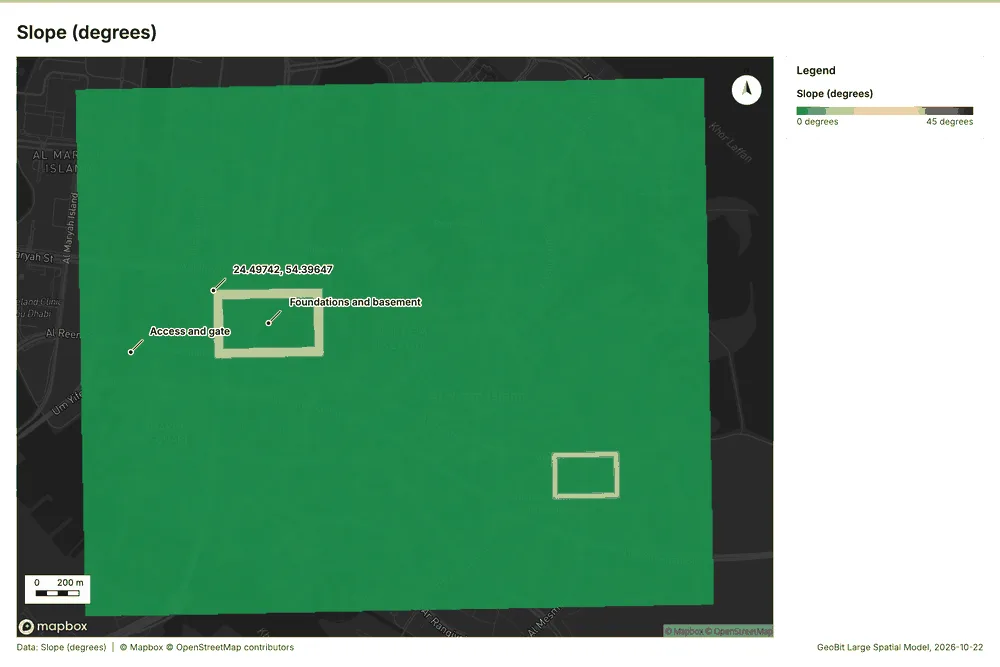
Slope
What this analysis is. Slope: Horn slope in degrees or percent, with the share of ground in six grade classes 45. In ArcGIS it is Slope (Spatial Analyst); in QGIS, Slope (GDAL DEM) 45.
Why it was run on this data. Slope of the Site terrain model (DEM) surface 46.
What it found. The slope analysis over 7.50 km2 revealed a mean of 0.36 degrees and a maximum slope of 18.73 degrees; specifically, 1.19 of the ground was steeper than 15% 47. This analysis utilized the Site terrain model (DEM) as its core input 48. The resulting slope grid was defined by 500 rows and 600 columns 47.
| Result | Value |
|---|---|
| dem, cols | 600 |
| dem, rows | 500 |
| dem, cell m | 5 |
| dem, relief m | 20.94 |
| dem, elev max m | 10.14 |
| dem, elev min m | -10.8 |
| dem, elev mean m | 3.4 |
| dem, missing frac | 0 |
| cost, usd | 0 |
| grid, cols | 600 |
| grid, rows | 500 |
| grid, cell m | 5 |
| stats, max | 18.73 |
| stats, min | 0 |
| stats, mean | 0.36 |
| stats, median | 0.16 |
| stats, steeper than 15pct | 1.19 |
| rows left out | 0 |
Findings
- Evidenced: Slope on Site terrain model (DEM): Slope over 7.50 km2: mean 0.36 degrees, max 18.73 degrees; 1% of the ground is steeper than 15% 4748.
- Evidenced: DEM: Site terrain model (DEM) 4748.
- Evidenced: Verified: 2 checks passed 4748.
- Evidenced: It reported dem, cols 600; dem, rows 500; dem, cell m 5; dem, relief m 20.94; dem, elev max m 10.14; dem, elev min m -10.8 47.
Tool tr_slope; parameters {"dem": {"layer": "Site terrain model (DEM) (0c6d4acd)"}, "project": "d4e5404f-06e4-4689-a539-31a71b8348eb"}
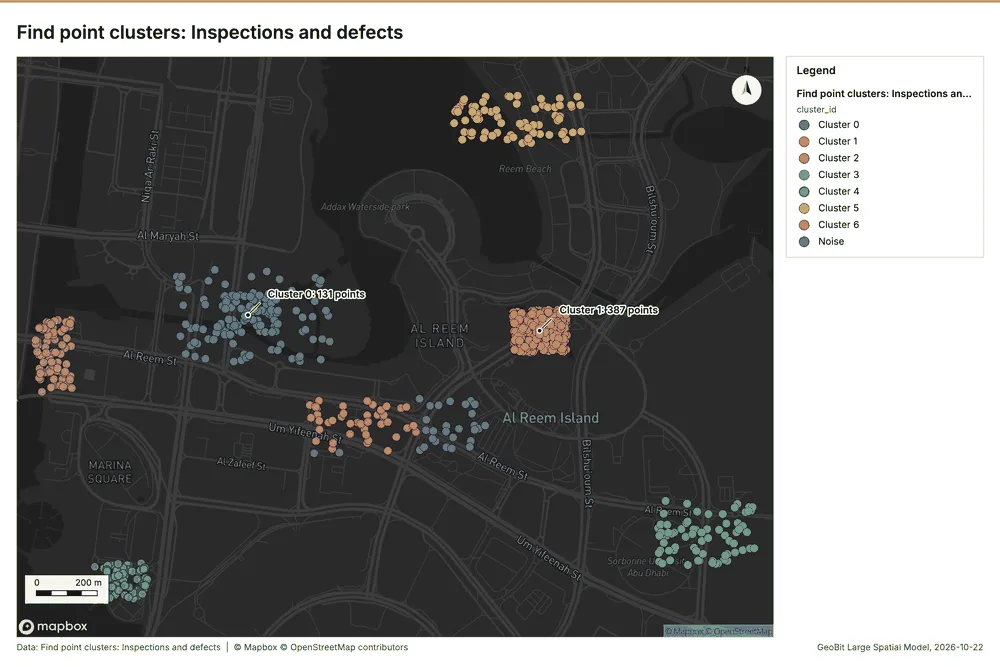
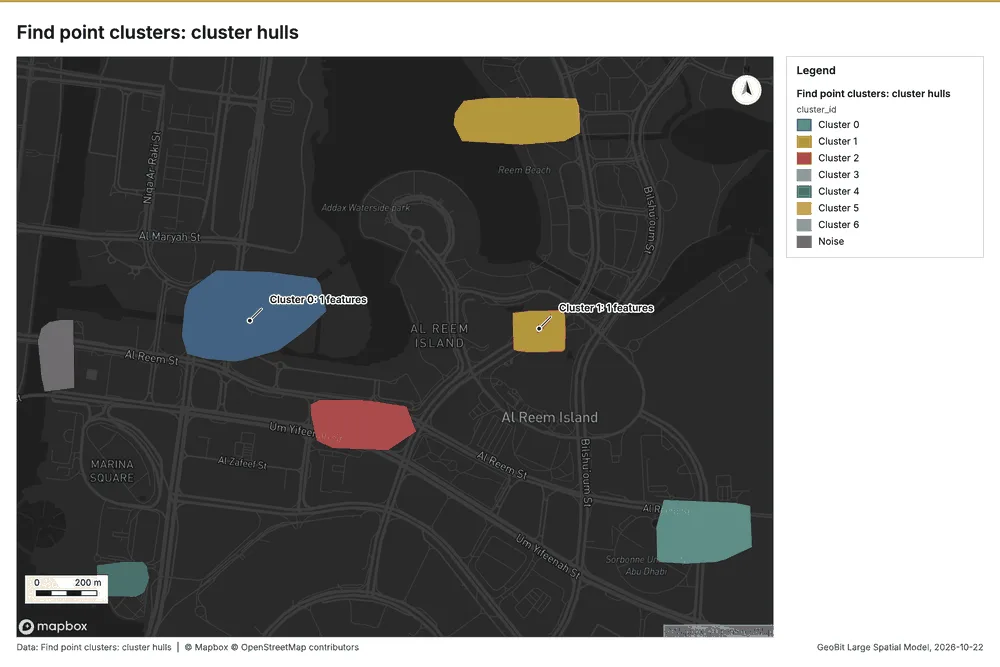
Find point clusters
What this analysis is. Find point clusters: Density-based clusters (DBSCAN, HDBSCAN or OPTICS, optionally space-time) with hulls and noise 49. In ArcGIS it is Find Point Clusters or Density-based Clustering; in QGIS, native:dbscanclustering or native:stdbscanclustering 49.
Why it was run on this data. DBSCAN finds dense groups of Inspections and defects and separates noise 50.
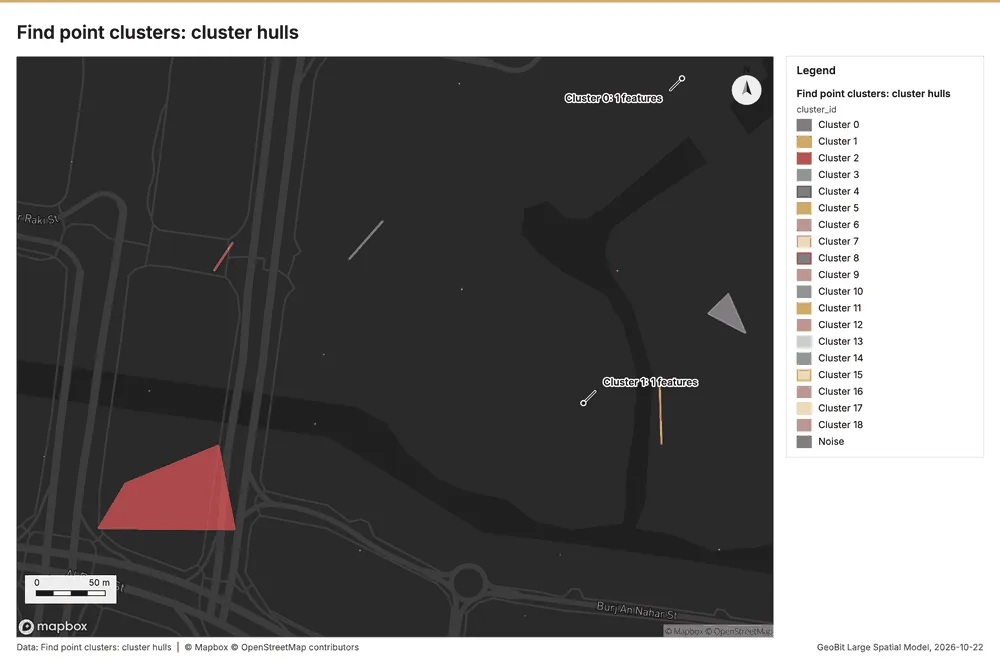
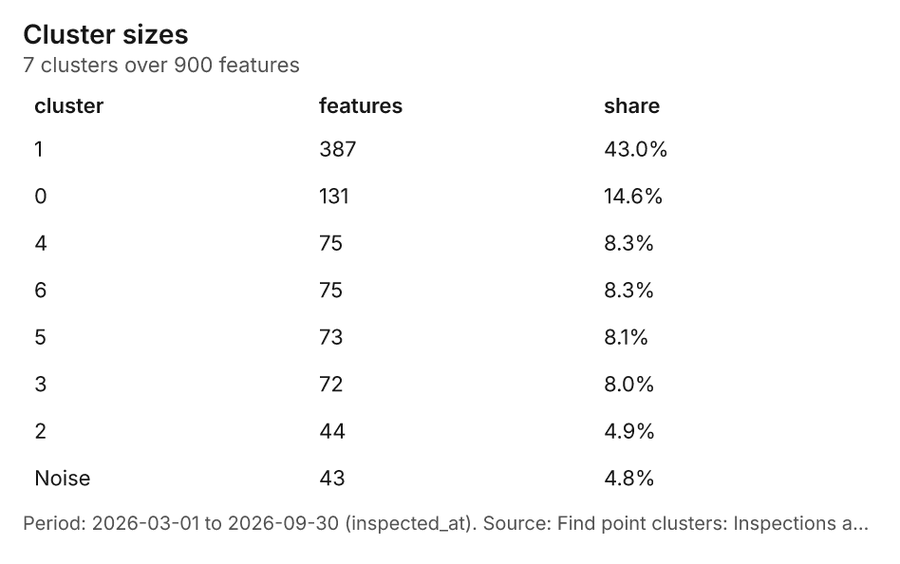
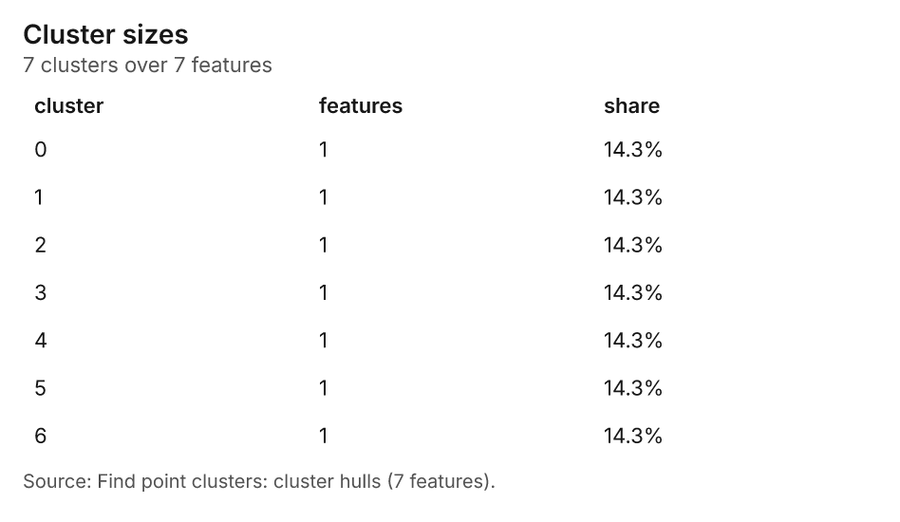
What it found. Find point clusters on Inspections and defects: Find point clusters: 2 layers saved: Find point clusters: Inspections and defects (900 features); Find point clusters: cluster hulls (7 features) 951. It reported result, count 900; result, noise 43; result, distance m 100; result, elapsed ms 18; result, min points 20; billing, cost 0.068 51.
| Result | Value |
|---|---|
| result, count | 900 |
| result, noise | 43 |
| result, distance m | 100 |
| result, elapsed ms | 18 |
| result, min points | 20 |
| billing, cost | 0.068 |
| billing, list price | 0.068 |
| billing, upstream cost | 0 |
Findings
- Evidenced: Find point clusters on Inspections and defects: Find point clusters: 2 layers saved: Find point clusters: Inspections and defects (900 features); Find point clusters: cluster hulls (7 features) 951.
- Evidenced: It reported result, count 900; result, noise 43; result, distance m 100; result, elapsed ms 18; result, min points 20; billing, cost 0.068 51.
Tool gp_find_point_clusters; parameters {"method": "dbscan", "project": "d4e5404f-06e4-4689-a539-31a71b8348eb", "features": {"layer": "Inspections and defects (2d513b03)"}, "distance_m": 100.0, "min_points": 20}
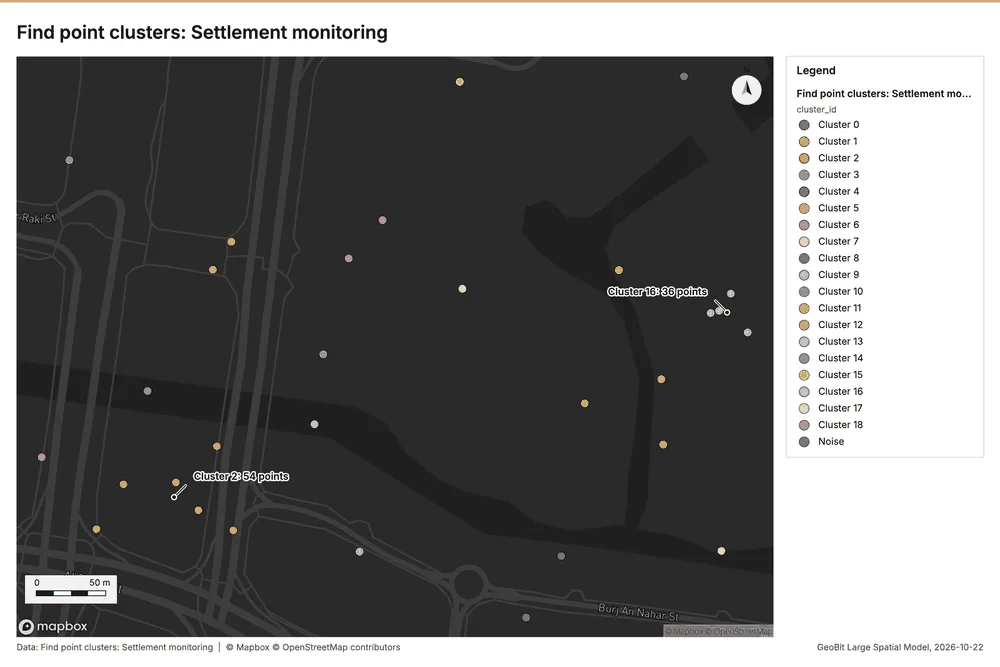
Find point clusters
What this analysis is. Find point clusters: Density-based clusters (DBSCAN, HDBSCAN or OPTICS, optionally space-time) with hulls and noise 49. In ArcGIS it is Find Point Clusters or Density-based Clustering; in QGIS, native:dbscanclustering or native:stdbscanclustering 49.
Why it was run on this data. DBSCAN finds dense groups of Settlement monitoring and separates noise 52.
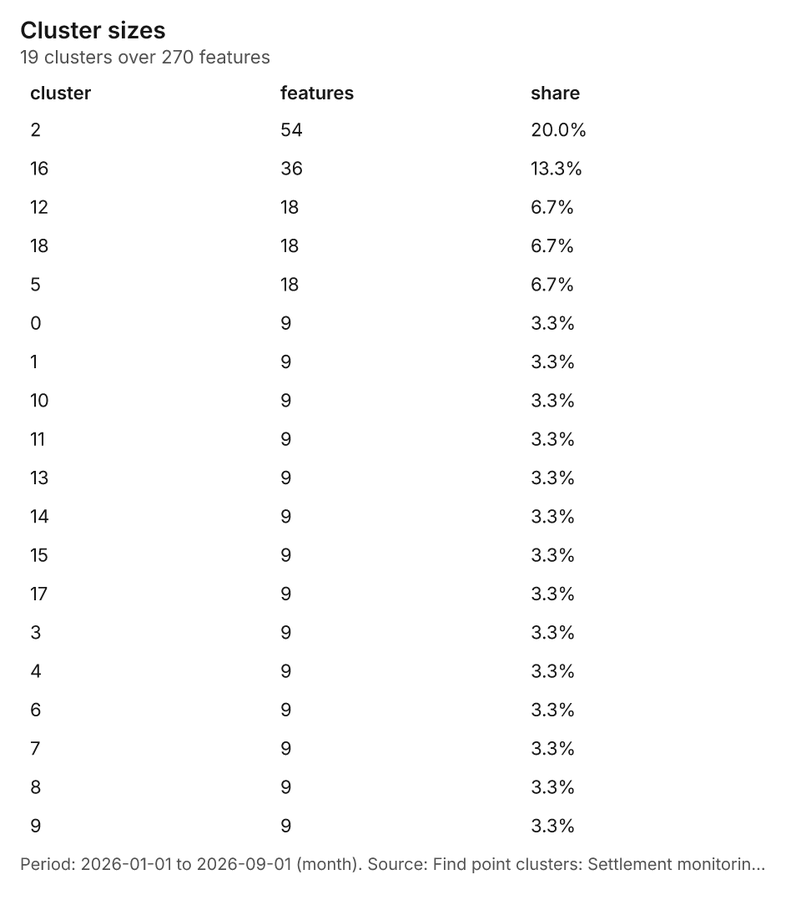
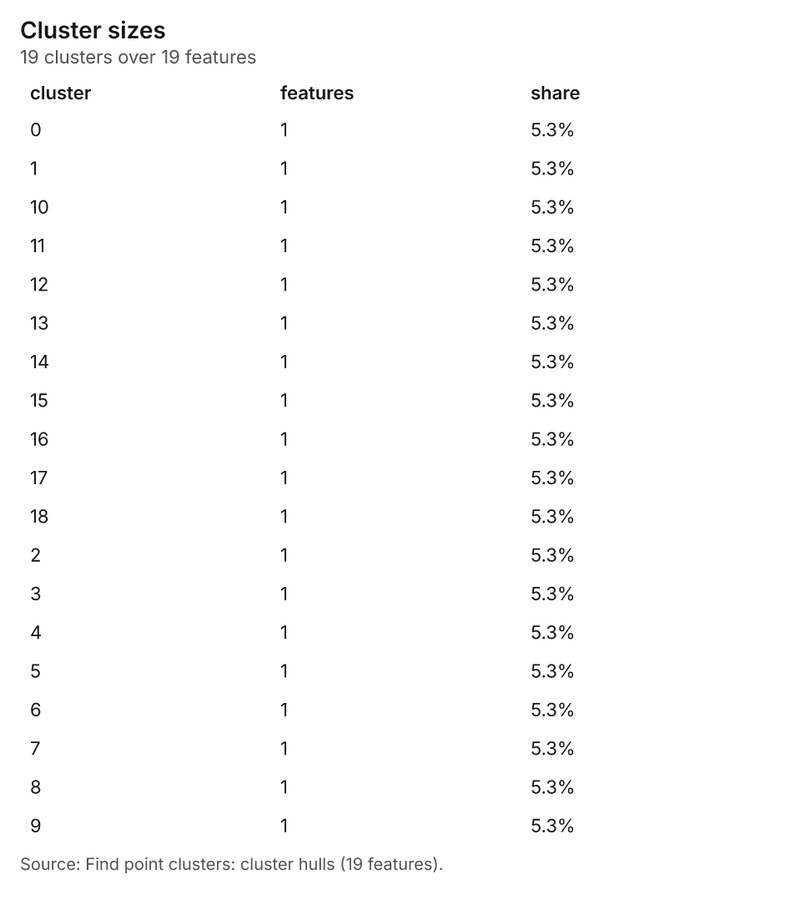
What it found. Find point clusters on Settlement monitoring: Find point clusters: 2 layers saved: Find point clusters: Settlement monitoring (270 features); Find point clusters: cluster hulls (19 features) 1253. It reported result, count 270; result, noise 0; result, distance m 50; result, elapsed ms 8; result, min points 7; billing, cost 0.0554 53.
| Result | Value |
|---|---|
| result, count | 270 |
| result, noise | 0 |
| result, distance m | 50 |
| result, elapsed ms | 8 |
| result, min points | 7 |
| billing, cost | 0.0554 |
| billing, list price | 0.0554 |
| billing, upstream cost | 0 |
Findings
- Evidenced: Find point clusters on Settlement monitoring: Find point clusters: 2 layers saved: Find point clusters: Settlement monitoring (270 features); Find point clusters: cluster hulls (19 features) 1253.
- Evidenced: It reported result, count 270; result, noise 0; result, distance m 50; result, elapsed ms 8; result, min points 7; billing, cost 0.0554 53.
Tool gp_find_point_clusters; parameters {"method": "dbscan", "project": "d4e5404f-06e4-4689-a539-31a71b8348eb", "features": {"layer": "Settlement monitoring (425841af)"}, "distance_m": 50.0, "min_points": 7}
Nearest neighbor index
What this analysis is. Average nearest neighbor: Clark-Evans ratio: clustered, dispersed or random 54. In ArcGIS it is Average Nearest Neighbor; in QGIS, native:nearestneighbouranalysis 54.
Why it was run on this data. The average nearest neighbor ratio says whether Inspections and defects are clustered, random or dispersed 55.
What it found. Nearest neighbor index on Inspections and defects: Average nearest neighbor: done; no map output 956. It reported result, n 900; result, p value 0; result, z score -36.26; result, elapsed ms 4; result, study area m2 2,804,596; result, nearest neighbor ratio 0.3682 56.
| Result | Value |
|---|---|
| result, n | 900 |
| result, p value | 0 |
| result, z score | -36.26 |
| result, elapsed ms | 4 |
| result, study area m2 | 2,804,596 |
| result, nearest neighbor ratio | 0.3682 |
| result, expected mean distance m | 27.91 |
| result, observed mean distance m | 10.28 |
| billing, cost | 0.02 |
| billing, list price | 0.02 |
| billing, upstream cost | 0 |
Findings
- Evidenced: Nearest neighbor index on Inspections and defects: Average nearest neighbor: done; no map output 956.
- Evidenced: It reported result, n 900; result, p value 0; result, z score -36.26; result, elapsed ms 4; result, study area m2 2,804,596; result, nearest neighbor ratio 0.3682 56.
Tool gp_nearest_neighbor_index; parameters {"project": "d4e5404f-06e4-4689-a539-31a71b8348eb", "features": {"layer": "Inspections and defects (2d513b03)"}}
Zonal statistics
What this analysis is. Zonal statistics: count/min/max/mean/std/sum/median/majority per polygon as a table and as GeoJSON 41. In ArcGIS it is Zonal Statistics as Table (polygons) 41.
Why it was run on this data. Statistics of Site progress scene 2026-09-01 inside each feature of Work zones 57.
What it found. The analysis utilized the Zonal statistics tool, specifically rs_zonal_statistics 58. The summary generated by the tool states the completion of zonal statistics 58. These results indicate there are 8 row(s) recorded 58. Moreover, the analysis covered a total of 8 zones 58.
Findings
Tool rs_zonal_statistics; parameters {"stats": ["mean", "min", "max", "std"], "zones": "Work zones (a87c9da1)", "raster_id": "Site progress scene 2026-09-01 (0e506696)"}
Zonal statistics
What this analysis is. Zonal statistics: count/min/max/mean/std/sum/median/majority per polygon as a table and as GeoJSON 41. In ArcGIS it is Zonal Statistics as Table (polygons) 41.
Why it was run on this data. Statistics of Site progress scene 2026-09-01 inside each feature of Work zones 57.
What it found. The analysis section utilized the rs_zonal_statistics tool for the first step 59. The zonal statistics report indicates 1 row(s) analyzed across 1 zone 59.
| Result | Value |
|---|---|
| stats, zones | 1 |
| features, count | 1 |
| elapsed ms | 35 |
Findings
- Evidenced: Zonal statistics: Zonal statistics: 1 row(s) 59.
- Evidenced: zones 1 59.
- Evidenced: It reported stats, zones 1; features, count 1; elapsed ms 35 59.
Tool rs_zonal_statistics; parameters {"stats": ["mean", "min", "max", "std"], "zones": "Site boundary (3902997c)", "raster_id": "Site progress scene 2026-09-01 (0e506696)"}
Zonal statistics
What this analysis is. Zonal statistics: count/min/max/mean/std/sum/median/majority per polygon as a table and as GeoJSON 41. In ArcGIS it is Zonal Statistics as Table (polygons) 41.
Why it was run on this data. Statistics of Site progress scene 2026-09-01 inside each feature of Work zones 57.
What it found. Zonal statistics: Zonal statistics: 8 row(s) 60. zones 8 60.
Findings
Tool rs_zonal_statistics; parameters {"stats": ["mean", "min", "max", "std"], "zones": "Work zones (a87c9da1)", "raster_id": "Site progress scene 2026-03-01 (44bcba49)"}
Index change
What this analysis is. Spectral index change: Change of a spectral index (NDVI, NDWI, NDBI, NBR …) or a band expression between two images: before, after and difference rasters, decrease / increase classes beyond the threshold with polygons and areas; NBR also gives dNBR with burn severity classes 24.
Why it was run on this data. Index change between Site progress scene 2026-03-01 (2026-03-01) and Site progress scene 2026-09-01 (2026-09-01): the changed area, with the changed places as polygons 25.
What it found. Index change: Spectral index change: created NDVI change Site progress scene 2026-03-01 to Site progress scene 2026-09-01 (300 x 250 cells, 10.00 m) 61. plus 1 more raster layer(s) 61. and layer NDVI change polygons with 1078 feature(s) 61. mean before 0.08239; mean after 0.08535; mean difference 0.002955; decrease ha 9.00; increase ha 15.70 61. It reported stats, polygons 1,078; stats, mean after 0.08535; stats, decrease ha 9; stats, increase ha 15.7; stats, mean before 0.08239; stats, masked pixels 0 61.
| Result | Value |
|---|---|
| stats, polygons | 1,078 |
| stats, mean after | 0.08535 |
| stats, decrease ha | 9 |
| stats, increase ha | 15.7 |
| stats, mean before | 0.08239 |
| stats, masked pixels | 0 |
| stats, mean difference | 0.002955 |
| elapsed ms | 537 |
Findings
- Evidenced: Index change: Spectral index change: created NDVI change Site progress scene 2026-03-01 to Site progress scene 2026-09-01 (300 x 250 cells, 10.00 m) 61.
- Evidenced: plus 1 more raster layer(s) 61.
- Evidenced: and layer NDVI change polygons with 1078 feature(s) 61.
- Evidenced: mean before 0.08239; mean after 0.08535; mean difference 0.002955; decrease ha 9.00; increase ha 15.70 61.
- Evidenced: It reported stats, polygons 1,078; stats, mean after 0.08535; stats, decrease ha 9; stats, increase ha 15.7; stats, mean before 0.08239; stats, masked pixels 0 61.
Tool im_index_change; parameters {"after_id": "Site progress scene 2026-09-01 (0e506696)", "polygons": true, "before_id": "Site progress scene 2026-03-01 (44bcba49)"}
Compute change raster
What this analysis is. Compute change raster: Pixel value or spectral change between two co-registered images: difference, relative difference, absolute difference, log ratio (radar, dB), Euclidean spectral distance, spectral angle (radians) or the band with most change 27.
Why it was run on this data. A change raster between Site progress scene 2026-03-01 (2026-03-01) and Site progress scene 2026-09-01 (2026-09-01): where and how much the pixels changed 28.
What it found. Compute change raster: Compute change raster: created Difference Site progress scene 2026-03-01 to Site progress scene 2026-09-01 (300 x 250 cells, 10.00 m) 62. mean -0.001083; std 0.01804; min -0.134; max 0.091; masked pixels 0 62. It reported stats, max 0.091; stats, min -0.134; stats, std 0.01804; stats, mean -0.001083; stats, masked pixels 0; elapsed ms 151 62.
| Result | Value |
|---|---|
| stats, max | 0.091 |
| stats, min | -0.134 |
| stats, std | 0.01804 |
| stats, mean | -0.001083 |
| stats, masked pixels | 0 |
| elapsed ms | 151 |
Findings
- Evidenced: Compute change raster: Compute change raster: created Difference Site progress scene 2026-03-01 to Site progress scene 2026-09-01 (300 x 250 cells, 10.00 m) 62.
- Evidenced: mean -0.001083; std 0.01804; min -0.134; max 0.091; masked pixels 0 62.
- Evidenced: It reported stats, max 0.091; stats, min -0.134; stats, std 0.01804; stats, mean -0.001083; stats, masked pixels 0; elapsed ms 151 62.
Tool im_compute_change_raster; parameters {"method": "difference", "after_id": "Site progress scene 2026-09-01 (0e506696)", "before_id": "Site progress scene 2026-03-01 (44bcba49)"}
Maps and charts
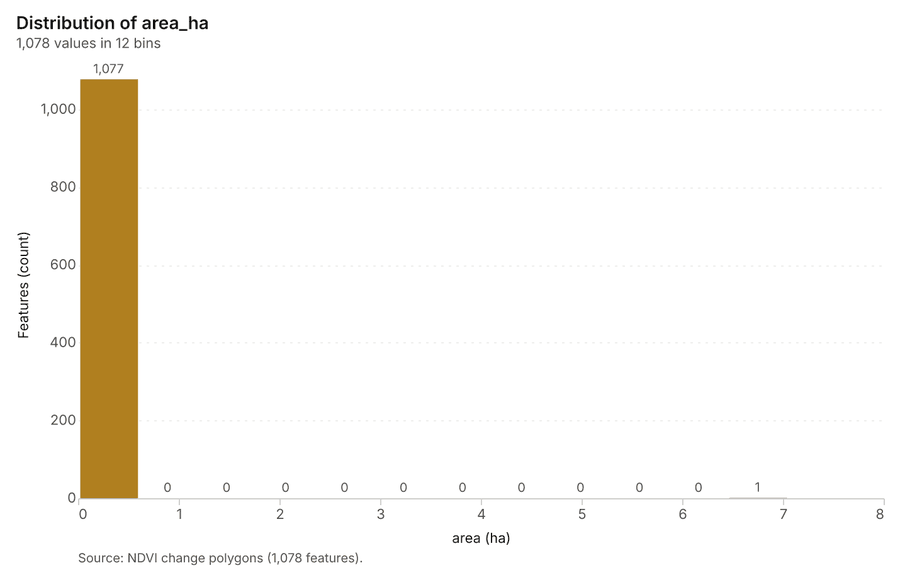
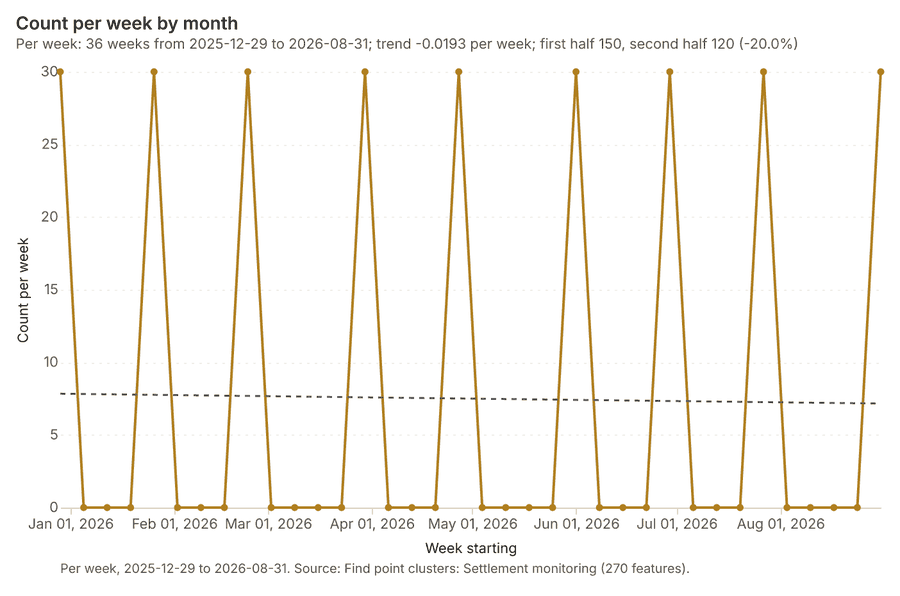
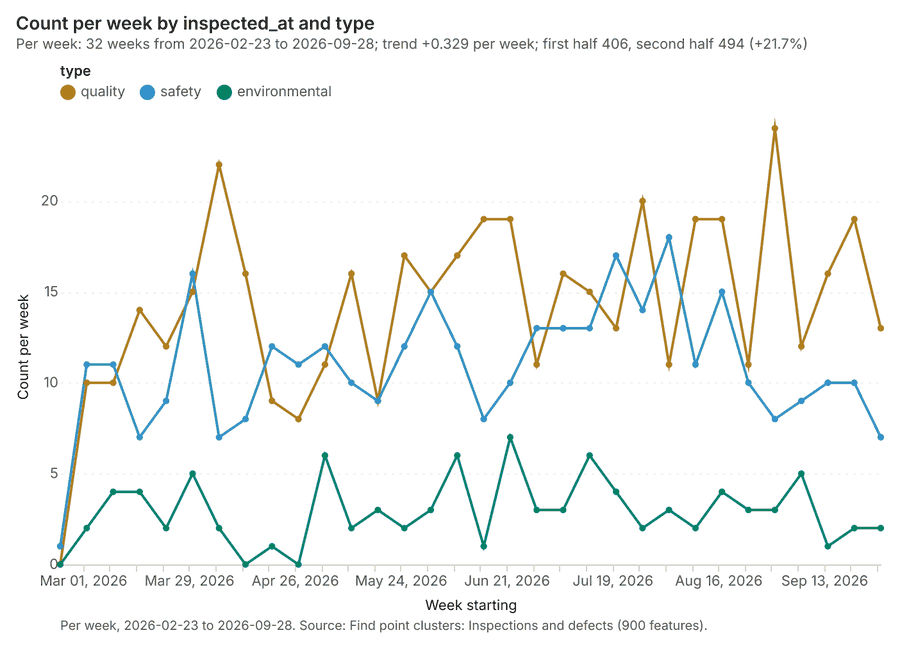
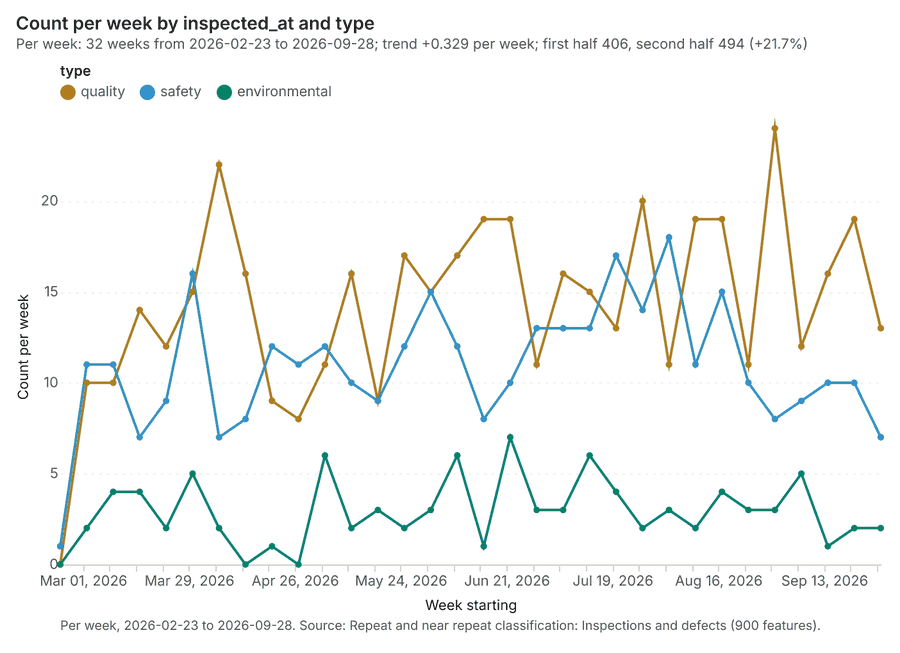
The run also made 24 map image(s) 636465666768697071727374757677787980818283848586 and 23 chart(s) 87888990919293949596979899100101102103104105106107108109.
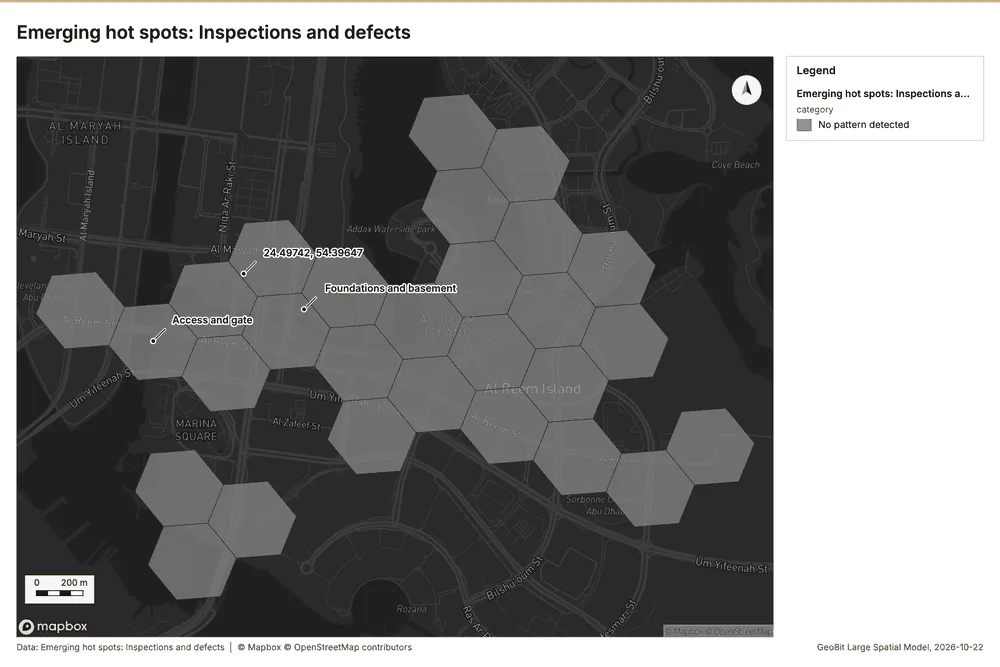
What the map shows. The map is titled "Emerging spots: Inspections and defects" and appears to be a spatial analysis designed to identify unusual clustering of inspections or defects. According to the legend, the analysis result indicates that "No pattern detected" for emerging hot spots in this area. Though the map displays various adjacent polygons filled with gray tones, the formal analysis provided does not show any specific hot spots or significant geographic patterns of defects. Overall, the image reports a lack of detectable spatial 63
Inferred: read from the image by gemma4:e4b, not evidence.
Changes since the last run
This is the first report of this project.
Sources
- 1Rendering: Chart: Timeline: events per week by dataset. 160 rows id 9f2bb274-af82-407c-9900-4bc77773b75b
- 2Dataset: Inspections and defects. vector, 900 rows id 3a360dc7-0b8b-4224-98e8-aba6b17ab2e0
- 3Dataset: Settlement monitoring. vector, 270 rows id 806d8b39-f228-4065-a394-d600f3812c49
- 4Dataset: Daily progress by zone. table, 1264 rows id 85f34f63-e5d5-45af-b627-04240488c239
- 5Dataset: Deliveries log. table, 400 rows id 25ca0509-fbcd-465c-ad7c-3d5ff8495ec0
- 6Catalog: Emerging hot spots (operation catalog, gp_space_time_hot_spots). Where hot spots are new, consecutive, intensifying, persistent, diminishing, sporadic, oscillating or historical over time. ArcGIS: Emerging Hot Spot Analysis, Create Space Time Cube. id gp_space_time_hot_spots
- 7Plan: Space time hot spots of Inspections and defects (the Start plan's candidate c_daa895129d49). Inspections and defects carry dates in 'inspected_at': emerging hot spot analysis finds new, intensifying and fading hot spots per week. id a0327f1f-63f3-4f6a-b834-207b8f9700a5:c_daa895129d49
- 8Tool result: gp_space_time_hot_spots, step 0. Emerging hot spots: 1 layer saved: Emerging hot spots: Inspections and defects (28 features). id c3736b48-18ef-4b5f-917c-a3f44e49df09:0
- 9Layer: Inspections and defects. 900 features id 2d513b03-8124-4d94-9ddd-e0e8d35ed9ae
- 10Plan: Space time hot spots of Settlement monitoring (the Start plan's candidate c_a657847729a2). Settlement monitoring carry dates in 'month': emerging hot spot analysis finds new, intensifying and fading hot spots per week. id a0327f1f-63f3-4f6a-b834-207b8f9700a5:c_a657847729a2
- 11Tool result: gp_space_time_hot_spots, step 1. Emerging hot spots: 1 layer saved: Emerging hot spots: Settlement monitoring (10 features). id c3736b48-18ef-4b5f-917c-a3f44e49df09:1
- 12Layer: Settlement monitoring. 270 features id 425841af-4239-4ea3-bb9a-66322270d86d
- 13Catalog: Repeat and near repeat classification (operation catalog, gp_near_repeat). Classify incidents as originators, repeats (same place) or near repeats within a distance and time window, with a Knox test table. ArcGIS: Repeat and Near Repeat Classification, Near Repeat Calculator. id gp_near_repeat
- 14Plan: Near repeat of Inspections and defects (the Start plan's candidate c_dab5834d48f7). Near repeat analysis tests whether Inspections and defects close in space also follow each other within 21 days. id a0327f1f-63f3-4f6a-b834-207b8f9700a5:c_dab5834d48f7
- 15Tool result: gp_near_repeat, step 2. Repeat and near repeat classification: 1 layer saved: Repeat and near repeat classification: Inspections and defects (900 features). id c3736b48-18ef-4b5f-917c-a3f44e49df09:2
- 16Catalog: Hot spot analysis (operation catalog, gp_hot_spots). Getis-Ord Gi* hot and cold spots with z-scores, p-values and confidence bins. ArcGIS: Find Hot Spots, Hot Spot Analysis (Getis-Ord Gi*). QGIS: qgis:hotspot (plugin). id gp_hot_spots
- 17Plan: Hot spots of Inspections and defects (the Start plan's candidate c_a14382cda44d). 900 points: Getis-Ord Gi* tests whether the concentrations in Inspections and defects are statistically significant. id a0327f1f-63f3-4f6a-b834-207b8f9700a5:c_a14382cda44d
- 18Tool result: gp_hot_spots, step 0. Hot spot analysis: 1 layer saved: Hot spot analysis: Inspections and defects (317 features). id b3ca19ef-101a-41ac-92ce-bbbc2c003a80:0
- 19Plan: Hot spots of Settlement monitoring (the Start plan's candidate c_40b66c08f429). 270 points: Getis-Ord Gi* tests whether the concentrations in Settlement monitoring are statistically significant. id a0327f1f-63f3-4f6a-b834-207b8f9700a5:c_40b66c08f429
- 20Tool result: gp_hot_spots, step 1. Hot spot analysis: 1 layer saved: Hot spot analysis: Settlement monitoring (87 features). id b3ca19ef-101a-41ac-92ce-bbbc2c003a80:1
- 21Plan: Hot spots of Work zones (the Start plan's candidate c_c596ca1fffb2). Gi* hot spots of 'pct_complete' across the areas. id a0327f1f-63f3-4f6a-b834-207b8f9700a5:c_c596ca1fffb2
- 22Tool result: gp_hot_spots, step 2. Hot spot analysis: 1 layer saved: Hot spot analysis: Work zones (8 features). id b3ca19ef-101a-41ac-92ce-bbbc2c003a80:2
- 23Layer: Work zones. 8 features id a87c9da1-d753-4f2a-ab7d-b864dabbbe8f
- 24Catalog: Spectral index change (analysis catalog, im_index_change). Change of a spectral index (NDVI, NDWI, NDBI, NBR ...) or a band expression between two images: before, after and difference rasters, decrease / increase classes beyond the threshold with polygons and areas; NBR also gives dNBR with burn severity classes. id im_index_change
- 25Plan: Index change of Site progress scene 2026-03-01 and Site progress scene 2026-09-01 (the Start plan's candidate c_be7290b1b94a). Index change between Site progress scene 2026-03-01 (2026-03-01) and Site progress scene 2026-09-01 (2026-09-01): the changed area, with the changed places as polygons. id a0327f1f-63f3-4f6a-b834-207b8f9700a5:c_be7290b1b94a
- 26Tool result: im_index_change, step 0. Spectral index change: created NDVI change Site progress scene 2026-03-01 to Site progress scene 2026-09-01 (300 x 250 cells, 10.00 m). plus 1 more raster layer(s). and layer NDVI change polygons with 1078 feature(s). mean before 0.08239; mean after 0.08535; mean difference 0.002955; decrease ha 9.0 id 7ffbeb87-0a83-4448-a1e2-6acaf335bc0c:0
- 27Catalog: Compute change raster (analysis catalog, im_compute_change_raster). Pixel value or spectral change between two co-registered images: difference, relative difference, absolute difference, log ratio (radar, dB), Euclidean spectral distance, spectral angle (radians) or the band with most change. Clouds and shadows are masked when the images have id im_compute_change_raster
- 28Plan: Compute change raster of Site progress scene 2026-03-01 and Site progress scene 2026-09-01 (the Start plan's candidate c_7e48e7dad7f6). A change raster between Site progress scene 2026-03-01 (2026-03-01) and Site progress scene 2026-09-01 (2026-09-01): where and how much the pixels changed. id a0327f1f-63f3-4f6a-b834-207b8f9700a5:c_7e48e7dad7f6
- 29Tool result: im_compute_change_raster, step 1. Compute change raster: created Difference Site progress scene 2026-03-01 to Site progress scene 2026-09-01 (300 x 250 cells, 10.00 m). mean -0.001083; std 0.01804; min -0.134; max 0.091; masked pixels 0. id 7ffbeb87-0a83-4448-a1e2-6acaf335bc0c:1
- 30Catalog: Calculate density (operation catalog, gp_calculate_density). Kernel density per square kilometer on a grid. ArcGIS: Calculate Density, Kernel Density. QGIS: native:heatmapkerneldensityestimation. id gp_calculate_density
- 31Plan: Kernel density of Inspections and defects (the Start plan's candidate c_b027c874c560). 900 points in Inspections and defects: a density surface shows where they concentrate. id a0327f1f-63f3-4f6a-b834-207b8f9700a5:c_b027c874c560
- 32Tool result: gp_calculate_density, step 0. Calculate density: 1 layer saved: Calculate density: Inspections and defects (976 features). id b4af9d8c-897b-4cb3-a492-826d8edde822:0
- 33Plan: Kernel density of Settlement monitoring (the Start plan's candidate c_d14b64b8c3f9). 270 points in Settlement monitoring: a density surface shows where they concentrate. id a0327f1f-63f3-4f6a-b834-207b8f9700a5:c_d14b64b8c3f9
- 34Tool result: gp_calculate_density, step 1. Calculate density: 1 layer saved: Calculate density: Settlement monitoring (806 features). id b4af9d8c-897b-4cb3-a492-826d8edde822:1
- 35Catalog: Summarize within (operation catalog, gp_summarize_within). Count and aggregate the features inside each polygon (or bin), proportionally for lines and polygons. ArcGIS: Summarize Within, Aggregate Points. QGIS: native:countpointsinpolygon, native:sumlinelengths. id gp_summarize_within
- 36Plan: Inspections and defects per feature of Work zones (the Start plan's candidate c_9b02c6bcc3d7). Count Inspections and defects inside each feature of Work zones by type; the counts map as a choropleth (natural breaks, sequential colors). id a0327f1f-63f3-4f6a-b834-207b8f9700a5:c_9b02c6bcc3d7
- 37Tool result: gp_summarize_within, step 0. Summarize within: 1 layer saved: Summarize within: Work zones (8 features). id c58995ca-42b1-4b4e-86fb-a88fb13acf0b:0
- 38Tool result: gp_summarize_within, step 1. Summarize within: 1 layer saved: Summarize within: Work zones (8 features). id c58995ca-42b1-4b4e-86fb-a88fb13acf0b:1
- 39Tool result: gp_summarize_within, step 2. Summarize within: 1 layer saved: Summarize within: Work zones (8 features). id c58995ca-42b1-4b4e-86fb-a88fb13acf0b:2
- 40Layer: Tower cranes. 4 features id a6101de1-0f97-42bb-a976-2736f8fc42cd
- 41Catalog: Zonal statistics (analysis catalog, rs_zonal_statistics). count/min/max/mean/std/sum/median/majority per polygon as a table and as GeoJSON. ArcGIS: Zonal Statistics as Table (polygons). id rs_zonal_statistics
- 42Plan: Zonal statistics of Site terrain model (DEM) and Work zones (the Start plan's candidate c_2be6fba28be6). Statistics of Site terrain model (DEM) inside each feature of Work zones. id a0327f1f-63f3-4f6a-b834-207b8f9700a5:c_2be6fba28be6
- 43Tool result: rs_zonal_statistics, step 0. Zonal statistics: 8 row(s). zones 8. id b9751382-9c63-45f7-aeeb-df532c540b48:0
- 44Tool result: rs_zonal_statistics, step 1. Zonal statistics: 1 row(s). zones 1. id b9751382-9c63-45f7-aeeb-df532c540b48:1
- 45Catalog: Slope (analysis catalog, tr_slope). Horn slope in degrees or percent, with the share of ground in six grade classes. ArcGIS: Slope (Spatial Analyst). QGIS: Slope (GDAL DEM). id tr_slope
- 46Plan: Slope of Site terrain model (DEM) (the Start plan's candidate c_9bcc9b88376e). Slope of the Site terrain model (DEM) surface. id a0327f1f-63f3-4f6a-b834-207b8f9700a5:c_9bcc9b88376e
- 47Tool result: tr_slope, step 2. Slope over 7.50 km2: mean 0.36 degrees, max 18.73 degrees; 1% of the ground is steeper than 15%. DEM: Site terrain model (DEM). Verified: 2 checks passed. id b9751382-9c63-45f7-aeeb-df532c540b48:2
- 48Layer: Site terrain model (DEM). 0 features id 0c6d4acd-4d8d-4cf4-b654-e096f06f71ff
- 49Catalog: Find point clusters (operation catalog, gp_find_point_clusters). Density-based clusters (DBSCAN, HDBSCAN or OPTICS, optionally space-time) with hulls and noise. ArcGIS: Find Point Clusters, Density-based Clustering. QGIS: native:dbscanclustering, native:stdbscanclustering. id gp_find_point_clusters
- 50Plan: Cluster points of Inspections and defects (the Start plan's candidate c_6339b071c51c). DBSCAN finds dense groups of Inspections and defects and separates noise. id a0327f1f-63f3-4f6a-b834-207b8f9700a5:c_6339b071c51c
- 51Tool result: gp_find_point_clusters, step 0. Find point clusters: 2 layers saved: Find point clusters: Inspections and defects (900 features); Find point clusters: cluster hulls (7 features). id a18ea698-d2a7-4e8a-b749-f525e603592f:0
- 52Plan: Cluster points of Settlement monitoring (the Start plan's candidate c_4199c930b59b). DBSCAN finds dense groups of Settlement monitoring and separates noise. id a0327f1f-63f3-4f6a-b834-207b8f9700a5:c_4199c930b59b
- 53Tool result: gp_find_point_clusters, step 1. Find point clusters: 2 layers saved: Find point clusters: Settlement monitoring (270 features); Find point clusters: cluster hulls (19 features). id a18ea698-d2a7-4e8a-b749-f525e603592f:1
- 54Catalog: Average nearest neighbor (operation catalog, gp_nearest_neighbor_index). Clark-Evans ratio: clustered, dispersed or random. ArcGIS: Average Nearest Neighbor. QGIS: native:nearestneighbouranalysis. id gp_nearest_neighbor_index
- 55Plan: Nearest neighbor index of Inspections and defects (the Start plan's candidate c_16c101371f91). The average nearest neighbor ratio says whether Inspections and defects are clustered, random or dispersed. id a0327f1f-63f3-4f6a-b834-207b8f9700a5:c_16c101371f91
- 56Tool result: gp_nearest_neighbor_index, step 2. Average nearest neighbor: done; no map output. id a18ea698-d2a7-4e8a-b749-f525e603592f:2
- 57Plan: Zonal statistics of Site progress scene 2026-09-01 and Work zones (the Start plan's candidate c_fbbb0c518f13). Statistics of Site progress scene 2026-09-01 inside each feature of Work zones. id a0327f1f-63f3-4f6a-b834-207b8f9700a5:c_fbbb0c518f13
- 58Tool result: rs_zonal_statistics, step 0. Zonal statistics: 8 row(s). zones 8. id f697e2f1-f28e-4342-8c96-78425e7ef30c:0
- 59Tool result: rs_zonal_statistics, step 1. Zonal statistics: 1 row(s). zones 1. id f697e2f1-f28e-4342-8c96-78425e7ef30c:1
- 60Tool result: rs_zonal_statistics, step 2. Zonal statistics: 8 row(s). zones 8. id f697e2f1-f28e-4342-8c96-78425e7ef30c:2
- 61Tool result: im_index_change, step 0. Spectral index change: created NDVI change Site progress scene 2026-03-01 to Site progress scene 2026-09-01 (300 x 250 cells, 10.00 m). plus 1 more raster layer(s). and layer NDVI change polygons with 1078 feature(s). mean before 0.08239; mean after 0.08535; mean difference 0.002955; decrease ha 9.0 id a50cf479-ac3c-4eaf-ba13-51b573e1a936:0
- 62Tool result: im_compute_change_raster, step 1. Compute change raster: created Difference Site progress scene 2026-03-01 to Site progress scene 2026-09-01 (300 x 250 cells, 10.00 m). mean -0.001083; std 0.01804; min -0.134; max 0.091; masked pixels 0. id a50cf479-ac3c-4eaf-ba13-51b573e1a936:1
- 63Rendering: Map: Emerging hot spots: Inspections and defects id 44c54df1-3ef4-4f48-bfdf-373e1dcae072
- 64Rendering: Map: Emerging hot spots: Settlement monitoring id cc8b26b5-2189-437a-ae60-bb5505e01bb3
- 65Rendering: Map: Repeat and near repeat classification: Inspections and defects id fa93e6d7-4351-4807-954d-94f0348da021
- 66Rendering: Map: Hot spot analysis: Inspections and defects id f6d190a7-d4f9-4493-be19-1be9956826b5
- 67Rendering: Map: Hot spot analysis: Settlement monitoring id fc9ccdba-f38f-47eb-997b-8a386b4ddb71
- 68Rendering: Map: Hot spot analysis: Work zones id efda6f0a-8900-45e7-97f8-c2c08b7ee7a9
- 69Rendering: Map: NDVI change Site progress scene 2026-03-01 to Site progress scene 2026-09-01 id 33bfa5c4-92ac-43df-86aa-b50106359dd2
- 70Rendering: Map: NDVI decrease / increase id f22e9812-824b-4eb6-8554-f8a7732bce15
- 71Rendering: Map: NDVI change polygons id 4fe5d947-63bf-4602-a7df-f7fceecf47aa
- 72Rendering: Map: Difference Site progress scene 2026-03-01 to Site progress scene 2026-09-01 id 53be4756-2fc4-4c8f-8dff-b832cdf6d17a
- 73Rendering: Map: Calculate density: Inspections and defects id 397fd56d-b01c-410e-84ef-a8e0aa7bcc27
- 74Rendering: Map: Calculate density: Settlement monitoring id f12560e9-420f-49e4-a19c-4fe1b9459ba8
- 75Rendering: Map: Summarize within: Work zones id 7d4caaef-9484-48dc-9123-64a0072860b6
- 76Rendering: Map: Summarize within: Work zones id f7131359-06b3-4304-8a0c-6106da84afdc
- 77Rendering: Map: Summarize within: Work zones id 43631e4b-9ad3-4475-8715-3bf283b8f106
- 78Rendering: Map: Slope (degrees) id c3664af4-8bb7-47c6-abf3-7aceea809124
- 79Rendering: Map: Find point clusters: Inspections and defects id cc3d7893-ab41-4034-a602-437ec73a0b31
- 80Rendering: Map: Find point clusters: cluster hulls id 7d94af92-e519-4c82-8a96-ffde80cf991c
- 81Rendering: Map: Find point clusters: Settlement monitoring id 96e2071a-d82a-40e3-9a4b-6cf33279bbbb
- 82Rendering: Map: Find point clusters: cluster hulls id 2c3db94d-30bb-47b3-9454-ae7ef2846a1d
- 83Rendering: Map: Site Progress Scene Index Analysis NDVI change Site progress scene 2026-03-01 to Site progress scene 2026-09-01 id 292b34c5-61b7-475e-96fe-f7b859c107ed
- 84Rendering: Map: Site Progress Scene Index Analysis NDVI decrease / increase id 01e5e6a9-49bd-4ac6-b2e8-ddda771b5582
- 85Rendering: Map: Site Progress Scene Index Analysis NDVI change polygons id 86d28d82-9108-431d-9ad3-a2feeec950c7
- 86Rendering: Map: Site Progress Scene Index Analysis Difference Site progress scene 2026-03-01 to Site progress scene 2026-09-01 id 7a29f585-6966-47f6-9e4c-058f8691bb28
- 87Rendering: Chart: Settlement monitoring over time (month). 36 rows id 9ead02da-348b-44ba-8ee7-269c1c2d63f3
- 88Rendering: Chart: Daily progress by zone over time (date). 28 rows id 39d65924-a112-4224-9302-9115ac3dd0da
- 89Rendering: Chart: Deliveries log over time (date). 140 rows id 8e7bf61d-a5a0-42f3-b502-875288bf1e29
- 90Rendering: Chart: Emerging hot spots: Inspections and defects. 6 rows id ef7d42dd-f3fa-4e99-a910-15f7ec83297b
- 91Rendering: Chart: Emerging hot spots: Settlement monitoring. 5 rows id dd35971b-2787-4a8d-9a43-aba57f75d47e
- 92Rendering: Chart: Repeat and near repeat classification: Inspections and defects. 96 rows id 8ca20871-10d1-40b1-834b-38cd1849b4b8
- 93Rendering: Chart: Hot spot analysis: Inspections and defects. 15 rows id 12698a56-ae20-4fae-aedd-bd8d3179f94f
- 94Rendering: Chart: Hot spot analysis: Settlement monitoring. 13 rows id 02c89ac1-1d31-4844-914d-6077abf66479
- 95Rendering: Chart: Hot spot analysis: Work zones. 5 rows id 9177a78d-8b65-410f-af6d-d56ceda4a636
- 96Rendering: Chart: NDVI change polygons. 12 rows id 61c75041-5982-429d-ac74-d9605047def1
- 97Rendering: Chart: Calculate density: Inspections and defects. 11 rows id abcf7e57-ebc5-4630-98dd-65228e550aa6
- 98Rendering: Chart: Calculate density: Settlement monitoring. 11 rows id 0aa266b1-0ecb-4312-8fb6-a3063dc7c7e5
- 99Rendering: Chart: Summarize within: Work zones. 5 rows id 5ee14e18-ab1d-46fd-8640-7feb7d508da7
- 100Rendering: Chart: Summarize within: Work zones. 5 rows id 67e6d938-9903-48f6-9a48-91d47bee8a02
- 101Rendering: Chart: Summarize within: Work zones. 5 rows id 2a7e5e5b-93c2-4898-8a7b-d8fb4045b928
- 102Rendering: Chart: Find point clusters: Inspections and defects. 8 rows id 5fd0ca87-fab6-488d-b580-707c3e546506
- 103Rendering: Chart: Find point clusters: cluster hulls. 7 rows id 0bbf6b08-675a-421e-a2b9-10bda913071e
- 104Rendering: Chart: Find point clusters: Settlement monitoring. 19 rows id 668ea7e9-018e-4e3a-8dc8-d454151ecdba
- 105Rendering: Chart: Find point clusters: cluster hulls. 19 rows id cce16250-17dc-44a0-90b3-1effbf06eee0
- 106Rendering: Chart: NDVI change polygons. 12 rows id bf7e96fd-8ac6-4ea5-abba-531dddd6c242
- 107Rendering: Chart: Find point clusters: Settlement monitoring over time. 36 rows id 8741d3df-a209-4ea2-b13f-828908da90f7
- 108Rendering: Chart: Find point clusters: Inspections and defects over time. 96 rows id 1dd42be8-67ac-47fa-bdce-1ee0deeb71f1
- 109Rendering: Chart: Repeat and near repeat classification: Inspections and defects over time. 96 rows id b8a63915-574e-487c-bc0e-b1f8099863a6
- 110Dataset: Site boundary. vector, 1 rows id bb559260-1c80-48a4-b1cf-f8d45912c652
- 111Dataset: Work zones. vector, 8 rows id 0e3a49ca-6c53-4c6a-9921-e5f541953931
- 112Dataset: Site progress scene 2026-03-01. raster, ? rows id d5b68dc5-16d9-4cfd-968a-c8903d998eed
- 113Dataset: Site progress scene 2026-09-01. raster, ? rows id 4032b2ca-3632-4bc3-b9ad-60d3a59b951f
- 114Dataset: Site terrain model (DEM). raster, ? rows id 454c0b82-bbf9-4c73-9e4c-e939f6a3fb53
- 115Dataset: Site roads. vector, 3 rows id 0f387307-aec2-41f8-92eb-4838eb3282bb
- 116Dataset: Tower cranes. vector, 4 rows id 9f4ea7c1-9e1c-47e8-8184-8cb05533c4ac
- 117Dataset: Monthly progress report. document, ? rows id 026a6911-73c9-4c20-aaf9-809a17446401
- 118Record: Sample: Construction, Al Reem Island id d4e5404f-06e4-4689-a539-31a71b8348eb
- 119Layer: Emerging hot spots: Inspections and defects. 28 features id b6e6a183-1b27-496c-a678-9f8df4e4b081
- 120Layer: Emerging hot spots: Settlement monitoring. 10 features id 97e34fec-6ba0-4f5b-aa10-f76b28b24d30
- 121Layer: Repeat and near repeat classification: Inspections and defects. 900 features id f23bce2c-8508-4e9c-8458-fd8faf8ec029
- 122Layer: Hot spot analysis: Inspections and defects. 317 features id ef4eb056-e817-462a-9733-a58fd43d00cb
- 123Layer: Hot spot analysis: Settlement monitoring. 87 features id cfbaa203-6871-498f-b688-d75ec0db6fa9
- 124Layer: Hot spot analysis: Work zones. 8 features id 006e9ce1-b483-4c73-acfb-5f48e1852b8f
- 125Layer: NDVI change Site progress scene 2026-03-01 to Site progress scene 2026-09-01. 0 features id 771ca68b-d2ee-4ff2-bbba-c4f0576cbae9
- 126Layer: NDVI decrease / increase. 0 features id 15acb616-2cef-42cf-a5e4-15164cafb21e
- 127Layer: NDVI change polygons. 1,078 features id 96ff870f-9163-461c-9f71-1cd79c835ecc
- 128Layer: Difference Site progress scene 2026-03-01 to Site progress scene 2026-09-01. 0 features id b963eb25-56c3-4309-af9d-4e029ccf90c5
- 129Layer: Calculate density: Inspections and defects. 976 features id 21b40807-b901-4510-b690-3a72503d53bb
- 130Layer: Calculate density: Settlement monitoring. 806 features id 4c96ec2a-2ff3-470f-a6f4-a4fe2e2c0f31
- 131Layer: Summarize within: Work zones. 8 features id 61db1d60-2cda-4ce2-ab31-ab3c66cf5242
- 132Layer: Summarize within: Work zones. 8 features id b32e8596-c2a2-453b-9f24-50829120080e
- 133Layer: Summarize within: Work zones. 8 features id 9b7216b5-5c39-4fa7-95fc-419178fd4681
- 134Layer: Slope (degrees). 0 features id 04fe23a2-183b-4b40-99ed-00c0a1c62545
- 135Layer: Find point clusters: Inspections and defects. 900 features id 483f389f-6f5f-4686-9358-d8ba8dfecc0c
- 136Layer: Find point clusters: cluster hulls. 7 features id a3ed91a3-93ec-4c1d-8f39-d00038f33711
- 137Layer: Find point clusters: Settlement monitoring. 270 features id e11e55d7-847b-4fb0-9ce1-b78d3ec3f87c
- 138Layer: Find point clusters: cluster hulls. 19 features id b5149260-c6f8-4546-8616-94dd97d60029
- 139Layer: NDVI change polygons. 1,078 features id ac97061d-6bed-44e0-9705-e3ab6f002d53
Appendix: the data behind the chartsShow
Figure 1. Timeline: events per week by dataset 1
| period | series | value |
|---|---|---|
| 2025-12-29 | Daily progress by zone | 0 |
| 2025-12-29 | Inspections and defects | 0 |
| 2025-12-29 | Deliveries log | 0 |
| 2025-12-29 | Settlement monitoring | 30 |
| 2026-01-05 | Daily progress by zone | 0 |
| 2026-01-05 | Inspections and defects | 0 |
| 2026-01-05 | Deliveries log | 0 |
| 2026-01-05 | Settlement monitoring | 0 |
| 2026-01-12 | Daily progress by zone | 0 |
| 2026-01-12 | Inspections and defects | 0 |
| 2026-01-12 | Deliveries log | 0 |
| 2026-01-12 | Settlement monitoring | 0 |
| 2026-01-19 | Daily progress by zone | 0 |
| 2026-01-19 | Inspections and defects | 0 |
| 2026-01-19 | Deliveries log | 0 |
| 2026-01-19 | Settlement monitoring | 0 |
| 2026-01-26 | Daily progress by zone | 0 |
| 2026-01-26 | Inspections and defects | 0 |
| 2026-01-26 | Deliveries log | 0 |
| 2026-01-26 | Settlement monitoring | 30 |
| 2026-02-02 | Daily progress by zone | 0 |
| 2026-02-02 | Inspections and defects | 0 |
| 2026-02-02 | Deliveries log | 0 |
| 2026-02-02 | Settlement monitoring | 0 |
| 2026-02-09 | Daily progress by zone | 0 |
| 2026-02-09 | Inspections and defects | 0 |
| 2026-02-09 | Deliveries log | 0 |
| 2026-02-09 | Settlement monitoring | 0 |
| 2026-02-16 | Daily progress by zone | 0 |
| 2026-02-16 | Inspections and defects | 0 |
| 2026-02-16 | Deliveries log | 0 |
| 2026-02-16 | Settlement monitoring | 0 |
| 2026-02-23 | Daily progress by zone | 8 |
| 2026-02-23 | Inspections and defects | 1 |
| 2026-02-23 | Deliveries log | 1 |
| 2026-02-23 | Settlement monitoring | 30 |
| 2026-03-02 | Daily progress by zone | 48 |
| 2026-03-02 | Inspections and defects | 23 |
| 2026-03-02 | Deliveries log | 22 |
| 2026-03-02 | Settlement monitoring | 0 |
| 2026-03-09 | Daily progress by zone | 48 |
| 2026-03-09 | Inspections and defects | 25 |
| 2026-03-09 | Deliveries log | 18 |
| 2026-03-09 | Settlement monitoring | 0 |
| 2026-03-16 | Daily progress by zone | 48 |
| 2026-03-16 | Inspections and defects | 25 |
| 2026-03-16 | Deliveries log | 8 |
| 2026-03-16 | Settlement monitoring | 0 |
| 2026-03-23 | Daily progress by zone | 48 |
| 2026-03-23 | Inspections and defects | 23 |
| 2026-03-23 | Deliveries log | 16 |
| 2026-03-23 | Settlement monitoring | 0 |
| 2026-03-30 | Daily progress by zone | 48 |
| 2026-03-30 | Inspections and defects | 36 |
| 2026-03-30 | Deliveries log | 17 |
| 2026-03-30 | Settlement monitoring | 30 |
| 2026-04-06 | Daily progress by zone | 48 |
| 2026-04-06 | Inspections and defects | 31 |
| 2026-04-06 | Deliveries log | 20 |
| 2026-04-06 | Settlement monitoring | 0 |
| 2026-04-13 | Daily progress by zone | 48 |
| 2026-04-13 | Inspections and defects | 24 |
| 2026-04-13 | Deliveries log | 19 |
| 2026-04-13 | Settlement monitoring | 0 |
| 2026-04-20 | Daily progress by zone | 48 |
| 2026-04-20 | Inspections and defects | 22 |
| 2026-04-20 | Deliveries log | 15 |
| 2026-04-20 | Settlement monitoring | 0 |
| 2026-04-27 | Daily progress by zone | 48 |
| 2026-04-27 | Inspections and defects | 19 |
| 2026-04-27 | Deliveries log | 7 |
| 2026-04-27 | Settlement monitoring | 30 |
| 2026-05-04 | Daily progress by zone | 48 |
| 2026-05-04 | Inspections and defects | 29 |
| 2026-05-04 | Deliveries log | 17 |
| 2026-05-04 | Settlement monitoring | 0 |
| 2026-05-11 | Daily progress by zone | 48 |
| 2026-05-11 | Inspections and defects | 28 |
| 2026-05-11 | Deliveries log | 19 |
| 2026-05-11 | Settlement monitoring | 0 |
| 2026-05-18 | Daily progress by zone | 48 |
| 2026-05-18 | Inspections and defects | 21 |
| 2026-05-18 | Deliveries log | 16 |
| 2026-05-18 | Settlement monitoring | 0 |
| 2026-05-25 | Daily progress by zone | 48 |
| 2026-05-25 | Inspections and defects | 31 |
| 2026-05-25 | Deliveries log | 17 |
| 2026-05-25 | Settlement monitoring | 0 |
| 2026-06-01 | Daily progress by zone | 48 |
| 2026-06-01 | Inspections and defects | 33 |
| 2026-06-01 | Deliveries log | 15 |
| 2026-06-01 | Settlement monitoring | 30 |
| 2026-06-08 | Daily progress by zone | 48 |
| 2026-06-08 | Inspections and defects | 35 |
| 2026-06-08 | Deliveries log | 15 |
| 2026-06-08 | Settlement monitoring | 0 |
| 2026-06-15 | Daily progress by zone | 48 |
| 2026-06-15 | Inspections and defects | 28 |
| 2026-06-15 | Deliveries log | 21 |
| 2026-06-15 | Settlement monitoring | 0 |
| 2026-06-22 | Daily progress by zone | 48 |
| 2026-06-22 | Inspections and defects | 36 |
| 2026-06-22 | Deliveries log | 13 |
| 2026-06-22 | Settlement monitoring | 0 |
| 2026-06-29 | Daily progress by zone | 48 |
| 2026-06-29 | Inspections and defects | 27 |
| 2026-06-29 | Deliveries log | 15 |
| 2026-06-29 | Settlement monitoring | 30 |
| 2026-07-06 | Daily progress by zone | 48 |
| 2026-07-06 | Inspections and defects | 32 |
| 2026-07-06 | Deliveries log | 17 |
| 2026-07-06 | Settlement monitoring | 0 |
| 2026-07-13 | Daily progress by zone | 48 |
| 2026-07-13 | Inspections and defects | 34 |
| 2026-07-13 | Deliveries log | 12 |
| 2026-07-13 | Settlement monitoring | 0 |
| 2026-07-20 | Daily progress by zone | 48 |
| 2026-07-20 | Inspections and defects | 34 |
| 2026-07-20 | Deliveries log | 12 |
| 2026-07-20 | Settlement monitoring | 0 |
| 2026-07-27 | Daily progress by zone | 48 |
| 2026-07-27 | Inspections and defects | 36 |
| 2026-07-27 | Deliveries log | 15 |
| 2026-07-27 | Settlement monitoring | 30 |
| 2026-08-03 | Daily progress by zone | 48 |
| 2026-08-03 | Inspections and defects | 32 |
| 2026-08-03 | Deliveries log | 9 |
| 2026-08-03 | Settlement monitoring | 0 |
| 2026-08-10 | Daily progress by zone | 48 |
| 2026-08-10 | Inspections and defects | 32 |
| 2026-08-10 | Deliveries log | 18 |
| 2026-08-10 | Settlement monitoring | 0 |
| 2026-08-17 | Daily progress by zone | 48 |
| 2026-08-17 | Inspections and defects | 38 |
| 2026-08-17 | Deliveries log | 9 |
| 2026-08-17 | Settlement monitoring | 0 |
| 2026-08-24 | Daily progress by zone | 48 |
| 2026-08-24 | Inspections and defects | 24 |
| 2026-08-24 | Deliveries log | 16 |
| 2026-08-24 | Settlement monitoring | 0 |
| 2026-08-31 | Daily progress by zone | 8 |
| 2026-08-31 | Inspections and defects | 35 |
| 2026-08-31 | Deliveries log | 1 |
| 2026-08-31 | Settlement monitoring | 30 |
| 2026-09-07 | Daily progress by zone | 0 |
| 2026-09-07 | Inspections and defects | 26 |
| 2026-09-07 | Deliveries log | 0 |
| 2026-09-07 | Settlement monitoring | 0 |
| 2026-09-14 | Daily progress by zone | 0 |
| 2026-09-14 | Inspections and defects | 27 |
| 2026-09-14 | Deliveries log | 0 |
| 2026-09-14 | Settlement monitoring | 0 |
| 2026-09-21 | Daily progress by zone | 0 |
| 2026-09-21 | Inspections and defects | 31 |
| 2026-09-21 | Deliveries log | 0 |
| 2026-09-21 | Settlement monitoring | 0 |
| 2026-09-28 | Daily progress by zone | 0 |
| 2026-09-28 | Inspections and defects | 22 |
| 2026-09-28 | Deliveries log | 0 |
| 2026-09-28 | Settlement monitoring | 0 |
Figure 26. Settlement monitoring over time (month) 87
| period | value |
|---|---|
| 2025-12-29 | 30 |
| 2026-01-05 | 0 |
| 2026-01-12 | 0 |
| 2026-01-19 | 0 |
| 2026-01-26 | 30 |
| 2026-02-02 | 0 |
| 2026-02-09 | 0 |
| 2026-02-16 | 0 |
| 2026-02-23 | 30 |
| 2026-03-02 | 0 |
| 2026-03-09 | 0 |
| 2026-03-16 | 0 |
| 2026-03-23 | 0 |
| 2026-03-30 | 30 |
| 2026-04-06 | 0 |
| 2026-04-13 | 0 |
| 2026-04-20 | 0 |
| 2026-04-27 | 30 |
| 2026-05-04 | 0 |
| 2026-05-11 | 0 |
| 2026-05-18 | 0 |
| 2026-05-25 | 0 |
| 2026-06-01 | 30 |
| 2026-06-08 | 0 |
| 2026-06-15 | 0 |
| 2026-06-22 | 0 |
| 2026-06-29 | 30 |
| 2026-07-06 | 0 |
| 2026-07-13 | 0 |
| 2026-07-20 | 0 |
| 2026-07-27 | 30 |
| 2026-08-03 | 0 |
| 2026-08-10 | 0 |
| 2026-08-17 | 0 |
| 2026-08-24 | 0 |
| 2026-08-31 | 30 |
Figure 27. Daily progress by zone over time (date) 88
| period | value |
|---|---|
| 2026-02-23 | 8 |
| 2026-03-02 | 48 |
| 2026-03-09 | 48 |
| 2026-03-16 | 48 |
| 2026-03-23 | 48 |
| 2026-03-30 | 48 |
| 2026-04-06 | 48 |
| 2026-04-13 | 48 |
| 2026-04-20 | 48 |
| 2026-04-27 | 48 |
| 2026-05-04 | 48 |
| 2026-05-11 | 48 |
| 2026-05-18 | 48 |
| 2026-05-25 | 48 |
| 2026-06-01 | 48 |
| 2026-06-08 | 48 |
| 2026-06-15 | 48 |
| 2026-06-22 | 48 |
| 2026-06-29 | 48 |
| 2026-07-06 | 48 |
| 2026-07-13 | 48 |
| 2026-07-20 | 48 |
| 2026-07-27 | 48 |
| 2026-08-03 | 48 |
| 2026-08-10 | 48 |
| 2026-08-17 | 48 |
| 2026-08-24 | 48 |
| 2026-08-31 | 8 |
Figure 28. Deliveries log over time (date) 89
| period | series | value |
|---|---|---|
| 2026-02-23 | ready-mix concrete | 0 |
| 2026-02-23 | rebar | 1 |
| 2026-02-23 | MEP | 0 |
| 2026-02-23 | precast | 0 |
| 2026-02-23 | formwork | 0 |
| 2026-03-02 | ready-mix concrete | 6 |
| 2026-03-02 | rebar | 0 |
| 2026-03-02 | MEP | 3 |
| 2026-03-02 | precast | 4 |
| 2026-03-02 | formwork | 9 |
| 2026-03-09 | ready-mix concrete | 5 |
| 2026-03-09 | rebar | 3 |
| 2026-03-09 | MEP | 7 |
| 2026-03-09 | precast | 2 |
| 2026-03-09 | formwork | 1 |
| 2026-03-16 | ready-mix concrete | 1 |
| 2026-03-16 | rebar | 2 |
| 2026-03-16 | MEP | 2 |
| 2026-03-16 | precast | 2 |
| 2026-03-16 | formwork | 1 |
| 2026-03-23 | ready-mix concrete | 3 |
| 2026-03-23 | rebar | 4 |
| 2026-03-23 | MEP | 4 |
| 2026-03-23 | precast | 3 |
| 2026-03-23 | formwork | 2 |
| 2026-03-30 | ready-mix concrete | 4 |
| 2026-03-30 | rebar | 1 |
| 2026-03-30 | MEP | 8 |
| 2026-03-30 | precast | 1 |
| 2026-03-30 | formwork | 3 |
| 2026-04-06 | ready-mix concrete | 4 |
| 2026-04-06 | rebar | 3 |
| 2026-04-06 | MEP | 2 |
| 2026-04-06 | precast | 7 |
| 2026-04-06 | formwork | 4 |
| 2026-04-13 | ready-mix concrete | 3 |
| 2026-04-13 | rebar | 2 |
| 2026-04-13 | MEP | 2 |
| 2026-04-13 | precast | 7 |
| 2026-04-13 | formwork | 5 |
| 2026-04-20 | ready-mix concrete | 2 |
| 2026-04-20 | rebar | 4 |
| 2026-04-20 | MEP | 3 |
| 2026-04-20 | precast | 2 |
| 2026-04-20 | formwork | 4 |
| 2026-04-27 | ready-mix concrete | 2 |
| 2026-04-27 | rebar | 1 |
| 2026-04-27 | MEP | 1 |
| 2026-04-27 | precast | 1 |
| 2026-04-27 | formwork | 2 |
| 2026-05-04 | ready-mix concrete | 1 |
| 2026-05-04 | rebar | 4 |
| 2026-05-04 | MEP | 9 |
| 2026-05-04 | precast | 1 |
| 2026-05-04 | formwork | 2 |
| 2026-05-11 | ready-mix concrete | 4 |
| 2026-05-11 | rebar | 6 |
| 2026-05-11 | MEP | 3 |
| 2026-05-11 | precast | 2 |
| 2026-05-11 | formwork | 4 |
| 2026-05-18 | ready-mix concrete | 4 |
| 2026-05-18 | rebar | 4 |
| 2026-05-18 | MEP | 2 |
| 2026-05-18 | precast | 4 |
| 2026-05-18 | formwork | 2 |
| 2026-05-25 | ready-mix concrete | 7 |
| 2026-05-25 | rebar | 5 |
| 2026-05-25 | MEP | 1 |
| 2026-05-25 | precast | 2 |
| 2026-05-25 | formwork | 2 |
| 2026-06-01 | ready-mix concrete | 7 |
| 2026-06-01 | rebar | 1 |
| 2026-06-01 | MEP | 6 |
| 2026-06-01 | precast | 0 |
| 2026-06-01 | formwork | 1 |
| 2026-06-08 | ready-mix concrete | 3 |
| 2026-06-08 | rebar | 5 |
| 2026-06-08 | MEP | 2 |
| 2026-06-08 | precast | 3 |
| 2026-06-08 | formwork | 2 |
| 2026-06-15 | ready-mix concrete | 5 |
| 2026-06-15 | rebar | 6 |
| 2026-06-15 | MEP | 3 |
| 2026-06-15 | precast | 5 |
| 2026-06-15 | formwork | 2 |
| 2026-06-22 | ready-mix concrete | 5 |
| 2026-06-22 | rebar | 1 |
| 2026-06-22 | MEP | 1 |
| 2026-06-22 | precast | 4 |
| 2026-06-22 | formwork | 2 |
| 2026-06-29 | ready-mix concrete | 4 |
| 2026-06-29 | rebar | 2 |
| 2026-06-29 | MEP | 4 |
| 2026-06-29 | precast | 2 |
| 2026-06-29 | formwork | 3 |
| 2026-07-06 | ready-mix concrete | 3 |
| 2026-07-06 | rebar | 3 |
| 2026-07-06 | MEP | 3 |
| 2026-07-06 | precast | 3 |
| 2026-07-06 | formwork | 5 |
| 2026-07-13 | ready-mix concrete | 1 |
| 2026-07-13 | rebar | 4 |
| 2026-07-13 | MEP | 2 |
| 2026-07-13 | precast | 2 |
| 2026-07-13 | formwork | 3 |
| 2026-07-20 | ready-mix concrete | 2 |
| 2026-07-20 | rebar | 1 |
| 2026-07-20 | MEP | 4 |
| 2026-07-20 | precast | 3 |
| 2026-07-20 | formwork | 2 |
| 2026-07-27 | ready-mix concrete | 4 |
| 2026-07-27 | rebar | 5 |
| 2026-07-27 | MEP | 0 |
| 2026-07-27 | precast | 1 |
| 2026-07-27 | formwork | 5 |
| 2026-08-03 | ready-mix concrete | 2 |
| 2026-08-03 | rebar | 3 |
| 2026-08-03 | MEP | 0 |
| 2026-08-03 | precast | 3 |
| 2026-08-03 | formwork | 1 |
| 2026-08-10 | ready-mix concrete | 4 |
| 2026-08-10 | rebar | 4 |
| 2026-08-10 | MEP | 2 |
| 2026-08-10 | precast | 4 |
| 2026-08-10 | formwork | 4 |
| 2026-08-17 | ready-mix concrete | 0 |
| 2026-08-17 | rebar | 3 |
| 2026-08-17 | MEP | 1 |
| 2026-08-17 | precast | 5 |
| 2026-08-17 | formwork | 0 |
| 2026-08-24 | ready-mix concrete | 7 |
| 2026-08-24 | rebar | 2 |
| 2026-08-24 | MEP | 2 |
| 2026-08-24 | precast | 2 |
| 2026-08-24 | formwork | 3 |
| 2026-08-31 | ready-mix concrete | 0 |
| 2026-08-31 | rebar | 0 |
| 2026-08-31 | MEP | 0 |
| 2026-08-31 | precast | 1 |
| 2026-08-31 | formwork | 0 |
Figure 29. Emerging hot spots: Inspections and defects 90
| bin_start | bin_end | count |
|---|---|---|
| -0.608 | -0.226 | 10 |
| -0.226 | 0.156 | 3 |
| 0.156 | 0.538 | 4 |
| 0.538 | 0.92 | 4 |
| 0.92 | 1.302 | 6 |
| 1.302 | 1.684 | 1 |
Figure 30. Emerging hot spots: Settlement monitoring 91
| bin_start | bin_end | count |
|---|---|---|
| 2.101 | 2.529 | 5 |
| 2.529 | 2.958 | 1 |
| 2.958 | 3.386 | 0 |
| 3.386 | 3.815 | 1 |
| 3.815 | 4.243 | 3 |
Figure 31. Repeat and near repeat classification: Inspections and defects 92
| period | series | value |
|---|---|---|
| 2026-02-23 | quality | 0 |
| 2026-02-23 | safety | 1 |
| 2026-02-23 | environmental | 0 |
| 2026-03-02 | quality | 10 |
| 2026-03-02 | safety | 11 |
| 2026-03-02 | environmental | 2 |
| 2026-03-09 | quality | 10 |
| 2026-03-09 | safety | 11 |
| 2026-03-09 | environmental | 4 |
| 2026-03-16 | quality | 14 |
| 2026-03-16 | safety | 7 |
| 2026-03-16 | environmental | 4 |
| 2026-03-23 | quality | 12 |
| 2026-03-23 | safety | 9 |
| 2026-03-23 | environmental | 2 |
| 2026-03-30 | quality | 15 |
| 2026-03-30 | safety | 16 |
| 2026-03-30 | environmental | 5 |
| 2026-04-06 | quality | 22 |
| 2026-04-06 | safety | 7 |
| 2026-04-06 | environmental | 2 |
| 2026-04-13 | quality | 16 |
| 2026-04-13 | safety | 8 |
| 2026-04-13 | environmental | 0 |
| 2026-04-20 | quality | 9 |
| 2026-04-20 | safety | 12 |
| 2026-04-20 | environmental | 1 |
| 2026-04-27 | quality | 8 |
| 2026-04-27 | safety | 11 |
| 2026-04-27 | environmental | 0 |
| 2026-05-04 | quality | 11 |
| 2026-05-04 | safety | 12 |
| 2026-05-04 | environmental | 6 |
| 2026-05-11 | quality | 16 |
| 2026-05-11 | safety | 10 |
| 2026-05-11 | environmental | 2 |
| 2026-05-18 | quality | 9 |
| 2026-05-18 | safety | 9 |
| 2026-05-18 | environmental | 3 |
| 2026-05-25 | quality | 17 |
| 2026-05-25 | safety | 12 |
| 2026-05-25 | environmental | 2 |
| 2026-06-01 | quality | 15 |
| 2026-06-01 | safety | 15 |
| 2026-06-01 | environmental | 3 |
| 2026-06-08 | quality | 17 |
| 2026-06-08 | safety | 12 |
| 2026-06-08 | environmental | 6 |
| 2026-06-15 | quality | 19 |
| 2026-06-15 | safety | 8 |
| 2026-06-15 | environmental | 1 |
| 2026-06-22 | quality | 19 |
| 2026-06-22 | safety | 10 |
| 2026-06-22 | environmental | 7 |
| 2026-06-29 | quality | 11 |
| 2026-06-29 | safety | 13 |
| 2026-06-29 | environmental | 3 |
| 2026-07-06 | quality | 16 |
| 2026-07-06 | safety | 13 |
| 2026-07-06 | environmental | 3 |
| 2026-07-13 | quality | 15 |
| 2026-07-13 | safety | 13 |
| 2026-07-13 | environmental | 6 |
| 2026-07-20 | quality | 13 |
| 2026-07-20 | safety | 17 |
| 2026-07-20 | environmental | 4 |
| 2026-07-27 | quality | 20 |
| 2026-07-27 | safety | 14 |
| 2026-07-27 | environmental | 2 |
| 2026-08-03 | quality | 11 |
| 2026-08-03 | safety | 18 |
| 2026-08-03 | environmental | 3 |
| 2026-08-10 | quality | 19 |
| 2026-08-10 | safety | 11 |
| 2026-08-10 | environmental | 2 |
| 2026-08-17 | quality | 19 |
| 2026-08-17 | safety | 15 |
| 2026-08-17 | environmental | 4 |
| 2026-08-24 | quality | 11 |
| 2026-08-24 | safety | 10 |
| 2026-08-24 | environmental | 3 |
| 2026-08-31 | quality | 24 |
| 2026-08-31 | safety | 8 |
| 2026-08-31 | environmental | 3 |
| 2026-09-07 | quality | 12 |
| 2026-09-07 | safety | 9 |
| 2026-09-07 | environmental | 5 |
| 2026-09-14 | quality | 16 |
| 2026-09-14 | safety | 10 |
| 2026-09-14 | environmental | 1 |
| 2026-09-21 | quality | 19 |
| 2026-09-21 | safety | 10 |
| 2026-09-21 | environmental | 2 |
| 2026-09-28 | quality | 13 |
| 2026-09-28 | safety | 7 |
| 2026-09-28 | environmental | 2 |
Figure 32. Hot spot analysis: Inspections and defects 93
| bin_start | bin_end | band | band_label | count |
|---|---|---|---|---|
| -1 | -0.5 | not_significant | Not significant | 173 |
| -0.5 | 0 | not_significant | Not significant | 45 |
| 0 | 0.5 | not_significant | Not significant | 35 |
| 0.5 | 1 | not_significant | Not significant | 28 |
| 1 | 1.5 | not_significant | Not significant | 11 |
| 1.5 | 2 | hot_90 | Hot spot, 90% confidence | 9 |
| 2.5 | 3 | hot_99 | Hot spot, 99% confidence | 2 |
| 3 | 3.5 | hot_99 | Hot spot, 99% confidence | 2 |
| 4 | 4.5 | hot_99 | Hot spot, 99% confidence | 3 |
| 5.5 | 6 | hot_99 | Hot spot, 99% confidence | 1 |
| 6 | 6.5 | hot_99 | Hot spot, 99% confidence | 1 |
| 6.5 | 7 | hot_99 | Hot spot, 99% confidence | 2 |
| 7 | 7.5 | hot_99 | Hot spot, 99% confidence | 1 |
| 7.5 | 8 | hot_99 | Hot spot, 99% confidence | 1 |
| 8 | 8.5 | hot_99 | Hot spot, 99% confidence | 3 |
Figure 33. Hot spot analysis: Settlement monitoring 94
| bin_start | bin_end | band | band_label | count |
|---|---|---|---|---|
| -2.5 | -2 | cold_95 | Cold spot, 95% confidence | 1 |
| -2 | -1.5 | cold_90 | Cold spot, 90% confidence | 1 |
| -2 | -1.5 | not_significant | Not significant | 1 |
| -1.5 | -1 | not_significant | Not significant | 12 |
| -1 | -0.5 | not_significant | Not significant | 17 |
| -0.5 | 0 | not_significant | Not significant | 20 |
| 0 | 0.5 | not_significant | Not significant | 12 |
| 0.5 | 1 | not_significant | Not significant | 3 |
| 1 | 1.5 | not_significant | Not significant | 6 |
| 1.5 | 2 | hot_90 | Hot spot, 90% confidence | 9 |
| 1.5 | 2 | hot_95 | Hot spot, 95% confidence | 2 |
| 2 | 2.5 | hot_95 | Hot spot, 95% confidence | 2 |
| 2.5 | 3 | hot_99 | Hot spot, 99% confidence | 1 |
Figure 34. Hot spot analysis: Work zones 95
| bin_start | bin_end | band | band_label | count |
|---|---|---|---|---|
| -2.5 | -2 | cold_95 | Cold spot, 95% confidence | 1 |
| -1.5 | -1 | not_significant | Not significant | 1 |
| 0 | 0.5 | not_significant | Not significant | 3 |
| 1 | 1.5 | not_significant | Not significant | 2 |
| 2 | 2.5 | hot_95 | Hot spot, 95% confidence | 1 |
Figure 35. NDVI change polygons 96
| bin_start | bin_end | count |
|---|---|---|
| 0.01 | 0.5958 | 1,077 |
| 0.5958 | 1.182 | 0 |
| 1.182 | 1.768 | 0 |
| 1.768 | 2.353 | 0 |
| 2.353 | 2.939 | 0 |
| 2.939 | 3.525 | 0 |
| 3.525 | 4.111 | 0 |
| 4.111 | 4.697 | 0 |
| 4.697 | 5.282 | 0 |
| 5.282 | 5.868 | 0 |
| 5.868 | 6.454 | 0 |
| 6.454 | 7.04 | 1 |
Figure 36. Calculate density: Inspections and defects 97
| bin_start | bin_end | count |
|---|---|---|
| 0 | 5 | 58 |
| 5 | 10 | 105 |
| 10 | 15 | 104 |
| 15 | 20 | 75 |
| 20 | 25 | 95 |
| 25 | 30 | 82 |
| 30 | 35 | 123 |
| 35 | 40 | 121 |
| 40 | 45 | 95 |
| 45 | 50 | 60 |
| 50 | 55 | 58 |
Figure 37. Calculate density: Settlement monitoring 98
| bin_start | bin_end | count |
|---|---|---|
| 0 | 3.182 | 52 |
| 3.182 | 6.364 | 69 |
| 6.364 | 9.545 | 67 |
| 9.545 | 12.73 | 63 |
| 12.73 | 15.91 | 63 |
| 15.91 | 19.09 | 108 |
| 19.09 | 22.27 | 87 |
| 22.27 | 25.45 | 84 |
| 25.45 | 28.64 | 81 |
| 28.64 | 31.82 | 80 |
| 31.82 | 35 | 52 |
Figure 38. Summarize within: Work zones 99
| bin_start | bin_end | count |
|---|---|---|
| 72 | 135 | 6 |
| 135 | 198 | 1 |
| 198 | 261 | 0 |
| 261 | 324 | 0 |
| 324 | 387 | 1 |
Figure 39. Summarize within: Work zones 100
| bin_start | bin_end | count |
|---|---|---|
| 0 | 39.6 | 7 |
| 39.6 | 79.2 | 0 |
| 79.2 | 118.8 | 0 |
| 118.8 | 158.4 | 0 |
| 158.4 | 198 | 1 |
Figure 40. Summarize within: Work zones 101
| bin_start | bin_end | count |
|---|---|---|
| 0 | 0.2 | 3 |
| 0.2 | 0.4 | 0 |
| 0.4 | 0.6 | 0 |
| 0.6 | 0.8 | 0 |
| 0.8 | 1 | 5 |
Figure 41. Find point clusters: Inspections and defects 102
| cluster | features | fraction | share |
|---|---|---|---|
| 1 | 387 | 0.43 | 43.0% |
| 0 | 131 | 0.1456 | 14.6% |
| 4 | 75 | 0.08333 | 8.3% |
| 6 | 75 | 0.08333 | 8.3% |
| 5 | 73 | 0.08111 | 8.1% |
| 3 | 72 | 0.08 | 8.0% |
| 2 | 44 | 0.04889 | 4.9% |
| Noise | 43 | 0.04778 | 4.8% |
Figure 42. Find point clusters: cluster hulls 103
| cluster | features | fraction | share |
|---|---|---|---|
| 0 | 1 | 0.1429 | 14.3% |
| 1 | 1 | 0.1429 | 14.3% |
| 2 | 1 | 0.1429 | 14.3% |
| 3 | 1 | 0.1429 | 14.3% |
| 4 | 1 | 0.1429 | 14.3% |
| 5 | 1 | 0.1429 | 14.3% |
| 6 | 1 | 0.1429 | 14.3% |
Figure 43. Find point clusters: Settlement monitoring 104
| cluster | features | fraction | share |
|---|---|---|---|
| 2 | 54 | 0.2 | 20.0% |
| 16 | 36 | 0.1333 | 13.3% |
| 12 | 18 | 0.06667 | 6.7% |
| 18 | 18 | 0.06667 | 6.7% |
| 5 | 18 | 0.06667 | 6.7% |
| 0 | 9 | 0.03333 | 3.3% |
| 1 | 9 | 0.03333 | 3.3% |
| 10 | 9 | 0.03333 | 3.3% |
| 11 | 9 | 0.03333 | 3.3% |
| 13 | 9 | 0.03333 | 3.3% |
| 14 | 9 | 0.03333 | 3.3% |
| 15 | 9 | 0.03333 | 3.3% |
| 17 | 9 | 0.03333 | 3.3% |
| 3 | 9 | 0.03333 | 3.3% |
| 4 | 9 | 0.03333 | 3.3% |
| 6 | 9 | 0.03333 | 3.3% |
| 7 | 9 | 0.03333 | 3.3% |
| 8 | 9 | 0.03333 | 3.3% |
| 9 | 9 | 0.03333 | 3.3% |
Figure 44. Find point clusters: cluster hulls 105
| cluster | features | fraction | share |
|---|---|---|---|
| 0 | 1 | 0.05263 | 5.3% |
| 1 | 1 | 0.05263 | 5.3% |
| 10 | 1 | 0.05263 | 5.3% |
| 11 | 1 | 0.05263 | 5.3% |
| 12 | 1 | 0.05263 | 5.3% |
| 13 | 1 | 0.05263 | 5.3% |
| 14 | 1 | 0.05263 | 5.3% |
| 15 | 1 | 0.05263 | 5.3% |
| 16 | 1 | 0.05263 | 5.3% |
| 17 | 1 | 0.05263 | 5.3% |
| 18 | 1 | 0.05263 | 5.3% |
| 2 | 1 | 0.05263 | 5.3% |
| 3 | 1 | 0.05263 | 5.3% |
| 4 | 1 | 0.05263 | 5.3% |
| 5 | 1 | 0.05263 | 5.3% |
| 6 | 1 | 0.05263 | 5.3% |
| 7 | 1 | 0.05263 | 5.3% |
| 8 | 1 | 0.05263 | 5.3% |
| 9 | 1 | 0.05263 | 5.3% |
Figure 45. NDVI change polygons 106
| bin_start | bin_end | count |
|---|---|---|
| 0.01 | 0.5958 | 1,077 |
| 0.5958 | 1.182 | 0 |
| 1.182 | 1.768 | 0 |
| 1.768 | 2.353 | 0 |
| 2.353 | 2.939 | 0 |
| 2.939 | 3.525 | 0 |
| 3.525 | 4.111 | 0 |
| 4.111 | 4.697 | 0 |
| 4.697 | 5.282 | 0 |
| 5.282 | 5.868 | 0 |
| 5.868 | 6.454 | 0 |
| 6.454 | 7.04 | 1 |
Figure 46. Find point clusters: Settlement monitoring over time 107
| period | value |
|---|---|
| 2025-12-29 | 30 |
| 2026-01-05 | 0 |
| 2026-01-12 | 0 |
| 2026-01-19 | 0 |
| 2026-01-26 | 30 |
| 2026-02-02 | 0 |
| 2026-02-09 | 0 |
| 2026-02-16 | 0 |
| 2026-02-23 | 30 |
| 2026-03-02 | 0 |
| 2026-03-09 | 0 |
| 2026-03-16 | 0 |
| 2026-03-23 | 0 |
| 2026-03-30 | 30 |
| 2026-04-06 | 0 |
| 2026-04-13 | 0 |
| 2026-04-20 | 0 |
| 2026-04-27 | 30 |
| 2026-05-04 | 0 |
| 2026-05-11 | 0 |
| 2026-05-18 | 0 |
| 2026-05-25 | 0 |
| 2026-06-01 | 30 |
| 2026-06-08 | 0 |
| 2026-06-15 | 0 |
| 2026-06-22 | 0 |
| 2026-06-29 | 30 |
| 2026-07-06 | 0 |
| 2026-07-13 | 0 |
| 2026-07-20 | 0 |
| 2026-07-27 | 30 |
| 2026-08-03 | 0 |
| 2026-08-10 | 0 |
| 2026-08-17 | 0 |
| 2026-08-24 | 0 |
| 2026-08-31 | 30 |
Figure 47. Find point clusters: Inspections and defects over time 108
| period | series | value |
|---|---|---|
| 2026-02-23 | quality | 0 |
| 2026-02-23 | safety | 1 |
| 2026-02-23 | environmental | 0 |
| 2026-03-02 | quality | 10 |
| 2026-03-02 | safety | 11 |
| 2026-03-02 | environmental | 2 |
| 2026-03-09 | quality | 10 |
| 2026-03-09 | safety | 11 |
| 2026-03-09 | environmental | 4 |
| 2026-03-16 | quality | 14 |
| 2026-03-16 | safety | 7 |
| 2026-03-16 | environmental | 4 |
| 2026-03-23 | quality | 12 |
| 2026-03-23 | safety | 9 |
| 2026-03-23 | environmental | 2 |
| 2026-03-30 | quality | 15 |
| 2026-03-30 | safety | 16 |
| 2026-03-30 | environmental | 5 |
| 2026-04-06 | quality | 22 |
| 2026-04-06 | safety | 7 |
| 2026-04-06 | environmental | 2 |
| 2026-04-13 | quality | 16 |
| 2026-04-13 | safety | 8 |
| 2026-04-13 | environmental | 0 |
| 2026-04-20 | quality | 9 |
| 2026-04-20 | safety | 12 |
| 2026-04-20 | environmental | 1 |
| 2026-04-27 | quality | 8 |
| 2026-04-27 | safety | 11 |
| 2026-04-27 | environmental | 0 |
| 2026-05-04 | quality | 11 |
| 2026-05-04 | safety | 12 |
| 2026-05-04 | environmental | 6 |
| 2026-05-11 | quality | 16 |
| 2026-05-11 | safety | 10 |
| 2026-05-11 | environmental | 2 |
| 2026-05-18 | quality | 9 |
| 2026-05-18 | safety | 9 |
| 2026-05-18 | environmental | 3 |
| 2026-05-25 | quality | 17 |
| 2026-05-25 | safety | 12 |
| 2026-05-25 | environmental | 2 |
| 2026-06-01 | quality | 15 |
| 2026-06-01 | safety | 15 |
| 2026-06-01 | environmental | 3 |
| 2026-06-08 | quality | 17 |
| 2026-06-08 | safety | 12 |
| 2026-06-08 | environmental | 6 |
| 2026-06-15 | quality | 19 |
| 2026-06-15 | safety | 8 |
| 2026-06-15 | environmental | 1 |
| 2026-06-22 | quality | 19 |
| 2026-06-22 | safety | 10 |
| 2026-06-22 | environmental | 7 |
| 2026-06-29 | quality | 11 |
| 2026-06-29 | safety | 13 |
| 2026-06-29 | environmental | 3 |
| 2026-07-06 | quality | 16 |
| 2026-07-06 | safety | 13 |
| 2026-07-06 | environmental | 3 |
| 2026-07-13 | quality | 15 |
| 2026-07-13 | safety | 13 |
| 2026-07-13 | environmental | 6 |
| 2026-07-20 | quality | 13 |
| 2026-07-20 | safety | 17 |
| 2026-07-20 | environmental | 4 |
| 2026-07-27 | quality | 20 |
| 2026-07-27 | safety | 14 |
| 2026-07-27 | environmental | 2 |
| 2026-08-03 | quality | 11 |
| 2026-08-03 | safety | 18 |
| 2026-08-03 | environmental | 3 |
| 2026-08-10 | quality | 19 |
| 2026-08-10 | safety | 11 |
| 2026-08-10 | environmental | 2 |
| 2026-08-17 | quality | 19 |
| 2026-08-17 | safety | 15 |
| 2026-08-17 | environmental | 4 |
| 2026-08-24 | quality | 11 |
| 2026-08-24 | safety | 10 |
| 2026-08-24 | environmental | 3 |
| 2026-08-31 | quality | 24 |
| 2026-08-31 | safety | 8 |
| 2026-08-31 | environmental | 3 |
| 2026-09-07 | quality | 12 |
| 2026-09-07 | safety | 9 |
| 2026-09-07 | environmental | 5 |
| 2026-09-14 | quality | 16 |
| 2026-09-14 | safety | 10 |
| 2026-09-14 | environmental | 1 |
| 2026-09-21 | quality | 19 |
| 2026-09-21 | safety | 10 |
| 2026-09-21 | environmental | 2 |
| 2026-09-28 | quality | 13 |
| 2026-09-28 | safety | 7 |
| 2026-09-28 | environmental | 2 |
Figure 48. Repeat and near repeat classification: Inspections and defects over time 109
| period | series | value |
|---|---|---|
| 2026-02-23 | quality | 0 |
| 2026-02-23 | safety | 1 |
| 2026-02-23 | environmental | 0 |
| 2026-03-02 | quality | 10 |
| 2026-03-02 | safety | 11 |
| 2026-03-02 | environmental | 2 |
| 2026-03-09 | quality | 10 |
| 2026-03-09 | safety | 11 |
| 2026-03-09 | environmental | 4 |
| 2026-03-16 | quality | 14 |
| 2026-03-16 | safety | 7 |
| 2026-03-16 | environmental | 4 |
| 2026-03-23 | quality | 12 |
| 2026-03-23 | safety | 9 |
| 2026-03-23 | environmental | 2 |
| 2026-03-30 | quality | 15 |
| 2026-03-30 | safety | 16 |
| 2026-03-30 | environmental | 5 |
| 2026-04-06 | quality | 22 |
| 2026-04-06 | safety | 7 |
| 2026-04-06 | environmental | 2 |
| 2026-04-13 | quality | 16 |
| 2026-04-13 | safety | 8 |
| 2026-04-13 | environmental | 0 |
| 2026-04-20 | quality | 9 |
| 2026-04-20 | safety | 12 |
| 2026-04-20 | environmental | 1 |
| 2026-04-27 | quality | 8 |
| 2026-04-27 | safety | 11 |
| 2026-04-27 | environmental | 0 |
| 2026-05-04 | quality | 11 |
| 2026-05-04 | safety | 12 |
| 2026-05-04 | environmental | 6 |
| 2026-05-11 | quality | 16 |
| 2026-05-11 | safety | 10 |
| 2026-05-11 | environmental | 2 |
| 2026-05-18 | quality | 9 |
| 2026-05-18 | safety | 9 |
| 2026-05-18 | environmental | 3 |
| 2026-05-25 | quality | 17 |
| 2026-05-25 | safety | 12 |
| 2026-05-25 | environmental | 2 |
| 2026-06-01 | quality | 15 |
| 2026-06-01 | safety | 15 |
| 2026-06-01 | environmental | 3 |
| 2026-06-08 | quality | 17 |
| 2026-06-08 | safety | 12 |
| 2026-06-08 | environmental | 6 |
| 2026-06-15 | quality | 19 |
| 2026-06-15 | safety | 8 |
| 2026-06-15 | environmental | 1 |
| 2026-06-22 | quality | 19 |
| 2026-06-22 | safety | 10 |
| 2026-06-22 | environmental | 7 |
| 2026-06-29 | quality | 11 |
| 2026-06-29 | safety | 13 |
| 2026-06-29 | environmental | 3 |
| 2026-07-06 | quality | 16 |
| 2026-07-06 | safety | 13 |
| 2026-07-06 | environmental | 3 |
| 2026-07-13 | quality | 15 |
| 2026-07-13 | safety | 13 |
| 2026-07-13 | environmental | 6 |
| 2026-07-20 | quality | 13 |
| 2026-07-20 | safety | 17 |
| 2026-07-20 | environmental | 4 |
| 2026-07-27 | quality | 20 |
| 2026-07-27 | safety | 14 |
| 2026-07-27 | environmental | 2 |
| 2026-08-03 | quality | 11 |
| 2026-08-03 | safety | 18 |
| 2026-08-03 | environmental | 3 |
| 2026-08-10 | quality | 19 |
| 2026-08-10 | safety | 11 |
| 2026-08-10 | environmental | 2 |
| 2026-08-17 | quality | 19 |
| 2026-08-17 | safety | 15 |
| 2026-08-17 | environmental | 4 |
| 2026-08-24 | quality | 11 |
| 2026-08-24 | safety | 10 |
| 2026-08-24 | environmental | 3 |
| 2026-08-31 | quality | 24 |
| 2026-08-31 | safety | 8 |
| 2026-08-31 | environmental | 3 |
| 2026-09-07 | quality | 12 |
| 2026-09-07 | safety | 9 |
| 2026-09-07 | environmental | 5 |
| 2026-09-14 | quality | 16 |
| 2026-09-14 | safety | 10 |
| 2026-09-14 | environmental | 1 |
| 2026-09-21 | quality | 19 |
| 2026-09-21 | safety | 10 |
| 2026-09-21 | environmental | 2 |
| 2026-09-28 | quality | 13 |
| 2026-09-28 | safety | 7 |
| 2026-09-28 | environmental | 2 |
GeoBit Large Spatial Model. Findings are labeled Evidenced (computed by a tool), Inferred (a reading or reasoning) or Unverified (no evidence yet).