Sample: Logistics, Madrid: report
Project: Sample: Logistics, Madrid
Goal: Describe the project Sample: Logistics, Madrid: run the analyses that tell the most about its data, draw every result, and write a cited report.
Run: a282190f-59a4-4a74-8816-0f88c1c06122 (running, 11 agent run(s))
Generated: 2026-10-18T05:22:18Z, version 1
Model cost: USD 0.0000 over 0 model call(s)
Data used
| Data | Kind | Rows | Time span | Summary | Source |
|---|---|---|---|---|---|
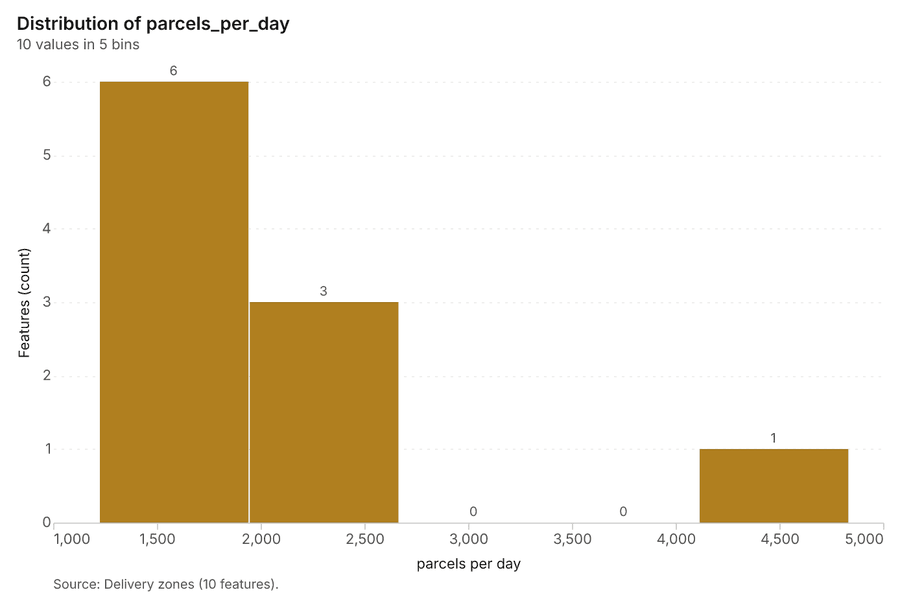
| Delivery zones | vector, Polygon | 10 | 10 polygon (area) features; 'parcels_per_day' 1,219 to 4,832 (mean 2062); 'households' 26,833 to 106,313 (mean 4.537e+04); named by 'name' (e.g. Barrio Norte, Las Flores, El Molino); total area 56.04 km2; extent -3.7513,40.3850 to -3.6564,40.4486. Areas (Delivery zones) with parcels_per_day to compare and map. | 110 | |
| Depots | vector, Point | 3 | 3 point features; 'vans' 23 to 32 (mean 28.33); 'cargo_bikes' 4 to 14 (mean 8.333); 'dock_doors' 8 to 15 (mean 12.67); named by 'name' (e.g. Depot Norte, Depot Sur, Depot Este); extent -3.7276,40.3903 to -3.6643,40.4387. Point locations of Depots. | 111 | |
| Routes | vector, LineString | 36 | 36 line features; 'vehicle' has 3 values (top: van 23, cargo bike 10, electric van 3); 'distance_km' 9.14 to 35.39 (mean 19.79); 'planned_min' 142 to 378 (mean 237.6); total length 712.7 km; extent -3.7501,40.3857 to -3.6573,40.4480. Lines (Routes) such as routes or networks. | 112 | |
| Delivery stops | vector, Point | 2,000 | 2026-07-27 to 2026-09-19 | 2,000 point features; dated by 'delivered_at' from 2026-07-27 to 2026-09-19; 'status' has 2 values (top: delivered 1877, failed 123); 'delay_min' -10 to 59 (mean 10.29); 'parcels' 1 to 3 (mean 1.583); extent -3.7499,40.3856 to -3.6567,40.4475. Dated point events by status: where and when Delivery stops happen. | 2 |
| Parcel lockers | vector, Point | 45 | 45 point features; 'host' has 3 values (top: supermarket 16, metro 15, gas station 14); 'compartments' 40 to 90 (mean 60); 'utilization_pct' 35.3 to 97.3 (mean 60.95); extent -3.7492,40.3915 to -3.6578,40.4475. Point locations of Parcel lockers by host. | 113 | |
| Loading bays | vector, Point | 60 | 60 point features; 'enforced' has 2 values (top: True 43, False 17); 'max_minutes' 15 to 30 (mean 21.83); extent -3.7497,40.3880 to -3.6596,40.4477. Point locations of Loading bays by enforced. | 114 | |
| Roadworks | vector, LineString | 12 | 2026-06-27 to 2026-09-03 | 12 line features; dated by 'start_date' from 2026-06-27 to 2026-09-03; 'type' has 3 values (top: water main 6, resurfacing 3, metro 3); 'lanes_closed' 1 to 2 (mean 1.333); total length 4.26 km; extent -3.7212,40.3883 to -3.6585,40.4349. Lines (Roadworks) such as routes or networks. | 3 |
| Route performance by day | table | 1,728 | 2026-07-27 to 2026-09-19 | Table of 1,728 rows and 6 columns without geometry; dated by 'date' from 2026-07-27 to 2026-09-19; 'on_time_pct' 59.4 to 99.7 (mean 85.51); 'avg_delay_min' 0 to 24.5 (mean 8.212); 'failed_stops' 0 to 7 (mean 1.513). A table of Route performance by day without locations. | 4 |
| Vehicle fleet | table | 60 | Table of 60 rows and 6 columns without geometry; 'type' has 3 values (top: van 32, electric van 21, cargo bike 7); 'capacity_parcels' 35 to 160 (mean 104.4); 'range_km' 60 to 320 (mean 206.7); 'model_year' 2,017 to 2,026 (mean 2022). A table of Vehicle fleet without locations. | 115 | |
| Operations review | document | 1-page md document 'Operations review: August and September 2026'; language en; mentions 5 place(s): Depot Este (2), El Molino (1), 40.41805, -3.70570 (1), Depot Sur (1), La Estacion (1). A document about Depot Este, El Molino, 40.41805, -3.70570. | 116 | ||
| Sample: Logistics, Madrid | record | 117 | |||
| Emerging hot spots: Delivery stops | layer, Polygon | 88 | 118 | ||
| Repeat and near repeat classification: Delivery stops | layer, Point | 2,000 | 119 | ||
| Summarize within: Delivery zones | layer, Polygon | 10 | 120 | ||
| Summarize within: Delivery zones | layer, Polygon | 10 | 121 | ||
| Summarize within: Delivery zones | layer, Polygon | 10 | 122 | ||
| Hot spot analysis: Delivery stops | layer, Polygon | 254 | 123 | ||
| Hot spot analysis: Parcel lockers | layer, Polygon | 19 | 124 | ||
| Hot spot analysis: Loading bays | layer, Polygon | 19 | 125 | ||
| Calculate density: Delivery stops | layer, Polygon | 1,654 | 126 | ||
| Calculate density: Parcel lockers | layer, Polygon | 99 | 127 | ||
| Calculate density: Loading bays | layer, Polygon | 101 | 128 | ||
| Find point clusters: Delivery stops | layer, Point | 2,000 | 129 | ||
| Find point clusters: cluster hulls | layer, Polygon | 2 | 130 | ||
| Find point clusters: Parcel lockers | layer, Point | 45 | 131 | ||
| Find point clusters: cluster hulls | layer, Polygon | 1 | 132 | ||
| Find point clusters: Loading bays | layer, Point | 60 | 133 | ||
| Find point clusters: cluster hulls | layer, Polygon | 6 | 134 | ||
| Find outliers: Delivery zones | layer, Polygon | 10 | 135 | ||
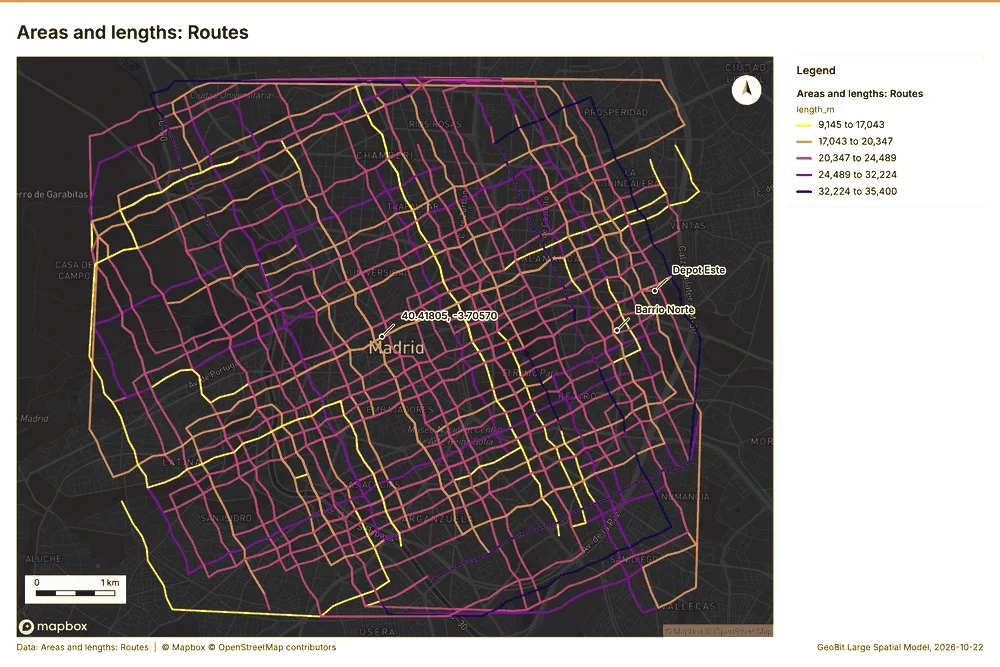
| Areas and lengths: Routes | layer, LineString | 36 | 136 | ||
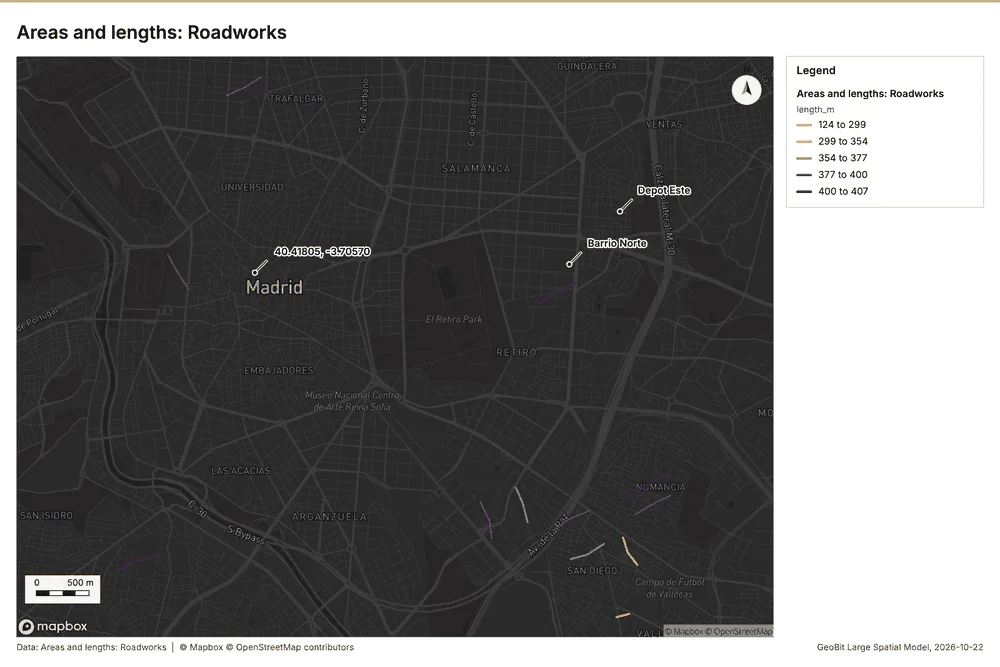
| Areas and lengths: Roadworks | layer, LineString | 12 | 137 | ||
| Line density: Routes | layer, Polygon | 480 | 138 |
Timeline
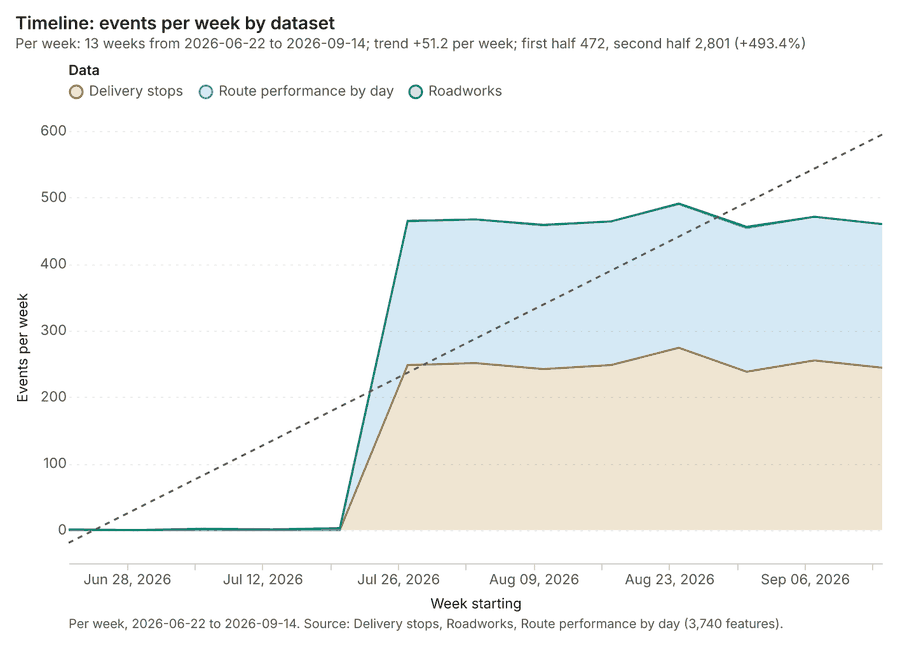
The timeline counts 3,740 dated events in Delivery stops, Roadworks, Route performance by day per week, from week of 2026-06-22 to week of 2026-09-14 1234. By dataset: Delivery stops 2,000; Route performance by day 1,728; Roadworks 12 1. The trend is +51.2 events per week; the second half of the weeks has 2,801 against 472 in the first (+493.4%) 1. 1 of the 13 weeks had no events 1. Change point detection found no shift in the counts 5.
Busiest weeks
Quietest weeks with events
Space time hot spots
What this analysis is. Emerging hot spots: Where hot spots are new, consecutive, intensifying, persistent, diminishing, sporadic, oscillating or historical over time 6. In ArcGIS it is Emerging Hot Spot Analysis or Create Space Time Cube 6.
Why it was run on this data. Delivery stops carry dates in 'delivered_at': emerging hot spot analysis finds new, intensifying and fading hot spots per week 7.
What it found. Space time hot spots on Delivery stops: Emerging hot spots: 1 layer saved: Emerging hot spots: Delivery stops (88 features) 89. It reported result, count 88; result, elapsed ms 15; result, resolution 8; result, features used 2,000; result, time neighbors 0; billing, cost 0.2 8.
| Result | Value |
|---|---|
| result, count | 88 |
| result, elapsed ms | 15 |
| result, resolution | 8 |
| result, features used | 2,000 |
| result, time neighbors | 0 |
| billing, cost | 0.2 |
| billing, list price | 0.2 |
| billing, upstream cost | 0 |
Findings
- Evidenced: Space time hot spots on Delivery stops: Emerging hot spots: 1 layer saved: Emerging hot spots: Delivery stops (88 features) 89.
- Evidenced: It reported result, count 88; result, elapsed ms 15; result, resolution 8; result, features used 2,000; result, time neighbors 0; billing, cost 0.2 8.
Tool gp_space_time_hot_spots; parameters {"project": "55917da2-e619-41aa-b6a1-e521a75b705c", "features": {"layer": "Delivery stops (ba8073d9)"}, "interval": "week", "bin_shape": "h3", "resolution": 8, "time_field": "delivered_at"}
Near repeat
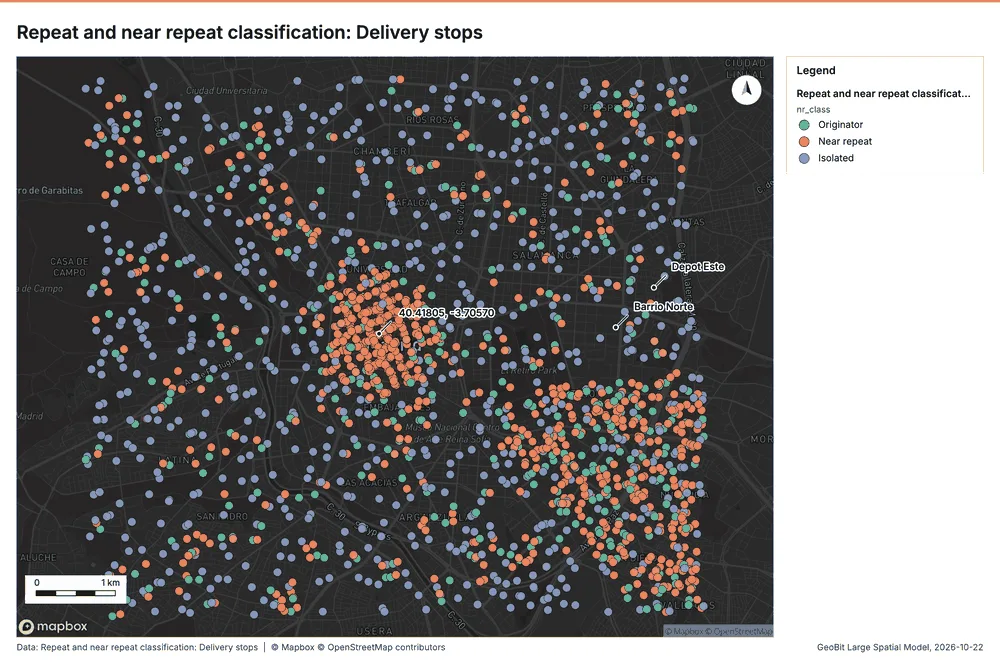
What this analysis is. Repeat and near repeat classification: Classify incidents as originators, repeats (same place) or near repeats within a distance and time window, with a Knox test table 10. In ArcGIS it is Repeat and Near Repeat Classification or Near Repeat Calculator 10.
Why it was run on this data. Near repeat analysis tests whether Delivery stops close in space also follow each other within 5 days 11.
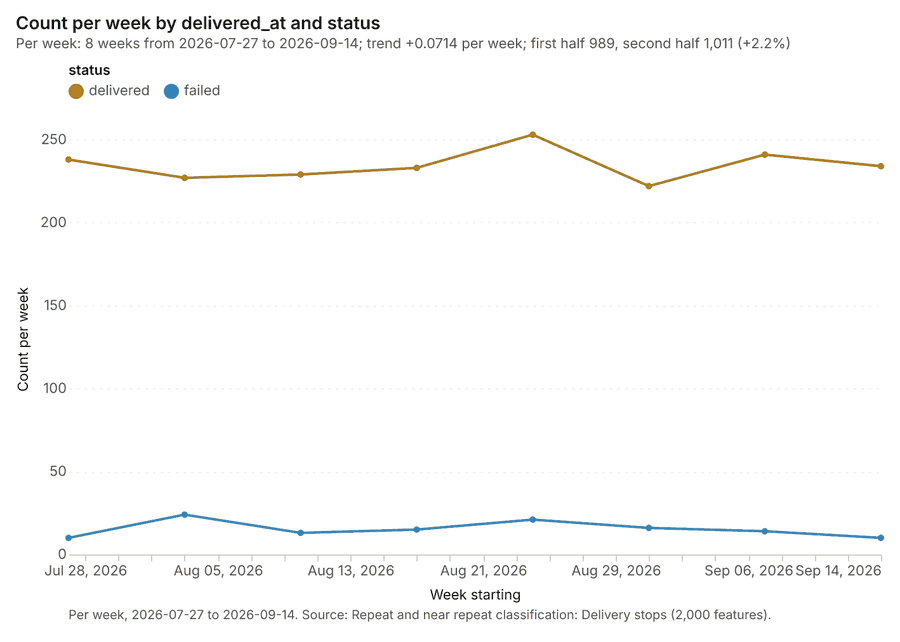
What it found. Near repeat on Delivery stops: Repeat and near repeat classification: 1 layer saved: Repeat and near repeat classification: Delivery stops (2000 features) 912. It reported result, days 5; result, count 2,000; result, chains 276; result, distance m 200; result, elapsed ms 48; result, pairs linked 1,743 12.
| Result | Value |
|---|---|
| result, days | 5 |
| result, count | 2,000 |
| result, chains | 276 |
| result, distance m | 200 |
| result, elapsed ms | 48 |
| result, pairs linked | 1,743 |
| billing, cost | 0.11 |
| billing, list price | 0.11 |
| billing, upstream cost | 0 |
Findings
- Evidenced: Near repeat on Delivery stops: Repeat and near repeat classification: 1 layer saved: Repeat and near repeat classification: Delivery stops (2000 features) 912.
- Evidenced: It reported result, days 5; result, count 2,000; result, chains 276; result, distance m 200; result, elapsed ms 48; result, pairs linked 1,743 12.
Tool gp_near_repeat; parameters {"days": 5, "project": "55917da2-e619-41aa-b6a1-e521a75b705c", "features": {"layer": "Delivery stops (ba8073d9)"}, "distance_m": 200.0, "time_field": "delivered_at"}
Change point detection
What this analysis is. Change point detection: When did the level, count, trend or variability change 13? For the whole study area or for every bin 13. In ArcGIS it is Change Point Detection 13.
Why it was run on this data. Change point detection finds when the weekly count of Delivery stops shifted 14.
What it found. Change point detection on Delivery stops: Change point detection: done; no map output 59. It reported result, n changes 0; result, elapsed ms 4; result, events used 2,000; billing, cost 0.11; billing, list price 0.11; billing, upstream cost 0 5.
| Result | Value |
|---|---|
| result, n changes | 0 |
| result, elapsed ms | 4 |
| result, events used | 2,000 |
| billing, cost | 0.11 |
| billing, list price | 0.11 |
| billing, upstream cost | 0 |
Findings
- Evidenced: Change point detection on Delivery stops: Change point detection: done; no map output 59.
- Evidenced: It reported result, n changes 0; result, elapsed ms 4; result, events used 2,000; billing, cost 0.11; billing, list price 0.11; billing, upstream cost 0 5.
Tool gp_change_point_detection; parameters {"method": "count", "project": "55917da2-e619-41aa-b6a1-e521a75b705c", "features": {"layer": "Delivery stops (ba8073d9)"}, "interval": "week", "time_field": "delivered_at"}
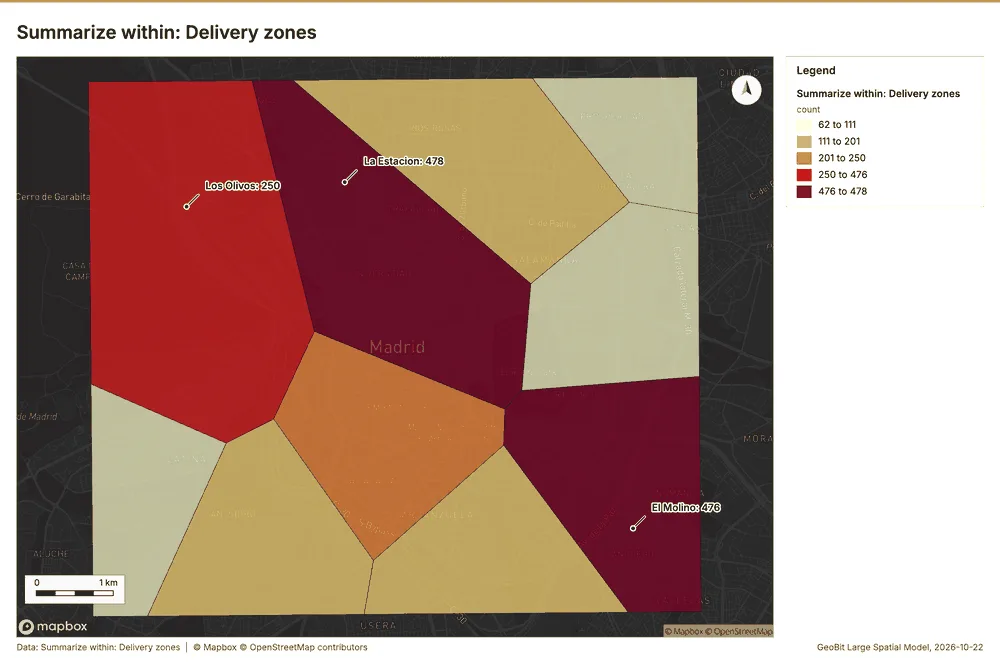
Summarize within
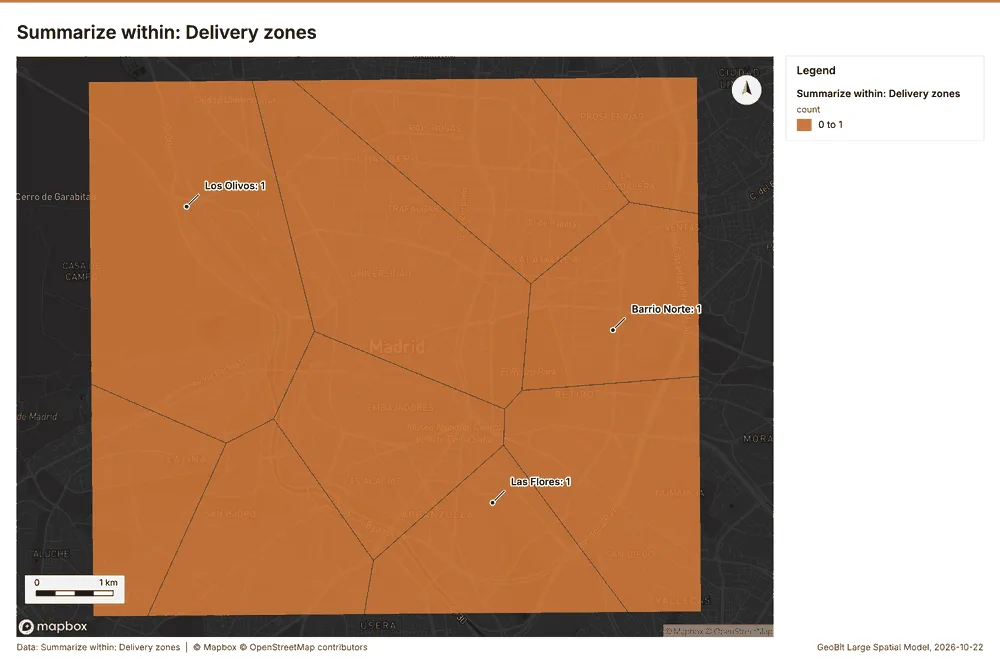
What this analysis is. Summarize within: Count and aggregate the features inside each polygon (or bin), proportionally for lines and polygons 15. In ArcGIS it is Summarize Within or Aggregate Points; in QGIS, native:countpointsinpolygon or native:sumlinelengths 15.
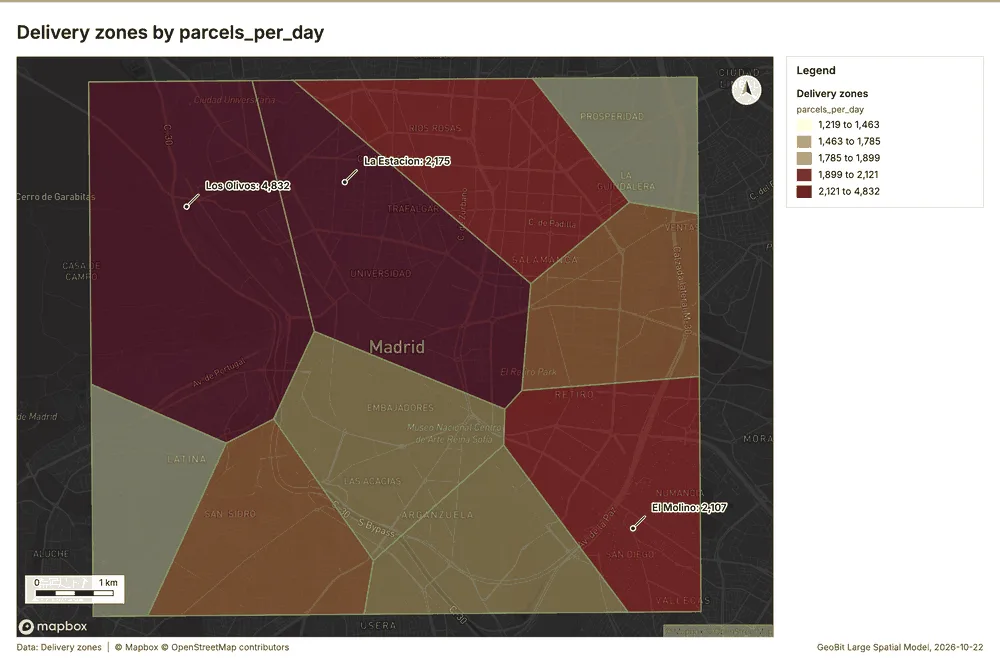
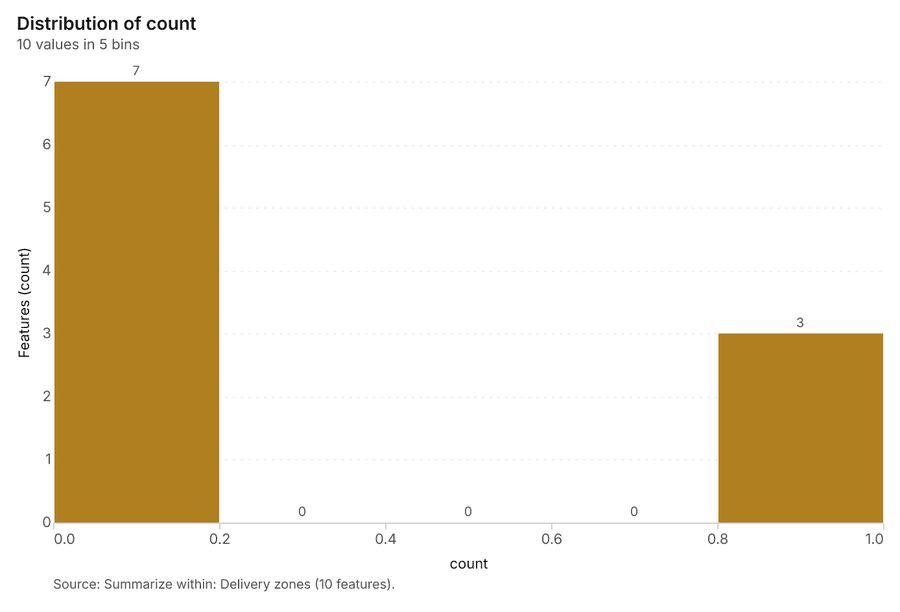
Why it was run on this data. Count Depots inside each feature of Delivery zones; the counts map as a choropleth (natural breaks, sequential colors) 16.
What it found. Summarize within on Depots, Delivery zones: Summarize within: 1 layer saved: Summarize within: Delivery zones (10 features) 171819. It reported result, count 10; result, elapsed ms 0; billing, cost 0.01028; billing, list price 0.01028; billing, upstream cost 0 17.
| Result | Value |
|---|---|
| result, count | 10 |
| result, elapsed ms | 0 |
| billing, cost | 0.01028 |
| billing, list price | 0.01028 |
| billing, upstream cost | 0 |
Findings
- Evidenced: Summarize within on Depots, Delivery zones: Summarize within: 1 layer saved: Summarize within: Delivery zones (10 features) 171819.
- Evidenced: It reported result, count 10; result, elapsed ms 0; billing, cost 0.01028; billing, list price 0.01028; billing, upstream cost 0 17.
Tool gp_summarize_within; parameters {"stats": [{"stat": "sum", "field": "vans"}], "project": "55917da2-e619-41aa-b6a1-e521a75b705c", "features": {"layer": "Depots (84d3272c)"}, "polygons": {"layer": "Delivery zones (bfcf8b53)"}}
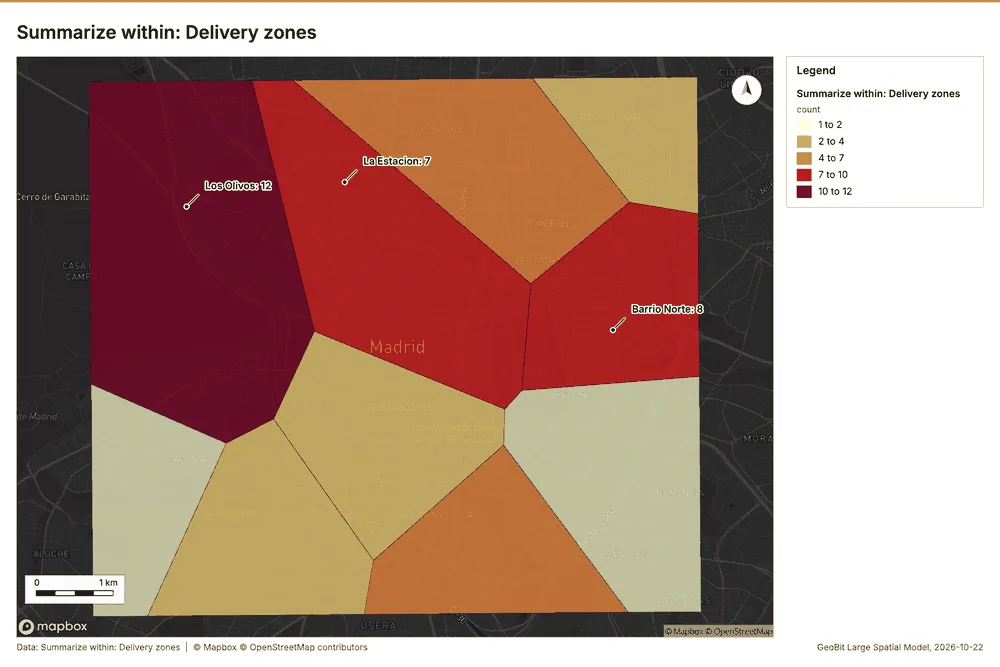
Summarize within
What this analysis is. Summarize within: Count and aggregate the features inside each polygon (or bin), proportionally for lines and polygons 15. In ArcGIS it is Summarize Within or Aggregate Points; in QGIS, native:countpointsinpolygon or native:sumlinelengths 15.
Why it was run on this data. Count Depots inside each feature of Delivery zones; the counts map as a choropleth (natural breaks, sequential colors) 16.
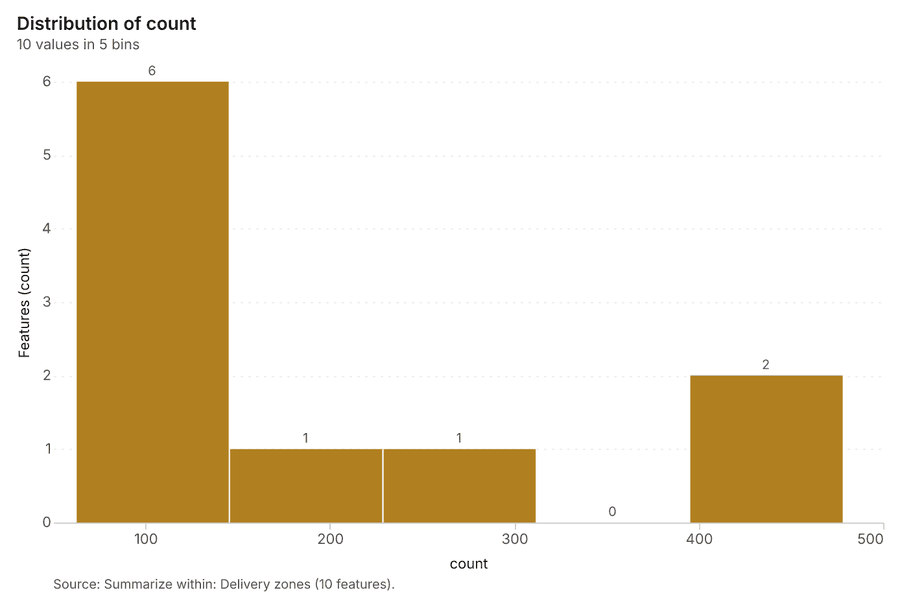
What it found. Summarize within on Delivery stops, Delivery zones: Summarize within: 1 layer saved: Summarize within: Delivery zones (10 features) 91920. It reported result, count 10; result, elapsed ms 4; billing, cost 0.05022; billing, list price 0.05022; billing, upstream cost 0 20.
| Result | Value |
|---|---|
| result, count | 10 |
| result, elapsed ms | 4 |
| billing, cost | 0.05022 |
| billing, list price | 0.05022 |
| billing, upstream cost | 0 |
Findings
- Evidenced: Summarize within on Delivery stops, Delivery zones: Summarize within: 1 layer saved: Summarize within: Delivery zones (10 features) 91920.
- Evidenced: It reported result, count 10; result, elapsed ms 4; billing, cost 0.05022; billing, list price 0.05022; billing, upstream cost 0 20.
Tool gp_summarize_within; parameters {"stats": [{"stat": "sum", "field": "delay_min"}], "project": "55917da2-e619-41aa-b6a1-e521a75b705c", "features": {"layer": "Delivery stops (ba8073d9)"}, "group_by": "status", "polygons": {"layer": "Delivery zones (bfcf8b53)"}}
Summarize within
What this analysis is. Summarize within: Count and aggregate the features inside each polygon (or bin), proportionally for lines and polygons 15. In ArcGIS it is Summarize Within or Aggregate Points; in QGIS, native:countpointsinpolygon or native:sumlinelengths 15.
Why it was run on this data. Count Depots inside each feature of Delivery zones; the counts map as a choropleth (natural breaks, sequential colors) 16.
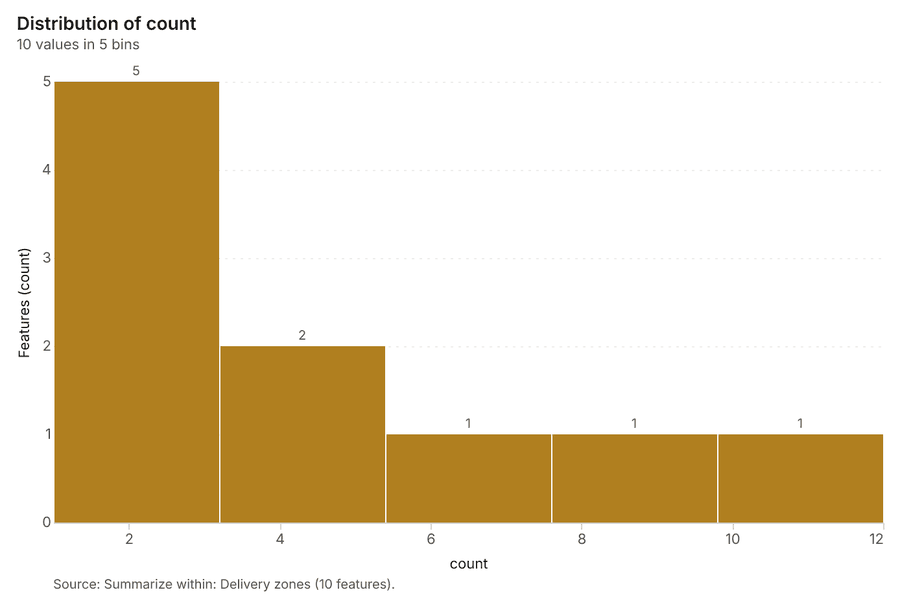
What it found. Summarize within on Parcel lockers, Delivery zones: Summarize within: 1 layer saved: Summarize within: Delivery zones (10 features) 192122. It reported result, count 10; result, elapsed ms 0; billing, cost 0.01112; billing, list price 0.01112; billing, upstream cost 0 21.
| Result | Value |
|---|---|
| result, count | 10 |
| result, elapsed ms | 0 |
| billing, cost | 0.01112 |
| billing, list price | 0.01112 |
| billing, upstream cost | 0 |
Findings
- Evidenced: Summarize within on Parcel lockers, Delivery zones: Summarize within: 1 layer saved: Summarize within: Delivery zones (10 features) 192122.
- Evidenced: It reported result, count 10; result, elapsed ms 0; billing, cost 0.01112; billing, list price 0.01112; billing, upstream cost 0 21.
Tool gp_summarize_within; parameters {"stats": [{"stat": "sum", "field": "compartments"}], "project": "55917da2-e619-41aa-b6a1-e521a75b705c", "features": {"layer": "Parcel lockers (4e9e11a9)"}, "group_by": "host", "polygons": {"layer": "Delivery zones (bfcf8b53)"}}
Hot spots
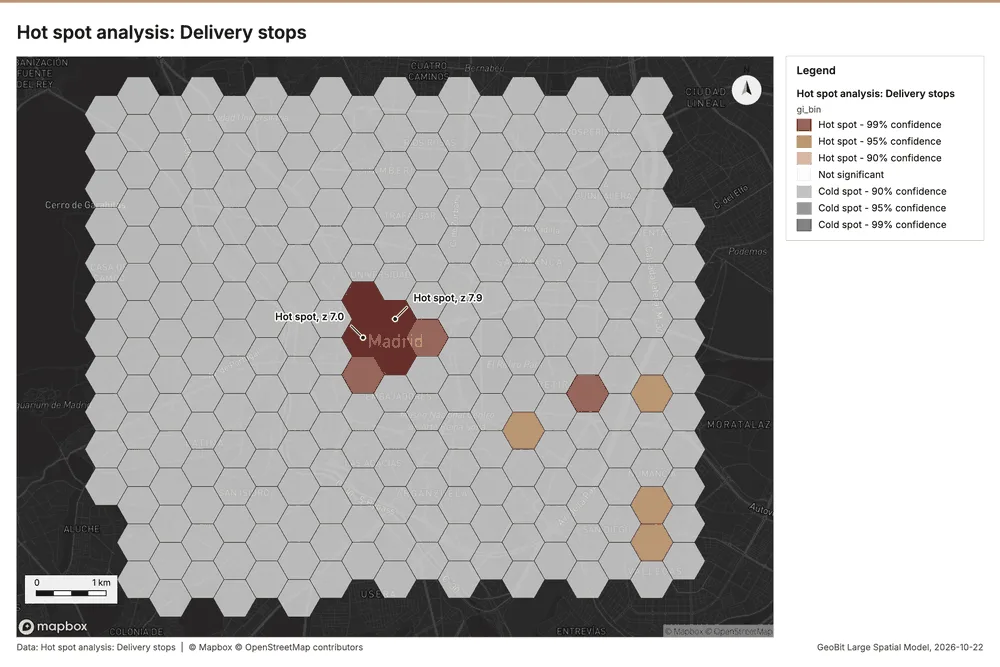
What this analysis is. Hot spot analysis: Getis-Ord Gi* hot and cold spots with z-scores, p-values and confidence bins 23. In ArcGIS it is Find Hot Spots or Hot Spot Analysis (Getis-Ord Gi*); in QGIS, qgis:hotspot (plugin) 23.
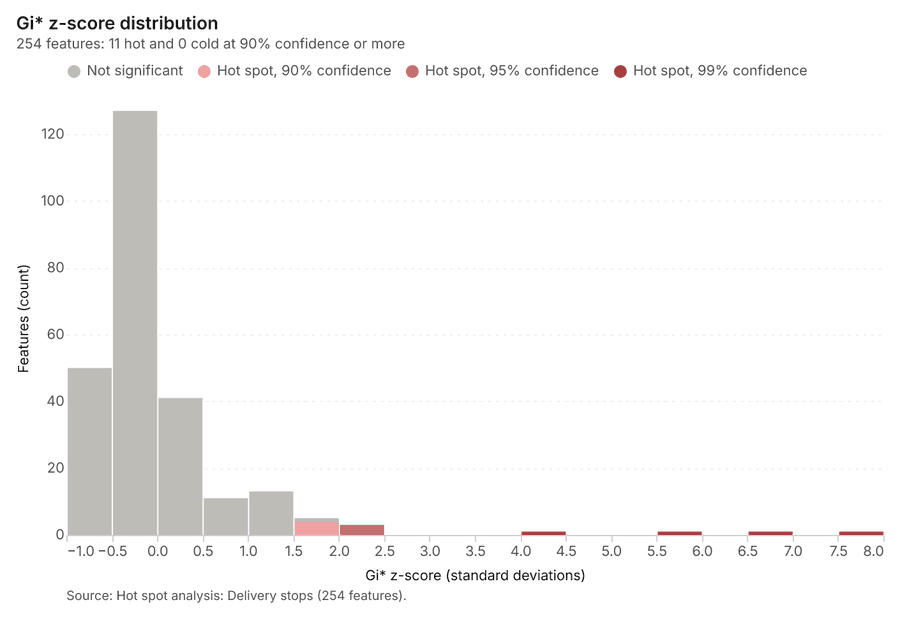
Why it was run on this data. 2000 points: Getis-Ord Gi* tests whether the concentrations in Delivery stops are statistically significant 24.
What it found. The hot spot analysis was conducted using the Delivery stops layer 9 and the gp_hot_spots tool 25. The process produced 254 features and calculated a count of 254 results 25. For this analysis, 2,000 incidents were utilized, and the resulting cell size was 500 m 25. The total billing cost for the analysis was 0.09 25.
| Result | Value |
|---|---|
| result, bins | 254 |
| result, count | 254 |
| result, elapsed ms | 23 |
| result, cell size m | 500 |
| result, incidents used | 2,000 |
| result, distance band m | 500 |
| billing, cost | 0.09 |
| billing, list price | 0.09 |
| billing, upstream cost | 0 |
Findings
- Evidenced: Hot spots on Delivery stops: Hot spot analysis: 1 layer saved: Hot spot analysis: Delivery stops (254 features) 925.
- Evidenced: It reported result, bins 254; result, count 254; result, elapsed ms 23; result, cell size m 500; result, incidents used 2,000; result, distance band m 500 25.
Tool gp_hot_spots; parameters {"project": "55917da2-e619-41aa-b6a1-e521a75b705c", "features": {"layer": "Delivery stops (ba8073d9)"}, "aggregation": "hexagon", "cell_size_m": 500.0, "distance_band_m": 500.0}
Hot spots
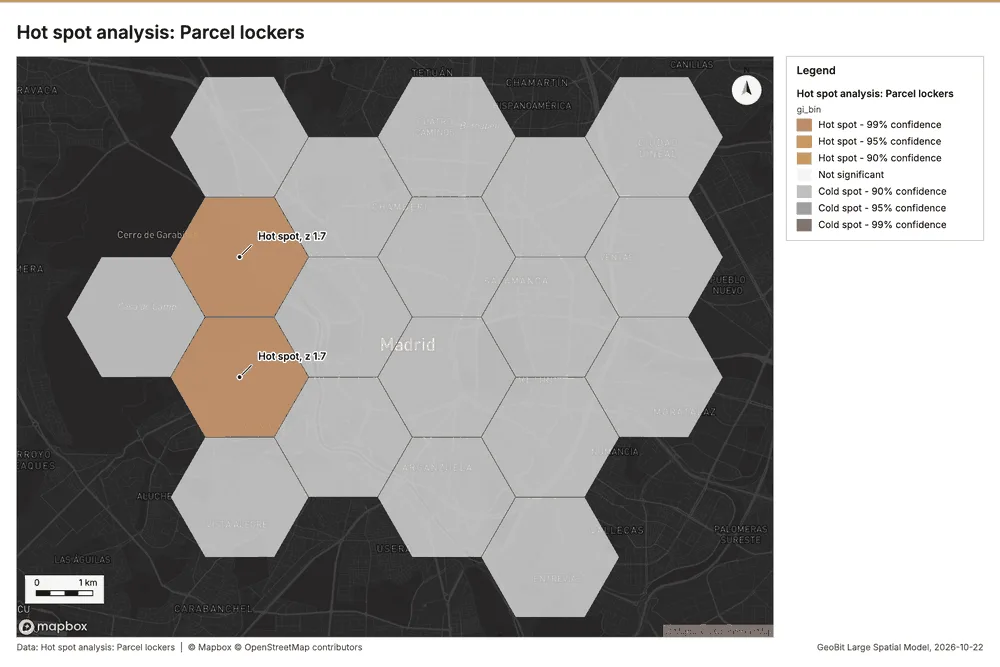
What this analysis is. Hot spot analysis: Getis-Ord Gi* hot and cold spots with z-scores, p-values and confidence bins 23. In ArcGIS it is Find Hot Spots or Hot Spot Analysis (Getis-Ord Gi*); in QGIS, qgis:hotspot (plugin) 23.
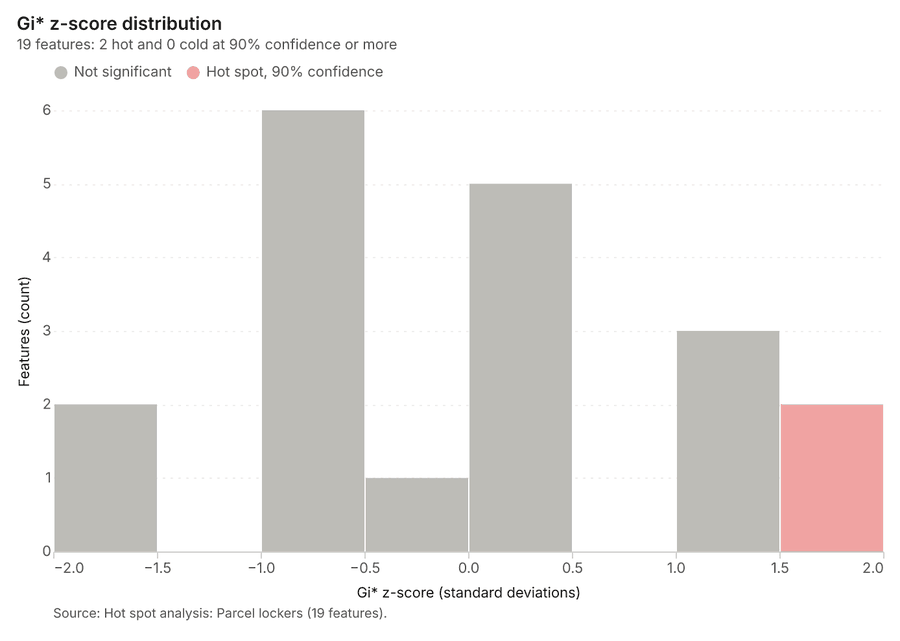
Why it was run on this data. 45 points: Getis-Ord Gi* tests whether the concentrations in Parcel lockers are statistically significant 26.
What it found. The hot spot analysis was conducted using the Parcel lockers layer 22. The analysis produced 1 layer, titled "Hot spot analysis: Parcel lockers (19 features)" 27. Key results showed the analysis generated 19 bins containing 19 features 27. The operation took 2 milliseconds to complete, and the resulting cell size and distance band were both 2,000 meters 27.
| Result | Value |
|---|---|
| result, bins | 19 |
| result, count | 19 |
| result, elapsed ms | 2 |
| result, cell size m | 2,000 |
| result, incidents used | 45 |
| result, distance band m | 2,000 |
| billing, cost | 0.0509 |
| billing, list price | 0.0509 |
| billing, upstream cost | 0 |
Findings
- Evidenced: Hot spots on Parcel lockers: Hot spot analysis: 1 layer saved: Hot spot analysis: Parcel lockers (19 features) 2227.
- Evidenced: It reported result, bins 19; result, count 19; result, elapsed ms 2; result, cell size m 2,000; result, incidents used 45; result, distance band m 2,000 27.
Tool gp_hot_spots; parameters {"project": "55917da2-e619-41aa-b6a1-e521a75b705c", "features": {"layer": "Parcel lockers (4e9e11a9)"}, "aggregation": "hexagon", "cell_size_m": 2000.0, "distance_band_m": 2000.0}
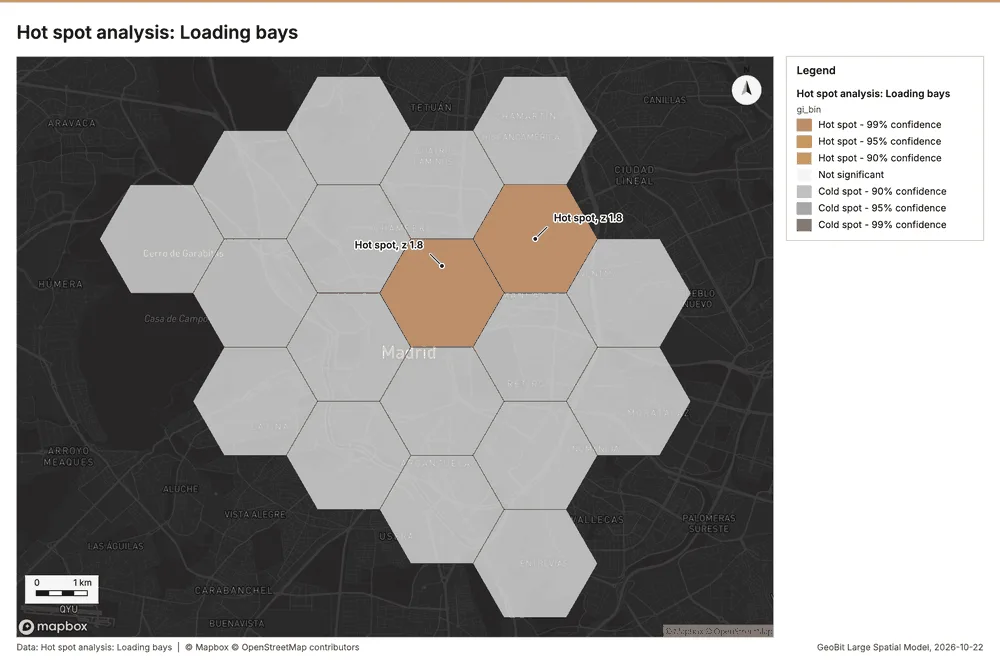
Hot spots
What this analysis is. Hot spot analysis: Getis-Ord Gi* hot and cold spots with z-scores, p-values and confidence bins 23. In ArcGIS it is Find Hot Spots or Hot Spot Analysis (Getis-Ord Gi*); in QGIS, qgis:hotspot (plugin) 23.
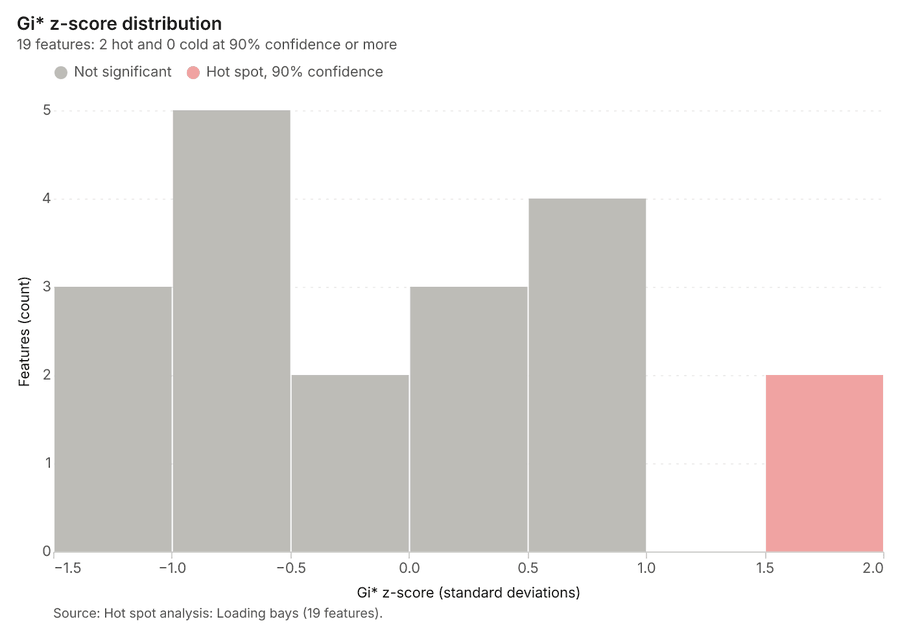
Why it was run on this data. 60 points: Getis-Ord Gi* tests whether the concentrations in Loading bays are statistically significant 28.
What it found. Hot spots on Loading bays: Hot spot analysis: 1 layer saved: Hot spot analysis: Loading bays (19 features) 2930. It reported result, bins 19; result, count 19; result, elapsed ms 2; result, cell size m 2,000; result, incidents used 60; result, distance band m 2,000 29.
| Result | Value |
|---|---|
| result, bins | 19 |
| result, count | 19 |
| result, elapsed ms | 2 |
| result, cell size m | 2,000 |
| result, incidents used | 60 |
| result, distance band m | 2,000 |
| billing, cost | 0.0512 |
| billing, list price | 0.0512 |
| billing, upstream cost | 0 |
Findings
- Evidenced: Hot spots on Loading bays: Hot spot analysis: 1 layer saved: Hot spot analysis: Loading bays (19 features) 2930.
- Evidenced: It reported result, bins 19; result, count 19; result, elapsed ms 2; result, cell size m 2,000; result, incidents used 60; result, distance band m 2,000 29.
Tool gp_hot_spots; parameters {"project": "55917da2-e619-41aa-b6a1-e521a75b705c", "features": {"layer": "Loading bays (16574f8d)"}, "aggregation": "hexagon", "cell_size_m": 2000.0, "distance_band_m": 2000.0}
Calculate density
What this analysis is. Calculate density: Kernel density per square kilometer on a grid 31. In ArcGIS it is Calculate Density or Kernel Density; in QGIS, native:heatmapkerneldensityestimation 31.
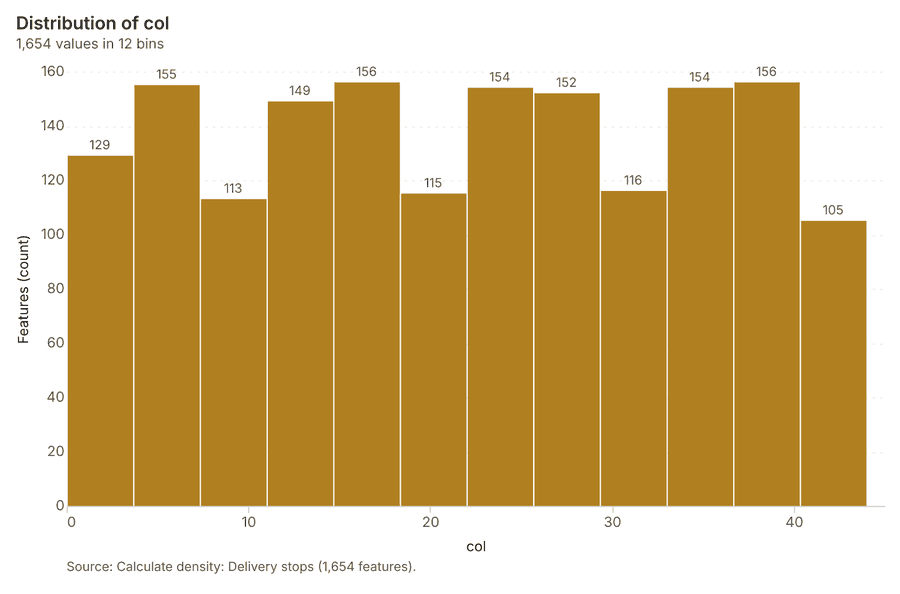
Why it was run on this data. 2000 points in Delivery stops: a density surface shows where they concentrate 32.
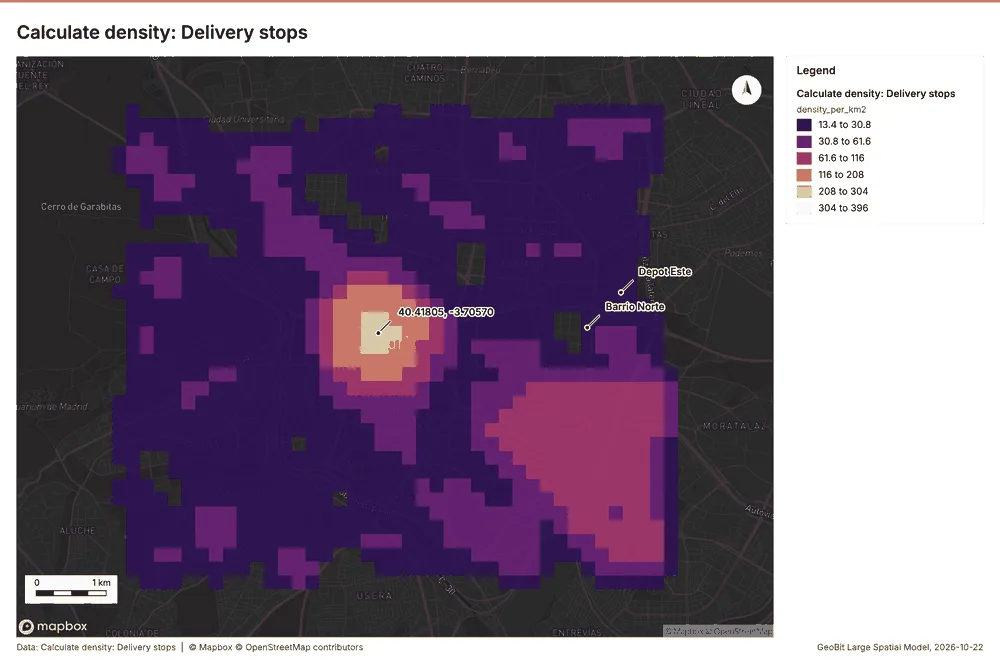
What it found. Calculate density on Delivery stops: Calculate density: 1 layer saved: Calculate density: Delivery stops (1654 features) 933. It reported result, count 1,654; result, elapsed ms 74; result, bandwidth m 500; result, cell size m 200; result, excluded null 0; result, max density per km2 396 33.
| Result | Value |
|---|---|
| result, count | 1,654 |
| result, elapsed ms | 74 |
| result, bandwidth m | 500 |
| result, cell size m | 200 |
| result, excluded null | 0 |
| result, max density per km2 | 396 |
| billing, cost | 0.09 |
| billing, list price | 0.09 |
| billing, upstream cost | 0 |
Findings
- Evidenced: Calculate density on Delivery stops: Calculate density: 1 layer saved: Calculate density: Delivery stops (1654 features) 933.
- Evidenced: It reported result, count 1,654; result, elapsed ms 74; result, bandwidth m 500; result, cell size m 200; result, excluded null 0; result, max density per km2 396 33.
Tool gp_calculate_density; parameters {"kernel": "quartic", "project": "55917da2-e619-41aa-b6a1-e521a75b705c", "features": {"layer": "Delivery stops (ba8073d9)"}, "bandwidth_m": 500.0, "cell_size_m": 200.0}
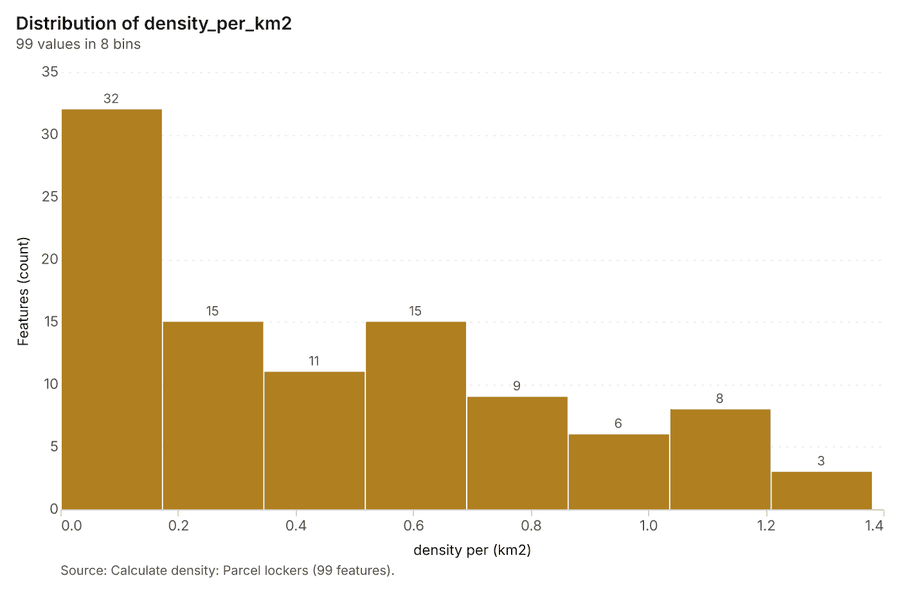
Calculate density
What this analysis is. Calculate density: Kernel density per square kilometer on a grid 31. In ArcGIS it is Calculate Density or Kernel Density; in QGIS, native:heatmapkerneldensityestimation 31.
Why it was run on this data. 45 points in Parcel lockers: a density surface shows where they concentrate 34.
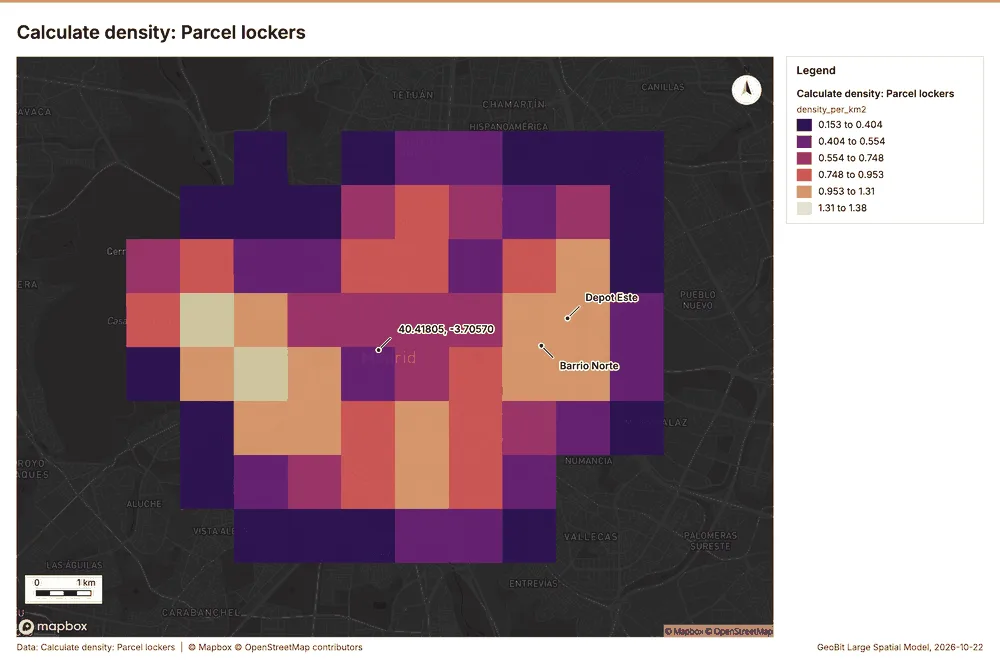
What it found. The calculation of density using the gp_calculate_density tool analyzed the Parcel lockers layer 22 and processed 99 features 35. The process required an elapsed time of 5 ms 35, identifying a maximum density of 1.381 per km² 35.
| Result | Value |
|---|---|
| result, count | 99 |
| result, elapsed ms | 5 |
| result, bandwidth m | 2,000 |
| result, cell size m | 1,000 |
| result, excluded null | 0 |
| result, max density per km2 | 1.381 |
| billing, cost | 0.0509 |
| billing, list price | 0.0509 |
| billing, upstream cost | 0 |
Findings
- Evidenced: Calculate density on Parcel lockers: Calculate density: 1 layer saved: Calculate density: Parcel lockers (99 features) 2235.
- Evidenced: It reported result, count 99; result, elapsed ms 5; result, bandwidth m 2,000; result, cell size m 1,000; result, excluded null 0; result, max density per km2 1.381 35.
Tool gp_calculate_density; parameters {"kernel": "quartic", "project": "55917da2-e619-41aa-b6a1-e521a75b705c", "features": {"layer": "Parcel lockers (4e9e11a9)"}, "bandwidth_m": 2000.0, "cell_size_m": 1000.0}
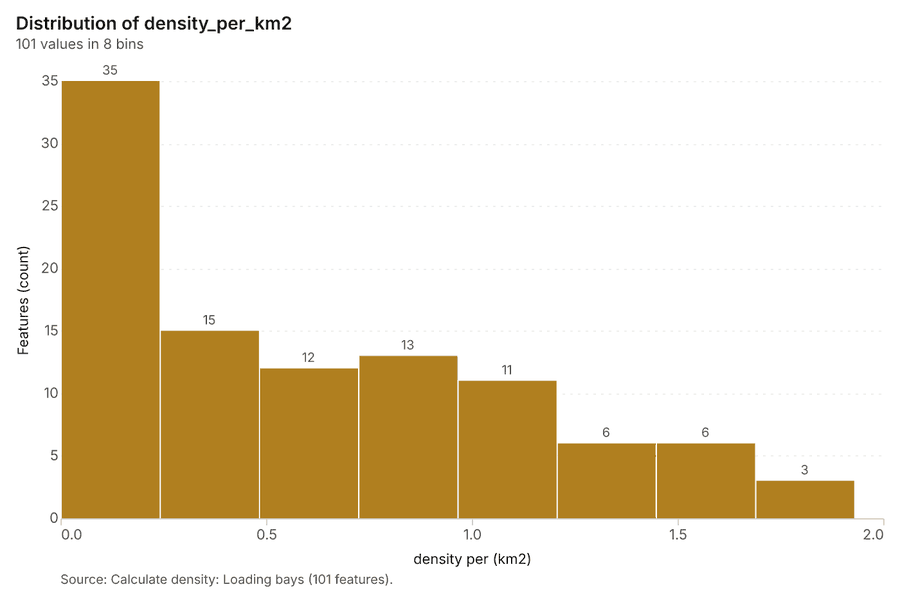
Calculate density
What this analysis is. Calculate density: Kernel density per square kilometer on a grid 31. In ArcGIS it is Calculate Density or Kernel Density; in QGIS, native:heatmapkerneldensityestimation 31.
Why it was run on this data. 60 points in Loading bays: a density surface shows where they concentrate 36.
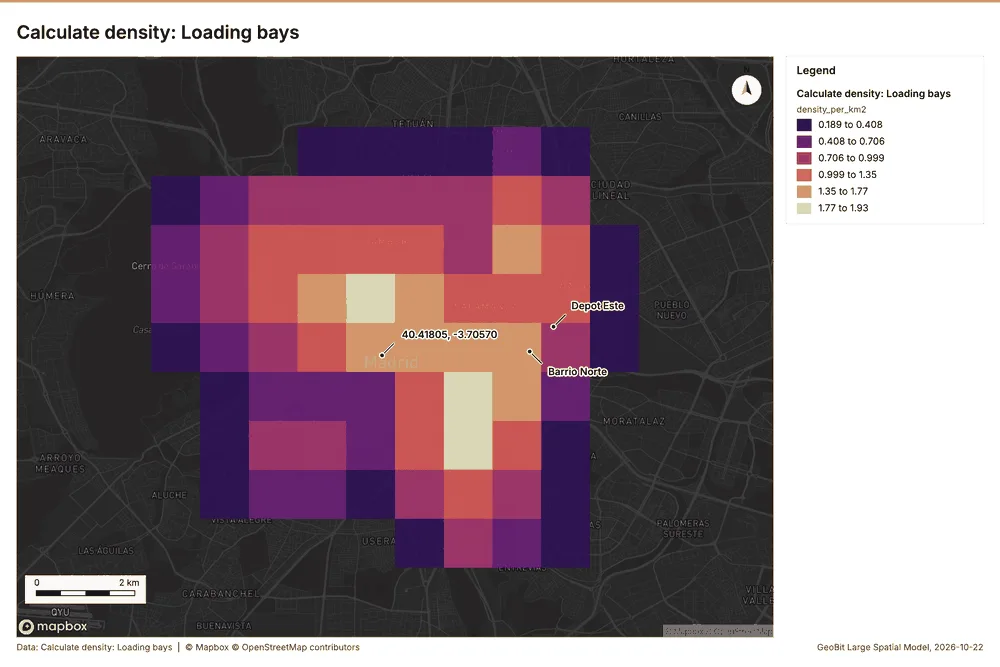
What it found. The density calculation used the Loading bays dataset 30. This process analyzed 101 features and reported a total bandwidth of 2,000 meters 37. The maximum density calculated across the layers was 1.929 per km² 37.
| Result | Value |
|---|---|
| result, count | 101 |
| result, elapsed ms | 5 |
| result, bandwidth m | 2,000 |
| result, cell size m | 1,000 |
| result, excluded null | 0 |
| result, max density per km2 | 1.929 |
| billing, cost | 0.0512 |
| billing, list price | 0.0512 |
| billing, upstream cost | 0 |
Findings
- Evidenced: Calculate density on Loading bays: Calculate density: 1 layer saved: Calculate density: Loading bays (101 features) 3037.
- Evidenced: It reported result, count 101; result, elapsed ms 5; result, bandwidth m 2,000; result, cell size m 1,000; result, excluded null 0; result, max density per km2 1.929 37.
Tool gp_calculate_density; parameters {"kernel": "quartic", "project": "55917da2-e619-41aa-b6a1-e521a75b705c", "features": {"layer": "Loading bays (16574f8d)"}, "bandwidth_m": 2000.0, "cell_size_m": 1000.0}
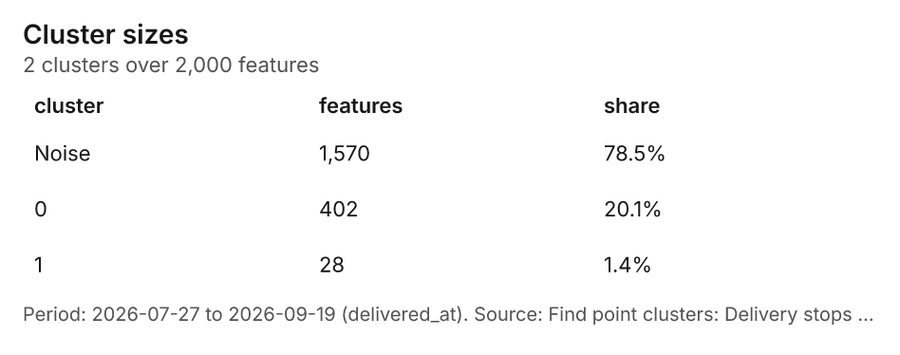
Find point clusters
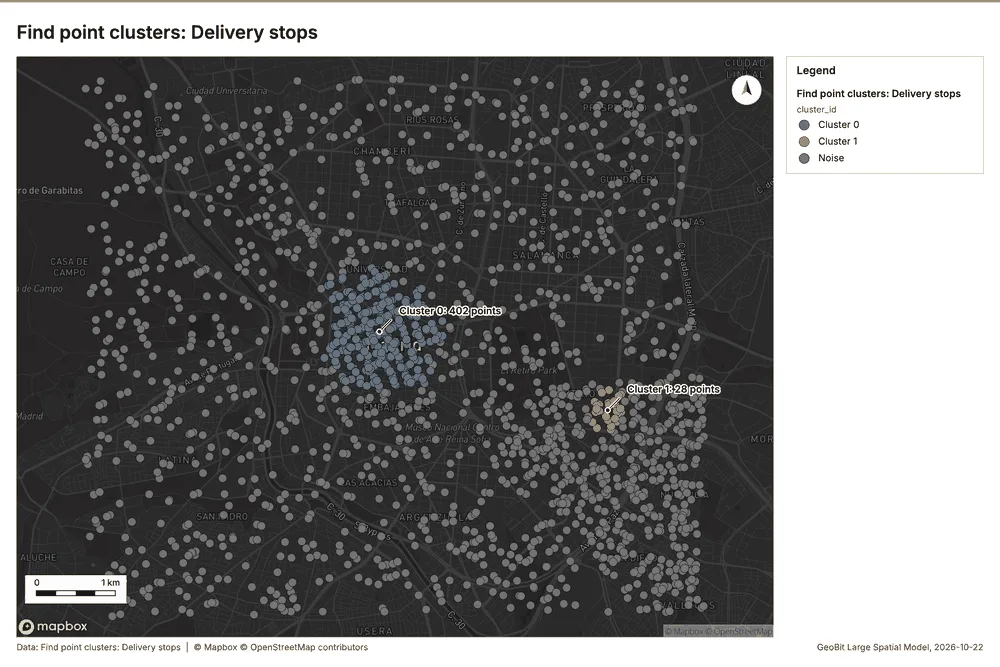
What this analysis is. Find point clusters: Density-based clusters (DBSCAN, HDBSCAN or OPTICS, optionally space-time) with hulls and noise 38. In ArcGIS it is Find Point Clusters or Density-based Clustering; in QGIS, native:dbscanclustering or native:stdbscanclustering 38.
Why it was run on this data. DBSCAN finds dense groups of Delivery stops and separates noise 39.
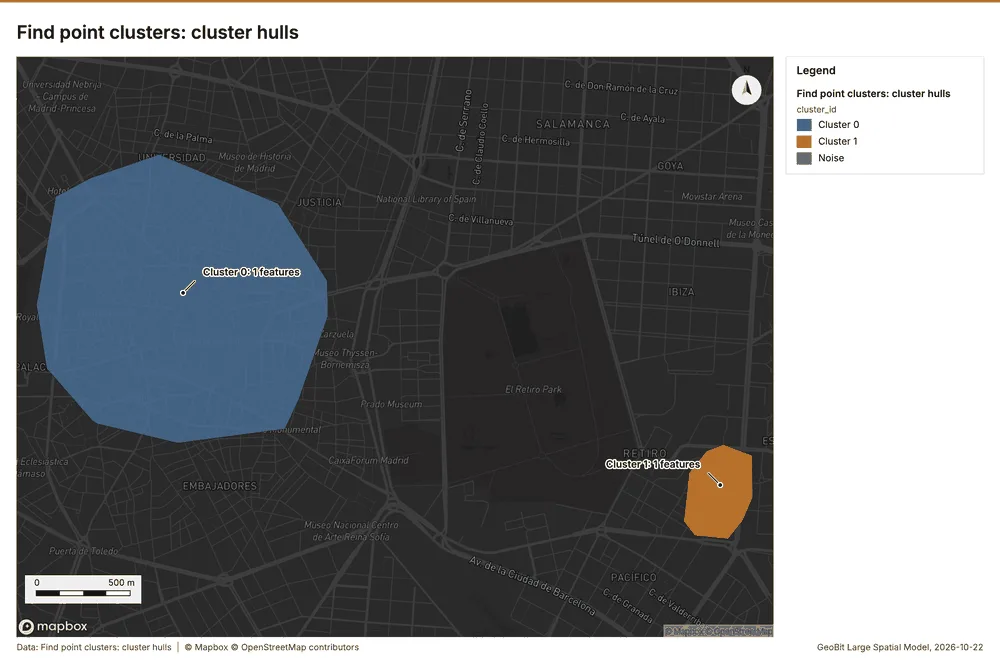
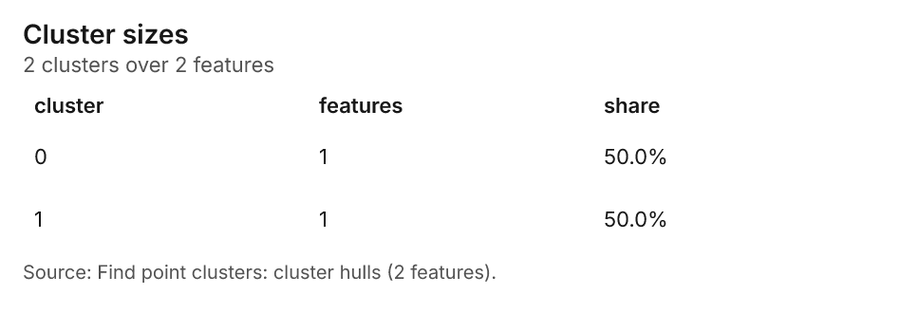
What it found. Find point clusters on Delivery stops: Find point clusters: 2 layers saved: Find point clusters: Delivery stops (2000 features); Find point clusters: cluster hulls (2 features) 940. It reported result, count 2,000; result, noise 1,570; result, distance m 200; result, elapsed ms 214; result, min points 20; billing, cost 0.09 40.
| Result | Value |
|---|---|
| result, count | 2,000 |
| result, noise | 1,570 |
| result, distance m | 200 |
| result, elapsed ms | 214 |
| result, min points | 20 |
| billing, cost | 0.09 |
| billing, list price | 0.09 |
| billing, upstream cost | 0 |
Findings
- Evidenced: Find point clusters on Delivery stops: Find point clusters: 2 layers saved: Find point clusters: Delivery stops (2000 features); Find point clusters: cluster hulls (2 features) 940.
- Evidenced: It reported result, count 2,000; result, noise 1,570; result, distance m 200; result, elapsed ms 214; result, min points 20; billing, cost 0.09 40.
Tool gp_find_point_clusters; parameters {"method": "dbscan", "project": "55917da2-e619-41aa-b6a1-e521a75b705c", "features": {"layer": "Delivery stops (ba8073d9)"}, "distance_m": 200.0, "min_points": 20}
Find point clusters
What this analysis is. Find point clusters: Density-based clusters (DBSCAN, HDBSCAN or OPTICS, optionally space-time) with hulls and noise 38. In ArcGIS it is Find Point Clusters or Density-based Clustering; in QGIS, native:dbscanclustering or native:stdbscanclustering 38.
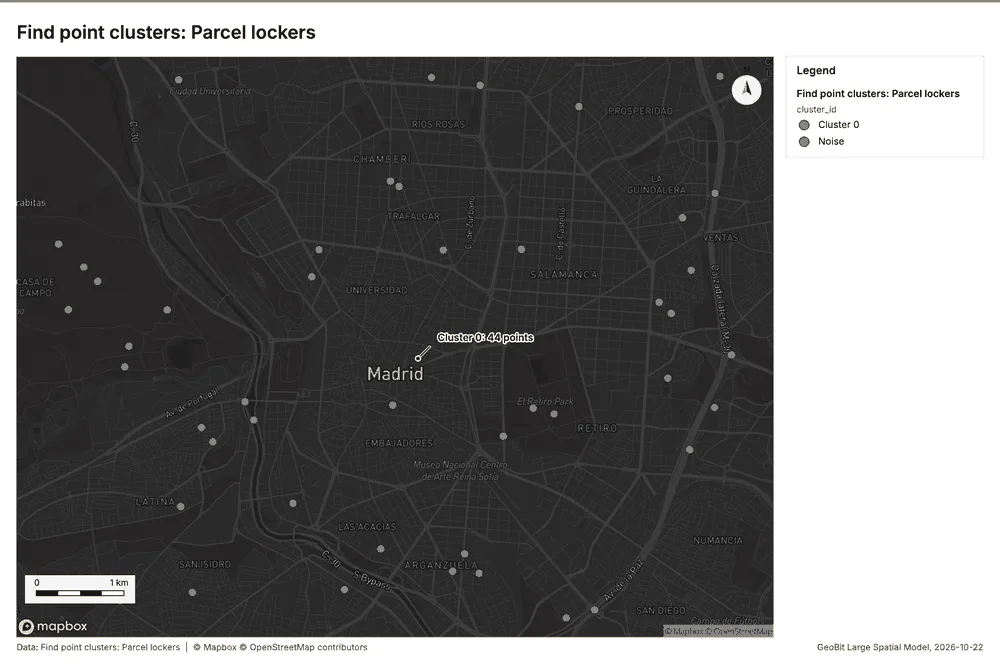
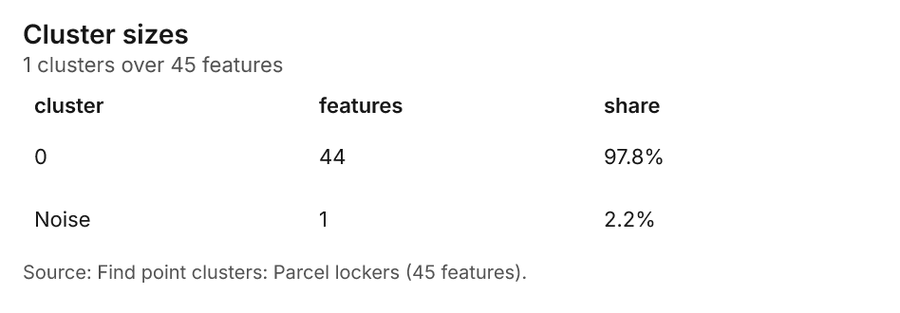
Why it was run on this data. DBSCAN finds dense groups of Parcel lockers and separates noise 41.
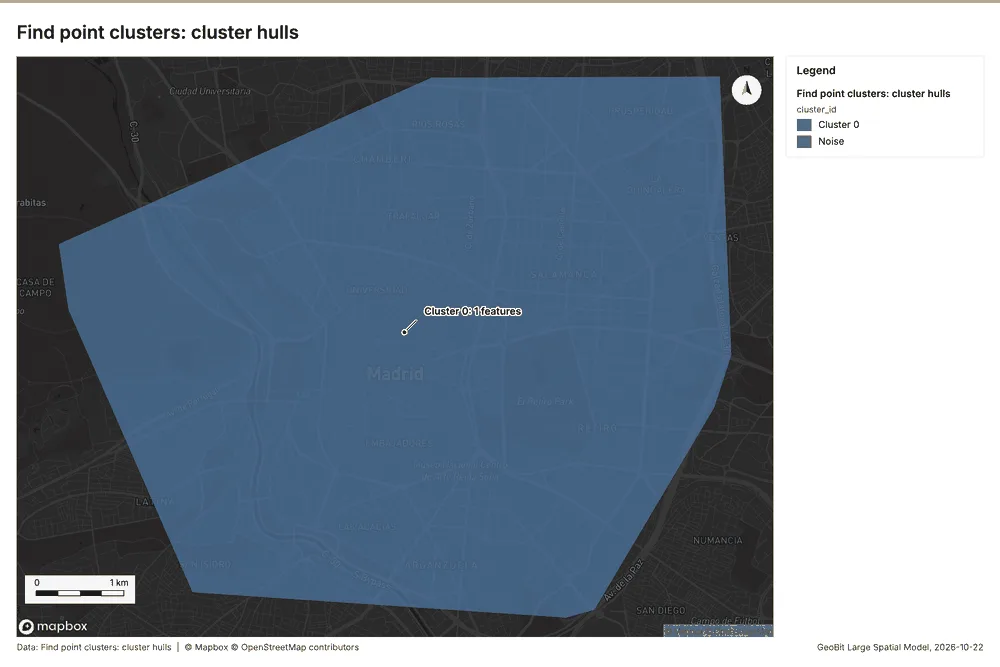
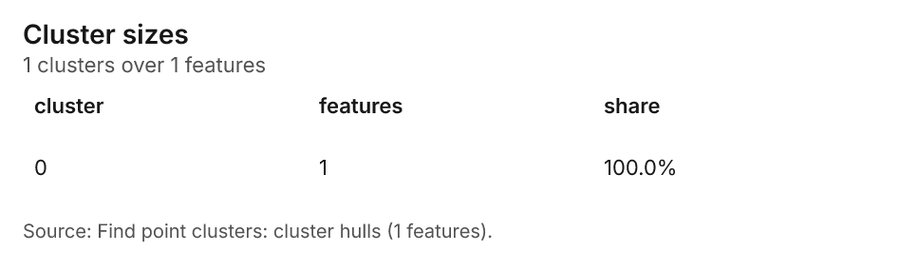
What it found. Find point clusters on Parcel lockers: Find point clusters: 2 layers saved: Find point clusters: Parcel lockers (45 features); Find point clusters: cluster hulls (1 feature) 2242. It reported result, count 45; result, noise 1; result, distance m 2,000; result, elapsed ms 2; result, min points 3; billing, cost 0.0509 42.
| Result | Value |
|---|---|
| result, count | 45 |
| result, noise | 1 |
| result, distance m | 2,000 |
| result, elapsed ms | 2 |
| result, min points | 3 |
| billing, cost | 0.0509 |
| billing, list price | 0.0509 |
| billing, upstream cost | 0 |
Findings
- Evidenced: Find point clusters on Parcel lockers: Find point clusters: 2 layers saved: Find point clusters: Parcel lockers (45 features); Find point clusters: cluster hulls (1 feature) 2242.
- Evidenced: It reported result, count 45; result, noise 1; result, distance m 2,000; result, elapsed ms 2; result, min points 3; billing, cost 0.0509 42.
Tool gp_find_point_clusters; parameters {"method": "dbscan", "project": "55917da2-e619-41aa-b6a1-e521a75b705c", "features": {"layer": "Parcel lockers (4e9e11a9)"}, "distance_m": 2000.0, "min_points": 3}
Find point clusters
What this analysis is. Find point clusters: Density-based clusters (DBSCAN, HDBSCAN or OPTICS, optionally space-time) with hulls and noise 38. In ArcGIS it is Find Point Clusters or Density-based Clustering; in QGIS, native:dbscanclustering or native:stdbscanclustering 38.
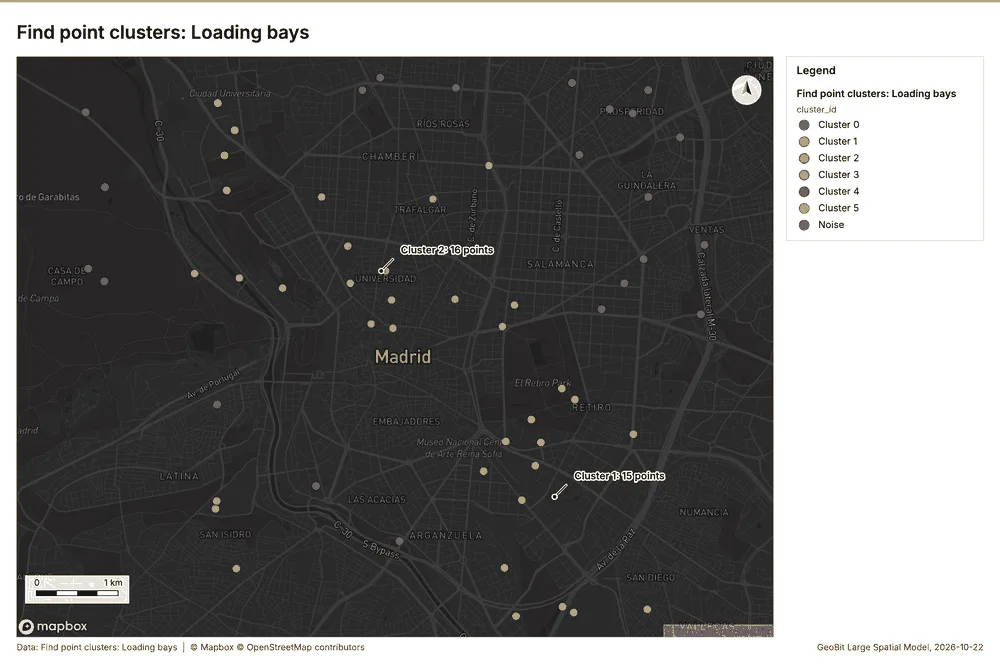
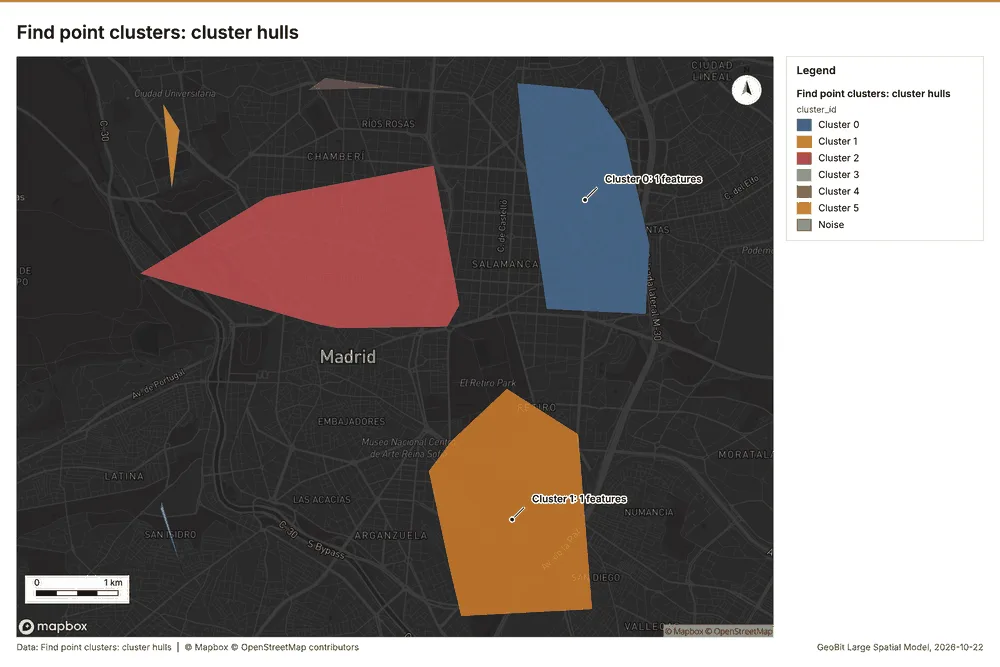
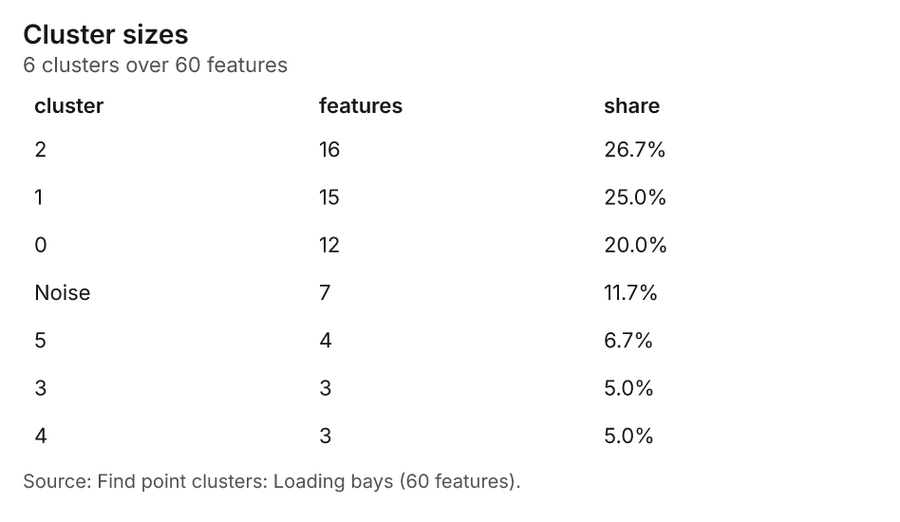
Why it was run on this data. DBSCAN finds dense groups of Loading bays and separates noise 43.
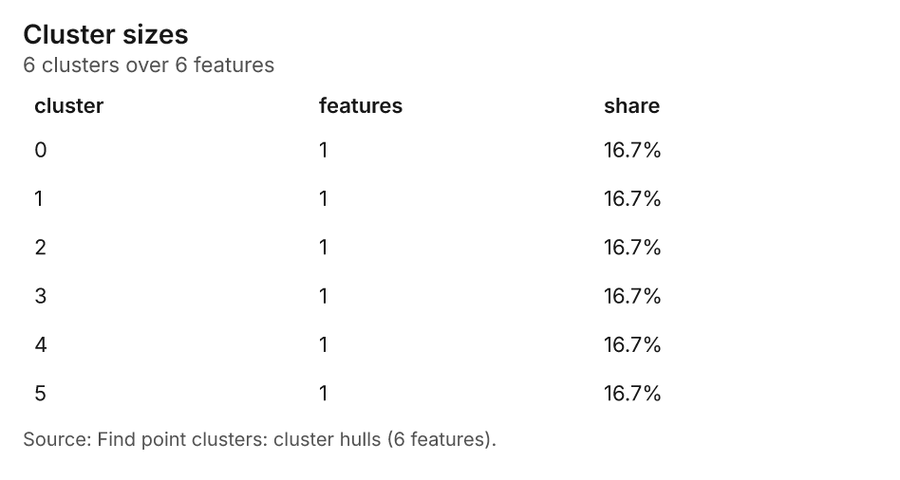
What it found. Find point clusters on Loading bays: Find point clusters: 2 layers saved: Find point clusters: Loading bays (60 features); Find point clusters: cluster hulls (6 features) 3044. It reported result, count 60; result, noise 7; result, distance m 1,000; result, elapsed ms 4; result, min points 3; billing, cost 0.0512 44.
| Result | Value |
|---|---|
| result, count | 60 |
| result, noise | 7 |
| result, distance m | 1,000 |
| result, elapsed ms | 4 |
| result, min points | 3 |
| billing, cost | 0.0512 |
| billing, list price | 0.0512 |
| billing, upstream cost | 0 |
Findings
- Evidenced: Find point clusters on Loading bays: Find point clusters: 2 layers saved: Find point clusters: Loading bays (60 features); Find point clusters: cluster hulls (6 features) 3044.
- Evidenced: It reported result, count 60; result, noise 7; result, distance m 1,000; result, elapsed ms 4; result, min points 3; billing, cost 0.0512 44.
Tool gp_find_point_clusters; parameters {"method": "dbscan", "project": "55917da2-e619-41aa-b6a1-e521a75b705c", "features": {"layer": "Loading bays (16574f8d)"}, "distance_m": 1000.0, "min_points": 3}
Outliers
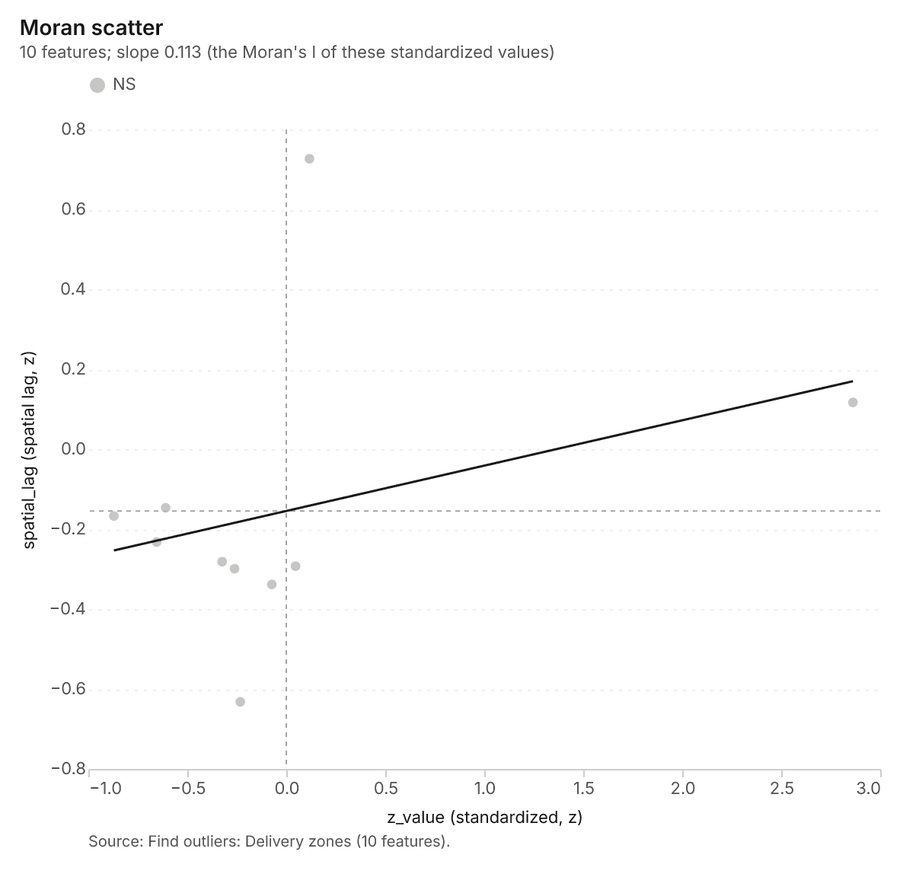
What this analysis is. Find outliers: Anselin local Moran’s I: HH, LL clusters and HL, LH outliers 45. In ArcGIS it is Find Outliers or Cluster and Outlier Analysis (Anselin Local Moran’s I) 45.
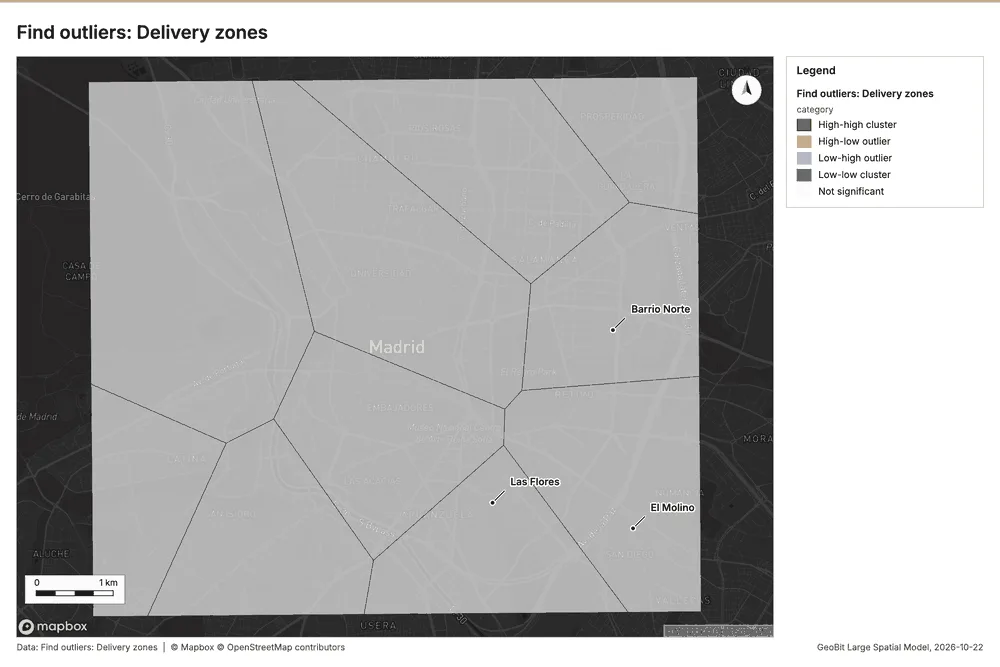
Why it was run on this data. Local Moran's I maps clusters and outliers of 'parcels_per_day' 46.
What it found. Outliers on Delivery zones: Find outliers: 1 layer saved: Find outliers: Delivery zones (10 features) 1947. It reported result, count 10; result, elapsed ms 4; result, permutations 199; result, excluded null 0; result, distance band m 2,661; billing, cost 0.0503 47.
| Result | Value |
|---|---|
| result, count | 10 |
| result, elapsed ms | 4 |
| result, permutations | 199 |
| result, excluded null | 0 |
| result, distance band m | 2,661 |
| billing, cost | 0.0503 |
| billing, list price | 0.0503 |
| billing, upstream cost | 0 |
Findings
- Evidenced: Outliers on Delivery zones: Find outliers: 1 layer saved: Find outliers: Delivery zones (10 features) 1947.
- Evidenced: It reported result, count 10; result, elapsed ms 4; result, permutations 199; result, excluded null 0; result, distance band m 2,661; billing, cost 0.0503 47.
Tool gp_outliers; parameters {"field": "parcels_per_day", "project": "55917da2-e619-41aa-b6a1-e521a75b705c", "features": {"layer": "Delivery zones (bfcf8b53)"}, "aggregation": "hexagon"}
Spatial autocorrelation
What this analysis is. Spatial autocorrelation: Global Moran’s I: is the pattern clustered, dispersed or random 48. In ArcGIS it is Spatial Autocorrelation (Global Moran’s I) 48.
Why it was run on this data. Global Moran's I says whether similar values of 'parcels_per_day' sit next to each other 49.
What it found. Spatial autocorrelation on Delivery zones: Spatial autocorrelation: done; no map output 1950. It reported result, n 10; result, p value 0.1412; result, z score 1.471; result, morans i 0.09356; result, variance 0.01935; result, elapsed ms 2 50.
| Result | Value |
|---|---|
| result, n | 10 |
| result, p value | 0.1412 |
| result, z score | 1.471 |
| result, morans i | 0.09356 |
| result, variance | 0.01935 |
| result, elapsed ms | 2 |
| result, expected i | -0.1111 |
| result, excluded null | 0 |
| result, distance band m | 2,661 |
| result, p value normality | 0.421 |
| result, z score normality | 0.8046 |
| result, variance normality | 0.06471 |
| billing, cost | 0.02 |
| billing, list price | 0.02 |
| billing, upstream cost | 0 |
Findings
- Evidenced: Spatial autocorrelation on Delivery zones: Spatial autocorrelation: done; no map output 1950.
- Evidenced: It reported result, n 10; result, p value 0.1412; result, z score 1.471; result, morans i 0.09356; result, variance 0.01935; result, elapsed ms 2 50.
Tool gp_spatial_autocorrelation; parameters {"field": "parcels_per_day", "project": "55917da2-e619-41aa-b6a1-e521a75b705c", "features": {"layer": "Delivery zones (bfcf8b53)"}}
Measure
What this analysis is. Areas and lengths: Geodesic area, perimeter and length of each feature 51. In ArcGIS it is Areas And Lengths or Calculate Geometry; in QGIS, qgis:exportaddgeometrycolumns 51.
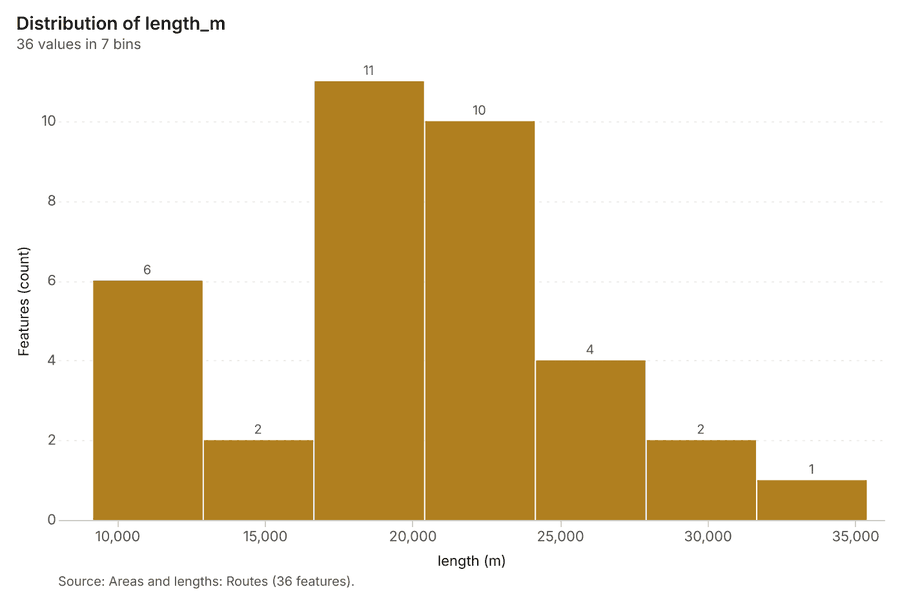
Why it was run on this data. Lengths of the 36 lines of Routes (total and per feature) 52.
What it found. Measure on Routes: Areas and lengths: 1 layer saved: Areas and lengths: Routes (36 features) 5354. It reported result, count 36; result, elapsed ms 7; billing, cost 0.01; billing, list price 0.01; billing, upstream cost 0 53.
| Result | Value |
|---|---|
| result, count | 36 |
| result, elapsed ms | 7 |
| billing, cost | 0.01 |
| billing, list price | 0.01 |
| billing, upstream cost | 0 |
Findings
- Evidenced: Measure on Routes: Areas and lengths: 1 layer saved: Areas and lengths: Routes (36 features) 5354.
- Evidenced: It reported result, count 36; result, elapsed ms 7; billing, cost 0.01; billing, list price 0.01; billing, upstream cost 0 53.
Tool gp_measure; parameters {"units": "metric", "project": "55917da2-e619-41aa-b6a1-e521a75b705c", "features": {"layer": "Routes (93de6e09)"}}
Measure
What this analysis is. Areas and lengths: Geodesic area, perimeter and length of each feature 51. In ArcGIS it is Areas And Lengths or Calculate Geometry; in QGIS, qgis:exportaddgeometrycolumns 51.
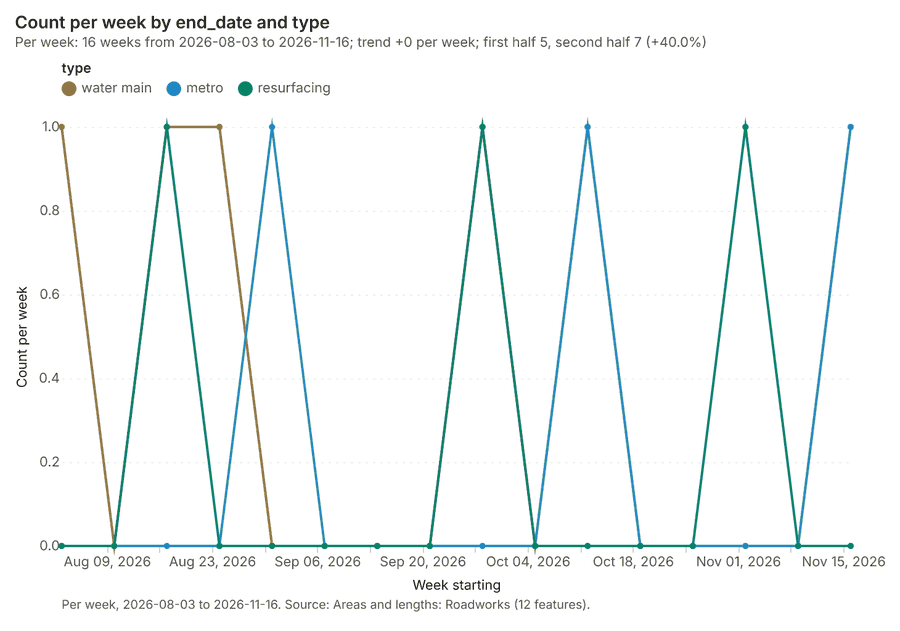
Why it was run on this data. Lengths of the 12 lines of Roadworks (total and per feature) 55.
What it found. The gp_measure tool was utilized with the Roadworks layer as input 57. The tool saved the areas and lengths for Roadworks, which contained 12 features 56. The process resulted in a count of 12 features and took 0 elapsed ms 56.
| Result | Value |
|---|---|
| result, count | 12 |
| result, elapsed ms | 0 |
| billing, cost | 0.01 |
| billing, list price | 0.01 |
| billing, upstream cost | 0 |
Findings
- Evidenced: Measure on Roadworks: Areas and lengths: 1 layer saved: Areas and lengths: Roadworks (12 features) 5657.
- Evidenced: It reported result, count 12; result, elapsed ms 0; billing, cost 0.01; billing, list price 0.01; billing, upstream cost 0 56.
Tool gp_measure; parameters {"units": "metric", "project": "55917da2-e619-41aa-b6a1-e521a75b705c", "features": {"layer": "Roadworks (50ecfc27)"}}
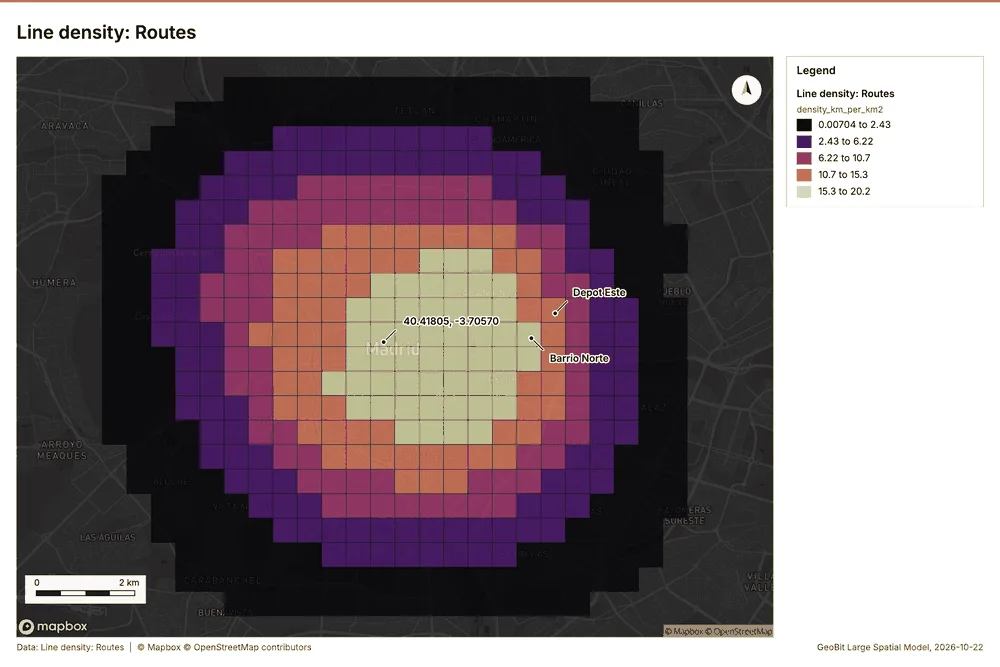
Line density
What this analysis is. Line density: Length of lines per unit area around each cell (km per square km), optionally weighted by a field 58. In ArcGIS it is Line Density; in QGIS, qgis:linedensity 58.
Why it was run on this data. Line density shows where Routes are densest 59.
What it found. Line density on Routes: Line density: 1 layer saved: Line density: Routes (480 features) 5460. It reported result, count 480; result, radius m 2,000; result, elapsed ms 69; result, cell size m 500; result, total length km 712.7; result, max density km per km2 20.21 60.
| Result | Value |
|---|---|
| result, count | 480 |
| result, radius m | 2,000 |
| result, elapsed ms | 69 |
| result, cell size m | 500 |
| result, total length km | 712.7 |
| result, max density km per km2 | 20.21 |
| billing, cost | 0.05072 |
| billing, list price | 0.05072 |
| billing, upstream cost | 0 |
Findings
- Evidenced: Line density on Routes: Line density: 1 layer saved: Line density: Routes (480 features) 5460.
- Evidenced: It reported result, count 480; result, radius m 2,000; result, elapsed ms 69; result, cell size m 500; result, total length km 712.7; result, max density km per km2 20.21 60.
A model draft was discarded because a sentence did not cite a source of this section.
Tool gp_line_density; parameters {"project": "55917da2-e619-41aa-b6a1-e521a75b705c", "features": {"layer": "Routes (93de6e09)"}, "radius_m": 2000.0, "cell_size_m": 500.0}
Maps and charts
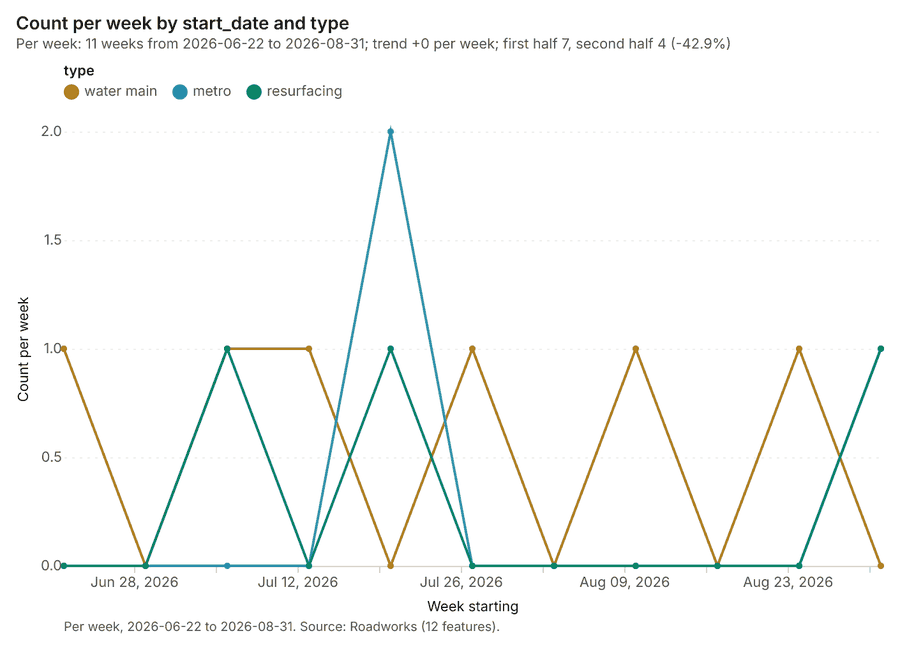
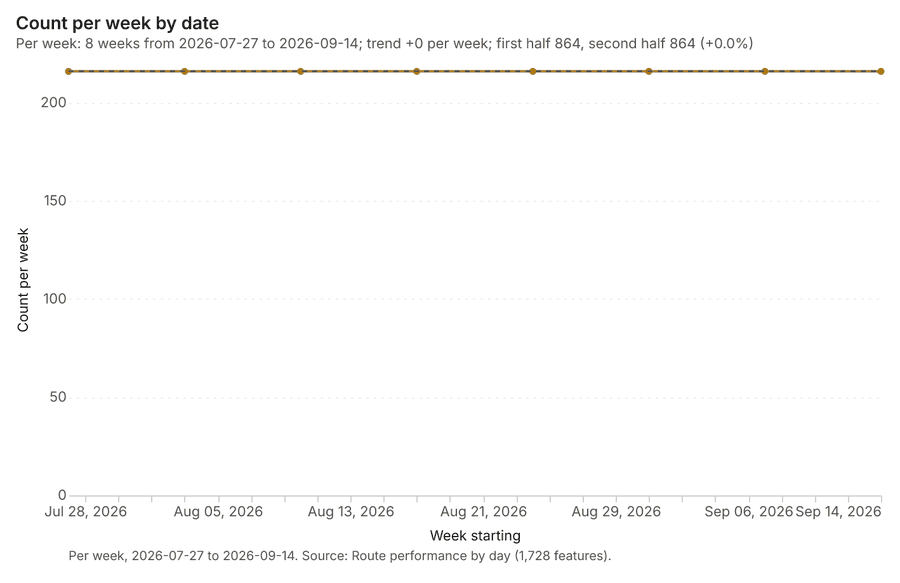
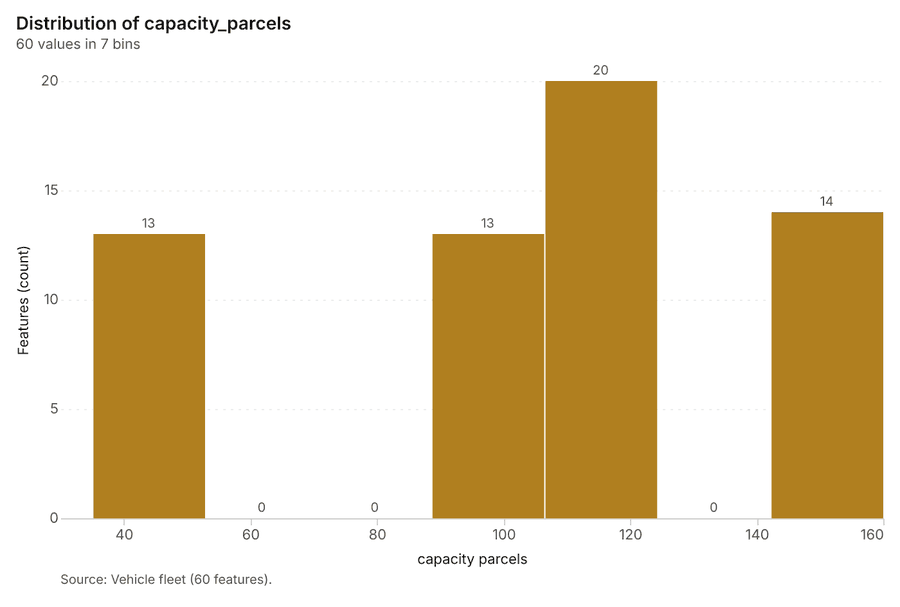
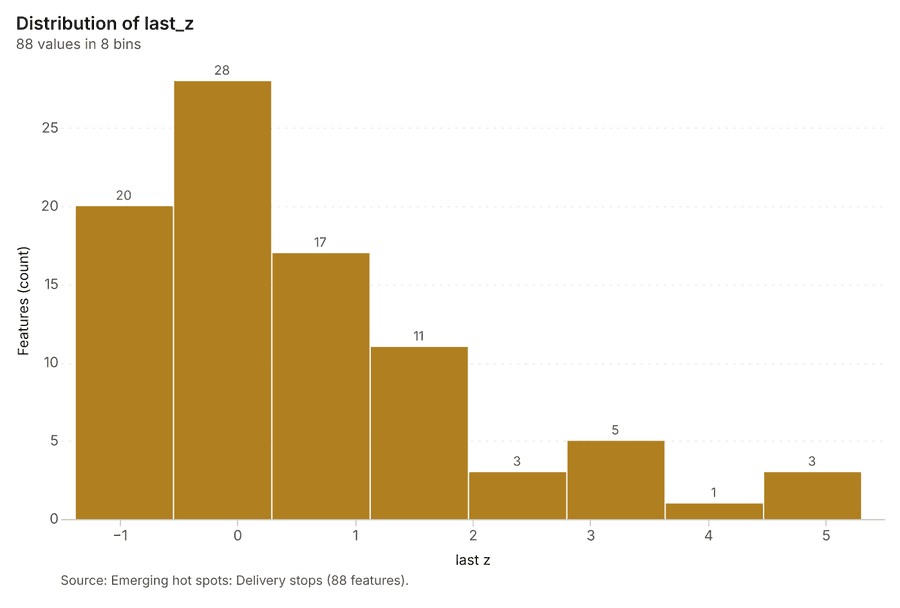
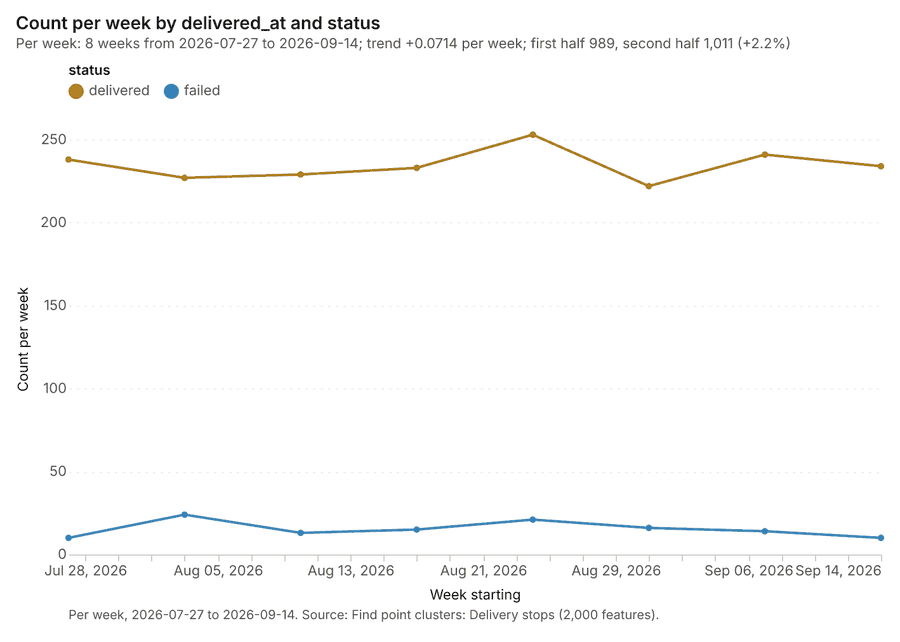
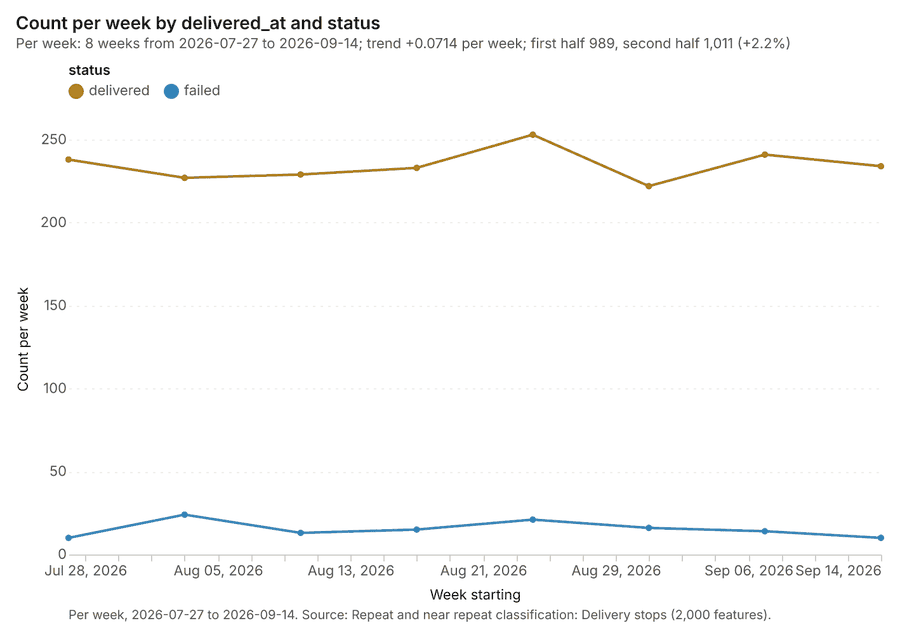
The run also made 22 map image(s) 61626364656667686970717273747576777879808182 and 27 chart(s) 8384858687888990919293949596979899100101102103104105106107108109.
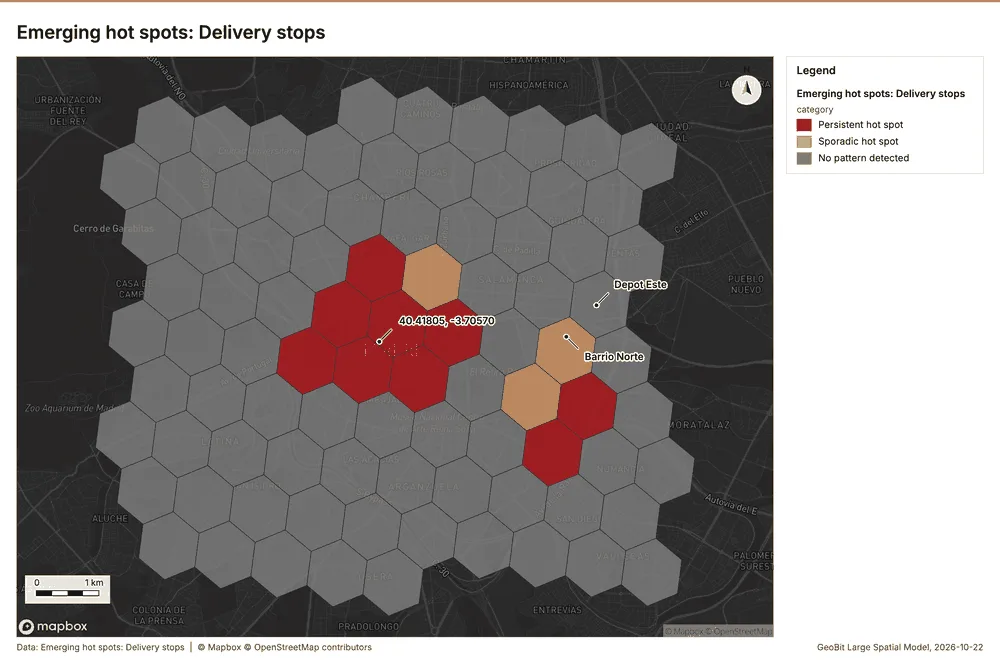
What the map shows. The map shows the emerging hot spots for delivery stops, categorizing intensity 61
Inferred: read from the image by gemma4:e4b, not evidence.
Changes since the last run
This is the first report of this project.
Sources
- 1Rendering: Chart: Timeline: events per week by dataset. 39 rows id 1521b52f-2ba2-4bbc-a8f6-ccfe5e7fdf7f
- 2Dataset: Delivery stops. vector, 2000 rows id b701b76f-6822-4c92-82fe-b4acdce6c331
- 3Dataset: Roadworks. vector, 12 rows id 6fda682d-6a14-4d92-9cdd-cdcabec36863
- 4Dataset: Route performance by day. table, 1728 rows id 93163425-d292-4c3d-9bd8-2e8681a816c2
- 5Tool result: gp_change_point_detection, step 2. Change point detection: done; no map output. id 0bc1c879-b643-4a1a-9035-72f62d929ae4:2
- 6Catalog: Emerging hot spots (operation catalog, gp_space_time_hot_spots). Where hot spots are new, consecutive, intensifying, persistent, diminishing, sporadic, oscillating or historical over time. ArcGIS: Emerging Hot Spot Analysis, Create Space Time Cube. id gp_space_time_hot_spots
- 7Plan: Space time hot spots of Delivery stops (the Start plan's candidate c_24901805ebc9). Delivery stops carry dates in 'delivered_at': emerging hot spot analysis finds new, intensifying and fading hot spots per week. id 99a0ba18-4245-45ac-a729-8f0ed736c8b0:c_24901805ebc9
- 8Tool result: gp_space_time_hot_spots, step 0. Emerging hot spots: 1 layer saved: Emerging hot spots: Delivery stops (88 features). id 0bc1c879-b643-4a1a-9035-72f62d929ae4:0
- 9Layer: Delivery stops. 2,000 features id ba8073d9-f217-4175-acc5-437aabf37b16
- 10Catalog: Repeat and near repeat classification (operation catalog, gp_near_repeat). Classify incidents as originators, repeats (same place) or near repeats within a distance and time window, with a Knox test table. ArcGIS: Repeat and Near Repeat Classification, Near Repeat Calculator. id gp_near_repeat
- 11Plan: Near repeat of Delivery stops (the Start plan's candidate c_07c2356dde76). Near repeat analysis tests whether Delivery stops close in space also follow each other within 5 days. id 99a0ba18-4245-45ac-a729-8f0ed736c8b0:c_07c2356dde76
- 12Tool result: gp_near_repeat, step 1. Repeat and near repeat classification: 1 layer saved: Repeat and near repeat classification: Delivery stops (2000 features). id 0bc1c879-b643-4a1a-9035-72f62d929ae4:1
- 13Catalog: Change point detection (operation catalog, gp_change_point_detection). When did the level, count, trend or variability change? For the whole study area or for every bin. ArcGIS: Change Point Detection. id gp_change_point_detection
- 14Plan: Change points of Delivery stops (the Start plan's candidate c_e6c80aa728e2). Change point detection finds when the weekly count of Delivery stops shifted. id 99a0ba18-4245-45ac-a729-8f0ed736c8b0:c_e6c80aa728e2
- 15Catalog: Summarize within (operation catalog, gp_summarize_within). Count and aggregate the features inside each polygon (or bin), proportionally for lines and polygons. ArcGIS: Summarize Within, Aggregate Points. QGIS: native:countpointsinpolygon, native:sumlinelengths. id gp_summarize_within
- 16Plan: Depots per feature of Delivery zones (the Start plan's candidate c_63970c31d3b8). Count Depots inside each feature of Delivery zones; the counts map as a choropleth (natural breaks, sequential colors). id 99a0ba18-4245-45ac-a729-8f0ed736c8b0:c_63970c31d3b8
- 17Tool result: gp_summarize_within, step 0. Summarize within: 1 layer saved: Summarize within: Delivery zones (10 features). id 06830d85-af54-42ad-b4e3-68502ee43e45:0
- 18Layer: Depots. 3 features id 84d3272c-9902-4e4b-a3a0-899c3b10edb7
- 19Layer: Delivery zones. 10 features id bfcf8b53-48d2-44c7-b00e-a89315aee1b5
- 20Tool result: gp_summarize_within, step 1. Summarize within: 1 layer saved: Summarize within: Delivery zones (10 features). id 06830d85-af54-42ad-b4e3-68502ee43e45:1
- 21Tool result: gp_summarize_within, step 2. Summarize within: 1 layer saved: Summarize within: Delivery zones (10 features). id 06830d85-af54-42ad-b4e3-68502ee43e45:2
- 22Layer: Parcel lockers. 45 features id 4e9e11a9-8154-47b8-a5ce-2ba3dbf5f3e6
- 23Catalog: Hot spot analysis (operation catalog, gp_hot_spots). Getis-Ord Gi* hot and cold spots with z-scores, p-values and confidence bins. ArcGIS: Find Hot Spots, Hot Spot Analysis (Getis-Ord Gi*). QGIS: qgis:hotspot (plugin). id gp_hot_spots
- 24Plan: Hot spots of Delivery stops (the Start plan's candidate c_90d2c6f9911f). 2000 points: Getis-Ord Gi* tests whether the concentrations in Delivery stops are statistically significant. id 99a0ba18-4245-45ac-a729-8f0ed736c8b0:c_90d2c6f9911f
- 25Tool result: gp_hot_spots, step 0. Hot spot analysis: 1 layer saved: Hot spot analysis: Delivery stops (254 features). id baba02b7-1f72-470f-802a-5d9cf0a96e0e:0
- 26Plan: Hot spots of Parcel lockers (the Start plan's candidate c_7f159ca7fe80). 45 points: Getis-Ord Gi* tests whether the concentrations in Parcel lockers are statistically significant. id 99a0ba18-4245-45ac-a729-8f0ed736c8b0:c_7f159ca7fe80
- 27Tool result: gp_hot_spots, step 1. Hot spot analysis: 1 layer saved: Hot spot analysis: Parcel lockers (19 features). id baba02b7-1f72-470f-802a-5d9cf0a96e0e:1
- 28Plan: Hot spots of Loading bays (the Start plan's candidate c_be4560f0ca20). 60 points: Getis-Ord Gi* tests whether the concentrations in Loading bays are statistically significant. id 99a0ba18-4245-45ac-a729-8f0ed736c8b0:c_be4560f0ca20
- 29Tool result: gp_hot_spots, step 2. Hot spot analysis: 1 layer saved: Hot spot analysis: Loading bays (19 features). id baba02b7-1f72-470f-802a-5d9cf0a96e0e:2
- 30Layer: Loading bays. 60 features id 16574f8d-1ab3-403e-bf7c-ef2918a3168a
- 31Catalog: Calculate density (operation catalog, gp_calculate_density). Kernel density per square kilometer on a grid. ArcGIS: Calculate Density, Kernel Density. QGIS: native:heatmapkerneldensityestimation. id gp_calculate_density
- 32Plan: Kernel density of Delivery stops (the Start plan's candidate c_b00e122abf70). 2000 points in Delivery stops: a density surface shows where they concentrate. id 99a0ba18-4245-45ac-a729-8f0ed736c8b0:c_b00e122abf70
- 33Tool result: gp_calculate_density, step 0. Calculate density: 1 layer saved: Calculate density: Delivery stops (1654 features). id 5426b1e3-5d44-4200-ad65-fcd6b9219354:0
- 34Plan: Kernel density of Parcel lockers (the Start plan's candidate c_d0abfcdb6ebd). 45 points in Parcel lockers: a density surface shows where they concentrate. id 99a0ba18-4245-45ac-a729-8f0ed736c8b0:c_d0abfcdb6ebd
- 35Tool result: gp_calculate_density, step 1. Calculate density: 1 layer saved: Calculate density: Parcel lockers (99 features). id 5426b1e3-5d44-4200-ad65-fcd6b9219354:1
- 36Plan: Kernel density of Loading bays (the Start plan's candidate c_f4d285023245). 60 points in Loading bays: a density surface shows where they concentrate. id 99a0ba18-4245-45ac-a729-8f0ed736c8b0:c_f4d285023245
- 37Tool result: gp_calculate_density, step 2. Calculate density: 1 layer saved: Calculate density: Loading bays (101 features). id 5426b1e3-5d44-4200-ad65-fcd6b9219354:2
- 38Catalog: Find point clusters (operation catalog, gp_find_point_clusters). Density-based clusters (DBSCAN, HDBSCAN or OPTICS, optionally space-time) with hulls and noise. ArcGIS: Find Point Clusters, Density-based Clustering. QGIS: native:dbscanclustering, native:stdbscanclustering. id gp_find_point_clusters
- 39Plan: Cluster points of Delivery stops (the Start plan's candidate c_ecc06546584b). DBSCAN finds dense groups of Delivery stops and separates noise. id 99a0ba18-4245-45ac-a729-8f0ed736c8b0:c_ecc06546584b
- 40Tool result: gp_find_point_clusters, step 0. Find point clusters: 2 layers saved: Find point clusters: Delivery stops (2000 features); Find point clusters: cluster hulls (2 features). id 95a73131-a24c-4f4f-9468-8e9fb0e8dd34:0
- 41Plan: Cluster points of Parcel lockers (the Start plan's candidate c_ea1cd80d3915). DBSCAN finds dense groups of Parcel lockers and separates noise. id 99a0ba18-4245-45ac-a729-8f0ed736c8b0:c_ea1cd80d3915
- 42Tool result: gp_find_point_clusters, step 1. Find point clusters: 2 layers saved: Find point clusters: Parcel lockers (45 features); Find point clusters: cluster hulls (1 feature). id 95a73131-a24c-4f4f-9468-8e9fb0e8dd34:1
- 43Plan: Cluster points of Loading bays (the Start plan's candidate c_d272c4a82a27). DBSCAN finds dense groups of Loading bays and separates noise. id 99a0ba18-4245-45ac-a729-8f0ed736c8b0:c_d272c4a82a27
- 44Tool result: gp_find_point_clusters, step 2. Find point clusters: 2 layers saved: Find point clusters: Loading bays (60 features); Find point clusters: cluster hulls (6 features). id 95a73131-a24c-4f4f-9468-8e9fb0e8dd34:2
- 45Catalog: Find outliers (operation catalog, gp_outliers). Anselin local Moran’s I: HH, LL clusters and HL, LH outliers. ArcGIS: Find Outliers, Cluster and Outlier Analysis (Anselin Local Moran’s I). id gp_outliers
- 46Plan: Local morans i of Delivery zones (the Start plan's candidate c_0bac5b3b8830). Local Moran's I maps clusters and outliers of 'parcels_per_day'. id 99a0ba18-4245-45ac-a729-8f0ed736c8b0:c_0bac5b3b8830
- 47Tool result: gp_outliers, step 0. Find outliers: 1 layer saved: Find outliers: Delivery zones (10 features). id 4c008862-b527-4c01-a253-53d590dcfc30:0
- 48Catalog: Spatial autocorrelation (operation catalog, gp_spatial_autocorrelation). Global Moran’s I: is the pattern clustered, dispersed or random. ArcGIS: Spatial Autocorrelation (Global Moran’s I). id gp_spatial_autocorrelation
- 49Plan: Global morans i of Delivery zones (the Start plan's candidate c_49e20ce52312). Global Moran's I says whether similar values of 'parcels_per_day' sit next to each other. id 99a0ba18-4245-45ac-a729-8f0ed736c8b0:c_49e20ce52312
- 50Tool result: gp_spatial_autocorrelation, step 1. Spatial autocorrelation: done; no map output. id 4c008862-b527-4c01-a253-53d590dcfc30:1
- 51Catalog: Areas and lengths (operation catalog, gp_measure). Geodesic area, perimeter and length of each feature. ArcGIS: Areas And Lengths, Calculate Geometry. QGIS: qgis:exportaddgeometrycolumns. id gp_measure
- 52Plan: Length stats of Routes (the Start plan's candidate c_85d40397c2bc). Lengths of the 36 lines of Routes (total and per feature). id 99a0ba18-4245-45ac-a729-8f0ed736c8b0:c_85d40397c2bc
- 53Tool result: gp_measure, step 0. Areas and lengths: 1 layer saved: Areas and lengths: Routes (36 features). id 91b1b73d-cdc4-44e3-a35d-b8f649d4d58d:0
- 54Layer: Routes. 36 features id 93de6e09-79b3-40e9-8b57-4b7906bd7eef
- 55Plan: Length stats of Roadworks (the Start plan's candidate c_a7200769644e). Lengths of the 12 lines of Roadworks (total and per feature). id 99a0ba18-4245-45ac-a729-8f0ed736c8b0:c_a7200769644e
- 56Tool result: gp_measure, step 1. Areas and lengths: 1 layer saved: Areas and lengths: Roadworks (12 features). id 91b1b73d-cdc4-44e3-a35d-b8f649d4d58d:1
- 57Layer: Roadworks. 12 features id 50ecfc27-2fb7-43a7-a97c-62847d89632e
- 58Catalog: Line density (operation catalog, gp_line_density). Length of lines per unit area around each cell (km per square km), optionally weighted by a field. ArcGIS: Line Density. QGIS: qgis:linedensity. id gp_line_density
- 59Plan: Line density of Routes (the Start plan's candidate c_42f6ef8679a2). Line density shows where Routes are densest. id 99a0ba18-4245-45ac-a729-8f0ed736c8b0:c_42f6ef8679a2
- 60Tool result: gp_line_density, step 2. Line density: 1 layer saved: Line density: Routes (480 features). id 91b1b73d-cdc4-44e3-a35d-b8f649d4d58d:2
- 61Rendering: Map: Emerging hot spots: Delivery stops id f1d06252-1aff-40b3-8003-f6b25228a418
- 62Rendering: Map: Repeat and near repeat classification: Delivery stops id 56dbe991-5135-48c1-bc6c-7d3b6a07d808
- 63Rendering: Map: Summarize within: Delivery zones id 858fe721-2926-4049-9403-b702f7c1d708
- 64Rendering: Map: Summarize within: Delivery zones id 2824f9fd-2587-4fb5-a77e-a3aa3900d97b
- 65Rendering: Map: Summarize within: Delivery zones id 27fa5b0d-6371-4492-98c5-31025c68e575
- 66Rendering: Map: Hot spot analysis: Delivery stops id 2bacb0be-de03-4c38-bf8f-0ae5de932ab2
- 67Rendering: Map: Hot spot analysis: Parcel lockers id 518d4c2b-80c3-42d9-bc31-0561cedde38a
- 68Rendering: Map: Hot spot analysis: Loading bays id 3bd8a3a6-8e83-4ea2-b732-5258f2917d5b
- 69Rendering: Map: Calculate density: Delivery stops id e5664686-25ef-412b-ba05-b9ff052753ba
- 70Rendering: Map: Calculate density: Parcel lockers id 9153e49e-e4a6-473d-9b9a-0c99aa981559
- 71Rendering: Map: Calculate density: Loading bays id 089aef48-4d04-4e2b-adf3-1b5f5ba6339b
- 72Rendering: Map: Find point clusters: Delivery stops id 7e2737d2-52c9-41a9-ba06-a22cd7165f20
- 73Rendering: Map: Find point clusters: cluster hulls id 4f3cc889-cd88-4ebf-a131-f8a38db74f3a
- 74Rendering: Map: Find point clusters: Parcel lockers id 980074f9-34f5-41ca-b730-bf16feeff400
- 75Rendering: Map: Find point clusters: cluster hulls id 7a66f851-f7b6-4f69-9d38-1eabeffea2a6
- 76Rendering: Map: Find point clusters: Loading bays id ce8ded9c-4170-4c0f-89c3-9e2f0139076b
- 77Rendering: Map: Find point clusters: cluster hulls id 3a1bb395-8af7-4e6b-92e6-5049fe664a97
- 78Rendering: Map: Delivery zones by parcels_per_day id 69ec72f2-551e-4c36-9de4-64b8694296ea
- 79Rendering: Map: Find outliers: Delivery zones id 784a0e29-5811-4741-945d-714d4fcd467c
- 80Rendering: Map: Areas and lengths: Routes id 79d6c4d8-5815-4392-acf3-1f691e6cd92c
- 81Rendering: Map: Areas and lengths: Roadworks id 639ec0fd-16fb-4b55-80ad-9ccaac010750
- 82Rendering: Map: Line density: Routes id c697b1c6-e2a2-4247-a4b7-0e7df7e97f00
- 83Rendering: Chart: Delivery zones over time (parcels_per_day). 5 rows id 3c505c95-3e52-4c5e-b196-a568f2171052
- 84Rendering: Chart: Roadworks over time (start_date). 33 rows id b39779d1-1e2b-44ac-aabb-76eb01c77d35
- 85Rendering: Chart: Route performance by day over time (date). 8 rows id b65bccae-a1a1-4e72-ad21-f8677654af9e
- 86Rendering: Chart: Vehicle fleet over time (model_year). 7 rows id 931218d3-0ce6-4d63-b966-4d7ecca4f72b
- 87Rendering: Chart: Emerging hot spots: Delivery stops. 8 rows id 001edf48-ce03-4110-b451-7e47cefb2ce2
- 88Rendering: Chart: Repeat and near repeat classification: Delivery stops. 16 rows id 2613f13d-0205-403c-968f-467d6b8f18f2
- 89Rendering: Chart: Summarize within: Delivery zones. 5 rows id 40091302-ced6-4853-a28e-c0ab84bba36e
- 90Rendering: Chart: Summarize within: Delivery zones. 5 rows id c26a03d2-ecac-406f-b1c6-cb323c8972c6
- 91Rendering: Chart: Summarize within: Delivery zones. 5 rows id 2e9694e1-5c83-4efa-9ca3-1f148701edd0
- 92Rendering: Chart: Hot spot analysis: Delivery stops. 12 rows id 6f99017b-7c08-476b-b981-9fa925479410
- 93Rendering: Chart: Hot spot analysis: Parcel lockers. 6 rows id 20343f2f-b6eb-4043-a48d-0151b407e909
- 94Rendering: Chart: Hot spot analysis: Loading bays. 6 rows id c1c9a919-b186-4232-8d8b-b7389924e9cd
- 95Rendering: Chart: Calculate density: Delivery stops. 12 rows id 0ba97a70-8aad-48cf-87c2-76cf7c7397ac
- 96Rendering: Chart: Calculate density: Parcel lockers. 8 rows id 497850ae-e8d8-417c-a07d-29a5ca46284e
- 97Rendering: Chart: Calculate density: Loading bays. 8 rows id 35ec39ed-b26e-42b1-bc59-ed94b99f9552
- 98Rendering: Chart: Find point clusters: Delivery stops. 3 rows id 38539886-bc2b-42a5-a72d-5568be187825
- 99Rendering: Chart: Find point clusters: cluster hulls. 2 rows id 338c3b9e-35ed-4db2-8bc0-a3a861c4c0a5
- 100Rendering: Chart: Find point clusters: Parcel lockers. 2 rows id 07017722-d2cb-4819-a0c1-8678ecaa6069
- 101Rendering: Chart: Find point clusters: cluster hulls. 1 rows id df1f8b27-67ba-452d-9903-5fb39e94536e
- 102Rendering: Chart: Find point clusters: Loading bays. 7 rows id 55877d31-670a-4414-b3d9-a5a94c031ea2
- 103Rendering: Chart: Find point clusters: cluster hulls. 6 rows id e2598c9e-3c2b-436e-aee2-463caf5d80d5
- 104Rendering: Chart: Find outliers: Delivery zones. 10 rows id 91935639-db85-4e93-abb1-ebacc5cbe28f
- 105Rendering: Chart: Areas and lengths: Routes. 7 rows id 35bb3975-be91-41d8-b635-b9396a602106
- 106Rendering: Chart: Areas and lengths: Roadworks. 48 rows id 0a975f43-6acf-4887-afda-2a66d1ef8d59
- 107Rendering: Chart: Areas and lengths: Roadworks over time. 48 rows id 9f61cad0-7d51-4311-a916-62ea61f27aa8
- 108Rendering: Chart: Find point clusters: Delivery stops over time. 16 rows id 71c46175-748d-4398-9f7d-e07e43524c4c
- 109Rendering: Chart: Repeat and near repeat classification: Delivery stops over time. 16 rows id 7f6f8dcd-9739-475e-8a73-e687a2eed73e
- 110Dataset: Delivery zones. vector, 10 rows id ad6ace2b-b87b-4426-b59c-fe04636a404c
- 111Dataset: Depots. vector, 3 rows id 01a5d86e-7877-46c0-b8d7-c7125ff945d6
- 112Dataset: Routes. vector, 36 rows id 6b02543e-134e-4798-8c55-7433740f3a99
- 113Dataset: Parcel lockers. vector, 45 rows id bec44bb9-e98a-4cba-ad40-4738c680b667
- 114Dataset: Loading bays. vector, 60 rows id c8f85255-787a-4380-8e60-7b2d51723499
- 115Dataset: Vehicle fleet. table, 60 rows id 247c930d-b071-44b8-abcc-a946270b0521
- 116Dataset: Operations review. document, ? rows id db8eab40-ac85-4720-ba18-144f3cb5e953
- 117Record: Sample: Logistics, Madrid id 55917da2-e619-41aa-b6a1-e521a75b705c
- 118Layer: Emerging hot spots: Delivery stops. 88 features id 3eda3d63-4109-4ada-a0a5-a28cb0adffff
- 119Layer: Repeat and near repeat classification: Delivery stops. 2,000 features id 16311f39-dfc9-4fec-9ba4-5ab359b9d89b
- 120Layer: Summarize within: Delivery zones. 10 features id eaca5331-e8c9-435a-bd13-b434e2db618e
- 121Layer: Summarize within: Delivery zones. 10 features id ddf33542-ad9c-48ca-92aa-bb183fc2175b
- 122Layer: Summarize within: Delivery zones. 10 features id 7f9be9fb-5f32-4d00-b86c-2ccbc578ecc5
- 123Layer: Hot spot analysis: Delivery stops. 254 features id 277a1b72-5c43-4bb2-8a19-af8ab6d8cc80
- 124Layer: Hot spot analysis: Parcel lockers. 19 features id 169714e0-714b-4884-8a02-53783c9c7f03
- 125Layer: Hot spot analysis: Loading bays. 19 features id 4caff2b6-ee3f-4415-bdc9-5fa9437fd063
- 126Layer: Calculate density: Delivery stops. 1,654 features id 99dbaab0-d5d0-4b45-987b-d2c43d1d09c8
- 127Layer: Calculate density: Parcel lockers. 99 features id 472257d0-327b-4c9e-a4a8-480595dc3856
- 128Layer: Calculate density: Loading bays. 101 features id b6afbc2f-7942-4c9b-94f7-38c291b44345
- 129Layer: Find point clusters: Delivery stops. 2,000 features id cc731b64-afbe-4a38-943f-995b6107d190
- 130Layer: Find point clusters: cluster hulls. 2 features id 436a36cd-df6c-4e32-a0cc-26d50a8c6585
- 131Layer: Find point clusters: Parcel lockers. 45 features id 5e40b4a8-a526-40ac-b338-c5f4ebf27f56
- 132Layer: Find point clusters: cluster hulls. 1 features id 5ab85912-f47a-4fb3-b798-991d03f36a1b
- 133Layer: Find point clusters: Loading bays. 60 features id 90a837e8-38e5-46ee-a786-10b7fcae3bc0
- 134Layer: Find point clusters: cluster hulls. 6 features id 4e2df776-301c-492e-bb6b-6813e216076d
- 135Layer: Find outliers: Delivery zones. 10 features id 5e638f0b-04fd-4df9-a5c9-b3d338aebaea
- 136Layer: Areas and lengths: Routes. 36 features id 8b07f80e-053c-4638-867e-d4f875f2ab43
- 137Layer: Areas and lengths: Roadworks. 12 features id 2ce6988d-7414-430d-b0b9-ede487fe0343
- 138Layer: Line density: Routes. 480 features id 90fa509b-1446-4abc-b818-41008be35963
Appendix: the data behind the chartsShow
Figure 1. Timeline: events per week by dataset 1
| period | series | value |
|---|---|---|
| 2026-06-22 | Delivery stops | 0 |
| 2026-06-22 | Route performance by day | 0 |
| 2026-06-22 | Roadworks | 1 |
| 2026-06-29 | Delivery stops | 0 |
| 2026-06-29 | Route performance by day | 0 |
| 2026-06-29 | Roadworks | 0 |
| 2026-07-06 | Delivery stops | 0 |
| 2026-07-06 | Route performance by day | 0 |
| 2026-07-06 | Roadworks | 2 |
| 2026-07-13 | Delivery stops | 0 |
| 2026-07-13 | Route performance by day | 0 |
| 2026-07-13 | Roadworks | 1 |
| 2026-07-20 | Delivery stops | 0 |
| 2026-07-20 | Route performance by day | 0 |
| 2026-07-20 | Roadworks | 3 |
| 2026-07-27 | Delivery stops | 248 |
| 2026-07-27 | Route performance by day | 216 |
| 2026-07-27 | Roadworks | 1 |
| 2026-08-03 | Delivery stops | 251 |
| 2026-08-03 | Route performance by day | 216 |
| 2026-08-03 | Roadworks | 0 |
| 2026-08-10 | Delivery stops | 242 |
| 2026-08-10 | Route performance by day | 216 |
| 2026-08-10 | Roadworks | 1 |
| 2026-08-17 | Delivery stops | 248 |
| 2026-08-17 | Route performance by day | 216 |
| 2026-08-17 | Roadworks | 0 |
| 2026-08-24 | Delivery stops | 274 |
| 2026-08-24 | Route performance by day | 216 |
| 2026-08-24 | Roadworks | 1 |
| 2026-08-31 | Delivery stops | 238 |
| 2026-08-31 | Route performance by day | 216 |
| 2026-08-31 | Roadworks | 2 |
| 2026-09-07 | Delivery stops | 255 |
| 2026-09-07 | Route performance by day | 216 |
| 2026-09-07 | Roadworks | 0 |
| 2026-09-14 | Delivery stops | 244 |
| 2026-09-14 | Route performance by day | 216 |
| 2026-09-14 | Roadworks | 0 |
Figure 24. Delivery zones over time (parcels_per_day) 83
| bin_start | bin_end | count |
|---|---|---|
| 1,219 | 1,942 | 6 |
| 1,942 | 2,664 | 3 |
| 2,664 | 3,387 | 0 |
| 3,387 | 4,109 | 0 |
| 4,109 | 4,832 | 1 |
Figure 25. Roadworks over time (start_date) 84
| period | series | value |
|---|---|---|
| 2026-06-22 | water main | 1 |
| 2026-06-22 | metro | 0 |
| 2026-06-22 | resurfacing | 0 |
| 2026-06-29 | water main | 0 |
| 2026-06-29 | metro | 0 |
| 2026-06-29 | resurfacing | 0 |
| 2026-07-06 | water main | 1 |
| 2026-07-06 | metro | 0 |
| 2026-07-06 | resurfacing | 1 |
| 2026-07-13 | water main | 1 |
| 2026-07-13 | metro | 0 |
| 2026-07-13 | resurfacing | 0 |
| 2026-07-20 | water main | 0 |
| 2026-07-20 | metro | 2 |
| 2026-07-20 | resurfacing | 1 |
| 2026-07-27 | water main | 1 |
| 2026-07-27 | metro | 0 |
| 2026-07-27 | resurfacing | 0 |
| 2026-08-03 | water main | 0 |
| 2026-08-03 | metro | 0 |
| 2026-08-03 | resurfacing | 0 |
| 2026-08-10 | water main | 1 |
| 2026-08-10 | metro | 0 |
| 2026-08-10 | resurfacing | 0 |
| 2026-08-17 | water main | 0 |
| 2026-08-17 | metro | 0 |
| 2026-08-17 | resurfacing | 0 |
| 2026-08-24 | water main | 1 |
| 2026-08-24 | metro | 0 |
| 2026-08-24 | resurfacing | 0 |
| 2026-08-31 | water main | 0 |
| 2026-08-31 | metro | 1 |
| 2026-08-31 | resurfacing | 1 |
Figure 26. Route performance by day over time (date) 85
| period | value |
|---|---|
| 2026-07-27 | 216 |
| 2026-08-03 | 216 |
| 2026-08-10 | 216 |
| 2026-08-17 | 216 |
| 2026-08-24 | 216 |
| 2026-08-31 | 216 |
| 2026-09-07 | 216 |
| 2026-09-14 | 216 |
Figure 27. Vehicle fleet over time (model_year) 86
| bin_start | bin_end | count |
|---|---|---|
| 35 | 52.86 | 13 |
| 52.86 | 70.71 | 0 |
| 70.71 | 88.57 | 0 |
| 88.57 | 106.4 | 13 |
| 106.4 | 124.3 | 20 |
| 124.3 | 142.1 | 0 |
| 142.1 | 160 | 14 |
Figure 28. Emerging hot spots: Delivery stops 87
| bin_start | bin_end | count |
|---|---|---|
| -1.381 | -0.5457 | 20 |
| -0.5457 | 0.2895 | 28 |
| 0.2895 | 1.125 | 17 |
| 1.125 | 1.96 | 11 |
| 1.96 | 2.795 | 3 |
| 2.795 | 3.631 | 5 |
| 3.631 | 4.466 | 1 |
| 4.466 | 5.301 | 3 |
Figure 29. Repeat and near repeat classification: Delivery stops 88
| period | series | value |
|---|---|---|
| 2026-07-27 | delivered | 238 |
| 2026-07-27 | failed | 10 |
| 2026-08-03 | delivered | 227 |
| 2026-08-03 | failed | 24 |
| 2026-08-10 | delivered | 229 |
| 2026-08-10 | failed | 13 |
| 2026-08-17 | delivered | 233 |
| 2026-08-17 | failed | 15 |
| 2026-08-24 | delivered | 253 |
| 2026-08-24 | failed | 21 |
| 2026-08-31 | delivered | 222 |
| 2026-08-31 | failed | 16 |
| 2026-09-07 | delivered | 241 |
| 2026-09-07 | failed | 14 |
| 2026-09-14 | delivered | 234 |
| 2026-09-14 | failed | 10 |
Figure 30. Summarize within: Delivery zones 89
| bin_start | bin_end | count |
|---|---|---|
| 0 | 0.2 | 7 |
| 0.2 | 0.4 | 0 |
| 0.4 | 0.6 | 0 |
| 0.6 | 0.8 | 0 |
| 0.8 | 1 | 3 |
Figure 31. Summarize within: Delivery zones 90
| bin_start | bin_end | count |
|---|---|---|
| 62 | 145.2 | 6 |
| 145.2 | 228.4 | 1 |
| 228.4 | 311.6 | 1 |
| 311.6 | 394.8 | 0 |
| 394.8 | 478 | 2 |
Figure 32. Summarize within: Delivery zones 91
| bin_start | bin_end | count |
|---|---|---|
| 1 | 3.2 | 5 |
| 3.2 | 5.4 | 2 |
| 5.4 | 7.6 | 1 |
| 7.6 | 9.8 | 1 |
| 9.8 | 12 | 1 |
Figure 33. Hot spot analysis: Delivery stops 92
| bin_start | bin_end | band | band_label | count |
|---|---|---|---|---|
| -1 | -0.5 | not_significant | Not significant | 50 |
| -0.5 | 0 | not_significant | Not significant | 127 |
| 0 | 0.5 | not_significant | Not significant | 41 |
| 0.5 | 1 | not_significant | Not significant | 11 |
| 1 | 1.5 | not_significant | Not significant | 13 |
| 1.5 | 2 | hot_90 | Hot spot, 90% confidence | 4 |
| 1.5 | 2 | not_significant | Not significant | 1 |
| 2 | 2.5 | hot_95 | Hot spot, 95% confidence | 3 |
| 4 | 4.5 | hot_99 | Hot spot, 99% confidence | 1 |
| 5.5 | 6 | hot_99 | Hot spot, 99% confidence | 1 |
| 6.5 | 7 | hot_99 | Hot spot, 99% confidence | 1 |
| 7.5 | 8 | hot_99 | Hot spot, 99% confidence | 1 |
Figure 34. Hot spot analysis: Parcel lockers 93
| bin_start | bin_end | band | band_label | count |
|---|---|---|---|---|
| -2 | -1.5 | not_significant | Not significant | 2 |
| -1 | -0.5 | not_significant | Not significant | 6 |
| -0.5 | 0 | not_significant | Not significant | 1 |
| 0 | 0.5 | not_significant | Not significant | 5 |
| 1 | 1.5 | not_significant | Not significant | 3 |
| 1.5 | 2 | hot_90 | Hot spot, 90% confidence | 2 |
Figure 35. Hot spot analysis: Loading bays 94
| bin_start | bin_end | band | band_label | count |
|---|---|---|---|---|
| -1.5 | -1 | not_significant | Not significant | 3 |
| -1 | -0.5 | not_significant | Not significant | 5 |
| -0.5 | 0 | not_significant | Not significant | 2 |
| 0 | 0.5 | not_significant | Not significant | 3 |
| 0.5 | 1 | not_significant | Not significant | 4 |
| 1.5 | 2 | hot_90 | Hot spot, 90% confidence | 2 |
Figure 36. Calculate density: Delivery stops 95
| bin_start | bin_end | count |
|---|---|---|
| 0 | 3.667 | 129 |
| 3.667 | 7.333 | 155 |
| 7.333 | 11 | 113 |
| 11 | 14.67 | 149 |
| 14.67 | 18.33 | 156 |
| 18.33 | 22 | 115 |
| 22 | 25.67 | 154 |
| 25.67 | 29.33 | 152 |
| 29.33 | 33 | 116 |
| 33 | 36.67 | 154 |
| 36.67 | 40.33 | 156 |
| 40.33 | 44 | 105 |
Figure 37. Calculate density: Parcel lockers 96
| bin_start | bin_end | count |
|---|---|---|
| 2.197e-05 | 0.1726 | 32 |
| 0.1726 | 0.3451 | 15 |
| 0.3451 | 0.5177 | 11 |
| 0.5177 | 0.6903 | 15 |
| 0.6903 | 0.8628 | 9 |
| 0.8628 | 1.035 | 6 |
| 1.035 | 1.208 | 8 |
| 1.208 | 1.381 | 3 |
Figure 38. Calculate density: Loading bays 97
| bin_start | bin_end | count |
|---|---|---|
| 3.822e-07 | 0.2412 | 35 |
| 0.2412 | 0.4823 | 15 |
| 0.4823 | 0.7235 | 12 |
| 0.7235 | 0.9647 | 13 |
| 0.9647 | 1.206 | 11 |
| 1.206 | 1.447 | 6 |
| 1.447 | 1.688 | 6 |
| 1.688 | 1.929 | 3 |
Figure 39. Find point clusters: Delivery stops 98
| cluster | features | fraction | share |
|---|---|---|---|
| Noise | 1,570 | 0.785 | 78.5% |
| 0 | 402 | 0.201 | 20.1% |
| 1 | 28 | 0.014 | 1.4% |
Figure 40. Find point clusters: cluster hulls 99
| cluster | features | fraction | share |
|---|---|---|---|
| 0 | 1 | 0.5 | 50.0% |
| 1 | 1 | 0.5 | 50.0% |
Figure 41. Find point clusters: Parcel lockers 100
| cluster | features | fraction | share |
|---|---|---|---|
| 0 | 44 | 0.9778 | 97.8% |
| Noise | 1 | 0.02222 | 2.2% |
Figure 42. Find point clusters: cluster hulls 101
| cluster | features | fraction | share |
|---|---|---|---|
| 0 | 1 | 1 | 100.0% |
Figure 43. Find point clusters: Loading bays 102
| cluster | features | fraction | share |
|---|---|---|---|
| 2 | 16 | 0.2667 | 26.7% |
| 1 | 15 | 0.25 | 25.0% |
| 0 | 12 | 0.2 | 20.0% |
| Noise | 7 | 0.1167 | 11.7% |
| 5 | 4 | 0.06667 | 6.7% |
| 3 | 3 | 0.05 | 5.0% |
| 4 | 3 | 0.05 | 5.0% |
Figure 44. Find point clusters: cluster hulls 103
| cluster | features | fraction | share |
|---|---|---|---|
| 0 | 1 | 0.1667 | 16.7% |
| 1 | 1 | 0.1667 | 16.7% |
| 2 | 1 | 0.1667 | 16.7% |
| 3 | 1 | 0.1667 | 16.7% |
| 4 | 1 | 0.1667 | 16.7% |
| 5 | 1 | 0.1667 | 16.7% |
Figure 45. Find outliers: Delivery zones 104
| value | lag | type |
|---|---|---|
| -0.2612 | -0.2991 | NS |
| -0.3242 | -0.2814 | NS |
| 0.0467 | -0.2927 | NS |
| 0.117 | 0.7266 | NS |
| 2.862 | 0.117 | NS |
| -0.8708 | -0.1672 | NS |
| -0.0732 | -0.3384 | NS |
| -0.6094 | -0.1465 | NS |
| -0.2323 | -0.6321 | NS |
| -0.6549 | -0.2323 | NS |
Figure 46. Areas and lengths: Routes 105
| bin_start | bin_end | count |
|---|---|---|
| 9,145 | 1.29e+04 | 6 |
| 1.29e+04 | 1.665e+04 | 2 |
| 1.665e+04 | 2.04e+04 | 11 |
| 2.04e+04 | 2.415e+04 | 10 |
| 2.415e+04 | 2.79e+04 | 4 |
| 2.79e+04 | 3.165e+04 | 2 |
| 3.165e+04 | 3.54e+04 | 1 |
Figure 47. Areas and lengths: Roadworks 106
| period | series | value |
|---|---|---|
| 2026-08-03 | water main | 1 |
| 2026-08-03 | metro | 0 |
| 2026-08-03 | resurfacing | 0 |
| 2026-08-10 | water main | 0 |
| 2026-08-10 | metro | 0 |
| 2026-08-10 | resurfacing | 0 |
| 2026-08-17 | water main | 1 |
| 2026-08-17 | metro | 0 |
| 2026-08-17 | resurfacing | 1 |
| 2026-08-24 | water main | 1 |
| 2026-08-24 | metro | 0 |
| 2026-08-24 | resurfacing | 0 |
| 2026-08-31 | water main | 0 |
| 2026-08-31 | metro | 1 |
| 2026-08-31 | resurfacing | 0 |
| 2026-09-07 | water main | 0 |
| 2026-09-07 | metro | 0 |
| 2026-09-07 | resurfacing | 0 |
| 2026-09-14 | water main | 0 |
| 2026-09-14 | metro | 0 |
| 2026-09-14 | resurfacing | 0 |
| 2026-09-21 | water main | 0 |
| 2026-09-21 | metro | 0 |
| 2026-09-21 | resurfacing | 0 |
| 2026-09-28 | water main | 1 |
| 2026-09-28 | metro | 0 |
| 2026-09-28 | resurfacing | 1 |
| 2026-10-05 | water main | 0 |
| 2026-10-05 | metro | 0 |
| 2026-10-05 | resurfacing | 0 |
| 2026-10-12 | water main | 1 |
| 2026-10-12 | metro | 1 |
| 2026-10-12 | resurfacing | 0 |
| 2026-10-19 | water main | 0 |
| 2026-10-19 | metro | 0 |
| 2026-10-19 | resurfacing | 0 |
| 2026-10-26 | water main | 0 |
| 2026-10-26 | metro | 0 |
| 2026-10-26 | resurfacing | 0 |
| 2026-11-02 | water main | 0 |
| 2026-11-02 | metro | 0 |
| 2026-11-02 | resurfacing | 1 |
| 2026-11-09 | water main | 0 |
| 2026-11-09 | metro | 0 |
| 2026-11-09 | resurfacing | 0 |
| 2026-11-16 | water main | 1 |
| 2026-11-16 | metro | 1 |
| 2026-11-16 | resurfacing | 0 |
Figure 48. Areas and lengths: Roadworks over time 107
| period | series | value |
|---|---|---|
| 2026-08-03 | water main | 1 |
| 2026-08-03 | metro | 0 |
| 2026-08-03 | resurfacing | 0 |
| 2026-08-10 | water main | 0 |
| 2026-08-10 | metro | 0 |
| 2026-08-10 | resurfacing | 0 |
| 2026-08-17 | water main | 1 |
| 2026-08-17 | metro | 0 |
| 2026-08-17 | resurfacing | 1 |
| 2026-08-24 | water main | 1 |
| 2026-08-24 | metro | 0 |
| 2026-08-24 | resurfacing | 0 |
| 2026-08-31 | water main | 0 |
| 2026-08-31 | metro | 1 |
| 2026-08-31 | resurfacing | 0 |
| 2026-09-07 | water main | 0 |
| 2026-09-07 | metro | 0 |
| 2026-09-07 | resurfacing | 0 |
| 2026-09-14 | water main | 0 |
| 2026-09-14 | metro | 0 |
| 2026-09-14 | resurfacing | 0 |
| 2026-09-21 | water main | 0 |
| 2026-09-21 | metro | 0 |
| 2026-09-21 | resurfacing | 0 |
| 2026-09-28 | water main | 1 |
| 2026-09-28 | metro | 0 |
| 2026-09-28 | resurfacing | 1 |
| 2026-10-05 | water main | 0 |
| 2026-10-05 | metro | 0 |
| 2026-10-05 | resurfacing | 0 |
| 2026-10-12 | water main | 1 |
| 2026-10-12 | metro | 1 |
| 2026-10-12 | resurfacing | 0 |
| 2026-10-19 | water main | 0 |
| 2026-10-19 | metro | 0 |
| 2026-10-19 | resurfacing | 0 |
| 2026-10-26 | water main | 0 |
| 2026-10-26 | metro | 0 |
| 2026-10-26 | resurfacing | 0 |
| 2026-11-02 | water main | 0 |
| 2026-11-02 | metro | 0 |
| 2026-11-02 | resurfacing | 1 |
| 2026-11-09 | water main | 0 |
| 2026-11-09 | metro | 0 |
| 2026-11-09 | resurfacing | 0 |
| 2026-11-16 | water main | 1 |
| 2026-11-16 | metro | 1 |
| 2026-11-16 | resurfacing | 0 |
Figure 49. Find point clusters: Delivery stops over time 108
| period | series | value |
|---|---|---|
| 2026-07-27 | delivered | 238 |
| 2026-07-27 | failed | 10 |
| 2026-08-03 | delivered | 227 |
| 2026-08-03 | failed | 24 |
| 2026-08-10 | delivered | 229 |
| 2026-08-10 | failed | 13 |
| 2026-08-17 | delivered | 233 |
| 2026-08-17 | failed | 15 |
| 2026-08-24 | delivered | 253 |
| 2026-08-24 | failed | 21 |
| 2026-08-31 | delivered | 222 |
| 2026-08-31 | failed | 16 |
| 2026-09-07 | delivered | 241 |
| 2026-09-07 | failed | 14 |
| 2026-09-14 | delivered | 234 |
| 2026-09-14 | failed | 10 |
Figure 50. Repeat and near repeat classification: Delivery stops over time 109
| period | series | value |
|---|---|---|
| 2026-07-27 | delivered | 238 |
| 2026-07-27 | failed | 10 |
| 2026-08-03 | delivered | 227 |
| 2026-08-03 | failed | 24 |
| 2026-08-10 | delivered | 229 |
| 2026-08-10 | failed | 13 |
| 2026-08-17 | delivered | 233 |
| 2026-08-17 | failed | 15 |
| 2026-08-24 | delivered | 253 |
| 2026-08-24 | failed | 21 |
| 2026-08-31 | delivered | 222 |
| 2026-08-31 | failed | 16 |
| 2026-09-07 | delivered | 241 |
| 2026-09-07 | failed | 14 |
| 2026-09-14 | delivered | 234 |
| 2026-09-14 | failed | 10 |
GeoBit Large Spatial Model. Findings are labeled Evidenced (computed by a tool), Inferred (a reading or reasoning) or Unverified (no evidence yet).