Sample: Retail, Manchester: report
Project: Sample: Retail, Manchester
Goal: Describe the project Sample: Retail, Manchester: run the analyses that tell the most about its data, draw every result, and write a cited report.
Run: fc8e4ab3-4293-4a39-95aa-e6a952c9b855 (running, 11 agent run(s))
Generated: 2026-10-18T05:14:40Z, version 1
Model cost: USD 0.0000 over 0 model call(s)
Data used
| Data | Kind | Rows | Time span | Summary | Source |
|---|---|---|---|---|---|
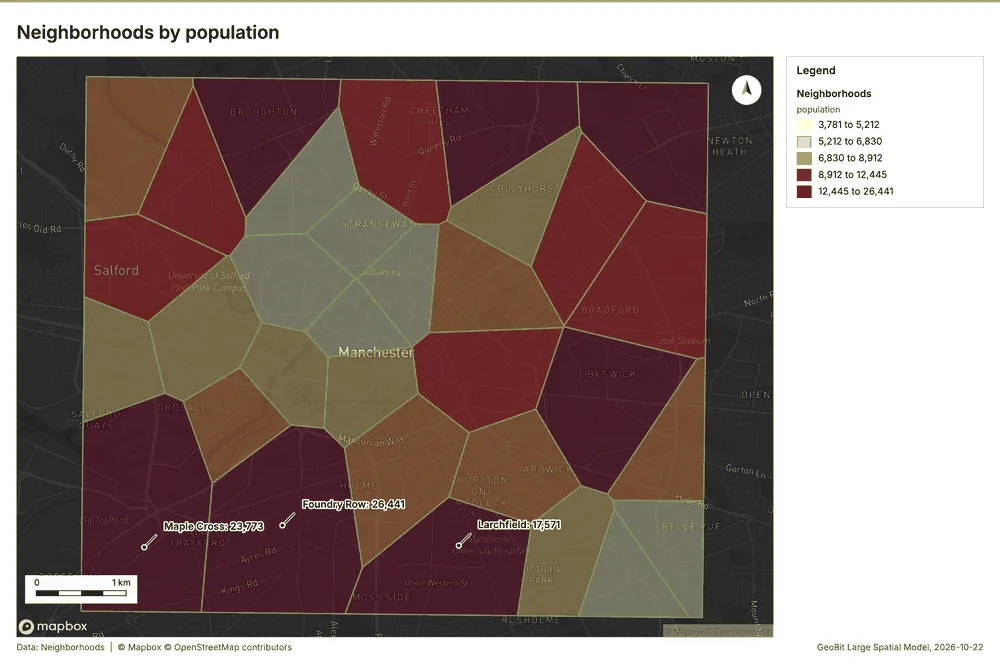
| Neighborhoods | vector, Polygon | 32 | 32 polygon (area) features; 'population' 3,781 to 26,441 (mean 9305); 'households' 1,591 to 11,295 (mean 3926); named by 'name' (e.g. Northgate, Southgate, Eastfield); total area 42.03 km2; extent -2.2952,53.4527 to -2.1888,53.5073. Areas (Neighborhoods) with population to compare and map. | 86 | |
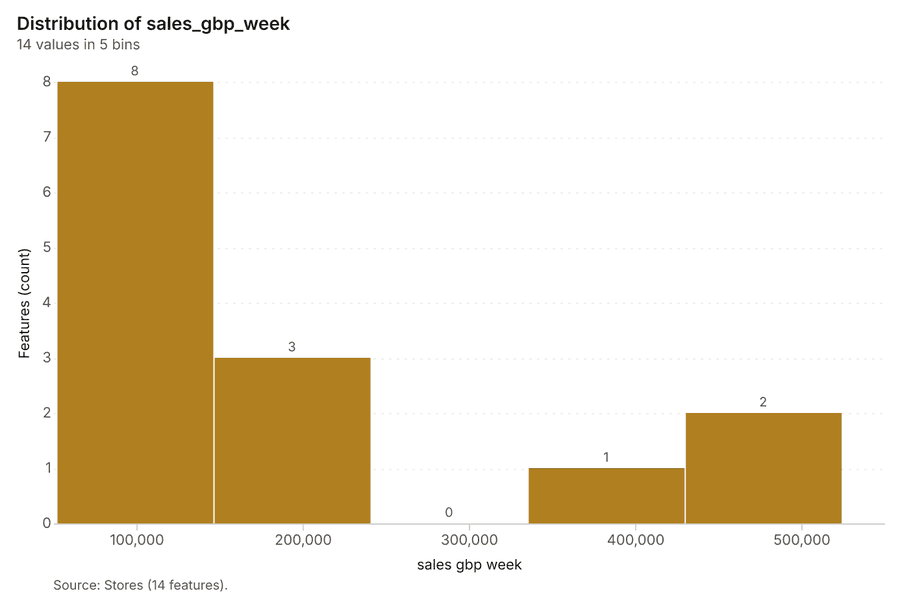
| Stores | vector, Point | 14 | 14 point features; 'format' has 3 values (top: express 8, superstore 3, metro 3); 'sales_gbp_week' 51,784 to 524,305 (mean 1.759e+05); 'floor_area_m2' 445 to 4,768 (mean 1625); 'opened_year' 1,996 to 2,024 (mean 2009); named by 'name' (e.g. Eastfield Superstore, Millbrook Superstore, Station Quarter Express); extent -2.2796,53.4607 to -2.2011,53.5019. Point locations of Stores by format. | 87 | |
| Competitor stores | vector, Point | 70 | 70 point features; 'brand' has 5 values (top: Brand A 16, Brand E 15, Brand D 14); 'format' has 3 values (top: convenience 40, discount 21, supermarket 9); 'est_sales_gbp_week' 33,094 to 394,645 (mean 1.278e+05); extent -2.2910,53.4547 to -2.1909,53.5016. Point locations of Competitor stores by brand. | 88 | |
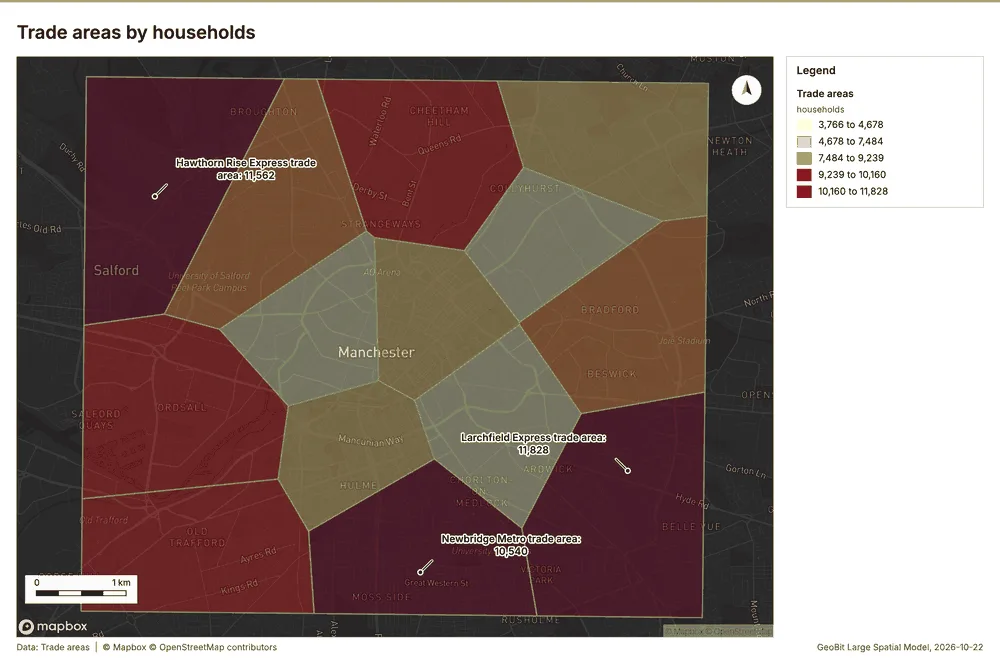
| Trade areas | vector, Polygon | 14 | 14 polygon (area) features; 'households' 3,766 to 11,828 (mean 7821); 'spend_potential_gbp_week' 194,055 to 511,896 (mean 3.537e+05); named by 'name' (e.g. Eastfield Superstore trade area, Millbrook Superstore trade area, Station Quarter Express trade area); total area 42.03 km2; extent -2.2952,53.4527 to -2.1888,53.5073. Areas (Trade areas) with households to compare and map. | 89 | |
| Loyalty transactions | vector, Point | 2,200 | 2026-04-01 to 2026-09-30 | 2,200 point features; dated by 'purchased_at' from 2026-04-01 to 2026-09-30; 'segment' has 4 values (top: family 786, professional 532, student 464); 'channel' has 3 values (top: in store 1531, click and collect 443, delivery 226); 'basket_gbp' 4.02 to 224.7 (mean 33.82); extent -2.2938,53.4534 to -2.1901,53.5066. Dated point events by segment: where and when Loyalty transactions happen. | 2 |
| Footfall counts by week | vector, Point | 780 | 2026-04-06 to 2026-09-28 | 780 point features; dated by 'date' from 2026-04-06 to 2026-09-28; 'visitors' 2,579 to 23,787 (mean 8873); extent -2.2893,53.4537 to -2.1929,53.5030. Dated point events: where and when Footfall counts by week happen. | 3 |
| Parking lots | vector, Point | 25 | 25 point features; 'type' has 2 values (top: multi-story 13, surface 12); 'spaces' 64 to 858 (mean 463.1); 'tariff_gbp_hour' 1.35 to 4.23 (mean 2.639); extent -2.2858,53.4557 to -2.1915,53.5046. Point locations of Parking lots by type. | 90 | |
| Main roads | vector, LineString | 18 | 18 line features; 'class' has 1 values (top: A road 18); 'aadt' 13,250 to 31,246 (mean 1.988e+04); named by 'name' (e.g. Bury Road, Hyde Road, Bridge Street); total length 98.34 km; extent -2.2939,53.4535 to -2.1904,53.5064. Lines (Main roads) such as routes or networks. | 91 | |
| Neighborhood demographics | table | 32 | Table of 32 rows and 6 columns without geometry; 'median_income_gbp' 20,009 to 46,150 (mean 3.21e+04); 'pct_age_65_plus' 8.1 to 23.4 (mean 16); 'pct_students' 2.1 to 36.8 (mean 20.3). A table of Neighborhood demographics without locations. | 92 | |
| Weekly store sales | table | 364 | 2026-04-06 to 2026-09-28 | Table of 364 rows and 5 columns without geometry; dated by 'week_start' from 2026-04-06 to 2026-09-28; 'sales_gbp' 47,580 to 616,246 (mean 1.887e+05); 'transactions' 1,412 to 23,295 (mean 6598); 'avg_basket_gbp' 24.07 to 34 (mean 28.99). A table of Weekly store sales without locations. | 4 |
| Store network expansion memo | document | 1-page md document 'Store network expansion memo'; language en; mentions 5 place(s): Eastfield Superstore (1), Millbrook Superstore (1), Orchard Park (1), 53.46088, -2.20544 (1), Oakwood Superstore trade area (1). A document about Eastfield Superstore, Millbrook Superstore, Orchard Park. | 93 | ||
| Sample: Retail, Manchester | record | 94 | |||
| Hot spot analysis: Competitor stores | layer, Polygon | 43 | 95 | ||
| Hot spot analysis: Footfall counts by week | layer, Polygon | 130 | 96 | ||
| Emerging hot spots: Footfall counts by week | layer, Polygon | 25 | 97 | ||
| Emerging hot spots: Loyalty transactions | layer, Polygon | 395 | 98 | ||
| Calculate density: Competitor stores | layer, Polygon | 322 | 99 | ||
| Calculate density: Footfall counts by week | layer, Polygon | 428 | 100 | ||
| Calculate density: Loyalty transactions | layer, Polygon | 3,864 | 101 | ||
| Summarize within: Trade areas | layer, Polygon | 14 | 102 | ||
| Summarize within: Trade areas | layer, Polygon | 14 | 103 | ||
| Summarize within: Trade areas | layer, Polygon | 14 | 104 | ||
| Find point clusters: Stores | layer, Point | 14 | 105 | ||
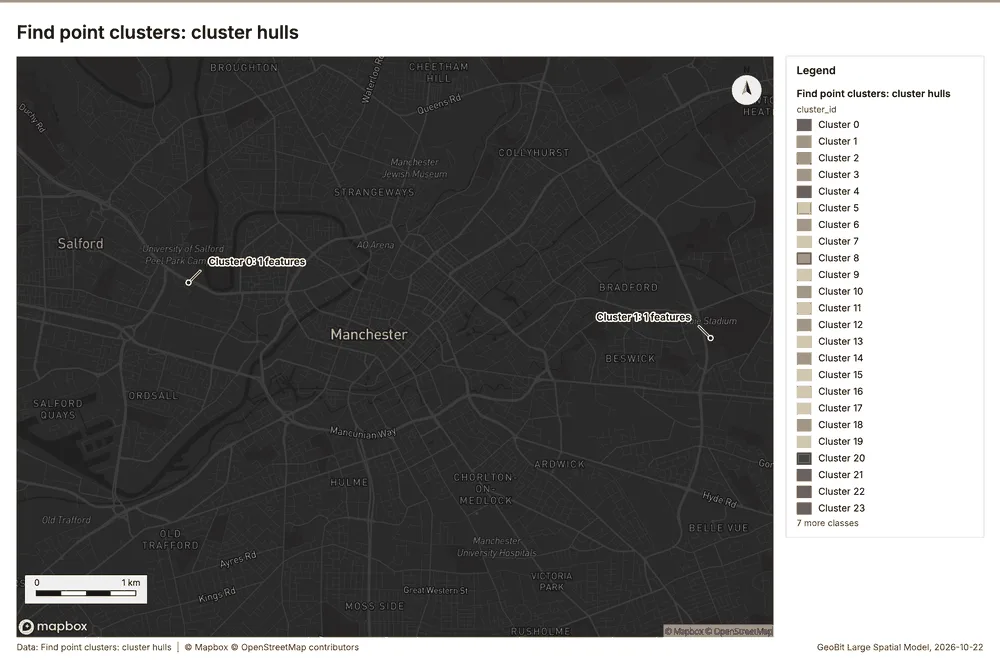
| Find point clusters: cluster hulls | layer, Polygon | 1 | 106 | ||
| Find point clusters: Competitor stores | layer, Point | 70 | 107 | ||
| Find point clusters: cluster hulls | layer, Polygon | 2 | 108 | ||
| Find point clusters: Footfall counts by week | layer, Point | 780 | 109 | ||
| Find point clusters: cluster hulls | layer, Polygon | 30 | 110 | ||
| Hot spot analysis: Loyalty transactions | layer, Polygon | 1,071 | 111 | ||
| Repeat and near repeat classification: Footfall counts by week | layer, Point | 780 | 112 |
Timeline
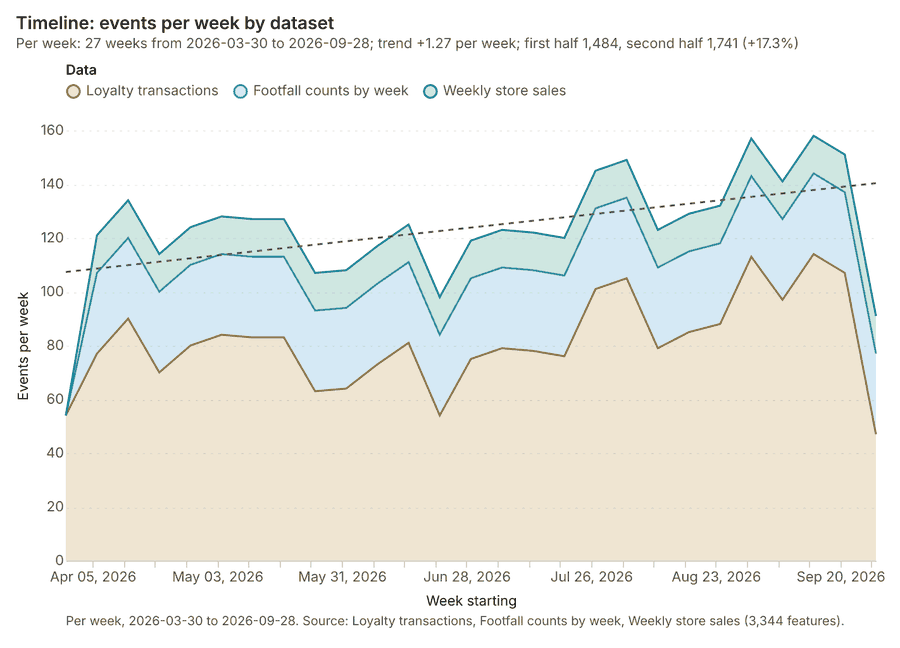
The timeline counts 3,344 dated events in Loyalty transactions, Footfall counts by week, Weekly store sales per week, from week of 2026-03-30 to week of 2026-09-28 1234. By dataset: Loyalty transactions 2,200; Footfall counts by week 780; Weekly store sales 364 1. The trend is +1.27 events per week; the second half of the weeks has 1,741 against 1,484 in the first (+17.3%) 1.
Busiest weeks
Quietest weeks
Hot spots
What this analysis is. Hot spot analysis: Getis-Ord Gi* hot and cold spots with z-scores, p-values and confidence bins 5. In ArcGIS it is Find Hot Spots or Hot Spot Analysis (Getis-Ord Gi*); in QGIS, qgis:hotspot (plugin) 5.
Why it was run on this data. 70 points: Getis-Ord Gi* tests whether the concentrations in Competitor stores are statistically significant 6.
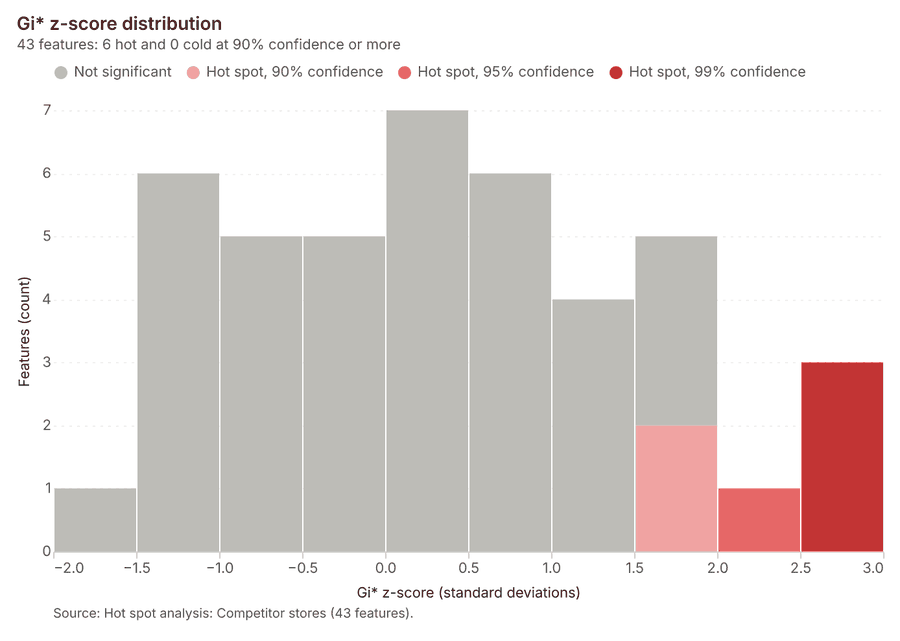
What it found. Hot spot analysis was conducted using the Competitor stores layer 8. The resulting dataset contained 43 features and 43 counts 7.
| Result | Value |
|---|---|
| result, bins | 43 |
| result, count | 43 |
| result, elapsed ms | 5 |
| result, cell size m | 1,000 |
| result, incidents used | 70 |
| result, distance band m | 2,000 |
| billing, cost | 0.0514 |
| billing, list price | 0.0514 |
| billing, upstream cost | 0 |
Findings
- Evidenced: Hot spots on Competitor stores: Hot spot analysis: 1 layer saved: Hot spot analysis: Competitor stores (43 features) 78.
- Evidenced: It reported result, bins 43; result, count 43; result, elapsed ms 5; result, cell size m 1,000; result, incidents used 70; result, distance band m 2,000 7.
Tool gp_hot_spots; parameters {"project": "e415669e-4f91-46e1-8afb-4604f1d21ffb", "features": {"layer": "Competitor stores (4c436f86)"}, "aggregation": "hexagon", "cell_size_m": 1000.0, "distance_band_m": 2000.0}
Hot spots
What this analysis is. Hot spot analysis: Getis-Ord Gi* hot and cold spots with z-scores, p-values and confidence bins 5. In ArcGIS it is Find Hot Spots or Hot Spot Analysis (Getis-Ord Gi*); in QGIS, qgis:hotspot (plugin) 5.
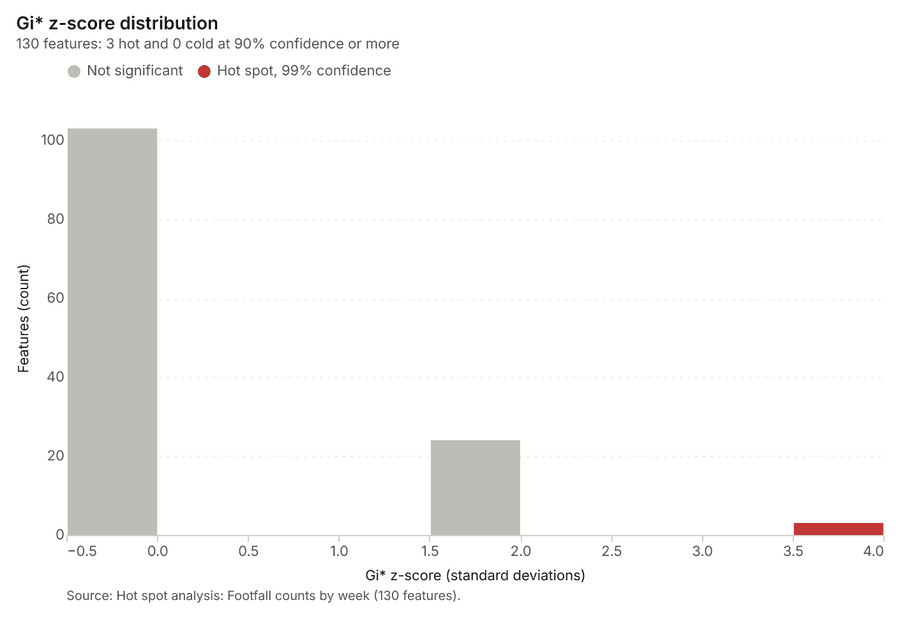
Why it was run on this data. 780 points: Getis-Ord Gi* tests whether the concentrations in Footfall counts by week are statistically significant 9.
What it found. Hot spots on Footfall counts by week: Hot spot analysis: 1 layer saved: Hot spot analysis: Footfall counts by week (130 features) 1011. It reported result, bins 130; result, count 130; result, elapsed ms 14; result, cell size m 500; result, incidents used 780; result, distance band m 500 10.
| Result | Value |
|---|---|
| result, bins | 130 |
| result, count | 130 |
| result, elapsed ms | 14 |
| result, cell size m | 500 |
| result, incidents used | 780 |
| result, distance band m | 500 |
| billing, cost | 0.0656 |
| billing, list price | 0.0656 |
| billing, upstream cost | 0 |
Findings
- Evidenced: Hot spots on Footfall counts by week: Hot spot analysis: 1 layer saved: Hot spot analysis: Footfall counts by week (130 features) 1011.
- Evidenced: It reported result, bins 130; result, count 130; result, elapsed ms 14; result, cell size m 500; result, incidents used 780; result, distance band m 500 10.
Tool gp_hot_spots; parameters {"project": "e415669e-4f91-46e1-8afb-4604f1d21ffb", "features": {"layer": "Footfall counts by week (f2397865)"}, "aggregation": "hexagon", "cell_size_m": 500.0, "distance_band_m": 500.0}
Space time hot spots
What this analysis is. Emerging hot spots: Where hot spots are new, consecutive, intensifying, persistent, diminishing, sporadic, oscillating or historical over time 12. In ArcGIS it is Emerging Hot Spot Analysis or Create Space Time Cube 12.
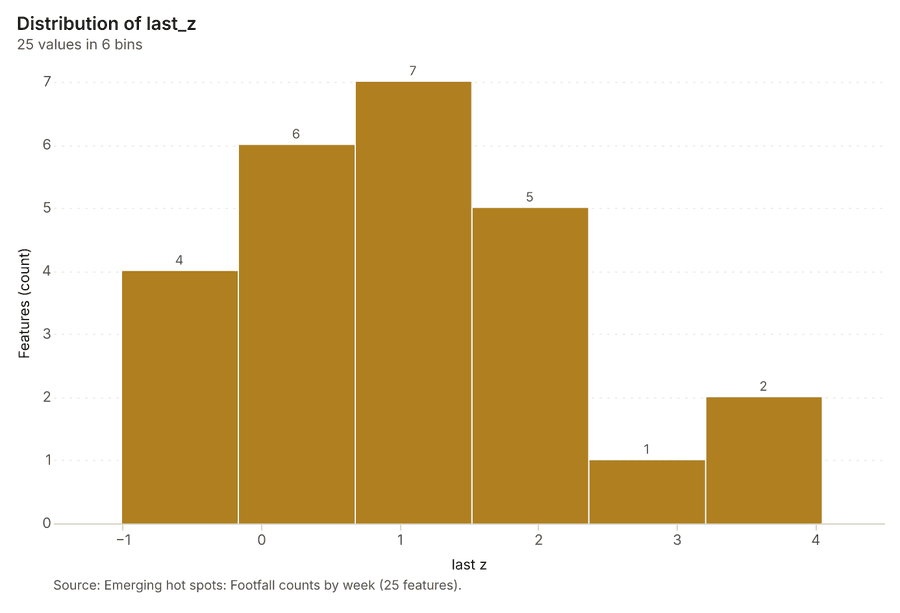
Why it was run on this data. Footfall counts by week carry dates in 'date': emerging hot spot analysis finds new, intensifying and fading hot spots per week 13.
What it found. Space time hot spots on Footfall counts by week: Emerging hot spots: 1 layer saved: Emerging hot spots: Footfall counts by week (25 features) 1114. It reported result, count 25; result, elapsed ms 11; result, resolution 8; result, features used 780; result, time neighbors 0; billing, cost 0.139 14.
| Result | Value |
|---|---|
| result, count | 25 |
| result, elapsed ms | 11 |
| result, resolution | 8 |
| result, features used | 780 |
| result, time neighbors | 0 |
| billing, cost | 0.139 |
| billing, list price | 0.139 |
| billing, upstream cost | 0 |
Findings
- Evidenced: Space time hot spots on Footfall counts by week: Emerging hot spots: 1 layer saved: Emerging hot spots: Footfall counts by week (25 features) 1114.
- Evidenced: It reported result, count 25; result, elapsed ms 11; result, resolution 8; result, features used 780; result, time neighbors 0; billing, cost 0.139 14.
Tool gp_space_time_hot_spots; parameters {"project": "e415669e-4f91-46e1-8afb-4604f1d21ffb", "features": {"layer": "Footfall counts by week (f2397865)"}, "interval": "week", "bin_shape": "h3", "resolution": 8, "time_field": "date"}
Space time hot spots
What this analysis is. Emerging hot spots: Where hot spots are new, consecutive, intensifying, persistent, diminishing, sporadic, oscillating or historical over time 12. In ArcGIS it is Emerging Hot Spot Analysis or Create Space Time Cube 12.
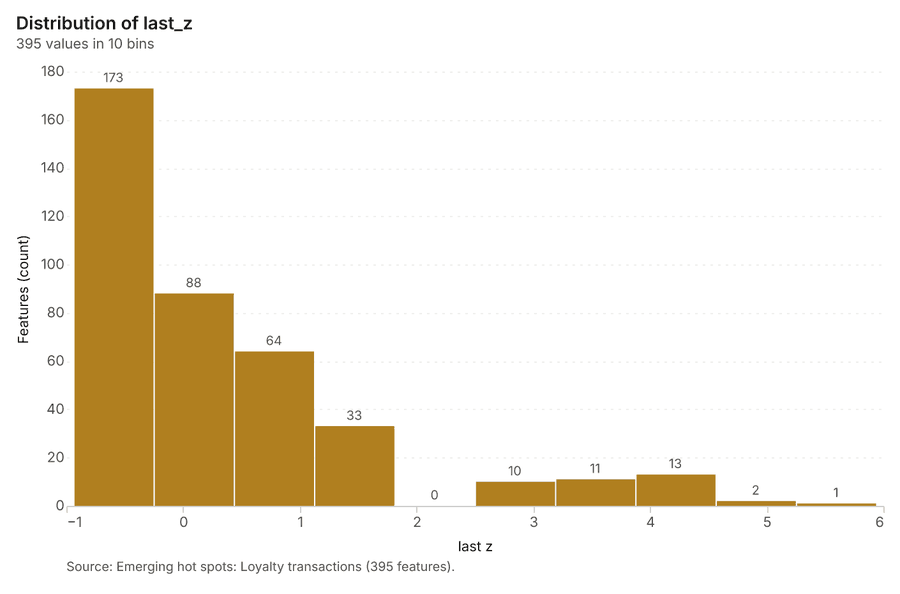
Why it was run on this data. Loyalty transactions carry dates in 'purchased_at': emerging hot spot analysis finds new, intensifying and fading hot spots per week 15.
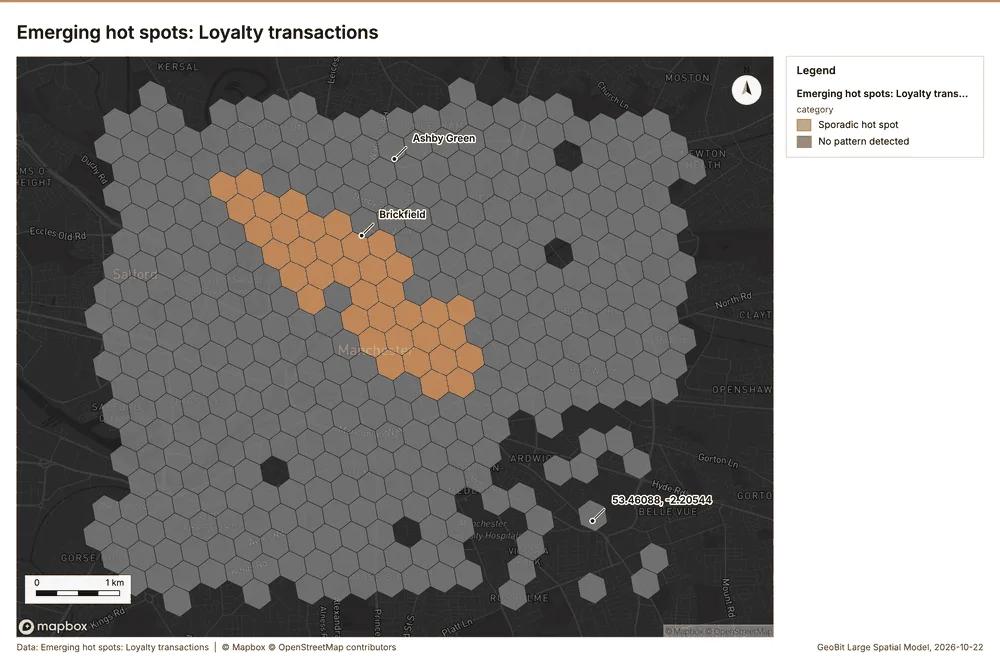
What it found. The analysis utilized the Loyalty transactions data 17 to identify emerging hot spots 16.
| Result | Value |
|---|---|
| result, count | 395 |
| result, elapsed ms | 66 |
| result, resolution | 9 |
| result, features used | 2,200 |
| result, time neighbors | 0 |
| billing, cost | 0.21 |
| billing, list price | 0.21 |
| billing, upstream cost | 0 |
Findings
- Evidenced: Space time hot spots on Loyalty transactions: Emerging hot spots: 1 layer saved: Emerging hot spots: Loyalty transactions (395 features) 1617.
- Evidenced: It reported result, count 395; result, elapsed ms 66; result, resolution 9; result, features used 2,200; result, time neighbors 0; billing, cost 0.21 16.
Tool gp_space_time_hot_spots; parameters {"project": "e415669e-4f91-46e1-8afb-4604f1d21ffb", "features": {"layer": "Loyalty transactions (aa524a0b)"}, "interval": "week", "bin_shape": "h3", "resolution": 9, "time_field": "purchased_at"}
Calculate density
What this analysis is. Calculate density: Kernel density per square kilometer on a grid 18. In ArcGIS it is Calculate Density or Kernel Density; in QGIS, native:heatmapkerneldensityestimation 18.
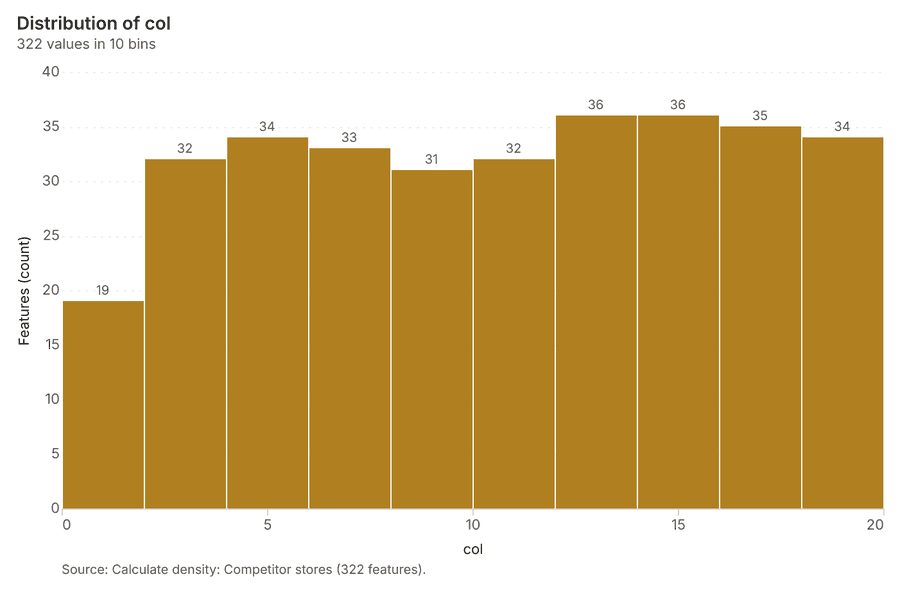
Why it was run on this data. 70 points in Competitor stores: a density surface shows where they concentrate 19.
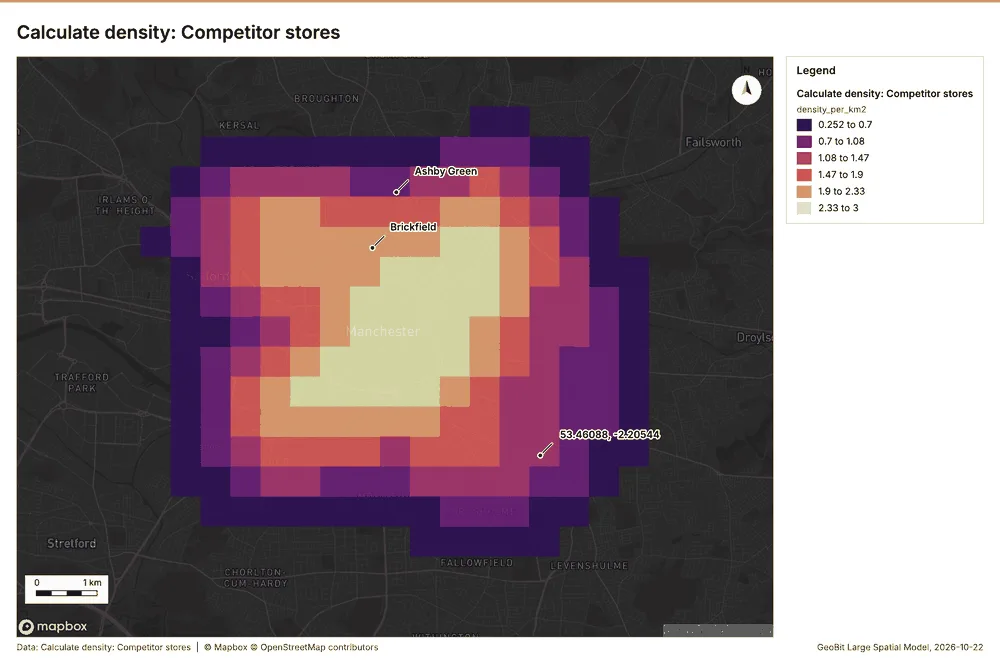
What it found. Calculate density on Competitor stores: Calculate density: 1 layer saved: Calculate density: Competitor stores (322 features) 820. It reported result, count 322; result, elapsed ms 15; result, bandwidth m 2,000; result, cell size m 500; result, excluded null 0; result, max density per km2 2.995 20.
| Result | Value |
|---|---|
| result, count | 322 |
| result, elapsed ms | 15 |
| result, bandwidth m | 2,000 |
| result, cell size m | 500 |
| result, excluded null | 0 |
| result, max density per km2 | 2.995 |
| billing, cost | 0.0514 |
| billing, list price | 0.0514 |
| billing, upstream cost | 0 |
Findings
- Evidenced: Calculate density on Competitor stores: Calculate density: 1 layer saved: Calculate density: Competitor stores (322 features) 820.
- Evidenced: It reported result, count 322; result, elapsed ms 15; result, bandwidth m 2,000; result, cell size m 500; result, excluded null 0; result, max density per km2 2.995 20.
A model draft was discarded because a sentence did not cite a source of this section.
Tool gp_calculate_density; parameters {"kernel": "quartic", "project": "e415669e-4f91-46e1-8afb-4604f1d21ffb", "features": {"layer": "Competitor stores (4c436f86)"}, "bandwidth_m": 2000.0, "cell_size_m": 500.0}
Calculate density
What this analysis is. Calculate density: Kernel density per square kilometer on a grid 18. In ArcGIS it is Calculate Density or Kernel Density; in QGIS, native:heatmapkerneldensityestimation 18.
Why it was run on this data. 780 points in Footfall counts by week: a density surface shows where they concentrate 21.
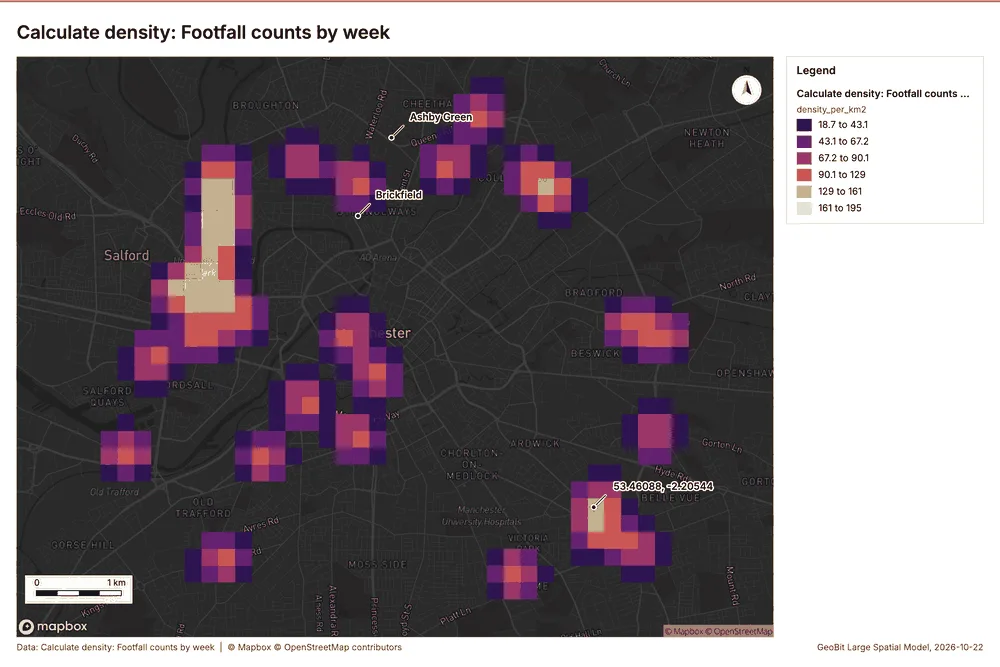
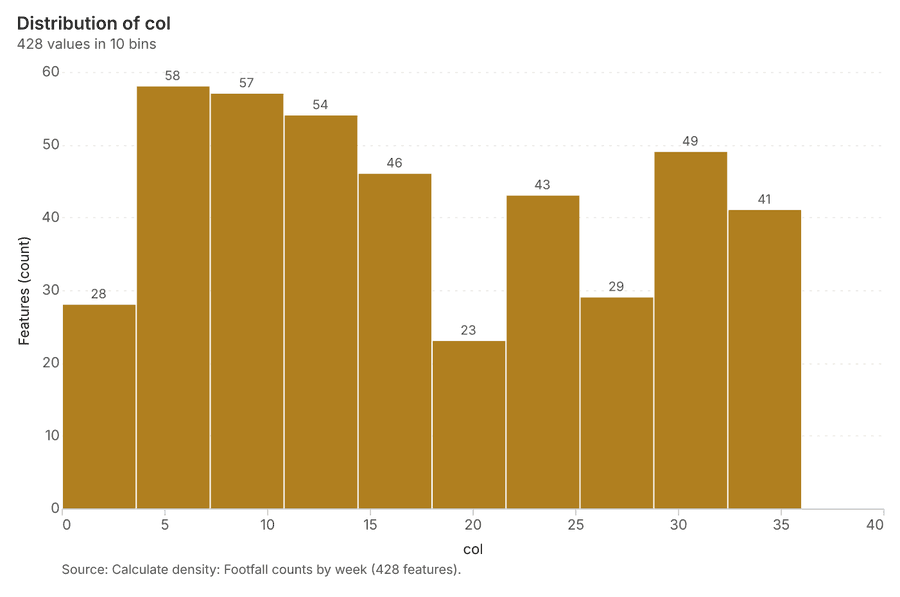
What it found. Calculate density on Footfall counts by week: Calculate density: 1 layer saved: Calculate density: Footfall counts by week (428 features) 1122. It reported result, count 428; result, elapsed ms 19; result, bandwidth m 500; result, cell size m 200; result, excluded null 0; result, max density per km2 195.5 22.
| Result | Value |
|---|---|
| result, count | 428 |
| result, elapsed ms | 19 |
| result, bandwidth m | 500 |
| result, cell size m | 200 |
| result, excluded null | 0 |
| result, max density per km2 | 195.5 |
| billing, cost | 0.0656 |
| billing, list price | 0.0656 |
| billing, upstream cost | 0 |
Findings
- Evidenced: Calculate density on Footfall counts by week: Calculate density: 1 layer saved: Calculate density: Footfall counts by week (428 features) 1122.
- Evidenced: It reported result, count 428; result, elapsed ms 19; result, bandwidth m 500; result, cell size m 200; result, excluded null 0; result, max density per km2 195.5 22.
A model draft was discarded because a sentence did not cite a source of this section.
Tool gp_calculate_density; parameters {"kernel": "quartic", "project": "e415669e-4f91-46e1-8afb-4604f1d21ffb", "features": {"layer": "Footfall counts by week (f2397865)"}, "bandwidth_m": 500.0, "cell_size_m": 200.0}
Calculate density
What this analysis is. Calculate density: Kernel density per square kilometer on a grid 18. In ArcGIS it is Calculate Density or Kernel Density; in QGIS, native:heatmapkerneldensityestimation 18.
Why it was run on this data. 2200 points in Loyalty transactions: a density surface shows where they concentrate 23.
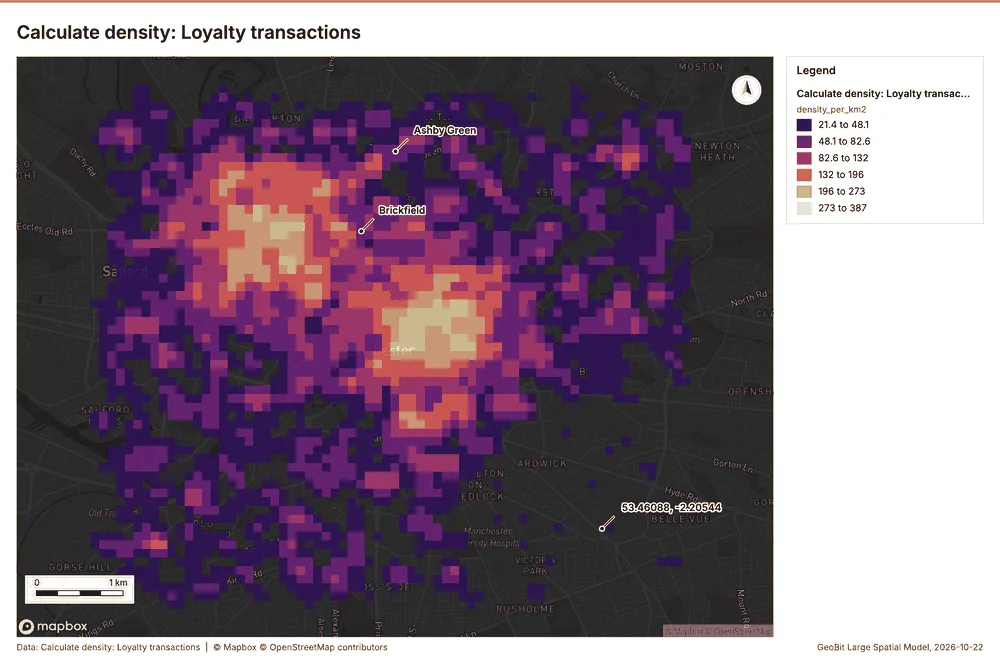
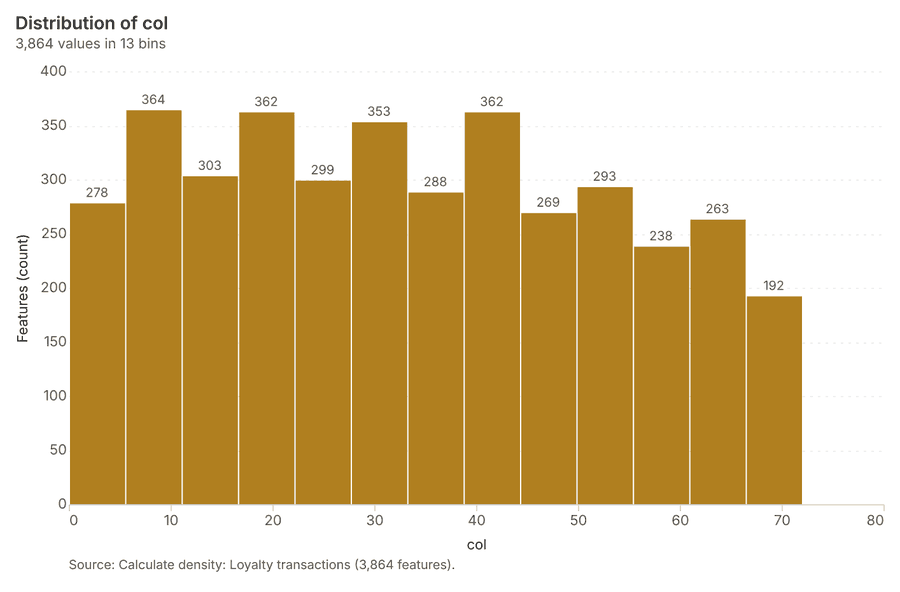
What it found. Calculate density on Loyalty transactions: Calculate density: 1 layer saved: Calculate density: Loyalty transactions (3864 features) 1724. It reported result, count 3,864; result, elapsed ms 134; result, bandwidth m 200; result, cell size m 100; result, excluded null 0; result, max density per km2 386.8 24.
| Result | Value |
|---|---|
| result, count | 3,864 |
| result, elapsed ms | 134 |
| result, bandwidth m | 200 |
| result, cell size m | 100 |
| result, excluded null | 0 |
| result, max density per km2 | 386.8 |
| billing, cost | 0.094 |
| billing, list price | 0.094 |
| billing, upstream cost | 0 |
Findings
- Evidenced: Calculate density on Loyalty transactions: Calculate density: 1 layer saved: Calculate density: Loyalty transactions (3864 features) 1724.
- Evidenced: It reported result, count 3,864; result, elapsed ms 134; result, bandwidth m 200; result, cell size m 100; result, excluded null 0; result, max density per km2 386.8 24.
Tool gp_calculate_density; parameters {"kernel": "quartic", "project": "e415669e-4f91-46e1-8afb-4604f1d21ffb", "features": {"layer": "Loyalty transactions (aa524a0b)"}, "bandwidth_m": 200.0, "cell_size_m": 100.0}
Summarize within
What this analysis is. Summarize within: Count and aggregate the features inside each polygon (or bin), proportionally for lines and polygons 25. In ArcGIS it is Summarize Within or Aggregate Points; in QGIS, native:countpointsinpolygon or native:sumlinelengths 25.
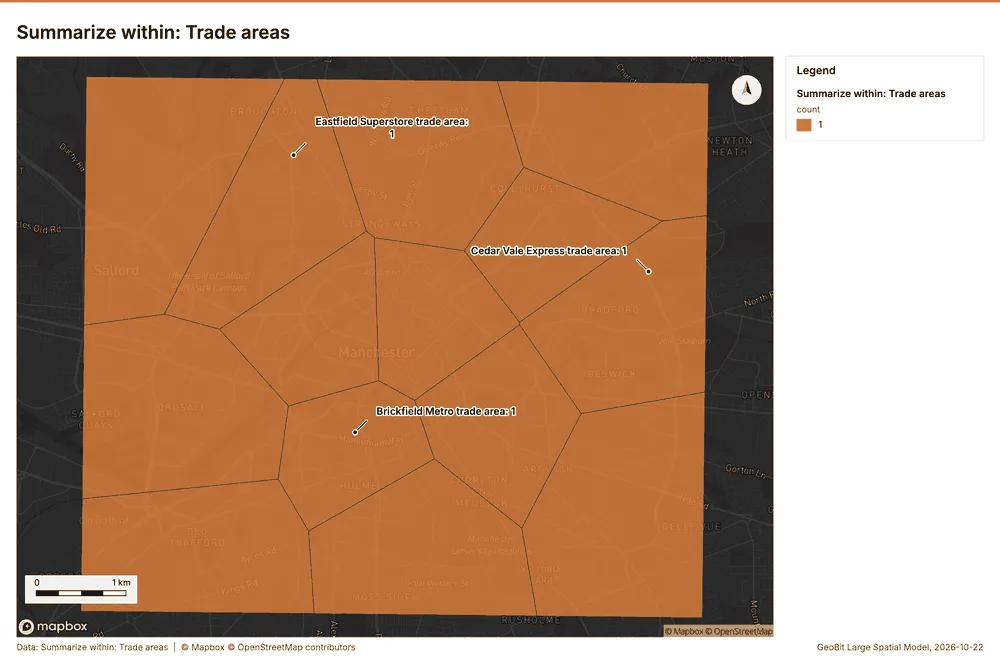
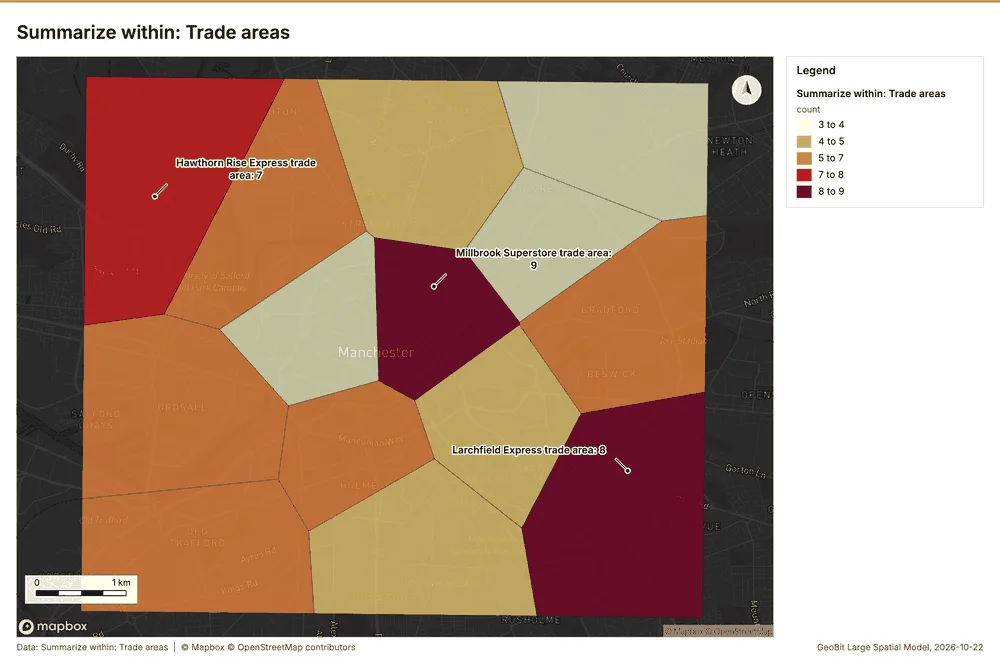
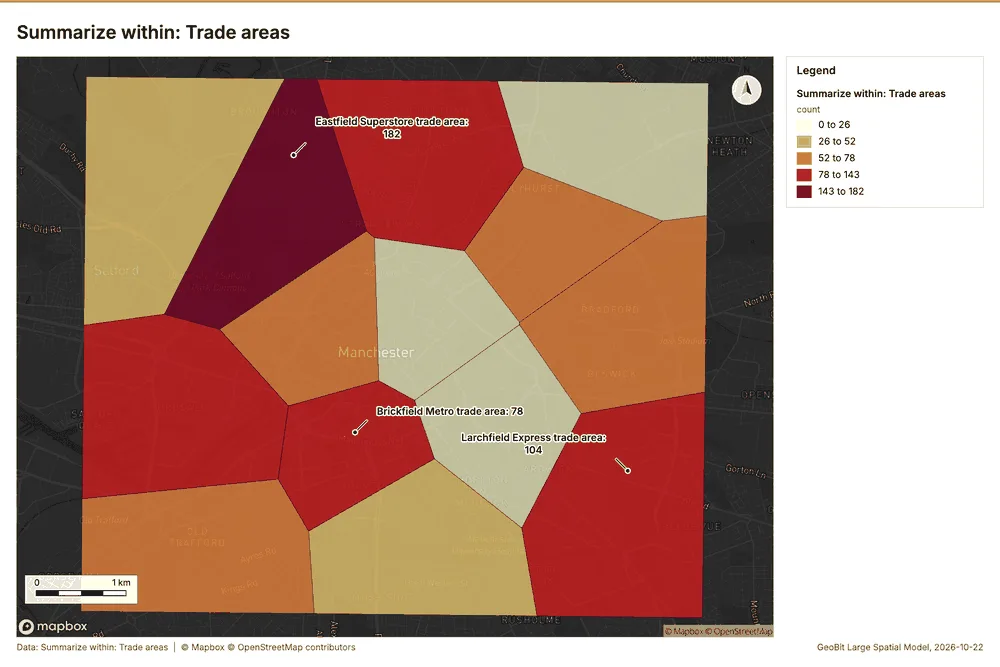
Why it was run on this data. Count Stores inside each feature of Trade areas by format; the counts map as a choropleth (natural breaks, sequential colors) 26.
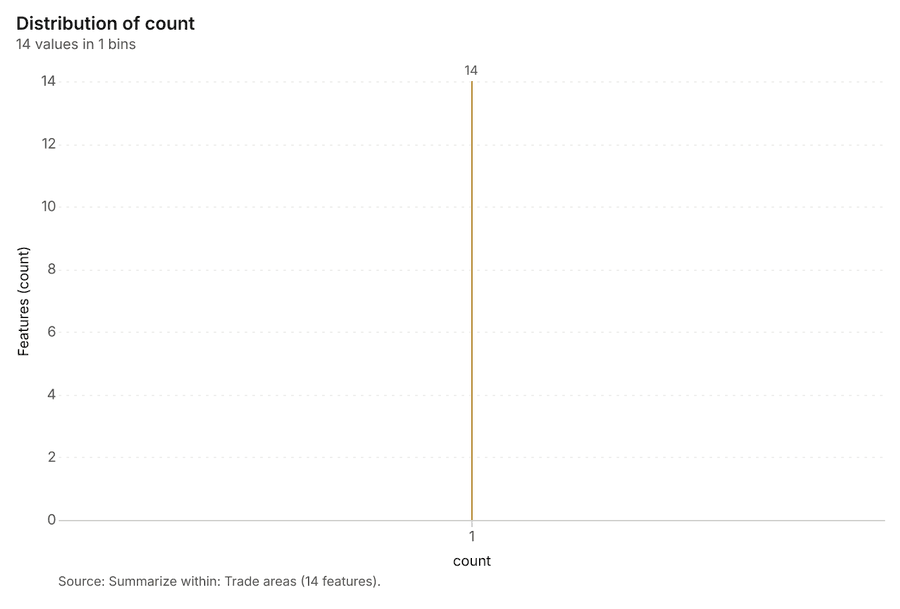
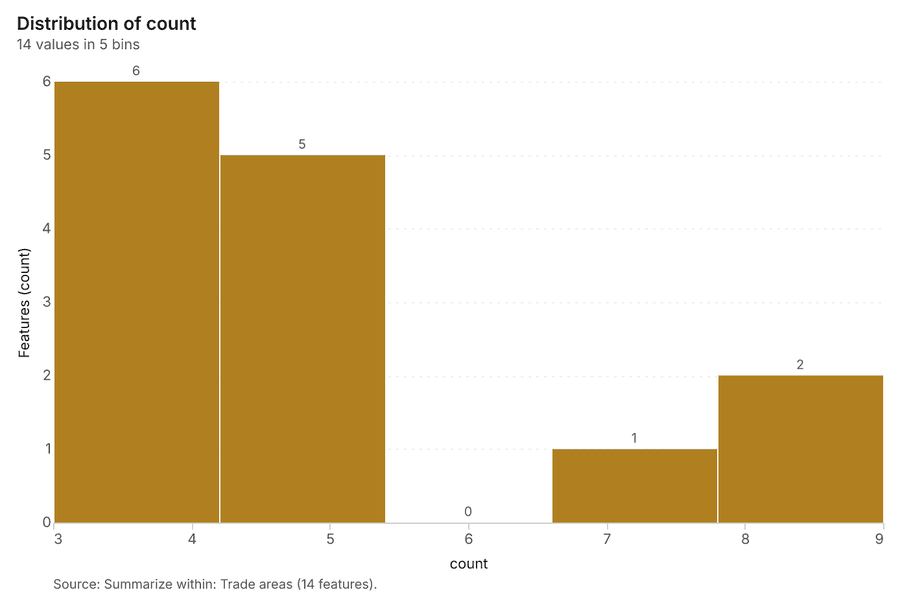
What it found. Summarize within on Stores, Trade areas: Summarize within: 1 layer saved: Summarize within: Trade areas (14 features) 272829. It reported result, count 14; result, elapsed ms 1; billing, cost 0.01058; billing, list price 0.01058; billing, upstream cost 0 27.
| Result | Value |
|---|---|
| result, count | 14 |
| result, elapsed ms | 1 |
| billing, cost | 0.01058 |
| billing, list price | 0.01058 |
| billing, upstream cost | 0 |
Findings
- Evidenced: Summarize within on Stores, Trade areas: Summarize within: 1 layer saved: Summarize within: Trade areas (14 features) 272829.
- Evidenced: It reported result, count 14; result, elapsed ms 1; billing, cost 0.01058; billing, list price 0.01058; billing, upstream cost 0 27.
Tool gp_summarize_within; parameters {"stats": [{"stat": "sum", "field": "sales_gbp_week"}], "project": "e415669e-4f91-46e1-8afb-4604f1d21ffb", "features": {"layer": "Stores (18363c3a)"}, "group_by": "format", "polygons": {"layer": "Trade areas (e712834d)"}}
Summarize within
What this analysis is. Summarize within: Count and aggregate the features inside each polygon (or bin), proportionally for lines and polygons 25. In ArcGIS it is Summarize Within or Aggregate Points; in QGIS, native:countpointsinpolygon or native:sumlinelengths 25.
Why it was run on this data. Count Stores inside each feature of Trade areas by format; the counts map as a choropleth (natural breaks, sequential colors) 26.
What it found. Summarize within on Competitor stores, Trade areas: Summarize within: 1 layer saved: Summarize within: Trade areas (14 features) 82930. It reported result, count 14; result, elapsed ms 0; billing, cost 0.0117; billing, list price 0.0117; billing, upstream cost 0 30.
| Result | Value |
|---|---|
| result, count | 14 |
| result, elapsed ms | 0 |
| billing, cost | 0.0117 |
| billing, list price | 0.0117 |
| billing, upstream cost | 0 |
Findings
- Evidenced: Summarize within on Competitor stores, Trade areas: Summarize within: 1 layer saved: Summarize within: Trade areas (14 features) 82930.
- Evidenced: It reported result, count 14; result, elapsed ms 0; billing, cost 0.0117; billing, list price 0.0117; billing, upstream cost 0 30.
Tool gp_summarize_within; parameters {"stats": [{"stat": "sum", "field": "est_sales_gbp_week"}], "project": "e415669e-4f91-46e1-8afb-4604f1d21ffb", "features": {"layer": "Competitor stores (4c436f86)"}, "group_by": "brand", "polygons": {"layer": "Trade areas (e712834d)"}}
Summarize within
What this analysis is. Summarize within: Count and aggregate the features inside each polygon (or bin), proportionally for lines and polygons 25. In ArcGIS it is Summarize Within or Aggregate Points; in QGIS, native:countpointsinpolygon or native:sumlinelengths 25.
Why it was run on this data. Count Stores inside each feature of Trade areas by format; the counts map as a choropleth (natural breaks, sequential colors) 26.
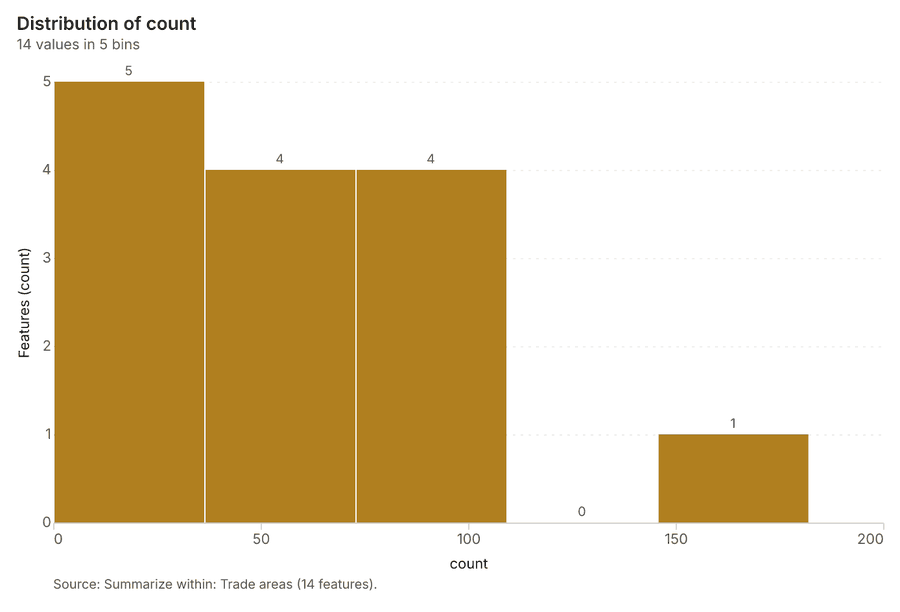
What it found. Summarize within on Footfall counts by week, Trade areas: Summarize within: 1 layer saved: Summarize within: Trade areas (14 features) 112931. It reported result, count 14; result, elapsed ms 2; billing, cost 0.0259; billing, list price 0.0259; billing, upstream cost 0 31.
| Result | Value |
|---|---|
| result, count | 14 |
| result, elapsed ms | 2 |
| billing, cost | 0.0259 |
| billing, list price | 0.0259 |
| billing, upstream cost | 0 |
Findings
- Evidenced: Summarize within on Footfall counts by week, Trade areas: Summarize within: 1 layer saved: Summarize within: Trade areas (14 features) 112931.
- Evidenced: It reported result, count 14; result, elapsed ms 2; billing, cost 0.0259; billing, list price 0.0259; billing, upstream cost 0 31.
Tool gp_summarize_within; parameters {"stats": [{"stat": "sum", "field": "visitors"}], "project": "e415669e-4f91-46e1-8afb-4604f1d21ffb", "features": {"layer": "Footfall counts by week (f2397865)"}, "polygons": {"layer": "Trade areas (e712834d)"}}
Find point clusters
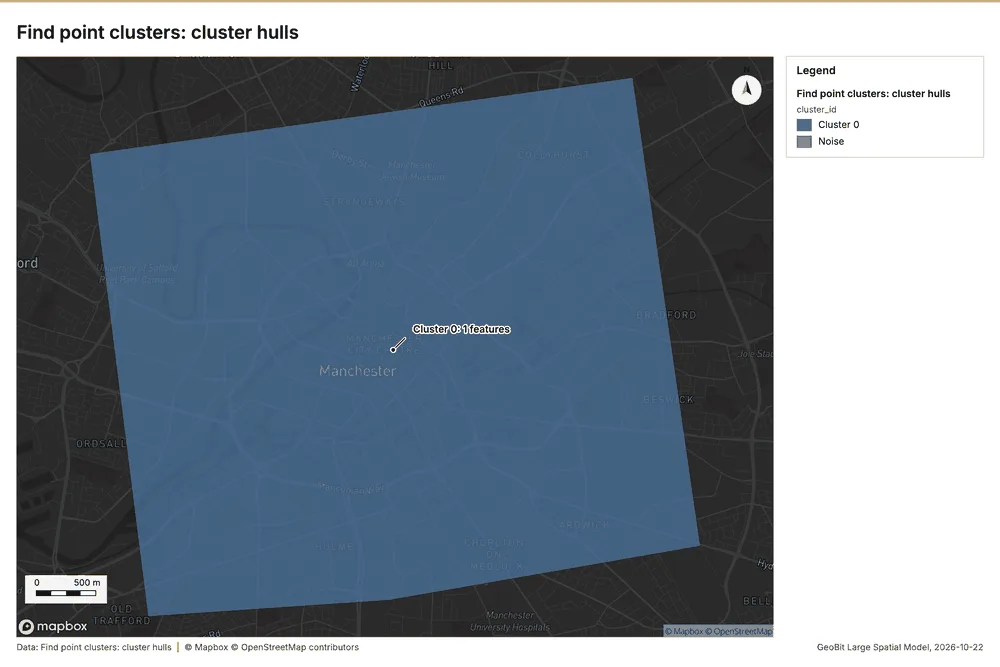
What this analysis is. Find point clusters: Density-based clusters (DBSCAN, HDBSCAN or OPTICS, optionally space-time) with hulls and noise 32. In ArcGIS it is Find Point Clusters or Density-based Clustering; in QGIS, native:dbscanclustering or native:stdbscanclustering 32.
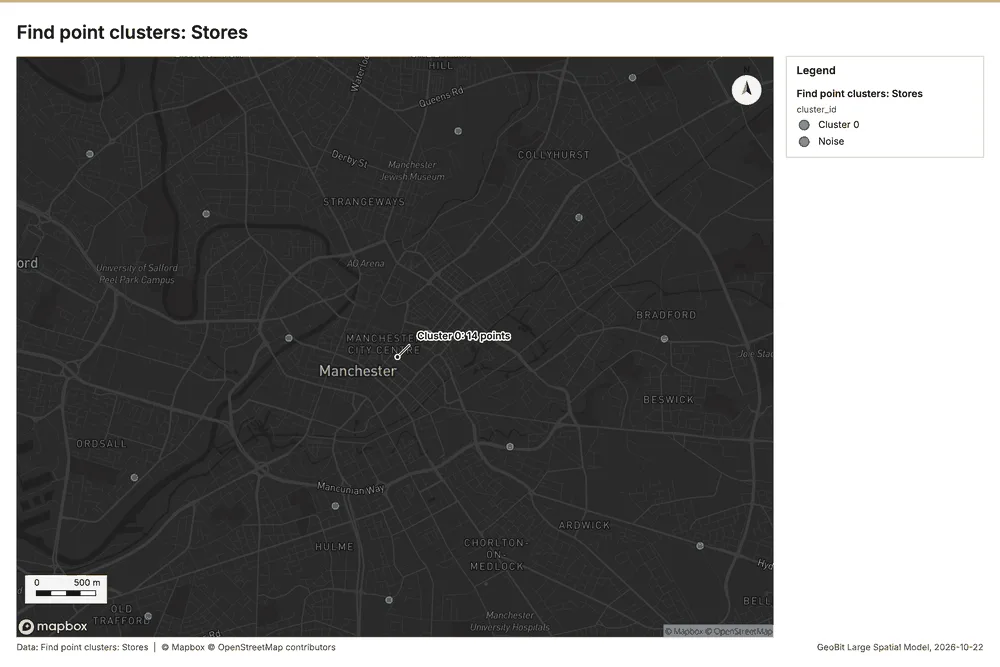
Why it was run on this data. DBSCAN finds dense groups of Stores and separates noise 33.
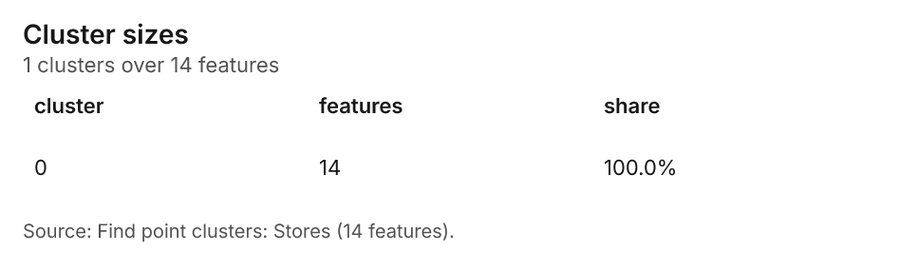
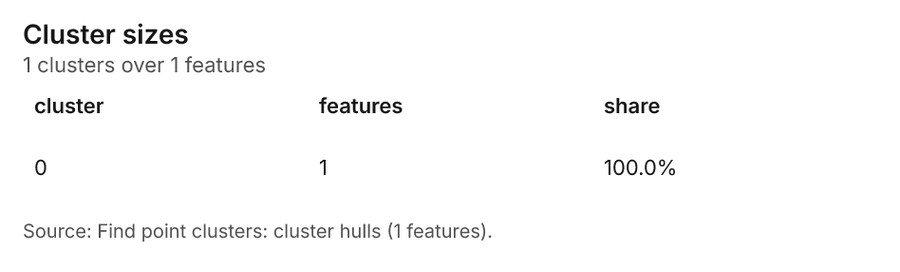
What it found. Find point clusters on Stores: Find point clusters: 2 layers saved: Find point clusters: Stores (14 features); Find point clusters: cluster hulls (1 feature) 2834. It reported result, count 14; result, noise 0; result, distance m 2,000; result, elapsed ms 5; result, min points 3; billing, cost 0.05028 34.
| Result | Value |
|---|---|
| result, count | 14 |
| result, noise | 0 |
| result, distance m | 2,000 |
| result, elapsed ms | 5 |
| result, min points | 3 |
| billing, cost | 0.05028 |
| billing, list price | 0.05028 |
| billing, upstream cost | 0 |
Findings
- Evidenced: Find point clusters on Stores: Find point clusters: 2 layers saved: Find point clusters: Stores (14 features); Find point clusters: cluster hulls (1 feature) 2834.
- Evidenced: It reported result, count 14; result, noise 0; result, distance m 2,000; result, elapsed ms 5; result, min points 3; billing, cost 0.05028 34.
Tool gp_find_point_clusters; parameters {"method": "dbscan", "project": "e415669e-4f91-46e1-8afb-4604f1d21ffb", "features": {"layer": "Stores (18363c3a)"}, "distance_m": 2000.0, "min_points": 3}
Find point clusters
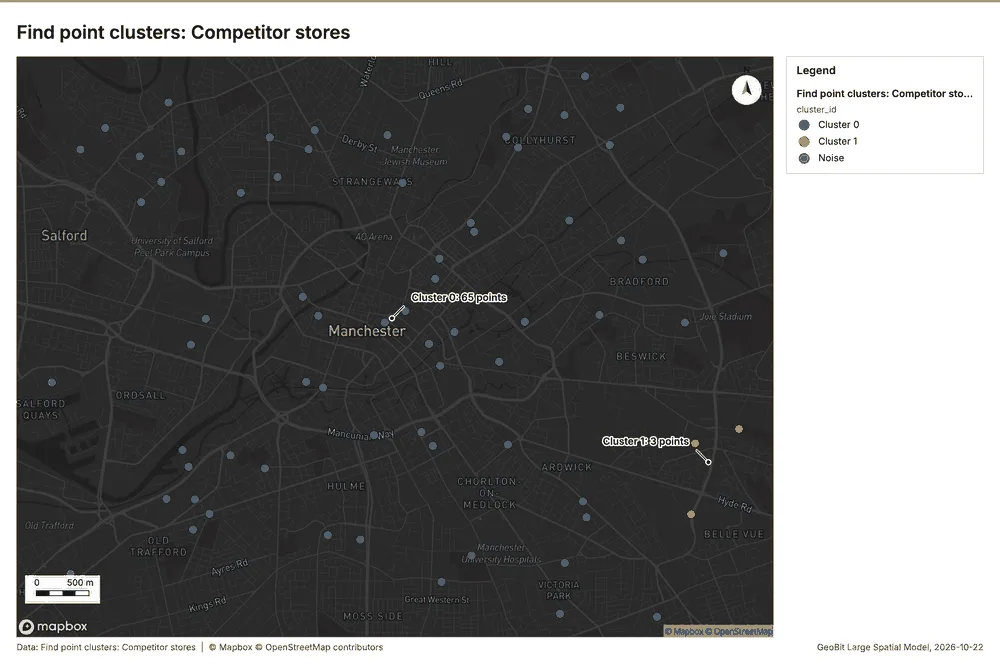
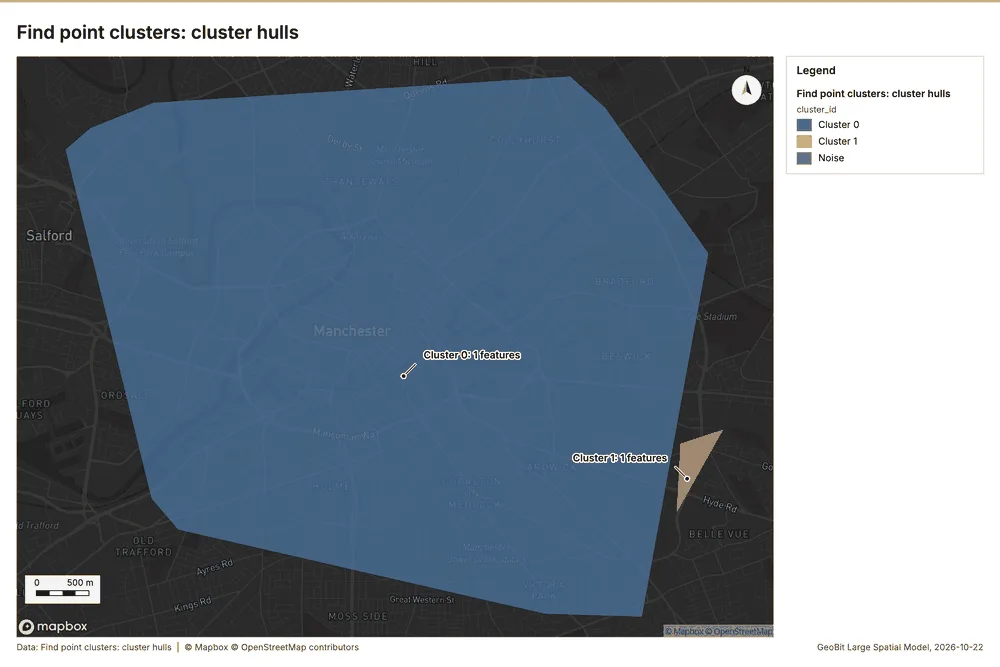
What this analysis is. Find point clusters: Density-based clusters (DBSCAN, HDBSCAN or OPTICS, optionally space-time) with hulls and noise 32. In ArcGIS it is Find Point Clusters or Density-based Clustering; in QGIS, native:dbscanclustering or native:stdbscanclustering 32.
Why it was run on this data. DBSCAN finds dense groups of Competitor stores and separates noise 35.
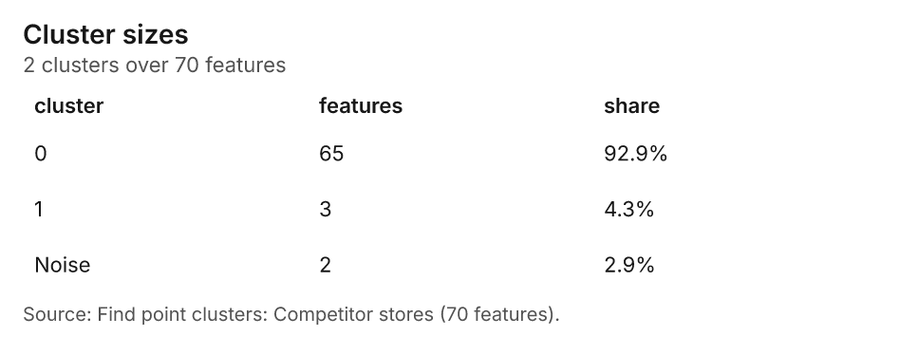
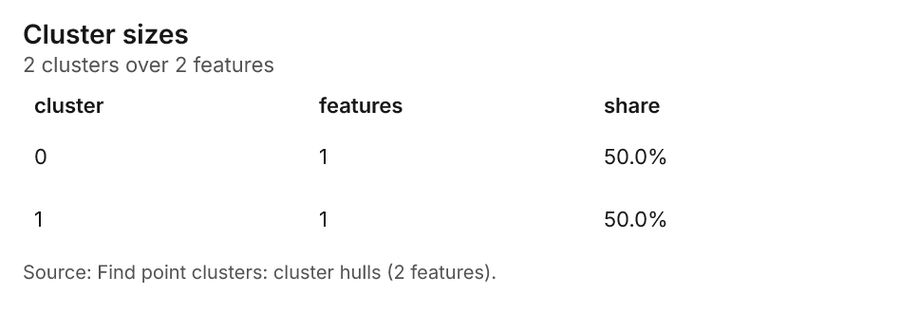
What it found. The gp_find_point_clusters tool was executed using the Competitor stores dataset 8. This analysis saved two layers, including Competitor stores with 70 features and cluster hulls with 2 features 36. The tool returned 70 results and 2 noise points 36. The entire process completed with an elapsed time of 3 milliseconds 36, and the associated billing cost was 0.0514 36.
| Result | Value |
|---|---|
| result, count | 70 |
| result, noise | 2 |
| result, distance m | 1,000 |
| result, elapsed ms | 3 |
| result, min points | 3 |
| billing, cost | 0.0514 |
| billing, list price | 0.0514 |
| billing, upstream cost | 0 |
Findings
- Evidenced: Find point clusters on Competitor stores: Find point clusters: 2 layers saved: Find point clusters: Competitor stores (70 features); Find point clusters: cluster hulls (2 features) 836.
- Evidenced: It reported result, count 70; result, noise 2; result, distance m 1,000; result, elapsed ms 3; result, min points 3; billing, cost 0.0514 36.
Tool gp_find_point_clusters; parameters {"method": "dbscan", "project": "e415669e-4f91-46e1-8afb-4604f1d21ffb", "features": {"layer": "Competitor stores (4c436f86)"}, "distance_m": 1000.0, "min_points": 3}
Find point clusters
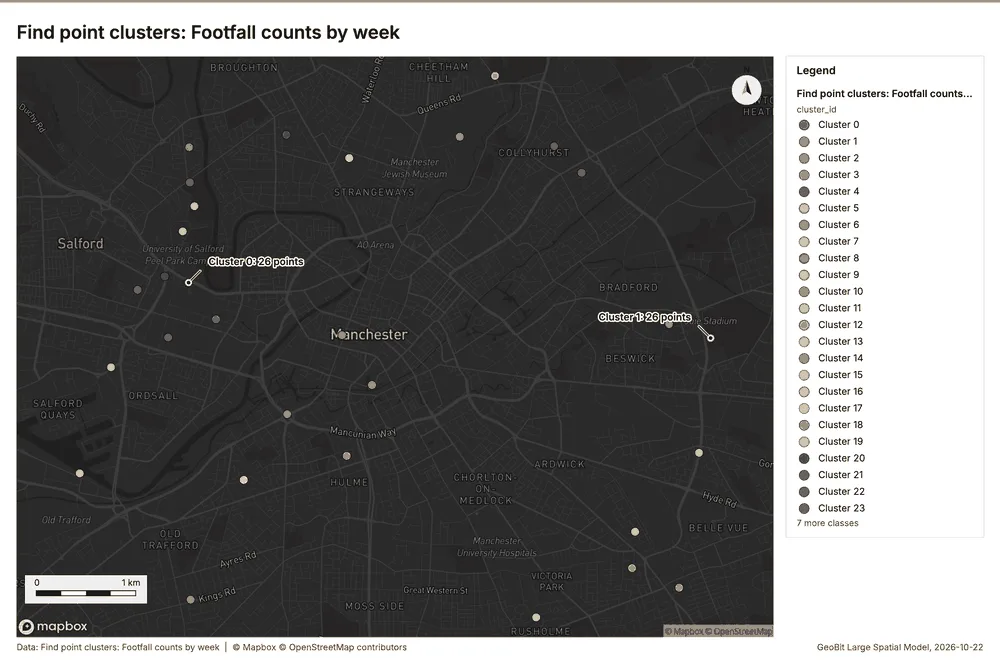
What this analysis is. Find point clusters: Density-based clusters (DBSCAN, HDBSCAN or OPTICS, optionally space-time) with hulls and noise 32. In ArcGIS it is Find Point Clusters or Density-based Clustering; in QGIS, native:dbscanclustering or native:stdbscanclustering 32.
Why it was run on this data. DBSCAN finds dense groups of Footfall counts by week and separates noise 37.
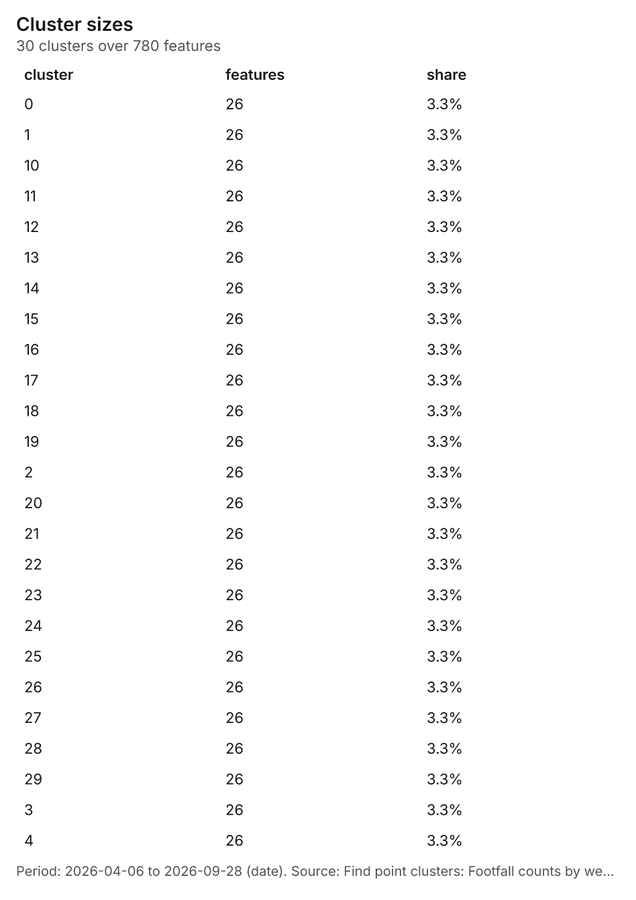
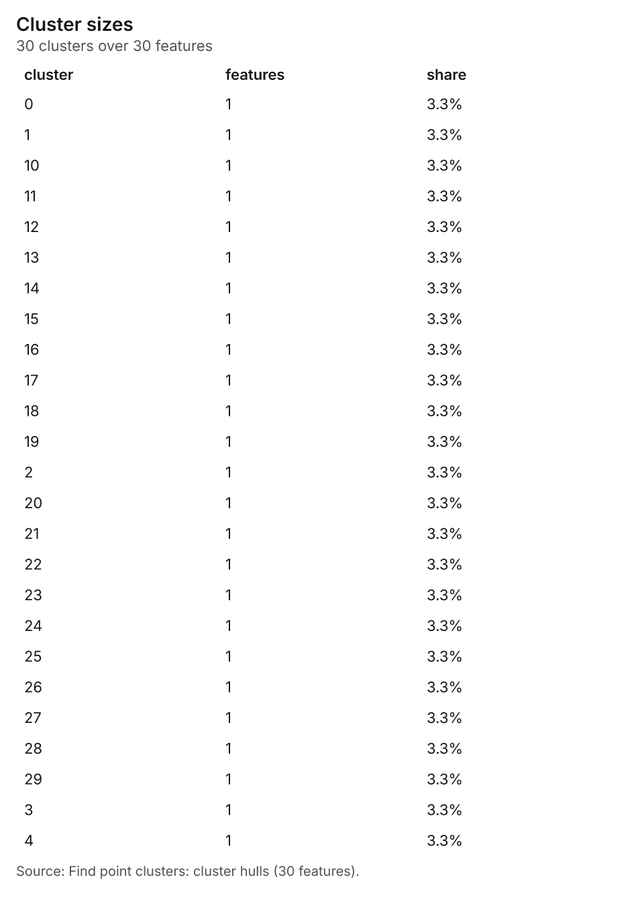
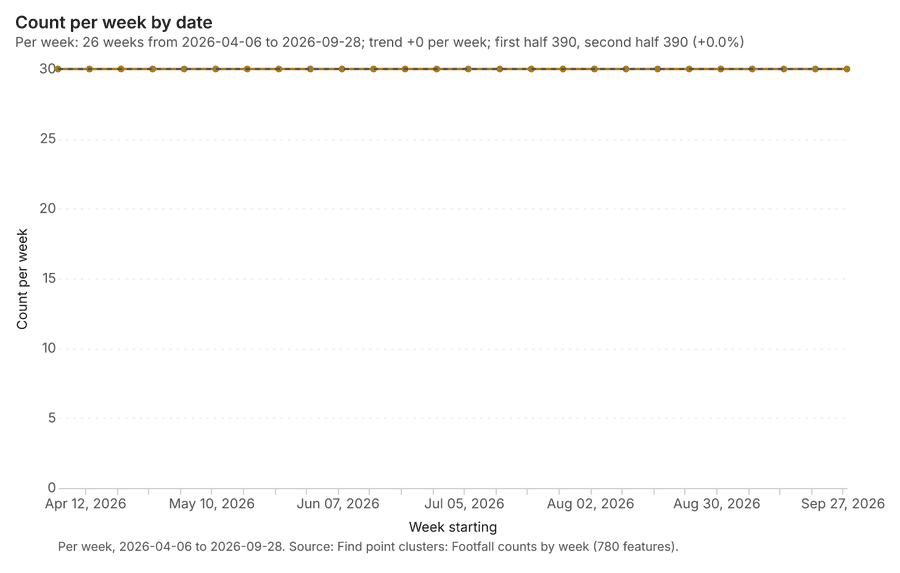
What it found. Find point clusters on Footfall counts by week: Find point clusters: 2 layers saved: Find point clusters: Footfall counts by week (780 features); Find point clusters: cluster hulls (30 features) 1138. It reported result, count 780; result, noise 0; result, distance m 200; result, elapsed ms 29; result, min points 20; billing, cost 0.0656 38.
| Result | Value |
|---|---|
| result, count | 780 |
| result, noise | 0 |
| result, distance m | 200 |
| result, elapsed ms | 29 |
| result, min points | 20 |
| billing, cost | 0.0656 |
| billing, list price | 0.0656 |
| billing, upstream cost | 0 |
Findings
- Evidenced: Find point clusters on Footfall counts by week: Find point clusters: 2 layers saved: Find point clusters: Footfall counts by week (780 features); Find point clusters: cluster hulls (30 features) 1138.
- Evidenced: It reported result, count 780; result, noise 0; result, distance m 200; result, elapsed ms 29; result, min points 20; billing, cost 0.0656 38.
Tool gp_find_point_clusters; parameters {"method": "dbscan", "project": "e415669e-4f91-46e1-8afb-4604f1d21ffb", "features": {"layer": "Footfall counts by week (f2397865)"}, "distance_m": 200.0, "min_points": 20}
Hot spots
What this analysis is. Hot spot analysis: Getis-Ord Gi* hot and cold spots with z-scores, p-values and confidence bins 5. In ArcGIS it is Find Hot Spots or Hot Spot Analysis (Getis-Ord Gi*); in QGIS, qgis:hotspot (plugin) 5.
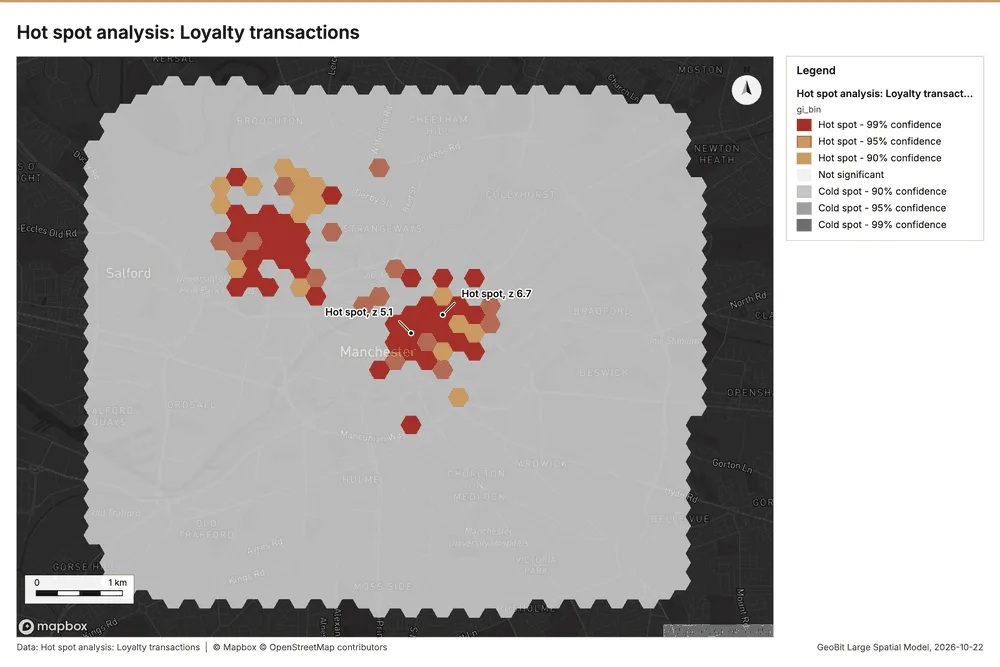
Why it was run on this data. 2200 points: Getis-Ord Gi* tests whether the concentrations in Loyalty transactions are statistically significant 39.
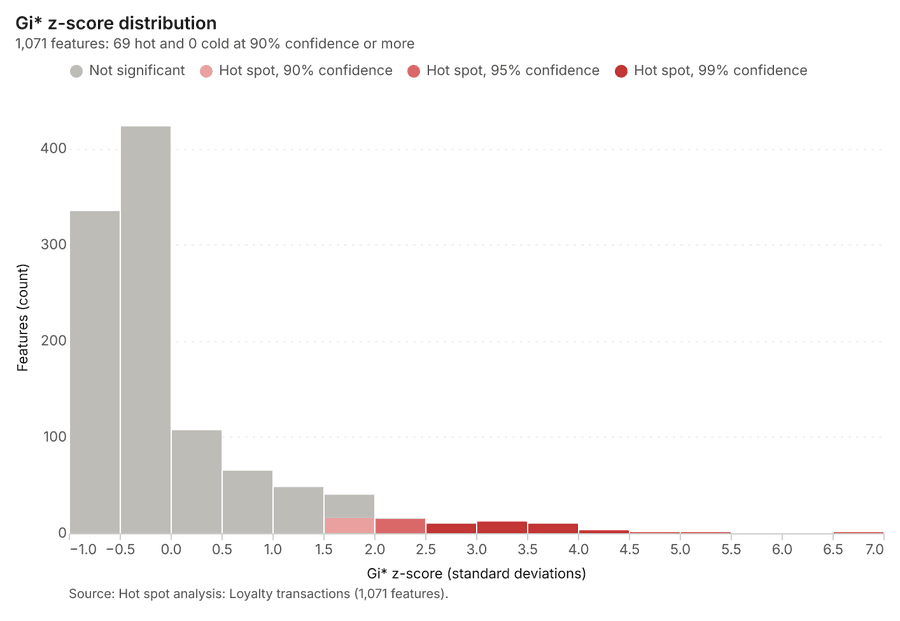
What it found. Hot spots on Loyalty transactions: Hot spot analysis: 1 layer saved: Hot spot analysis: Loyalty transactions (1071 features) 1740. It reported result, bins 1,071; result, count 1,071; result, elapsed ms 59; result, cell size m 200; result, incidents used 2,200; result, distance band m 200 40.
| Result | Value |
|---|---|
| result, bins | 1,071 |
| result, count | 1,071 |
| result, elapsed ms | 59 |
| result, cell size m | 200 |
| result, incidents used | 2,200 |
| result, distance band m | 200 |
| billing, cost | 0.094 |
| billing, list price | 0.094 |
| billing, upstream cost | 0 |
Findings
- Evidenced: Hot spots on Loyalty transactions: Hot spot analysis: 1 layer saved: Hot spot analysis: Loyalty transactions (1071 features) 1740.
- Evidenced: It reported result, bins 1,071; result, count 1,071; result, elapsed ms 59; result, cell size m 200; result, incidents used 2,200; result, distance band m 200 40.
Tool gp_hot_spots; parameters {"project": "e415669e-4f91-46e1-8afb-4604f1d21ffb", "features": {"layer": "Loyalty transactions (aa524a0b)"}, "aggregation": "hexagon", "cell_size_m": 200.0, "distance_band_m": 200.0}
Near repeat
What this analysis is. Repeat and near repeat classification: Classify incidents as originators, repeats (same place) or near repeats within a distance and time window, with a Knox test table 41. In ArcGIS it is Repeat and Near Repeat Classification or Near Repeat Calculator 41.
Why it was run on this data. Near repeat analysis tests whether Footfall counts by week close in space also follow each other within 18 days 42.
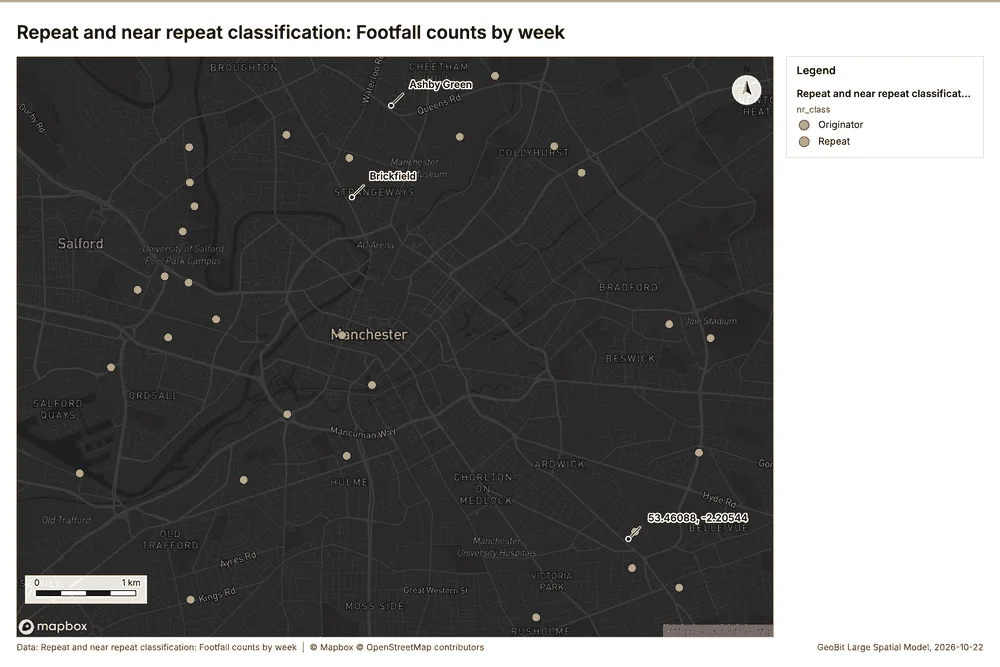
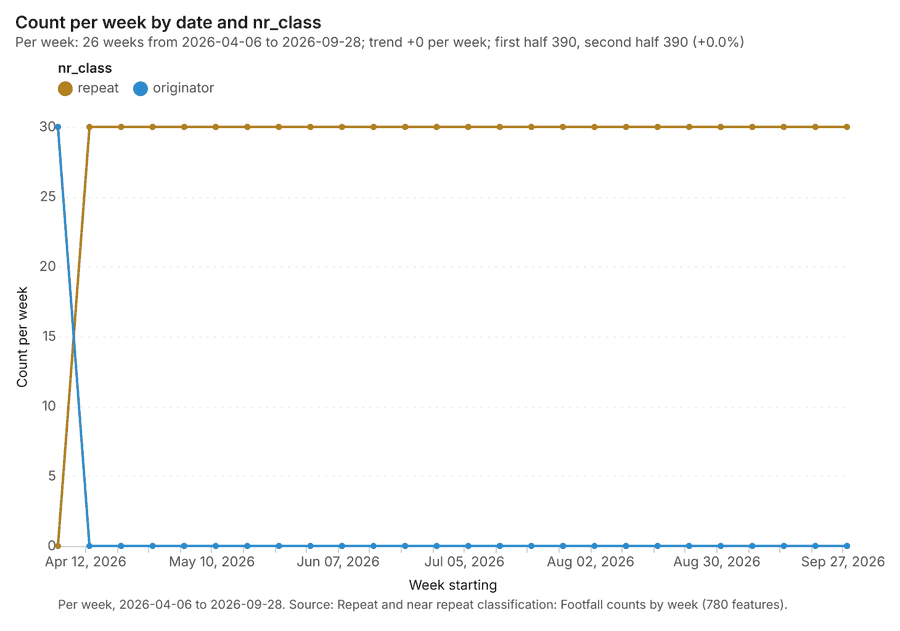
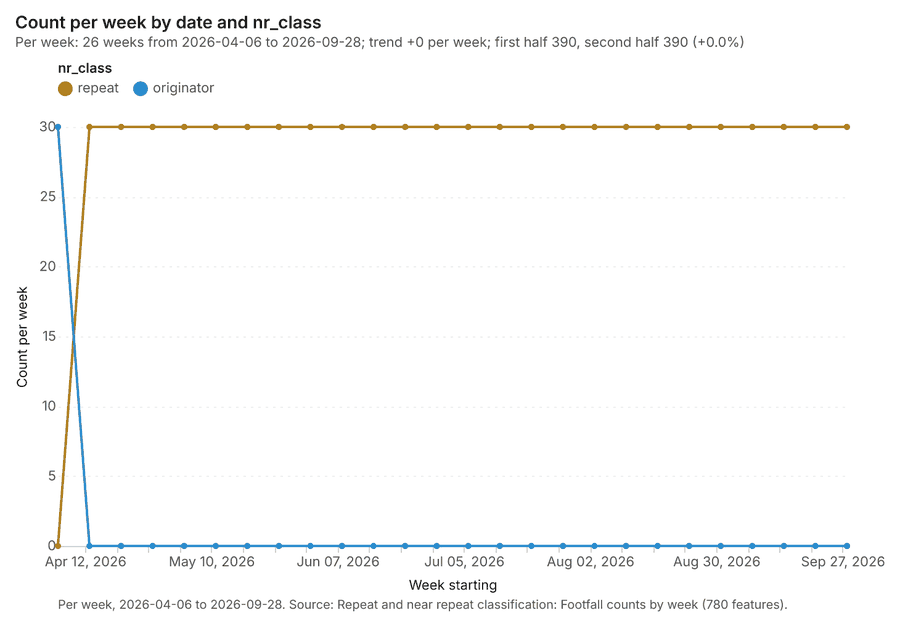
What it found. Near repeat on Footfall counts by week: Repeat and near repeat classification: 1 layer saved: Repeat and near repeat classification: Footfall counts by week (780 features) 1143. It reported result, days 18; result, count 780; result, chains 30; result, distance m 200; result, elapsed ms 40; result, pairs linked 1,470 43.
| Result | Value |
|---|---|
| result, days | 18 |
| result, count | 780 |
| result, chains | 30 |
| result, distance m | 200 |
| result, elapsed ms | 40 |
| result, pairs linked | 1,470 |
| billing, cost | 0.0734 |
| billing, list price | 0.0734 |
| billing, upstream cost | 0 |
Findings
- Evidenced: Near repeat on Footfall counts by week: Repeat and near repeat classification: 1 layer saved: Repeat and near repeat classification: Footfall counts by week (780 features) 1143.
- Evidenced: It reported result, days 18; result, count 780; result, chains 30; result, distance m 200; result, elapsed ms 40; result, pairs linked 1,470 43.
Tool gp_near_repeat; parameters {"days": 18, "project": "e415669e-4f91-46e1-8afb-4604f1d21ffb", "features": {"layer": "Footfall counts by week (f2397865)"}, "distance_m": 200.0, "time_field": "date"}
Maps and charts
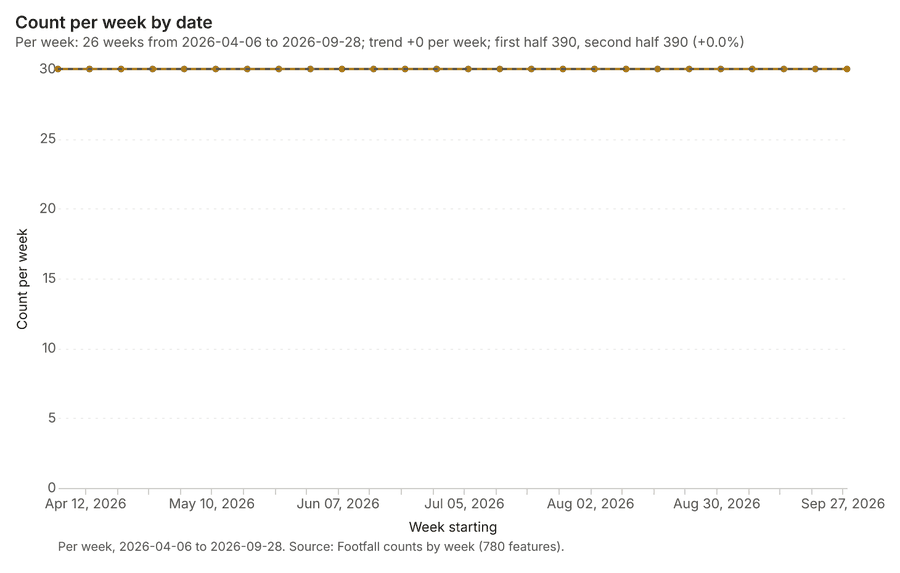
The run also made 20 map image(s) 4445464748495051525354555657585960616263 and 22 chart(s) 64656667686970717273747576777879808182838485.
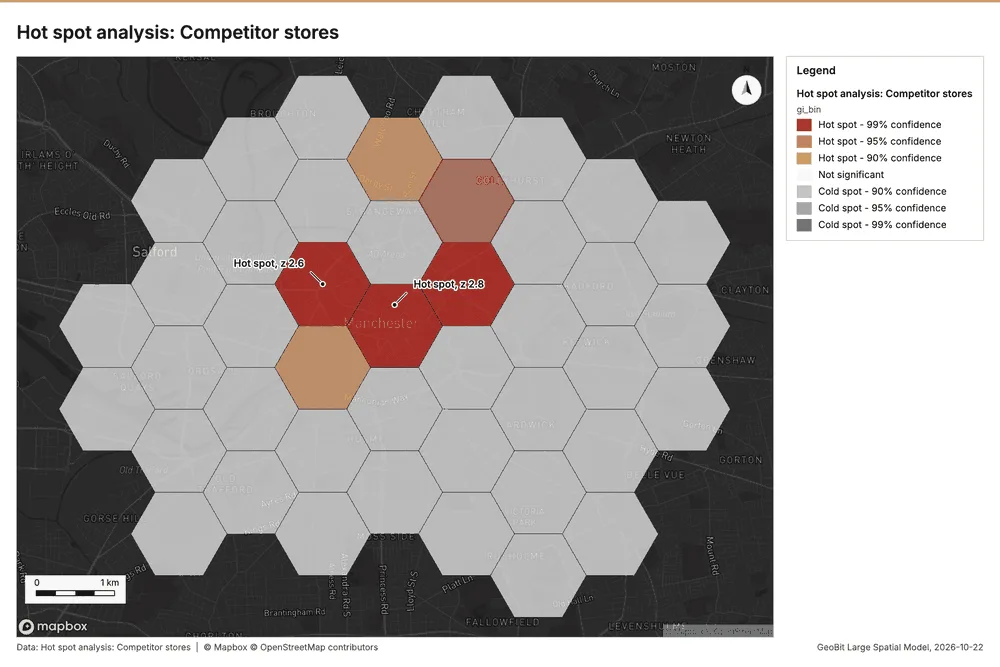
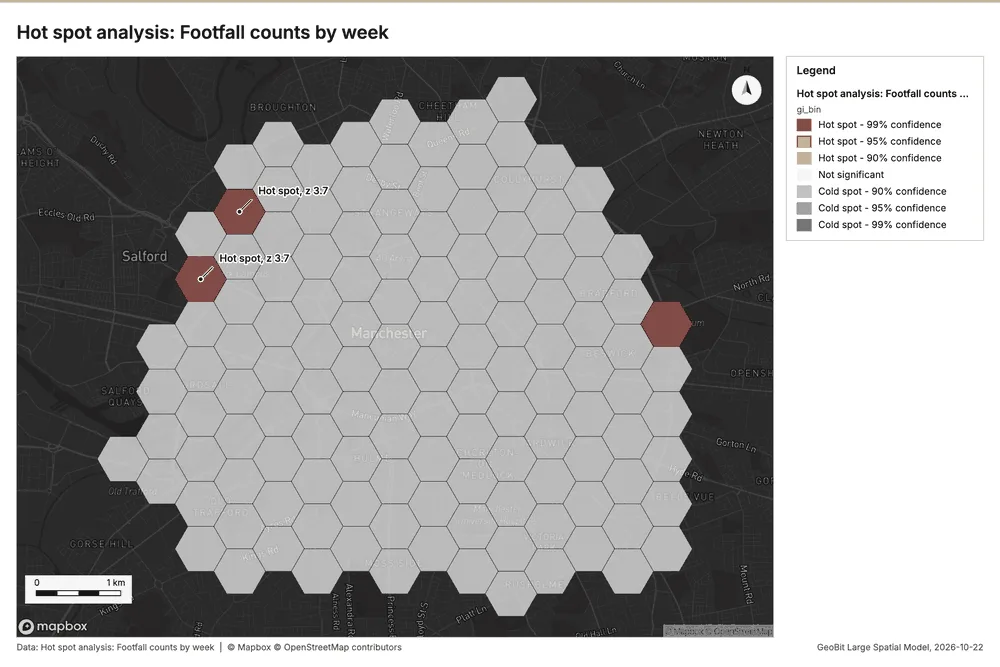
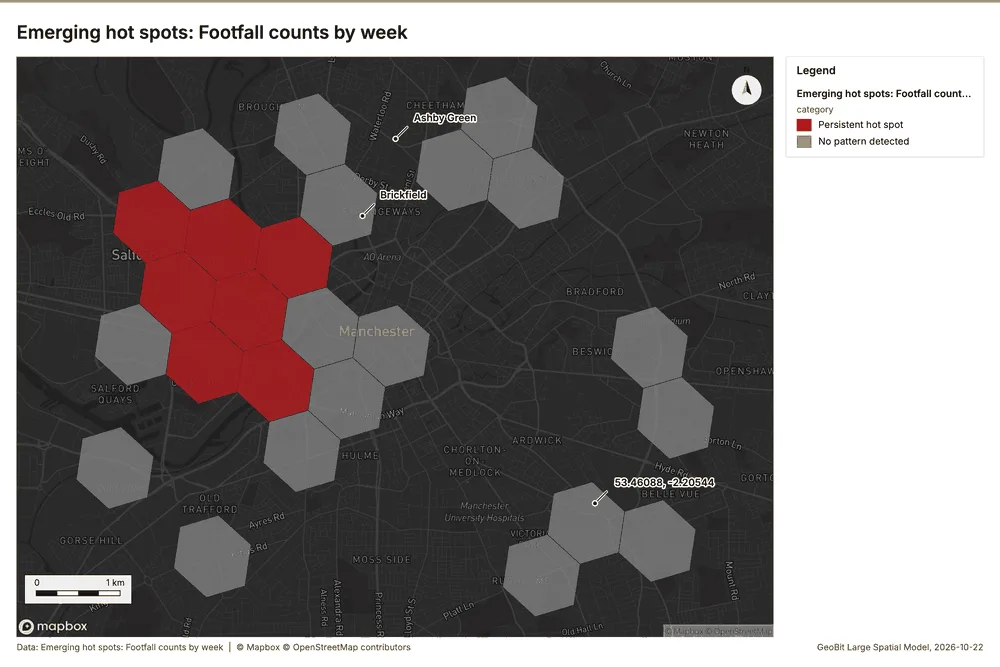
What the map shows. The "Hot spot analysis: Competitor stores" shows a noticeable cluster of high activity located in the 44
Inferred: read from the image by gemma4:e4b, not evidence.
Changes since the last run
This is the first report of this project.
Sources
- 1Rendering: Chart: Timeline: events per week by dataset. 81 rows id b6ec7ced-8908-403a-82e8-b707067abf11
- 2Dataset: Loyalty transactions. vector, 2200 rows id c92f0326-813e-48e4-b969-2af33dd6f105
- 3Dataset: Footfall counts by week. vector, 780 rows id b8b278cf-9521-499e-b4b7-e6f243cb9269
- 4Dataset: Weekly store sales. table, 364 rows id 0fd06209-c790-4dc2-9c7b-6ef4117b8bf2
- 5Catalog: Hot spot analysis (operation catalog, gp_hot_spots). Getis-Ord Gi* hot and cold spots with z-scores, p-values and confidence bins. ArcGIS: Find Hot Spots, Hot Spot Analysis (Getis-Ord Gi*). QGIS: qgis:hotspot (plugin). id gp_hot_spots
- 6Plan: Hot spots of Competitor stores (the Start plan's candidate c_768477a30749). 70 points: Getis-Ord Gi* tests whether the concentrations in Competitor stores are statistically significant. id 0b0bb769-454c-448a-a67b-f44e5a60fefc:c_768477a30749
- 7Tool result: gp_hot_spots, step 0. Hot spot analysis: 1 layer saved: Hot spot analysis: Competitor stores (43 features). id b507865e-e41b-4810-90c3-5f92db83053c:0
- 8Layer: Competitor stores. 70 features id 4c436f86-a921-4bc7-ab04-ec1160edd973
- 9Plan: Hot spots of Footfall counts by week (the Start plan's candidate c_e591398dec9c). 780 points: Getis-Ord Gi* tests whether the concentrations in Footfall counts by week are statistically significant. id 0b0bb769-454c-448a-a67b-f44e5a60fefc:c_e591398dec9c
- 10Tool result: gp_hot_spots, step 1. Hot spot analysis: 1 layer saved: Hot spot analysis: Footfall counts by week (130 features). id b507865e-e41b-4810-90c3-5f92db83053c:1
- 11Layer: Footfall counts by week. 780 features id f2397865-1eae-4be9-8276-1cefdc53f340
- 12Catalog: Emerging hot spots (operation catalog, gp_space_time_hot_spots). Where hot spots are new, consecutive, intensifying, persistent, diminishing, sporadic, oscillating or historical over time. ArcGIS: Emerging Hot Spot Analysis, Create Space Time Cube. id gp_space_time_hot_spots
- 13Plan: Space time hot spots of Footfall counts by week (the Start plan's candidate c_1fdb05aba998). Footfall counts by week carry dates in 'date': emerging hot spot analysis finds new, intensifying and fading hot spots per week. id 0b0bb769-454c-448a-a67b-f44e5a60fefc:c_1fdb05aba998
- 14Tool result: gp_space_time_hot_spots, step 0. Emerging hot spots: 1 layer saved: Emerging hot spots: Footfall counts by week (25 features). id 21998efd-79ff-497c-8ea5-61d8a01f2b62:0
- 15Plan: Space time hot spots of Loyalty transactions (the Start plan's candidate c_a7d38c7e2909). Loyalty transactions carry dates in 'purchased_at': emerging hot spot analysis finds new, intensifying and fading hot spots per week. id 0b0bb769-454c-448a-a67b-f44e5a60fefc:c_a7d38c7e2909
- 16Tool result: gp_space_time_hot_spots, step 1. Emerging hot spots: 1 layer saved: Emerging hot spots: Loyalty transactions (395 features). id 21998efd-79ff-497c-8ea5-61d8a01f2b62:1
- 17Layer: Loyalty transactions. 2,200 features id aa524a0b-a973-4a26-9744-54d5e4cfc549
- 18Catalog: Calculate density (operation catalog, gp_calculate_density). Kernel density per square kilometer on a grid. ArcGIS: Calculate Density, Kernel Density. QGIS: native:heatmapkerneldensityestimation. id gp_calculate_density
- 19Plan: Kernel density of Competitor stores (the Start plan's candidate c_395aeab7e765). 70 points in Competitor stores: a density surface shows where they concentrate. id 0b0bb769-454c-448a-a67b-f44e5a60fefc:c_395aeab7e765
- 20Tool result: gp_calculate_density, step 0. Calculate density: 1 layer saved: Calculate density: Competitor stores (322 features). id 430ebe02-9fb6-4905-a3f4-d3f833474337:0
- 21Plan: Kernel density of Footfall counts by week (the Start plan's candidate c_af8a7417d64e). 780 points in Footfall counts by week: a density surface shows where they concentrate. id 0b0bb769-454c-448a-a67b-f44e5a60fefc:c_af8a7417d64e
- 22Tool result: gp_calculate_density, step 1. Calculate density: 1 layer saved: Calculate density: Footfall counts by week (428 features). id 430ebe02-9fb6-4905-a3f4-d3f833474337:1
- 23Plan: Kernel density of Loyalty transactions (the Start plan's candidate c_17cb4893e203). 2200 points in Loyalty transactions: a density surface shows where they concentrate. id 0b0bb769-454c-448a-a67b-f44e5a60fefc:c_17cb4893e203
- 24Tool result: gp_calculate_density, step 2. Calculate density: 1 layer saved: Calculate density: Loyalty transactions (3864 features). id 430ebe02-9fb6-4905-a3f4-d3f833474337:2
- 25Catalog: Summarize within (operation catalog, gp_summarize_within). Count and aggregate the features inside each polygon (or bin), proportionally for lines and polygons. ArcGIS: Summarize Within, Aggregate Points. QGIS: native:countpointsinpolygon, native:sumlinelengths. id gp_summarize_within
- 26Plan: Stores per feature of Trade areas (the Start plan's candidate c_2c5b6056dd2b). Count Stores inside each feature of Trade areas by format; the counts map as a choropleth (natural breaks, sequential colors). id 0b0bb769-454c-448a-a67b-f44e5a60fefc:c_2c5b6056dd2b
- 27Tool result: gp_summarize_within, step 0. Summarize within: 1 layer saved: Summarize within: Trade areas (14 features). id 19ff26ef-a2c9-471b-a599-9000ca42c12a:0
- 28Layer: Stores. 14 features id 18363c3a-9918-4ce0-ab48-033ac000c916
- 29Layer: Trade areas. 14 features id e712834d-448e-41b7-b460-06c5bedc46af
- 30Tool result: gp_summarize_within, step 1. Summarize within: 1 layer saved: Summarize within: Trade areas (14 features). id 19ff26ef-a2c9-471b-a599-9000ca42c12a:1
- 31Tool result: gp_summarize_within, step 2. Summarize within: 1 layer saved: Summarize within: Trade areas (14 features). id 19ff26ef-a2c9-471b-a599-9000ca42c12a:2
- 32Catalog: Find point clusters (operation catalog, gp_find_point_clusters). Density-based clusters (DBSCAN, HDBSCAN or OPTICS, optionally space-time) with hulls and noise. ArcGIS: Find Point Clusters, Density-based Clustering. QGIS: native:dbscanclustering, native:stdbscanclustering. id gp_find_point_clusters
- 33Plan: Cluster points of Stores (the Start plan's candidate c_6507de56c2a3). DBSCAN finds dense groups of Stores and separates noise. id 0b0bb769-454c-448a-a67b-f44e5a60fefc:c_6507de56c2a3
- 34Tool result: gp_find_point_clusters, step 0. Find point clusters: 2 layers saved: Find point clusters: Stores (14 features); Find point clusters: cluster hulls (1 feature). id ca920f5a-83d3-4ecf-82d9-45a80921c7b9:0
- 35Plan: Cluster points of Competitor stores (the Start plan's candidate c_53b613e74a4d). DBSCAN finds dense groups of Competitor stores and separates noise. id 0b0bb769-454c-448a-a67b-f44e5a60fefc:c_53b613e74a4d
- 36Tool result: gp_find_point_clusters, step 1. Find point clusters: 2 layers saved: Find point clusters: Competitor stores (70 features); Find point clusters: cluster hulls (2 features). id ca920f5a-83d3-4ecf-82d9-45a80921c7b9:1
- 37Plan: Cluster points of Footfall counts by week (the Start plan's candidate c_d5d62e4a81d6). DBSCAN finds dense groups of Footfall counts by week and separates noise. id 0b0bb769-454c-448a-a67b-f44e5a60fefc:c_d5d62e4a81d6
- 38Tool result: gp_find_point_clusters, step 2. Find point clusters: 2 layers saved: Find point clusters: Footfall counts by week (780 features); Find point clusters: cluster hulls (30 features). id ca920f5a-83d3-4ecf-82d9-45a80921c7b9:2
- 39Plan: Hot spots of Loyalty transactions (the Start plan's candidate c_47bf1f0a2ecf). 2200 points: Getis-Ord Gi* tests whether the concentrations in Loyalty transactions are statistically significant. id 0b0bb769-454c-448a-a67b-f44e5a60fefc:c_47bf1f0a2ecf
- 40Tool result: gp_hot_spots, step 0. Hot spot analysis: 1 layer saved: Hot spot analysis: Loyalty transactions (1071 features). id 5a6f1c3e-75be-4e48-a441-9e9439c69a91:0
- 41Catalog: Repeat and near repeat classification (operation catalog, gp_near_repeat). Classify incidents as originators, repeats (same place) or near repeats within a distance and time window, with a Knox test table. ArcGIS: Repeat and Near Repeat Classification, Near Repeat Calculator. id gp_near_repeat
- 42Plan: Near repeat of Footfall counts by week (the Start plan's candidate c_73acbbcef86d). Near repeat analysis tests whether Footfall counts by week close in space also follow each other within 18 days. id 0b0bb769-454c-448a-a67b-f44e5a60fefc:c_73acbbcef86d
- 43Tool result: gp_near_repeat, step 0. Repeat and near repeat classification: 1 layer saved: Repeat and near repeat classification: Footfall counts by week (780 features). id 1f9ce8d2-9c80-423d-af47-a65148d65bf2:0
- 44Rendering: Map: Hot spot analysis: Competitor stores id 41888450-f89e-4987-b1c8-dd5bf46def36
- 45Rendering: Map: Hot spot analysis: Footfall counts by week id f93b9c24-c668-48a3-bbb7-19c453deff48
- 46Rendering: Map: Emerging hot spots: Footfall counts by week id cb7f1de8-6f92-4f7b-851f-d1e165a7b7cc
- 47Rendering: Map: Emerging hot spots: Loyalty transactions id 4b865cd2-b745-4c5f-8633-9afed6258161
- 48Rendering: Map: Calculate density: Competitor stores id e400313e-2c8f-4e48-a9f7-25769b8d11a0
- 49Rendering: Map: Calculate density: Footfall counts by week id f2d8ba2d-fb20-4c4c-a479-297dc0b8b234
- 50Rendering: Map: Calculate density: Loyalty transactions id 3e01b21f-9a4f-4179-9e11-68a06635b4a7
- 51Rendering: Map: Summarize within: Trade areas id d11fb076-b43e-46f5-90e6-45ae509035e4
- 52Rendering: Map: Summarize within: Trade areas id 73cc3108-93e2-4779-b12c-3b92ec9c25a2
- 53Rendering: Map: Summarize within: Trade areas id 924e39d5-2308-4dff-b4e4-f47f5728463f
- 54Rendering: Map: Find point clusters: Stores id 78c40d3d-dee7-49cb-be7d-ef0ed8325367
- 55Rendering: Map: Find point clusters: cluster hulls id e9a1e8eb-0435-4209-9bd4-f5dbf7b51be9
- 56Rendering: Map: Find point clusters: Competitor stores id d3819598-0281-437f-992f-f0f54e12724e
- 57Rendering: Map: Find point clusters: cluster hulls id 70d2c2da-7629-473a-9f6f-106e6d23bab1
- 58Rendering: Map: Find point clusters: Footfall counts by week id 7112a329-ab18-44fb-a596-e82e1bee032d
- 59Rendering: Map: Find point clusters: cluster hulls id bf8ff644-7688-4db7-8bb6-f3cc36fe7901
- 60Rendering: Map: Trade areas by households id 33981aa9-656c-4956-b45f-c22bca1b6eeb
- 61Rendering: Map: Neighborhoods by population id a8598722-b6b3-4fc1-93e3-d3453c8c18d7
- 62Rendering: Map: Hot spot analysis: Loyalty transactions id fce9171a-60ec-4705-a035-aaccbcaba8e8
- 63Rendering: Map: Repeat and near repeat classification: Footfall counts by week id e70b2db0-fea4-47cf-8ec3-7183fee9e834
- 64Rendering: Chart: Stores over time (opened_year). 5 rows id 88a4e6a1-e252-4fad-bb98-135337862108
- 65Rendering: Chart: Footfall counts by week over time (date). 26 rows id 6e13d856-d944-439a-8903-ae33a8ab0da3
- 66Rendering: Chart: Hot spot analysis: Competitor stores. 11 rows id 9c3ad16e-b912-4594-a05a-87cded10ab78
- 67Rendering: Chart: Hot spot analysis: Footfall counts by week. 3 rows id 0b831a4b-dee4-45be-b7d7-e986b73d50bc
- 68Rendering: Chart: Emerging hot spots: Footfall counts by week. 6 rows id 789e8923-f0a6-4857-9ab7-b66bc1cd1c3f
- 69Rendering: Chart: Emerging hot spots: Loyalty transactions. 10 rows id 813722a9-1e8c-4450-aec2-7394e0775dba
- 70Rendering: Chart: Calculate density: Competitor stores. 10 rows id 7d20b087-1407-433c-8dc8-d356ce1f082e
- 71Rendering: Chart: Calculate density: Footfall counts by week. 10 rows id 17d4ba42-821c-40ae-b3d1-7b35ca038652
- 72Rendering: Chart: Calculate density: Loyalty transactions. 13 rows id f692141a-e0e4-42c1-ac87-80825e412def
- 73Rendering: Chart: Summarize within: Trade areas. 1 rows id 8f97ef4e-3866-4c95-a751-112dfd457eef
- 74Rendering: Chart: Summarize within: Trade areas. 5 rows id 35a513b9-93bb-465d-b882-5d348e39b6dc
- 75Rendering: Chart: Summarize within: Trade areas. 5 rows id 8e3c214d-56fd-4e64-929e-30c9c09c29f5
- 76Rendering: Chart: Find point clusters: Stores. 1 rows id b9c77e7c-1f5c-400c-bf75-b3aca56b70e7
- 77Rendering: Chart: Find point clusters: cluster hulls. 1 rows id 467acba3-533e-407d-9fbd-23f5820d4419
- 78Rendering: Chart: Find point clusters: Competitor stores. 3 rows id 6d7a778d-7a18-45e4-adf0-4bd41485ad7e
- 79Rendering: Chart: Find point clusters: cluster hulls. 2 rows id eb67f5bb-ba8e-4094-b82d-ec0756a3a23a
- 80Rendering: Chart: Find point clusters: Footfall counts by week. 30 rows id 45f91f53-c509-412f-a771-62cba1d96b4f
- 81Rendering: Chart: Find point clusters: cluster hulls. 30 rows id 7541ae38-9abb-4836-9e35-aa37edae4d9e
- 82Rendering: Chart: Hot spot analysis: Loyalty transactions. 15 rows id b9623d33-4a1f-466f-887c-2aecc180a640
- 83Rendering: Chart: Repeat and near repeat classification: Footfall counts by week. 52 rows id 693cb1b3-8254-4cfb-8525-f6aab230d985
- 84Rendering: Chart: Repeat and near repeat classification: Footfall counts by week over time. 52 rows id da2c2ad8-5c02-46ad-be96-5afb7abf90a7
- 85Rendering: Chart: Find point clusters: Footfall counts by week over time. 26 rows id 43bccbb2-c646-4616-8780-2bd48f81912e
- 86Dataset: Neighborhoods. vector, 32 rows id fa0b8017-5ddc-4e1f-a444-31fd07e52b97
- 87Dataset: Stores. vector, 14 rows id 82660798-29d0-4c66-a9c0-444823fa0479
- 88Dataset: Competitor stores. vector, 70 rows id 9c4d2224-f1d8-4fc0-8667-d94268e2460a
- 89Dataset: Trade areas. vector, 14 rows id 5172e6d7-515f-4a32-89d2-408d49039a96
- 90Dataset: Parking lots. vector, 25 rows id ef40dd81-eb91-41ff-a8ce-d61b98dfa2bc
- 91Dataset: Main roads. vector, 18 rows id 1d4e054d-0664-4e98-9a81-0645bcbb69a7
- 92Dataset: Neighborhood demographics. table, 32 rows id e76e880f-2f9b-4745-8cb1-c1977effb3ab
- 93Dataset: Store network expansion memo. document, ? rows id 8f7f2a26-905f-48fc-8056-46e9aaa7cd21
- 94Record: Sample: Retail, Manchester id e415669e-4f91-46e1-8afb-4604f1d21ffb
- 95Layer: Hot spot analysis: Competitor stores. 43 features id b80aa42a-d8ea-4e32-8d49-6e5773e54e39
- 96Layer: Hot spot analysis: Footfall counts by week. 130 features id f0b07952-61d1-4329-8f15-30737eeffd7b
- 97Layer: Emerging hot spots: Footfall counts by week. 25 features id 0e4e31f2-68f4-4616-9467-013b9d001713
- 98Layer: Emerging hot spots: Loyalty transactions. 395 features id a138b441-1405-4566-b2be-a105c298c8bc
- 99Layer: Calculate density: Competitor stores. 322 features id 66cc8107-cef3-4817-88bc-3d844fef8c5d
- 100Layer: Calculate density: Footfall counts by week. 428 features id 127e81c4-1813-4a14-bf8a-e02c15922197
- 101Layer: Calculate density: Loyalty transactions. 3,864 features id c60805b0-dabf-417a-9c74-56991faf551d
- 102Layer: Summarize within: Trade areas. 14 features id 7c9a641f-d6ec-4516-94be-bf77837866f9
- 103Layer: Summarize within: Trade areas. 14 features id 18fcae7b-5cd3-43b0-8df8-db89ccdf1ce1
- 104Layer: Summarize within: Trade areas. 14 features id aa777707-952c-4358-950b-2b0b19102664
- 105Layer: Find point clusters: Stores. 14 features id 99f04d61-5c35-4915-81c3-07e1c20e77a9
- 106Layer: Find point clusters: cluster hulls. 1 features id 307f2beb-8d40-4d28-80e7-f41546cea1f1
- 107Layer: Find point clusters: Competitor stores. 70 features id b588c0ef-eaf1-43aa-9e46-eb574ee308cd
- 108Layer: Find point clusters: cluster hulls. 2 features id 937090ee-0478-421a-b9ea-436ec735517e
- 109Layer: Find point clusters: Footfall counts by week. 780 features id 9185731c-b554-4959-be37-e8b614083c36
- 110Layer: Find point clusters: cluster hulls. 30 features id 589e2574-90d1-40c4-9a13-7a72b83fb52f
- 111Layer: Hot spot analysis: Loyalty transactions. 1,071 features id e5715bae-7cde-4109-98c9-68e36ec45e14
- 112Layer: Repeat and near repeat classification: Footfall counts by week. 780 features id e233d1b4-20ea-4a50-8578-dd34d19532fc
Appendix: the data behind the chartsShow
Figure 1. Timeline: events per week by dataset 1
| period | series | value |
|---|---|---|
| 2026-03-30 | Loyalty transactions | 54 |
| 2026-03-30 | Footfall counts by week | 0 |
| 2026-03-30 | Weekly store sales | 0 |
| 2026-04-06 | Loyalty transactions | 77 |
| 2026-04-06 | Footfall counts by week | 30 |
| 2026-04-06 | Weekly store sales | 14 |
| 2026-04-13 | Loyalty transactions | 90 |
| 2026-04-13 | Footfall counts by week | 30 |
| 2026-04-13 | Weekly store sales | 14 |
| 2026-04-20 | Loyalty transactions | 70 |
| 2026-04-20 | Footfall counts by week | 30 |
| 2026-04-20 | Weekly store sales | 14 |
| 2026-04-27 | Loyalty transactions | 80 |
| 2026-04-27 | Footfall counts by week | 30 |
| 2026-04-27 | Weekly store sales | 14 |
| 2026-05-04 | Loyalty transactions | 84 |
| 2026-05-04 | Footfall counts by week | 30 |
| 2026-05-04 | Weekly store sales | 14 |
| 2026-05-11 | Loyalty transactions | 83 |
| 2026-05-11 | Footfall counts by week | 30 |
| 2026-05-11 | Weekly store sales | 14 |
| 2026-05-18 | Loyalty transactions | 83 |
| 2026-05-18 | Footfall counts by week | 30 |
| 2026-05-18 | Weekly store sales | 14 |
| 2026-05-25 | Loyalty transactions | 63 |
| 2026-05-25 | Footfall counts by week | 30 |
| 2026-05-25 | Weekly store sales | 14 |
| 2026-06-01 | Loyalty transactions | 64 |
| 2026-06-01 | Footfall counts by week | 30 |
| 2026-06-01 | Weekly store sales | 14 |
| 2026-06-08 | Loyalty transactions | 73 |
| 2026-06-08 | Footfall counts by week | 30 |
| 2026-06-08 | Weekly store sales | 14 |
| 2026-06-15 | Loyalty transactions | 81 |
| 2026-06-15 | Footfall counts by week | 30 |
| 2026-06-15 | Weekly store sales | 14 |
| 2026-06-22 | Loyalty transactions | 54 |
| 2026-06-22 | Footfall counts by week | 30 |
| 2026-06-22 | Weekly store sales | 14 |
| 2026-06-29 | Loyalty transactions | 75 |
| 2026-06-29 | Footfall counts by week | 30 |
| 2026-06-29 | Weekly store sales | 14 |
| 2026-07-06 | Loyalty transactions | 79 |
| 2026-07-06 | Footfall counts by week | 30 |
| 2026-07-06 | Weekly store sales | 14 |
| 2026-07-13 | Loyalty transactions | 78 |
| 2026-07-13 | Footfall counts by week | 30 |
| 2026-07-13 | Weekly store sales | 14 |
| 2026-07-20 | Loyalty transactions | 76 |
| 2026-07-20 | Footfall counts by week | 30 |
| 2026-07-20 | Weekly store sales | 14 |
| 2026-07-27 | Loyalty transactions | 101 |
| 2026-07-27 | Footfall counts by week | 30 |
| 2026-07-27 | Weekly store sales | 14 |
| 2026-08-03 | Loyalty transactions | 105 |
| 2026-08-03 | Footfall counts by week | 30 |
| 2026-08-03 | Weekly store sales | 14 |
| 2026-08-10 | Loyalty transactions | 79 |
| 2026-08-10 | Footfall counts by week | 30 |
| 2026-08-10 | Weekly store sales | 14 |
| 2026-08-17 | Loyalty transactions | 85 |
| 2026-08-17 | Footfall counts by week | 30 |
| 2026-08-17 | Weekly store sales | 14 |
| 2026-08-24 | Loyalty transactions | 88 |
| 2026-08-24 | Footfall counts by week | 30 |
| 2026-08-24 | Weekly store sales | 14 |
| 2026-08-31 | Loyalty transactions | 113 |
| 2026-08-31 | Footfall counts by week | 30 |
| 2026-08-31 | Weekly store sales | 14 |
| 2026-09-07 | Loyalty transactions | 97 |
| 2026-09-07 | Footfall counts by week | 30 |
| 2026-09-07 | Weekly store sales | 14 |
| 2026-09-14 | Loyalty transactions | 114 |
| 2026-09-14 | Footfall counts by week | 30 |
| 2026-09-14 | Weekly store sales | 14 |
| 2026-09-21 | Loyalty transactions | 107 |
| 2026-09-21 | Footfall counts by week | 30 |
| 2026-09-21 | Weekly store sales | 14 |
| 2026-09-28 | Loyalty transactions | 47 |
| 2026-09-28 | Footfall counts by week | 30 |
| 2026-09-28 | Weekly store sales | 14 |
Figure 22. Stores over time (opened_year) 64
| bin_start | bin_end | count |
|---|---|---|
| 5.178e+04 | 1.463e+05 | 8 |
| 1.463e+05 | 2.408e+05 | 3 |
| 2.408e+05 | 3.353e+05 | 0 |
| 3.353e+05 | 4.298e+05 | 1 |
| 4.298e+05 | 5.243e+05 | 2 |
Figure 23. Footfall counts by week over time (date) 65
| period | value |
|---|---|
| 2026-04-06 | 30 |
| 2026-04-13 | 30 |
| 2026-04-20 | 30 |
| 2026-04-27 | 30 |
| 2026-05-04 | 30 |
| 2026-05-11 | 30 |
| 2026-05-18 | 30 |
| 2026-05-25 | 30 |
| 2026-06-01 | 30 |
| 2026-06-08 | 30 |
| 2026-06-15 | 30 |
| 2026-06-22 | 30 |
| 2026-06-29 | 30 |
| 2026-07-06 | 30 |
| 2026-07-13 | 30 |
| 2026-07-20 | 30 |
| 2026-07-27 | 30 |
| 2026-08-03 | 30 |
| 2026-08-10 | 30 |
| 2026-08-17 | 30 |
| 2026-08-24 | 30 |
| 2026-08-31 | 30 |
| 2026-09-07 | 30 |
| 2026-09-14 | 30 |
| 2026-09-21 | 30 |
| 2026-09-28 | 30 |
Figure 24. Hot spot analysis: Competitor stores 66
| bin_start | bin_end | band | band_label | count |
|---|---|---|---|---|
| -2 | -1.5 | not_significant | Not significant | 1 |
| -1.5 | -1 | not_significant | Not significant | 6 |
| -1 | -0.5 | not_significant | Not significant | 5 |
| -0.5 | 0 | not_significant | Not significant | 5 |
| 0 | 0.5 | not_significant | Not significant | 7 |
| 0.5 | 1 | not_significant | Not significant | 6 |
| 1 | 1.5 | not_significant | Not significant | 4 |
| 1.5 | 2 | hot_90 | Hot spot, 90% confidence | 2 |
| 1.5 | 2 | not_significant | Not significant | 3 |
| 2 | 2.5 | hot_95 | Hot spot, 95% confidence | 1 |
| 2.5 | 3 | hot_99 | Hot spot, 99% confidence | 3 |
Figure 25. Hot spot analysis: Footfall counts by week 67
| bin_start | bin_end | band | band_label | count |
|---|---|---|---|---|
| -0.5 | 0 | not_significant | Not significant | 103 |
| 1.5 | 2 | not_significant | Not significant | 24 |
| 3.5 | 4 | hot_99 | Hot spot, 99% confidence | 3 |
Figure 26. Emerging hot spots: Footfall counts by week 68
| bin_start | bin_end | count |
|---|---|---|
| -1.012 | -0.1687 | 4 |
| -0.1687 | 0.6747 | 6 |
| 0.6747 | 1.518 | 7 |
| 1.518 | 2.361 | 5 |
| 2.361 | 3.205 | 1 |
| 3.205 | 4.048 | 2 |
Figure 27. Emerging hot spots: Loyalty transactions 69
| bin_start | bin_end | count |
|---|---|---|
| -0.941 | -0.2532 | 173 |
| -0.2532 | 0.4346 | 88 |
| 0.4346 | 1.122 | 64 |
| 1.122 | 1.81 | 33 |
| 1.81 | 2.498 | 0 |
| 2.498 | 3.186 | 10 |
| 3.186 | 3.874 | 11 |
| 3.874 | 4.561 | 13 |
| 4.561 | 5.249 | 2 |
| 5.249 | 5.937 | 1 |
Figure 28. Calculate density: Competitor stores 70
| bin_start | bin_end | count |
|---|---|---|
| 0 | 2 | 19 |
| 2 | 4 | 32 |
| 4 | 6 | 34 |
| 6 | 8 | 33 |
| 8 | 10 | 31 |
| 10 | 12 | 32 |
| 12 | 14 | 36 |
| 14 | 16 | 36 |
| 16 | 18 | 35 |
| 18 | 20 | 34 |
Figure 29. Calculate density: Footfall counts by week 71
| bin_start | bin_end | count |
|---|---|---|
| 0 | 3.6 | 28 |
| 3.6 | 7.2 | 58 |
| 7.2 | 10.8 | 57 |
| 10.8 | 14.4 | 54 |
| 14.4 | 18 | 46 |
| 18 | 21.6 | 23 |
| 21.6 | 25.2 | 43 |
| 25.2 | 28.8 | 29 |
| 28.8 | 32.4 | 49 |
| 32.4 | 36 | 41 |
Figure 30. Calculate density: Loyalty transactions 72
| bin_start | bin_end | count |
|---|---|---|
| 0 | 5.538 | 278 |
| 5.538 | 11.08 | 364 |
| 11.08 | 16.62 | 303 |
| 16.62 | 22.15 | 362 |
| 22.15 | 27.69 | 299 |
| 27.69 | 33.23 | 353 |
| 33.23 | 38.77 | 288 |
| 38.77 | 44.31 | 362 |
| 44.31 | 49.85 | 269 |
| 49.85 | 55.38 | 293 |
| 55.38 | 60.92 | 238 |
| 60.92 | 66.46 | 263 |
| 66.46 | 72 | 192 |
Figure 31. Summarize within: Trade areas 73
| bin_start | bin_end | count |
|---|---|---|
| 1 | 1 | 14 |
Figure 32. Summarize within: Trade areas 74
| bin_start | bin_end | count |
|---|---|---|
| 3 | 4.2 | 6 |
| 4.2 | 5.4 | 5 |
| 5.4 | 6.6 | 0 |
| 6.6 | 7.8 | 1 |
| 7.8 | 9 | 2 |
Figure 33. Summarize within: Trade areas 75
| bin_start | bin_end | count |
|---|---|---|
| 0 | 36.4 | 5 |
| 36.4 | 72.8 | 4 |
| 72.8 | 109.2 | 4 |
| 109.2 | 145.6 | 0 |
| 145.6 | 182 | 1 |
Figure 34. Find point clusters: Stores 76
| cluster | features | fraction | share |
|---|---|---|---|
| 0 | 14 | 1 | 100.0% |
Figure 35. Find point clusters: cluster hulls 77
| cluster | features | fraction | share |
|---|---|---|---|
| 0 | 1 | 1 | 100.0% |
Figure 36. Find point clusters: Competitor stores 78
| cluster | features | fraction | share |
|---|---|---|---|
| 0 | 65 | 0.9286 | 92.9% |
| 1 | 3 | 0.04286 | 4.3% |
| Noise | 2 | 0.02857 | 2.9% |
Figure 37. Find point clusters: cluster hulls 79
| cluster | features | fraction | share |
|---|---|---|---|
| 0 | 1 | 0.5 | 50.0% |
| 1 | 1 | 0.5 | 50.0% |
Figure 38. Find point clusters: Footfall counts by week 80
| cluster | features | fraction | share |
|---|---|---|---|
| 0 | 26 | 0.03333 | 3.3% |
| 1 | 26 | 0.03333 | 3.3% |
| 10 | 26 | 0.03333 | 3.3% |
| 11 | 26 | 0.03333 | 3.3% |
| 12 | 26 | 0.03333 | 3.3% |
| 13 | 26 | 0.03333 | 3.3% |
| 14 | 26 | 0.03333 | 3.3% |
| 15 | 26 | 0.03333 | 3.3% |
| 16 | 26 | 0.03333 | 3.3% |
| 17 | 26 | 0.03333 | 3.3% |
| 18 | 26 | 0.03333 | 3.3% |
| 19 | 26 | 0.03333 | 3.3% |
| 2 | 26 | 0.03333 | 3.3% |
| 20 | 26 | 0.03333 | 3.3% |
| 21 | 26 | 0.03333 | 3.3% |
| 22 | 26 | 0.03333 | 3.3% |
| 23 | 26 | 0.03333 | 3.3% |
| 24 | 26 | 0.03333 | 3.3% |
| 25 | 26 | 0.03333 | 3.3% |
| 26 | 26 | 0.03333 | 3.3% |
| 27 | 26 | 0.03333 | 3.3% |
| 28 | 26 | 0.03333 | 3.3% |
| 29 | 26 | 0.03333 | 3.3% |
| 3 | 26 | 0.03333 | 3.3% |
| 4 | 26 | 0.03333 | 3.3% |
| 5 | 26 | 0.03333 | 3.3% |
| 6 | 26 | 0.03333 | 3.3% |
| 7 | 26 | 0.03333 | 3.3% |
| 8 | 26 | 0.03333 | 3.3% |
| 9 | 26 | 0.03333 | 3.3% |
Figure 39. Find point clusters: cluster hulls 81
| cluster | features | fraction | share |
|---|---|---|---|
| 0 | 1 | 0.03333 | 3.3% |
| 1 | 1 | 0.03333 | 3.3% |
| 10 | 1 | 0.03333 | 3.3% |
| 11 | 1 | 0.03333 | 3.3% |
| 12 | 1 | 0.03333 | 3.3% |
| 13 | 1 | 0.03333 | 3.3% |
| 14 | 1 | 0.03333 | 3.3% |
| 15 | 1 | 0.03333 | 3.3% |
| 16 | 1 | 0.03333 | 3.3% |
| 17 | 1 | 0.03333 | 3.3% |
| 18 | 1 | 0.03333 | 3.3% |
| 19 | 1 | 0.03333 | 3.3% |
| 2 | 1 | 0.03333 | 3.3% |
| 20 | 1 | 0.03333 | 3.3% |
| 21 | 1 | 0.03333 | 3.3% |
| 22 | 1 | 0.03333 | 3.3% |
| 23 | 1 | 0.03333 | 3.3% |
| 24 | 1 | 0.03333 | 3.3% |
| 25 | 1 | 0.03333 | 3.3% |
| 26 | 1 | 0.03333 | 3.3% |
| 27 | 1 | 0.03333 | 3.3% |
| 28 | 1 | 0.03333 | 3.3% |
| 29 | 1 | 0.03333 | 3.3% |
| 3 | 1 | 0.03333 | 3.3% |
| 4 | 1 | 0.03333 | 3.3% |
| 5 | 1 | 0.03333 | 3.3% |
| 6 | 1 | 0.03333 | 3.3% |
| 7 | 1 | 0.03333 | 3.3% |
| 8 | 1 | 0.03333 | 3.3% |
| 9 | 1 | 0.03333 | 3.3% |
Figure 40. Hot spot analysis: Loyalty transactions 82
| bin_start | bin_end | band | band_label | count |
|---|---|---|---|---|
| -1 | -0.5 | not_significant | Not significant | 335 |
| -0.5 | 0 | not_significant | Not significant | 423 |
| 0 | 0.5 | not_significant | Not significant | 107 |
| 0.5 | 1 | not_significant | Not significant | 65 |
| 1 | 1.5 | not_significant | Not significant | 48 |
| 1.5 | 2 | hot_90 | Hot spot, 90% confidence | 16 |
| 1.5 | 2 | not_significant | Not significant | 24 |
| 2 | 2.5 | hot_95 | Hot spot, 95% confidence | 15 |
| 2.5 | 3 | hot_99 | Hot spot, 99% confidence | 10 |
| 3 | 3.5 | hot_99 | Hot spot, 99% confidence | 12 |
| 3.5 | 4 | hot_99 | Hot spot, 99% confidence | 10 |
| 4 | 4.5 | hot_99 | Hot spot, 99% confidence | 3 |
| 4.5 | 5 | hot_99 | Hot spot, 99% confidence | 1 |
| 5 | 5.5 | hot_99 | Hot spot, 99% confidence | 1 |
| 6.5 | 7 | hot_99 | Hot spot, 99% confidence | 1 |
Figure 41. Repeat and near repeat classification: Footfall counts by week 83
| period | series | value |
|---|---|---|
| 2026-04-06 | repeat | 0 |
| 2026-04-06 | originator | 30 |
| 2026-04-13 | repeat | 30 |
| 2026-04-13 | originator | 0 |
| 2026-04-20 | repeat | 30 |
| 2026-04-20 | originator | 0 |
| 2026-04-27 | repeat | 30 |
| 2026-04-27 | originator | 0 |
| 2026-05-04 | repeat | 30 |
| 2026-05-04 | originator | 0 |
| 2026-05-11 | repeat | 30 |
| 2026-05-11 | originator | 0 |
| 2026-05-18 | repeat | 30 |
| 2026-05-18 | originator | 0 |
| 2026-05-25 | repeat | 30 |
| 2026-05-25 | originator | 0 |
| 2026-06-01 | repeat | 30 |
| 2026-06-01 | originator | 0 |
| 2026-06-08 | repeat | 30 |
| 2026-06-08 | originator | 0 |
| 2026-06-15 | repeat | 30 |
| 2026-06-15 | originator | 0 |
| 2026-06-22 | repeat | 30 |
| 2026-06-22 | originator | 0 |
| 2026-06-29 | repeat | 30 |
| 2026-06-29 | originator | 0 |
| 2026-07-06 | repeat | 30 |
| 2026-07-06 | originator | 0 |
| 2026-07-13 | repeat | 30 |
| 2026-07-13 | originator | 0 |
| 2026-07-20 | repeat | 30 |
| 2026-07-20 | originator | 0 |
| 2026-07-27 | repeat | 30 |
| 2026-07-27 | originator | 0 |
| 2026-08-03 | repeat | 30 |
| 2026-08-03 | originator | 0 |
| 2026-08-10 | repeat | 30 |
| 2026-08-10 | originator | 0 |
| 2026-08-17 | repeat | 30 |
| 2026-08-17 | originator | 0 |
| 2026-08-24 | repeat | 30 |
| 2026-08-24 | originator | 0 |
| 2026-08-31 | repeat | 30 |
| 2026-08-31 | originator | 0 |
| 2026-09-07 | repeat | 30 |
| 2026-09-07 | originator | 0 |
| 2026-09-14 | repeat | 30 |
| 2026-09-14 | originator | 0 |
| 2026-09-21 | repeat | 30 |
| 2026-09-21 | originator | 0 |
| 2026-09-28 | repeat | 30 |
| 2026-09-28 | originator | 0 |
Figure 42. Repeat and near repeat classification: Footfall counts by week over time 84
| period | series | value |
|---|---|---|
| 2026-04-06 | repeat | 0 |
| 2026-04-06 | originator | 30 |
| 2026-04-13 | repeat | 30 |
| 2026-04-13 | originator | 0 |
| 2026-04-20 | repeat | 30 |
| 2026-04-20 | originator | 0 |
| 2026-04-27 | repeat | 30 |
| 2026-04-27 | originator | 0 |
| 2026-05-04 | repeat | 30 |
| 2026-05-04 | originator | 0 |
| 2026-05-11 | repeat | 30 |
| 2026-05-11 | originator | 0 |
| 2026-05-18 | repeat | 30 |
| 2026-05-18 | originator | 0 |
| 2026-05-25 | repeat | 30 |
| 2026-05-25 | originator | 0 |
| 2026-06-01 | repeat | 30 |
| 2026-06-01 | originator | 0 |
| 2026-06-08 | repeat | 30 |
| 2026-06-08 | originator | 0 |
| 2026-06-15 | repeat | 30 |
| 2026-06-15 | originator | 0 |
| 2026-06-22 | repeat | 30 |
| 2026-06-22 | originator | 0 |
| 2026-06-29 | repeat | 30 |
| 2026-06-29 | originator | 0 |
| 2026-07-06 | repeat | 30 |
| 2026-07-06 | originator | 0 |
| 2026-07-13 | repeat | 30 |
| 2026-07-13 | originator | 0 |
| 2026-07-20 | repeat | 30 |
| 2026-07-20 | originator | 0 |
| 2026-07-27 | repeat | 30 |
| 2026-07-27 | originator | 0 |
| 2026-08-03 | repeat | 30 |
| 2026-08-03 | originator | 0 |
| 2026-08-10 | repeat | 30 |
| 2026-08-10 | originator | 0 |
| 2026-08-17 | repeat | 30 |
| 2026-08-17 | originator | 0 |
| 2026-08-24 | repeat | 30 |
| 2026-08-24 | originator | 0 |
| 2026-08-31 | repeat | 30 |
| 2026-08-31 | originator | 0 |
| 2026-09-07 | repeat | 30 |
| 2026-09-07 | originator | 0 |
| 2026-09-14 | repeat | 30 |
| 2026-09-14 | originator | 0 |
| 2026-09-21 | repeat | 30 |
| 2026-09-21 | originator | 0 |
| 2026-09-28 | repeat | 30 |
| 2026-09-28 | originator | 0 |
Figure 43. Find point clusters: Footfall counts by week over time 85
| period | value |
|---|---|
| 2026-04-06 | 30 |
| 2026-04-13 | 30 |
| 2026-04-20 | 30 |
| 2026-04-27 | 30 |
| 2026-05-04 | 30 |
| 2026-05-11 | 30 |
| 2026-05-18 | 30 |
| 2026-05-25 | 30 |
| 2026-06-01 | 30 |
| 2026-06-08 | 30 |
| 2026-06-15 | 30 |
| 2026-06-22 | 30 |
| 2026-06-29 | 30 |
| 2026-07-06 | 30 |
| 2026-07-13 | 30 |
| 2026-07-20 | 30 |
| 2026-07-27 | 30 |
| 2026-08-03 | 30 |
| 2026-08-10 | 30 |
| 2026-08-17 | 30 |
| 2026-08-24 | 30 |
| 2026-08-31 | 30 |
| 2026-09-07 | 30 |
| 2026-09-14 | 30 |
| 2026-09-21 | 30 |
| 2026-09-28 | 30 |
GeoBit Large Spatial Model. Findings are labeled Evidenced (computed by a tool), Inferred (a reading or reasoning) or Unverified (no evidence yet).